
Blade V220 - Smartphone ZTE - Free user manual and instructions
Find the device manual for free Blade V220 ZTE in PDF.


| Product type | Smartphone |
| Brand | ZTE |
| Model | Blade V220 |
| Dimensions (H x W x D) | 158 x 75 x 8 mm |
| Weight | 170 g |
| Screen | 6.2-inch HD+ (1520 x 720 pixels) |
| Processor | Octa-core 1.6 GHz |
| RAM | 3 GB |
| Internal storage | 32 GB expandable via microSD |
| Operating system | Android 10 |
| Battery | 4000 mAh (removable) |
| Rear camera | 13 MP + 2 MP depth sensor |
| Front camera | 5 MP |
| Connectivity | 4G LTE, Wi-Fi 802.11 b/g/n, Bluetooth 5.0, GPS |
| Sensors | Accelerometer, proximity, ambient light |
| Power | Charger 5V/1A, micro USB port |
| Main functions | Calls, SMS, internet browsing, Android apps, camera, video, GPS |
| Maintenance and cleaning | Clean with a soft, dry cloth. Avoid liquids and abrasive products. |
| Safety | Do not expose to water, do not open, use a suitable charger. |
| Spare parts and repairability | Removable battery. Other parts available from authorized repairers. |
| General information | 2-year warranty. Support at zte.com. |
Frequently Asked Questions - Blade V220 ZTE
User questions about Blade V220 ZTE
0 question about this device. Answer the ones you know or ask your own.
Ask a new question about this device
Download the instructions for your Smartphone in PDF format for free! Find your manual Blade V220 - ZTE and take your electronic device back in hand. On this page are published all the documents necessary for the use of your device. Blade V220 by ZTE.
USER MANUAL Blade V220 ZTE
Quick Start Guide....2
ZTE Blade V220
Copyright © 2015 ZTE CORPORATION.
All rights reserved.
No part of this publication may be quoted, reproduced, translated or used in any form or by any means, electronic or mechanical, including photocopying and microfilm, without the prior written permission of ZTE Corporation.
Notice
ZTE Corporation reserves the right to make modifications on print errors or update specifications in this guide without prior notice.
We offer self-service for our smart terminal device users. Please visit the ZTE official website (at www.ztedevice.com) for more information on self-service and supported product models. Information on the website takes precedence.
Visit http://www.ztedevice.com to download the user manual. Just click Support > Manuals from the home page and then select your location, product type, and name to search for related support information.
Disclaimer
ZTE Corporation expressly disclaims any liability for faults and damages caused by unauthorized modifications of the software. Images and screenshots used in this guide may differ from the actual product. Content in
this guide may differ from the actual product or software.
Trademarks
ZTE and the ZTE logos are trademarks of the ZTE Corporation.
Google and Android are trademarks of Google, Inc.
The Bluetooth ^® trademark and logos are owned by the Bluetooth SIG, Inc. and any use of such trademarks by ZTE Corporation is under license.

microSDHC Logo is a trademark of SD-
3C, LLC.
Manufactured under license from Dolby Laboratories. Dolby and the double-D symbol are trademarks of Dolby Laboratories.
Qualcomm snapdragon

Qualcomm ^® Snapdragon ^TM processors are products of Qualcomm Technologies, Inc.
Qualcomm and Snapdragon are trademarks of Qualcomm Incorporated, registered in the United States and other countries. Used with permission.
Other trademarks and trade names are the property of their respective owners.
Version No.: R1.0
Edition Time : December 25, 2014
Manual No.: 079584507074
Getting to Know Your Phone


| Key Function | |
| Power Key | Press and hold to turn on or off airplane mode, enable silent mode or silent mode with vibration, disable silent mode, power off or restart the phone.Press to turn off or on the screen display. |
| Home Key | Touch to return to the home screen.Touch and hold to open Google Search. |
| Back Key | Touch to go to the previous screen. |
| Menu Key | Touch to view the options for the current screen.Touch and hold to see recently used applications. |
| Volume Key | Press or hold either end of the key to turn the volume up or down. |

NOTE:
You can exchange the positions of the Back Key and Menu Key. Touch the Home Key >

Settings > Hard Key and select one
case.
Installing the micro-SIM Card
Power off your phone before installing or removing the micro-SIM card.

WARNING!
To avoid damage to the phone, do not use any other kind of SIM cards, or any non-standard micro-SIM card cut from a SIM card. You can get a standard micro-SIM card from your service provider.
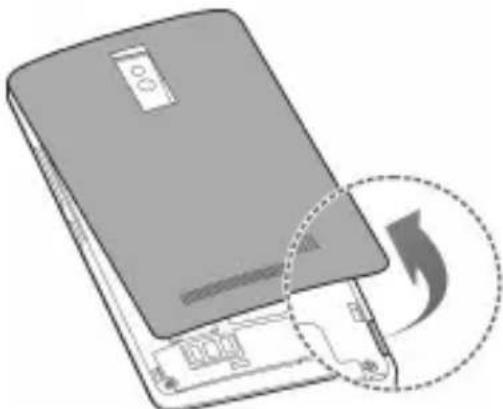
- Insert your fingernail into the slot at the right of the back cover and lift it up gently.
natural_image
Illustration of a gray electronic device with a circular arrow symbol indicating data transfer or update (no text or symbols present)- Hold the micro-SIM card with the cut corner oriented as shown and slip it into the card holder.

natural_image
Diagram of a smartphone showing internal circuitry and a highlighted component (no text or symbols)- Align the back cover with the back of the phone and press the cover back into place. Ensure that all the tabs are secure and there are no gaps around the cover.
Installing the microSDHC™ Card (Not Included)
A microSDHC card can be installed or removed while the phone is turned on. You need to unmount the microSDHC card before removing it.
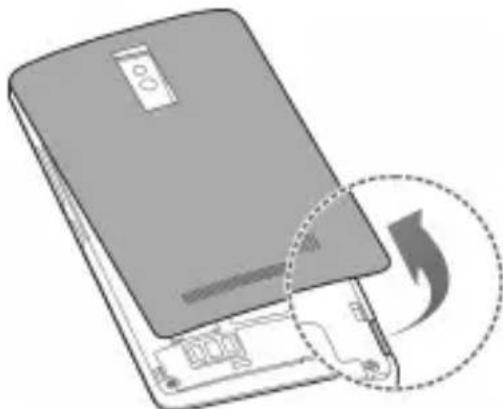
- Remove the back cover.
natural_image
Illustration of a smartphone with a circular arrow indicating download or refresh (no text or symbols)- Hold your microSDHC card with the metal contacts facing down and slide it in.

natural_image
Diagram of a smartphone interior layout with a highlighted device component (no text or symbols)
NOTE:
Some applications may require a microSDHC card to work normally or may store certain data on it. Therefore, it is recommended that you keep a microSDHC card installed and not remove or replace it randomly.
- Replace the back cover.
Charging the Battery
Your phone's battery should have enough power for the phone to turn on, find a signal, and make a few calls. You should fully charge the battery as soon as possible.

WARNING!
Use only ZTE-approved chargers and cables. The use of unapproved accessories could damage your phone or cause the battery to explode.

CAUTION:
Do not remove or change the built-in rechargeable battery in your phone by yourself. The battery can only be changed by ZTE or ZTE authorised service provider.
- Connect the adapter to the charging jack. Ensure that the adapter is inserted in the correct direction.

natural_image
Line drawing of a rectangular electronic device with a USB cable inserted, showing an arrow pointing to its internal structure (no text or symbols present)- Connect the charger to a standard AC power outlet.
- Disconnect the charger when the battery is fully charged.

NOTE:
If the battery is extremely low, you may be unable to power on the phone even when it is being charged. In this case, try again after charging the phone for at least 20 minutes.
Contact the customer service if you still cannot power on the phone after prolonged charging.
Powering On/Off Your Phone
Ensure that the battery is charged.
- Press and hold the Power Key to turn on your phone.
• To turn it off, press and hold the Power Key to open the options menu. Touch Power off and then touch OK.
Restarting Your Phone
If the screen freezes or takes too long to respond, try pressing and holding the Power Key for about 10 seconds to restart the phone.
Waking Up Your Phone
Your phone automatically goes into sleep mode when it is not in use for some time. The display is turned off to save power and the keys are locked to prevent accidental operations.
You can wake up your phone by turning on the display and unlocking the keys.
-
Press the Power Key to turn the screen on.
-
Touch and hold on the screen.

NOTE:
If you have set an unlock pattern, a PIN or a password for your phone, you'll need to draw the pattern, or enter the PIN/password to unlock your phone.
Using the Touch Screen
Your phone's touch screen enables you to control actions through a variety of touch gestures.
- Touch
When you want to type using the onscreen keyboard, select items on the screen such as the application and settings icons, or press the onscreen buttons, simply touch them with your finger.

natural_image
Illustration of a hand with a finger pointing at the button (no text or symbols)- Touch and Hold
To open the available options for an item (for example, a message or link in a web page), touch and hold the item.
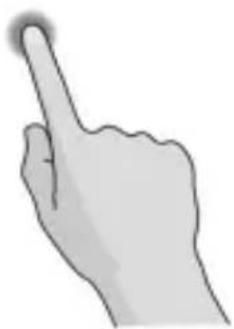
natural_image
Illustration of a hand with a finger pointing upward (no text or symbols)- Swipe or Slide
To swipe or slide means to quickly drag your finger vertically or horizontally across the screen.

natural_image
Illustration of a hand with index finger and curved arrow indicating rotation (no text or symbols)- Drag
To drag, press and hold your finger with some pressure before you start to move your finger. While dragging, do not release your finger until you have reached the target position.

natural_image
Illustration of two hands interacting with a device, one pointing upward and the other holding a square (no text or symbols)- Pinch
In some apps (such as Maps, Browser, and Gallery), you can zoom in and out by placing two fingers on the screen at once and pinching them together (to zoom out) or spreading them apart (to zoom in).

natural_image
Illustration of two hand gestures with arrows indicating motion (no text or symbols)- Rotate the screen
For most screens, you can automatically change the screen orientation from portrait to landscape by turning the phone sideways.
Product Safety Information
 | Don't make or receive phone calls while driving. Never text while driving. |
 | For body-worn operations, maintain a separation of 15 mm. |
 | Small parts may cause choking. |
 | Your phone can produce a loud sound. |
 | To prevent possible hearing damage, do not listen at high volume levels for long periods. |
 | Avoid contact with anything magnetic. |
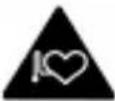 | Keep away from pacemakers and other electronic medical devices. |
 | Turn off when asked to in hospitals and medical facilities. |
 | Turn off when told to on aircraft and at airport. |
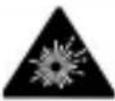 | Turn off when near explosive materials or liquids. |
 | Don't use at gas stations. |
 | Your phone may produce a bright or flashing light. |
 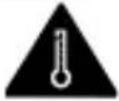 | Don't dispose of your phone in fire.Avoid extreme temperatures. |
 | Avoid contact with liquids. Keep your phone dry. |
 | Do not attempt to disassemble your phone. |
 | Only use approved accessories. |
 | Don’t rely on your phone as a primary device for emergency communications. |
Declaration of RoHS Compliance
To minimize the environmental impacts and take more responsibilities to the earth we live on, this document shall serve as a formal declaration that the ZTE Blade V220 manufactured by ZTE CORPORATION is in compliance with the Directive 2011/65/EU of the European Parliament - RoHS (Restriction of Hazardous Substances) with respect to the following substances:
- Lead (Pb)
- Mercury (Hg)
- Cadmium (Cd)
- Hexavalent Chromium (Cr (VI))
- Polybrominated biphenyls (PBBs)
- Polybrominated diphenyl ethers (PBDEs)
The ZTE Blade V220 manufactured by ZTE CORPORATION, meets the requirements of EU 2011/65/EU.
SAR
Your mobile device is a radio transmitter and receiver. It is designed not to exceed the limits for exposure to radio waves recommended by international guidelines. These guidelines were developed by the independent scientific organization ICNIRP and include safety margins designed to assure the protection of all persons, regardless of age and health.
The guidelines use a unit of measurement known as Specific Absorption Rate, or SAR.
The SAR limit for mobile devices is 2 W/kg and the highest SAR value for this device when tested at the head was 0.436 W/kg*, and when tested at the body was 1.57 W/kg*. As mobile devices offer a range of functions, they can be used in other positions, such as on the body as described in this user guide**.
As SAR is measured utilizing the device's highest transmitting power, the actual SAR of this device while operating is typically below that indicated above. This is due to automatic changes to the power level of the device to ensure it only uses the minimum power required to communicate with the network.
* The tests are carried out in accordance with EN 50360, EN 50566, EN 62209-1, EN 62209-2.
** Please see body worn operation.
Disposal of Your Old Appliance
 | 1. When this crossed-out wheeled bin symbol is attached to a product, it means the product is covered by the European Directive 2012/19/EU.2. All electrical and electronic products should be disposed of separately from the municipal waste stream via designated collection facilities appointed by the government or the local authorities.3. The correct disposal of your old appliance will help prevent potential negative consequences for the environment and human health. |
For this product's recycling information based on WEEE directive, please send an e-mail to weee@zte.com.cn
EC DECLARATION OF CONFORMITY
C € 0700
It is hereby declared that following designated product:
Produc Type: LTE/WCDMA/GSM(GPRS)
Digital Mobile phone
Model No: ZTE Blade V220 / Avea in Touch 4
Complies with the essential protection requirements of Directives on Radio and Telecommunication Terminal Equipment (Directive 1999/5/EC), Restriction of the Certain Hazardous Substances in electrical and electronic equipment (Directive 2011/65/EU), Eco-design Requirements for Energy-Related Products (Directive 2009/125/EC) and their amendments.
This declaration applies to all specimens manufactured identical to the samples submitted for testing/evaluation.
Assessment of compliance of the product with the requirements relating to Directive 1999/5/EC was performed by PHOENIX TESTLAB GmbH (Notified Body No.0700) and assessment of compliance of the product with the requirements relating to Directive 2011/65/EU was performed by Intertek Testing Services Ltd., Shanghai Lab, Directive 2009/125/EC
was performed by ZTE Corporation Reliability Testing Centre. The assessments were based on the following regulations and standards:
| Requirement | Standard |
| Health and safety | EN 62209-1:2006EN 62209-2:2010EN 50360:2001/A1:2012EN 50566:2013EN 62479:2010 |
| EN 60950-1:2006+A11:2009+A1:2010+A12:2011EN 50332-1-2000;EN 50332-2-2003EN 62471:2008 | |
| EMC | EN 301 489-1 V1.9.2:2011EN 301 489-7 V1.3.1: 2005EN 301 489-3 V1.6.1:2012EN 301489-17 V V2.2.1 :2012EN 301 489-24V1.5.1:2010 |
| Radio Spectrum | EN 301 511 V9.0.2EN 301 908-1/-2/-13 V6.2.1EN 300328 V1.8.1EN 300 440-1 V1.6.1; EN 300 440-2 V1.4.1; |
| RoHS IEC 62321:2013 | |
| ErP EN 62301:2006 | |
This declaration is the responsibility of the manufacturer:
ZTE Corporation
ZTE Plaza, Keji Road South, Hi-Tech, Industrial Park, Nanshan District, Shenzhen, Guangdong, 518057, P.R.China
Authorised person signing for the company:
XU Feng Quality Director Of ZTE Corporation
Name in block letters & position in the company
Shenzhen, 24 October 2014
徐峰
Place & date Legally valid signature
| This equipment may be operated in: | AT BE | ||||
| CY CZ DK EE FI FR | |||||
| DE GR HU IE IT LV | |||||
| LT LU MT NL PL PT | |||||
| SK SI ES SE GB IS | |||||
| LI NO CH BG RO TR | |||||
ZTE Blade V220
Copyright © 2015 ZTE CORPORATION.
natural_image
Illustration of a closed electronic device with a circular arrow symbol indicating download or refresh (no text or symbols present)natural_image
Diagram of a smartphone interior layout with a highlighted circular component (no text or symbols)natural_image
Illustration of a closed electronic device with a circular arrow symbol indicating download or refresh (no text or symbols present)natural_image
Diagram of a smartphone front panel with an inset showing a device and a close-up view (no text or symbols)
REMARQUE :
natural_image
Line drawing of a rectangular electronic device with an attached USB cable, showing no text or symbols.natural_image
Illustration of a hand with a finger pressing a circular button (no text or symbols)natural_image
Illustration of a hand pointing upward with a glowing highlight (no text or symbols)natural_image
Illustration of a hand with fingers extended, showing motion direction (no text or symbols)natural_image
Illustration of a hand interacting with a touchscreen device (no text or symbols visible)- Pincer
natural_image
Illustration of two hands demonstrating finger movement with arrows indicating direction (no text or symbols)ZTE Plaza, Keji Road South, Hi-Tech, Industrial Park, Nanshan District, Shenzhen, Guangdong, 518057, République Populaire de Chine
Copyright © 2015 ZTE CORPORATION.
natural_image
Illustration of a device with a circular arrow indicating rotation or refresh (no text or symbols present)natural_image
Diagram of a smartphone showing internal circuitry and a highlighted device with an arrow (no text or symbols present)natural_image
Illustration of a device with a circular arrow indicating download or refresh (no text or symbols present)natural_image
Diagram of a smartphone interior layout with a highlighted device component (no text or symbols)
HINWEIS:
natural_image
Line drawing of a rectangular electronic device with a USB cable inserted, showing no text or symbols.natural_image
Illustration of a hand with a finger pressing a circular button (no text or symbols)natural_image
Illustration of a hand pointing upward with a glowing highlight (no text or symbols)natural_image
Illustration of a hand with index finger extended, showing fingers slightly curled (no text or symbols)- Ziehen
natural_image
Illustration of a hand pointing at a square interface with an arrow indicating rotation (no text or symbols present)natural_image
Illustration of two hand gestures with arrows indicating motion (no text or symbols)natural_image
Symbol of a trash bin crossed with no visible text or labelsZTE Plaza, Keji Road South, Hi-Tech, Industrial Park, Nanshan District, Shenzhen, Guangdong, 518057, P.R.China
XU Feng Quality Director der ZTE Corporation
Telif Hakki © 2015 ZTE CORPORATION.
microSDHC Logosu, SD-3C, LLC
natural_image
Illustration of a smartphone with a circular arrow symbol indicating download or refresh (no text or symbols present)natural_image
Diagram of a smartphone showing internal circuitry and a highlighted device (no text or symbols present)natural_image
Illustration of a device with a circular arrow indicating download or refresh (no text or symbols present)natural_image
Diagram of a smartphone interior layout with a highlighted device component (no text or symbols)
NOT:
natural_image
Line drawing of a smartphone with an attached USB cable, showing no text or symbolsnatural_image
Illustration of a hand with a finger pressing a circular button (no text or symbols)natural_image
Illustration of a hand with index finger pointing upward (no text or symbols)- Kaydırma
natural_image
Illustration of a human hand with index finger pointing upward (no text or symbols)- Sürükleme
natural_image
Illustration of two hands pointing at a device with an arrow indicating motion (no text or symbols)natural_image
Illustration of two hand gestures with arrows indicating motion (no text or symbols)- Ekranı döndürme
natural_image
Symbol of a trash bin crossed with no text or numbers, representing environmental restriction (no text present)Model No: ZTE Blade V220 / Avea in Touch 4
ZTE Plaza, Keji Road South, Hi-Tech,
Industrial Park, Nanshan District,
Shenzhen, Guangdong, 518057, Çin Halk
Cumhuriyeti
ZTE Blade V220 Snelstartgids
Copyright © 2015 ZTE CORPORATION.
natural_image
Illustration of a closed electronic device with a circular arrow symbol indicating download or refresh (no text or symbols present)natural_image
Diagram of a smartphone showing internal circuitry and a highlighted device (no text or symbols present)natural_image
Illustration of a device with a magnified inset showing a circular arrow symbol (no text or labels)natural_image
Diagram of a smartphone interior layout with a highlighted device component (no text or symbols)
OPMERKING:
natural_image
Line drawing of a rectangular electronic device with a USB cable inserted, showing an arrow pointing to its internal structure (no text or symbols present)natural_image
Illustration of a hand with a finger pressing a circular button (no text or symbols)- Lang aanraken
natural_image
Illustration of a hand pointing upward with a glowing highlight (no text or symbols)• Vegen of schuiven
natural_image
Illustration of a hand with index finger extended, showing the palm and fingers (no text or symbols)- Slepen
natural_image
Illustration of two hands interacting with a digital interface (no text or symbols)- Knijpen
natural_image
Illustration of two hand gestures with arrows indicating motion (no text or symbols)natural_image
Symbol of a trash bin crossed with a diagonal line, no text or numbers presentModel: ZTE Blade V220 / Avea in Touch 4
ZTE Plaza, Keji Road South, Hi-Tech, Industrial Park, Nanshan District, Shenzhen, Guangdong, 518057, China
XU Feng Quality Director van ZTE Corporation
Copyright © 2015 ZTE CORPORATION.
Med ensamrätt.
natural_image
Illustration of a closed electronic device with a circular arrow symbol indicating download or refresh (no text or symbols present)natural_image
Diagram of a smartphone showing internal circuitry and a highlighted component (no text or symbols)natural_image
Illustration of a closed electronic device with a circular arrow indicating compression or disassembly (no text or symbols present)natural_image
Diagram of a smartphone interior layout with a highlighted device component (no text or symbols)
Obs!
natural_image
Line drawing of a smartphone with an attached USB cable, showing no text or symbolsnatural_image
Illustration of a hand with a finger pressing a circular button (no text or symbols)natural_image
Illustration of a hand with a finger pointing upward (no text or symbols)- Svepa
natural_image
Illustration of a human hand with index finger extended, showing motion direction (no text or symbols)- Dra
natural_image
Illustration of a hand pointing at a rectangular object with an arrow indicating motion (no text or symbols)- Nypa
natural_image
Illustration of two hand gestures with arrows indicating motion (no text or symbols)- Rotera skärmen
Modellnr: ZTE Blade V220 / Avea in Touch 4
ZTE Plaza, Keji Road South, Hi-Tech, Industrial Park, Nanshan District, Shenzhen, Guangdong, 518057, Kina
natural_image
Illustration of a closed electronic device with a circular arrow symbol indicating download or refresh (no text or symbols present)natural_image
Diagram of a smartphone showing internal circuitry and a highlighted device (no text or symbols present)natural_image
Illustration of a gray rectangular device with a circular arrow indicating download or transfer (no text or symbols)natural_image
Diagram of a smartphone interior layout with a highlighted rectangular component (no text or symbols)
ΣΗΜΕΙΩΣΗ:
natural_image
Line drawing of a smartphone with an attached USB cable, showing no text or symbolsnatural_image
Illustration of a hand with a finger pointing at the button (no text or symbols)natural_image
Illustration of a hand with index finger pointing upward (no text or symbols)natural_image
Illustration of a human hand with index finger extended, showing fingers slightly curled (no text or symbols)• Σύρσιμο
natural_image
Illustration of a hand pointing at a digital interface with an arrow (no text or symbols)• Τσίμπημα
natural_image
Illustration of two hand gestures with arrows indicating motion (no text or symbols)• Περιστροφή Οθόνης
natural_image
Symbol of a trash bin crossed with no text or numbers, representing environmental restriction (no text present)Copyright © 2015 ZTE CORPORATION.
natural_image
Illustration of a computer monitor with a circular arrow symbol indicating download or refresh (no text or symbols present)natural_image
Diagram of a smartphone showing internal circuitry and a highlighted device (no text or symbols present)natural_image
Illustration of a device with a circular arrow indicating download or refresh (no text or symbols present)natural_image
Diagram of a smartphone interior layout with a highlighted internal component (no text or symbols)
NOTA:
natural_image
Line drawing of a smartphone with an attached USB cable, showing no text or symbolsnatural_image
Illustration of a hand with a finger pressing a circular button (no text or symbols)- Tenere premuto
natural_image
Illustration of a hand with a finger pointing upward (no text or symbols)natural_image
Illustration of a hand with fingers extended, showing motion direction (no text or symbols)natural_image
Illustration of two hands interacting with a device, one pointing at the screen (no text or symbols present)natural_image
Illustration of two hand gestures with arrows indicating motion (no text or symbols)- Ruotare lo schermo
natural_image
Symbol of a trash bin crossed with no text or numbers, representing waste sorting or disposal (no text present)ZTE Plaza, Keji Road South, Hi-Tech, Industrial Park, Nanshan District, Shenzhen, Guangdong, 518057, R.P.Cinese
Copyright © 2015 ZTE CORPORATION.
natural_image
Illustration of a gray electronic device with a circular arrow symbol indicating download or refresh (no text or symbols present)natural_image
Diagram of a smartphone showing internal circuitry and a highlighted device (no text or symbols present)natural_image
Illustration of a device with a circular arrow indicating download or refresh (no text or symbols present)natural_image
Diagram of a smartphone interior layout with a highlighted device component (no text or symbols)
NOTA:
natural_image
Line drawing of a rectangular electronic device with an attached USB cable, showing no text or symbols.natural_image
Illustration of a hand with a finger pressing a circular button (no text or symbols)- Pulsación larga
natural_image
Illustration of a hand pointing upward with a glowing highlight (no text or symbols)- Deslizamientos
natural_image
Illustration of a hand with fingers extended, showing motion direction (no text or symbols)- Arrastre
natural_image
Illustration of two hands interacting with a finger, one pointing upward (no text or symbols)- Pellizco
natural_image
Illustration of two hand gestures with motion arrows indicating movement (no text or symbols)natural_image
Symbol of a trash bin crossed with diagonal lines, no text or numbers presentZTE Plaza, Keji Road South, Hi-Tech, Industrial Park, Nanshan District, Shenzhen, Guangdong, 518057, R. P. China
Copyright © 2015 ZTE CORPORATION.
natural_image
Illustration of a device with a circular arrow indicating compression or disassembly (no text or symbols present)natural_image
Diagram of a smartphone showing internal circuitry and a highlighted device (no text or symbols present)natural_image
Illustration of a gray rectangular device with a circular arrow symbol indicating download or transfer (no text or symbols present)natural_image
Diagram of a smartphone interior layout with a highlighted device component (no text or symbols)
NOTA:
natural_image
Line drawing of a rectangular electronic device with an attached USB cable, showing no text or symbols.natural_image
Illustration of a hand with a finger pressing a circular button (no text or symbols)- Tocar e manter
natural_image
Illustration of a hand with a finger pointing upward (no text or symbols)natural_image
Illustration of a human hand with fingers extended, showing motion direction (no text or symbols)- Arrastar
natural_image
Illustration of a hand pointing at a square with an arrow indicating motion (no text or symbols)- Beliscar e esticar
natural_image
Illustration of two hand gestures with arrows indicating motion (no text or symbols)- Rodar o ecrã
natural_image
Symbol of a trash bin crossed with no text or numbers, representing environmental protection (no text present)ZTE Plaza, Keji Road South, Hi-Tech, Industrial Park, Nanshan District, Shenzhen, Guangdong, 518057, P.R.China
Representante autorizado da empresa:
- All rights reserved.
- Notice
- Disclaimer
- Trademarks
- Qualcomm snapdragon
- NOTE:
- Installing the micro-SIM Card
- WARNING!
- Installing the microSDHC™ Card (Not Included)
- Charging the Battery
- CAUTION:
- Powering On/Off Your Phone
- Restarting Your Phone
- Waking Up Your Phone
- Using the Touch Screen
- Product Safety Information
- Declaration of RoHS Compliance
- SAR
- Disposal of Your Old Appliance
- EC DECLARATION OF CONFORMITY
- C € 0700
- ZTE Blade V220
- REMARQUE :
- Copyright © 2015 ZTE CORPORATION.
- HINWEIS:
- NOT:
- ZTE Blade V220 Snelstartgids
- OPMERKING:
- Med ensamrätt.
- Obs!
- ΣΗΜΕΙΩΣΗ:
- NOTA:
Brand : ZTE
Model : Blade V220
Category : Smartphone