
HR2390 - Kitchen scale PHILIPS - Free user manual and instructions
Find the device manual for free HR2390 PHILIPS in PDF.


| Product type | Digital kitchen scale |
| Brand | Philips |
| Model | HR2390 |
| Dimensions (approx) | 20 x 15 x 2 cm |
| Weight (approx) | 300 g |
| Power supply | 2 x AAA batteries (not included) |
| Display | LCD, digital |
| Maximum capacity | 5 kg |
| Division / accuracy | 1 g |
| Units | g, kg, lb, oz, ml, fl.oz |
| Tare function | Yes |
| Auto-off | Yes, after 2 minutes of inactivity |
| Overload indication | Yes |
| Low battery indication | Yes |
| Platform material | Glass or plastic (assumed) |
| Cleaning | Wipe with a damp cloth; do not immerse in water |
| Safety | Do not use near water; keep dry |
| Spare parts | Battery compartment cover (if lost) |
| Repairability | Scale is not user-serviceable; contact Philips support |
| Included accessories | User manual |
| Warranty | 2 years (varies by region) |
Frequently Asked Questions - HR2390 PHILIPS
User questions about HR2390 PHILIPS
0 question about this device. Answer the ones you know or ask your own.
Ask a new question about this device
Download the instructions for your Kitchen scale in PDF format for free! Find your manual HR2390 - PHILIPS and take your electronic device back in hand. On this page are published all the documents necessary for the use of your device. HR2390 by PHILIPS.
USER MANUAL HR2390 PHILIPS
natural_image
Black-and-white photo of a bowl filled with cooked fish, placed on a digital scale with a reading of 256 (no text or symbols on the food or background)PHILIPS

ENGLISH 4
POLSKI 10
ROMÂNĂ 16
РУССКИЙ 22
ČESKY 29
MAGYAR 36
SLOVENSKY 42
УКРАЇНСЬКІЙ 48
HRVATSKI 55
EESTI 61
LATVISKI 67
LIETUVIŠKAI 73
SLOVENŠČINA 79
БЪЛГАРСКИ 85
SRPSKI 92
Important
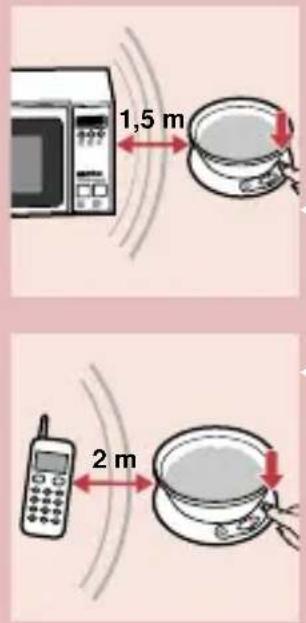
- Please read the instructions and look at the illustrations before you use the appliance.
- When the scales are not being used, make sure there is nothing on the weighing plate except for the upturned bowl belonging to the appliance.
- Do not allow water (or any other liquid) to enter the base of the scales.
- Always place the appliance on a solid, smooth and horizontal surface when you use it.
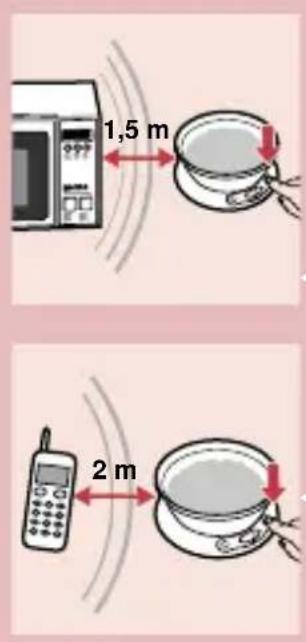
- A microwave oven or a mobile phone may cause interference, which can lead to unreliable weighing results.
- Use the kitchen scales at a safe distance of at least 1.5 metres from a working microwave oven, or switch the microwave oven off.
- A mobile phone that is switched on must be kept at a safe distance of at least 2 metres from the scales, or it must be switched off.
Battery
The scales work on a 9-volt battery (not included). We advise you to use a Philips 6LR 6I Alkaline battery on account of its long life and environmental friendliness.

natural_image
Illustration of a hand holding a small object with red arrows indicating direction (no text or symbols)

Fitting the battery
I Open the battery compartment.
2 Fit the battery in the battery holder and close the battery compartment.
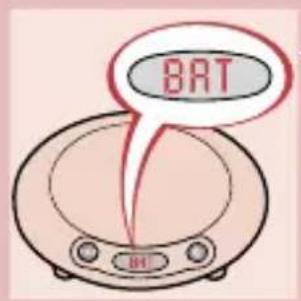
Battery replacement
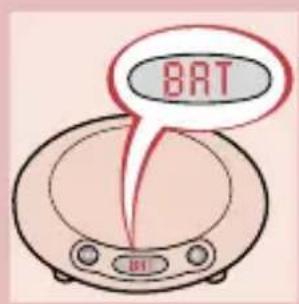
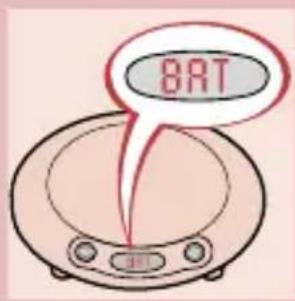
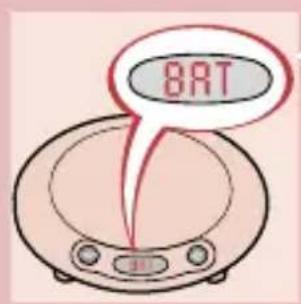
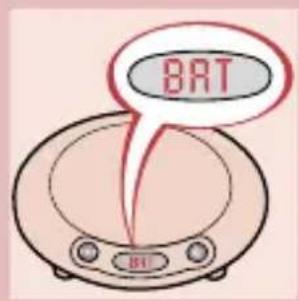
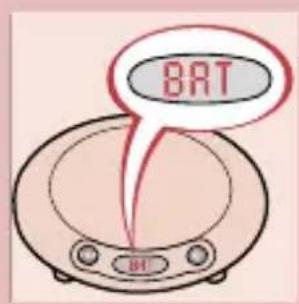
I Replace the battery as soon as the BAT indication appears on the display.
Batteries contain substances which may pollute the environment. Keep the old battery separate from normal household waste and dispose of it at an officially assigned collection point.
Do not use a rechargeable battery in this appliance.
Weighing and using the "Reset" function ▶○◀
The scales indicate weight in graduations of 2 grams (d = 2 g).
natural_image
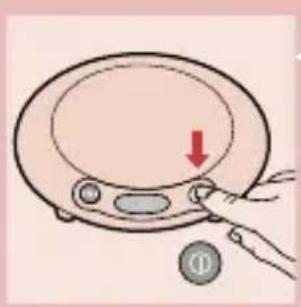
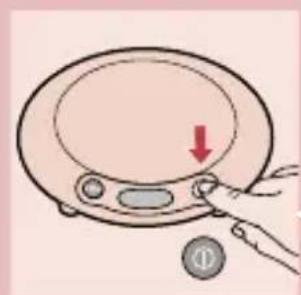
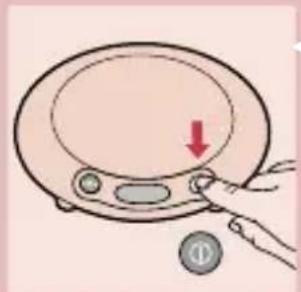
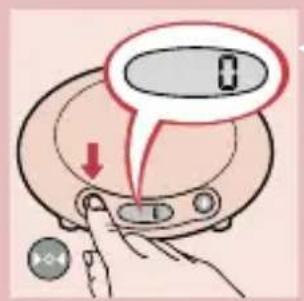
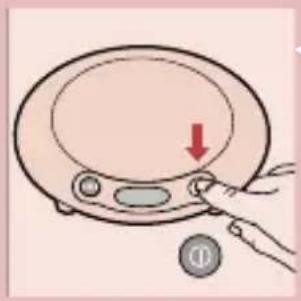
Illustration of a hand pressing down on a digital kitchen appliance with a red arrow indicating the button (no text or symbols)I Press button I to switch the scales on.

2 The display switches on after 3 seconds. Push button ▶○◀ and the display will read 0.
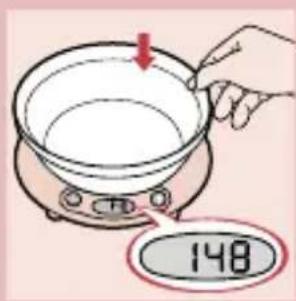
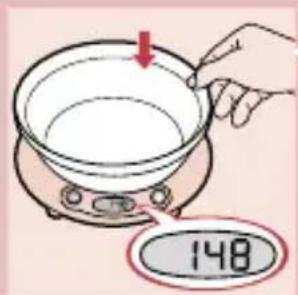
Weighing in the bowl that comes with the scales
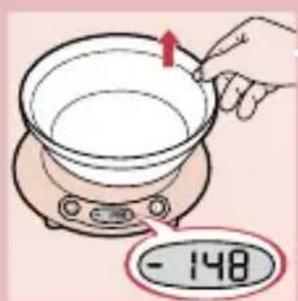
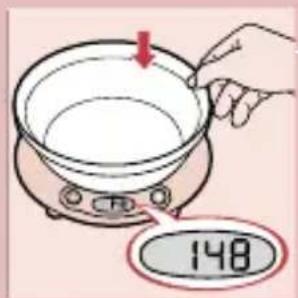
I Put the empty bowl on the weighing plate. The display will show the weight of the bowl.
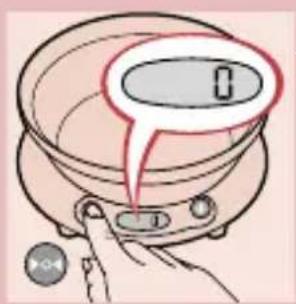
2 Press button ▶○◀. The display will read 0 again.

3 Remove the bowl from the weighing plate. The display will now show the weight of the bowl with a minus sign (-) in front.

- The appliance will now display the weight of each ingredient that is added.

- The appliance will keep on doing so until you set the display back to 0 by pressing button ▶○◀while the weighing plate is empty.

Weighing directly on the weighing plate
I Place the ingredient(s) to be weighed directly on the weighing plate. The weight will be displayed immediately.

Adding ingredients
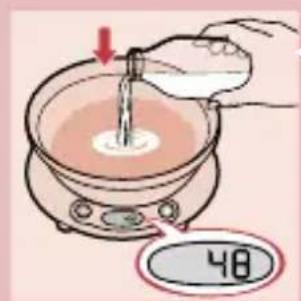
- If you wish to add ingredients (e.g. 48 g) to a known quantity (e.g. 174 g), you can save yourself some calculating by first pressing button ▶○◀before adding a new ingredient. By pressing button ▶○◀you will set the display back to 0 again.
- Subsequently the display will show how much of the new ingredient you have added.
- Please note that the word STOP will become visible on the display if the weighing plate has been overloaded (more than 3 kilograms).


natural_image
Illustration of a hand pressing down on a digital kitchen scale with a red arrow indicating the process (no text or symbols)
natural_image
Illustration of a kitchen appliance with a magnified view showing a scale and a separate oval object (no text or symbols)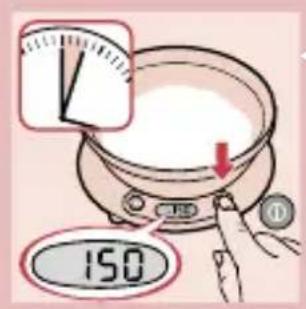
Switching off
I Press button I to switch the scales off.
- If the appliance has not been used for more than 3 minutes, it will switch off automatically to save battery power.
Full memory backup
- This appliance has 'full memory backup': if the appliance has not been used for more than 3 minutes, it will switch off automatically. If you have left the ingredient(s) you have just weighed on the weighing plate, the previously shown weight will be displayed again when you press button I.
Cleaning
You can clean the appliance with a damp cloth and, if necessary, some detergent. Clean the bowl in warm soapy water.
- Do not use abrasives, scourers, alcohol, etc. Never immerse the scales in water or rinse them under the tap!

natural_image
Illustration of a hand washing a sink with a red X symbol (no text or symbols present)Storage
natural_image
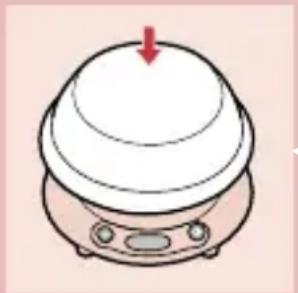
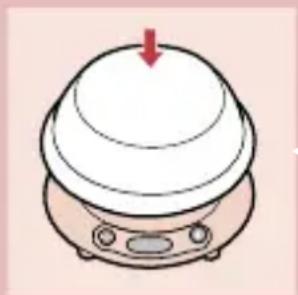
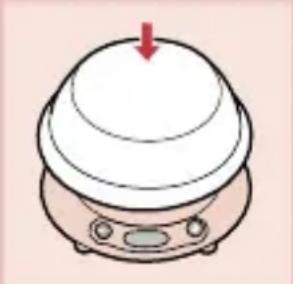
Simple line drawing of a dome-shaped appliance with a red arrow pointing downward (no text or symbols)When you store the appliance, make sure there is nothing on the weighing plate except the upturned bowl.
- To store the scales, turn the bowl upside down and place it on the weighing plate. The bowl functions as a dust cover.
Environment
If you discard the appliance in due course, dispose of it in accordance with the instructions given by your local authority.
Remove the batteries when you discard the appliance. Do not throw the batteries away with the normal household waste, but hand them in at an official collection point. You can also take the batteries to a Philips Service Centre, which will dispose of them in an environmentally safe way.
Information and service
If you need information or if you have a problem, please visit the Philips Web site at www.philips.com or contact the Philips Customer Care Centre in your country (you will find its phone number in the worldwide guarantee leaflet). If there is no Customer Care Centre in your country, turn to your local Philips dealer or contact the Service Department of Philips Domestic Appliances and Personal Care BV.
Ważne
natural_image
Illustration of a hand holding a computer mouse with red arrows indicating motion (no text or symbols)

natural_image
Illustration of a hand pressing down on a digital kitchen appliance with a red arrow indicating the button (no text or symbols)
natural_image
Illustration of a hand pressing down on a digital kitchen scale with a red arrow indicating the downward motion (no text or symbols)
natural_image
Illustration of a kitchen appliance with a magnified view showing its interior (no text or symbols)
Wyłączanie
natural_image
Illustration of a hand washing a sink with a red X mark (no text or symbols)Przechowywanie
natural_image
Simple line drawing of a dome-shaped object with a red arrow pointing downward (no text or symbols)natural_image
Illustration of a hand holding a computer mouse with red arrows indicating motion (no text or symbols)

natural_image
Illustration of a hand pressing down on a digital kitchen scale with a red arrow indicating the downward motion (no text or symbols)
natural_image
Illustration of a hand pressing down on a digital kitchen scale with a red arrow indicating the process (no text or symbols)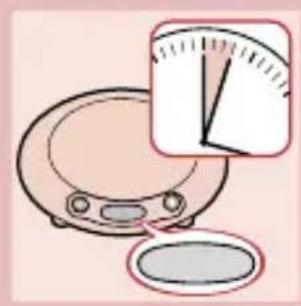
natural_image
Illustration of a kitchen appliance with a magnified view showing a scale and a separate oval object (no text or symbols)
Oprire
natural_image
Illustration of a hand washing a sink with a red X symbol (no text or symbols present)Depozitare

natural_image
Simple line drawing of a kitchen appliance with a lid and control panel (no text or symbols)natural_image
Illustration of a hand holding a small object with red arrows indicating direction (no text or symbols)

Установка батареи
natural_image
Illustration of a hand pressing down on a digital kitchen appliance with a red arrow indicating the button (no text or symbols)

natural_image
Illustration of a hand pressing down on a circular device with a red arrow indicating downward motion (no text or symbols)
natural_image
Illustration of a kitchen appliance with a magnified view showing its interior scale (no text or symbols)
natural_image
Illustration of a hand washing a sink with a red X mark (no text or symbols)natural_image
Illustration of a kitchen appliance with a red arrow pointing to the lid (no text or symbols)natural_image
Illustration of a hand holding a computer mouse with red arrows indicating motion (no text or symbols)
Vložení baterie
I Otevřte prostor pro baterii.
natural_image
Illustration of a hand pressing down on a circular device with a red arrow indicating downward motion (no text or symbols)natural_image
Illustration of a hand pressing down on a digital kitchen appliance with a red arrow indicating the button (no text or symbols)Vypnutí váhy
natural_image
Illustration of a kitchen appliance with a magnified view showing a pie chart (no text or symbols)natural_image
Illustration of a hand washing a sink with a red X mark indicating no resistance or prohibition (no text or symbols present)natural_image
Simple line drawing of a dome-shaped object with a red arrow pointing downward (no text or symbols)natural_image
Illustration of a hand holding a computer mouse with red arrows indicating motion (no text or symbols)
Az elem behelyezése
natural_image
Illustration of a hand pressing down on a circular device with a red arrow indicating downward motion (no text or symbols)2 Nyomja meg a ▶○◀gombot.A kijelző ismét 0-t mutat.


natural_image
Illustration of a hand pressing down on a digital kitchen scale with a red arrow indicating the downward motion (no text or symbols)
natural_image
Illustration of a kitchen appliance with a magnified view showing a scale and a separate oval object (no text or symbols)
Kikapcsolás
Tárolás
natural_image
Simple line drawing of a dome-shaped object with a red arrow pointing downward (no text or symbols)natural_image
Illustration of a hand holding a computer mouse with red arrows indicating motion (no text or symbols)
Umiestnenie batérie
I Otvorte oddelenie pre batériu.
2 Pripojte batériu ku konektoru, vložte ju a uzatvorte oddelenie pre batériu.
Výmena batérie
natural_image
Illustration of a hand pressing down on a digital kitchen appliance with a red arrow indicating the button (no text or symbols)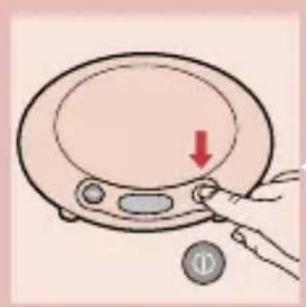
natural_image
Illustration of a hand pressing down on a circular device with a red arrow indicating downward motion (no text or symbols)
natural_image
Illustration of a small electronic device with a magnified view showing internal components (no text or symbols)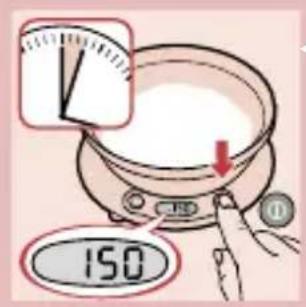
Vypnutie
Uloženie

natural_image
Simple line drawing of a dome-shaped appliance with a red arrow pointing to the top surface (no text or symbols)natural_image
Illustration of a hand holding a small object with red arrows indicating direction (no text or symbols)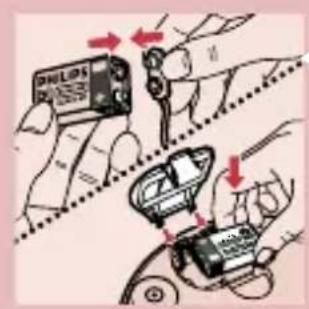

natural_image
Illustration of a hand pressing down on a digital kitchen appliance with a red arrow indicating the button (no text or symbols)natural_image
Illustration of a hand pressing down on a digital kitchen appliance with a red arrow indicating the downward motion (no text or symbols)natural_image
Illustration of a kitchen appliance with a magnified view showing a scale and a separate oval object (no text or symbols)natural_image
Illustration of a hand washing a sink with a red X symbol (no text or symbols present)natural_image
Simple line drawing of a dome-shaped object with a red arrow pointing downward (no text or symbols)natural_image
Illustration of a hand holding a computer mouse with red arrows indicating motion (no text or symbols)Stavljanje baterije
I Otvorite baterijski pretinac.

2 Stavite bateriju u pretinac i zatvorite ga.
Zamjena baterije
Zamijenite bateriju čim se na pokazivaču pojavi indikator BATT.
Baterije sadrže supstance štetne za okoliš. Staru bateriju odvojite od kućnog otpada i odnesite je na za to namijenjeno odlagalište.
natural_image
Illustration of a hand pressing down on a digital kitchen scale with a red arrow indicating the downward motion (no text or symbols)Vage pokazuju težinu u jedinicama od 2 grama (d = 2 g).
2 Pokazivač se uključuje nakon 3 sekunde. Pritisnite tipku ▶○◀i na pokazivaču se pojavi 0.
Vaganje u posudi isporučenoj uz vage
natural_image
Illustration of a hand pressing down on a circular device with a red arrow indicating downward motion (no text or symbols)Isključenje
natural_image
Illustration of a kitchen appliance with a magnified view showing its interior scale (no text or symbols)- Ako ne koristitie vagu dulje od 3 minute, ona se automatski isključi radi štednje baterije.

Memorija
- Ovaj aparat ima memoriju: ako se ne koristi dulje od 3 minute, automatski se isključuje. Ako ste upravo izvagane sastojke ostavili na ploči, nakon pritiska na tipku I se na pokazivaču pojavi prethodno prikazana težina.
Čišćenje
Aparat možete očistiti vlažnom krpom i, ako je potrebno, s malo detergenta. Operite posudu u toploj vodi s detergentom.

- Nemojte koristiti abrazive, žičane spužve, alkohol, itd. Nikada ne uranjajte vage u vodu i ne ispirite ih pod slavinom!
Pohranjivanje
natural_image
Simple line drawing of a kitchen appliance with a lid and side-mounted control panel (no text or symbols)Prije pohranjivanja na ploču za vaganje nemojte stavljati ništa osim posude okrenute naopako.
- Vage pohranite tako da ih prekrijete posudom okrenutom naopako. Posuda služi kao zaštita od prašine.
Zaštita okoliša
Stari aparat odbacite u skladu s važećim propisima.
natural_image
Illustration of a hand holding a computer mouse with red arrows indicating motion (no text or symbols)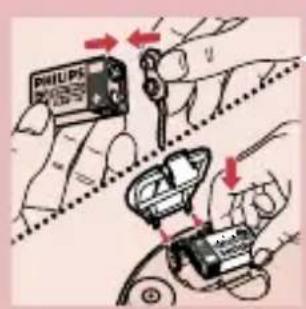
2 Pange akud akupesssa ja sulgege see.

Akude vahetamine
natural_image
Illustration of a hand pressing down on a digital kitchen scale with a red arrow indicating the downward motion (no text or symbols)I Vajutage nuppu I, et kaalu sisse lülitada.
Välja lülitamine
natural_image
Illustration of a hand pressing down on a circular device with a red arrow indicating downward motion (no text or symbols)
natural_image
Illustration of a kitchen appliance with a magnified view showing its interior space (no text or symbols)natural_image
Simple line drawing of a dome-shaped object with a red arrow pointing downward (no text or symbols)natural_image
Illustration of a hand holding a computer mouse with red arrows indicating motion (no text or symbols)
natural_image
Illustration of a hand pressing down on a digital kitchen scale with a red arrow indicating the downward motion (no text or symbols)Izslēgšana
natural_image
Illustration of a hand pressing down on a digital kitchen appliance with a red arrow indicating the downward motion (no text or symbols)
natural_image
Illustration of a kitchen appliance with a magnified view showing its interior (no text or symbols)natural_image
Illustration of a hand washing a sink with a red 'X' symbol crossed out, no text or symbols presentGlabāšana

natural_image
Illustration of a white dome-shaped appliance with a red arrow pointing downward (no text or symbols)natural_image
Illustration of a hand holding a computer mouse with red arrows indicating motion (no text or symbols)

natural_image
Illustration of a hand pressing down on a digital kitchen scale with a red arrow indicating the downward motion (no text or symbols)Baterijos ïdėjimas
I Atidarykite bateriju skyreli.

natural_image
Illustration of a hand pressing down on a circular device with a red arrow indicating downward motion (no text or symbols)Išjungimas
natural_image
Illustration of a kitchen appliance with a magnified inset showing its interior scale (no text or symbols)natural_image
Illustration of a hand washing a sink with a red X mark, no text or symbols presentnatural_image
Simple line drawing of a kitchen appliance with a red arrow pointing to the top surface (no text or symbols)natural_image
Illustration of a hand holding a computer mouse with red arrows indicating motion (no text or symbols)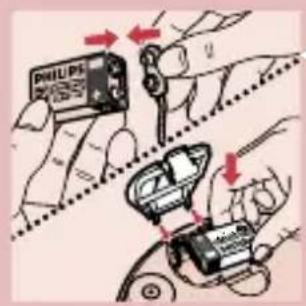

Vstavljanje baterije
natural_image
Illustration of a hand pressing down on a digital kitchen appliance with a red arrow indicating the downward motion (no text or symbols)2 Prikazovalnik se vklopi po treh sekundah. Pritisnite gumb ▶○◀in na prikazovalniku bo pisalo 0.
2 Pritisnite gumb &v5,051;. Prikazovalnik ponovno pokaže 0.

natural_image
Illustration of a hand pressing down on a circular device with a red arrow indicating downward motion (no text or symbols)Izklop
natural_image
Illustration of a kitchen appliance with a magnified inset showing its interior scale (no text or symbols)natural_image
Illustration of a hand washing a sink with a red X mark (no text or symbols)natural_image
Simple line drawing of a kitchen appliance with a lid and control panel (no text or symbols)natural_image
Illustration of a hand holding a computer mouse with red arrows indicating motion (no text or symbols)
natural_image
Illustration of a hand pressing down on a digital kitchen appliance with a red arrow indicating the button (no text or symbols)natural_image
Illustration of a hand pressing a button on a cooking pot with a speech bubble (no text or symbols)natural_image
Illustration of a hand pressing down on a circular device with a red arrow indicating downward motion (no text or symbols)Изключване
natural_image
Illustration of a kitchen appliance with a magnified view of its side panel (no text or symbols)natural_image
Illustration of a hand washing a sink with a red X mark indicating no resistance or leakage (no text or symbols present)natural_image
Simple line drawing of a dome-shaped appliance with a red arrow pointing to the top surface (no text or symbols)natural_image
Illustration of a hand holding a computer mouse with red arrows indicating motion (no text or symbols)

Postavljanje baterije
natural_image
Illustration of a hand pressing down on a digital kitchen appliance with a red arrow indicating the downward motion (no text or symbols)2 Nakon 3 sekunde displej će se uključiti. Pritisnite taster ▶○◀i na displeju će se pojaviti 0.
Merenje u isporučenoj posudi
2 Pritisnite taster ▶○◀. Na displeju će se ponovo pojaviti 0.

3 Uklonite posudu sa ploče za merenje. Displej će pokazati težinu posude sa znakom minus (-) ispred.

- Uredjaj će pokazivati težinu svakog sastojka koji dodajete.

- Uredjaj će nastaviti da pokazuje težinu svakog dodatog sastojka, sve dok na displej ne vratite 0 pritiskom na taster ▶○◀u trenutku kada je ploča za merenje prazna.

Merenje na ploči
natural_image
Illustration of a hand pressing down on a digital kitchen appliance with a red arrow indicating the process (no text or symbols)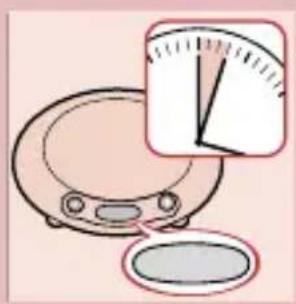
natural_image
Illustration of a kitchen appliance with a magnified inset showing a pie chart (no text or symbols)
Isključivanje
Da biste isključili vagu pritisnite taster I.
- Ukoliko uredjaj niste upotrebili duže od 3 minuta, uredjaj će se sam isključiti kako bi uštedeo punjenje baterije.
Puna memorijska podrška
Odlaganje

natural_image
Simple line drawing of a dome-shaped appliance with a red arrow pointing downward (no text or symbols)Kada odlažete uredjaj, proverite da se na ploči za merenje ne nalazi ništa osim isporučene posude.
- Da biste odložili vagu, okrenite posudu naopako i postavite je na ploču za merenje. Posuda takodje služi kao zaštitni poklopac.
Okolina
Ako vremenom bacite uredjaj, uradite to na način koji je u skladu sa instrukcijama datim od strane lokalnih zvaničnih institucija.



- PHILIPS
- Important
- Battery
- Fitting the battery
- Battery replacement
- Weighing and using the "Reset" function ▶○◀
- Weighing in the bowl that comes with the scales
- Weighing directly on the weighing plate
- Adding ingredients
- Switching off
- Full memory backup
- Cleaning
- Storage
- Environment
- Information and service
- Ważne
- Wyłączanie
- Przechowywanie
- Oprire
- Depozitare
- Установка батареи
- Vložení baterie
- Vypnutí váhy
- Az elem behelyezése
- Kikapcsolás
- Tárolás
- Umiestnenie batérie
- Výmena batérie
- Vypnutie
- Uloženie
- Stavljanje baterije
- Zamjena baterije
- Vaganje u posudi isporučenoj uz vage
- Isključenje
- Memorija
- Čišćenje
- Pohranjivanje
- Zaštita okoliša
- Akude vahetamine
- Välja lülitamine
- Izslēgšana
- Glabāšana
- Baterijos ïdėjimas
- Išjungimas
- Vstavljanje baterije
- Izklop
- Изключване
- Postavljanje baterije
- Merenje u isporučenoj posudi
- Merenje na ploči
- Isključivanje
- Puna memorijska podrška
- Odlaganje
- Okolina
Brand : PHILIPS
Model : HR2390
Category : Kitchen scale