
HR2395 - Kitchen scale PHILIPS - Free user manual and instructions
Find the device manual for free HR2395 PHILIPS in PDF.


| Product type | Kitchen scale |
| Brand | Philips |
| Model | HR2395 |
| Dimensions (approx.) | 20 x 15 x 2 cm |
| Weight (approx.) | 300 g |
| Power supply | 2 AAA batteries (not included) |
| Maximum capacity | 5 kg |
| Accuracy | 1 g |
| Units of measurement | g, kg, lb, oz |
| Tare function | Yes |
| Auto-off function | Yes, after 2 minutes |
| Overload indicator | Yes |
| Low battery indicator | Yes |
| Weighing surface | Tempered glass |
| Cleaning | Soft damp cloth |
| Storage | Away from moisture |
| Spare parts available | Batteries only |
| Warranty | 2 years |
| Country of origin | China |
Frequently Asked Questions - HR2395 PHILIPS
User questions about HR2395 PHILIPS
0 question about this device. Answer the ones you know or ask your own.
Ask a new question about this device
Download the instructions for your Kitchen scale in PDF format for free! Find your manual HR2395 - PHILIPS and take your electronic device back in hand. On this page are published all the documents necessary for the use of your device. HR2395 by PHILIPS.
USER MANUAL HR2395 PHILIPS
natural_image
Two Philips digital kitchen scales with control buttons and a rotary dial, no visible text or symbols on the devices themselves.PHILIPS
natural_image
Illustration of an open book with a grid pattern on the left and its open pages on the right (no text or symbols)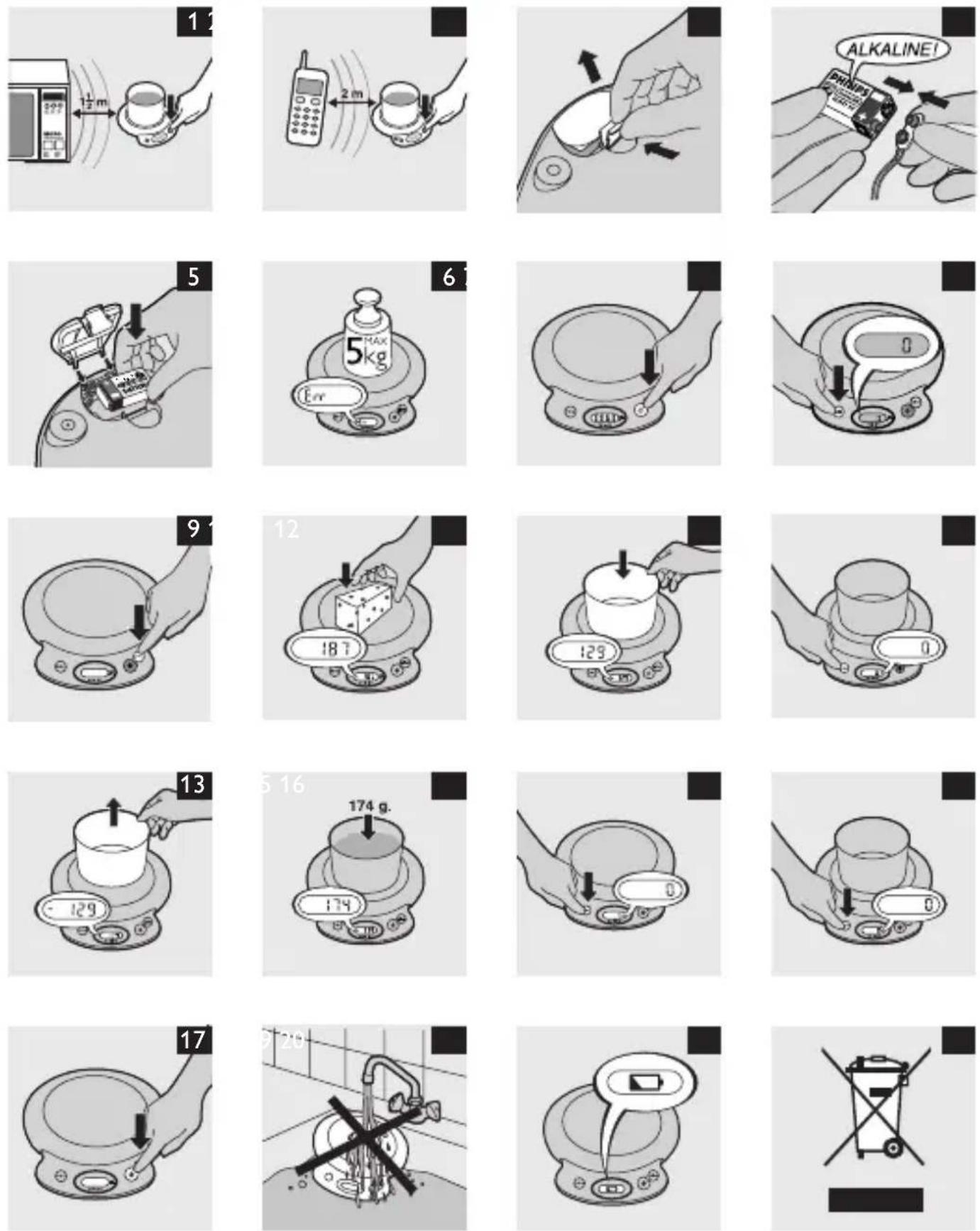
ENGLISH 6
DANSK 10
DEUTSCH 14
ΕΛΛΗΝΙΚΑ 19
ESPAÑOL 24
SUOMI 29
FRANÇAIS 33
ITALIANO 38
NEDERLANDS 43
NORSK 48
PORTUGUÊS 52
SVENSKA 56
TÜRKÇE 60
العربية 67
71 فارسی
Important
Read these instructions for use carefully before you use the appliance and save them for future reference.
Make sure that there is nothing on the weighing plate when the scales are not in use.
Do not immerse the scales in water or any other liquid and do not allow liquid to enter the scales.
Always place the appliance on a solid, smooth and horizontal surface when you use it.
A microwave oven or a mobile phone may cause interference, which can lead to unreliable weighing results.
Use the kitchen scales at a safe distance of at least 1.5 metres from a working microwave oven, or switch off the microwave oven. (Fig. 1)
Keep a mobile phone that is switched on at a safe distance of at least 2 metres from the scales, or switch off the mobile phone. (Fig. 2)
Electromagnetic fields (EMF)
This Philips appliance complies with all standards regarding electromagnetic fields (EMF). If handled properly and in accordance with the instructions in this instruction manual, the appliance is safe to use according to scientific evidence available today.
Preparing for use
The appliance runs on a 9-volt battery (not included). We advise you to use a Philips 6LR 61 alkaline battery on account of its long life and environmental friendliness.
Do not use a rechargeable battery in this appliance.
Inserting the battery
Make sure your hands and the appliance are dry when you insert the battery.
1 Remove the battery compartment cover. (Fig. 3)
2 Connect the battery to the battery connector. (Fig. 4)
3 Place the battery in the battery compartment and reattach the battery compartment cover. (Fig. 5)
Using the appliance
- The scales indicate weight in graduations of 1 gram from 2 grams onwards. In addition, the scales can also weigh in ounces in graduations of 1/8 oz.
- The appliance can weigh up to 5kg. If you put a weight of more than 5kg on the weighing plate, 'Err' appears on the display. (Fig. 6)
Weighing
Buttons
The appliance has three buttons:
1 On/off button ① (Fig. 7)
Press the on/off button briefly to switch on the scales. The appliance is ready for use after 2 seconds. Press the on/off button again to switch off the appliance.
2 Reset button ▶○◀ (Fig. 8)
Press this button to set the display to 0.
3 Conversion button g/oz (Fig. 9)
This button change the weight displayed from grams (g) to ounces (oz) or from ounces (oz) to grams (g).
Weighing on the weighing plate
1 Place the ingredient(s) to be weighed directly on the weighing plate. (Fig. 10)
The weight is displayed immediately.
Weighing in a bowl
1 Put the empty bowl on the weighing plate. (Fig. 11)
The display shows the weight of the bowl.
2 Press the reset button ▶○◀. (Fig. 12)
ENGLISH8
The display reads 0 again.
3 If you remove the bowl from the weighing plate, the display shows the negative weight of the bowl. (Fig. 13)
4 Put the ingredient to be weighed in the bowl. (Fig. 14)
The display shows the weight of the ingredient only.
The appliance shows the weight of the ingredients only (without the weight of the bowl) until you reset the appliance by pressing the reset button ▶○◀ while the weighing plate is empty. (Fig. 15)
Each time you press the reset button ▶○◀ when there is something on the weighing plate, the weight on the display is set back to 0 again, irrespective of the ingredients that are already in the bowl on the weighing plate. For example: if you have put 200 grams of sugar in the bowl on the scales and you press the ▶○◀ button, the weight is set back to 0. You can then easily add another ingredient, for example 300 grams of flour, without calculating. (Fig. 16)
Features
Automatic switch-off
If you do not use the appliance for 3 minutes when it is switched on, it switches off automatically to save battery power.
Full memory back-up
- This appliance has ‘full memory backup’: if the appliance has not been used for 3 minutes, it switches off automatically. If you have left the ingredient(s) you have just weighed on the weighing plate, the previously shown weight is displayed again when you press the on/off button Ⓐ. (Fig. 17)
- When the appliance switches off automatically or when you switch it off with the on/off button ①, it returns to the last selected measure (grams or ounces) when you switch it on again.
Cleaning
Do not use abrasive cleaning agents, scourers, alcohol etc. to clean the scales.
Never immerse the scales in water or rinse them under the tap. (Fig. 18)
1 Clean the appliance with a damp cloth and, if necessary, some mild cleaning agent.
Storage
Make sure that there is nothing on the weighing plate when the scales are not in use.
Replacement
Replacing the battery
1 Replace the battery as soon as the battery symbol appears on the display (see chapter ‘Preparing for use’). (Fig. 19)
Environment
Batteries contain substances that may pollute the environment. Do not throw away batteries with the normal household waste, but dispose of them at an official collection point for batteries. Always remove the battery before you discard and hand in the appliance at an official collection point.
Do not throw away the appliance with the normal household waste at the end of its life, but hand it in at an official collection point for recycling. By doing this, you help to preserve the environment. (Fig. 20)
Guarantee & service
If you need information or if you have a problem, please visit the Philips website at www.philips.com or contact the Philips Customer Care Centre in your country (you will find its phone number in the worldwide guarantee leaflet). If there is no Customer Care Centre in your country, turn to your local Philips dealer or contact the Service Department of Philips Domestic Appliances and Personal Care BV
Vigtigt
The image is too blurry to recognize any text content.



- Important
- Electromagnetic fields (EMF)
- Preparing for use
- Inserting the battery
- Using the appliance
- Weighing
- Buttons
- Weighing on the weighing plate
- Weighing in a bowl
- ENGLISH8
- Features
- Automatic switch-off
- Full memory back-up
- Cleaning
- Storage
- Replacement
- Replacing the battery
- Environment
- Guarantee & service
- Vigtigt
- The image is too blurry to recognize any text content.
Brand : PHILIPS
Model : HR2395
Category : Kitchen scale