
Series 3000 QT4015 - Beard trimmer PHILIPS - Free user manual and instructions
Find the device manual for free Series 3000 QT4015 PHILIPS in PDF.


| Product Type | Beard Trimmer |
| Model | Series 3000 QT4015 |
| Brand | Philips |
| Dimensions (approx.) | 17 x 4 x 5 cm |
| Weight | Approx. 200 g |
| Power Source | Rechargeable battery (NiMH) |
| Operating Time | Up to 60 minutes |
| Charging Time | 8 hours |
| Blade Material | Stainless steel |
| Length Settings | 5 adjustable settings (1-10 mm) |
| Usage | Cordless |
| Washable | Yes, detachable head |
| Accessories | Comb, cleaning brush, protective cap |
| Maintenance | Oil blades regularly; clean after each use |
| Safety | Round tips for skin comfort; IPX4 water-resistant |
| Spare Parts | Replacement blades and combs available |
| Repairability | Modular design; parts can be replaced |
| Warranty | 2 years |
| General Info | Ergonomic handle; LED battery indicator |
Frequently Asked Questions - Series 3000 QT4015 PHILIPS
User questions about Series 3000 QT4015 PHILIPS
0 question about this device. Answer the ones you know or ask your own.
Ask a new question about this device
Download the instructions for your Beard trimmer in PDF format for free! Find your manual Series 3000 QT4015 - PHILIPS and take your electronic device back in hand. On this page are published all the documents necessary for the use of your device. Series 3000 QT4015 by PHILIPS.
USER MANUAL Series 3000 QT4015 PHILIPS
Always here to help you
Register your product and get support at www.philips.com/welcome


natural_image
Black Philips brand hairbrush with textured grip and brand logo (no text or symbols on body)QT4015, QT4015, QT4014, QT4013, QT4011
User manual
PHILIPS

ENGLISH 4
ESPAÑOL 13
FRANÇAIS 23
INDONESIA 33
한국어 42
BAHASA MELAYU 51
PORTUGUÊS 61
ภาษาไทย 70
TIÊNG VIÊT 78
繁體中文 88
简体中文 96
Introduction
Congratulations on your purchase and welcome to Philips! To fully benefit from the support that Philips offers, register your product at www.philips.com/welcome.
General description (Fig. 1)
1 Trimming comb
2 Cutting unit
3 Precision Zoom Lock™ adjustment ring
4 On/off slide with battery indicator
5 Socket for appliance plug
6 Pouch
7 Brush
8 Appliance plug
9 Adapter
Important
Read this user manual carefully before you use the appliance and save it for future reference.
Danger
- Make sure the adapter does not get wet.
Warning
- The adapter contains a transformer. Do not cut off the adapter to replace it with another plug, as this causes a hazardous situation.
- This appliance is not intended for use by persons (including children) with reduced physical, sensory or mental capabilities, or lack of experience and knowledge, unless they have been given supervision or instruction concerning use of the appliance by a person responsible for their safety.
- Children should be supervised to ensure that they do not play with the appliance.
Caution
- Never immerse the appliance in water or rinse it under the tap. Only the cutting unit can be rinsed under the tap.
- Use, charge and store the appliance at a temperature between 5^ C and 35^ C.
- Only use the adapter supplied.
- If the adapter is damaged, always have it replaced with one of the original type in order to avoid a hazard.
- This appliance is only intended for trimming the human beard. Do not use it for any other purpose.
- Do not use the appliance if the cutting unit or the trimming comb is damaged or broken, as this may cause injury.
Electromagnetic fields
This Philips appliance complies with all standards regarding electromagnetic fields (EMF). If handled properly and according to the instructions in this user manual, the appliance is safe to use based on scientific evidence available today.
General
- The appliance is equipped with an automatic voltage selector and is suitable for mains voltages from 100 to 240 volts.
- The adapter transforms 100-240 volts to a safe low voltage of less than 24 volts.
Charging

natural_image
Illustration of a hand holding a tool with a ruler and a magnified inset showing the measurement (no text or symbols)Charge the appliance fully before you use it for the first time.
It takes approximately 1 hour to fully charge the appliance.
When it is fully charged, the appliance has a cordless operating time of up to 60 minutes.
Note: You can use the appliance cordless as well as connected to the mains.

natural_image
Illustration of a hairpin inserting into an electrical socket (no text or symbols)1 Make sure the appliance is switched off.
2 Insert the appliance plug into the appliance.
3 Put the adapter in the wall socket.
The charging light starts to flash green to indicate that the appliance is charging.
When the battery is fully charged, the charging light lights up green continuously.
After 30 minutes, the charging light goes out.
4 After charging, remove the adapter from the wall socket and pull the appliance plug out of the appliance.
Battery low
When the battery is almost empty (when there are only 5 or fewer trimming minutes left), the charging light flashes orange.
Optimising the lifetime of the rechargeable battery
When you have charged the appliance for the first time, we advise you to use it until the battery is completely empty. Continue to use the appliance until the motor almost stops running during a session. Then recharge the battery. Follow this procedure at least twice a year.
Using the appliance
Always comb the beard and/or moustache with a fine comb before you start trimming.
When you trim for the first time, be careful.
Do not move the trimmer too fast. Make smooth and gentle movements.
Trimming with comb

1 Turn the Precision Zoom Lock ^TM adjustment ring to the desired setting. The selected setting is the setting in the centre of the adjustment ring.
See the table below for an overview of the settings and the resulting hair lengths.
| Setting Resulting hair length | Setting Resulting hair length |
| . 0.5mm . 5.5mm | |
| 1 1mm 6 6mm | |
| . 1.5mm . 6.5mm | |
| 2 2mm 7 7mm | |
| . 2.5mm . 7.5mm | |
| 3 3mm 8 8mm | |
| . 3.5mm . 8.5mm | |
| 4 4mm 9 9mm | |
| . 4.5mm . 9.5mm | |
| 5 5mm 10 10mm |
ENGLISH8

natural_image
Illustration of a person brushing a beard with a hairpin (no text or symbols)Note: When you trim for the first time, start at the highest setting (10) to familiarise yourself with the appliance.
2 Switch on the appliance.
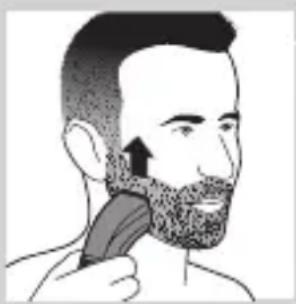
3 To trim most effectively, move the trimmer against the hair growth direction. Make sure the surface of the comb always stays in contact with the skin.
4 If a lot of hair has accumulated in the beard trimming comb, remove the comb and blow and/or shake the hair out of it. The selected setting does not change when you do this.
Trimming at the unique 'stubble look' setting

natural_image
Illustration of a hand using a tool to lift debris with an upward arrow (no text or symbols)1 To create a ‘stubble look’, trim with the beard trimming comb set to setting 1.

natural_image
Illustration of a person's face with a magnified circular object labeled '1' (no text or symbols on the object itself)Trimming without comb
Use the trimmer without beard trimming comb to trim full beards and single hairs.
Be careful when you trim without comb because the cutting element removes every hair it touches.

natural_image
Illustration of a hand holding a mechanical device with an upward arrow indicating motion (no text or symbols)1 Pull the beard trimming comb off the appliance as shown in figure 8.
2 Switch on the appliance.
natural_image
Illustration of a person applying a hair to their beache with a brush (no text or symbols)3 Make well-controlled movements. Touch the hair lightly with the trimmer.
Corded trimming
If the battery is low, you can also use the appliance from the mains:
1 Switch off the appliance, insert the adapter in the wall socket and wait a few seconds before you switch on the appliance.
Cleaning
Never use scouring pads, abrasive cleaning agents or aggressive liquids such as alcohol, petrol or acetone to clean the appliance.
1 Make sure the appliance is switched off and disconnected from the mains.
2 Wipe the housing of the appliance with a dry cloth.
Never immerse the appliance in water or rinse it under the tap.
3 Remove the trimming comb and clean it with the brush.
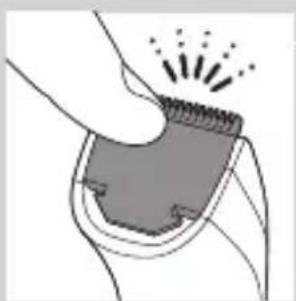
4 Remove the cutting unit by pushing against the teeth of the cutting unit and clean it with the brush or rinse it under the tap.

natural_image
Illustration of a hand holding a device and a device with an arrow, against a diagonal line (no text or symbols)
natural_image
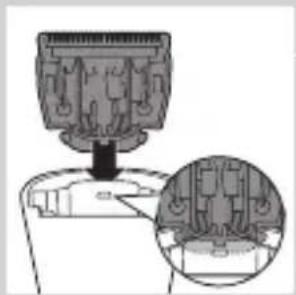
Diagram showing a mechanical component being inserted into a device, with an inset close-up of the internal structure (no text or symbols visible)5 Shake off excess water and place the cutting unit back by inserting the lug of the cutting unit into the guiding slot.
6 Push the cutting unit back onto the appliance ('click').
Replacement

natural_image
Illustration of a hand holding a device and a close-up of its device (no text or symbols present)Only replace a worn or damaged cutting unit with an original Philips cutting unit, available from authorised Philips service centres.
1 Open the cutting unit.
2 Remove the old cutting unit by pushing against the teeth of the cutting unit.
3 Insert the lug of the new cutting unit into the guiding slot.
natural_image
Diagram showing a mechanical component with an arrow pointing to a section, and a magnified inset of a component detail (no text or symbols)4 Push the cutting unit back onto the appliance ('click').
natural_image
Illustration of a hand pressing down on a textured object with radiating lines (no text or symbols)Ordering accessories
To purchase accessories for this appliance, please visit our online shop at www.shop.philips.com/service. If the online shop is not available in your country, go to your Philips dealer or a Philips service centre. If you have any difficulties obtaining accessories for your appliance, please contact the Philips Consumer Care Centre in your country. You find its contact details in the worldwide guarantee leaflet.
Environment
natural_image
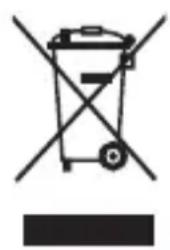
Symbol of a trash bin crossed with no text or numbers, representing waste sorting or disposal (no text present)- Do not throw away the appliance with the normal household waste at the end of its life, but hand it in at an official collection point for recycling. By doing this, you help to preserve the environment.
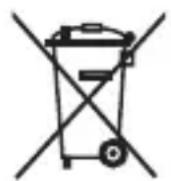
- The built-in rechargeable battery contains substances that may pollute the environment. Always remove the battery before you discard and hand in the appliance at an official collection point. Dispose of the battery at an official collection point for batteries. If you have trouble removing the battery, you can also take the appliance to a Philips service centre. The staff of this centre will remove the battery for you and will dispose of it in an environmentally safe way.
Removing the rechargeable batteries

natural_image
Line drawing of a screwdriver holding a tool, no text or symbols presentOnly remove the rechargeable batteries if they are completely empty.
1 Disconnect the appliance from the mains and let the appliance run until the motor stops.
2 Insert a screwdriver in the hair chamber to separate the housing part.
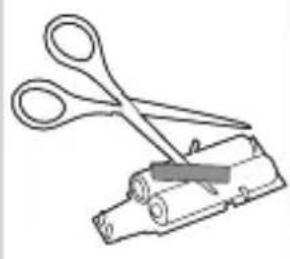
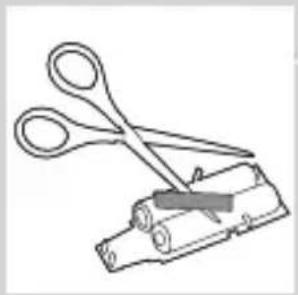
3 Cut the wires close to the batteries with a pair of household scissors.
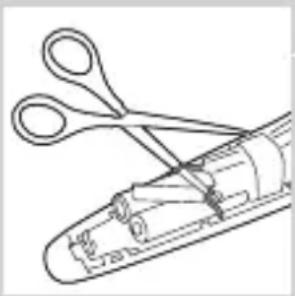
natural_image
Line drawing of a pair of scissors cutting through a mechanical component (no text or symbols)4 Remove the printed circuit board with the rechargeable batteries.

natural_image
Diagram of a mechanical device with a lever and internal components, no visible text or symbols5 Cut the battery tabs with a pair of scissors and separate the batteries from the printed circuit board.
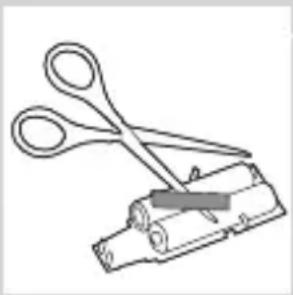
natural_image
Line drawing of scissors cutting a cylindrical object (no text or symbols)Do not connect the appliance to the mains again after you have opened it.
Guarantee and service
If you need service or information or if you have a problem, please visit the Philips website at
www.philips.com/support or contact the Philips Consumer Care Centre in your country. You find its phone number in the worldwide guarantee leaflet. If there is no Consumer Care Centre in your country, go to your local Philips dealer.
Introducción
natural_image
Illustration of a hand holding a tool with a ruler and arrow indicating direction (no text or symbols)natural_image
Illustration of a medical device with an arrow pointing to a circular component and an inset showing a plug (no text or symbols)natural_image
Illustration of a person using a hairpin to trim a beard (no text or symbols present)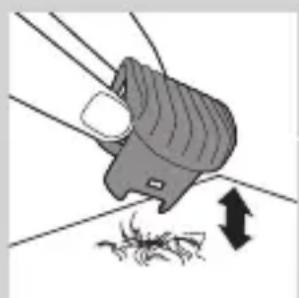
natural_image
Illustration of a hand using a handheld device to remove debris (no text or symbols)natural_image
Illustration of a person holding a textured object next to a circular object labeled '1' (no text or symbols on the object itself)natural_image
Illustration of a hand holding a device with an upward arrow indicating motion (no text or symbols)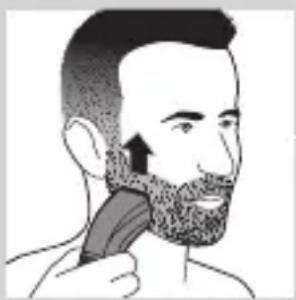
natural_image
Illustration of a person brushing a beaded head with a brush (no text or symbols)natural_image
Diagram showing a hand holding a device and a device with a handle, both crossed over a diagonal line (no text or symbols)natural_image
Diagram showing a mechanical component with a downward arrow and a magnified inset of its internal structure (no text or symbols)natural_image
Illustration of a hand holding a device and a close-up of its internal components (no text or symbols)natural_image
Diagram of a mechanical component with a downward arrow and magnified inset showing internal structure (no text or symbols)natural_image
Illustration of a hand holding a small object with radiating lines, emitting sparkles (no text or symbols)natural_image
Symbol of a trash bin crossed with no text or labels, accompanied by a black rectangular block below (no readable text or symbols)
natural_image
Line drawing of a tool interacting with a mechanical component (no text or symbols)natural_image
Line drawing of a pair of scissors cutting through a mechanical component (no text or symbols)
natural_image
Diagram of a mechanical device with a lever and handle, showing internal components and an upward arrow (no text or symbols)natural_image
Line drawing of scissors cutting a cylindrical object (no text or symbols)natural_image
Illustration of a hand holding a tool with a ruler and a pointer, no text or symbols present
natural_image
Illustration of a hairpin inserting into a socket with an electrical outlet (no text or symbols)natural_image
Illustration of a person using a hairbrush to trim a beard (no text or symbols present)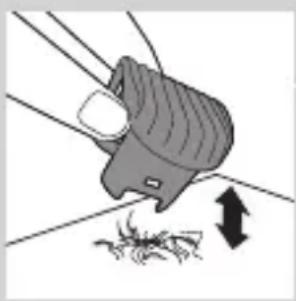
natural_image
Illustration of a hand holding a device with arrows indicating motion or force (no text or symbols)natural_image
Illustration of a person's face with a circular button labeled '1' (no text or symbols on the button itself)natural_image
Illustration of a hand holding a device with an upward arrow indicating motion (no text or symbols)natural_image
Illustration of a person brushing a beard with a brush (no text or symbols)natural_image
Diagram showing two hand tools interacting over a gear, one with a curved arrow and the other with a circular arrow (no text or symbols)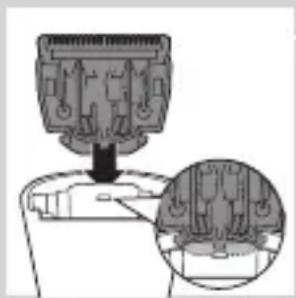
natural_image
Diagram showing a mechanical component being inserted into a housing, with an inset close-up of its internal structure (no text or symbols visible)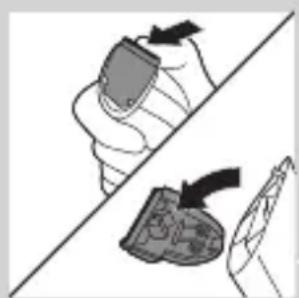
natural_image
Illustration of a hand holding a container and a bag, separated by a diagonal line (no text or symbols)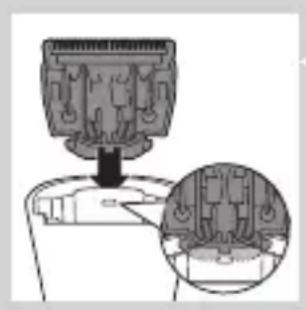
natural_image
Diagram of a mechanical component with a magnified inset showing internal structure (no text or symbols)natural_image
Illustration of a hand holding a small object with a glowing effect, no text or symbols presentnatural_image
Line drawing of a hand holding a screwdriver above a container with a cartoon face (no text or symbols)natural_image
Line drawing of a pair of scissors cutting through a mechanical component (no text or symbols)natural_image
Diagram of a tool interacting with a mechanical component, showing a handle and internal structure (no text or symbols)natural_image
Line drawing of a pair of scissors cutting a cylindrical object (no text or symbols)natural_image
Illustration of a hand holding a tool with a ruler and a pointer, no text or symbols presentnatural_image
Illustration of a hairpin with a black cap and a magnified inset showing an electrical socket (no text or symbols)Menggunakan alat
natural_image
Illustration of a person using a hairpin to trim a beard (no text or symbols)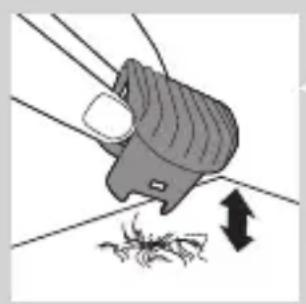
natural_image
Illustration of a hand holding a tool with a downward arrow indicating compression or dislocation (no text or symbols)natural_image
Illustration of a person's face with a magnified inset showing a numbered circular object (no text or symbols)natural_image
Illustration of a hand holding a mechanical component with an upward arrow indicating motion (no text or symbols)natural_image
Illustration of a person applying a hair to their beache with a brush (no text or symbols)natural_image
Diagram showing two hand positions: one with a device and arrow, the other with a tool and arrow (no text or symbols)natural_image
Diagram showing a mechanical component with a downward arrow and a magnified inset of its side view (no text or symbols)natural_image
Diagram showing two hand positions: one with a device and arrow, the other with a device and arrow (no text or symbols)natural_image
Diagram of a mechanical component with an inset close-up showing internal components (no text or symbols)natural_image
Illustration of a hand holding a small object with radiating lines, emitting sparkles (no text or symbols)Memesan aksesori
natural_image
Symbol of a trash bin crossed with no text or numbers, representing waste sorting or disposal (no text present)
natural_image
Line drawing of a tool with a screwdriver inserted into a mechanical component (no text or symbols)natural_image
Line drawing of a pair of scissors cutting through a mechanical component (no text or symbols)natural_image
Diagram of a tool interacting with a mechanical component, showing a handle and arrow indicating direction (no text or symbols)natural_image
Line drawing of scissors cutting a cylindrical object (no text or symbols)natural_image
Illustration of a hand holding a tool with a ruler and a black arrow pointing to it (no text or symbols present)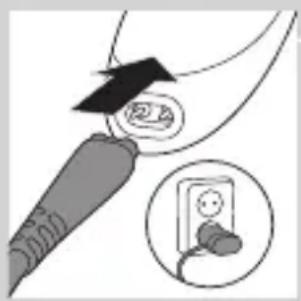
natural_image
Illustration of a medical device with a magnified inset showing a patient's ear connected to an electrical outlet (no text or symbols present)natural_image
Illustration of a person using a hairbrush to trim a beard (no text or symbols present)natural_image
Illustration of a hand holding a device with arrows indicating movement or force (no text or symbols)natural_image
Illustration of a person's face with a magnified inset showing a numbered item (1), no text or symbols present.natural_image
Illustration of a hand holding a mechanical component with an upward arrow indicating motion (no text or symbols)natural_image
Illustration of a person applying a hair to their beache, showing the brush and facial marking (no text or symbols)유선 트리머
natural_image
Diagram showing two hand positions: one with a can and arrow, the other with a bag and arrow (no text or symbols)
natural_image
Diagram showing a mechanical component with a downward arrow and a magnified inset of its internal structure (no text or symbols)교체

natural_image
Diagram showing two hand positions with arrows indicating movement, no text or symbols presentnatural_image
Diagram showing a mechanical component being inserted into a device, with an inset close-up of internal components (no text or symbols)natural_image
Illustration of a hand holding a small object with radiating lines, emitting heat or vibration (no text or symbols)natural_image
Symbol of a trash bin crossed with no visible text or labelsnatural_image
Simple line drawing of a trash bin with crossed x-bracing (no text or symbols)natural_image
Line drawing of a screwdriver inserted into a mechanical component (no text or symbols)natural_image
Line drawing of a medical or laboratory procedure with scissors and tubing (no text or symbols)natural_image
Diagram of a mechanical device with a lever and handle, showing an upward arrow (no text or symbols present)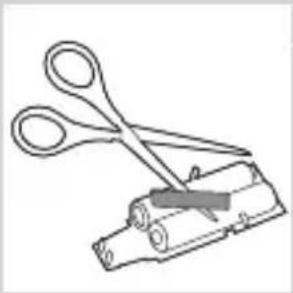
natural_image
Line drawing of scissors cutting a cylindrical object (no text or symbols)natural_image
Illustration of a hand holding a tool with a ruler and arrow indicating direction (no text or symbols)
natural_image
Illustration of a medical device with an arrow pointing to a circular component and an inset showing a plug (no text or symbols)natural_image
Illustration of a person using a hairbrush to trim a beard (no text or symbols present)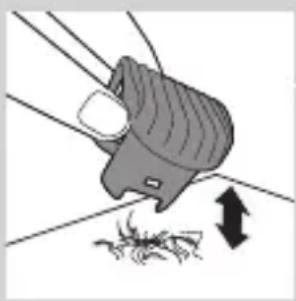
natural_image
Illustration of a hand holding a device with arrows indicating motion or force (no text or symbols)natural_image
Illustration of a person's face with a circular button labeled '1' pointing to the nose area (no text or symbols beyond the number)natural_image
Illustration of a hand holding a seatbelt with an upward arrow indicating motion (no text or symbols)natural_image
Illustration of a person applying a hair to their beache with a brush (no text or symbols)natural_image
Illustration of a hand holding a tool and a close-up of a device, both without any text or symbols.
natural_image
Diagram showing a mechanical component being inserted into a housing, with an inset close-up of the interior detail (no text or symbols)natural_image
Diagram showing two hand positions: one with a curved arrow and the other with an arrow, both on a diagonal line (no text or symbols)natural_image
Diagram of a mechanical component with an inset close-up showing internal components (no text or symbols)natural_image
Illustration of a hand holding a small electronic device with a glowing spike effect (no text or symbols)natural_image
Symbol of a trash bin crossed with a diagonal line and a horizontal bar below (no text or labels)natural_image
Line drawing of a screwdriver inserted into a mechanical component (no text or symbols)natural_image
Line drawing of a pair of scissors cutting through a mechanical component (no text or symbols)natural_image
Diagram of a mechanical device with a lever and handle, showing an upward arrow (no text or symbols present)natural_image
Line drawing of scissors cutting a cylindrical object (no text or symbols)natural_image
Illustration of a hand holding a tool with a ruler and arrow indicating direction (no text or symbols)natural_image
Illustration of a medical device with an attached device and a close-up of its electrical socket (no text or symbols)1 Certifique-se de que o aparelho está desligado.
2 Introduza a ficha do aparelho no aparelho.
3 Ligue o adaptador à tomada eléctrica.
natural_image
Illustration of a person using a hairbrush to trim a beard (no text or symbols present)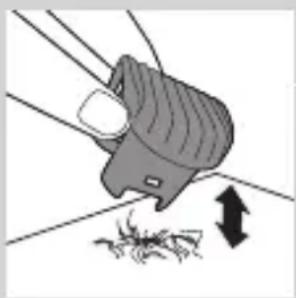
natural_image
Illustration of a hand holding a device with arrows indicating motion or force (no text or symbols)natural_image
Illustration of a person's face with a circular object labeled '1' pointing to a textured, patterned garment (no text or symbols on the object itself)natural_image
Illustration of a hand holding a mechanical component with an upward arrow (no text or symbols)natural_image
Illustration of a person applying a hair to their beache, showing the brush (no text or symbols present)Aparar com fio
natural_image
Illustration of a hand holding a tool and a device, both with arrows indicating direction (no text or symbols)natural_image
Diagram of a plug assembly with a magnified inset showing internal components (no text or labels)natural_image
Illustration of a hand holding a device and a close-up of its internal components (no text or symbols)natural_image
Diagram showing a mechanical component being inserted into a housing, with an inset close-up highlighting internal components (no text or symbols present)natural_image
Illustration of a hand holding a small object with a spark effect, no text or symbols presentEncomendar acessórios
natural_image
Symbol of a trash bin crossed with no text or numbers, representing waste sorting or disposal (no text present)natural_image
Line drawing of a screwdriver inserted into a mechanical component (no text or symbols)natural_image
Line drawing of a pair of scissors cutting through a cylindrical tool (no text or symbols)natural_image
Diagram of a tool interacting with a mechanical component, showing a lever and handle (no text or symbols)natural_image
Illustration of scissors cutting a cylindrical object with a handle (no text or symbols)natural_image
Illustration of a hand holding a tool with a ruler and arrow indicating direction (no text or symbols)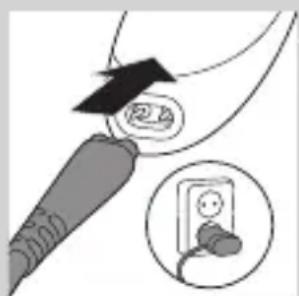
natural_image
Illustration of a plug inserted into a socket with an arrow indicating direction (no text or symbols)natural_image
Illustration of a person styling their hair with a comb (no text or symbols)natural_image
Illustration of a hand using a tool to remove debris from a surface, with no visible text or symbols.natural_image
Illustration of a person's face with a textured scarf and a circular object labeled '1' (no text or symbols on the object itself)การเล็มโดยไม่ใช้ววี
natural_image
Illustration of a hand holding a small mechanical component with an upward arrow indicating motion (no text or symbols)natural_image
Illustration of a person applying a hair to their beache with a brush (no text or symbols)natural_image
Illustration of a hand holding a tool and a device, both crossed over a diagonal line (no text or symbols)natural_image
Diagram showing a mechanical component being inserted into a housing, with an inset close-up of its internal structure (no text or symbols present)การเปลี่ยนอะไรหล่

natural_image
Diagram showing two hand tools on a diagonal line, one with a curved arrow and the other with a circular arrow (no text or symbols)natural_image
Diagram showing a mechanical component with a downward arrow and an inset close-up of internal components (no text or symbols)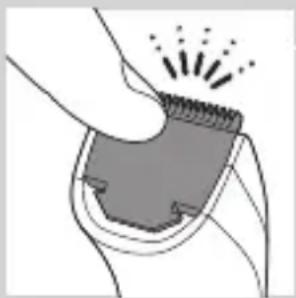
natural_image
Illustration of a hand holding a textured object with radiating lines, no text or symbols presentnatural_image
Symbol of a trash bin crossed with no visible text or labelsnatural_image
Simple line drawing of a trash bin with two crossed arms (no text or symbols)natural_image
Line drawing of a tool with a handle and grip, no text or symbols presentnatural_image
Line drawing of a medical procedure with scissors and tubing (no text or symbols)natural_image
Diagram of a tool interacting with a mechanical component, showing a handle and lever (no text or symbols)
natural_image
Line drawing of a pair of scissors cutting a cylindrical object (no text or symbols)natural_image
Illustration of a hand holding a tool with a barcode patch and arrow indicating direction (no text or symbols)natural_image
Illustration of a plug inserted into a socket with a magnified inset showing the socket (no text or symbols)natural_image
Illustration of a person brushing a beard with a hairpin (no text or symbols)natural_image
Illustration of a hand holding a device with arrows indicating motion or force (no text or symbols)natural_image
Illustration of a person's face with a textured scarf and a circular object labeled '1' (no text or symbols on the object itself)1 public service for the public service of the government's law, which is to be applied to the government's law.
natural_image
Illustration of a hand holding a mechanical component with an upward arrow indicating motion (no text or symbols)natural_image
Illustration of a person applying a hair to their beache with a brush (no text or symbols)natural_image
Diagram showing two hand gestures: one moving a cylindrical object with an arrow, the other moving a textured object with an arrow (no text or symbols)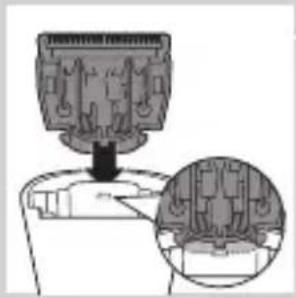
natural_image
Technical illustration of a mechanical component with an inset close-up showing internal components (no text or symbols)natural_image
Illustration of a hand holding a tool and a bag, both on a diagonal line (no text or symbols)natural_image
Diagram showing a mechanical component being inserted into a housing, with an inset close-up highlighting internal components (no text or symbols present)natural_image
Illustration of a hand inserting a spring into a button-like device (no text or symbols)natural_image
Symbol of a trash bin crossed with no text or numbers, representing waste sorting or disposal (no text present)natural_image
Line drawing of a screwdriver holding a cylindrical object (no text or symbols)natural_image
Line drawing of a medical or surgical tool with scissors and clamps (no text or symbols)natural_image
Diagram of a tool interacting with a mechanical component, showing a handle and arrow (no text or symbols)natural_image
Line drawing of scissors cutting a cylindrical object (no text or symbols)natural_image
Illustration of a hand holding a tool with a ruler and arrow indicating measurement (no text or symbols)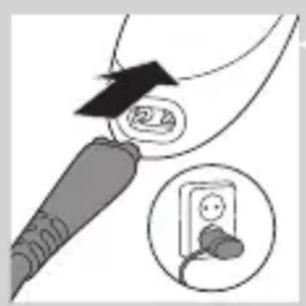
natural_image
Illustration of a medical device with an arrow pointing to a circular component and an inset showing a small electrical socket (no text or symbols)第一次使用本產品前,請將產品充滿電。
本產品完全充電約需 1 個小時。
natural_image
Illustration of a person using a hairbrush to trim a beard (no text or symbols present)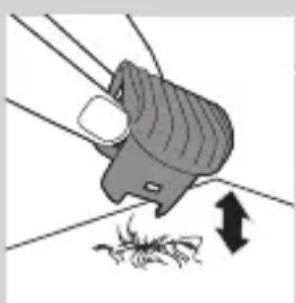
natural_image
Illustration of a hand using a tool to remove debris from a surface, with no visible text or symbols.natural_image
Illustration of a person's face with a circular inset showing a numbered item (1), no text or symbols present.natural_image
Illustration of a hand holding a belt buckle with an upward arrow indicating motion (no text or symbols)natural_image
Illustration of a person applying a hair product to their beaded jaw (no text or symbols)natural_image
Illustration of a hand holding a device and a close-up of its internal components (no text or symbols)natural_image
Diagram showing a mechanical component being inserted into a housing, with an inset close-up highlighting internal components (no text or symbols present)更换

natural_image
Diagram showing two hand tools on a diagonal line, one with a brush and arrow, the other with a tool and arrow (no text or symbols)natural_image
Diagram showing a mechanical component being inserted into a container, with an inset close-up of the internal structure (no text or symbols visible)
natural_image
Illustration of a hand holding a small object with radiating lines, emitting sparkles (no text or symbols)natural_image
Simple line drawing of a trash bin with no text or symbolsnatural_image
Line drawing of a screwdriver inserted into a container with a handle (no text or symbols)natural_image
Line drawing of a pair of scissors cutting through a cylindrical tool (no text or symbols)natural_image
Diagram of a mechanical device with a lever and internal components, no visible text or symbols4 拆下附有充電式電池的印刷電路板。
natural_image
Line drawing of scissors cutting a cylindrical object (no text or symbols)natural_image
Illustration of a hand holding a tool with a ruler and arrow indicating measurement (no text or symbols)
natural_image
Illustration of a plug inserted into a socket with a magnified inset showing the socket (no text or symbols)1 确保产品电源已关闭。
2 将产品插头插入本产品。
3 将电源适配器插入电源插座。
natural_image
Illustration of a man using a hairdryer to brush or brush with arrows indicating direction (no text or symbols)natural_image
Illustration of a person's face with a circular inset showing a numbered item (1), no text or symbols present.natural_image
Illustration of a hand holding a device with an upward arrow indicating motion (no text or symbols)natural_image
Illustration of a person applying a hair to their beache, showing the brush (no text or symbols present)natural_image
Illustration of a hand holding a device and a device with an arrow, separated by a diagonal line (no text or symbols)natural_image
Diagram of a mechanical component with a magnified inset showing internal structure (no text or symbols)natural_image
Illustration of a hand holding a container and a bag, separated by a diagonal line (no text or symbols)natural_image
Diagram of a mechanical component with a downward arrow and an inset close-up showing internal structure (no text or symbols)natural_image
Illustration of a hand holding a small object with radiating lines, emitting heat or vibration (no text or symbols)订购附件
natural_image
Symbol of a trash bin crossed with a diagonal line, representing waste sorting or recycling (no text or labels)natural_image
Line drawing of a tool interacting with a mechanical component (no text or symbols)natural_image
Line drawing of a pair of scissors cutting through a mechanical component (no text or symbols)natural_image
Diagram of a mechanical component with a tool and arrow indicating direction (no text or symbols)4 取下带有充电电池的印刷电路板。
natural_image
Line drawing of scissors cutting a cylindrical object (no text or symbols)- Always here to help you
- Introduction
- General description (Fig. 1)
- Important
- Danger
- Warning
- Caution
- Electromagnetic fields
- General
- Charging
- Battery low
- Optimising the lifetime of the rechargeable battery
- Using the appliance
- Trimming with comb
- ENGLISH8
- Trimming at the unique 'stubble look' setting
- Trimming without comb
- Corded trimming
- Cleaning
- Replacement
- Ordering accessories
- Environment
- Removing the rechargeable batteries
- Guarantee and service
- Introducción
- Menggunakan alat
- Memesan aksesori
- 유선 트리머
- 교체
- Aparar com fio
- Encomendar acessórios
- การเปลี่ยนอะไรหล่
- 更换
- 订购附件
Brand : PHILIPS
Model : Series 3000 QT4015
Category : Beard trimmer