
Series 7000 QT4050 - Beard trimmer PHILIPS - Free user manual and instructions
Find the device manual for free Series 7000 QT4050 PHILIPS in PDF.


| Product Type | Beard Trimmer |
| Model | Series 7000 QT4050 |
| Brand | Philips |
| Dimensions | Approx. 5.5 x 2.0 x 2.5 inches (14 x 5 x 6 cm) |
| Weight | Approx. 0.5 lbs (230 g) |
| Power Source | Rechargeable battery, cordless use |
| Battery Type | Lithium-ion |
| Charging Time | Approx. 1 hour |
| Run Time | Up to 60 minutes |
| Number of Length Settings | 40+ step settings (0.5mm) |
| Blade Material | Self-sharpening steel blades |
| Waterproof | Yes, fully washable |
| Wet & Dry Use | Wet and dry usage |
| Display | LED display showing battery status |
| Accessories Included | Precision trimmer attachment, comb, cleaning brush, charging cable |
| Cleaning | Rinse under running water, use cleaning brush |
| Maintenance | Oil blades every 6 months |
| Safety Feature | Automatic voltage adaptation, overcharge protection |
| Spare Parts | Blade unit, comb attachment available |
| Repairability | Blade replacement possible; battery not user-replaceable |
| Warranty | 2 years |
| Manual Language | English (134 pages) |
Frequently Asked Questions - Series 7000 QT4050 PHILIPS
User questions about Series 7000 QT4050 PHILIPS
0 question about this device. Answer the ones you know or ask your own.
Ask a new question about this device
Download the instructions for your Beard trimmer in PDF format for free! Find your manual Series 7000 QT4050 - PHILIPS and take your electronic device back in hand. On this page are published all the documents necessary for the use of your device. Series 7000 QT4050 by PHILIPS.
USER MANUAL Series 7000 QT4050 PHILIPS
Always here to help you
Register your product and get support at www.philips.com/welcome

BT7085
QT4070
QT4050

natural_image
Black Philips Vacuum Thermostat electric shaver with digital display (no visible text or symbols)User manual
PHILIPS
ENGLISH 4
ESPAÑOL 14
FRANÇAIS 25
INDONESIA 35
한국어 45
BAHASA MELAYU 55
PORTUGUÊS 66
ภาษาไทย 77
TIÊNG VIÊT 86
繁體中文 96
简体中文 106
۱۳۴۲۶۵۰۴۸۶۹۷۴۵۱۲
133 العربية
Introduction
Congratulations on your purchase and welcome to Philips! To fully benefit from the support that Philips offers, register your product at
www.philips.com/welcome.
This maintenance-free Philips vacuum beard trimmer combines innovative technology and outstanding comfort of use. It is excellently suited for cutting and contouring your beard and sideburns.
The integrated vacuum system absorbs cut-off hairs during use and gives you a cleaner washbasin after use. The trimming comb, the self-sharpening cutting unit and the adjustment ring to select hair lengths from 1 to 18mm ensure excellent cutting results and time-saving operation. The ergonomic shape of the appliance allows pleasant and comfortable handling.
All types come with a trimming comb that has been specially designed to offer you a better view when you want to create a stubble look.
BT7085/QT4070 comes with a contour-following trimming comb that has been specially designed to trim longer beards.
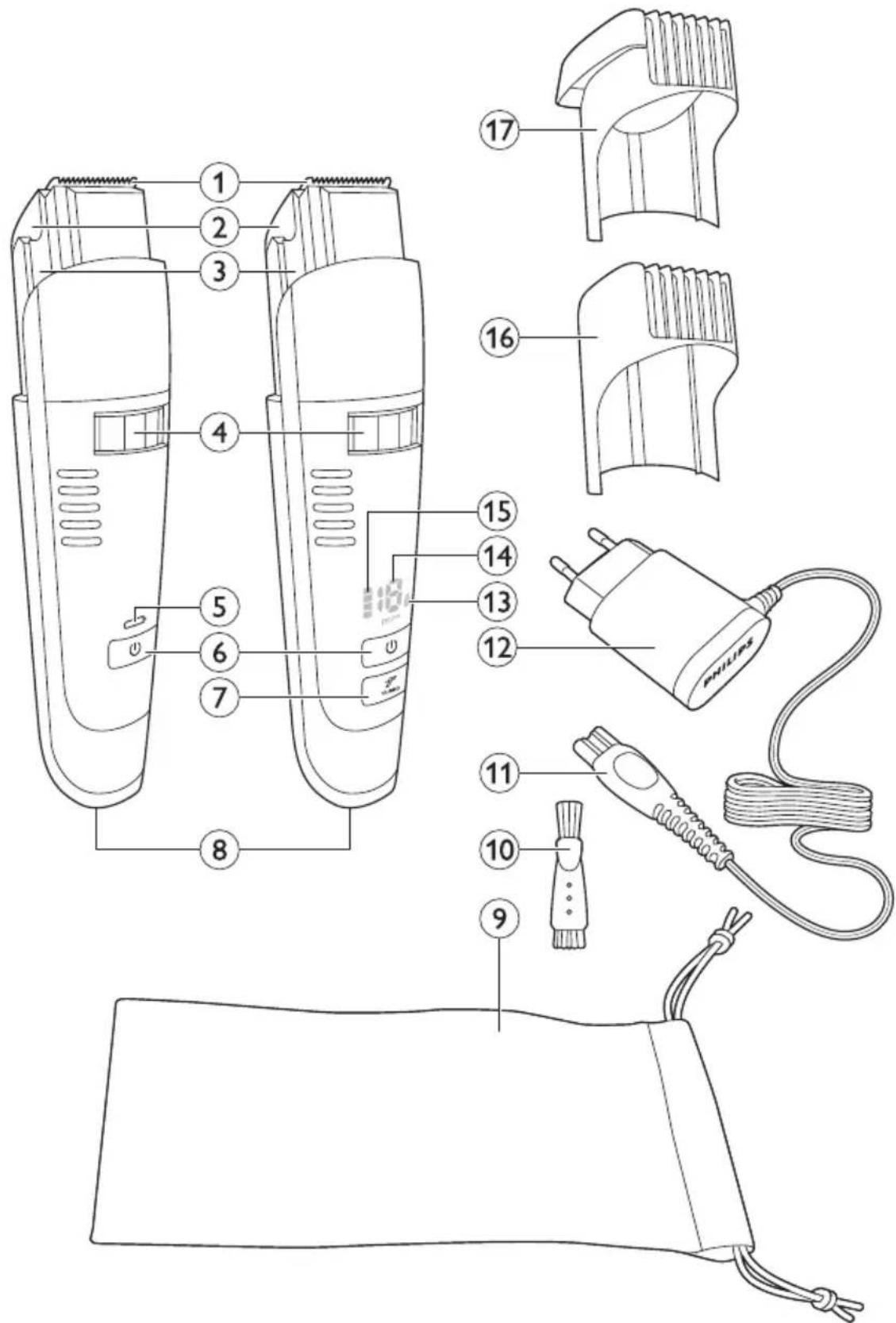
General description (Fig. 1)
1 Detachable cutting unit
2 Lid of hair collection chamber
3 Hair-collection chamber and filter
4 Adjustment ring (Precision Zoom Lock™)
5 Charging light (QT4050 only)
6 On/off button
7 Turbo button (BT7085/QT4070 only)
8 Socket for appliance plug
9 Storage pouch (BT7085 only)
10 Cleaning brush
11 Appliance plug
12 Adapter
13 Travel lock indicator (BT7085/QT4070 only)
14 Hair length indicator (BT7085/QT4070 only)
15 Charge level indicator (BT7085/QT4070 only)
16 Trimming comb
17 Contour-following trimming comb (BT7085/QT4070 only)
Important
Read this user manual carefully before you use the appliance and save it for future reference.
Danger
- Keep the adapter dry.
Warning
- The adapter contains a transformer. Do not cut off the adapter to replace it with another plug, as this causes a hazardous situation.
- This appliance is not intended for use by persons (including children) with reduced physical, sensory or mental capabilities, or lack of experience and knowledge, unless they have been given supervision or instruction concerning use of the appliance by a person responsible for their safety.

natural_image
Prohibition sign showing a faucet without shower, enclosed in a circle (no text or symbols)- Children should be supervised to ensure that they do not play with the appliance.
- Always check the appliance before you use it. Do not use the appliance if it is damaged, as this may cause injury.
- Do not use the appliance in the bath or in the shower.
Caution
- Only use the adapter supplied.
- Use, charge and store the appliance at a temperature between 5°C and 35°C.
- Do not charge the appliance in the storage pouch supplied (BT7085 only).
- Do not use the appliance if one of the trimming combs or the cutting unit is damaged or broken, as this may cause injury.
- If the adapter, the cutting unit or one of the trimming combs is damaged, always have it replaced with one of the original type in order to avoid a hazard.
- This appliance is only intended for trimming the human beard. Do not use it for any other purpose.
General
- The adapter is equipped with an automatic voltage selector and is suitable for mains voltages ranging from 100 to 240 volts.
- The adapter transforms 220-240 volts to a safe low voltage of less than 24 volts.
- Noise level: Lc = 65 dB(A).
Electromagnetic fields (EMF)
- This Philips appliance complies with all applicable standards and regulations regarding exposure to electromagnetic fields.
Preparing for use
Charging (BT7085/QT4070)
Charge the appliance fully before you use it for the first time and after a long period of disuse.
Standard charging takes approximately 60 minutes.

1 Switch off the appliance before you charge it.
2 Insert the appliance plug into the appliance and put the adapter in the wall socket.
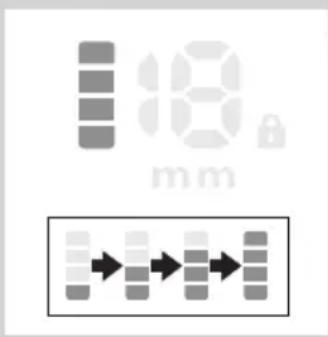
When you start charging the empty appliance, the bottom segment of the charge level indicator flashes orange. When the battery contains enough power for one trimming session of approx. 7 minutes, the bottom segment starts flashing blue.
First the bottom segment of the charge level indicator flashes blue, then the second segment and so on, until the appliance is fully charged.
When the appliance is fully charged, all segments of the charge level indicator light up blue continuously.
If the fully charged appliance is still connected to the mains after 1 hour, the segments of the charge level indicator go out.
ENGLISH6

natural_image
Line drawing of a handheld electronic device with a battery icon and a circular indicator (no text or symbols)Battery low
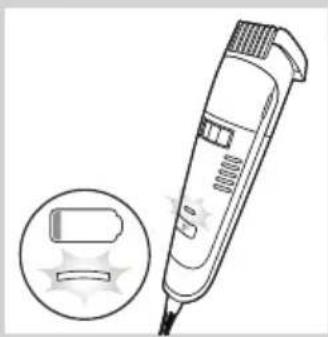
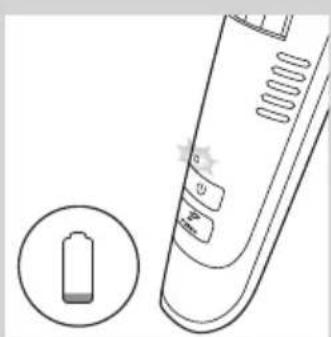
- When the battery is almost empty (when there are approx. 7 or fewer trimming minutes left), the bottom segment of the charge level indicator turns orange. When you switch off the trimmer, the bottom segment flashes for a few seconds.
Charging (QT4050)

natural_image
Diagram showing a hairpin plug inserted into a socket, with an inset view of the socket being inserted (no text or symbols present)Charge the appliance fully before you use it for the first time and after a long period of disuse.
Standard charging takes approximately 8 hours.
1 Switch off the appliance before you charge it.
2 Insert the appliance plug into the appliance and put the adapter in the wall socket.
natural_image
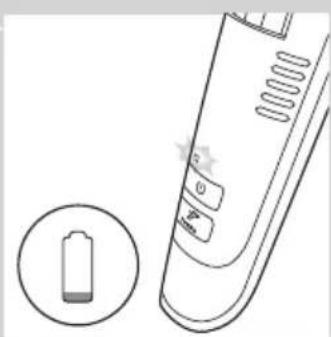
Illustration of a handheld hairbrush with a circular inset showing a stylized device (no text or symbols)When you start charging the empty appliance, the charging light flashes green.
When the appliance is fully charged, the charging light goes out.
natural_image
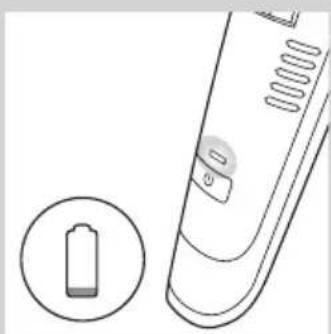
Illustration of a remote control device with a battery icon and a circular indicator (no text or symbols)Battery low
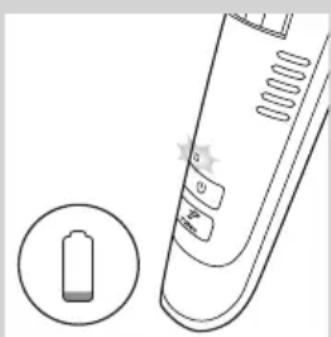
- When the battery is almost empty (when there are approx. 7 or fewer trimming minutes left), the charging light lights up orange.
Corded trimming
When the rechargeable battery is low, you can also run the appliance from the mains.
To use the appliance connected to the mains:
1 Switch off the appliance and connect it to the mains.
2 Wait a few seconds and then switch on the appliance.
Note: If the battery is completely empty, wait a few minutes before you switch on the appliance.
Using the appliance
Display indications (BT7085/QT4070 only)
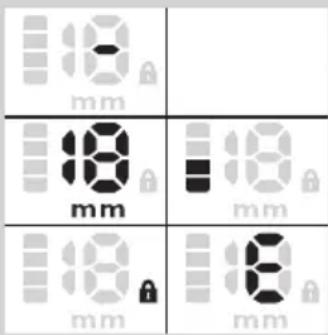
The display is activated when you press the on/of button and when you turn the adjustment ring.
- During trimming, the display provides the following information:
D’-’ when no comb is attached to the appliance.
The selected hair length (i.e. the remaining hair length after trimming) in millimetres.
The remaining charge level.
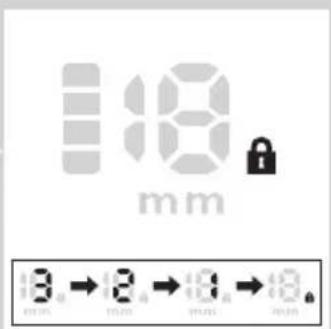
Travel lock indicator if the appliance is locked (see section ‘Travel lock’ in this chapter).
•'E' if the cutting unit is blocked.
Beard trimming

natural_image
Technical illustration of a mechanical component with an arrow indicating direction, showing internal structure (no text or symbols)Always comb your beard or moustache with a fine comb before you start trimming.
Trimming with trimming comb
The hair length settings are indicated in millimetres on the display of the appliance. The settings correspond to the remaining hair length after cutting. The trimming comb cuts hair to a length of 1-18mm.
If you trim for the first time, start with the maximum hair length setting (18mm).
1 Slide the trimming comb onto the appliance.
2 Turn the adjustment ring (Precision Zoom Lock™) to the desired hair length setting.
The display shows the selected hair length.

natural_image
Illustration of a hand holding a pen with arrows indicating motion or movement (no text or symbols)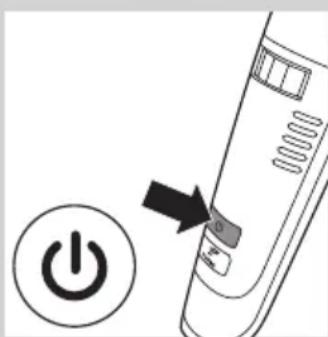
natural_image
Diagram of a power button with an arrow pointing to it, next to a circular icon with a 'Power' symbol (no text or labels present)3 Switch on the appliance.
Note: During trimming, you can use the turbo function for extra suction power and trimming speed (see section 'Turbo function' below).
ENGLISH8


natural_image
Diagram of a mechanical component with an arrow indicating direction (no text or symbols present)4 To trim most effectively, move the appliance against the direction of hair growth.
Note: Make smooth and gentle movements and make sure the surface of the trimming comb always stays in contact with the skin.
Note: Do not move the appliance too fast.
5 Switch off the appliance after use and clean it (see chapter 'Cleaning').
Creating a stubble look
- Use the trimmer with the trimming comb set to a hair length of 1mm to create a stubble look.
- If you want even shorter stubble of 0.5mm, use the trimmer without the trimming comb attached.
Trimming without trimming comb
Use the trimmer without trimming comb to trim full beards and single hairs.
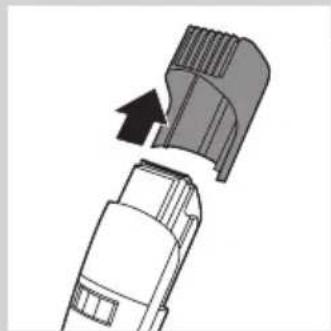
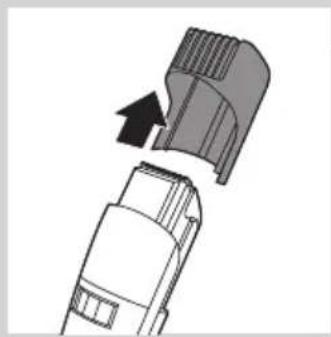
1 Remove the trimming comb.
Note: Never pull at the flexible top of the trimming comb. Always pull at the bottom part.
2 Make well-controlled movements and touch the hair lightly with the cutting unit.
Turbo function (BT7085/QT4070 only)
You can use the turbo function for greater suction power and increased cutting speed.
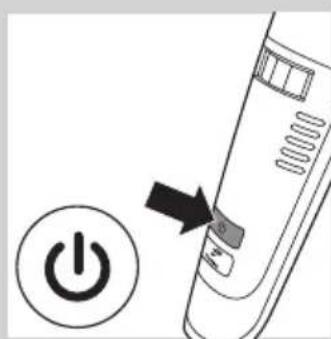
1 Switch on the appliance.
natural_image
Diagram showing a power button with an arrow pointing to it, next to a circular icon labeled 'Power' (no text or symbols on the diagram itself)
2 Press the turbo button.
When you switch off the appliance, the turbo function is deactivated automatically.
Absorbing cut hairs
The vacuum system is activated automatically as soon as you switch on the appliance. It absorbs cut hairs during every kind of use, i.e. trimming with and without trimming comb and contouring.
We advise you to empty the hair-collection chamber after each trimming session. When you trim long, dense beards, it may also be necessary to empty the hair-collection chamber during the trimming session in order to maintain optimal suction performance (see chapter 'Cleaning', section 'Hair-collection chamber').
Note: To ensure optimal functioning of the vacuum system, do not cut off more than approx. 7mm of your overall beard length at a time. If you want to cut your beard shorter, repeat the process one or more times.
Travel lock (BT7085/QT4070 only)
You can lock the appliance when you are going to travel. The travel lock prevents the appliance from being switched on by accident.
Activating the travel lock
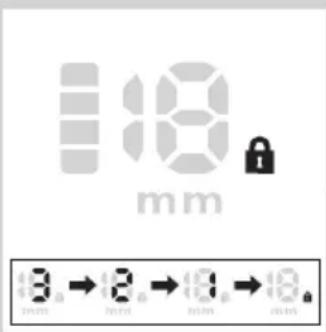
1 Press and hold the on/off button for at least 6 seconds.
The display counts down from 3 to 1. Then the travel lock indicator appears on the display to indicate that the appliance is locked.
Deactivating the travel lock
1 Press and hold the on/off button for at least 6 seconds.
The display counts down from 3 to 1. Then the travel lock indicator disappears from the display to indicate that the appliance is unlocked.
Note: The travel lock is deactivated automatically when you connect the appliance to the mains.

Cleaning
Never use scouring pads, abrasive cleaning agents or aggressive liquids such as alcohol, petrol or acetone to clean the appliance.
Do not immerse the appliance in water or any other liquid, nor rinse it under the tap.
Hair-collection chamber
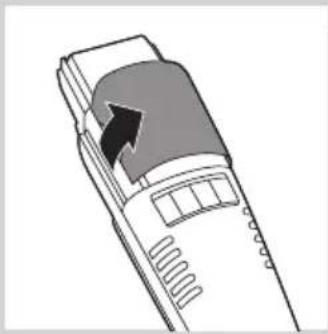
natural_image
Diagram of a device with an arrow pointing to a component, no text or symbols present1 Switch off the appliance.
2 Open the lid of the hair-collection chamber.

natural_image
Technical illustration of a mechanical device with a tool inserted, showing internal components and motion (no text or symbols)3 Shake the hairs out of the hair-collection chamber and/or remove them with the cleaning brush supplied.

natural_image
Diagram of a mechanical device with a tool inserted into a container (no text or symbols visible)4 Clean the filter inside the hair-collection chamber with the cleaning brush supplied.
Never use sharp or hard objects to clean the filter, to avoid damaging it.
5 Close the lid of the hair-collection chamber.
Appliance

natural_image
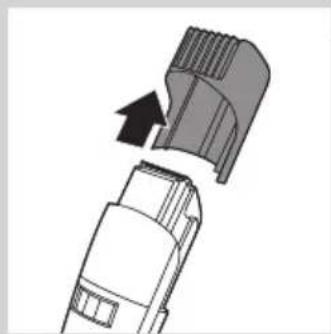
Diagram of a mechanical component with an arrow indicating direction (no text or symbols present)1 Pull the trimming comb off the appliance.

natural_image
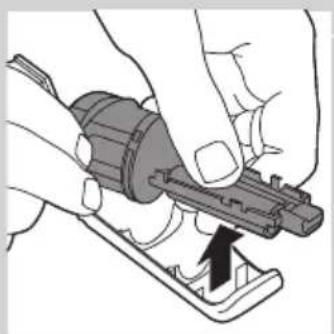
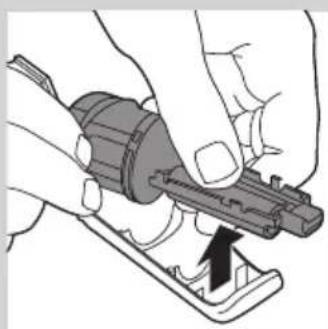
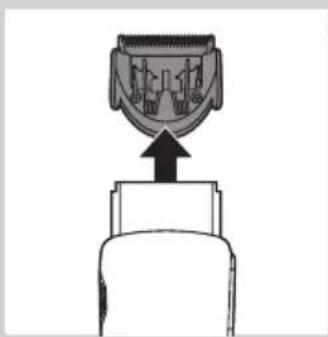
Simple line drawing of a mechanical component with an upward arrow (no text or symbols)2 Pull the cutting unit off the appliance.
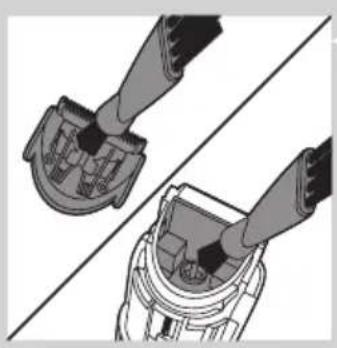
natural_image
Technical illustration of two mechanical components with no visible text or symbols3 Clean the cutting unit and the inside of the appliance with the cleaning brush supplied.

natural_image
Diagram of a mechanical component with a downward arrow indicating compression or disassembly (no text or symbols present)4 Put the cutting unit and the trimming comb back onto the appliance ('click').
Storage
1 BT7085 only: Put the appliance in the storage pouch supplied.
2 Store the appliance in a safe and dry place.
Ordering accessories
To buy accessories or spare parts, visit www.shop.philips.com/service or go to your Philips dealer. You can also contact the Philips Consumer Care Centre in your country (see the worldwide guarantee leaflet for contact details).
Environment
- Do not throw away the appliance with the normal household waste at the end of its life, but hand it in at an official collection point for recycling. By doing this, you help to preserve the environment.

natural_image
Symbol of a waste bin with no text or labels, crossed by two crossed lines and a solid rectangle below (no readable text or symbols)ENGLISH ^12

- The built-in rechargeable battery contains substances that may pollute the environment. Always remove the battery before you discard and hand in the appliance at an official collection point. Dispose of the battery at an official collection point for batteries. If you have trouble removing the battery, you can also take the appliance to a Philips service centre. The staff of this centre will remove the battery for you and will dispose of it in an environmentally safe way.
Removing the rechargeable battery

natural_image
Diagram of a device with a highlighted component and arrow, no text or symbols presentDo not connect the appliance to the mains again after you have opened it.
Follow the steps below to remove the rechargeable battery.
1 Disconnect the appliance from the mains and let the appliance run until the motor stops.
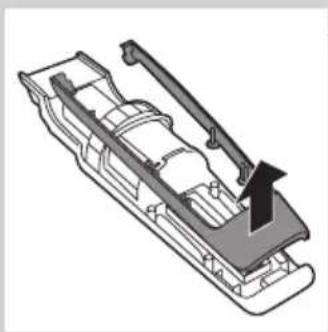
2 Open the lid of the hair-collection chamber.
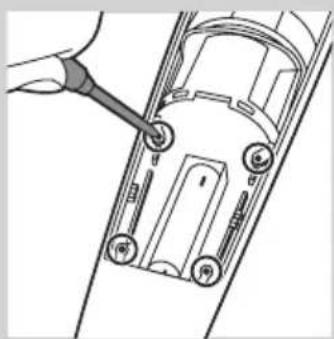
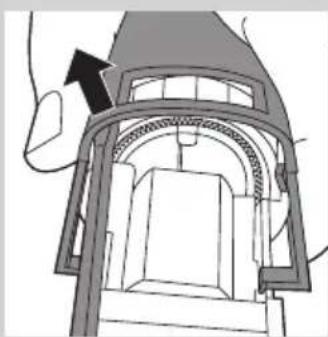
3 Remove the 4 screws inside the hair-collection chamber with a screwdriver.
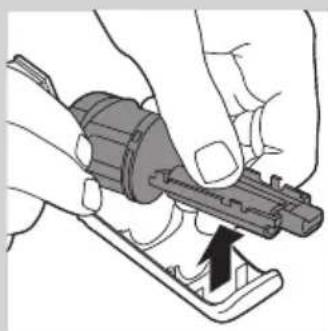
4 Pull the hair-collection chamber out of the appliance with some force.
5 To remove the front panel, wedge a screwdriver between the front panel and the inside of the appliance.

natural_image
Line drawing of a car front view with a hand using a screwdriver to mark the point (no text or symbols)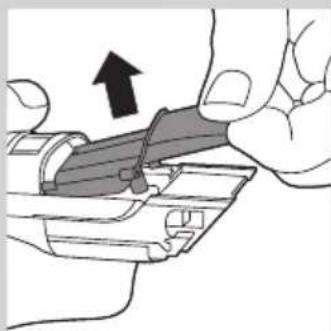
natural_image
Illustration of a hand holding a mechanical component with an arrow indicating direction (no text or symbols present)
natural_image
Technical diagram of a mechanical assembly with an arrow indicating direction (no text or symbols present)
natural_image
Technical line drawing of a mechanical assembly with a tool inserted, showing no text or symbols6 Remove the 4 screws on the inside of the appliance.

natural_image
Technical illustration of a vehicle chassis with internal components and an arrow indicating motion (no text or symbols)7 Remove the inner panel.

natural_image
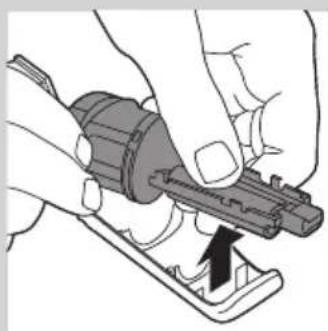
Close-up of hands using a tool to adjust or install a mechanical component (no text or symbols visible)8 Remove the printed circuit board with the rechargeable battery connected to it.
9 Cut the wires between the printed circuit board and the rechargeable battery.
Guarantee and support
If you need information or support, please visit www.philips.com/support or read the separate worldwide guarantee leaflet.
Introducción
natural_image
No smoking sign with faucet symbol (no text)Advertencia
natural_image
Diagram showing a plug inserted into a cable with an arrow indicating direction, and an inset showing a plug inserted into a socket (no text or symbols present)

natural_image
Line drawing of a handheld electronic device with a battery icon and star rating (no text or symbols)
natural_image
Illustration of a hairpin being inserted into a socket, with an inset showing the socket plug (no text or symbols present)
natural_image
Illustration of a handheld hairbrush with a circular inset showing a battery and sparkles (no text or symbols)natural_image
Illustration of a remote control device with a battery icon and a circular indicator (no text or symbols)Batería baja
natural_image
Technical illustration of a mechanical component with an arrow indicating direction, showing internal structure (no text or symbols)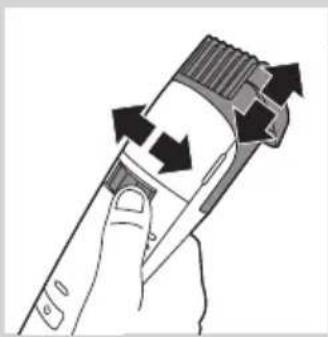
natural_image
Illustration of a hand holding a pen with arrows indicating motion or movement (no text or symbols)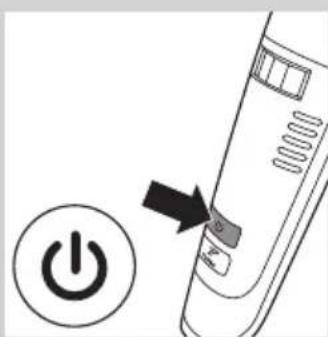
natural_image
Diagram showing a power button with an arrow pointing to a device component (no text or symbols present)

natural_image
Diagram of a mechanical component with an arrow indicating direction (no text or symbols present)natural_image
Diagram of a power button with an arrow pointing to it, no text or symbols presentnatural_image
Diagram showing two steps of a vacuum cleaner's internal structure, with no visible text or symbols.natural_image
Technical illustration of a mechanical device with a tool inserted, showing internal components and motion (no text or symbols)
natural_image
Diagram of a container with a tool inserted into the top, showing granular contents (no text or symbols)natural_image
Diagram of a mechanical component with an arrow indicating direction (no text or symbols present)natural_image
Diagram of a connector with an upward arrow, no text or symbols presentnatural_image
Diagram showing two mechanical components with fasteners, one connected to a central housing and the other to a device (no text or symbols present)natural_image
Diagram of a mechanical component with internal structure and downward arrow, no text or symbols presentnatural_image
Symbol of a trash bin crossed with no visible text or labelsnatural_image
Diagram of a handheld device with an arrow indicating direction (no text or symbols present)natural_image
Line drawing of a car front view with a hand using a screwdriver to mark the point (no text or symbols)natural_image
Illustration of a hand holding a mechanical component with an arrow indicating direction (no text or symbols present)natural_image
Cross-sectional diagram of a mechanical or architectural component with an arrow indicating direction (no text or symbols present)natural_image
Diagram of a mechanical assembly with a tool inserted, showing components inside a vehicle chassis (no text or symbols)natural_image
Technical illustration of a vehicle chassis with structural components and an arrow indicating motion (no text or symbols)natural_image
Illustration of hands using a tool to adjust or install a mechanical component (no text or symbols visible)natural_image
No sign depicting a faucet with a diagonal line and a showerhead, commonly used in public safety or fire prevention measures.Avertissement
Charge (BT7085/QT4070)
natural_image
Diagram of a handheld device with a battery icon and a circular indicator (no text or symbols)natural_image
Diagram showing a medical or dental tool interacting with an electrical socket, with an inset close-up of the socket (no text or symbols present)natural_image
Illustration of a handheld electric shaver with a circular inset showing a battery symbol (no text or labels)natural_image
Illustration of a remote control device with a battery icon and a circular button (no text or symbols)Piles faibles
natural_image
Technical illustration of a mechanical component with an arrow indicating direction, showing internal structure (no text or symbols)natural_image
Illustration of a hand holding a handheld device with arrows indicating rotation or movement (no text or symbols)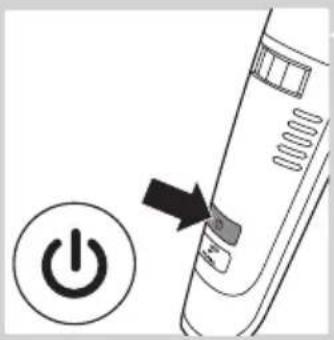
natural_image
Diagram of a power button with an arrow pointing to it, no text or symbols present
natural_image
Illustration of a person applying hair to a brush, with a magnified inset showing hair texture and directional arrows (no text or symbols)

natural_image
Diagram of a mechanical component with an arrow indicating direction (no text or symbols present)natural_image
Diagram of a power button with an arrow pointing to it, no text or symbols present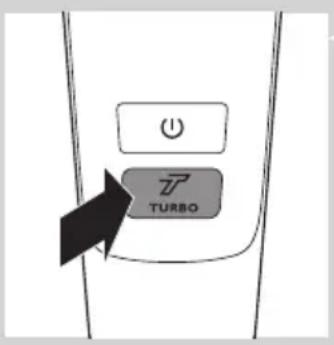
natural_image
Illustration of a handheld device with a black arrow pointing to the top portion of its cover (no text or symbols present)natural_image
Technical illustration of a mechanical device with a tool inserted, showing internal components and motion (no text or symbols)natural_image
Diagram of a container with a tool inserted into the top container, showing granular material inside (no text or symbols)natural_image
Diagram of a mechanical component with an arrow indicating direction (no text or symbols present)natural_image
Diagram of a mechanical component with an upward arrow, no text or symbols presentnatural_image
Technical illustration of two mechanical components with connectors, showing assembly or alignment (no text or symbols)natural_image
Diagram of a mechanical component with a downward arrow indicating process (no text or symbols)natural_image
Symbol of a trash bin with crossed lines indicating no waste or discharge, and a solid black rectangle below (no text or labels)natural_image
Symbol of a trash bin crossed with two crossed lines, representing no waste or discharge (no text or labels)natural_image
Diagram of a device with a black arrow pointing to a component, no text or symbols presentnatural_image
Line drawing of a car front view with a hand pointing to the side panel (no text or symbols)
natural_image
Illustration of a hand holding a mechanical component with an arrow indicating direction (no text or symbols present)natural_image
Technical diagram of a mechanical assembly with an arrow indicating direction (no text or symbols present)natural_image
Diagram of a mechanical assembly with a tool inserted, showing internal components and mounting holes (no text or symbols)natural_image
Technical illustration of a vehicle chassis with structural components and an arrow indicating motion direction (no text or symbols)natural_image
Close-up of hands using a tool to adjust or install a mechanical component (no text or symbols visible)natural_image
Prohibition sign showing a faucet without a shower, enclosed in a circle (no text or symbols)Peringatan
natural_image
Diagram of a handheld device with a battery icon and a circular indicator (no text or symbols)natural_image
Diagram showing a medical or electrical device with an arrow pointing to a small component and an inset showing a plug (no text or symbols present)natural_image
Illustration of a handheld electric shaver with a circular inset showing a battery symbol (no text or labels)natural_image
Illustration of a remote control with a battery icon and a circular button (no text or symbols)natural_image
Technical illustration of a mechanical component with an arrow indicating direction, showing internal structure (no text or symbols)natural_image
Illustration of a hand holding a handheld device with arrows indicating rotation or movement (no text or symbols)
natural_image
Diagram of a power button with an arrow pointing to it, no text or symbols present
natural_image
Illustration of a person applying hair to a brush, with a magnified inset showing hair texture and directional arrows (no text or symbols)

natural_image
Diagram of a mechanical component with an arrow indicating direction (no text or symbols present)3 Hidupkan alat.
natural_image
Diagram of a power button with an arrow pointing to it, no text or symbols present
2 Tekan tombol turbo.
Mengaktifkan travel lock
natural_image
Illustration of a handheld device with a black arrow pointing to the cover area (no text or symbols)natural_image
Technical illustration of a mechanical device with a tool inserted, showing internal components and motion (no text or symbols)natural_image
Diagram of a mechanical device with a tool inserted into a container (no text or symbols visible)natural_image
Diagram of a mechanical component with an arrow indicating direction (no text or symbols present)natural_image
Diagram of a mechanical component with an upward arrow, no text or symbols presentnatural_image
Technical illustration of two mechanical components with connectors, showing assembly or alignment (no text or symbols)natural_image
Diagram of a mechanical component with a downward arrow indicating compression or disassembly (no text or symbols present)natural_image
Symbol of a trash bin crossed with a diagonal line and a horizontal bar below (no text or numbers present)natural_image
Symbol of a trash bin crossed out by two crossed lines, representing no waste or discharge (no text or labels)natural_image
Diagram of a handheld device with an arrow pointing to the internal structure (no text or symbols)natural_image
Line drawing of a car front view with a hand using a screwdriver to mark the point (no text or symbols)natural_image
Illustration of a hand holding a mechanical component with an arrow indicating direction (no text or symbols present)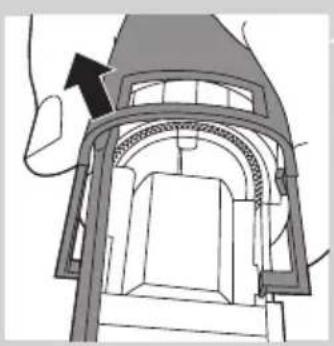
natural_image
Technical diagram of a mechanical assembly with an arrow indicating direction (no text or symbols present)natural_image
Diagram of a car interior with a hand adjusting a component (no text or symbols visible)natural_image
Technical illustration of a vehicle chassis with structural components and an arrow indicating motion (no text or symbols)7 Lepaskan panel dalam.

natural_image
Close-up of hands using a tool to adjust or install a mechanical component (no visible text or symbols)natural_image
Prohibition sign showing a faucet without a shower, enclosed in a circle (no text or symbols)natural_image
Diagram showing a plug inserted into a cable with an arrow indicating direction, and an inset of a socket connected to a wall (no text or symbols)

natural_image
Line drawing of a remote control device with a battery icon and a circular indicator (no text or symbols)배터리 부족
natural_image
Diagram showing a cable being inserted into a plug, with an inset showing the plug socket (no text or symbols present)natural_image
Illustration of a handheld electric shaver with an inset showing a battery and sparkles (no text or symbols)natural_image
Illustration of a remote control device with a battery icon and a circular button (no text or symbols)배터리 부족
natural_image
Technical diagram of a mechanical component with an arrow indicating direction, showing internal structure (no text or symbols)natural_image
Hand holding a handheld device with arrows indicating rotation or movement (no text or symbols)natural_image
Diagram of a power button with an arrow pointing to it, next to a circular icon labeled 'Power' (no text or symbols on the diagram itself)3 제품의 전원을 켜십시오.


natural_image
Diagram of a mechanical component with an arrow indicating direction (no text or symbols present)
natural_image
Diagram showing a power button with an arrow pointing to it, next to a circular icon labeled 'Power' (no text or symbols on the diagram itself)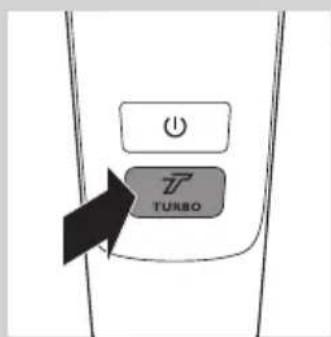
natural_image
Illustration of a handheld device with an arrow pointing to the top panel (no text or symbols visible)natural_image
Technical illustration of a mechanical device with a tool interacting with it, showing internal components and motion (no text or symbols)natural_image
Diagram of a container with a tool inserted into the top, showing granular material inside (no text or symbols)natural_image
Diagram of a mechanical component with an arrow indicating direction (no text or symbols present)natural_image
Simple line drawing of a mechanical component with an upward arrow, no text or symbols present.natural_image
Technical illustration of two mechanical components with connectors, showing assembly or alignment (no text or symbols)natural_image
Symbol of a trash bin crossed with no text or numbers, representing waste sorting or disposal (no text present)natural_image
Diagram of a device with an arrow pointing to a component, no text or symbols present
natural_image
Line drawing of a car front view with a hand using a screwdriver to mark the point (no text or symbols)
natural_image
Illustration of a hand holding a mechanical component with an arrow indicating direction (no text or symbols present)
natural_image
Technical diagram of a mechanical assembly with an arrow indicating direction (no text or symbols present)natural_image
Technical diagram of a mechanical component with a tool inserted, showing internal parts and mounting holes (no text or symbols)natural_image
Technical illustration of a vehicle chassis with an arrow indicating motion direction (no text or symbols present)7 내부 패널을 분리하십시오.

natural_image
Illustration of hands using a tool to adjust or install a mechanical component (no text or symbols visible)natural_image
Prohibition sign showing a faucet without a shower, enclosed in a circle (no text or symbols)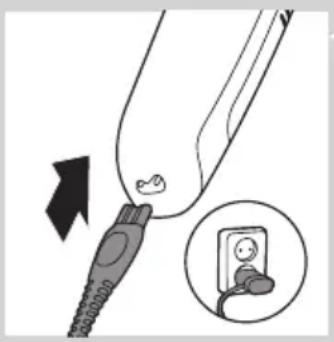
1 Matikan perkakas sebelum anda mengecasnya.
natural_image
Line drawing of a handheld electronic device with a battery icon and star rating (no text or symbols)Pengecasan (QT4050)
natural_image
Diagram showing a medical device with an arrow pointing to a small object, and an inset showing a socket connected to a wall (no text or symbols present)1 Matikan perkakas sebelum anda mengecasnya.
natural_image
Line drawing of a handheld electric shaver with an inset showing a rectangular device and sparkles (no text or symbols)Apabila anda mula mengecas perkakas kosong, lampu pengecasan akan berkelip hijau.
natural_image
Illustration of a remote control device with a battery icon and a circular indicator (no text or symbols)Bateri lemah
- Apabila bateri hampir habis (ketika hanya terdapat baki 7 minit perapian atau kurang), lampu pengecasan akan berkelip jingga.
Perapian berkord
natural_image
Technical illustration of a mechanical component with an arrow indicating direction, showing internal structure (no text or symbols)natural_image
Illustration of a hand holding a pen with arrows indicating motion or movement (no text or symbols)2 Putar gelang pelarasan (Kunci Zum Tepat™) kepada tetapan panjang rambut yang dikehendaki.
natural_image
Diagram showing a power button with an arrow pointing to a device component (no text or symbols present)natural_image
Diagram of a mechanical component with an arrow indicating direction (no text or symbols present)natural_image
Diagram of a power button with an arrow pointing to it, no text or symbols presentnatural_image
Diagram of a device with a highlighted section and arrow, no text or symbols presentnatural_image
Technical illustration of a mechanical device with a tool interacting with it, showing internal components and motion (no text or symbols)natural_image
Diagram of a coffee maker with a brush applying powder into the cup (no text or symbols)natural_image
Diagram of a mechanical component with an arrow indicating direction (no text or symbols present)natural_image
Diagram of a mechanical component with an upward arrow, no text or symbols presentnatural_image
Diagram showing two hands inserting a connector into a socket (no text or symbols present)natural_image
Diagram of a hairbrush working on a component, showing the blade and base (no text or symbols)natural_image
Symbol of a trash bin with crossed lines indicating no waste or restriction, and a solid black rectangle below (no text or labels)natural_image
Diagram of a handheld device with an arrow pointing to the top panel (no text or symbols present)natural_image
Line drawing of a car front view with a hand using a screwdriver to mark the point (no text or symbols)natural_image
Illustration of a hand holding a tool with an arrow indicating direction (no text or symbols present)natural_image
Technical line drawing of a mechanical assembly with an arrow indicating direction (no text or symbols present)natural_image
Technical diagram of a mechanical assembly with a tool inserted, showing no text or symbolsnatural_image
Technical illustration of a vehicle chassis with an arrow indicating motion direction (no text or symbols present)natural_image
Close-up of hands using a tool to adjust or install a mechanical component (no text or symbols visible)8 Keluarkan papan litar bercetak dengan bateri boleh cas semula bersambung dengannya.
9 Potong wayar antara papan litar bercetak dan bateri boleh cas semula.
Jaminan dan sokongan
natural_image
Prohibition sign showing a faucet crossed out by a diagonal line, indicating no leakage or anti-poaching (no text present)natural_image
Diagram showing a plug inserted into a socket with an arrow indicating direction, and an inset showing a socket connected to a wall (no text or symbols present)natural_image
Illustration of a handheld electric brush with a battery icon and star rating (no text or symbols)Bateria fraca
natural_image
Illustration of a medical or electrical device with a plug and socket, showing a magnified inset of its socket (no text or symbols present)natural_image
Line drawing of a handheld electric shaver with an inset showing a rectangular component and sparkles (no text or symbols)natural_image
Line drawing of a remote control with a battery icon and a circular indicator (no text or symbols)Bateria fraca
natural_image
Technical illustration of a mechanical component with an arrow indicating direction, showing internal structure (no text or symbols)
natural_image
Illustration of a hand holding a pen with arrows indicating motion or movement (no text or symbols)

natural_image
Diagram of a mechanical component with an arrow indicating direction (no text or symbols present)natural_image
Diagram of a power button with an arrow pointing to it, no text or symbols present
natural_image
Illustration of a handheld device with a black arrow pointing to the cover area (no text or symbols)natural_image
Technical illustration of a vacuum cleaner cleaning a component with a hand operating it (no text or symbols present)natural_image
Diagram of a container with a brush applying material to the interior (no text or symbols)natural_image
Diagram of a mechanical component with an arrow indicating direction (no text or symbols present)natural_image
Diagram of a connector with an arrow indicating upward motion (no text or symbols)natural_image
Technical illustration of two mechanical components with clamps, showing assembly or mounting (no text or symbols)natural_image
Diagram of a mechanical component with a downward arrow indicating process (no text or symbols present)Encomendar acessórios
natural_image
Symbol of a trash bin crossed with no text or labelsnatural_image
Symbol of a trash bin crossed with two crossed lines, representing no waste or discharge (no text or labels)natural_image
Diagram of a mobile phone with an arrow pointing to the cover area (no text or symbols present)natural_image
Line drawing of a car front view with a hand pointing to the side panel (no text or symbols)natural_image
Illustration of a hand holding a mechanical component with an arrow indicating upward motion (no text or symbols present)natural_image
Architectural diagram of a building interior with arched windows and a hand pointing to a component (no text or symbols)natural_image
Diagram of a car interior with a tool inserted, showing no text or symbolsnatural_image
Technical line drawing of a vehicle chassis with a handle and arrow indicating motion (no text or symbols)7 Retire o painel interior.
natural_image
Illustration of hands using a tool to adjust or install a mechanical component (no text or symbols visible)natural_image
Prohibition sign showing a faucet crossed out by a diagonal line, indicating no leakage or disinfection (no text present)ข้อควรระวัง
natural_image
Illustration of a handheld device next to a circular icon showing a battery (no text or symbols present)natural_image
Diagram showing a medical device with a plug inserted, and an inset view of a socket connected to a plug (no text or symbols present)
natural_image
Illustration of a handheld electric shaver with an inset showing a battery and a magnified view of its internal structure (no text or symbols present)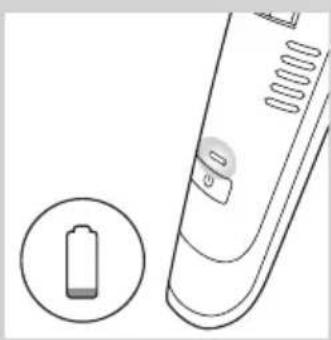
natural_image
Illustration of a remote control device with a battery icon and a circular button (no text or symbols)natural_image
Technical illustration of a mechanical component with an arrow indicating direction, showing internal parts (no text or symbols)natural_image
Illustration of a hand holding a handheld device with arrows indicating rotation or movement (no text or symbols)natural_image
Line drawing of a power button with an arrow pointing to it, no text or symbols present3 เปิดสวิตช์เครื่อง
natural_image
Diagram of a mechanical component with an arrow indicating direction (no text or symbols present)1 ถอดหวีส าหรับเล็ม
natural_image
Diagram showing a power button with an arrow pointing to it, next to a circular icon labeled 'Power' (no text or symbols on the diagram itself)natural_image
Illustration of a device with a black arrow pointing to a component (no text or symbols)
natural_image
Technical illustration of a mechanical device with a tool inserted, showing internal components and motion (no text or symbols)
natural_image
Diagram of a container with a tool inserted into the top, showing granular contents (no text or symbols)natural_image
Diagram of a mechanical component with an arrow indicating direction (no text or symbols present)natural_image
Diagram of a mechanical component with an upward arrow, no text or symbols presentnatural_image
Diagram showing two mechanical components with connectors, one above and one below, connected by a diagonal line (no text or symbols)natural_image
Diagram of a mechanical component with internal structure and downward arrow, no text or symbols presentnatural_image
Symbol of a trash bin crossed with no text or symbols, representing waste sorting or disposal (no text present)natural_image
Illustration of a handheld device with an arrow pointing to the top panel (no text or symbols present)natural_image
Line drawing of a hand using a screwdriver to adjust or install a car front panel (no text or symbols)natural_image
Illustration of a hand holding a mechanical component with an arrow indicating direction (no text or symbols present)natural_image
Technical line drawing of a mechanical assembly with an arrow indicating direction (no text or symbols present)natural_image
Technical line drawing of a mechanical component with a tool inserted, showing internal parts and mounting holes (no text or symbols)natural_image
Technical illustration of a vehicle chassis with structural components and an arrow indicating direction (no text or symbols)7 ถอดจอภาพด้านใน
natural_image
Illustration of hands using a tool to adjust or install a mechanical component (no text or symbols visible)natural_image
Prohibition sign showing a faucet without a shower, enclosed in a circle (no text or symbols)natural_image
Illustration of a handheld electronic device next to a battery icon, with no visible text or symbols.natural_image
Illustration of a handheld electric shaver with a close-up inset showing a battery and a sparkles (no text or symbols)
natural_image
Illustration of a remote control with a battery icon and a circular button (no text or symbols)Pin yêu
natural_image
Technical diagram of a mechanical component with an arrow indicating direction, showing internal structure and detail (no text or symbols)natural_image
Illustration of a hand holding a pen with arrows indicating motion or movement (no text or symbols)
natural_image
Diagram of a power button with an arrow pointing to it, no text or symbols present

natural_image
Diagram of a mechanical component with an arrow indicating direction (no text or symbols present)
natural_image
Diagram showing a power button next to a device with an arrow pointing to it, no text or symbols present.3 Bật thiết bị.
natural_image
Diagram of a device with a highlighted section and arrow, no text or symbols presentnatural_image
Technical illustration of a mechanical device with a tool inserted, showing internal components and motion (no text or symbols)natural_image
Line drawing of a container with a brush applying material to the interior (no text or symbols)natural_image
Diagram of a mechanical component with an arrow indicating direction (no text or symbols present)natural_image
Simple line drawing of a mechanical component with an upward arrow, no text or symbols present.natural_image
Technical illustration of two mechanical components with connectors, showing assembly or alignment (no text or symbols)natural_image
Diagram of a mechanical component with internal structure and downward arrow, no visible text or symbolsnatural_image
Symbol of a trash bin crossed with no text or numbers, representing waste sorting or disposal (no text present)natural_image
Symbol of a trash bin crossed out by two crossed lines, representing no waste or discharge (no text or labels)natural_image
Illustration of a handheld device with an arrow pointing to the top panel (no text or symbols present)natural_image
Line drawing of a car front view with a hand pointing to the side panel (no text or symbols)natural_image
Close-up of a hand holding a mechanical component with an arrow indicating direction (no text or symbols present)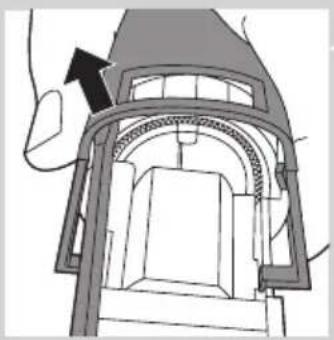
natural_image
Technical line drawing of a mechanical assembly with an arrow indicating direction (no text or symbols present)5 public sector public sector public sector public sector public sector public sector public sector public sector public sector public sector public sector public sector public sector public sector public sector public sector public sector public sector public sector public sector public sector public sector public sector public sector public sector public sector public sector public sector public sector public sector public sector public sector public sector public sector public sector public sector public sector public sector public sector public sector public sector public sector public sector public sector public sector public sector public sector public sector public sector public sector public sectors, government, state, and other government sectors.
natural_image
Technical line drawing of a mechanical component with a tool inserted, showing internal parts and mounting holes (no text or symbols)natural_image
Technical illustration of a vehicle chassis with structural components and an arrow indicating direction (no text or symbols)natural_image
Illustration of hands using a tool to adjust or install a mechanical component (no text or symbols visible)natural_image
Prohibition sign showing a faucet crossed out by a diagonal line, indicating no fire or water discharge (no text present)警告
natural_image
Illustration of a medical or dental procedure showing a connector inserted into a device with an inset showing a baby's seat (no text or symbols present)
natural_image
Line drawing of a handheld electronic device with a circular icon showing a battery and a star symbol (no text or labels)充電 (QT4050)

natural_image
Illustration of a medical or dental tool with an arrow pointing to a connector and an inset showing a close-up of the device (no text or symbols present)natural_image
Illustration of a handheld electronic device with a close-up inset showing a rectangular component and a starburst effect (no text or symbols)natural_image
Illustration of a remote control device with a battery icon and a circular indicator (no text or symbols)電量不足
natural_image
Technical illustration of a mechanical component with an arrow indicating direction, showing internal structure (no text or symbols)natural_image
Illustration of a hand holding a handheld device with arrows indicating rotation or movement (no text or symbols)natural_image
Diagram of a power button with an arrow pointing to it, no text or symbols present3 開啟產品。
natural_image
Illustration of a man brushing teeth with a brush, showing a circular inset highlighting a tooth area with arrows (no text or symbols)natural_image
Diagram of a mechanical component with an arrow indicating direction (no text or symbols present)創造鬍渣造型
natural_image
Diagram of a power button with an arrow pointing to it, no text or symbols present
natural_image
Diagram of a device with an arrow pointing to a component, no text or symbols present1 關閉產品。
2 開啟鬍渣收集室的蓋子。
natural_image
Technical illustration of a mechanical device with a tool inserted, showing internal components and motion (no text or symbols)繁體中文102

natural_image
Line drawing of a container with a tool inserted, showing liquid level and contents (no text or symbols)natural_image
Diagram of a mechanical component with an arrow indicating direction (no text or symbols present)1 將修整梳從產品上取下。

natural_image
Diagram of a connector with an upward arrow indicating direction (no text or symbols)2 將刀組從產品上取下。

natural_image
Technical illustration of two mechanical components with no visible text or symbolsnatural_image
Diagram of a mechanical component with internal structure and downward arrow, no visible text or symbolsnatural_image
Symbol of a trash bin crossed with no text or labels, representing waste sorting or disposal (no text present)natural_image
Illustration of a handheld device with an arrow pointing to the top panel (no text or symbols present)拆開產品後,請勿再次將產品連接電源。
依照下列步驟取出充電式電池。
natural_image
Line drawing of a car front view with a hand using a screwdriver to mark the point on the side (no text or symbols)natural_image
Illustration of a hand holding a mechanical component with an arrow indicating direction (no text or symbols present)4 使力從產品上拔下鬍渣收集室。

natural_image
Architectural diagram of a building interior with arched windows and a hand pointing to a component (no text or symbols)natural_image
Technical line drawing of a mechanical assembly with a tool inserted, showing no text or symbols6 取出產品內部的 4 個螺絲。

natural_image
Technical illustration of a vehicle chassis with structural components and an arrow indicating direction (no text or symbols)7 拆下內護板。
natural_image
Close-up of hands using a tool to adjust or install a mechanical component (no text or symbols visible)natural_image
Prohibition sign showing a faucet without a shower, enclosed in a circle (no text or symbols)注意
natural_image
Diagram showing a medical device with an arrow pointing to a small anatomical feature, and an inset showing a socket connected to a wall (no text or symbols present)natural_image
Illustration of a handheld electronic device with a battery icon and a circular indicator (no text or symbols)电池电量不足
natural_image
Illustration of a handheld electronic device with a circular inset showing a rectangular component and starburst effect (no text or symbols)natural_image
Illustration of a remote control device with a battery icon and circular button (no text or symbols)电池电量不足
natural_image
Technical illustration of a mechanical component with an arrow indicating direction, showing internal structure and a magnified inset (no text or symbols)natural_image
Hand holding a handheld device with arrows indicating rotation or movement (no text or symbols)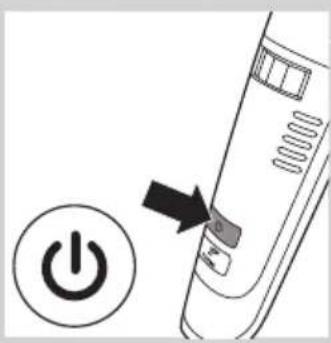
3 启动产品。

natural_image
Diagram of a mechanical component with an arrow indicating direction (no text or symbols present)natural_image
Diagram showing a power button with an arrow pointing to it, next to a circular icon labeled 'Power' (no text or symbols on the diagram itself)
2 按下高速按钮。
关闭本产品后,高速功能将自动禁用。
吸入剪下的须发
natural_image
Illustration of a handheld device with a black arrow pointing to the cover area (no text or symbols)natural_image
Technical illustration of a mechanical device with a hand inserting a component into a housing (no text or symbols visible)natural_image
Line drawing of a mechanical device with a tool inserted into a container (no text or symbols)natural_image
Diagram of a mechanical component with an arrow indicating direction (no text or symbols present)1 从产品中拉出修剪梳。
natural_image
Diagram of a mechanical component with an upward arrow indicating force or direction (no text or symbols)2 从产品中拉出修剪部件。

natural_image
Diagram showing two hands inserting a connector into a device (no text or symbols present)natural_image
Symbol of a waste bin with crossed lines indicating no waste, and a solid black rectangle below (no text or labels)natural_image
Illustration of a handheld device with a black arrow pointing to the top panel (no text or symbols)natural_image
Line drawing of a car front view with a hand using a screwdriver to mark the point on the side (no text or symbols)natural_image
Illustration of a hand holding a mechanical component with an arrow indicating direction (no text or symbols present)4 稍微用力将胡茬储藏室从产品中拔出。
natural_image
Architectural diagram of a building interior with arched windows and a hand pointing to a component (no text or symbols)natural_image
Technical line drawing of a mechanical assembly with a tool interacting with a component (no text or symbols visible)6 从本产品内部取出 4 颗螺钉。
natural_image
Technical illustration of a vehicle chassis with structural components and an arrow indicating direction (no text or symbols)7 取出内侧面板。
natural_image
Close-up of hands using a tool to adjust or install a mechanical component (no text or symbols visible)natural_image
Illustration of a hand holding a mechanical component with an arrow indicating direction (no text or symbols present)
natural_image
Technical diagram of a mechanical assembly with an arrow indicating direction (no text or symbols present)
natural_image
Technical line drawing of a mechanical component with a tool inserted, showing internal parts and mounting holes (no text or symbols)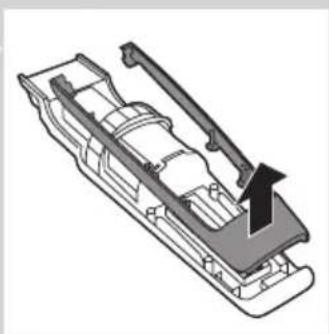
natural_image
Technical illustration of a vehicle chassis with an arrow indicating motion direction (no text or symbols)
natural_image
Close-up of hands using a tool to adjust or install a mechanical component (no visible text or symbols)ضمانت و پشنيباني
نگهداری
natural_image
Symbol of a waste bin with crossed lines indicating no waste, and a solid black rectangle below (no text or labels)natural_image
Illustration of a handheld device with an arrow pointing to the top panel (no text or symbols)natural_image
Line drawing of a car front view with a hand using a screwdriver to mark the point (no text or symbols)natural_image
Diagram of a container with a brush applying granular material, no text or symbols presentnatural_image
Diagram showing a mechanical component with an arrow indicating direction (no text or symbols present)natural_image
Diagram of a connector with an arrow pointing upward, no text or symbols presentnatural_image
Diagram showing two mechanical components with connectors, one split and one assembled (no text or symbols)natural_image
Illustration of a handheld device with an arrow pointing to the top panel (no text or symbols)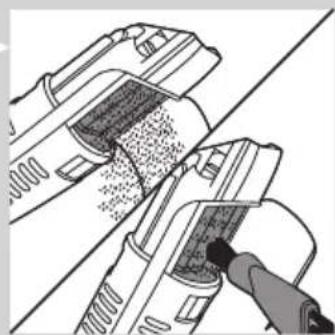
natural_image
Technical illustration of a vacuum cleaner with meshing and cleaning process (no text or symbols)natural_image
Diagram of a mechanical component with an arrow indicating direction (no text or symbols present)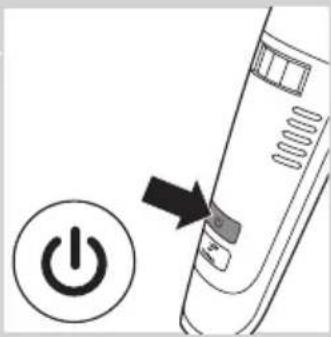
natural_image
Diagram of a power button with an arrow pointing to it, no text or symbols presentnatural_image
Technical illustration of a mechanical component with an arrow indicating direction, showing internal structure (no text or symbols)
natural_image
Hand holding a handheld device with arrows indicating rotation or movement (no text or symbols visible)
natural_image
Diagram of a power button with an arrow pointing to it, no text or symbols present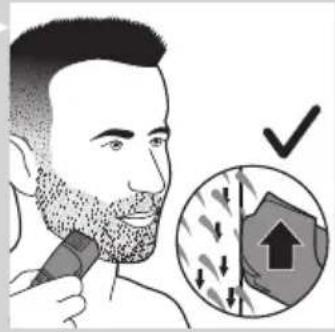

natural_image
Diagram showing a cable being inserted into a socket with an arrow indicating direction (no text or symbols present)
natural_image
Line drawing of a handheld electric shaver with an inset showing a rectangular component (no text or symbols)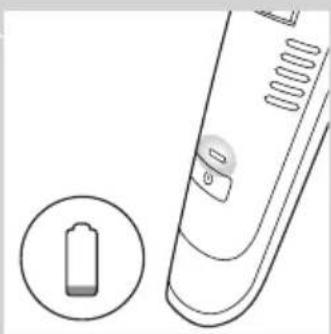
natural_image
Illustration of a remote control device with a battery icon and a circular button (no text or symbols) | |
 |  |
 |  |
اح祗اط
natural_image
Diagram showing a medical device with an arrow pointing to a plug and a close-up of a socket (no text or symbols present)

m m


natural_image
Line drawing of a handheld electronic device with a battery icon and control panel (no text or symbols)مقدمه
The image contains no legible text or symbols.
natural_image
Prohibition sign showing a faucet without a shower, enclosed in a circle (no text or symbols)natural_image
Technical diagram of a mechanical assembly with an arrow indicating direction (no text or symbols present)
natural_image
Technical line drawing of a mechanical component with a tool inserted, showing internal parts and mounting holes (no text or symbols)
natural_image
Technical illustration of a vehicle chassis with a lever and load, showing internal components without any text or symbols.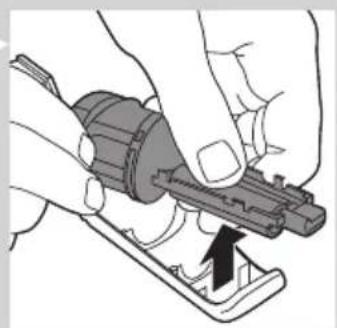
natural_image
Close-up of hands using a tool to adjust or install a mechanical component (no text or symbols visible)الضمان والدعم
natural_image
Symbol of a trash bin with crossed lines indicating no waste or discharge (no text or labels)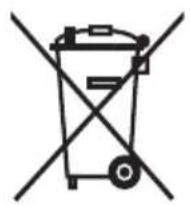
natural_image
Symbol of a trash bin crossed out by two diagonal lines (no text or numbers present)natural_image
Illustration of a handheld device with an arrow pointing to the top panel (no text or symbols)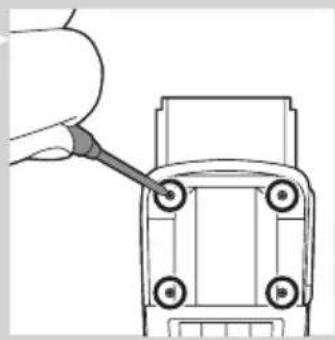
natural_image
Line drawing of a car front view with a hand pointing to the side panel (no text or symbols)natural_image
Illustration of a hand holding a mechanical component with an arrow indicating direction (no text or symbols present)الجهاز
natural_image
Illustration of a handheld device with a black arrow pointing to the cover area (no text or symbols)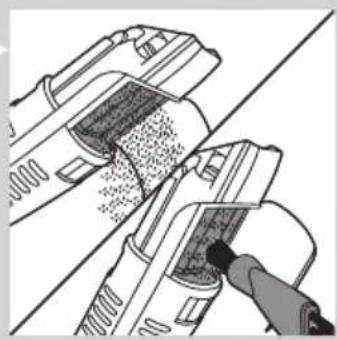
natural_image
Technical illustration of a mechanical device with a tool interacting with it (no text or symbols visible)
natural_image
Diagram of a container with granular material being inserted, no text or symbols presentnatural_image
Diagram of a mechanical component with an arrow indicating direction (no text or symbols present)
natural_image
Diagram of a power button with an arrow pointing to it, no text or symbols present
تهذيب الذقن
natural_image
Technical illustration of a mechanical component with an arrow indicating direction, showing internal structure (no text or symbols)
natural_image
Illustration of a hand holding a hairbrush with arrows indicating direction (no text or symbols)
natural_image
Diagram of a power button with an arrow pointing to it, no text or symbols present
natural_image
Diagram showing a medical device with an arrow pointing to a small object, and an inset showing a close-up of a device (no text or symbols present)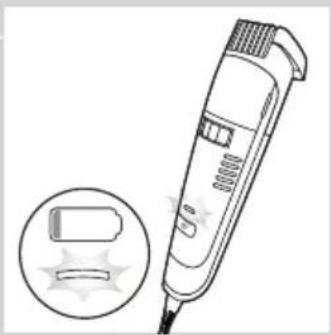
natural_image
Line drawing of a handheld electronic device with an inset showing a battery and sparkles (no text or symbols)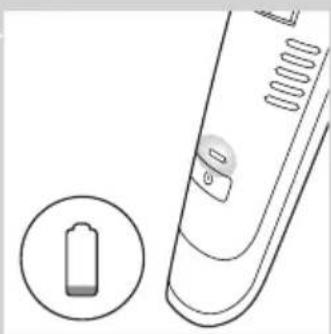
natural_image
Illustration of a remote control device with a battery icon and circular button (no text or symbols) | |
| mm | mm |
 | |
natural_image
Line drawing of a handheld electronic device with a battery icon and a circular indicator (no text or symbols)مقدمة
natural_image
Prohibition sign showing a faucet crossed out by a diagonal line, indicating no fire or water discharge (no text present)
- Always here to help you
- User manual
- PHILIPS
- Introduction
- www.philips.com/welcome.
- General description (Fig. 1)
- Important
- Danger
- Warning
- Caution
- General
- Electromagnetic fields (EMF)
- Preparing for use
- Charging (BT7085/QT4070)
- ENGLISH6
- Battery low
- Charging (QT4050)
- Corded trimming
- Using the appliance
- Display indications (BT7085/QT4070 only)
- Beard trimming
- Trimming with trimming comb
- ENGLISH8
- Creating a stubble look
- Trimming without trimming comb
- Turbo function (BT7085/QT4070 only)
- Absorbing cut hairs
- Travel lock (BT7085/QT4070 only)
- Activating the travel lock
- Deactivating the travel lock
- Cleaning
- Hair-collection chamber
- Appliance
- Storage
- Ordering accessories
- Environment
- ENGLISH 12
- Removing the rechargeable battery
- Guarantee and support
- Introducción
- Advertencia
- Batería baja
- Avertissement
- Charge (BT7085/QT4070)
- Piles faibles
- Peringatan
- Tekan tombol turbo.
- Mengaktifkan travel lock
- 배터리 부족
- Pengecasan (QT4050)
- Bateri lemah
- Perapian berkord
- Jaminan dan sokongan
- Bateria fraca
- Encomendar acessórios
- ข้อควรระวัง
- Pin yêu
- 警告
- 充電 (QT4050)
- 電量不足
- 創造鬍渣造型
- 繁體中文102
- 注意
- 电池电量不足
- 吸入剪下的须发
- نگهداری
- اح祗اط
- مقدمه
- The image contains no legible text or symbols.
- الجهاز
- تهذيب الذقن
- مقدمة
Brand : PHILIPS
Model : Series 7000 QT4050
Category : Beard trimmer