
TSI802810 - Iron SIEMENS - Free user manual and instructions
Find the device manual for free TSI802810 SIEMENS in PDF.


| Type | Steam iron |
| Brand | Siemens |
| Model | TSI802810 |
| Power | 2400 W |
| Water tank capacity | 300 ml |
| Soleplate material | Ceramic |
| Continuous steam output | Up to 45 g/min |
| Steam shot | Up to 170 g/min |
| Spray function | Yes |
| Vertical steam | Yes |
| Anti-calc system | Self-clean function |
| Auto shut-off | Yes |
| Cord length | 2 m |
| Weight | 1.2 kg |
| Dimensions (W x D x H) | 30 x 12 x 15 cm |
| Voltage | 220-240 V |
| Frequency | 50/60 Hz |
| Warranty | 2 years |
Frequently Asked Questions - TSI802810 SIEMENS
User questions about TSI802810 SIEMENS
0 question about this device. Answer the ones you know or ask your own.
Ask a new question about this device
Download the instructions for your Iron in PDF format for free! Find your manual TSI802810 - SIEMENS and take your electronic device back in hand. On this page are published all the documents necessary for the use of your device. TSI802810 by SIEMENS.
USER MANUAL TSI802810 SIEMENS
Register your product online

natural_image
Illustration of an open book with blank pages and a small arrow pointing to the right page (no text or symbols visible)
| Index | |
| DEUTSCH 6 | |
| ENGLISH 20 | |
| NEDERLANDS 34 | |
| ESPAÑOL 48 | |
| PORTUGUÊS 62 | |
| ΕΛΛΗΝΙΚΑ 76 | |
| TÜRKÇE 90 | |
| POLSKI 104 | |
| РУССКИЙ 118 | |
| العربية | 145 |
natural_image
Illustration of an open book with blank pages and a bookmark (no text or symbols visible)

natural_image
Line drawing of a pair of trousers with a zipper, showing front and side views (no text or symbols)

natural_image
Line drawing of a hand pressing down on an iron iron (no text or symbols)
„allTextile”-Programm


natural_image
Line drawing of an iron (£) with steam rising, next to a device labeled 'ET' (no text or symbols on the iron itself)
natural_image
Line drawing of a hand using an iron on a steam iron, with steam spilling out (no text or symbols)


natural_image
Illustration of a hand using a power tool to adjust or install a mechanical component, with no visible text or symbols.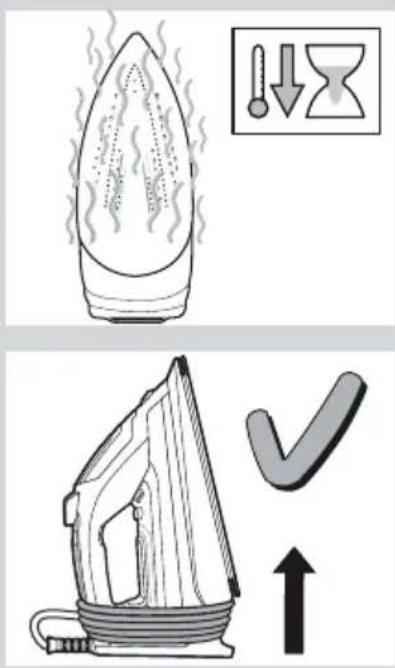
natural_image
Line drawing of a steam iron with a circular gasket (no text or symbols)


natural_image
Illustration of a hand using a power iron to clean or wear a circular object, with no visible text or symbols.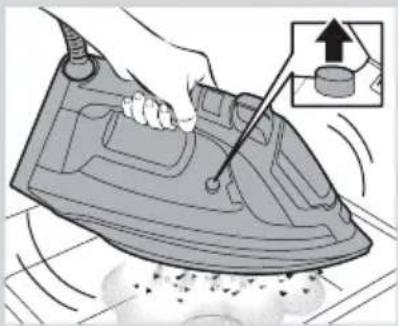
natural_image
Illustration of a hand using a power iron to clean or store floor tiles (no text or symbols visible)

natural_image
Diagram of a mechanical device with a lever and arrow indicating motion (no text or symbols)Zubehör
natural_image
Illustration of a bottle and a rectangular box, both without any text or symbols
natural_image
Line drawing of a teardrop-shaped object with a handle and pointed tip (no text or symbols)
natural_image
Line drawing of a single flannel or plastic object with internal compartments and handle (no text or symbols)Thank you for buying the IQ700 compact steam iron from Siemens.
Carefully read through the operating instructions for the appliance and safeguard them for future reference.
You can download this manual from the local home pages of Siemens.
General safety instructions
☐ The iron must not be left unattended while it is connected to the supply mains.
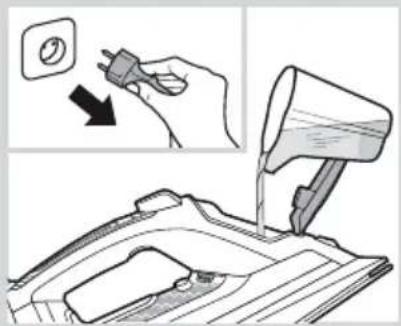
☐ Remove the plug from the socket before filling the appliance with water or before pouring out the remaining water after use.
☐ The appliance must be used and placed on a stable surface.
☐ When placed on its stand, make sure that the surface on which the stand is placed is stable.
☐ The iron should not be used if it has been dropped, if there are visible signs of damage or if it is leaking water. It must be checked by an authorized Technical Service Centre before it can be used again.
☐ With the aim of avoiding dangerous situations, any work or repair that the appliance may need, e.g. replacing a faulty mains cable, must only be carried out by qualified personnel from an Authorised Technical Service Centre.
☐ This appliance can be used by children aged from 8 years and above and persons with reduced physical, sensory or mental capabilities or lack of experience and knowledge if they have been given supervision or instruction concerning use of the appliance in a safe way and understand the hazards involved. Children shall not play with the appliance. Cleaning and user maintenance shall not be made by children without supervision.
☐ Keep the iron and its cord out of reach of children less than 8 years of age when it is energized or cooling down.
☐ This appliance is designed only for household use up to 2000m above sea level.

CAUTION. Hot surface.
Surface is liable to get hot during use.
Important notices
- This appliance has been designed exclusively for domestic use and must not be used for industrial purposes.
- This appliance must be used only for the purposes for which it was designed, i.e. as an iron. Any other use will be considered improper and consequently dangerous. The manufacturer will not be held responsible for any damage arising from misuse or improper use.
-
This appliance reaches high temperatures and produces steam during use, this could cause scalds or burns in case of improper use.
-
Do not touch the soleplate! Hold the iron by its handle.
- Do not leave the supply cord hanging over the table or ironing board, to prevent the appliance from falling.
- Do not iron clothing while it is being worn!
-
Never spray or aim the steam at persons or animals!
-
Do not allow the power cable to come into contact with sharp edges or with the soleplate when it is hot.
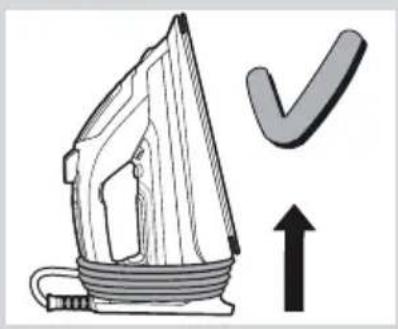
- Never rest the iron in a horizontal position when the soleplate is hot. Rest it on its heel.
- Do not touch the appliance with wet hands when in operation.
- This appliance is to be connected and used in accordance with the information stated on its characteristics plate.
- This appliance must be connected to an earthed socket. If it is absolutely necessary to use an extension cable, make sure that it is suitable for 16A and has a socket with an earth connection.
- In order to avoid that, under unfavorable mains conditions, phenomena like transient voltage drops or lighting fluctuations can happen, it is recommended that the
iron is connected to a power supply system with a maximum impedance of 0.23 Ω. If necessary, the user can ask the public power supply company for the system impedance at the interface point.
- In special environmental conditions slight instability may occur.
- The appliance must never be placed directly under the tap to fill the water tank.
- Unplug the appliance from the mains supply after each use, or if a fault is suspected.
- The electrical plug must not be removed from the socket by pulling the cable.
- Never immerse the iron in water or any other fluid.
- Do not leave the appliance exposed to weather conditions (rain, sun, frost, etc.).
- While the steam is being released, the iron produces a pumping sound. This is normal, indicating that water is being pumped to the steam chamber.
Advice on disposal
Our goods come in optimised packaging. This basically consists in using non-contaminating materials which should be handed over to the local waste disposal service as secondary raw materials. Your local town council can give you information about how to dispose of obsolete appliances.

This appliance is labelled in accordance with European Directive 2012/19/EU concerning used electrical and electronic appliances (waste electrical and electronic equipment – WEEE).
The guideline determines the framework for the return and recycling of used appliances as applicable throughout the EU.
Description

natural_image
Illustration of an open book with blank pages, no text or symbols visible- Ironing programme indicator lamps
- "startStop Control" indicator lamp
- "SET" button
- "calc'n Clean" indicator lamp
- "autoSteam" indicator lamp
- Spray button
- Shot of steam button
- Water inlet lid
- Spray nozzle
- Level mark for maximum filling
- "clean" button
- Soleplate
- Heel
- Power cable
- "steamCompressor" indicator lamps
- Steam activation trigger
Using your appliance
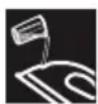
1. Filling the water tank
This appliance has been designed to use normal tap water.
Important:
Do not use additives! The addition of other liquids, such as perfume, vinegar, starch, condensation water from tumble dryers or from air conditioning systems or chemicals will damage the appliance. Any damage caused by the use of the aforementioned products will make the guarantee void!
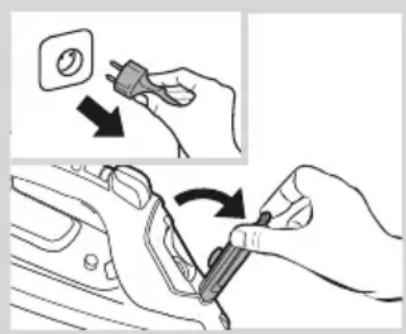
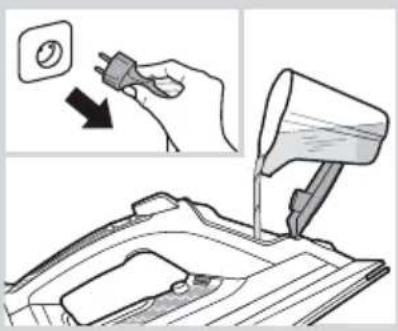
1 Unplug the iron from the mains.
2 Open the water inlet lid (8).
3 Fill the water tank. Never fill beyond the level mark for maximum filling (10)!
4 Close the water inlet lid.
Tip:
To prolong the optimum steam function, you may mix tap water with distilled water 1:1. If the tap water in your district is very hard, mix tap water with distilled water 1:2.
You can inquire about the water hardness with your local water supplier.

2. Heating
Remove any labels or protective covering from the soleplate (12).
1 Plug in the iron.
2 One beep will be heard.
3 "startStop Control" function will be activated and the indicator lamp (2) will flash.
4 The iron will shift automatically to the "autoSteam" mode and the indicator lamp (5) will remain lit continuously.
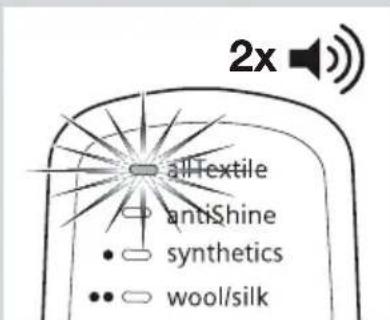
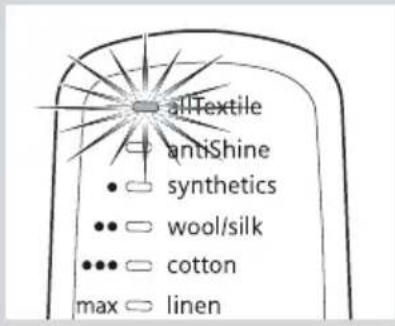
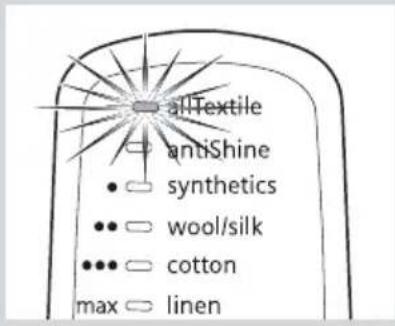
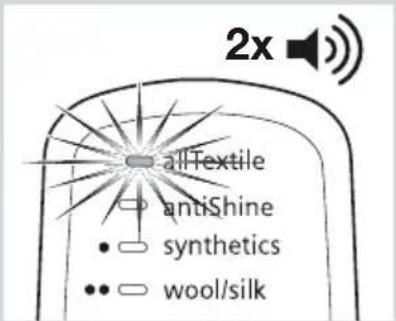
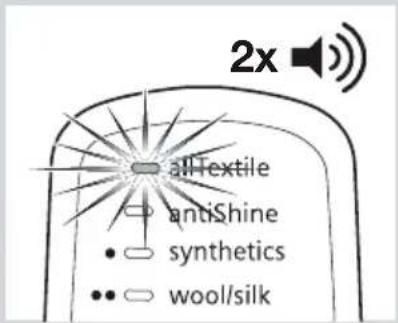
5 The iron will shift automatically to the "allTextile" programme. The "allTextile" indicator lamp (1) will flash, indicating that the iron is heating up.
5 The iron will shift automatically to the "allTextile" programme. The "allTextile" indicator lamp (1) will flash, indicating that the iron is heating up.
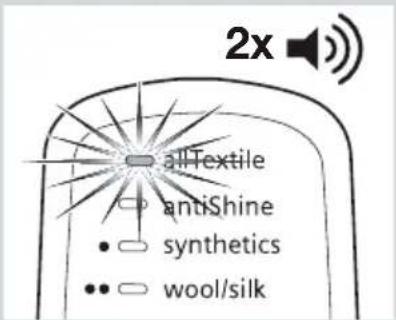
6 When the iron is ready to use, the indicator lamp will remain lit continuously. Two beeps will be heard.


natural_image
Line drawing of a pair of trousers with a zipper, showing front and side views (no text or symbols)
natural_image
Illustration of a hand using a power iron to burn or heat, with an inset showing a warning light (no text or symbols)
natural_image
Line drawing of a hand opening a steam iron (no text or symbols)
"allTextile" programme
The iron will shift automatically to the "allTextile" programme.
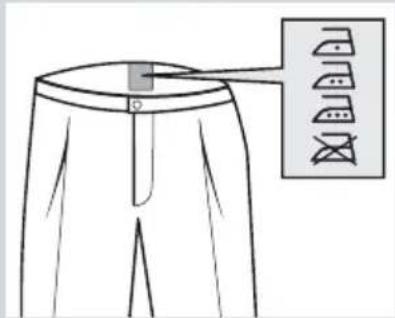
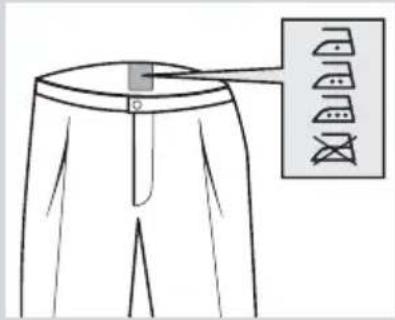
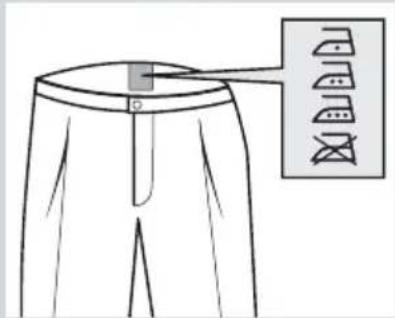
If this function is selected, an appropriate temperature is set which is suitable for all fabrics that can be ironed (symbols 🐘 🐘 🐘), and prevents clothes from becoming damaged due to an unsuitable temperature being selected.
The "allTextile" programme does not apply to fabrics that cannot be ironed (symbol ☒).
Please check the garment care label for details or try ironing on a part of the fabric not visible normally.

3. "startStop Control" function
After the initial heating, "startStop Control" function switches off the iron when it is left unattended, thus increasing security and saving energy.
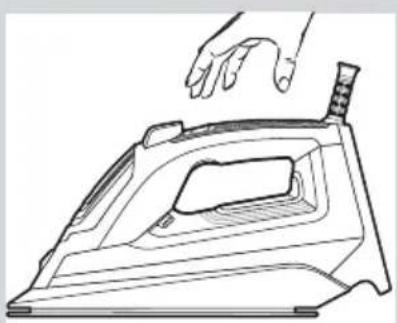
1 While the handle is gripped, the iron heats up. Steam is generated automatically (in "autoSteam" mode). The "startStop Control" indicator lamp (2) will remain lit continuously.
2 When the handle is released, the "startStop Control" function is activated and the iron stops heating. Steam generation is stopped. The "startStop Control" indicator lamp (2) will flash.

4. Setting the temperature
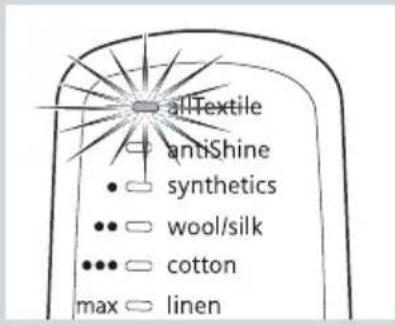
Your steam iron is equipped with six ironing programmes. Each programme sets an appropriate combination of temperature and steam which is suitable for the kind of garment selected.
Tip:
Start by ironing the fabrics that require the lowest ironing temperature. Check the recommended ironing temperature on the label on the garment.
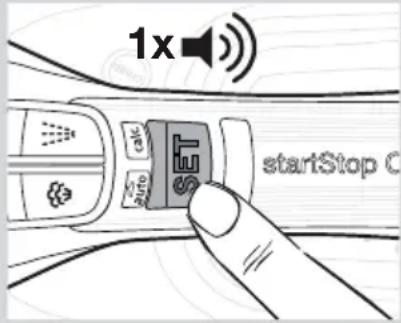
You can change the ironing programme by pressing the “SET” button (3) successively. With each pressing, the setting will go to the next programme. A beep will be heard.

flowchart
graph TD
    A[" "] --> B["allTextile"]
    A --> C["antiShine"]
    A --> D["synthetics"]
    A --> E["wool/silk"]
    A --> F["cotton"]
    A --> G["linen"]
    H["max"] --> I
    J[" "] --> K
    L[" "] --> M
    N[" "] --> O
    P[" "] --> Q
    R[" "] --> S
    T[" "] --> U
    V[" "] --> W
    X[" "] --> Y
    Z[" "] --> AA
    AB[" "] --> AC
    AD[" "] --> AE
    AF[" "] --> AG
    AH[" "] --> AI
    AJ[" "] --> AK
    AL[" "] --> AM
    AN[" "] --> AO
    AP[" "] --> AQ
    AR[" "] --> AS
    AT[" "] --> AU
    AV[" "] --> AW
    AX[" "] --> AY
    AZ[" "] --> BA
    BB[" "] --> BC
    BD[" "] --> BD1
    BE[" "] --> BE2
    BF[" "] --> BF3
    BG[" "] --> BG4
    BH[" "] --> BH5
    BI[" "] --> BJ
    BK[" "] --> BK1
    BL[" "] --> BL2
    BM[" "] --> BM3
    BN[" "] --> BN4
    BO[" "] --> BO5
    BP[" "] --> BP6
    BQ[" "] --> BQ1
    CA[" "] --> CA2
    CB[" "] --> CB3
    CC[" "] --> CC4
    DD[" "] --> DD5
    EE[" "] --> EE6
    FF[" "] --> FF7
    GG[" "] --> GG8
    BH<fcel> ]
    BB<fcel> ]
    AC<fcel> ]
    AD<fcel> ]
    AE<fcel> ]
    AF<fcel> ]
    AG<fcel> ]
    AH<fcel> ]
    AI<fcel> ]
    AJ<fcel> ]
    AK<fcel> ]
    AL<fcel> ]
    AM<fcel> ]
    AN<fcel> ]
    AO<fcel> ]
    AP<fcel> ]
    AQ<fcel> ]
    AR<fcel> ]
    AS<fcel> ]
    AT<fcel> ]
    AU<fcel> ]
    AV<fcel> ]
    AW<fcel> ]
    AX<fcel> ]
    AY<fcel> ]
The programme indicator lamp (1) will flash.
When the iron is ready to use, the indicator lamp will remain lit continuously. Two beeps will be heard.

"allTextile" programme
When plugging the iron in, it will shift automatically to the “allTextile” programme (see “Heating” section).

"antiShine" programme
Suitable for dark and delicate fabrics. Reduces the risk of shiny marks when ironing.
Tip:
Try to iron the fabrics while they are still damp after washing. Steam will be generated from the fabrics rather than the iron.


natural_image
Line drawing of an iron iron with steam rising, next to a labeled SET brand (no text or symbols on the iron itself)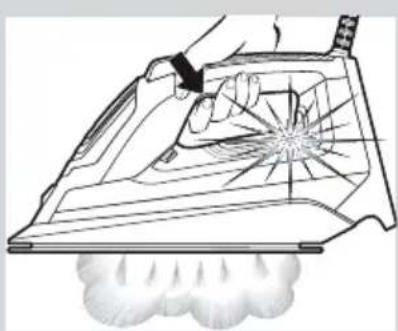
natural_image
Line drawing of a hand using an iron on a steam, with a plume of steam rising nearby (no text or symbols)

5. Steam modes
This iron generates steam by means of a built-in motor. While the motor is working, the motor lamps (15) of the water tank come on.
The iron is equipped with a sensor so that the steam is generated only while ironing in a horizontal position. Thus, unnecessary steam production is avoided.
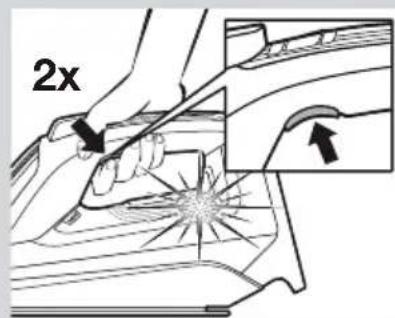
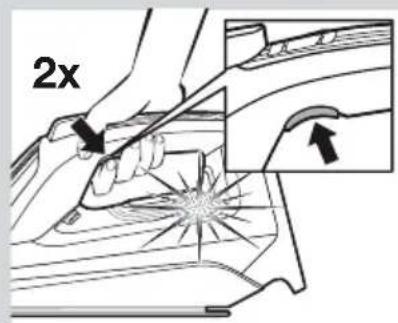
The iron is fitted with two steam production modes. The mode can be changed by double-clicking the steam activation trigger (16).
A “autoSteam” mode
The indicator lamp (5) is on.
The iron will automatically set the appropriate steam amount which is suitable for the selected ironing programme.
The steam will be produced continuously.
B “Steam on demand” mode
The indicator lamp (5) is off.
Steam production can be controlled manually for steam ironing only when necessary.
1 For ironing with steam, press the steam activation trigger (16).
2 For ironing without steam (dry ironing), do not press the steam activation trigger.
Tip:
For better ironing results, iron the last strokes without steam to dry the garment.

6. Shot of steam function
Shot of steam can be used to remove stubborn wrinkles or to press in a sharp crease or pleat.
1 Set the temperature to "max".
2 Press the shot of steam button (7) repeatedly with intervals of at least 5 seconds.

7. Vertical steam
Vertical steam can be used to remove creases from hanging clothes, curtains etc.
1 Set the temperature to "max".
2 Hang article of clothing on a clothes hanger.
3 Operate the iron in a vertical position at a distance of 10 cm / 4 in, and press the shot of steam button (7) repeatedly with pauses of at least 5 seconds.
Important:
If the "startStop Control" indicator lamp (2) flashes while ironing in a vertical position, it means that the handle is not properly gripped and the iron will cool down.
Grip the handle correctly in such a way that the indicator lamp remains lit permanently.
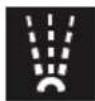
8. Spray
Spray can be used to remove stubborn wrinkles.
1 When ironing, press the spray button (6) and water will spray out of the spray nozzle (9) onto the garment.
Tip:
Do not use the spray function with silk.

9. After ironing
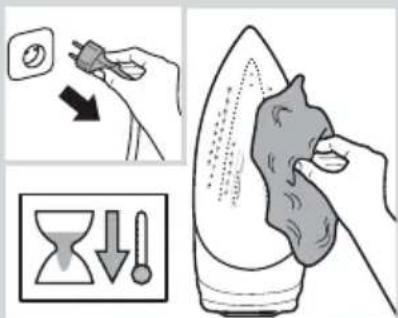
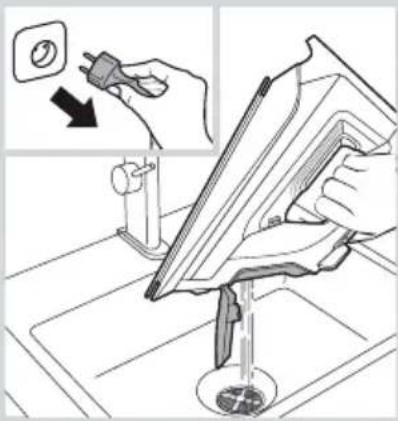
1 Unplug the iron from the mains socket.
2 Empty the water tank.


natural_image
Illustration of a hand using a power iron to trim a wall-mounted fan, with a warning symbol and dotted lines indicating motion (no text or symbols present)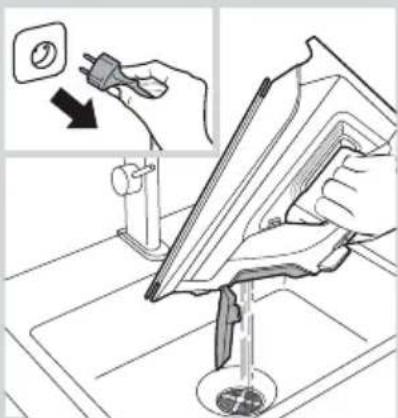
natural_image
Illustration of a hand using a power plug to clean or store floor tiles, with no visible text or symbols.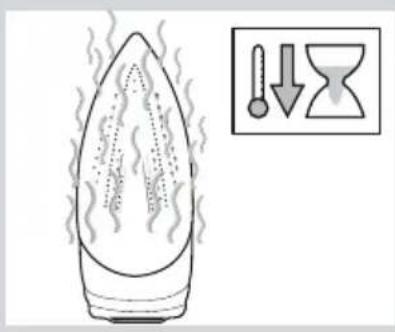

natural_image
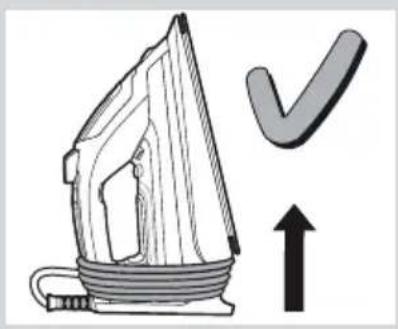
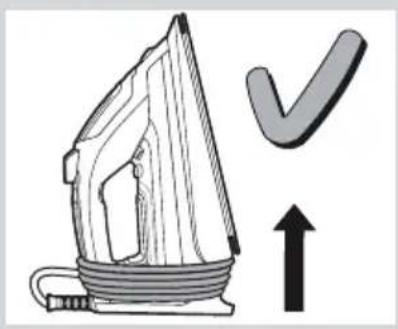
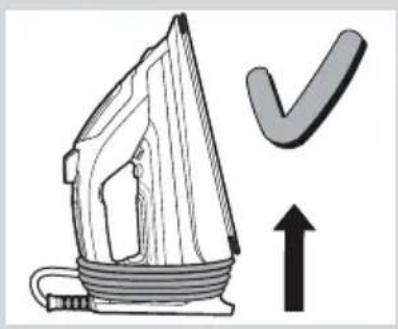
Illustration of an iron (£) with a checkmark and upward arrow, no text or symbols present3 Set the iron aside in a vertical position on its heel (13) to cool down.
4 Coil the power cable (14) loosely around the heel of the iron. Store the iron in an upright position.
Tip:
For immediate storage of the iron, you may use the "storeProtect" accessory (see "Accessories" section).

Cleaning & Maintenance

natural_image
Hand holding a plug with a circular socket, pointing downward (no text or symbols)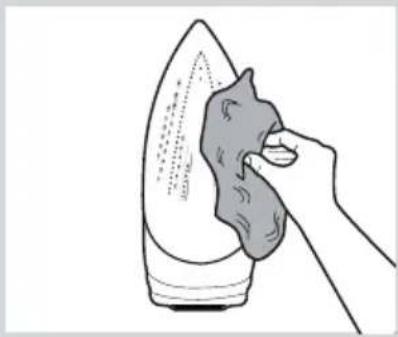
natural_image
Illustration of a hand using a cloth to clean or brush the iron on a surface (no text or symbols)
natural_image
Illustration of a hand holding a food item next to a bottle and a cross mark (no text or symbols)Attention! Risk of burns!
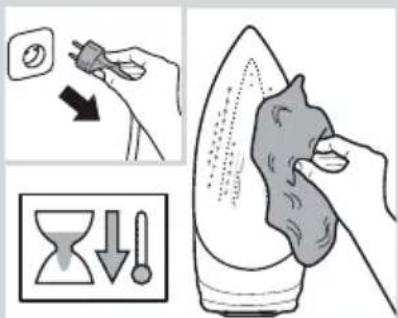
Always unplug the appliance from the mains supply before carrying out any cleaning or maintenance operation on it.
1 If the soleplate (12) is soiled or has garment residues due to a wrong selection of the temperature, rub off immediately with a thickly folded, damp cotton cloth.
2 To keep the soleplate smooth, you should avoid hard contact with metal objects. Never use a scouring pad or chemicals to clean the soleplate.
Your iron is equipped with the following descaling features:
A "self-clean"
The "self-clean" filter prevents motor from blocking.
B “anti-calc”
The “anti-calc” cartridge has been designed to reduce the build-up of scale produced during steam ironing, helping to extend the useful life of your iron. Nevertheless the “anti-calc” cartridge cannot prevent all of the scale that is produced naturally over time. Due to this, the “calc'n Clean” function has been designed.
C "calc'n Clean" function
The "calc'n Clean" function helps to remove scale particles out of the steam chamber.
"calc'n Clean" timer:
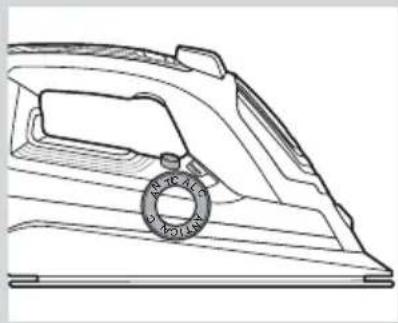
After a period of use, the automatic clean warning lamp "calc" (4) flashes, indicating that "calc'n Clean" process must be performed.
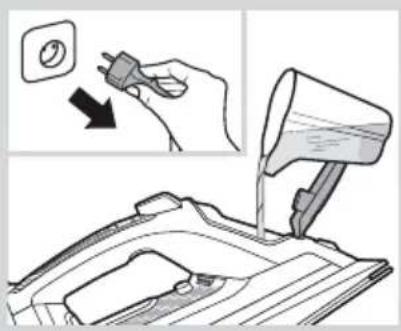
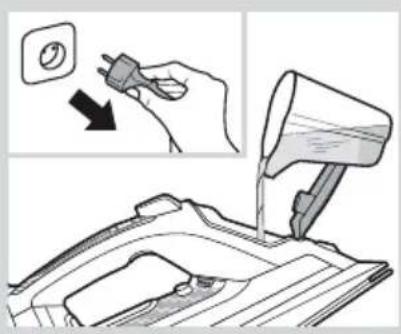
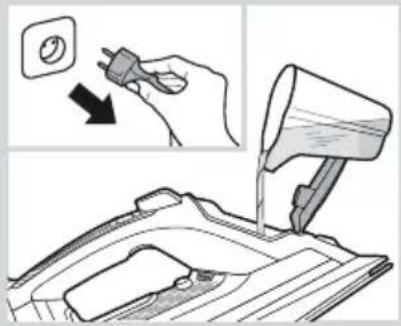
1 Unplug the iron from the mains socket, and fill the water tank with water.
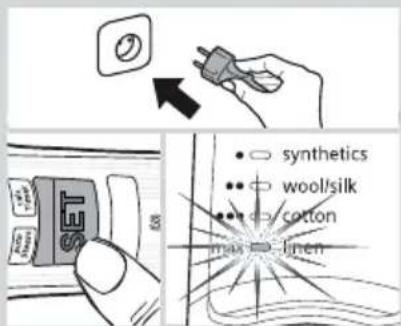
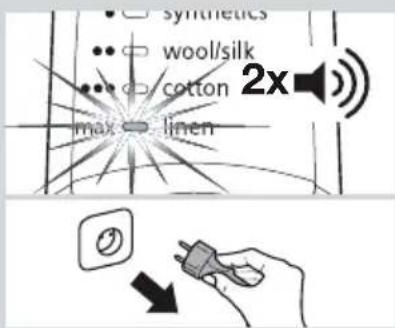
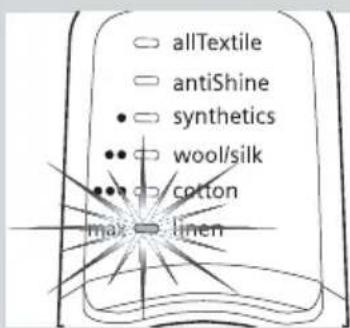
2 Plug in the iron and set the temperature to the "max" position.
natural_image
Line drawing of a steam iron with a circular gasket (no text or symbols)


natural_image
Illustration of a hand using a power iron to clean or store floor tiles (no text or symbols visible)
natural_image
Illustration of a hand using a power iron to clean or store air, with an inset showing the tool and component (no text or symbols)

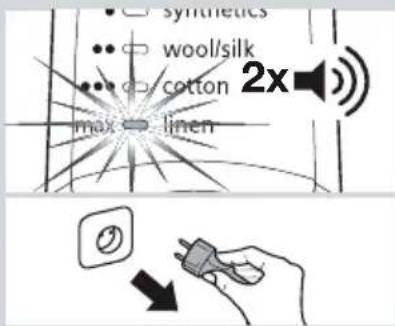
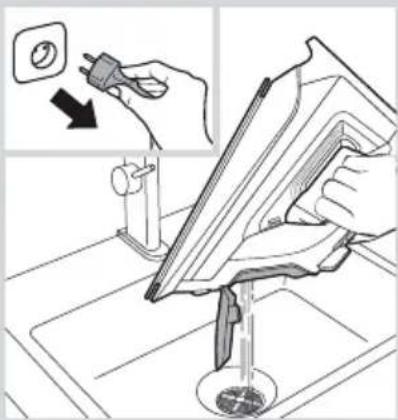
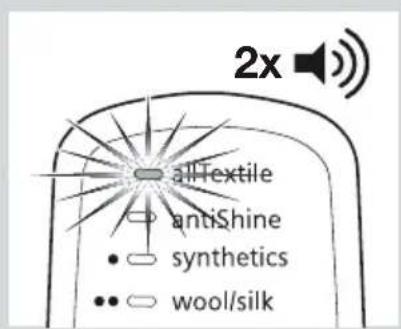
3 Two beeps will be heard. When the lamp "max" remains lit continuously, unplug the iron (very important!).
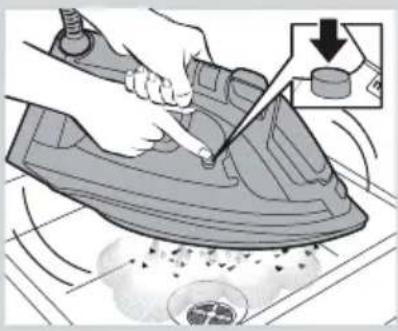
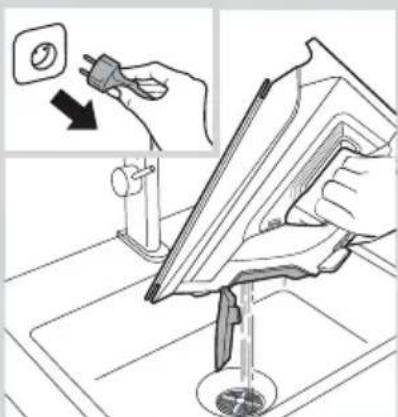
4 Hold the iron over a sink.
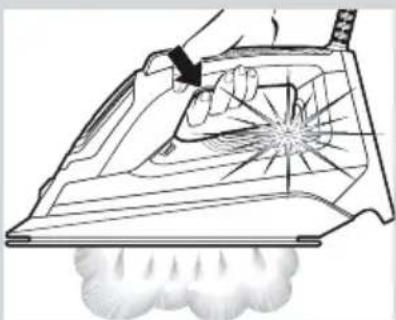
5 Press the “clean” button (11) and shake the iron until approximately one third of the water capacity of the tank is evaporated. Boiling water and steam will come out, carrying scale or deposits that might be there.
6 Release "clean" button, and gently shake the iron for some seconds.
7 Repeat steps 5 and 6 three times until the tank is empty.
8 Plug the iron in and heat it up again until the remaining water has evaporated. Push the "clean" button a few more times, more to make sure that the water tank is empty.
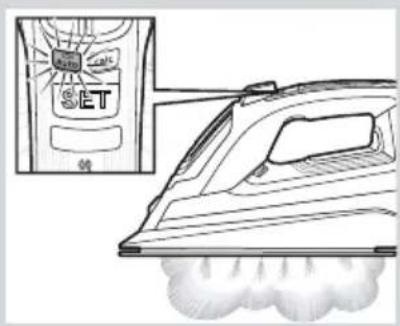
9 Press the "SET" button (3) for three seconds or until the "calc" lamp (4) goes off.
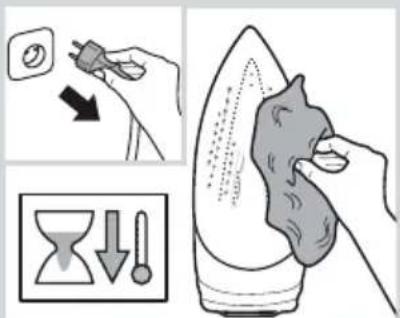
10 Unplug the iron and let the soleplate cool down. Wipe the soleplate with a damp cotton cloth only.
Tip:
If the water in your area is very hard, you may use this function approximately every two weeks without waiting for the automatic clean warning lamp "calc" to flash.
D “calc'n Clean” with descaling liquid
For deep descaling, it is recommended to use the descaling liquid (see "Accessories" section) every second time the automatic clean warning lamp "calc" (4) flashes.
Follow the procedure described below:
1 Unplug the iron.
2 Pour a measure (25 ml) of the descaling fluid into the water tank.
3 Fill the water tank up to the level mark for maximum filling.
4 Then follow the procedure described above in section C "calc'n Clean function" (steps 2 to 10).


natural_image
Diagram of a mechanical device with a lever and directional arrow indicating motion (no text or symbols)Accessories
The accessories may be purchased from the customer service or specialist shops.

Descaling liquid
Name of the accessory: TDZ1101
Accessory code: 00311715
Contents: 4 bottles x 25 ml
For deep descaling of the steam iron.

"textileProtect"
Name of the accessory: TDZ1550
Accessory code: 00575494
Used for steam-ironing delicate garments at maximum temperature and maximum steam without damaging them.

"storeProtect"
Name of the accessory: TDZ1750
Accessory code: 00575960
Enables an immediate and safe storage of the iron, even with a hot soleplate.

natural_image
Illustration of a baby bottle and a rectangular box (no text or symbols)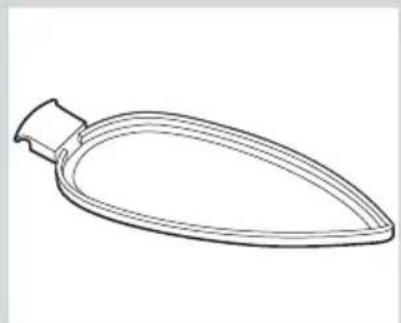
natural_image
Line drawing of a teardrop-shaped object with a handle and pointed tip (no text or symbols)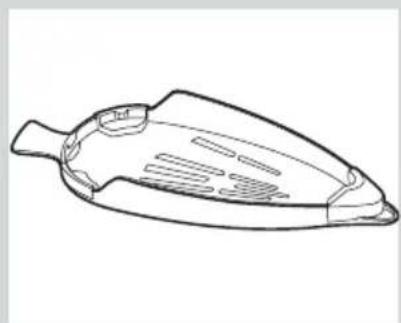
natural_image
Line drawing of a triangular-shaped object with internal cutouts and a handle (no text or symbols)| Problem Probable cause Solution | ||
| The iron does not heat up. | 1. The “startStop Control” function has been activated. The iron is set to stand-by. | 1. Grip the handle of the iron to re-start it. |
| “startStop Control” indicator lamp (2) flashes. | 1. The “startStop Control” function has been activated. The iron is set to stand-by. | 1. Grip the handle of the iron to re-start it. |
| Programme indicator lamp (1) flashes. | 1. The soleplate (12) is heating up or cooling down to the selected temperature. | 1. This is normal and lights will stop flashing when the selected temperature is reached. |
| The clothes tend to stick. | 1. The temperature of the soleplate (12) is too high. | 1. Select a lower temperature and wait until the iron has cooled down. |
| Water drips out of the soleplate when using the “shot of steam” function. | 1. You have pressed the shot of steam button (7) repeatedly without waiting for 5 seconds between each press.2. The temperature is too low. | 1. Wait 5 seconds between each press of the shot of steam button.2. Set the temperature to “max”. |
| Steam does not come out in horizontal position. | 1. “Steam on demand” mode has been selected. | 1. Press the steam activation trigger (16) to generate steam.Double click on steam activation trigger to select the “‘autoSteam” mode. |
| Excessive dripping or steaming. | 1. No proper closing of “clean” button (11). | 1. Point the iron away from the ironing area. Actuate a few times the “clean” button. |
| The motor does not work. | 1. The iron is not in a horizontal position.2. The soleplate (12) is heating up. | 1. Use the iron in a horizontal position.2. Wait until the selected temperature is reached. |
| Smoke comes out when connecting the iron for the first time. | 1. This may be caused by the lubrication of some of the internal parts. | 1. This is normal and will stop after a few minutes. |
| Deposits come out through the holes in the soleplate (12). | 1. Traces of lime scale are coming out of the steam chamber. | 1. Carry out a cleaning cycle (see “calc'n Clean function” section). |
| The appliance makes a pumping sound. | 1. Water is being pumped into the steam chamber. | 1. This is normal. |
| The automatic clean warning lamp “calc” (4) flashes. | 1. “calc'n Clean” reminder has been activated. | 1. Carry out a cleaning cycle (see “calc'n Clean function” section). |
If none of the above solves the problem, get in touch with an Authorised Technical Service.
natural_image
Illustration of an open book with blank pages, no text or symbols visible
1. De watertank vullen


natural_image
Line drawing of a pair of trousers with a zipper, showing front and side views (no text or symbols)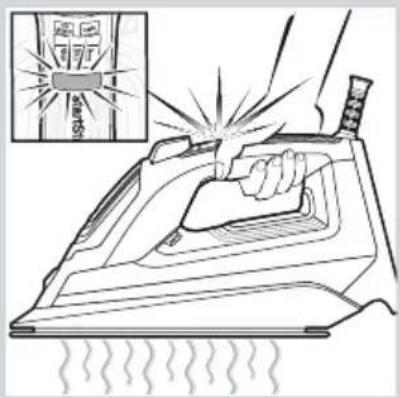
natural_image
Line drawing of a hand opening a house iron (no text or symbols)


natural_image
Line drawing of a hand using an iron to clean or smoke from a steam machine (no text or symbols)

5. Stoomstanden
natural_image
Illustration of a kitchen utensil being cleaned with a tool, showing the blade being cut (no text or symbols present)

natural_image
Illustration of an iron (£) with a checkmark and upward arrow, no text or symbols presentnatural_image
Hand holding a plug with a small circular socket, pointing downward (no text or symbols)
natural_image
Line drawing of a hand using a power tool to clean or brush iron on an iron (no text or symbols)
natural_image
Illustration of a hand holding a food item next to a bottle and a halved fruit, with no visible text or symbols.⚠️ Pas op! Verbrandingsgevaar!
natural_image
Line drawing of a steam iron with a circular gasket (no text or symbols)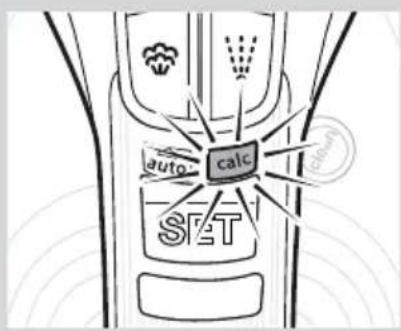


natural_image
Illustration of a hand using a power iron to clean or store floor tiles (no text or symbols visible)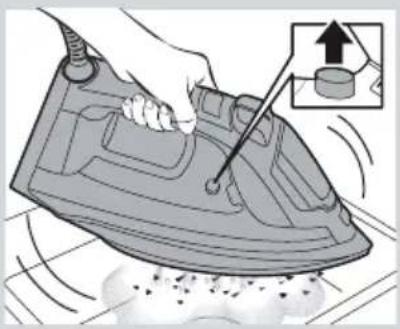
natural_image
Illustration of a hand using a steam iron to clean or wear, with an inset showing a bolt and nut (no text or symbols)
natural_image
Technical line drawing of a mechanical device with a lever and directional arrow (no text or symbols)Accessoires
Accessoirecode: 00311715
Accessoirecode: 00575960
natural_image
Illustration of a baby bottle and a rectangular box (no text or symbols)
natural_image
Line drawing of a teardrop-shaped object with a handle and narrow neck (no text or symbols)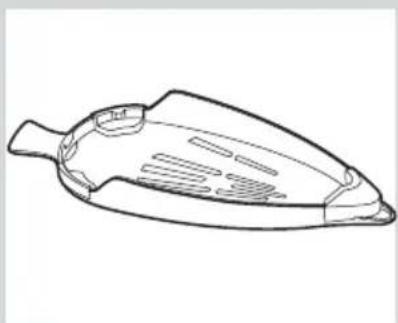
natural_image
Line drawing of a mechanical component with internal slots and handle (no text or symbols)natural_image
Illustration of an open book with blank pages, no text or symbols visible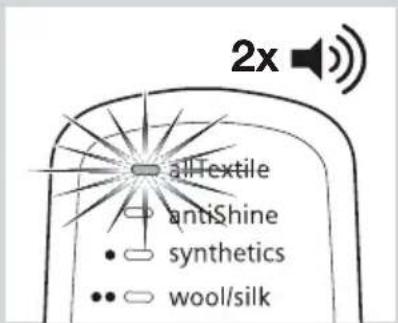

natural_image
Line drawing of a pair of trousers with a zipper, showing front and side views (no text or symbols)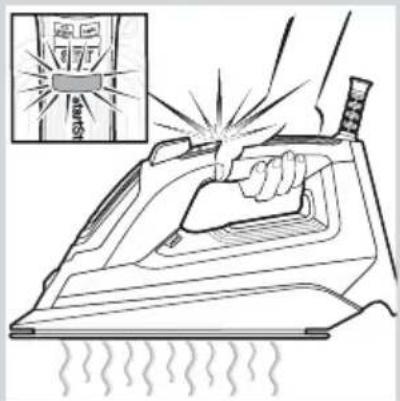

natural_image
Line drawing of a hand opening a steam iron (no text or symbols)
Programa "allTextile"


natural_image
Line drawing of an iron (£) with steam rising, next to a device labeled 'SET' (no text or symbols on the iron itself)
natural_image
Line drawing of a hand using a steam iron to clean or store air, with no text or symbols present.

5. Modos de vapor

natural_image
Illustration of an iron (£) with a checkmark and upward arrow, no text or symbols presentnatural_image
Hand holding a plug with a circular socket, pointing downward (no text or symbols)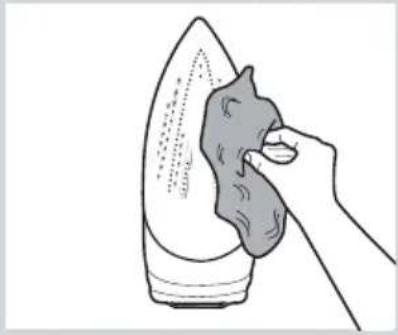
natural_image
Line drawing of a hand using a cloth to clean or brush the iron (no text or symbols)
natural_image
Illustration of a hand cleaning a food item with a cross mark (no text or symbols)natural_image
Line drawing of a steam iron with a circular dial indicator (no text or symbols)


natural_image
Hand holding a plug with a circular socket, pointing to an electrical outlet (no text or symbols)


natural_image
Illustration of a hand using a power iron to clean or repair a mechanical component, with no visible text or symbols.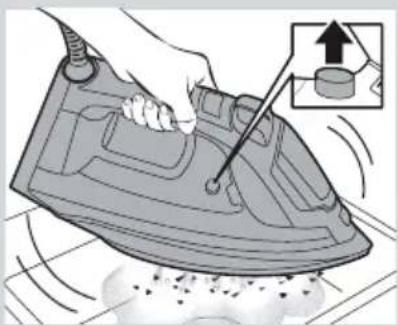
natural_image
Illustration of a hand using a power iron to clean air, with an inset showing the correct inspection (no text or symbols present)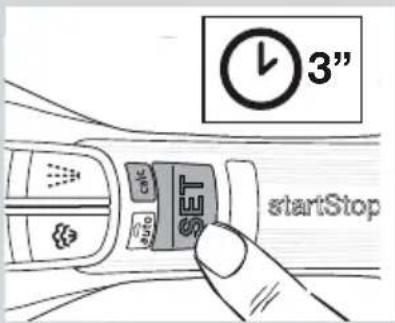

natural_image
Technical line drawing of a mechanical component with a lever and arrow indicating motion (no text or symbols)Accesorios
natural_image
Illustration of a baby bottle and a rectangular box (no text or symbols)
natural_image
Line drawing of a teardrop-shaped object with a handle, resembling a stylized spoon or container (no text or symbols)
natural_image
Line drawing of a conical object with internal compartments and a handle (no text or symbols)natural_image
Illustration of an open book with blank pages and a curved arrow indicating rotation (no text or symbols)


natural_image
Line drawing of a pair of trousers with a zipper, shown with a magnified inset showing internal pattern (no text or symbols)

natural_image
Line drawing of a hand pressing down on a steam iron (no text or symbols)
Programa "allTextile"
natural_image
Line drawing of an electric iron with a labeled SET brand and smoke plume (no text or symbols on the iron itself)
natural_image
Line drawing of a steam iron with a cloth underneath (no text or symbols)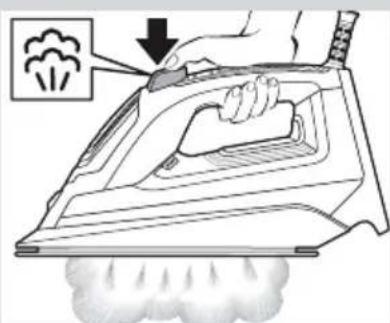

5. Modos de vapor
natural_image
Illustration of a hand using a power iron to clean air, showing iron being brushed with a tool (no text or symbols present)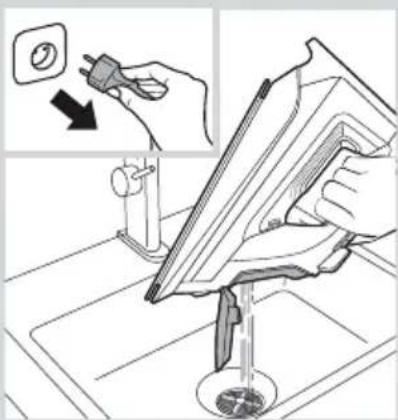

natural_image
Illustration of an iron (£) with a checkmark and upward arrow, no text or symbols presentnatural_image
Hand holding a plug with a circular button and arrow indicating downward motion (no text or symbols)
natural_image
Line drawing of a hand using a tool to clean or brush iron on an iron (no text or symbols)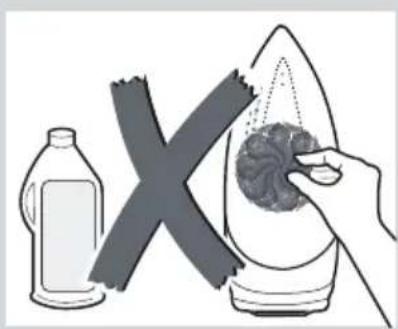
natural_image
Illustration of a hand holding a food item next to a bottle and a cross symbol (no text or symbols present)natural_image
Line drawing of a steam iron with a circular gasket and handle (no text or symbols)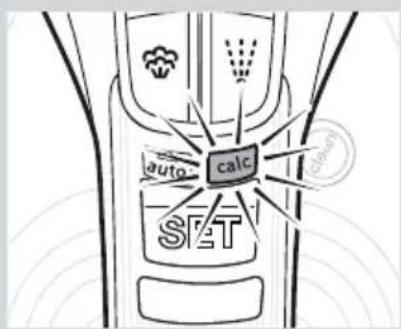


natural_image
Illustration of a hand using a power iron to clean or repair a mechanical component, with no visible text or symbols.
natural_image
Illustration of a hand using a power iron to press down on a surface, with an inset showing the correct assembly (no text or symbols present)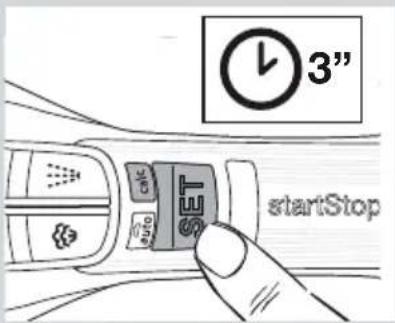
natural_image
Diagram of a mechanical device pouring liquid into a container with an arrow indicating flow direction (no text or symbols present)Acessórios
natural_image
Illustration of a baby bottle and a rectangular box (no text or symbols)
natural_image
Line drawing of a teardrop-shaped object with a handle and narrow neck (no text or symbols)
natural_image
Line drawing of a mechanical component with internal slots and a tapered body (no text or symbols)natural_image
Illustration of an open book with blank pages, no text or symbols visible


natural_image
Line drawing of a pair of trousers with a zipper, shown with a magnified inset showing garment details (no text or symbols)

natural_image
Line drawing of a hand opening a steam iron (no text or symbols)


natural_image
Line drawing of a steam iron with a magnified inset showing a SET brand logo (no text or symbols on the main image)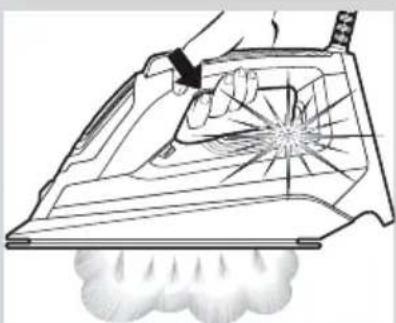
natural_image
Line drawing of a hand using a steam iron to clean or smoke from a machine (no text or symbols)
natural_image
Illustration of a hand using a steam iron to press down a fan (no text or symbols present)

natural_image
Illustration of a kitchen utensil being adjusted for a tool, showing a hand holding a small pot and a tool inserted into a bowl (no text or symbols present)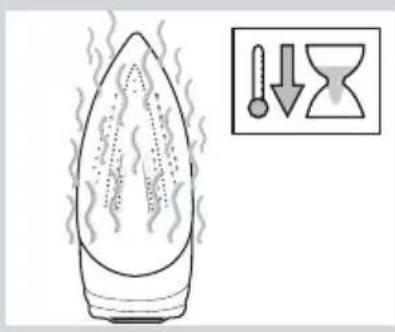
natural_image
Illustration of an iron (£) with a checkmark and upward arrow, no text or symbols presentnatural_image
Hand holding a plug with a circular button, pointing downward (no text or symbols)
natural_image
Line drawing of a hand using a tool to clean or brush iron on an iron (no text or symbols)
natural_image
Illustration of a hand holding a food item next to a bottle and a cross mark (no text or symbols)natural_image
Line drawing of a steam iron with a circular bolt and handle (no text or symbols)


natural_image
Hand holding a plug with a circular socket, pointing to it (no text or symbols present)


natural_image
Illustration of a hand using a power tool to clean or store floor tiles (no text or symbols visible)
natural_image
Illustration of a hand using a power iron to press down on a surface, with an inset showing the correct assembly (no text or symbols present)
natural_image
Illustration of a small bottle and a rectangular box (no text or symbols)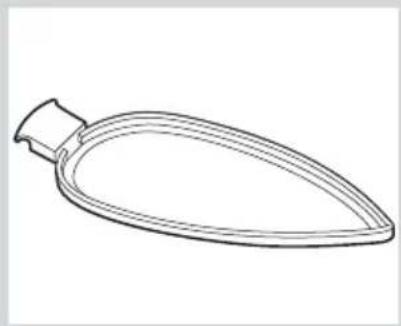
natural_image
Line drawing of a teardrop-shaped object with a handle and narrow neck (no text or symbols)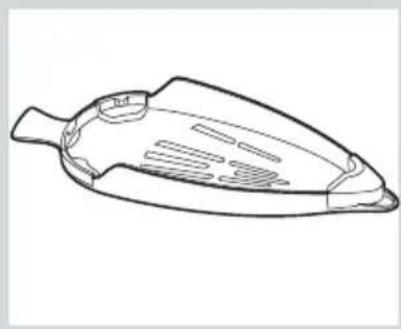
natural_image
Line drawing of a fish-shaped object with internal patterns (no text or symbols)natural_image
Illustration of an open book with blank pages and a curved arrow indicating rotation (no text or symbols)


natural_image
Line drawing of a pair of trousers with a zipper, showing front and side views (no text or symbols)

natural_image
Line drawing of a hand opening a steam iron (no text or symbols)
"allTextile" program
"allTextile" program



natural_image
Illustration of a hand using an iron on a steam iron, with a starburst effect and smoke plume (no text or symbols)
natural_image
Illustration of a hand using an iron on a steam iron, with exhaust smoke and a magnified inset showing the process (no text or symbols)
5. Buhar modlari
natural_image
Illustration of a hand using a power iron to trim a wall, with a warning symbol and dotted lines indicating material damage (no text or symbols present)


natural_image
Illustration of an iron (£) with a checkmark and upward arrow, no text or symbols presentnatural_image
Hand holding a plug with a circular socket, pointing downward (no text or symbols)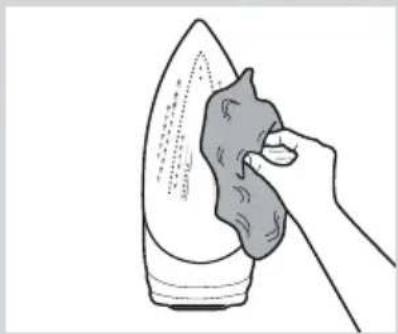
natural_image
Line drawing of a hand using a tool to press down a steaming iron (no text or symbols present)
natural_image
Illustration of a hand cleaning a leaf with a cross mark (no text or symbols)natural_image
Line drawing of a mechanical iron or iron component with a circular dial indicator (no text or symbols)

natural_image
Illustration of a hand pouring liquid into a mechanical component, with an inset showing the switch and magnified view (no text or symbols)


natural_image
Illustration of a hand using a power tool to clean or store floor tiles (no text or symbols visible)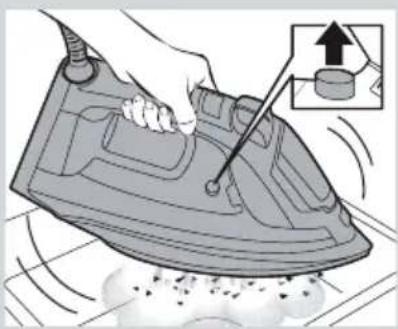
natural_image
Illustration of a hand using a power iron to clean air, with an inset showing the correct inspection of the iron (no text or symbols present)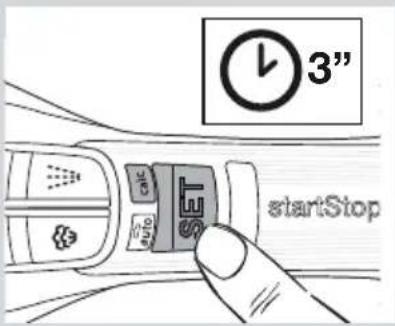

natural_image
Illustration of a small bottle and a rectangular box (no text or symbols)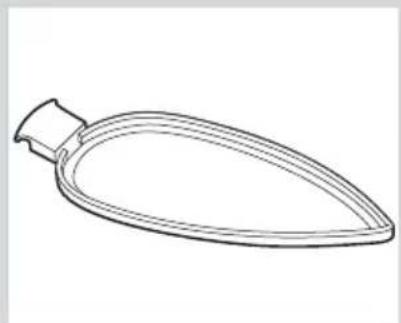
natural_image
Line drawing of a teardrop-shaped object with a handle and pointed tip (no text or symbols)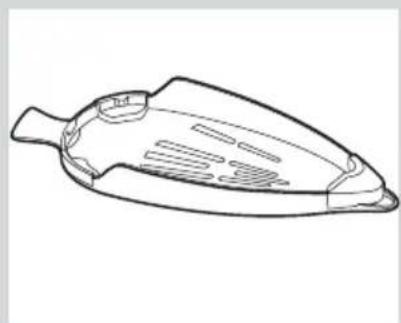
natural_image
Line drawing of a mechanical component with a tapered body and internal slots (no text or symbols)natural_image
Illustration of an open book with blank pages and a curved arrow indicating rotation (no text or symbols)


natural_image
Line drawing of a pair of trousers with a close-up detail showing front and side views (no text or symbols)
natural_image
Illustration of a hand using a power iron to clean air, with an inset showing a warning light (no text or symbols)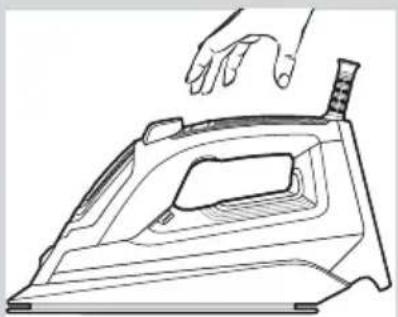
natural_image
Line drawing of a hand pressing down on an iron iron (no text or symbols)
Program "allTextile"
Program "allTextile"

natural_image
Line drawing of a steam iron with a SET brand logo and a close-up of its smoke (no text or symbols on the iron itself)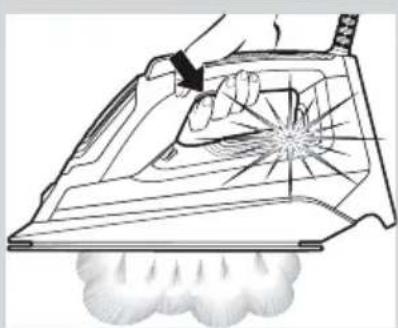
natural_image
Line drawing of a hand using an iron on a steam iron, with steam rising and dust spraying (no text or symbols)

natural_image
Illustration of a hand using a power tool to clean or store items on a kitchen sink (no text or symbols visible)
natural_image
Illustration of an iron (£) with a checkmark and upward arrow, no text or symbols presentnatural_image
Hand holding a plug with a circular button, pointing downward (no text or symbols)
natural_image
Illustration of a hand using a tool to clean or brush a piece of material, no text or symbols present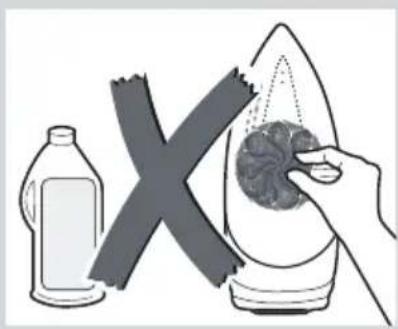
natural_image
Illustration of a hand holding a food item next to a bottle and a cross mark (no text or symbols)natural_image
Line drawing of a mechanical component with a circular hole and base plate (no text or symbols)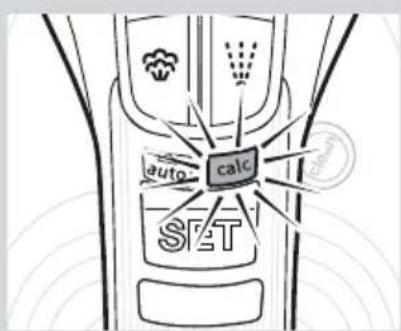

natural_image
Hand holding a plug with a circular socket, pointing to an electrical outlet (no text or symbols visible)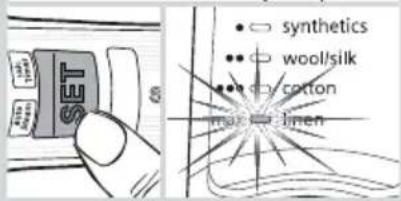


natural_image
Illustration of a hand using a power tool to clean or store floor tiles (no text or symbols visible)
natural_image
Illustration of a hand using a power iron to clean or store air, with an inset showing the correct setup (no text or symbols present)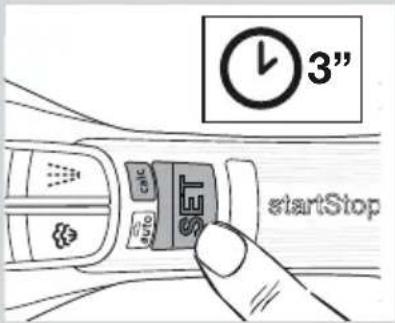

natural_image
Diagram of a mechanical device pouring liquid into a container with an arrow indicating flow direction (no text or symbols present)Akcesoria
natural_image
Illustration of a small bottle and a rectangular box (no text or symbols)
natural_image
Line drawing of a teardrop-shaped object with a handle and narrow neck (no text or symbols)
natural_image
Line drawing of a fish-shaped object with internal patterns (no text or symbols)natural_image
Illustration of an open book with blank pages and a curved arrow indicating rotation (no text or symbols)natural_image
Illustration of hands using a tool to adjust or install a component, showing a close-up of the switch (no text or symbols present)
natural_image
Line drawing of a pair of trousers with a zipper, showing front and side views (no text or symbols)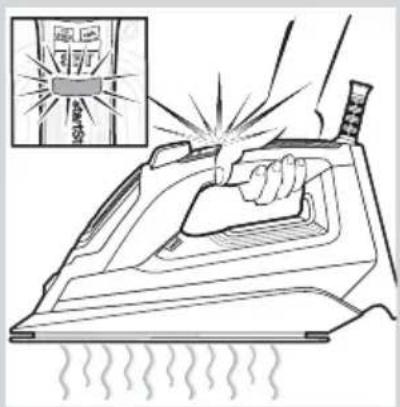

natural_image
Line drawing of a hand pressing down on an iron iron (no text or symbols)


natural_image
Line drawing of a steam iron with a SET air conditioner unit attached (no text or symbols on the iron itself)
natural_image
Illustration of a hand using a steam iron to clean or smoke from a plow (no text or symbols)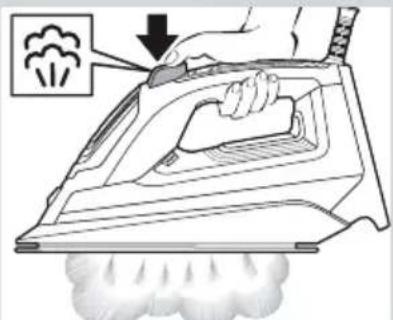

natural_image
Illustration of a hand using a power iron to lift a surface, with a magnified inset showing the iron being cut (no text or symbols present)


natural_image
Illustration of an iron (£) with a checkmark and upward arrow, no text or symbols presentnatural_image
Hand holding a plug with a circular socket, pointing downward (no text or symbols)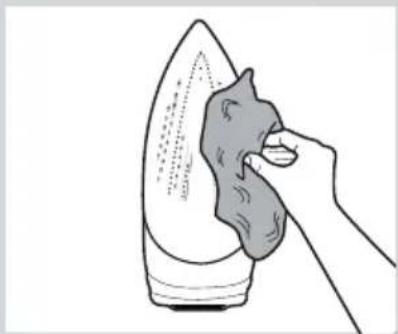
natural_image
Illustration of a hand using a tool to clean or brush the iron on a surface (no text or symbols)
natural_image
Illustration of a hand holding a food item next to a bottle and a cross mark (no text or symbols)natural_image
Line drawing of a steam iron with a circular gasket (no text or symbols)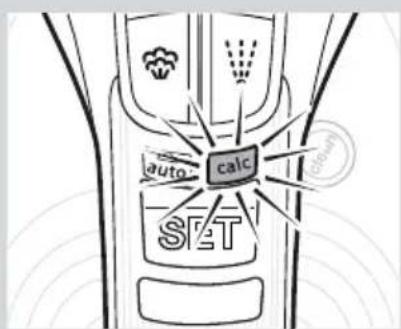

natural_image
Illustration of a hand using a power plug to lift liquid into a machine (no text or symbols present)


natural_image
Illustration of a hand using a power tool to clean or repair a shoe, with no visible text or symbols.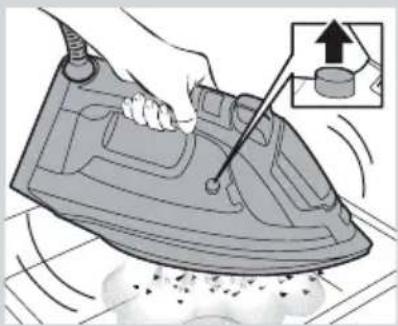
natural_image
Illustration of a hand using a power iron to burn on a surface, with an inset showing the same tool (no text or symbols present)

natural_image
Diagram of a mechanical device with a lever and arrow indicating motion (no text or symbols)Принадлежности
natural_image
Illustration of a bottle and a rectangular box (no text or symbols)
natural_image
Line drawing of a teardrop-shaped object with a handle and curved body (no text or symbols)
natural_image
Line drawing of a hair iron with a flared body and internal ribs (no text or symbols)natural_image
Diagram of a mechanical device with a lever and directional arrow indicating motion (no text or symbols)The image is too blurry to recognize any text content.
4
الملحقات الإضافية
natural_image
Illustration of a baby bottle and a rectangular box (no text or symbols)natural_image
Line drawing of a teardrop-shaped object with a handle and curved body (no text or symbols)natural_image
Line drawing of a boat hull with side ribs and hull plate (no text or symbols)The image is too blurry to recognize any text content.
9
10
新华社
natural_image
Illustration of a hand using a power iron to work on a machine, with a magnified inset showing the drop of the tool (no text or symbols present)
natural_image
Illustration of a hand using a power iron to clean air, with an inset showing the correct inspection (no text or symbols present)

natural_image
Line drawing of a steam iron with a circular label on its side (no text or symbols beyond the label)
natural_image
Illustration of a hand using a power plug to lift a water bottle into a machine (no text or symbols present)

natural_image
Illustration of an electric iron with a checkmark and upward arrow (no text or symbols)التنظيف والصيانة

natural_image
Hand holding a plug with a circular socket, pointing downward (no text or symbols)
natural_image
Line drawing of a hand using a tool to clean or brush iron on an iron (no text or symbols)
natural_image
Illustration of a hand holding a food item next to a bottle and a cross mark (no text or symbols)[Unreadable]


natural_image
Illustration of a hand using a power iron to clean air, showing iron being brushed with a tool (no text or symbols present)
natural_image
Illustration of hands using a tool to clean or store items on a kitchen sink, with no visible text or symbols.7. البخار الرأسي

The image is too blurry to recognize any text content.
The image is too blurry to recognize any text content.
The image is too blurry to recognize any text content.
natural_image
Line drawing of an electric iron with a control panel and steam emission (no text or symbols)
natural_image
Line drawing of a hand using an iron on a steam iron, with a plume of dust emerging from the base (no text or symbols)

صيحة:
natural_image
Line drawing of a pair of trousers with a zipper and a close-up inset showing patterned fabric (no text or symbols)"startStop Control" وظيفة
The image is too blurry to recognize any text content.


natural_image
Line drawing of a hand pressing down on an iron iron (no text or symbols)4. ضبط درجة الحرارة

The image is too blurry to recognize any text content.
2

m = 311
4
(ال Connectivity) "clean" زر.11
.12. قاعدة المكواة
[Unreadable]




- „allTextile”-Programm
- Zubehör
- General safety instructions
- CAUTION. Hot surface.
- Important notices
- Advice on disposal
- Description
- Using your appliance
- Filling the water tank
- Important:
- Tip:
- Heating
- "allTextile" programme
- "startStop Control" function
- Setting the temperature
- "antiShine" programme
- Steam modes
- A “autoSteam” mode
- B “Steam on demand” mode
- Shot of steam function
- Vertical steam
- Spray
- After ironing
- Cleaning & Maintenance
- A "self-clean"
- B “anti-calc”
- C "calc'n Clean" function
- "calc'n Clean" timer:
- D “calc'n Clean” with descaling liquid
- Accessories
- Descaling liquid
- "textileProtect"
- "storeProtect"
- De watertank vullen
- Stoomstanden
- Accessoires
- Programa "allTextile"
- Modos de vapor
- Accesorios
- Acessórios
- "allTextile" program
- Buhar modlari
- Program "allTextile"
- Akcesoria
- Принадлежности
- الملحقات الإضافية
- البخار الرأسي
- "startStop Control" وظيفة
- ضبط درجة الحرارة
Brand : SIEMENS
Model : TSI802810
Category : Iron