
NRF7181TX - Refrigerator GORENJE - Free user manual and instructions
Find the device manual for free NRF7181TX GORENJE in PDF.


| Product type | Fridge freezer combination |
| Dimensions (HxWxD) | 200 x 60 x 60 cm |
| Net weight | 70 kg |
| Total capacity | 350 L |
| Fridge capacity | 250 L |
| Freezer capacity | 100 L |
| Climate class | N-ST |
| Noise level | 42 dB |
| Energy class | A+ |
| Annual consumption | 280 kWh |
| Refrigerant | R600a |
| Lighting | LED |
| Defrosting | Automatic (fridge) / Manual (freezer) |
| Reversible door | Yes |
| Control type | Electronic |
| Display | Digital temperature display |
| Shelves | 4 glass |
| Vegetable drawer | 1 |
| Freezer drawers | 3 |
| Special functions | Open door alarm, quick freeze |
| Shelf material | Tempered glass |
| Cleaning | With soapy water and soft cloth |
| Spare parts | Available through authorized after-sales service |
Frequently Asked Questions - NRF7181TX GORENJE
User questions about NRF7181TX GORENJE
0 question about this device. Answer the ones you know or ask your own.
Ask a new question about this device
Download the instructions for your Refrigerator in PDF format for free! Find your manual NRF7181TX - GORENJE and take your electronic device back in hand. On this page are published all the documents necessary for the use of your device. NRF7181TX by GORENJE.
USER MANUAL NRF7181TX GORENJE
Old and out-of-order fridges.... 6
Safety warnings 7
Installing and operating your fridge.... 8
Before Using your Fridge 9
Information about NO FROST Technology 9
PARTS AND PIECES OF YOUR FRIDGE ....10
USAGE INFORMATION ......12
Display and control panel 12
Operating your fridge 14
Super Freeze Mode 14
Super Cool Mode 14
Economy Mode 15
Holiday Mode 15
Drink Cool Mode 16
Screen Saver Mode 17
Function of Child Lock 18
Temperature Settings.... 18
Freezer Temperature Settings 18
Cooler Temperature Settings 19
Warnings About Temperature Adjustments 20
BEFORE CALLING SERVICE ....21
Accessories 22
Icemaker 22
Quick Freezer Compartment 22
Chilled Room Compartment 23
Fresh dial 23
CLEANING AND MAINTENANCE ......24
Replacing the bulb 25
PLACING THE FOODS ......26
Where to place in the 26
Freezer Compartment.... 27
SHIPMENT AND REPOSITIONING ....32
Repositioning the Door 32
BEFORE CALLING SERVICE ....33
TIPS FOR SAVING ENERGY ....36

General warnings
WARNING: Keep ventilation openings, in the appliance enclosure or in the built-in structure, clear of obstruction.
WARNING: Do not use mechanical devices or other means to accelerate the defrosting process, other than those recommended by the manufacturer.
WARNING: Do not use electrical appliances inside the food storage compartments of the appliance, unless they are of the type recommended by the manufacturer.
WARNING: Do not damage the refrigerant circuit.
WARNING: To avoid a hazard due to the instability of the appliance, it must be fixed in accordance with the instructions.

- If your appliance uses R600a as a refrigerant – you can learn this information from the label on the cooler - you should be careful during shipment and installation to prevent your appliance's cooler elements from being damaged. Although R600a is an environmentally friendly and natural gas, as it is explosive, in case of a leakage occurring due to damage in the cooler elements, move your fridge away from open flames or heat sources and ventilate the room where the appliance is located for a few minutes.
- While carrying and positioning the fridge, do not damage the cooler gas circuit.
- Do not store explosive substances such as aerosol cans with a flammable propellant in this appliance.
- The appliance is intended solely for household use.
- If the socket does not match the refrigerator plug, it must be replaced by the manufacturer, service agent or similar qualified persons in order to avoid a hazard.
- This appliance is not intended for use by persons (including children) with reduced physical, sensory or mental capabilities, or lack of experience and knowledge, unless they have been given supervision or instruction concerning use of the appliance by a person responsible for their safety. Children should be supervised to ensure that they do not play with the appliance.
- A specially grounded plug has been connected to the power cable of your refrigerator. This plug should be used with a grounded socket rated at 16 Amps. If there is no such socket in your house, please have it installed by a qualified electrician.
- This appliance can be used by children aged from 8 years and above and persons with reduced physical, sensory or mental capabilities or lack of knowledge if they have been given supervision or instruction concerning use of the appliance in a safe way and understand the hazard involved. Children shall not play with the appliance. Cleaning and user maintenance shall not be made by children without supervision.
- If the supply cord is damaged, it must be replaced by the manufacturer, service agent or similar qualified persons in order to avoid a hazard.

Old and out-of-order fridges
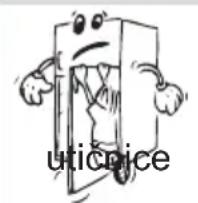
- If your old fridge has a lock, break or remove the lock before discarding it, because children may get trapped inside it and may cause an accident.
- Old fridges and freezers contain isolation material and refrigerant with CFC. Therefore, take care not to harm the environment when you are discarding your old fridges.
- Please ask your municipal authority about the disposal of the WEEE for the reuse, recycle and recovery purposes.
Notes:
- Please read the instruction manual carefully before installing and using your appliance. We are not responsible for the damage occurred due to misuse.
- Follow all instructions on your appliance and instruction manual, and keep this manual in a safe place to resolve the problems that may occur in the future.
- This appliance is produced to be used at houses and it can only be used in house and for the specified purposes. It is not suitable for commercial or common use. Such use will cause the guarantee of the appliance to be cancelled and our company will not be responsible for the losses to be occurred.
- This appliance is produced to be used in houses and it is only suitable for cooling / storing foods. It is not suitable for commercial or common use and/or for storing substances except for food. Our company is not responsible for the losses to be occurred in the contrary case.
Safety warnings
- Do not use multiple receptacles or extension cord. • Do not plug in damaged, torn or old plugs. • Do not pull, bend or damage the cord.

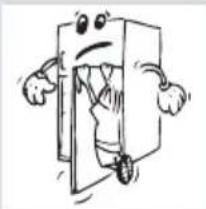
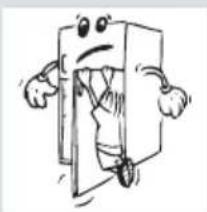
- This appliance is designed for use by adults, do not allow children to play with the appliance or let them to hang over the door.
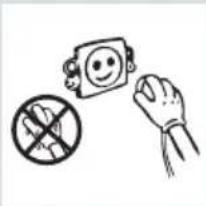
- Do not plug-in or out the plug from the receptacle with wet hands to prevent electrocution!
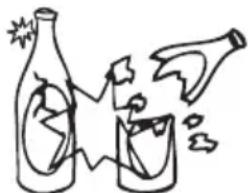
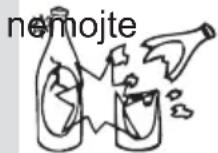
- Do not place glass bottles or beverage cans in the freezer department. Bottles or cans may explode.
- Do not place explosive or flammable material in your fridge for your safety. Place drinks with higher alcohol amount vertically and by closing their necks tightly in the fridge department.
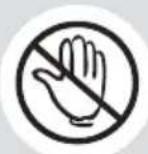
- When taking ice made in the freezer department, do not touch it, ice may cause ice burns and/or cuts.
- Do not touch frozen goods with wet hands! Do not eat ice-cream and ice cubes immediately after you take them out of the freezer department!
- Do not re-freeze the frozen goods after being melted. This may cause health issues like food poisoning.
- Do not cover the body or top of fridge with lace. This affects the performance of your fridge.
- Fix the accessories in the fridge during transportation to prevent damage to accessories.



Installing and operating your fridge
Before starting to use your fridge, you should pay attention to the following points:
- Operating voltage for your fridge is 220-240 V at 50Hz.
- The mains cord of your fridge has a grounded plug. This plug should be used with a grounded receptacle that has a 16 ampere fuse minimum. If you don't have a receptacle conforming to this, please have it done by an electrician. We do not take responsibility for damages that occur due to ungrounded usage.
- Place your fridge in a place where it will not be exposed to direct sunlight.
- Your appliance should be at least 50 cm away from stoves, gas ovens, and heater cores, and at least 5 cm away from electrical ovens.
- Your fridge should never be used outdoors or left under the rain.
- When your fridge is placed next to a deep freezer, there should be at least 2 cm between them to prevent humidity on the outer surface.
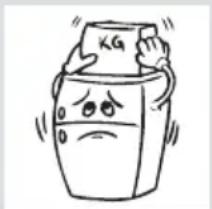
- Do not place anything on your fridge, and install your fridge in a suitable place so that at least 15 cm is available on the upper side.
- The adjustable front legs should be stabilized at an appropriate height to allow your fridge to operate in a stable and proper way. You can adjust the legs by turning them clockwise (or in the opposite direction). This should be done before placing food in the fridge.
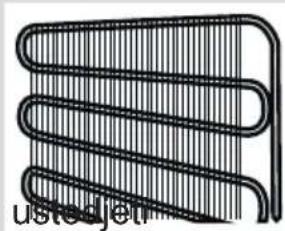
- Before using your fridge, wipe all parts with warm water added with a teaspoonful of sodium bicarbonate, then rinse with clean water and dry. Place all parts after cleaning. Install the distance adjustment plastic (the part with black vanes at the rear) by turning it 90 degrees as shown in the figure to prevent the condenser from touching the wall.
Before Using Your Fridge
- When it is operated for the first time or after transportation, keep your fridge in the upright position for 3 hours and plug it in to allow efficient operation. Otherwise, you may damage the compressor.
- Your fridge may have a smell when it is operated for the first time; the smell will fade away when your fridge starts to cool.
Information about NO FROST Technology
No-Frost fridges differ from other static fridges in their operating principle.
In normal fridges, the humidity entering the fridge in the door openings and the humidity of the food causes freezing in the freezer compartment. To defrost the snow and ice in the freezer compartment, you should turn off the fridge, take the food that needs to be kept at a constant temperature out of the fridge, and remove the ice gathered in the freezer compartment periodically.
The situation is completely different in no-frost fridges. Dry and cold air is blown into the fridge and freezer compartments homogeneously from several points via a blower fan. Cold air dispersed homogeneously even between the shelves cools all your food equally and uniformly, thus preventing humidity and freezing.
Therefore your no-frost fridge allows you ease of use, besides its huge volume and stylish appearance.

![graph TD A["Top Floor"] --> B["Top Section"] B --> C["Top Section 1"] B --> D["Top Section 2"] C --> E["Bottom Section"] D --> F["Bottom Section 3"] style A fill:#f9f,stroke:#333 style B fill:#ccf,stroke:#333 style C fill:#cfc,stroke:#333 style D fill:#fcc,stroke:#333 style E fill:#ffc,stroke:#333 s…](/content/2026/06/1286911/images/f39cea6fb1d78176a03ab2b6b313550a4ed9e35ffeac6ee913a409fdf3788909.jpg)

The purpose of this presentation is informing you about the parts of your appliance.
The parts may vary depending on the model of the appliance.
A) Freezer compartment B) Fridge compartment
1) Quick freezing shelf 2) Icemaker 3) Freezer lamp and its cover 4) Freezer compartment shelf 5) Chilled room shelf 6) Fridge compartment shelves 7) Crisper cover 8) Crispers 9) Leveling feet 10) Fridge compartment door bottle shelf 11) Fridge compartment lamp and its cover 12) Fridge compartment door shelves 13) Egg holder 14) Freezer compartment door shelves
The purpose of this presentation is informing you about the parts of your appliance.
The parts may vary depending on the model of the appliance.
Display and control panel

USAGE INFORMATION
1- It enables the setting value of Freezer to be modified and Super Freeze Mode to be activated if desired. Freezer may be set to -16, -18, -20, -22, -24 °C, SF. 2- It enables the setting value of Cooler to be modified and Super Cool Mode to be activated if desired. Cooler may be set to 8, 6, 5, 4, 2 °C, SC. 3- It enables the modes (Economy, Holiday...) to be activated if desired. 4- It is Child Lock and Sound Alarm Off Button. 5- It is Freezer Set Value Screen. 6- It is Super Freeze Indicator. 7- It is Holiday Mode Symbol. 8- It is Low Voltage Warning Symbol. 9- It is Drink Cool Mode Time Value Screen. 10- It is Cooler Set Value Screen. 11- It is Super Cool Indicator. 12- It is Alarm Symbol. 13- It is Economy Mode Symbol. 14- It is Demo Mode Symbol. 15- It is Child-Lock Symbol.

Operating your fridge
Super Freeze Mode
How would it be used?
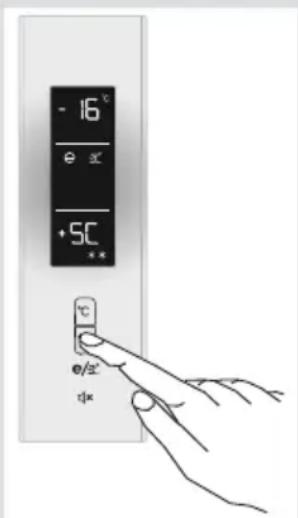
- Press Freezer Set Button until SF letters will be seen on the screen. Buzzer will sound beep beep. Mode will be set. • Freezer temperature segment will show "SF".
During this mode ;
• The temperature of Cooler and Super Cool Mode may be adjusted. In this case, Super Freeze Mode continues. • Economy and Holiday Mode cannot be selected. - Super Freeze Mode can be cancelled by the same operation of selecting.
Note:
• The maximum amount of fresh food (in kilograms) to be frozen within 24 hours is shown on the appliance label. - For optimal appliance performance in maximum freezer capacity, set the appliance to active SF mode 3 hours before you put the fresh food into the freezer. - At the end of this period, the fridge will release an audible alarm notifying that it is ready.
Super Freeze Mode will be automatically cancelled after 24 hours or when the freezer sensor temperature drops beneath -32°C.
Super Cool Mode
How would it be used?
- Press the Cooler Set Button until SC letters are seen on the screen. The buzzer will sound beep beep. The mode will be set. • The cooler temperature segment will show "SC".
During this mode:
• The temperature of Freezer and Super Freeze Mode may be adjusted. In this case, Super Cool Mode continues. • Economy and Holiday Mode cannot be selected. - Super Cool Mode can be cancelled by the same operation of selecting.
Note: Super Cool Mode will be automatically cancelled after 4 or 6 hours depending on the environmental temperature or when the refrigerator sensor reaches a sufficiently low temperature.
Economy Mode
How would it be used?
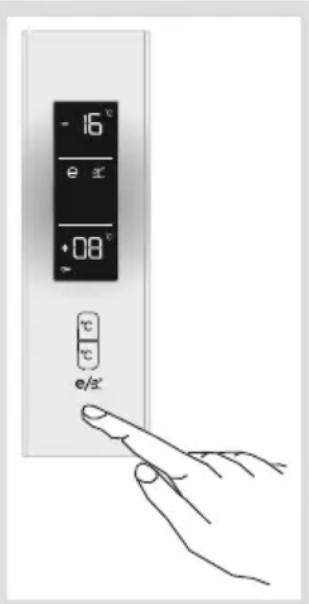
- Push the "Mode Button" until a circle appears around the economy symbol.
- If no button is pressed for 1 second, the mode will be set. The circle will blink 3 times. When the mode is set, the buzzer will sound beep beep.
- The Freezer and Refrigerator temperature segments will show "E". • The circle of the Economy Symbol and E will light until the mode finishes.
During this mode;
- Freezer may be adjusted. When Economy Mode is cancelled, the selected setting values will proceed.
- Cooler may be adjusted. When Economy Mode is cancelled, the selected setting values will proceed.
- Super Cool and Super Freeze modes can be selected. Economy Mode is automatically cancelled and the selected mode is activated.
- Holiday Mode can be selected after cancelling the Economy Mode. Then the selected mode is activated. • To cancel, you will just need to press the Mode Button.
Holiday Mode
How would it be used?
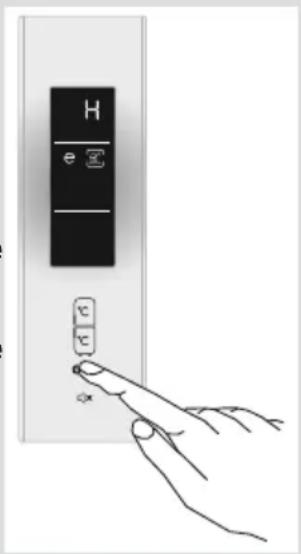
- Push the Mode Button until a circle appears around the plane symbol.
- If no button is pressed for 1 sec., the mode will be set. The circle will blink 3 times. When the mode is set, the buzzer will sound beep beep. • The freezer temperature segment will show "H". • The circle of the plane symbol and H will light until the mode finishes.


During this mode;
- Freezer may be adjusted. When Holiday Mode is cancelled, the selected setting values will proceed.
- Cooler may be adjusted. When Holiday Mode is cancelled, the selected setting values will proceed.
- Super Cool and Super Freeze Modes can be selected. Holiday Mode is automatically cancelled and the selected mode is activated.
- Economy Mode can be selected after cancelling the Holiday Mode. Then the selected mode is activated. • To cancel, you will just need to press the Mode Button.
- Holiday Mode should be activated when the cooler will not be used for a long period of time. By doing this, you will be using your fridge in a more economic manner. The cooler must be completely emptied before Holiday Mode is activated.
Drink Cool Mode
When would it be used?
• This mode is used to cool drinks within an adjustable time.
How would it be used?
- Press the Freezer Set button for 3 seconds.
- The letters "dc" will appear on the freezer screen, and "05" blinks on the D.Cool mode time value screen.
- Press the Cooler button to adjust the time (05 - 10 - 15 - 20 - 25 - 30 minutes).
- When you select the time, the numbers will blink 3 times on the screen and a beep-beep sound will be heard.
- If no button is pressed within 2 seconds, the time will be set.
- The countdown starts from the adjusted time, minute by minute. • The remaining time blinks on the screen.
- To cancel this mode, press the Freezer Set button for 3 seconds.
Note: You must adjust the time according to the temperature of the bottles before you put them in.
- For example, you can set the time as "5 minutes" in the beginning. After this time, if the cooling is insufficient, you might set another 5 or 10 minutes.
- While using this mode, you must check the temperature of the bottles regularly. When the bottles are cool enough, you must take them out of the appliance.
- In the event that you leave the bottles in when the Drink Cool Mode is on, they might explode.
Screen Saver Mode
How to use?
- This mode will be activated when you press on Mode Button for 3 seconds.
- If pressed on no button in 5 seconds when he mode is active, lights of the control panel will go off.
- If you press any button when lights of control panel are off, the current settings will appear on the screen, and then you can make the adjustment as you want. If you neither cancel screen saver mode nor press on any button in 5 seconds, the control panel will go off again.
- To cancel screen saver mode press on Mode Button for 3 seconds again.
- When Screen Saver Mode is active you can also activate Child Lock.
- If you do not press any button for 5 seconds after activating Child Lock, the lights of the control panel will go off. Then, you can view the previous settings and that child lock symbol is active when you pres any button, and you can cancel Child Lock as is described in the instruction of that mode.

Function of Child Lock
When would it be used?
To prevent children from playing with the buttons and changing the settings you have made, Child Lock is available in the appliance.
Activating Child Lock
Press on Child Lock and Sound Alarm Off Button simultaneously for 5 seconds.
Deactivating Child Lock
Press on Child Lock and Sound Alarm Off Button simultaneously for 5 seconds.
Note: Child Lock will also be deactivated if electricity is interrupted or the fridge is unplugged.
Temperature Settings
Freezer Temperature Settings
- Initial temperature value for Freezer Setting Indicator is -18°C.
- Press Freezer Set Button once.
- When you first push this button, the last set value will blink on screen.
- Whenever you press on this button, lower temperature will be set. (-16°C, -18°C, -20°C, -22°C, -24°C, super freeze)
- When you push the Freezer Set Button until Super Freeze symbol appears on the Freezer Setting Indicator, and if you do not push any button in 1 seconds Super Freeze will flash. • If you continue to press, it will restart from -16°C.
- The temperature value selected before Holiday Mode, Super Freeze Mode, Super Cool Mode or Economy Mode is activated will remain the same when the mode is over or cancelled. The appliance continues to operate with this temperature value.

Cooler Temperature Settings
- Initial temperature value for Cooler Setting Indicator is +4°C.
- Press Cooler Set Button once.
- When you first push this button, the last value appears on the setting indicator of the cooler.
- Whenever you press on this button, lower temperature will be set. (+8°C, +6°C, +5°C, +4°C, +2°C, supercool)
- When you push the Cooler Set Button until supercool symbol appears on the Cooler Setting Indicator, and if you do not push any button in 1 seconds Super Cool will flash. • If you continue to press, it will restart from +8°C.
- The temperature value selected before Holiday Mode, Super Freeze Mode, Super Cool Mode, or Economy Mode is activated will remain the same when the mode is over or cancelled. The appliance continues to operate with this temperature value.

| Freezer Partition | Refrigerator Compartment | Remarks |
| -18°C 4°C For regular use and best performance. | ||
| -20°C,-22°C or -24°C 4°C | Recommended when environmental temperature exceeds 30°C. | |
| SF 4°C | Must be used when you wish to freeze food in a short period of time. | |
| -18°C, -20°C,-22°C or -24°C | 2°C | These temperature settings must be used when the environmental temperature is high or if you think the refrigerator compartment is not cool enough because the door is being opened frequently. |
| -18°C, -20°C,-22°C or -24°C | SC | Must be used when the refrigerator compartment is overloaded with food or when there is food to be cooled instantly. |
Warnings About Temperature Adjustments
- Your temperature adjustments will not be deleted when an energy breakdown occurs.
- It is not recommended that you operate your fridge in environments colder than 10°C in terms of its efficiency.
- Temperature adjustments should be made according to the frequency of door openings, the quantity of food kept inside the fridge, and the ambient temperature of the place where your fridge is located.
- Your fridge should be operated up to 24 hours according to the ambient temperature without interruption after being plugged in to be completely cooled. Do not open the doors of your fridge frequently and do not place much food inside it during this period.
- A 5-minute delaying function is applied to prevent damage to the compressor of your fridge when you take the plug off and then plug it on again to operate it, or when an energy breakdown occurs. Your fridge will start to operate normally after 5 minutes.
- Your fridge is designed to operate in the ambient temperature intervals stated in the standards, according to the climate class stated on the information label. We do not recommend operating your fridge outside the stated temperature limits in terms of cooling effectiveness.
| Climate Class | Ambient Temperature °C |
| T Between 16 and 43 (°C) | |
| ST Between 16 and 38 (°C) | |
| N Between 16 and 32 (°C) | |
| SN Between 10 and 32 (°C) | |
Note: If the ambient temperature is higher than 38° C, the compartment temperature cannot be set to -22° C, -23° C, or -24° C. It can only be set to -16° C, -17° C, -18° C, -19° C, -20° C, or -21° C.
Check Warnings:
Your fridge warns you if the temperatures for the cooler and freezer are at improper levels or when a problem occurs in the appliance. Warning codes are displayed in the Freezer and Cooler Indicators.
| ERROR TYPE | MEANING WHY | ? WHAT TO DO ? | |
| SR | "Failure Warning" | There is/are some part(s) Out of order or there is a failure in cooling process | Call Service for assistance as soon as possible. |
| LF | Freezer comp. Not Cold enough | This caution will be seen especially after long term of power failure | 1. Do not freeze the foods that are thaw and use in short time period.2. Set the freezer temperature to colder values or set the super freeze, until the compartment gets to normal temperature.3. Do not put fresh food until this failure is off. |
| LC | Refrigerator comp. Not Cold enough | Ideal temperature for Ref. Compartment is +4 °C. If you see this warning your foods have risk of spoiling. | 1. Set the refrigerator temperature to colder values or set the super cooling mode until the compartment gets to normal temperature.2. Do not open the door much until this failure is off. |
| LF and LC | not cold enough | It is the combination of LF and LC Error type | You will see this failure when first starting the appliance. It will be off after the compartments gets normal temperature |
| HC | Refrigerator comp. too Cold | The foods starts to freeze because of the too much cold temperature | 1. Check if the “Super cooling mode” is on2. Decrease the refrigerator temperature values |
| LOPO | Low voltage Warning | When the power supply gets lower than 170 V the appliance gets to steady position. | This not a failure. This prevents any damages on the compressor. This warning will off after the voltage gets required level |


Accessories
Icemaker
- Fill the icebox part of the icemaker with water and place it back. • You can take your ice approximately 2 hours later.
- Without displacing the icebox, turn the icebox arm to the right until all the ice cubes are discharged into the ice bucket.
- You can serve by taking the ice bucket out, or you can store ice in it.
The ice bucket is only for storing ice. Do not use it to make ice by filling it with water, as this could damage it.
Quick Freezer Compartment
- Use the Quick Freezer compartment for freezing fresh foods. This allows foods you want to freeze to freeze more rapidly and prevents them from coming into contact with already frozen foods. Once the food is frozen, you can move it to other shelves in the freezing compartment by removing it from the quick freezer shelf.
- To open the Quick Freezer compartment door, hold it and push it forward along the rails; close it by pulling it back in the same manner.
- Before closing the upper door of your fridge, make sure the cover of the Quick Freezer is closed. Otherwise, it cannot perform its quick freezing function.
Chilled Room Compartment
Keeping food in the Chiller compartment instead of the freezer or refrigerator compartment helps food retain freshness and flavor longer, while preserving its fresh appearance. When the chiller tray becomes dirty, remove it and wash it with water.
(Water freezes at 0°C, but foods containing salt or sugar freeze at lower temperatures.)
Normally, people use the chiller compartment for raw fish, lightly pickled items, rice, etc.
Please do not put foods you want to freeze or ice trays in the chiller compartment to make ice.
Fresh Dial
If the crisper is completely full, the fresh dial located in front of the crisper should be opened. This controls the air and humidity level in the crisper, increasing its lifespan.
If you see condensation on the glass shelf, you must open this flap located behind the shelf.

Visual and text descriptions in the accessories section may vary depending on your appliance model.
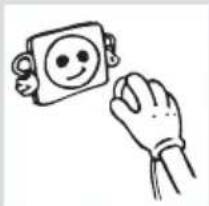
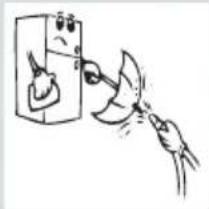


• Make sure to unplug the fridge before starting to clean it.
• Do not wash your fridge by pouring water.
- You can wipe the inner and outer sides of your appliance with a soft cloth or a sponge using warm and soapy water.
- Remove the parts individually and clean with soapy water. Do not wash in washing machine.

- Never use flammable, explosive or corrosive material like thinner, gas, acid for cleaning.
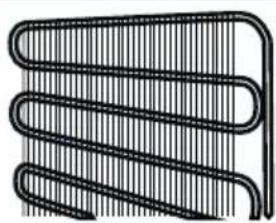
- The condenser (the back part with black wings) should be cleaned using a vacuum cleaner or a dry brush at least once a year. This will help your fridge to operate more efficiently and will enable you to save energy.
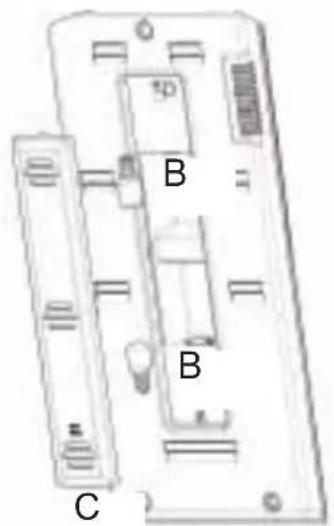
Replacing the bulb
To replace the bulb in freezer and fridge compartments;
- Unplug the unit from the power supply,
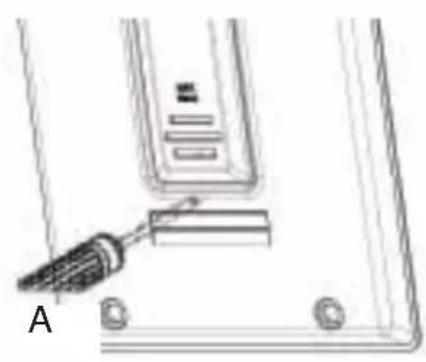
- Remove the refrigerator light cover with a minus screw driver, and take out the cover.(A)
- Change the present light bulb with a new one of not more than 15 W.(B)
- Replace the light cover and after waiting 5 minutes plug the unit.(C)


Replacing The Light Led (If the illumination is occurred via LED strip)
Please call the service man.

Where to place in the
- For normal operating conditions, adjusting the temperature value of the cooler partition of the fridge to +4°C / +6°C will be enough.
- Food should be placed in the fridge in closed containers or covered with appropriate material.
- Hot food and beverages should be cooled to room temperature before being placed in the fridge.
- Vegetables and fruits: can be placed in the vegetable bin directly without being wrapped.
- The fridge air duct distributes cold air to the fridge compartment. Avoid preventing the air flow by covering the front of the ducts with food. Do not thrust packed food or containers to the lamp or door of the fridge compartment.
Important Note:
- Cover the liquid and stews when you put them in the fridge. Otherwise, the humidity amount inside the fridge increases. And this causes the fridge to operate more. Covering the food and beverages also allows you to protect their taste and flavor.
- Potatoes, onion and garlic shouldn't be kept in the fridge.
Some suggestions on the placing and storing of your food in the fridge compartment are supplied below.
| Food Storing time | Where to place in the fridge department | |
| Vegetables and fruits 1 week | In the Crisper (without being wrapped) | |
| Meat and fish 2 to 3 days | Covered with plastic folio and bags or in a meat box (on the glass shelf) | |
| Fresh cheese 3 to 4 days | In the special door shelf | |
| Butter and Margarine 1 week | In the special door shelf | |
| Bottled product, Milk and Yoghurt | Until the expiry date recommended by the producer | In the special door shelf |
| Eggs 1 month In the egg shelf | ||
| Cooked food | All | shelves |
Freezer Compartment
- For normal operating conditions, adjusting the temperature value of the freezer partition of the fridge to -18 / -20 °C will be enough.
- The freezer is used for storing deep frozen or frozen foods for a long time or for producing ice.
- Do not put fresh and hot foods on the shelves of the freezer door in order to freeze them. Only use it for storing frozen foods.
- Do not put fresh and hot foods close to frozen foods because the frozen foods can melt.
- In order to freeze the food you cook at home (which needs to be frozen) more quickly, use the quick freezer shelf, because the quick freezer compartment has a higher capacity for freezing.
- While freezing fresh food (e.g., meat, fish, and minced meat), divide it into small portions that you can use at once.
- While freezing fresh foods, the maximum amount of food that can be frozen within 24 hours is shown on the label of the appliance (in kg).
- For an ideal appliance capacity that will enable you to reach the maximum freezing capacity, rotate the freezer compartment thermostat knob to the MAX position 24 hours before you place fresh foods in the freezer compartment.
- After placing fresh foods in the freezer compartment, waiting for 24 hours with the knob at the MAX position is generally enough. After 24 hours, you do not need to adjust the freezer compartment knob to the MAX position.
- Caution: While freezing a small amount of food, you do not need to adjust the freezer compartment knob to the MAX position. This will help you save energy.
- To store frozen foods, you should carefully follow the instructions on the packages of frozen foods. If there are no instructions on the foods, they should be stored for a maximum of 3 months from the date of purchase.
- When you purchase frozen foods, please make sure that the food is frozen at appropriate temperatures and that its package is safe.
- Frozen foods should be carried in appropriate storage boxes and placed in the freezer compartment of the appliance as soon as possible.
- If there are moisture and abnormal swelling marks on the package of a frozen food, it was probably stored at an inappropriate temperature and its content has deteriorated.
PLACING THE FOODS
- The expiry date of a frozen food depends on the room temperature, thermostat setting, the frequency of opening the door of your fridge, the type of food, and the time passing while carrying it from the shop to the house. Always follow the instructions on the package and do not exceed the storage period.
Important Note:
- Cover liquids and stews when you put them in the fridge. Otherwise, the humidity amount inside the fridge increases, and this causes the fridge to operate more. Covering food and beverages also helps preserve their taste and flavor.
- If you put frozen foods taken out from the deep freezer compartment of your fridge into the fridge compartment one day before, they will help cool the fridge. So you can save energy. If you put the material from the deep freeze in an open area, energy loss occurs.
Notes:
- Some spices in cooked food (aniseed, basil, dill, vinegar, spice mix, ginger, garlic, onion, mustard, thyme, marjoram, black pepper, bologna sausage etc.) may have a foul taste when stored for a long time. Therefore, frozen food should be spiced just a little or spice should be added after the food is thawed.
- The storing time for the food depends on the oil used. Margarines, veal fat, olive oil and butter are suitable, peanut oil and lard are not suitable.
- Cooked food in liquid form should be frozen in plastic containers, other food should be frozen wrapped in plastic foil or in plastic bags.
Some suggestions on the placing and storing of your food in the freezer compartment are supplied on pages 29, 30 and 31.
| Fish and Meat Preparation | Storage Duration (months) | Thawing period at room temperature -hours- | |
| Beef Steak | Packed for freezing in convenient portions | 6-10 1-2 | |
| Lamb Meat | Packed for freezing in convenient portions | 6-8 1-2 | |
| Calf Roast | Packed for freezing in convenient portions | 6-10 1-2 | |
| Calf Cubes In small pieces | 6-10 1-2 | ||
| Sheep Cubes In pieces 4-8 | 2-3 | ||
| Minced meat | In convenient portions, packaged without being spiced | 1-3 2-3 | |
| Offal (piece) In pieces 1-3 | 1-2 | ||
| Sausage/Salami | Must be packed even if it is film-coated | Until | |
| Chicken and turkey | Packed for freezing in convenient portions | 7-8 10-12 | |
| Goose / Duck | Packed for freezing in convenient portions | 4-8 10 | |
| Deer - Rabbit - Boar | Portions of 2.5 kg and with no bones | 9-12 10-12 | |
| Freshwater fish (Trout, Carp, Northern Pike, Cat, Fish) | It should be washed and dried after it is well cleaned inside and scaled, the tail and head parts should be cut off where necessary. | 2 | Until it is well thawed |
| Lean fish (Sea Bass, Turbot, Sole) | 4-8 | Until it is well thawed | |
| Fatty fish (Bonito, Mackerel, Blue Fish, Anchovy) | 2-4 | Until it is well thawed | |
| Crustaceans | Cleansed and put into bags | 4-6 | Until it is well thawed |
| Caviar | In its package, inside an aluminum or plastic cup | 2-3 | Until it is well thawed |
| Snail | In salty water, inside an aluminum or plastic cup | 3 | Until it is well thawed |
| Vegetables and Fruits | Preparation | Storage Duration (months) | Thawing period at room temperature -hours- | ||
| Cauliflower | Remove the leaves, divide the core into parts and keep it waiting in water containing a little amount of lemon | 10 - 12 | It may be used in frozen form | ||
| Green Beans, French Beans | Wash them and cut into small pieces. | 10 - 13 | It may be used in frozen form | ||
| Peas Shell and wash | them 12 | It may be used in frozen form | |||
| Mushrooms and Asparagus | Wash them and cut into small pieces | 6 - 9 | It may be used in frozen form | ||
| Cabbage In a cleaned fashion 6 - 8 2 | |||||
| Eggplant | Cut it into pieces of 2cm after washing it | 10 - 12 | Separate plates from each other | ||
| Corn | Clean it and pack it with its cob or in grains | 12 | It may be used in frozen form | ||
| Carrot Clean them and cut into slices 12 | It may be used in frozen form | ||||
| Pepper | Remove the stem, divide it into two and separate the seeds | 8 - 10 | It may be used in frozen form | ||
| Spinach Washed 6 - 9 2 | |||||
| Apple and Pear Slice | it by peeling its rind 8 - 10 (In freezer) 5 | ||||
| Apricot and Peach | Divide it into half and remove the seeds | 4 - 6 (In freezer) 4 | |||
| Strawberry and Raspberry | Wash and clean them 8 - 12 2 | ||||
| Cooked fruits | Inside a cup with addition of 10% of sugar | 12 | 4 | ||
| Plums, Cherries, Sour Cherries | Wash them and remove the stems | 8 - 12 | 5 - 7 | ||
| Dairy Products and Pastries | Preparation | Storage Duration (months) | Storage Conditions | ||
| Packaged (Homogenised) Milk | In its own package 2 - 3 | Homogenised | Milk only | ||
| Cheese (except white cheese) | In the form of slices 6 - 8 | They may be left in their original packages for short time storage. They should also be wrapped in plastic folio for long term storage. | |||
| Butter, Margarine In its own package 6 | |||||
| Egg (*) | Egg White 10 - 12 | 30 gr of it Equals to one egg yolk. | In a closed cup | ||
| Egg mixture (White-Yolk) | It is mixed very well, a pinch of salt or sugar is added to prevent it from getting too thick | 10 | 50 gr of it Equals to one egg yolk. | ||
| Egg Yolk | It is mixed very well, a pinch of salt or sugar is added to prevent it from getting too thick | 8 - 10 | 20 gr of it Equals to one egg yolk. | ||
(*) Should never be frozen with its shell. Albumen and yolk should be frozen individually or completely mixed.
| Storage Duration (months) | Thawing period at room temperature (hours) | Thawing duration in the oven (minutes) | |
| Bread 4 - 6 2 - 3 4-5 | (220-225 °C) | ||
| Biscuits 3 - 6 1 - 1,5 | 5-8 (190-200 °C) | ||
| Pie 1 - 3 2 - 3 5-10 | (200-225 °C) | ||
| Tart 1 - 1,5 3 - 4 5-8 | (190-200 °C) | ||
| Filo Pastry | 2 - 3 1 - 1,5 | 5-8 (190-200 °C) | |
| Pizza | 2 - 3 2 - 4 | 15-20 (200 °C) |

- Original package and foam may be kept for re-transportation (optionally).
- You should fasten your fridge with thick package, bands or strong cords and follow the instructions for transportation on the package for re-transportation.
- Remove movable parts (shelves, accessories, vegetable bins etc.) or fix them into the fridge against shocks using bands during re-positioning and transportation.
Carry your fridge in the upright position.
Repositioning the Door
- It is not possible to change the opening direction of your fridge door, if the door handles on your fridge are installed from the front surface of the door.
- It is possible to change the opening direction of the door on models without any handles.
- If the door opening direction of your fridge may be changed, you should contact the nearest Authorized Service to have the opening direction changed.
Check Warnings;
Your fridge warns you if the temperatures for the cooler and freezer are at improper levels or when a problem occurs in the appliance. Warning codes are displayed in the Freezer and Cooler Indicators.
If your fridge is not operating:
• Is there any electrical fault? • Is the plug placed properly in the socket outlet? • Is the fuse of the socket outlet that the plug is plugged into or the main fuse blown? • Is the temperature setting on the correct level? • Is there any fault in the socket outlet? Examine this by plugging your fridge into a socket outlet which you are sure is working.
If your fridge is not cooling enough:
• Is the temperature setting on the correct level? • Is the door of your fridge opened frequently and left open for a long while? • Is the door of the fridge closed properly? • Did you put a dish or food in your fridge so that it contacts the rear wall of your fridge, preventing air circulation? • Is your fridge filled excessively? • Is there adequate distance between your fridge and the rear and side walls? • Is the ambient temperature between the values specified in the operating manual?
If the food in your refrigerator compartment is over-cooled:
- Is the temperature adjustment right? (Is the refrigerator temperature setting level SC?)
- Are there many foods recently put inside the freezer compartment? If so, your fridge may over-cool the food inside the refrigerator compartment as it will operate longer to cool these foods.
If your fridge is operating too loudly:
To maintain the set cooling level, the compressor may be activated from time to time. Noises from your fridge at this time are normal and due to its function. When the required cooling level is reached, noises will be
decreased automatically. If the noises persist:
• Is your appliance stable? Are the legs adjusted? • Is there anything behind your fridge? • Are the shelves or dishes on the shelves vibrating? Re-place the shelves and/or dishes if this is the case. • Are the items placed on your fridge vibrating?
Normal Noises:
Cracking (Ice cracking) Noise:
• During automatic defrosting. - When the appliance is cooled or warmed (due to the appliance material).
Short cracking: Heard when the thermostat switches the compressor on/off.
Compressor noise (Normal motor noise): This noise means that the compressor operates normally. The compressor may cause more noise for a short time when it is activated.
Bubbling noise and splash: This noise is caused by the flow of the refrigerant in the tubes of the system.
Water flow noise: Normal flow noise of water flowing to the evaporation container during defrosting. This noise can be heard during defrosting.
Air blowing noise (Normal fan noise): This noise can be heard in No-Frost fridges during normal operation of the system due to the circulation of air.
If humidity builds up inside the fridge:
- Are all food packed properly? Are the containers dried before placing them in the fridge?
- Are the fridge doors opened frequently? Humidity of the room gets in the fridge when the doors are opened. Humidity build up will be faster when you open the doors more frequently, especially if the humidity of the room is high. • Building up of water drops on the rear wall after automatic defrosting is normal. (In Static Models)
If the doors are not opened and closed properly:
- Do the food packages prevent closing of the door?
- Are the door compartments, shelves and drawers placed properly?
• Are door gaskets broken or torn? • Is your fridge on a level surface?
If the edges of the fridge cabinet that the door joint contact are warm:
Especially in summer (hot weather), the surfaces that the joint contact may get warmer during the operation of the compressor. This is normal.
IMPORTANT NOTES:
- Compressor protection thermal fuse will be blown after sudden power breakdowns or after unplugging the appliance, because the gas in the cooling system is not stabilized yet. Your fridge will start after 4 or 5 minutes, there is nothing to worry about.
- The cooling unit of your refrigerator is hidden in the rear wall. Therefore, water droplets or icing may occur on the rear surface of your fridge due to the operation of the compressor in specified intervals. This is normal. There is no need to perform a defrosting operation unless the icing is excessive.
- If you will not use your fridge for a long time (e.g. in summer holidays), unplug it. After defrosting, clean your fridge and leave the door open to prevent humidity and smell.
- If the problem persists after you have followed all the instructions above, please consult to the nearest Authorized Service.
- The appliance you have purchased is designed for home type use and can be used only at home and for the stated purposes. It is not suitable for commercial or common use. If the consumer use the appliance in a way that does not comply with these features, we emphasize that the producer and the dealer shall not be responsible for any repair and failure within the guarantee period.
Conformity Information
- This appliance is designed for use at an ambient temperature within the 16°C - 43°C range.
- The appliance is designed in compliance with the IEC60335-1 / IEC60335-2-24, 2004/108/EC standards.
TIPS FOR SAVING ENERGY
1- Install the appliance in a cool, well ventilated room, but not in direct sunlight and not near heat source (radiator, cooker.. etc). Otherwise use an insulating plate. 2- Allow warm food and drinks to cool down outside the appliance. 3- When thawing frozen food, place it in the refrigerator compartment. The low temperature of the frozen food will help to cool the refrigerator compartment when it is thawing. So it causes energy saving. If the frozen food is put out, it causes wastage of energy. 4- When placing, drinks and slops they must be covered. Otherwise humidity increases at the appliance. Therefore the working time gets longer. Also covering drinks and slops helps to save smell and taste. 5- When placing food and drinks, open the appliance door as briefly as possible. 6- Keep close the covers of any different temperature compartment in the appliance (crisper, chiller ...etc). 7- Door gasket must be clean and pliable. Replace gaskets if worn.
Index
BEFORE USING THE APPLIANCE ....38



Super Freeze Mode
minute by minute.
Flap
Notes:


warm
after


- It is not possible to select the Economy (Econor) or Holiday (Holiday) modes.
- Super Cool mode can be canceled by the same selection action.
Note: Super Cool mode will automatically turn off after 4 or 6 hours, depending on the ambient temperature or when the refrigerator sensor reaches a sufficiently low temperature.
Economy mode
How to use?
Quick freeze compartment
Rattle
Visual and textual descriptions in the accessories section may vary depending on your appliance model.
- For cleaning, never use flammable, explosive, or corrosive materials such as thinner, gas, or acid.


Replacing the light bulb

Where to place
Old and broken refrigerators
- If your old refrigerator has a lock, break it or remove it before disposal, because children can get trapped inside and an accident may occur.
- Old refrigerators and freezers contain insulating material and refrigerant with CFCs. Therefore, be careful not to harm the environment when disposing of your old refrigerators.
- Inquire with local authorities regarding WEEE for reuse, recycling, and recovery.
Notes:
- Read the instruction manual carefully before installation and use of the appliance. We are not responsible for damage caused by misuse.
- Follow all instructions on the appliance and in the user manual, and keep this manual in a safe place to resolve any problems that may arise in the future.
- This appliance is manufactured for use in homes/households and may only be used in a home/household for the stated purposes. It is not suitable for commercial or common use. Such use will lead to violation of the warranty on the appliance, and our company will not be responsible for any resulting losses.
- This appliance is manufactured for use in homes/households and is suitable for cooling/storing food. It is not suitable for commercial or shared use and/or storage of substances other than food. Our company is not responsible for losses resulting from improper use.


Installation and operation of the refrigerator


Probor
Ice maker
- Fill the ice tray in the ice maker with water and return it. • You can use the ice approximately 2 hours later.
- Without moving the ice tray, turn the ice tray handle to the right until all ice cubes are emptied into the ice bin.
- You can serve by removing the bin or you can store ice in it.


- Make sure to unplug the refrigerator before starting cleaning.
• Do not wash the refrigerator by pouring water over it.
- You can wipe the inside and outside of your appliance with a soft cloth or sponge using warm soapy water.
- Remove individual parts and wash them with soapy water. Do not wash them in a dishwasher.

- Never use flammable, explosive, or corrosive materials such as thinner, gas, or acid for cleaning.
- The condenser (the back side with black fins) should be cleaned using a vacuum cleaner or a dry brush at least once a year. This will help your refrigerator work more efficiently and save energy.
Replacing the light bulb
To replace the bulb in the freezer and refrigerator compartments:
- Disconnect the appliance from the power supply.
- Remove the refrigerator light cover using a flat-head screwdriver and take out the cover. (A)
- Replace the bulb with a new one whose wattage does not exceed 15 W. (B)
- Reinstall the light cover and after 5 minutes, plug the unit back in. (C)


Replacing the LED lamp (if the lighting is provided via an LED strip): Call a service technician.

Where to place the
- The original packaging and foam can be kept for future transport (optional).
- You need to secure your refrigerator with thick packaging, tape, or strong cables and follow the transport instructions on the packaging.
- Remove movable parts (shelves, accessories, vegetable containers, etc.) or secure them in the refrigerator to prevent damage using tape during moving and transport.


Safety warnings
- To reset, press and hold the freezer setting button for 3 seconds.
Note: You must set the time according to the temperature of the bottles before placing them in the refrigerator.


Accessories
Ice maker


Where to place
- PARTS AND PIECES OF YOUR FRIDGE
- USAGE INFORMATION
- BEFORE CALLING SERVICE
- CLEANING AND MAINTENANCE
- PLACING THE FOODS
- SHIPMENT AND REPOSITIONING
- TIPS FOR SAVING ENERGY
- GENERAL WARNINGS
- OLD AND OUT-OF-ORDER FRIDGES
- NOTES
- SAFETY WARNINGS
- INSTALLING AND OPERATING YOUR FRIDGE
- BEFORE USING YOUR FRIDGE
- INFORMATION ABOUT NO FROST TECHNOLOGY
- DISPLAY AND CONTROL PANEL
- OPERATING YOUR FRIDGE
- SUPER FREEZE MODE
- HOW WOULD IT BE USED
- DURING THIS MODE
- NOTE
- SUPER COOL MODE
- ECONOMY MODE
- HOLIDAY MODE
- DRINK COOL MODE
- WHEN WOULD IT BE USED
- SCREEN SAVER MODE
- HOW TO USE
- FUNCTION OF CHILD LOCK
- ACTIVATING CHILD LOCK
- DEACTIVATING CHILD LOCK
- TEMPERATURE SETTINGS
- FREEZER TEMPERATURE SETTINGS
- COOLER TEMPERATURE SETTINGS
- WARNINGS ABOUT TEMPERATURE ADJUSTMENTS
- CHECK WARNINGS
- ACCESSORIES
- ICEMAKER
- QUICK FREEZER COMPARTMENT
- FRESH DIAL
- REPLACING THE BULB
- REPLACING THE LIGHT LED (IF THE ILLUMINATION IS OCCURRED VIA LED STRIP)
- WHERE TO PLACE IN THE
- IMPORTANT NOTE
- FREEZER COMPARTMENT
- REPOSITIONING THE DOOR
- IF YOUR FRIDGE IS NOT OPERATING
- IF YOUR FRIDGE IS NOT COOLING ENOUGH
- IF THE FOOD IN YOUR REFRIGERATOR COMPARTMENT IS OVER-COOLED
- IF YOUR FRIDGE IS OPERATING TOO LOUDLY
- NORMAL NOISES
- CRACKING (ICE CRACKING) NOISE
- IF HUMIDITY BUILDS UP INSIDE THE FRIDGE
- IF THE DOORS ARE NOT OPENED AND CLOSED PROPERLY
- IF THE EDGES OF THE FRIDGE CABINET THAT THE DOOR JOINT CONTACT ARE WARM
- IMPORTANT NOTES
- CONFORMITY INFORMATION
- INDEX
- BEFORE USING THE APPLIANCE
- QUICK FREEZE COMPARTMENT
- REPLACING THE LIGHT BULB
- WHERE TO PLACE
- OLD AND BROKEN REFRIGERATORS
- INSTALLATION AND OPERATION OF THE REFRIGERATOR
- PROBOR
- ICE MAKER
- WHERE TO PLACE THE
Brand : GORENJE
Model : NRF7181TX
Category : Refrigerator