
DL8740 - Thermometer PHILIPS - Free user manual and instructions
Find the device manual for free DL8740 PHILIPS in PDF.


| Product Type | Digital Thermometer |
| Model | DL8740 |
| Brand | Philips |
| Measurement Type | Infrared (forehead) or contact (oral/rectal/underarm) |
| Temperature Range | 34.0°C - 42.2°C (93.2°F - 108.0°F) |
| Accuracy | ±0.2°C (forehead mode) / ±0.1°C (contact mode) |
| Measurement Time | Approximately 1 second (forehead) or 10 seconds (contact) |
| Display | LCD with backlight |
| Memory | Stores last 10 readings |
| Fever Alarm | Yes, beeps and red backlight for temperature >37.5°C (99.5°F) |
| Power Source | 2 x 1.5V AAA alkaline batteries (included) |
| Battery Life | Approximately 200 hours of use |
| Auto-Off | Yes, after 60 seconds inactivity |
| Dimensions | 150 mm x 40 mm x 30 mm |
| Weight (without batteries) | 50 g |
| Material | BPA-free plastic, soft silicone tip (contact mode) |
| Water Resistance | IP22 (splash-proof) |
| Cleaning | Wipe with a soft, dry cloth. Do not immerse. |
| Storage Conditions | Temperature: -25°C to 60°C, Humidity: 15% to 90% RH |
| Safety Certifications | CE, FDA (if applicable) |
| Included Accessories | 2 AAA batteries, storage case, user manual |
| Warranty | 2 years |
Frequently Asked Questions - DL8740 PHILIPS
User questions about DL8740 PHILIPS
0 question about this device. Answer the ones you know or ask your own.
Ask a new question about this device
Download the instructions for your Thermometer in PDF format for free! Find your manual DL8740 - PHILIPS and take your electronic device back in hand. On this page are published all the documents necessary for the use of your device. DL8740 by PHILIPS.
USER MANUAL DL8740 PHILIPS
Specifications are subject to change without notice
© 2017 Kori-fkijke Philips NV.
Find the least user manual on
www.phips.com/support
All rights reserved.
■ Philips Consumer Lighting
Tussendepen 432068 Duetten The Netherlands
Tax: 31(0)512594316
29710345886(28/6/2017)

: /ʌˈreɪdʒən 100 : /ʌˈpɑːdər ræn 15

English
Introduction
Congratulations on your purchase and welcome to Tips: To fully benefit from the poor. If
• Tips of drs, register your product.
www.philips.com/welcome.
Intended use
The product is intended for measuring the
temperature of the human body via the ear canal by an intra-to-sensor of the device is interested in all
General
This. Philips et Lernometer has been developed for accurate and fast human body temperature In measure it's in the car in the adjusted mode. The first part of the body is ideal, it takes the body temperature to the body side. Asking the body can be able to be a body too. (14.2) The area by focus (1) shares, he says blood s-pey as the temporary membrane (2). Measurement results can be transmitted via Rueclorth® to the Philips Health and for cheating and packing purposes.
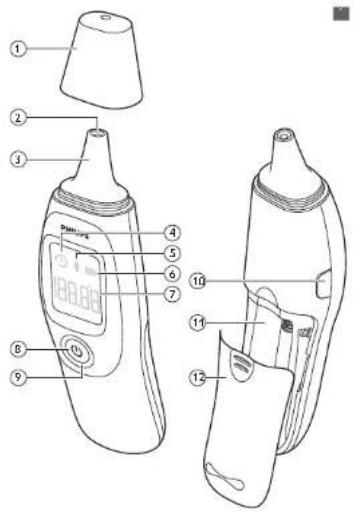
General description (Fig. 1)
Protection cap
2 Infrared sensor
3 Price ip
4 History con
5 Bluetooth icon
6 Gallery sign
/ Temperature display
8 Power button
9 Temperature light ring
'0 C/F selected on L. Hen
1 Battery compartment
2 Battery cover
Important safety information
lead in important in small or rare utility before you use the device and save it for future reference.
Warning
4
Do not measure the body temperature at the
car site if the car's inflamed or infected.
- Keep the device on a 'the reach of children'
and pets to avoid inhalation or swallowing of
small parts. Children may not be able to use the
dev're according to he'sn.r.ions in his...ser
Fid'Ud.1. is not a
Do not throw disposable batteries into fire
Batteries may explore.
- Do not put the device to what can be
swimming or bathing. This may cause injury to
the ear canal
- Do not use the device if this is an error.
damaged. Using a broken or damaged device
may cause it up.
Caution
△
- Only use the device as described in this user
Furua Donol use i. for any other purpose
The device is not intended as a substitute for
consulting a doctor. Measurement results are
for reference only
When the device is used to measure the
temperature of a child, it has to be operated by
enact Adults can treasure their own
temperature
- If you clean the car, wait 5-10 minutes before
you use the device
Ear wax in the ear canal may cause maccerase
measurements. Make sure the car cana, is clean
before you use the device
- Do not take out, repair or charge any out of
the devots at any time.
- Do not store the device in extreme temperature
Fe ox^-/23C4-4H or over 60 C/^13C4H
extreme levels of humidity (below 15%RH or
over 55%RH) This may cause naccurate
- 请详细阅读。
keep the infrared sensory dry, clear and
undamaged to ensure accurate measurements.
- Do not ... or b over a. The infrared sensor A
polluted infrared sensor may cause inaccurate
measurements.
- Never: clear the device with an abrasive
clearer, thinner benzene or impersetone
devoc in water or other liquids.
- When the temperature of the storage area differs from the temperature of the measuring area, wait at least 30 minutes before you use the device.
- If you do not intend to use the device for a long period of time, it is advised to remove the batteries before storing. This is to prevent possible damage due to leakage of the batteries. If the batteries leak, remove them carefully and replace with new batteries.
Compliance with standards
The device meets the relevant standards for this type of Class IIa, medical device for home use.
- his Philips device complies with all applicable standards and regulations regarding exposure to electromagnetic fields and complies with EN 60601-1-2
- Skin coriol parts (ABS, IPU, mela): coriol wtc ISO 10993 5 and SO 10993 10. Cytotoxicity, sensitization and irritation meet the requirement.
Based on the current science and technology, other potential allergic reactions are unknown initial accuracy validation results.
| Subject are group | A1 A2 D C |
| Operator mode | Adjusted mouse |
| Measuring site | Ear |
| Reference body site | Ear |
| Chrmca bias (Acb) | 0.020 0.033 0.014 0.016 |
| Limits of agreement (A) | 0.004 0.019: 0.038 0.799 |
| Chrmca capability (n) | 0.0770 |
Display
Symbol Description Explanation
| History icon Display shows asmeas, remont resultwhen switching on thedevice | ||
| Bluetooth'sicon | The device usesBluetooth's forcommunication. | |
| Battery'symbol | Battery symbol,indicating status ofbattery. | |
Battery status indications
Battery full
To indicate that the battery's fully charged the battery symbol shows a full battery (Fig. 2).
Battery low
To indicate that the battery's low, the battery symbol shows a nearly empty battery (Fig. 4). When using 2×10V/AM, 700 mA batteries, 500 measurements can be realized (23 ± 5°C, 50 ± 20% 711).
Preparing for use
The batteries (2x 1:4V/AM) are included with the device. Remove the battery support from the battery compartment before first use. Slide the battery cover-back until it looks into place (Fig. 5).
Pairing the thermometer to your mobile device
Your Philips car thermometer is equipped with Bluetooth®. Download the Philips LeachSuite Health app from the App Store or Google Play. Use the search term: Philips HealthSuite Health app. Two Philips health app is available for iOS® 8.0+ and Android™ 4.4. Down our the Philips Health Suite health app on your mobile device, start the Setup wizard and follow the steps to create a user profile and add the thermometer
2 Make sure the Phillips health app is active and Bluetooth on your mobile device is on when pairing is in progress.
3 Press the power button once, to switch on the thermometer (Fig. 6).
- he app identifies the thermonele and requests to join. The Bluetooth con lights up when the thermonele is connected to your mobile device.
4 The thermometer switches off automatically after 30 seconds of no activity
- When the thermometer has paired successfully with your mobile device, your personal measurement results are automatically transmitted to your mobile device via Bluetooth.
Vole Only when the Philips HealthS...i.e health aop is active, your personal health data can be transmitted.
Cleaning the infrared sensor
To achieve accurate measurements, it is important to check if the infrared sensor's clear. Use a custom swab to clean the infrared sensor. See chapter Clearing and storage for instructions After cleaning was approximately 5-10 minutes before you use the device
Cleaning the ear
Canwax in the ear canal may cause inaccurate measurements. Make sure the ear canal is clean before you use the device. Carefully clear your ear canal. If you clean your ear, wait for 5-10 minutes before you use the device.
Resetting the thermometer
If you press the "C/" selection button on the side of the home or for longer than 10 seconds, all measurements are deleted from the device and all settings return to the factory values.
Measuring temperature
Tips for proper measurement
-external factors can influence your body temperature. In the following cases, wait at least 30 minutes before taking your temperature
- When you have been lying in your ear When you had your cars covered
- When you have been exposed to very low or very high enterprise areas When you have been swimming or sucking - If you wear carp.ues or nearing aids, remove them first
We do not advise you to use the device in the following circumstances as this may cause inaccurate measurements
- When the temperature of the slunge area differs from the temperature of the measuring area. In this case, wait at least 30 minutes before you use I've device. If you are using car crops or other ear medication. In this case, measure the temperature in the unsealed ear (furry)
Body temperature
Normal body temperature is a range. A person's normal temperature range tends to decrease with age. The following table shows normal temperature ranges by age. The range of normal body temperature varies from person to person and can be influenced by many factors such as time of day, level of activity and emotions.
| Age | Temperature in "Celsius | Temperature in "Fahrenheit |
0-2 years 164 - 38.0°C 1975 - 130.4°F
3-10 years, 351 - 372 °C 370 - 103
1-65 years 35.9 - 37.6 °C 96.6 - 99.7 °F
65 years 35.8 - 37.5 °C 96.4 - 99.5 °F
Source: Chamberslin, M., et al., Determination of Normal Ear Temperature with an Infrared Emission Detection: Thermomeer, Annals of Emergency Medicine, January 1995, Vol. 25, pp. 15–20
Performing a measurement
Note: Before measuring, take sure that the probe is of the device is clean.
Remove the protection cap before you use the device (Fig. 7).
2 Press the power outlet to switch on the device - The display shows the last measurement result as well as the history icon.
3 Hold the outer ear and gently pull it towards the rear of the head to straighten the outer canal. Children under the age of 1: hold the outer ear and gently out it straight back. (Fig. 8)
- Children aged 1 year or 20 car hold the outer car and gently out the car up one back (Fig. 9).
A insert the probe tip very gently and slowly into the car canal (Fig. 10).
- Make sure the probe tip points straight towards the search run when you hold it (Fig. II). - Always insert the proof dip into the same ear, in the same direction and at the same deach.
Note: When you do not pain, the probe to lowness the heartburn (Fig. 12). The measurement result will be inaccurate.
Note: A temperature measurement taken in the right car may differ from a measurement taken in the left car
3 Press the power out. on to start the measurement. (Fig. 13)
- When the measurement is done, you near 7 bears.
6 Remove the probe tp from the ear canal (Fig. 14)
- The display shows the measured temperature. The temperature lighting around the power button may light up red, depending on the measurement result.
Note: The temperature display of the device shows the measurement result for 30 seconds or until you perform a new measurement
Note: The thermometer is equipped with a Thermal sensor located in the box of the device. Immediately after a measurement on the device needs a short arc (approx. 6 seconds) to stabilize the thermal sensor to ensure the accuracy of the next measurement. Within these 6 seconds a measurement cannot be taken. The backlight of the device will switch off as soon as the thermometer is ready to do a new measurement. If you try to measure multiple times within 6 seconds, the thermometer will provide a double feedback in the form of free short sequential waves, indicating no measurement was done. In this case you should wait a low moment and try again
Temperature light ring
This device is equipped with a remote ure light ring around the power button (Fig. 15). After the measurement, the ring may light up red, depending on the measured temperature.
- When the temperature lighting lights are red, the measured temperature is between 38.0°C (100.4°F) and 42.9°C (109.2°F)
Transmit and display personal measurement results in the app
Note: Your personal measurement data's only stored and displayed in the Philips HealthSurto health® apo.
Start up the Philips Healths, i.e. health app and switch on Bluetooth on your mobile device.
2 The Bluetooth symbol will light up on the
d splay of the thermometer to indicate it is connected to your mobile device
Once successfully connected, the measurement results will be automated by transmit to your mobile device via Bluetooth.
If the data transmission's successful, the measurement results are displayed in the Philips health app.
The time and date of each measurement's shown in the Philips area, h app:
Removing/inserting batteries
When the batteries are almost empty, the display shows a flashing battery symbol and the text 'toAtt (Fig. 16).
When the gallery low symbol appears on
The display (Fig. 4) or if the device does not function at all, replace the batteries as soon as possible. The device works on 2×15V AAA batteries.
Data will be lost when the bacteria are completely empty or are later out of the thermometer.
Sude the battery cover downwards to open the battery compartment and remove the empty batteries (Fig. 1/).
2 Insert two new batteries in the battery compartment according to the polarity indicators marked inside the compartment. Press down the batteries until they click into place (Fig. 18).
- Side the battery cover pack in 110 or as into pace (Fig. 5)
Setting the measurement unit
You can select either Ceus (°C) or Fair-reheit (°F) for measuring temperature * Switch on the device
2 Press and hold the °C/F selection burden for 3 seconds to change the measurement unit (Fig. 13)
Cleaning and storage
Caution: Do not expose the device to extreme temperatures (below -20°C/-4°F or over 60°C/140°F), extreme levels of humidity (below 15%RH or over 85%RH), direct sunlight or shock. This may result in malfunctions.
Use a cotton swab: to clean the infrared sensor. * Mosten the cotton swab with a few drops of alcohol and wipe the surface of the infrared sensor gently with the swab (Fig 20)
2 Immediately wipe the surface cry with a clean cotton swab.
3 Use a so! cry cloth to clean the body of the device (Fig. 21)
4 Store the device in a clean, dry place at room temperature
Calibration
The device has been calibrated when it was manufactured. If the device is used according to the instructions, period a recalibration is not required. If you quest on the accuracy of the measurement at any time, contact the Consumer Care Center in your country
Do not attempt to modify or reassemble the device.
The expected service life of the thermometer is 2 years.
Specifications
| Power supply | 3 x AAA non-recha peable batteries |
| Temperature readings range | 32.4^ 2.9^ / 90.3^ = 109.2^ |
| I-car measurements accuracy | ± 0.2^ ( ± 0.4^ ) within the range of 32.4^ = 42.8^ ( 30.0^ - 109.0^ ) |
| Dimensions 134 (L) × 37 (W) × 27 (D) mm | |
| Weight About 54.6g (without batteries) | |
| Operating conditions | 10.0^ 10.0^ ( 50.0^ - 104.0^ ) with a relative humidity of 19% = 85%, 86 kPa to 106 kPa |
| Storage and transport conditions | -20^ 60^ ( 24^ - 131^ ) with a relative humidity of 15% = 85%, 86 kPa to 106 kPa |
| Frequency unit | 2402 2480 M/s |
| Modulation CFSK | |
| Effective radiated power | Max - 1x3Pa |
Ordering accessories
To buy accessories or spare parts, visit www.shop.philips.com/service or go to your Philips dealer. You can also contact the Philis Consumer Care Centre in your country (see the worldwide warranty leaflet for contact details
Recycling
his symbol means that this product shall not be disposed of with normal household waste (2012/9/10) (Fig 72)
- his symbol means that this proved contains disposable batteries which shall not be disposed of with normal household waste (2006/bb/FC) (Fig. 23).
Follow your country's rules for the separate collection of electrical and electronic products and batteries. Correct disposal helps prevent negative consequences for the environment and human health.
Removing disposable batteries
To remove disposable batteries, see the instructions for placing and/or removing batteries in the user manual
Warranty and support
If you need information or support, please visit www.philips.com/support or read the in emotional warranty leaflet. If you need more information about the app, please visit www.philips.com/healthprograms
Troubleshooting
I is chapter summarizes the most common problems you could encourage when the app once. If you are unable to solve the problem with the information below, visit www.philips.com/support for a list of requests or queries, the Consumer Care Center in your country.
Problem Possible cause and solution
| the device does not response or resets automatically when I pull out the battery slip. | The batteries are empty, replace the batteries. |
| The poles of the batteries point in the wrong direction. Remove the batteries and rearser them properly |
| The batteries are not making proper contact. Remove the batteries and reuser, then properly |
The measured temperature is
| lower than 32.4°C/90.8°F or higher than 42.9°C/109.7°FFollow the instructions in the user manual for proper measurement. |
The device's ma functioning
| Contact the Philippines Concrete Care Center in your country |
Temperature is out of
| temperature measuring range |
| Use the thermometer in the range of operating conditions (see 'specified units'). |
| The thermometer seems to be inaccurate or | The infrared sensor is not clean enough. Clean the infrared sensor with a cotton swab according to user manual. |
The vertical
| results seen questionable. |
Ensure that the meteorological
| pointed correctly towards the carcer.m (Fig. 11). An incorrect measurement position (Fig. 12) might lead to incorrect measurement results. Make sure that, you have read: The user man, I and know how to use the device properly (see 'Measuring temperature') |
Your room temperature is too
| low or too high. Use yourthermore et al roomtemperatures between 10.0°Cand 40.0°C (50.0°F and 104.0°F). |
You are using the device
| outdoors. The device is only intended for indoor use. |
You have he.e the device in your
| Hand loc. long Put the device on the table in the room where the measurement is taking place and let it cool down first |
| The battery symbol, flashes on the display. | The batteries are empty. Replace the empty batteries with new ones. |
| The display shows FR0 | Self test error. Remove and replace the batteries. If the error persists, contact Philips Consumer Care Center in your country |
| The cisolay shows Er2 | Stabilization error. Wart 30 minutes and measure agar |
| The display shows FrS | Battery level low. Replace the empty batteries with new ones |
Explanation of symbols
The warning signs and symbols are essential to ensure that you use this product safely and correctly and to protect you and others from injury. Below you find the meaning of the warning signs and symbols on the label and in the user manual.

Symbol for 'follow instructions for use'.

This symbol means that the part of the device that comes into physical contact with the user (also known as the applied part, probe tip) is of type BF (Body Healing) according to IEC 6060-1

Symbol for the device complies with European Modica. Device Directive 32/42/FEC requirements: 0344 refers to the notched body.

Symbol for WEEE waste electrical and electromed equipment. Electrical waste product should not be exposed of with household waste. Please recycle where facilities exist. Check with your local surgery or resale for recycling advice and see chapter 'Battery recycling.

This symbol means that this product contains batteries which shall not be disposed of with normal household waste (POCG/06/FC)

Indicates the manufacturer, as defined in EU Direct vs 93/42/CIC.
① Bluetooth
Symbol for the 'Fluelco h Coriainion mark. The device uses Bluetooth for communication
SN
Indicates the manufacturer's serial number so that a specific medical device can be denified
[Figure]
Symbol for ineror ..se only
!
Handicles caution: The use should consult the instructions for use for important auditory information on such as waiting and precautions that cannot, for a variety of reasons, be presented on the medical device itself.
IP22
IP22: The first number 2: Protected against solid foreign objects of 12.5mm and greater. The second number Prolocus against vertical lating water drops when enclosure is tilted up to 15. Vertically falling drops shall have an harmful effects when the enclosure is too at any angle up to 15^ on other side of the vertical.
^41
Indicates the storage and translocation temperature units to which the medical device can be safely exposed: -20°C, to 60°C
m
Indicates the storage and transportation relative humidity limits to which the medical device can be safely exposed: 15% - 85%
2
Symbol for the 2 year Philips guarantee
©
The Green Dot (Der Grüne Purk) in (German) is the license symbol of a European network of industry funded systems for recycling the packaging materials of consumer goods.
Electromagnetic emissions and immunity
The device is approved according to EMC safety standard - X (2001-1-0) is designed to be used in typical domestic environments. In copy, Philips Consumer lifestyle BV declares that the radio equipment type Blue.com HLL is in compliance with Direct vs 2014/53/EU. The full text of the EU declaration of conformity is available at the following n erme: address: www.philips.com/support
EMC Guidance
The car thermometer needs social precautions requiring EMC and needs to be installed and pull in a service according to the EMC information provided in this document. Wireless communications equipment such as wireless, home network devices, mobile phones, cordless telephones and their base stations, walk too, can affect this equipment and should be kept at least a distance of 3.3 m away from the equipment.
Note: As indicated in IEC 6060-1 2:2007 for VE equipment, a photon cell phone with a maximum output power of 2 W/keV, d = 2.3 m on an immunity level of 3W/m.
Table 1 Guidance and manufacturer's declaration – electromagnetic emissions - for all ME equipment and ME systems
Guidance and manufacturer's declaration = electromagnetic emissions The device is intended for use in the electromagnetic environment specified below. The customer or the user of the device should assure that it is used in such an environment.
| Emissions test Compliance | Electromagnetic environment - guidance | |
| RF emissions CISPR-1 | Group I | The DL8740 uses RF energy only for its inte ma, function. Therefore its RF excitations are very low and are mo. likely to cause any interference in nearly electronic equipment. |
| RF emissionsCISPR-11 | Class B |
| Harmonicemissions IEC6'000-3-7 | Noapolicalb.e |
| Voltagefluctuations/tlickercritions I-C6'000 3 3 | Noapolicalb.c |
Table 4 Guidance and manufacturer's declaration – electromagnetic immunity –for ME equipment and ME systems that are not life supporting
Guidance and manufacturer's declaration electromagnetic is immunity. The device is in ended for use in the electronicic environment, specified below. The customer or the user of the device should assure that it is used in such an environment.
| IMMUNITYtest | IEC 60601TEST LEVEL | Compliancelevel |
| Conductor RF I-C 6'003 4 6 | 3 Vrms150 kVz, u80 Vl z | 3 Vrms |
| Radiotec RF I-C 6'003-4-3 | 3 V/m50 Vf/v to 2: cCl/z | 3 V/m |
Hectromagnetic environment - guidance
forable and mobile -IF communications
equipment should be used to close to any part of the device, reducing cables, than the
recommended separation distance calculated from the equations principle to keyness of the
the output is applicable to a frequency of the "snmille".
Recommended separation distance:
c = 1.2
c 1.2 VP 80 MHz to 800MHz
c - 2.3 vP 800 MHz to 25 GHz
where P is the maximum output power rating of
he transmits towards (49) according to the
transmitte manufacture and a's the
recommenced separation distance in metres (m).
1c.c strengths from fixed R ^- transmitters, as
determined by an electron-highertz site survey (a)
spool of the PSS in the company level in each
frequency range (0).
nleference may occur in the vicinity of equipment
marked with the following symbol.

NC 1.1A, 50 MHz and 800 MHz, the higher
frequency to be up: es.
CTE 2 These guidelines may not apply in all
situatons. Electro magnetic propagation is affected
by absorption and reflection from structures.
objects and people
(s) Field strength from fixed transmitters, such as
base set ans for vacio (cellular/cicless)
telephones and mobile radios amateur radio,
AV and FM radio broadcast and TV broadcasts
central be anticipated theoretical with accuracy to
assess the electron-genetic environment due to
fixed RF transmitters, an electron spectr's site
survey should be considered if the measured field
strength in the location in which the device is used
exceeds the applicable RF compliance level
above, the device should be observed to verify
normal operation. If abnormal performance is
observed, additional measures may be necessary.
such as re-orienting or relocating the device
(b) Over the frequency range 120 kHz to 30 MHz.
field strengths should be less than 3V/m.
Guidance and manufacturer's declaration – electromagnetic immunity – for all ME equipment and ME systems
Guidance and manufacturer's declaration -
e ecloragne.i.c. irr.t.nly
The devices intend to use in the
electromagnetic environment spectra below The
customer or the user of the device would use it
that it is used in such an environment.
| Immunity test | IEC 60601 test level | Compliance level | Electromagnetic environment - guidance |
| Electrostaticdischarge(ESD)1-C(000--4-2 | -5 kVcontact&kV air | -1 kVcontact8 kVair | Hours should bewood concrete orceramic tile. Iffloors are coveredwith syntheticmaterials. Therealive humidityshould be at least90% |
| Power | 3A/m 3A/m Power frequency |
| Iro | magnetic fields |
| quency | should be at levels |
| (50/60 Hz) | characteristic of a typical location in |
| magnetic field | typical |
| I-C | common solar hospital |
| 6'000'-4'8 | environment |
Table 6 Recommended separation distances between portable and mobile RF communications equipment and the ME equipment or ME system – for ME equipment and ME systems that are not life supporting
-Recommended separation distances between
portable and mobile RF communicators
equipment and the device
I've dev ce is illenced for use in an
electromagnetic environment in which radiated RF
disturbances are controlled. The customer of the
user of the device can help prevent
e.electromagnetic interference by maintaining a
minimum distance between portable and mobile
- communication ions equipment (characters) and
the device as recommended below, according to
the maximum output power of the
communications equipment
Separation distance according to
frequency of transmitter (m)
| Rated maximum output power of transistor (W) | 150 kHz to 80 MHz d = 12 V P | 80 MHz to 800 MHz d = 12 V P | 800 MHz to 2.5 GHz d = 2.2 |
G0'01201202
0.1 0.37 0.37 0.74
11.2 1.2 2.3
10375774
100 12 12 23
For transmitters rated at a maximum output power not listed above, the recommended separation distance in metres (m) can be estimated using the equation applicable to the frequency of the transmitter, which is the maximum output power rating of the transmit line walls (W) according to the transmitter manufacture.
C-E1A:80MHz and 800MHz . the separation
distance or the higher frequency range applies
O E 2 These guidelines may not apply in all
situations. Electromagnetic propagation is affected
by absorption and reflection from structures
objects and people

- English
- Introduction
- Intended use
- General
- General description (Fig. 1)
- Important safety information
- Warning
- Caution
- Compliance with standards
- Display
- Battery status indications
- Battery full
- Battery low
- Preparing for use
- Pairing the thermometer to your mobile device
- Make sure the Phillips health app is active and Bluetooth on your mobile device is on when pairing is in progress.
- Cleaning the infrared sensor
- Cleaning the ear
- Resetting the thermometer
- Measuring temperature
- Tips for proper measurement
- Body temperature
- Performing a measurement
- Temperature light ring
- Transmit and display personal measurement results in the app
- Removing/inserting batteries
- Setting the measurement unit
- Cleaning and storage
- Calibration
- Ordering accessories
- Recycling
- Removing disposable batteries
- Warranty and support
- Troubleshooting
- Explanation of symbols
- Electromagnetic emissions and immunity
- EMC Guidance
- Table 1 Guidance and manufacturer's declaration – electromagnetic emissions - for all ME equipment and ME systems
- Table 4 Guidance and manufacturer's declaration – electromagnetic immunity –for ME equipment and ME systems that are not life supporting
- Guidance and manufacturer's declaration – electromagnetic immunity – for all ME equipment and ME systems
- Table 6 Recommended separation distances between portable and mobile RF communications equipment and the ME equipment or ME system – for ME equipment and ME systems that are not life supporting
Brand : PHILIPS
Model : DL8740
Category : Thermometer