
series 3000 S3110 - Razor PHILIPS - Free user manual and instructions
Find the device manual for free series 3000 S3110 PHILIPS in PDF.


| Product Type | Electric Shaver |
| Model Number | S3110 |
| Series | 3000 |
| Brand | Philips |
| Color | Black |
| Dimensions (approximate) | 5.5 x 2.5 x 1.5 inches |
| Weight (approximate) | 0.5 lbs / 230 g |
| Power Source | Rechargeable Lithium-ion battery |
| Battery Life | 45 minutes |
| Charging Time | 8 hours |
| Charging Indicator | Yes, LED |
| Shaving System | CloseCut blades |
| Blade Material | Self-sharpening stainless steel |
| Shaving Head | 3D pivot and flex |
| Trimmer | Pop-up trimmer |
| Wet/Dry Use | Yes, fully washable |
| Cleaning | Rinse under tap |
| Usage | Cordless |
| Travel Lock | Yes |
| Safety Feature | Auto shut-off after 5 minutes |
| Package Contents | Shaver, charging adapter, manual |
| Guarantee | 2 years |
Frequently Asked Questions - series 3000 S3110 PHILIPS
User questions about series 3000 S3110 PHILIPS
0 question about this device. Answer the ones you know or ask your own.
Ask a new question about this device
Download the instructions for your Razor in PDF format for free! Find your manual series 3000 S3110 - PHILIPS and take your electronic device back in hand. On this page are published all the documents necessary for the use of your device. series 3000 S3110 by PHILIPS.
USER MANUAL series 3000 S3110 PHILIPS
S3540, S3530, SS3520, S3510, S3130, S3120, S3110

natural_image
Black Philips Series 3000 electric shaver with three rotary buttons and a button labeled 'PHILIPS' (no additional text or symbols visible on the device body)
natural_image
Illustration of an open book with a grid and arrow indicating text or transformation (no readable text or symbols)
English 6
Dansk 24
Deutsch 40
Español 61
Français 79
Italiano 100
Nederlands 121
Norsk 140
Português 156
Suomi 173
Svenska 189
Türkçe 205
Ελληνικα 221
Introduction
Congratulations on your purchase and welcome to Philips! To fully benefit from the support that Philips offers, register your product at www.philips.com/welcome.
General description (Fig. 1)
1 Click-on stubble cap (S3520, S3510 only)
2 Shaving unit
3 Shaving unit release button
4 On/off button
5 Shaving head symbol
6 Charging light
7 Protection cap
8 Trimmer (S3540, S3530, S3520, S3510 only)
9 Trimmer release slidez (S3540, S3530, S3520, S3510 only)
10 Supply unit (adapter, type HQ8505)
11 Small plug
Important safety information
Read this important information carefully before you use the appliance and its accessories and save it for future reference. The accessories supplied may vary for different products.
Danger

natural_image
Prohibition sign of a faucet without any text or symbols- Keep the supply unit dry.
Warning
- To charge the battery, only use the detachable supply unit (type HQ8505) provided with the appliance.
- The supply unit contains a transformer. Do not cut off the supply unit to replace it with another plug, as this causes a hazardous situation.
- This appliance can be used by children aged from 8 years and above and persons with reduced physical, sensory or mental capabilities or lack of experience and knowledge if they have been given supervision or instruction concerning use of the appliance in a safe way and understand the hazards involved. Children shall not play with the appliance. Cleaning and user maintenance shall not be made by children without supervision.
- Always unplug the shaver before you clean it under the tap.
- Always check the appliance before you use it. Do not use the appliance if it is damaged, as this may cause injury. Always replace a damaged part with one of the original type.
- Do not open the appliance to replace the rechargeable battery.
Caution
natural_image
Prohibition sign of a faucet without any text or symbols- Never immerse the cleaning system or the charging stand in water and do not rinse it under the tap.
- Never immerse the shaver in water. Do not use the shaver in the bath or in the shower.
- Never use water hotter than 60°C to rinse the shaver.
- Only use this appliance for its intended purpose as shown in the user manual.
- For hygienic reasons, the appliance should only be used by one person.
- Never use compressed air, scouring pads, abrasive cleaning agents or aggressive liquids such as petrol or acetone to clean the appliance.
- If your shaver comes with a cleaning system, always use the original Philips cleaning fluid (cartridge or bottle, depending on the type of cleaning system).
- Always place the cleaning system on a stable, level and horizontal surface to prevent leakage.
- If your cleaning system uses a cleaning cartridge, always make sure the cartridge compartment is closed before you use the cleaning system to clean or charge the shaver.
- When the cleaning system is ready for use, do not move it to prevent leakage of cleaning fluid.
- Water may drip from the socket at the bottom of the shaver when you rinse it. This is normal and not dangerous because all electronics are enclosed in a sealed power unit inside the shaver.
- Do not use the supply unit in or near wall sockets that contain an electric air freshener to prevent irreparable damage to the supply unit.
Electromagnetic fields (EMF)
This Philips appliance complies with all applicable standards and regulations regarding exposure to electromagnetic fields.
General

natural_image
Simple black-and-white icon of a faucet with a showerhead, no text or symbols present.- This shaver can be safely cleaned under the tap.
- The supply unit is suitable for mains voltages ranging from 100 to 240 volts.
- The supply unit transforms 100-240 volts to a safe low voltage of less than 24 volts.
Charging
It takes approx. 1 hour (S3540, S3530, S3520, S3510) or 8 hours (S3130, S3120, S3110) to fully charge the appliance. When you charge the appliance for the first time or after a long period of
disuse, let it charge until the charging light lights up continuously. A fully charged appliance provides up to 50 minutes (S3540, S3530, S3520, S3510) or 45 minutes (S3130, S3120, S3110) of shaving time.
The shaving time may be less than 50 or 45 minutes as a result of your shaving behavior, your cleaning habits or your beard type.
Charging with the adapter
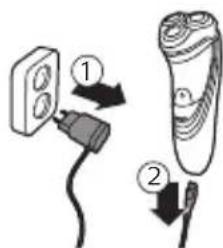
1 Put the small plug in the appliance.
2 Put the supply unit in the wall socket.
- The charging light shows the charging status of the appliance (see section ‘Charge indications’ in this chapter).
3 After charging, remove the supply unit from the wall socket and pull the small plug out of the appliance.
Charge indications

natural_image
Abstract diagram with curved lines and a central star-like shape, no text or symbols presentBattery low
- When the battery is almost empty (when there are only 5 or fewer shaving minutes left), the charging light starts to flash orange.
- When you switch off the appliance, the charging light continues to flash orange for a few seconds.
Quick charging
When you start charging the empty battery, the charging light alternately flashes orange and green. After approx. 3 minutes the charging light starts flashing green only. The appliance now contains enough energy for a 5-minute shave.
12 English

natural_image
Diagram showing wave propagation with a power button and a star-shaped light source (no text or symbols)Charging
- When the appliance is charging, the charging light flashes green.

natural_image
Diagram of a curved surface with concentric lines and a central circular symbol, no text or labels present.Battery fully charged
- When the battery is fully charged, the charging light lights up green continuously.
Note: After approx. 30 minutes, the charging light goes out to save energy.
Using the appliance
Note: This appliance can be used without cord or when it is connected to the wall socket.
Shaving tips and tricks
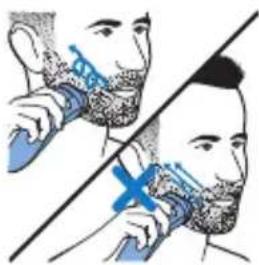
- Make circular movements during use. Circular movements provide better shaving results than straight movements.
- Your skin may need 2 or 3 weeks to get accustomed to the Philips shaving system.
Switching the appliance on and off

natural_image
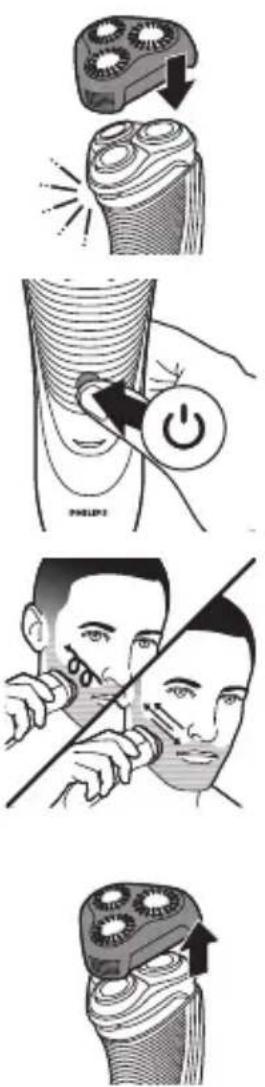
Diagram of a curved, layered structure with a blue arrow pointing to a small circular feature (no text or symbols)1 To switch on the appliance, press the on/off button once.
2 To switch off the appliance, press the on/off button once.
Shaving
1 Switch on the appliance.
natural_image
Illustration of a person applying a toothbrush to their face, showing two different angles (no text or symbols present)2 Move the shaving heads over your skin in circular movements.
3 After shaving, switch off the appliance.
4 Clean the appliance (see chapter 'Cleaning and maintenance').
Trimming (S3540, S3530, S3520, S3510 only)
You can use the trimmer to groom your sideburns and moustache.

natural_image
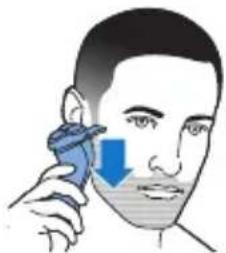
Diagram of a device being inserted into a socket with blue arrows indicating direction (no text or symbols)1 Push the trimmer release slide downwards to open the trimmer.
2 Switch on the appliance.
natural_image
Illustration of a person using a handheld device to apply face-to-face pressure application (no text or symbols present)- You can now start trimming.
3 After trimming, switch off the appliance.
4 Clean the trimmer (see chapter 'Cleaning and maintenance').

natural_image
Illustration of a hand holding a device with a blue arrow pointing to it, showing internal components (no text or symbols)5 Close the trimmer ('click').
Trimming with click-on stubble cap (S3520, S3510 only)
You can use the click-on stubble cap to trim your beard to a length of a 3 day beard or to maintain a 1mm stubble look.
- For best trimming results with the click-on stubble cap, hair and skin should be dry. - The maximum beard length for using the click-on
English
stubble cap is a 7 day beard. - The click-on stubble cap is for trimming above the neck line only.
1 Place the click-on stubble cap on the appliance.
2 To switch on the appliance, press the on/off button once.
3 Gently press the appliance to your skin. Make both straight and circular movements to achieve the best result.
4 To switch off the appliance, press the on/off button once.
5 Pull off the stubble cap from the appliance.
6 Clean the appliance and the click-on stubble cap after each use.
Cleaning and maintenance
Danger: Remove the detachable cord from the handheld part before cleaning this part in water.
Caution: Never use compressed air, scouring pads, abrasive cleaning agents or aggressive
liquids such as petrol or acetone to clean the appliance.
- Clean the appliance after every shave for optimal shaving performance.
- Regular cleaning guarantees better shaving performance.
- Be careful with hot water. Always check if the water is not too hot, to prevent your hands from getting burnt.
Note: Water may leak from the socket at the bottom of the appliance when you rinse it. This is normal and not dangerous because all electronics are enclosed in a sealed power unit inside the shaver.
Cleaning the shaving unit under the tap
natural_image
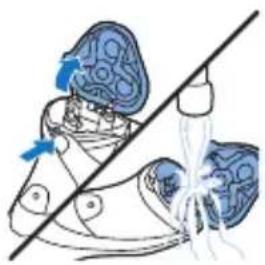
Diagram of a shoe with blue surgical tool and blue arrow indicating a specific area (no text or symbols present)1 Switch off the appliance and make sure it is disconnected from the wall socket.
2 Press the release button to open the shaving unit. Rinse the inside of the shaving unit and the hair chamber under a hot tap for 30 seconds.
- Rinse the outside of the shaving unit.
3 Close the shaving unit and shake off excess water.

natural_image
Illustration of a medical procedure showing fluid injection into a blue container (no text or symbols)Caution: Be careful not to hit the shaving unit against anything while you shake off excess water.
Caution: Never dry the shaving unit and the hair chamber with a towel or tissue, as this may damage the shaving unit.
4 Open the shaving unit again and leave it open to let the appliance dry completely.
Thorough cleaning
Clean the shaving heads thoroughly once a month for optimal performance.
natural_image
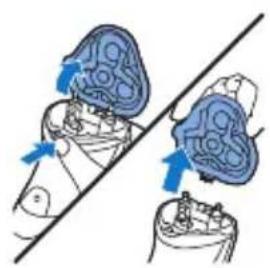
Diagram showing two blue circular objects with arrows indicating movement or force, intersected by a diagonal line (no text or symbols)1 Switch off the appliance and make sure it is disconnected from the wall socket.
2 Press the release button to open the shaving unit. Pull the shaving unit off the appliance.
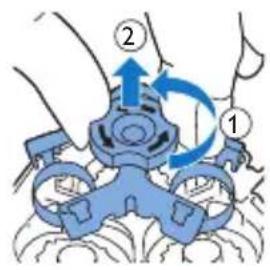
3 Turn the lock anticlockwise and remove the retaining frame.

natural_image
Illustration of a hand holding two containers with upward arrows indicating flow or movement (no text or symbols)4 Remove and clean one shaving head at a time. Each shaving head consists of a cutter and a guard.
Note: Do not clean more than one cutter and guard at a time, since they are all matching sets. If you accidentally mix up the cutters and guards, it may take several weeks before optimal shaving performance is restored.

natural_image
Illustration of a hand holding a bottle and a bulb, with a diagonal line crossing through it (no text or symbols)- Remove the cutter from the shaving guard and clean both parts under the tap.


natural_image
Diagram showing two mechanical components with downward arrows, one above and one below, intersected by a diagonal line (no text or symbols)
natural_image
Illustration of two hands performing a medical procedure on a device, showing anatomical changes (no text or symbols present)5 Put the cutter back into the guard.
6 Put the shaving heads back into the shaving unit.
Note: Make sure that the projections of the shaving heads fit exactly into the recesses of the shaving head holder.
7 Put the retaining frame back into the shaving unit and turn the lock clockwise.
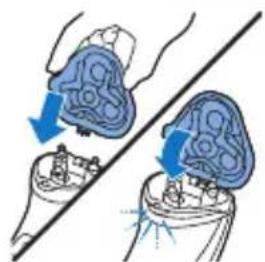
8 Insert the lug of the shaving unit into the slot in the top of the appliance. Then close the shaving unit ('click').
Note: If the shaving unit does not close smoothly, check if you have inserted the shaving heads properly and if the retaining frame is locked.
Cleaning the trimmer under the tap (S3520, S3510 only)
Clean the trimmer every time you have used it.
1 Switch off the appliance and make sure it is disconnected from the wall socket.

2 Push the trimmer release slide downwards to open the trimmer.
3 Switch on the appliance and clean the trimmer under the tap.
4 Switch off the appliance and leave the trimmer open to let it dry.
5 Close the trimmer ('click').
Tip: For optimal trimming performance, lubricate the trimmer teeth with a drop of sewing machine oil every six months.
Cleaning the click-on stubble cap (S3520, S3510 only)
Clean the click-on stubble cap after every trim for optimal performance.
Be careful with hot water. Always check if the water is not too hot, to prevent burning your hands.
Never dry the stubble cap with a towel or tissue, as this may damage the stubble cap.
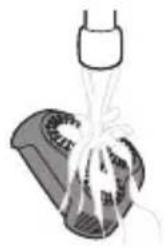
1 Remove the stubble cap from the appliance.

natural_image
Illustration of a container being dispensed with liquid, no text or symbols present2 Rinse the stubble cap under a warm tap.
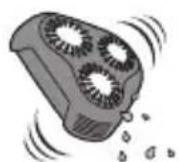
3 Carefully shake off excess water and let the stubble cap air dry.
Storage

natural_image
Illustration of a toothbrush applying blue liquid to a tooth (no text or symbols)Note: We advise you to let the appliance dry before you put the protection cap on it.
Put the protection cap on the appliance to prevent damage.
Replacement

For maximum shaving performance, we advise you to replace the shaving heads every two years. Replace damaged shaving heads immediately. Always replace the shaving heads with original Philips shaving heads' (see 'Ordering accessories').
Replacement reminder
The shaving unit symbol will light up to indicate that the shaving heads need to be replaced.
English
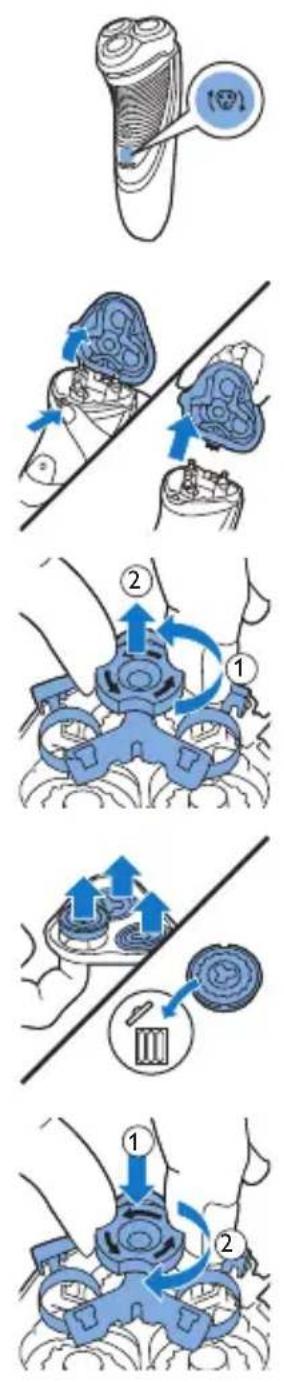
1 The shaving unit symbol lights up orange continuously.
2 Switch off the appliance and make sure it is disconnected from the wall socket.
3 Press the release button to open the shaving unit. Pull the shaving unit off the appliance.
4 Turn the lock anticlockwise and remove the retaining frame.
5 Remove the shaving heads from the shaving unit and throw them away.
6 Place new shaving heads in the shaving unit.
Note: Make sure that the projections of the shaving heads fit exactly into the recesses of the shaving head holder.
7 Put the retaining frame back into the shaving unit and turn the lock clockwise.

natural_image
Illustration of two medical devices with blue tubing and arrows indicating movement or force (no text or symbols)8 Insert the lug of the shaving unit into the slot in the top of the appliance. Then close the shaving unit ('click').
Note: If the shaving unit does not close smoothly, check if you have inserted the shaving heads properly and if the retaining frame is locked.

9 Press and hold the on/off button for 5 seconds to reset the replacement reminder on the shaver. The orange light goes out.
Ordering accessories
To buy accessories or spare parts, visit www.shop.philips.com/service or go to your Philips dealer. You can also contact the Philips Consumer Care Center in your country (see the international warranty leaflet for contact details).
The following accessories and spare parts are available:
- SH30 Philips Shaving Heads.
- HQ110 Philips shaving head cleaning spray
Recycling

- This symbol means that this product shall not be disposed of with normal household waste (2012/19/EU).
22 English

- This symbol means that this product contains a built-in rechargeable battery which shall not be disposed of with normal household waste (2006/66/EC). Please take your product to an official collection point or a Philips service center to have a professional remove the rechargeable battery.
- Follow your country's rules for the separate collection of electrical and electronic products and rechargeable batteries. Correct disposal helps prevent negative consequences for the environment and human health.
Warranty and support
If you need information or support, please visit www.philips.com/support or read the international warranty leaflet.
Guarantee restrictions
The shaving heads (cutters and guards) are not covered by the terms of the international guarantee because they are subject to wear.
Troubleshooting
This chapter summarizes the most common problems you could encounter with the appliance. If you are unable to solve the problem with the information below, visit www.philips.com/support for a list of frequently asked questions or contact the Consumer Care Center in your country.
Problem Possible cause Solution
| The appliance does not shave as well as it used to. | The shaving heads are damaged or worn. | Replace the shaving heads (see chapter 'Replacement'). |
Problem Possible cause Solution
| Long hairs obstruct the shaving heads. | Clean the shaving heads one by one (see chapter 'Cleaning and maintenance'). | |
| You have not inserted the shaving heads properly. | Make sure that the projections of the shaving heads fit exactly into the recesses (see chapter 'Cleaning and maintenance'). | |
| The appliance does not work when I press the on/off button. | The rechargeable battery is empty. | Recharge the battery (see chapter 'Charging'. |
| The temperature of the appliance is too high. In this case, the appliance does not work. | As soon as the temperature of the appliance has dropped sufficiently, you can switch on the appliance again. |
Introduktion
natural_image
Prohibition sign showing a faucet crossed out by a diagonal line, indicating no leakage or anti-poaching action (no text present)natural_image
Prohibition sign of a faucet without any text or symbolsnatural_image
Simple black-and-white icon of a faucet with a showerhead, no text or symbols present.- Denne shaver kan skylles under rindende vand uden risiko.
natural_image
Abstract diagram with concentric curved lines and a central circular symbol (no text or labels)natural_image
Diagram of a curved surface with concentric lines and a central star-shaped region, no text or symbols present.Opladning
natural_image
Diagram of a curved surface with concentric lines and a central circular feature, no text or symbols present.natural_image
Diagram of a human torso with ribbed texture and a blue arrow pointing to a specific area (no text or symbols present)natural_image
Illustration of a person brushing their teeth with a tool, showing two different angles (no text or symbols)natural_image
Diagram of a device being inserted into a slot, showing blue arrows indicating direction (no text or symbols present)natural_image
Illustration of a person using a handheld device to apply face-to-face pressure application (no text or symbols present)natural_image
Illustration of a hand holding a tool interacting with a device, showing a blue arrow indicating direction (no text or symbols present)5 Luk trimmeren ("klik").
Trimning med stubbekappe, der kan klikkes på (kun S3520, S3510)
natural_image
Illustration of a toothbrush and its tip, showing the blade and crown (no text or symbols)natural_image
Illustration of a person using a tool to cut the face area, showing no text or symbolsnatural_image
Diagram of a surgical procedure showing surgical tools and tubing (no text or labels)natural_image
Illustration of a pipette dispensing liquid into a blue container (no text or symbols)natural_image
Diagram showing two mechanical components with blue arrows indicating motion or force direction (no text or symbols)3 Drej låsen venstre om, og tag samlerammen af.

natural_image
Diagram showing a hand holding a tray with blue arrows indicating upward motion, alongside a smaller fan or container (no text or symbols)natural_image
Illustration of a medical procedure showing a hand holding a bulb and tubing, connected to a catheter (no text or symbols present)
natural_image
Diagram showing two mechanical components with blue arrows indicating motion or force direction, separated by a diagonal line (no text or symbols)natural_image
Illustration of a medical procedure showing two steps of a laparoscopic implant or implant (no text or symbols present)natural_image
Illustration showing a hand inserting a device into a car seatbelt, with no text or symbols present.natural_image
Illustration of a toothbrush with a blue cap and arrow indicating compression or dissection (no text or symbols)natural_image
Illustration of two medical devices with blue tubing and arrows indicating movement or force (no text or symbols)natural_image
Prohibition sign of a faucet without any text or symbolsnatural_image
Prohibition sign showing a faucet without spraying water, enclosed in a circle (no text)natural_image
Abstract diagram with concentric curved lines and a central star-like shape, no text or symbols presentBatterie schwach
natural_image
Diagram of a medical or electrical device with concentric lines and a central star-shaped component, no text or symbols present.Laden
natural_image
Diagram of a curved surface with concentric lines and a central circular feature, no text or symbols present.natural_image
Diagram of a curved, layered structure with a blue arrow pointing to a small circular feature (no text or symbols)natural_image
Illustration of a person brushing teeth with a blue tool, no text or symbols presentnatural_image
Diagram of a device being inserted into a socket with blue arrows indicating direction (no text or symbols)natural_image
Illustration of a person using a handheld device to apply face-to-face pressure application (no text or symbols present)natural_image
Illustration of a hand inserting a component into a device with blue arrows indicating direction (no text or symbols)natural_image
Illustration of a shoe with blue patterned fabric and a diagonal line crossing (no text or symbols)
natural_image
Illustration of a medical procedure with tubing and a pipette (no text or symbols)natural_image
Diagram showing two blue anatomical structures with directional arrows, no text or symbols presentnatural_image
Illustration of a hand holding a tray with blue circular objects and arrows indicating direction, separated by a diagonal line (no text or symbols)natural_image
Illustration of a hand holding a small object above a diagonal line, with another hand hanging from below (no text or symbols)natural_image
Diagram showing two mechanical components with downward arrows, one above and one below, intersected by a diagonal line (no text or symbols)natural_image
Illustration of two hands performing a medical procedure on a device, showing force application and alignment (no text or symbols)natural_image
Illustration of a car interior showing a blue arrow indicating rotation and a close-up of the interior (no text or symbols)natural_image
Illustration of a hairbrush with a blue cap and arrow indicating compression or lifting (no text or symbols)Austausch

natural_image
Diagram showing two hands operating a device with blue arrows indicating movement or force (no text or symbols present)natural_image
Illustration of a hand using a tool to adjust a cylindrical component with upward arrows, alongside a circular object with a pointer (no text or symbols)natural_image
Illustration of two medical or surgical procedures with blue arrows indicating force or movement (no text or symbols present)natural_image
Prohibition sign showing a faucet crossed out by a diagonal line, indicating no use or prohibition (no text present)natural_image
Prohibition sign showing a faucet without raindrops, enclosed in a circle (no text)natural_image
Simple black-and-white icon of a faucet with a showerhead, no text or symbols present.natural_image
Abstract diagram with curved lines and a central star-like shape, no text or symbols presentBatería baja
natural_image
Abstract diagram with curved lines, a central star-like shape, and a power button (no text or symbols)Carga
natural_image
Diagram of a curved surface with concentric lines and a central circular feature, no text or symbols present.natural_image
Diagram of a curved, layered structure with a blue arrow pointing to a specific region (no text or symbols present)natural_image
Illustration of a person brushing teeth with a blue tool, no text or symbols presentnatural_image
Diagram of a hand inserting a device into a cable socket (no text or symbols visible)natural_image
Illustration of a person using a handheld device to apply face-to-face correction (no text or symbols present)natural_image
Illustration of a hand using a tool to apply blue arrows to a device component (no text or symbols)natural_image
Illustration of a person wearing a blue hat and holding a white object, with a diagonal line crossing (no text or symbols)
natural_image
Illustration of a medical procedure with tubing and a syringe (no text or symbols)natural_image
Illustration of two medical devices with blue arrows indicating movement or force direction (no text or symbols)natural_image
Illustration of a hand holding a container with blue arrows indicating upward movement, alongside a smaller container with a gear-like shape (no text or symbols)natural_image
Illustration of a medical procedure showing a surgical tool and a catheter device (no text or symbols present)
natural_image
Diagram showing two mechanical components with blue arrows indicating motion or force direction, separated by a diagonal line (no text or symbols)natural_image
Illustration of two hands performing a medical procedure on a device, showing blue anatomical structures with arrows indicating motion (no text or symbols present)natural_image
Illustration showing a hand inserting a device into a car seat, with no visible text or symbols.natural_image
Illustration of a hand pressing down on a textured surface with a blue arrow indicating compression (no text or symbols)Sustitución

natural_image
Illustration of a toothbrush with a magnified inset showing a circular detail (no text or symbols)natural_image
Diagram showing two mechanical components with blue arrows indicating motion or force direction, intersected by a diagonal line (no text or symbols)natural_image
Diagram showing a mechanical assembly with arrows indicating motion and a circular component with a brush (no text or symbols)natural_image
Illustration of two medical or surgical procedures with blue arrows indicating force or movement (no text or symbols present)natural_image
Prohibition sign showing a faucet crossed out by a diagonal line, indicating no use or prohibition (no text present)natural_image
Prohibition sign showing a faucet crossed out by a diagonal line, indicating no restrictions or leakage.natural_image
Simple black-and-white icon of a faucet with raindrops (no text or symbols)natural_image
Abstract diagram with curved lines and a central star-like shape, no text or symbols presentBatterie faible
natural_image
Diagram showing wave propagation with a power button and a star-shaped light source (no text or symbols)Charge
natural_image
Diagram of a curved surface with concentric lines and a central circular symbol, no text or labels present.natural_image
Diagram of a curved, layered structure with a blue arrow pointing to a small circular feature (no text or symbols)natural_image
Illustration of a person brushing teeth with a blue tool, no text or symbols presentnatural_image
Diagram of a hand inserting a device into a cable socket (no text or symbols visible)natural_image
Illustration of a person using a handheld device to apply face-to-face correction (no text or symbols present)natural_image
Illustration of a hand using a tool to apply blue arrows to a device component (no text or symbols)natural_image
Illustration of a pair of sneakers with blue hair and blue tassels, no text or symbols presentnatural_image
Illustration of a medical procedure with a pipette and tubing, no text or symbols presentnatural_image
Diagram showing two hands operating a device with blue arrows indicating motion or force direction (no text or symbols present)92 Français

natural_image
Illustration of a hand holding a tray with blue arrows indicating upward movement, alongside a separate bowl with gear-like shapes (no text or symbols)natural_image
Illustration of a hand holding a blue object above a wire, with another hand pouring liquid into a blue container (no text or symbols)natural_image
Diagram showing two mechanical components with downward arrows, one above a circular base and the other below a ring (no text or symbols)natural_image
Illustration of two medical devices with blue arrows indicating force or movement, no text or symbols presentnatural_image
Diagram of a hand inserting a device into a cable, showing blue arrows indicating direction (no text or symbols present)
natural_image
Diagram of a car being inserted into a blue plastic container with a water splash (no text or symbols)natural_image
Illustration of a tooth being compressed with a blue object above it, showing stress or damage (no text or symbols)Remplacement

natural_image
Illustration of a toothbrush with a magnified inset showing a circular detail (no text or symbols)natural_image
Diagram showing two mechanical components with blue arrows indicating motion or force direction, intersected by a diagonal line (no text or symbols)natural_image
Diagram showing a hand holding a tray with upward arrows and a circular object, alongside a magnified view of a brush (no text or symbols)natural_image
Illustration of two hands performing a medical procedure on a patient's abdomen, with arrows indicating movement (no text or symbols present)natural_image
Prohibition sign of a faucet without any text or symbolsnatural_image
Prohibition sign of a faucet without any text or symbolsnatural_image
Abstract diagram with curved lines and a central star-like shape, no text or symbols presentBatteria scarica
natural_image
Diagram showing concentric wave patterns with a central star and power symbol (no text or labels)natural_image
Diagram of a curved surface with concentric lines and a central circular feature, no text or symbols present.natural_image
Diagram of a curved, layered structure with a blue arrow pointing to a specific region (no text or symbols present)natural_image
Illustration of a person brushing teeth with a blue tool, no text or symbols presentnatural_image
Diagram of a hand inserting a device into a cable socket (no text or symbols visible)natural_image
Illustration of a person using a handheld device to apply face-to-face correction (no text or symbols present)natural_image
Illustration of a hand using a tool to apply blue arrows to a device component (no text or symbols)natural_image
Illustration of two-step shoe cleaning procedure: top shows a hand holding a blue glove, bottom shows a blue glove with steam rising from the base (no text or symbols)natural_image
Illustration of two hands performing a medical or surgical procedure on a device, with arrows indicating direction (no text or symbols present)natural_image
Diagram showing a hand holding a tray with blue arrows indicating upward motion, alongside a separate gear mechanism (no text or symbols)natural_image
Illustration of a medical procedure showing a hand holding a blue object and another with a bulb-like structure, both without any text or symbols.natural_image
Diagram showing two mechanical components with blue arrows indicating direction, no text or symbols presentnatural_image
Illustration of two medical or surgical procedures with blue arrows indicating movement or force (no text or symbols present)natural_image
Illustration of a hand holding a blue object above a textured surface with light reflections (no text or symbols)natural_image
Illustration of two medical or surgical procedures with blue arrows indicating force or movement (no text or symbols present)natural_image
Prohibition sign showing a faucet without raindrops, enclosed in a circle (no text)natural_image
Prohibition sign showing a faucet without raindrops, enclosed in a circle (no text)natural_image
Diagram of a curved surface with concentric lines and a central star-like symbol, no text or labels present.natural_image
Diagram of a curved surface with concentric lines and a central star-like shape, no text or symbols present.natural_image
Diagram of a curved surface with concentric lines and a central circular feature, no text or symbols present.natural_image
Diagram of a curved surface with a blue arrow pointing to a specific region (no text or symbols present)natural_image
Illustration of a person brushing their teeth with a blue tool (no text or symbols)natural_image
Diagram of a device being inserted into a cable, showing blue arrows indicating direction (no text or symbols present)natural_image
Illustration of a person applying a blue tool to their face, showing the nose and mouth (no text or symbols present)natural_image
Illustration of a hand holding a tool interacting with a device (no text or symbols visible)natural_image
Illustration of a brush with three blades and a downward arrow, emitting light (no text or symbols)

natural_image
Illustration of a person using a tool to cut the face (no text or symbols present)
natural_image
Illustration of a shoe being cut with a tool, showing the blade and base (no text or symbols)natural_image
Illustration of two medical devices with blue arrows indicating movement or force (no text or symbols)natural_image
Diagram showing a hand holding three circular objects with blue arrows indicating direction, separated by a diagonal line (no text or symbols)natural_image
Illustration of a hand pouring liquid into a bottle, with another droplet partially submerged (no text or symbols)natural_image
Diagram showing two blue arrows pointing downward on a circular object, separated by a diagonal line (no text or symbols)natural_image
Illustration of two hands performing a medical procedure on a patient's abdomen, with arrows indicating movement (no text or symbols present)natural_image
Diagram of a device with blue directional arrows indicating movement or force (no text or symbols)134 Nederlands

natural_image
Illustration of a blue plastic container being inserted into a car (no text or symbols)natural_image
Two-panel illustration showing a mechanical component with internal features and a wire being inserted into it (no text or symbols)natural_image
Illustration of a mechanical component with a blue lever and sparkles, no text or symbols presentnatural_image
Illustration of two medical devices with blue arrows indicating movement or force (no text or symbols)natural_image
Diagram showing a hand holding a tray with upward arrows and a circular object below, no text or symbols present.natural_image
Illustration of two hands performing a medical procedure on a device, showing blue arrows indicating movement or force (no text or symbols present)natural_image
Prohibition sign showing a faucet crossed out by a diagonal line, indicating no water release or pollution (no text present)natural_image
Prohibition sign showing a faucet without a shower, enclosed in a circle (no text)natural_image
Simple black-and-white icon of a faucet with a showerhead, no text or symbols present.natural_image
Abstract diagram with concentric curved lines and a central circular symbol (no text or labels)natural_image
Diagram of a curved surface with concentric lines and a central star-like shape, no text or symbols present.Fulladet batteri
- Når batteriet er fulladet, lyser ladelampen kontinuerlig grønt.
natural_image
Diagram of a curved surface with concentric lines and a central circular feature, no text or symbols present.Bruke apparatet
Merk: Dette apparatet kan brukes uten ledning eller när det er koblet til en stikkontakt.
natural_image
Diagram of a curved, layered structure with a blue arrow pointing to a specific region (no text or symbols present)natural_image
Illustration of a person using a handheld device to interact with another person (no text or symbols present)1 Slå på apparatet.
natural_image
Diagram of a device being inserted into a cable, showing blue arrows indicating direction (no text or symbols present)natural_image
Illustration of a person using a handheld device to apply face-to-face pressure (no text or symbols present)natural_image
Illustration of a hand holding a tool interacting with a device, showing a blue arrow indicating direction (no text or symbols present)natural_image
Illustration of a person with blue hair and blue eyes, separated by a diagonal line (no text or symbols)natural_image
Illustration of a medical procedure with a pipette inserted into a blue container (no text or symbols)natural_image
Diagram showing two views of a biological structure with blue arrows indicating direction (no text or labels)natural_image
Illustration of a hand holding three circular objects with upward arrows, separated by a diagonal line (no text or symbols)natural_image
Illustration of a medical procedure involving a surgical instrument and a catheter (no text or symbols present)natural_image
Diagram showing two mechanical components with blue arrows indicating motion or force direction (no text or symbols)natural_image
Illustration of two hands performing a medical procedure on a device, showing blue arrows indicating movement or force (no text or symbols present)natural_image
Illustration of a mechanical component with fluid flowing from a nozzle (no text or symbols)2 Skyll skjeggstubbhetten under varmt vann.

natural_image
Illustration of a toothbrush applying blue liquid to a tooth (no text or symbols)natural_image
Illustration of two medical devices with blue arrows indicating force or movement, no text or symbols present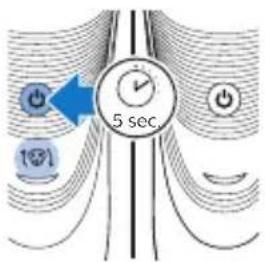
natural_image
Prohibition sign showing a faucet crossed out by a diagonal line, indicating no use or prohibition (no text present)natural_image
Prohibition sign showing a faucet without raindrops, enclosed in a circle (no text)natural_image
Simple black-and-white icon of a faucet with a showerhead, no text or symbols present.1 Introduza a ficha pequena no aparelho.
2 Ligue o adaptador à tomada eléctrica.
natural_image
Abstract diagram with curved lines and a central star-like shape, no text or symbols presentBateria fraca
natural_image
Diagram of a curved surface with concentric lines and a central star-like symbol, no text or labels present.Carregamento
natural_image
Diagram of a curved surface with concentric lines and a central circular feature, no text or symbols present.natural_image
Diagram of a curved, layered structure with a blue arrow pointing to a specific region (no text or symbols present)natural_image
Illustration of a person brushing their face with a blue tool (no text or symbols)natural_image
Diagram of a device being inserted into a cable, showing blue arrows indicating direction (no text or symbols present)natural_image
Illustration of a person using a handheld device to apply face-to-face pressure application (no text or symbols present)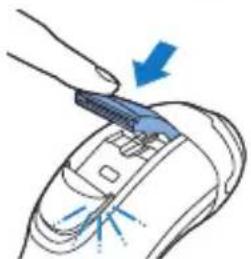
natural_image
Illustration of a hand holding a device with an arrow pointing to it, showing light rays on the device (no text or symbols present)Aparar com o acessório de barba curta de encaixe (apenas S3520 e S3510)
natural_image
Illustration of a shoe with a blue arrow pointing to the upper part of the shoe (no text or symbols present)
natural_image
Illustration of a medical procedure showing fluid dispersion from a pipette into a blue liquid-filled container (no text or symbols)natural_image
Illustration of two hands performing a medical or surgical procedure on a device, with arrows indicating direction (no text or symbols present)natural_image
Illustration of a hand holding a tray with blue arrows indicating upward movement, separated by a diagonal line (no text or symbols)natural_image
Illustration of a hand holding a blue flower and a hanging object against a diagonal line (no text or symbols)natural_image
Diagram showing two mechanical components with downward arrows, one above and one below, against a diagonal line (no text or symbols)natural_image
Illustration of two hands performing a medical procedure on a device, with arrows indicating force or movement (no text or symbols present)natural_image
Diagram of a hand holding a device with blue arrows indicating rotation or movement (no text or symbols)
natural_image
Diagram of a blue plastic plug inserted into a car's seat, with a white spray bottle nearby (no text or symbols)
natural_image
Illustration of a spray bottle dispensing liquid into a container (no text or symbols)natural_image
Illustration of a hairdryer with a blue hat and blue spray effect (no text or symbols)natural_image
Illustration of a hairbrush with a magnified inset showing internal structure (no text or symbols)
natural_image
Diagram showing two hands operating a device with blue arrows indicating movement or force (no text or symbols present)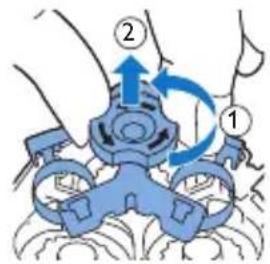

natural_image
Illustration of a hand using a tool to interact with a device, showing upward arrows and a circular button (no text or symbols)
natural_image
Illustration of two medical devices with blue arrows indicating force or movement, no text or symbols presentEncomendar acessórios
natural_image
Prohibition sign showing a showerhead crossed out by a diagonal line, no text or symbols present.natural_image
Prohibition sign showing a faucet without a shower, enclosed in a circle (no text)natural_image
Abstract diagram with concentric curved lines and a central star-like shape, no text or symbols present.natural_image
Diagram of a curved surface with concentric lines and a central star-like shape, no text or symbols present.natural_image
Diagram of a curved surface with concentric lines and a central blue circle, no text or symbols presentAkku täynnä
natural_image
Diagram of a curved, layered structure with a blue arrow pointing to a small feature (no text or symbols present)natural_image
Illustration of a person using a handheld device to interact with another person (no text or symbols present)natural_image
Diagram of a device being inserted into a cable, showing blue arrows indicating direction (no text or symbols present)natural_image
Illustration of a person using a handheld device to apply face-to-face pressure (no text or symbols present)natural_image
Illustration of a hand holding a tool interacting with a device, showing a blue arrow indicating direction (no text or symbols present)natural_image
Illustration of a toothbrush and its tip, showing blade structure and impact effect (no text or symbols)natural_image
Illustration of a person using a tool to cut the face, showing no text or symbolsnatural_image
Medical illustration showing a surgical procedure with surgical tools and tubing (no text or labels)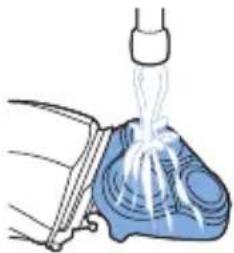
natural_image
Illustration of a medical procedure showing fluid flow from a bottle onto a blue anatomical device (no text or symbols)natural_image
Diagram showing two blue anatomical structures with directional arrows, intersected by a diagonal line (no text or labels)
natural_image
Diagram showing a hand holding a tray with blue arrows indicating upward motion, alongside a separate bowl with a coin (no text or symbols)natural_image
Illustration of a medical procedure showing a bottle being inserted into a cup onto a tube, with another tube partially submerged in liquid (no text or symbols present)natural_image
Diagram showing two mechanical components with downward arrows, one above and one below, against a diagonal line (no text or symbols)natural_image
Illustration of two medical devices with blue arrows indicating force or movement, no text or symbols presentnatural_image
Illustration showing a hand inserting a device into a car seatbelt, with no text or symbols present.natural_image
Illustration of a hairdryer with blue spray and light effect (no text or symbols)natural_image
Illustration of a dental tool with a magnified inset showing teeth and jaw (no text or symbols)natural_image
Diagram showing two hands performing a medical procedure on a patient's abdomen, with arrows indicating movement (no text or labels)natural_image
Illustration of a hand holding a tray with upward arrows and a circular object below, no text or symbols present.natural_image
Medical illustration showing two surgical or implant procedures on a tool, with arrows indicating force direction (no text or symbols present)natural_image
Prohibition sign showing a faucet with a diagonal line and raindrops, no text presentnatural_image
Prohibition sign showing a faucet without a shower, enclosed in a circle (no text)natural_image
Simple black-and-white icon of a faucet with a showerhead, no text or symbols present.natural_image
Diagram of a curved surface with concentric lines and a central circular symbol, no text or labels presentnatural_image
Diagram of a curved surface with concentric lines and a central star-like shape, no text or symbols present.Batteriet fulladdat
natural_image
Diagram of a curved surface with concentric lines and a central circular feature, no text or symbols present.Använda apparaten
natural_image
Diagram of a curved, layered structure with a blue arrow pointing to a small circular feature (no text or symbols)natural_image
Illustration of a person brushing their teeth with a blue tool (no text or symbols)1 Slå på apparaten.
natural_image
Diagram of a device's cable or connector with blue directional arrows indicating rotation (no text or symbols)natural_image
Illustration of a person using a handheld device to apply face-to-face correction (no text or symbols present)natural_image
Illustration of a hand using a tool to adjust or install a component, with no visible text or symbols.natural_image
Illustration of a toothbrush and its corresponding blade, showing the blade being cut with a downward arrow (no text or symbols)natural_image
Illustration of a person using a tool to cut the face, showing no text or symbols
natural_image
Medical illustration showing a surgical procedure with surgical tools and tubing (no text or labels)
natural_image
Illustration of a medical procedure showing fluid flow from a bottle onto a blue device (no text or symbols)natural_image
Diagram showing two anatomical views of a human head with blue arrows indicating movement or force (no text or labels)natural_image
Diagram showing a hand holding a tray with blue arrows indicating upward motion, alongside a separate bowl with a coin (no text or symbols)natural_image
Illustration of a medical procedure showing fluid transfer from a bottle to a patient's abdomen (no text or symbols present)natural_image
Diagram showing two mechanical components with downward arrows, one above and one below, against a diagonal line (no text or symbols)natural_image
Illustration of two medical devices with blue arrows indicating force or movement, no text or symbols presentnatural_image
Illustration showing a hand inserting a device into a car seat, with no text or symbols present.natural_image
Illustration of a hairdryer with blue hair and a blue cap, showing hair damage and light effect (no text or symbols)natural_image
Illustration of a hand holding a small object, possibly a device or tool, with no visible text or symbols.natural_image
Diagram showing two blue anatomical views of a foot with arrows indicating movement or force (no text or labels)natural_image
Illustration of a hand using a device to interact with a circular object, showing upward arrows and a circular component (no text or symbols)natural_image
Illustration of two medical or surgical procedures with blue arrows indicating force or movement (no text or symbols present)natural_image
Prohibition sign showing a faucet without a shower, enclosed in a circle (no text or symbols)natural_image
Prohibition sign showing a faucet with a diagonal line and a showerhead symbol (no text)natural_image
Simple black-and-white icon of a faucet with raindrops (no text or symbols)natural_image
Abstract diagram with curved lines and a central star-like shape, no text or symbols presentDüşük pil
natural_image
Diagram of a curved channel with a star-shaped symbol and power button, no text or labels presentŞarj etme
natural_image
Diagram of a curved surface with concentric lines and a central circular symbol, no text or labels present.natural_image
Diagram of a curved, layered structure with a blue arrow pointing to a small object (no text or symbols present)1 Cihazı açın.
natural_image
Diagram of a device being inserted into a socket with blue arrows indicating direction (no text or symbols)natural_image
Illustration of a person applying a blue tool to their face, showing the nose and mouth (no text or symbols present)
natural_image
Illustration of a hand holding a blue tool interacting with a device (no text or symbols visible)natural_image
Illustration of a toothbrush cutting into a tooth with a magnified inset showing the blade and surrounding teeth (no text or symbols)212 Türkçe

natural_image
Illustration of a person using a tool to cut the face area, showing no text or symbolsnatural_image
Illustration of a sneaker with blue plastic components and a diagonal line, no text or symbols presentnatural_image
Illustration of a medical procedure showing fluid injection into a blue anatomical device (no text or symbols)natural_image
Diagram showing two hands operating a device with blue arrows indicating motion or force (no text or symbols present)natural_image
Diagram showing a hand holding a tray with blue arrows indicating upward motion, alongside a separate view of a gear-like object (no text or symbols)natural_image
Illustration of a medical procedure involving a blue anatomical device and a blue implant (no text or symbols)natural_image
Diagram showing two mechanical components with downward arrows, one above and one below, against a diagonal line (no text or symbols)
natural_image
Illustration of two medical or surgical procedures on a tool, showing hand placement and force arrows (no text or symbols)natural_image
Diagram of a device being inserted into a socket with blue arrows indicating direction (no text or symbols)
natural_image
Line drawing of a car interior with a blue plastic component inserted, connected to a bottle (no text or symbols)natural_image
Two-panel illustration showing a hairnet with teeth and a plug inserted into a container (no text or symbols)natural_image
Illustration of a blue object being lifted by a blue arrow, with a textured base and sparkles (no text or symbols)natural_image
Diagram showing two hands operating a device with blue arrows indicating movement or force (no text or symbols present)
natural_image
Diagram showing a hand holding a tray with upward arrows and a circular object with a pointer, no text or symbols present.natural_image
Illustration of two hands performing a medical procedure on a device, showing valve placement and alignment (no text or symbols)natural_image
Prohibition sign showing a faucet without raindrops, enclosed in a circle (no text)natural_image
Prohibition sign of a faucet without any text or symbolsnatural_image
Simple black-and-white icon of a faucet with raindrops, no text or symbols present.natural_image
Abstract diagram with curved lines and a central circular symbol (no text or labels)Χαμηλή μπαταρία
natural_image
Diagram of a curved surface with concentric lines and a central star-like symbol, no text or labels present.Φόρτιση
natural_image
Diagram of a curved surface with concentric lines and a central circular feature, no text or symbols present.natural_image
Diagram of a curved, layered structure with a blue arrow pointing to a specific region (no text or symbols present)natural_image
Diagram of a device being inserted into a socket with blue arrows indicating direction (no text or symbols)natural_image
Illustration of a person using a handheld device to apply face-to-face pressure (no text or symbols present)natural_image
Illustration of a hand inserting a device into a device with a blue arrow indicating direction (no text or symbols)natural_image
Illustration of two-step medical procedure showing foot positioning and fluid transfer (no text or symbols)natural_image
Diagram showing two blue gear meshing setups with directional arrows indicating movement (no text or symbols)natural_image
Diagram showing two circular objects with upward arrows above them, separated by a diagonal line (no text or symbols)natural_image
Illustration of a medical procedure showing a hand holding a bottle and tubing, connected to a surgical instrument (no text or symbols present)natural_image
Illustration of a mechanical component with fluid flowing from a nozzle (no text or symbols)
natural_image
Illustration of a hand turning a tooth with a blue arrow indicating direction (no text or symbols)natural_image
Illustration of two hands performing a medical procedure on a patient's abdomen, with arrows indicating force or movement (no text or symbols present)
- Introduction
- General description (Fig. 1)
- Important safety information
- Danger
- Warning
- Caution
- Electromagnetic fields (EMF)
- General
- Charging
- Charging with the adapter
- Charge indications
- Battery low
- Quick charging
- English
- Battery fully charged
- Using the appliance
- Shaving tips and tricks
- Switching the appliance on and off
- Shaving
- Trimming (S3540, S3530, S3520, S3510 only)
- Trimming with click-on stubble cap (S3520, S3510 only)
- English
- Cleaning and maintenance
- liquids such as petrol or acetone to clean the appliance.
- Cleaning the shaving unit under the tap
- Thorough cleaning
- Cleaning the trimmer under the tap (S3520, S3510 only)
- Cleaning the click-on stubble cap (S3520, S3510 only)
- Storage
- Replacement
- Replacement reminder
- Ordering accessories
- Recycling
- English
- Warranty and support
- Guarantee restrictions
- Troubleshooting
- Introduktion
- Opladning
- Trimning med stubbekappe, der kan klikkes på (kun S3520, S3510)
- Batterie schwach
- Laden
- Austausch
- Batería baja
- Carga
- Sustitución
- Batterie faible
- Charge
- Français
- Remplacement
- Batteria scarica
- Nederlands
- Fulladet batteri
- Bruke apparatet
- Bateria fraca
- Carregamento
- Aparar com o acessório de barba curta de encaixe (apenas S3520 e S3510)
- Encomendar acessórios
- Akku täynnä
- Batteriet fulladdat
- Använda apparaten
- Düşük pil
- Şarj etme
- Türkçe
- Χαμηλή μπαταρία
- Φόρτιση
Brand : PHILIPS
Model : series 3000 S3110
Category : Razor