
5000 series S5360 - Razor PHILIPS - Free user manual and instructions
Find the device manual for free 5000 series S5360 PHILIPS in PDF.


| Product type | Electric shaver |
| Brand | Philips |
| Model | 5000 series S5360 |
| Dimensions (approx.) | 6.5 x 16 x 4 cm |
| Weight | 220 g |
| Power supply | Rechargeable Li-Ion battery |
| Battery life | 50 minutes |
| Charging time | 1 hour |
| Usage | Dry and wet |
| Shaving head | MultiPrecision with SteelPrecision blades |
| Cutting system | 5 pivoting blades |
| Display | LED charge indicator |
| Main functions | Close shave, suitable for sensitive skin |
| Maintenance and cleaning | Washable under water, removable blades, occasional lubrication |
| Safety | IPX7 waterproof, automatic shut-off after 8 hours |
| Spare parts | SH50 shaving head, replacement blades |
| Repairability | Replaceable blades and heads |
| General information | 2-year warranty, made in China |
Frequently Asked Questions - 5000 series S5360 PHILIPS
User questions about 5000 series S5360 PHILIPS
0 question about this device. Answer the ones you know or ask your own.
Ask a new question about this device
Download the instructions for your Razor in PDF format for free! Find your manual 5000 series S5360 - PHILIPS and take your electronic device back in hand. On this page are published all the documents necessary for the use of your device. 5000 series S5360 by PHILIPS.
USER MANUAL 5000 series S5360 PHILIPS
Always here to help you
Register your product and get support at www.philips.com/welcome
series S5000


natural_image
Black Philips Aquatouch electric shaver with three rotary buttons and power button (no visible text beyond brand name)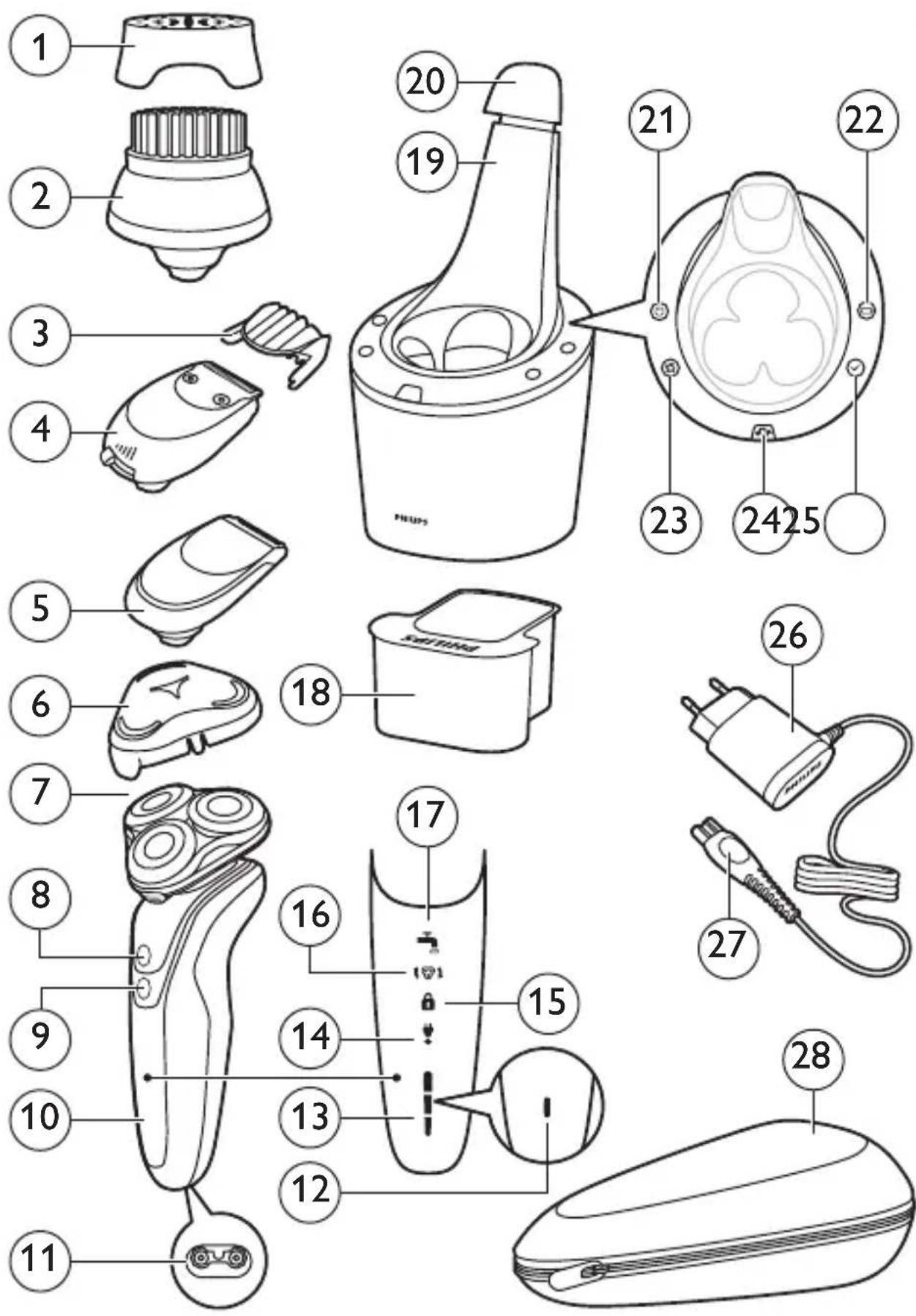
ENGLISH 4
DANSK 39
DEUTSCH 73
ΕΛΛΗΝΙΚΑ 111
ESPAÑOL 150
SUOMI 187
FRANÇAIS 221
ITALIANO 258
NEDERLANDS 294
NORSK 331
PORTUGUÊS 365
SVENSKA 402
TÜRKÇE 437
Introduction
Congratulations on your purchase and welcome to Philips! To fully benefit from the support that Philips offers, register your product at www.philips.com/welcome.
General description (Fig. 1)
1 Protection cap for cleansing brush attachment (specific types only)
2 Click-on cleansing brush attachment (specific types only)
3 Comb for beard styler attachment (specific types only)
4 Click-on beard stylister attachment (specific types only)
5 Click-on trimmer attachment (specific types only)
6 Protection cap for shaving unit (specific types only)
7 Click-on shaving unit
8 On/off button
9 Turbo button (specific types only)
10 Handle
11 Socket for small plug
12 Battery charge indicator with 1 light
13 Battery charge indicator with 3 lights
14 Unplug for use symbol
15 Travel lock symbol
16 Replacement reminder
17 Cleaning reminder
18 Cleaning cartridge for SmartClean system
19 SmartClean system (specific types only)
20 Cap of SmartClean system
21 On/off button
22 Battery symbol
23 Cleaning symbol
24 Replacement symbol
25 Ready symbol
26 Adapter
27 Small plug
28 Pouch (specific types only)
Note: The accessories supplied may vary for different products. The box shows the accessories that have been supplied with your appliance.
Important safety information
Read this important information carefully before you use the appliance and its accessories and save it for future reference. The accessories supplied may vary for different products.
Danger
- Keep the adapter dry.
Warning
- The adapter contains a transformer. Do not cut off the adapter to replace it with another plug, as this causes a hazardous situation.
- This appliance can be used by children aged from 8 years and above and persons with reduced physical, sensory or mental capabilities or lack of experience and knowledge if they have been given supervision or instruction concerning use of the appliance in a safe way and understand the hazards involved. Children shall not play with the appliance. Cleaning and user maintenance shall not be made by children without supervision.
- Always unplug the shaver before you clean it under the tap.
- Always check the appliance before you use it. Do not use the appliance if it is damaged, as this may cause injury. Always replace a damaged part with one of the original type.

natural_image
Prohibition sign showing a faucet without raindrops, enclosed in a circle (no text)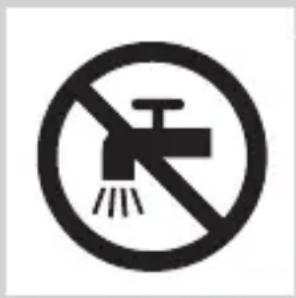
natural_image
Prohibition sign of a faucet with no text or symbolsCaution
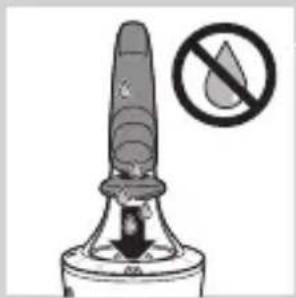
- Never immerse the cleaning system or the charging stand in water and do not rinse it under the tap.
- Never use water hotter than 80^ C to rinse the shaver.
- Only use this appliance for its intended purpose as shown in the user manual.
- For hygienic reasons, the appliance should only be used by one person.
- Do not use the adapter in or near wall sockets that contain or have contained an electric air freshener to prevent irreparable damage to the adapter.
- Never use compressed air, scouring pads, abrasive cleaning agents or aggressive liquids such as petrol or acetone to clean the appliance.
- If your shaver comes with a cleaning system, always use the original Philips cleaning fluid (cartridge or bottle, depending on the type of cleaning system).
- Always place the cleaning system on a stable, level and horizontal surface to prevent leakage.
- If your cleaning system uses a cleaning cartridge, always make sure that the cartridge compartment is closed before you use the cleaning system to clean or charge the shaver.
- When the cleaning system is ready for use, do not move it to prevent leakage of cleaning fluid.
- Water may drip from the socket at the bottom of the shaver when you rinse it. This is normal and not dangerous because all electronics are enclosed in a sealed power unit inside the shaver.
Electromagnetic fields (EMF)
- This Philips appliance complies with all applicable standards and regulations regarding exposure to electromagnetic fields.

General
- This shaver is waterproof. It is suitable for use in the bath or shower and for cleaning under the tap. For safety reasons, the shaver can therefore only be used without cord.
- The appliance is suitable for mains voltages ranging from 100 to 240 volts.
- The adapter transforms 100-240 volts to a safe low voltage of less than 24 volts.
The display
Charging
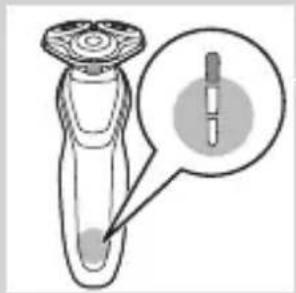
Battery charge indicator with 3 lights
- Charging takes approx. 1 hour
- Quick charge: When the appliance is connected to the mains, the lights of the battery charge indicator light up one after the other continuously. When the appliance contains enough energy for one shave, the bottom light of the battery charge indicator flashes slowly.
- If you leave the appliance connected to the mains, the charging process continues. To indicate that the appliance is charging, first the bottom light flashes and then lights up continuously. Then the second light flashes and then lights up continuously, and so on until the appliance is fully charged.
Battery charge indicator with 1 light
- Charging takes approx. 1 hour.
natural_image
Illustration of a laboratory pipette with a magnified inset showing internal structure (no text or symbols)ENGLISH8

natural_image
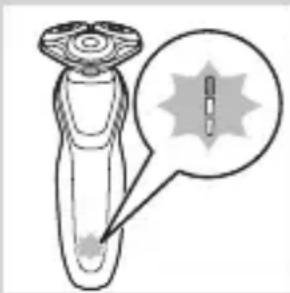
Illustration of a dropper with a magnified inset showing a spike (no text or symbols)- Quick charge: When the appliance does not contain enough energy for one shave, the battery charge indicator flashes quickly. When the battery charge indicator starts flashing slowly, the appliance contains enough energy for one shave. - If you leave the appliance connected to the mains, the charging process continues. To indicate that the appliance is charging, the battery charge indicator flashes slowly.
Battery fully charged

natural_image
Diagram of a laboratory test tube with a magnified inset showing internal structures (no text or labels)Note: This appliance can only be used without cord.
Note: When the battery is full, the display switches off automatically after 30 minutes. If you press the on/off button during charging, the ‘unplug for use’ symbol flashes white to remind you that you have to disconnect the appliance from the mains.
When the battery is fully charged, all lights of the battery charge indicator light up continuously.
- Battery charge indicator with 3 lights

natural_image
Diagram of a mechanical component with a labeled circular feature (no text or symbols present)- Battery charge indicator with 1 light
Battery low
When the battery is almost empty, the battery charge indicator flashes orange.

natural_image
Illustration of a hairdryer with a magnified inset showing the tip and base (no text or symbols)- Battery charge indicator with 3 lights

natural_image
Illustration of a hairdryer with a starburst graphic (no text or symbols)- Battery charge indicator with 1 light
Remaining battery capacity
natural_image
Diagram of a test tube with a magnified inset showing internal components (no text or labels)Battery charge indicator with 3 lights
- The remaining battery capacity is indicated by the lights of the battery charge indicator that light up continuously.
'Unplug for use' reminder

- The appliance is equipped with an ‘unplug for use’ reminder. The ‘unplug for use’ symbol starts to flash to remind you that you have to disconnect the appliance from the adapter before you can switch it on.
Cleaning reminder
For optimal shaving performance, we advise you to clean the shaver after every use.
ENGLISH10

- When you switch off the shaver, the cleaning reminder flashes to remind you to clean the shaver.
Travel lock

You can lock the shaver when you are going to travel. The travel lock prevents the shaver from being switched on by accident.
Activating the travel lock
1 Press the on/off button for 3 seconds to enter the travel lock mode.
- While you activate the travel lock, the travel lock symbol lights up continuously. When the travel lock is activated, the travel lock symbol flashes.
Deactivating the travel lock
1 Press the on/off button for 3 seconds.
- The travel lock symbol flashes and then lights up continuously. The shaver is now ready for use again.

natural_image
Illustration of a smart device with a lock icon and a star on the base (no text or symbols)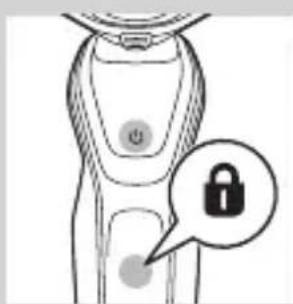
natural_image
Illustration of a smart device with a lock icon and a button, no text or symbols presentReplacing shaving heads
For maximum shaving performance, we advise you to replace the shaving heads every two years.
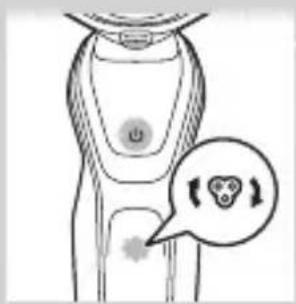
- The appliance is equipped with a replacement reminder which reminds you to replace the shaving heads. The replacement reminder lights up continuously.
Note: After replacing the shaving heads, you need to reset the replacement reminder by pressing the on/off button for 7 seconds.
Turbo setting (specific types only)
The appliance is equipped with a Turbo or Turbo+ setting. This setting is intended for quicker and more intense shaving and makes hard-to-reach areas easier to shave.

natural_image
Illustration of a hand pressing a button on a knee joint (no text or symbols)Activating the Turbo setting
1 To activate the Turbo setting, press the Turbo button once.
Deactivating the Turbo setting
1 To deactivate the Turbo setting, simply press the Turbo button once again.
Charging
Charging takes approx. 1 hour.
Note: This appliance can only be used without cord.
Charge the shaver before you use it for the first time and when the display indicates that the battery is almost empty.
Charging with the adapter

natural_image
Diagram of a plug connected to a shaver with arrows indicating cable direction (no text or symbols)1 Insert the small plug into the appliance and put the adapter in the wall socket.
Charging in the SmartClean system (specific types only)

1 Put the small plug in the SmartClean system.
2 Put the adapter in the wall socket.
3 Press down the top cap to be able to place the shaver in the holder ('click').
4 Hold the shaver upside down above the holder. Make sure the front of the shaver points towards the SmartClean system.

natural_image
Simple line drawing of a mechanical component with a downward arrow indicating force or direction (no text or symbols)
natural_image
Illustration of a pair of boots with arrows indicating motion or force direction (no text or symbols)5 Place the shaver in the holder, tilt the shaver backwards and press down the top cap to connect the shaver ('click').
- The battery symbol flashes slowly to indicate the shaver is charging.
Using the shaver
Switching the appliance on and off

natural_image
Illustration of a hand holding a circular object with an arrow pointing to it, no text or symbols present1 To switch on the appliance, press the on/off button once.
2 To switch off the appliance, press the on/off button once.
- Battery charge indicator with 3 lights: The display lights up for a few seconds to show the remaining battery status.
Shaving
Skin adaptation period
Your first shaves may not bring you the result you expect and your skin may even become slightly irritated. This is normal. Your skin and beard need time to adapt to any new shaving system. We advise you to shave regularly (at least 3 times a week) with this shaver for a period of 3 weeks to allow your skin to adapt to the new shaver.
Note: This appliance can only be used without a cord.

natural_image
Illustration of a person applying facial contour or mask to their ear (no text or symbols present)1 Switch on the appliance.
2 Move the shaving heads over your skin in circular movements.
Note: Do not make straight movements.
3 Clean the shaver after use (see chapter ‘Cleaning and maintenance’).
Wet shaving
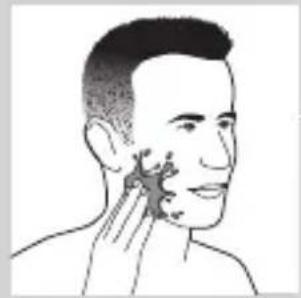
You can also use this shaver in the shower or on a wet face with shaving foam or shaving gel.
ENGLISH14
natural_image
Illustration of a person's face with hand near ear area, no text or symbols presentTo shave with shaving foam or shaving gel, follow the steps below:
1 Apply some water to your skin.

natural_image
Line drawing of a person applying a product to their ear (no text or symbols)2 Apply shaving foam or shaving gel to your skin.
natural_image
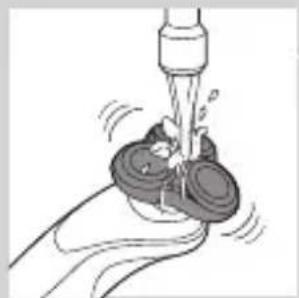
Illustration of a hand washing a cup with water spray (no text or symbols)3 Rinse the shaving unit under the tap to ensure that the shaving unit glides smoothly over your skin.
4 Switch on the shaver.

natural_image
Illustration of a person applying makeup to their face with a brush (no text or symbols)5 Move the shaving heads over your skin in circular movements.
Note: Rinse the shaver under the tap regularly to ensure that it continues to glide smoothly over your skin.
6 Dry your face and thoroughly clean the shaver after use (see chapter ‘Cleaning and maintenance’).
Note: Make sure you rinse all foam or shaving gel off the shaver.
Turbo setting (specific types only)
The appliance is equipped with a Turbo or Turbo+ setting for easy shaving of hard-to reach areas.

natural_image
Illustration of a hand holding a circular button labeled 'Y' on a curved surface, with no visible text or symbols beyond the icon.1 Switch on the shaver.
2 Press the Turbo button once to switch on the Turbo setting if you want to shave hard-to-reach areas more quickly.

natural_image
Illustration of a man with a beard and a circular logo containing a stylized 'T' symbol (no text or symbols present)3 Move the shaving heads over your skin in circular movements.
Note: Do not make straight movements.
4 To deactivate the Turbo setting simply press the Turbo button once.
Using the click-on attachments
Note: The accessories supplied may vary for different products. The box shows the accessories that have been supplied with your appliance.
Removing or attaching the click-on attachments

natural_image
Illustration of a hand holding a device with a warning symbol (no text or labels)1 Make sure the appliance is switched off.
2 Pull the attachment straight off the appliance.
Note: Do not twist the attachment while you pull it off the appliance.

natural_image
Illustration of a medical procedure with a funnel and arrow, showing a magnified view of a graduation cap (no text or symbols present)3 Insert the lug of the attachment into the slot in the top of the appliance. Then press down the attachment to attach it to the appliance ('click').

natural_image
Illustration of a medical or laboratory procedure showing a device emitting particles from a surface, with an inset magnified view of a graduation cap and a hand holding a test tube (no text or symbols present)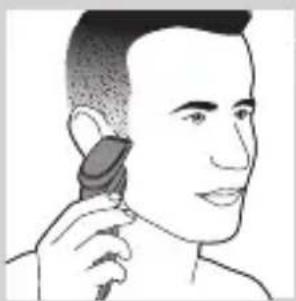
natural_image
Illustration of a person using a hairdryer (no text or symbols present)
natural_image
Illustration of a medical procedure showing a device emitting particles into a patient's ear, with an inset showing a graduation cap and blood pressure drop (no text or symbols)
natural_image
Line drawing of a hairbrush cutting into a toothbrush (no text or symbols)Using the trimmer attachment
You can use the trimmer attachment to groom your sideburns and moustache.
1 Make sure the appliance is switched off.
2 Insert the lug of the attachment into the slot in the top of the shaver. Then press down the trimmer attachment to attach it to the appliance ('click').
3 Switch on the appliance.
4 You can now start trimming.
5 Clean the attachment after use (see chapter 'Cleaning and maintenance').
Using the beard styler attachment
1 Make sure the appliance is switched off.
2 Insert the lug of the attachment into the slot in the top of the appliance. Then press down the attachment to attach it to the appliance ('click').
Using the beard styler attachment with comb
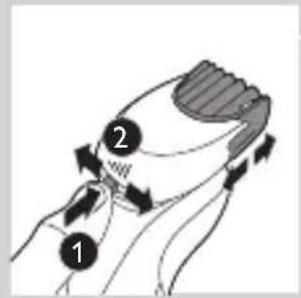
You can use the beard styler attachment with the comb attached to style your beard at one fixed setting, but also at different length settings. You can use it also to pre-trim any long hairs before shaving to have a more comfortable shave.
The hair length settings on the beard styler attachment correspond to the remaining hair length after cutting and range from 1 to 5mm.
1 Slide the comb straight into the guiding grooves on both sides of the attachment ('click').

natural_image
Illustration of a man with a beard and a pipe, showing a hand holding a small object (no text or symbols present)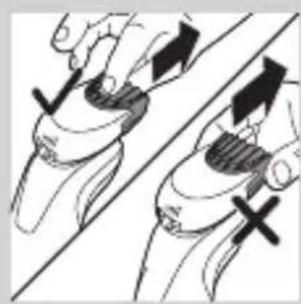
natural_image
Illustration of two hands holding a curved object with directional arrows indicating movement or force (no text or symbols)
natural_image
Line drawing of a man's face with a hairpin, no text or symbols present2 Press the length selector and then push it to the left or right to select the desired hair length setting.
3 Switch on the appliance.
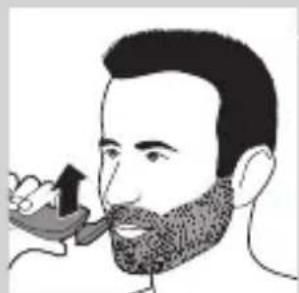
4 You can now start styling your beard by moving the attachment upwards with gentle pressure making sure the front of the comb is in full contact with the skin.
5 Clean the attachment after use (see chapter 'Cleaning and maintenance').
Using the beard styler attachment without comb
You can use the beard styler attachment without the comb to contour your beard, moustache, sideburns or neckline to a length of 0.5mm.
1 Pull the comb off the attachment.
Note: Grab the comb in the centre to pull it off the attachment. Do not pull at the sides of the comb.
2 Switch on the appliance.
3 You can now start contouring your beard, moustache, sideburns or neckline by moving the styler downwards with gentle pressure while holding it perpendicular to the skin.
4 Clean the attachment after use (see chapter 'Cleaning and maintenance').
Using the cleansing brush attachment
Use the rotating cleansing brush attachment with your daily cleansing cream. The cleansing brush attachment removes oil and dirt, contributing to a healthy and oil-free skin.

natural_image
Illustration of a dropper tip dispensing liquid into a container with an arrow indicating flow (no text or symbols)1 Insert the lug of the attachment into the slot in the top of the appliance. Then press down the attachment to attach it to the appliance ('click').

natural_image
Illustration of a mechanical component with motion lines indicating movement (no text or symbols)2 Moisten the attachment with water. Do not use the appliance with a dry brush head, as this can irritate the skin.

natural_image
Illustration of a person applying facial care to their face, with no text or symbols present.Tip: Use the attachment before shaving for easier shaving and a more hygienic shaving result.
3 Moisten your face with water and apply a cleanser to your face.
4 Place the attachment on your right cheek.
5 Switch on the appliance.

6 Gently move the attachment across your skin from the nose towards the ear. Do not push the attachment too hard onto the skin to make sure the treatment remains comfortable.

7 After approx. 20 seconds you can move the attachment to your left cheek and start cleansing this part of your face.
Caution: Do not clean the sensitive area around your eyes.

8 After approx. 20 seconds you can move the attachment to your forehead and start cleansing this part of your face. Gently move the attachment from left to right.
Note: We advise you to not overdo the cleansing and to not cleanse any zone longer than 20 seconds.

natural_image
Illustration showing two facial expressions with a magnified inset of the first face (no text or symbols)9 After the treatment, rinse and dry your face. Your face is now ready for the next step of your daily skincare routine.
10 Clean the attachment after use (see chapter ‘Cleaning and maintenance’).
Cleaning and maintenance
Note: The accessories supplied may vary for different products. The box shows the accessories that have been supplied with your appliance.
Cleaning the shaver in the SmartClean system (specific types only)

natural_image
Simple line drawing of a paintbrush with a cross mark and spray, no text or symbols presentDo not tilt the SmartClean system to prevent leakage.
Note: Hold the SmartClean system while you prepare it for use.
Note: If you clean the shaver in the SmartClean system once a week, the SmartClean cartridge will last approximately three months.

Preparing the SmartClean system for use
1 Put the small plug in the back of the SmartClean system.
2 Put the adapter in the wall socket.
3 Press the button on the side of the SmartClean system and lift the top part of the SmartClean system.

natural_image
Simple line drawing of a container with an upward arrow, no text or symbols present4 Pull the seal off the cleaning cartridge.

natural_image
Diagram of a blender with a black arrow indicating the process (no text or symbols present)5 Place the cleaning cartridge in the SmartClean system.

natural_image
Mechanical component diagram showing a lever with a downward arrow indicating motion (no text or symbols)6 Push the top part of the SmartClean system back down ('click').
Using the SmartClean system
Always make sure to shake excess water off the shaver before you place it in the SmartClean system.

natural_image
Illustration of a hand spraying water with an inset showing a magnified view of a device (no text or symbols)1 Press down the top cap to be able to place the shaver in the holder ('click').

natural_image
Close-up of a mechanical component with a downward arrow indicating force or direction (no text or symbols)2 Hold the shaver upside down above the holder. Make sure the front of the shaver points towards the SmartClean system.

natural_image
Illustration of a pair of boots with arrows indicating motion or change, no text or symbols present3 Place the shaver in the holder, tilt the shaver backwards and press down the top cap to connect the shaver ('click').
- The battery symbol flashes slowly to indicate that the shaver is charging.

natural_image
Line drawing of a hand holding two circular buttons with power and spiral symbols (no text or labels)4 Press the on/off button on the SmartClean system to start the cleaning program.
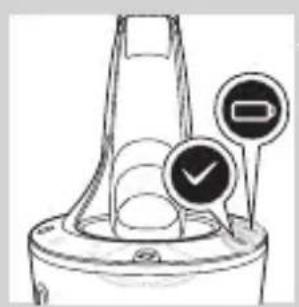
- During the cleaning program (which takes approx. 10 minutes), the cleaning symbol flashes.
natural_image
Diagram of a mechanical component with two circular indicators (one checked, one checked) and a checkmark symbol, no readable text or labels present.- When the cleaning program has been completed, the ready symbol lights up continuously.
- The battery symbol lights up continuously to indicate that the shaver is fully charged. This takes approx. 1 hour.
Note: If you press the on/off button of the SmartClean system during the cleaning program, the program aborts. In this case, the cleaning symbol stops flashing.

Note: If you remove the adapter from the wall socket during the cleaning program, the program aborts.
Note: 30 minutes after the charging phase has been completed, the SmartClean system switches off automatically.
5 To let the shaver dry, you can leave it in the SmartClean system until your next shave. You can also remove the shaver from the SmartClean system, shake off excess water, open the shaving unit and let the shaver air dry.
Replacing the cartridge of the SmartClean System
If you clean the shaver in the SmartClean system once a week, the SmartClean cartridge will last approximately three months.
Replace the cleaning cartridge when the replacement symbol flashes orange or when you are no longer satisfied with the cleaning result. If used once a week, the SmartClean cartridge will last for approximately three months
1 Press the button on the side of the SmartClean system and lift the top part of the SmartClean system.
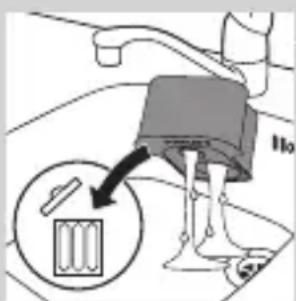
2 Take the empty cleaning cartridge from the SmartClean system and pour any remaining cleaning fluid out of the cleaning cartridge.
You can simply pour the cleaning fluid down the sink.
3 Throw away the empty cleaning cartridge.
4 Unpack the new cleaning cartridge and pull the seal off the cartridge.

natural_image
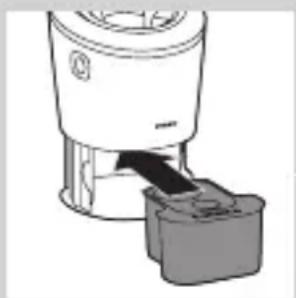
Diagram of a blender with a black arrow pointing to its internal component (no text or symbols present)5 Place the new cleaning cartridge in the SmartClean system.

natural_image
Diagram of a mechanical component with a downward arrow indicating rotation (no text or symbols)6 Push the top part of the SmartClean system back down ('click').
Cleaning the shaver under the tap
Clean the shaver after every shave for optimal shaving performance.
Be careful with hot water. Always check if the water is not too hot, to prevent your hands from getting burnt.
Never dry the shaving unit with a towel or tissue, as this may damage the shaving heads.

natural_image
Illustration of a hand holding a small object with motion lines indicating movement or force (no text or symbols)1 Rinse the shaving unit under a warm tap for some time.
2 Press the release button and open the shaving unit.

natural_image
Anatomical illustration of internal organs with arrows indicating movement or force (no text or labels)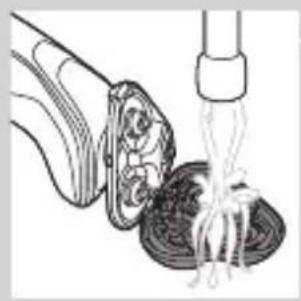
natural_image
Illustration of a food item being lifted by a fork (no text or symbols)3 Rinse the shaving head holder under a warm tap for 30 seconds.
4 Carefully shake off excess water and let the shaving head holder dry.
5 Close the shaving head holder ('click').
Thorough cleaning method

natural_image
Diagram of a biological structure with arrows indicating movement or force (no text or labels)Make sure the appliance is switched off.
1 Press the release button and open the shaving unit.
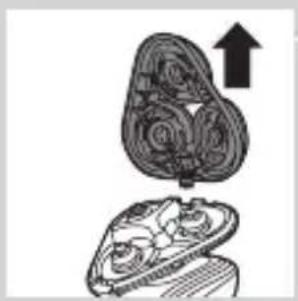
2 Pull the shaving head holder off the bottom part of the shaving unit.
natural_image
Illustration of a mushroom-shaped container with an upward arrow, no text or symbols present
flowchart
graph TD
    A["Step 1"] --> B["Process Step"]
    B --> C["Step 2"]
    C --> D["End"]
3 Turn the retaining rings anticlockwise and remove them.
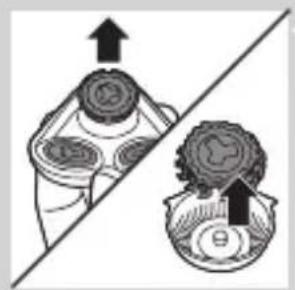
natural_image
Diagram showing two mechanical components with arrows indicating direction, no text or symbols present4 Remove the shaving heads from the shaving head holder. Each shaving head consists of a cutter and guard.
Note: Do not clean more than one cutter and guard at a time, since they are all matching sets. If you accidentally put a cutter in the wrong shaving guard, it may take several weeks before optimal shaving performance is restored.
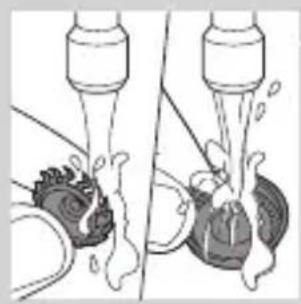
natural_image
Diagram showing fluid flow between two vessels with bubbles and a central pipe (no text or symbols)5 Clean the cutter and guard under the tap.
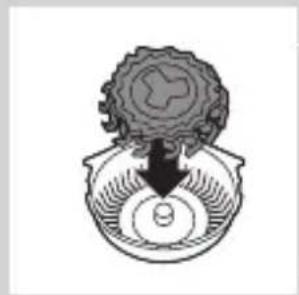
natural_image
Diagram of a mechanical or biological structure with a central circular component and an arrow pointing downward (no text or symbols)6 After cleaning, place the cutter back into the guard.

flowchart
graph TD
    A["Top Node"] --> B["Central Cell"]
    B --> C["Bottom Left Node"]
    B --> D["Bottom Right Node"]
    B --> E["Bottom Left Node"]
    style A fill:#f9f,stroke:#333
    style B fill:#ccf,stroke:#333
    style C fill:#cfc,stroke:#333
    style D fill:#fcc,stroke:#333
    style E fill:#cff,stroke:#333
7 Put the shaving heads back into the shaving head holder.

natural_image
Diagram showing a circular object with a downward arrow pointing to a triangular structure (no text or symbols)Note: Make sure the projections of the shaving heads fit exactly into the recesses of the shaving-head holder.
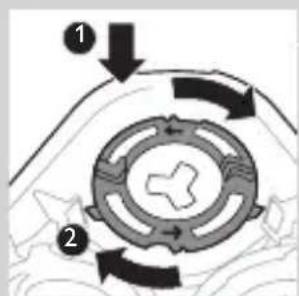
8 Place the retaining rings back onto the shaving head holder and turn them clockwise.
ENGLISH26

flowchart
graph TD
    A[" "] --> B[" "]
    B --> C[" "]
    C --> D[" "]
    D --> E[" "]
    style A fill:#f9f,stroke:#333
    style B fill:#ccf,stroke:#333
    style C fill:#cfc,stroke:#333
    style D fill:#fcc,stroke:#333
    style E fill:#ffc,stroke:#333
- Each retaining ring has two recesses and two projections that fit exactly in the projections and recesses of the shaving head holder.

natural_image
Diagram showing two circular components with arrows and a checkmark, no readable text or symbols present- Turn the ring clockwise until your hear 'click' and the ring is fixed.
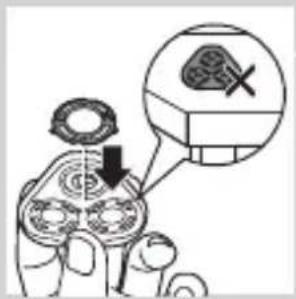
Note: Hold the shaving head holder in your hand when you reinsert the shaving heads and reattach the retaining rings. Do not place the shaving head holder on a surface when you do this, as this may cause damage.

natural_image
Illustration of two hands holding a cloud-like object with arrows indicating motion (no text or symbols)9 Reinsert the hinge of the shaving head holder into the slot of the shaving unit. Close the shaving head holder ('click').
Cleaning the click-on attachments
Never dry the trimmer or beard styler attachments with a towel or tissue, as this may damage the trimming teeth.
Cleaning the trimmer attachment
Clean the trimmer attachment every time you have used it.
natural_image
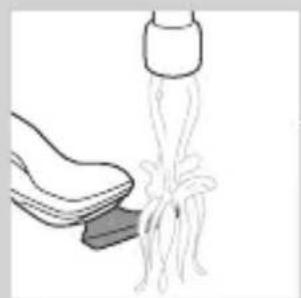
Illustration of a shoe being lifted by a bag (no text or symbols)1 Switch on the appliance with the trimmer attachment attached.
2 Rinse the trimmer attachment under a hot tap for some time.
3 After cleaning, switch off the appliance.

natural_image
Illustration of a hand crushing a rock with a magnified circular section showing a pile of rocks (no text or symbols)4 Carefully shake off excess water and let the trimmer attachment dry.
Tip: For optimal trimmer performance, lubricate the trimmer teeth with a drop of sewing machine oil every six months.

natural_image
Illustration of two hands holding a curved object with directional arrows indicating movement or force (no text or symbols)Cleaning the beard styler attachment
Clean the beard styler attachment every time you have used it.
1 Pull the comb off the beard styler attachment.
Note: Grab the comb in the centre to pull it off the attachment. Do not pull at the sides of the comb.
2 Switch on the appliance.
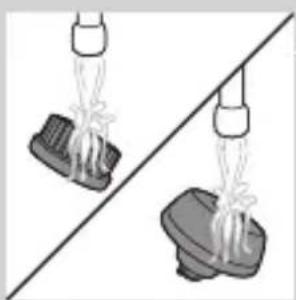
3 Rinse the beard styler attachment and the comb separately under a hot tap for some time.
4 After cleaning, switch off the appliance.
5 Carefully shake off excess water and let the beard styler attachment and comb dry.
Tip: For optimal trimmer performance, lubricate the trimmer teeth with a drop of sewing machine oil every six months.
Cleaning the cleansing brush attachment
Clean the cleansing brush attachment every time you have used it.

natural_image
Illustration of two hands holding a bag and a shoe, separated by a diagonal line (no text or symbols)
natural_image
Two cartoon fish jumping over a diagonal line, one falling and the other wading (no text or symbols)ENGLISH28

natural_image
Simple line drawing of a mechanical component with an upward arrow, no text or symbols present.1 Make sure the appliance is switched off.
2 Detach the brush head from the brush base.
natural_image
Two identical diagrams showing a hand holding a tool above a base, with no text or symbols present.3 Clean both parts thoroughly with warm water and mild soap.

natural_image
Illustration of mechanical components and a gear mechanism (no text or symbols)4 Dry the cleansing brush attachment with a towel.
Storage

natural_image
Diagram of a hairbrush with a curved blade and three circular blades, showing mechanical components (no text or symbols)Note: The accessories supplied may vary for different products. The box shows the accessories that have been supplied with your appliance.
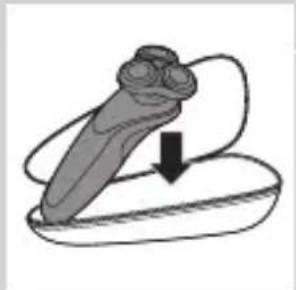
Note: We advise you to let the appliance and its attachments dry before you put the protection caps on the attachments and store the shaver in the pouch.
- Put the protection cap on the shaving unit to protect it from dirt accumulation.
- Store the shaver in the pouch supplied.
natural_image
Illustration of a mechanical component with a downward arrow indicating motion (no text or symbols)
natural_image
Diagram of a mechanical component with a downward arrow indicating force or direction (no text or symbols)- Put the protection cap on the cleansing brush attachment to protect it from dirt accumulation.
Replacement
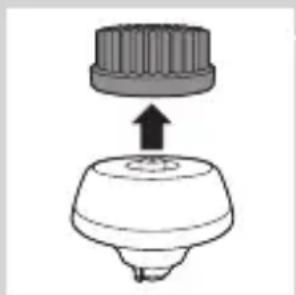
Replacing the cleansing brush head
natural_image
Simple line drawing of a mechanical component with an upward arrow, no text or symbols present.- The cleansing brush head attachment should be replaced every 3 months or earlier if the filaments are deformed or damaged.
Replacing the shaving heads
For maximum shaving performance, we advise you to replace the shaving heads every two years.
Replacement reminder
The shaving unit symbol will light up to indicate that the shaving heads need to be replaced. Replace damaged shaving heads immediately. Only replace the shaving heads with original Philips shaving heads as specified in chapter ‘Ordering accessories’.

1 The shaving unit symbol lights up continuously when you switch off the shaver to indicate that the shaving heads need to be replaced.
ENGLISH30
natural_image
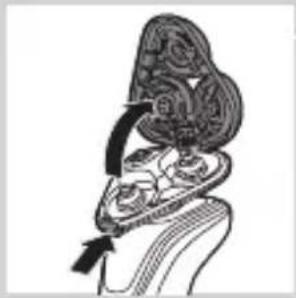
Anatomical illustration of internal organs with arrows indicating movement or force (no text or labels)2 Press the release button and open the shaving unit.

natural_image
Diagram of a mechanical component with an upward arrow indicating motion or force (no text or symbols present)3 Pull the shaving head holder off the bottom part of the shaving unit.

flowchart
graph TD
    A["Step 1"] --> B["Step 2"]
    B --> C["Step 3"]
    C --> A
4 Turn the retaining rings anticlockwise and remove them.

natural_image
Diagram showing a hand holding a circular object with arrows indicating motion or force (no text or symbols present)5 Remove the shavings heads from the shaving head holder and throw them away.

natural_image
Abstract diagram of a symmetrical structure with three circular elements and an upward arrow, no text or symbols present.6 Place new shaving heads in the holder.
Note: Make sure the projections of the shaving heads fit exactly into the recesses of the shaving head holder.
Place the retaining rings back onto the shaving heads and turn them clockwise.
- Each retaining ring has two recesses and two projections that fit exactly in the projections and recesses of the shaving head holder.
- Turn the ring clockwise until your hear ‘click’ and the ring is fixed.
Note: Hold te shaving head holder in your hand when you reinsert the shaving heads and reattach the retaining rings. Do not place the shaving head holder on a surface when you do this, as this may cause damage.

natural_image
Illustration of two hands holding a heart-shaped object with arrows indicating motion or transformation (no text or symbols)
8 Reinsert the hinge of the shaving head holder into the slot of the shaving unit. Close the shaving head holder ('click').
9 To reset the replacement reminder, press and hold the on/off button for approx. 7 seconds.
Ordering accessories
To buy accessories or spare parts, visit
www.shop.philips.com/service or go to your
Philips dealer. You can also contact the Philips
Consumer Care Centre in your country (see the worldwide guarantee leaflet for contact details).
The following parts are available:
- HQ8505 adapter
- SH50 Philips shaving heads
- HQ110 Philips Shaving Head Cleaning Spray
- RQ111 Philips beard styler attachment
- RQ585 Philips cleansing brush attachment
- RQ560, RQ563 Philips cleansing brush heads
- JC301, JC302, JC303, JC304, JC305 cleaning cartridge
Note: Availability of the accessories may differ per country.

Shaving heads
- We advise you to replace your shaving heads every two years. Always replace the shaving heads with original SH50 Philips shaving heads.
Recycling
natural_image
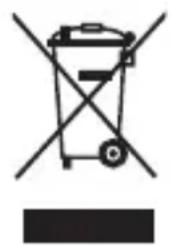
Symbol of a trash bin crossed with no text or labels, accompanied by a solid black rectangle below (no text or symbols present)- This symbol means that this product shall not be disposed of with normal household waste (2012/19/EU).
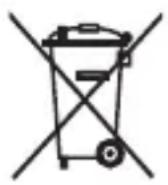
- This symbol means that this product contains a built-in rechargeable battery which shall not be disposed of with normal household waste (2006/66/EC). We strongly advise you to take your product to an official collection point or a Philips service centre to have a professional remove the rechargeable battery. - Follow your country's rules for the separate collection of electrical and electronic products and rechargeable batteries. Correct disposal helps prevent negative consequences for the environment and human health.
Removing the rechargeable shaver battery
Only remove the rechargeable battery when you discard the shaver. Make sure the battery is completely empty when you remove it.
Be careful, the battery strips are sharp.

natural_image
Illustration showing a hand using a screwdriver to cut a cylindrical object, with another hand holding a small boat (no text or symbols present)1 Remove the screw in the back panel with a screwdriver. Then remove the back panel.
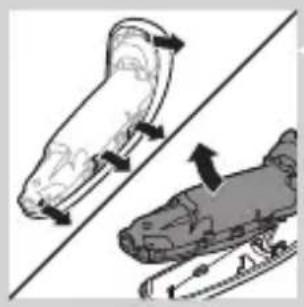
natural_image
Illustration of two skis with directional arrows indicating motion (no text or symbols)2 Bend the hooks aside and remove the power unit.
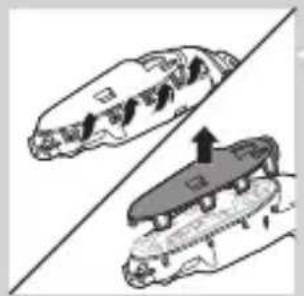
natural_image
Diagram of two mechanical components with arrows indicating motion or assembly (no text or symbols)3 Break the snap hooks and remove the front panel of the power unit.
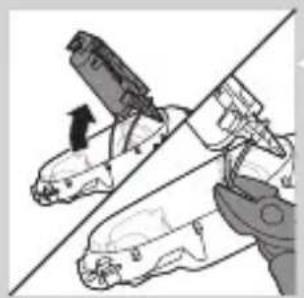
natural_image
Illustration of a hand using a tool to lift a car, showing mechanical components and motion (no text or symbols)4 Take out the battery holder and cut the battery tags with a pair of cutting pliers.
Guarantee and support
If you need information or support, please visit www.philips.com/support or read the separate worldwide guarantee leaflet.
Guarantee restrictions
The shaving heads (cutters and guards) are not covered by the terms of the international guarantee because they are subject to wear.
Troubleshooting
This chapter summarises the most common problems you could encounter with the appliance. If you are unable to solve the problem with the information below, visit www.philips.com/support for a list of frequently asked questions or contact the Consumer Care Centre in your country.
Problem Possible cause Solution
| The shaver does not shave as well as it used to. | The shaving heads are damaged or worn. | Replace the shaving heads (see chapter ‘Replacement’). |
| Hairs or dirt obstruct the shaving heads. | Clean the shaving heads by following the steps of the thorough cleaning method (see chapter ‘Cleaning and maintenance’). | |
| The shaver does not work when I press the on/off button. | The shaver is still attached to the mains. For safety reasons, the shaver can only be used without cord. | Disconnect the shaver from the mains and press the on/off button to switch on the shaver (see section ‘Unplug for use reminder’). |
| The rechargeable battery is empty. | Recharge the battery (see chapter ‘Charging’). | |
| The travel lock is activated. | Press the on/off button for 3 seconds to deactivate the travel lock. | |
| Problem Possible cause Solution | ||
| The shaving unit is soiled or damaged to such an extent that the motor cannot run. | Clean the shaving heads or replace them (see chapters ‘Cleaning and maintenance’ and ‘Replacement’). | |
| The shaver is not entirely clean after I clean it in the SmartClean system. | You have not placed the shaver in the SmartClean system properly, so there is no electrical connection between the SmartClean system and the shaver. | Press down the top cap ('click') to ensure a proper connection between the shaver and the SmartClean system. |
| The cleaning cartridge is empty. The replacement symbol flashes to indicate you have to replace the cleaning cartridge. | Place a new cleaning cartridge in the SmartClean system (see chapter ‘Cleaning and maintenance’). | |
| You have used another cleaning fluid than the original Philips cleaning cartridge. | Only use the original Philips cleaning cartridges. | |
| Water is leaking from the bottom of the shaver. | During cleaning, water may collect between the inner body and the outer shell of the shaver. | This is normal and not dangerous because all electronics are enclosed in a sealed power unit inside the shaver. |
Problem Possible cause Solution
| The SmartClean system does not work when I press the on/off button. | The SmartClean system is not connected to the mains. | Put the small plug in SmartClean system and put the adapter in the wall socket. |
| The shaver is not fully charged after I charge it in the SmartClean system. | You have not placed the shaver in the SmartClean system properly. | Make sure you press the shaver in the SmartClean system until it locks into place and press down the top cap. |
| I replaced the shaving heads, but the replacement reminder symbol is still showing. | You have not reset the shaver. | Reset the shaver by pressing the on/off button for approx. 7 seconds (see chapter ‘Replacement’). |
| A shaving head symbol had suddenly appeared on the display. | This symbol is a replacement reminder. | Replace the shaving heads (see chapter ‘Replacement’). |
| The nose trimmer attachment pulls at the hairs. | You move the appliance too fast. | Do not move the appliance too fast. |
Problem Possible cause Solution
The nose trimmer attachment does not work.
The cutting element of the attachment is very dirty, for instance because some nasal mucus has dried inside the cutting element.
Clean the cutting element by rinsing it under the tap with hot water. Switch on the appliance and rinse the cutting element once more to remove any remaining hairs.
If rinsing the nose trimmer under the tap does not unblock the cutting element, then immerse it in a glass with warm water for a few minutes. Then switch on the appliance and rinse it under the tap.
Introduktion

natural_image
No smoking sign with faucet symbol (no text)Forsigtig
natural_image
Simple line drawing of a showerhead spraying over a water-filled container (no text or symbols)Elektromagnetiske felter (EMF)
natural_image
Diagram of a test tube with a cap and a magnified inset showing internal structure (no text or labels)natural_image
Illustration of a dropper with a magnified inset showing a spike (no text or symbols)natural_image
Diagram of a laboratory test tube with a magnified inset showing internal structures (no text or labels)natural_image
Diagram of a hairbrush with a circular indicator labeled 'I' (no text or symbols on the diagram itself)Lavt batteriniveau
natural_image
Illustration of a hairdryer with a magnified inset showing the tip and base (no text or symbols)natural_image
Illustration of a hairdryer with a starburst graphic (no text or symbols)natural_image
Diagram of a test tube with a magnified inset showing internal components (no text or labels)natural_image
Line drawing of a robot's torso with a lock icon and speech bubble (no text or symbols)
natural_image
Diagram of a smart device with a lock icon and a speech bubble (no text or symbols)Udskiftning af skær
natural_image
Illustration of a hand pressing a button on a knee joint (no text or symbols)natural_image
Diagram of a hairpin with a plug and cord, showing two blades and a cable with arrows indicating direction (no text or symbols)natural_image
Simple line drawing of a mechanical component with a downward arrow indicating force or direction (no text or symbols)natural_image
Illustration of two boots with arrows indicating motion or change, no text or symbols present5 Sæt shaveren i holderen, vip shaveren bagud, og tryk ned på den øverste hætte for at tilslutte shaveren ("klik").
- Batterisymbolet blinker langsomt for at indikere, at shaveren oplades.
Brug af shaveren
1 Apparatet tændes ved at trykke én gang på on/off-knappen.
2 Apparatet slukkes ved at trykke én gang på on/off-knappen.
natural_image
Illustration of a person applying a hairpin to their ear (no text or symbols present)natural_image
Illustration of a person's face with a hand near the ear, showing a stylized eye or mask (no text or symbols present)Vådbarbering
natural_image
Line drawing of a person applying a product to their ear (no text or symbols)
natural_image
Illustration of a hand using a tool to lift a small object, no text or symbols present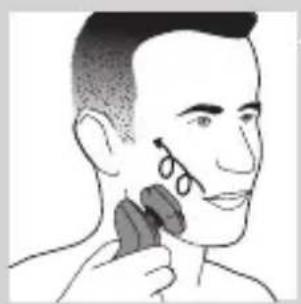
natural_image
Illustration of a person applying facial hair to the ear with a brush (no text or symbols)
natural_image
Illustration of a hand pressing a button on a device component (no text or symbols visible)
natural_image
Illustration of a person's head with a T-shaped logo overlay (no text or symbols on the figure itself)natural_image
Illustration of a hand holding a mushroom-shaped object with an upward arrow and a cross symbol (no text or labels)
natural_image
Illustration of a medical procedure showing a device emitting powder into a patient's ear, with an inset magnified view of the procedure (no text or symbols present)natural_image
Illustration of a medical or laboratory procedure showing a device emitting particles from a surface, with an inset magnified view of a graduation cap (no text or symbols present)natural_image
Line drawing of a person using a hairpin to apply product (no text or symbols)
natural_image
Illustration of a medical procedure showing a device emitting particles onto skin, with an inset magnified view of the tissue (no text or symbols present)
natural_image
Line drawing of a hairbrush cutting down a button with a downward arrow (no text or symbols)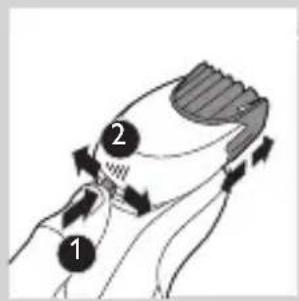
natural_image
Illustration of a man with a beard and a pipe, showing hand motion (no text or symbols)natural_image
Illustration of two hands holding a tool with arrows indicating movement or force direction (no text or symbols)natural_image
Line drawing of a person applying a hair accessory to their neck (no text or symbols)natural_image
Illustration of a dropper tip dispensing liquid into a container, with an inset showing a dropper tip (no text or symbols present)natural_image
Illustration of a mechanical component with fluid flow, no text or symbols present
natural_image
Illustration of a person applying facial care to their face, with no visible text or symbols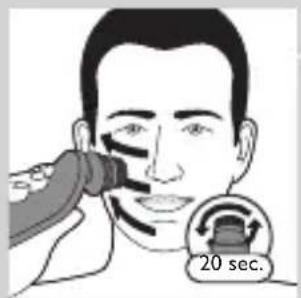

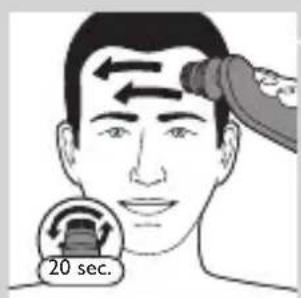
natural_image
Simple line drawing of a paintbrush with a cross mark and sound waves, no text or symbols present.natural_image
Simple line drawing of a container with an upward arrow, no text or symbols presentnatural_image
Diagram of a blender with a black arrow pointing to its lid, showing no text or symbols.5 Placer rengøringspatronen i SmartClean-systemet.

natural_image
Mechanical component diagram showing a lever mechanism with a downward arrow indicating motion (no text or symbols)natural_image
Illustration of a spray bottle with a stopper and a prohibition symbol (no text or labels)natural_image
Close-up of a mechanical component with a downward arrow indicating force or direction (no text or symbols visible)natural_image
Illustration of a pair of boots with arrows indicating motion or damage, no text or symbols present3 Sæt shaveren i holderen, vip shaveren bagud, og tryk ned på den øverste hætte for at tilslutte shaveren ("klik").
- Batterisymbolet blinker langsomt for at indikere, at shaveren oplades.

natural_image
Hand holding a device with two circular buttons labeled 'Power' and 'Spiral', no visible text or symbolsnatural_image
Technical line drawing of a mechanical component with two circular indicators (no text or symbols)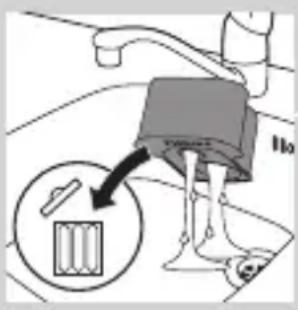

natural_image
Diagram of a blender with an arrow pointing to its internal component (no text or symbols present)
natural_image
Diagram of a mechanical component with a downward arrow indicating motion (no text or symbols)natural_image
Illustration of a hand holding a small object with motion lines indicating movement or force (no text or symbols)natural_image
Anatomical illustration of internal organs with arrows indicating movement or force (no text or labels)natural_image
Illustration of a fork being inserted into a bowl of noodles (no text or symbols)natural_image
Anatomical illustration of a human head with internal organs and a curved arrow indicating a specific structure (no text or labels present)natural_image
Diagram of a mechanical component with an upward arrow indicating motion or force (no text or symbols present)natural_image
Diagram showing two mechanical components with arrows indicating motion or force direction (no text or symbols)natural_image
Illustration of two mechanical devices with water spray and a gear-like component, no text or symbols presentnatural_image
Diagram of a mechanical component with a central circular feature and a downward arrow, no text or symbols present.natural_image
Abstract diagram with three connected circular nodes and a central triangular structure (no text or symbols)natural_image
Pure diagram of a mechanical or architectural component with no text, numbers, or symbolsnatural_image
Diagram showing mechanical components with arrows and a checkmark, no readable text or symbols presentnatural_image
Illustration of two hands holding a cloud-like object with arrows indicating rotation or change (no text or symbols)natural_image
Line drawing of a foot and ankle joint with a tool inserted into the lower part (no text or symbols)natural_image
Illustration of a hand blowing bubbles with a magnified circular inset showing a landscape (no text or symbols)natural_image
Illustration of two hands holding a tool with directional arrows indicating movement or force (no text or symbols present)
natural_image
Illustration of two hands using a tool to lift or lift water from a surface, with no text or symbols present.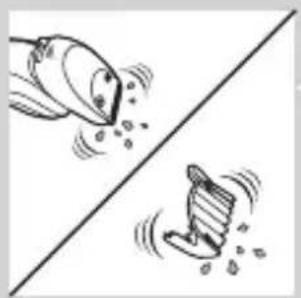
natural_image
Two cartoon fish jumping over a diagonal line, one falling and the other wading (no text or symbols)
natural_image
Diagram of a mechanical component with a top cylindrical part and an upward arrow, no text or symbols present.
natural_image
Two identical mechanical components hanging from a diagonal line, no text or symbols visible
natural_image
Illustration of mechanical components including a drum, screw, and base mount (no text or symbols)natural_image
Diagram of a mechanical component with a downward arrow indicating force or direction (no text or symbols)natural_image
Diagram of a mechanical component with a top cylindrical part and an upward arrow, no text or symbols present.
natural_image
Diagram of a biological structure with internal organs and directional arrows, no visible text or labels
natural_image
Illustration of a mushroom-shaped container with internal swirling patterns and an upward arrow, no text or symbols present.
flowchart
graph TD
    A["1"] --> B["2"]
    B --> C["3"]
    C --> A
    style A fill:#f9f,stroke:#333
    style B fill:#ccf,stroke:#333
    style C fill:#cfc,stroke:#333
natural_image
Diagram showing a hand holding three circular components with an arrow indicating upward motion, alongside a battery and switch (no text or symbols present)natural_image
Pure diagram of a mechanical or structural component with no visible text, numbers, or symbolsnatural_image
Diagram showing two circular components with arrows indicating direction, one crossed over the other by a diagonal line (no text or symbols)natural_image
Illustration of two hands holding a cloud-like object with a downward arrow and a glowing effect (no text or symbols)natural_image
Symbol of a trash bin crossed with no text or labels, representing waste sorting or disposal (no text present)natural_image
Illustration of a hand holding a small object with a tool, alongside a close-up of the same object (no text or symbols present)natural_image
Illustration of two skis with directional arrows indicating movement or motion (no text or symbols)natural_image
Two car body diagrams showing front and side views of a vehicle, with an arrow indicating motion or change (no text or symbols)natural_image
Illustration of a hand using a tool to lift a car, showing mechanical components and motion (no text or symbols)natural_image
No sign depicting a faucet with a showerhead symbol (no text)
natural_image
Prohibition sign showing a faucet without a shower, enclosed in a circle (no text or symbols)natural_image
Simple line drawing of a showerhead spraying over water in a container (no text or symbols)natural_image
Illustration of a hairdryer with a magnified inset showing internal structure (no text or symbols)natural_image
Diagram of a laboratory pipette with a magnified inset showing a test tube tip (no text or labels)natural_image
Diagram of a laboratory test tube with a magnified inset showing internal structure (no text or labels)natural_image
Diagram of a laboratory test tube with a labeled component (no text or symbols present)natural_image
Illustration of a hairdryer with a magnified inset showing internal structure (no text or symbols)natural_image
Diagram of a laboratory test tube with a capillary top and a magnified inset showing a star-shaped object (no text or labels)natural_image
Diagram of a hairdryer with a magnified inset showing internal structure (no text or symbols)natural_image
Illustration of a robot's head with a lock icon and speech bubble (no text or symbols)
natural_image
Line drawing of a smart device with a lock icon and speech bubble (no text or symbols)
natural_image
Illustration of a hand pressing a button on a patient's knee joint (no text or symbols)natural_image
Diagram of a hairpin plug connecting a power outlet to a cable with an arrow indicating direction (no text or symbols)natural_image
Close-up of a mechanical component with a black arrow pointing downward (no text or symbols visible)natural_image
Illustration of a pair of boots with arrows indicating motion or force (no text or symbols)natural_image
Illustration of a hand pressing down on a circular object with a black arrow (no text or symbols)natural_image
Illustration of a person applying a hair product to their face (no text or symbols)natural_image
Line drawing of a person's face with hand near ear area (no text or symbols)
natural_image
Line drawing of a person applying a product to their ear (no text or symbols)natural_image
Illustration of a hand washing a small object with a water tap (no text or symbols)natural_image
Illustration of a person applying a hair product to their face (no text or symbols)natural_image
Illustration of a hand pressing a button on a knee joint (no text or symbols)
natural_image
Illustration of a person's beard and ear with a T-shaped logo overlay (no text or symbols on the main subject)natural_image
Diagram showing a funnel with an arrow and a cross symbol, no text or labels present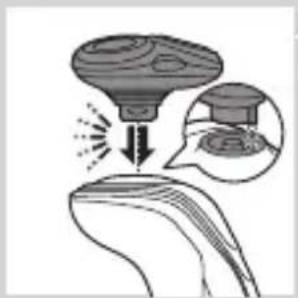
natural_image
Diagram showing a device emitting heat or emission from a surface, with an inset magnified view of a droplet (no text or symbols present)
natural_image
Illustration of a medical or laboratory procedure showing a device emitting particles into a surface, with an inset magnified view of the process (no text or symbols present)
natural_image
Illustration of a person using a hairdryer (no text or symbols present)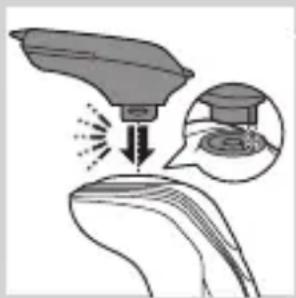
natural_image
Illustration of a hairdryer with an inset showing the tip and mouth area (no text or symbols)natural_image
Line drawing of a hairbrush cutting into a circular shape with a downward arrow (no text or symbols)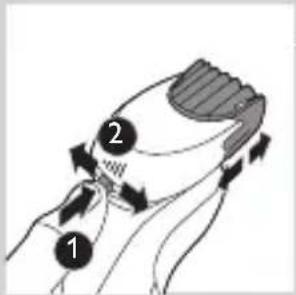
natural_image
Illustration of a man eating with a spoon (no text or symbols)natural_image
Illustration of two hands holding a device with directional arrows indicating movement (no text or symbols)natural_image
Line drawing of a person applying a hair accessory to their ear (no text or symbols)natural_image
Illustration of a dropper tip dispensing liquid into a container with an inset showing a dropper tip (no text or symbols)natural_image
Illustration of a mechanical component with fluid flow, no text or symbols presentnatural_image
Illustration of a person applying facial care to their face, with no visible text or symbolsnatural_image
Illustration showing two facial expressions with a magnified inset of a tool (no text or symbols)natural_image
Simple line drawing of a paintbrush with a cross mark and spray effect (no text or symbols)natural_image
Simple line drawing of a container with an upward arrow and label 'POTATO' (no other text or symbols)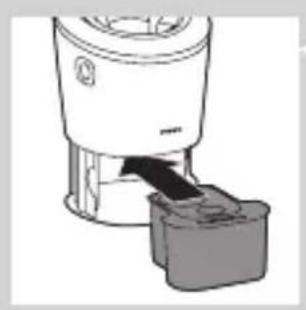
natural_image
Diagram of a blender with a handle and base, showing mechanical components without any text or symbols.natural_image
Diagram of a mechanical component with a downward arrow indicating direction (no text or symbols)natural_image
Close-up of a mechanical component with a downward arrow and a prohibition symbol (no text or labels)natural_image
Close-up of a mechanical component with a downward arrow indicating force or direction (no text or symbols)natural_image
Illustration of a pair of boots with arrows indicating motion or change, no text or symbols presentnatural_image
Line drawing of a hand holding two circular buttons with power and spiral symbols (no text or labels)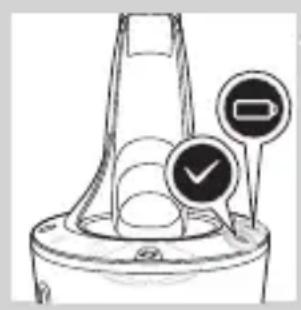
natural_image
Diagram of a mechanical component with two circular indicators (one checked, one not checked) and a checkmark symbol, no readable text or labels present.
natural_image
Diagram of a blender with a plastic container inserted, showing internal components (no text or symbols)
natural_image
Diagram of a mechanical component with a downward arrow indicating direction (no text or symbols)natural_image
Illustration of a hand holding a small object with motion lines indicating movement or force (no text or symbols)natural_image
Anatomical illustration of a human upper body with internal organs and a directional arrow indicating movement (no text or labels)
natural_image
Illustration of a fork lifting noodles into a bowl (no text or symbols)natural_image
Anatomical illustration of a human head and neck region with internal organs, no text or labels present.natural_image
Illustration of a mushroom-shaped container with internal swirling patterns and an upward arrow (no text or symbols)natural_image
Diagram showing two mechanical components with arrows indicating direction, no text or symbols presentnatural_image
Diagram showing mechanical components with fluid flow, no text or symbols presentnatural_image
Diagram of a mechanical component with a central gear and base, no text or symbols presentnatural_image
Abstract diagram of a symmetrical geometric structure with three circular elements and a top node (no text or symbols)natural_image
Pure diagram of a mechanical or structural component with no visible text, numbers, or symbolsnatural_image
Diagram showing mechanical components with arrows and a checkmark, no readable text or symbols presentnatural_image
Illustration of two hands exchanging a leaf with arrows indicating rotation or movement (no text or symbols)natural_image
Illustration of a shoe being dispensed from a bottle onto a surface (no text or symbols)natural_image
Illustration of a hand blowing bubbles with a magnified circular inset showing a mountain (no text or symbols)natural_image
Illustration of two hands holding a curved object with directional arrows indicating movement or force (no text or symbols)natural_image
Illustration of two hands holding small objects above a diagonal line, no text or symbols present
natural_image
Two cartoon fish jumping over a diagonal line, one falling and the other wading (no text or symbols)
natural_image
Diagram of a mechanical component with a top cylindrical part and an upward arrow indicating motion (no text or symbols)
natural_image
Two hanging objects with ropes tied on a diagonal line, no text or symbols visible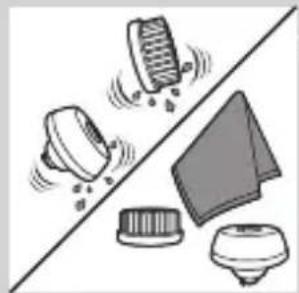
natural_image
Illustration of various electronic components and a switch, including a bulb, capacitor, and diode (no text or symbols)natural_image
Diagram of a mechanical component with a downward arrow indicating motion or force (no text or symbols)
natural_image
Illustration of a medical device with a downward arrow indicating motion (no text or symbols)
natural_image
Simple line drawing of a spray bottle with a handle and spout (no text or symbols)natural_image
Diagram of a mechanical component with a top cylindrical part and an upward arrow, no text or symbols present.natural_image
Anatomical illustration of a human digestive system with internal organs and a curved arrow indicating movement (no text or labels)natural_image
Illustration of a mushroom-shaped object with an upward arrow, no text or symbols present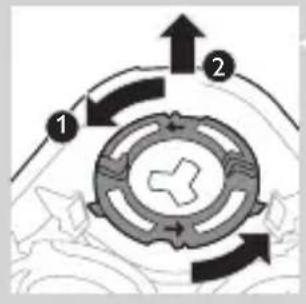
flowchart
graph TD
    A["1"] --> B["Central Gear"]
    B --> C["2"]
    C --> A
    style A fill:#f9f,stroke:#333
    style B fill:#ccf,stroke:#333
    style C fill:#cfc,stroke:#333
natural_image
Diagram showing a hand holding a circular object with an arrow indicating direction, alongside a mechanical component (no text or symbols present)natural_image
Abstract diagram with three symmetrical shapes and arrows, no text or symbols presentnatural_image
Pure diagram of a mechanical or structural component with a circular top and triangular base, no text or symbols present.natural_image
Diagram showing mechanical components with arrows and a checkmark, no readable text or symbols presentnatural_image
Illustration of two hands holding three identical circular objects with arrows indicating motion or transformation (no text or symbols)natural_image
Symbol of a trash bin crossed with no visible text or labelsnatural_image
Simple line drawing of a trash bin with two crossed lines indicating no waste or discharge (no text or symbols)natural_image
Illustration of a sewing machine tool and a sewing machine base, showing mechanical components without any text or symbols.natural_image
Two skis shown side by side, one with curved arrows indicating motion or movement (no text or symbols)natural_image
Diagram of two car body components with an arrow indicating a change or movement (no text or symbols present)natural_image
Illustration of a hand holding a tool with a black arrow indicating direction (no text or symbols)natural_image
No sign depicting a faucet with a diagonal line and a diagonal line, crossed out by a diagonal line (no text or symbols)
natural_image
Simple line drawing of a showerhead spraying over a water-filled container (no text or symbols)natural_image
Illustration of a laboratory test tube with a magnified inset showing internal structures (no text or symbols)
natural_image
Illustration of a test tube with a cap and a magnified inset showing a spike (no text or symbols)natural_image
Illustration of a hairdryer with a magnified inset showing internal structure (no text or symbols)
natural_image
Diagram of a mechanical component with a labeled circular feature (no text or symbols present)
natural_image
Diagram of a hairbrush with a magnified inset showing internal structure (no text or symbols)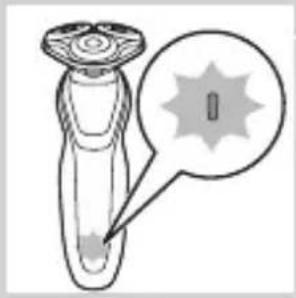
natural_image
Diagram of a laboratory test tube with a magnified inset showing a labeled spike (no text or symbols present)natural_image
Diagram of a test tube with a cap and a magnified inset showing internal components (no text or labels)natural_image
Simple line drawing of a device with a plug icon and a star-shaped mark, no text or symbols present.natural_image
Illustration of a smart device with a lock icon and speech bubble (no text or symbols)
natural_image
Illustration of a smart device with a lock icon and speech bubble (no text or symbols)
natural_image
Illustration of a hand pressing a button on a human leg, with no visible text or symbolsnatural_image
Diagram of a hairpin with two leads connected to a power outlet (no text or symbols)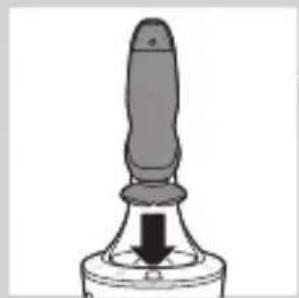
natural_image
Close-up of a mechanical component with a downward arrow indicating force or direction (no text or symbols)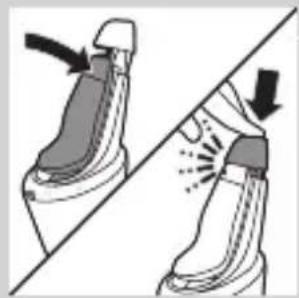
natural_image
Illustration of a pair of boots with arrows indicating motion or force, no text or symbols presentnatural_image
Illustration of a hand holding a circular object with an arrow pointing to it, no text or symbols presentnatural_image
Illustration of a person applying makeup to their ear with a brush (no text or symbols)natural_image
Line drawing of a person's face with hand near ear area (no text or symbols)natural_image
Line drawing of a person applying a product to their ear (no text or symbols)natural_image
Illustration of a hand washing a small object with a water dispenser (no text or symbols)natural_image
Illustration of a person applying makeup to their ear with a brush (no text or symbols)
natural_image
Illustration of a person's beard and hair being brushed with a T-shaped tool (no text or symbols)natural_image
Illustration of a hand holding a device with a bulb and a cross symbol, no text or labels present
natural_image
Diagram showing a funnel pouring liquid into a curved surface, with an inset magnified view of the process (no text or symbols)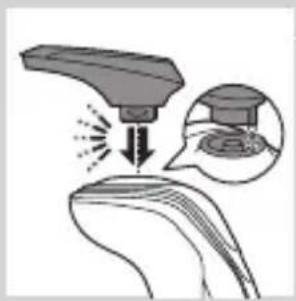
natural_image
Diagram showing a hairdryer tip interacting with a surface, with an inset magnified view of the hairdryer's surface (no text or symbols present)
natural_image
Line drawing of a person applying makeup to their ear (no text or symbols)natural_image
Illustration of a medical procedure showing a needle inserted into tissue with an inset image of a graduation cap (no text or symbols present)natural_image
Illustration of a hairbrush cutting down a button with a downward arrow (no text or symbols)
natural_image
Illustration of a man with a beard and a pipe, showing a hand holding a small object (no text or symbols present)natural_image
Illustration of two hands holding a tool with directional arrows indicating movement or force (no text or symbols)natural_image
Illustration showing two men applying facial care to their face, one with a magnified inset of the first eye (no text or symbols present)natural_image
Simple line drawing of a paintbrush with a cross mark and spray effect (no text or symbols)natural_image
Simple line drawing of a container with an upward arrow and label 'POT' (no text or symbols on the diagram itself)natural_image
Diagram of a blender with a black arrow indicating the process (no text or symbols present)
natural_image
Diagram of a mechanical component with a downward arrow indicating rotation (no text or symbols)natural_image
Illustration of a dropper tip with a stopper and a prohibition symbol (no text or labels)natural_image
Diagram showing fluid flow around a container with an inset magnified view of internal structures (no text or symbols)natural_image
Close-up of a mechanical component with a downward arrow indicating force or direction (no text or symbols)natural_image
Illustration of a pair of boots with arrows indicating motion or change, no text or symbols presentnatural_image
Hand holding two circular buttons with 'Power' and 'Spiral' symbols, next to a device (no text or labels visible)
natural_image
Diagram of a mechanical component with two circular indicators (one checked, one not checked) and a checkmark symbol, no readable text or labels present.

natural_image
Diagram of a blender with a plug inserted into a container (no text or symbols visible)
natural_image
Mechanical component diagram showing a lever with a downward arrow indicating motion (no text or symbols)natural_image
Illustration of a hand holding a small object with motion lines indicating movement or force (no text or symbols)
natural_image
Anatomical illustration of internal organs with arrows indicating movement or force (no text or labels)
natural_image
Illustration of a food item being lifted from a pipette into a bowl (no text or symbols)natural_image
Anatomical illustration of a human digestive system with an arrow indicating a specific structure (no text or labels present)natural_image
Diagram of a mechanical component with an upward arrow indicating motion or force (no text or symbols present)natural_image
Diagram showing two mechanical components with arrows indicating direction, no text or symbols presentnatural_image
Diagram showing fluid flow between two vessels with bubbles and a central pipe (no text or symbols)natural_image
Diagram of a mechanical or biological component with a central arrow pointing downward, no visible text or symbolsnatural_image
Diagram showing a circular object with a downward arrow pointing to a triangular structure (no text or symbols)natural_image
Diagram showing a mechanical component with arrows indicating motion, divided by a diagonal line (no text or symbols)natural_image
Illustration of two hands holding a cloud-like object with arrows indicating motion or transformation (no text or symbols)natural_image
Simple line drawing of a hand holding a shoe next to a bundle of fabric or fiber, with no text or symbols present.
natural_image
Illustration of a hand blowing bubbles with motion lines, accompanied by a magnified circular inset showing a hand holding a rock (no text or symbols)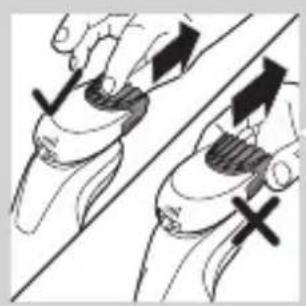
natural_image
Illustration of two hands holding a curved object with directional arrows indicating movement or force (no text or symbols)
natural_image
Illustration of two hands pouring liquid from a bottle onto a surface, separated by a diagonal line (no text or symbols)natural_image
Illustration of two cartoon fish separated by a diagonal line, one blowing water and the other wading down (no text or symbols)natural_image
Diagram of a mechanical component with a top cylindrical part and an upward arrow indicating motion (no text or symbols)natural_image
Two hanging objects with ropes tied on a diagonal line, no text or symbols visiblenatural_image
Illustration of mechanical components and a gear mechanism (no text or symbols)Αποθήκευση
natural_image
Diagram of a mechanical component with a cylindrical top and a flanged base, showing an upward arrow (no text or symbols)
natural_image
Illustration of a biological structure with a curved top and internal components, no visible text or symbols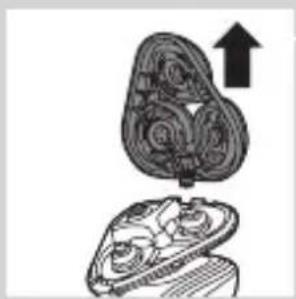
natural_image
Illustration of a mechanical component with an upward arrow, no text or symbols present
flowchart
graph TD
    A["Step 1"] --> B["Process Step"]
    B --> C["Step 2"]
    C --> D["End"]

natural_image
Diagram showing a hand holding a device with an upward arrow and a magnified view of the device (no text or symbols present)natural_image
Abstract diagram with three connected circular nodes and a central triangular structure (no text or symbols)natural_image
Pure diagram of a mechanical or architectural structure with no text, numbers, or symbolsnatural_image
Diagram showing mechanical components with arrows indicating motion or force, no readable text or symbols present
natural_image
Diagram showing two hands holding a cloud-like object with arrows indicating motion or transformation (no text or symbols)
natural_image
Symbol of a trash bin crossed with no visible text or labelsnatural_image
Simple line drawing of a trash bin with crossed lines indicating no waste or discharge (no text or symbols)natural_image
Illustration of a hand using a screwdriver to cut the pad, with a close-up of the pad being held (no text or symbols present)natural_image
Illustration of two mechanical components with directional arrows indicating motion (no text or symbols)natural_image
Two mechanical components with arrows indicating motion or assembly, no visible text or symbolsnatural_image
Diagram showing two robotic arms with a tool, one open and the other tilted, against a diagonal line (no text or symbols)natural_image
No smoking sign with faucet symbol (no text or numbers)
natural_image
Illustration of a hairdryer with a magnified inset showing internal structure (no text or symbols)natural_image
Illustration of a test tube with a star-shaped label and arrow pointing to its tip (no text or symbols present)natural_image
Diagram of a laboratory test tube with a magnified inset showing internal structure (no text or labels)natural_image
Diagram of a mechanical component with a circular annotation and pointer, no readable text or symbols present.natural_image
Illustration of a hairdryer with a magnified inset showing internal structure (no text or symbols)natural_image
Diagram of a dropper with a cap and a starburst pattern, no text or symbols presentnatural_image
Diagram of a test tube with a magnified inset showing internal components (no text or labels)natural_image
Simple line drawing of a plug plug with a small star-shaped base and a speech bubble containing an electrical symbol (no text or labels)natural_image
Illustration of a robotic arm with a lock icon and speech bubble (no text or symbols)natural_image
Illustration of a robotic device with a lock icon and a speech bubble (no text or symbols)natural_image
Illustration of a human torso with a speech bubble containing a heart symbol (no text or labels)natural_image
Diagram of a hairbrush connecting plug to cable with arrows indicating direction (no text or symbols)natural_image
Illustration of a hand holding a small object with arrows indicating motion, alongside an inset showing a close-up of a mushroom-like structure (no text or symbols)natural_image
Close-up of a mechanical component with a black arrow pointing downward (no text or symbols visible)natural_image
Illustration of a pair of boots with arrows indicating motion or change, no text or symbols presentnatural_image
Illustration of a hand pressing down on a circular object with an arrow (no text or symbols)natural_image
Illustration of a person applying makeup to their face with a brush (no text or symbols)natural_image
Line drawing of a person's face with hand near ear area (no text or symbols)natural_image
Line drawing of a person applying a product to their ear (no text or symbols)
natural_image
Illustration of a hand using a tool to lift a small object, no text or symbols presentnatural_image
Illustration of a hand pressing a button on a human leg, with no visible text or symbolsnatural_image
Illustration of a person's head with a T-shaped logo overlay (no text or symbols on the figure itself)natural_image
Diagram showing a hand holding a device with a warning symbol and an upward arrow, no text or labels present.natural_image
Diagram showing a funnel pouring liquid into a curved surface, with an inset magnified view of a droplet (no text or symbols)natural_image
Illustration of a hairdryer with a magnified inset showing the tip and base (no text or symbols)natural_image
Illustration of a person using a hairpin to apply product (no text or symbols present)
natural_image
Illustration of a spray gun on a surface with an inset showing a spray gun (no text or symbols present)natural_image
Line drawing of a hairbrush cutting into a button with a downward arrow (no text or symbols)
natural_image
Illustration of a man eating with a spoon (no text or symbols)
natural_image
Illustration of two hands holding a device with directional arrows indicating movement (no text or symbols)
natural_image
Line drawing of a person applying a hair accessory to their neck (no text or symbols)
natural_image
Illustration of a dropper tip dispensing liquid into a container, with an inset showing a dropper tip (no text or symbols present)
natural_image
Illustration of a mechanical component with fluid flow, no text or symbols presentnatural_image
Illustration of a person applying facial care to their face, with no visible text or symbolsnatural_image
Illustration showing two people applying facial care to their face, with a magnified inset of the first person's eye (no text or symbols present)natural_image
Simple line drawing of a paintbrush with a cross mark and spray effect (no text or symbols)natural_image
Simple line drawing of a container with an upward arrow, no text or symbols presentnatural_image
Diagram of a blender with a black arrow pointing to its lid (no text or symbols present)natural_image
Mechanical component diagram showing a lever mechanism with a downward arrow (no text or symbols)natural_image
Illustration of a spray bottle with a stopper and a prohibition symbol (no text or labels)natural_image
Close-up of a mechanical component with a downward arrow indicating force or direction (no text or symbols)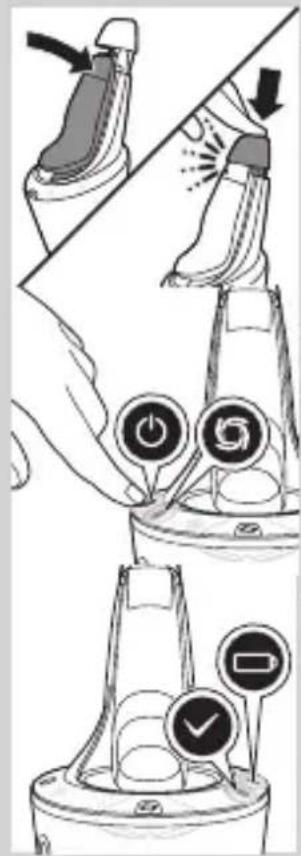

natural_image
Diagram of a blender with a black arrow pointing to its internal component (no text or symbols present)natural_image
Mechanical component diagram showing a lever mechanism with a downward arrow indicating motion (no text or symbols)natural_image
Illustration of a hand holding a small object with motion lines indicating movement or force (no text or symbols)natural_image
Anatomical illustration of a human digestive system with arrows indicating movement or force (no text or labels)natural_image
Illustration of a food item being lifted from a pipette into a bowl (no text or symbols)natural_image
Illustration of a decorative ornamental object with swirling patterns and a central arrow (no text or symbols)natural_image
Illustration of a mushroom-shaped object with an upward arrow, partially enclosed in a cross-section (no text or symbols)natural_image
Diagram showing two mechanical components with arrows indicating direction, no text or symbols presentnatural_image
Diagram showing fluid flow between two vessels with bubbles and a central pipe (no text or symbols)natural_image
Diagram of a mechanical or biological structure with a central circular component and directional arrow (no text or symbols)natural_image
Diagram showing a circular object falling into a triangular structure with concentric rings (no text or symbols)natural_image
Diagram showing a mechanical or electrical component with arrows indicating motion, no text or symbols presentnatural_image
Illustration of two hands holding a cloud-like object with arrows indicating motion or transformation (no text or symbols)natural_image
Illustration of a shoe being lifted by a bag (no text or symbols)natural_image
Illustration of a hand crushing a rock with a magnified circular inset showing a pile of dust (no text or symbols)natural_image
Illustration of two hands holding a tool with directional arrows indicating movement or force (no text or symbols)natural_image
Illustration of two hands using a tool to lift or lift a shoe, with no text or symbols present.natural_image
Diagram of a hairbrush with three blades and a top blade, showing mechanical components (no text or symbols)natural_image
Two-step diagram showing a tool pressing down on a component, with no visible text or symbols.natural_image
Diagram of a mechanical component with a top cylindrical part and an upward arrow indicating motion (no text or symbols)natural_image
Illustration of a stylized, ornate object resembling a helmet or abstract form with a curved handle, no text or symbols present.natural_image
Illustration of a mechanical component with an upward arrow, no text or symbols presentnatural_image
Diagram showing a hand holding a circular object with arrows indicating motion or assembly (no text or symbols present)natural_image
Abstract diagram with three connected circular nodes and a central triangular structure (no text or symbols)natural_image
Pure diagram of a mechanical or architectural structure with a circular component and arrow, no text or symbols present.natural_image
Diagram showing mechanical components with arrows and a checkmark, no readable text or symbols presentnatural_image
Illustration of two hands holding a cloud-like object with arrows indicating motion (no text or symbols)natural_image
Symbol of a trash bin crossed with no text or numbers, representing waste sorting or disposal (no text present)natural_image
Simple line drawing of a trash bin with no text or symbolsnatural_image
Illustration of a sewing machine needle stitching a shoe, with no text or symbols presentnatural_image
Illustration of two skis with directional arrows indicating motion (no text or symbols)natural_image
Two mechanical components with arrows indicating motion or assembly, no visible text or symbolsnatural_image
Diagram showing two hands operating a tool with an arrow indicating direction (no text or symbols present)natural_image
No sign depicting a faucet without any text or symbols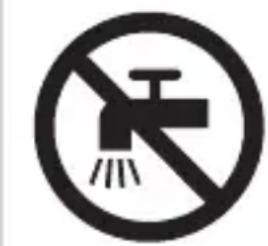
natural_image
Prohibition sign showing a faucet without a shower, enclosed in a circle (no text or symbols)Varoitus
natural_image
Simple line drawing of a showerhead spraying over a water-filled container (no text or symbols)Yleistä
natural_image
Diagram of a laboratory test tube with a magnified inset showing internal structures (no text or labels)natural_image
Illustration of a handheld device with a starburst symbol and speech bubble (no text or labels)natural_image
Diagram of a laboratory pipette with a magnified inset showing internal structure (no text or labels)
natural_image
Diagram of a mechanical component with a labeled circular feature (no text or symbols present)
natural_image
Illustration of a hairbrush with a magnified inset showing internal structure (no text or symbols)
natural_image
Diagram of a laboratory test tube with a magnified inset showing a labeled component (no text or symbols present)natural_image
Diagram of a laboratory test tube with a magnified inset showing internal components (no text or labels)natural_image
Illustration of a smart device with a lock icon and a speech bubble (no text or symbols)
natural_image
Illustration of a smart device with a lock icon and a button, no text or symbols presentnatural_image
Illustration of a medical or health device with a speech bubble containing a heart symbol (no text or labels present)
natural_image
Diagram of a hairbrush connecting a plug to a cable with an arrow indicating direction (no text or symbols)natural_image
Illustration of a hand holding a small object with arrows indicating motion or force direction, and a magnified inset showing a close-up of a mechanical component (no text or symbols)natural_image
Close-up of a mechanical component with a downward arrow indicating force or direction (no text or symbols visible)natural_image
Illustration of a pair of boots with arrows indicating motion or damage, no text or symbols presentnatural_image
Line drawing of a person applying makeup to their face with a brush (no text or symbols)natural_image
Line drawing of a person's face with hand near ear area, showing skin texture (no text or symbols)
natural_image
Line drawing of a person applying a cotton or cotton product to their ear (no text or symbols)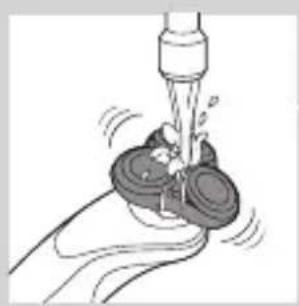
natural_image
Illustration of a hand washing a cup with water spray (no text or symbols)
natural_image
Illustration of a person applying a hair product to their face (no text or symbols)natural_image
Illustration of a hand holding a button labeled 'Y' on a curved surface, with no visible text or symbols beyond the icon.natural_image
Illustration of a person applying a toothbrush to their ear, with a circular logo containing the letter 'T' (no text or symbols on the diagram itself)natural_image
Diagram showing a hand holding a device with a bulb and a cross symbol, no text or labels presentnatural_image
Diagram showing a funnel pouring liquid into a curved surface, with an inset magnified view of the process (no text or symbols)natural_image
Illustration of a hairdryer with an inset showing the tip and base (no text or symbols)natural_image
Line drawing of a hairbrush cutting down a piece of hair with a downward arrow indicating compression (no text or symbols)natural_image
Illustration of a man eating with a spoon (no text or symbols)natural_image
Illustration of two hands holding a curved object with directional arrows indicating movement or force (no text or symbols)natural_image
Line drawing of a person applying a hair product to their ear (no text or symbols)natural_image
Illustration of a dropper tip dispensing liquid into a container, with an inset showing a dropper tip (no text or symbols present)natural_image
Illustration of a mechanical component with fluid flow, no text or symbols presentnatural_image
Illustration of a person applying facial care to their face, with no text or symbols present.natural_image
Illustration showing a person applying facial care to another person's face, with a magnified inset of the eye (no text or symbols)natural_image
Simple line drawing of a paintbrush with a cross mark, no text or symbols presentnatural_image
Close-up of a mechanical component with a downward arrow and a prohibition symbol (no text or labels)natural_image
Simple line drawing of a mechanical component with a downward arrow, no text or symbols presentnatural_image
Illustration of a pair of boots with arrows indicating motion or change, no text or symbols presentnatural_image
Hand holding a device with two circular buttons labeled 'Power' and 'Spiral', no visible text or symbols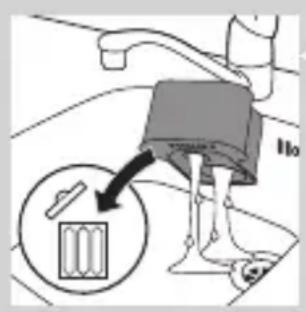
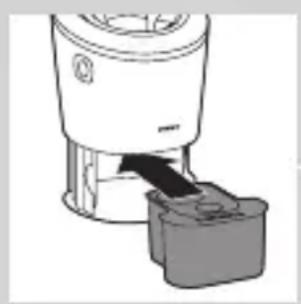
natural_image
Diagram of a blender with a black arrow pointing to its lid (no text or symbols present)
natural_image
Diagram of a mechanical component with a downward arrow indicating motion (no text or symbols)natural_image
Illustration of a hand holding a small object with motion lines indicating movement or force (no text or symbols)natural_image
Anatomical illustration of a human upper body with internal organs and a curved arrow indicating a specific region (no text or labels present)natural_image
Illustration of a fork being inserted into a bowl of noodles (no text or symbols)natural_image
Illustration of a biological structure with swirling patterns and directional arrows (no text or symbols)natural_image
Illustration of a mushroom-shaped container with internal compartments and an upward arrow, no text or symbols presentnatural_image
Diagram showing two mechanical components with directional arrows, no text or symbols presentnatural_image
Illustration of two mechanical devices with water spray and a gear-like component, no text or symbols presentnatural_image
Pure mechanical component diagram without any text, numbers, or symbolsnatural_image
Pure diagram of a mechanical or structural component with no visible text, numbers, or symbolsnatural_image
Diagram showing mechanical components with arrows indicating motion or force, no readable text or symbols presentnatural_image
Illustration of two hands holding a cloud-like object with arrows indicating motion or transformation (no text or symbols)natural_image
Illustration of a hand holding a shoe with a plug inserted into a socket (no text or symbols)natural_image
Illustration of two hands holding a tool with directional arrows indicating movement or force (no text or symbols present)
natural_image
Illustration of two hands pouring liquid from a bottle onto a surface, separated by a diagonal line (no text or symbols)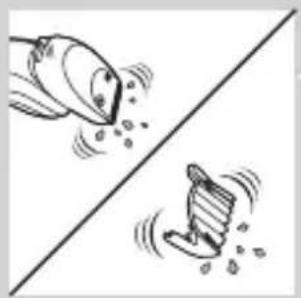
natural_image
Two cartoon fish jumping over a diagonal line, one falling and the other wading (no text or symbols)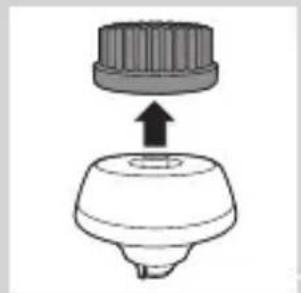
natural_image
Diagram of a mechanical component with a top cylindrical part and an arrow indicating upward motion (no text or symbols)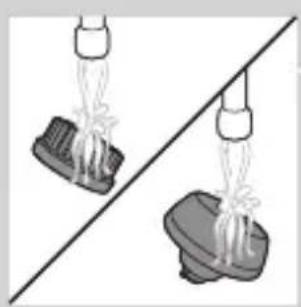
natural_image
Two identical mechanical components hanging from a diagonal line, no text or symbols visible
natural_image
Illustration of cleaning tools including a brush, cloth, and washer (no text or symbols)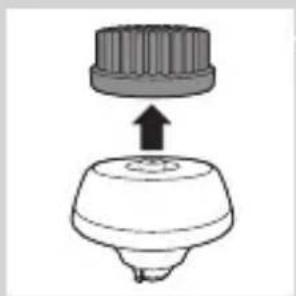
natural_image
Diagram of a mechanical component with a top cylindrical part and an upward arrow, no text or symbols present.natural_image
Illustration of a decorative object with floral patterns and an arrow, no visible text or symbolsnatural_image
Illustration of a stylized heart-shaped object with an upward arrow, placed above a circular base (no text or symbols)natural_image
Illustration of a hand holding a circular object with arrows indicating motion or assembly (no text or symbols)natural_image
Abstract diagram with three connected circular nodes and a central triangular structure (no text or symbols)natural_image
Pure diagram of a mechanical or architectural component with no text, numbers, or symbolsnatural_image
Diagram showing two circular components with arrows and a checkmark, no readable text or symbols presentnatural_image
Illustration of two hands holding a cloud-like object with arrows indicating motion (no text or symbols)natural_image
Symbol of a waste bin with no text or labels, crossed by two crossed lines and a solid rectangle below (no text or symbols present)natural_image
Illustration showing a hand using a screwdriver to cut a cylindrical object, with another hand holding a small boat (no text or symbols present)1 Irrota takapaneelin ruuvi ruuvitaltalla. Irrota sitten takapaneeli.

natural_image
Illustration of two skis with directional arrows indicating motion (no text or symbols)natural_image
Two mechanical components with a diagonal line and an upward arrow, no visible text or symbolsnatural_image
Illustration of a robotic arm gripping a tool, with a hand holding the grip and an arrow indicating motion (no text or symbols)
natural_image
Simple line drawing of a showerhead spraying over water in a container (no text or symbols)natural_image
Diagram of a laboratory test tube with a magnified inset showing internal structure (no text or labels)natural_image
Diagram of a mechanical component with a circular annotation and pointer, no readable text or symbols present.natural_image
Illustration of a hairdryer with a magnified inset showing internal structure (no text or symbols)natural_image
Diagram of a dropper with a cap and a starburst pattern, no text or symbols presentnatural_image
Diagram of a laboratory test tube with a magnified inset showing internal components (no text or labels)natural_image
Illustration of a robotic arm with a lock icon and speech bubble (no text or symbols)natural_image
Illustration of a smart device with a lock icon and a speech bubble (no text or symbols)natural_image
Illustration of a human torso with a speech bubble containing a heart symbol (no text or labels)natural_image
Illustration of a hand pressing a button on a human leg, with no visible text or symbolsnatural_image
Diagram of a hairbrush connecting a plug to a cable with an arrow indicating direction (no text or symbols)natural_image
Illustration of a hand pouring liquid into a container with an inset showing a cross-section of a container (no text or symbols)natural_image
Close-up of a mechanical component with a black arrow pointing downward (no text or symbols visible)natural_image
Illustration of a pair of boots with arrows indicating motion or change, no text or symbols presentnatural_image
Illustration of a hand pressing down on a curved object with a circular arrow pointing to it (no text or symbols)natural_image
Illustration of a person applying makeup to their face with a brush (no text or symbols)natural_image
Illustration of a person's face with hand near ear area, no text or symbols presentnatural_image
Line drawing of a person applying a product to their ear (no text or symbols)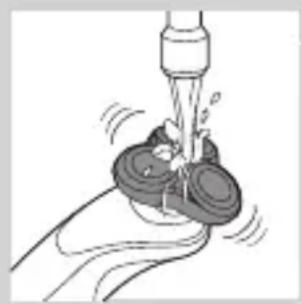
natural_image
Illustration of a hand washing a cup with a water dispenser (no text or symbols)natural_image
Illustration of a hand pressing a button on a human leg, with no visible text or symbolsnatural_image
Illustration of a person applying a toothbrush to their ear, with a circular logo containing the letter 'T' (no text or symbols on the diagram itself)natural_image
Illustration of a mushroom-shaped object with an arrow pointing upward, above a stylized leaf or crown (no text or symbols)natural_image
Illustration of a funnel pouring liquid into a curved surface, with an inset showing a droplet on a surface (no text or symbols)natural_image
Diagram showing a device emitting light onto a surface with an inset magnified view of the device (no text or symbols)natural_image
Line drawing of a person applying makeup to their ear (no text or symbols)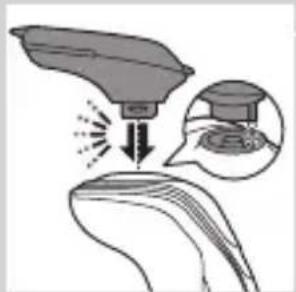
natural_image
Illustration of a spray gun interacting with a surface, showing spray effect and magnified view (no text or symbols)
natural_image
Line drawing of a hairbrush cutting into a toothbrush with motion lines indicating brush direction (no text or symbols)

natural_image
Illustration of a man with a beard eating a spoon (no text or symbols)natural_image
Illustration of two hands holding a curved object with directional arrows indicating movement or force (no text or symbols)
natural_image
Line drawing of a person applying a hair accessory to their ear (no text or symbols)
natural_image
Illustration of a dropper dispensing liquid into a container with an inset showing a dropper tip (no text or symbols)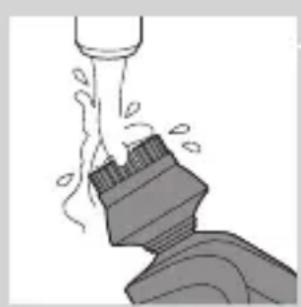
natural_image
Illustration of a mechanical component with motion lines indicating movement (no text or symbols)natural_image
Illustration of a person applying facial care to their face, with no visible text or symbolsnatural_image
Illustration showing two facial expressions with a magnified inset of the first face (no text or symbols)natural_image
Simple line drawing of a paintbrush with a cross mark and motion lines (no text or symbols)natural_image
Simple line drawing of a container with an upward arrow, no text or symbols presentnatural_image
Diagram of a blender with a black arrow indicating the process (no text or symbols present)natural_image
Diagram of a mechanical component with a downward arrow indicating rotation (no text or symbols)natural_image
Illustration of a spray bottle with a stopper and a prohibition symbol (no text or labels)natural_image
Illustration of a hand spraying water with a magnified inset showing a droplet on a surface (no text or symbols)natural_image
Close-up of a mechanical component with a black arrow pointing downward (no text or symbols visible)natural_image
Illustration of a pair of boots with arrows indicating motion or change, no text or symbols presentnatural_image
Hand inserting a power button into a device (no text or symbols visible)natural_image
Diagram of a mechanical component with two circular indicators (one checked, one not checked) and a checkmark symbol, no readable text or labels present.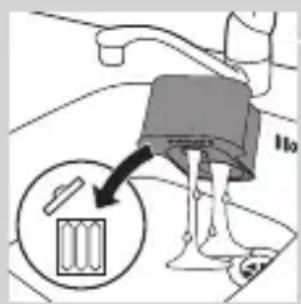
natural_image
Diagram of a blender with a black arrow pointing to its lid (no text or symbols present)natural_image
Diagram of a mechanical component with a downward arrow indicating rotation (no text or symbols)natural_image
Illustration of a hand holding a small object with motion lines indicating movement or force (no text or symbols)natural_image
Anatomical illustration of a human upper body with internal organs and a directional arrow indicating movement (no text or labels)
natural_image
Illustration of a fork being inserted into a bowl of noodles (no text or symbols)natural_image
Diagram of a biological structure with layered patterns and an arrow indicating direction (no text or symbols)natural_image
Illustration of a biological structure with an upward arrow, no text or symbols presentnatural_image
Diagram showing two mechanical components with directional arrows, no text or symbols presentnatural_image
Diagram showing fluid flow between two vessels with bubbles and a central pipe (no text or symbols)natural_image
Diagram of a mechanical or biological component with a central circular feature and a downward arrow, no visible text or symbols.natural_image
Diagram showing a circular object with a downward arrow pointing to a triangular structure (no text or symbols)natural_image
Diagram showing a mechanical component with arrows indicating motion, divided by a diagonal line (no text or symbols)natural_image
Illustration of two hands holding a cloud-like object with a downward arrow and a light burst, no text or symbols present.natural_image
Illustration of a shoe being lifted by a bag (no text or symbols)natural_image
Illustration of a hand crushing a rock with a magnified circular section showing a pile of rocks (no text or symbols)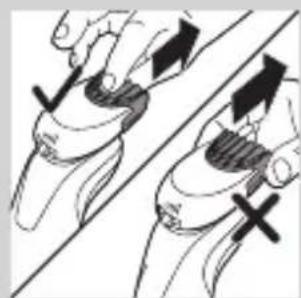
natural_image
Illustration of two hands holding a curved object with directional arrows indicating movement or force (no text or symbols)
natural_image
Illustration of two hands holding a bag and a shoe, separated by a diagonal line (no text or symbols)
natural_image
Two cartoon fish jumping over a diagonal line, one falling and the other wading (no text or symbols)FRANÇAIS246

natural_image
Simple line drawing of a mechanical component with an upward arrow, no text or symbols present.natural_image
Two identical diagrams showing a hand holding a tool above a base, with no text or symbols present.natural_image
Illustration of mechanical components and a gear mechanism (no text or symbols)natural_image
Diagram of a hairbrush with three blades, showing a downward shift from the top to the bottom (no text or symbols)natural_image
Two-step illustration showing a hairpin being inserted into a device, with no text or symbols present.natural_image
Diagram of a mechanical component with a cylindrical top and a base, showing an upward arrow (no text or symbols)natural_image
Illustration of a stylized human head with ornate patterns and a curved arrow indicating motion (no text or symbols)natural_image
Diagram of a mechanical component with an upward arrow indicating motion or force (no text or symbols present)natural_image
Diagram showing a hand holding a circular object with arrows indicating direction, alongside a battery and a separate cylindrical component (no text or symbols present)natural_image
Abstract diagram with three connected circular nodes and a central triangular structure (no text or symbols)natural_image
Pure diagram of a mechanical or architectural structure with no text, numbers, or symbolsnatural_image
Diagram showing mechanical components with arrows and a checkmark, no readable text or symbols presentnatural_image
Illustration of two hands holding a cloud-like object with arrows indicating motion (no text or symbols)natural_image
Symbol of a trash bin with crossed lines and a blank rectangular base (no text or numbers)natural_image
Symbol of a trash bin crossed with no text or numbers, representing waste sorting or disposal (no text present)natural_image
Illustration of a hand holding a pen and a small object, with no visible text or symbolsnatural_image
Illustration of two skis with directional arrows indicating movement or force (no text or symbols)natural_image
Two mechanical components with a diagonal line and an upward arrow, no visible text or symbolsnatural_image
Illustration of two hands using a tool to lift or lift an object, showing mechanical components and motion (no text or symbols)natural_image
No sign depicting a faucet with a showerhead, enclosed in a circle (no text or symbols)
natural_image
Simple line drawing of a showerhead spraying over water in a container (no text or symbols)natural_image
Diagram of a hairdryer with a magnified inset showing internal structure (no text or symbols)natural_image
Diagram of a laboratory test tube with a capillary top and a magnified inset showing a test tube (no text or labels)natural_image
Diagram of a laboratory test tube with a magnified inset showing internal structure (no text or labels)natural_image
Diagram of a hairbrush with a circular indicator and arrow pointing to the tip (no text or symbols present)natural_image
Illustration of a hairdryer with a magnified inset showing internal structure (no text or symbols)natural_image
Diagram of a laboratory test tube with a capillary top and a magnified inset showing a star-shaped object (no text or labels)natural_image
Diagram of a hairdryer with a magnified inset showing the tip and base (no text or symbols)natural_image
Illustration of a robot's head with a lock icon and speech bubble (no text or symbols)natural_image
Illustration of a smart device with a lock icon and a speech bubble (no text or symbols)natural_image
Diagram of a hairbrush connecting a plug to a cable with an arrow indicating direction (no text or symbols)natural_image
Simple line drawing of a mechanical component with a downward arrow, no text or symbols presentnatural_image
Illustration of a pair of boots with arrows indicating motion or damage, no text or symbols presentnatural_image
Illustration of a hand holding a circular object with an arrow pointing to it, no text or symbols presentnatural_image
Illustration of a person applying makeup to their face with a brush (no text or symbols)natural_image
Illustration of a person's face with hand near ear area, no text or symbols presentnatural_image
Line drawing of a person applying a product to their ear (no text or symbols)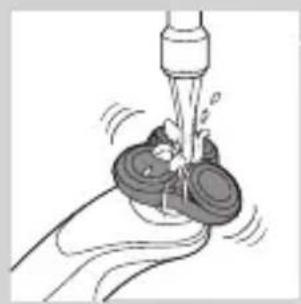
natural_image
Illustration of a hand washing a cup with a water dispenser (no text or symbols)natural_image
Illustration of a hand holding a button with a circular icon, pointing to the right side of the knee (no text or symbols present)natural_image
Illustration of a person applying a toothbrush to their beaded area, with a circular logo containing the letter 'T' (no text or symbols on the diagram itself)natural_image
Diagram showing a funnel with an upward arrow and a cross symbol, no text or labels presentnatural_image
Illustration of a medical procedure showing a surgical tool impacting a patient's ear with an inset image of the procedure (no text or symbols present)natural_image
Illustration of a robotic arm with motion arrows and a magnified inset showing the head area (no text or symbols)natural_image
Line drawing of a person using a hairpin to trim a neck (no text or symbols)
natural_image
Illustration of a medical procedure showing a device interacting with a patient's ear (no text or symbols present)natural_image
Line drawing of a hairbrush cutting down with a downward arrow indicating compression (no text or symbols)natural_image
Illustration of a man with a beard and a pipe, showing a hand holding a small object (no text or symbols present)natural_image
Illustration of two hands holding a curved object with directional arrows indicating movement (no text or symbols)
natural_image
Line drawing of a person's head and neck with a hairpin (no text or symbols)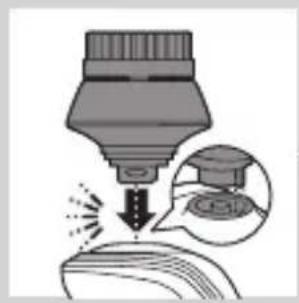
natural_image
Illustration of a dropper tip dispensing liquid into a container, with an inset showing a dropper tip (no text or symbols present)
natural_image
Illustration of a mechanical component with motion lines indicating movement (no text or symbols)natural_image
Illustration of a person applying facial care to their face, with no visible text or symbolsnatural_image
Illustration showing two men applying facial care to their face, one with a magnified inset of the first eye (no text or symbols present)natural_image
Simple line drawing of a paintbrush with a cross mark and spray effect (no text or symbols)natural_image
Simple line drawing of a container with an upward arrow and label 'SWEET' (no text or symbols on the diagram itself)
natural_image
Diagram of a blender with a black arrow pointing to its internal component (no text or symbols present)natural_image
Diagram of a mechanical component with a downward arrow indicating motion (no text or symbols)natural_image
Close-up of a mechanical component with a downward arrow and a prohibition symbol (no text or labels)natural_image
Diagram showing a mechanical or fluidic process with arrows indicating flow direction, no text or symbols presentnatural_image
Close-up of a mechanical component with a handle and base, showing a downward arrow (no text or symbols)natural_image
Illustration of a pair of boots with arrows indicating motion or change, no text or symbols present
natural_image
Hand holding two circular buttons with power and eye symbols, connected to a device (no text or labels visible)
natural_image
Technical diagram of a mechanical component with two circular indicators (no text or symbols)natural_image
Illustration of a hand holding a small object with motion lines indicating movement or force (no text or symbols)natural_image
Anatomical illustration of a human head with internal organs and a directional arrow indicating movement (no text or labels)
natural_image
Illustration of a noodle being lifted from a piping bag into a bowl (no text or symbols)natural_image
Anatomical illustration of a human digestive system with an arrow indicating a process (no text or labels present)natural_image
Illustration of a mechanical component with an upward arrow, showing internal gear-like structure (no text or symbols)natural_image
Diagram showing two mechanical components with arrows indicating direction, no text or symbols presentnatural_image
Diagram showing two mechanical components with fluid or material flows, no text or symbols presentnatural_image
Diagram of a mechanical or electrical component with a central shaft and surrounding gear (no text or symbols)natural_image
Pure diagram of a mechanical or architectural component with a circular top and triangular base, no text or symbols present.natural_image
Diagram showing mechanical components with arrows indicating motion or force direction (no text or symbols)natural_image
Illustration of two hands holding a cloud-like object with a downward arrow and a glowing effect (no text or symbols)natural_image
Line drawing of a shoe being lifted by a cloth, showing fabric texture and a bottle (no text or symbols)natural_image
Illustration of a hand crushing debris with a magnified inset showing a pile of waste (no text or symbols)
natural_image
Illustration of two hands holding a tool with directional arrows indicating movement or force (no text or symbols present)
natural_image
Illustration of two hands using pipette to lift a bag and drop liquid onto a surface, separated by a diagonal line (no text or symbols)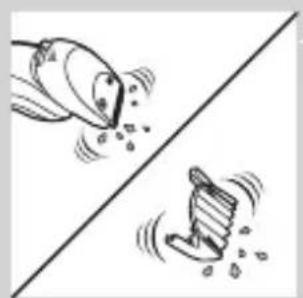
natural_image
Two cartoon fish jumping over a diagonal line, one falling and the other wading (no text or symbols)natural_image
Diagram of a mechanical component with a top cylindrical part and an upward arrow, no text or symbols present.natural_image
Two identical diagrams showing a tool interacting with a base, connected by a diagonal line (no text or symbols)natural_image
Illustration of mechanical components and a gear mechanism on a diagonal line (no text or symbols)natural_image
Diagram of a hairbrush with a downward arrow indicating compression or disassembly (no text or symbols)natural_image
Simple line drawing of a mechanical component with a downward arrow indicating motion (no text or symbols)
natural_image
Diagram of a mechanical component with a downward arrow indicating force or direction (no text or symbols)natural_image
Diagram of a mechanical component with a top cylindrical part and an upward arrow indicating motion (no text or symbols)natural_image
Anatomical illustration of internal organs with arrows indicating movement or force (no text or labels)natural_image
Diagram of a mechanical component with an upward arrow indicating motion or force (no text or symbols present)natural_image
Diagram showing a hand holding a circular object with arrows indicating motion or force (no text or symbols present)natural_image
Abstract diagram of a symmetrical geometric structure with three circular elements and an upward arrow, no text or symbols present.natural_image
Pure diagram of a mechanical or structural component with no visible text, numbers, or symbolsnatural_image
Diagram showing two mechanical components with arrows indicating motion, one crossed over the other (no text or symbols)natural_image
Illustration of two hands holding a heart-shaped object with arrows indicating motion or change (no text or symbols)
natural_image
Symbol of a trash bin crossed with no text or numbers, representing waste sorting or disposal (no text present)natural_image
Symbol of a trash bin crossed out by two diagonal lines (no text or numbers present)natural_image
Illustration of a hand holding a pen and a small object, with no visible text or symbolsnatural_image
Illustration of two skis with directional arrows indicating movement or force (no text or symbols)natural_image
Two mechanical components with a diagonal line and an upward arrow, no visible text or symbolsnatural_image
Illustration of two hands using pliers to lift a tool, showing mechanical components (no text or symbols)natural_image
No sign depicting a faucet crossed out by a diagonal line, indicating no pollution or leakage (no text present)
natural_image
Illustration of a syringe with a magnified inset showing internal structure (no text or symbols)natural_image
Illustration of a test tube with a magnified inset showing a star-shaped object (no text or symbols)natural_image
Diagram of a laboratory test tube with a magnified inset showing internal structure (no text or labels)natural_image
Diagram of a hairbrush with a circular indicator and arrow pointing to the tip (no text or symbols present)natural_image
Illustration of a hairdryer with a magnified inset showing internal structure (no text or symbols)natural_image
Diagram of a laboratory test tube with a capillary top and a magnified inset showing a star-shaped object (no text or labels)natural_image
Diagram of a hairdryer with a magnified inset showing the tip and body area (no text or symbols)natural_image
Illustration of a smart device with a lock icon and a starburst symbol (no text or labels)natural_image
Diagram of a smart device with a lock icon and a speech bubble (no text or symbols)De reisvergrendeling deactiveren
natural_image
Illustration of a human torso with a speech bubble containing a heart symbol (no text or labels)De Turbo-instelling activeren
natural_image
Diagram of a hairbrush connecting a plug to a cable with an arrow indicating direction (no text or symbols)natural_image
Close-up of a mechanical component with a black arrow pointing downward (no text or symbols visible)natural_image
Illustration of a pair of boots with arrows indicating motion or damage, no text or symbols presentnatural_image
Illustration of a hand holding a circular object with an arrow pointing to it, no text or symbols present.natural_image
Illustration of a person applying makeup to their face with a brush (no text or symbols)natural_image
Line drawing of a person's face with hand near ear area, no text or symbols presentnatural_image
Line drawing of a person applying a product to their ear (no text or symbols)
natural_image
Illustration of a hand holding a water dispenser with a spray bottle (no text or symbols)natural_image
Illustration of a hand pressing a button on a human leg, with no visible text or symbolsnatural_image
Illustration of a person's beard and toothpaste being brushed (no text or symbols)natural_image
Diagram showing a mushroom-shaped object above a curved surface with a cross symbol and an upward arrow, no text or labels present.natural_image
Diagram showing a funnel pouring liquid into a curved surface, with an inset magnified view of the process (no text or symbols)natural_image
Illustration of a robotic arm with motion arrows and a magnified inset showing a small mechanical component (no text or symbols)natural_image
Line drawing of a person applying a hair accessory to their ear (no text or symbols)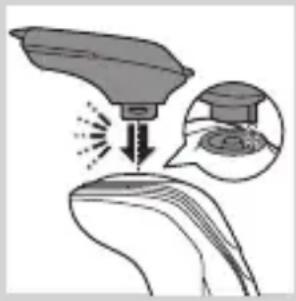
natural_image
Illustration of a medical procedure with an incision and magnified view of the procedure (no text or symbols)
natural_image
Line drawing of a hairbrush cutting down a surface with a downward arrow indicating compression (no text or symbols)

natural_image
Illustration of a man smoking a pipe with a beanie (no text or symbols)natural_image
Illustration of two hands holding a tool, with arrows indicating movement or force direction (no text or symbols)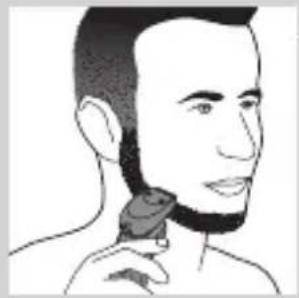
natural_image
Line drawing of a man applying a hair accessory to his neck (no text or symbols)
natural_image
Illustration of a dropper tip dispensing liquid into a container with a magnified inset showing a dropper tip (no text or symbols)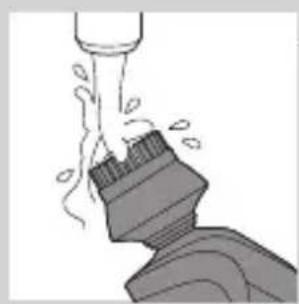
natural_image
Illustration of a mechanical component with fluid flow, no text or symbols presentnatural_image
Illustration of a person applying facial care to their face, with no visible text or symbolsnatural_image
Illustration showing a person applying facial care to another person's face, with a magnified inset of the first eye (no text or symbols present)natural_image
Simple line drawing of a paintbrush with a cross mark and spray effect (no text or symbols)natural_image
Simple line drawing of a container with an upward arrow and label 'WATER' (no text or symbols on the diagram itself)
natural_image
Illustration of a pair of boots with arrows indicating motion or change, no text or symbols present
natural_image
Hand holding two circular buttons with power and spiral symbols, connected to a device (no text or labels visible)
natural_image
Diagram of a device with two circular indicators: one checked and one not checked, no text or symbols present.natural_image
Illustration of a hand holding a small object with motion lines, possibly a tool or device, emitting a bundle of wires or fibers (no text or symbols present)
natural_image
Illustration of a decorative bird perched on a branch with an arrow indicating direction (no text or symbols)
natural_image
Illustration of a food item being lifted by a fork (no text or symbols)natural_image
Anatomical illustration of a human digestive system with an arrow indicating a specific structure (no text or labels present)1 Druk op de ontgrendelknop en klap de scheerunit open.

natural_image
Illustration of a mechanical component with an upward arrow, showing internal gear-like structure (no text or symbols)natural_image
Diagram showing two mechanical components with upward arrows, no text or symbols presentnatural_image
Illustration of a kitchen sink with water spray and a bowl of liquid (no text or symbols)natural_image
Diagram of a mechanical or electrical component with a central downward arrow and circular base (no text or symbols)natural_image
Diagram showing a circular object with a downward arrow pointing to a triangular structure (no text or symbols)natural_image
Diagram showing mechanical components with arrows indicating motion or force direction (no text or symbols)natural_image
Illustration of two hands holding a cloud-like object with a downward arrow and a light burst, no text or symbols present.natural_image
Illustration of a shoe being lifted by a bag (no text or symbols)natural_image
Illustration of a hand crushing a rock with a magnified circular inset showing a pile of rocks (no text or symbols)natural_image
Illustration of two hands holding a curved object with directional arrows indicating movement or force (no text or symbols)natural_image
Illustration of two hands holding a tool and a pair of boots, separated by a diagonal line (no text or symbols)natural_image
Two cartoon fish jumping over a diagonal line, one falling and the other wading (no text or symbols)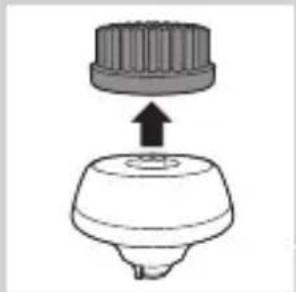
natural_image
Diagram of a mechanical component with a top cylindrical part and a base, showing an upward arrow (no text or symbols)natural_image
Two identical diagrams showing a hand holding a tool above a base, with no text or symbols present.
natural_image
Illustration of mechanical components and a gear mechanism (no text or symbols)Opbergen
natural_image
Diagram of a mechanical component with a downward arrow indicating motion or force (no text or symbols)NEDERLANDS320

natural_image
Illustration of a mechanical component with an arrow indicating downward motion (no text or symbols)natural_image
Diagram of a spray bottle with a stopper and internal structure (no text or symbols)natural_image
Diagram of a mechanical component with a top cylindrical part and an upward arrow, no text or symbols present.natural_image
Illustration of a stylized human head with ornate patterns and a curved arrow indicating motion (no text or symbols)2 Druk op de ontgrendelknop en klap de scheerunit open.
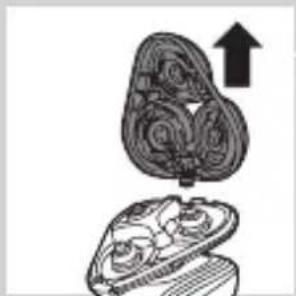
natural_image
Diagram of a mechanical component with an upward arrow indicating motion or force (no text or symbols present)natural_image
Diagram showing a hand holding a circular object with arrows indicating direction, alongside a cylindrical object (no text or symbols present)natural_image
Abstract diagram with three connected circular shapes and a central arrow (no text or symbols)natural_image
Pure diagram of a mechanical or structural component with no visible text, numbers, or symbolsnatural_image
Diagram showing two circular components with arrows and a checkmark, no readable text or symbols presentnatural_image
Illustration of two hands holding a cloud-like object with arrows indicating motion (no text or symbols)natural_image
Symbol of a trash bin crossed with a diagonal line and a horizontal bar below (no text or numbers present)natural_image
Symbol of a trash bin crossed with no text or numbers, representing waste sorting or disposal (no text present)natural_image
Illustration of a hand holding a small object, with another hand partially visible below (no text or symbols)natural_image
Two types of skis shown side by side, one with directional arrows indicating motion (no text or symbols)natural_image
Diagram showing two car body components with directional arrows, no text or symbols presentnatural_image
Diagram showing two hands operating a tool with a black arrow indicating direction (no text or symbols present)natural_image
Prohibition sign showing a faucet without raindrops, enclosed in a circle (no text)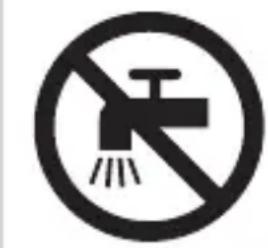
natural_image
Prohibition sign showing a faucet without a shower, enclosed in a circle (no text or symbols)Forsiktig
natural_image
Simple line drawing of a showerhead spraying over a water-filled container (no text or symbols)- Ladingen tar ca. én time.

natural_image
Illustration of a test tube with a cap and a magnified inset showing internal structure (no text or symbols)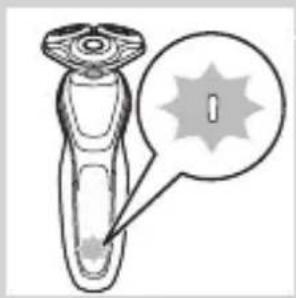
natural_image
Illustration of a test tube with a magnified inset showing a spike (no text or symbols)natural_image
Diagram of a dropper with a magnified inset showing internal structure (no text or symbols)natural_image
Diagram of a hairbrush with a circular indicator showing a specific area (no text or symbols present)Lav batterikapasitet

natural_image
Diagram of a medical or laboratory device with a magnified inset showing internal components (no text or symbols)natural_image
Diagram of a laboratory test tube with a magnified inset showing a labeled component (no text or symbols present)natural_image
Diagram of a dropper with a magnified inset showing internal structure (no text or labels)natural_image
Illustration of a smart device with a lock icon and a speech bubble (no text or symbols)
natural_image
Diagram of a smart device with a lock icon and a button, no text or symbols present
natural_image
Illustration of a robotic device with a circular icon and a speech bubble containing a skull symbol (no text or labels)natural_image
Illustration of a hand pressing a button on a knee joint (no text or symbols)Aktivere turboinnstillingen
Ladingen tar ca. én time.
natural_image
Diagram of a hairbrush connecting a power outlet with a cable, showing two arrows indicating direction (no text or symbols)natural_image
Close-up of a mechanical component with a black arrow pointing downward (no text or symbols visible)4 Hold barbermaskinen opp ned over holderen. Kontroller at forsiden av barbermaskinen vender mot SmartClean-systemet.

natural_image
Illustration of a pair of boots with arrows indicating motion or change, no text or symbols presentnatural_image
Illustration of a hand holding a circular object with an arrow pointing to it, against a stylized background (no text or symbols)natural_image
Illustration of a person applying facial contour or mask to their ear (no text or symbols)Tilpasningsperiode for huden
natural_image
Line drawing of a person's face with a hand touching the cheek area (no text or symbols)
natural_image
Line drawing of a person applying a product to their ear (no text or symbols)
natural_image
Illustration of a hand washing a cup with a water dispenser (no text or symbols)natural_image
Illustration of a person applying a hairpin to their face (no text or symbols present)natural_image
Illustration of a hand pressing a button on a patient's knee joint (no text or symbols)natural_image
Illustration of a man applying a toothbrush to the ear with a circular logo (no text or symbols)natural_image
Illustration of a mushroom-shaped object with a cross symbol and an upward arrow, no text or symbols present.natural_image
Diagram showing a funnel pouring liquid into a curved surface, with an inset magnified view of the tip (no text or symbols)natural_image
Diagram showing a hairdryer interacting with a surface, with an inset magnified view of the contact area (no text or symbols present)natural_image
Illustration of a person using a hairdryer (no text or symbols present)
natural_image
Illustration of a spray gun on a curved surface with an inset showing a magnified view of the spray (no text or symbols)
natural_image
Illustration of a hairbrush cutting into a toothbrush with a downward arrow (no text or symbols)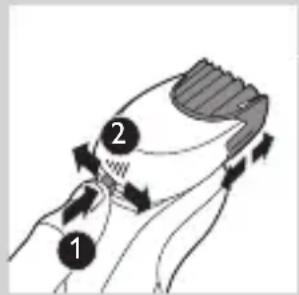

natural_image
Illustration of a man smoking a bearded man with a pipe (no text or symbols)natural_image
Illustration of two hands holding a tool with directional arrows indicating movement or force (no text or symbols present)
natural_image
Line drawing of a person applying a hair accessory to their neck (no text or symbols)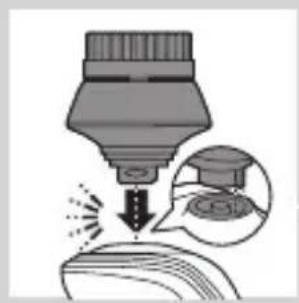
natural_image
Illustration of a dropper tip dispensing liquid into a container, with an inset showing a dropper tip (no text or symbols present)
natural_image
Illustration of a mechanical component with fluid flow, no text or symbols present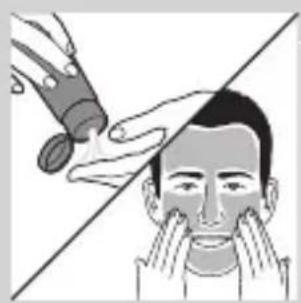
natural_image
Illustration of a person applying facial care to their face, with no text or symbols present.natural_image
Simple line drawing of a paintbrush with a cross mark and spray effect (no text or symbols)Ikke vipp SmartClean-systemet. På den måten unngår du lekkasje.
natural_image
Simple line drawing of a container with an upward arrow and label 'PAPAY' (no text or symbols on the diagram itself)natural_image
Diagram of a blender with a black arrow pointing to its base, showing no text or symbols.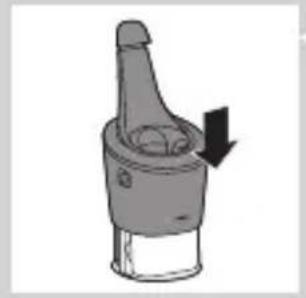
natural_image
Diagram of a mechanical component with a downward arrow indicating direction (no text or symbols)6 Skyv den øvre delen av SmartClean-systemet tilbake ned (du skal høre et klikk).
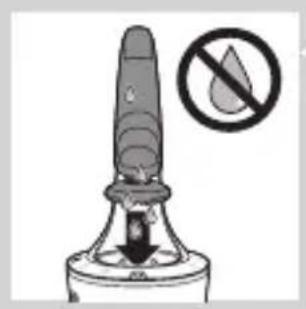
natural_image
Warning symbol of a device with a downward arrow and a prohibition sign (no text or labels)Bruke SmartClean-systemet
natural_image
Diagram showing a hand pouring liquid into a container with an inset magnified view of a lid (no text or symbols)natural_image
Close-up of a mechanical component with a downward arrow indicating force or direction (no text or symbols)2 Hold barbermaskinen opp ned over holderen. Kontroller at forsiden av barbermaskinen vender mot SmartClean-systemet.

natural_image
Illustration of a pair of boots with arrows indicating motion or change, no text or symbols presentnatural_image
Hand holding two circular buttons with 'Power' and 'Spiral' symbols, next to a device (no text or labels visible)
natural_image
Diagram of a mechanical component with two circular indicators (one checked, one not checked) and a checkmark symbol inside (no text or labels)

natural_image
Diagram of a blender with a black arrow pointing to its internal component (no text or symbols present)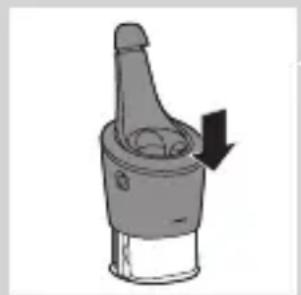
natural_image
Diagram of a mechanical component with a downward arrow indicating motion (no text or symbols)natural_image
Illustration of a hand holding a small object with motion lines indicating movement or force (no text or symbols)1 Skyll skjæreenheten under varmt rennende vann en liten stund.

natural_image
Anatomical illustration of a human head with internal organs and a directional arrow indicating movement (no text or labels)natural_image
Illustration of a fork and chopsticks lifting a bowl of noodles (no text or symbols)natural_image
Anatomical illustration of a human head with internal organs and a curved arrow indicating a specific structure (no text or labels present)natural_image
Illustration of a mechanical component with an upward arrow indicating motion (no text or symbols)natural_image
Diagram showing two mechanical components with directional arrows, no text or symbols presentnatural_image
Illustration of two mechanical devices with water spray and a gear-like component, no text or symbols presentnatural_image
Pure mechanical component diagram without any text, numbers, or symbolsnatural_image
Pure diagram of a mechanical or structural component with no visible text, numbers, or symbolsnatural_image
Diagram showing two circular components with arrows and a checkmark, no readable text or symbols presentnatural_image
Illustration of two hands exchanging a cloud-like object with arrows indicating rotation or movement (no text or symbols)natural_image
Illustration of a foot stepping on a shoe with a bottle inserted (no text or symbols)natural_image
Illustration of a hand blowing bubbles with motion lines, accompanied by a circular icon showing a cloud or landscape (no text or symbols)
natural_image
Illustration of two hands holding a tool with directional arrows indicating movement or force (no text or symbols present)natural_image
Illustration of two hands pouring liquid from a bottle onto a shoe, separated by a diagonal line (no text or symbols)natural_image
Illustration of two cartoon fish separated by a diagonal line, one falling and the other wading (no text or symbols)natural_image
Diagram of a mechanical component with a top cylindrical part and an upward arrow, no text or symbols present.natural_image
Two identical diagrams showing a container being lifted by a tool, connected by a diagonal line (no text or symbols)
natural_image
Illustration of cleaning tools including a bulb, cloth, and tray (no text or symbols)Oppbevaring

natural_image
Diagram of a spray bottle with a downward arrow indicating downward motion (no text or symbols)natural_image
Diagram of a mechanical component with a top cylindrical part and an upward arrow, no text or symbols present.natural_image
Illustration of a decorative hat with floral patterns and an arrow indicating direction (no text or symbols)natural_image
Illustration of a mushroom-shaped container with internal organs and an upward arrow, no text or symbols presentnatural_image
Illustration of a hand holding a circular object with arrows indicating direction (no text or symbols)natural_image
Pure diagram of a mechanical or structural component with a circular top and triangular base, no text or symbols present.natural_image
Diagram showing two circular components with arrows indicating direction, one crossed over the other by a diagonal line (no text or symbols)natural_image
Illustration of two hands holding a cloud-like object with a downward arrow and a glowing effect (no text or symbols)natural_image
Symbol of a trash bin crossed with no text or labels, representing waste sorting or disposal (no text present)natural_image
Illustration of a hand holding a pen and a slide, with no visible text or symbolsTa bare ut det oppladbare batteriet når du avhender barbermaskinen. Kontroller at batteriet er helt tomt når du tar det ut.
natural_image
Illustration of two skis with directional arrows indicating movement or motion (no text or symbols)natural_image
Diagram showing two car body components with arrows indicating movement or force, no text or symbols presentnatural_image
Illustration of a hand using a tool to lift a car, showing mechanical components and motion (no text or symbols)4 Ta ut batteriholderen, og klipp over batterifikene med en avbitertang.
Garanti og støtte
Hvis du trenger kundestøtte eller informasjon, kan du gå til www.philips.com/support eller lese i garantiheftet.
Begrensninger i garantien

natural_image
Simple line drawing of a showerhead spraying over a water-filled basin (no text or symbols)natural_image
Illustration of a hairdryer with a magnified inset showing internal structure (no text or symbols)natural_image
Illustration of a laboratory test tube with a stopper and a warning symbol (no text or labels)Indicador de carga da bateria com 1 luz
natural_image
Diagram of a laboratory test tube with a magnified inset showing internal structure (no text or labels)- Indicador de carga da bateria com 3 luzes

natural_image
Diagram of a hairbrush with a circular indicator labeled 'I' (no text or symbols on the diagram itself)- Indicador de carga da bateria com 1 luz
Bateria fraca

natural_image
Illustration of a hairdryer with a magnified inset showing internal structure (no text or symbols)natural_image
Diagram of a laboratory test tube with a capillary top and a magnified inset showing a star-shaped object (no text or labels)- Indicador de carga da bateria com 1 luz
natural_image
Diagram of a laboratory test tube with a magnified inset showing internal components (no text or labels)natural_image
Illustration of a robot's torso with a padlock icon and a speech bubble (no text or symbols)natural_image
Illustration of a smart device with a lock icon and speech bubble (no text or symbols)natural_image
Illustration of a hand pressing a button on a knee joint (no text or symbols)natural_image
Diagram of a hairbrush connecting a plug to a cable with an arrow indicating direction (no text or symbols)1 Introduza a ficha pequena no aparelho e coloque o adaptador na tomada eléctrica.
Carregamento no sistema SmartClean (apenas modelos específicos)
1 Introduza a ficha pequena no sistema SmartClean.
2 Ligue o adaptador à tomada eléctrica.
PORTUGUÊS374
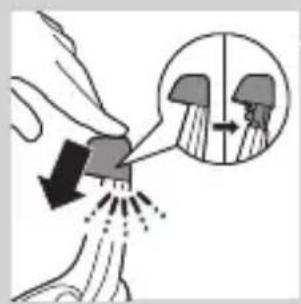
natural_image
Illustration of a hand pouring liquid into a container with an inset showing a cross-section of a container (no text or symbols)natural_image
Close-up of a mechanical component with a black arrow pointing downward (no text or symbols visible)natural_image
Illustration of a pair of boots with arrows indicating motion or change, no text or symbols presentnatural_image
Illustration of a hand inserting a circular component into a container (no text or symbols)natural_image
Illustration of a person applying facial contour or mask to their ear (no text or symbols)natural_image
Line drawing of a person's face with hand near ear area, no text or symbols presentnatural_image
Line drawing of a person applying a cotton or cotton product to their ear (no text or symbols)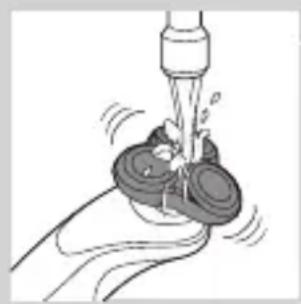
natural_image
Illustration of a hand washing a cup with a water dispenser (no text or symbols)natural_image
Illustration of a hand pressing a button on a human leg, with no visible text or symbolsnatural_image
Illustration of a man's beard and hair being brushed with a T-shaped tool (no text or symbols)natural_image
Illustration of a hand holding a device with a bulb and a cross symbol, no text or labels presentnatural_image
Illustration of a funnel pouring liquid into a curved surface, with an inset showing a graduation cap (no text or symbols)natural_image
Diagram showing a spray gun interacting with a surface, with an inset magnified view of the spray (no text or symbols)natural_image
Line drawing of a person applying makeup to their ear (no text or symbols)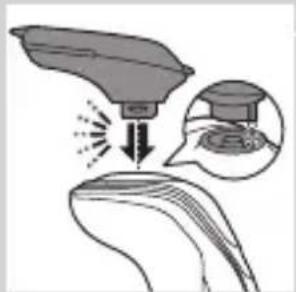
natural_image
Illustration of a hairdryer with a magnified inset showing the tip and base (no text or symbols)
natural_image
Line drawing of a hairbrush cutting into a circular cutter (no text or symbols)

natural_image
Illustration of a man with a beard eating a pipe (no text or symbols)natural_image
Illustration of two hands holding a tool with arrows indicating movement or force direction (no text or symbols)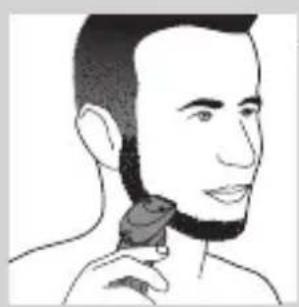
natural_image
Line drawing of a person applying a hair accessory to their neck (no text or symbols)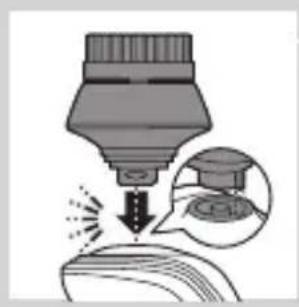
natural_image
Illustration of a dropper tip dispensing liquid into a container, with an inset showing a dropper tip (no text or symbols present)natural_image
Illustration of a mechanical component with fluid flow, no text or symbols presentnatural_image
Illustration of a person applying facial care to their face, with no visible text or symbolsnatural_image
Simple line drawing of a paintbrush with a cross mark and paint drop, no text or symbols presentnatural_image
Simple line drawing of a container with an upward arrow, no text or symbols present4 Retire o selo da recarga de limpeza.

natural_image
Illustration of a blender with a black arrow pointing to its lid (no text or symbols)natural_image
Diagram of a mechanical component with a downward arrow indicating direction (no text or symbols)natural_image
Illustration of a spray bottle with a stopper and a prohibition symbol (no text or labels)Utilizar o sistema SmartClean
natural_image
Illustration of a hand spraying water with a magnified inset showing a person's head and shoulder (no text or symbols)natural_image
Close-up of a mechanical component with a black arrow pointing downward (no text or symbols visible)natural_image
Illustration of a pair of boots with arrows indicating motion or change, no text or symbols presentnatural_image
Line drawing of a hand holding two circular buttons with power and spiral symbols (no text or labels)4 Prima o botão ligar/desligar no sistema SmartClean para iniciar o programa de limpeza.
- Durante o programa de limpeza (que demora aprox. 10 minutos), o símbolo de limpeza fica intermitente.

natural_image
Technical line drawing of a mechanical component with two circular indicators (no text or symbols)
natural_image
Diagram of a blender with a black arrow indicating a process or operation, no text or symbols presentnatural_image
Diagram of a mechanical component with a downward arrow indicating direction (no text or symbols)Limpeza da máquina de barbear à torneira
natural_image
Illustration of a hand holding a small object with motion lines indicating movement or force (no text or symbols)natural_image
Illustration of a biological structure with layered patterns and a central arrow (no text or symbols)PORTUGUÊS386

natural_image
Illustration of a food item being lifted by a fork (no text or symbols present)natural_image
Diagram of a biological structure with swirling patterns and an arrow indicating direction (no text or labels)natural_image
Diagram of a mechanical component with an upward arrow indicating motion or assembly (no text or symbols present)natural_image
Diagram showing two mechanical components with directional arrows, no text or symbols presentnatural_image
Illustration of a mechanical device with fluid flow and a gear-like component (no text or symbols)natural_image
Diagram of a mechanical or biological structure with a central circular component and a curved top surface, no visible text or symbols.natural_image
Diagram showing a circular object with a downward arrow pointing to a triangular structure (no text or symbols)natural_image
Diagram showing a mechanical component with arrows indicating motion, divided by a diagonal line (no text or symbols)natural_image
Illustration of two hands holding a cloud-like object with arrows indicating motion or transformation (no text or symbols)natural_image
Illustration of a shoe being lifted by a bag (no text or symbols)natural_image
Illustration of a hand crushing a rock with a magnified circular inset showing a pile of rocks (no text or symbols)natural_image
Illustration of two hands holding a tool with directional arrows indicating movement (no text or symbols)natural_image
Illustration of two hands holding a shoe and a pair of boots, separated by a diagonal line (no text or symbols)2 Ligue o aparelho.
natural_image
Illustration of two cartoon fish separated by a diagonal line, one falling and the other wading (no text or symbols)PORTUGUÊS390
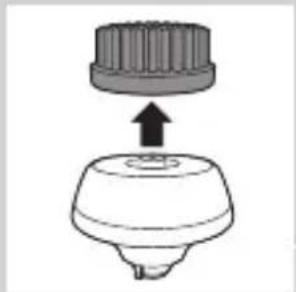
natural_image
Diagram of a mechanical component with a top cylindrical part and a base, showing an upward arrow (no text or symbols)natural_image
Two identical diagrams showing a tool interacting with a base, one emitting powder from a spring-like object and the other with a base, separated by a diagonal line (no text or symbols)natural_image
Illustration of a mechanical component with motion indicators and a triangular base (no text or symbols)natural_image
Illustration of a mechanical component with a downward arrow indicating motion or force (no text or symbols)
natural_image
Two-step diagram showing a hairpin being inserted into a device, with no text or symbols present.- Guarde a máquina de barbear na bolsa fornecida.
natural_image
Diagram of a mechanical component with a cylindrical top and a flanged base, showing an upward arrow (no text or symbols)natural_image
Illustration of a stylized human head with ornate hair and decorative patterns, no text or symbols presentnatural_image
Illustration of a mechanical component with an upward arrow, no text or symbols presentnatural_image
Diagram showing a hand holding a circular object with arrows indicating motion or assembly (no text or symbols present)natural_image
Abstract diagram with three connected circular nodes and a central triangular structure (no text or symbols)natural_image
Pure diagram of a mechanical or architectural component with a circular top and triangular base, no text or symbols present.natural_image
Diagram showing mechanical components with arrows and a checkmark, no readable text or symbols presentnatural_image
Illustration of two hands holding a cloud-like object with arrows indicating motion (no text or symbols)Encomendar acessórios
natural_image
Symbol of a trash bin crossed with a diagonal line and a horizontal bar below (no text or numbers present)natural_image
Symbol of a trash bin crossed with no text or numbers, representing waste sorting or disposal (no text present)natural_image
Illustration of a sewing machine needle and a sewing machine foot (no text or symbols)natural_image
Illustration of two skis with directional arrows indicating movement or force (no text or symbols)natural_image
Two mechanical components with arrows indicating movement or assembly, no visible text or symbolsnatural_image
Diagram showing a robotic arm gripping a mechanical component, with an arrow indicating motion (no text or symbols present)natural_image
No sign depicting a faucet without a shower, enclosed in a circle (no text or symbols)
natural_image
Prohibition sign of a faucet with no text or symbolsFörsiktighet
natural_image
Illustration of a hairdryer with a magnified inset showing internal structure (no text or symbols)
natural_image
Illustration of a dropper with a magnified inset showing a spike (no text or symbols)natural_image
Diagram of a laboratory test tube with a magnified inset showing internal structures (no text or labels)natural_image
Diagram of a hairbrush with a circular indicator labeled 'I' (no text or symbols on the diagram itself)natural_image
Illustration of a hairdryer with a magnified inset showing the tip and base (no text or symbols)natural_image
Diagram of a test tube with a cap and a magnified inset showing internal components (no text or labels)natural_image
Line drawing of a robot's torso with a lock icon and a speech bubble (no text or symbols)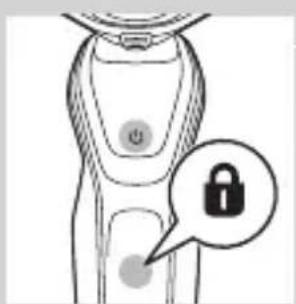
natural_image
Line drawing of a smart device with a lock icon and a button, no text or symbols presentByte av rakhuvuden
natural_image
Illustration of a hand pressing a button on a patient's knee joint (no text or symbols)natural_image
Diagram of a plug connected to a handheld device with two arrows indicating cable or connection (no text or symbols present)natural_image
Simple line drawing of a mechanical component with a downward arrow indicating force or direction (no text or symbols)natural_image
Illustration of a pair of boots with arrows indicating motion or change, no text or symbols presentnatural_image
Illustration of a person applying facial hair to their ear (no text or symbols present)natural_image
Line drawing of a person's face with hand near ear area, no text or symbols presentVåtrakning
natural_image
Illustration of a hand pressing a button on a device component (no text or symbols visible)
natural_image
Illustration of a person's head with a T-shaped logo overlay (no text or symbols on the figure)natural_image
Illustration of a hand holding a device with a warning symbol (no text or labels)
natural_image
Diagram showing a device emitting particles onto a surface, with an inset magnified view of the particle (no text or symbols present)
natural_image
Illustration of a medical or laboratory procedure showing a device emitting particles from a surface, with an inset magnified view of a graduation cap (no text or symbols present)
natural_image
Line drawing of a person using a hairpin to apply product (no text or symbols)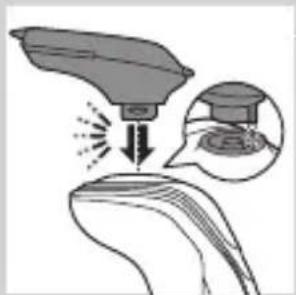
natural_image
Illustration of a medical procedure showing a device emitting particles into a patient's ear, with an inset showing a graduation cap and earlobe (no text or symbols)
natural_image
Line drawing of a hairbrush cutting down a button with a downward arrow (no text or symbols)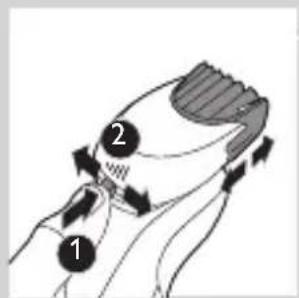
natural_image
Illustration of a man with a beard and a pipe, showing a hand holding a small object (no text or symbols present)natural_image
Illustration of two hands holding a tool with directional arrows indicating movement or force (no text or symbols present)natural_image
Line drawing of a person applying a hair accessory to their neck (no text or symbols)natural_image
Illustration of a dropper tip dispensing liquid into a container with a magnified inset showing the dropper's tip (no text or symbols present)natural_image
Illustration of a mechanical component with motion lines indicating movement (no text or symbols)natural_image
Illustration of a person applying facial care to their face, with no visible text or symbolsnatural_image
Simple line drawing of a paintbrush with a cross mark and spray effect (no text or symbols)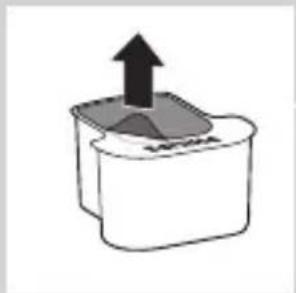
natural_image
Simple line drawing of a container with an upward arrow and a shaded interior (no text or symbols)
natural_image
Diagram of a blender with a black arrow pointing to its base, showing mechanical components (no text or symbols)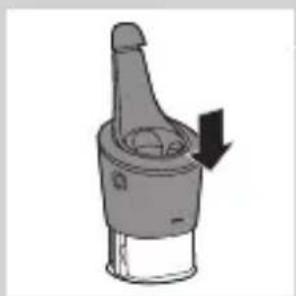
natural_image
Diagram of a mechanical component with a downward arrow indicating rotation (no text or symbols)
natural_image
Illustration of a dropper tip with a stopper and a prohibition symbol (no text or labels)natural_image
Illustration of a hand spraying water with a magnified inset showing a person's head and shoulder (no text or symbols)natural_image
Close-up of a mechanical component with a black arrow pointing downward (no text or symbols visible)natural_image
Illustration of a pair of boots with arrows indicating motion or change, no text or symbols presentnatural_image
Hand holding two circular buttons with a power symbol, next to a device (no text or labels visible)natural_image
Technical line drawing of a mechanical component with two circular indicators (no text or symbols)
natural_image
Diagram of a blender with a black arrow pointing to its lid (no text or symbols present)natural_image
Diagram of a mechanical component with a downward arrow indicating rotation (no text or symbols)natural_image
Illustration of a hand holding a small object with motion lines indicating movement (no text or symbols)natural_image
Illustration of a hand holding a decorative object with swirling patterns, no text or symbols presentnatural_image
Illustration of a food item being lifted by a fork, showing a bowl with noodles and a spoon (no text or symbols)natural_image
Anatomical illustration of a human organ with arrows indicating movement or force (no text or labels)natural_image
Illustration of a mushroom-shaped container with internal swirling patterns and an upward arrow (no text or symbols)natural_image
Diagram showing two mechanical components with arrows indicating direction, no text or symbols presentnatural_image
Illustration of a mechanical device with fluid flow and a gear-like component (no text or symbols)natural_image
Diagram of a mechanical or biological structure with a central circular component and directional arrow (no text or symbols)natural_image
Diagram showing a circular object falling into a triangular structure with concentric rings (no text or symbols)natural_image
Diagram showing two circular components with arrows and a checkmark, no readable text or symbols presentnatural_image
Illustration of two hands holding a cloud-like object with arrows indicating motion or transformation (no text or symbols)natural_image
Illustration of a shoe being lifted by a bag (no text or symbols)natural_image
Illustration of a hand holding a tool with motion lines, accompanied by a circular icon showing a mountain (no text or symbols)
natural_image
Illustration of two hands holding a tool with directional arrows indicating movement or force (no text or symbols present)
natural_image
Illustration of two kitchen utensils with liquid splashing, separated by a diagonal line (no text or symbols)
natural_image
Two cartoon fish jumping over a diagonal line, one falling and the other wading (no text or symbols)SVENSKA426

natural_image
Diagram of a mechanical component with a top cylindrical part and an upward arrow, no text or symbols present.natural_image
Two identical diagrams showing a tool with a spring-like object above and a base with a bulb below, connected by a diagonal line (no text or symbols)natural_image
Illustration of mechanical components and a gear mechanism (no text or symbols)natural_image
Diagram of a hairpin with a curved blade and three circular blades, showing mechanical components (no text or symbols)natural_image
Simple line drawing of a mechanical component with an arrow indicating downward motion (no text or symbols)
natural_image
Diagram of a mechanical component with a downward arrow indicating force or direction (no text or symbols)natural_image
Diagram of a mechanical component with a top cylindrical part and an upward arrow indicating motion (no text or symbols)natural_image
Anatomical illustration of a human digestive system with an arrow indicating a specific region (no text or labels present)natural_image
Diagram of a mechanical component with an upward arrow indicating motion or force (no text or symbols present)natural_image
Diagram showing a hand holding a circular object with arrows indicating motion or force (no text or symbols present)natural_image
Abstract diagram of a symmetrical structure with three circular elements and a top node, no text or symbols present.natural_image
Pure diagram of a mechanical or structural component with no visible text, numbers, or symbolsnatural_image
Diagram showing mechanical components with arrows indicating motion or force, no readable text or symbols presentnatural_image
Illustration of two hands holding a heart-shaped object with arrows indicating motion or transformation (no text or symbols)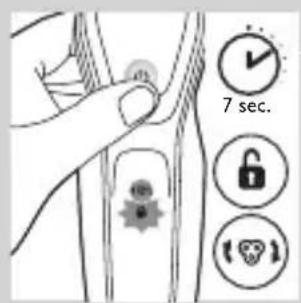
natural_image
Symbol of a trash bin crossed with a diagonal line and a horizontal bar below (no text or numbers present)natural_image
Simple line drawing of a trash bin with two crossed arms (no text or symbols)natural_image
Illustration showing a hand using a screwdriver to cut a cylindrical object, with another hand holding a small boat (no text or symbols present)natural_image
Illustration of two skis with directional arrows indicating motion (no text or symbols)natural_image
Two mechanical components with a diagonal line and an upward arrow, no visible text or symbolsnatural_image
Illustration of a robotic arm gripping a tool, with a hand holding the grip and an arrow indicating motion (no text or symbols)natural_image
No sign depicting a faucet without any text or symbols
natural_image
Simple line drawing of a showerhead spraying over water in a container (no text or symbols)Elektromanyetik alanlar (EMF)
natural_image
Diagram of a test tube with a cap and a magnified inset showing internal structure (no text or labels)
natural_image
Diagram of a test tube with a spiky tip and a magnified inset showing a labeled section (no text or symbols present)natural_image
Diagram of a laboratory test tube with a magnified inset showing internal structures (no text or labels)natural_image
Diagram of a mechanical component with a labeled section and circular annotation (no text or symbols)natural_image
Illustration of a syringe with a magnified inset showing internal components (no text or symbols)natural_image
Illustration of a dropper with a cap and a starburst symbol (no text or labels)natural_image
Diagram of a test tube with a magnified inset showing internal components (no text or labels)natural_image
Line drawing of a robot's torso with a lock icon and a speech bubble (no text or symbols)
natural_image
Line drawing of a smart device with a lock icon and a button, no text or symbols presentnatural_image
Illustration of a hand pressing a button on a knee joint (no text or symbols)natural_image
Diagram of a handheld device with cable and plug, showing connection to a wall socket (no text or symbols)natural_image
Diagram showing a hand pressing down on a surface with arrows indicating force direction, and an inset magnified view of a mechanical component (no text or symbols)natural_image
Simple line drawing of a mechanical component with a downward arrow indicating force or direction (no text or symbols)natural_image
Illustration of a pair of boots with arrows indicating motion or change, no text or symbols presentnatural_image
Illustration of a hand holding a circular object with an arrow pointing to it, no text or symbols presentnatural_image
Illustration of a person applying a hair product to their face (no text or symbols)natural_image
Illustration of a person's face with a hand touching the cheek area (no text or symbols)
natural_image
Line drawing of a person applying a product to their ear (no text or symbols)
natural_image
Illustration of a hand using a tool to lift a small object, showing motion lines (no text or symbols)
natural_image
Illustration of a person applying makeup to their face with a circular tool (no text or symbols)natural_image
Illustration of a hand pressing a button on a human leg, with no visible text or symbolsnatural_image
Illustration of a person's beard and toothbrush with a circular logo containing the letter 'T' (no text or symbols on the diagram itself)
natural_image
Illustration of a hand holding a small object with an upward arrow and a cross symbol, no text or labels present.natural_image
Diagram showing a funnel pouring liquid into a curved surface, with an inset magnified view of the process (no text or symbols)natural_image
Illustration of a robotic arm interacting with a curved surface, showing motion and magnified detail (no text or symbols)natural_image
Illustration of a hairdryer emitting powder from a showerhead (no text or symbols)
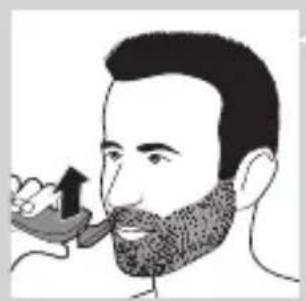
natural_image
Illustration of a man with a beard and a pipe, showing a hand holding a small object (no text or symbols present)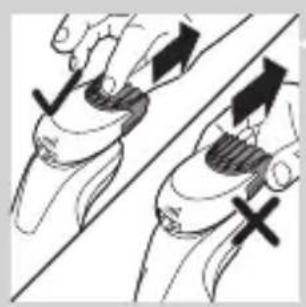
natural_image
Illustration of two hands performing a grip or grip movement with directional arrows (no text or symbols)natural_image
Line drawing of a person applying a hair product to their neck (no text or symbols)natural_image
Illustration of a dropper tip dispensing liquid into a container, with an inset showing a dropper tip (no text or symbols present)natural_image
Illustration of a mechanical component with fluid flow, no text or symbols presentnatural_image
Illustration of a person applying facial care to their face with a tool, no text or symbols presentnatural_image
Illustration showing a person applying facial care to another person's face, with a magnified inset of the device (no text or symbols present)natural_image
Simple line drawing of a paintbrush with a cross mark and spray effect (no text or symbols)natural_image
Simple line drawing of a container with an upward arrow and label 'SWEA' (no text or symbols on the diagram itself)natural_image
Diagram of a blender with a black arrow pointing to its base, showing mechanical components (no text or symbols)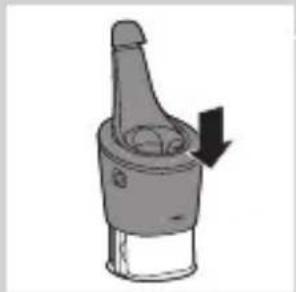
natural_image
Diagram of a mechanical component with a downward arrow indicating rotation (no text or symbols)natural_image
Illustration of a dropper tip with a stopper and a prohibition symbol (no text or labels)SmartClean sistemini kullanma
natural_image
Diagram showing fluid flow around a container with an inset magnified view of internal structures (no text or symbols)natural_image
Close-up of a mechanical component with a black arrow pointing downward (no text or symbols visible)natural_image
Illustration of a pair of boots with arrows indicating motion or change, no text or symbols presentnatural_image
Hand holding two circular buttons with power and spiral symbols, connected to a device (no text or labels visible)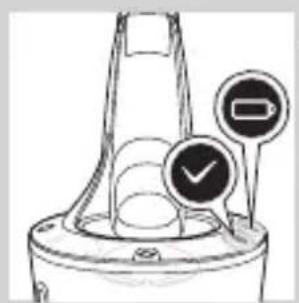
natural_image
Technical line drawing of a mechanical component with two circular indicators (no text or symbols)

natural_image
Diagram of a blender with a black arrow pointing to its lid, showing mechanical components (no text or symbols)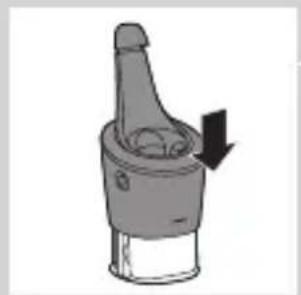
natural_image
Diagram of a mechanical component with a downward arrow indicating motion (no text or symbols)natural_image
Illustration of a hand holding a small object with motion lines indicating movement or force (no text or symbols)natural_image
Illustration of a biological structure with swirling patterns and an arrow indicating direction (no text or symbols)natural_image
Illustration of a food item being lifted from a tube into a bowl (no text or symbols)natural_image
Anatomical illustration of internal organs with arrows indicating movement or force (no text or labels)natural_image
Illustration of a mushroom-shaped object with an upward arrow, no text or symbols presentnatural_image
Diagram showing two mechanical components with directional arrows, no text or symbols presentnatural_image
Illustration of two mechanical devices with water spray and a gear-like component, no text or symbols presentnatural_image
Pure mechanical component diagram without any text, numbers, or symbolsnatural_image
Pure diagram of a mechanical or structural component with no visible text, numbers, or symbolsnatural_image
Diagram showing two circular components with arrows and a checkmark, no readable text or symbols presentnatural_image
Illustration of two hands exchanging a heart-shaped object, with arrows indicating motion (no text or symbols)natural_image
Illustration of a shoe being lifted by a fork (no text or symbols)natural_image
Illustration of a hand blowing bubbles with motion lines, accompanied by a magnified circular section showing a mountain silhouette (no text or symbols)
natural_image
Illustration of two hands holding a tool with directional arrows indicating movement or force (no text or symbols)
natural_image
Illustration of two hands pouring liquid from a container onto a surface, separated by a diagonal line (no text or symbols)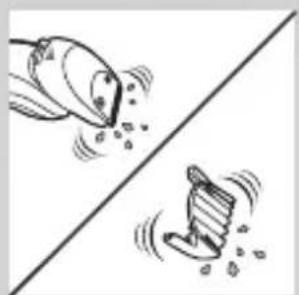
natural_image
Two cartoon-style fish jumping over a diagonal line, one falling and the other rising (no text or symbols)
natural_image
Diagram of a mechanical component with a top component and an arrow indicating upward motion (no text or symbols)
natural_image
Two hanging objects with ropes tied on a diagonal line, no text or symbols present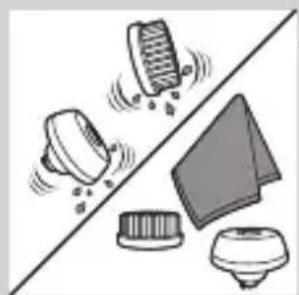
natural_image
Illustration of mechanical components and a device on a diagonal line (no text or symbols)natural_image
Diagram of a mechanical component with a top cylindrical part and an upward arrow, no text or symbols present.natural_image
Anatomical illustration of a human head and neck region with internal organs, showing no text or labels.natural_image
Illustration of a mushroom-shaped container with an upward arrow, no text or symbols presentnatural_image
Diagram showing a hand holding a circular object with arrows indicating direction, alongside a divided line and a battery-like component (no text or symbols present)natural_image
Pure diagram of a mechanical or structural component with no visible text, numbers, or symbolsnatural_image
Diagram showing two circular components with arrows indicating direction, one crossed over the other by a diagonal line (no text or symbols)natural_image
Illustration of two hands holding a cloud-like object with a downward arrow and a glowing effect (no text or symbols)natural_image
Symbol of a trash bin crossed with no text or labels, representing waste sorting or disposal (no text present)natural_image
Illustration of a hand holding a small object with a tool, alongside a close-up of the same object (no text or symbols present)natural_image
Illustration of two skis with directional arrows indicating movement or force (no text or symbols)natural_image
Diagram showing two car body cross-sections with arrows indicating movement or force, no text or symbols presentnatural_image
Illustration of a hand using a tool to lift a car, with an arrow indicating the process (no text or symbols present)- Always here to help you
- Introduction
- General description (Fig. 1)
- Important safety information
- Danger
- Warning
- Caution
- Electromagnetic fields (EMF)
- General
- The display
- Charging
- Battery charge indicator with 3 lights
- Battery charge indicator with 1 light
- ENGLISH8
- Battery fully charged
- Battery low
- Remaining battery capacity
- 'Unplug for use' reminder
- Cleaning reminder
- ENGLISH10
- Travel lock
- Activating the travel lock
- Deactivating the travel lock
- Replacing shaving heads
- Turbo setting (specific types only)
- Activating the Turbo setting
- Deactivating the Turbo setting
- Charging with the adapter
- Charging in the SmartClean system (specific types only)
- Using the shaver
- Switching the appliance on and off
- Shaving
- Skin adaptation period
- Wet shaving
- ENGLISH14
- Using the click-on attachments
- Removing or attaching the click-on attachments
- Using the trimmer attachment
- Using the beard styler attachment
- Using the beard styler attachment with comb
- Using the beard styler attachment without comb
- Using the cleansing brush attachment
- Cleaning and maintenance
- Cleaning the shaver in the SmartClean system (specific types only)
- Preparing the SmartClean system for use
- Using the SmartClean system
- Replacing the cartridge of the SmartClean System
- Cleaning the shaver under the tap
- Thorough cleaning method
- ENGLISH26
- Cleaning the click-on attachments
- Cleaning the trimmer attachment
- Cleaning the beard styler attachment
- Cleaning the cleansing brush attachment
- ENGLISH28
- Storage
- Replacement
- Replacing the cleansing brush head
- Replacing the shaving heads
- Replacement reminder
- ENGLISH30
- Ordering accessories
- Shaving heads
- Recycling
- Removing the rechargeable shaver battery
- Guarantee and support
- Guarantee restrictions
- Troubleshooting
- Problem Possible cause Solution
- Introduktion
- Forsigtig
- Elektromagnetiske felter (EMF)
- Lavt batteriniveau
- Udskiftning af skær
- Brug af shaveren
- Vådbarbering
- Αποθήκευση
- Varoitus
- Yleistä
- FRANÇAIS246
- De reisvergrendeling deactiveren
- De Turbo-instelling activeren
- Opbergen
- NEDERLANDS320
- Forsiktig
- Lav batterikapasitet
- Aktivere turboinnstillingen
- Tilpasningsperiode for huden
- Bruke SmartClean-systemet
- Oppbevaring
- Garanti og støtte
- Begrensninger i garantien
- Indicador de carga da bateria com 1 luz
- Bateria fraca
- Carregamento no sistema SmartClean (apenas modelos específicos)
- PORTUGUÊS374
- Utilizar o sistema SmartClean
- Limpeza da máquina de barbear à torneira
- PORTUGUÊS386
- PORTUGUÊS390
- Encomendar acessórios
- Försiktighet
- Byte av rakhuvuden
- Våtrakning
- SVENSKA426
- Elektromanyetik alanlar (EMF)
- SmartClean sistemini kullanma
Brand : PHILIPS
Model : 5000 series S5360
Category : Razor