
Universal Wireless Receiver - Bluetooth Receiver FOCAL - Free user manual and instructions
Find the device manual for free Universal Wireless Receiver FOCAL in PDF.


| Product type | Bluetooth Receiver |
| Brand | Focal |
| Model | Universal Wireless Receiver |
| Bluetooth Version | 5.0 |
| Supported audio codecs | SBC, AAC, aptX |
| Wireless range | 10 meters |
| Audio outputs | 3.5mm stereo jack, RCA |
| Power supply | USB 5V |
| Dimensions (L x W x H) | 10 x 6 x 2 cm |
| Weight | 50 g |
| Main functions | Wireless connection, audio transmission to speakers or Hi-Fi system |
| Care and cleaning | Clean with a soft, dry cloth. Disconnect before cleaning. |
| Safety | Do not expose to moisture, extreme temperatures, or direct sunlight. |
| Spare parts and repairability | Device not user-serviceable. Contact Focal customer service for any repairs. |
| General information | Use with powered speakers or an audio system. Works with all Bluetooth devices (smartphone, tablet, computer). |
Frequently Asked Questions - Universal Wireless Receiver FOCAL
User questions about Universal Wireless Receiver FOCAL
0 question about this device. Answer the ones you know or ask your own.
Ask a new question about this device
Download the instructions for your Bluetooth Receiver in PDF format for free! Find your manual Universal Wireless Receiver - FOCAL and take your electronic device back in hand. On this page are published all the documents necessary for the use of your device. Universal Wireless Receiver by FOCAL.
USER MANUAL Universal Wireless Receiver FOCAL
Universal Wireless Receiver


Universal Wireless Receiver
User manual/Manuel d'installation
F
Thank you for choosing Focal loudspeakers. We are pleased to share with you our philosophy: "the Spirit of Sound". These high-performance speakers feature the latest technical developments from Focal in terms of speaker design, whether it is for high fidelity or home theater systems. In order to enjoy the maximum of their performance, we advise you to read this user's manual and to keep it carefully so that you can consult it later.
ES
Universal Wireless Receiver
User manual
English
Installation
![graph TD A["Power"] --> B["FOCAL"] B --> C["RCA"] C --> D["Malogine Inputs"] D --> E["Power Bird"] B --> F["XS Book"]](/content/2026/06/1283947/images/daaa5250e57f1ff1146c6ccc2dbca230f9bd80dc91c9511e8259412ad90ad9d9.jpg)
Info : If you use Powerbird in horizontal position you can directly plug the aptX receiver without using the RCA cable.
Universal Wireless Receiver
User manual
Bluetooth Association
- The receiver must be free : the LED is blinking.
- Go on your device bluetooth association menu
- Select the "Focal Wireless Receiver"
- When the association is done, the LED do not blink anymore, you hear two bips
- Push play in your music player to listen to your music.
Info: To free up the receiver : disable the bluetooth association between your receiver and the device already associated. After disabling, you hear two bips, the LED should be blinking.
Use instructions
Once your bluetooth compliant device is associated, you will automatically be re-connected to your receiver when your device will be within the range. You can play your music and sound from any software player.
If, after pushing play button in your software player, your music is not played. Be sure your device is associated with the receiver by checking your device bluetooth menu. Repeat association process if needed.
Universal Wireless Receiver
User manual
Wireless Receiver states

The LED is not lighting : the receiver is off. Plug the powercord to use the receiver.

The LED is blinking : the receiver is powered, no source is associated, you can associate a new device.
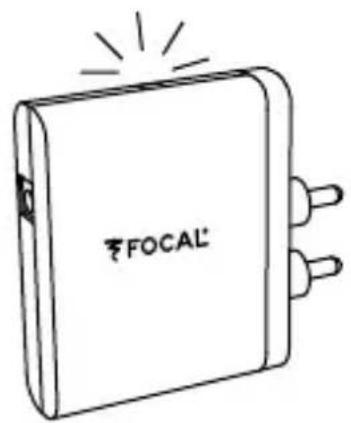
The LED is continuously light : the receiver is powered, one Device is already associated. You need to disassociate this source to associate a new one.
General Characteristics
Range : 10 m (line of sight)
Audio Characteristics
• Sampling Rate 44.1 kHz
- Resolution 16 bits
AptX Codec Characteristics
- Lossless compression type : Adaptive Differential Pulse Code Modulation
- Compression ratio : 4:1
• Transfert Rate : 384 kbps Radio Characteristics
• Frequency Range : 2.4 Ghz ISM Band
• Power (sensitivity) 2.5 mW (4 dBm)

Model: Universal Wireless Receiver
FCC ID: OV3-WIRELESSGG
This device complies with Part 15 of the FCC Rules. Operation is subject to the following two conditions: (1) this device may not cause harmful interference, and (2) this device must accept any interference received, including interference that may cause undesired operation.
(1) the user that changes or modifications not expressly approved by the party responsible for compliance could void the user's authority to operate the equipment.
(2) this equipment has been tested and found to comply with the limits for a Class B digital device.
Conditions of guarantee
All Focal products are covered by guarantee drawn up by the official Focal distributor in your country. Your distributor can provide all details concerning the conditions of guarantee. Guarantee cover extends at least to that granted by the legal guarantee in force in the country where the original purchase invoice was issued.
Now it's possible to register on line: www.focal.com/warranty
Universal Wireless Receiver
Universal Wireless Receiver
Universal Wireless Receiver
Model: Universal Wireless Receiver
FCC ID: OV3-WIRELESSGG
Universal Wireless Receiver
Instrucciones
Español
Installation
![graph TD A["Power"] --> B["FOCAL"] B --> C["RCA"] C --> D["Power Bird"] B --> E["XS Book"] style B fill:#f9f,stroke:#333 style D fill:#ccf,stroke:#333](/content/2026/06/1283947/images/7798d9d94796704be264d7d705e9ac7f0d9a9cb7c6460652fb26542c77d94568.jpg)
Universal Wireless Receiver
Instrucciones
Universal Wireless Receiver
Instrucciones
Model: Universal Wireless Receiver
FCC ID: OV3-WIRELESSGG
Universal Wireless Receiver
Manuale di utilizzo
Italiano
Installazione
![graph TD A["Power"] --> B["FOCAL"] B --> C["RCA"] C --> D["Power Bird"] D --> E["XS Book"] B --> F["LED"]](/content/2026/06/1283947/images/69cfba05b2b977bd3f26b68b3680e58f5639f99f65210f51eebdf8422b0166af.jpg)
Universal Wireless Receiver
Manuale di utilizzo
Universal Wireless Receiver
Manuale di utilizzo
Model: Universal Wireless Receiver
FCC ID: OV3-WIRELESSGG
Universal-Funk-Receiver
Bedienungsanleitung
Deutsch
Installation
![graph TD A["Power Outlet"] --> B["LED"] B --> C["CINCH"] C --> D["Power Bird"] D --> E["XS Book"]](/content/2026/06/1283947/images/66797aae723c1c8ff2b9f2f8b73d55add02050447d9bbf56cff2b48b68a80690.jpg)
Universal-Funk-Receiver
Bedienungsanleitung
Universal-Funk-Receiver
Bedienungsanleitung
Universal-Funk-Receiver
Model: Universal Wireless Receiver
FCC ID: OV3-WIRELESSGG
Model: Universal Wireless Receiver
FCC ID: OV3-WIRELESSGG
www.focal.com
© 2012 Focal-JMlab all rights reserved. Made in China.
Focal is a trademark of Focal-JMlab.
SCEB-121114/3 - codo1352
Brand : FOCAL
Model : Universal Wireless Receiver
Category : Bluetooth Receiver