
POW162X - Router PowerPlus - Free user manual and instructions
Find the device manual for free POW162X PowerPlus in PDF.


| Product Type | Router |
| Brand | PowerPlus |
| Model | POW162X |
| Dimensions (approx) | 200 x 150 x 30 mm |
| Weight (approx) | 0.5 kg |
| Power Supply | 12V DC, 1A |
| Wireless Standards | IEEE 802.11 b/g/n |
| Frequency Band | 2.4 GHz |
| Maximum Data Rate | Up to 300 Mbps |
| Ethernet Ports | 4 x 10/100 LAN, 1 x 10/100 WAN |
| Antennas | 2 x external |
| Security | WPA2, WEP, SPI Firewall |
| Mounting | Desktop |
| LED Indicators | Power, WAN, LAN |
| Buttons | Reset, WPS |
| Operating Temperature | 0°C to 40°C |
| Cleaning | Use dry cloth |
| Spare Parts Availability | Not available |
| Reparability | Professional repair only |
Frequently Asked Questions - POW162X PowerPlus
User questions about POW162X PowerPlus
0 question about this device. Answer the ones you know or ask your own.
Ask a new question about this device
Download the instructions for your Router in PDF format for free! Find your manual POW162X - PowerPlus and take your electronic device back in hand. On this page are published all the documents necessary for the use of your device. POW162X by PowerPlus.
USER MANUAL POW162X PowerPlus
1 APPLICATION ....2
2 DESCRIPTION (FIG. A)....2
3 PACKAGE CONTENT LIST 2
4 SYMBOLS....3
5 GENERAL POWER TOOL SAFETY WARNINGS....3
5.1 Working area....3
5.2 Electrical safety....3
5.3 Personal safety 4
5.4 Power tool use and care....4
5.5 Service....5
6 ASSEMBLING THE ACCESSORIES....5
6.1 Attaching and Removing Router Bits (fig. 1)....5
6.2 Assembling and Installing the Profiling Bar (fig. 2)....5
6.3 Assemble the Guide Bushing (fig. 3)....5
6.4 Attaching the Adapter for Dust Collection (fig. 4)....5
7 OPERATION ....5
8 DEPTH CONTROL....6
8.1 Using the graded scale: (Fig. 5)....6
8.2 Using the depth regulator revolver:....6
9 STARTING AND STOPPING (FIG. A)......6
10 MAINTENANCE....6
10.1 Cleaning....6
10.2 Lubricating....6
10.3 Defect....6
11 TECHNICAL DATA....7
12 NOISE....7
13 WARRANTY....7
14 ENVIRONMENT 8
15 DECLARATION OF CONFORMITY....9
1 APPLICATION
The router is suited for routing work to wood and wood-like materials as well as plastics. It is not designed for commercial use.

WARNING! Read this manual and general safety instructions carefully before using the appliance, for your own safety. Your power tool should only be passed on together with these instructions.
2 DESCRIPTION (FIG. A)
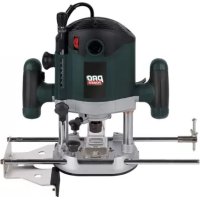
- on/off switch
- handle
- router base
- adjustable clamp for profiling bar
- fitting for profiling bar
- collet nut
-
spindle lock
-
revolver depth stop
- adjustable clamp depth stop
- depth stop
- clamp handle
- calibration routing depth
- adjustment wheel electronic speed regulation
3 PACKAGE CONTENT LIST
■ Remove all packing materials
- Remove remaining packaging and transit supports (if existing)
- Check the completeness of the packing content
- Check the appliance, the power cord, the power plug and all accessories for transportation damages.
- Keep the packaging materials as far as possible till the end of the warranty period. Dispose it into your local waste disposal system afterwards.

WARNING Packing materials are no toys! Children must not play with plastic bags! Danger of suffocation!
1 router
12 router bit
1 profiling bar
1 guide bushing
2 screws
2 nuts
1 adapter for dust collection
1 wrench
1 instruction manual

When parts are missing or damaged, please contact your dealer.
4 SYMBOLS
The following symbols are used in this manual and/or on the machine:
 | In accordance with essential applicable safety standards of European directives |
 | Double insulated |
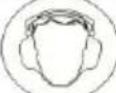 | Wear ear protection |
 | Wear eye protection |
| KKDZ] | Read manual before usage |
 | Denotes risk of personal injury or damage to the tool. |
 | Wear a mask In dusty conditions |
5 GENERAL POWER TOOL SAFETY WARNINGS
Read all safety warnings and instructions. Failure to heed warnings and follow instructions may result in electric shock, fire and/or serious injury. Keep safety warnings and instructions for future reference. The term "power tool" in the safety warnings refers to your mains-operated (corded) power tool or battery-operated (cordless) power tool.
5.1 Working area
- Keep working area clean and well lit. Untidy and dark areas can lead to accidents.
- Do not operate power tools in potentially explosive surroundings, for example, in the presence of inflammable liquids, gases or dust. Power tools create sparks which may ignite the dust or fumes.
- Keep children and bystanders at a distance when operating a power tool. Distractions can cause you to lose control of it.
5.2 Electrical safety

Always check that the power supply corresponds to the voltage on the rating plate.
- Power tool plugs must match the outlet. Never modify the plug in any way. Do not use adapter plugs with earthed power tools. Unmodified plugs and matching outlets will reduce the risk of a lethal electric shock.
-
Avoid body contact with earthed surfaces such as pipes, radiators, kitchen ranges and refrigerators. There is an increased risk of a lethal electric shock if your body is earthed.
-
Do not expose power tools to rain or wet conditions. If water gets inside a power tool, it will increase the risk of a lethal electric shock.
- Do not damage the cord. Never use the cord for carrying, pulling or unplugging the power tool. Keep the cord away from heat, oil, sharp edges or moving parts. Damaged or entangled cords increase the risk of a lethal electric shock.
- When operating a power tool outdoors, use an extension cable suitable for outdoor use. Using a cord suitable for outdoor use reduces the risk of a lethal electric shock.
- If operating a power tool in a damp location is unavoidable, use a power supply protected by a residual current device (RCD). Using an RCD reduces the risk of a lethal electric shock.
5.3 Personal safety
- Stay alert, watch what you are doing and use common sense when operating a power tool. Do not use a power tool when you are tired or under the influence of drugs, alcohol or medication. A moment of inattention when operating a power tool may result in serious personal injury.
- Use safety equipment. Always wear eye protection. Using safety equipment such as a dust mask, non-skid safety shoes, a hard hat, or hearing protection whenever it is needed will reduce the risk of personal injury.
- Avoid accidental starts. Ensure the switch is in the off position before inserting the plug. Carrying power tools with your finger on the switch or plugging in power tools when the switch is in the on position makes accidents more likely.
- Remove any adjusting keys or spanners before turning on the power tool. A spanner or key left attached to a rotating part of the power tool may result in personal injury.
- Do not reach out too far. Keep your feet firmly on the ground at all times. This will enable you retain control over the power tool in unexpected situations.
- Dress properly. Do not wear loose clothing or jewellery. Keep your hair, clothing and gloves away from the power tool. Loose clothes, jewellery or long hair can become entangled in the moving parts.
- If there are devices for connecting dust extraction and collection facilities, please ensure that they are attached and used correctly. Using such devices can reduce dust-related hazards.
5.4 Power tool use and care
- Do not expect the power tool to do more than it can. Use the correct power tool for what you want to do. A power tool will achieve better results and be safer if used in the context for which it was designed.
- Do not use the power tool if the switch cannot turn it on and off. A power tool with a broken switch is dangerous and must be repaired.
- Disconnect the plug from the power source before making adjustments, changing accessories, or storing power tools. Such preventive safety measures reduce the risk of starting the power tool accidentally.
- Store power tools, when not in use, out of the reach of children and do not allow people who are not familiar with the power tool or these instructions to operate it. Power tools are potentially dangerous in the hands of untrained users.
- Maintenance. Check for misalignment or jammed moving parts, breakages or any other feature that might affect the operation of the power tool. If it is damaged, the power tool must be repaired. Many accidents are caused by using poorly maintained power tools.
- Keep cutting tools sharp and clean. Properly maintained cutting tools with sharp cutting edges are less likely to jam and are easier to control.
- Use the power tool, accessories and cutting tools, etc., in accordance with these instructions and in the manner intended for the particular type of power tool, taking into account the working conditions and the work which needs to be done. Using a power tool in ways for which it was not intended can lead to potentially hazardous situations.
5.5 Service
- Your power tool should be serviced by a qualified specialist using only standard spare parts. This will ensure that it meets the required safety standards.
6 ASSEMBLING THE ACCESSORIES

Always remove the plug from the socket before assembling.
6.1 Attaching and Removing Router Bits (fig. 1)
Use router bits with a shank diameter that is the same as the size of the collet. Only use router bits that are suitable for the maximum RPMs of the machine. The router diameter may not exceed the maximum diameter (see "Technical Specifications").
- Press the spindle lock (7) and turn the collet nut (6) until it drops into the lock. Keep the spindle lock pressed down for the duration of this procedure.
■ Using the wrench, loosen the collet nut. - Placer the shaft of the router bit into the opening of the collet.
- Turn the collet nut until the router bit is well tightened.
- Loosen the collet nut if you want to replace the router bit.

If replacing the bit during operations, wait until the machine has come to a complete halt and the router has cooled down.
6.2 Assembling and Installing the Profiling Bar (fig. 2)
The profiling bar is a useful resource for routing small work pieces.
■ Assemble the profiling bar. Using bolts (19), attach the profiling bar (18) to the frame (14).
■ Loosen the clamp screws (4) and slide the profiling bars into the fittings (5)
- Adjust the profiling bar to the desired guiding distance.
■ Tighten the clamp screws.
6.3 Assemble the Guide Bushing (fig. 3)
Guide bushing is a suitable resource for routing according to a pattern.
- Attach the guide bushing (15) using the screws (17) and nuts (20) on the router base (3).
6.4 Attaching the Adapter for Dust Collection (fig. 4)
■ Use the adapter to collect the dust generated.
- Attach the adapter for dust collection (16) using the screws (17) and nuts (20) on the router base (3).
- Attach the mouth of the dust collector on the exit of the adapter.
- In order to guarantee good visibility of the work piece, place the exit of the adapter behind the machine.
7 OPERATION
Always follow the safety instructions and adhere to current regulations.
Keep the machine in stopped position on the work piece when you switch the machine on or off. The router bit in the collet may damage the work piece.
- Clamp the work piece or somehow make sure that it cannot slide away from under the machine while in operation.
- Hold on to the machine firmly and move it across the work piece evenly. Do not force the machine.
- Only use router bits that have no visible wear and tear. Worn out router bits have a negative effect on the efficiency of the machine.
- After ending the work, always switch the machine off before removing the plug from the socket.
8 DEPTH CONTROL
2 adjustment options:
8.1 Using the graded scale: (Fig. 5)
■ Loosen the collet of the depth regulator (9).
- Remove the clamp handle (11) and push the machine downwards until it touches the work piece (11).
- Tighten the clamp handle again.
- Use the graded scale (12) to adjust to the desired depth (10).
- Tighten the collet.
8.2 Using the depth regulator revolver:
2 different depths can be quickly adjusted. This is done using the 3 adjustment screws that are on the depth regulator.
9 STARTING AND STOPPING (FIG. A)
- To start, press the on/off button (1). Adjust speed with the adjusting key (13).
- To stop, press the same button on "O".

Warning: plastic parts should be routed at low speeds! After use, put the machine away only after it has come to a complete halt. Do not store in a dusty place; the dust might enter and disrupt the mechanical parts.
10 MAINTENANCE
If you want to examine the machine, always remove the plug from the socket. The machine has been designed to function perfectly with a minimum of maintenance.
Keeping the machine dust-free and clean will increase its lifespan.
10.1 Cleaning
Regularly with a damp cloth, preferably after every use.
The ventilation plates must always be free of dust. A damp cloth and detergent can be used for stubborn dirt, but never ammonia, alcohol, gasoline or other caustic products because these will damage the plastic parts.
10.2 Lubricating
This machine does not need additional lubrication.
10.3 Defect
In case of defects resulting from wear and tear to a part, contact the store where you bought the machine. In the back, you will find a list with the reference numbers of the various parts.
11 TECHNICAL DATA
| Voltage | V | 230-240 |
| Frequency | Hz | 50 |
| Capacity | W | 1020 |
| RPMs (no load) | rpm | 11.500-34.000 |
| Routing depth | mm | 50 |
| Shaft diameter router | mm | 8 |
| Weight | kg | 3.8 |
12 NOISE
| Noise emission values measured according to relevant standard. (K=3) | |
| Acoustic pressure level LpA | 92 dB(A) |
| Acoustic power level LwA | 103 dB(A) |

ATTENTION! Wear hearing protection when sound pressure is over 85 dB(A).
aw (Vibration):
5.6 m/s²
K = 1.5 ~m / s^2
13 WARRANTY
- This product is warranted as provided by law for a 24-month period effective from the date of purchase by the first user.
- This warranty covers all material or production flaws excluding: batteries, chargers, defective parts subject to normal wear & tear such as bearings, brushes, cables, and plugs, or accessories such as drills, drill bits, saw blades, etc. ; damage or defects resulting from maltreatment, accidents or alterations; nor the cost of transportation.
- Damage and/or defects resulting from inappropriate use also do not fall under the warranty provisions.
■ We also disclaim all liability for any bodily injury resulting from inappropriate use of the tool. - Repairs may only be carried out by an authorised customer service centre for Powerplus tools.
- You can always obtain more information at the number 00 32 3 292 92 90.
- Any transportation costs shall always be borne by the customer, unless agreed otherwise in writing.
- At the same time, no claim can be made on the warranty if the damage of the device is the result of negligent maintenance or overload.
- Definitely excluded from the warranty is damage resulting from fluid permeation, excessive dust penetration, intentional damage (on purpose or by gross carelessness), inappropriate usage (use for purposes for which the device is not suitable), incompetent usage (e.g. not following the instructions given in the manual), inexpert assembly, lightning strike, erroneous net voltage. This list is not exhaustive.
- Acceptance of claims under warranty can never lead to the prolongation of the warranty period nor commencement of a new warranty period in case of a device replacement.
- Devices or parts which are replaced under the warranty therefore remain the property of Varo NV.
- We reserve the right to reject a claim whenever the purchase cannot be verified or when it is clear that the product has not been properly maintained. (Clean ventilation slots, carbon brushes serviced regularly, etc.).
- Your purchase receipt must be kept as proof of date of purchase.
- Your appliance must be returned undismantled to your dealer in an acceptably clean state, (in its original blow-moulded case if applicable to the unit), accompanied by proof of purchase.
14 ENVIRONMENT

Should your appliance need replacement after extended use, do not discard it with the household rubbish but dispose of it in an environmentally safe way. Waste produced by electrical machine items should not be handled like normal household rubbish. Please recycle where recycle facilities exist. Check with your Local Authority or retailer for recycling advice.
15 DECLARATION OF CONFORMITY

VARO N.V. – Joseph Van Instraat 9 – BE2500 Lier – Belgium, declares that,
Product Router
Trade mark PowerPlus
Model POW162X
is in conformity with the essential requirements and other relevant provisions of the applicable European Directives, based on the application of European harmonized standards. Any unauthorized modification of the apparatus voids this declaration.
European Directives (including, if applicable, their amendments up to the date of signature);
2011/65/EU
2004/108/EC
2006/42/EC
European harmonized standards (including, if applicable, their amendments up to the date of signature);
EN60745-1:2009
EN60745-2-17:2010
EN55014-1:2006
EN55014-2:1997
EN61000-3-2:2006
EN61000-3-3:2013
Keeper of the Technical Documentation : Philippe Vankerkhove, VARO – Vic. Van Rompuy N.V.
The undersigned acts on behalf of the company CEO,

Hugo Cuypers
Regulatory Affairs – Compliance Manager
26/11/14

- APPLICATION
- DESCRIPTION (FIG. A)
- PACKAGE CONTENT LIST
- SYMBOLS
- GENERAL POWER TOOL SAFETY WARNINGS
- Working area
- Electrical safety
- Personal safety
- Power tool use and care
- Service
- ASSEMBLING THE ACCESSORIES
- Always remove the plug from the socket before assembling.
- Attaching and Removing Router Bits (fig. 1)
- If replacing the bit during operations, wait until the machine has come to a complete halt and the router has cooled down.
- Assembling and Installing the Profiling Bar (fig. 2)
- Assemble the Guide Bushing (fig. 3)
- Attaching the Adapter for Dust Collection (fig. 4)
- OPERATION
- DEPTH CONTROL
- Using the graded scale: (Fig. 5)
- Using the depth regulator revolver:
- STARTING AND STOPPING (FIG. A)
- MAINTENANCE
- Cleaning
- Lubricating
- Defect
- TECHNICAL DATA
- NOISE
- ATTENTION! Wear hearing protection when sound pressure is over 85 dB(A).
- WARRANTY
- ENVIRONMENT
- DECLARATION OF CONFORMITY
Brand : PowerPlus
Model : POW162X
Category : Router