
AquaTouch AT756 - Razor PHILIPS - Free user manual and instructions
Find the device manual for free AquaTouch AT756 PHILIPS in PDF.


| Product Type | Electric Shaver |
| Brand | Philips |
| Model | AquaTouch AT756 |
| Dimensions (L x W x H) | 15 x 5 x 6 cm |
| Weight | 200 g |
| Power supply | Rechargeable Li-ion battery |
| Charging time | 1 hour |
| Battery life | 50 minutes |
| Usage | Dry or wet (AquaTouch) |
| Shaving heads | 3 rotary heads |
| Cleaning | Washable under water |
| Charge indicator | Yes |
| Head replacement indicator | Yes |
| Transport lock | Yes |
| Warranty | 2 years |
| Box contents | Shaver, cap, charger, cleaning brush, manual |
Frequently Asked Questions - AquaTouch AT756 PHILIPS
User questions about AquaTouch AT756 PHILIPS
0 question about this device. Answer the ones you know or ask your own.
Ask a new question about this device
Download the instructions for your Razor in PDF format for free! Find your manual AquaTouch AT756 - PHILIPS and take your electronic device back in hand. On this page are published all the documents necessary for the use of your device. AquaTouch AT756 by PHILIPS.
USER MANUAL AquaTouch AT756 PHILIPS
Always here to help you
Register your product and get support at
www.philips.com/welcome


natural_image
Close-up of a Philips Aquare electric shaver with three circular dials and water droplets on the side (no text or symbols visible)AT941
AT940
AT899
AT897
AT896
AT894
AT891
AT890
AT811
AT790
AT756
AT753
AT751
AT750
User manual
PHILIPS
natural_image
Simple line drawing of an open book with a grid on the left and a closed page on the right (no text or symbols)
ENGLISH 6
DANSK 20
DEUTSCH 34
ΕΛΛΗΝΙΚΑ 48
ESPAÑOL 63
SUOMI 77
FRANÇAIS 90
ITALIANO 104
NEDERLANDS 118
NORSK 132
PORTUGUÊS 146
SVENSKA 160
TÜRKÇE 174
Introduction
Congratulations on your purchase and welcome to Philips! To fully benefit from the support that Philips offers, register your product at www.philips.com/welcome.
Please read this user manual, as it contains information about the wonderful features of this shaver as well as some tips to make shaving easier and more enjoyable.
General description (Fig. 1)
1 Protection cap
2 Shaving unit
3 Shaving unit release button
4 Shaver on/off button (AT899/AT896/AT894/AT892/AT891/AT890/AT811/AT790/AT756/AT753/AT751/AT750 only)
5 Shaving head symbol
6 Charging light (AT899/AT896/AT894/AT892/AT891/AT890/AT811/AT790/AT756/AT753/AT751/AT750 only)
7 Charging stand (AT941/AT940 only)
8 Adapter
9 Cleaning brush
10 Storage pouch (AT941/AT940/AT897/AT894/AT892/AT891/AT890/AT811 only)
11 Battery symbol and shaving head symbol (AT941/AT940/AT897 only)
12 Shaver on/off button (AT941/AT940/AT897 only)
13 Trimmer release slide (AT941/AT940/AT897/AT896/AT894/AT892/AT891/AT890/AT811/AT790/AT756 only)
14 Trimmer (AT941/AT940/AT897/AT896/AT894/AT892/AT891/AT890/AT811/AT790/AT756 only)
Note: You can find the type number on the back of the shaver.
Important
Read this user manual carefully before you use the appliance and the charging stand (AT941/AT940 only). Save it for future reference.
Danger
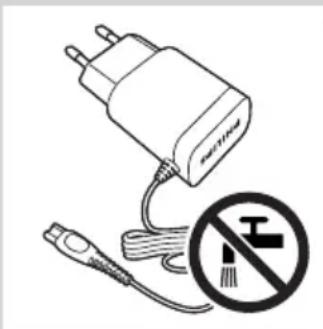
- Make sure the adapter does not get wet.
Warning
- The adapter contains a transformer. Do not cut off the adapter to replace it with another plug, as this causes a hazardous situation.
- This appliance is not intended for use by persons (including children) with reduced physical, sensory or mental capabilities, or lack of experience and knowledge, unless they have been given supervision or instruction concerning use of the appliance by a person responsible for their safety.
- Children should be supervised to ensure that they do not play with the appliance.
- Always unplug the shaver before you clean it under the tap.
natural_image
Electric plug connected to a cable with a no-smoking symbol (no text or labels)Caution
- Never use water hotter than 80irc C to rinse the shaver.
- Be careful with hot water. Always check if the water is not too hot, to prevent your hands from getting burnt.
- The shaver and the other accessories are not dishwasher-proof.
- Water may leak from the socket at the bottom of the shaver when you rinse it. This is normal and not dangerous because all electronics are enclosed in a sealed power unit inside the shaver.
- Do not use the shaver, adapter, charging stand or any other part if it is damaged, as this may cause injury. Always replace a damaged adapter or charging stand with one of the original type.
- Use, charge and store the appliance at a temperature between 10irc C and 35irc C.
- Always place and use the shaver on a surface that is fluid-resistant.
- Only use the adapter, charging stand and accessories supplied.
- Always put the protection cap on the shaver to protect the shaving heads when you are travelling.
- If the shaver is subjected to a major change in temperature, pressure or humidity, let it acclimatise for 30 minutes before you use it.
- Do not immerse the charging stand in water or any other liquid, nor rinse it under the tap.
Compliance with standards
- This Philips appliance complies with all applicable standards and regulations regarding electromagnetic fields (EMF).
General
- The appliance is equipped with an automatic voltage selector and is suitable for mains voltages ranging from 100 to 240 volts.
- The adapter transforms 100-240 volts to a safe low voltage of less than 24 volts.
Charging
Note: The shaver cannot be used directly from the mains.
When you charge the shaver for the first time or after a long period of disuse, let it charge until the charging light lights up continuously.
See the table below for the charging time of your shaver.
Charging time 1 hour 8 hours
AT941, AT940, AT897 AT899, AT896, AT790
AT894, AT892, AT891 AT756, AT753, AT751
AT890, AT811 AT750
The shaving time may be less than stated below in the table as a result of your shaving behaviour, your cleanings habits or your beard type.
Battery low
- AT941/AT940/AT897: When the battery is almost empty (when there are only 5 or fewer shaving minutes left), the orange battery symbol starts to flash. When you switch off the shaver, the orange battery symbol continues to flash for a few seconds.

natural_image
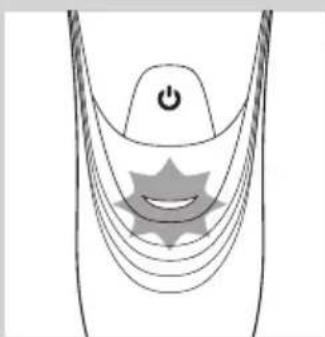
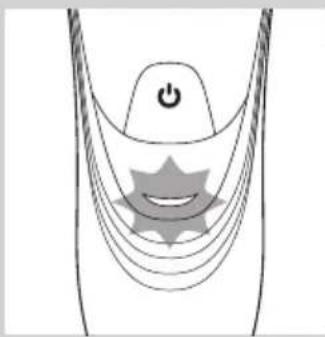
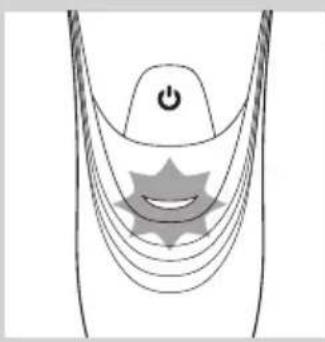
Diagram of a stylized smiley face with curved lines and a power button, no text or symbols present- AT899/AT896/AT894/AT892/AT891/AT890/AT811/AT790/AT756/AT753/AT751/AT750: When the battery is almost empty (when there are only 5 or fewer shaving minutes left), the charging light starts to flash orange. When you switch off the shaver, the charging light continues to flash orange for a few seconds.

Quick charging (AT941/AT940/AT897/AT896/AT894/AT892/AT891/AT890/AT811 only)
- AT941/AT940/AT897: When you start charging the empty battery, the battery symbol flashes orange and white.
Note: When the battery symbol flashes white and orange towards only white, you can have a quick shave of three minutes.
natural_image
Diagram of a medical or electronic device with curved lines and a central star-like symbol, no text or labels present.- AT896/AT894/AT892/AT891/AT890/AT811: When you start charging the empty battery, the charging light alternately flashes orange and green.
Note: When the charging light flashes orange and green towards only green, you can have a quick shave of three minutes.

Charging
- AT941/AT940/AT897: When the shaver is charging, the white battery symbol flashes.

natural_image
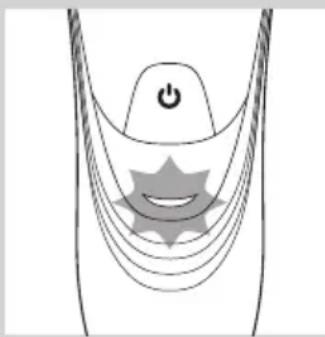
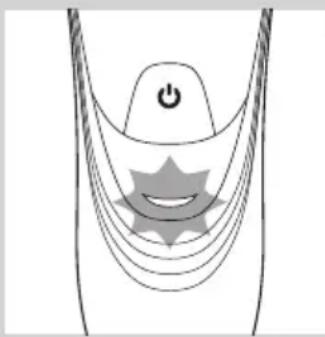
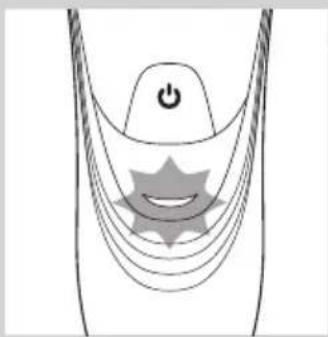
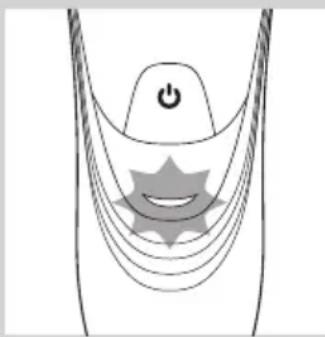
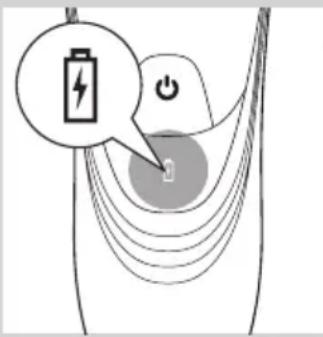
Diagram of a stylized human head with a power button and star-shaped elements, no text or symbols present.- AT899/AT896/AT894/AT892/AT891/AT890/AT811/AT790/AT756/AT753/AT751/AT750: When the shaver is charging, the charging light flashes green.

Battery fully charged
- AT941/AT940/AT897: When the battery is fully charged, the white battery symbol lights up continuously.
Note: After approx. 30 minutes, the battery symbol goes out to save energy.
natural_image
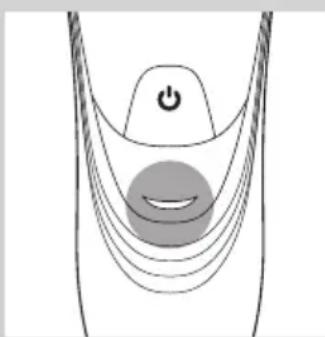
Diagram of a curved mechanical or electrical component with a power button and a circular component, no text or symbols present.- AT899/AT896/AT894/AT892/AT891/AT890/AT811/AT790/AT756/AT753/AT751/AT750:When the battery is fully charged, the charging light lights up green continuously.
Note: After approx. 30 minutes, the charging light goes out to save energy.
Charging
1 Put the small plug in the shaver.
2 Put the adapter in the wall socket.
The charging light shows the charging status of the shaver (see section ‘Charge indications’ in this chapter).
Charging in the charging stand (AT941/AT940 only)

natural_image
Illustration of a medical or laboratory device with a downward arrow pointing to a circular base (no text or symbols)1 Put the small plug in the charging stand.
2 Put the adapter in the wall socket.
3 Place the shaver in the charging stand.
The charging light shows the charging status of the shaver (see section ‘Charge indications’ in this chapter).
Using the shaver
Note: This shaver can be used in the bath or shower. It can therefore not be used directly from the mains for safety reasons.
Shaving tips and tricks
- This shaver is suitable for both wet and dry use. Use the shaver with shaving gel or foam for extra skin comfort, or use the shaver dry for extra convenience.
Note: We advise you to use the shaver with shaving gel or foam when you use it for a wet shave. Do not use thick shaving cream or shaving oil with this shaver.
- For optimal shaving results, make circular movements during use.
- The shaver is waterproof and can be used in the bath or shower.
- Your skin may need 2 or 3 weeks to get accustomed to the Philips shaving system.
Wet shaving
natural_image
Line drawing of a person applying facial massage or pressure to the ear (no text or symbols)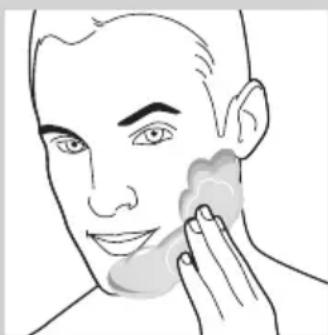
natural_image
Line drawing of a person applying face-to-face care to their cheek (no text or symbols)
natural_image
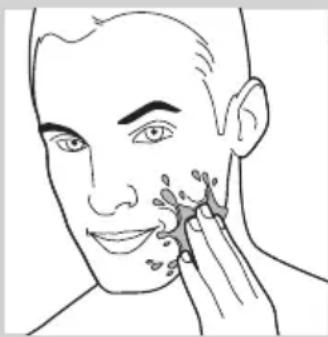
Illustration of a person using a device to interact with a cylindrical device, showing motion and assembly (no text or symbols)1 Apply some water to your skin.
2 Apply shaving foam or shaving gel to your skin.
3 Rinse the shaving unit under the tap to ensure that the shaving unit glides smoothly over your skin.
4 Press the on/off button once to switch on the shaver.
5 Move the shaving heads in circular movements over your skin.
Note: Rinse the shaver under the tap regularly to ensure that it continues to glide smoothly over your skin.
6 After shaving, press the on/off button once to switch off the shaver and dry your face.
7 Clean the shaver (see chapter ‘Cleaning and maintenance’).
Note: Make sure you rinse all foam or shaving gel off the shaver.
Dry shaving

natural_image
Illustration of a person using a pair of flashlights to clean their face (no text or symbols present)1 Press the on/off button once to switch on the shaver.
2 Move the shaving heads in circular movements over your skin.
3 After shaving, press the on/off button once to switch off the shaver.
4 Clean the shaver (see chapter 'Cleaning and maintenance').
Trimming (AT941/AT940/AT897/AT896/AT894/AT892/AT891/AT890/AT811/AT790/AT756 only)
natural_image
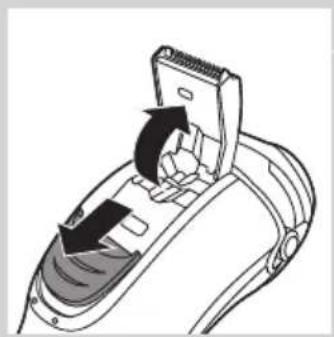
Diagram of a hairdryer with directional arrows indicating movement (no text or symbols)You can use the trimmer to groom your sideburns and moustache.
1 Push the trimmer slide downwards to open the trimmer.
2 Press the on/off button once to switch on the shaver.
▶You can now start trimming.
3 After trimming, press the on/off button once to switch off the shaver.

natural_image
Illustration of a hand holding a tool with directional arrows indicating movement or force (no text or symbols)4 Clean the trimmer (see chapter 'Cleaning and maintenance').

natural_image
Diagram of a hand using a tool to adjust or install a device component, with no visible text or symbols.5 Close the trimmer ('click').
Cleaning and maintenance
Never use compressed air, scouring pads, abrasive cleaning agents or aggressive liquids such as petrol or acetone to clean the shaver and the charging stand (AT941/AT940 only).
Always unplug the shaver before you clean it under the tap.
- Clean the shaver after every shave for optimal shaving performance.
- Regular cleaning guarantees better shaving performance.
- For the best cleaning results, we advise you to use the Philips Cleaning spray (HQ110).
- Be careful with hot water. Always check if the water is not too hot, to prevent your hands from getting burnt.
Note: Water may leak from the socket at the bottom of the shaver when you rinse it. This is normal and not dangerous because all electronics are enclosed in a sealed power unit inside the shaver.
Cleaning the shaving unit under the tap

natural_image
Illustration of a person holding a mechanical device with arrows indicating motion (no text or symbols)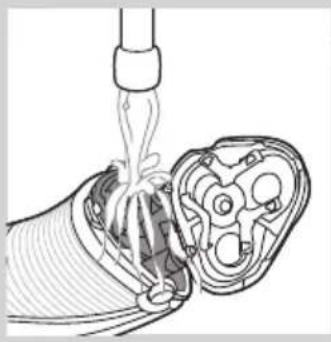
natural_image
Diagram of a cable being inserted into a multi-core socket (no text or labels)
natural_image
Illustration of a mechanical device pouring liquid into a foot (no text or symbols)1 Switch off the shaver.
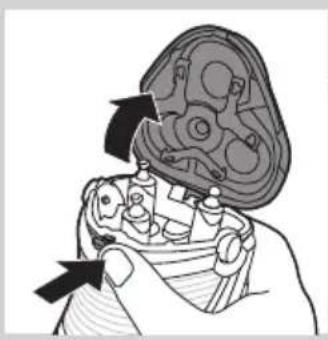
2 Press the release button to open the shaving unit.
3 Rinse the shaving unit and hair chamber under a hot tap for 30 seconds.
Be careful with hot water. Always check if the water is not too hot, to prevent your hands from getting burnt.
- Rinse the hair chamber and the inside of the shaving unit.
- Rinse the outside of the shaving unit.
4 Close the shaving unit and shake off excess water.
Be careful not to hit the shaving unit against anything while shaking off excess water.
Never dry the shaving unit and the hair chamber with a towel or tissue, as this may damage the shaving unit.
5 Open the shaving unit again and leave it open to let the shaver dry completely.
Cleaning the shaving unit with the cleaning brush
natural_image
Illustration of a hand holding a mechanical component with arrows indicating movement (no text or symbols)1 Switch off the shaver.
2 Press the release button to open the shaving unit.
3 Pull the shaving unit off the shaver.

natural_image
Diagram of a mechanical component with an arrow indicating direction, showing internal structure without any text or symbols.4 Turn the lock anticlockwise (A) and remove the retaining frame (B).

5 Remove and clean one shaving head at a time. Each shaving head consists of a cutter and a guard.

natural_image
Illustration of a hand holding a tray with three food items, each containing an upward arrow (no text or symbols)Note: Do not clean more than one cutter and guard at a time, since they are all matching sets. If you accidentally mix up the cutters and guards, it may take several weeks before optimal shaving performance is restored.
- Remove the cutter from the shaving guard and clean it with the brush.

natural_image
Illustration of a hand using a tool to clean a mechanical component, with no text or symbols present.- Clean the inside and outside of the shaving guard with the brush.

natural_image
Illustration of a hand placing a small bowl labeled '9' into a tray with food items (no text or symbols present)6 Put the shaving heads back into the shaving unit.

Make sure that the projections of the shaving heads fit exactly into the recesses.
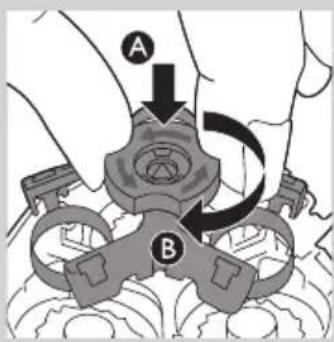
7 Put the retaining frame back into the shaving unit (A) and turn the lock clockwise (B).

natural_image
Diagram showing two views of a mechanical component with arrows indicating direction (no text or symbols)8 Insert the lug of the shaving unit into the slot in the top of the shaver. Then close the shaving unit.
Note: If the shaving unit does not close smoothly, check if you have inserted the shaving heads properly and if the retaining frame is locked.
Cleaning the trimmer with the cleaning brush (AT941/AT940/AT897/AT896/AT894/AT892/AT891/AT890/AT811/AT790/AT756 only)

natural_image
Diagram of a hairdryer with a slide and mechanical components, showing directional arrows (no text or symbols)Clean the trimmer every time you have used it.
1 Switch off the shaver.
2 Push the trimmer slide downwards to open the trimmer.
natural_image
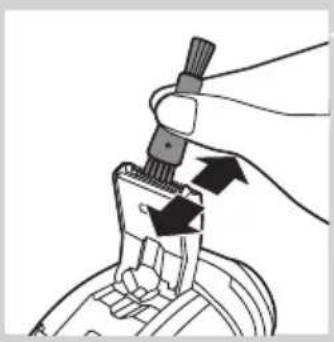
Illustration of a hand holding a tool with arrows indicating direction (no text or symbols)3 Clean the trimmer with the short-bristled side of the cleaning brush. Brush up and down along the trimmer teeth.
4 Close the trimmer ('click').
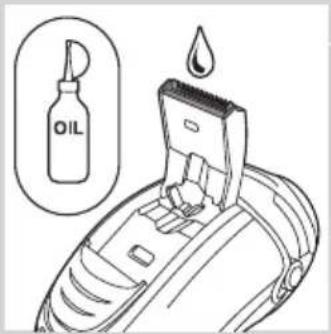
Tip: For optimal trimming performance, lubricate the trimmer teeth with a drop of sewing machine oil every six months.
Storage

natural_image
Diagram of a hand turning a three-pin electric shaver (no text or symbols)- Put the protection cap on the shaver to prevent damage. - AT941/AT940/AT897/AT894/AT892/AT891/AT890 only: Store the shaver in the pouch supplied.
Replacement
natural_image
Illustration of a hand holding a small electronic device with a magnified inset showing rotational icons (no text or symbols)For maximum shaving performance, we advise you to replace the shaving heads every year.
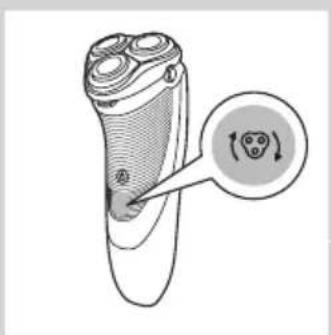
Replacement reminder
The shaving head symbol will light up to indicate that the shaving heads need to be replaced. Replace damaged shaving heads right away. Only replace the shaving heads with original HQ9 (AT941/AT940) or HQ8 (AT899/AT897/AT896/AT894/AT892/AT891/AT890/AT790/AT756/AT753/AT751/AT750) Philips Shaving Heads.
1 The shaving head symbol lights up orange continuously.
2 Switch off the shaver. Disconnect the shaver from the mains or remove it from the charging stand (AT940/AT921 only).
natural_image
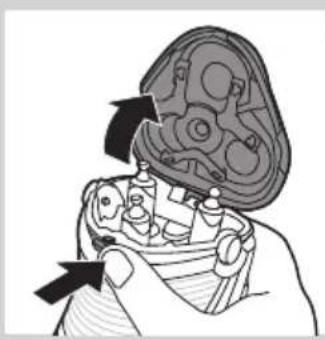
Illustration of a hand holding a mechanical component with arrows indicating movement (no text or symbols)3 Press the release button to open the shaving unit.
4 Pull the shaving unit off the shaver.

5 Turn the lock anticlockwise (A) and remove the retaining frame (B).
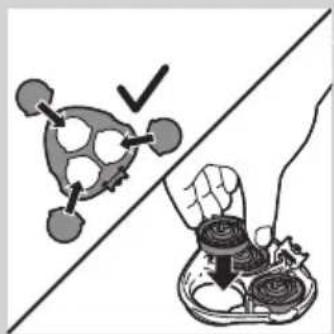
6 Remove the shaving heads and place new ones in the shaving unit.
natural_image
Illustration showing a hand holding a bowl of food next to a stylized vegetable or tomato, with a checkmark indicating a detail (no text or symbols present)Make sure that the projections of the shaving heads fit exactly into the recesses.

7 Put the retaining frame back into the shaving unit (A) and turn the lock clockwise (B).

natural_image
Medical illustration showing two views of a surgical instrument with arrows indicating movement or force (no text or symbols present)8 Insert the lug of the shaving unit into the slot in the top of the shaver. Then close the shaving unit.
Note: If the shaving unit does not close smoothly, check if you have inserted the shaving heads properly and if the retaining frame is locked.

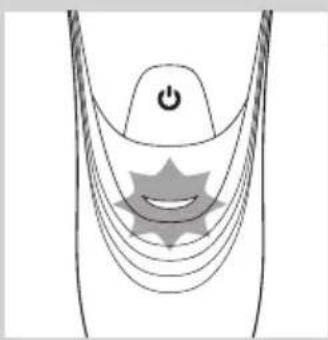
9 Press and hold the on/off button for 5 seconds to reset the replacement reminder on the shaver. The orange light will go out.
Ordering accessories

To retain the top performance of your shaver, make sure you clean it regularly and replace its shaving heads at the recommended time.
Shaving heads
- We advise you to replace your shaving heads every two years. Always replace with HQ9 (AT941/AT940) or HQ8(AT899/AT897/AT896/AT894/AT892/AT891/AT890/AT790/AT756/AT753/AT751/AT750) Philips Shaving Heads.
Cleaning
- Use Cleaning spray (HQ110) to clean the shaving heads thoroughly.
Environment

natural_image
Symbol of a trash bin with crossed lines indicating no waste or discharge, and a solid black rectangle below (no text or labels)- Do not throw away the appliance with the normal household waste at the end of their life, but hand them in at an official collection point for recycling. By doing this, you help to preserve the environment.

natural_image
Symbol of a trash bin crossed with no text or numbers, representing waste sorting or restriction (no text present)- The built-in rechargeable shaver battery contains substances that may pollute the environment. Always remove the battery before you discard or hand in the shaver at an official collection point. Dispose of the battery at an official collection point for batteries. If you have trouble removing the battery, you can also take the appliance to a Philips service centre. The staff of this centre will remove the battery for you and will dispose of it in an environmentally safe way.
Removing the rechargeable shaver battery
Only remove the rechargeable battery when you discard the shaver. Make sure the rechargeable battery is completely empty when you remove it.
1 Disconnect the shaver from the mains.
2 Let the shaver operate until it stops.
3 Undo the screws in the back of the shaver and in the hair chamber.
4 Remove the front panel and the back panel.
5 Bend the 6 hooks aside and take out the power unit.
Be careful, the hooks are sharp.
6 Remove the battery.
Be careful, the battery strips are sharp.
Do not connect the shaver to the mains again after you have removed the rechargeable battery.
Guarantee and support
If you need information or support, please visit www.philips.com/support or read the separate worldwide guarantee leaflet.
Guarantee restrictions
The shaving heads (cutters and guards) are not covered by the terms of the international guarantee because they are subject to wear.
Troubleshooting
This chapter summarises the most common problems you could encounter with the appliance. If you are unable to solve the problem with the information below, visit www.philips.com/support for a list of frequently asked questions or contact the Consumer Care Centre in your country.
Problem Possible cause Solution
| The shaver does not shave as well as it used to. | The shaving heads are damaged or worn. | Replace the shaving heads (see chapter ‘Replacement’). |
| Foam or gel residues clog up the shaving heads. | Rinse the shaving unit under a hot tap (see chapter ‘Cleaning and maintenance’). | |
| Long hairs obstruct the shaving heads. | Clean the shaving heads one by one (see chapter ‘Cleaning and maintenance’). | |
| You have not inserted the shaving heads properly. | Make sure that the projections of the shaving heads fit exactly into the recesses (see chapter ‘Cleaning and maintenance’). | |
| The shaver does not work when I press the on/off button. | The rechargeable battery is empty. | Recharge the battery (see chapter ‘Charging’). |
| The temperature of the shaver is too high. In this case, the shaver does not work. | As soon as the temperature of the shaver has dropped sufficiently, you can switch on the shaver again. | |
| The shaver does not work, although it is connected to the mains. | The shaver is not designed to be used directly from the mains. | Recharge the battery (see chapter ‘Charging’) and disconnect it from the mains. |
Introduktion
natural_image
Electric plug connected to a cable with a no-smoking symbol (no text or labels)
Forsigtig

natural_image
Diagram of a medical or electrical device with curved lines and a central star-like symbol, no text or labels present.
natural_image
Diagram of a stylized human head with curved lines and a central star-like shape, no text or symbols present.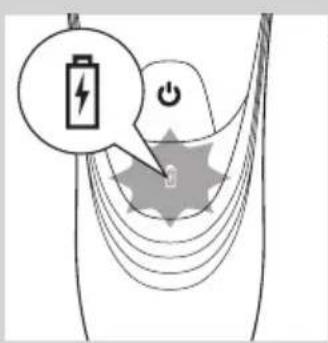
natural_image
Diagram of a stylized human head with curved lines and a star-shaped symbol, no text or labels present- AT899/AT896/AT894/AT892/AT891/AT890/AT811/AT790/AT756/AT753/AT751/AT750: Når shaveren oplades, blinker opladeindikatoren grønt.

natural_image
Diagram of a curved mechanical or electrical component with a power button and a circular component, no text or symbols present.- AT899/AT896/AT894/AT892/AT891/AT890/AT811/AT790/AT756/AT753/AT751/AT750: Når batteriet er fuldt opladet, lyser opladeindikatoren konstant grønt.
natural_image
Medical device with a black arrow pointing to a circular base labeled 'NeuR' (no text or symbols on the device itself)natural_image
Line drawing of a person applying facial massage to the ear (no text or symbols)
natural_image
Line drawing of a person applying product to their face with a sponge (no text or symbols)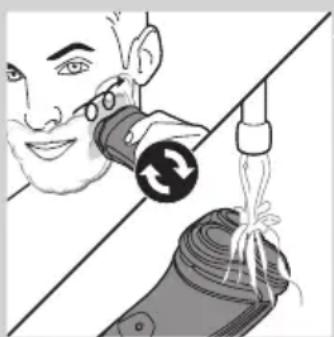
natural_image
Illustration of a person using a device to interact with a plant, showing a circular arrow and leafy root system (no text or symbols)1 Påfør lidt vand på din hud.
natural_image
Illustration of a person brushing teeth with a pair of flashlights (no text or symbols)natural_image
Diagram of a hairdryer with a brush and handle, showing internal components (no text or symbols)natural_image
Illustration of a hand using a tool to adjust or install a mechanical component (no text or symbols visible)natural_image
Diagram of a device being inserted into a component, showing tool and internal structure (no text or symbols)natural_image
Illustration of a hand holding a mechanical component with arrows indicating movement (no text or symbols)
natural_image
Diagram of a medical procedure showing a catheter inserted into a device with internal tubing (no text or labels)
natural_image
Illustration of a mechanical device emitting fluid from a nozzle (no text or symbols)natural_image
Illustration of a hand holding a mechanical component with arrows indicating movement (no text or symbols)1 Sluk for shaveren.
natural_image
Diagram of a mechanical component with an arrow indicating direction, showing internal structure (no text or symbols)natural_image
Illustration of a hand holding a tray with three small food items and upward arrows indicating growth (no text or symbols)natural_image
Illustration of a mechanical assembly with two views: top shows a gear-like component, bottom shows three bowls (no text or symbols)natural_image
Illustration of a hand holding a small bowl with a downward arrow, next to a circular object (no text or symbols)natural_image
Diagram showing two views of a biological structure with arrows indicating movement or transformation (no text or symbols present)natural_image
Diagram of a hairdryer with directional arrows indicating movement (no text or symbols)natural_image
Illustration of a hand holding a tool with arrows indicating motion or force (no text or symbols)natural_image
Diagram of a hand turning a leaf into a three-pin device (no text or symbols)natural_image
Diagram of a hairbrush with a circular icon highlighting the teeth (no text or symbols present)1 Shaverhovedsymbolet lyser konstant orange.
natural_image
Illustration of a hand holding a mechanical component with arrows indicating movement (no text or symbols)natural_image
Illustration of a hand holding a tray with food items, separated by a diagonal line (no text or symbols)natural_image
Medical illustration showing two views of a surgical instrument with arrows indicating movement or force (no text or symbols present)natural_image
Symbol of a waste sorting machine crossed over a trash bin, with no text or labels present.natural_image
Symbol of a trash bin crossed out by a diagonal line, representing no waste or elimination (no text or labels)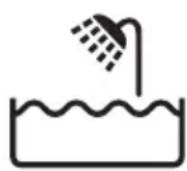
Achtung
Akku fast leer
natural_image
Diagram of a stylized human head with a power button and star-shaped graphic overlay (no text or symbols)natural_image
Diagram of a stylized human head with a power button and star-shaped graphic overlay (no text or symbols)Laden
natural_image
Diagram of a medical or electrical device with curved lines and a central power button, no text or symbols presentnatural_image
Diagram of a curved mechanical component with a power button and a circular feature, no text or symbols present.natural_image
Illustration of a medical or laboratory device with a downward arrow pointing to a spherical base (no text or symbols)natural_image
Line drawing of a person applying facial massage or pressure to the ear (no text or symbols)natural_image
Line drawing of a person applying a product to their face, no text or symbols presentnatural_image
Illustration of a person using a medical device to interact with a rolled-up device (no text or symbols visible)natural_image
Illustration of a person using a handheld device to clean another (no text or symbols present)natural_image
Diagram of a hairdryer with a brush and lever mechanism (no text or symbols)natural_image
Illustration of a hand using a tool to adjust or install a component, with arrows indicating motion (no text or symbols present)
natural_image
Diagram of a medical device being inserted into a device, showing a black arrow indicating the insertion point (no text or symbols present)natural_image
Illustration of a hand holding a mechanical component with arrows indicating direction (no text or symbols)natural_image
Diagram of a medical procedure showing fluid flow from a tube into a device (no text or labels)natural_image
Illustration of a medical procedure showing fluid flowing from a bottle onto a patient's foot (no text or symbols present)natural_image
Illustration of a hand holding a mechanical component with arrows indicating motion (no text or symbols)natural_image
Diagram of a mechanical component with an arrow indicating direction, showing internal structure (no text or symbols)natural_image
Illustration of a hand holding a bowl with three small bowls and upward arrows, no text or symbols present.natural_image
Illustration of a mechanical assembly with two views: top shows a gear-like component, bottom shows three circular components (no text or symbols)natural_image
Illustration of a hand holding a small bowl with a downward arrow, next to a circular object (no text or symbols)natural_image
Diagram showing two views of a mechanical component with arrows indicating direction (no text or symbols)natural_image
Diagram of a hairdryer with black arrows indicating direction (no text or symbols)natural_image
Illustration of a hand holding a tool with arrows indicating motion or force (no text or symbols)natural_image
Diagram of a hand turning a three-pin electric shaver (no text or symbols present)natural_image
Diagram of a plush or brush with a circular arrow and circular icon, no text or symbols presentnatural_image
Illustration of a hand holding a mechanical component with arrows indicating movement (no text or symbols)natural_image
Illustration showing a hand holding a tray with food items, separated by a diagonal line (no text or symbols)natural_image
Medical illustration showing two views of a surgical implant or implant device with arrows indicating direction (no text or labels)natural_image
Symbol of a trash bin crossed with a diagonal line, representing waste sorting or disposal (no text or labels)
natural_image
Diagram of a stylized human head with a power button and star-shaped graphic overlay (no text or symbols)natural_image
Diagram of a medical or electrical device with curved lines and a central power button (no text or symbols)Φόρτιση
natural_image
Diagram of a medical or electrical device with curved lines and a central power button (no text or symbols)natural_image
Diagram of a curved mechanical or electrical component with a power button and a circular base (no text or symbols)natural_image
Close-up of a medical or electronic device with a black arrow pointing to a circular component (no visible text or symbols)natural_image
Line drawing of a person applying facial massage or pressure to the ear (no text or symbols)natural_image
Line drawing of a person applying face-to-face care to their cheek (no text or symbols)natural_image
Illustration of a person using a device to interact with a plug, showing mechanical components and tubing (no text or symbols)natural_image
Illustration of a person using a handheld device to clean another (no text or symbols present)natural_image
Diagram of a hairdryer with black arrows indicating direction (no text or symbols)natural_image
Hand holding a tool with arrows indicating motion or force (no text or symbols)natural_image
Diagram of a hand using a tool to adjust or install a device component, with arrows indicating the process (no text or symbols present)natural_image
Illustration of a person assembling a mechanical component with arrows indicating assembly direction (no text or symbols)natural_image
Diagram of a cable being inserted into a multi-core socket (no text or symbols present)natural_image
Illustration of a mechanical device emitting a fluid or material stream from a nozzle (no text or symbols)
natural_image
Illustration of a hand holding a mechanical component with arrows indicating direction (no text or symbols)natural_image
Diagram of a mechanical component with an arrow indicating upward motion, no text or symbols presentnatural_image
Illustration of a hand holding a tray with three circular objects and upward arrows, no text or symbols present.natural_image
Illustration of a hand using a tool to clean or inspect a mechanical component, with no visible text or symbols.natural_image
Illustration of a hand holding a small mechanical component with a magnified inset showing the top part (no text or symbols)
natural_image
Diagram showing two views of a mechanical component with arrows indicating direction (no text or symbols)natural_image
Diagram of a hairdryer with black arrows indicating direction (no text or symbols)natural_image
Hand holding a tool interacting with a mechanical component (no text or symbols visible)natural_image
Diagram of a hand turning a three-pin electric shaver (no text or symbols)natural_image
Illustration of a hand holding a small electronic device with a magnified inset showing rotational arrows (no text or symbols)natural_image
Illustration of a hand holding a mechanical component with arrows indicating movement (no text or symbols)natural_image
Illustration showing a hand pressing down on food items with a checkmark and arrow (no text or symbols)natural_image
Diagram showing two views of a mechanical component with arrows indicating direction (no text or symbols)natural_image
Symbol of a waste bin with crossed lines indicating no waste, and a solid black rectangle below (no text or labels)
Precaución
Batería baja
natural_image
Diagram of a stylized human head with a power button and star-shaped elements, no text or symbols present.Carga rápida (solo modelos AT941/AT940/AT897/AT896/AT894/AT892/AT891/AT890/AT811)
natural_image
Diagram of a medical or electrical device with curved lines and a power button, no text or symbols presentCarga
natural_image
Diagram of a stylized ear with a power button and star-shaped graphic overlay (no text or symbols)natural_image
Diagram of a medical or electrical device with curved lines and a central circular component, no text or symbols present.natural_image
Close-up of a handheld device with a black arrow pointing to a circular base labeled 'FHLA2' (no text or symbols on the device itself)natural_image
Line drawing of a person applying facial massage to the ear (no text or symbols)1 Humedézcase la piel.

natural_image
Line drawing of a person applying facial massage to the ear (no text or symbols)
natural_image
Illustration of a person using a medical device to interact with a bandage, showing motion and cord placement (no text or symbols)natural_image
Illustration of a person using a handheld device to clean another's face (no text or symbols present)natural_image
Diagram of a hairdryer with directional arrows indicating movement or force (no text or symbols)natural_image
Illustration of a hand using a tool to adjust or install a mechanical component (no text or symbols visible)natural_image
Diagram of a hand using a tool to adjust or install a component, with arrows indicating the process (no text or symbols present)natural_image
Illustration of a person holding a device with arrows indicating movement or force (no text or symbols)natural_image
Diagram of a medical procedure showing fluid flow from a pipette into a cross-sectional view (no text or labels)natural_image
Illustration of a medical procedure showing fluid flow from a bottle onto a patient's foot (no text or symbols)natural_image
Diagram of a mechanical assembly with arrows indicating direction (no text or symbols)natural_image
Diagram of a mechanical component with an arrow indicating upward motion (no text or symbols present)natural_image
Illustration of a hand holding a tray with three circular objects and upward arrows, no text or symbols present.natural_image
Illustration of three mechanical components: a gear, a bowl with a screw, and a tool applying force to them (no text or symbols)natural_image
Illustration of a hand holding a small bowl with coins, and a magnified inset showing the lid (no text or symbols)natural_image
Diagram showing two views of a mechanical component with arrows indicating motion, no text or symbols presentnatural_image
Diagram of a hairdryer with directional arrows indicating movement or force (no text or symbols)natural_image
Illustration of a hand using a tool to adjust or install a component, with arrows indicating motion (no text or symbols present)natural_image
Diagram of a hand holding a three-pin electric shaver with a top handle, showing the blade and base (no text or symbols)natural_image
Illustration of a hairbrush with a circular arrow indicating rotation (no text or symbols)natural_image
Illustration of a hand holding a mechanical component with arrows indicating direction (no text or symbols)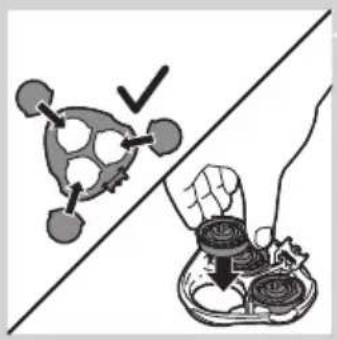
natural_image
Illustration showing a hand holding a tray with food items, separated by a diagonal line (no text or symbols)natural_image
Diagram showing two mechanical components with arrows indicating motion, no text or symbols presentnatural_image
Symbol of a waste bin with crossed lines indicating no waste, and a solid black rectangle below (no text or labels)natural_image
Electric plug connected to a cable with a no-smoking symbol (no text or labels)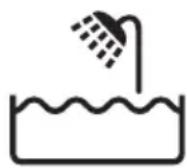
Varoitus
natural_image
Diagram of a medical or electrical device with a power button and star-shaped components (no text or symbols)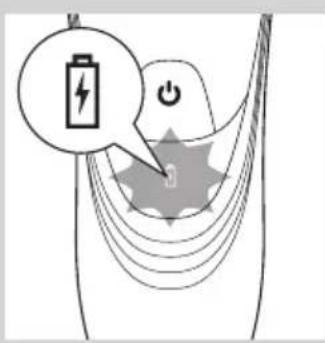
natural_image
Diagram of a medical or electrical device with a power button and star-shaped component (no text or symbols)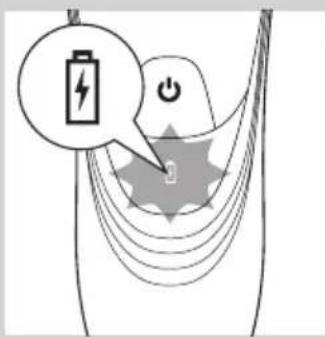
natural_image
Diagram of a stylized human head with a power button and star-shaped elements, no text or symbols present.Akku täynnä
natural_image
Diagram of a curved mechanical or electrical component with a power button and a circular button, no text or symbols present.natural_image
Close-up of a handheld electronic device with a black arrow pointing to a circular base (no text or symbols visible)natural_image
Line drawing of a person applying facial massage to the ear (no text or symbols)
natural_image
Line drawing of a person applying a product to their face, no text or symbols present
natural_image
Illustration of a person using a tool to lift a cylindrical object, with no visible text or symbolsnatural_image
Illustration of a person using a pair of flashlights to clean their face (no text or symbols present)natural_image
Diagram of a hairdryer with a brush and lever mechanism (no text or symbols)natural_image
Illustration of a hand using a tool to adjust or install a component, with arrows indicating motion (no text or symbols present)natural_image
Diagram of a hand using a tool to adjust or install a device component, with arrows indicating the process (no text or symbols present)natural_image
Illustration of a mechanical assembly with gears and a handle, showing no text or symbols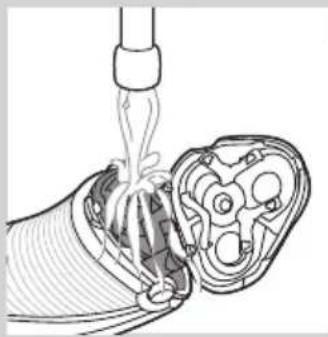
natural_image
Diagram of a medical procedure showing fluid flow from a pipette into a device (no text or labels)
natural_image
Illustration of a mechanical device pouring liquid into a component (no text or symbols)natural_image
Illustration of a hand holding a mechanical component with arrows indicating movement (no text or symbols)natural_image
Diagram of a mechanical component with an arrow indicating upward motion, no text or symbols presentnatural_image
Illustration of a hand holding a tray with three food items, each containing an upward arrow (no text or symbols)natural_image
Illustration of a hand using a tool to clean a mechanical component, with no text or symbols present.natural_image
Illustration of a hand placing a small bowl into a tray with a downward arrow, no text or symbols presentnatural_image
Diagram showing two views of a mechanical component with arrows indicating motion, no text or symbols presentnatural_image
Diagram of a hairdryer with arrows indicating direction (no text or symbols)natural_image
Illustration of a hand holding a tool with arrows indicating motion or force (no text or symbols)natural_image
Diagram of a three-pin electric shaver with a top handle and arrow indicating downward motion (no text or symbols)natural_image
Illustration of a hand holding a small electric shaver with a magnified inset showing rotational motion (no text or symbols)natural_image
Mechanical assembly diagram showing a hand holding a component with arrows indicating motion (no text or symbols)natural_image
Illustration showing a food item being cut off by a hand, with no visible text or symbols.natural_image
Diagram showing two views of a mechanical component with arrows indicating direction (no text or symbols)natural_image
Symbol of a trash bin with crossed lines indicating no waste or discharge, and a solid black rectangle below (no text or labels)natural_image
Symbol of a trash bin crossed with no visible text or labelsAttention
Piles faibles
natural_image
Diagram of a stylized human head with a power button and star-shaped symbol (no text or labels)Charge rapide (AT941/AT940/AT897/AT896/AT894/AT892/AT891/AT890/AT811 uniquement)
natural_image
Diagram of a stylized smiley face with curved lines and a power button, no text or symbols presentCharge
natural_image
Diagram of a medical or electrical device with a power button and star-shaped components (no text or symbols)natural_image
Diagram of a curved mechanical or electrical component with a power button, no text or symbols presentnatural_image
Line drawing of a person applying facial massage to the ear (no text or symbols)natural_image
Line drawing of a person applying face-to-face care to their ear (no text or symbols)natural_image
Illustration of a person using a medical device to interact with a device, showing hand placement and mechanical components (no text or symbols)natural_image
Illustration of two people using microphones, separated by a diagonal line (no text or symbols)natural_image
Diagram of a hairdryer with directional arrows indicating movement (no text or symbols)natural_image
Illustration of a hand holding a tool with arrows indicating motion or force (no text or symbols)natural_image
Line drawing of a hand using a tool to adjust or install a device component (no text or symbols visible)5 Remettez la tondeuse en place (clic).
natural_image
Illustration of a hand holding a mechanical component with arrows indicating direction (no text or symbols)
natural_image
Diagram of a medical procedure showing fluid flow from a tube into a cross-sectional view (no text or labels)
natural_image
Illustration of a mechanical device pouring liquid into a container (no text or symbols)natural_image
Illustration of a mechanical assembly with arrows indicating direction (no text or symbols)natural_image
Diagram of a mechanical component with an arrow indicating direction, showing internal parts and a cylindrical body (no text or symbols)natural_image
Illustration of a hand holding a tray with three small food items and upward arrows, no text or symbols present.natural_image
Illustration of a mechanical assembly with three views: top view of a gear-like component, side view of a bowl with a handle, and bottom view of a bowl with a screw (no text or symbols)natural_image
Illustration of a hand placing a small bowl into a tray with three cups, showing a downward arrow (no text or symbols)natural_image
Medical illustration showing two views of a surgical instrument with arrows indicating movement or force (no text or symbols present)natural_image
Diagram of a hairdryer with directional arrows indicating movement or force (no text or symbols)natural_image
Illustration of a hand holding a tool with arrows indicating motion or force (no text or symbols)natural_image
Diagram of a hand turning a three-pin electric shaver (no text or symbols)natural_image
Diagram of a hand holding a small object with a circular arrow and three circular features, no text or symbols present.
natural_image
Illustration of a hand holding a mechanical component with arrows indicating direction (no text or symbols)

natural_image
Illustration showing a hand holding a tray with food items, separated by a diagonal line (no text or symbols)
natural_image
Medical illustration showing two views of a surgical instrument with arrows indicating movement (no text or labels)natural_image
Symbol of a waste bin with no text or labels, crossed by two crossed lines and a solid black rectangle below (no text or symbols present)natural_image
Symbol of a trash bin crossed out by two diagonal lines, representing no waste or restriction (no text present)natural_image
Electric plug connected to a cable with a no-smoking symbol (no text or labels)Attenzione
Batteria scarica
natural_image
Diagram of a stylized smiley face with curved lines and a power button, no text or symbols presentRicarica rapida (solo AT941/AT940/AT897/AT896/AT894/AT892/AT891/AT890/AT811)
natural_image
Diagram of a stylized smiley face with curved lines and a power button, no text or symbols presentnatural_image
Diagram of a stylized human head with curved lines and a star-shaped symbol, no text or labels presentnatural_image
Diagram of a medical device with a power button and curved tubing, no text or symbols presentnatural_image
Close-up of a medical or electronic device with a downward arrow and label 'Heliert' (no readable text beyond labels)natural_image
Line drawing of a person applying facial massage or pressure to the ear (no text or symbols)1 Bagnate la pelle.

natural_image
Line drawing of a person applying a sponge to their face (no text or symbols)natural_image
Illustration of a person using a medical device to interact with a device, showing a hand holding a circular button and a bag with tubing (no text or symbols)natural_image
Illustration of a person using a handheld device to clean another (no text or symbols present)natural_image
Diagram of a hairdryer with a brush and lever mechanism (no text or symbols)natural_image
Illustration of a hand using a tool to adjust or install a mechanical component (no text or symbols visible)natural_image
Diagram of a hand using a tool to adjust or install a device component, with arrows indicating the process (no text or symbols present)natural_image
Illustration of a hand holding a mechanical component with arrows indicating direction (no text or symbols)natural_image
Diagram of a medical procedure showing fluid flow from a pipette into a device (no text or labels)natural_image
Illustration of a mechanical device pouring liquid into a container (no text or symbols)natural_image
Diagram of a mechanical assembly with arrows indicating direction (no text or symbols)natural_image
Diagram of a mechanical component with an arrow indicating upward motion, showing internal structure (no text or symbols)natural_image
Illustration of a hand holding a tray with three food items, each containing upward arrows (no text or symbols)natural_image
Illustration of a mechanical assembly with two parts: one showing a tool interacting with a gear-like component, the other showing a bowl with pins (no text or symbols present)natural_image
Illustration of a hand holding three small bowls with a downward arrow, no text or symbols presentnatural_image
Medical illustration showing two views of a surgical instrument with arrows indicating movement (no text or labels)natural_image
Diagram of a hairdryer with directional arrows indicating movement or force (no text or symbols)natural_image
Illustration of a hand holding a tool with arrows indicating motion or force (no text or symbols)natural_image
Diagram of a hand turning a three-pin electric shaver (no text or symbols)natural_image
Illustration of a hairbrush with a circular arrow indicating rotation (no text or symbols)natural_image
Illustration of a hand holding a mechanical component with arrows indicating movement (no text or symbols)natural_image
Illustration showing a hand holding a tray with food items, separated by a diagonal line (no text or symbols)natural_image
Diagram showing two views of a mechanical component with arrows indicating movement, no text or symbols present
natural_image
Symbol of a trash bin crossed with no text or numbers, representing waste sorting or disposal (no text present)
natural_image
Symbol of a trash bin crossed out by two crossed lines, representing no waste or restriction (no text present)natural_image
Electric plug connected to a cable with a no-smoking symbol (no text or labels)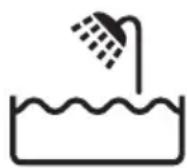
Accu bijna leeg
natural_image
Diagram of a stylized smiley face with curved lines and a power button, no text or symbols presentSnel opladen (alleen AT941/AT940/AT897/AT896/AT894/AT892/AT891/AT890/AT811)
natural_image
Diagram of a stylized smiley face with curved lines and a power button, no text or symbols presentOpladen
natural_image
Diagram of a medical or electrical device with a power button and star-shaped stimulus symbol (no text or labels)Accu vol
natural_image
Diagram of a curved mechanical or electrical component with a power button and a circular feature, no text or symbols present.natural_image
Close-up of a medical or laboratory device with a black arrow pointing to a circular base (no visible text or symbols)natural_image
Line drawing of a person applying facial massage or pressure to the ear (no text or symbols)natural_image
Line drawing of a person applying product to their face with a sponge (no text or symbols)natural_image
Illustration of a person using a handheld device to interact with a mechanical component (no text or symbols visible)natural_image
Illustration of a person using a handheld device to clean another's face (no text or symbols present)natural_image
Diagram of a hairbrush with a clip inserted into the jaw (no text or symbols)natural_image
Hand holding a tool interacting with a mechanical component, showing motion arrows (no text or symbols)5 Klap de trimmer in ('klik').

natural_image
Diagram of a device being inserted into a component, showing tool and internal structure (no text or symbols)natural_image
Illustration of a mechanical assembly with arrows indicating movement or force (no text or symbols present)natural_image
Diagram of a medical procedure showing fluid flow through a device into a cross-sectional view (no text or labels)- Spoel de haarkamer en de binnenkant van de scheerunit schoon.

natural_image
Illustration of a medical procedure showing fluid flow from a bottle onto a patient's foot (no text or symbols)natural_image
Illustration of a hand holding a mechanical component with arrows indicating direction (no text or symbols)natural_image
Diagram of a mechanical component with an arrow indicating direction, showing internal parts and a top view (no text or symbols)natural_image
Illustration of a hand holding a tray with three small food items, each with upward arrows indicating growth (no text or symbols)natural_image
Illustration of a mechanical assembly with two parts: a gear-like component and a bowl, both being handled by a tool (no text or symbols present)natural_image
Illustration of a hand holding a small mechanical component with a magnified inset showing the top view (no text or symbols)natural_image
Diagram showing two views of a mechanical component with arrows indicating direction (no text or symbols)natural_image
Diagram of a hairdryer with arrows indicating internal components (no text or symbols)natural_image
Hand holding a tool with arrows indicating motion or force (no text or symbols)natural_image
Diagram of a hand holding a three-pin electric shaver with a top handle (no text or symbols)natural_image
Illustration of a hand holding a small electric shaver with a circular button indicating rotation (no text or symbols present)natural_image
Illustration of a hand holding a mechanical component with arrows indicating movement (no text or symbols)natural_image
Diagram showing two views of a mechanical component with arrows indicating motion or assembly (no text or symbols)natural_image
Symbol of a waste bin with crossed lines indicating no waste, and a solid black rectangle below (no text or labels)natural_image
Symbol of a trash bin crossed out by a diagonal line, representing no waste or discharge (no text or labels)natural_image
Electric plug connected to a cable with a no-smoking symbol (no text or labels)Forsiktig
Lav batterikapasitet
natural_image
Diagram of a stylized human head with a power button and star-shaped graphic overlay (no text or symbols)Hurtiglading (kun AT941/AT940/AT897/AT896/AT894/AT892/AT891/AT890/AT811)
natural_image
Diagram of a stylized human head with a power button and star-shaped graphic overlay (no text or symbols)Lading
- AT941/AT940/AT897: Når barbermaskinen lader, blinker det hvite batterisymbolet.
natural_image
Diagram of a medical or electrical device with curved lines and a central power button, no text or symbols present.- AT899/AT896/AT894/AT892/AT891/AT890/AT811/AT790/AT756/AT753/AT751/AT750: Når barbermaskinen lades, blinker ladelampen grønt.

Fulladet batteri
- AT941/AT940/AT897: Når batteriet er fulladet, lyser det hvite batterisymbolet kontinuerlig.
natural_image
Diagram of a curved mechanical component with a power button and a circular feature, no text or symbols present- AT899/AT896/AT894/AT892/AT891/AT890/AT811/AT790/AT756/AT753/AT751/AT750: Når batteriet er fulladet, lyser ladelampen kontinuerlig grønt.
natural_image
Close-up of a medical or electronic device with a black arrow pointing to a circular component labeled 'No.27' (no readable text or symbols beyond the label)1 Koble den lille kontakten til ladestativet.
2 Sett adapteren i stikkontakten.
3 Sett barbermaskinen i ladestativet.
Ladelampen viser ladestatusen til barbermaskinen (se avsnittet Ladeindikasjoner i dette kapittelet).
Bruke barbermaskinen
natural_image
Line drawing of a person applying facial contour or pressure application to the neck area (no text or symbols)natural_image
Line drawing of a person applying product to their ear (no text or symbols)natural_image
Illustration of a person using a medical device to interact with a bandage, showing a circular arrow and rope (no text or symbols)natural_image
Illustration of a person using a handheld device to clean another (no text or symbols present)natural_image
Diagram of a hairdryer with directional arrows indicating movement (no text or symbols)natural_image
Illustration of a hand holding a tool with arrows indicating motion or force (no text or symbols)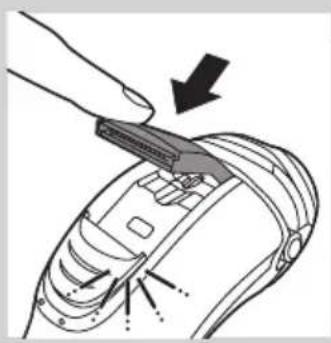
natural_image
Diagram of a hand using a tool to adjust or install electronic components, with arrows indicating action (no text or symbols present)5 Lukk trimmeren med et klikk.
natural_image
Diagram of a mechanical assembly with internal components and directional arrows (no text or labels)natural_image
Diagram of a medical procedure showing fluid flow through a tube into a cross-sectional view (no text or labels)natural_image
Illustration of a mechanical device emitting white ribbons into a textured surface (no text or symbols)natural_image
Illustration of a hand holding a mechanical component with arrows indicating direction (no text or symbols)natural_image
Diagram of a mechanical component with an arrow indicating direction, showing internal structure without any text or symbols.natural_image
Illustration of a hand holding a bowl with three small food items, each with an upward arrow indicating growth (no text or symbols present)natural_image
Illustration of a mechanical assembly with two views: top shows a gear-like component, bottom shows three circular components (no text or symbols)natural_image
Illustration of a hand holding a small bowl with a downward arrow, next to a circular object (no text or symbols)natural_image
Diagram showing two views of a biological structure with arrows indicating movement or transformation (no text or symbols present)natural_image
Diagram of a hairdryer with directional arrows indicating movement (no text or symbols)natural_image
Illustration of a hand holding a tool with arrows indicating motion or force (no text or symbols)natural_image
Diagram of a hand turning a three-pin electric shaver (no text or symbols present)natural_image
Diagram of a hairbrush with a magnified inset showing internal components (no text or symbols)1 Skjærehodesymbolet lyser oransje kontinuerlig.
2 Slå av barbermaskinen. Koble barbermaskinen fra strømnettet, eller fjern den fra ladestativet (kun AT940/AT921).

natural_image
Illustration of a hand holding a mechanical component with arrows indicating movement (no text or symbols)natural_image
Medical illustration showing two views of a surgical instrument with arrows indicating movement (no text or labels)natural_image
Symbol of a trash bin crossed with no text or numbers, representing waste sorting or disposal (no text present)natural_image
Symbol of a trash bin crossed out by two diagonal lines (no text or numbers present)- Det integrerte oppladbare barbermaskinbatteriet inneholder stoffer som kan forurense miljøet. Ta alltid ut batteriet før du kaster barbermaskinen eller leverer den på en offentlig gjenvinningsstasjon. Lever batteriet på en offentlig gjenvinningsstasjon for batterier. Hvis du har problemer med å ta ut batteriet, kan du også ta apparatet med til et Philips-servicesenter. Der vil de ta ut batteriet for deg og behandle det på en miljøvennlig måte.
Fjerne det oppladbare barbermaskinbatteriet
Det oppladbare batteriet skal bare tas ut när du avhender barbermaskinen. Kontroller at batteriet er helt utladet när du fjerner det.
Cuidado
Bateria fraca
natural_image
Diagram of a medical or electrical device with curved lines and a central star-like symbol, no text or labels present.Carga rápida (apenas AT941/AT940/AT897/AT896/AT894/AT892/AT891/AT890/AT811)
natural_image
Diagram of a stylized ear with a power button and star-shaped graphic overlay (no text or symbols)Carregamento
natural_image
Diagram of a medical or electrical device with a power button and star-shaped components (no text or symbols)- AT899/AT896/AT894/AT892/AT891/AT890/AT811/AT790/AT756/AT753/AT751/AT750: Quando a máquina de barbear está a carregar, a luz de carregamento fica intermitente a verde.

natural_image
Diagram of a curved mechanical or electrical component with a power button and a circular component, no text or symbols present.- AT899/AT896/AT894/AT892/AT891/AT890/AT811/AT790/AT756/AT753/AT751/AT750: Quando a bateria estiver completamente carregada, a luz de carregamento permanece continuamente acesa a verde.
natural_image
Close-up of a medical or electronic device with a downward arrow and label 'PHILIPS' (no readable text or symbols beyond labels)natural_image
Line drawing of a person applying facial massage to the ear (no text or symbols)natural_image
Line drawing of a person applying a sponge to their ear (no text or symbols)natural_image
Illustration of a person using a handheld device to interact with a rolled-up cable or cable (no text or symbols present)natural_image
Illustration of a person using a handheld device to clean another (no text or symbols present)natural_image
Diagram of a hairdryer with directional arrows indicating movement (no text or symbols)natural_image
Hand holding a tool with arrows indicating direction of movement (no text or symbols)natural_image
Diagram of a hand using a tool to adjust or install a device component, with no visible text or symbols.natural_image
Illustration of a mechanical assembly with arrows indicating direction (no text or symbols)
natural_image
Diagram of a medical procedure showing a catheter inserted into a device with internal tubing (no text or labels)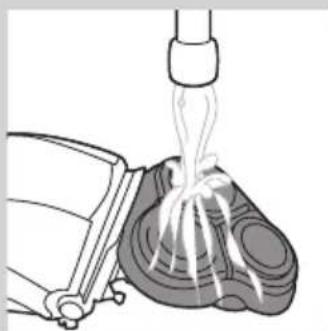
natural_image
Illustration of a mechanical device pouring liquid into a container (no text or symbols)natural_image
Illustration of a hand holding a mechanical component with arrows indicating movement (no text or symbols)natural_image
Diagram of a mechanical component with an arrow indicating direction, showing internal structure (no text or symbols)natural_image
Illustration of a hand holding a tray with three food items and upward arrows indicating growth (no text or symbols)natural_image
Illustration of a mechanical assembly with three views: top view, side view, and bottom view (no text or symbols)natural_image
Illustration of a hand holding a small bowl with a downward arrow, next to a bowl with a lid (no text or symbols)natural_image
Medical illustration showing two views of a surgical instrument with arrows indicating movement (no text or labels)natural_image
Diagram of a hairdryer with directional arrows indicating movement (no text or symbols)natural_image
Illustration of a hand holding a tool with arrows indicating motion or force (no text or symbols)natural_image
Diagram of a hand turning a three-pin electric shaver (no text or symbols)natural_image
Diagram of a hand holding a small object with a circular arrow and three circular features, no text or symbols present.
natural_image
Illustration of a hand holding a mechanical component with internal gears and a handle (no text or symbols)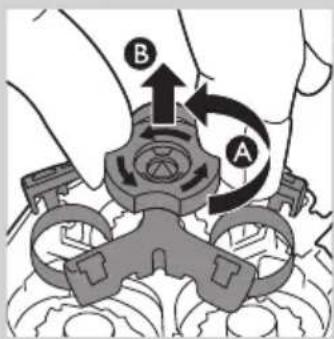


1 O símbolo da cabeça de corte permanece continuamente aceso a cor de laranja.
natural_image
Diagram showing two views of a mechanical component with internal components and directional arrows (no text or labels)
Encomendar acessórios
natural_image
Symbol of a trash bin with crossed lines indicating no waste or discharge, and a solid black rectangle below (no text or labels)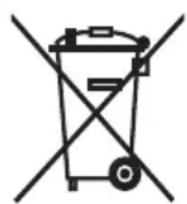
natural_image
Electric plug connected to a cable with a no-smoking symbol (no text or labels)Försiktighet

natural_image
Diagram of a medical or electrical device with curved lines and a central star-like symbol, no text or labels present.

natural_image
Diagram of a stylized human head with curved lines and a central star-like shape, no text or symbols present.
natural_image
Diagram of a stylized smiley face with curved lines and a power button, no text or symbols presentBatteriet fulladdat
natural_image
Diagram of a curved mechanical or electrical component with a power button and a circular component, no text or symbols present.natural_image
Medical device with a black arrow pointing to a circular base labeled 'Neurol', no text or symbols present.natural_image
Line drawing of a person applying facial massage to the ear (no text or symbols)
natural_image
Line drawing of a person applying a product to their face, showing the tooth and cheek area (no text or symbols)
natural_image
Illustration of a person using a medical or cosmetic device to interact with a bottle, showing a circular icon and rope routing (no text or symbols)natural_image
Illustration of a person using a handheld device to interact with another person (no text or symbols present)natural_image
Diagram of a hairdryer with black arrows indicating direction (no text or symbols)natural_image
Hand holding a tool with arrows indicating movement or change (no text or symbols visible)natural_image
Diagram of a device being inserted into a component, showing tool and internal structure (no text or symbols)natural_image
Illustration of a mechanical device with internal components and directional arrows indicating movement (no text or symbols)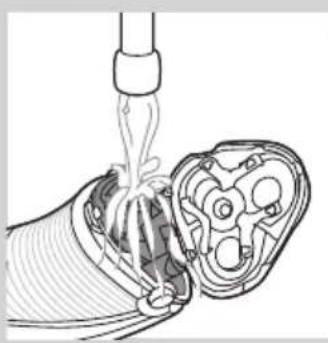
natural_image
Diagram of a medical procedure showing fluid flow from a pipette into a device (no text or labels)
natural_image
Illustration of a mechanical device pouring liquid into a container (no text or symbols)natural_image
Illustration of a hand holding a mechanical component with arrows indicating movement (no text or symbols)natural_image
Diagram of a mechanical component with an arrow indicating direction, showing internal parts and a cylindrical body (no text or symbols)natural_image
Illustration of a hand holding a bowl with three food items and upward arrows indicating growth (no text or symbols)natural_image
Illustration of a mechanical assembly with two parts: a gear-like component and a bowl, both being handled by tool holders (no text or symbols present)natural_image
Illustration of a hand placing a small bowl into a tray with two circular objects, no text or symbols present.natural_image
Diagram showing two views of a biological structure with arrows indicating movement or transformation (no text or symbols)natural_image
Diagram of a handheld device with internal components and directional arrows indicating movement (no text or symbols)natural_image
Illustration of a hand using a tool to adjust or install a component, with arrows indicating motion (no text or symbols present)natural_image
Diagram of a hand turning a three-pin electric shaver (no text or symbols)natural_image
Illustration of a hand holding a small electronic device with a circular button labeled '3' pointing to its tip (no text or symbols on the device itself)natural_image
Illustration of a hand holding a mechanical component with arrows indicating direction (no text or symbols)natural_image
Illustration of a food safety concept with a hand holding a bowl and a checkmark over a food item (no text or symbols)natural_image
Diagram showing two views of a mechanical component with arrows indicating movement or assembly (no text or symbols present)natural_image
Symbol of a trash bin with crossed lines indicating no waste or discharge, and a solid black rectangle below (no text or labels)natural_image
Symbol of a trash bin crossed with no visible text or labelsnatural_image
Electric plug connected to a cable with a no-smoking symbol (no text or labels)Dikkat

natural_image
Diagram of a stylized smiley face with curved lines and a power button, no text or symbols present

natural_image
Diagram of a medical or diagnostic device with a power button and star-shaped stimulus symbol (no text or labels)

natural_image
Diagram of a stylized human head with a power button and star-shaped graphic overlay (no text or symbols)- AT899/AT896/AT894/AT892/AT891/AT890/AT811/AT790/AT756/AT753/AT751/AT750: Tıraş makinesi şarj olurken şarj ışığı yeşil renkte yanıp söner.
natural_image
Diagram of a curved mechanical or electrical component with a power button and a circular component, no text or symbols present.natural_image
Close-up of a medical or electronic device with a black arrow pointing to a circular component (no visible text or symbols)natural_image
Line drawing of a person applying facial massage or pressure to the ear (no text or symbols)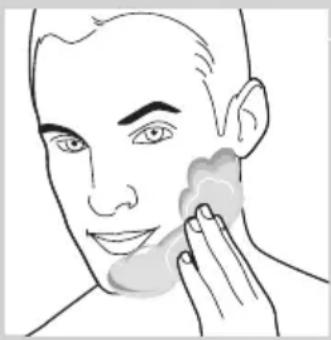
natural_image
Line drawing of a person applying a product to their face, showing the tooth and mouth area (no text or symbols)
natural_image
Illustration of a person using a tool to lift a cylindrical object, with no visible text or symbolsnatural_image
Illustration of a person using a handheld device to clean another (no text or symbols present)natural_image
Diagram of a hairdryer with a brush and lever mechanism (no text or symbols)natural_image
Illustration of a hand holding a tool with arrows indicating motion or force (no text or symbols)
natural_image
Diagram of a device being inserted into a component, showing a finger and arrow indicating insertion (no text or symbols present)natural_image
Illustration of a person holding a mechanical component with arrows indicating movement (no text or symbols)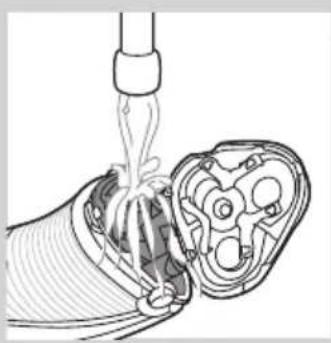
natural_image
Diagram of a medical procedure showing fluid flow through a device into a cross-sectional view (no text or labels)
natural_image
Illustration of a mechanical device emitting liquid from a piping bag (no text or symbols)natural_image
Illustration of a hand holding a mechanical component with arrows indicating movement (no text or symbols)natural_image
Diagram of a mechanical component with an arrow indicating upward motion, no text or symbols presentnatural_image
Illustration of a hand holding a tray with three food items, each containing upward arrows (no text or symbols)natural_image
Illustration of a hand using a tool to clean a mechanical component, with no text or symbols present.natural_image
Illustration of a hand holding a small bowl with a downward arrow, next to a bowl with a circular inset showing a magnified view (no text or symbols)natural_image
Diagram showing two views of a mechanical component with arrows indicating direction (no text or symbols)natural_image
Diagram of a hairdryer with black arrows indicating direction (no text or symbols)natural_image
Illustration of a hand using a tool to adjust or install a component, with arrows indicating direction (no text or symbols present)natural_image
Diagram of a hand turning a three-pin electric shaver (no text or symbols present)natural_image
Illustration of a hand holding a small electric shaver with a magnified inset showing rotational motion (no text or symbols)natural_image
Illustration of a hand holding a mechanical component with arrows indicating movement (no text or symbols)natural_image
Illustration showing a hand holding a bowl with food items, separated by a diagonal line (no text or symbols)natural_image
Medical illustration showing two views of a surgical instrument with arrows indicating movement or force (no text or symbols present)natural_image
Symbol of a trash bin with crossed lines indicating no waste or discharge, and a solid black rectangle below (no text or labels)natural_image
Symbol of a trash bin crossed with no visible text or labels- Always here to help you
- User manual
- PHILIPS
- Introduction
- General description (Fig. 1)
- Important
- Danger
- Warning
- Caution
- Compliance with standards
- General
- Charging
- Battery low
- Quick charging (AT941/AT940/AT897/AT896/AT894/AT892/AT891/AT890/AT811 only)
- Battery fully charged
- Charging in the charging stand (AT941/AT940 only)
- Using the shaver
- Shaving tips and tricks
- Wet shaving
- Dry shaving
- Trimming (AT941/AT940/AT897/AT896/AT894/AT892/AT891/AT890/AT811/AT790/AT756 only)
- Cleaning and maintenance
- Cleaning the shaving unit under the tap
- Cleaning the shaving unit with the cleaning brush
- Storage
- Replacement
- Replacement reminder
- Ordering accessories
- Shaving heads
- Cleaning
- Environment
- Removing the rechargeable shaver battery
- Guarantee and support
- Guarantee restrictions
- Troubleshooting
- Introduktion
- Forsigtig
- Achtung
- Akku fast leer
- Laden
- Φόρτιση
- Precaución
- Batería baja
- Carga rápida (solo modelos AT941/AT940/AT897/AT896/AT894/AT892/AT891/AT890/AT811)
- Carga
- Varoitus
- Akku täynnä
- Attention
- Piles faibles
- Charge rapide (AT941/AT940/AT897/AT896/AT894/AT892/AT891/AT890/AT811 uniquement)
- Charge
- Attenzione
- Batteria scarica
- Ricarica rapida (solo AT941/AT940/AT897/AT896/AT894/AT892/AT891/AT890/AT811)
- Accu bijna leeg
- Snel opladen (alleen AT941/AT940/AT897/AT896/AT894/AT892/AT891/AT890/AT811)
- Opladen
- Accu vol
- Forsiktig
- Lav batterikapasitet
- Hurtiglading (kun AT941/AT940/AT897/AT896/AT894/AT892/AT891/AT890/AT811)
- Lading
- Fulladet batteri
- Bruke barbermaskinen
- Fjerne det oppladbare barbermaskinbatteriet
- Cuidado
- Bateria fraca
- Carga rápida (apenas AT941/AT940/AT897/AT896/AT894/AT892/AT891/AT890/AT811)
- Carregamento
- Encomendar acessórios
- Försiktighet
- Batteriet fulladdat
- Dikkat
Brand : PHILIPS
Model : AquaTouch AT756
Category : Razor