
KSM804 - Sandwich Maker Koenic - Free user manual and instructions
Find the device manual for free KSM804 Koenic in PDF.


| Product type | Croque-monsieur press |
| Brand | Koenic |
| Model | KSM804 |
| Dimensions (L x W x H) | Approximately 25 x 20 x 10 cm |
| Weight | Approximately 1.5 kg |
| Power supply | 220-240 V, 50 Hz |
| Power | 750 W |
| Plate material | Non-stick coating |
| Number of croque-monsieur | 2 |
| Indicator light | Heating and ready indicator |
| Lockable handle | Yes |
| Non-slip feet | Yes |
| Safety thermostat | Yes, automatic shutdown in case of overheating |
| Cleaning | Removable plates (or clean with damp cloth) |
| Maintenance | Do not immerse, wipe after use |
| Spare parts | Replacement plates available |
| Warranty | 2 years |
| Color | White/Stainless steel (estimated) |
Frequently Asked Questions - KSM804 Koenic
User questions about KSM804 Koenic
0 question about this device. Answer the ones you know or ask your own.
Ask a new question about this device
Download the instructions for your Sandwich Maker in PDF format for free! Find your manual KSM804 - Koenic and take your electronic device back in hand. On this page are published all the documents necessary for the use of your device. KSM804 by Koenic.
USER MANUAL KSM804 Koenic
natural_image
Exterior view of a black KOENIC robotic device with a red dot on the cover (no text or symbols beyond branding)



| Deutsch | 4 - 7 |
| Ελληνικά | 8 - 11 |
| English | 12 - 15 |
| Español | 16 - 19 |
| Français | 20 - 23 |
| Magyar | 24 - 27 |
| Italiano | 28 - 31 |
| Nederlands | 32 - 35 |
| Polski | 36 - 39 |
| Português | 40 - 43 |
| Русский | 44 - 47 |
| Svenska | 48 - 51 |
| Türkçe | 52 - 55 |
| 汉语 | 56 - 59 |
natural_image
Close-up of a white electrical outlet plug with a black cable and red arrow pointing to the socket (no text or symbols visible)natural_image
Close-up of a black electrical plug with a red arrow pointing to its socket (no text or symbols visible)natural_image
Close-up of a mechanical component with a red arrow indicating a downward motion (no text or symbols visible)natural_image
Two black plastic tray-like objects with internal slots, no visible text or symbolsnatural_image
Close-up of a mechanical component with red arrows indicating a specific feature (no text or symbols visible)natural_image
Close-up of a mechanical component with a red arrow indicating a specific part (no text or symbols visible)natural_image
Close-up of a mechanical component with a red arrow pointing to a section (no visible text or symbols)
natural_image
Close-up of a white electrical outlet plug with a black cable, showing a red arrow pointing to the plug (no text or symbols visible)natural_image
Close-up of a black plastic component with a red arrow pointing to a small feature (no text or symbols visible)natural_image
Close-up of a car body panel with a red arrow pointing to a specific part (no text or symbols visible)natural_image
Close-up of a mechanical component with a red arrow pointing to a section (no visible text or symbols)natural_image
Close-up of a black electrical plug with a red arrow pointing to its side (no text or symbols visible)natural_image
Two black plastic tray compartments with internal slots and cutouts (no text or symbols visible)natural_image
Close-up of a mechanical component with a red arrow indicating a specific part (no text or symbols visible)
IMPORTANT SAFETY INSTRUCTIONS READ CAREFULLY AND KEEP FOR FUTURE REFERENCE.
- Before connecting the appliance to a socket outlet, make sure the voltage indicated on the appliance corresponds to your local mains voltage.
- For safety reasons, this class I appliance is provided with a plug with earth connection.
• Always connect this appliance to a mains socket outlet with a protective earthing connection. - This appliance is not intended for use by persons (including children) with reduced physical, sensory or mental capabilities, or lack of experience and knowledge, unless they have been given supervision or instruction concerning use of the appliance by a person responsible for their safety. Children should be supervised to ensure that they do not play with the appliance.
- If the supply cord is damaged, it must be replaced by the manufacturer or its service agent or similarly qualified persons in order to avoid hazard.
- Do not operate the appliance by means of an external timer or separate remote-control system.
- The appliance is intended to be used in household and similar applications such as staff kitchen areas in shops, offices and other working environments, farm houses, by clients in hotels, motels and other residential type environments, and bed and breakfast type environments.
• AUTION: Surfaces get hot during operation. Only operate at the handle and controls. - This appliance is intended for preparing sandwiches. Do not use the appliance for other purposes than described in this manual, in order to avoid hazardous situations.
- Do not immerse the appliance or supply cord in water or any other liquid.
- Regularly check if the supply cord, appliance or extension cable are defective. If found defective, do not put appliance into operation.
Immediately pull the plug. Never carry or pull the appliance by the supply cord. Do not pull the supply cord over sharp edges. Do not jam or bend it.
- Never put the appliance or supply cord on hot surfaces or near open flames.
- Do not allow the supply cord to hang down within easy reach.
- Never pull the plug by the supply cord or with wet hands. Disconnect the mains plug in case of faults during use, before cleaning or moving the appliance, and after use.
- Place the supply cord and, if necessary, an extension cable in such a way that pulling or tripping over it is impossible. Do not allow the supply cord to hang down within easy reach.
- Do not leave the appliance unattended while turned on or plugged in.
• Always clean the appliance after use. Let the appliance cool down completely before cleaning and storage. - Never touch the plates with sharp or abrasive items, as this would damage the non-stick surface.
Intended use
This appliance is only intended for preparing sandwiches. Only use according to these instructions. Improper use is dangerous and will void any warranty claim. Observe the safety instructions.
Disposal

The crossed-out wheeled bin logo requires the separate collection of waste electric and electronic equipment
(WEEE). Electric and electronic equipment may contain dangerous and hazardous substances. Do not dispose of this appliance as unsorted municipal waste. Return it to a designated collection point for the recycling of WEEE. By doing so, you will help to conserve resources and protect the environment. Contact your retailer or local authorities for more information.
Technical Data
Rated voltage: 220-240 V
Rated power input: 750-850 W
Rated frequency: 50/60 Hz
English
Congratulations
Thanks for your purchase of a KOENIC product. Please read this manual carefully and keep it for future reference.
Before first time use
Remove and clean the cooking plates as described in Cleaning and care.
Using the sandwich maker
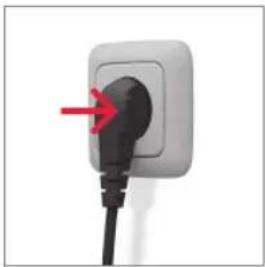
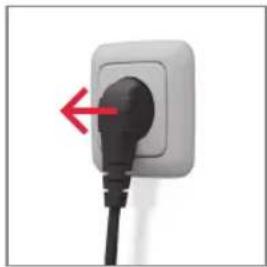
- Plug the unit in; the red power indicator turns on. Wait until the green indicator turns on; this takes about 6 minutes.
- Place 1 or 2 slices of bread on the bottom cooking plate with the greased side down.
- Put fillings on the bread.
- Place another 1 or 2 bread slices on top with the greased side up.
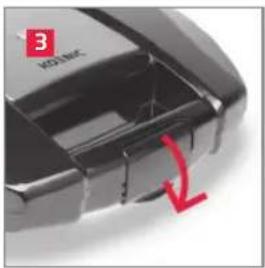
- Close the lid and lock the tab until it clicks into place.
- The sandwiches are ready when the green light is off.
natural_image
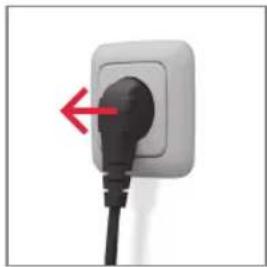
Close-up of a white electrical outlet plug with a black cable and red arrow pointing to the socket (no text or symbols visible)Before use, plug the unit in.
natural_image
Close-up of a black electrical plug with a red arrow pointing to its socket (no text or symbols visible)After use, unplug the unit.
natural_image
Close-up of a black mechanical component with a red arrow pointing to a feature, labeled '3' in the top-left corner (no readable text or symbols beyond label)the handle.
natural_image
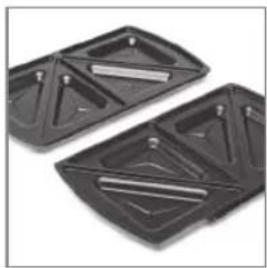
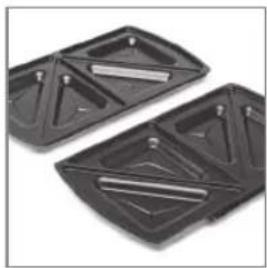
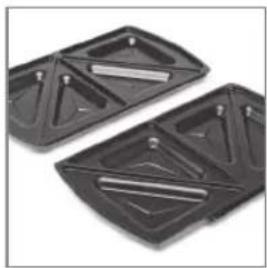
Two black plastic tray-like objects with internal slots, no visible text or symbolsCooking platesClose the lid and lock
Caution

- Do not insert too much filling. Never close the lid using force!
- Never remove any residues with sharp objects such as knives or forks.
Cleaning and care
-
Unplug the unit from the mains supply and allow it to cool down.
-
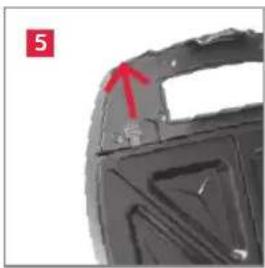
Open the lid and push the release tabs upwards; remove the cooking plate.
- Remove the bottom cooking plate likewise.
- Clean cooking plates in warm soapy water. Do not use caustic or abrasive cleaners.
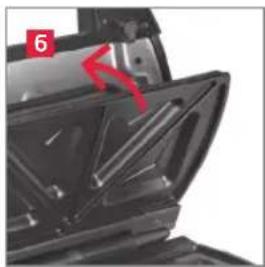
- Dry all parts and then reassemble them.
natural_image
Close-up of a mechanical component with a red arrow pointing to a feature, no visible text or symbolsPush release tabs upwards.
natural_image
Close-up of a mechanical component with a red arrow pointing to a section, no visible text or symbolsRemove the cooking plate.

natural_image
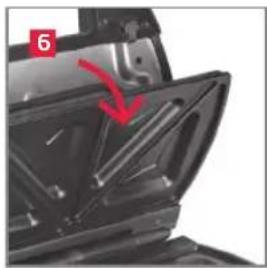
Close-up of a mechanical component with a red arrow pointing to a section (no visible text or symbols)Fit the cooking plate at the hinge.
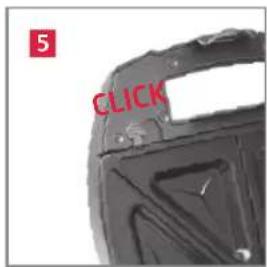
Push slightly until it clicks into place.
EN
Note
- You can stop the heating process at any time by unplugging the unit.
- Always unplug after use, otherwise unit continues operation.
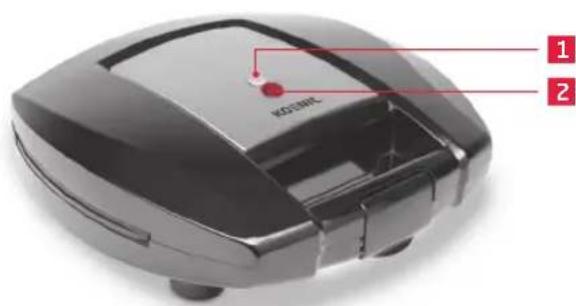

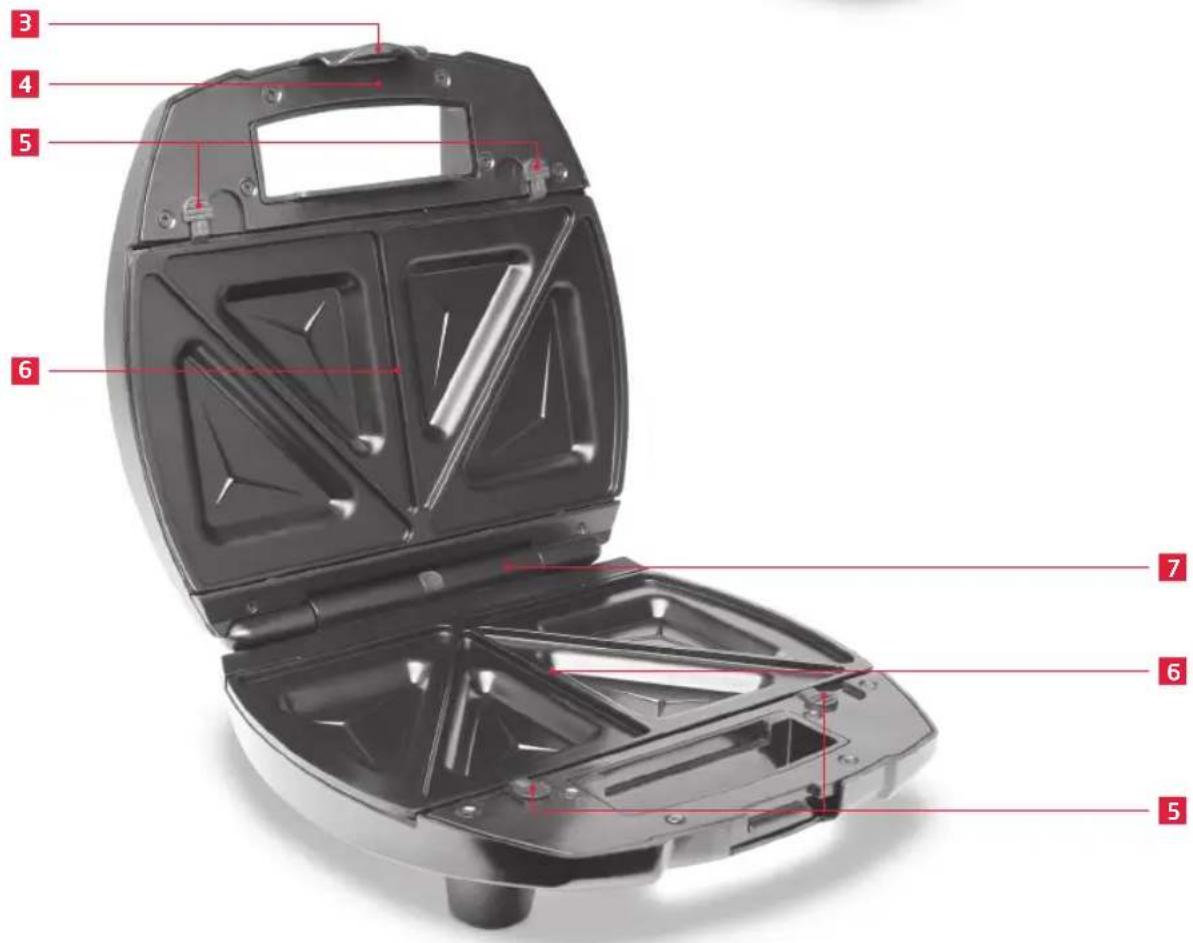
1 Ready indicator (green)
2 Power indicator (red)
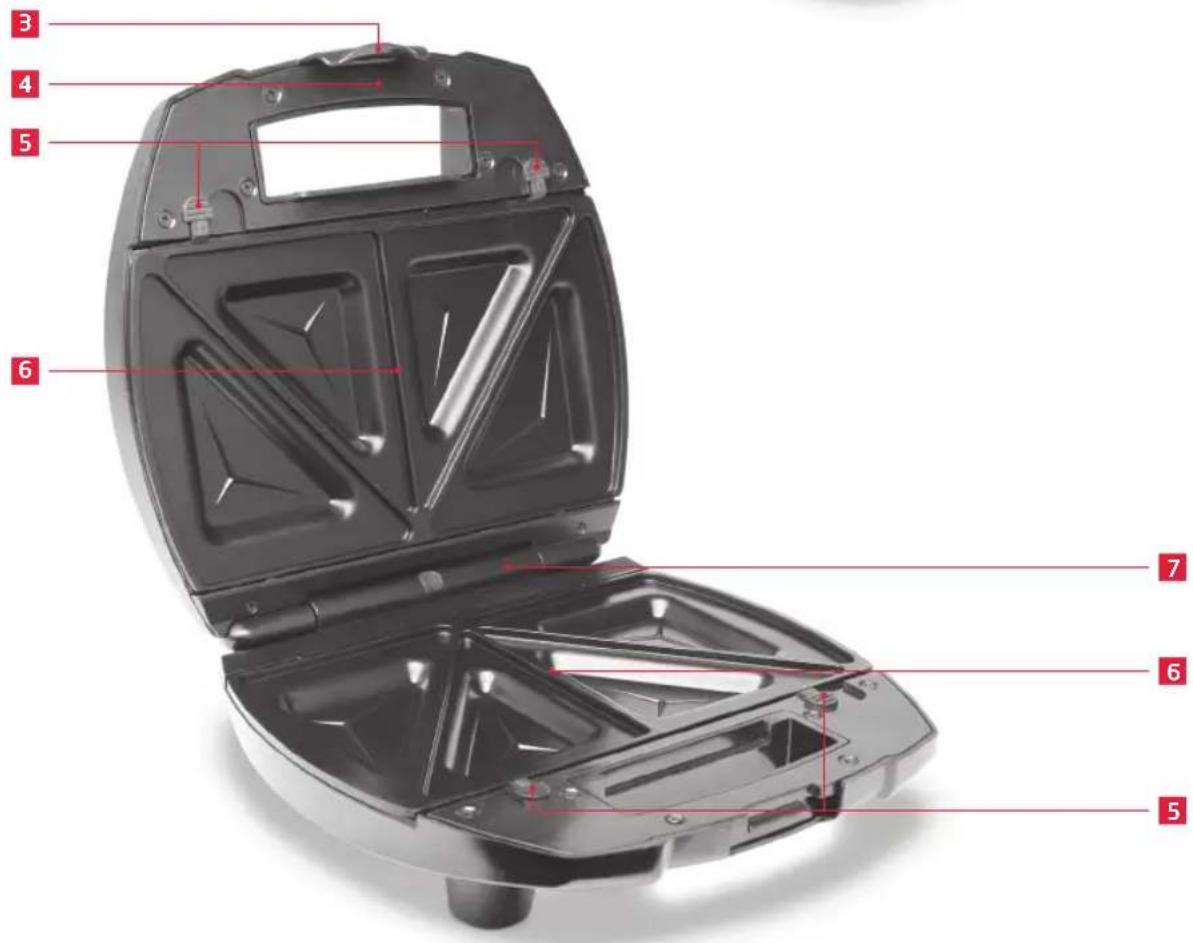
3 Locking tab
4 Lid with handle
5 Cooking plate release tabs
6 Cooking plates
7 Hinge
Caution
- Never touch the metal plate on the lid during operation, as it becomes very hot. Risk of burns!
• Make sure the unit has cooled down before removing the cooking plates.

natural_image
Close-up of a white electrical outlet plug with a black cable and red arrow pointing to the socket (no text or symbols visible)natural_image
Close-up of a black electrical plug with a red arrow pointing to its socket (no text or symbols visible)natural_image
Close-up of a black mechanical component with a red arrow pointing to a feature, labeled '3' (no readable text or symbols beyond label)natural_image
Two black plastic tray-like objects with triangular cutouts and internal slots, no visible text or symbols.natural_image
Close-up of a mechanical component with red arrow and label (no readable text or symbols)natural_image
Close-up of a mechanical component with a red arrow indicating a specific part (no text or symbols visible)natural_image
Close-up of a mechanical component with a red arrow pointing to a section (no visible text or symbols)
natural_image
Close-up of a white electrical outlet plug with a black cable, showing a red arrow pointing to the socket (no text or symbols visible)natural_image
Close-up of a black electrical plug with a red arrow pointing to its socket (no text or symbols visible)natural_image
Close-up of a mechanical component with a red arrow indicating a downward motion (no text or symbols visible)natural_image
Two black plastic tray-like objects with internal slots, no visible text or symbolsnatural_image
Close-up of a mechanical component with a red arrow pointing to a specific area (no text or symbols visible)natural_image
Close-up of a mechanical component with a red arrow indicating a specific feature (no text or symbols visible)Retirer la plaque de cuisson

natural_image
Close-up of a mechanical component with a red arrow pointing to a section (no visible text or symbols)
natural_image
Close-up of a white electrical outlet plug with a black cable and red arrow pointing to the socket (no text or symbols visible)natural_image
Close-up of a black electrical plug with a red arrow pointing to its socket (no text or symbols visible)natural_image
Close-up of a black mechanical component with a red arrow pointing to a feature, labeled '3' in the top-left corner (no readable text or symbols beyond label)natural_image
Two black plastic tray-like objects with internal slots, no visible text or symbolsnatural_image
Close-up of a mechanical component with red arrow and label (no readable text or symbols)füleket.

natural_image
Close-up of a mechanical component with a red arrow pointing to a section, no visible text or symbolsnatural_image
Close-up of a mechanical component with a red arrow pointing to a section (no visible text or symbols)natural_image
Close-up of a white electrical outlet plug with a black cable and red arrow pointing to the socket (no text or symbols visible)natural_image
Close-up of a black electrical plug with a red arrow pointing to its socket (no text or symbols visible)natural_image
Close-up of a black mechanical component with a red arrow pointing to a feature, labeled '3' (no readable text or symbols beyond label)natural_image
Two black plastic tray-like objects with triangular cutouts and internal slots, no visible text or symbols.natural_image
Close-up of a mechanical component with red arrow and label (no readable text or symbols)natural_image
Close-up of a mechanical component with a red arrow pointing to a section, no visible text or symbolsnatural_image
Close-up of a mechanical component with a red arrow pointing to a section (no visible text or symbols)natural_image
Close-up of a black robotic vacuum cleaner with a red indicator light and 'KOSO' label on the cover (no other text or symbols visible)1
2
natural_image
Close-up of a white electrical outlet plug with a black cable, showing a red arrow pointing to the plug (no text or symbols visible)natural_image
Close-up of a black electrical plug with a red arrow pointing to its socket (no text or symbols visible)natural_image
Close-up of a mechanical component with a red arrow indicating a downward motion (no text or symbols visible)vergrendel de greep.
natural_image
Two black plastic tray-like objects with internal slots, no visible text or symbolsKookplatenSluit de deksel en

natural_image
Close-up of a mechanical component with red arrows indicating a specific feature (no text or symbols visible)natural_image
Close-up of a mechanical component with a red arrow indicating a specific part (no text or symbols visible)natural_image
Close-up of a mechanical component with a red arrow pointing to a section (no visible text or symbols)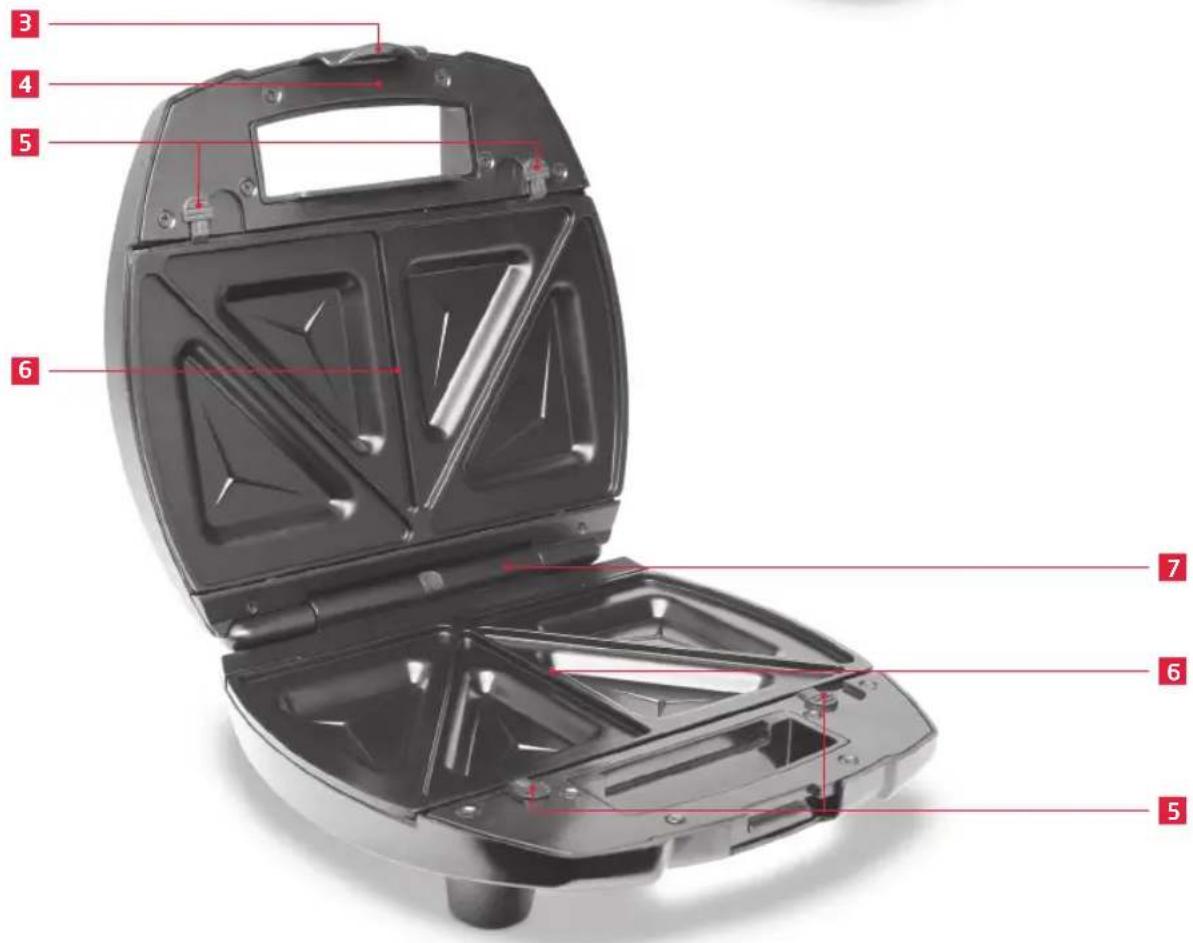
natural_image
Close-up of a white electrical outlet plug with a black cable, showing a red arrow pointing to the plug (no text or symbols visible)natural_image
Close-up of a black electrical plug with a red arrow pointing to its socket (no text or symbols visible)natural_image
Close-up of a mechanical component with a red arrow pointing to a small feature (no visible text or symbols)zablokować uchwyt.

natural_image
Two black plastic tray cavities with internal slots, no text or symbols visiblenatural_image
Close-up of a car body panel with a red arrow pointing to a specific part (no text or symbols visible)natural_image
Close-up of a mechanical component with a red arrow indicating a specific part (no text or symbols visible)natural_image
Close-up of a mechanical component with a red arrow pointing to a section (no visible text or symbols)3
4
5

natural_image
Open black plastic guitar box with internal compartments and red measurement lines (no text or symbols)7
6
5
Ostrzeżenie

natural_image
Close-up of a white electrical outlet plug with a black cable and red arrow pointing to the socket (no text or symbols visible)natural_image
Close-up of a black electrical plug with a red arrow pointing to its socket (no text or symbols visible)natural_image
Close-up of a black mechanical component with a red arrow pointing to a feature, labeled '3' (no readable text or symbols beyond label)bloqueie a pega
natural_image
Two black plastic tray-like objects with triangular cutouts and internal slots, no visible text or symbols.natural_image
Close-up of a mechanical component with red arrows indicating a specific feature (no text or symbols visible)natural_image
Close-up of a mechanical component with a red arrow pointing to a section, no visible text or symbolsnatural_image
Close-up of a mechanical component with a red arrow indicating a specific feature (no text or symbols visible)3
4
5

natural_image
Open black plastic grating box with internal compartments and red measurement lines (no text or symbols)7
6
5
natural_image
Close-up of a white electrical outlet plug with a black cable and red arrow pointing to the socket (no text or symbols visible)natural_image
Close-up of a black electrical plug with a red arrow pointing to its socket (no text or symbols visible)natural_image
Close-up of a mechanical component with a red arrow pointing to a detail (no visible text or symbols)зафиксируйте ручку.

natural_image
Two black plastic tray cavities with internal slots, no text or symbols visiblenatural_image
Close-up of a mechanical component with a red arrow pointing to a feature, no visible text or symbolsnatural_image
Close-up of a car body panel with a red arrow pointing to the interior (no text or symbols visible)natural_image
Close-up of a mechanical component with a red arrow pointing to a section (no visible text or symbols)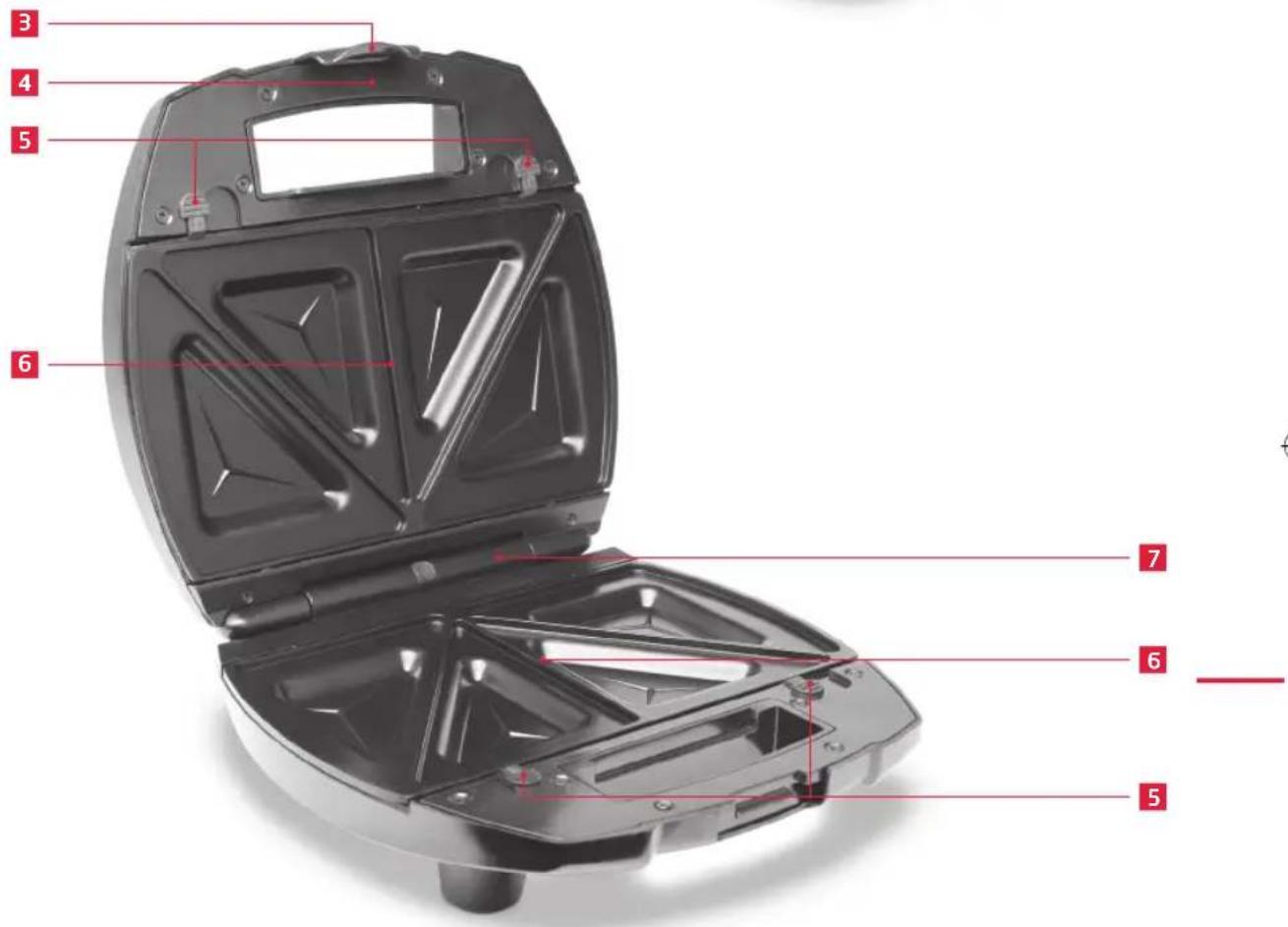
natural_image
Close-up of a white electrical outlet plug with a black cable and red arrow pointing to the socket (no text or symbols visible)natural_image
Close-up of a black electrical plug with a red arrow pointing to its side (no text or symbols visible)natural_image
Close-up of a black mechanical component with a red arrow pointing to a feature, labeled '3' (no readable text or symbols beyond label)handtaget.

natural_image
Two black plastic tray-like objects with triangular cutouts and internal slots, no visible text or symbols.natural_image
Close-up of a mechanical component with red arrows indicating a specific feature (no text or symbols visible)flikarna uppåt.

natural_image
Close-up of a mechanical component with a red arrow pointing to a cutaway section (no text or symbols visible)Ta bort kokplattan Tryck frigörings-
natural_image
Close-up of a mechanical component with a red arrow indicating a specific feature (no text or symbols visible)
natural_image
Close-up of a white electrical outlet plug with a black cable and red arrow pointing to the socket (no text or symbols visible)natural_image
Close-up of a black electrical plug with a red arrow pointing to its socket (no text or symbols visible)natural_image
Close-up of a mechanical component with a red arrow indicating a downward motion (no text or symbols visible)sapı kilitleyin

natural_image
Two black plastic tray-like objects with internal slots, no visible text or symbolsnatural_image
Close-up of a mechanical component with red arrow and label '5' (no readable text or symbols)natural_image
Close-up of a mechanical component with a red arrow pointing to a section, no visible text or symbolsnatural_image
Close-up of a mechanical component with a red zigzag line marking a feature (no text or symbols visible)3
4
5

natural_image
Open black plastic guitar box with internal compartments and red measurement lines (no text or symbols)7
6
5
natural_image
Close-up of a white electrical outlet plug with a black cable and red arrow pointing to the socket (no text or symbols visible)使用前,插上设备。
natural_image
Close-up of a black electrical plug with a red arrow pointing to its socket (no text or symbols visible)使用后,拔出设备。

natural_image
Close-up of a black mechanical component with a red arrow pointing to a feature, labeled '3' (no readable text or symbols beyond label)合上盖子,锁上手柄。

natural_image
Two black plastic tray-like objects with triangular cutouts and internal slots, no visible text or symbols.烹饪盘

natural_image
Close-up of a mechanical component with red arrow and label (no readable text or symbols)向上推动释放拉舌

natural_image
Close-up of a mechanical component with a red arrow pointing to a cutaway section (no text or symbols visible)移开烹饪盘。
natural_image
Close-up of a mechanical component with a red arrow pointing to a section (no visible text or symbols)将烹饪盘安装在铰链上。

轻轻推动,直至滴答一声入位。
说明
Brand : Koenic
Model : KSM804
Category : Sandwich Maker