CR1400 - Barcode Reader Code Corporation - Free user manual and instructions
Find the device manual for free CR1400 Code Corporation in PDF.


| Product Type | Handheld Barcode Scanner |
| Brand | Code Corporation |
| Model | CR1400 |
| Scan Engine | 2D CMOS Imager |
| Supported Symbologies | 1D, 2D, PDF417, QR, Data Matrix, Postal |
| Connectivity | USB (HID, CDC), optional Bluetooth |
| Dimensions (L x W x H) | 170 x 100 x 70 mm (6.7 x 3.9 x 2.8 in) |
| Weight | 150 g (5.3 oz) |
| Power Supply | USB bus power (5V DC, 500 mA) |
| Scan Angle | Horizontal: 40°, Vertical: 30° |
| Read Range | Up to 30 cm (12 in) for typical barcodes |
| Depth of Field | 5 cm to 30 cm (2 in to 12 in) |
| IP Rating | IP50 (dust resistant) |
| Drop Rating | 1.5 m (5 ft) to concrete |
| Operating Temperature | 0°C to 50°C (32°F to 122°F) |
| Storage Temperature | -20°C to 60°C (-4°F to 140°F) |
| Indicators | LED, Buzzer (programmable) |
| Warranty | 2 years |
| Maintenance | Clean lens with soft, dry cloth; avoid solvents |
| Safety Certifications | CE, FCC, RoHS |
| Included Accessories | USB cable, quick start guide |
Frequently Asked Questions - CR1400 Code Corporation
User questions about CR1400 Code Corporation
0 question about this device. Answer the ones you know or ask your own.
Ask a new question about this device
Download the instructions for your Barcode Reader in PDF format for free! Find your manual CR1400 - Code Corporation and take your electronic device back in hand. On this page are published all the documents necessary for the use of your device. CR1400 by Code Corporation.
USER MANUAL CR1400 Code Corporation
natural_image
Black barcode scanner with a white square patch and 'code' logo on top (no visible text or symbols on device body)Code Reader™ 1400
Manual Version 04
Release Date: January 2013

The Code Reader™ 1400 (CR1400) has been tested for compliance with FCC regulations and was found to be compliant with all applicable FCC Rules and Regulations.
IMPORTANT NOTE: To comply with FCC RF exposure compliance requirements, this device must not be co-located or operate in conjunction with any other antenna or transmitter.
CAUTION: Changes or modifications not expressly approved by the party responsible for compliance could void the user's authority to operate the equipment.

The CR1400 has been tested for compliance to CE standards and guidelines and was found to conform to applicable CE standards, specifically the EMC requirements EN 55024, ESD EN 61000-4-2, Radiated RF Immunity EN 61000-4-3, ENV 50204, EFT EN 61000-4-4, Conducted RF Immunity EN 61000-4-6, EN 55022, Class B Radiated Emissions, and Class B Conducted Emissions.
Code voids product warranty if the hard case has been opened or tampered with in any way.
In addition, a CB Test Certificate has been issued by the National Certification Board (NCB) indicating CR1400 meets all safety and quality standards in accordance to IEC 60950-1:2001, First Edition.
Code Reader™ 1400 User Manual
Copyright © 2013 Code Corporation.
All Rights Reserved.
The software described in this manual may only be used in accordance with the terms of its license agreement.
No part of this publication may be reproduced in any form or by any means without written permission from Code Corporation. This includes electronic or mechanical means such as photocopying or recording in information storage and retrieval systems.
NO WARRANTY. This technical documentation is provided AS-IS. Further, the documentation does not represent a commitment on the part of Code Corporation. Code Corporation does not warrant that it is accurate, complete or error free. Any use of the technical documentation is at the risk of the user. Code Corporation reserves the right to make changes in specifications and other information contained in this document without prior notice, and the reader should in all cases consult Code Corporation to determine whether any such changes have been made. Code Corporation shall not be liable for technical or editorial errors or omissions contained herein; nor for incidental or consequential damages resulting from the furnishing, performance, or use of this material. Code Corporation does not assume any product liability arising out of or in connection with the application or use of any product or application described herein.
NO LICENSE. No license is granted, either by implication, estoppel, or otherwise under any intellectual property rights of Code Corporation. Any use of hardware, software and/or technology of Code Corporation is governed by its own agreement.
The following are trademarks or registered trademarks of Code Corporation:
CodeXML ^® , Maker, QuickMaker, CodeXML ^® Maker, CodeXML ^® Maker Pro, CodeXML ^® Router, CodeXML ^® Client SDK, CodeXML ^® Filter, HyperPage, CodeTrack, GoCard, GoWeb, ShortCode, GoCode ^® , Code Router, QuickConnect Codes, Rule Runner ^® , Cortex ^® , CortexRM, CortexMobile, Code, Code Reader, CortexAG, CortexStudio, CortexTools, Affinity ^® , and CortexDecoder.
All other product names mentioned in this manual may be trademarks of their respective companies and are hereby acknowledged.
The software and/or products of Code Corporation include inventions that are patented or that are the subject of patents pending. U.S. Patents: 6997387, 6957769, 7428981, 6619547, 6736320, 7392933, 7014113, 7240831, 7353999, 7519239, 7204417, 6942152, 7070091, 7097099, 7621453, 8001550, 8011584
The Code Reader software uses the Mozilla SpiderMonkey JavaScript engine, which is distributed under the terms of the Mozilla Public License Version 1.1.
The Code Reader software is based in part on the work of the Independent JPEG Group.
Code Corporation, 14870 South Pony Express Road, Suite 200, Bluffdale, UT 84065
www.codecorp.com
Table of Contents
1.0 - Unpacking....1
2.0 - Attaching/Detaching a Cable....1
3.0 - Powering the Reader On/Off....1
4.0 - Using a CR1400 Out of a Stand....2
5.0 - Using a CR1400 in a Stand....2
6.0 - Reading Range....3
7.0 - Reader Feedback .... 3
8.0 - Symbologies Defaulted On....4
9.0 - Symbologies Defaulted Off....4
10.0 - Locating the Hardware Revision Number ....4
11.0 - Reader ID & Firmware Version .... 5
12.0 - CR1400 Overall Dimensions 6
13.0 - USB Cable Example with Pinouts....7
14.0 - RS232 Cable Example with Pinouts ....7
15.0 - Reader Pinouts ....8
16.0 - Maintenance....8
17.0 - Warranty 9
1.0 - Unpacking
Remove the CR1400 from its packing and inspect it for damage. If the reader was damaged during shipping, please call Code at (801) 495-2200.
Depending on the kit ordered, a USB or RS232 Affinity® cable has been included with your reader.
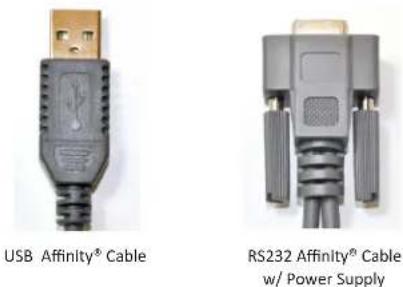
2.0 - Attaching and Detaching a Cable
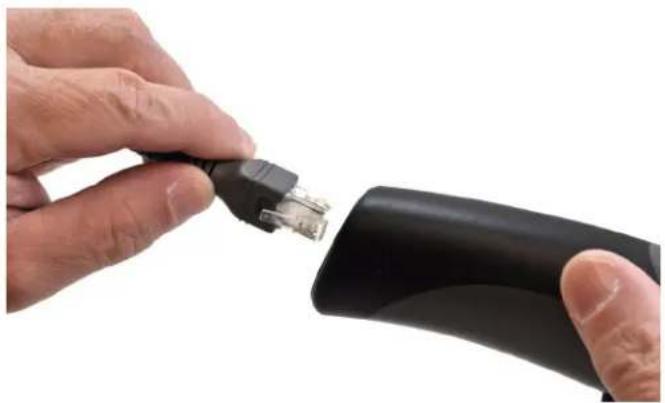
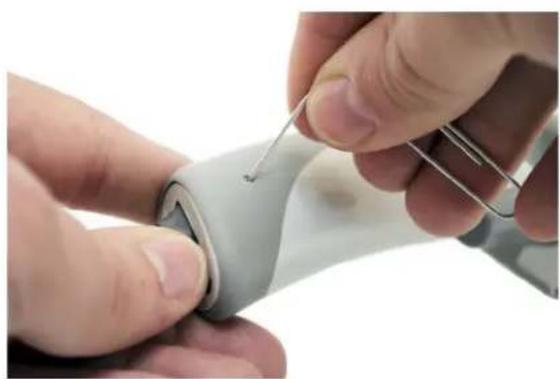
To attach a cable, plug the RJ-50 end of the Affinity® cable into bottom of the reader handle (Figure 1). Firmly push the connector into the reader, until a snap can be heard to indicate the cable is properly attached. To detach a cable, press a paper clip into the hole on the side of the CR1400 handle (Figure 2), and gently pull the cable from the reader.
natural_image
Close-up of a hand inserting a USB into a black remote control device (no text or symbols visible)Figure 1
natural_image
Close-up of hands using a tool to apply material to a white cylindrical component (no text or symbols visible)Figure 2
3.0 - Powering On/Off the Reader
For USB Cable: plug the USB end of the Affinity® cable into a USB port on the host device. After several seconds, the reader will beep twice, the reader will vibrate, and the LED will turn off to indicate the CR1400 is ready for use.
For RS232 Cable: plug the power supply into the AC outlet, plug the power supply cord into the barrel jack of the cable, and connect the RS232 connector to the appropriate serial port on the host device. After several seconds, the reader will beep twice, the reader will vibrate and the LED will turn off to indicate the CR1400 is ready for use.
4.0 - Using a CR1400 Out of a Universal Stand
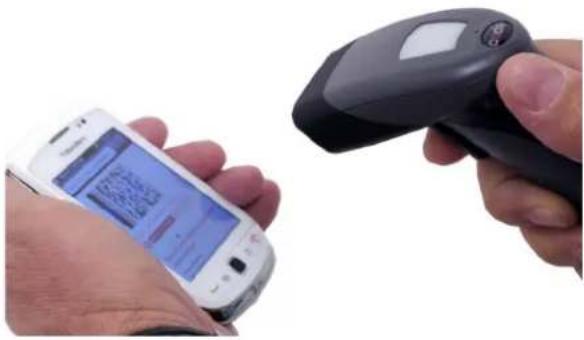
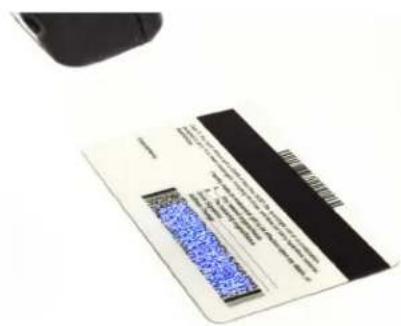
Press and hold the CR1400 trigger, the two blue bars emitting from the reader are used for targeting. Center the blue bars in the middle of a bar code. The optimal reading distance from reader to bar code is approximately 4.0" (10 cm).
Once the reader is at the optimal distance, the reader will read the bar code. The CR1400 will beep, flash a green LED and vibrate to indicate a 'good read' has occurred.
To modify any default settings, download the CR1400 Configuration Guide at www.codecorp.com/files.php and scan the appropriate code.
5.0 - Using a CR1400 in a Universal Stand
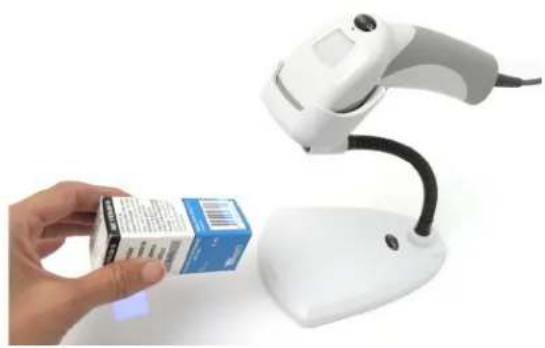
Revision 2 Hardware of the CR1400 has a stand detection feature. By default, when the CR1400 is placed in the stand, the reader will automatically enter into motion detection mode. When in this mode, simply place a bar code in the scan field to activate the reader. The CR1400 will beep and flash a green LED to indicate a 'good read' has occurred.
When the CR1400 is removed from the stand, the reader switches to manual mode and the trigger must be pressed to read a bar code (refer to Section 4.0).
Revision 1 Hardware of the CR1400 does not have an automatic stand detection feature to enable motion detection reading when the CR1400 is in a stand. To configure this hardware revision for motion detection scanning, please refer to the CR1400 Configuration Guide, located at www.codecorp.com/files.php and scan the appropriate code.
natural_image
Hand holding a box next to a white barcode scanner (no visible text or symbols)See Section 10.0 to learn how to determine your CR1400 hardware revision number.
6.0 - Reading Ranges
| CR1400 Performance | ||
| Test Code Min Inches (mm) Max Inches (mm) | ||
| 3 mil Code 39 3.1" (80 mm) 4.0" | (102 mm) | |
| 7.5 mil Code 39 1.3" (33 mm) 7.2" | (182 mm) | |
| 10.5 mil GS1 DataBar | 0.8" (20 mm) 8.7" (220 mm) | |
| 13 mil UPC 1.1"(28 mm) | 11.0" (280 mm) | |
| 4.2 mil Data Matrix | 1.9" (48 mm) 4.3" (110 mm) | |
| 5 mil Data Matrix | 1.7" (43 mm) 4.5" (115 mm) | |
| 6.3 mil Data Matrix | 1.3" (33 mm) 5.9" (150 mm) | |
| 10 mil Data Matrix | 0.8" (20 mm) 7.1" (180 mm) | |
| 20.8 mil Data Matrix | 1.1" (28 mm) 13.5" (343 mm) | |
Note: working ranges are a combination of both the wide and high density fields. All samples were high quality codes and were read along a physical center line at a 10^ angle. Default AGC settings were used. Accuracy= +/- 10%.
7.0 - Reader Feedback
| Scenario Top LED Light Sound Vibration | |||
| CR1400 Successfully Powers Up | Green LED Flashes 1 Beep Handle Vibrates | ||
| CR1400 Successfully Enumerates with Host (via cable) | Once Enumerated, the Green LED turns Off | 1 Beep Handle Vibrates | |
| Attempting to Decode | Green LED Light is Off | None No Vibration | |
| Successful Decode and Data Transfer | Green LED Flashes 1 Beep Handle Vibrates | ||
| Configuration Code Successfully Decoded and Processed | Green LED Flashes 2 Beep Handle Vibrates | ||
| Configuration Code successfully decoded but wasn’t successfully processed | Green LED Flashes 4 Beeps Handle Vibrates | ||
8.0 - Symbologies Defaulted On
The following are symbologies that have a default of ON. To turn symbologies on or off, scan the symbology bar codes located in the CR1400 Configuration Guide located on our website at http://www.codecorp.com.
Aztec
Codabar
Code 39
Code 93
Code 128
Data Matrix
Data Matrix Rectangle
All GS1 DataBar
Interleaved 2 of 5
PDF417
QR Code
UPC/EAN/JAN
9.0 - Symbologies Defaulted Off
The following are symbologies that have a default of OFF. To turn symbologies on or off, scan the symbology bar codes located in the CR1400 Configuration Guide located on our website at http://www.codecorp.com.
Aztec Inverse
Code 11
Code 32
Code 39 Extended Full ASCII
Code 39 Checksum
Composite
Data Matrix Inverse
Han Xin
Matrix 2 of 5
Micro PDF417
Micro QR
MSI Plessey
Plessey
QR Code Inverse
Straight 2 of 5
Trioptic
UPC-E Expansion
UPC Supplemental
10.0 - Locating the Hardware Revision Number
Locate the serial label on the bottom of the reader to identify the hardware revision number of the CR1400.
Serial #: 20000XXXX
MFG #: CR1411_02
Designed in USA.
Made in Malaysia.
The number after the
underscore ( _ ) represents the
hardware revision number.
11.0 - Reader ID and Firmware Version
To find out the Reader ID and firmware version, open a text editor program (i.e., Notepad, Microsoft Word, etc.) and read the following code:
Reader ID and Firmware

You will see a text string indicating your firmware version and CR1400 ID number (see below):
iVVVVWWWWXXXXSSSSSSSSSAODYYYYHHIIIIJJJKKKLLLL
i indicates '1' string output;
VVVV is the application firmware version number;
WWW is the core application firmware version number;
XXXX is reserved for the radio firmware version number;
SSSSSSSSS is the Reader's serial number (ten digits);
A is the current execution state:
"A" means core is running
"B" means undefined
"C" means undefined
OO is the OEM identifier;
D is the display type:
"0" or "N" is no display device
“D” is the standard Keypad/Display
YYYY is the flash file system version number. Reserved;
HH is the hardware revision;
III is the hardware type identifier: 0008 indicates a CR1400
JJJJ is the boot application version;
KKKK is the operating system kernel version;
LLLL is the root file-system version;
Z...Z is the OEM decoder version: a null terminated string of printable ASCII characters. Without a decoder.ini file, the order of the decoders listed here indicates the order of use.
Example: Xap/i3000300006040010002363A06D-SD+SQ
Note: Code will periodically release new firmware for CR1400 readers. For information on latest firmware versions, call Code at (801) 495-2200. To upgrade firmware, please visit our website at http://www.codecorp.com/codesupport.php and follow instructions provided.
12.0 - CR1400 Overall Dimensions
![131.72 [5.186] 91.49 [3.602]](/content/2026/06/1280938/images/6f726a3ae3e57bbf757bbe6f3e2fcd5538bae76ecf7627188c743d876087ef83.jpg)
![51.95 [2.045]](/content/2026/06/1280938/images/9dbc0cb40c049d0553fca26480abe697d29657f2fdc5427ea13c22e0af22e11d.jpg)
13.0 - USB Cable Example with Pinouts
Connector B
Connector A

natural_image
Line drawing of a USB cable connector with port and connector terminals (no text or symbols)Connector A
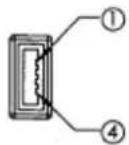
WIRING TABLE:
| CONNECTOR A | NAME | WIRE | COLOR | CONNECTOR B |
| 1 | VIN | 24AWG | RED | 1 |
| 2 | DM | 28AWG | WHITE | 2 |
| 3 | DP | 28AWG | GREEN | 3 |
| 4 | GND | 24AWG | BLACK | 10 |
| SHELL | - | SHIELD | BARE | SHELL |
Connector B
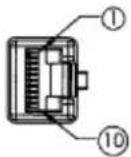
See Section 15.0 for complete reader pinouts descriptions.
NOTES:
- Part to be ROHS and Reach compliant.
- Maximum Voltage Tolerance = 5V +/- 10%.
- Caution: Exceeding the maximum voltage will void manufacturer warranty.
14.0 - RS232 Cable Example with Pinouts
Connector B
Connector A

natural_image
Technical line drawing of a coiled electrical connector with connectors (no text or symbols)Connector A
Connector B
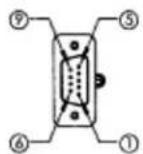
Connector C
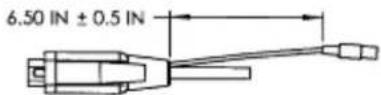
• MATING PLUG OD: 5.5 mm
• CENTER PIN OD 2.0 mm, LENGTH 8.5 mm.
• INPUT: +5V=——MIN 500 mA

WIRING TABLE:
| CONN A | NAME | WIRE | COLOR | CONN B | WIRE | COLOR | CONN C |
| 1 | VIN | 24AWG | RED | 9 | 24AWG | RED | TIP |
| 4 | TX | 28AWG | BROWN | 2 | |||
| 5 | RTS | 28AWG | ORANGE | 8 | |||
| 6 | RX | 28AWG | YELLOW | 3 | |||
| 7 | CTS | 28AWG | GREEN | 7 | |||
| 10 | GND | 24AWG | BLACK | 5 | 24AWG | BLACK | RING |
| SHIELD | - | SHIELD | SHIELD |
See Section 15.0 for complete reader pinouts descriptions.
NOTES:
- Part to be ROHS and Reach compliant.
- Maximum Voltage Tolerance = 5V +/- 10%.
- Caution: Exceeding the maximum voltage will void manufacturer warranty.
15.0 - Reader Pinouts
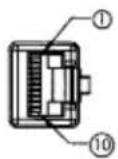
The connector on the CR1400 is an RJ-50 (10P-10C). The pinouts are as follows:
| Pin 1 +VIN (5v) |
| Pin 2 USB_DM |
| Pin 3 USB_DP |
| Pin 4 RS232 TX (output from reader) |
| Pin 5 RS232 RTS (output from reader) |
| Pin 6 RS232 RX (input to reader) |
| Pin 7 RS232 CTS (input to reader) |
| Pin 8 External Trigger (active low input to reader) |
| Pin 9 N/C |
| Pin 10 Ground |
16.0 - CR1400 Maintentance
The CR1400 needs only a minimum of maintenance to operate. A few tips are given below for maintenance suggestions.
Cleaning the CR1400
The CR1400 window should be clean to allow the best performance of the device. The window is the clear plastic piece inside the head of the reader. Do not touch the window. Your CR1400 uses CMOS technology that is much like a digital camera. A dirty window may stop the CR1400 from reading bar codes.
If the window becomes dirty, clean it with a soft, non-abrasive cloth or a facial tissue (no lotions or additives) that has been moistened with water. A mild detergent may be used to clean the window, but the window should be wiped with a water moistened cloth or tissue after using the detergent.
The following agents are approved to clean a Code bar code reader:
1) Alcohol Wipes
2) CaviWipes® Disinfecting Towlettes
3) Clorox® Disinfecting Wipes
4) Clorox Bleach Solution (10% clorox bleach, 90% tap water)
5) Medical DiAirKem
6) Sani-Cloth® HB, Super Sani-Cloth® Germicidal, Sani-Cloth® Plus Germicidal Disposable Wipes
7) Virex ^® II Disinfectant Cleaner
Technical Support and Returns
For returns or technical support call Code Technical Support at (801) 495-2200. For all returns Code will issue an RMA number which must be placed on the packing slip when the reader is returned.
Visit http://www.codecorp.com/codesupport.php for more information.
17.0 - Warranty
Code's CR1400 carries a five year limited warranty as described herein. Universal Stands follow the warranty of the reader, and Cables have a 90 Day warranty period.
Limited Warranty
Code manufactures its hardware products in accordance with industry-standard practices. Code warrants its products will be free from defects in materials and workmanship, provided that the products are used under normal operating condition intended by the Manufacturer. This warranty is provided to the original owner only and is not transferable to any third party. This warranty is subject to any and all accompanying disclaimers, limitations and other terms of this section.
Warranty periods are not extendable beyond 5 years. CodeOne extended warranty programs are available and must be purchased within 90 days of purchase. Please refer the CodeOne Data Sheet for program pricing and terms and conditions.
Exclusions
No warranty herein contained or set out shall apply to any product (i) which has been repaired, altered or tampered with unless done or approved by Code, (ii) which has not been maintained in accordance with any operating or handling instructions supplied by Code, (iii) which has been subjected to unusual physical or electrical stress, immersion in fluids, puncture, crushing, misuse, abuse, power shortage, improper power supply such as incorrect voltage or wrong polarity, negligence or accident, or (iv) which has been used other than in accordance with the product operating and handling instructions. Preventive maintenance is the responsibility of the customer and is not covered under this warranty.
Warranty Coverage and Procedure
During the warranty period, Code will repair or replace defective products returned to Code's service center in the US. For worldwide warranty service, go to http://www.codecorp.com/technical-support.php and fill out a service request. Customer will be issued a case number. Case will be routed into the support queue within Code. Customer will be contacted within one business day of submission. Code representative will work with customer to troubleshoot solution and attempt to restore reader to proper functionality. If the Code representative determines that it cannot be restored programmatically and deems a hardware issue is found a Return Material Authorization (RMA) Number will be assigned and customer will be instructed to return the product to Code.
Products must be shipped in the original or comparable packaging, with shipping and insurance charges prepaid. Only parts listed in the original RMA should be sent and will be accepted. Code will pay for return shipping and insurance of repaired or replacement products worldwide. Code will use new or refurbished parts at its discretion and will own all parts removed from repaired products. Customer will pay for any pre-shipped replacement product in case it does not return the replaced product to Code within 7 days of receipt of the replacement product. The process for return and customer's charges will be in accordance with Code's Exchange Policy in effect at the time of the exchange. Customer accepts full responsibility for its software and data including the appropriate backup thereof. Repair or replacement of a product during warranty will not extend the original warranty term.
Return time frames are listed in the chart above. For RMA's not covered under warranty as outlined in the exclusion section, customer will be required to pay the non-covered warranty fee as listed in the chart above.
General
EXCEPT FOR THE WARRANTIES STATED ABOVE, CODE DISCLAIMS ALL WARRANTIES, EXPRESS OR IMPLIED, ON PRODUCTS FURNISHED HEREUNDER, INCLUDING WITHOUT LIMITATION IMPLIED WARRANTIES OF MERCHANTABILITY AND FITNESS FOR A PARTICULAR PURPOSE AND NON-INFRINGEMENT.
The stated express warranties are in lieu of all obligations or liabilities on part of Code for damages, including without limitation, special, indirect, or consequential damages arising out of or in connection with the use or performance of the product. Seller's liability for damages to buyer or others (regardless of the form of action, whether by contract, warranty, tort, malpractice, and/or otherwise) resulting from the use of any product, shall in no way exceed the purchase price of said product. In no event shall Code be liable for any consequential, special, indirect, incidental or punitive damages, or for any loss of profits, revenue or data, even if Code has been advised of the possibility thereof.
- Code Reader™ 1400 User Manual
- Table of Contents
- - Unpacking
- - Attaching and Detaching a Cable
- - Powering On/Off the Reader
- - Using a CR1400 Out of a Universal Stand
- - Using a CR1400 in a Universal Stand
- - Reading Ranges
- - Reader Feedback
- - Symbologies Defaulted On
- - Symbologies Defaulted Off
- - Locating the Hardware Revision Number
- - Reader ID and Firmware Version
- - CR1400 Overall Dimensions
- - USB Cable Example with Pinouts
- NOTES:
- - RS232 Cable Example with Pinouts
- - Reader Pinouts
- - CR1400 Maintentance
- Cleaning the CR1400
- Technical Support and Returns
- - Warranty
- Limited Warranty
- Exclusions
- Warranty Coverage and Procedure
- General
Brand : Code Corporation
Model : CR1400
Category : Barcode Reader