
SB2000A - Docking Station PHILIPS - Free user manual and instructions
Find the device manual for free SB2000A PHILIPS in PDF.


| Product Type | Docking Station |
| Brand | Philips |
| Model | SB2000A |
| Dimensions (W x D x H) | 200 x 150 x 50 mm |
| Weight | 0.5 kg |
| Power Supply Input | 100-240V AC, 50/60Hz |
| Power Supply Output | 5V DC, 2A |
| Charging Output | 5V, 2A |
| Audio Output | 3.5mm aux jack |
| Compatibility | Most smartphones and tablets with USB charging |
| Main Functions | Charge devices and play music via built-in speakers |
| Built-in Speakers | Yes, stereo |
| LED Indicator | Power status LED |
| Material | Plastic and metal |
| Care Instructions | Wipe with a dry cloth |
| Cleaning Warnings | Do not use liquid cleaners or immerse in water |
| Safety | Keep away from water and heat sources. Do not disassemble. |
| Included Accessories | AC adapter, user manual |
| Repairability | Not user-serviceable. Contact Philips support. |
| Operating Temperature | 0°C to 40°C |
Frequently Asked Questions - SB2000A PHILIPS
User questions about SB2000A PHILIPS
0 question about this device. Answer the ones you know or ask your own.
Ask a new question about this device
Download the instructions for your Docking Station in PDF format for free! Find your manual SB2000A - PHILIPS and take your electronic device back in hand. On this page are published all the documents necessary for the use of your device. SB2000A by PHILIPS.
USER MANUAL SB2000A PHILIPS
Always there to help you
Register your product and get support at
www.philips.com/welcome

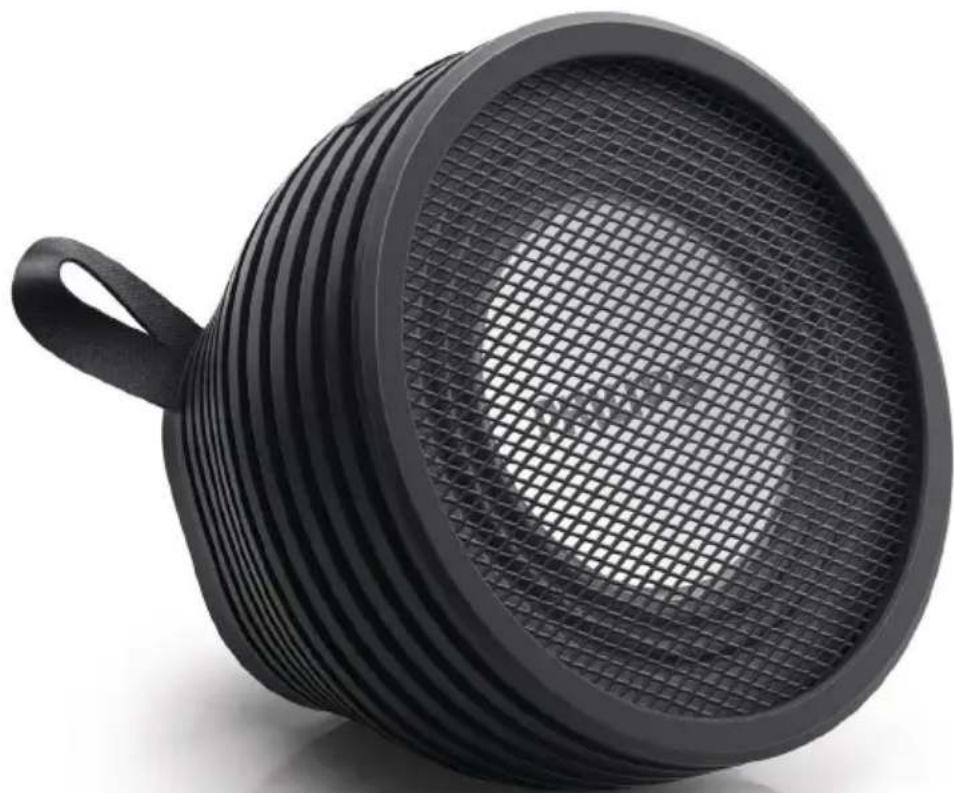
SB2000
natural_image
Black plastic filter or filter device with a mesh grille and handle, shown against white background (no text or symbols)User manual
PHILIPS
Register online at www.philips.com/welcome today to get the very most from your purchase.
Registering your model with PHILIPS makes you eligible for all of the valuable benefits listed below, so don't miss out. Register online at www.philips.com/welcome to ensure:
\*Product Safety Notification
By registering your product, you'll receive notification - directly from the manufacturer.
\*Additional Benefits
Registering your product guarantees that you'll receive all of the privileges to which you're entitled, including special money-saving offers.
PHILIPS
Congratulations on your purchase, and welcome to the "family!"
Dear PHILIPS product owner:
Thank you for your confidence in PHILIPS. You've selected one of the best-built, best-backed products available today. We'll do everything in our power to keep you happy with your purchase for many years to come.
As a member of the PHILIPS "family," you're entitled to protection by one of the most comprehensive warranties in the industry. What's more, your purchase guarantees you'll receive all the information and special offers for which you qualify, plus easy access to accessories from our convenient home shopping network.
Most importantly, you can count on our uncompromising commitment to your total satisfaction.
All of this is our way of saying welcome - and thanks for investing in a PHILIPS product.
P.S. To get the most from your PHILIPS purchase, be sure to register online at:
www.philips.com/welcome
Know these
safety symbols
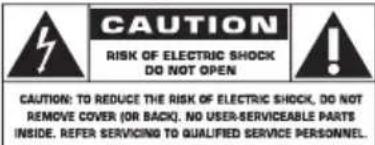

This "bolt of lightning" indicates uninsulated material within your unit may
cause an electrical shock. For the safety of everyone in your household, please do not remove product covering.

The “exclamation point” calls attention to features for which you should the enclosed literature closely to pre-operating and maintenance problems.
WARNING: To reduce the risk of fire or electric shock, this apparatus should not be exposed to rain or moisture and objects filled with liquids, such as vases, should not be placed on this apparatus.
CAUTION: To prevent electric shock, match wide blade of plug to wide slot, fully insert.
Enter below the Serial No. which is located on the rear of the cabinet. Retain this information for future reference.
Model No. ____ Serial No. ____
Contents
1 Important safety instructions 4
2 Your Portable Speaker 5
Introduction 5
What's in the box 5
3 Get started 6
Charge the built-in battery 6
Power on/off 6
4 Use Bluetooth devices 7
Connect a device 7
Play audio via Bluetooth 8
Make a call 8
Clear the pairing history 8
5 Listen to an external device 9
6 Adjust volume 9
7 Product information 10
General information 10
Bluetooth 10
Amplifier 10
8 Troubleshooting 10
General 10
About Bluetooth device 10
9 Notice 11
Compliance 11
Disposal of your old product and
batteries 12
Trademark notice 12
Copyright 12
1 Important safety instructions
① Read these instructions.
② Keep these instructions.
③ Heed all warnings.
④ Follow all instructions.
⑤ Do not install near any heat sources such as radiators, heat registers, stoves, or other apparatus (including amplifiers) that produce heat.
⑥ Only use attachments/accessories specified by the manufacturer.
⑦ Refer all servicing to qualified service personnel. Servicing is required when the apparatus has been damaged in any way, such as power-supply cord or plug is damaged, liquid has been spilled or objects have fallen into the apparatus, the apparatus has been exposed to rain or moisture, does not operate normally, or has been dropped.
⑧ Do not place any sources of danger on the product, for example, lighted candles.
⑨ Keep the product away from direct sunlight, naked flames or heat.
⑩ During charging the battery or listening to an external device through the USB cable, do not expose this product to any liquid.
⑪ Make sure that the protective lid is tightly closed before exposing this product to any liquid.
⑫ Never open the protective lid under humid circumstance or when the product is wet.
⑬ After use under humid circumstance, immediately clean the product with a soft dry cloth and let it dry in a well-ventilated place away from direct sunlight.
⑭ Battery shall not be exposed to excessive heat such as sunshine, fire or the like.
⑮ Danger of explosion if battery is incorrectly replaced. Replace only with the same or equivalent type.
⑯ Batteries contain chemical substances, so they should be disposed of properly.
- Perchlorate Material - special handling may apply. See www.dtsc.ca.gov/hazardouswaste/perchlorate.

Warning
- Never remove the casing of this apparatus.
• Never lubricate any part of this apparatus. - Never place this apparatus on other electrical equipment.

Caution
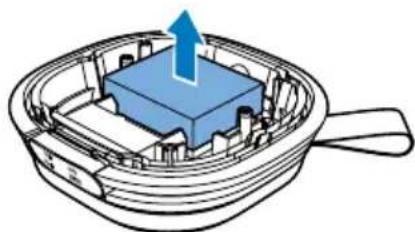
•Removal of the built-in battery invalidates the warranty and may destroy the product.
• These servicing instructions are for use by qualified service personnel only. To reduce the risk of electric shock do not perform any servicing other than that contained in the operating instructions unless you are qualified to do so.
Always bring your product to a professional to remove the built-in battery.
natural_image
Diagram of a blue rectangular component inside a transparent container with a handle, showing internal structure and an upward arrow (no text or symbols)
Note
- Rechargeable batteries have a limited number of charge cycles. Battery life and number of charge cycles vary by use and settings.

Note
•The type plate is located on the bottom of the product.
2 Your Portable Speaker
Congratulations on your purchase, and welcome to Philips! To fully benefit from the support that Philips offers, register your product at www.philips.com/welcome.
Introduction
With this speaker, you can
- listen to audio from an external device via Bluetooth connection,
- listen to audio from an external device through the micro USB socket, and
• make phone calls.
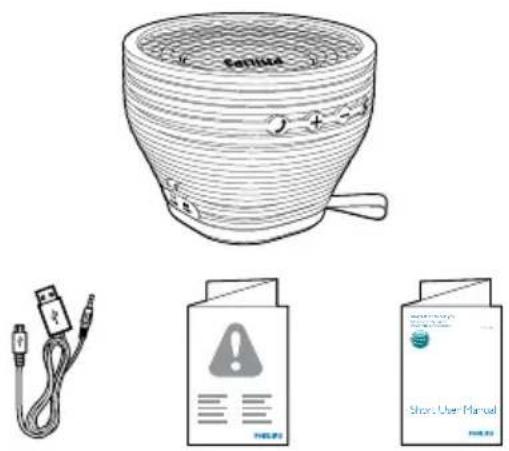
What's in the box
Check and identify the contents of your package:
- Main unit
- USB cable
- Short user manual
- Safety sheet
3 Get started
Always follow the instructions in this chapter in sequence.
Charge the built-in battery
The speaker is powered by a built-in rechargeable battery.

Note
•Before use, fully charge the built-in battery.
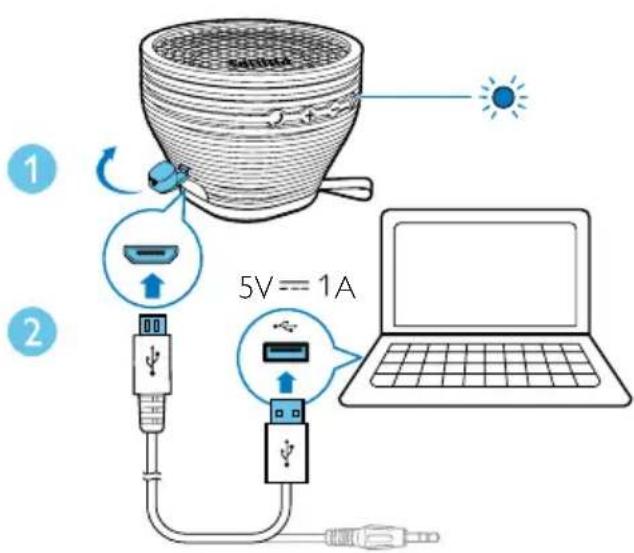
1 Open the protective lid.
2 Connect the USB cable between
• the micro USB socket on the speaker, and
• a USB socket on your computer.
Battery indicator
The LED indicator beside the Ⓐ button indicates the battery status.
Indicator Battery
Solid red Under charging
Off Fully charged
Power on/off
Press Ⓞ to power it on or off.
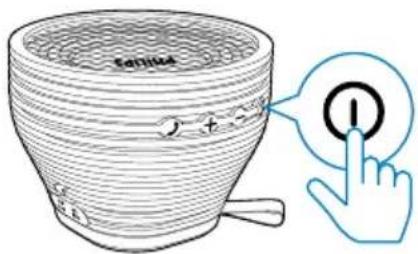

Note
If the USB cable is connected to the micro USB socket, this product does not automatically power off. To save battery power, disconnect the USB cable or manually power off the product after use.
- In Bluetooth mode, if there is no Bluetooth connection or no audio is streamed to this product for 15 minutes, this product automatically powers off.
Use the auto sensor
An auto sensor is integrated in this product. You can adjust the direction of this product to power it off easily.

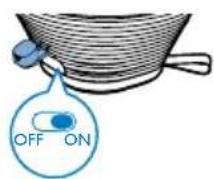

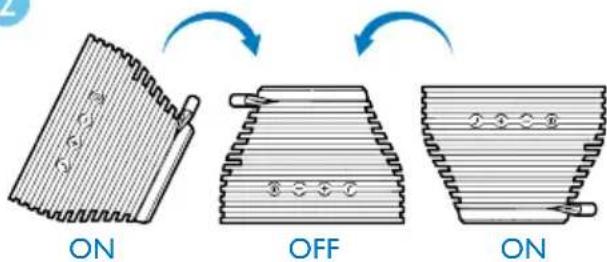
1 Switch the slider to ON to enable the auto sensor.
2 Put the speaker upside down.
→ After 30 seconds, it powers off automatically.
• To power it on again, press ^① .
• To disable the auto sensor, switch the slider to OFF.
4 Use Bluetooth devices
With this speaker, you can listen to audio from a player and make a call through Bluetooth.

Note
- WOOX Innovations does not guarantee the compatibility with all Bluetooth devices.
- Before pairing a device with this product, read its user manual for Bluetooth compatibility. Make sure that the connected Bluetooth device supports the Advanced Audio Distribution Profile (A2DP) and the Audio Video Remote Control Profile (AVRCP).
- The product can memorize a maximum of 4 paired devices.
• Make sure that Bluetooth function is enabled on your device, and your device is set as visible to all other Bluetooth devices.
• The operational range between this product and a Bluetooth device is approximately 10 meters (30 feet). - Any obstacle between this product and a Bluetooth device can reduce the operational range.
- Keep away from any other electronic device that may cause interference.
Connect a device
flowchart
graph TD
    A["Sunlight"] --> B["COFFA"]
    B --> C["(BEEP)"]
    C --> D["SB2000"]
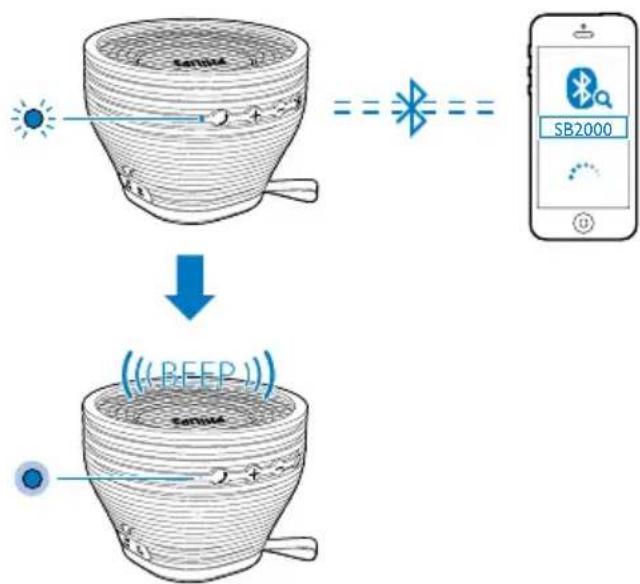
1 On your device, search for Bluetooth devices.
2 In the device list, select SB2000.
- If a message prompts for the permission for Bluetooth connection with SB2000, confirm it.
• If a password is required, enter 0000 and then confirm.
→ The speaker beeps when the Bluetooth connection is established.
Bluetooth indicator
The LED indicator beside the √ button indicates the status of Bluetooth connection.
Indicator Bluetooth connection
Blinking blue Connecting or waiting for connection
Solid blue Connected
Disconnect a device
On your device, disable the Bluetooth connection with this product.

Note
- Before connecting another Bluetooth device, disconnect the current device first.
Reconnect a device
- For a paired Bluetooth device on which the automatic reconnection is enabled, this product reconnects with it once it is detected.
- For a paired Bluetooth device that does not support the automatic reconnection, reconnect it with this product manually.
Play audio via Bluetooth

Note
If the connected Bluetooth device supports the Advanced Audio Distribution Profile (A2DP), you can listen to tracks that are stored on the device through the system.
- If the device also supports the Audio Video Remote Control Profile (AVRCP), you can control play on this product.
- If the connected device does not support the AVRCP, control play on the connected device.
- If there is an incoming call on the connected mobile phone, music play pauses.
| Buttons | Functions |
| Start, pause, or resume play. | |
| + / - | Increase or decrease the speaker volume. |
Make a call
| Buttons | Functions |
| Press to answer an incoming call. | |
| Press to end the current call. | |
| Press and hold to reject an incoming call. | |
| Press twice to dial the last called number. | |
| Press twice to hold on the current call and answer another incoming call. | |
| +/- | Increase or decrease the speaker volume. |
Clear the pairing history
When the product is powered off, press and hold Ⓐ for 8 seconds.
5 Listen to an external device
You can also listen to an external audio device, for example, MP3 player, through this product.

Note
• Make sure that no device is streaming audio to the speaker via Bluetooth.
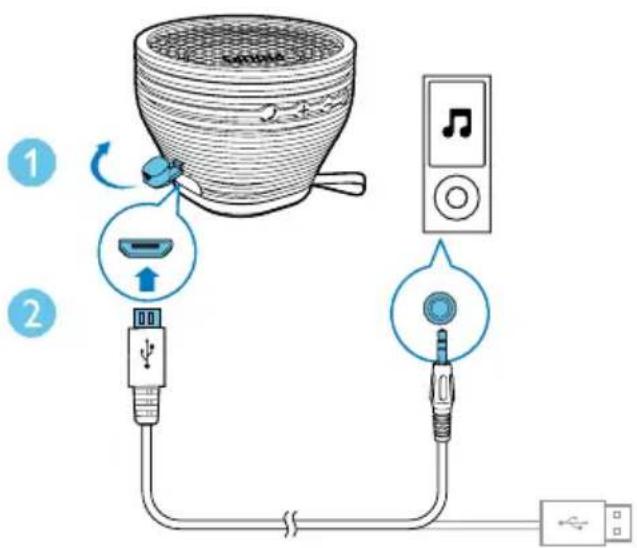
1 Open the protective lid.
2 Connect the USB cable between
• the micro USB socket on this product, and
• the headphone socket on the external device.
3 Play audio on the external device (refer to its user manual).
6 Adjust volume
Press +/ -
7 Product information

Note
- Product information is subject to change without prior notice.
General information
| Power Supply (through USB socket) | 5 V== 1 A |
| Built-in Battery Lithium battery(500 mAh, 7.4 V) | |
| Dimensions - Main Unit (W x H x D) | 123 x 92 x 123 mm |
| Weight - Main Unit 0.6 kg | |
Bluetooth
| Bluetooth specification | V3.0 |
| Supported profiles | A2DP v1.0, AVRCP V1.0, HFP, and HSP |
| Range 10 m (Free space) | |
Amplifier
| Rated Output Power 5 W RMS | |
| Signal to Noise Ratio > 50 dBA | |
| Audio input through micro USB socket | 650 mV RMS, 22 kOhm |
8 Troubleshooting

Warning
• Never remove the casing of this product.
To keep the warranty valid, never try to repair the product yourself. If you encounter problems when using this device, check the following points before requesting service. If the problem remains unsolved, go to the Philips Web page (www.philips.com/support). When you contact the Consumer Care, make sure that the product is nearby and the model number and serial number are available.
General
No power
• Recharge your speaker.
No sound
• Adjust volume on this product.
- Adjust volume on the connected device.
• Make sure that your Bluetooth device is within the effective operational range.
No response from the speaker
- Restart the speaker.
About Bluetooth device
The audio quality is poor after connection with a Bluetooth-enabled device.
- The Bluetooth reception is poor. Move the device closer to this product or remove any obstacle between them.
Cannot connect with the device.
- The Bluetooth function of the device is not enabled. Refer to the user manual of the device for how to enable the function.
- This product is already connected with another Bluetooth-enabled device. Disconnect that device and then try again.
The paired device connects and disconnects constantly.
- The Bluetooth reception is poor. Move the device closer to this product or remove any obstacle between them.
- For some devices, Bluetooth connection may be deactivated automatically as a power-saving feature. This does not indicate any malfunction of this product.
9 Notice
Any changes or modifications made to this device that are not expressly approved by WOOX Innovations may void the user's authority to operate the equipment.
Compliance
Notice for the USA and Canada
This device complies with Part 15 of the FCC Rules and RSS standard of Industry Canada. Operation is subject to the following two conditions:
1 this device may not cause harmful interference, and
2 this device must accept any interference received, including interference that may cause undesired operation.
This equipment has been tested and found to comply with the limits for a Class B digital device, pursuant to part 15 of the FCC Rules and ICES-003 of Industry Canada. These limits are designed to provide reasonable protection against harmful interference in a residential installation. This equipment generates, uses, and can radiate radio frequency energy and, if not installed and used in accordance with the instruction manual, may cause harmful interference to radio communications. However, there is no guarantee that interference will not occur in a particular installation. If this equipment does cause harmful interference to radio or television reception, which can be determined by turning the equipment off and on, the user is encouraged to try to correct the interference by one or more of the following measures:
- Relocate the receiving antenna.
-
Increase the separation between equipment and receiver.
-
Connect the equipment into an outlet on a circuit different from that to which the receiver is connected.
- Consult the dealer or an experienced radio/TV technician for help.
RF Radiation Exposure Statement: This equipment complies with FCC's and IC's RF radiation exposure limits set forth for an uncontrolled environment. The antenna(s) used for this transmitter must be installed and operated to provide a separation distance of at least 20 cm from all persons and must not be collocated or operating in conjunction with any other antenna or transmitter. Installers must ensure that 20cm separation distance will be maintained between the device (excluding its handset) and users.
This product is designed to be waterproof in compliance with IEC 60529 IPX4.
Disposal of your old product and batteries
Your product is designed and manufactured with high quality materials and components, which can be recycled and reused.
Never dispose of your product with other household waste. Please inform yourself about the local rules on the separate collection of electrical and electronic products and batteries.
The correct disposal of these products helps prevent potentially negative consequences on the environment and human health.
Your product contains batteries, which cannot be disposed of with normal household waste.
Please inform yourself about the local rules on separate collection of batteries. The correct disposal of batteries helps prevent potentially negative consequences on the environment and human health.
Please visit www.recycle.philips.com for additional information on a recycling center in your area.
Environmental information
All unnecessary packaging has been omitted.
We have tried to make the packaging easy to
separate into three materials: cardboard (box), polystyrene foam (buffer) and polyethylene (bags, protective foam sheet.)
Your system consists of materials which can be recycled and reused if disassembled by a specialized company. Please observe the local regulations regarding the disposal of packaging materials, exhausted batteries and old equipment.
Trademark notice
The Bluetooth® word mark and logos are registered trademarks owned by Bluetooth SIG, Inc. and any use of such marks by WOOX Innovations is under license.
Copyright
2014 © WOOX Innovations Limited. All rights reserved.
Philips and the Philips' Shield Emblem are registered trademarks of Koninklijke Philips N.V. and are used by WOOX Innovations Limited under license from Koninklijke Philips N.V."
Specifications are subject to change without notice. WOOX reserves the right to change products at any time without being obliged to adjust earlier supplies accordingly.


Specifications are subject to change without notice. 2014 © WOOX Innovations Limited. All rights reserved. This product was brought to the market by WOOX Innovations Limited or one of its affiliates, further referred to in this document as WOOX Innovations, and is the manufacturer of the product. P&F is the warrantor in relation to the product with which this booklet was packaged. Philips and the Philips Shield Emblem are registered trademarks of Koninklijke Philips N.V.
- Always there to help you
- User manual
- PHILIPS
- Register online at www.philips.com/welcome today to get the very most from your purchase.
- \*Product Safety Notification
- \*Additional Benefits
- Dear PHILIPS product owner:
- Contents
- Important safety instructions 4
- Your Portable Speaker 5
- Get started 6
- Use Bluetooth devices 7
- Listen to an external device 9
- Adjust volume 9
- Product information 10
- Troubleshooting 10
- Notice 11
- Important safety instructions
- Warning
- Caution
- Note
- Your Portable Speaker
- Introduction
- What's in the box
- Get started
- Charge the built-in battery
- Battery indicator
- Indicator Battery
- Power on/off
- Use the auto sensor
- Put the speaker upside down.
- Use Bluetooth devices
- Connect a device
- Bluetooth indicator
- Indicator Bluetooth connection
- Disconnect a device
- Reconnect a device
- Play audio via Bluetooth
- Make a call
- Clear the pairing history
- Listen to an external device
- Adjust volume
- Product information
- Troubleshooting
- General
- No power
- No sound
- No response from the speaker
- About Bluetooth device
- The audio quality is poor after connection with a Bluetooth-enabled device.
- Cannot connect with the device.
- The paired device connects and disconnects constantly.
- Notice
- Compliance
- Notice for the USA and Canada
- Disposal of your old product and batteries
- Environmental information
- Trademark notice
- Copyright
Brand : PHILIPS
Model : SB2000A
Category : Docking Station