
SB500B - Docking Station PHILIPS - Free user manual and instructions
Find the device manual for free SB500B PHILIPS in PDF.


| Product Type | Docking Station |
| Brand | Philips |
| Model | SB500B |
| Dimensions (W x H x D) | 200 x 120 x 100 mm |
| Weight | 0.8 kg |
| Power Supply | AC 100-240V, 50/60 Hz |
| Power Consumption | 15 W |
| Main Functions | Charging compatible devices, audio playback, Bluetooth connectivity |
| Compatible Devices | Smartphones, tablets, MP3 players (with dock connector or Bluetooth) |
| Audio Output | 2 x 5W speakers |
| Bluetooth Version | 4.2 |
| Input Ports | USB, 3.5mm AUX |
| Care and Cleaning | Wipe with a soft, dry cloth. Avoid liquids and abrasives. |
| Safety Precautions | Do not expose to rain or moisture. Keep away from heat sources. |
| Spare Parts Available | Remote control, power adapter |
| Reparability | Not user-serviceable. Contact qualified service. |
| General Information | Designed for home use. Operates at 0-40°C ambient temperature. |
Frequently Asked Questions - SB500B PHILIPS
User questions about SB500B PHILIPS
0 question about this device. Answer the ones you know or ask your own.
Ask a new question about this device
Download the instructions for your Docking Station in PDF format for free! Find your manual SB500B - PHILIPS and take your electronic device back in hand. On this page are published all the documents necessary for the use of your device. SB500B by PHILIPS.
USER MANUAL SB500B PHILIPS
User manual
Contents
1 Important 1
Safety 1
Notice 1
2 Your Bluetooth speaker 2
Introduction 2
What's in the box 3
Overview of the speaker 3
3 Get started 4
Check the battery level 4
Charge the built-in battery 5
Turn on/off 6
4 Play from Bluetooth devices 6
Connect a Bluetooth device 6
Play from a connected
Bluetooth device 7
Disconnect a device 7
Reconnect a device 7
Clear pairing information 7
Control your phone call 8
5 Other features 8
Listen to an external device 8
Turn the shog mode on or off 9
Select an LED lighting effect 9
Adjust volume 9
6 Specifications 10
7 Troubleshooting 10
General 10
About Bluetooth device 11
1 Important
Safety

Warning
- Never remove the casing of this speaker.
- Never place this speaker on other electrical equipment.
-
Keep this speaker away from direct sunlight, naked flames or heat.
-
Only use attachments or accessories specified by the manufacturer.
- The battery shall not be exposed to excessive heat such as sunshine, fire or the like.
- Do not place any sources of danger on the speaker (e.g. lighted candles).
- The speaker can meet IPX7 waterproof standard only when the USB/AUDIO IN socket cover is covered seamlessly.
- The operation temperature of the speaker is from -10°C to 40°C .
- The speaker only supports USB V2.0, V1.1, and V1.0.

Note
- The type plate is located on the bottom of the speaker.
Notice
Any changes or modifications made to this device that are not expressly approved by Gibson Innovations may void the user's authority to operate the equipment.
Compliance
C€0700
Hereby, Gibson Innovations declares that this product is in compliance with the essential requirements and other relevant provisions of Directive 1999/5/EC. You can find the Declaration of Conformity on www.philips.com/support.
Care of the environment
Disposal of your old product and battery

Your product is designed and manufactured with high quality materials and components, which can be recycled and reused.
This symbol on a product means that the product is covered by European Directive 2012/19/EU.

This symbol means that the product contains a built-in rechargeable battery covered by European Directive 2013/56/EU which cannot be disposed of with normal household waste. We strongly advise you to take your product to an official collection point or a Philips service centre to have a professional remove the rechargeable battery.
Inform yourself about the local separate collection system for electrical and electronic products and rechargeable batteries. Follow local rules and never dispose of the product and rechargeable batteries with normal household waste. Correct disposal of old products and rechargeable batteries helps prevent negative consequences for the environment and human health.

Caution
- Removal of the built-in battery invalidates the warranty and may destroy the product.
Always bring your product to a professional to remove the built-in battery.
Environmental information
All unnecessary packaging has been omitted. We have tried to make the packaging easy to separate into three materials: cardboard (box), polystyrene foam (buffer) and polyethylene (bags, protective foam sheet.) Your system consists of materials which can be recycled and reused if disassembled by a specialized company. Please observe the local regulations regarding the disposal of packaging materials, exhausted batteries and old equipment.
Trademark notice
Bluetooth
The Bluetooth ® word mark and logos are registered trademarks owned by Bluetooth SIG, Inc. and any use of such marks by Gibson Innovations Limited is under license. Other trademarks and trade names are those of their respective owners.
2 Your Bluetooth speaker
Congratulations on your purchase, and welcome to Philips! To fully benefit from the support that Philips offers, register your product at www.philips.com/welcome.
Introduction
With this speaker, you can
- enjoy audio from Bluetooth-enabled devices or other external devices, and
- enjoy flashing light during music playback.
What's in the box
Check and identify the contents of your package:
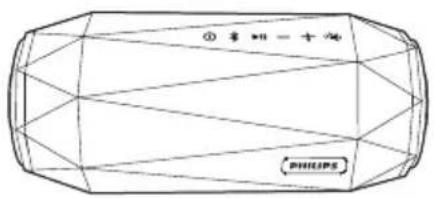
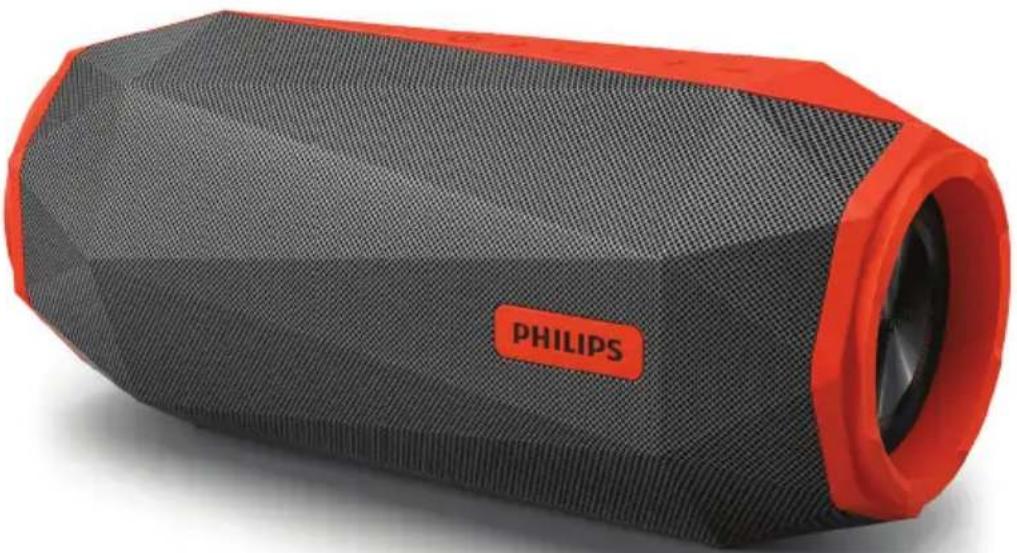
- Speaker
• USB cable for charging - Printed materials
Overview of the speaker
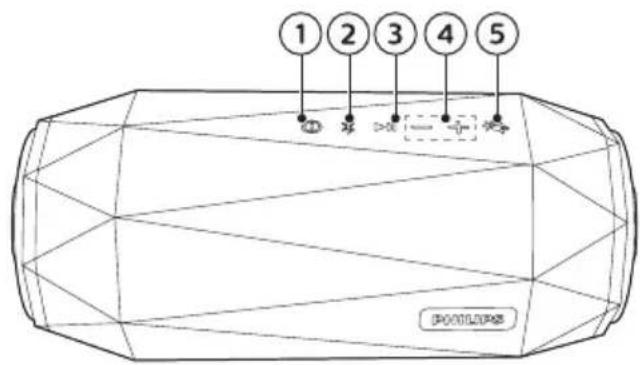
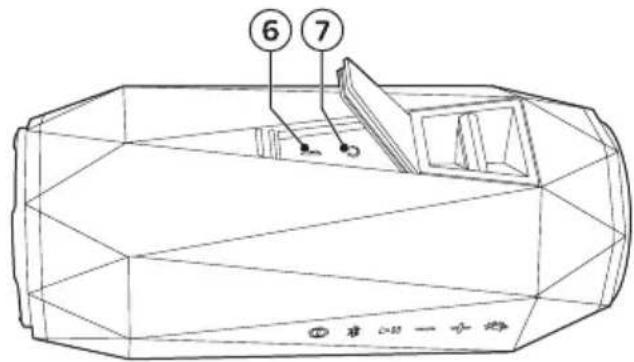
①
- Turn the speaker on or off.
- Check the battery level.
• Show the charging progress. - Turn off the low battery indication.
②
- Enter Bluetooth pairing mode.
- Clear Bluetooth pairing information.
③ ▶
• In Bluetooth mode, press to pause or resume play.
- In Bluetooth mode, press twice to play the next track.
- Respond to an incoming call through Bluetooth connection.
④ -/+
- Adjust volume.
5

- Turn the shoq mode on or off.
- Select different LED light patterns.
- Turn off the lighting effect.
⑥

- Charge the built-in battery.
⑦
AUDIO IN
- Connect an external audio device.
3 Get started
Always follow the instructions in this chapter in sequence.
Check the battery level
The speaker is powered by the built-in rechargeable battery.
- To check the battery level, press ① → The different behavior of the five LEDs indicates different battery levels.
LED indication:
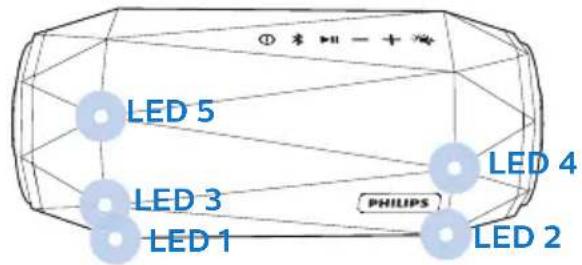
| Battery power | LED 1 | LED 2 | LED 3 | LED 4 | LED 5 |
| Full Solid green | |||||
| >80% Solid green Off | |||||
| 60% - 80% | Solid green Off | ||||
| 40% - 60% | Solid green Off | ||||
| 20% - 40% | Solid green | Off | |||
| Low battery (<20%) | Flash red | Off | |||
Charge the built-in battery

Note
- It takes you approximately 3.5 hours to fully charge the battery.
• The micro USB socket is for charging only. - Rechargeable battery has a limited number of charge cycles. Battery life and number of charge cycles vary by use and settings.
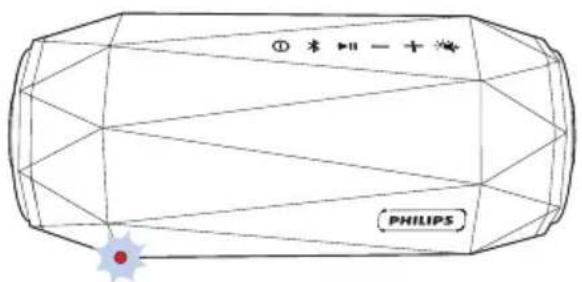
When the battery level is low, LED 1 flashes red as illustrated. To turn off the low power indication, press①.
To charge the built-in battery:
- Connect the speaker to AC power by using the adaptor (not supplied; 5V 2.1A adaptor recommended).
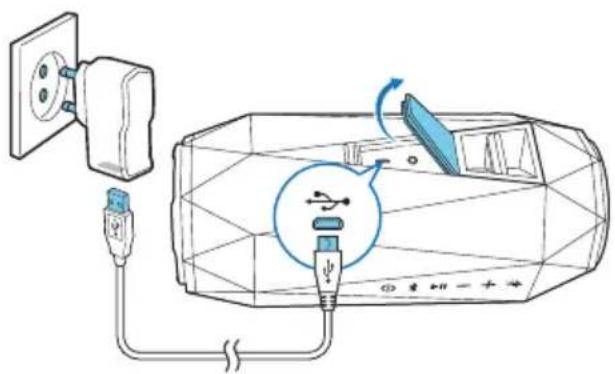
| System status | Battery status | System behavior |
| On Under charging | Beep once, without charging indication. | |
| Off Under charging | Show the charging indication | |
| Off Fully charged | All LEDs are on, then turn off in 3 minutes. | |
Check the charging progress
When the speaker is being charged, press Ⓞ to check the charging progress.
| Battery level | LED 1 | LED 2 | LED 3 | LED 4 | LED 5 |
| <20% charged | Flash green | Off | |||
| 20% - 40% charged | Solid green | Flash green | Off | ||
| 40% - 60% charged | Solid green | Flash green | Off | ||
| 60% - 80% charged | Solid green | Flash green | Off | ||
| >80% charged | Solid green | Flash green | |||
| Fully charged | Solid green (turn off in 3 minutes) | ||||
Turn on/off
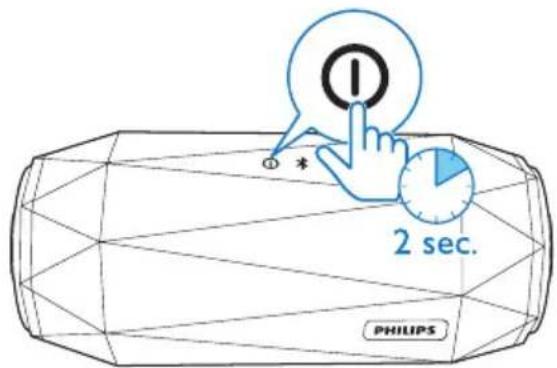
- To turn the speaker on, press and hold Ⓐ for over two seconds until the LEDs light up.
• To turn the speaker off, press and hold Ⓐ for two seconds again.

Note
•The speaker turns off automatically when being idle for 15 minutes.
4 Play from Bluetooth devices
With this speaker, you can listen to audio from Bluetooth-enabled devices and control the incoming call through Bluetooth.
Connect a Bluetooth device

Note
•Make sure that Bluetooth function is enabled on your device, and your device is set as visible to all other Bluetooth devices.
- Any obstacle between this speaker and a Bluetooth device can reduce the operational range.
- Keep away from any other electronic device that may cause interference.
• The operational range between this speaker and a Bluetooth device is approximately 10 meters.
1 Make sure that the speaker is in Bluetooth pairing mode. → The LEDs flash blue quickly.
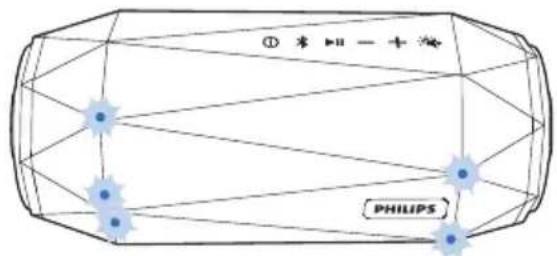
→ If the LEDs flash blue slowly, press and hold ✝ for two seconds to enter pairing mode.
2 On your Bluetooth device, enable Bluetooth and search for Bluetooth devices that can be paired (see the user manual of the device).
3 Select [Philips SB500] displayed on your device for pairing. If necessary, input "0000" as the pairing password.
→ After successful connection, the speaker beeps twice, and the blue LED light stops flashing.
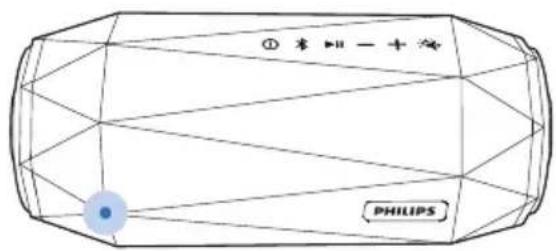
| LED behavior Description | |
| Flashing blue quickly | Ready for pairing |
| Flashing blue slowly | Reconnecting the last connected device;Waiting for connection from the paired device |
Solid blue Connected
Play from a connected Bluetooth device

Note
•Music play pauses when there is an incoming call, and resumes when your phone call ends.
After successful Bluetooth connection, play audio on the connected device.
→ Audio streams from your Bluetooth device to the speaker.
- To pause or resume play, press ▶II.
- To play the next track, press twice.

Tip
•You can also use your Bluetooth device to control play.
Disconnect a device
- Press and hold for two seconds;
- Turn off the speaker;
- Disable Bluetooth on your device; or
- Move the device beyond the communication range.
Reconnect a device
- When you turn on the speaker, it tries to reconnect the last connected device automatically;
- If not successful, select [Philips SB500] on your Bluetooth menu to start reconnection.
Clear pairing information
- Press and hold for 10 seconds.
Control your phone call
After Bluetooth connection, you can control an incoming call with this speaker.
Button Function
| ▶II | Press to answer an incoming call. |
| Press and hold for two seconds to reject an incoming call. | |
| During a call, press to end the current call. | |
| During a call, press and hold for two seconds to transfer the call to your mobile device. |
5 Other features
Listen to an external device
With this speaker, you can also listen to an external audio device such as an MP3 player.

Note
• Make sure that music playback through Bluetooth is stopped.
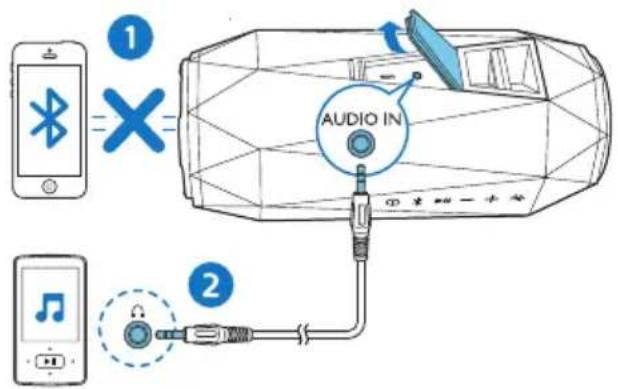
1 Open the protective cover on the back of the speaker.
2 Connect an audio input cable (not supplied) with a 3.5 mm connector on both ends to
• the AUDIO IN socket on this speaker, and
• the headphone socket on the external device.
3 Play audio on the external device (refer to its user manual).

Tip
- When you start music streaming from a connected Bluetooth device, the speaker switches to the Bluetooth source automatically.
Turn the shoq mode on or off
- During music playback, press and hold 🎨 for two seconds to turn the shoq mode on or off.
When the shoq mode is turned on, the volume increases to the maximum immediately.
When the shoq mode is turned off, the volume level returns to your last setting.
Select an LED lighting effect
During music playback, you can enjoy the flashing light effect. The speaker provides two LED light patterns for you to choose from.
- Press repeatedly to select a lighting effect or turn off the LED light:
- Pattern 1
- Pattern 2
- Turn off

Note
- If there is no music playback, the lighting effect will not start.
Adjust volume
During music playback, press -/+ to increase or decrease volume.

Tip
- You can press and hold -/+ to increase or decrease volume continuously.
- When the volume reaches the maximum, the speaker beeps twice.
- During Bluetooth playback, the volume control will be synchronized between the speaker and your Bluetooth device as long as your device supports this function.
6 Specifications

Note
•Product information is subject to change without prior notice.
| Rated output power (Amplifier) | 2x15W RMS ≤ 1% THD |
| Acoustic frequency response | 50-20000 Hz |
| Speaker driver 2 x 2" full range, 4 Ω | |
| Bass enhancement | 2 x 2.5" passive radiator |
| Bluetooth version | V2.1 + EDR |
| Bluetooth supported profiles | HFP V1.6, A2DP V1.2, AVRCP V1.4 |
| Bluetooth frequency band / Output power | 2.402GHz ~ 2.480GHz ISM Band / ≤ 4dBm (Class 2) |
| AUX input level 500mV±100mV | |
| Water resistance | IPX7 |
| Built-in battery Li-ion battery (7.4 V, 2200 mAh) | |
| Play time in battery mode | Approx. 8 hours |
| Charging time Approx. 3.5 hours | |
| USB charging 5V, 2.1A / Micro-USB socket | |
| Dimensions - Main unit (W x H x D) 230 x 101 x 105 mm | |
| Weight - Main unit 1 kg | |
7 Trouble-shooting

Warning
- Never remove the casing of this device.
To keep the warranty valid, never try to repair the system yourself. If you encounter problems when using this device, check the following points before requesting service. If the problem remains unsolved, go to the Philips Web page (www.philips.com/support). When you contact Philips, make sure that the device is nearby and the model number and serial number are available.
General
No power
•Recharge the speaker.
No sound
- Adjust volume on this product.
- Adjust volume on the connected device.
• In AUDIO IN mode, make sure that music playback through Bluetooth is stopped. - Make sure that your Bluetooth device is within the effective operational range.
No repsonse from the speaker when pressing any key.
- The speaker is in demo mode. To exit this mode: press and hold ✝ for 20 seconds.
About Bluetooth device
The audio quality is poor after connection with a Bluetooth-enabled device.
•The Bluetooth reception is poor. Move the device closer to this product or remove any obstacle between them.
Fail to find [Philips SB500] on your device for pairing.
- Press and hold ✝ for two seconds to enter pairing mode, and then try again.
Cannot connect with the device.
- The Bluetooth function of the device is not enabled. Refer to the user manual of the device for how to enable the function.
- This product is already connected with another Bluetooth-enabled device. Disconnect that device and then try again.
The paired device connects and disconnects constantly.
•The Bluetooth reception is poor. Move the device closer to this product or remove any obstacle between them.
- For some devices, Bluetooth connection may be deactivated automatically as a power-saving feature. This does not indicate any malfunction of this product.

2017 © Gibson Innovations Limited. All rights reserved.
This product has been manufactured by, and is sold under the responsibility of Gibson Innovations Ltd., and Gibson Innovations Ltd. is the warrantor in relation to this product.
Philips and the Philips Shield Emblem are registered trademarks of Koninklijke Philips N.V. and are used under license.


- USER MANUAL
- CONTENTS
- 1 IMPORTANT 1
- 2 YOUR BLUETOOTH SPEAKER 2
- 3 GET STARTED 4
- 4 PLAY FROM BLUETOOTH DEVICES 6
- 5 OTHER FEATURES 8
- 6 SPECIFICATIONS 10
- 7 TROUBLESHOOTING 10
- 1 IMPORTANT
- SAFETY
- WARNING
- NOTE
- NOTICE
- COMPLIANCE
- C€0700
- CARE OF THE ENVIRONMENT
- CAUTION
- ENVIRONMENTAL INFORMATION
- TRADEMARK NOTICE
- BLUETOOTH
- 2 YOUR BLUETOOTH SPEAKER
- INTRODUCTION
- WHAT'S IN THE BOX
- OVERVIEW OF THE SPEAKER
- AUDIO IN
- 3 GET STARTED
- CHECK THE BATTERY LEVEL
- CHARGE THE BUILT-IN BATTERY
- TO CHARGE THE BUILT-IN BATTERY
- CHECK THE CHARGING PROGRESS
- TURN ON/OFF
- 4 PLAY FROM BLUETOOTH DEVICES
- CONNECT A BLUETOOTH DEVICE
- PLAY FROM A CONNECTED BLUETOOTH DEVICE
- TIP
- DISCONNECT A DEVICE
- RECONNECT A DEVICE
- CLEAR PAIRING INFORMATION
- CONTROL YOUR PHONE CALL
- 5 OTHER FEATURES
- LISTEN TO AN EXTERNAL DEVICE
- TURN THE SHOQ MODE ON OR OFF
- SELECT AN LED LIGHTING EFFECT
- ADJUST VOLUME
- 6 SPECIFICATIONS
- 7 TROUBLE-SHOOTING
- GENERAL
- NO POWER
- NO SOUND
- NO REPSONSE FROM THE SPEAKER WHEN PRESSING ANY KEY
- ABOUT BLUETOOTH DEVICE
Brand : PHILIPS
Model : SB500B
Category : Docking Station