
SensoTouch 2D RQ1150 - Razor PHILIPS - Free user manual and instructions
Find the device manual for free SensoTouch 2D RQ1150 PHILIPS in PDF.


| Brand | Philips |
| Model | SensoTouch 2D RQ1150 |
| Product Type | Electric Shaver |
| Shaving System | 2D Contour Following |
| Cutting Heads | Dual precision blades |
| Pop-up Trimmer | Yes, for sideburns and mustache |
| Wet & Dry Use | Yes, can be used with foam/gel |
| Power Supply | Rechargeable battery |
| Charging Time | Approx. 1 hour |
| Shaving Time per Charge | Up to 45 minutes |
| Quick Charge | 3 minutes for one shave |
| Display | Battery indicator light |
| Cleaning | Rinse under water; includes cleaning brush |
| Dimensions (approx.) | 5.5 x 2.5 x 2 inches |
| Weight (approx.) | 0.5 lbs (225 g) |
| Replacement Heads | Philips RQ11 series |
| Waterproof | Yes, IPX7 rated |
| Warranty | 2 years limited |
| Manual Language | English (PDF available) |
Frequently Asked Questions - SensoTouch 2D RQ1150 PHILIPS
User questions about SensoTouch 2D RQ1150 PHILIPS
0 question about this device. Answer the ones you know or ask your own.
Ask a new question about this device
Download the instructions for your Razor in PDF format for free! Find your manual SensoTouch 2D RQ1150 - PHILIPS and take your electronic device back in hand. On this page are published all the documents necessary for the use of your device. SensoTouch 2D RQ1150 by PHILIPS.
USER MANUAL SensoTouch 2D RQ1150 PHILIPS
Always here to help you
Register your product and get support at
www.philips.com/welcome

RQ1100 series
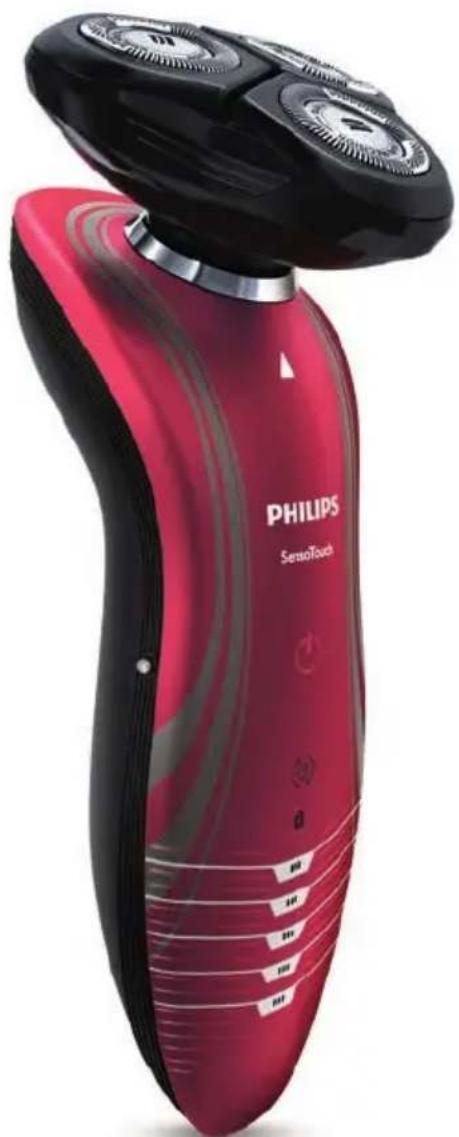
natural_image
Red Philips SensoTouch electric shaver with black and red casing (no visible text or symbols on body)User manual
PHILIPS
ENGLISH 4
DANSK 27
SUOMI 50
FRANÇAIS 72
NEDERLANDS 95
DEUTSCH 118
ΕΛΛΗΝΙΚΑ 141
ITALIANO 166
NORSK 189
ESPAÑOL 212
PORTUGUÊS 235
SVENSKA 258
TÜRKÇE 280
Introduction
Congratulations on your purchase and welcome to Philips! To fully benefit from the support that Philips offers, register your product at www.philips.com/welcome.
Please read this user manual, as it contains information about the features of this shaver as well as some tips to make shaving easier and more enjoyable.
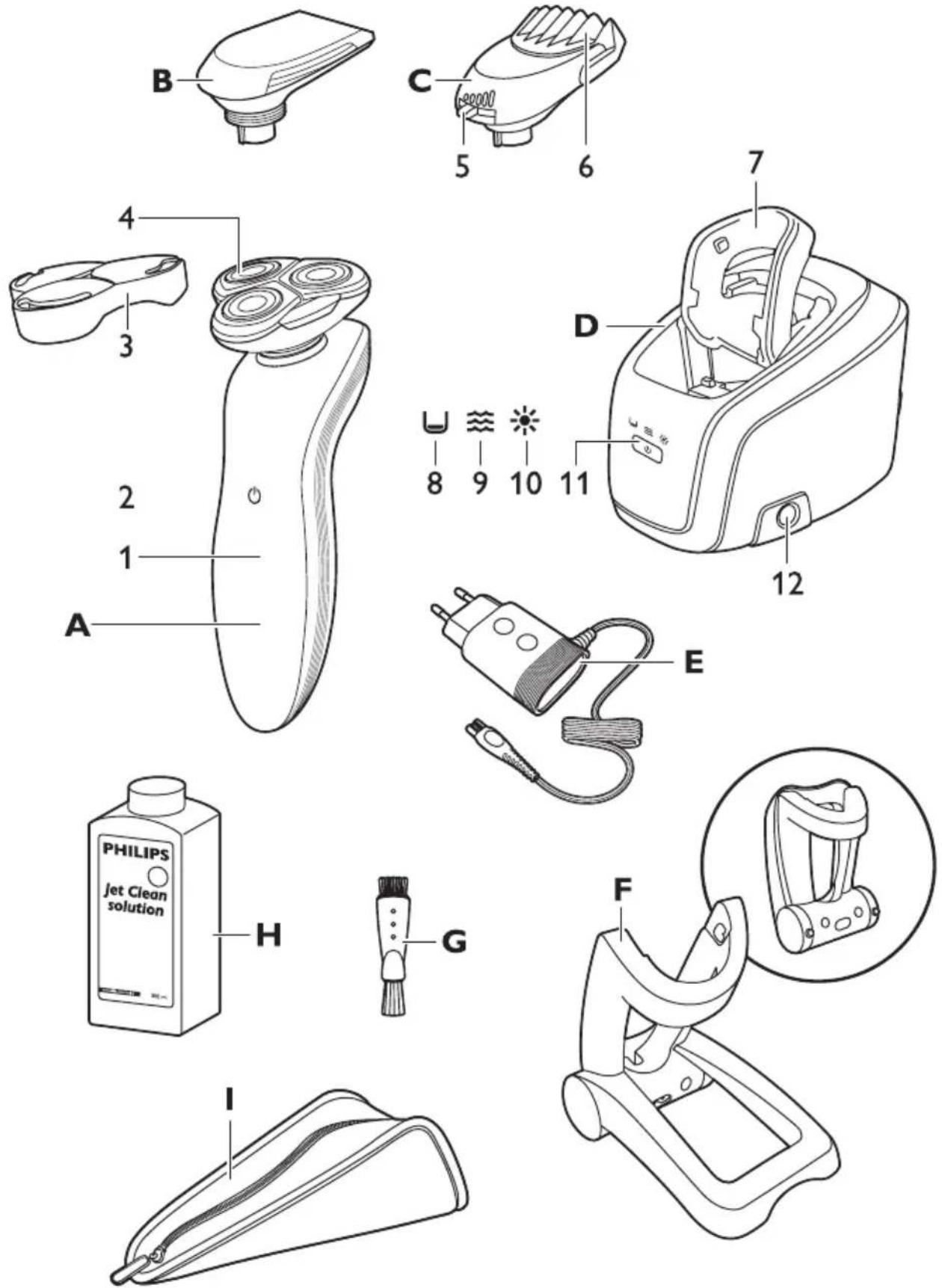
General description (Fig. 1)
A Shaver
1 Display
2 Shaver on/off button
3 Protection cap
4 RQ11 Shaving unit
B CRP331 Trimmer (RQ1197, RQ1185, RQ1180, RQ1160, RQ1155, RQ1151 only)
C RQ111 Beard Styler attachment (RQ1195, RQ1175 only)
1 Hair length selector
2 Comb of Beard Styler attachment
D Jet Clean System (RQ1197CC, RQ1195CC, RQ1185CC, RQ1180CC, RQ1175CC, RQ1160CC only)
1 Shaver holder
2 'Cleaning chamber empty' symbol
3 Cleaning symbol
4 Drying symbol
5 Jet Clean System on/off button
6 Cleaning chamber release button
E Adapter
F Charger
G Cleaning brush
H HQ200 Cleaning fluid (RQ1197CC, RQ1195CC, RQ1185CC, RQ1180CC, RQ1175CC, RQ1160CC only)
I Pouch (RQ1197, RQ1195, RQ1185, RQ1180, RQ1175, RQ1160, RQ1155, RQ1151 only)
Important
Read this user manual carefully before you use the shaver and the Jet Clean System and save it for future reference.
Note: In this user manual the term ‘appliances’ refers to the shaver and the Jet Clean System. If your shaver does not come with a Jet Clean System, it refers to the shaver only.
General

natural_image
Prohibition sign with a faucet and diagonal line, no text or symbols presentDanger
- Make sure the adapter does not get wet.
Warning
- The adapter contains a transformer. Do not cut off the adapter to replace it with another plug, as this causes a hazardous situation.
- These appliances are not intended for use by persons (including children) with reduced physical, sensory or mental capabilities, or lack of experience and knowledge, unless they have been given supervision or instruction concerning use of these appliances by a person responsible for their safety.
- Children should be supervised to ensure that they do not play with the shaver and the Jet Clean System.
- Be careful with hot water when you clean the appliances. Always check if the water is not too hot, to prevent your hands from getting burnt.
Caution
- Never immerse the Jet Clean System and the charger in water nor rinse them under the tap.
- The appliances and accessories are not dishwasher-proof.
- Always place and use the appliances on a surface that is fluid-resistant.
- Use, charge and store the shaver at a temperature between 5irc C and 35irc C.
- Only use the accessories supplied with this shaver or that have been specifically developed for this shaver.
- If the adapter or any of the other accessories is damaged, always have it replaced with one of the original type in order to avoid a hazard.
- The adapter transforms 100-240 volts to a safe low voltage of less than 24 volts.
- Do not use the appliances and accessories if they are damaged.
- Water may leak from the socket at the bottom of the shaver when you rinse it. This is normal and not dangerous because all electronics are enclosed in a sealed power unit inside the shaver.
Jet Clean system (RQ1197CC, RQ1195CC, RQ1185CC, RQ1180CC, RQ1175CC only)
Caution
- Only use the Jet Clean System with the original HQ200 cleaning fluid.
- Always place and use the Jet Clean System on a stable, level and horizontal fluid-resistant surface to prevent leakage.
- Never immerse the Jet Clean System in water.
- Empty the cleaning chamber and clean it thoroughly by rinsing it with hot tap water every 15 days.
- The Jet Clean System thoroughly cleans but does not disinfect your shaver, therefore do not share the shaver with others.
- The cleaning chamber of the Jet Clean System is not dishwasher-proof.
- When the Jet Clean System is ready for use, do not move it to prevent leakage of cleaning fluid.
Beard Styler attachment (RQ1195, RQ1175 only)
Caution
- Only use the Beard Styler attachment to trim facial hair (beard, moustache and sideburns). Do not use it to trim body parts below the neckline.
- Only use the Beard Styler attachment in combination with the following shaver types: RQ12xx, RQ11xx, RQ10xx.
- The Beard Styler attachment is not dishwasher-proof.
Compliance with standards

- This shaver complies with the internationally approved safety regulations and can be safely used in the bath or shower and cleaned under the tap.
- These Philips appliances comply comply with all standards regarding electromagnetic fields (EMF). If handled properly and according to the instructions in this user manual, the appliances are safe to use based on scientific evidence available today.
The display

Note: If there is a protective foil on the display, remove it before you use the shaver for the first time.
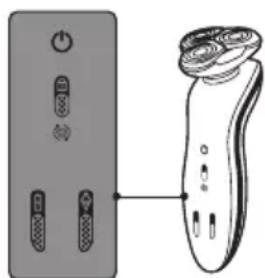
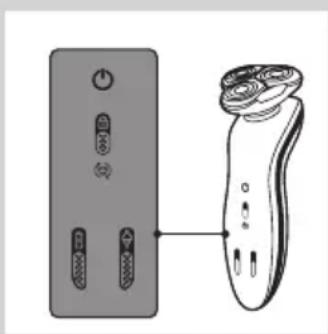
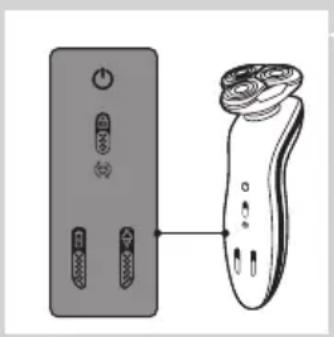
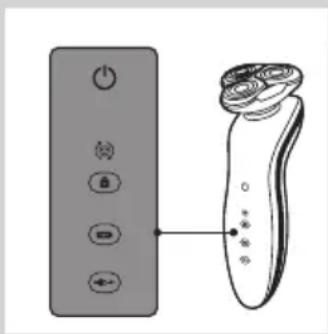
The various shaver types have different displays, which are shown in the figures below.
- RQ1185, RQ1167, RQ1160

natural_image
Diagram showing a device with two buttons connected to a handheld device (no text or symbols present)- RQ1155, RQ1151, RQ1150, RQ1145, RQ1141, RQ1131
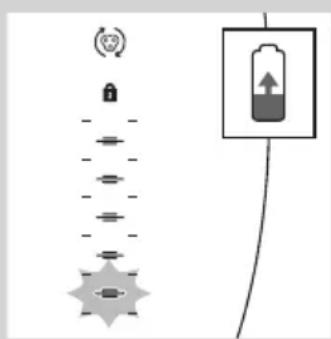
Charging
- Charging takes approx. 1 hour.
- When the shaver is charging, first the bottom charging light flashes, then the second charging light, and so on until the shaver is fully charged.
- Quick charge: When the shaver contains enough energy for one shave, the bottom charging light alternately flashes orange and white.
RQ1185, RQ1167, RQ1160, RQ1155, RQ1151, RQ1150, RQ1145, RQ1141, RQ1131
Note: The displays of the various shaver types look different, but work in the same way.
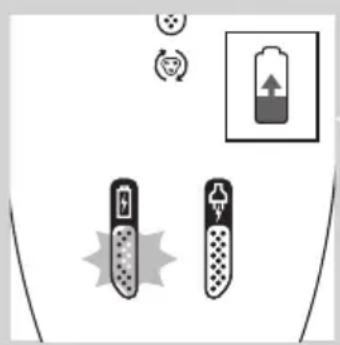
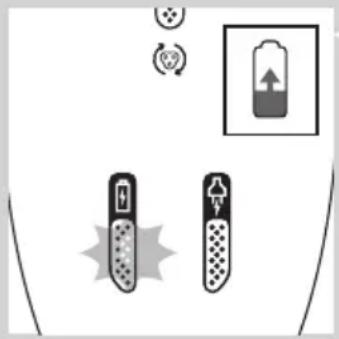
- When the shaver is charging, first the plug symbol and the battery symbol flash alternately. After some time, the plug symbol goes out and the battery symbol continues to flash until the shaver is fully charged.
- Quick charge: When the shaver contains enough energy for one shave, the alternate flashing of the plug symbol and battery symbol stops and only the battery symbol flashes.
Battery fully charged
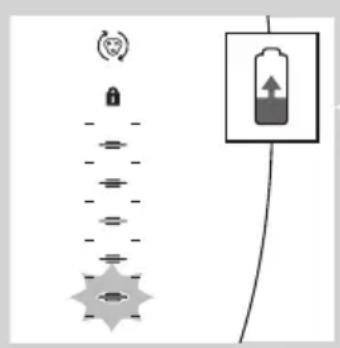
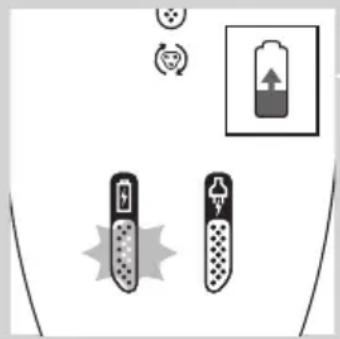
natural_image
Diagram showing battery charging setup with two test tubes and a battery icon (no text or symbols)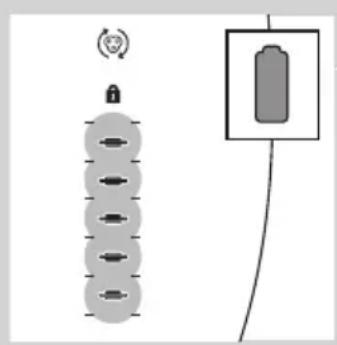
natural_image
Diagram showing a battery connected to a vertical stack of circular components with a lock icon above (no text or symbols)
natural_image
Pure electrical circuit lines without any symbols- When the battery is fully charged, all charging lights light up continuously. After approx. 30 minutes, the display automatically switches off again.
RQ1185, RQ1167, RQ1160, RQ1155, RQ1151, RQ11510, RQ1145, RQ1141, RQ1131
Note: The displays of the various shaver types look different, but work in the same way.
- When the battery is fully charged, the battery symbol lights up continuously. After approx. 30 minutes, the display automatically switches off again.
Battery low
natural_image
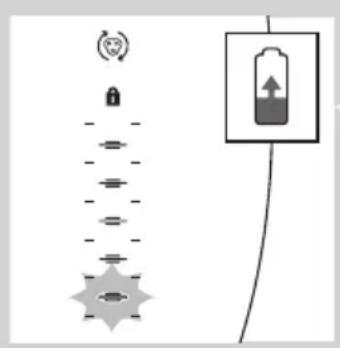
Pure electrical circuit lines without any symbols- When the battery is almost empty (when there are only 5 or fewer shaving minutes left), the bottom charging light flashes orange.
- When you switch off the shaver, the bottom charging light continues to flash for a few seconds.
RQ1185, RQ1167, RQ1160, RQ1155, RQ1151, RQ11510, RQ1145, RQ1141, RQ1131
Note: The displays of the various shaver types look different, but work in the same way.
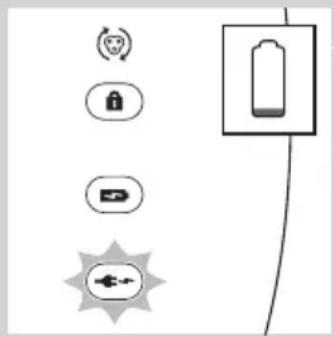
- When the battery is almost empty (when there are only 5 or fewer shaving minutes left), the plug symbol flashes.
- When you switch off the shaver, the plug symbol continues to flash for a few seconds.
Remaining battery capacity

- The remaining battery capacity is indicated by the number of charging lights that are on.
Travel lock

You can lock the shaver when you are going to travel. The travel lock prevents the shaver from being switched on by accident.
Activating the travel lock
1 Press the on/off button for 3 seconds to enter the travel lock mode.
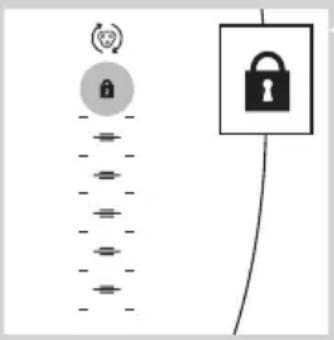
The lock symbol lights up on the display.
Note: The displays of the various shaver types look different, but show the same symbol.
Deactivating the travel lock
1 Press the on/off button for 3 seconds.
The motor starts running to indicate that the travel lock has been deactivated.
The shaver is now ready for use again.
Note: When you place the shaver in the plugged-in charger or Jet Clean System, the travel lock is automatically deactivated.
Replace shaving head holder

Note: The displays of the various shaver types look different, but show the same symbol.
For maximum shaving performance, we advise you to replace the shaving head holder every two years.
- To remind you to replace the shaving head holder, the appliance is equipped with a replacement reminder which is activated automatically after approx. two years. The replacement reminder is repeated at 9 successive shaves or until you reset the shaver.
Charging
Charging takes approx. 1 hour.
RQ1155: A fully charged shaver has a shaving time of up to 50 minutes.
RQ1151, RQ1150, RQ1145: A fully charged shaver has a shaving time of up to 45 minutes.
RQ1141, RQ1131: A fully charged shaver has a shaving time of up to 40 minutes.
Charge the shaver before you use it for the first time and when the display indicates that the battery is almost empty (see section 'Battery low' in chapter 'The display').
Quick charge
After the shaver has charged for 5 minutes, it contains enough energy for one shave.
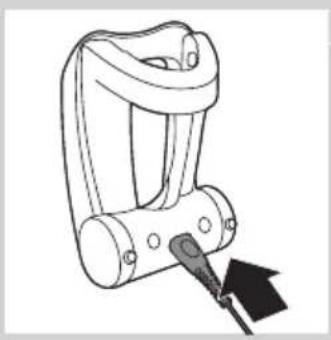
Charging in the charger
natural_image
Line drawing of a mechanical device with a black arrow pointing to a component (no text or symbols)1 Insert the small plug into the charger.
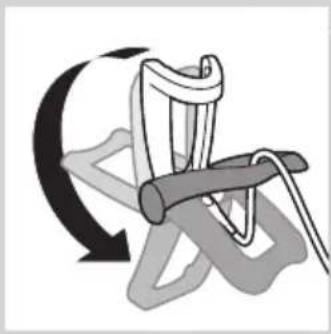
natural_image
Diagram of a climbing rope with a curved arrow indicating rotational motion (no text or symbols)2 Unfold the charger ('click').
3 Put the adapter in the wall socket.

4 Put the shaver in the charger (1) and press it backwards until it locks into place (2).
The display shows that the shaver is charging (see section 'Charging' in chapter 'The display').
Charging in the Jet Clean System (RQ1197CC, RQ1195CC, RQ1185CC, RQ11801CC, RQ1175CC only)

natural_image
Illustration of a device with a cylindrical top and a rectangular base (no text or symbols)1 Put the small plug in the Jet Clean System.
2 Put the adapter in the wall socket.
3 Hold the shaver upside down above the holder with the back of the shaver pointing towards the holder.
Note: RQ1197, RQ1195, RQ1180, RQ1175: when you turn the shaver upside down, the battery indication on the display is also turned upside down so you can still see to what level the battery is charged.

natural_image
Diagram showing two mechanical components with arrows indicating motion or force, no text or symbols present4 Place the shaver body in the holder behind the two clips (1) and press it down until it locks into place (2).
Note: The shaver cannot be placed in the Jet Clean System when the protection cap is on the shaving unit or when the trimmer is placed on the shaver.
The display shows that the shaver is charging (see chapter 'The display').
Using the shaver
Shaving
Skin adaptation period
Your first shaves may not bring you the result you expect and your skin may even become slightly irritated. This is normal. Your skin and beard need time to adapt to any new shaving system.
We advise you to shave regularly (at least 3 times a week) for a period of 3 weeks to allow your skin to adapt to the new shaver. During this period, use your new electric shaver exclusively and do not use other shaving methods. If you use different shaving methods, it is more difficult for your skin to adapt to the new shaving system.

natural_image
Illustration of a person applying facial massage to the ear with directional arrows indicating motion (no text or symbols)1 Press the on/off button once to switch on the shaver.
DRQ1197, RQ1195, RQ1185, RQ1180, RQ1175: The display lights up for a few seconds.
2 Move the shaving heads over your skin in circular movements.
- Do not make straight movements.
3 Press the on/off button once to switch off the shaver.
DRQ1197, RQ1195, RQ1185, RQ1180, RQ1175: The display lights up for a few seconds and then shows the remaining battery capacity.
Wet shaving
You can also use this shaver on a wet face with shaving foam or shaving gel. To shave with shaving foam or shaving gel, follow the steps below:
1 Apply some water to your skin.
2 Apply shaving foam or shaving gel to your skin.
3 Rinse the shaving unit under the tap to ensure that the shaving unit glides smoothly over your skin.
4 Press the on/off button once to switch on the shaver.
5 Move the shaving heads over your skin in circular movements.
Note: Rinse the shaver under the tap regularly to ensure that it continues to glide smoothly over your skin.
6 Dry your face and thoroughly clean the shaver after use (see chapter 'Cleaning and maintenance').
Note: Make sure you rinse all foam or shaving gel off the shaver.
Using the trimmer (RQ1197, RQ1185, RQ1180, RQ1160, RQ1155, RQ1151 only)

natural_image
Illustration of a hand pouring liquid into a container with a cross mark, indicating a process step (no text or symbols present)You can use the trimmer to groom your sideburns and moustache.
1 Pull the shaving unit straight off the shaver.
Note: Do not twist the shaving unit while you pull it off the shaver.


natural_image
Diagram showing a mechanical device with an upward arrow and a cross symbol, no text or labels present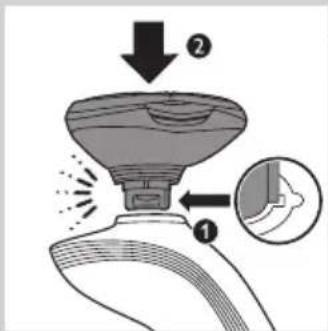
2 Insert the lug of the trimmer into the slot in the top of the shaver (1). Then press down the trimmer (2) to attach it to the shaver ('click').
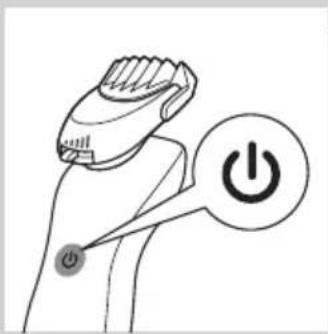
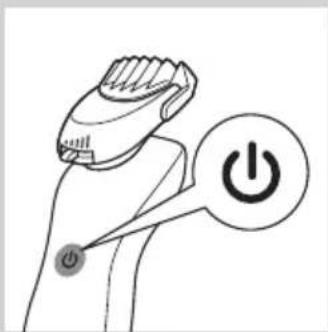
3 Press the on/off button once to switch on the trimmer.
DRQ1180: The display lights up for a few seconds.
4 You can now start trimming.
5 Press the on/off button once to switch off the trimmer.
▶RQ1180: The display lights up for a few seconds to show the remaining battery capacity.
6 Pull the trimmer straight off the shaver.
Note: Do not twist the trimming unit while you pull it off the shaver.
7 Insert the lug of the shaving unit into the slot in the top of the shaver (1). Then press down the shaving unit (2) to attach it to the shaver ('click').
Using the Beard Styler attachment (RQ1195, RQ1175 only)

natural_image
Diagram showing a hand pouring liquid into a container with a cross symbol, indicating a process or operation (no text or labels present)
natural_image
Illustration of a hand holding an electronic device with a magnified inset showing internal components (no text or symbols)Note: Only use the Beard Styler attachment to trim facial hair (beard, moustache and sideburns). Do not use it to trim body parts below the neckline.
1 Make sure the shaver is switched off.
2 Pull the shaving unit straight off the shaver.
Note: Do not twist the shaving unit while you pull it off the shaver.
3 Insert the lug of the Beard Styler attachment into the slot in the top of the shaver (1). Then press down the Beard Styler attachment (2) to attach it to the shaver ('click').
Using the Beard Styler attachment with comb
You can use the Beard Styler attachment with the comb attached to style your beard at one fixed setting, but also at different length settings. The hair length settings on the Beard Styler attachment correspond to the remaining hair length after cutting and range from 1 to 5mm.

natural_image
Illustration of a hand holding a device with a lightning bolt and arrow indicating motion (no text or symbols)1 Slide the comb straight into the guiding grooves on both sides of the Beard Styler attachment ('click').
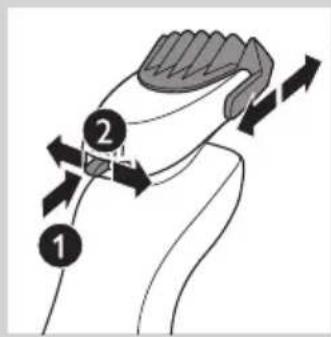
2 Press the length selector (1) and then push it to the left or right (2) to select the desired hair length setting.

3 Press the on/off button on the shaver to switch it on.

natural_image
Line drawing of a person applying a toothbrush to their beaded jaw (no text or symbols)4 You can now start styling your beard.
Using the Beard Styler attachment without comb
You can use the Beard Styler attachment without the comb to trim and contour your beard, moustache or sideburns.

natural_image
Line drawing of a handheld electric shaver with a black arrow indicating motion (no text or symbols)1 Pull the comb off the Beard Styler attachment.

Note: Grab the comb in the centre to pull it off the Beard Styler attachment. Do not pull at the sides of the comb.
2 Press the on/off button to switch on the shaver.

natural_image
Line drawing of a person applying makeup to their ear (no text or symbols)3 You can now start to trim and contour your beard, moustache, sideburns or neckline.
Beard styles
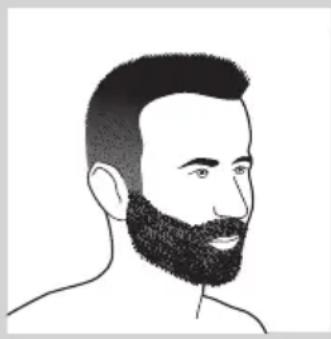
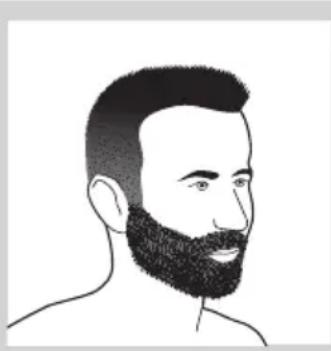
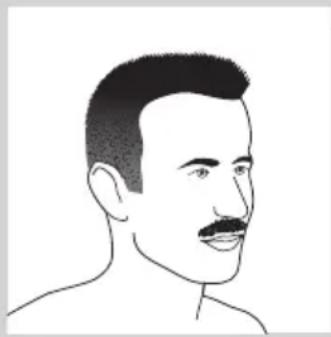
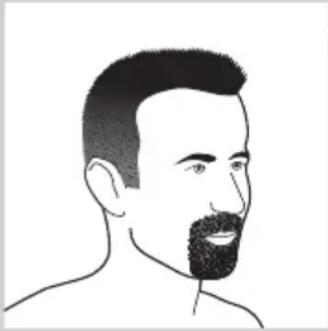
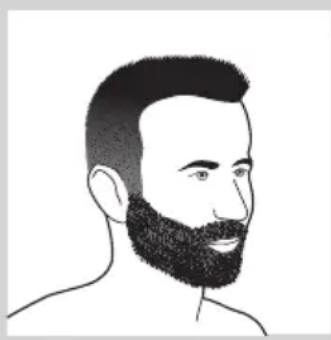
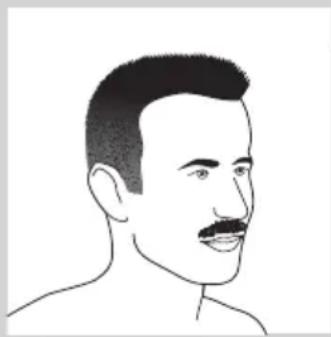
Below you find some examples of beard styles you can create.

natural_image
Line drawing of a man's head and shoulders with a beard (no text or symbols)- A stubble look

natural_image
Line drawing of a man's head and beard (no text or symbols)- A full beard

natural_image
Line drawing of a male's face with short hair and mustache (no text or symbols)- A moustache

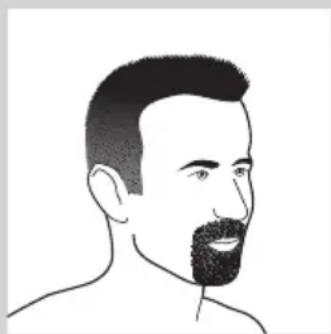
natural_image
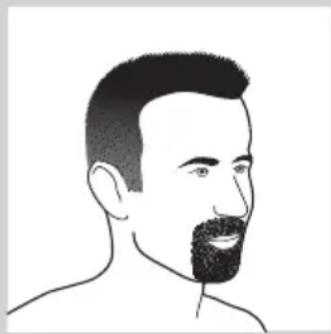
Line drawing of a man's head and shoulders (no text or symbols)- A goatee
Cleaning and maintenance
Never use scouring pads, abrasive cleaning agents or aggressive liquids such as petrol or acetone to clean the shaver, its accessories and the Jet Clean System (RQ1197CC, RQ1195CC, RQ1185CC, RQ1180CC, RQ1175CC only).
- The best and most hygienic way to clean the shaver is in the Jet Clean System (RQ1197CC, RQ1195CC, RQ1185CC, RQ1180CC, RQ1175CC only). You can also rinse the shaver under the tap or clean it with the brush supplied.
- Clean the shaver after every shave for optimal shaving performance.
- You can clean the outside of the shaver with a damp cloth.
- Regular cleaning guarantees better shaving performance.
Cleaning the shaving unit

Be careful with hot water. Always check if the water is not too hot, to prevent your hands from getting burnt.
1 Switch off the shaver. Remove it from the charger or remove it from the Jet Clean System (RQ1197CC, RQ1195CC, RQ1185CC, RQ1180CC, RQ1175CC only).
2 Rinse the shaving unit under a hot tap for some time.
Note: You can also clean the shaving unit with the cleaning brush supplied.
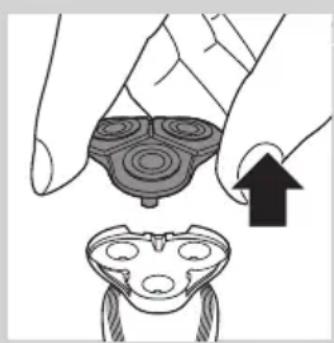
natural_image
Illustration of a hand holding a circular object with concentric rings, next to a separate abstract shape with internal circles (no text or symbols)3 Pull the shaving head holder off the bottom part of the shaving unit and rinse it under a hot tap for 30 seconds.
Note: You can also clean the shaving head holder with the cleaning brush supplied.
4 Carefully shake off excess water and let the shaving head holder dry. Never dry the shaving unit with a towel or tissue, as this may damage the shaving heads.

natural_image
Illustration of a hand holding a device with a downward arrow indicating process (no text or symbols)5 Reattach the shaving head holder to the bottom part of the shaving unit ('click').
Cleaning the shaving unit in the Jet Clean System (RQ1197CC, RQ1195CC, RQ1185CC, RQ1180CC, RQ1175CC only)
The Jet Clean System has an automatic cleaning program. When you press the on/off button, the Jet Clean System starts cleaning in this automatic cleaning program.
Preparing the Jet Clean System for use
Fill the cleaning chamber before first use.
1 Put the small plug in the Jet Clean System.
2 Put the adapter in the wall socket.
The holder automatically moves to the highest position.
natural_image
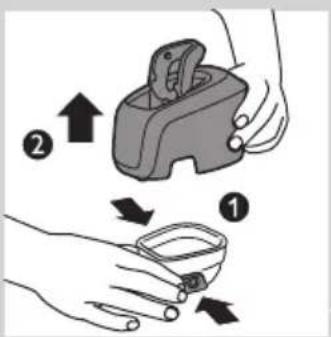
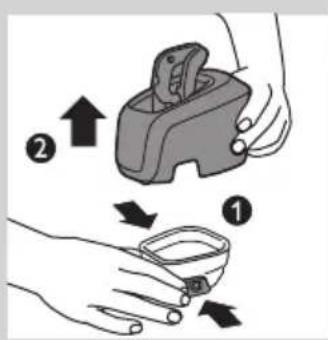
Illustration of a hand pouring liquid into a container with a water level indicator (no text or symbols)3 Simultaneously press the release buttons on both sides of the cleaning chamber (1). Then lift the Jet Clean System off the cleaning chamber (2).
The cleaning chamber remains behind.
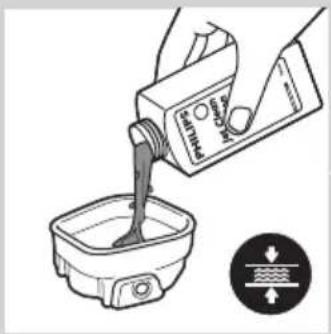
4 Unscrew the cap from the bottle with HQ200 cleaning fluid.
5 Fill the cleaning chamber with HQ200 cleaning fluid to a level between the two lines.
natural_image
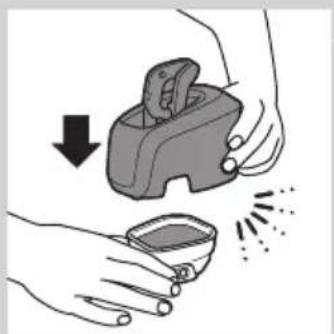
Illustration of hands using a handheld device to remove or clean material, with no text or symbols present.6 Place the Jet Clean System back onto the cleaning chamber.
Make sure the release buttons click back into place.
Using the Jet Clean System
Note: If you use the shaver with shaving foam or shaving gel, we advise you to rinse it under the hot tap before you clean it in the Jet Clean System. This guarantees an optimal lifetime for the cleaning fluid.

natural_image
Illustration of a device with a cylindrical top and a rectangular base (no text or symbols)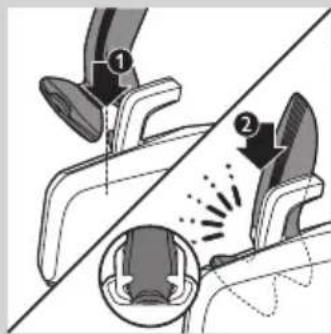

natural_image
Diagram of a device with a sun symbol and a warning label, no readable text or symbols present.1 Hold the shaver upside down above the holder with the back of the shaver pointing towards the holder.
2 Place the shaver body in the holder behind the two clips (1) and press it down until it locks into place (2).
The display shows that the shaver is charging (see chapter 'The display').
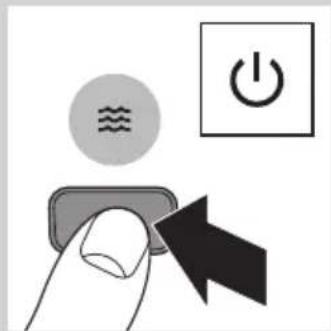
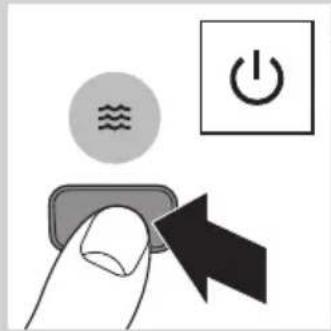
3 Press the on/off button on the Jet Clean System to start the cleaning program.
The shaver display stops showing the charging indication.
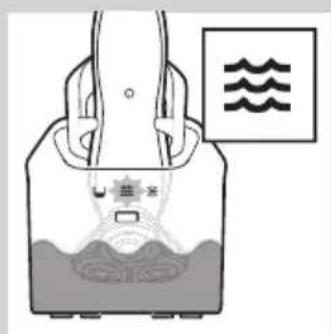
The cleaning light starts to flash and the shaver is automatically lowered into the cleaning fluid.
The cleaning light flashes throughout the cleaning program, which takes a few minutes.
During the first phase of the cleaning program, the shaver automatically switches on and off several times and moves up and down.
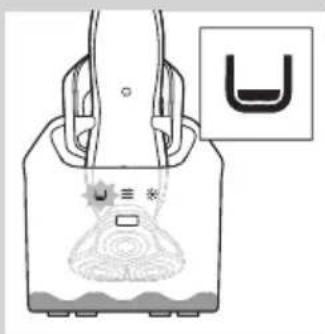
During the second phase of the cleaning program, the shaver is placed in the drying position, indicated by the flashing drying symbol. This phase takes approx. 2 hours. The shaver stays in this position until the end of the program.
After the cleaning program, the charging indication appears on the shaver display (see chapter 'The display').
Note: If you press the on/off button of the Jet Clean System during the cleaning program, the program aborts. In this case, the cleaning or drying light stops flashing and the holder moves to the highest position.
natural_image
Diagram of a device with a U-shaped symbol and a warning label, no readable text or symbols present.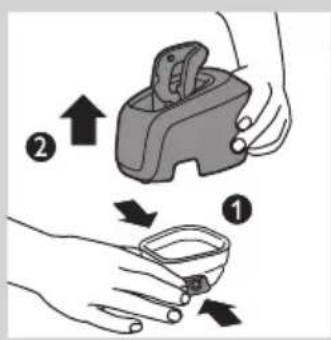

natural_image
Illustration of a hand holding a small object with a curved line extending from it, no text or symbols present.
natural_image
Illustration of a faucet dispensing liquid into a container with a small outlet (no text or symbols)
natural_image
Illustration of a hand pouring liquid into a container with a water level indicator (no text or symbols)Note: If you remove the adapter from the wall socket during the cleaning program, the program aborts. The holder remains in its current position. When you put the adapter back into the wall socket, the holder moves to the highest position.
- When the cleaning fluid drops below the minimum level, the 'cleaning chamber empty' symbol starts to flash and the holder returns to its starting position.
- If you use the Jet Clean System to clean your shaver every day, you need to refill the cleaning chamber approx. every 15 days.
Cleaning the Jet Clean System
Clean the cleaning chamber every 15 days.
You can wipe the outside of the Jet Clean System with a damp cloth.
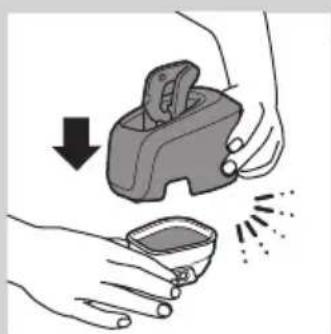
1 Simultaneously press the release buttons on both sides of the Jet Clean System (1). Then lift the Jet Clean System off the cleaning chamber (2).
The cleaning chamber remains behind.
2 Pour any remaining cleaning fluid out of the cleaning chamber. You can simply pour the cleaning fluid down the sink.
3 Rinse the cleaning chamber under the tap.
The cleaning chamber is not dishwasher-proof.
4 Fill the cleaning chamber with HQ200 cleaning fluid to a level between the two lines.
natural_image
Illustration of a hand holding a device with a downward arrow and a small bowl nearby (no text or symbols)5 Place the Jet Clean System back onto the cleaning chamber.
Make sure the release buttons click back into place.
Extra-thorough cleaning method

natural_image
Illustration of a hand holding a circular object with concentric rings and an arrow pointing to it, alongside a separate sketch of a frog-like figure (no text or symbols)Make sure the appliance is switched off.
1 Pull the shaving head holder off the bottom part of the shaving unit.

natural_image
Abstract symmetrical pattern with concentric rings and a black arrow pointing left (no text or symbols)2 Slide the green retaining frame in the direction of the arrows indicated on the retaining frame.

natural_image
Mechanical assembly diagram showing gears and shafts with an upward arrow (no text or symbols)3 Lift the retaining frame out of the shaving head holder.
natural_image
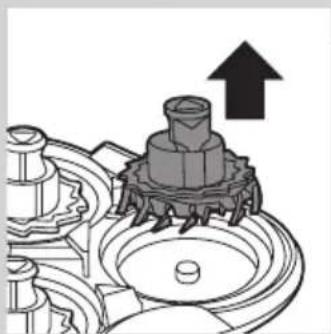
Mechanical assembly diagram showing a gear-like component with an upward arrow indicating motion (no text or symbols present)4 Remove the cutter from the shaving guard.
Note: Do not clean more than one cutter and shaving guard at a time, since they are all matching sets. If you accidentally put a cutter in the wrong shaving guard, it may take several weeks before optimal shaving performance is restored.
natural_image
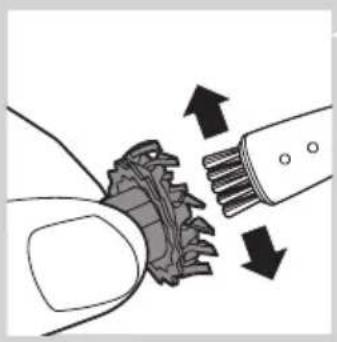
Diagram showing gear meshing with arrows indicating direction (no text or symbols)5 Clean the cutter with the cleaning brush supplied.

natural_image
Mechanical assembly diagram showing a brush applying material to a gear mechanism (no text or symbols)6 Clean the inside of the shaving guard.
natural_image
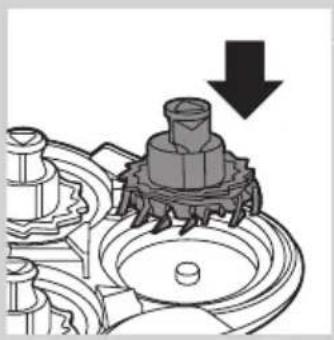
Mechanical gear assembly diagram showing a rotating shaft and housing with a downward arrow indicating motion (no text or symbols)7 After cleaning, place the cutter back into the shaving guard with the cutter legs pointing downwards.

natural_image
Mechanical assembly diagram showing gear-like components and a downward arrow (no text or symbols)8 Place the retaining frame back onto the shaving head holder.

natural_image
Abstract diagram with concentric circles and radiating lines, no text or symbols present9 Slide the guard back into place ('click').

natural_image
Illustration of a hand holding a device with a downward arrow indicating process (no text or symbols)10 Reattach the shaving head holder to the bottom part of the shaving unit.
Cleaning the trimmer (RQ1197, RQ1185, RQ1180, RQ1160, RQ1155, RQ1151 only)

Clean the trimmer every time you have used it.
1 Switch on the appliance with the trimmer attached.
2 Rinse the trimmer under a hot tap for some time.
3 After cleaning, switch off the appliance.
Tip: For optimal trimmer performance, lubricate the trimmer teeth with a drop of sewing machine oil every six months.

natural_image
Illustration of two hands performing a manual water tap technique (no text or symbols)Cleaning the Beard Styler attachment (RQ1195, RQ1175 only)
Clean the Beard Styler attachment every time you have used it.
1 Pull the comb off the Beard Styler attachment.
2 Rinse the Beard Styler attachment and the comb separately under a hot tap for some time.
Note: You can also clean the Beard Styler attachment and the comb with the cleaning brush supplied.
3 Lubricate the trimmer teeth with a drop of sewing machine oil every six months.
Storage

natural_image
Illustration of a pliers with an arrow indicating motion (no text or symbols)1 Slide the protection cap onto the shaving unit to prevent damage to the shaving heads.
2 RQ1197, RQ1195, RQ1185, RQ1180, RQ1175, RQ1160, RQ1155, RQ1151 only: Store the shaver in the pouch supplied.
Replacement
For maximum shaving performance, we advise you to replace the shaving head holder every two years.
Only replace the shaving head holder with an original RQ11 Philips Shaving Head Holder.
Replacement reminder
To remind you to replace the shaving head holder, the appliance is equipped with a replacement reminder which is activated automatically after approx. two years. The replacement reminder is repeated at 9 successive shaves or until you reset the shaver.

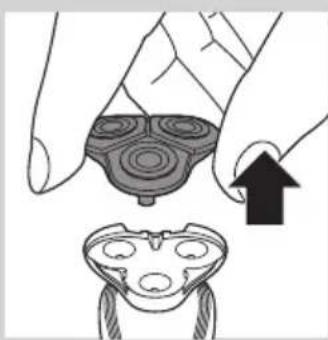
1 The shaving unit symbol flashes when you switch off the shaver.
Note: The displays of the various shaver types look different, but show the same symbol.
2 Pull the shaving head holder off the bottom part of the shaving unit.
natural_image
Illustration of a hand holding a circular object with concentric rings and an arrow pointing to a separate abstract shape (no text or symbols)3 Attach the new shaving head holder to the bottom part of the shaving unit ('click').

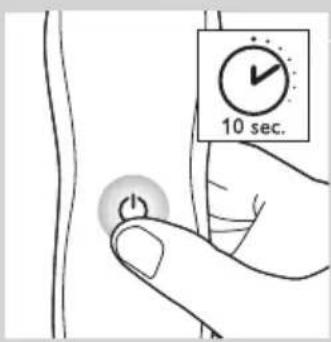
4 To reset the shaver, press and hold the on/off button for approx. 10 seconds.

Note: If you do not reset the shaver at the first replacement reminder, it continues to show the shaving unit symbol at 8 more shaves or until you reset the shaver.
Ordering accessories
To purchase accessories for this appliance, please visit our online shop at www.shop.philips.com/service. If the online shop is not available in your country, go to your Philips dealer or a Philips service centre. If you have any difficulties obtaining accessories for your appliance, please contact the Philips Consumer Care Centre in your country. You find its contact details in the worldwide guarantee leaflet.
The following parts are available
- HQ8505 adapter
- RQ11 Philips Shaving Head Holder
- HQ110 Philips Shaving Head Cleaning Spray
- HQ200 Philips Cleaning Fluid
- RQ111 Beard Styler attachment
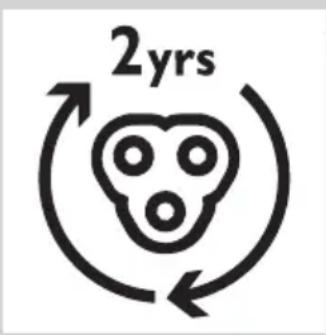
Shaving head holder
- We advise you to replace the shaving head holder every two years. Always replace the shaving head holder with an original RQ11 Philips Shaving Head Holder.
Cleaning
- RQ1197CC, RQ1195CC, RQ1185CC, RQ1180CC, RQ1175CC only: use Jet Clean Solution (HQ200) for regular cleaning of the shaving heads.
Environment

natural_image
Symbol of a waste bin with no text or labels, crossed by two crossed lines and a solid black rectangle below (no text or symbols present)- Do not throw away the shaver and the Jet Clean System (RQ1197CC, RQ1195CC, RQ1185CC, RQ1180CC, RQ1175CC only) with the normal household waste at the end of their life, but hand them in at an official collection point for recycling. By doing this, you help to preserve the environment.

- The built-in rechargeable shaver battery contains substances that may pollute the environment. Always remove the battery before you discard or hand in the shaver at an official collection point. Dispose of the battery at an official collection point for batteries. If you have trouble removing the battery, you can also take the appliance to a Philips service centre. The staff of this centre will remove the battery for you and will dispose of it in an environmentally safe way.
Removing the rechargeable shaver battery
| Only remove the rechargeable battery when you discard the shaver.Make sure the battery is completely empty when you remove it.Be careful, the battery strips are sharp.1 Remove the back panel of the shaver with a screwdriver.2 Remove the rechargeable battery. | ||
| Guarantee and support | ||
| If you need information or support, please visit www.philips.com/support or read the separate worldwide guarantee leaflet.Guarantee restrictions | ||
| The shaving heads (cutters and shaving guards) are not covered by the terms of the international guarantee because they are subject to wear. | ||
| Troubleshooting | ||
| This chapter summarises the most common problems you could encounter with the appliance. If you are unable to solve the problem with the information below, visit www.philips.com/support for a list of frequently asked questions or contact the Consumer Care Centre in your country. | ||
| Problem Possible cause Solution | ||
| The shaver does not shave as well as it used to. | The shaving heads are damaged or worn. | Replace the shaving head holder (see chapter ‘Replacement’). |
| Long hairs obstruct the shaving heads. | Clean the shaving heads by following the steps of the extra-thorough cleaning method (see chapter ‘Cleaning and maintenance’). | |
| RQ1197CC, RQ1195CC,RQ1185CC, RQ1180CC, RQ1175CC only: The Jet Clean System has not cleaned the shaver properly, because the cleaning fluid in the cleaning chamber is soiled or the cleaning fluid level is too low. | Clean the shaver thoroughly before you continue shaving. If necessary, clean and refill the cleaning chamber (see chapter ‘Cleaning and maintenance’). | |
Problem Possible cause Solution
| The shaver does not work when I press the on/off button. | The rechargeable battery is empty. Recharge the battery (see chapter ‘Charging’). | |
| The travel lock is activated. Press the on/off button for 3 seconds to deactivate the travel lock. | ||
| The shaving head holder is soiled or damaged to such an extent that the motor cannot run. | Clean the shaving head holder or replace it (see chapters ‘Cleaning and maintenance’ and ‘Replacement’). | |
| The temperature of the shaver is too high. In this case, the shaver does not work. | Let the shaver cool down. As soon as the temperature of the shaver has dropped sufficiently, you can switch on the shaver again. | |
| RQ1197CC, RQ1195CC, RQ1185CC, RQ1180CC, RQ1175CC only: The shaver is not entirely clean after I clean it in the Jet Clean System. | The cleaning fluid in the cleaning chamber is soiled. | Empty and rinse the cleaning chamber and refill it with new cleaning fluid. |
| The cleaning fluid level is too low. If the fluid volume in the cleaning chamber drops below the minimum level during the cleaning program, the program aborts. The cleaning light and the ‘cleaning chamber empty’ symbol flash at intervals and the holder returns to its starting position. | Refill the cleaning chamber with cleaning fluid to a level between the two lines (see chapter ‘Cleaning and maintenance’). | |
| You have used another cleaning fluid than the original Philips cleaning fluid. | Only use HQ200 Philips Cleaning Fluid. | |
| RQ1197CC, RQ1195CC, RQ1185CC, RQ1180CC, RQ1175CC only: The Jet Clean System does not work when I press the on/off button. | The Jet Clean System is not connected to the mains. | Put the small plug in the Jet Clean System and put the adapter in the wall socket. |
| There is no electrical connection between the Jet Clean System and the shaver. | Press the shaver tightly into the holder to lock it into place. | |
Problem Possible cause Solution
The shaver is not fully charged after I charge it in the charger/Jet Clean System (RQ1197CC, RQ1195CC, RQ1185CC, RQ1180CC, RQ1175CC only).
You have not placed the shaver in the charger/Jet Clean System properly.
Make sure you press the shaver until it locks into place.
Introduktion
natural_image
Prohibition sign with a faucet and diagonal line, no text or symbols presentGenerelt
Fare
- RQ1185, RQ1167, RQ1160

natural_image
Diagram showing a device with two buttons connected to a handheld device (no text or symbols present)- RQ1155, RQ1151, RQ1150, RQ1145, RQ1141, RQ1131
natural_image
Diagram showing battery charging setup with two test tubes and a battery icon (no text or symbols)Opladning
natural_image
Diagram showing a battery connected to a vertical stack of circular components with a lock icon above (no text or symbols)
natural_image
Pure electrical circuit lines without any symbolsnatural_image
Pure electrical circuit lines without any symbolsflowchart
graph TD
    A["Lock Icon"] --> B["Network Connection"]
    C["Lock Icon"] --> D["Network Connection"]
    E["Lock Icon"] --> F["Network Connection"]
    G["Lock Icon"] --> H["Network Connection"]
natural_image
Technical line drawing of a mechanical device with a tool inserted (no text or symbols)natural_image
Diagram of a mechanical device with a curved arrow indicating rotational motion (no text or symbols)natural_image
Line drawing of a device with a top view and a base view (no text or symbols)4 Placer selve shaveren i holderen bag de to klemmer (1), og tryk den ned, indtil den låses på plads (2).
natural_image
Illustration of a person applying facial massage to the ear with directional arrows indicating motion (no text or symbols)natural_image
Illustration of a hand pouring liquid into a container with a cross mark, indicating a step or process (no text or symbols present)

natural_image
Diagram showing a hand operating a device with an upward arrow and a cross symbol (no text or labels)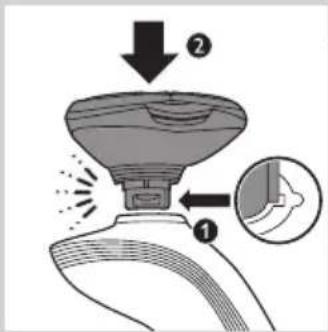
natural_image
Illustration of a hand holding a medical or laboratory device with a magnified inset showing internal components (no text or symbols)natural_image
Illustration of a hand holding a handheld device with a black arrow indicating motion or force (no text or symbols)natural_image
Line drawing of a person applying a hair product to their beaded neck (no text or symbols)natural_image
Line drawing of a handheld device with a scroll wheel and directional arrow (no text or symbols)natural_image
Illustration of two hands holding a device with checkmark and cross symbols, no text or labels presentnatural_image
Line drawing of a person holding a hairpin, no text or symbols presentnatural_image
Line drawing of a man's head and shoulders (no text or symbols)- Et "skægstubbe-look"
natural_image
Line drawing of a man's head and beard (no text or symbols)- Et fuldskæg

natural_image
Line drawing of a male face with short hair and mustache (no text or symbols)- Et overskæg

natural_image
Line drawing of a man's head and shoulders with a beard (no text or symbols)- Et gedeskæg
natural_image
Illustration of a hand holding a circular object with concentric rings, and a separate view of a device with internal components (no text or symbols)
natural_image
Illustration of a hand holding a circular object with a downward arrow, alongside a close-up of a mechanical component (no text or symbols)natural_image
Illustration of a hand pouring liquid into a container with a water level indicator (no text or symbols)
natural_image
Illustration of hands using a handheld device to remove a small container with liquid, showing a downward arrow and sparkles (no text or symbols)
natural_image
Line drawing of a device with a cylindrical top and a rectangular base (no text or symbols)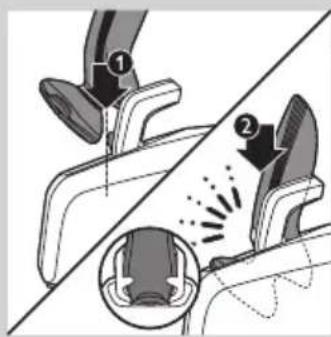
natural_image
Simple line drawing of a container with liquid and a wavy pattern inside, no text or symbols present.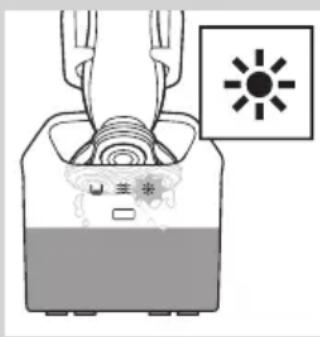
natural_image
Diagram of a device with a sun symbol and control panel, no text or labels present
natural_image
Diagram of a device with a U-shaped symbol and a warning icon, no readable text or labels present.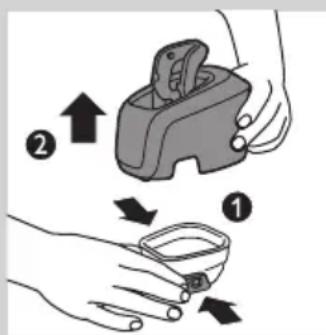

natural_image
Illustration of a hand holding a small object with a string, no text or symbols presentnatural_image
Illustration of a bucket being inserted into a container with a piping bag (no text or symbols)3 Skyl rensekammeret under vandhanen.
natural_image
Illustration of a hand pouring liquid into a container with a pump bottle, accompanied by a directional indicator (no text or symbols on the diagram itself)natural_image
Illustration of hands using a handheld device to remove liquid from a small container (no text or symbols)natural_image
Illustration of a hand holding a circular object with concentric rings, next to a separate sketch of a frog-like figure (no text or symbols)natural_image
Abstract diagram with concentric circles and a black arrow pointing left (no text or symbols)natural_image
Mechanical assembly diagram showing gears and shafts with an upward arrow (no text or symbols)natural_image
Mechanical assembly diagram showing a gear and shaft assembly with an upward arrow (no text or symbols)natural_image
Diagram showing a hand holding a mechanical component with arrows indicating direction (no text or symbols)natural_image
Mechanical assembly diagram showing a brush tool interacting with a gear and motor (no text or symbols)natural_image
Mechanical gear assembly diagram showing a rotating shaft and housing with a downward arrow indicating motion (no text or symbols)natural_image
Mechanical assembly diagram showing gear and shaft components with a downward arrow indicating motion (no text or symbols)natural_image
Abstract diagram with concentric circles and radiating lines, no text or symbols presentnatural_image
Illustration of a hand holding a device with a downward arrow indicating process (no text or symbols)natural_image
Illustration of a hand pouring liquid into a bottle and a bag, separated by a diagonal line (no text or symbols)natural_image
Illustration of a pliers being cut with an arrow indicating the process (no text or symbols present)
natural_image
Illustration of a hand holding a circular object with concentric rings, and a separate view of a device with three circular components (no text or symbols)
natural_image
Symbol of a trash bin crossed out by two crossed lines (no text or numbers present)
natural_image
Prohibition sign with a faucet and diagonal line, no text or symbols presentVaara
- RQ1185, RQ1167, RQ1160
natural_image
Diagram showing a device with two buttons connected to a handheld device (no text or symbols present)- RQ1155, RQ1151, RQ1150, RQ1145, RQ1141, RQ1131
Lataaminen

natural_image
Diagram showing battery charging setup with two test tubes and a battery icon (no text or symbols)
natural_image
Diagram showing a battery connected to a vertical stack of circular components, with a separate rectangular device on the right (no text or symbols)
natural_image
Pure electrical circuit lines without any symbolsnatural_image
Pure electrical circuit lines without any symbolsnatural_image
Mechanical component diagram showing a lever and pin (no text or symbols)natural_image
Diagram of a mechanical device with a curved arrow indicating rotational motion (no text or symbols)natural_image
Line drawing of a device with a top component and a base device (no text or symbols)natural_image
Illustration of a person applying facial massage to the ear with directional arrows indicating motion (no text or symbols)1 Kytke parranajokoneeseen virta painamalla virtapainiketta kerran.
natural_image
Illustration of a hand pouring liquid into a container with a cross mark, indicating a step or process (no text or symbols present)

natural_image
Diagram showing a robotic arm performing a press operation with an upward arrow and cross symbol (no text or labels)
natural_image
Illustration of a hand pouring liquid into a container with a cross symbol, indicating a process or action (no text or symbols present)natural_image
Illustration of a hand holding a medical or laboratory device with a magnified inset showing internal components (no text or symbols)natural_image
Illustration of a hand holding a handheld device with a lightning bolt indicating motion (no text or symbols)natural_image
Line drawing of a person applying a hair product to their beaded neck (no text or symbols)natural_image
Line drawing of a handheld device with a scroll wheel and directional arrow (no text or symbols)natural_image
Illustration of two hands holding a device with checkmark and cross symbols, no text or labels presentnatural_image
Line drawing of a person holding a hairpin, no text or symbols presentnatural_image
Line drawing of a man's head and shoulders with a beard (no text or symbols)- Sänki
natural_image
Line drawing of a man's head and shoulders with a beard (no text or symbols)- Kokoparta
natural_image
Line drawing of a male's head and shoulders (no text or symbols)- Viikset

natural_image
Line drawing of a man's head and shoulders with a beard (no text or symbols)- Pukinparta
Puhdistus ja hoito
natural_image
Illustration of a hand holding a circular object with concentric rings, next to a separate abstract shape with internal circles (no text or symbols)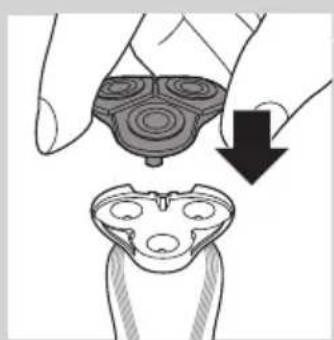
natural_image
Illustration of a hand holding a device with a downward arrow indicating process (no text or symbols)natural_image
Illustration of a hand pouring liquid into a container with a pump bottle, accompanied by a directional control symbol (no text or labels)natural_image
Illustration of hands using a handheld device to remove a small container with liquid, no text or symbols presentnatural_image
Line drawing of a device with a cylindrical top and a rectangular base (no text or symbols)
natural_image
Diagram of a device with a sun symbol and control panel, no readable text or symbols present

natural_image
Illustration of a hand holding a medical device with a catheter inserted (no text or symbols)natural_image
Illustration of a faucet pouring liquid into a square basin (no text or symbols)natural_image
Illustration of a hand pouring liquid into a container with a label, accompanied by a directional indicator (no text or symbols on the diagram itself)natural_image
Illustration of hands using a handheld device to remove liquid from a small bowl (no text or symbols)natural_image
Illustration of a hand holding a circular object with concentric rings and an arrow pointing to it, next to a separate abstract shape (no text or symbols)natural_image
Abstract symmetrical pattern with concentric rings and a black arrow pointing left (no text or symbols)natural_image
Mechanical assembly diagram showing gears and shafts with an upward arrow (no text or symbols)natural_image
Mechanical assembly diagram showing a gear-like component with an upward arrow indicating motion (no text or symbols present)natural_image
Diagram showing a hand holding a mechanical component with arrows indicating direction (no text or symbols)natural_image
Mechanical assembly diagram showing a tool interacting with a gear and shaft (no text or symbols)natural_image
Mechanical gear assembly diagram showing a central shaft and surrounding gears with a downward arrow indicating motion (no text or symbols)natural_image
Mechanical assembly diagram showing gear and shaft components with a downward arrow indicating motion (no text or symbols)natural_image
Abstract diagram with concentric circles and radiating lines, no text or symbols presentnatural_image
Illustration of a hand holding a circular object with concentric rings, and a magnified view of a device with internal components (no text or symbols)natural_image
Illustration of a hand pouring liquid into a bottle and a bag, with another hand pouring liquid from a bottle (no text or symbols)natural_image
Illustration of a pliers with an arrow indicating process direction (no text or symbols)natural_image
Illustration of a hand holding a circular object with concentric rings, and a separate view of a device with three circular features (no text or symbols)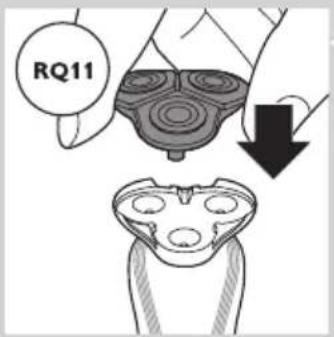
natural_image
Symbol of a trash bin crossed out by two diagonal lines (no text or numbers present)natural_image
Prohibition sign with a faucet and diagonal line, no text or symbols presentDanger
- RQ1185/RQ1167/RQ1160

natural_image
Diagram showing a device with two buttons connected to a handheld device (no text or symbols present)- RQ1155/RQ1151/RQ1150/RQ1145/RQ1141/RQ1131
Charge

natural_image
Diagram showing a vertical stack of circular components with a battery symbol and a separate rectangular device (no text or labels)RQ1197/RQ1195/RQ1180/RQ1175
natural_image
Pure electrical circuit lines without any symbolsRQ1197/RQ1195/RQ1180/RQ1175
RQ1197/RQ1195/RQ1180/RQ1175
natural_image
Line drawing of a mechanical device with a black arrow pointing to a component (no text or symbols)natural_image
Diagram of a mechanical device with a rotating arrow and curved motion, no text or symbols presentnatural_image
Line drawing of a device with a top view and a base view (no text or symbols)natural_image
Illustration of a person's face with arrows indicating direction of movement or pressure (no text or symbols)natural_image
Illustration of a hand pouring liquid into a container with a cross mark, indicating a process step (no text or symbols present)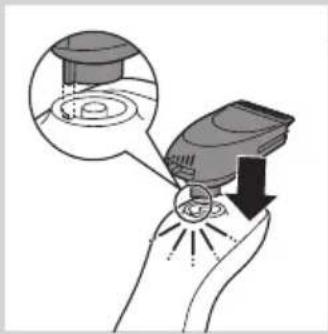
natural_image
Illustration of a hand holding an electronic device with a magnified inset showing internal components (no text or symbols)
natural_image
Illustration of a hand holding a handheld device with a lightning bolt and arrow indicating motion (no text or symbols)
natural_image
Line drawing of a person using a power shaver with a 'Power' button (no text or symbols on the diagram itself)natural_image
Line drawing of a person applying a hair product to their beak (no text or symbols)natural_image
Line drawing of a handheld device with a curved arrow indicating motion (no text or symbols)natural_image
Illustration of two hands holding a device with directional arrows indicating movement or force (no text or symbols present)natural_image
Line drawing of a person holding a hairpin, no text or symbols presentnatural_image
Line drawing of a man's head and shoulders with a beard (no text or symbols)Styles de barbe
natural_image
Line drawing of a man's head and beard (no text or symbols)natural_image
Line drawing of a man's head and shoulders (no text or symbols)- Une moustache
natural_image
Line drawing of a man's head and shoulders (no text or symbols)- Un bouc
natural_image
Illustration of a hand holding a circular object with concentric rings, next to a separate abstract shape with three circles (no text or symbols)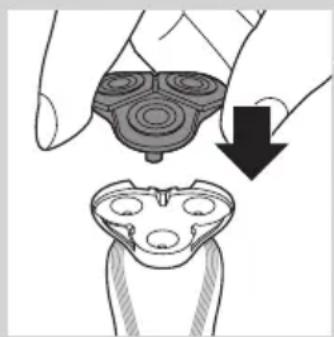
natural_image
Illustration of a hand holding a circular object with a downward arrow, alongside a close-up of a mechanical component (no text or symbols)natural_image
Illustration of a hand pouring liquid into a container with a water level indicator (no text or symbols)natural_image
Illustration of hands holding a device with a downward arrow and a small bowl nearby (no text or symbols)natural_image
Line drawing of a device with a vertical cylindrical object above a flat base (no text or symbols)

natural_image
Diagram of a device with a sun symbol and control panel, no readable text or symbols present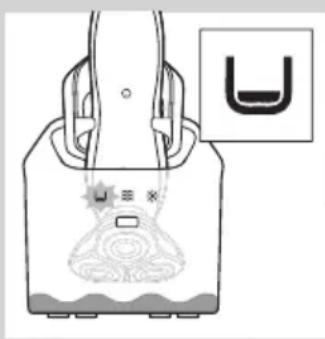
natural_image
Illustration of a handbag with decorative patterns and a small inset showing a U-shaped symbol (no text or labels)
natural_image
Illustration of a hand holding a medical device with a catheter inserted (no text or symbols)natural_image
Illustration of a faucet pouring liquid into a square basin (no text or symbols)natural_image
Illustration of a hand pouring liquid into a container with a water level indicator (no text or symbols)natural_image
Illustration of hands using a handheld device to remove a small container with liquid, showing a downward arrow and motion lines (no text or symbols)natural_image
Illustration of a hand holding a circular object with concentric rings and an arrow pointing to it, next to a separate abstract shape (no text or symbols)natural_image
Abstract diagram with concentric circles and a black arrow pointing left (no text or symbols)natural_image
Mechanical assembly diagram showing gear and shaft components with an upward arrow (no text or symbols)natural_image
Mechanical assembly diagram showing a gear and shaft assembly with an upward arrow (no text or symbols)4 Retirez la lame de la grille.
natural_image
Illustration of a hand holding a mechanical component with arrows indicating motion or force direction (no text or symbols)natural_image
Mechanical assembly diagram showing a brush tool interacting with a gear mechanism (no text or symbols visible)natural_image
Mechanical assembly diagram showing a gear-like component with a downward arrow indicating motion (no text or symbols present)natural_image
Mechanical assembly diagram showing gear and shaft components with a downward arrow indicating motion (no text or symbols)natural_image
Abstract diagram with concentric circles and radiating lines, no text or symbols presentnatural_image
Illustration of a hand holding a device with a downward arrow indicating process (no text or symbols)natural_image
Illustration of two fish being splashing from a surface, with no text or symbols present.natural_image
Illustration of a pliers with an arrow indicating force or movement (no text or symbols)natural_image
Illustration of a hand holding a circular object with concentric rings, next to a stylized frog-like figure with three eyes (no text or symbols)natural_image
Symbol of a waste bin with crossed lines indicating no waste, and a solid rectangle below (no text or labels)natural_image
Prohibition sign with a faucet and lightbulb crossed out, no text or symbols present.Algemeen
Gevaar
- RQ1185, RQ1167, RQ1160
natural_image
Diagram showing a device with buttons connected to a handheld device (no text or symbols present)- RQ1155, RQ1151, RQ1150, RQ1145, RQ1141, RQ1131
Opladen
RQ1185, RQ1167, RQ1160, RQ1155, RQ1151, RQ1150, RQ1145, RQ1141, RQ1131
natural_image
Diagram showing a battery connected to a vertical stack of circular components, with a separate inset illustrating the battery symbol (no text or labels present)natural_image
Pure electrical circuit lines without any symbolsRQ1185, RQ1167, RQ1160, RQ1155, RQ1151, RQ11510, RQ1145, RQ1141, RQ1131
De reisvergrendeling deactiveren
natural_image
Technical line drawing of a mechanical device with a tool inserted (no text or symbols)natural_image
Diagram of a mechanical device with a curved arrow indicating rotational motion (no text or symbols)natural_image
Line drawing of a device with a cylindrical top and a rectangular base (no text or symbols)natural_image
Diagram showing two mechanical components with arrows indicating motion or force, no text or symbols presentnatural_image
Illustration of a person applying facial massage to the ear with directional arrows indicating motion (no text or symbols)natural_image
Diagram showing a hand pouring liquid into a container with a cross mark and an upward arrow, no text or symbols present.natural_image
Diagram showing a robotic arm performing a manual press operation with a valve and switch (no text or symbols present)natural_image
Diagram showing a hand pressing down a container with a cross symbol, indicating a process or procedure (no text or labels present)natural_image
Illustration of a hand holding a medical device with a magnified inset showing internal components (no text or symbols)natural_image
Illustration of a hand holding a handheld device with a black arrow indicating motion or force (no text or symbols)natural_image
Line drawing of a person using a power shaver with a 'Power' button (no text or symbols beyond the icon)natural_image
Illustration of a person brushing their hair with a comb (no text or symbols)4 U kunt nu beginnen uw baard te stylen.
natural_image
Line drawing of a handheld device with a scroll wheel and directional arrow (no text or symbols)natural_image
Illustration of two hands holding a small object with directional arrows indicating movement or change (no text or symbols present)natural_image
Line drawing of a person holding a hairpin, no text or symbols presentnatural_image
Line drawing of a man's head and shoulders with short hair and beard (no text or symbols)- Een stoppelbaard

natural_image
Line drawing of a man's head and shoulders with a beard (no text or symbols)- Een volle baard

natural_image
Line drawing of a male's head and shoulders (no text or symbols)- Een snor
natural_image
Line drawing of a man's head and shoulders (no text or symbols)- Een sik
natural_image
Illustration of a hand holding a circular object with concentric rings, and a separate view of a device with internal components (no text or symbols)natural_image
Illustration of a hand holding a circular object with a downward arrow, next to a close-up of a mechanical component (no text or symbols)natural_image
Illustration of a hand pouring liquid into a container with a directional control symbol (no text or labels)
natural_image
Illustration showing two hands exchanging a device and a small bowl with spikes, no text or symbols presentnatural_image
Line drawing of a vacuum cleaner with a cylindrical component above it (no text or symbols)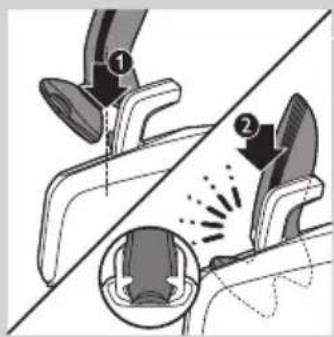


natural_image
Diagram of a device with a sun icon and control panel, no text or symbols presentnatural_image
Diagram of a device with a U-shaped symbol and a small inset showing a black-and-white icon (no text or labels)

natural_image
Illustration of a hand holding a small object with a curved line inside, no text or symbols present
natural_image
Illustration of a faucet dispensing liquid into a square basin (no text or symbols)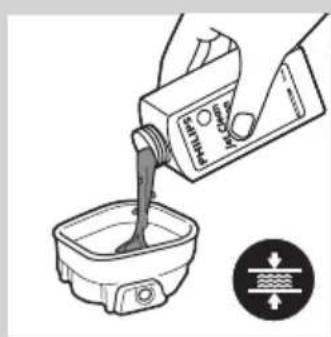
natural_image
Illustration of a hand pouring liquid into a container with a water level indicator (no text or symbols)natural_image
Illustration of hands using a handheld device to interact with a small bowl, showing motion and vibration (no text or symbols)natural_image
Illustration of a hand holding a circular object with concentric rings and an arrow pointing to it, alongside a separate sketch of a frog-like figure (no text or symbols)natural_image
Abstract symmetrical pattern with concentric rings and a black arrow pointing left (no text or symbols)natural_image
Mechanical assembly diagram showing gears and shafts with an upward arrow (no text or symbols)natural_image
Mechanical assembly diagram showing a gear-like component with an upward arrow indicating motion (no text or symbols present)natural_image
Diagram showing a hand holding a gear-like object with arrows indicating motion or force (no text or symbols)natural_image
Mechanical assembly diagram showing a brush applying material to a gear (no text or symbols)natural_image
Mechanical assembly diagram showing a gear-like component with a downward arrow indicating motion (no text or symbols present)natural_image
Mechanical assembly diagram showing gear and shaft components with a downward arrow indicating motion (no text or symbols)natural_image
Abstract diagram of a symmetrical, multi-layered structure with radiating lines and a black arrow pointing inward (no text or symbols)natural_image
Illustration showing a hand holding a device with a magnified view of its internal components (no text or symbols)natural_image
Illustration of two fish being pulled by a rope, showing water droplets (no text or symbols)natural_image
Illustration of a pliers with an arrow indicating motion (no text or symbols)natural_image
Illustration of a hand holding a circular object with concentric rings, and a separate view of a mechanical component with internal cavities (no text or symbols)natural_image
Symbol of a trash bin with crossed lines indicating no waste or restriction, plus a solid black rectangle below (no text or symbols)natural_image
Prohibition sign with a faucet and diagonal line, no text or symbols presentGefahr
natural_image
Diagram showing a remote control panel connected to a pair of electric shakers (no text or symbols present)- RQ1185, RQ1167, RQ1160
natural_image
Diagram showing a device with two buttons connected to a handheld device (no text or symbols present)- RQ1155, RQ1151, RQ1150, RQ1145, RQ1141, RQ1131
Laden
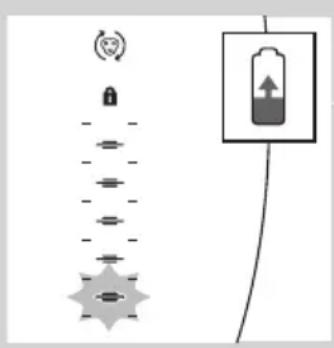
RQ1185, RQ1167, RQ1160, RQ1155, RQ1151, RQ1150, RQ1145, RQ1141, RQ1131
natural_image
Diagram showing a vertical stack of circular components with a battery symbol and a separate rectangular device connected by wires (no text or labels)natural_image
Pure electrical circuit lines without any symbolsnatural_image
Technical line drawing of a mechanical component with a tool inserted (no text or symbols)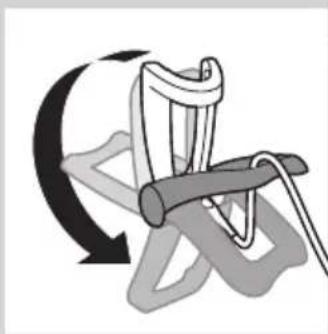
natural_image
Diagram of a rope knot with a curved arrow indicating rotational motion (no text or symbols)
natural_image
Illustration of a device with a cylindrical top and a rectangular base (no text or symbols)natural_image
Illustration of a person's face with arrows indicating direction of movement or pressure (no text or symbols)natural_image
Illustration of a hand pressing down on a device with a cross symbol, showing mechanical components and an upward arrow (no text or symbols)natural_image
Illustration of a hand pouring liquid into a container with an X mark, indicating a process or operation (no text or symbols present)natural_image
Illustration of a hand holding a small device with a magnified inset showing internal components (no text or symbols)natural_image
Illustration of a hand holding a handheld device with a black arrow indicating compression or disassembly (no text or symbols present)natural_image
Illustration of a person using a power shaver with a 'Power' button (no text or symbols beyond the icon)natural_image
Illustration of a person brushing a beaded neck with a tool (no text or symbols)natural_image
Line drawing of a hand holding a small electronic device with a handle and arrow indicating rotation (no text or symbols)natural_image
Illustration of two hands holding a device with checkmark and cross symbols, no text or labels presentnatural_image
Line drawing of a person holding a hairpin, no text or symbols presentnatural_image
Line drawing of a man's head and shoulders with a beard (no text or symbols)- Ein Dreitagebart

natural_image
Line drawing of a man's head and beard (no text or symbols)- Ein Vollbart

natural_image
Line drawing of a male's face with short hair and mustache (no text or symbols)- Ein Schnurrbart
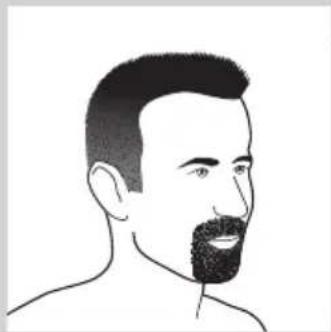
natural_image
Line drawing of a man's head and shoulders (no text or symbols)- Ein Spitzbart
natural_image
Illustration of a hand holding a circular object with concentric rings, next to a separate abstract shape with internal circles (no text or symbols)
natural_image
Illustration of a hand holding a device with a magnified view below showing internal components (no text or symbols)natural_image
Illustration of a hand pouring liquid into a container with a device, showing fluid flow direction (no text or symbols)
natural_image
Illustration of hands using a handheld device to remove or spray liquid, with no text or symbols present.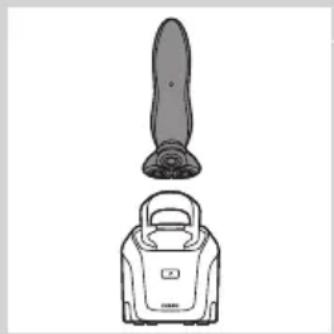
natural_image
Illustration of a vacuum cleaner with a cylindrical component and a base device (no text or symbols)
natural_image
Diagram of a device with a sun icon and control panel, no readable text or symbols present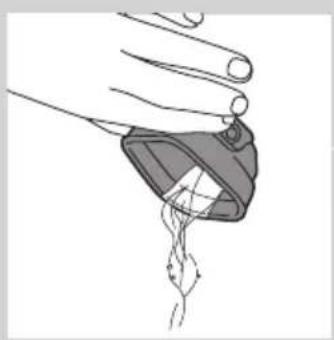
natural_image
Line drawing of a hand holding a medical device with a catheter inserted (no text or symbols)
natural_image
Illustration of a faucet pouring liquid into a square basin with water flowing out (no text or symbols)
natural_image
Illustration of a hand pouring liquid into a container with a water level indicator (no text or symbols)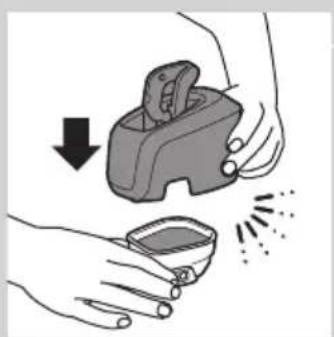
natural_image
Illustration of hands using a handheld device to remove or clean material, with no text or symbols present.natural_image
Illustration of a hand holding a circular object with concentric rings, next to a separate abstract shape with four circles (no text or symbols)
natural_image
Abstract symmetrical pattern with concentric rings and a central arrow (no text or symbols)
natural_image
Mechanical assembly diagram showing gears and shafts with an upward arrow (no text or symbols)
natural_image
Mechanical gear assembly diagram showing a central shaft and housing with an upward arrow (no text or symbols)
natural_image
Diagram showing a hand holding a car tire with arrows indicating motion or force (no text or symbols)natural_image
Mechanical assembly diagram showing a brush applying material to a gear (no text or symbols)natural_image
Mechanical assembly diagram showing a gear-like component with a downward arrow indicating motion (no text or symbols present)natural_image
Mechanical assembly diagram showing gear and shaft components with a downward arrow indicating motion (no text or symbols)natural_image
Abstract diagram with concentric circles and radiating lines, no text or symbols presentnatural_image
Illustration of a hand holding a three-layered device with a downward arrow indicating compression or disassembly (no text or symbols present)natural_image
Illustration of two fish being watered from a pipe, showing different shapes and water droplets (no text or symbols)natural_image
Illustration of a pliers with an arrow indicating force or movement (no text or symbols)natural_image
Illustration of a hand holding a circular object with concentric rings, next to a stylized frog head (no text or symbols)natural_image
Prohibition sign showing a faucet crossed out by a diagonal line, indicating no pollution or water release.Γενικά
Κίνδυνος

natural_image
Diagram showing a device connected to a handheld device, with no visible text or symbols.- RQ1185, RQ1167, RQ1160
- RQ1155, RQ1151, RQ1150, RQ1145, RQ1141, RQ1131
Φόρτιση
RQ1185, RQ1167, RQ1160, RQ1155, RQ1151, RQ1150, RQ1145, RQ1141, RQ1131
natural_image
Diagram showing a battery connected to a vertical stack of circular components, with a circular icon above indicating a notification or alert (no text or symbols present)natural_image
Pure electrical circuit lines without any symbolsRQ1185, RQ1167, RQ1160, RQ1155, RQ1151, RQ11510, RQ1145, RQ1141, RQ1131
natural_image
Mechanical component diagram showing a lever and pin (no text or symbols)natural_image
Diagram of a mechanical device with a curved arrow indicating rotational motion (no text or symbols)natural_image
Illustration of a handheld device with a top view and a smaller front view (no text or symbols)natural_image
Illustration of a person applying facial massage to the ear with directional arrows indicating motion (no text or symbols)natural_image
Diagram showing a hand pressing down a device with a cross symbol, indicating mechanical or electrical hazard (no text or labels present)
natural_image
Diagram showing a mechanical device with an upward arrow and a cross symbol, no text or labels present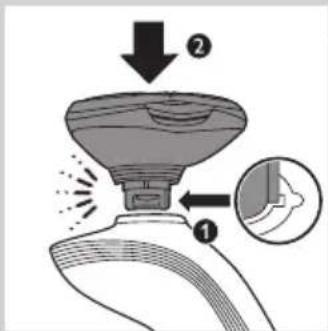
natural_image
Diagram showing a hand pressing down a device with a cross symbol, indicating mechanical or electrical hazard (no text or labels present)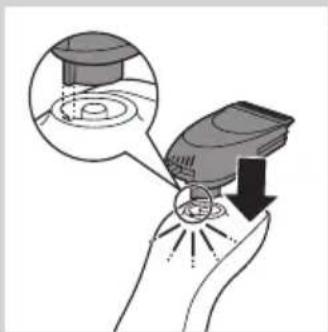
natural_image
Illustration of a hand holding a medical device with a magnified inset showing internal components (no text or symbols)natural_image
Illustration of a hand holding a small electronic device with a lightning bolt indicating light emission (no text or symbols)natural_image
Line drawing of a person applying a hair to their beache, no text or symbols presentnatural_image
Line drawing of a hand holding a small electric shaver with a black arrow indicating motion (no text or symbols)
natural_image
Illustration of two hands holding a device with checkmark and cross symbols, no text or labels present
natural_image
Line drawing of a person applying makeup to their ear (no text or symbols)
natural_image
Line drawing of a man's head and shoulders with a beard (no text or symbols)
natural_image
Line drawing of a man's head and beard (no text or symbols)natural_image
Line drawing of a male's face with short hair and mustache (no text or symbols)- Μουστάκι
natural_image
Line drawing of a man's head and shoulders (no text or symbols)- Μουσάκι
natural_image
Illustration showing two hand positions of a medical device with internal patterns, one up and one down, both with black arrows indicating direction (no text or symbols present)natural_image
Illustration of a hand pouring liquid into a container with a sensor icon (no text or symbols)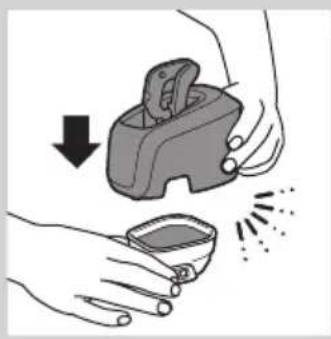
natural_image
Illustration of hands using a handheld device to remove liquid from a small bowl (no text or symbols)
natural_image
Line drawing of a device with a cylindrical top and a rectangular base (no text or symbols)
natural_image
Hand pressing a button with a power symbol and arrow, no text or labels present
natural_image
Diagram of a device with a sun symbol and a warning label, no readable text or symbols present.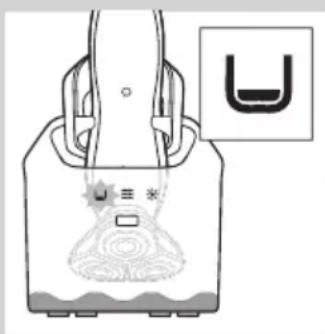


natural_image
Illustration of a hand holding a small object with a curved line extending from it, no text or symbols present.natural_image
Illustration of a faucet pouring liquid into a square basin (no text or symbols)natural_image
Illustration of a hand pouring liquid into a container with a label, accompanied by a directional indicator (no text or symbols on the diagram itself)natural_image
Illustration of hands using a handheld device to remove liquid from a small bowl (no text or symbols)natural_image
Illustration of a hand holding a circular object with concentric rings and an arrow pointing to it, next to a separate abstract shape (no text or symbols)natural_image
Abstract symmetrical pattern with concentric rings and a black arrow pointing left (no text or symbols)natural_image
Mechanical gear assembly diagram showing gears and shafts with an upward arrow (no text or symbols)natural_image
Mechanical assembly diagram showing a gear and shaft assembly with an upward arrow (no text or symbols)natural_image
Diagram showing a hand holding a mechanical component with arrows indicating direction (no text or symbols)natural_image
Mechanical assembly diagram showing a brush tool interacting with a gear mechanism (no text or symbols visible)natural_image
Mechanical gear assembly diagram showing a rotating shaft and housing with a downward arrow indicating motion (no text or symbols)natural_image
Mechanical assembly diagram showing gear and shaft components with a downward arrow indicating motion (no text or symbols)natural_image
Abstract diagram with concentric circles and radiating lines, no text or symbols presentnatural_image
Illustration of a hand holding a circular object with a downward arrow indicating a process or transformation (no text or symbols present)natural_image
Illustration of a hand pouring liquid into a bottle and a slide, with no text or symbols present.natural_image
Illustration of a kitchen knife with a handle and blade, showing a cutting tool (no text or symbols)natural_image
Illustration of a hand holding a circular object with concentric rings, next to a separate abstract shape with internal circles (no text or symbols)

natural_image
Symbol of a waste bin with crossed lines indicating no waste, and a solid black rectangle below (no text or labels)natural_image
Prohibition sign with a faucet and diagonal line, no text or symbols presentPericolo
natural_image
Simple line drawing of a showerhead spraying over a water-filled basin (no text or symbols)natural_image
Diagram showing a remote control panel connected to a pair of electric shakers (no text or symbols present)- RQ1185, RQ1167, RQ1160

natural_image
Diagram showing a device with two buttons connected to a handheld device (no text or symbols present)- RQ1155, RQ1151, RQ1150, RQ1145, RQ1141, RQ1131
natural_image
Diagram showing a vertical stack of circular components with a lock icon and a battery symbol, connected by a wire (no text or labels)natural_image
Pure electrical circuit lines without any symbolsnatural_image
Line drawing of a mechanical device with a black arrow pointing to a cable or connector (no text or symbols)natural_image
Diagram of a rope knot with a curved arrow indicating rotational motion (no text or symbols)natural_image
Illustration of a showerhead and a water dispenser (no text or symbols)natural_image
Illustration of a person's face with arrows indicating direction of motion or movement (no text or symbols)natural_image
Diagram showing a hand holding a container with an arrow indicating upward motion, no text or symbols present

natural_image
Diagram showing a hand operating a device with an upward arrow and a cross symbol (no text or labels)
natural_image
Illustration of a hand holding a container with a cross symbol, showing mechanical components and an upward arrow (no text or symbols present)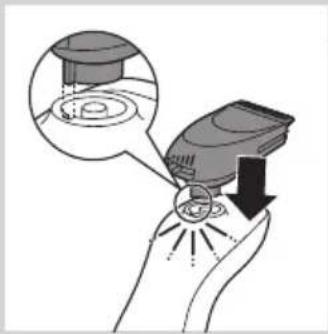
natural_image
Illustration of a hand holding an electronic device with a magnified inset showing internal components (no text or symbols)
natural_image
Illustration of a hand holding a handheld device with a curved handle and directional arrows indicating motion (no text or symbols)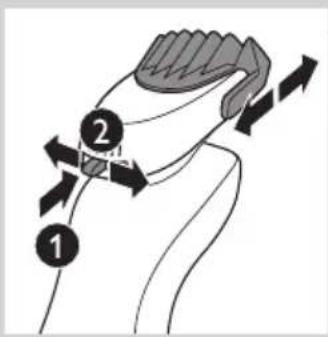
natural_image
Line drawing of a handheld device with a power button and power symbol (no text or labels)natural_image
Line drawing of a person applying a hair to their beache, no text or symbols presentnatural_image
Line drawing of a handheld device with a curved handle and directional arrow (no text or symbols)natural_image
Illustration of two hands holding a device with directional arrows indicating movement or force (no text or symbols present)natural_image
Line drawing of a person holding a hairpin, no text or symbols presentnatural_image
Line drawing of a man's head and shoulders with short hair and beard (no text or symbols)- Look trasandato
natural_image
Line drawing of a man's head and beard (no text or symbols)- Barba lunga
natural_image
Line drawing of a male's head and shoulders (no text or symbols)- Baffi

natural_image
Line drawing of a man's head and shoulders (no text or symbols)- Pizzetto
natural_image
Illustration of a hand pouring liquid into a container with a water level indicator (no text or symbols)natural_image
Illustration of hands using a handheld device to remove or clean material, with no text or symbols present.natural_image
Line drawing of a vacuum cleaner with a handle and top component (no text or symbols)

natural_image
Diagram of a device with a sun symbol and control panel, no text or labels present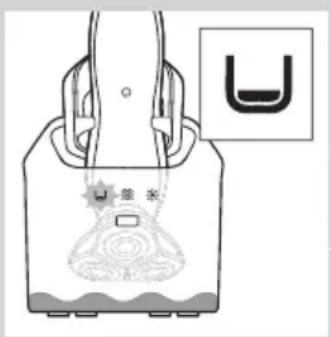
natural_image
Illustration of a handbag with a U-shaped symbol and decorative elements, no readable text or symbols present.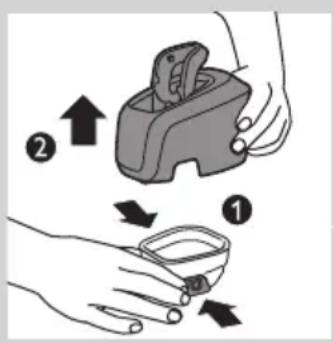
natural_image
Illustration of a hand holding a medical device with a catheter inserted (no text or symbols)natural_image
Illustration of a faucet dispensing water into a square basin (no text or symbols)natural_image
Illustration of a hand pouring liquid into a container with a water level indicator (no text or symbols)natural_image
Illustration of hands using a handheld device to interact with a small bowl, showing motion and vibration (no text or symbols)natural_image
Illustration of a hand holding a circular object with concentric rings and an arrow pointing to it, alongside a separate abstract diagram (no text or symbols)natural_image
Abstract symmetrical pattern with concentric rings and a black arrow pointing left (no text or symbols)natural_image
Mechanical assembly diagram showing gears and shafts with an upward arrow (no text or symbols)natural_image
Mechanical gear assembly diagram showing a central shaft and housing with an upward arrow (no text or symbols)natural_image
Diagram showing a hand holding a gear-like object with arrows indicating motion or force (no text or symbols)natural_image
Mechanical assembly diagram showing a brush applying material to a gear mechanism (no text or symbols)natural_image
Mechanical assembly diagram showing a gear and shaft assembly with a downward arrow indicating motion (no text or symbols)natural_image
Mechanical assembly diagram showing gear and shaft components with a downward arrow indicating motion (no text or symbols)natural_image
Abstract diagram with concentric circles and radiating lines, no text or symbols presentnatural_image
Illustration of a hand holding a 3D object with a downward arrow indicating a process or transformation (no text or symbols present)Pulizia del rifinitore (solo RQ1197, RQ1185, RQ1180, RQ1160, RQ1155, RQ1151)
natural_image
Illustration of two hands holding water droplets, one with a leaf and the other with a handle (no text or symbols)natural_image
Illustration of a pliers with an arrow indicating motion (no text or symbols)natural_image
Illustration of a hand holding a circular object with concentric rings, next to a separate abstract shape with internal circles (no text or symbols)

natural_image
Symbol of a waste bin with crossed lines indicating no waste, and a solid black rectangle below (no text or labels)natural_image
Prohibition sign with a faucet and diagonal line, no text or symbols presentGenerelt
Fare
- RQ1185, RQ1167, RQ1160

natural_image
Diagram showing two electronic devices connected by a cable, one with power button and others with buttons (no text or symbols)- RQ1155, RQ1151, RQ1150, RQ1145, RQ1141, RQ1131
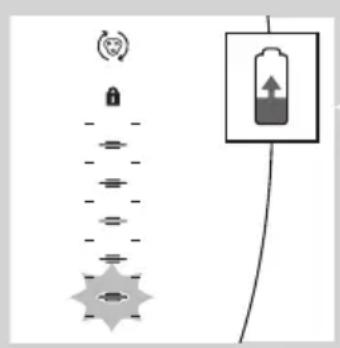

natural_image
Diagram showing two battery cells with icons and a battery symbol (no text or labels)Lading
- Ladingen tar ca. én time.
natural_image
Diagram showing a battery connected to a vertical stack of circular components with a lock icon above (no text or symbols)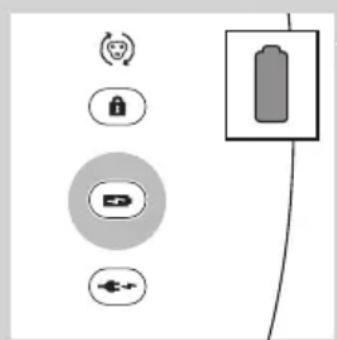
natural_image
Pure electrical circuit lines without any symbols
Transportlås
Ladingen tar ca. én time.
natural_image
Technical line drawing of a mechanical component with a tool inserted (no text or symbols)1 Sett den lille kontakten i laderen.

natural_image
Diagram of a mechanical device with a rotating arrow and curved motion, no text or symbols present4 Sett barbermaskinen i laderen (1), og trykk den bakover til den låses på plass (2).
- Displayet viser at barbermaskinen lades (se under Lading i avsnittet Displayet).
Lading i Jet Clean-systemet (kun RQ1197CC, RQ1195CC, RQ1185CC, RQ11801CC, RQ1175CC)
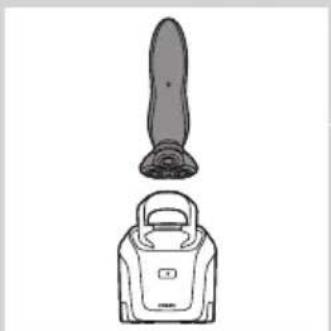
natural_image
Line drawing of a device with a top view and a base view (no text or symbols)1 Koble den lille kontakten til Jet Clean-systemet.
2 Sett adapteren i stikkontakten.
natural_image
Illustration of a person's face with directional arrows indicating movement or pressure points (no text or symbols)natural_image
Illustration of a hand pouring liquid into a container with a cross mark, indicating a step or process (no text or symbols present)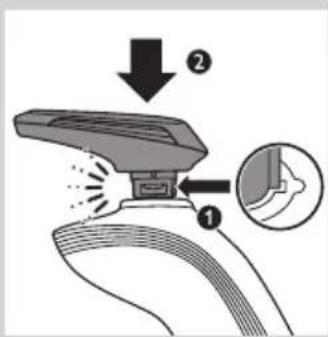

natural_image
Diagram showing a robotic arm performing a press operation with an upward arrow and a cross symbol (no text or labels)
natural_image
Illustration of a hand pouring liquid into a container with a cross symbol, indicating a process or operation (no text or symbols present)
natural_image
Illustration of a hand holding a medical device with a magnified inset showing internal components (no text or symbols)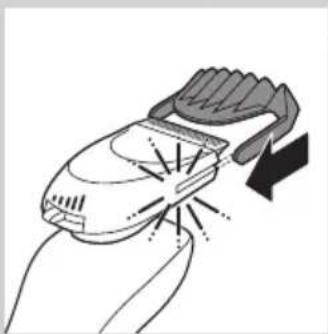
natural_image
Illustration of a hand holding a small electronic device with a lightning bolt and arrow indicating action (no text or symbols)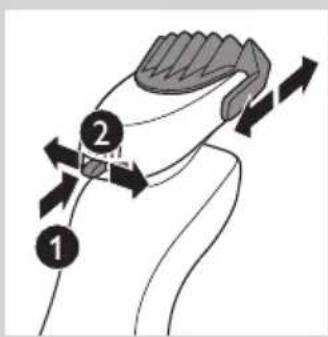
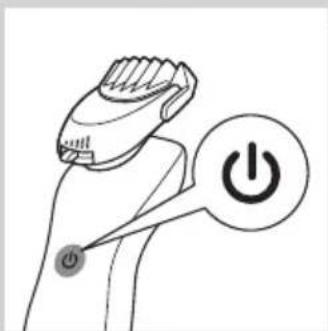
natural_image
Line drawing of a person using a power shaver with a 'Power' button (no text or symbols beyond the icon)natural_image
Line drawing of a person applying a hair to their beache, no text or symbols presentnatural_image
Line drawing of a handheld device with a curved handle and directional arrow (no text or symbols)natural_image
Illustration of two hands holding a device with directional arrows indicating movement or force (no text or symbols present)natural_image
Line drawing of a person holding a hairpin, no text or symbols presentnatural_image
Line drawing of a man's head and shoulders with short hair and beard (no text or symbols)- Tredagersskjegg

natural_image
Line drawing of a man's head and beard (no text or symbols)- Helskjegg

natural_image
Line drawing of a man's head and shoulders (no text or symbols)- Bart

natural_image
Line drawing of a man's head and shoulders (no text or symbols)- Fippskjegg
natural_image
Illustration of a hand holding a circular object with concentric rings, next to a separate frog-shaped object (no text or symbols)
natural_image
Illustration of a hand holding a three-layered device with a downward arrow indicating compression or disassembly (no text or symbols present)
2 Skyll barberingsenheten under varmt vann.
natural_image
Illustration of a hand pouring liquid into a container with a water level indicator (no text or symbols)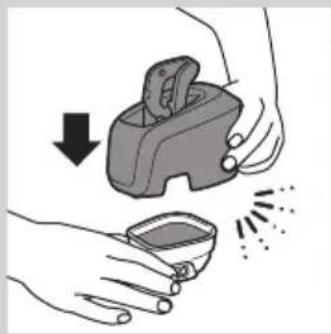
natural_image
Illustration of hands using a handheld device to remove or clean material, with no text or symbols present.
natural_image
Line drawing of a vacuum cleaner with a cylindrical body and handle, shown from top and bottom (no text or symbols)
natural_image
Diagram showing two mechanical components with arrows indicating motion or force, no text or symbols present
natural_image
Diagram of a scientific apparatus with a central star-like component and wavy lines indicating wave or measurement (no text or symbols present)
natural_image
Diagram of a device with a sun icon and internal components, no text or symbols present
natural_image
Illustration of a bag with a decorative emblem and a small inset showing a U-shaped symbol (no text or labels)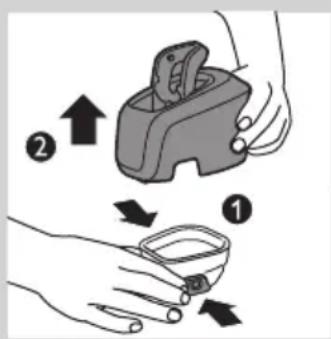

natural_image
Illustration of a hand holding a medical device with a catheter inserted (no text or symbols)natural_image
Illustration of a faucet pouring liquid into a square basin (no text or symbols)natural_image
Illustration of a hand pouring liquid into a container with a water level indicator (no text or symbols)natural_image
Illustration of hands using a handheld device to remove liquid from a small bowl (no text or symbols)natural_image
Illustration of a hand holding a circular object with concentric rings, being pointed at by an arrow (no text or symbols present)natural_image
Abstract diagram with concentric contour lines and a black arrow pointing left (no text or symbols)2 Skyv den grønne holderammen i pilens retning, som står på holderammen.
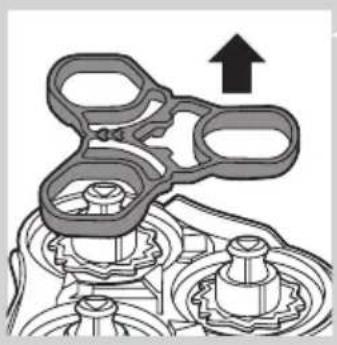
natural_image
Mechanical assembly diagram showing gears and housing with an upward arrow (no text or symbols)natural_image
Mechanical assembly diagram showing a gear-like component with an upward arrow indicating motion (no text or symbols present)4 Fjern kniven fra barberlamelltoppen.
natural_image
Diagram showing a hand holding a mechanical component with arrows indicating direction (no text or symbols)natural_image
Mechanical assembly diagram showing a brush tool interacting with a gear and motor (no text or symbols)natural_image
Mechanical assembly diagram showing a gear-like component with a downward arrow indicating motion (no text or symbols present)natural_image
Mechanical assembly diagram showing gear and shaft components with a downward arrow indicating motion (no text or symbols)natural_image
Abstract diagram with concentric circles and radiating lines, no text or symbols presentnatural_image
Illustration of a hand holding a circular object with a downward arrow indicating motion or force (no text or symbols)natural_image
Illustration of two fish being lifted by a tool, showing water droplets (no text or symbols)natural_image
Illustration of a pliers with an arrow indicating force or movement (no text or symbols)natural_image
Illustration of a hand holding a circular object with concentric rings and an arrow pointing to it, next to a separate abstract shape (no text or symbols)
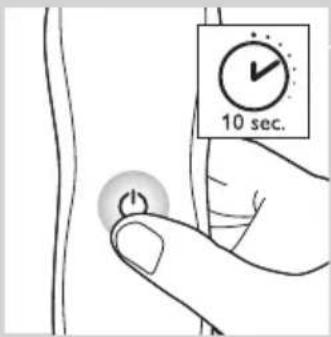
natural_image
Symbol of a waste bin with crossed lines indicating no waste or restriction, and a solid black rectangle below (no text or symbols)natural_image
Prohibition sign with a faucet and diagonal line, no text or symbols presentPeligro
- RQ1185, RQ1167, RQ1160

natural_image
Diagram showing a device with two buttons connected to a handheld device (no text or symbols present)- RQ1155, RQ1151, RQ1150, RQ1145, RQ1141, RQ1131

Carga
natural_image
Diagram showing a vertical stack of circular components with a lock icon and a battery symbol, connected by wires (no text or labels)natural_image
Line drawing of a mechanical device with a black arrow pointing to a cable or connector (no text or symbols)natural_image
Diagram of a rope knot with a curved arrow indicating rotational motion (no text or symbols)natural_image
Illustration of a device with a cylindrical top and a rectangular base (no text or symbols)natural_image
Illustration of a person's face with arrows indicating direction or movement (no text or symbols)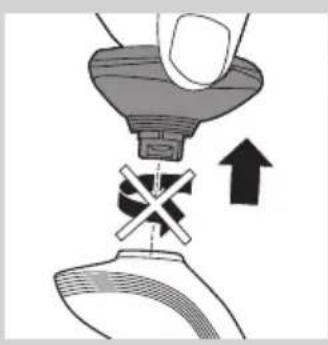
natural_image
Illustration of a hand pressing down on a device with a cross symbol, showing mechanical components and an upward arrow (no text or symbols)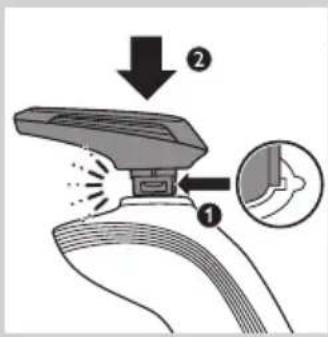

natural_image
Diagram showing a hand operating a device with an upward arrow and a cross symbol (no text or labels)
natural_image
Illustration of a hand pouring liquid into a container with a cross mark, indicating a process step (no text or symbols present)natural_image
Illustration of a hand holding a medical device with an inset showing a magnified view of the device's internal structure (no text or symbols present)natural_image
Illustration of a hand holding a handheld device with a lightning bolt and arrow indicating action (no text or symbols)natural_image
Illustration of a person brushing their neck with a brush (no text or symbols)natural_image
Line drawing of a handheld device with a curved handle and directional arrow (no text or symbols)natural_image
Illustration of two hands holding a device with directional arrows indicating movement or force (no text or symbols present)natural_image
Line drawing of a person holding a hairpin, no text or symbols presentnatural_image
Line drawing of a man's head and shoulders with short hair and beard (no text or symbols)natural_image
Line drawing of a man's head and shoulders with a beard (no text or symbols)- Barba completa
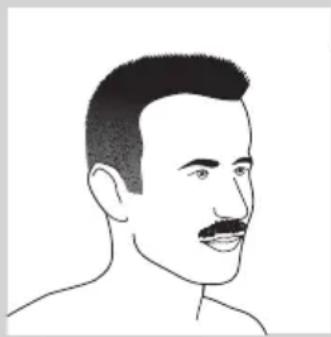
natural_image
Line drawing of a male's head and shoulders (no text or symbols)- Bigote

natural_image
Line drawing of a man's head and shoulders (no text or symbols)- Perilla
natural_image
Illustration of a hand pouring liquid into a container with a water level indicator (no text or symbols)natural_image
Illustration of hands using a handheld device to remove or clean material, showing a downward arrow and spray effect (no text or symbols)natural_image
Illustration of a vacuum cleaner with a handle and top component (no text or symbols)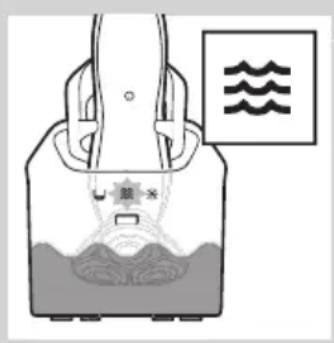

natural_image
Diagram of a device with a sun symbol and control panel, no readable text or symbols present

natural_image
Illustration of a hand holding a medical device with a catheter inserted (no text or symbols)natural_image
Illustration of a faucet dispensing water into a square basin (no text or symbols)natural_image
Illustration of a hand pouring liquid into a container with a water level indicator (no text or symbols)natural_image
Illustration of hands using a handheld device to interact with a small bowl, showing motion and vibration (no text or symbols)natural_image
Illustration of a hand holding a circular object with an upward arrow, alongside a separate sketch of a frog-like figure (no text or symbols)natural_image
Abstract symmetrical pattern with concentric rings and a black arrow pointing left (no text or symbols)natural_image
Mechanical assembly diagram showing gears and shafts with an upward arrow (no text or symbols)natural_image
Mechanical gear assembly diagram showing a central shaft and housing with an upward arrow (no text or symbols)4 Extraiga la cuchilla del protector.
natural_image
Diagram showing a hand holding a gear-like object with arrows indicating motion or force (no text or symbols)natural_image
Mechanical assembly diagram showing a brush tool interacting with a gear mechanism (no text or symbols)natural_image
Mechanical assembly diagram showing a gear and shaft assembly with a downward arrow indicating motion (no text or symbols)natural_image
Mechanical assembly diagram showing gear and shaft components with a downward arrow indicating motion (no text or symbols)natural_image
Abstract diagram of a symmetrical, multi-layered structure with radiating lines and a black arrow pointing inward (no text or symbols)natural_image
Illustration of a hand holding a 3D object with a downward arrow indicating a process or transformation (no text or symbols present)natural_image
Illustration of two water droplets falling from a pipe, one with liquid and the other with liquid, against a diagonal line (no text or symbols)natural_image
Illustration of a pliers or tool with an arrow indicating motion (no text or symbols present)natural_image
Symbol of a waste bin with crossed lines indicating no waste, and a solid black rectangle below (no text or labels)natural_image
Prohibition sign with a faucet and diagonal line, no text or symbols presentGeral
Perigo
natural_image
Diagram showing a remote control panel connected to a stylus, with no text or symbols present.- RQ1185,RQ1167,RQ1160

natural_image
Diagram showing a device with two buttons connected to a handheld device (no text or symbols present)- RQ1155,RQ1151,RQ1150,RQ1145,RQ1141,RQ1131
Carregamento
RQ1185, RQ1167, RQ1160, RQ1155, RQ1151, RQ1150, RQ1145, RQ1141, RQ1131

natural_image
Diagram showing a vertical stack of circular elements with a lock icon and a battery symbol, connected by a wire (no text or labels)RQ1197,RQ1195,RQ1180,RQ1175
RQ1197,RQ1195,RQ1180,RQ1175
RQ1197,RQ1195,RQ1180,RQ1175
Bloqueio de viagem
natural_image
Line drawing of a mechanical device with a black arrow pointing to a cable or connector (no text or symbols)1 Introduza a ficha pequena no carregador.

natural_image
Diagram of a rope knot with a curved arrow indicating rotational motion (no text or symbols)natural_image
Illustration of a device with a cylindrical top and a rectangular base (no text or symbols)1 Introduza a ficha pequena no sistema Jet Clean.
2 Ligue o adaptador à tomada eléctrica.
natural_image
Illustration of a person's face with directional arrows indicating movement or pressure points (no text or symbols)natural_image
Illustration of a hand pressing down on a device with a cross symbol, showing mechanical components and an upward arrow (no text or symbols)

natural_image
Diagram showing a hand operating a device with an upward arrow and a cross symbol (no text or labels)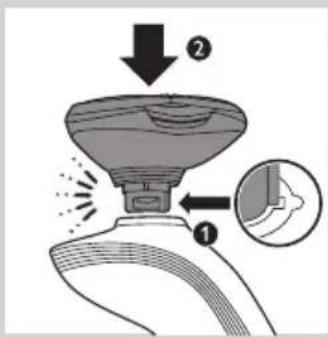
natural_image
Illustration of a hand pouring liquid into a container with a cross mark, indicating a process step (no text or symbols present)natural_image
Illustration of a hand holding a medical device with an inset showing a magnified view of the device's internal structure (no text or symbols present)natural_image
Illustration of a hand holding a handheld device with a curved handle and emitting light rays (no text or symbols)natural_image
Line drawing of a man brushing his beard with a comb (no text or symbols)natural_image
Line drawing of a handheld device with a scroll wheel and directional arrow (no text or symbols)natural_image
Illustration of two hands holding a device with directional arrows indicating movement or force (no text or symbols present)natural_image
Line drawing of a person applying makeup to their ear (no text or symbols)natural_image
Line drawing of a man's head and shoulders with a beard (no text or symbols)natural_image
Line drawing of a man's head and beard (no text or symbols)natural_image
Line drawing of a man's head and shoulders (no text or symbols)- Um bigode
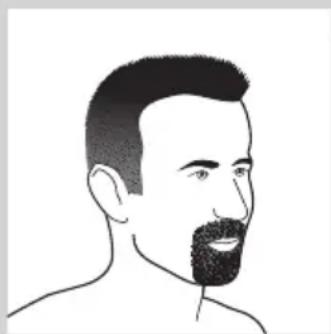
natural_image
Line drawing of a man's head and shoulders (no text or symbols)- Uma barbicha
natural_image
Illustration of a hand holding a circular object with concentric rings, above a separate frog-shaped object (no text or symbols)
natural_image
Illustration of a hand holding a three-layered device with a downward arrow indicating compression or disassembly (no text or symbols present)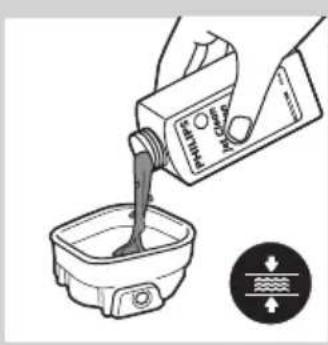
natural_image
Illustration of a hand pouring liquid into a container with a water level indicator (no text or symbols)
natural_image
Illustration of hands using a handheld device to remove or clean material, with no text or symbols present.
natural_image
Line drawing of a vacuum cleaner with a cylindrical body and handle, shown from top and bottom (no text or symbols)
natural_image
Diagram showing two mechanical components with arrows indicating motion or force, no text or symbols present
natural_image
Diagram of a scientific apparatus with a star-shaped component and wavy lines, no readable text or symbols present.
natural_image
Diagram of a device with a sun symbol and control panel, no readable text or labels present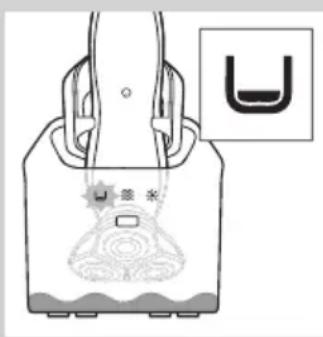


natural_image
Illustration of a hand holding a medical device with a catheter inserted (no text or symbols)natural_image
Illustration of a faucet pouring liquid into a square basin (no text or symbols)natural_image
Illustration of a hand pouring liquid into a container with a water level indicator (no text or symbols)natural_image
Illustration of hands using a handheld device to remove liquid from a small bowl (no text or symbols)natural_image
Illustration of a hand holding a circular object with concentric rings, being pointed at by an arrow (no text or symbols present)natural_image
Abstract symmetrical pattern with concentric rings and a black arrow pointing left (no text or symbols)natural_image
Mechanical assembly diagram showing gears and housing with an upward arrow (no text or symbols)natural_image
Mechanical assembly diagram showing a gear-like component with an upward arrow indicating motion (no text or symbols present)natural_image
Diagram showing a hand holding a gear-like object with arrows indicating motion or force (no text or symbols)natural_image
Mechanical assembly diagram showing a brush tool interacting with a gear and motor (no text or symbols)natural_image
Mechanical assembly diagram showing a gear-like component with a downward arrow indicating motion (no text or symbols present)natural_image
Mechanical assembly diagram showing gear and shaft components with a downward arrow indicating motion (no text or symbols)natural_image
Abstract diagram with concentric circles and radiating lines, no text or symbols presentnatural_image
Illustration of a hand holding a circular object with a downward arrow indicating motion or force (no text or symbols)natural_image
Illustration of a hand holding a fish and a small object above another, with no visible text or symbols.natural_image
Illustration of a pliers being cut with an arrow indicating motion (no text or symbols)natural_image
Illustration of a hand holding a circular object with concentric rings, next to a separate abstract shape with internal circles (no text or symbols)
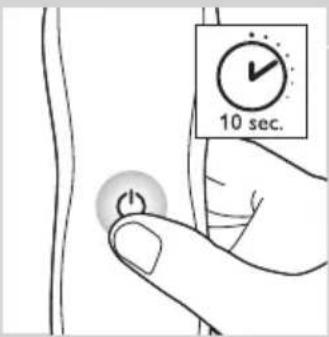
Encomendar acessórios
natural_image
Symbol of a trash bin crossed out by two crossed lines (no text or numbers present)natural_image
Prohibition sign showing a faucet crossed out by a diagonal line, indicating no pollution or water discharge (no text present)Fara
- RQ1185, RQ1167, RQ1160
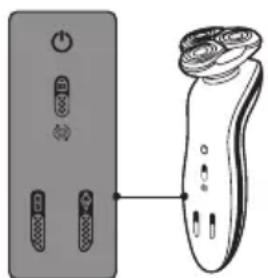
natural_image
Diagram showing a pair of remote control buttons connected to a handheld device (no text or symbols present)- RQ1155, RQ1151, RQ1150, RQ1145, RQ1141, RQ1131
Laddning
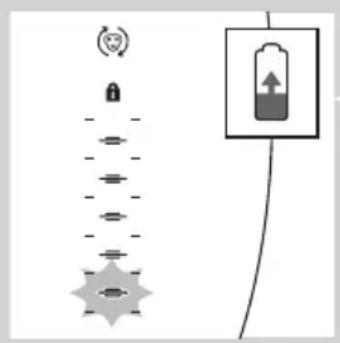
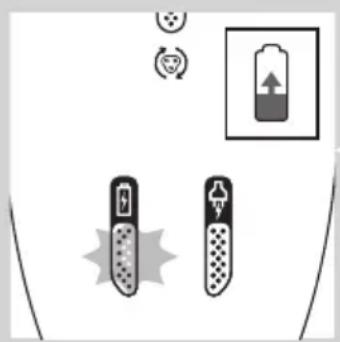
natural_image
Diagram showing two battery icons with a battery symbol and circular icons above, no text or labels present.natural_image
Diagram showing a battery connected to a vertical stack of circular components with a lock icon and a separate rectangular device (no text or symbols)
natural_image
Pure electrical circuit lines without any symbolsnatural_image
Pure electrical circuit lines without any symbolsnatural_image
Technical line drawing of a mechanical device with a tool inserted (no text or symbols)natural_image
Diagram of a mechanical device with a curved arrow indicating rotational motion (no text or symbols)natural_image
Line drawing of a device with a top view and a base view (no text or symbols)natural_image
Illustration of a person's face with hand near ear, showing facial massage motion arrows (no text or symbols)natural_image
Illustration of a hand pouring liquid into a container with a cross mark, indicating a step or process (no text or symbols present)natural_image
Diagram showing a mechanical device with an upward arrow and a cross symbol, no text or labels presentnatural_image
Illustration of a hand pouring liquid into a container with a cross mark, indicating a warning or action (no text or symbols present)natural_image
Illustration of a hand holding a medical device with a magnified inset showing internal components (no text or symbols)natural_image
Illustration of a hand holding a device with a lightning bolt and arrow indicating motion (no text or symbols)natural_image
Line drawing of a man brushing his beard with a comb (no text or symbols)natural_image
Line drawing of a hand holding a small electric shaver with a black arrow indicating motion (no text or symbols)
natural_image
Illustration of two hands holding a device with checkmark and cross symbols, no text or labels present
natural_image
Line drawing of a person applying makeup to their ear (no text or symbols)
natural_image
Line drawing of a man's head and shoulders with a beard (no text or symbols)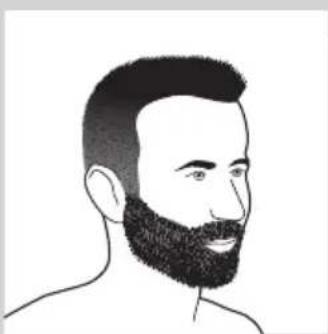
natural_image
Line drawing of a man's head and beard (no text or symbols)natural_image
Line drawing of a male's head and shoulders (no text or symbols)- Mustasch

natural_image
Line drawing of a man's head and shoulders (no text or symbols)- Bockskägg
natural_image
Illustration of a hand holding a circular object with concentric rings, next to a separate abstract diagram with arrows indicating motion (no text or symbols)
natural_image
Illustration of a hand holding a device with a magnified view below showing internal components (no text or symbols)
natural_image
Illustration of a hand pouring liquid into a container with a label, no text or symbols present.
natural_image
Illustration of hands holding a device with a downward arrow and emitting powder (no text or symbols)natural_image
Line drawing of a device with a vertical cylindrical component and a base device (no text or symbols)

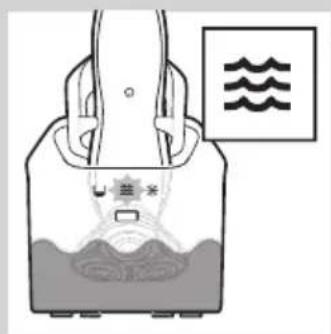

natural_image
Diagram of a device with a sun symbol and a warning label, no readable text or symbols present.
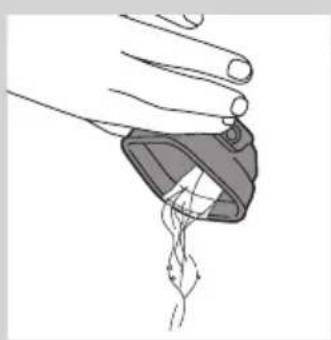
natural_image
Illustration of a hand holding a medical device with a catheter inserted (no text or symbols)
natural_image
Illustration of a faucet dispensing liquid into a square basin (no text or symbols)natural_image
Illustration of hands using a handheld device to remove or clean material, with no text or symbols present.natural_image
Illustration of a hand holding a circular object with concentric rings and an arrow pointing to it, alongside a separate abstract diagram (no text or symbols)natural_image
Abstract diagram with concentric circular patterns and a black arrow pointing left (no text or symbols)natural_image
Mechanical assembly diagram showing gears and shafts with an upward arrow (no text or symbols)natural_image
Mechanical gear assembly diagram with an upward arrow indicating motion (no text or symbols present)natural_image
Diagram showing a hand holding a mechanical component with arrows indicating motion or force direction (no text or symbols)natural_image
Mechanical assembly diagram showing a brush applying material to a gear (no text or symbols)natural_image
Mechanical assembly diagram showing a gear-like component with a downward arrow indicating motion (no text or symbols present)natural_image
Mechanical assembly diagram showing gear and shaft components with a downward arrow indicating motion (no text or symbols)natural_image
Abstract diagram with concentric circles and radiating lines, no text or symbols presentnatural_image
Illustration of a hand holding a circular object with a downward arrow, alongside a close-up of a mechanical component (no text or symbols)natural_image
Illustration of two hands performing a manual water tap stroke technique (no text or symbols)natural_image
Line drawing of a pliers with an arrow indicating motion (no text or symbols)natural_image
Illustration of a hand holding a circular object with concentric rings, next to a separate abstract shape with three circles (no text or symbols)natural_image
Symbol of a waste bin with no text or labels, crossed by two crossed lines and a solid black rectangle below (no text or symbols present)natural_image
Prohibition sign showing a faucet crossed out by a diagonal line, indicating no pollution or water discharge (no text present)Tehlike
- RQ1185, RQ1167 ve RQ1160

natural_image
Diagram showing two electronic devices connected by a cable, one with power button and others with buttons (no text or symbols)- RQ1155, RQ1151, RQ1150, RQ1145, RQ1141 ve RQ1131
Şarj etme
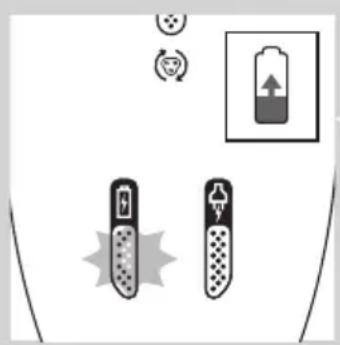
natural_image
Diagram showing battery charging setup with two test tubes and a battery icon (no text or symbols)
natural_image
Diagram showing a battery connected to a vertical stack of circular components, with a separate inset showing the same battery (no text or symbols present)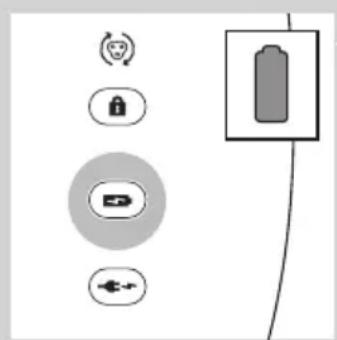
natural_image
Pure electrical circuit lines without any symbolsnatural_image
Pure electrical circuit lines without any symbolsnatural_image
Technical line drawing of a mechanical component with a tool inserted (no text or symbols)natural_image
Diagram of a mechanical device with a curved arrow indicating rotational motion (no text or symbols)natural_image
Line drawing of a device with a handle and top component (no text or symbols)natural_image
Illustration of a person's face with hand near ear, showing facial massage or motion arrows (no text or symbols)natural_image
Illustration of a hand pouring liquid into a container with a cross symbol, indicating a process or operation (no text or symbols present)natural_image
Diagram showing a robotic arm performing a manual press operation with an arrow indicating upward motion (no text or symbols present)natural_image
Illustration of a hand pouring liquid into a container with a cross symbol, indicating a process or operation (no text or symbols present)natural_image
Illustration of a hand holding a medical device with an inset showing a magnified view of the device's internal structure (no text or symbols present)natural_image
Illustration of a hand holding a small electronic device with a lightning bolt and arrow indicating action (no text or symbols)natural_image
Line drawing of a person applying a hair to their beache, no text or symbols presentnatural_image
Line drawing of a handheld device with a curved handle and directional arrow (no text or symbols)natural_image
Illustration of two hands holding a device with directional arrows indicating movement or force (no text or symbols)natural_image
Line drawing of a person holding an object near their ear (no text or symbols)natural_image
Line drawing of a man's head and shoulders with short hair and beard (no text or symbols)Sakal stilleri
natural_image
Line drawing of a man's head and beard (no text or symbols)- Uzun sakal

natural_image
Line drawing of a male's face with short hair and mustache (no text or symbols)- Bıyıklı

natural_image
Line drawing of a man's head and shoulders (no text or symbols)- Keçi sakal
Temizlik ve bakım
natural_image
Illustration of a hand holding a small container with a downward arrow, emitting powder from a bowl (no text or symbols)natural_image
Line drawing of a vacuum cleaner with a handle and top component (no text or symbols)
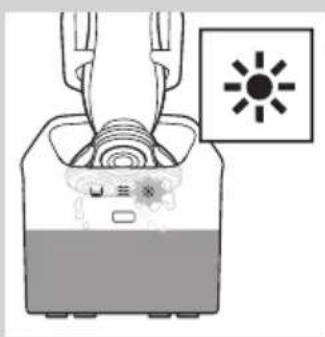
natural_image
Diagram of a device with a sun symbol and internal components, no readable text or labels present

natural_image
Illustration of a hand holding a medical device with a catheter inserted (no text or symbols)natural_image
Illustration of a faucet dispensing water into a square basin (no text or symbols)natural_image
Illustration of a hand pouring liquid into a container with a water level indicator (no text or symbols)natural_image
Illustration of hands using a handheld device to remove liquid from a small bowl (no text or symbols)natural_image
Illustration of a hand holding a circular object with concentric rings, and a separate view of a frog-like figure below (no text or symbols)natural_image
Abstract symmetrical pattern with concentric rings and a black arrow pointing left (no text or symbols)natural_image
Mechanical assembly diagram showing gears and shafts with an upward arrow (no text or symbols)natural_image
Mechanical gear assembly diagram showing a central shaft and housing with an upward arrow (no text or symbols)natural_image
Diagram showing a hand holding a gear-like object with arrows indicating motion or force (no text or symbols)natural_image
Mechanical assembly diagram showing a brush applying material to a gear mechanism (no text or symbols)natural_image
Mechanical assembly diagram showing a gear and shaft assembly with a downward arrow indicating motion (no text or symbols)natural_image
Mechanical assembly diagram showing gear and shaft components with a downward arrow indicating motion (no text or symbols)natural_image
Abstract diagram of a symmetrical, multi-layered structure with radiating lines and a black arrow pointing inward (no text or symbols)natural_image
Illustration of a hand holding a 3D object with a downward arrow indicating a process or transformation (no text or symbols present)natural_image
Illustration of two hands pouring liquid from a bottle onto a surface, separated by a diagonal line (no text or symbols)natural_image
Illustration of a pliers with an arrow indicating motion (no text or symbols)
natural_image
Illustration of a hand holding a circular object with concentric rings, next to a separate abstract shape with three circles (no text or symbols)
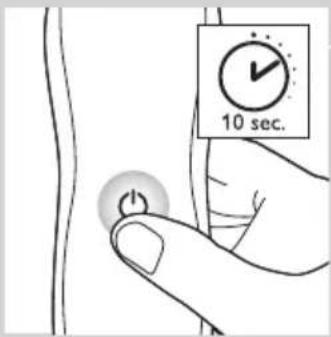
natural_image
Symbol of a waste bin with no text or labels, crossed by two crossed lines and a solid black rectangle below (no text or symbols present)- Always here to help you
- User manual
- PHILIPS
- Introduction
- General description (Fig. 1)
- Important
- General
- Danger
- Warning
- Caution
- Jet Clean system (RQ1197CC, RQ1195CC, RQ1185CC, RQ1180CC, RQ1175CC only)
- Beard Styler attachment (RQ1195, RQ1175 only)
- Compliance with standards
- The display
- Charging
- RQ1185, RQ1167, RQ1160, RQ1155, RQ1151, RQ1150, RQ1145, RQ1141, RQ1131
- Battery fully charged
- RQ1185, RQ1167, RQ1160, RQ1155, RQ1151, RQ11510, RQ1145, RQ1141, RQ1131
- Battery low
- Remaining battery capacity
- Travel lock
- Activating the travel lock
- Deactivating the travel lock
- Replace shaving head holder
- Quick charge
- Charging in the charger
- Charging in the Jet Clean System (RQ1197CC, RQ1195CC, RQ1185CC, RQ11801CC, RQ1175CC only)
- Using the shaver
- Shaving
- Skin adaptation period
- Wet shaving
- Using the trimmer (RQ1197, RQ1185, RQ1180, RQ1160, RQ1155, RQ1151 only)
- Using the Beard Styler attachment (RQ1195, RQ1175 only)
- Using the Beard Styler attachment with comb
- Using the Beard Styler attachment without comb
- Beard styles
- Cleaning and maintenance
- Cleaning the shaving unit
- Cleaning the shaving unit in the Jet Clean System (RQ1197CC, RQ1195CC, RQ1185CC, RQ1180CC, RQ1175CC only)
- Preparing the Jet Clean System for use
- Using the Jet Clean System
- Cleaning the Jet Clean System
- Extra-thorough cleaning method
- Cleaning the trimmer (RQ1197, RQ1185, RQ1180, RQ1160, RQ1155, RQ1151 only)
- Cleaning the Beard Styler attachment (RQ1195, RQ1175 only)
- Storage
- Replacement
- Replacement reminder
- Ordering accessories
- Shaving head holder
- Cleaning
- Environment
- Problem Possible cause Solution
- Introduktion
- Generelt
- Fare
- Opladning
- Vaara
- Lataaminen
- Puhdistus ja hoito
- Charge
- RQ1197/RQ1195/RQ1180/RQ1175
- Styles de barbe
- Algemeen
- Gevaar
- Opladen
- De reisvergrendeling deactiveren
- Gefahr
- Laden
- Γενικά
- Κίνδυνος
- Φόρτιση
- Pericolo
- Pulizia del rifinitore (solo RQ1197, RQ1185, RQ1180, RQ1160, RQ1155, RQ1151)
- Lading
- Transportlås
- Lading i Jet Clean-systemet (kun RQ1197CC, RQ1195CC, RQ1185CC, RQ11801CC, RQ1175CC)
- Peligro
- Carga
- Geral
- Perigo
- Carregamento
- RQ1197,RQ1195,RQ1180,RQ1175
- Bloqueio de viagem
- Encomendar acessórios
- Fara
- Laddning
- Tehlike
- Şarj etme
- Sakal stilleri
- Temizlik ve bakım
Brand : PHILIPS
Model : SensoTouch 2D RQ1150
Category : Razor