
RHM2064R - Microwave Oven RUSSELL HOBBS - Free user manual and instructions
Find the device manual for free RHM2064R RUSSELL HOBBS in PDF.


| Product Type | Solo Microwave Oven |
| Brand | Russell Hobbs |
| Model | RHM2064R |
| Capacity | 20 Liters |
| Power Output (Microwave) | 800 W |
| Power Input | 1200 W |
| Voltage / Frequency | 230 V ~ 50 Hz |
| Dimensions (W x D x H) | 45.2 x 35.6 x 26.2 cm |
| Net Weight | 10.5 kg |
| Control Type | Digital with LED Display |
| Timer | Up to 95 minutes |
| Defrost Function | By Weight or Time |
| Auto Cook Menus | 8 Auto Programs |
| Child Lock | Yes |
| Interior Light | Yes |
| Turntable | Glass Turntable (25 cm diameter) |
| Door Release | Push-Button |
| Safety Features | Auto Shut-Off, Door Interlock System |
| Cleaning and Maintenance | Wipe interior and exterior with a damp cloth; do not use abrasive cleaners |
Frequently Asked Questions - RHM2064R RUSSELL HOBBS
User questions about RHM2064R RUSSELL HOBBS
0 question about this device. Answer the ones you know or ask your own.
Ask a new question about this device
Download the instructions for your Microwave Oven in PDF format for free! Find your manual RHM2064R - RUSSELL HOBBS and take your electronic device back in hand. On this page are published all the documents necessary for the use of your device. RHM2064R by RUSSELL HOBBS.
USER MANUAL RHM2064R RUSSELL HOBBS
natural_image
Exterior view of a modern stainless steel microwave oven (no visible text or symbols on the device body)Model number: RHM2064S
Important safety instrucons, please read carefully and keep them for future reference For Customer Services & Spare Parts please call
0845 209 7461
Opening mes: Monday – Friday 8am – 6pm & Saturday 9am – 1pm
Or visit us at www.productcareuk.com
Contents
Page
About this microwave oven....2
Unpacking your microwave oven.... 3
Safety instrucons.... 4
Microwave oven installaon.... 9
Feature diagram....10
Turn table installaon.... 11
Control panel.... 12
How to use your microwave oven.... 13
Cleaning and care.... 21
Important utensil informaon.... 23
Connecon to the mains supply.... 24
Non-rewireable mains plug.... 26
Problem solving.... 27
Guarantee....28
Technical specicaon.... 29
Spares....30
For Customer Services & Spare Parts please call 0845 209 7461
Opening mes: Monday - Friday 8am – 6pm & Saturday 9am – 1pm or visit us at www.productcareuk.com
About this microwave oven
Microwaves are high-frequency electromagnec waves similar to radio waves. While radio waves may vary in length from one metre to many kilometres, microwaves are very short (less than 12.5 cenmetres). Microwaves do not make any heat themselves but only cause water molecules in food to vibrate. This vibraon produces heat that cooks the food. This is why your food will come out of the microwave piping hot, when your utensils inside the oven stay much cooler. The microwaves do not stay in the air or in the food when you open the microwave oven door.
The microwave oven will work using an ordinary household electrical socket. Inside the microwave oven is the magnetron, which turns the electrical energy into microwaves. Microwaves cannot go through metal, so the inside of the oven is lined with metal. The door is lined with a ne metal mesh which stops microwaves geng through. This means that when the microwave oven door is shut, there is no possibility that microwaves can be released. This is why the microwave oven has been made so that it will not work when the door is open.
For Customer Services & Spare Parts please call 0845 209 7461
Opening mes: Monday - Friday 8am – 6pm & Saturday 9am – 1pm or visit us at www.productcareuk.com
Unpacking your microwave oven
Before you use your microwave oven
- Remove all the packaging. Do not remove the small piece of card from the right hand side of the cavity wall. This is called a wave-guide cover and allows the microwaves to pass through to cook the food. Please ensure you keep this cover clean at all me.
-
Check the oven aer unpacking for any visual damage such as:
-
A misaligned door
- Damage to the door
● Dents or holes in the door window and screen
• Dents in the inside - If you can see any damage do not use the oven
This microwave oven weighs approximately 10.6kg so you must put it on a horizontal surface that is strong enough to support this weight.
The oven must be placed away from high temperatures and steam.
Do not put anything on the top of the microwave oven.
For Customer Services & Spare Parts please call 0845 209 7461
Opening mes: Monday - Friday 8am – 6pm & Saturday 9am – 1pm or visit us at www.productcareuk.com
Safety instrucons
Do not use the oven for any reason other than preparing food, such as for drying clothes, paper or any other non-food items, or for sterilising purposes.
➢ Do not use the oven when it is empty. This could damage the oven.
Do not store anything in the oven, such as papers, cookbooks and so on.
➢ Do not cook any food surrounded by a membrane, such as egg yolks, potatoes, chicken livers, ready meals and so on without piercing them several mes with a fork.
➢ Never put any objects into the openings on the outer case.
➢ Never remove parts from the oven such as the feet, screws and so on.
➢ You should use microwave utensils only in line with these instrucons.
Do not try to deep-fry foods in this oven.
▶ Only use the accessories supplied by the manufacturer
For Customer Services & Spare Parts please call 0845 209 7461
Opening mes: Monday - Friday 8am – 6pm & Saturday 9am – 1pm or visit us at www.productcareuk.com
Safety instrucons
➢ Heat from the contents of a container may be transmied to the container itself, so please be careful when removing it from the oven. Please remember that the food or liquid inside will be releasing some steam or will be spiting. Never cover any container fully, always leave a gap for steam to escape.
➢ Cooking utensils may become hot because of heat transferred from the heated food. This is especially true if plasc wrap has been covering the top and handles of the utensil. You may need oven gloves to handle the utensil.
The contents of feeding boles and baby food jars shall be sred or shaken and the temperature checked before consumpon, in order to avoid burns.
➢ Always test the temperature of cooked food, never eat or drink food or liquid straight from the oven, allow it to stand for a few minutes and sr to distribute the heat evenly.
For Customer Services & Spare Parts please call 0845 209 7461
Opening mes: Monday - Friday 8am – 6pm & Saturday 9am – 1pm or visit us at www.productcareuk.com
Safety instrucons
➢ Food containing a mixture of fat and water (for example, stock) should stand for 30 to 60 seconds in the oven aer it has been turned o. This is to allow the mixture to sele and to prevent it from bubbling when a spoon is placed in it, or a stock cube is added.
When heang or cooking food or liquid, remember that there are certain foods (such as Christmas puddings, jam and mincemeat) which heat up very quickly.
When heang or cooking foods that contain a lot of fat or sugar, do not use plasc containers.
➢ Always have the glass tray and turntable support in place when using the oven.
➢ Never remove parts from the oven such as the feet, screws and so on.
➢ Do not cook food directly on the glass tray. Put food on a suitable plate or in a bowl before pung it in the oven.
For Customer Services & Spare Parts please call 0845 209 7461
Opening mes: Monday - Friday 8am – 6pm & Saturday 9am – 1pm or visit us at www.productcareuk.com
Safety instrucons
To reduce the risk of re in the oven cavity:
Do not overcook food.
➢ Do not leave the microwave oven unaended while you are using it and if using paper or plasc containers check regularly to ensure they do not ignite.
➢ Remove wire twist-es from bags before pung the bag in the oven.
If materials inside the oven smoke or catch re, keep the oven door closed to se the ames, turn the oven o at the wall switch, or shut the power o at the fuse or circuit-breaker panel.
➢If the supply cord is damaged, it must be replaced by the manufacturer, its service agent or similarly qualified persons in order to avoid a hazard.
Warning: Children should not use this microwave oven.
Warning: This appliance is not intended for use by persons (including children) with reduced physical, sensory or mental capabilities, or lack of experience and knowledge, unless they have been given supervision or instrucon concerning use of the appliance by a person responsible for their safety. Children should be supervised to make sure that they do not play with the appliance.
Safety instrucons
Warning: it is hazardous for anyone other than a competent person to carry out any service or repair operaon which involves the removal of a cover which gives protecon against exposure to microwave energy.
Warning: if the door or door seals are damaged, the oven must not be operated until it has been repaired by a competent person. The door seals are located around the window on the inside of the door. These seals are not airght, although no microwaves can be released, it is normal for small amounts of air or steam to escape when the oven is in use.
Warning: Liquids and other foods must not be heated in sealed containers as they are liable to explode.
Warning: do not use the microwave when it is empty.
For Customer Services & Spare Parts please call 0845 209 7461
Opening mes: Monday - Friday 8am – 6pm & Saturday 9am – 1pm or visit us at www.productcareuk.com
Microwave oven installaon
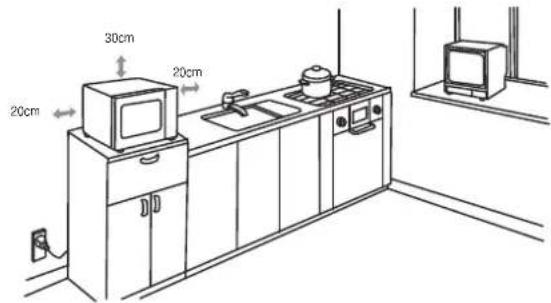
➢ Select a level surface that provides enough space for the outlet vents.
➢ A minimum clearance of 20cm is required between the oven and any adjacent walls. Leave a minimum clearance of 30cm above the oven.
The rear surface of appliance shall be placed against a wall.
➢ Place the oven as far away from radios and TV's as possible. Using the oven may cause interference with the recepon.
➢ Plug the oven into a suitable 13 amp mains socket, make sure the voltage is the same as on the rang label (do not use extension cables or mains socket adaptors).
Warning: do not install the oven over a cooker or other heat producing appliance. This will damage the oven.
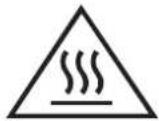
Do not cover venlaon on top of microwave, outer casing can get extremely hot
Feature diagram
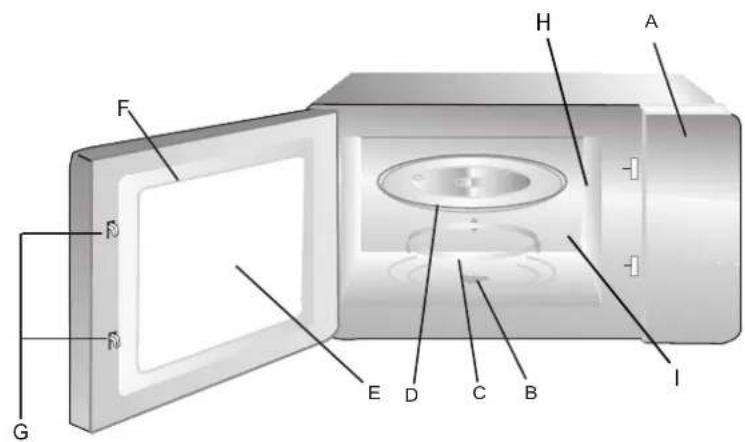
A. Control panel
B. Turntable sha
C. Turntable ring assembly
D. Glass tray
E. Observaon window
F. Door assembly
G. Safety interlock latches
H. Waveguide cover
I. Oven cavity
Warning - do not use the oven when empty or for warming plates. Always keep the oven cavity, door assembly and waveguide cover clean
For Customer Services & Spare Parts please call 0845 209 7461
Opening mes: Monday - Friday 8am – 6pm & Saturday 9am – 1pm or visit us at www.productcareuk.com
Turn table installaon
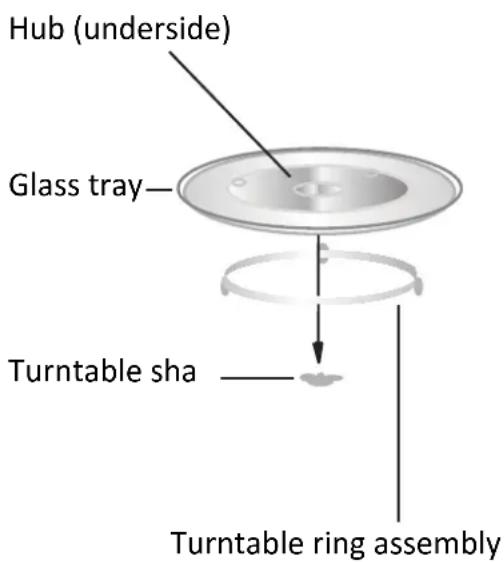
Before rst use, check that any securing tape has been removed from the glass tray and turntable ring assembly. These parts must never be restricted from rotang.
▶ Never place the glass tray upside down.
Both the glass tray and turntable ring assembly must always be used during cooking.
➢ Do not place the food directly onto the glass tray, always place on or in suitable microwaveable cookware.
➢ If the glass tray or turntable ring assembly has been damaged in anyway, please contact the spares helpline number detailed on the back of this instrucon manual.
For Customer Services & Spare Parts please call 0845 209 7461
Opening mes: Monday - Friday 8am – 6pm & Saturday 9am – 1pm or visit us at www.productcareuk.com
Control panel
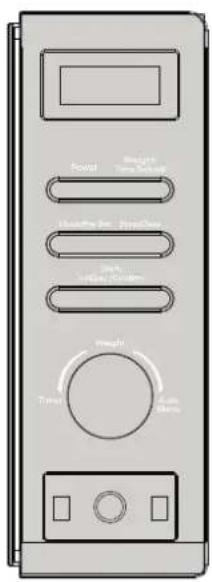
MENU ACTION SCREEN Cooking me, power, auto, and the clock me are displayed.
POWER Press to select the power level for microwave cooking
WEIGHT/TIME DEFROST Press this buon to input weight for defrosng.
CLOCK/PRE-SET Press this buon to set the clock and use the preset funcon.
STOP/CLEAR Press to stop the cooking process.
TIMER/WEIGHT/AUTO MENU Rotate to select the cooking me and the auto menus.
START/+30SEC/CONFIRM Press this buon to start the cooking process and conrm when programming.
DOOR BUTTON Push the buon to release the door.
How to use your microwave oven
Clock Seng
When the microwave oven is rst turned on, the oven will display "0:00", the buzzer will ring once.
1) Press "CLOCK/PRE-SET" to choose hours or minutes for alteraon. The hour gures will ash.
2) Turn the "TIMER/WEIGHT/AUTO MENU" dial to adjust the hour gures, the input me should be within 0 - 23(24-hour).
3) Press "CLOCK/PRE-SET" buon again and the minute gures will ash.
4) Turn the "TIMER/WEIGHT/AUTO MENU" dial to adjust the minute gures, the input me should be within 0 - 59 (60-minutes).
5) Press "CLOCK/PRE-SET" to nish the clock seng procedure. The ":" will ash.
Note:
1) If the clock is not set, it will not funcon when powered.
2) During the process of clock seng, if you press " STOP/CLEAR ", the oven will go back to the previous status.
For Customer Services & Spare Parts please call 0845 209 7461
Opening mes: Monday - Friday 8am – 6pm & Saturday 9am – 1pm or visit us at www.productcareuk.com
How to use your microwave oven
Microwave Cooking
1) Press the "POWER" buon once, and "P100" will display and ash.
2) Turn the "TIMER/WEIGHT/AUTO MENU" to select the microwave power. "P100", "P80", "P50", "P30", "P10" will display in order or press the "POWER" to scroll through the power levels.
3) Press "START/+30SEC/CONFIRM" to conrm.
4) Turn the "TIMER/WEIGHT/AUTO MENU" dial to adjust the cooking me. (The me seng should be between 0:05-95:00.)
5) Press "START/+30SEC/CONFIRM" to start the cooking process.
| Press power button | Cooking power |
| P100 | 100% |
| P80 | 80% |
| P50 | 50% |
| P30 | 30% |
| P10 | 10% |
To stop the cooking process at anyme press the "STOP/CLEAR" buon.
For Customer Services & Spare Parts please call 0845 209 7461
Opening mes: Monday - Friday 8am – 6pm & Saturday 9am – 1pm or visit us at www.productcareuk.com
How to use your microwave oven
Speedy Cooking
Press the "START/+30SEC/CONFIRM" buon to microwave cook with 100% power level for 30 seconds.
The microwave will start cooking immediately.
Each press on the same key can increase the cooking me by 30 seconds. The maximum cooking me is 95 minutes.
Note: this funcon does not work for defrost by weight, auto menu and mul-stage cooking.
or
Turn the "TIMER/WEIGHT/AUTO MENU" dial le to adjust the desired cooking me, then press "START/+30SEC/CONFIRM". The oven will start cooking for the selected length of me at 100% power.
Defrosng by Weight
1) Press "WEIGHT/TIME DEFROST" buon once, the oven will display "dEF1".
2) Turn the "TIMER/WEIGHT/AITO MENU" dial to select the weight of the food in grams. The weight should be set between 100-2000g.
3) Press "START/+30SEC/CONFIRM" buon to start defrosng.
For Customer Services & Spare Parts please call 0845 209 7461
Opening mes: Monday - Friday 8am – 6pm & Saturday 9am – 1pm or visit us at www.productcareuk.com
How to use your microwave oven
Defrosng by Time
1) Press "WEIGHT/TIME DEFROST" buon twice, the oven will display "dEF2".
2) Turn the "TIMER/WEIGHT/AUTO MENU" dial to select the defrosng me, the maximum is 95 minutes.
3) Press "START/+30SEC/CONFIRM" buon to start defrosng.
The defrosng power is 30%, and cannot be changed.
Mul-Stage Cooking
To set a maximum of two dierent stages.
Note: The auto menu cannot be set as one of the mul-stage cooking funcons.
Example: if you want to defrost 500g of food, then cook it at 80% microwave power for 7 minutes. The steps are as following:
1) Press "WEIGHT/TIME DEFROST" buon once, the screen will display "dEF1"
2) Turn the "TIMER/WEIGHT/AUTO MENU" dial to adjust the defrost weight to 500g;
3) Press the "POWER" buon once;
4) Turn the "TIMER/WEIGHT/AUTO MENU" dial to choose 80% microwave power II "P80" display;
5) Press "START/+30SEC/CONFIRM" to conrm;
6) Turn the "TIMER/WEIGHT/AJTO MENU" dial to adjust the cooking me to 7 minutes;
7) Press the "START/+30SEC/CONFIRM" buon to start the cooking process.
For Customer Services & Spare Parts please call 0845 209 7461
Opening mes: Monday - Friday 8am – 6pm & Saturday 9am – 1pm or visit us at www.productcareuk.com
How to use your microwave oven
Pre-set me to start funcons
1) Set the clock rst. (Consult the instrucon of clock seng).
2) Input the cooking program. A maximum of two stages can be set. Do not use the de-frost funcon in the pre-set funcon. The auto menu can be set for a single stage only.
Example: if you want to cook with 80% microwave power for 7 minutes.
a. Press the "POWER" buon once;
b. Turn the "TIMER/WEIGHT/AUTO MENU" dial to choose 80% microwave power II "P80" is displayed;
c. Press "START/+30SEC/CONFIRM" buon to conrm;
d. Turn "TIMER/WEIGHT/AUTO MENU" dial to adjust the cooking me to 7 minutes;
Aer the above steps, do not press " START/+30SEC " buon, but do as follows :
3) Press the "CLOCK/PRE-SET" buon, the current me displays and the hour gures ash.
4) Turn "TIMER/WEIGHT/AUTO MENU" dial to adjust the hours, the input me should be within 0--23.
5) Press "CLOCK/PRE-SET" buon and the minute gures will ash.
6) Turn the "TIMER/WEIGHT/AUTO MENU" dial to adjust the minutes, the input me should be within 0--59.
7) Press "START/+30SEC/CONFIRM" to nish seng.
The":" will light, the buzzer will ring twice when the me to start arrives, and then cooking will start automacally.
Note: The clock must be set rst. Otherwise, the pre-set funcon will not work.
For Customer Services & Spare Parts please call 0845 209 7461
Opening mes: Monday - Friday 8am – 6pm & Saturday 9am – 1pm or visit us at www.productcareuk.com
How to use your microwave oven
Auto Menu
1) Turn the "TIMER/WEIGHT/AUTO MENU" dial clockwise, so that "A-1" displays on the screen. Connue to turn for the other auto selecons up to A-8.
2) Press "START/+30SEC/CONFIRM" to select the chosen auto, A-1--A-8.
3) Turn the "TIMER/WEIGHT/AUTO MENU" to choose the food weight.
4) Press "START/+30SEC/CONFIRM" buon to start cooking.
Please see the table below and on the next page for the various sengs.
| Display | Auto Menu Weight (g) on the | Display Power | |
| A-1 | Auto Reheat 200 100% | ||
| 400 | |||
| 600 | |||
| A-2 | Vegetable 200 100% | ||
| 300 | |||
| 400 | |||
| A-3 | Fish 250 80% | ||
| 350 | |||
| 450 |
For Customer Services & Spare Parts please call 0845 209 7461
Opening mes: Monday - Friday 8am – 6pm & Saturday 9am – 1pm or visit us at www.productcareuk.com
How to use your microwave oven
| A-4 | Meat 250 100% | 350 | |
| 450 | |||
| A-5 | Pasta 50 (add 450ml water) | 80% | |
| 100(add 800ml water) | |||
| A-6 | Potato 200 100% | ||
| 400 | |||
| 600 | |||
| A-7 | Pizza 200 100% | ||
| 400 | |||
| A-8 | Soup 200 80% | ||
| 400 |
For Customer Services & Spare Parts please call 0845 209 7461
Opening mes: Monday - Friday 8am – 6pm & Saturday 9am – 1pm or visit us at www.productcareuk.com
How to use your microwave oven
Inquiring Funcon
(1) During the cooking cycle, press the "POWER" buon and the current power will be displayed for 2-3 seconds.
(2) In pre-set state, press the "CLOCK/PRE-SET" buon to check the me when the cooking will start.
The pre-set me will ash for 2-3 seconds, then the oven will turn back to the clock display.
(3) During the cooking cycle, press the "CLOCK/PRE-SET" buon to check the current me. It will be displayed for 2-3 seconds.
Child lock
Lock on: In waiing state, press "STOP/CLEAR" for 3 seconds, there will be a long "beep" as the lock acvates a green rectangle will illuminate in the display. Lock o: In locked state, press "STOP/CLEAR" for 3 seconds, there will be a long "beep"
The current me will connue to display.
General Specicaon
(1) The buzzer will sound once when turning the knob at the beginning;
(2) The "START/+30SEC/CONFIRM" buon must be pressed again to connue cooking if the door is opened during the cycle.
(3) Once the cooking programme has been set, if the "START/+30SEC/CONFIRM" buon is not pressed in 1 minute. The current me will be displayed and the seng will be cancelled.
(4) The buons will beep if they are pressed correctly, they will not beep if not.
(5) The buzzer will sound ve mes to remind you when cooking is nished.
Cleaning and care
Before you clean the oven, turn it o and unplug it.
Keep the inside of the oven clean. When food or liquids sick to the oven walls, wipe with a damp cloth. We recommend that you do not use harsh detergent or abrasives.
On the right hand side wall of the cavity is the wave guide cover, microwaves are passed through this to enable your food to cook. It is important that this wave guide cover is kept clean at all mes. To do this wipe with mild detergent and water, then dry.
- You should clean the outside of the oven with a damp cloth. Don't allow water to seep into the venlaon openings.
➢ Do not allow the control panel to become wet. Clean with a so, damp cloth. Do not use detergents, abrasives or spray-on cleaners on the control panel.
If steam builds up inside or around the outside of the oven door, wipe with a so cloth. This may happen when the microwave oven is used in humid condions.
For Customer Services & Spare Parts please call 0845 209 7461
Opening mes: Monday - Friday 8am – 6pm & Saturday 9am – 1pm or visit us at www.productcareuk.com
Cleaning and care
➢ Regularly remove the glass turntable to clean it, and wash it in warm soapy water.
➢ Regularly clean the turntable support and oven oor. Simply wipe the bottom surface of the oven with mild detergent and water, then dry. You can wash the turntable support in mild soapy water.
When removing the turntable support of the oven, make sure you put it back properly.
If the inside of the oven smells, put a cup of water with the juice and skin of one lemon in a deep microwave bowl. Microwave it for three minutes, wipe thoroughly and then dry with a so cloth.
➢ Failure to maintain the oven in a clean condion, especially if liquid is le under the turntable, could lead to deterioraon of the surface that could adversely act the life of the appliance and possibly result in a hazardous condion.
For Customer Services & Spare Parts please call 0845 209 7461
Opening mes: Monday - Friday 8am – 6pm & Saturday 9am – 1pm or visit us at www.productcareuk.com
Important utensil informaon
Do not use metal pans or dishes with metal handles.
Do not use anything with a metal trim.
➢ Do not use paper covered wire twist-es on plasc bags.
➢ Do not use melamine dishes as they contain a material which will absorb microwave energy. This may cause the dishes to crack or burn, and will slow down the cooking speed.
➢ Use only cookware that is approved to be used in a microwave oven.
➢ Do not cook using a container with a restricted opening, such as boles, as they may explode.
➢ Do not heat baby boles with the teat le on and remove if replacing the bole back into the oven.
➢ Only use thermometers that are approved for microwave ovens.
➢ Do not use the microwave oven for heang utensils.
For Customer Services & Spare Parts please call 0845 209 7461
Opening mes: Monday - Friday 8am – 6pm & Saturday 9am – 1pm or visit us at www.productcareuk.com
Connecon to the mains supply
WARNING- THIS APPLIANCE MUST BE EARTHED
This appliance is designed to operate from a mains supply of AC 230-240V \~ 50Hz. Check that the voltage marked on the product corresponds with your supply voltage.
This product is ed with a 13A plug complying with BS1363.
If this plug is unsuitable or needs to be replaced, please note the following:
Important: The wires in the mains lead are Coloured in accordance with the following code: GREEN/YELLOW-EARTH BLUE-NEUTRAL BROWN-LIVE
DANGER Electric Shock Risk
For Customer Services & Spare Parts please call 0845 209 7461
Opening mes: Monday - Friday 8am – 6pm & Saturday 9am – 1pm or visit us at www.productcareuk.com
Connecon to the mains supply
For UK use only – Plug ng details (where applicable):
As the colours of the wires in the mains lead of this appliance may not correspond with the coloured markings identifying the terminals in your plug, proceed as follows:
The GREEN/YELLOW wire is the EARTH and must be connected to the terminal which is marked with the leer E or by the earth symbol or coloured GREEN or GREEN/YELLOW.
The BLUE wire is the NEUTRAL and must be connected to the terminal marked with the leer N or coloured BLACK.
The BROWN wire is the LIVE wire and must be connected to the terminal marked with the leer L or coloured RED.
Always ensure that the plug cord grip is fastened correctly.
If a 13A (BS1363) fused plug is used it must be ed with a 13amp fuse conforming to BS1362 and be BSI or ASTA approved.
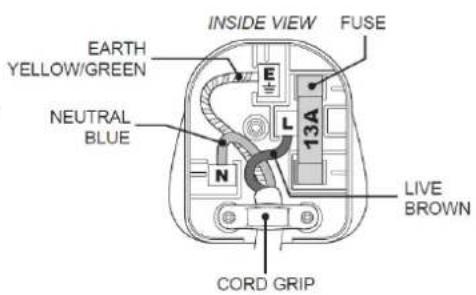
Non-rewireable mains plug
If your appliance is supplied with a non-rewireable plug ed to the mains lead you will nd that it incorporates a fuse, the value of which is indicated either on the base of the plug or on the fuse carrier. Should the fuse need replacing, you must use an ASTA approved fuse (conforming to BS1362) of the same rang.
If the fuse cover is lost the plug must not be used until a replacement is obtained from an electrical supplier.
If you need to remove the plug, cut it from the mains lead and dispose of it. Never aempt to re-use this plug or insert it into a socket outlet, as there is a very great risk of an electric shock.
For Customer Services & Spare Parts please call 0845 209 7461
Opening mes: Monday - Friday 8am – 6pm & Saturday 9am – 1pm or visit us at www.productcareuk.com
Problem solving
The microwave oven may cause interference to your radio, TV or similar equipment. If it does, you can get rid of the interference by moving the radio, TV or equipment as far away from your microwave oven as possible.
If the oven doesn't work -
➢ Make sure the mains plug is plugged in securely. If it is not, remove the plug from the socket, wait 10 seconds and plug it in again securely.
➢ Check the premises for a blown circuit fuse or a tripped main circuit breaker. If these seem to be working properly, test the socket with another appliance.
If the microwave power will not work –
▶ Check to see whether the mer is set.
➢ Make sure the door is securely closed. Otherwise, the microwave energy will not ow into the oven
For Customer Services & Spare Parts please call 0845 209 7461
Opening mes: Monday - Friday 9am – 6pm & Saturday 9am – 1pm or visit us at www.productcareuk.com
Guarantee
This product is guaranteed for 12 months from the date of the original purchase. If any defect arises due to faulty materials or workmanship the faulty product must be returned to the place of purchase.
Refund or replacement is at the discretion of the store.
The following conditions apply:
- The product must be returned to the retailer with the original proof of purchase.
- The product must be installed and used in accordance with the instrucons contained in this instrucon guide and any other instrucons for use which has been supplied.
- It must be used for domesc purposes only and for its intended use.
• This guarantee does not cover wear and tear, damage, misuse or consumable parts.
This does not aect your statutory rights.
For Customer Services & Spare Parts please call 0845 209 7461
Opening mes: Monday - Friday 8am – 6pm & Saturday 9am – 1pm or visit us at www.productcareuk.com
Technical Specicaons
Rated Voltage: 230V - 240V \~ 50Hz
Rated Input Power(Microwave): 1200 -1270 W
Rated Output Power(Microwave): 750-800 W
Oven Capacity: 20 L
Turntable Diameter: 255 mm
External Dimensions(LxWxH): 439.5mmX340mmX258.2mm
Net Weight: Approx. 10.6 kg
Spares
The following spare parts are available from www.productcareuk.com
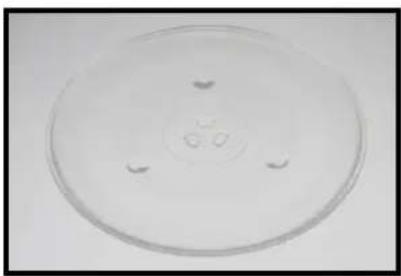
Glass turntable
natural_image
Circular petri dish with a central hole and four small circular indentations, no text or symbols visible.Turntable coupling
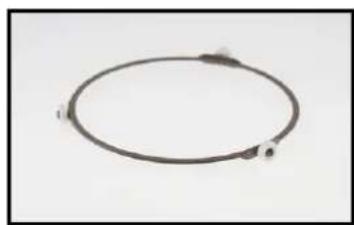
natural_image
Simple circular diagram with two labeled points and arrows, no text or symbols presentWave Guide cover
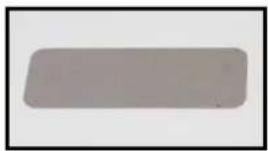
natural_image
Plain gray rectangular object with rounded edges, no visible text or symbolsFor Customer Services & Spare
Parts please call
0845 209 7461
Opening mes: Monday - Friday
9am – 5pm & Saturday 8am –1pm
or visit us at
www.productcareuk.com
Revision 1


This symbol is known as the 'Crossed-out wheelie bin Symbol'. When this symbol is marked on a product/baeries, it means that the product/batteries should not be disposed of with your general household waste. Only discard electrical/electronic/baery items in separate collecon schemes, which cater for the recovery and recycling of materials contained within. Your co-operaon is vital to make sure the success of these schemes and for the protecon of the environment. For your nearest disposal facility, visit www.recycle-more.co.uk or ask in store for details.
We reserve the right due to possible changes to design to alter the instrucon manual without prior noce.
- Model number: RHM2064S
- Contents
- Page
- About this microwave oven
- Unpacking your microwave oven
- Safety instrucons
- Microwave oven installaon
- Feature diagram
- Warning - do not use the oven when empty or for warming plates. Always keep the oven cavity, door assembly and waveguide cover clean
- Turn table installaon
- Control panel
- How to use your microwave oven
- Clock Seng
- Note:
- Microwave Cooking
- Speedy Cooking
- or
- Defrosng by Weight
- Defrosng by Time
- Mul-Stage Cooking
- Pre-set me to start funcons
- Auto Menu
- Inquiring Funcon
- Child lock
- General Specicaon
- Cleaning and care
- Important utensil informaon
- Connecon to the mains supply
- WARNING- THIS APPLIANCE MUST BE EARTHED
- Non-rewireable mains plug
- Problem solving
- Guarantee
- The following conditions apply:
- This does not aect your statutory rights.
- Technical Specicaons
- Spares
- Revision 1
Brand : RUSSELL HOBBS
Model : RHM2064R
Category : Microwave Oven