
Shell Snap-On Keyboard for iPad mini 19489 - Keyboard TRUST - Free user manual and instructions
Find the device manual for free Shell Snap-On Keyboard for iPad mini 19489 TRUST in PDF.


| Brand | Trust |
| Model | Shell Snap-On Keyboard for iPad mini 19489 |
| Product Type | Keyboard case for iPad mini |
| Compatibility | iPad mini (all generations) |
| Dimensions (L x W x H) | 200 x 140 x 18 mm |
| Weight | 260 g |
| Power Supply | Rechargeable lithium-ion battery (300 mAh) |
| Battery Life | Up to 90 hours of continuous use |
| Connectivity | Bluetooth 3.0 |
| Bluetooth Range | Up to 10 meters |
| Number of Keys | 78 keys (including iPad-specific function keys) |
| Main Functions | Typing input, iOS shortcuts, adjustable tilt, screen protection |
| Material | ABS plastic with soft-touch finish |
| Color | Black |
| Care and Cleaning | Clean with a slightly damp soft cloth. Do not use abrasive products. |
| Safety | Use only with certified chargers. Do not expose to moisture. |
| Spare Parts and Repairability | Contact Trust support for spare parts. The battery is not user-replaceable. |
| General Information | 2-year warranty. Made in China. |
Frequently Asked Questions - Shell Snap-On Keyboard for iPad mini 19489 TRUST
User questions about Shell Snap-On Keyboard for iPad mini 19489 TRUST
0 question about this device. Answer the ones you know or ask your own.
Ask a new question about this device
Download the instructions for your Keyboard in PDF format for free! Find your manual Shell Snap-On Keyboard for iPad mini 19489 - TRUST and take your electronic device back in hand. On this page are published all the documents necessary for the use of your device. Shell Snap-On Keyboard for iPad mini 19489 by TRUST.
USER MANUAL Shell Snap-On Keyboard for iPad mini 19489 TRUST
www.trust.com/19487/faq
Trust
natural_image
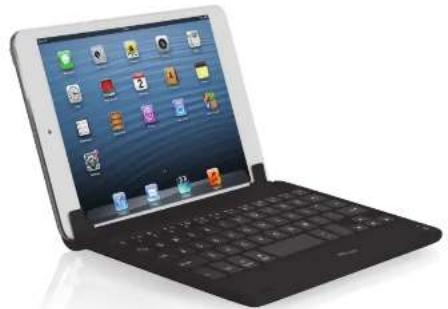
Modern tablet device with open screen displaying app icons (no visible text or symbols on screen)Quick Installation Guide
flowchart
graph TD
    A["Charging"] --> B["Stage 1: lightning icon"]
    B --> C["Stage 2: battery icon with battery symbol"]
    C --> D["Stage 3: clock icon"]
    D --> E["Charging Stage 1: lightning icon"]
    style A fill:#f9f,stroke:#333
    style B fill:#ccf,stroke:#333
    style C fill:#cfc,stroke:#333
    style D fill:#fcc,stroke:#333
    style E fill:#cff,stroke:#333

Index
| Language | Page | ||
| English | 2 | ||
| Deutsch | 5 | ||
| Français | 8 | ||
| Italiano | 11 | ||
| Español | 14 | ||
| Português | 17 | ||
| Nederlands | 20 | ||
| Dansk | 23 | ||
| Suomi | 26 | ||
| Norsk | 29 | ||
| Svenska | 32 | ||
| Polski | 35 | ||
| Česky | 38 | ||
| Slovenčina | 41 | ||
| Magyar | 44 | ||
| Română | 47 | ||
| Български | 50 | ||
| Русский | 53 | ||
| Еллэнvíкá | 56 | ||
| Türkçe | 59 | ||
| Hrvatski | 62 | ||
| Slovenski | 65 | ||
| српски | 68 | ||
Package contents (Package contents)
| a. Pair buttonb. On/Off switch | |
| Keyboard: | c. Mini-USB (charge) connectord. Charge indicator / Battery indicatore. Bluetooth indicator |
| f. | Mini-USB (charge) cable |
| g. | Elastic band |

For transportation, use the Elastic band.
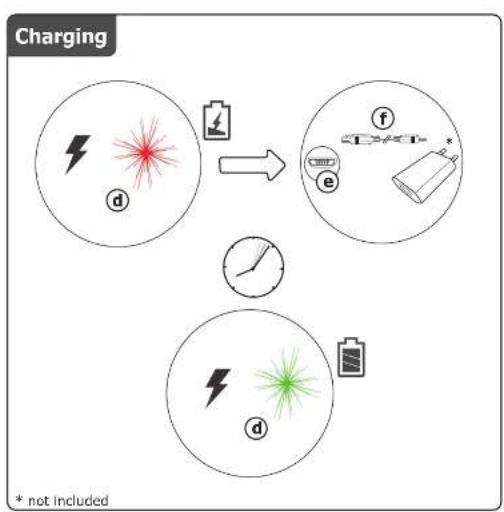
Charging (Charging)
When the Battery Indicator is red permanently, the keyboard is running out of battery. To charge the keyboard, use the mini-USB cable (f) to connect it to one of your computer's USB port, or to any device that has a USB charging port.
Pairing (Pairing)
To pair the keyboard with your iPad,
| 1. Switch On the keyboard | |
| 2. | Press the Pair button► The Bluetooth indicator blinks. |
| 3. | Open your iPad's Bluetooth Settings► Tap Settings, Bluetooth |
| 4. | Tap the "Trust KB-02" line in the list of detected devices► Devices are detected only if Bluetooth is On |
| 5. | Your iPad will display a passkey► A unique passkey is generated every time you pair your devices |
| 6. | Type the passkey on the keyboard, and press Enter |
Shell Snap-On Keyboard for iPad mini - User's Manual
Trust
Special keys (Special keys)

Homescreen

Brightness +

Brightness -

Search

Photo slide show

Lock

Display on-screen keyboard

Previous track

Play/Pause

Next track

Mute

Volume down

Volume up
Trouble shooting
| Problem | Solution |
| Can't connect the Bluetooth keyboard to my device | - Make sure that the keyboard is in pairing mode. Press and hold the connect button (a) for 5 seconds to activate the pairing mode.- If a passcode is requested. Type the requested phrase on the keyboard and press enter.- Charge the battery. |
| Not all typed characters are showing on the screen | - Charge the battery- Move the Bluetooth keyboard away from other wireless devices (like Wireless network routers)- The keyboard goes into sleep mode after some time of not using. After pressing a key the keyboard will wake up. This make take a couple of seconds. |
| The keyboard shows different characters on my device. | - Change the keyboard language settings of your device. |
| The media keys are not working | - When using an alternative music player, the media keys may not work. |
If your problem is not solved, please contact the helpdesk at www.trust.com/19487/faq
Lieferumfang (Package contents)
a. Verbindungstaste
b. Ein-/Ausschalter
Chargement (Charging)
Appariement (Pairing)
Tasti speciali (Special keys)

Schermata iniziale

Luminosità +

Luminosità -

Cerca

Foto mostrare

Bloccare

Pakkens indhold (Package contents)
a. Parringsknap
Specialtaster (Special keys)

Hjemmeskærm

Lysstyrke +

Lysstyrke -

Søg

Lysbilledshow

lás

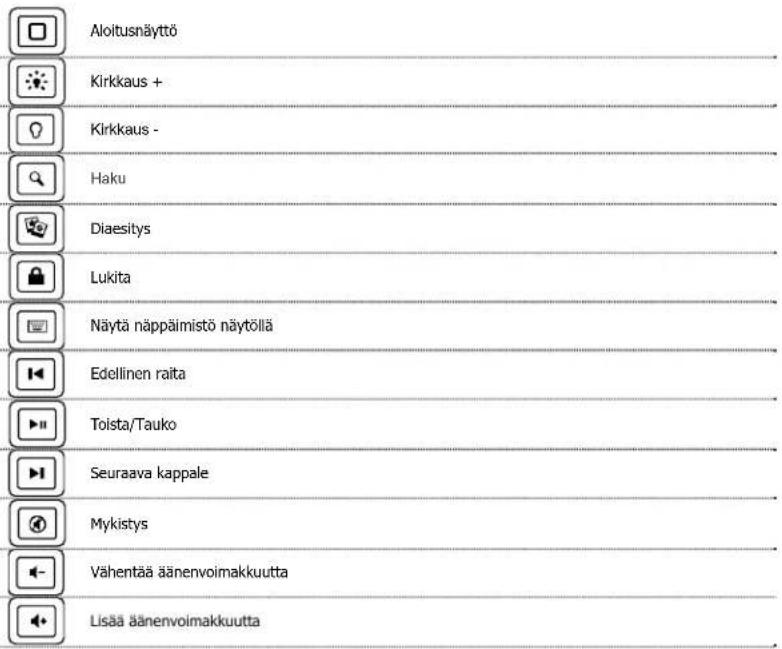
Erityispainikkeet (Special keys)
Pakkens innhold (Package contents)
a. Forbindingsknapp
b. På/av-bryter
Tastatur:
c. Mini-USB-kontakt (lading)
d. Ladelampe / Batterilampe
e. Bluetooth-lampe
f. Mini-USB-ledning (lading)
g. Elastisk bänd

3 Apne iPad-ens Bluetooth-innstillinger
Specialtangenter (Special keys)

Hemskärm

Ljusstyrka +

Ljusstyrka -

Sök

Bildspel

Las

Visa skärmtangentbord

Föregående spår

Uppspelning/paus

Nästa spår

Ljud av

Sänk volymen

Höj volymen
Shell Snap-On Keyboard for iPad mini - User's Manual
Trust
Felsökning
Brand : TRUST
Model : Shell Snap-On Keyboard for iPad mini 19489
Category : Keyboard