
TW7PINUP - Hi-Fi System BIGBEN INTERACTIVE - Free user manual and instructions
Find the device manual for free TW7PINUP BIGBEN INTERACTIVE in PDF.


| Product type | Hi-Fi System |
| Brand | Bigben Interactive |
| Model | TW7PINUP |
| Dimensions (approx.) | 30 x 20 x 15 cm |
| Weight (approx.) | 2.5 kg |
| Power supply | 220-240 V AC, 50/60 Hz |
| Main functions | CD player, FM radio, auxiliary input (3.5 mm), Bluetooth, stereo speakers |
| Connectivity | Bluetooth, AUX input, FM antenna jack |
| Care and cleaning | Clean with a soft, dry cloth. Do not use abrasive products. |
| Safety | Do not expose to moisture or heat sources. Disconnect before cleaning. |
| Spare parts and repairability | Use compliant original parts. Contact Bigben customer service for any repairs. |
| General information | Compact Hi-Fi system for home use. Retro design with pin-up style. |
Frequently Asked Questions - TW7PINUP BIGBEN INTERACTIVE
User questions about TW7PINUP BIGBEN INTERACTIVE
0 question about this device. Answer the ones you know or ask your own.
Ask a new question about this device
Download the instructions for your Hi-Fi System in PDF format for free! Find your manual TW7PINUP - BIGBEN INTERACTIVE and take your electronic device back in hand. On this page are published all the documents necessary for the use of your device. TW7PINUP by BIGBEN INTERACTIVE.
USER MANUAL TW7PINUP BIGBEN INTERACTIVE
MODE D'EMPLOI
LISEZ COMPLETEMENT CE MANUEL D' UTILISATION AVANT D'UTILISER CET APPAREIL ET LES CONSERVER POUR VOUS Y RÉFÉRER ULTÉRIEUREMENT
MISES EN GARDE ET PRÉCAUTIONS

ATTENTION
RISQUE DE CHOC ÉLECTRIQUE
NE PAS OUVRIR
WARNING: SHOCK HAZARD - DO NOT OPEN
AVIS : RISQUE DE CHOC ELECTRIQUE - NE PAS OUVRIR

TÉLÉCOMMANDE
SOURCE D'ALIMENTATION
customerservice@ bigben-interactive.be
SPAIN, sat@ bigbeninteractive.es
www.bigben.eu
EN

TW7
2.1CH TOWER SPEAKER BLUETOOTH/USB/SD/FM
OPERATING INSTRUCTIONS
PLEASE READ THE USER MANUAL COMPLETELY BEFORE OPERATING THIS UNIT AND RETAIN THIS BOOKLET FOR FUTURE REFERENCE
WARNINGS AND PRECAUTIONS

WARNING:SHOCK HAZARD -DO NOT OPEN AVIS:RISQUE DE CHOC ELECTRIQUE-NE PAS OUVRIR

The lightning flash with arrowhead symbol, within an equilateral triangle, is intended to alert the user to the presence of uninsulated 'dangerous voltage' within the product's enclosure that may be of Sufficient magnitude to constitute a risk of electric shock to persons.

The exclamation point within an equilateral triangle is intended to alert the user to the presence of important operating and maintenance
(servicing) instructions in the literature accompanying the appliance.
DANGER:
Invisible and hazardous laser radiation when open and interlock failed or defeated. Avoid direct exposure to beam.

This symbol indicates that this product incorporates double insulation between hazardous mains voltage and user accessible parts.
- WARNING: To reduce the risk of fire or electric shock, do not expose this apparatus to rain or moisture.
- CAUTION: Use of controls or adjustments or performance of procedures other than those specified may result in hazardous radiation exposure.
- WARNING: Changes or modifications to this unit not expressly approved by the party responsible for compliance could void the user's authority to operate the equipment.
- WARNING: Do not place the unit on top of any soft, porous, or sensitive surfaces to avoid damaging the surface. Use a protective barrier between the unit and surface to protect the surface.
- WARNING: Use of this unit near fluorescent lighting may cause interference regarding use of the remote. If the unit is displaying erratic behavior move away from any fluorescent lighting, as it may be the cause.
- CAUTION: Danger of explosion if battery is incorrectly replaced. Replace only with the same or equivalent type.
- WARNING: Use of this unit near fluorescent lighting may cause interference regarding use of the remote. If the unit is displaying erratic behavior move away from any fluorescent lighting, as it may be the cause.
- CAUTION: Danger of explosion if battery is incorrectly replaced. Replace only with the same or equivalent type.
- WARNING: Shock hazard - Do Not Open
Main plug is used as disconnect device and it should remain readily operable during intended use. In order to disconnect the apparatus from the main completely, the main plug should be disconnected from the main socket outlet completely.
IMPORTANT SAFETY INSTRUCTION
- Read these Instructions.
- Keep these Instructions.
- Heed all warnings.
- Follow all instructions.
- Do not use this apparatus near water.
- Clean only with a dry cloth.
- Do not block any ventilation openings install in accordance with the manufacturer's instructions.
- Do not install near any heat sources such as radiators, heat registers, stoves, or other apparatus (including amplifiers) that produce heat.
- Protect the power cord from being walked on or pinched particularly at plugs, convenience receptacles, and the point where they exit from the apparatus.
- Only use attachments/accessories specified by the manufacturer.
- Use only with a cart, stand, tripod, bracket, or table specified by the manufacturer. or sold with the apparatus. When a cart is used, use caution when moving the cart apparatus combination to avoid injury from tip-over.
-
Unplug this apparatus during lightning storms or when unused for long periods of time.
-
Refer all servicing to qualified service personnel. Servicing is required when the apparatus has been damaged in any way, such as power-supply cord or plug is damaged, liquid has been spilled or objects have fallen into the apparatus, the apparatus has been exposed to rain or moisture, does not operate normally, or has been dropped.
Additional Warnings
- The apparatus shall not be exposed to dripping or splashing and that no objects filled with liquids, such as vases, shall be placed on apparatus.
- Main plug is used as disconnect device and it should remain readily operable during intended use. In order to disconnect the apparatus from the main completely, the main plug should be disconnected from the main socket outlet completely.
- Battery shall not be exposed to excessive heat such as sunshine, fire or the like.
- Caution marking is located at the rear or bottom of the apparatus.
- The marking information is located at the rear or bottom of apparatus.
Warning: Changes or modifications to this unit not expressly approved by the party responsible for compliance could void the user's authority to operate the equipment.
PACKAGE CONTENTS
When you unpack your new unit, make sure that you have removed all the accessories and information papers:
-Speaker tower
-User manual
-Remote Control
-3.5 stereo plug audio cable
-2 x Assembly screws.
-2 x Assembly washers
-5x Pads to the base bottom to protect the ground (1pc for spare part)
INSTALLATION
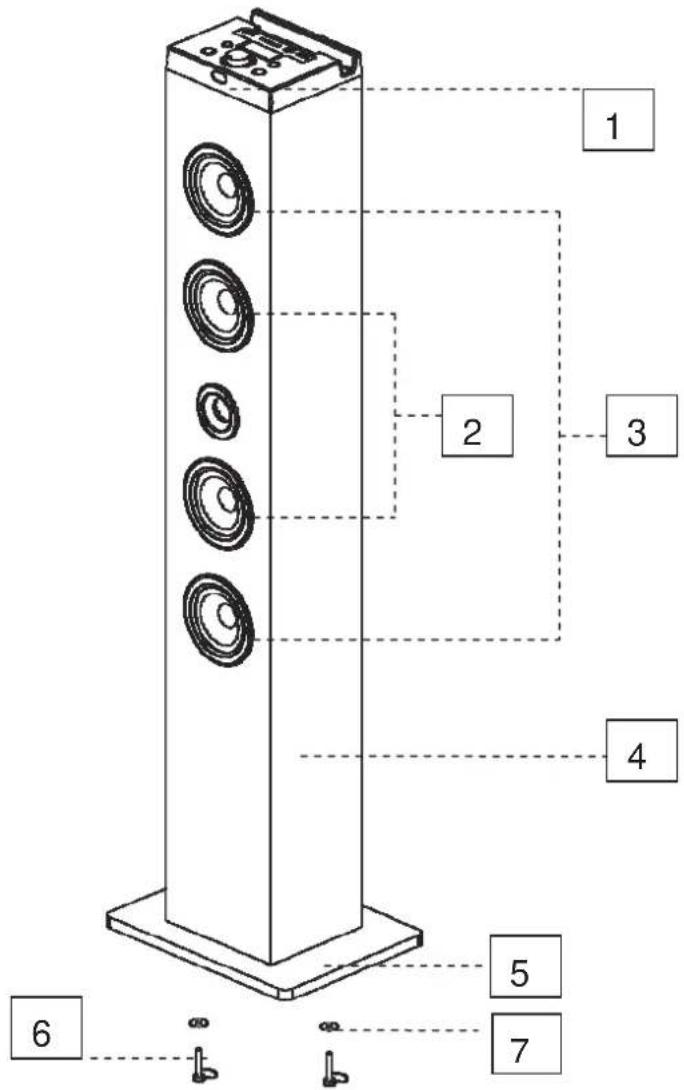
- Remote Sensor
- Tweeters
- Loud Speakers
- subwoofer
Note:
- Base
-
Screws
-
Washers
Assemble the wooden base to the main body with the supplied screws and washers.
MAIN UNIT
- USB port
- SD CARD slot
- AUX IN jack
- USB charging port
- LED Display screen
- Mode button / Standby
- Play / Pause button
-
TUNE+ button
-
TUNE-button
-
VOL(Vokholse)+/-
-
Power OFF / ON
-
Power Line (AC90\~240V 50/1)
- Blowhole
- Subwoofer


REMOTE CONTROL
- STANDBY Button
- AUX Mode
- Mute
- FM station memory +
- Previous
- FM station memory -
- USB Mode
- SD Mode
- Bluetooth Mode
- FM Mode
- FM auto search
- Play / Pause
- Next

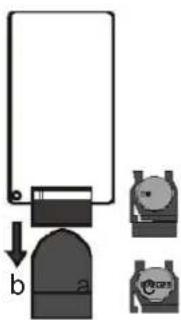
The remote control operates on I pc "CR2025" lithium battery (included). To power up the remote control, remove the insulation tab from the back of unit.
Replacing battery for the remote control
- Push and slide out the battery door, as shown below
- Replace the battery with a new CR2025 button cell with the polarity "+" facing up.
- Slide the cover
Notes on batteries
. Never recharge the batteries, apply heat to them or take them apart.
. Battery shall not be exposed to excessive heat such as sunshine, fire or the like.
. Do not throw the batteries in fire!
. Attention should be drawn to the environmental aspects of battery disposal.
. If the remote control is not going to be used for a long time, remove the battery to avoid damage caused by battery leakage corrosion.
. Please respect the environment. Before throwing any batteries away, consult your distributor who may be able to take them back for specific recycling.
CAUTION:
- Do not mix old and new batteries, or different types of batteries
- Danger of explosion if battery is incorrectly replaced. Replace only with the same or equivalent type.
Setting up your tower
Carefully take the tower body and base out of the packaging.
- take the screws and washers out
- Attach the base to the body aligning the two holes in the base with the two holes in the tower
- Screw the base into the body
- Attach the four pads to the base bottom to protect the ground,(1pc for spare parts)
- Stand the tower upright on the floor. The appliance is now ready for use
POWER SOURCE
Inert the AC plug into a conveniently located AC outlet having AC 230V-60Hz.
WARNING: This unit has a long AC cord that can easily be tripped on or pulled on, causing injur. Please make sure it is arranged so it will not drape over a tabletop, etc. where it can be pulled on by children or tripped over accidentally.
GENERAL OPERATION
- Press ⬇ button to turn on or turn off the unit.
- Press the MODE button repeatedly to select the playback source. The LED displayed the current mode
- Press the VOL(Volume)+/-Knobs to adjust volume level.
- Press the MUTE Button on the remote control to turn off the sound. Press it again to restore the previous sound level.
- If the unit is not used for a long period of time, pull out the plug to turn off the unit completely.
PLAY RADIO
- Press ⏻ button to turn on or turn off the unit.
- Press the MODE button on the unit or the remote control to select FM mode. The unit will be in FM radio mode. The LED display FM
- Press and hold AUTO SCAN button on remote, The unit will automatically start and search the frequencies for the previous or next strong station and stop on that station.
- Once you find a station you want to save, press the MEM+ button or MEM- until the desired memory position number appears on the display. Press the MEM again to confirm and save the current station.
FM: Fully unwind the antenna wire and extend it
USING THE AUX & LINE INPUT
requires an RCA cable or 3.5mm audio cable (included)
- Connect your auxiliary device (e.g. smart phone/ MP3 player) to the AUX jack or 3.5mm LINE jack
- Press ⏻ button to turn on the unit. Press the MODE button repeatedly.
- Press 'Play/Pause 'on your auxiliary source.
- Adjust the volume to desired level.
- To stop playback, disconnect your auxiliary source from the AUX jack.
USB CHARGES FOR SMARTPHONES
There is a USB charger on the top of the unit to charge small devices such as smartphones that can be charged via USB
LISTENING TO AUDIO DEVICE
You can connect a USB flash device (not included) to the USB port or a SD card (not included) to the memory expansion card slot on the unit to play MP3 files.
- Press ⏻ button to turn on the unit.
- Press MODE into the USB or SD mode. the unit can automatically play
- Press MENU + /MENU - to select which folder you want to open. The display will shows the number of folder first.
- Press PREVIOUS/NEXT to select track.
Note:
• Supported format: MP3 (32kbps-320kbps)
- The total number of MP3 files on the Memory Device should not exceed 999.
- If you can't easily insert the memory card, you may have inserted it incorrectly. Try to turn over the card and then insert again.
- For playing files on USB flash drive or SD card, you should plug in the USB flash drive or SD card when the unit is in standby mode. Turn ON the unit and use MODE button to select USB or SD card mode.
- There are many USB /SD cards on the market. we can't guarantee to support all different models. Please try another USB /SD card if your device is not supported.
- Some SD cards may be incompatible.
BLUETOOTH PAIRING & LINKING OPERATION
- Turn off the Bluetooth functionality of other devices that are already paired with your unit.
- Press ⏻ button to turn on the unit.
- Press MODE button to select Bluetooth mode. The LED will displayed BT.
- Turn on Bluetooth functionality on your Bluetooth device. Typically, Bluetooth controls are found on the device's tools or settings menu (see your user manual).
Tum on Bluetooth connectivity and make your device 'discoverable".
- Clean out the paring list on your Bluetooth device.
- Choose 'add a new Bluetooth device' or 'setup Bluetooth device' on your device. It will start to search. Once "TW7" shows on your device, select it. If your device prompts you for a pass code, please enter 0000. If the pairing attempt fails or times out, please start pairing procedure again (see steps 2-6).
- After your device and the "T" have connected each other, a sound can be heard.
Play MUSIC from Bluetooth devices.
Make sure the Bluetooth connection between the unit and the device is active.
- Press ▶ button to pause playback, press ▶ button again to resume playback.
- Press button to skip forward to next track and to skip backward to previous track.
TROUBLESHOOTING GUIDE
| Symptom Cause Solution | ||
| No power AC plug not plugged into wall outlet. | Plug it to the wall outlet properly. | |
| No sound Volume set too low. Adjust volume to a desired level. | ||
| Sound output of the connected device set too low (AUXIN & BLUETOOTH mode) | Adjust volume connected device. | |
| Sound distortion | Volume level too high | Reduce the volume level by press the VOL-button. |
| Volume level of the connected device too high.(AUX IN & BLUETOOTH mode) | Reduce the volume level of the connected device. | |
| Bluetooth Reception failure | Not connected via Bluetooth properly. | Check that Bluetooth is activated on your device and retry Bluetooth connection.(see page 7). |
of
SPECIFICATIONS
Power source: AC 230V-50Hz
Radio Coverage: FM 87.5 -108.0 MHz
Impedance of Speakers:
Loud speakers 80hm,10W x 2
Subwoofer 8ohm 20w
Bluetooth working distance: up to 10 meters measured in open space. (Wall
and structures may affect range of device)
Remote working distance: up to 5 meters, +1-30 degree.
Care and Maintenance
Always disconnect the unit from the mains power supply before cleaning. Clean the appliance with a soft, damp, lint free cloth. Do not use abrasives or harsh cleaners.
Don't throw the electronic and electronic appliances into the usual dustbin
✧ Bring them to a collecting point
Some parts container in these appliances may be dangerous for health and environment

Imported by Bigben Interactive SA
CRT2-RUE DE LA VOYETTE
59810 LESQUIN CEDEX FRANCE
www.bigben.eu


Hereby, Bigben interactive S.A., declares that the TW7 device complies with the essential requirements of the directive 1995/5/EC of the European Parliament and of the council of 9 March 1999 on radio equipment and telecommunications terminal equipment and the mutual recognition of their conformity.
To download the full statement, please visit our website: Http://www.bigben.eu/support and the section declaration of the conformity.

customerservice@ bigben-interactive.be
SPAIN, sat@ bigbeninteractive.es
www.bigben.eu
ES

TW7
TORRE DE ALTAVOCES DE 2
CANALES Y 1 WOOFER
CON
BLUETOOTH/USB/SD/FM

MANDO A DISTANCIA
customerservice@ bigben-interactive.be
SPAIN, sat@ bigbeninteractive.es
www.bigben.eu
IT

TW7
ALTOPARLANTE TOWER 2.1CH CON BLUETOOTH/USB/SD/RADIO FM

ISTRUZIONI D'USO
PRIMA DI UTILIZZARE L'APPARECCHIO, LEGGERE PER INTERO IL PRESENTE MANUALE E CONSERVARLO PER CONSULTAZIONI FUTURE
customerservice@ bigben-interactive.be
SPAIN, sat@ bigbeninteractive.es
www.bigben.eu
PT

TW7
Coluna de som
BLUETOOTH/USB/SD/FM de
CN 2.1

customerservice@ bigben-interactive.be
SPAIN, sat@ bigbeninteractive.es
www.bigben.eu
DE

TW7
2.1CH
TOWER-LAUTSPRECHER
BLUETOOTH/USB/SD/FM
BEDIENUNGSANLEITUNG
customerservice@ bigben-interactive.be
SPAIN, sat@ bigbeninteractive.es
www.bigben.eu
NL

TW7
2.1-TORENLUIDSPREKER BLUETOOTH/USB/SD/FM

VEILIGHEIDSINSTRUCTIES
LEES DEZE GEBRUIKSAANWIJZING VOLLEDIG DOOR ALVORENS DEZE EENHEID BEDIENEN, EN BEWAAR DIT BOEKJE VOOR UW ADMINISTRATIE
WAARSCHUWINGEN EN VOORZORGSMAATREGELEN

WAARSCHUWING
KANS OP ELEKTRISCHE SCHOK
NIET OPENEN
WAARSCHUWING: GEVAAR VOOR SCHOKKEN - NIET OPENEN
AVIS: RISQUE DE CHOC ELECTRIQUE - NE PAS OUVRIR

AFSTANDSBEDIENING
- STANDBY-knop
- AUX-modus
- Mute
- FM-zendergeheugen +
- Previous
- FM-zendergeheugen -
- USB-modus
- SD-modus
- Bluetooth-modus
- FM-modus
- FM auto zoeken
- Start/pauze
- Next

Opmerkingen over batterijen
AUDIO APPARAAT BELUISTEREN
Radiodekking: FM 87,5-108,0 MHz
Impedantie van
luidsprekers:
Luidsprekers 8 ohm, 10 W x 2
Subwoofer 8 ohm 20 w
customerservice@bigben-interactive.be
SPAIN, sat@ bigbeninteractive.es
www.bigben.eu


- MODE D'EMPLOI
- MISES EN GARDE ET PRÉCAUTIONS
- TÉLÉCOMMANDE
- SOURCE D'ALIMENTATION
- TW7
- OPERATING INSTRUCTIONS
- WARNINGS AND PRECAUTIONS
- DANGER
- IMPORTANT SAFETY INSTRUCTION
- ADDITIONAL WARNINGS
- PACKAGE CONTENTS
- INSTALLATION
- MAIN UNIT
- REMOTE CONTROL
- REPLACING BATTERY FOR THE REMOTE CONTROL
- NOTES ON BATTERIES
- CAUTION
- SETTING UP YOUR TOWER
- POWER SOURCE
- GENERAL OPERATION
- PLAY RADIO
- USING THE AUX & LINE INPUT
- USB CHARGES FOR SMARTPHONES
- LISTENING TO AUDIO DEVICE
- NOTE
- BLUETOOTH PAIRING & LINKING OPERATION
- PLAY MUSIC FROM BLUETOOTH DEVICES
- SPECIFICATIONS
- CARE AND MAINTENANCE
- MANDO A DISTANCIA
- ISTRUZIONI D'USO
- BEDIENUNGSANLEITUNG
- VEILIGHEIDSINSTRUCTIES
- WAARSCHUWINGEN EN VOORZORGSMAATREGELEN
- AFSTANDSBEDIENING
- OPMERKINGEN OVER BATTERIJEN
- AUDIO APPARAAT BELUISTEREN
Brand : BIGBEN INTERACTIVE
Model : TW7PINUP
Category : Hi-Fi System