
RAS-E10HB - Air Conditioning HITACHI - Free user manual and instructions
Find the device manual for free RAS-E10HB HITACHI in PDF.


| Product type | Wall-mounted split air conditioner |
| Brand | Hitachi |
| Model | RAS-E10HB |
| Cooling capacity (BTU/h) | 9,000 |
| Cooling capacity (kW) | 2.5 |
| Heating capacity (kW) | 2.8 |
| Power supply | 220-240 V, 50 Hz |
| Interior unit dimensions (W x H x D) | 770 x 250 x 220 mm |
| Exterior unit dimensions (W x H x D) | 800 x 550 x 300 mm |
| Weight of interior unit | 8 kg |
| Weight of exterior unit | 30 kg |
| Refrigerant type | R32 |
| Main functions | Cooling, heating, dehumidification, ventilation, night mode, timer |
| Air filter | Washable and reusable filter |
| Sound level interior unit (dB(A)) | 22-38 |
| Sound level exterior unit (dB(A)) | 46-52 |
| Remote control | Infrared remote control included |
| Maintenance and cleaning | Clean the filter every 2 weeks, check drainage |
| Power consumption (cooling) | 750 W |
| Power consumption (heating) | 820 W |
| Energy efficiency ratio (EER/COP) | 3.2 / 3.4 |
| Spare parts and repairability | Available through Hitachi authorized service |
| Safety | Surge protection, automatic shut-off |
Frequently Asked Questions - RAS-E10HB HITACHI
User questions about RAS-E10HB HITACHI
0 question about this device. Answer the ones you know or ask your own.
Ask a new question about this device
Download the instructions for your Air Conditioning in PDF format for free! Find your manual RAS-E10HB - HITACHI and take your electronic device back in hand. On this page are published all the documents necessary for the use of your device. RAS-E10HB by HITACHI.
USER MANUAL RAS-E10HB HITACHI
SPLIT TYPE AIR CONDITIONER
natural_image
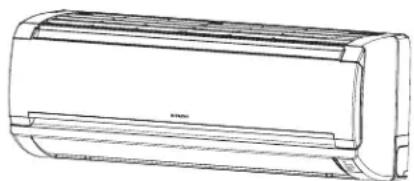
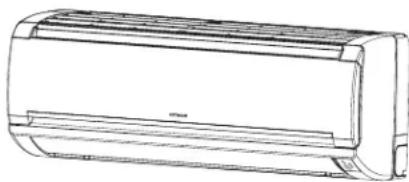
Line drawing of a Hitachi air conditioner unit (no text or symbols on the fan body)RAC-E10HB RAC-E10HBG RAC-E14HB RAC-E14HBG
INDOOR UNIT

natural_image
Line drawing of a cylindrical air conditioner unit (no text or symbols)RAS-E10HB RAS-E10HBG RAS-E14HB RAS-E14HBG
Instruction manual
Page 1\~10
To obtain the best performance and ensure years of trouble free use, please read this instruction manual completely.
This room air conditioner is only for consumer usage.
Do not use for preservation of foods, animals, plants, precision machines, art, medicine or such.
SAFETY PRECAUTION
- Please read the "Safety Precaution" carefully before operating the unit to ensure correct usage of the unit.
- Pay special attention to signs of “Warning” and “Caution”. The “Warning” section contains matters which, if not observed strictly, may cause death or serious injury. The “Caution” section contains matters which may result in serious consequences if not observed properly. Please observe all instructions strictly to ensure safety.
- The signs indicate the following meanings. (The following are examples of signs.)

Make sure to connect earth line.

This sign in the figure indicates prohibition.

Indicates the instructions that must be followed.
- Please keep this manual after reading.
PRECAUTIONS DURING INSTALLATION
 WARNING WARNING | Do not reconstruct the unit.Water leakage, fault, short circuit or fi re may occur if you reconstruct the unit by yourself. |  PROHIBITION PROHIBITION |
| Please ask your sales agent or qualified technician for the installation of your unit.Water leakage, short circuit or fire may occur if you install the unit by yourself. | ||
| Please use earth line.Do not place the earth line near water or gas pipes, lightning-conductor, or the earth line of telephone. Improper installation of earth line may cause electric shock or fire. |  CONNECT EARTH LINE CONNECT EARTH LINE | |
| Be sure to use the specified piping set for R410A. Otherwise, this may result in broken copper pipes or faults. | ||
 CAUTION CAUTION | A circuit breaker should be installed depending on the mounting site of the unit.Without a circuit breaker, the danger of electric shock exists. |  PROHIBITION PROHIBITION |
| Do not install the unit near a location where there is flammable gas.The outdoor unit may catch fire if flammable gas leaks around it. | ||
| Please ensure smooth flow of water when installing the drain hose. | ||
| Make sure that a single phase 220V-230V power source is used.The use of other power sources may cause electrical components to overheat and lead to fi re. |  PROHIBITION PROHIBITION |
PROHIBITION
PRECAUTIONS DURING SHIFTING OR MAINTENANCE
| [07XW]WARNING | Should abnormal situation arise (like burning smell), please stop operating the unit and turn off the circuit breaker. Contact your agent. Fault, short circuit or fire may occur if you continue to operate the unit under abnormal situation.  |
| Please contact your agent for maintenance. Improper self maintenance may cause electric shock and fi re. | |
| Please contact your agent if you need to remove and reinstall the unit. Electric shock or fire may occur if you remove and reinstall the unit yourself improperly. |
PRECAUTIONS DURING OPERATION
| WARNING | ·Avoid an extended period of direct airflow for your health. PROHIBITION |
 Do not put objects like thin rods into the panel of blower and suction side because the high-speed fan inside may cause danger. Do not put objects like thin rods into the panel of blower and suction side because the high-speed fan inside may cause danger. | |
·Do not use any conductor as fuse wire, this could cause fatal accident.  PROHIBITION PROHIBITION | |
 During thunder storm, disconnect the plug top and turn off the circuit breaker. During thunder storm, disconnect the plug top and turn off the circuit breaker. | |
| ·Spray cans and other combustibles should not be located within a meter of the air outlets of both indoor and outdoor units.As a spray can's internal pressure can be increased by hot air, a rupture may result. PROHIBITION | |
| PRECAUTIONS DURING OPERATION | |
| CAUTION | The product shall be operated under the manufacturer specifi cation and not for any other intended use.PROHIBITION |
| Do not attempt to operate the unit with wet hands, this could cause fatal accident. | |
| When operating the unit with burning equipments, regularly ventilate the room to avoid oxygen insufficiency.STRICTLY OBSERVE PRECAUTIONS | |
| Do not direct the cool air coming out from the air-conditioner panel to face household heating apparatus as this may affect the working of apparatus such as the electric kettle, oven etc. | |
| Please ensure that outdoor mounting frame is always stable, fi rm and without defect. If not, the outdoor unit may collapse and cause danger.PROHIBITION | |
| Do not wash the unit with water or place a water container such as a vase on the indoor unit.Electrical leakage could be present and cause electric shock. | |
| Do not place plants directly under the airfl ow as it is bad for the plants.PROHIBITION | |
| Be sure to stop the operation by using the remote controller and turn off the circuit breaker during cleaning, the high-speed fan inside the unit may cause danger. | |
| Turn off the circuit breaker if the unit is not be operated for a long period.OFF | |
| Do not climb on the outdoor unit or put objects on it. | |
| When operating the unit with the door and windows opened, (the room humidity is always above 80%) and with the air deflector facing down or moving automatically for a long period of time, water will condense on the air defctor and drips down occasionally. This will wet your furniture. Therefore, do not operate under such condition for a long time.PROHIBITION | |
| If the amount of heat in the room is above the cooling or heating capability of the unit (for example: more people entering the room, using heating equipments and etc.), the preset room temperature cannot be achieved.PROHIBITION | |
| Indoor unit cleaning must be performed by authorized personnel only.Consult your sales agent.Using a commercially available detergent or similar can damage the plastic parts or clog the drain pipe, causing water to drip with potential electricshock hazard.DON'T TOUCHDo not touch the air outlet, bottom surface and aluminium fin of the outdoor unit.You may get hurt. | |
| Do not touch the refrigerant pipe and connecting valve.Burns may result.DON'T TOUCH | |
| This appliance is not intended for use by young children or infirm persons unless they have been adequately supervised by a responsible person to ensure that they can use this appliance safely.Young children should be supervised to ensure that they do not play with the appliance. | |
INDOOR UNIT

natural_image
Technical line drawing of a wall-mounted air conditioner unit with internal panel and mounting points (no text or symbols)Air filter
To prevent dust from coming into the indoor unit.
(Refer page 6)
Front panel
(Refer page )
Indoor unit indicators
Light indicator showing the operating condition.
(Refer page 5)
Horizontal deflector Vertical deflector
(Air Outlet)

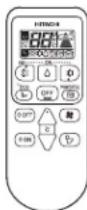
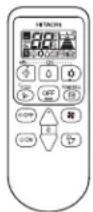
Remote controller
Send out operation signal to the indoor unit. So as to operate the whole unit.
OUTDOOR UNIT
RAC-E10HB
RAC-E10HBG
RAC-E14HB
RAC-E14HBG
Air outlet
When “heating” operation is performed, cool air blows and when “cooling” or “dehumidifying” operation is performed, warm air blows.
Drain hose
Drains the dehumidified water from the indoor unit to the outdoor during "cooling" or "dehumidifying" operation.
Piping and Wiring
Air inlets (Rear and left sides)

Drain port
(Bottom)
Earth terminal
(Lower section of the side)
About the outdoor unit:
- When "Stop" is selected during operation of the indoor unit, the fan of the outdoor unit continues turning for 10 to 60 seconds to cool the electric parts down.
- In heating operation, condensate or water due to defrosting will flow. Do not cover the drain port of the outdoor unit because such water may freeze in the chilly area.
- When the outdoor unit is hung on the ceiling, install the bush and drain pipe on the drain port and drain water.
MODEL NAME AND DIMENSIONS
| MODEL WIDTH (mm) HEIGHT (mm) DEPTH (mm) | |||
| RAS-E10HB, RAS-E10HBGRAS-E14HB, RAS-E14HBG | 780280210 | ||
| RAC-E10HB, RAC-E10HBGRAC-E14HB, RAC-E14HBG | 660530278 | ||
INDOOR UNIT INDICATIONS
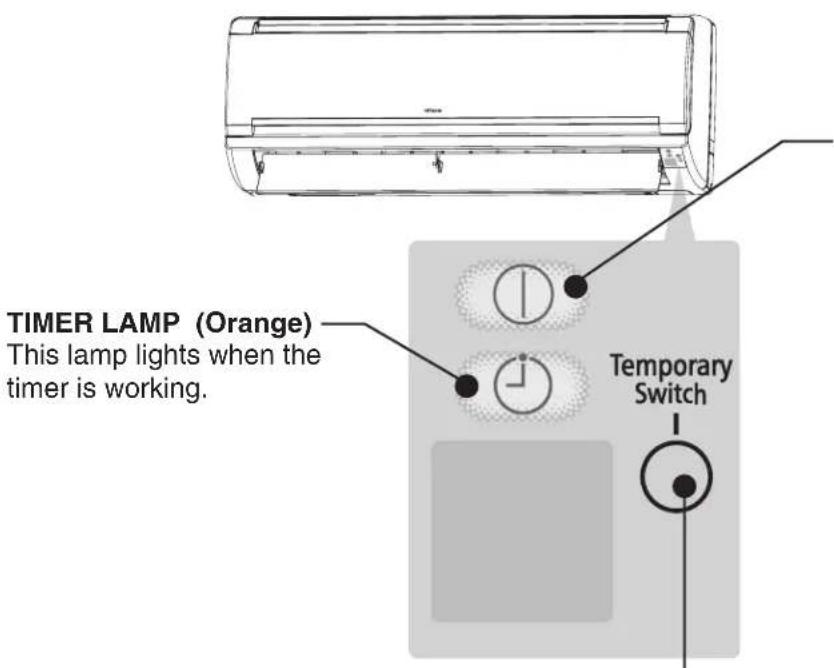
OPERATION LAMP (Yellow)
This lamp lights during operation. The OPERATION LAMP flashes in the following cases during heating.
(1) During preheating
For about 2-3 minutes after starting up.
(2) During defrosting
Defrosting will be performed about once an hour when frost forms on the heat exchanger of the outdoor unit, for 5-10 minutes each time.

CAUTION
Turn off the circuit breaker if the unit is not be operated for a long period.
TEMPORARY SWITCH
Use this switch to start and stop when the remote controller does not work.
- By pressing the temporary switch, the operation is done in automatic mode.
- When the operation is done using the temporary switch after the power source is turned off and turn on again, the operation is done in automatic mode.
☆ If the power stays on and the unit is not operated, power is slightly consumed in the control circuit. The power is saved by turning off the power switch (or the circuit breaker when the power is supplied from the outdoor unit).
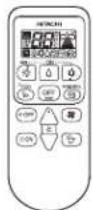
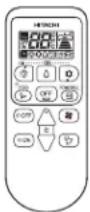
NAMES AND FUNCTIONS OF REMOTE CONTROLLER
This controls the operation function and timer setting of the room air conditioner. The range of control is about 7 meters. If indoor lighting is controlled electronically, the range of control may be shorter.

Precautions for Use
- Do not put the remote controller under direct sunlight and high temperature.
- Do not drop it on the floor, and protectit from water.
- If you press the FUNCTION button during operation, the air conditioner may stop for about 3 minutes for protection before you can start it again.
MANUAL OPERATION [Heating • Dehumidify • Cooling]
■ Please use under below condition when you want to set the function mode, room temperature and fan speed manually.
| HEATING | DEHUMIDIFYING | COOLING |
| Outdoor Temperature 24°C below | Room Temperature 16°C above | Outdoor Temperature 21°C above |
● Every time you press the button, the mode will change as the below.

2 ROOM TEMPERATURE SETTING

■ Recommend Temperature
| Heating | 20~24°C |
| Dehumidify | 20~26°C |
| Cooling | 25~28°C |
- The cooling operation does not start if the temperature setting is higher than the current room temperature.
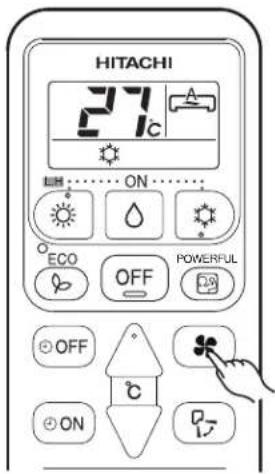
3 FAN SPEED SETTING
- Every time you press the button, fan speed will change as below sequence.
• HEATING COOLING } : AUTO → HIGH → MED → LOW → SILENT - DEHUMIDIFYING : LOW > SILENT
4 Press the OFF (STOP) button
• Operation stops with a beep.


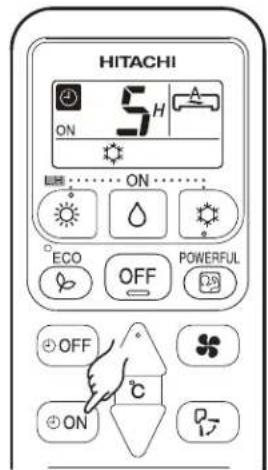
■ ON Timer and OFF Timer are available.
Timer Reservation
1 OFF OFF TIME setting
- Select the OFF TIME by pressing the ⏻OFF (OFF) Button.
- Setting time will change according to the below sequence when you press the button.

flowchart
graph LR
    A["1"] --> B["2"]
    B --> C["3"]
    C --> D["..."]
    D --> E["9"]
    E --> F["10"]
    F --> G["11"]
    G --> H["12"]
    H --> I["Timer off"]
    I --> A
    style A fill:#f9f,stroke:#333
    style B fill:#f9f,stroke:#333
    style C fill:#f9f,stroke:#333
    style D fill:#f9f,stroke:#333
    style E fill:#f9f,stroke:#333
    style F fill:#f9f,stroke:#333
    style G fill:#f9f,stroke:#333
    style H fill:#f9f,stroke:#333
    style I fill:#f9f,stroke:#333
■ Operation stop at setting time

2 ON TIME setting
- Select the ON TIME by pressing the ⏻ON (ON) Button.
- Setting time will change according to the below sequence when you press the button.

flowchart
graph LR
    A["1"] --> B["2"]
    B --> C["3"]
    C --> D["..."]
    D --> E["9"]
    E --> F["10"]
    F --> G["11"]
    G --> H["12"]
    H --> I["Timer on"]
    I --> A
    style A fill:#f9f,stroke:#333
    style B fill:#f9f,stroke:#333
    style C fill:#f9f,stroke:#333
    style D fill:#f9f,stroke:#333
    style E fill:#f9f,stroke:#333
    style F fill:#f9f,stroke:#333
    style G fill:#f9f,stroke:#333
    style H fill:#f9f,stroke:#333
    style I fill:#f9f,stroke:#333
POWERFUL OPERATION
- By pressing POWERFUL (POWERFUL) button during AUTO, HEATING, DEHUMIDIFYING, COOLING or FAN operation, the air conditioner performs at maximum power.
- During POWERFUL operation, cooler or warmer air will be blown out from indoor unit for COOLING or HEATING operation respectively.

NOTE
Press the POWERFUL button during operation.
• “ is displayed on the LCD.
POWERFUL operation ends in 20 minutes. Then the system automatically operates with the previous settings used before POWERFUL operation.
START
CANCEL
Press the (POWERFUL) button again.
• “ ” disappears from the LCD.
- When ECO mode, or LEAVE HOME mode is selected, POWERFUL operation is cancelled.
• During POWERFUL operation, capacity of the air conditioner will not increase
- if the air conditioner is already running at maximum capacity.
- just before defrost operation (when the air conditioner is running in HEATING operation).
• After auto restart, POWERFUL operation is cancelled and previous operation shall start.
■ Prevent the room temperature from falling too much by setting temperature at 10 deg automatically when no one is at home.

START
Hold down the HEATING Button for 3-5 seconds to start Leave Home operation.
• Room temperature is automatically set at 10 deg.
- “☀”, “LH”, “☐”, “☐”, is displayed on the LCD.
CANCEL
Press the OFF (STOP) button.
Change to other Operation Mode.
NOTE
● During Leave Home operation, fan speed and horizontal air deflector position cannot be changed.
■ Energy saving operation by changing set temperature and by limiting the maximum power consumption value.

NOTE
- In case the power consumption is already low, ECO operation will not reduce the power consumption.
- By pressing (POWERFUL) button, ECO operation is cancelled.
- After auto restart, ECO operation is cancelled and previous operation mode shall start.
ADJUSTING THE AIRFLOW DIRECTION

Adjust the airflow upward and downward.
According to operation, the horizontal air deflector is automatically set to the proper angle suitable for each operation. The deflector can be swings up and down and also set to the desired angle using the “(AUTO SWING)” button.
- If the “☐(AUTO SWING)” button is pressed once, the horizontal air deflector swings up and down. If the button is pressed again, the deflector stops in its current position. Several seconds (about 6 seconds) may be required before the deflector starts to move.
● The adjusting range of the horizontal air deflector is shown on the right. - When the operation is stopped, the horizontal air deflector moves and stops at the position where the air outlet closes.

CAUTION
- In "Cooling" operation, do not keep the horizontal air deflector swinging for a long time. Some dew may form on the horizontal air deflector and some dew may drop from it.

flowchart
graph TD
    A["OFF"] --> B["C"]
    C["ON"] --> B
    D["Cliver"] --> B
    B --> E["P-"]


Adjust the airflow to left and right.
Hold the vertical air deflector as shown on the right and adjust the airflow to left and right.

natural_image
Line drawing of hands installing or adjusting a wall-mounted air conditioner unit, with an inset showing the hand inserting a button (no text or symbols present)HOW TO EXCHANGE THE BATTERIES IN THE REMOTE CONTROLLER

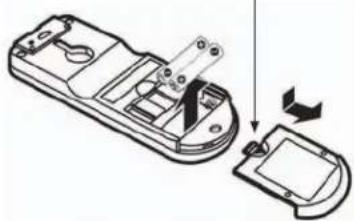
Remove the cover as shown in the figure and take out the old batteries.


Install the new batteries.
The direction of the batteries should match the marks in the case.

CAUTION
- Do not use new and old batteries, or different kinds of batteries together.
- Take out the batteries when you do not use the remote controller for 2 or 3 months.
Push and pull to the direction of arrow
natural_image
Diagram of a device's internal components being folded into a housing, showing part assembly and rotation (no text or symbols)MEMO

CAUTION
Cleaning and maintenance must be carried out only by qualified service personal. Before cleaning, stop operation and switch off the power supply.
1. AIR FILTER
Please clean the filter once about every two weeks. By doing so, the power rates are saved. In case the air filter is full of dust, the air flow will decrease and the cooling capacity will be reduced. Further, noise may occur. Be sure to clean the filter following the procedure below.
PROCEDURE

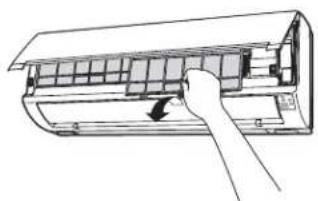
Open the front panel carefully and remove the filter.

natural_image
Technical line drawing of a car air conditioner unit (no text or symbols)
Vacuum dust from the air filter using vacuum cleaner. If there is too much dust, wash the filter with a detergent and rinse it thoroughly. After that, dry it in the shade.
natural_image
Line drawing of a hand inserting a component into an air conditioner unit (no text or symbols)

natural_image
Diagram of a hand inserting air conditioner into a housing panel (no text or symbols)
- Set the filter with "FRONT" mark facing front, and slot them into the original state.
- After attaching the filters, push the front panel at three arrow portions as shown in figure and close it.

CAUTION
- Do not wash with hot water at more than 40°C. The filter may shrink.
- When washing it, shake off moisture completely and dry it in the shade; do not expose it directly to the sun. The filter may shrink.
- Don't operate the unit without filter. Fault may occur if you continue.
2. CLEANING OF FRONT PANEL
- Remove the front panel and wash with clean water. Wash it with a soft sponge. After using neutral detergent, wash thoroughly with clean water.
- When front panel is not removed, wipe it with a soft dry cloth. Wipe the remote controller thoroughly with a soft dry cloth.
- Wipe the water thoroughly. If water remains at indicators or signal receiver of indoor unit, it causes trouble.
Method of removing the front panel. Be sure to hold the front panel with both hands to detach and attach it.

natural_image
Illustration showing two scenes: a hand washing a pipe with splashing water and a person cleaning a scroll with a cloth (no text or symbols)Removing the Front Panel Attaching the Front Panel
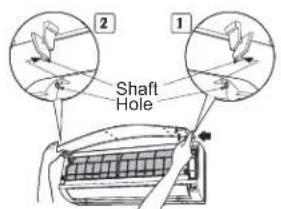
- When the front panel is fully opened with both hands, push the right arm to the inside to release it, and while closing the front panel slightly, put it out forward.

- Move the shafts of the left and right arms into the steps in the unit and securely insert them into the holes.
CAUTION
- Do not splash or direct water to the body of the unit when cleaning it as this may cause short circuit.
- Never use hot water (above 40°C), benzine, gasoline, acid, thinner or a brush, because they will damage the plastic surface and the coating.

3. MAINTENANCE BEFORE LONG OFF PERIOD
- Run the unit by setting the operation mode to ⚙ (COOL), the temperature to 32°C and the fan speed to HI for about half a day on a fine day, and dry the whole of the unit.
- Switch off the power plug or turn off the circuit breaker.

CAPABILITIES
Heating Capability
- This room air conditioner utilizes a heat pump system that absorbs exterior heat and brings it into a room to be heated. As the ambient temperature gets lower, heating capability will also lower. In such a situation, the inverter work to increase compressor rpm to keep the unit's heating capability from decreasing. If the unit's heating performance is still unsatisfactory, other heating appliances should be used to augment this unit's performance.
- The air conditioner is designed to heat an entire room so that it may take some time before you feel warm. Timer operation is recommended for effective preheating ahead of the desired time.
Do not use a stove or any other hightemperature devices in proximity to the indoor unit.
Cooling and Dehumidifying Capabilities
- If the heat present in a room exceeds the unit's cooling capacity (for example, if there are many people in the room or other heating appliances are used), the preset room temperature may not be reached.
CAUTION

PROHIBITION
PLEASE CHECK THE FOLLOWING POINTS EVERY EITHER HALF YEARLY OR YEARLY. CONTACT YOUR SALES AGENT SHOULD YOU NEED ANY HELP.
| 1 | 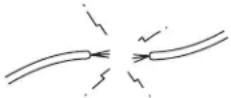 | [ckax]WARNING | Check to see if the unit's earth line has been connected correctly.If the earth line is disconnected or faulty, unit failure or electric shock hazard may result. |
| 2 |  | WARNING | Check to see if the mounting frame has rusted excessively or if the outdoor unit has tilted or become unstable.It could collapse or fall, causing injury. |
AFTER SALES SERVICE AND WARRANTY
WHEN ASKING FOR SERVICE, CHECK THE FOLLOWING POINTS.
| CONDITION CHECK THE FOLLOWING POINTS | |
 dim of blank.) dim of blank.) | Do the batteries need replacement?Is the polarity of the inserted batteries correct? |
 | Is the fuse all right?Is the voltage extremely high or low?Is the circuit breaker “ON”?Is the power plug inserted?Do you have any power cut? |
 | Is the air filter blocked with dust?Is the set temperature suitable?Have horizontal air deflectors been adjusted to their correct positions according to the operation mode selected?Are the air inlets or air outlets of indoor and outdoor units blocked?Is the fan speed “LOW”or “SILENT”? |
■ The following phenomena do not indicate unit failure.
| During heating, the operation indicator blinks and air blow stops | |
| The unit is preparing to blow warm air. Please wait. | |
| The outdoor unit is defrosting. Please wait. | |
| Hissing or fizzy sounds | Refrigerant flow noise in the pipe or valve sound generated when flow rate is adjusted. |
| Squeaking noise | Noise generated when the unit expands or contracts due to temperature changes. |
| Rustling noise | Noise generated with the indoor unit fan's rpm changing such as operation start times. |
| Clicking noise | Noise of the motorized valve when the unit is switched on. |
| Perking noise | Noise of the ventilation fan sucking in air present in the drain hose and blowing out dehumidifying water that had accumulated in the condensed water collector. For details, consult your sales agent. |
| Changing operation noise | Operation noise changes due to power variations according to room temperature changes. |
| Mist emission | Mist is generated as the air within the room is suddenly cooled by conditioned air. |
| Steam emitted from the outdoor unit | Water generated during defrosting operation evaporates and steam is emitted. |
| Odors | Caused as the smells and particles of smoke, food, cosmetics, etc. present in room air become attached the unit and blown off into the room again. |
| The outdoor unit continues to operate even if operation is stopped. | Defrosting is underway (as the heating operation is stopped, the microcomputer checks frost accumulated in the outdoor unit and instructs the unit to perform automatic defrosting if necessary). |
| The OPERATION lamp is blinking. | Shows preheating or defrosting operation is underway.As the protective circuit or preheat sensor operates when unit operation is stopped during preheating and then restarted, or when operation mode is switched from cooling to heating, the lamp continues to blink. |
| Does not reach the temperature setting | Actual room temperature may deviate slightly from the remote controller's temperature setting depending on the number of people in the room, indoor or outdoor conditions. |
- If the unit still fails to operate normally after performing the above inspections, turn the circuit breaker off and contact your sales agent immediately.
Contact your sales agent immediately if the following phenomena should occur:
- The circuit breaker switches off or the fuse blows frequently.
• The switch operation is not stable.
• Foreign matter or water accidentally enters the unit interior. - The power cord gets excessively hot or its insulation is torn or stripped.
• TIMER lamp on the indoor unit display blinks.
( As the nature of the failure can be identified by the blinking cycle, check the blinking cycle before turning off the circuit breaker. )


natural_image
Illustration of a smiling man in a suit giving two thumbs up (no text or symbols)Notes
- In quiet operation or stopping the running, the following phenomena may occasionally occur, but they are not abnormal for the operation.
(1) Slight flowing noise of refrigerant in the refrigerating cycle.
(2) Slight rubbing noise from the fan casing which is cooled and then gradually warmed as operation stops.
- The odor will possibly be emitted from the room air conditioner because the various odor, emitted by smoke, foodstuffs, cosmetics and so on, sticks to it. So please clean the air filter and the evaporator regularly to reduce the odor.
- Please contact your sales agent immediately if the air conditioner still fails to operate normally after the above inspections. Inform your agent of the model of your unit, production number, date of installation. Please also inform him regarding the fault.
Please note:
On switching on the equipment, particularly when the room light is dimmed, a slight brightness fluctuation may occur. This is of no consequence.
The conditions of the local Power Supply Companies are to be observed.
HITACHI
natural_image
Line drawing of a Hitachi air conditioner unit with fan and ventilation slots (no text or symbols)RAC-E10HB RAC-E10HBG RAC-E14HB RAC-E14HBG
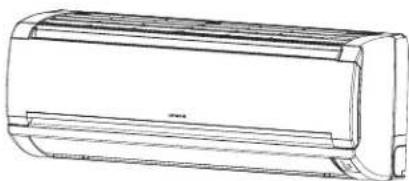
natural_image
Line drawing of a cylindrical air conditioner unit (no text or symbols)RAS-E10HB RAS-E10HBG RAS-E14HB RAS-E14HBG

Instruction manual
Page 1\~10
To obtain the best performance and ensure years of trouble free use, please read this instruction manual completely.
INDICATORI UNITÀ INTERNA


natural_image
Line drawing of hands installing or adjusting a wall-mounted air conditioner unit, with an inset showing the hand inserting a button (no text or symbols present)COME SOSTITUIRE LE BATTERIE DEL TELECOMANDO

natural_image
Diagram of a device's internal components being folded into a housing, showing part assembly and rotation (no text or symbols)MEMO

CAUTELA
natural_image
Technical line drawing of a car air conditioner unit showing internal panel structure (no text or symbols)
natural_image
Line drawing of a hand inserting a component into an air conditioner panel (no text or symbols)
natural_image
Diagram of a car air conditioner unit with airflow arrows indicating airflow direction (no text or labels)
natural_image
Line drawing of hands cleaning a surface with water droplets (no text or symbols)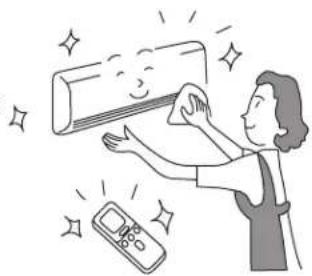
natural_image
Illustration of a person cleaning a wall-mounted air conditioner with a digital thermometer nearby (no text or symbols)3. MANUTENZIONE PRIMA DI UN LUNGO PERIODO DI INUTILIZZO
natural_image
Illustration of a smiling man in a suit giving two thumbs up (no text or symbols)
Note
natural_image
Line drawing of a Hitachi air conditioner unit with fan and ventilation slots (no text or symbols on the device itself)RAC-E10HB RAC-E10HBG RAC-E14HB RAC-E14HBG
natural_image
Line drawing of a cylindrical air conditioner unit (no text or symbols)RAS-E10HB RAS-E10HBG RAS-E14HB RAS-E14HBG
Instruction manual
Page 1\~10
To obtain the best performance and ensure years of trouble free use, please read this instruction manual completely.
natural_image
Technical line drawing of a front-end air conditioning unit with fan and control panel (no text or symbols)natural_image
Line drawing of a hand inserting a component into a rack, with an inset showing hands adjusting the part (no text or symbols present)natural_image
Diagram of a remote control casing with internal components and an external housing, showing no text or symbols.MEMO

PRECAUCIÓN
natural_image
Technical line drawing of a car air conditioner unit (no text or symbols)
natural_image
Diagram of a hand inserting air conditioner into a panel, showing internal structure and airflow direction (no text or symbols)
natural_image
Diagram of a car air conditioner unit with airflow arrows indicating airflow direction (no text or symbols)
PRECAUCIÓN
natural_image
Illustration showing two scenes: a hand washing a pipe with splashing water and a person cleaning a wall with a cloth (no text or symbols)natural_image
Illustration of a smiling man in a suit giving two thumbs up (no text or symbols)Notas
natural_image
Line drawing of a Hitachi air conditioner unit with fan and vent (no text or symbols)RAC-E10HB RAC-E10HBG RAC-E14HB RAC-E14HBG
natural_image
Line drawing of a cylindrical air conditioner unit (no text or symbols)RAS-E10HB RAS-E10HBG RAS-E14HB RAS-E14HBG
Instruction manual
Page 1\~10
To obtain the best performance and ensure years of trouble free use, please read this instruction manual completely.
natural_image
Technical line drawing of a rectangular air conditioner unit with internal grid pattern and mounting points (no text or symbols)Φίλτρο αέρα
natural_image
Technical line drawing of a fan with internal blades and control panel (no text or symbols)natural_image
Line drawing of hands installing or adjusting a wall-mounted air conditioner unit, with an inset showing hand positioning (no text or symbols)natural_image
Diagram of a remote control device with a switch and battery, showing internal components and a close-up view (no text or symbols)MEMO

ΠΡΟΣΟΧΗ
natural_image
Technical line drawing of a car air conditioner unit (no text or symbols)
natural_image
Diagram of a hand inserting air filters into a panel, showing internal structure and airflow direction (no text or symbols)
natural_image
Diagram of a car air conditioner unit with airflow arrows indicating airflow direction (no text or labels)
natural_image
Illustration of hands cleaning a book with water droplets (no text or symbols)
natural_image
Illustration of a person cleaning a wall-mounted air conditioner with a digital thermometer nearby (no text or symbols)natural_image
Illustration of a smiling man in a suit giving two thumbs up (no text or symbols)Σημειώσεις
natural_image
Line drawing of a Hitachi air conditioner unit with fan and ventilation slots (no text or symbols on body)RAC-E10HB RAC-E10HBG RAC-E14HB RAC-E14HBG
UNITÉ INTÉRIEURE

natural_image
Line drawing of a single air conditioner unit (no text or symbols)RAS-E10HB RAS-E10HBG RAS-E14HB RAS-E14HBG
Instruction manual Page 1\~10
To obtain the best performance and ensure years of trouble free use, please read this instruction manual completely.
natural_image
Technical line drawing of a rectangular air conditioner unit with internal grid pattern and mounting points (no text or symbols)Filtre à air

natural_image
Illustration of hands installing or adjusting a large air conditioner panel, with a magnified inset showing the component detail (no text or symbols present)COMMENT REMPLACER LES PILES DE LA TÉLÉCOMMANDE

natural_image
Diagram of a mobile phone casing with internal components and an open lid, showing a downward arrow indicating a process (no text or symbols present)MEMO

ATTENTION
natural_image
Technical line drawing of a wall-mounted air conditioner unit (no text or symbols)
natural_image
Line drawing of a hand inserting a component into an air conditioner panel (no text or symbols)


natural_image
Illustration showing two scenes: a hand washing a pipe with splashing water and a person cleaning a wall with a cloth (no text or symbols)natural_image
Illustration of a smiling man in a suit pointing upward with both hands (no text or symbols)Remarques
- SPLIT TYPE AIR CONDITIONER
- Instruction manual
- SAFETY PRECAUTION
- Air filter
- Front panel
- Indoor unit indicators
- Horizontal deflector Vertical deflector
- Remote controller
- OUTDOOR UNIT
- Air outlet
- Drain hose
- Piping and Wiring
- About the outdoor unit:
- INDOOR UNIT INDICATIONS
- OPERATION LAMP (Yellow)
- During preheating
- During defrosting
- CAUTION
- TEMPORARY SWITCH
- NAMES AND FUNCTIONS OF REMOTE CONTROLLER
- Precautions for Use
- MANUAL OPERATION [Heating • Dehumidify • Cooling]
- ROOM TEMPERATURE SETTING
- FAN SPEED SETTING
- Press the OFF (STOP) button
- Timer Reservation
- OFF OFF TIME setting
- ON TIME setting
- POWERFUL OPERATION
- NOTE
- START
- CANCEL
- ADJUSTING THE AIRFLOW DIRECTION
- HOW TO EXCHANGE THE BATTERIES IN THE REMOTE CONTROLLER
- MEMO
- AIR FILTER
- PROCEDURE
- CLEANING OF FRONT PANEL
- MAINTENANCE BEFORE LONG OFF PERIOD
- CAPABILITIES
- Heating Capability
- Cooling and Dehumidifying Capabilities
- AFTER SALES SERVICE AND WARRANTY
- Contact your sales agent immediately if the following phenomena should occur:
- Notes
- Please note:
- HITACHI
- INDICATORI UNITÀ INTERNA
- COME SOSTITUIRE LE BATTERIE DEL TELECOMANDO
- CAUTELA
- MANUTENZIONE PRIMA DI UN LUNGO PERIODO DI INUTILIZZO
- PRECAUCIÓN
- Notas
- Φίλτρο αέρα
- ΠΡΟΣΟΧΗ
- Σημειώσεις
- Instruction manual Page 1\~10
- Filtre à air
- COMMENT REMPLACER LES PILES DE LA TÉLÉCOMMANDE
- ATTENTION
- Remarques
Brand : HITACHI
Model : RAS-E10HB
Category : Air Conditioning