
Explorer 10x42 - Binoculars Praktica - Free user manual and instructions
Find the device manual for free Explorer 10x42 Praktica in PDF.


| Product Type | Binoculars |
| Brand | Praktica |
| Model | Explorer 10x42 |
| Magnification | 10x |
| Objective Lens Diameter | 42 mm |
| Prism | Roof |
| Optical Coating | Fully Multi-Coated (FMC) |
| Field of View | 114 m at 1000 m |
| Focus | Central knurled knob |
| Diopter Adjustment | Ring on right eyepiece |
| Minimum Focus Distance | 3 m |
| Exit Pupil | 4.2 mm |
| Relative Brightness | 17.6 |
| Twilight Factor | 20.5 |
| Dimensions (L x W x H) | 150 x 130 x 55 mm |
| Weight | 720 g |
| Body Material | Armored rubber |
| Waterproof | Yes, waterproof |
| Nitrogen Filling | Yes (fog-proof) |
| Power | None (passive model) |
| Warranty | 2 years |
| Included Accessories | Case, strap, lens caps, cleaning cloth |
| Care and Cleaning | Clean lenses with a dry microfiber cloth; avoid solvents. Store in the case. |
| Safety | Never look directly at the sun, risk of serious eye injury. |
| Spare Parts and Repairability | Available from Praktica customer service or authorized dealers. |
Frequently Asked Questions - Explorer 10x42 Praktica
User questions about Explorer 10x42 Praktica
0 question about this device. Answer the ones you know or ask your own.
Ask a new question about this device
Download the instructions for your Binoculars in PDF format for free! Find your manual Explorer 10x42 - Praktica and take your electronic device back in hand. On this page are published all the documents necessary for the use of your device. Explorer 10x42 by Praktica.
USER MANUAL Explorer 10x42 Praktica
We thank you for choosing this product from PRAKTICA International Ltd. If you have any questions, please consult your specialist dealer or contact us directly at www.praktica.com
Operation
Adjusting the Interpupillary Distance (IPD)
The interpupillary distance, or the distance between the pupils, varies from person to person. The binoculars must be correctly aligned (adjusted) to the distance between your pupils to achieve a single, clear image. To adjust this distance, lift the binoculars up to your eyes (using both hands) and look at an object in the distance. Move the two barrels (halves) of the binoculars closer together or further apart until you see a single, clear image. Check that the interpupillary distance is set correctly every time you use your binoculars.
WARNING: Viewing the Sun may cause permanent eye damage. Do not view the Sun with your binoculars or even with the naked eye.

natural_image
Black binoculars with blue lenses and a blue arrow indicating rotation (no text or symbols)Eyecup Adjustment
PRAKTICA binoculars feature twist up rubber eyecups to accommodate both eyeglass and non-eyeglass wearers. If you do not wear eyeglasses, leave the rubber eyecups in the up position. If you wear eyeglasses, make sure that the eyecups are down to obtain the maximum field of view. When you are done observing, make sure the rubber eyecups are in the up position for storage.

natural_image
Close-up of black binoculars with a blue vertical arrow indicating measurement (no text or symbols)Focusing
- Adjust the interpupillary distance by moving the center hinge until you see a single circular image.
- The diopter adjustment ring is located directly below the right eyecup (A). Make sure the diopter adjustment is set to "zero" for now (raised index tab on the diopter ring is lined up with center mark on the binoculars). Keep both eyes open at all times.
-
Using the attached lens cap or your hand, cover the objective (front) lens on the right side of the binoculars as you look into the evepieces.
-
Using the center focus knob (B), focus on a distant object with fine detail (e.g., brick wall, tree branches, etc) until it appears as sharp as possible on the left side.
-
Uncover the objective lens on the right side, and cover the left objective lens while continuing to view the same object.
-
Rotate the diopter adjustment ring (A) to bring the object into focus in the right side of the binoculars. Avoid over-turning or forcing the diopter mechanism. If you are unable to bring the object into focus on the right side by adjusting the diopter ring, make sure the left side is still focused and that the center focus knob was not moved from its original setting. The diopter adjustment only affects the right side.
-
Your binoculars should now be adjusted for your eyes. Focusing for any distance can now be done simply by turning the center focus knob. (B)

natural_image
Black binoculars with labeled points A and B, no visible text or symbols on the bin itselfWaterproof/Fogproof
Your PRAKTICA binoculars has been designed and built utilizing the latest waterproof and fogproof technology. The binoculars are O-ring sealed for complete moisture protection. Fogproof protection is achieved from dry nitrogen purging that removes all internal moisture.
Tripod Adaptability
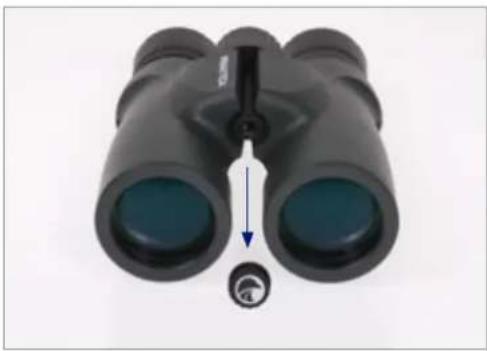
PRAKTICA binoculars feature a built-in thread that allows the binoculars to be attached to a tripod using a binocular tripod adapter. This thread can be accessed by unscrewing the logo plate found on the front of the hinge. To attach the binocular to a tripod, thread the adapter into the binoculars and attach the other end of the adapter to a photographic tripod. Mounting the binoculars on a tripod allows for added stability and comfort during prolonged viewing.
natural_image
Close-up of a black binoculars with an arrow pointing to the lens (no text or symbols visible)Neck Strap Attachment
Thread the ends of the neck strap through the strap lugs on each side of the binoculars, then back through the plastic buckle. Adjust the position of the binoculars on your chest as they hang around your neck by changing the length of the strap portion which passes through the lug and buckle (by an equal amount on each side).

natural_image
Three-panel sequence showing binoculars with a rope knot, no text or symbols presentMaintenance & Care
Your PRAKTICA binoculars will provide years of trouble-free service if it receives the normal care you would give any fine optical instrument.
- Avoid sharp impacts. Set the binoculars down gently on hard surfaces.
- Tug on the strap after attaching it to make sure it is securely fastened to the binoculars before placing it around your neck.
- Protect the optics of your binoculars by putting on all lens caps when not in use.
- Store your binoculars in a cool, dry place whenever possible.
- When storing for an extended period of time, place the binoculars in a plastic bag or airtight container with a desiccant.
- Do not leave the binoculars in a car on a hot/sunny day or near anything that generates heat as this may cause damage.
- Clean any dust, dirt or water that may get on the binoculars or inside moving parts as soon as possible to prevent any unforeseen damage.
Cleaning
We have designed all elements and surfaces to require little care. To ensure the long-lasting optical brilliance of your binoculars, you should keep the glass surfaces free of dirt, oil and grease. When cleaning the lenses, first remove larger particles with an optical lens brush. For the subsequent thorough cleaning we recommend breathing onto the lens surface to form a coat of condensation and then cleaning it with a soft, moist cloth. The housing is best cleansed with a soft, moist cloth (don't use the lens-cleaning cloth).
In the event of hard-to-remove dirt (e.g. sand) the eye cups can be unscrewed and cleaned very easily.
Lens-Cleaning Cloth
You can clean high sensitive lens surfaces with the enclosed special microfibre cloth. It is suitable for objective lenses, ocular lenses and spectacles.
Please keep the cloth clean, as dirt can damage the lens surface. If the cloth becomes soiled it can be washed in lukewarm soapy water and left to dry. Please only use for cleaning lens surfaces!
Warranty
PRAKTICA grant a worldwide warranty of 25 years from the date of purchase in accordance with the following conditions:
If defects in material and/or workmanship appear, we will take over material costs for the entire warranty period. We reserve the right in such instances to repair or replace the instrument or the defective part at our discretion. During the first five years we will take over all labour costs.
This guarantee in no way limits the statutory warranty obligations.
In the event that our range of products are updated, we reserve the right to repair defective instruments or to replace them with those of equal value.
We undertake no liability for repairs carried out by a repair shop which has not been authorized by us, nor for damages caused by improper use, nor for direct or indirect damages brought about by defects on the instrument. In addition, all parts are excluded from the warranty which are subject to natural wear, such as eyepiece caps, objective lens caps, carry straps, cases, armouring, etc.
natural_image
Black binoculars with blue lenses, shown in a white image (no text or symbols visible)natural_image
Close-up of black binoculars with a blue vertical arrow indicating measurement (no text or symbols)Fokussieren
natural_image
Black binoculars with labeled points A and B, no visible text or symbols beyond labelsnatural_image
Close-up of a black binoculars with a blue lens and a small dial indicator below (no text or symbols)natural_image
Three-panel image showing binoculars with blue motion arrows indicating sequence (no text or symbols)Wartung und Pflege
natural_image
Black binoculars with blue lenses and a blue arrow indicating rotation (no text or symbols)natural_image
Close-up of two black binoculars with a blue vertical arrow indicating measurement (no text or symbols)Mise Au Point
natural_image
Black binoculars with labeled points A and B, no visible text or symbols on the binoculars themselves.natural_image
Black binoculars with a blue lens and a small dial indicator below (no text or symbols on the binoculars)natural_image
Three-panel sequence showing binoculars with blue motion arrows indicating rope manipulation (no text or symbols)natural_image
Black binoculars with blue lenses and a blue arrow indicating rotation (no text or symbols)natural_image
Close-up of black binoculars with a blue vertical arrow indicating measurement (no text or symbols)Enfoque
natural_image
Black binoculars with labeled points A and B, no visible text or symbols beyond labelsResistente al Agua / Resistente a la Niebla
natural_image
Close-up of black binoculars with a blue arrow pointing to the lens (no text or symbols visible)Correa
natural_image
Three-panel sequence showing binoculars with a rope knot and blue motion arrows, no text or symbols presentnatural_image
Black binoculars with blue lenses and a blue arrow indicating rotation (no text or symbols)natural_image
Close-up of black binoculars with a blue vertical arrow indicating measurement (no text or symbols)Messa a Fuoco
natural_image
Black bipod with labeled parts A and B, no visible text or symbols on the binoculars themselves.natural_image
Close-up of a black binoculars with an arrow pointing to the bottom-left corner (no text or symbols visible)natural_image
Three-panel image showing binoculars with blue arrows indicating motion or sequence, no text or symbols present.Manutenzione e Cura
natural_image
Blue circular logo with a stylized bird head and curved lines, no text or symbols present.Product Support
www.praktica.com
5 Century Point, Halifax Road
High Wycombe, Bucks, HP12 3SL
United Kingdom


- Operation
- Adjusting the Interpupillary Distance (IPD)
- Eyecup Adjustment
- Focusing
- Waterproof/Fogproof
- Tripod Adaptability
- Neck Strap Attachment
- Maintenance & Care
- Cleaning
- Lens-Cleaning Cloth
- Warranty
- Fokussieren
- Wartung und Pflege
- Mise Au Point
- Enfoque
- Resistente al Agua / Resistente a la Niebla
- Correa
- Messa a Fuoco
- Manutenzione e Cura
- Product Support
Brand : Praktica
Model : Explorer 10x42
Category : Binoculars