
musicbox XS - Docking Station CANTON - Free user manual and instructions
Find the device manual for free musicbox XS CANTON in PDF.


| Product Type | Docking Station / Bluetooth Speaker |
| Brand | Canton |
| Model | musicbox XS |
| Dimensions (W x H x D) | 180 x 100 x 80 mm |
| Weight | 0.55 kg |
| Power Supply | AC adapter (100-240 V) or USB-C (5V/2A) |
| Battery Life | Up to 8 hours (playback) |
| Charging Time | Approx. 3 hours |
| Bluetooth Version | 5.0 |
| Wireless Range | Up to 10 m |
| Connectivity | Bluetooth, AUX-in (3.5 mm), USB-A (charging only) |
| Functions | Bluetooth streaming, AUX playback, hands-free calling, alarm clock, radio (FM) |
| Speaker Configuration | Full-range driver + passive radiator |
| Output Power | 2 x 5 W |
| Frequency Response | 70 Hz - 20 kHz |
| Material | Plastic housing with fabric grille |
| Color Options | Black, White |
| Included Accessories | AC adapter, AUX cable, user manual |
| Cleaning Instructions | Wipe with a soft, dry cloth. Do not use abrasive cleaners. |
| Safety Warnings | Do not expose to water or extreme temperatures. Use only supplied adapter. |
| Spare Parts & Repairability | Replacement battery and adapter available from Canton service centers. |
| General Information | Designed for home or office use. Compatible with iOS and Android devices. |
Frequently Asked Questions - musicbox XS CANTON
User questions about musicbox XS CANTON
0 question about this device. Answer the ones you know or ask your own.
Ask a new question about this device
Download the instructions for your Docking Station in PDF format for free! Find your manual musicbox XS - CANTON and take your electronic device back in hand. On this page are published all the documents necessary for the use of your device. musicbox XS by CANTON.
USER MANUAL musicbox XS CANTON
CANTON®
German loudspeaker tradition
DeutschDeu
Near-Field-Communication

AUX-IN True Wireless
CANTON
German loudspeaker tradition
EnglishEngl
Welcome to the world of mobile Canton sound
We are delighted that you have chosen a Canton loudspeaker. Our products combine high quality
components with many years of development experience and meticulous production methods. In order to get the best out of your loudspeaker you need to observe a few points, as detailed in the Operating Instructions. In addition, user friendly voice messages will guide you through the individual coordination and connection procedures.
We hope you enjoy listening to pure music!
Contents
The user is responsible for ensuring that the loudspeaker is correctly positioned and connected. Canton cannot accept any responsibility for damages or accidents caused by inappropriate positioning or inappropriate connection or use.
Safety advice
Please follow the safety advice when positioning and maintaining your musicbox!
Choose a level surface
Avoid moisture
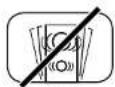
Avoid vibrations
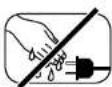
Never touch the power cable with wet hands
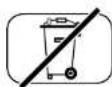
Do not, discard in household rubbish

Avoid direct sunlight

Protect against extreme cold
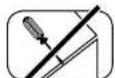
Do not open housing
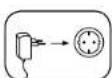
Keep access to socket clear
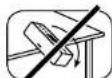
Protect product from failing
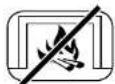
Keep away from heat sources
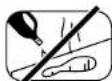
Do not use aggressive, alcohol-based or abrasive cleaning agents
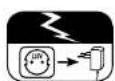
Unpug the device during thunderstorms
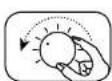
in case of overload turn the volume down
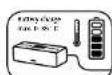
Charge the battery at an ambient temperature of 0-35°C
EnglishEngli
Important Safety Instructions

Notices
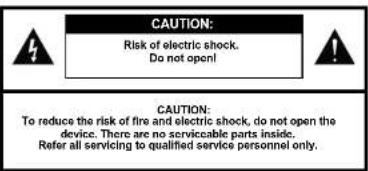
Read and follow all instructions.
Keep these instructions.
Heed all warnings.
Use this apparatus only in moderate climates (not in tropical climates)
Do not operate this apparatus at altitudes in excess of 2000 m above sea level.
Indoor use only. Do not use outdoors or in humid rooms.
To reduce the risk of fire and electric shock, do not expose this apparatus to rain or moisture.
Do not use this apparatus near water.
The apparatus shall not be exposed to dripping or splashing.
Strong fluctuations in temperature lead to condensation (water droplets) forming inside the apparatus. Wait until the moisture has evaporated before starting up the apparatus (min. 3 hours).
Objects filled with liquids (such as vases) shall not be placed on the apparatus.
No naked flame source, such as lighted candles, should be placed on or beside the apparatus.
Do not install the apparatus near any heat sources such as radiators, heat registers, stoves, or other apparatus (incl. amplifiers) that produce heat.
Prevent exposure to direct sunlight.
Observe a free space of at least 5 cm around the apparatus.
To prevent electric shock, do not use the power supply unit with an extension cord, receptacle, or other outlet unless the blades can be fully inserted to prevent blade exposure.
Never touch signal- and power supply unit with wet hands.
Protect the power supply unit from being walked on or pinched particularly at plug, convenience receptacles, and the point where they exit from the apparatus
The power supply unit must always be freely accessible so that it can be unplugged in case of danger.
Unplug this apparatus during lightning storms or when unused for long periods of time.
To completely disconnect this apparatus from the mains, disconnect the power supply unit from the receptacle.
Power down the apparatus before connecting or disconnecting any cable.
Always pull the plugs and not the cables.
Install this apparatus in accordance with the manufacturer's instructions.
Always position the device upright on the rubberized surface with the operating elements facing upwards.
EnglishEngl
Notices
Do not position the device too close to an edge (table or shelf edge) to prevent it from falling as a result of vibrations. If necessary secure the device to prevent it from falling.
Always choose a level surface. The apparatus has to be in perfect vertical alignment.
Do not use force on operating elements, connections and cables.
The apparatus may only be operated with the voltage and frequency specified on the apparatus or the type label.
Do not insert any objects or body parts into the apparatus openings. Live components inside the enclosure could get touched and / or damaged. This could lead to short circuiting, electric shock and fire.
Only use attachments and accessories specified by the manufacturer and / or provided with the apparatus.
Clean the apparatus only with a clean, dry cloth.
Do not use aggressive, alcohol-based or abrasive cleaning agents.
To reduce the risk of electric shock, do not open the housing! There are no serviceable parts inside.
Refer all servicing to qualified service personnel. Servicing is required when the apparatus has been damaged in any way, such as power supply cord or plug is damaged, liquid has been spilled or objects have fallen into the apparatus, the apparatus has been exposed to rain or moisture, does not operate normally, or has been dropped.
Do not make any modification to the apparatus or the accessory. Unauthorized alterations may affect the safety, regulatory compliance, or the system performance. In this case, the operating licence/warranty can expire.
Turn down the volume level immediately if sound distortions, such as unnatural knocking, beating or high-frequency clicking can be heard.
To prevent possible hearing damage, do not listen at high volume levels for long periods. Stop playback if you can hear ringing or whistling sounds in your car or if you have the impression (even for short times) that you can no longer hear high tones.
Batteries shall not be exposed to excessive heat such as sunshine, fire or the like.
The device should only be operated at an ambient temperature of 0–45°C.
The integrated battery should only be charged at an ambient temperature of 0–35°C. The recommended temperature range is 15–25°C.
Temperatures outside these ranges can lead to a termination of the playback or charging process (protective circuit). Never store the device at temperatures below -10°C or above 45°C.
Prevent extreme knocks and vibrations.
Only use the power supply unit provided to operate and charge the loudspeaker.
The device and/or accessories may contain small parts, which could pose a swallowing risk. They are therefore unsuitable for children under the age of three.
This symbol is intended to alert the user to the presence of uninsulated dangerous voltage within the product's enclosure that may be of sufficient magnitude to constitute risk of fire and electric shock.
This symbol is intended to alert the user to the presence of important operating and maintenance instructions in the literature accompanying this product.
This symbol denotes equipment with Class II Protection Rating. These devices are deemed to be fully protected against the risk of electric shock during normal use by means of double or reinforced insulation, and therefore require no earth conductor.



EnglishEngl
Unpacking
Check that the Canton musicbox and the power supply unit, including adaptor, are all in the box. If any of the contents are missing please contact your authorised Canton dealer directly. Please keep the entire packaging material in a safe place. We recommend that you charge the battery of the musicbox fully before using it for the first time.
Operating elements
1 Power (on/off)
2 AUX input
3 Bluetooth® function
4 Mute
5 Volume (+/-)
6 NFC sensor (Near-Field-Communication)
7 Centerpad
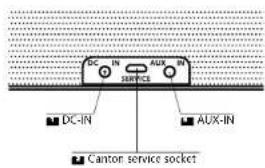
Connection
1 DC-IN (for LINE-IN)
Canton service socket
3 AUX-IN (3,5 mm jack)
Operating elements
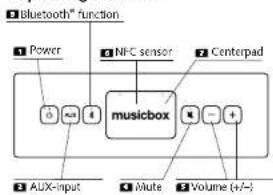
Connections
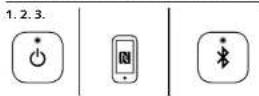
Bluetooth® connection
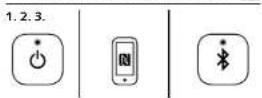
1 Switch on the musicbox by pressing the power button
2 Briefly press the Bluetooth ° button (LED flashes blue).
■ Activate the Bluetooth™ function on your mobile device.
Press and hold the Bluetooth button for approx. 2 seconds. The LED flashes white and you hear the voice message "Bluetooth Pairing".
5 Search on your mobile device for nearby Bluetooth devices (max. range 10 m).
6 Select "musicbox S" or "musicbox XS".
7 If you are asked for a password, enter the number "0000" and confirm
8 Your device is connected when the LED is a steady blue and you hear the voice message "Connected".
When you switch on your musicbox next time (with activated Bluetooth function on your mobile device) the Bluetooth connection will happen automatically and you will hear the voice message "Connected".
Note: To connect additional Bluetooth *-enabled mobile devices with your musicbox repeat steps 3–8. The musicbox will save the last five paired bluetooth* devices. A maximum of two of these can be connected to the musicbox at the same time (not in True Wireless mode). This means that a third mobile device can only be used when one of the currently connected devices is disconnected. Normally the volume of the musicbox is synchronised with your mobile device, but that depends on the individual device.
EnglishEngl
Bluetooth® connection via NFC
If your Bluetooth ^® -enabled mobile device supports NFC technology, you can use this to connect with your musicbox even more easily.
1 Switch on the musicbox by pressing the power button
2 Activate the NFC function on your mobile device.
Press the Bluetooth® button [in the musicbox (LED flashes blue).
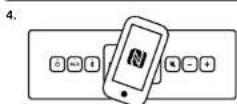
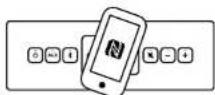
Place the mobile device with the NFC antenna on the NFC sensor of the musicbox until a connection request appears on the display.
Remove the Bluetooth device and confirm the connection request.
6 If you are asked for a password, enter the number "0000" and confirm.
7 Your device is connected when the LED is a steady blue and you hear the voice message "Connected".
Note: To disconnect the Bluetooth ^40 connection via NFC place your mobile device with the NFC antenna on the NFC sensor of the musicbox until you hear the voice message "Disconnected". This function may not be fully supported, depending on the individual device.
Bluetooth® connection via NFC AUX connAUX connection
Near-Field-Communication

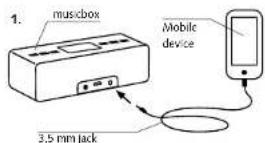
If your mobile device has a Line-Out or headphones output, it can be connected with the musicbox via the AUX-IN using an optional 3.5 mm jack, as follows:
1 Plug the jack into the mobile device.
2 Plug the jack into the musicbox AUX-IN
3 Switch on the musicbox by pressing the power button
4 Select the AUX input
5 Press Play on the mobile device.
6 In AUX operation the volume is not synchronised between the musicbox and the mobile device. To achieve the maximum possible volume, turn the volume on the musicbox to maximum and select the desired volume on the mobile device.
Note: To reduce the power consumption of your musicbox, the Bluetooth® connections in AUX operation will be disconnected automatically.
Note: Before unplugging the jack from the mobile device once you have finished playback, either lower the volume on the music-box or switch it off.
AUX


EnglishEngli
True Wireless
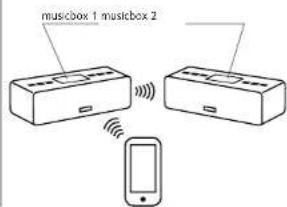
The True Wireless function allows you to connect your musicbox wirelessly with another musicbox as a second audio source in the same room. Here we differentiate between Stereo mode, in which musicbox 1 plays the sound signal of the left channel and musicbox 2 plays the sound signal of the right channel (as with a traditional stereo system) and Party mode, in which both musicboxes play the same stereo sound signal.
With the True Wireless function, the volume of both musicboxes is synchronised. The same applies to switching the devices off, i.e., if you switch off one musicbox, the other musicbox automatically switches off too. In True Wireless mode it is recommended that the mobile device is always connected to musicbox 1.
Stereo mode
Activate Stereo mode as follows:
Switch on both musicboxes by pressing the power button
2 On musicbox 1 select the Bluetooth ^® input (LED flashing or steady blue).
On musicbox 1 briefly press the Bluetooth * and volume -, button at the same time. You will hear the voice message "True Wireless Pairing".
4 The left LED of musicbox 1 in the centre pad flashes blue.
Within 5 seconds a signal tone can be heard on musicbox 1.
On musicbox 2 select the Bluetooth ^® input (LED flashing or steady blue).
On musicbox 2 briefly press the Bluetooth "☐ and volume ☐, button at the same time. You will hear the voice message "True Wireless Pairing".
True Wireless
B The right LED of musicbox 2 in the centre pad flashes blue.
When the voice message "Stereo Mode Left" comes from musicbox 1 and "Stereo Mode Right" comes from musicbox 2 and the flashing LEDs in the centre pad of musicboxes 1 and 2 turn a steady blue then the connection has been successful.
Party mode
To switch from Stereo mode to Party mode, press the Bluetooth® button on musicbox 1 as often as necessary for approx.3 seconds until you hear the voice message "Party Mode". Now press the Bluetooth® button on musicbox 2 as often as necessary for approx. 3 seconds until you hear the voice message "Party Mode". Both musicboxes are now in Party mode.
Switch both musicboxes directly into Party mode as follows:
1 Switch on both musicboxes by pressing the power button
2 On musicbox 1 select the Bluetooth® input (LED flashing or steady blue).
On musicbox 1 briefly press the Bluetooth "and volume button at the same time. You will hear the voice message "True Wireless Pairing".
4 The left LED of musicbox 1 in the centre pad flashes blue.
Within 5 seconds a signal tone can be heard on musicbox 1.
6 On musicbox 2 select the Bluetooth® input (LED flashing or steady blue).
7 On musicbox 2 briefly press the Bluetooth ^9 and volume button at the same time. You will hear the voice message "True Wireless Pairing".
The right LED of musicbox 2 in the centre pad flashes blue.
9 When the voice message "Stereo Mode Left" comes from musicbox 1 and "Stereo Mode Right" comes from musicbox 2 and the flashing LEDs in the centre pad of musicboxes 1 and 2 turn a steady blue then the connection has been successful.
10 Press the Bluetooth button @n musicbox 1 as often as necessary for approx. 3 seconds until you hear the voice message "Party Mode".
11 Press the Bluetooth button ☐ on musicbox 2 as often as necessary for approx. 3 seconds until you hear the voice message "Party Mode".
Note: The last True Wireless status is saved in both devices and can only be deleted by pressing the Bluetooth® and Mute ● buttons simultaneously. In other words, when both devices are switched on they connect with each other automatically if they are within range.
AUX-IN True Wireless
In True Wireless mode the AUX input can also be used. For this you have to select the AUX input on the musicbox to which the 3.5 mm jack is connected. The second musicbox remains set on Bluetooth * input.
EnglishEngli
Charge function
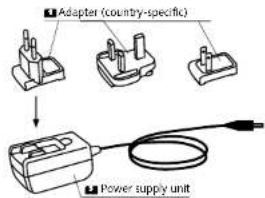
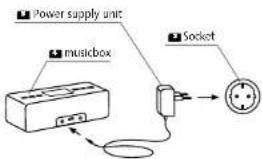
The musicbox is equipped with a long life lithium-ion battery. Before using the musicbox for the first time it is recommended that the battery is fully charged (approx. 3 hours). To charge the battery you should only use the power supply unit provided and the correct adapter for your region. While the battery is charging you can already begin using the musicbox. During the charging process the LED on the power button shows the charge status of the battery (see Battery status). The battery of your musicbox is "fully" charged when the LED of the power button turns blue.
In order not to shorten the lifetime of the battery it is a good idea to stop charging process at this point. High ambient temperatures could lead to longer charging. In the case of extreme ambient temperatures a protective circuit stops charging process to protect the internal battery.
Battery operation
With the lithium-ion battery you can play music for up to 10 hours, with no need to access a power socket. The duration of playback depends primarily on the ambient temperature, the type of music and the volume. Listening to music at higher volumes reduces the running time. If the LED on the power button flashes red, it is recommended to stop music playback and recharge the battery. In battery operation the musicbox switches automatically into Standloy mode after an inactive time of approx. 5 minutes (in mains operation approx. 60 minutes).
Charge function
Battery status
The LED of the power button displays the status of the battery charge. The three possible display modes have the following meanings:
Blue 90-100%
Flashing blue 20–90%
Flashing red <20%
Voice messages
In order to simplify the coordination and connection processes in Bluetooth-mode your musicbox is equipped with user-friendly voice messages. These voice messages have the following meanings:
Bluetooth® Pairing → Bluetooth © pairing process
Connected → Bluetooth ° connection established
Disconnected → Bluetooth ^ connection terminated
The True Wireless function, which connects two musicboxes together, is also made easy thanks to the additional voice messages:
True Wireless Pairing → True Wireless pairing process
(musicbox 1/musicbox 2)
Stereo Mode Left → True Wireless mode, left channel
Stereo Mode Right → Ture Wireless mode, right channel
Party Mode → True Wireless mode, stereo operation
(Party mode)
EnglishEngli
LED status display
| LED | Colour | Meaning |
| Power Steady blue | Start process (up to 10s after switching on) | |
| Power Steady blue | Battery charge status 90-100% | |
| Power Flashing blue | Battery charge status 20-90% | |
| Power Flashing red | Battery charge status <20% | |
| Power Rapid flashing red (2x/sec.) Error | ||
| Bluetooth® Flashing blue No connection | ||
| Bluetooth® Steady blue Connection established | ||
| Bluetooth® Flashing white Pairing process | ||
| Bluetooth®/AUX Off Standby | ||
| AUX Steady blue Input selected | ||
| Mute Flashing white Mute function activated | ||
| Mute 5 Seconds steady white Maximum volume | ||
| Centerpad Flashing blue left or right True Wireless pairing process | ||
| Centerpad Steady blue left Stereo mode left channel | ||
| Centerpad Steady blue right Stereo mode right channel | ||
| Centerpad Steady blue left and right Party mode | ||
Note: In battery operation all LEDs are switched off after approx. 5 seconds to save power consumption. Only the LED display of the selected input remains active.
Troubleshooting
Here is an overview of the most common problems. If you have any further questions please contact your Canton dealer, call our Service Hotline on +49 (0) 6083 287-0 or send us an e-mail to info@canton.de.
| Problem | Possible cause | Solution |
| musicbox does not turn on. | 1. Battery is fully discharged (e.g. after long storage). | 1. Charge the battery. |
| 2. Device temperature is lower than 0°C or higher than 60°C. An internal protective circuit prevents operation. | 2. The musicbox should only be used at moderate temperatures (see Safety Instructions, page 33) | |
| No sound reproduction. | 1. No audio output from Mobile device. | 1. Volume set to "Zero" (please refer to mobile device instructions). |
| 2. Jack incorrectly connected or faulty (only in AUX operation). | 2. Check the connection between the mobile device and the musicbox. Change the signal cable if necessary. | |
| 3. The musicbox is set on mute (LED flashes white). | 3. Increase the volume on the musicbox by pressing vol+ button. | |
| 4. The protective circuit of the integrated amplifier has been triggered (through overload or excessive temperatures). | 4. Reduce the volume and prevent the device from overheating. | |
| Sound reproduction too soft. | Volume of the musicbox or the mobile device set too low. Note: With some android devices and in AUX operation the volume between the musicbox and the mobile device is not synchronised. | 1. Increase the volume on the musicbox using the volume button "a". |
| 2. Increase the volume on the mobile device. |
EnglishEngli
| Problem Possible cause Solution | ||
| Playback distorted. 1. The volume is too high. 1. Reduce the volume. | ||
| 2. The AUX input is overdriven (only AUX operation). The maximum input level of the AUX input is 1.2Vrms. | 2. Reduce the output level of your mobile device. | |
| NFC connection failure 1. The NFC function is deactivated on your mobile device. | 1. Activate the NFC function on your mobile device. | |
| 2. The NFC antenna of your mobile device is beyond the range of the musicbox (max. 2-3 cm). | 2. The NFC of your mobile device needs to be central to the "centre pad" of the musicbox. The antenna position of the mobile device is often marked "NFC". | |
| 3. You have not moved the mobile device away from the musicbox before confirming the connection request. | 3. Before confirming the connection on your mobile device, move this away from the music box, Repeat the process. | |
| Your mobile device does not connect to the musicbox automatically. | 1. The Bluetooth® function on your mobile device is deactivated. | 1. Activate the Bluetooth® function on your mobile device. |
| 2. The musicbox has been deleted from the blue-tooth® menu of your mobile device. | 3. Pair the musicbox again to your mobile device. | |
| 3. The AUX input has been selected on the musicbox. | 3. Select the Bluetooth® input on the musicbox.. | |
| 4. 5 or more other mobile devices have been connected in the musicbox since the last use. | 4. Pair the musicbox again to your mobile device. Note: This will mean that the mobile device not connected for the longest time will be deleted from the device list of the musicbox. |
| Problem Possible cause Solution | ||
| No sound or distorted sound via Bluetooth® wireless technology. | 1. There is no connection between the musicbox and the mobile device. | 1. Connect the mobile device as described. |
| 2. Your mobile device is paired but not connected. 2. The mobile device has not connected automatically and must be connected manually. | ||
| 3. Your mobile device is connected. 3.1. Make sure that any sources of disturbance (e.g. WiFi router) are not too close to the musicbox or the mobile device. | ||
| 3.2. It is often not possible to have interference-free simultaneous operation via WiFi and bluetooth connection on a mobile end device. Deactivate the WiFi on your mobile device. | ||
| 4. You are out of range of the musicbox (max. 10 m). 4. Reduce the distance between the musicbox and the mobile device. | ||
| The Bluetooth® connection between the mobile device and the musicbox was unexpectedly interrupted. | 1. The musicbox switched off because there was no music played for 5 minutes (battery operation) or 60 minutes (means operation). | 1. To prevent the musicbox from switching off automatically set the volume of your mobile device to minimum (mute). |
| 2. You have placed your already connected NFC-enabled mobile device back on the "centre pad". | 2. If you bring an already connected NFC-enabled mobile device close to the "centre pad" the Bluetooth® connection is terminated. To reconnect, bring the mobile device close to the "centre pad" again. | |
| 3. You have selected the AUX input on the musicbox. 3. Select the Bluetooth® input and wait for the musicbox to create the connection. | ||
EnglishEngli
| Problem Possible cause Solution | ||
| True Wireless Pairing is not possible. | 1. The Pairing process can fail if a mobile device is connected to one of the musicboxes. | 1. Disconnect all Bluetooth® connections between the mobile device(s) and musicbox and repeat the True Wireless Pairing process. |
| 2. You have not pressed the Bluetooth button and the relevant volume button (- or -) at the same time. | 2. Press the Bluetooth® button and the volume button at exactly the same time. | |
| 3. Two mobile devices are connected to one of the two musicboxes. | 3. Terminate the connection to at least one of the two mobile devices. | |
| 4. The distance between the two musicboxes is too high. | 4. Reduce the distance between the two musicboxes to loss than 10 m. | |
| 5. You have selected the AUX input on at least one of the two musicboxes. | 5. Select the Bluetooth® input on both musicboxes before starting the process. | |
| 6. One of the two musicboxes is already connected to a third musicbox via True Wireless. | 6. Terminate the True Wireless connection between the two musicboxes according to the instructions. Now start the process with the two chosen music boxes according to the instructions. | |
| 7. You have pressed the same button combination on both musicboxes. | 7. Repeat the pairing process exactly according to the instructions. | |
| One or both musicboxes do not play the desired channels (L.R, L.R). | As standard, musicbox 1 plays the left and musicbox 2 plays the right music channel after the connection has been made. | Change the True Wireless made according to the instructions. |
| Problem Possible cause Solution | ||
| True Wireless modeTwo musicboxes do not connect with each other after being switched off. | 1. You have waited less than 20 seconds between switching on the first and the second musicboxes. | 1. Always wait 20 seconds between switching on the first and the second musicboxes. |
| 2. Two mobile devices are connected to one of the two musicboxes. | 2. Terminate the connection to at least one of the mobile devices. | |
| 3. The distance between the two musicboxes is too high. It should not exceed 10 m. | 3. Reduce the distance between the two music boxes. | |
| 4.1. You have cancelled True Wireless mode on one musicbox by pressing the Bluetooth® and Mule buttons. | 4. Set up a new connection between the two music boxes according to the instructions. | |
| 4.2. At least one musicbox was connected with a third musicbox via True Wireless. | ||
| 5. You have selected the AUX input on both musicboxes. | 5. Select the Bluetooth® input on at least one musicbox. | |
| The AUX input cannot be selected. This musicbox is connected via True Wireless to a second musicbox which already has the AUX input selected. | Only select the AUX input on the musicbox that you wish to connect to the mobile device. The Bluetooth® input must be selected on the second musicbox. Alternatively, cancel True Wireless mode according to the instructions. | |
EnglishEngli
| Problem Possible cause Solution | ||
| The musicbox switches off by itself. | 1. The battery is completely discharged. 1. Charge the battery. | |
| 2. The musicbox was switched off by the automatic power down (5 minutes in battery operation, 1 hour in mains operation). | 2. Provide the musicbox with a sound signal and switch the musicbox to Mute to avoid it switching off. | |
| 3. A protective circuit in the musicbox has detected an error. | 3. Ensure that you only operate the musicbox within the specified temperature range and do not overload it. | |
| The musicbox battery does not charge. | 1. The power supply unit is not connected with the mains network or with the musicbox. | 1. Make sure that the power supply unit is connected to both the mains socket and the musicbox. |
| 2. You are trying to charge the battery using the USB port on the musicbox. | 2. The USB port on the musicbox cannot be used to charge the battery. It is only for Canton service purposes. | |
| 3. The ambient temperature is lower than 0°C or higher than 35°C. | 3. The musicbox should only be charged at moderate temperatures (see Safety Instructions, page 33). | |
| 4. You are not using the original power supply unit. 4 | Only use the original power supply unit. If this gets lost please contact the Canton Customer Service team. | |
| 5. The internal battery is faulty. 5. | Please contact the Canton Customer Service team. | |
| 6. The power supply unit is faulty. 6 | Please contact the Canton Customer Service team. | |
Technical data
Bluetooth
- Bluetooth® Standard 3.0 (A2DP)
- Supports CSR aptX ^e decoding
- Range up to 10 m
- Frequency range 2400 - 2483.5 MHz (2.4 GHz ISM Band)
- Max. transmission power 10 mW (- 10 dBm)
EnglishEngli
EU – Declaration of Conformity
CE marking
We, Manufacturer/Importer
confirm and declare under our sole responsibility that the product
musicbox S / musicbox XS
(Portable compact loudspeaker for battery and mains operation, with Bluetooth* radio technology,
analogue input and wide-range power supply unit)
is in conformity with the directives of the European Parliament and of the Council
Richtlinie 1999/5/EG (Radio and Telecommunications Terminal Equipment)
Richtlinie 2006/95/EG (Low Voltage Directive)
Directive 2011/65/EU (Restriction of the use of certain Hazardous Substances)
Directive 2012/19/EU (Waste of Electric and Electronic Equipment)
Directive 2009/125/EG (Ecodesign requirements for Energy-related Products)
Operation is permitted within all countries of the European Union
A complete Declaration of Conformity is placed at: www.canton.de/en/doc.htm
Authorized Signature:
Guin Kein
Date: August 27th 2015
Name: Günther Seitz
Function: CEO
Further Information
Information about "appropriate use"
The musicbox should not be used in wet environments. The device should not be exposed to temperatures below -10^ or above 45^ . It must not be rebuilt or altered. The musicbox should be connected as described in the instructions and the safety instructions must be heeded. Only use the power supply unit with the mains voltage and frequency specified on the type label
Information about environmentally friendly operation
Battery operation: After charging, unplug the power supply unit from the mains to prevent permanent power consumption through the power supply unit and thus to reduce costs.
Mains operation: When not in use, switch the musicbox to standby mode to reduce power consumption to a minimum and thus to reduce costs.
CE
Information about CE labelling
All electrical and electronic equipment sold in the European Union must carry a CE mark to show that the device in question complices with the legal requirements (e.g. electromagnetic compatibility or safety requirements).

Disposal instructions
In accordance with the regulations governing the disposal of old electrical and electronic equipment, all devices that carry this symbol may not be disposed of in general household waste. If required, please contact your local recycling centre or the local authorities to find out about free disposal. This serves to protect the environment and public health as well as saving (scare) resources through recycling. Batteries should not be disposed of in general household waste. They should be collected separately and taken to a battery collection point. You can dispose of empty batteries free of charge in collection containers at c.g. retail outlets. Batteries that are not properly disposed of can be harmful to humans and animals and/or the environment.
English
DEU GARANTIE
In addition to the statutory guarantee, Canton offers a warranty of 2 years for all musicbox systems and of 1 year for the integrated battery. The warranty period begins on the date of purchase and only applies to the original purchaser. Claims can only be made using the original packaging. The warranty does not extend to transport damage and damage caused by improper use. The claim is not extended if components are exchanged within the warranty period. This applies to all musicbox systems that are purchased from an authorised Canton dealer. In case of damage please contact your dealer or go direct to the Canton Customer Service team.

Bluetooth
Bluetooth\*:
The Bluetooth ^® word mark and logos are registered trademarks owned by Bluetooth ^® SIG, Inc. and any use of such marks by Canton is under license. Other trademarks and trade names are those of their respective owners.

aptX\*:
The aptX ^® software is copyright CSR plc or its group companies. All rights reserved. The aptX mark and the aptX ^® logo are trade marks of CSR plc or one of its group companies and may be registered in one or more jurisdictions.
- DeutschDeu
- AUX-IN True Wireless
- EnglishEngl
- Welcome to the world of mobile Canton sound
- Safety advice
- EnglishEngli
- Important Safety Instructions
- Notices
- Unpacking
- Operating elements
- Connection
- Bluetooth® connection
- Bluetooth® connection via NFC
- Bluetooth® connection via NFC AUX connAUX connection
- True Wireless
- Stereo mode
- Party mode
- Charge function
- Battery operation
- Battery status
- Voice messages
- Troubleshooting
- Technical data
- English
- DEU GARANTIE
- Bluetooth
- Bluetooth\*:
- aptX\*:
Brand : CANTON
Model : musicbox XS
Category : Docking Station