
WireBind W25E - Binder GBC - Free user manual and instructions
Find the device manual for free WireBind W25E GBC in PDF.


| Product Type | Wire Binding Machine |
| Brand | GBC |
| Model | WireBind W25E |
| Binding Method | Wire spine, 3:1 pitch |
| Binding Capacity | Up to 25 sheets (20 lb bond) |
| Punching Capacity | Up to 10 sheets (20 lb bond) |
| Punch Pattern | 21 rectangular holes, 3:1 pitch |
| Max Binding Length | 14 inches (A4 landscape) |
| Operating Mode | Electric (motorized punch and bind) |
| Power Supply | 100-240 V AC, 50/60 Hz |
| Power Consumption | 60 W (max) |
| Weight | 15.4 kg (34 lbs) |
| Dimensions (L x W x H) | 460 x 360 x 250 mm (18 x 14 x 10 in) |
| Margin Depth Adjustment | Adjustable from 3 to 7 mm |
| Disengageable Pins | Yes, for custom document sizes |
| Safety Features | Safety guard over punch area; automatic shutoff |
| Included Accessories | Starter set of 50 wire spines, power cord, user manual |
| Maintenance | Regular cleaning of punch pins; occasional lubrication |
| Consumables | 3:1 pitch wire spines (various diameters) |
| Repairability | Replacement parts available (punch pins, motor, etc.) |
Frequently Asked Questions - WireBind W25E GBC
User questions about WireBind W25E GBC
0 question about this device. Answer the ones you know or ask your own.
Ask a new question about this device
Download the instructions for your Binder in PDF format for free! Find your manual WireBind W25E - GBC and take your electronic device back in hand. On this page are published all the documents necessary for the use of your device. WireBind W25E by GBC.
USER MANUAL WireBind W25E GBC
WireBind W18, W20 & W25E
GB Instruction Manual
F Manuel d'utilisation
D Bedienungsanleitung
① Manuale d'istruzioni
NL Gebruiksaanwijzing
E Manual de instrucciones
P Manual de Instruções
TR Kullanım Kılavuzu
GR Οδηγίες
DK Brugsvejledning
FI Käyttöopas
NO Bruksanvisning
⑤ Bruksanvisning
PL Instrukcja obsługi
© CZ Návod k obsluze
H Használati útmutató
RUS Руководство по эксплуатации

ATTENTION
To register and activate
the warranty go to
www.accoeurope.com

natural_image
Black handheld electronic device with open lid and handle, no visible text or symbols on bodyEnglish 4
Français 6
Deutsch 8
Italiano 10
Nederlands 12
Español 14
Português 16
Türkçe 18
Ελληνικά 20
Dansk 22
Suomi 24
Norsk 26
Svenska 28
Polski 30
Česky 32
Magyar 34
Русский 36



natural_image
Mechanical diagram showing a rotating component with directional arrows, no text or symbols present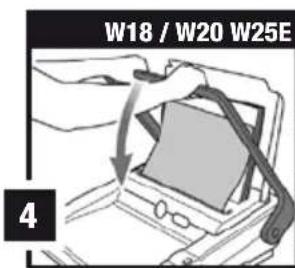

natural_image
Diagram of a hand pressing down on a wooden tray with a curved tool, no text or symbols present
natural_image
Four-panel illustration showing a coiled spring being inserted into a holder, then being folded with arrows indicating the process (no text or symbols)

natural_image
Illustration of hands using a tool to lift a rectangular object (no text or symbols visible)Specifications
| GBC W18 Wire Binder | GBC W20 Wire Binder | GBC W25E Wire Binder | |
| Operation mode | manual | manual | electric |
| Max. binding size | A4 | A4 | A4 |
| Hole pitch | International pitch 3.1" (8.46mm) | International pitch 3.1" (8.46mm) | International pitch 3.1" (8.46mm) |
| Number of punch slots | 34 | 34 | 34 |
| Margin depth | fixed | fixed | fixed |
| Punching paper (80gsm) | max. 15 | max. 20 | max. 25 |
| Punching PVC plastic foils (0.2mm) | max. 2 | max. 2 | max. 2 |
| Max. wire diameter | 14mm | 14mm | 14mm |
| Binding capacity | 125 sheets | 125 sheets | 125 sheets |
| Net weight | 11kg | 13.14kg | 18.1kg |
| Dimensions WxDxH | 470x450x200mm | 495x450x200mm | 495x450x170mm |
| Voltage | n/a | n/a | 230V 50Hz AC |
Location of controls
A Punching handle (W18, W20 only)
B Paper thickness guide
Comb size guide
D Wire selector (W20, W25E only)
E Document separator
F Punching slot
G Paper centering dial
Electric punch button (W25E only)
Wire binding channel
J Wire closing handle
K Clippings tray (located at side of machine)
Quick start guide
On/Off switch (W25E only)
CE W25E is approved to EN60950 and CE Standards. Technical data subject to change without notification.
Safety instructions

YOUR SAFETY AS WELL AS THE SAFETY OF OTHERS IS IMPORTANT TO ACCO BRANDS EUROPE. IN THIS INSTRUCTION MANUAL AND ON THE PRODUCT ARE IMPORTANT SAFETY MESSAGES. READ THESE MESSAGES CAREFULLY.
- In order to avoid overloading your machine, please refer to the maximum punch guide located on the front of your machine before punching.
- When punching PVC/PP covers, we recommend the cover be punched with some paper either side.
- DO NOT punch metallic objects such as staples or paper clips.
- Please empty the waste tray regularly.
- Ensure that the machine is operated on a flat stable surface.
- Never lift the machine by the punching handle. Always use the hand grips located on the side of the machine.
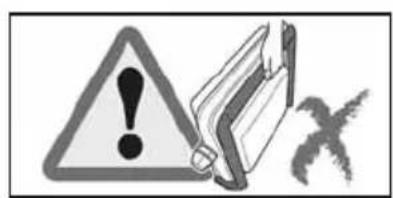
- To avoid risk of injury DO NOT put your fingers into the wire binding channel.
- The binder is not to be exposed to temperature / humidity conditions that would cause condensation. Maximum ambient temperature 40^ .
Safety tips - W25E

• DO NOT obstruct air inlets and outlets.
- DO NOT use the binder if the power cord (mains cable) is damaged.
- DO NOT place the power cord where it may be tripped over or pulled. Ensure it does not come into contact with hot surfaces such as pipes or radiators. Make sure the cable is not squashed or pinched.
- DO NOT use an extension cable unless it is absolutely necessary and then only use one of a suitable current rating (10A or greater).
- DO NOT leave the binder connected to the electricity supply when not in use.
- DO NOT immerse the binder in water or other liquids. Doing so will result in ELECTRIC SHOCK.
- DO NOT attempt to disassemble the binder. Always consult a qualified person.
- The noise emitted by the machine does not exceed 70 dB.
Special notice
Thank you for choosing a GBC Binding Machine. We aim to produce quality binding machines at an affordable price, with many advanced features to enable you to create excellent results every time. Before using your machine for the first time, please take a few minutes to read through this guide and retain these instructions for future reference.
Setting up
- Your machine is ready to use when removed from the box. Retain the packaging in case you need to return the machine for repair.
- The punching mechanism is coated with a protective film of lubricant, which will mark your paper. Clear this by punching scrap sheets of paper until clean prior to binding.
Setting up - W25E
- Connect the binder to the electricity supply with the power cord supplied.
- Switch ON using the ON/OFF switch located at the rear of the binder by the power inlet socket.
- Wait while the binder goes through an automatic check procedure, both LED's light up.
- When complete the green LED will remain ON.
- For foot pedal operation of the punching cycle, connect the foot pedal cable to the socket at the front of the machine.
• The binder is ready for operation.

WARNING: This appliance MUST be earthed. If in doubt consult a qualified electrician.
Maintenance options
- If you would like to extend your warranty coverage beyond the stated manufacturers period, please consult your local ACCO Brands Europe reseller for options.
Wire binding instructions
For use with GBC 34 loop wire elements.
1. Set the wire
1 Lift the lid and punch handle (A) to the upright position.
2 Place entire document so it rests on the lid.
3 Check the wire size (mm) needed using the paper thickness guide (B).
4 Select your wired using the Wire Size Guide (C).
5 Turn the wire selector (D) (located at the side of the machine) until the number matches your wire size (5mm-14mm).
6 The machine will automatically prevent your wire from over closing, and will adjust the margin depth.
2. Sort paper
1 For managing large documents use the document separator (E).
2 Push the separator into the document.
3 Lift the separator upwards to reveal the first stack of paper ready for easy punching.
3. Set paper size
On manual machines, ensure that the punch handle is in the upright position before centering the paper.
2 Load the first paper stack into the punch slot (F).
3 Centre the paper using the dial (G).
4. Punch paper
For manual punching: Lower the raised handle until the paper is punched and support the machine when lifting the handle to the upright position.
For electric punching (W25E only): Press the 'punch button' (H).
Note: If the machine is overloaded and fails to complete the punch cycle, the red LED will be lit. Press the 'punch button' to cancel the red LED. If this does not work contact the service helpline.
Security

A security slot is fitted for use with leading makes of security leash. E.g. Kensington Microsaver.
Guarantee
Operation of this machine is guaranteed for two years from date of purchase, subject to normal use. Within the guarantee period, ACCO Brands Europe will at its own discretion either repair or replace the defective machine free of charge. Defects due to misuse or use for inappropriate purposes are not covered under the guarantee. Proof of date of purchase will be required. Repairs or alterations made by
Register this product online at www.accoeurope.com
5. Wire binding
1 Open the hinged cover at the front of the machine to reveal the wire binding channel (I).
2 Place the wire (open side up) on the wire support.
3 Feed each paper stack onto the wire and repeat until your document is complete.
4 Support the document and wire on removal from the wire support.
5 Insert the document into the wire closing jaws (wire opening face down).
6 Support the document and pull down the wire closing handle (J) to close the jaws.
W18:
7 Use the wire closing guide (located in the wire closing jaws) to ensure correct closure of the wire.
Binding tips:
To hide the spine of the wire:
- Load the internal sheets onto the wire first, repeating until all are loaded.
- Load the front PVC cover onto the wire element.
- Load the rear cover onto the wire element last.
- It is best to close the wire a little, check, and then close the wire a little more until you are happy with the wire closure.
- If the wire does not close properly, check that the machine has been set to the correct wire size.
- For further hints and tips please visit our website: www.gbceurope.com
Note: The ‘Quickstep’ guide on the machine illustrates how to bind in four easy steps.
6. Maintenance
Please ensure the clippings tray (K) is emptied on a regular basis. This may prevent your machine from overloading.
W25E:
When the clippings tray is full, a yellow LED will be lit. Empty the contents of the tray to continue binding.
Troubleshooting
- This machine has a recommended duty cycle of 5 operations per minute, up to a maximum of 30 minutes on / 30 minutes off.
- This machine is fitted with a thermal overload safety feature. In extreme circumstances, the motor may overheat which will activate the safety feature. This feature will prevent the machine punching until it has cooled sufficiently.
- The thermal overload switch will automatically reset after approximately 15 minutes. The machine will then operate as if it had been overloaded (see step 4 below).
persons not authorised by ACCO Brands Europe will invalidate the guarantee. It is our aim to ensure that our products perform to the specifications stated. This guarantee does not affect the legal rights which consumers have under applicable national legislation governing the sale of goods.
GB ACCO Service Division
Hereward Rise, Halesowen, West Midlands, B62 8AN
Tel: 0845 658 6600, Fax: 0870 421 5576
www.acco.co.uk/service
F Acco Brands France SAS
Service après-vente, ZAC Excellence 2000
6 rue Robert Schuman, 21800 Chevigny Saint Sauveur
Tel: +33 3 80 68 60 30, Fax: +33 3 80 68 60 49
contact@vmbs.fr
(A) Arnoldstrasse 5, 73614 Schorndorf, Germany
Tel: +49 7181 887 120, Fax:+49 7181 887 198
info.de@acco.com
E ACCO Brands Iberia SL
P Isaac Peral 19, 28820 Coslada (Madrid)
Tel: 902 500 182 ext. 2, Fax: 91 309 6412
⑤ ACCO Brands Nordic AB
DK Makadamgatan 5, 254 64 Helsingborg, Sweden
N Tel: +46 42 38 36 00, Fax: +46 42 38 36 10
is service.nordic@acco.com
LV
EST
LT
CZ XERTEC a.s.
SK Kloknerova 2278/24 (vchod z ulice Koštířova, budova CeWe Color - Fotolab)
148 00 Praha 4 - Chodov
Tel: 225 004 411, Fax: 225 004 162
servis@xertec.cz, http://www.xertec.cz
PL ACCO Polska Sp. z o.o
Al. Jerozolimskie 184, 02-486 Warszawa
Tel.+48 22 570-18-29, fax +48 22 570-18-33
www.acco.pl
H OPI Customer Service
Tel.: +359 2 80 99 166
Exportee@accoeu.local
2 Coronation Avenue, Kings Park, NSW, Australia 2148
Tel: +61 2 9674 9000, Fax: +61 2 9674 0910
custsupport@pelikanartline.com.au
Clonshaugh Business & Technology Park, Clonshaugh, Dublin 17, Ireland
Tel: 01 816 4346, Fax: 01 816 4302
admin@accoservice.eu, www.accorexel.ie
ZA Rexel Office Products (PTY) Ltd
Crusher Road, Crown Ext.3, PO Box 102,
Crown Mines, Johannesburg 2025, South Africa
Tel: +27 (0)11 226 3300
service@rexelsa.co.za
IND ACCO Brands Asia Pte Ltd
PAK 47 Ayer Rajah Crescent, #05-08/17, Singapore 139947
BD Tel: +65 6776 0195, Fax: +65 6779 1041
webmaster@accobrandsasia.com
JPN GBC-Japan K.K.
14F Harmony Tower, 1-32-2 Honcho, Nakano-ku, Tokyo 164-8721
Tel: (81)-03-5351-1801, Fax: (81)-03-5351-1831
serv@gbc-japan.co.jp, www.gbc-japan.co.jp


- WireBind W18, W20 & W25E
- Location of controls
- Safety instructions
- Safety tips - W25E
- Special notice
- Setting up
- Setting up - W25E
- Maintenance options
- Wire binding instructions
- Set the wire
- Sort paper
- Set paper size
- Punch paper
- Security
- Guarantee
- Wire binding
- W18:
- Binding tips:
- Maintenance
- W25E:
- Troubleshooting
Brand : GBC
Model : WireBind W25E
Category : Binder