
VideoControl 3 - Audio/video extension MARMITEK - Free user manual and instructions
Find the device manual for free VideoControl 3 MARMITEK in PDF.


| Product Type | Audio/video extender (HDMI transmitter) |
| Brand | Marmitek |
| Model | VideoControl 3 |
| Dimensions (approx.) | 100 x 80 x 30 mm |
| Weight (approx.) | 200 g |
| Power supply | 5 V DC power adapter (included) |
| Power consumption | 5 W max |
| Maximum transmission distance | Up to 100 m (via Cat5e/6 cable) |
| Supported video resolution | 1080p (Full HD) |
| Input connection | 1 x HDMI (source) |
| Output connection | 1 x HDMI (display) |
| Network connection | 1 x RJ45 (Cat5e/6 cable) |
| Main functions | HDMI extension, IR signal transmission for remote control, HDCP support |
| Care and cleaning | Wipe with a soft, dry cloth; do not use abrasive products |
| Safety | Do not expose to humidity or extreme temperatures |
| Spare parts and repairability | No spare parts available; contact Marmitek support |
| General information | Marmitek VideoControl 3 audio/video extender: allows transmitting HDMI signal and IR commands remotely. |
Frequently Asked Questions - VideoControl 3 MARMITEK
User questions about VideoControl 3 MARMITEK
0 question about this device. Answer the ones you know or ask your own.
Ask a new question about this device
Download the instructions for your Audio/video extension in PDF format for free! Find your manual VideoControl 3 - MARMITEK and take your electronic device back in hand. On this page are published all the documents necessary for the use of your device. VideoControl 3 by MARMITEK.
USER MANUAL VideoControl 3 MARMITEK
ALL RIGHTS RESERVED MARMITEK © 2007
MARMITEK®
Safety warnings
- To prevent short circuits, this product should only be used inside and only in dry spaces. Do not expose the components to rain or moisture. Do not use the product close to a bath, swimming pool etc.
- Do not expose the components of your systems to extremely high temperatures or bright light sources.
- Do not open the product: the device contains live parts. The product should only be repaired or serviced by a qualified repairman
- In case of improper usage or if you have opened, altered and repaired the product yourself, all guarantees expire. Marmitek does not accept responsibility in the case of improper usage of the product or when the product is used for purposes other than specified. Marmitek does not accept responsibility for additional damage other than covered by the legal product responsibility.
- Adapters: only connect the adapter to the mains after checking whether the mains voltage is the same as the values on the identification tags. Never connect an adapter or power cord when it is damaged. In that case, contact your supplier.
- This product is not a toy. Keep out of reach of children.
Introduction
Congratulations on buying the Marmitek VideoControl3. With the infra-red extender VideoControl3 you can transmit infra-red signals via the existing COAX network in your home and control all equipment connected from another room. Example: you have a satellite receiver in the living room and a second TV in the bedroom, where you would like to watch the satellite programs. You would like to control the satellite receiver with
the remote control, but do not want to go to the living room. The infra-red extender VideoControl3 transmits the infra-red signals to the equipment via the COAX cable network.
Set content
• 1 VideoControl3 infra-red receiver with 1 IR LED (IR receiver)
• 1 VideoControl3 infra-red transmitter with 3 IR LEDs (IR emitter)
- 2 power adapters
• Coax extension plugs (IEC-F) male and female
- This user manual
How does it work?
The VideoControl3 transmits the signal from your own remote control back to the other room via the existing antenna cable. The VideoControl3 consists of an infra-red receiver and an infra-red transmitter. The receiver is connected to the antenna connection of a TV (e.g. in the bedroom).
The transmitter is connected to the antenna connection of e.g. the satellite receiver. You can control up to three different devices (e.g. a satellite receiver, a VCR and a decoder) using the three infra-red LEDs. If desired, you can place multiple infra-red receivers in different rooms, to control your video equipment from each TV in your house.
NOTE: The Marmitek VideoControl3 signal is carried via all antenna boxers, splitters and antenna amplifiers suitable for a return channel.
![graph TD A["House Shape"] --> B["TV"] B --> C["R"] C --> D["T"] D --> E["SAT"] D --> F["VCR"] D --> G["CABLE"] style A fill:#ccc,stroke:#333 style B fill:#fff,stroke:#333 style C fill:#fff,stroke:#333 style D fill:#fff,stroke:#333 style E fill:#fff,stroke:#333 style F fill:#fff,stroke:#333 style G f…](/content/2026/06/1264893/images/bb2f3c2d5684a132ffc5e5ad3af414278ef22e8a00fbc2a511b80a84304386e3.jpg)
Installing the receiver
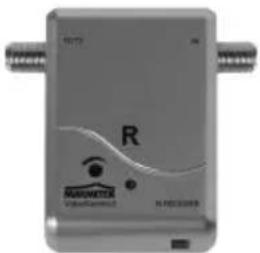
- Connect the 'IN' side of the VideoControl3 receiver, (with the character R on the device, with the IR LED) to the COAX cable near the TV in the room you want to use the remote control from (e.g. the bedroom).
- Plug the 'TO TV' plug of the receiver into the antenna IN of the TV.
-
Use the coax extension plug included if necessary.
-
Position the IR LED within range of the remote control, e.g. on the top of the TV.
- Plug the power adapter into the wall socket.
Tip 1
There are two types of antenna plugs in Europe: the IEC plug and the F plug. This last one causes the least loss of signal and is used in superior installations. Your Marmitek VideoControl3 also uses an F plug. With the adapters included you can also connect IEC plugs.
Installation of the transmitter

- Connect the 'IN' side of the VideoControl3 transmitter (with the character T on the device and with the IR LEDs) to the COAX cable near the satellite receiver or video recorder in the room the equipment you want to control is situated.
- Connect the 'TO TV' plug to the antenna IN of the TV or satellite receiver.
- Use the coax extension plug included if necessary.
- Stick the LEDs on the IR windows of the equipment. This should be done very carefully and precisely. Test whether the LEDs are in the right place first (with another person holding them) before you stick them down.
- Plug the power adapter into the wall socket.
ATTENTION: if you connect less than 3 devices, do not remove the other LEDs from the cable.
6 © MARMITEK
You have now successfully installed the VideoControl3. The red LED on the receiver and transmitter will light up as soon as you transmit a command with your remote control.
Tip 2
The receiver has a adjustment screw which you use to set the sensitivity of the reception. If the red LED lights up when it is not being activated via the remote control, the sensitivity is too high. If the LED does not light up when you are using the remote control, it is set too low. Use a Phillips screw driver to change the setting.
Tip 3
If you want to control your equipment from multiple rooms, you can purchase extra receivers (Art. No. 9709 (E), Art. No. 9715 (UK).
Frequently asked questions
I have no picture and no sound.
Check whether all the cables are connected properly.
The infra-red doesn't work.
a. Check whether the infra-red LED is placed on the sensor correctly.
b. Check whether all the cables are connected properly.
c. Check whether the LEDs on the transmitter and receiver flash up if the IR signal is activated. You can alter the sensitivity of the receiver by setting the adjustment screw, see tip 2.
d. The infra-red return channel only works if you are using amplifiers, splitters and antenna boxes that support return channels. This is usually indicated by the term '5-30MHz' or '5-68MHz'. Consult your cable store for more information.
e. Make sure the transmitter cannot control the receiver. The LEDs on the transmitters have to be out of view of the LED on the receiver (acoustic feedback).
f. Make sure that, if you use multiple receivers, these do not all receive an IR signal at the same time.
g. Prevent interference from other IR sources, such as sunlight, energy lamp and/or plasma screen.
Technical data
VideoControl3 infra-red transmitter:
Power adapter: 230VAC/50Hz, 12 VDC/100 mA
RF modulation: 10.52 MHz +/- 250 KHz
Sensitivity: <45 dBuV
VHF/UHF damping: 47 MHz - 230 MHz 2 dB (Max.)
470 MHz - 860 MHz 4 dB (Max.)
Dimensions: 49 x 67 x 26 mm (excl. connection plugs)
VideoControl3 infra-red receiver
Power adapter: 230VAC/50Hz, 12 VDC/100 mA
IR receiver: 37 - 45 KHz
Opening angle: +/- 45 degrees
Reception area: Min. 5 m
RF modulation: 10.52 MHz +/- 250 KHz 110 dBuV (Min.)
VHF/UHF damping: 47 MHz - 230 MHz 2 dB (Max.)
470 MHz - 860 MHz 4 dB (Max.)
Dimensions: 49 x 67 x 26 mm (excl. connection plugs)

Environmental Information for Customers in the European Union
European Directive 2002/96/EC requires that the equipment bearing this symbol on the product and/or its packaging must not be disposed of with unsorted municipal waste. The symbol indicates that this product should be disposed of separately from regular household waste streams. It is your responsibility to dispose of this and other electric and electronic equipment via designated collection facilities appointed by the government or local authorities. Correct disposal and recycling will help prevent potential negative consequences to the environment and human health. For more detailed information about the disposal of your old equipment, please contact your local authorities, waste disposal service, or the shop where you purchased the product.
SICHERHEITSHINWEISE
VEILIGHEIDSWAARSCHUWINGEN
DECLARATION OF CONFORMITY
Hereby, Marmitek BV, declares that this VideoControl 3 ™ is in compliance with the essential requirements and other relevant provisions of the following Directives:
Council Directive 89/336/EEC of 3 May 1989 on the approximation of the laws of the Member States relating to electromagnetic compatibility
Council Directive 73/23/EEC of 19 February 1973 on the harmonization of the laws of Member States relating to electrical equipment designed for use within certain voltage limits
DECLARATION OF CONFORMITY
The following copyrights and trademarks are applicable:
Marmitek is a trademark of Marmidenko BV VideoControl3 is a trademark of Marmitek
All rights reserved.
Copyright and all other proprietary rights in the content (including but not limited to model numbers, software, audio, video, text and photographs) rests with Marmitek B.V. Any use of the Content, including without limitation, distribution, reproduction, modification, display or transmission without the prior written consent of Marmitek is strictly prohibited. All copyright and other proprietary notices shall be retained on all reproductions.
MARMITEK www.marmitek.com


- SAFETY WARNINGS
- INTRODUCTION
- SET CONTENT
- HOW DOES IT WORK
- TIP 1
- INSTALLATION OF THE TRANSMITTER
- 6 © MARMITEK
- TIP 2
- TIP 3
- FREQUENTLY ASKED QUESTIONS
- I HAVE NO PICTURE AND NO SOUND
- THE INFRA-RED DOESN'T WORK
- TECHNICAL DATA
- VIDEOCONTROL3 INFRA-RED TRANSMITTER
- VIDEOCONTROL3 INFRA-RED RECEIVER
- ENVIRONMENTAL INFORMATION FOR CUSTOMERS IN THE EUROPEAN UNION
- SICHERHEITSHINWEISE
- VEILIGHEIDSWAARSCHUWINGEN
- DECLARATION OF CONFORMITY
- MARMITEK WWW.MARMITEK.COM
Brand : MARMITEK
Model : VideoControl 3
Category : Audio/video extension