
WP3811 - Water filter PHILIPS - Free user manual and instructions
Find the device manual for free WP3811 PHILIPS in PDF.


| Product Type | Water Filter |
| Brand | Philips |
| Model | WP3811 |
| Filtration Technology | Activated Carbon |
| Filter Capacity | 100 Liters |
| Flow Rate | 2 L/min |
| Dimensions (HxWxD) | 13 x 7 x 7 cm |
| Weight | 0.2 kg |
| Material | ABS Plastic |
| Installation | No tools required, direct faucet connection |
| Filter Replacement Indicator | Recommended every 2-3 months or 100 L |
| Certifications | NSF/ANSI 42, 53 |
| Temperature Range | 5-38 °C |
| Pressure Range | 0.1-0.4 MPa |
| Maintenance | Regular filter replacement, clean exterior with damp cloth |
| Spare Parts | Replacement filter cartridges available |
Frequently Asked Questions - WP3811 PHILIPS
User questions about WP3811 PHILIPS
0 question about this device. Answer the ones you know or ask your own.
Ask a new question about this device
Download the instructions for your Water filter in PDF format for free! Find your manual WP3811 - PHILIPS and take your electronic device back in hand. On this page are published all the documents necessary for the use of your device. WP3811 by PHILIPS.
USER MANUAL WP3811 PHILIPS
Register your product and get support at
www.philips.com/welcome
WP3811

natural_image
Close-up of a Philips water tap wrench with a metal handle and drain, no visible text or symbols on the device itself.
natural_image
Diagram of a folded document with grid patterns and directional arrows indicating orientation (no text or symbols)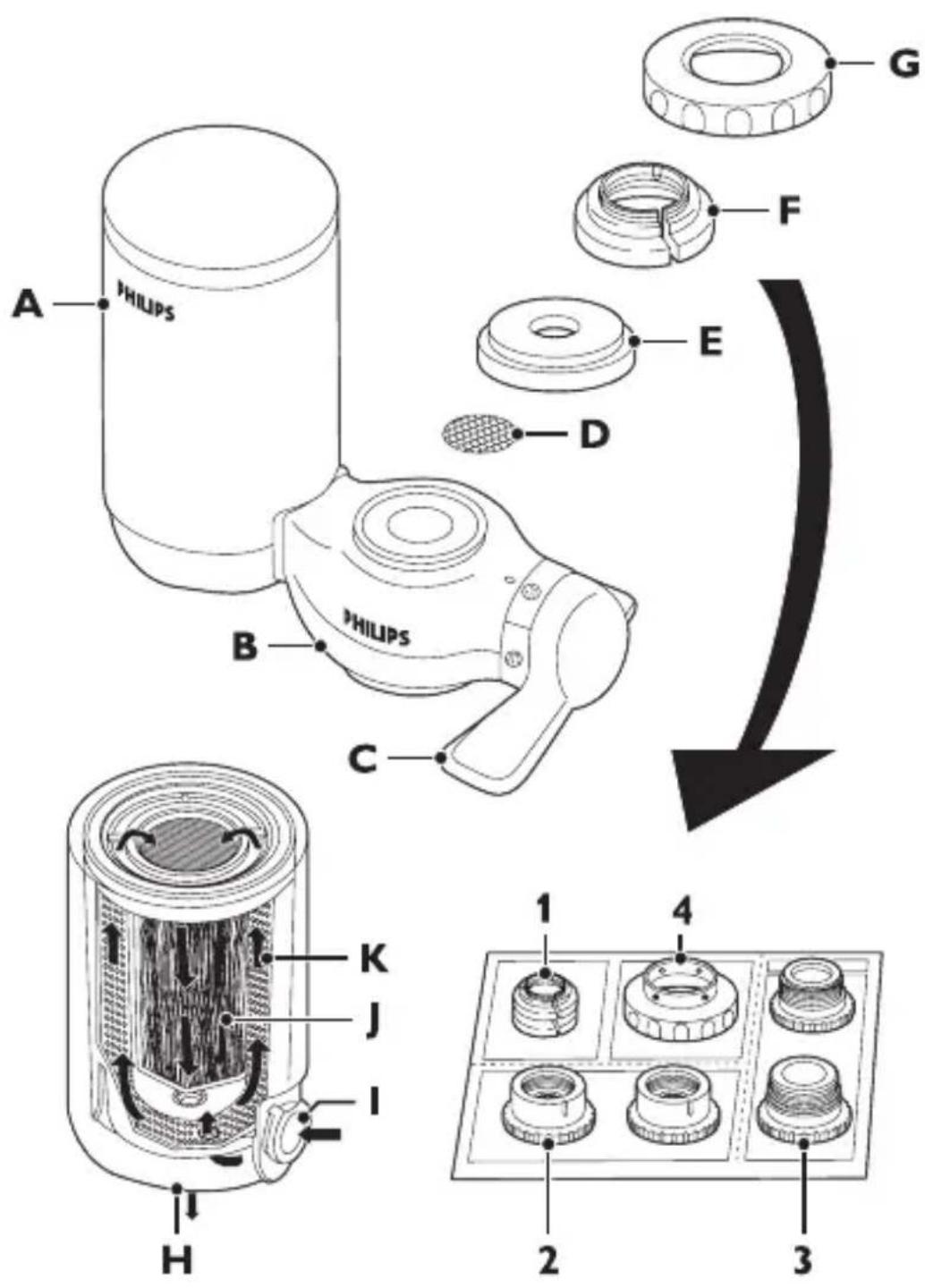
ENGLISH 6
繁體中文 16
简体中文 25
Introduction
Congratulations on your purchase and welcome to Philips! To fully benefit from the support that Philips offers, register your product at www.philips.com/welcome.
You have made an excellent choice. The Philips Micro Pure is a compact and easy-to-install water purifier that gives you pure water by removing bacteria, harmful organic compounds and chlorine while keeping all the good minerals in your water. Pure water made easy, by Philips.
General description (Fig. 1)
A Filter cartridge
B Water purifier housing
C Water selection lever
D Stainless steel screen
E Rubber washer
F Adapter
1 A-type
2 B-type
3 C type
4 D-type
G Attachment nut
H Filtered water outlet
Unfiltered water inlet
J Hollow fibre
K Granular activated carbon
Important
Read this user manual carefully before you use the water purifier and save it for future reference.
Warning
- This water purifier is not intended for use by persons (including children) with reduced physical, sensory or mental capabilities, or lack of experience and knowledge, unless they have been given
supervision or instruction concerning use of the water purifier by a person responsible for their safety.
- Children should be supervised to ensure that they do not play with the water purifier.
Before daily use
- To prevent quick clogging of the filter cartridge, let the water run at the unfiltered setting for around 5 seconds before every use.
- If the water is highly coloured or turbid due to work on your water network, do not let the water run at the filtered setting until the water is clear.
- Cautions:
1 Let the water run at the filtered setting for 10 seconds before use each day.
2 Let the water run at the filtered setting for 60 seconds before use if you have not used the water purifier for more than two days.
3 If you have not used the water purifier for more than two weeks, let the water run at the filtered setting for 2-3 minutes before use. If the filter cartridge emits an unpleasant smell, replace it with a new one.
Water temperature
- Do not let water hotter than 65^ C run through the water purifier at the unfiltered setting or hotter than 50^ C at the filtered setting.
This may damage the water purifier. - Do not let the water purifier freeze.
Applications
- Only use the water purifier to filter water that meets drinking water standards.
- Do not use this water purifier in combination with electric taps.
- Do not block the filtered water outlet or connect other devices to it.
- If the water pressure is very high, reduce the water flow of the tap to prevent damage to the cartridge.
- Keep the water purifier away from heat to avoid distortion or breakage.
- Do not tamper with the water purifier.
ENGLISH8
- Do not remove the filter cartridge while you use the water purifier.
- Do not install the water purifier near a window where it is exposed to direct sunlight.
- Do not use the water purifier without a filter cartridge.
- This water purifier does not soften water.
- Do not use filtered water in aquariums. Tap water, filtered or unfiltered, can be harmful to fish.
- This water purifier is intended for household use only.
- Do not store purified water to avoid contamination. Air contact contaminates purified water quickly. If you want to store purified water, use a clean container and keep it in the refrigerator. Do not keep it in the refrigerator longer than 1 day to avoid contamination.
Features
- Philips' multi-filtration system consists of a primary filter, a secondary filter, a high-tech hollow-fibre membrane filter and a granular activated carbon filter.
- The hollow fibre membrane contains more than 520 billion micropores that are small enough to remove particles down to 0.1μm. It eliminates 99.99%* of bacteria, rust and other particles larger than the micropore size from your tap water without removing calcium, magnesium and other minerals that are vital to your body. (* tested according to Japanese Water Purifier Association (JWPA) standard).
- The granular activated carbon removes the unpleasant chlorine smell and taste from your tap water.
- Apart from the recommended cartridge lifetime, Philips' unique cartridge replacement indicator helps you determine when to replace the filter cartridge.
- The 2ltrs/min high-speed initial flow rate gives you a plenty of clean water instantly.
- The water selection lever offers you a choice of three water flow types: unfiltered spray, unfiltered stream or filtered spray.
- The eight tap-mounting adapters supplied with the water purifier allow easy installation on almost any type of tap.
- The bayonet-type mount ensures quick, easy and secure filter cartridge replacement.
Preparing for use
Before installation
- Before you install the water purifier, make sure all tap-mounting adapters you require are present.
- The tap must have a diameter of 13mm-25mm.
- Determine what type of tap you have and select the appropriate adapter.
- The adapters supplied make the water purifier suitable for almost any kitchen tap. However, the water purifier may not fit some uncommon types of taps.
- The tap water pressure has to be between 0.3 kgf/cm^2 (3 metres of water column) and 3.5 kgf/cm^2 (35 metres of water column). If you use the water purifier at a water pressure outside this range, either the filtered water flow will be extremely low or the water purifier will get damaged.
Installation A-type adapter
- For taps with a round spout with a diameter of 16mm, 17.5mm or 19mm (Fig. 2).
1 Remove the attachment nut and the adapter from the water purifier housing (Fig. 3).
2 Pass the attachment nut over the tap spout (Fig. 4).
3 Place the matching adapter (A-type) over the tip of the spout. The 16mm adapter is packed with the water purifier. Replace it with the 17.5mm adapter or 19mm adapter to fit the diameter of your tap (Fig. 5).
4 Screw the attachment nut firmly onto the water purifier housing (Fig. 6).
Installation B-type adapter
- For taps with an aerator (threaded outside) (Fig. 7).
ENGLISH10
1 Remove the attachment nut and the adapter from the water purifier (Fig. 8).
2 Remove the aerator cap from the tap and pass the attachment nut over the spout. Take out the original adapter and screw the matching adapter (B-type) onto the tap (Fig. 9).
3 Tighten the adapter further with a coin (Fig. 10).
4 Firmly screw the attachment nut onto the water purifier housing (Fig. 11).
Installation C-type adapter
- For taps with an aerator (threaded inside) (Fig. 12).
1 Remove the attachment nut and the adapter from the water purifier housing (Fig. 13).
2 Remove the aerator cap from the tap. Take out the original adapter and screw the matching adapter (C-type) onto the tap through the attachment nut. (Fig. 14)
3 Tighten the adapter further with a coin (Fig. 15).
4 Firmly screw the attachment nut onto the water purifier housing (Fig. 16).
Installation D-type adapter
- For taps other than A, B or C. (Fig. 17)
1 Remove the attachment nut and the adapter from the water purifier housing (Fig. 18).
2 Take out the original adapter and screw the D-type adapter onto the water purifier housing. (Fig. 19)
3 Push the water purifier housing onto the tap from below and tighten the 4 screws evenly (Fig. 20).
4 Screw the attachment nut firmly onto the water purifier housing (Fig. 21).
Make sure the rubber washer is firmly pushed against the tap to prevent water leakage.
Installing the filter cartridge
1 Make sure the tap is closed.
2 Set the water selection lever to the unfiltered stream position (Fig. 22).
3 Tilt the filter cartridge 90° backwards and insert it into the water purifier housing. (Fig. 23)
4 Pull the cartridge upwards until it is in upright position. (Fig. 24)
Using the water purifier
1 Make sure that the water purifier housing and the filter cartridge are properly installed.
2 Turn the water selection lever to the desired setting ('click').
Filtered spray
Select this setting for drinking, washing vegetables or fruits and for cooking.
1 Turn the water selection lever until the filtered spray symbol is aligned with the indicator (Fig. 25).
Do not let water hotter than 50^ C run through the water purifier at this setting, as this may damage the water purifier.
If you filter water between 35^ C and 50^ C, the water may have an unpleasant smell. The filter cartridge has absorbed this smell during filtering, but releases it again if you filter water hotter than 35^ C.
Unfiltered spray
Select this setting for washing dishes and other jobs that require a gentle water flow.
1 Turn the water selection lever until the unfiltered spray symbol is aligned with the indicator (Fig. 26).
ENGLISH12
Do not let water hotter than 65^ C run through the water purifier at this setting, as this may damage the water purifier.
Unfiltered stream
Select this setting for a strong water flow.
1 Turn the water selection lever until the unfiltered stream symbol is aligned with the indicator (Fig. 22).
Do not let water hotter than 65^ C run through the water purifier at this setting as this may damage the water purifier.
Cleaning
Never use scouring pads, abrasive cleaning agents or aggressive liquids such as petrol or acetone to clean the water purifier. These substances may cause cracking, discolouration or distortion.
1 Clean the water purifier with a damp cloth.
Replacement
New filter cartridges are available under type number WP3911.
Replace the filter cartridge if it is clogged to prevent damage to the water purifier.
1 For optimal performance of the water purifier, replace the filter cartridge if either of the following situations occurs:
A You have used the filter cartridge for six months.
B The hollow fibre of the filter cartridge (visible through the cartridge window) has turned rust brown or dark grey (see section 'Cartridge replacement indicator').
C The volume of purified water decreases substantially.
D The filtered water still has an unpleasant smell or is still turbid after purification.
2 To change the filter, close the tap and set the water selection lever to the unfiltered stream position. (Fig. 22)
3 Tilt the used filter cartridge 90° backwards and pull it off the water purifier housing (Fig. 23).
4 Write down the replacement date on the information label of the new cartridge.
5 Tilt the new filter cartridge 90° backwards and insert it into the water purifier housing.
6 Pull the cartridge upwards until it is in upright position. (Fig. 24)
Cartridge replacement indicator
- We advise you to replace the filter cartridge every 6 months, for optimum performance. Please register your product online at http://www.philips.com/welcome for more information on filter cartridge replacement.
- To help you determine when to replace the filter cartridge, the water purifier and each replacement filter cartridge comes with a self-adhesive colour-coded cartridge replacement indicator. Place this replacement indicator in a convenient place for future reference.
Tip: Remove the cover of the filter cartridge and stick the cartridge replacement indicator to the inside of the cover. Check the colour of the hollow fibre of the filter cartridge through the cartridge window from time to time. If the colour of the filter matches the rust brown or dark grey shown on the cartridge replacement indicator, replace the filter cartridge (Fig. 27).
Guarantee and service
If you need service or information or if you have a problem, please visit the Philips website at www.philips.com or contact the Philips Consumer Care Centre in your country (you find its phone number in the worldwide guarantee leaflet). If there is no Consumer Care Centre in your country, go to your local Philips dealer.
Frequently asked questions
This chapter lists the questions most frequently asked about the water purifier. If you cannot find the answer to your question, contact the Consumer Care Centre in your country.
| Question Answer | |
| Why does water leak from the attachment nut? | Perhaps you have not installed the water purifier properly. Reinstall the water purifier according to the instructions in this user manual. |
| Perhaps the attachment nut or the tap-mounting adapter is damaged. Contact an authorised Philips service centre. | |
| Perhaps the tap water pressure is higher than specified. | |
| You may need to wind some Teflon tape around the thread of the adapter. | |
| Why is the water flow weak at the unfiltered setting? | Perhaps the stainless steel screen under the rubber washer inside the water purifier housing is clogged. Clean it with a toothbrush and rinse it. |
| Why is the water flow is weak at the filtered setting? | Perhaps the filter cartridge is clogged. Replace the filter cartridge. |
| Perhaps the tap water pressure is lower than specified. | |
Product specifications
Product name and type number
WP3811 Philips Micro Pure
| Type Direct tap mount | |
| Major filter components | Polysulphone hollow-fibre membrane and granular activated carbon |
| Initial water flow rate 2ltrs/min. (water pressure at 1kgf/cm2, water temperature at 20°C) | |
| Chlorine reduction capacity | WP3911-2,500ltrs (water density at 2ppm) |
| Turbidity reduction capacity | 3,000ltrs (water turbidity at 2NTU) |
| Filter lifetime Approximately 6 months at 10ltrs a day (the actual lifetime depends on the quality of the local water and the water pressure) | |
| Replacement filter cartridge | WP3911 |
| Minimum water pressure | 0.3kgf/cm2(3 metres of water column/30kPa/0.3 bar) |
| Maximum water pressure | 3.5kgf/cm2(35 metres of water column/350kPa/3.5 bar) |
| Accessories WP3911 filter cartridge, 8 tap-mounting adapters, cartridge replacement indicator | |
| Water purifier dimensions | 105mm × 121mm × 83mm (H × W × D) |
| Packaging dimensions 140mm × 170mm × 84mm (H × W × D) | |
| Weight Approximately 330g | |
| Country of origin Japan | |
* Above specifications are according to Japanese JIS S 3201 Standard.
簡介


- Introduction
- General description (Fig. 1)
- Important
- Warning
- Before daily use
- Water temperature
- Applications
- ENGLISH8
- Features
- Preparing for use
- Before installation
- Installation A-type adapter
- Installation B-type adapter
- ENGLISH10
- Installation C-type adapter
- Installation D-type adapter
- Installing the filter cartridge
- Using the water purifier
- Filtered spray
- Unfiltered spray
- ENGLISH12
- Unfiltered stream
- Cleaning
- Replacement
- Cartridge replacement indicator
- Guarantee and service
- Frequently asked questions
- Product specifications
- 簡介
Brand : PHILIPS
Model : WP3811
Category : Water filter