
Meteorite - Microphone SAMSON - Free user manual and instructions
Find the device manual for free Meteorite SAMSON in PDF.


| Product Type | USB Condenser Microphone |
| Brand | Samson |
| Model | Meteorite |
| Polar Pattern | Cardioid |
| Frequency Response | 20 Hz - 20 kHz |
| Sample Rate / Bit Depth | 44.1 kHz / 16-bit or 48 kHz / 16-bit |
| Connectivity | USB 2.0 (Mini-B) |
| Power Source | USB bus powered |
| Dimensions (with stand) | 6.3 x 5.5 x 6.3 inches (160 x 140 x 160 mm) |
| Weight | 1.0 lb (455 g) |
| Material | Metal body with retro design |
| Headphone Output | 1/8" (3.5 mm) with volume control |
| Mute Button | Yes, touch-sensitive |
| Stand Type | Built-in foldable metal stand |
| Compatibility | Windows, macOS, Linux, iPad (with CCK) |
| Driver Required | No, plug-and-play |
| Accessories Included | USB cable, adjustment tool for stand |
| Maintenance | Clean with soft dry cloth |
| Safety | Avoid liquids; do not disassemble |
| Spare Parts / Repairability | Not user-serviceable; contact Samson support |
Frequently Asked Questions - Meteorite SAMSON
User questions about Meteorite SAMSON
0 question about this device. Answer the ones you know or ask your own.
Ask a new question about this device
Download the instructions for your Microphone in PDF format for free! Find your manual Meteorite - SAMSON and take your electronic device back in hand. On this page are published all the documents necessary for the use of your device. Meteorite by SAMSON.
USER MANUAL Meteorite SAMSON
natural_image
Close-up of a Samsung audio jack with a USB cable, no visible text or symbols on the device itself.Meteorite
USB Condenser Microphone
Quick Start Guide
INTRODUCTION
Congratulations on your purchase of the Samson Meteorite USB studio condenser microphone. The Meteorite represents the culmination of Samson's history of building world-class microphones, and is a product of Samson's position on the leading edge of digital microphone technology.
The Meteorite is a professional studio microphone with a large studio condenser microphone capsule, housed in a uniquely designed case with a magnetic base that allows the microphone to be easily directed at the sound source. The microphone features high-quality on-board digital converters for crystal clear recordings. With the Meteorite, you get everything you need to start recording on your computer - just plug in the connected USB cable, launch your favorite audio software, and begin recording.

natural_image
Top-down view of a SAMSON brand microphone grille with checkered pattern (no text or symbols beyond branding)With its extended frequency and fast transient response, the Meteorite reproduces any performance with incredible accuracy and clarity. It is also great for VoIP, chatting and webcasting.
Whether you're recording your latest song idea, a podcast, or your band's next big hit, the Meteorite is the simplest and most comprehensive solution for high-quality recording on a Mac or PC. Just plug it in and start creating!
MICROPHONE CALL OUTS

flowchart
graph TD
    A["Capsule"] --> B["Large 14mm studio quality microphone capsule with Cardioid polar pickup pattern."]
    C["Status Light"] --> D["Two-color LED illuminates blue to indicate power and flashes red when the input signal is clipping."]
    E["Magnetic Base"] --> F["Microphone mounts to the magnetic base providing a full range of motion and optimal positioning for any recording application."]
    G["USB Cable"] --> H["USB cable for interfacing with your PC or Mac."]
    I["SAMSON"] --> J["Windscreen: Dual stage grille protects the capsule and helps reduce wind noise and p-popping."]
Quick Start
Follow this example as a typical setup to begin recording vocals:


Quick Start

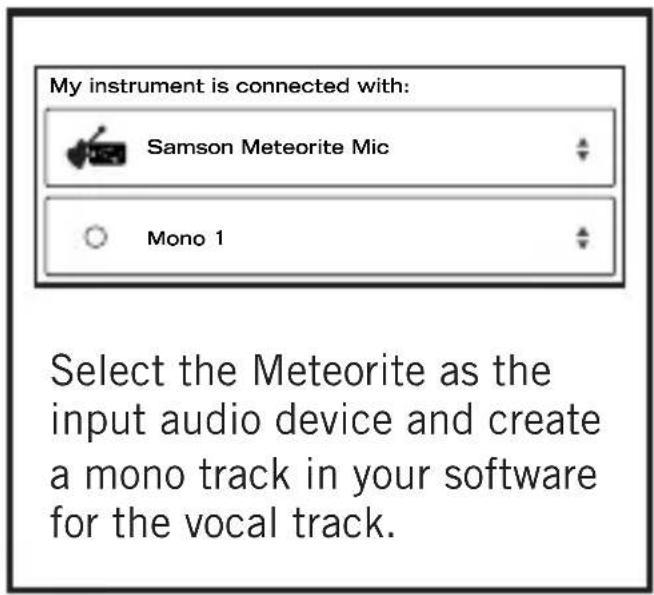
Turn the Monitor output ON to hear the input of the microphone to the track's input. If using speakers, you may want to turn the Monitor output OFF in order to avoid feedback. Set the level of the Meteorite by slowly raising the level of the microphone while singing or talking into the microphone at the performance level. If you see the

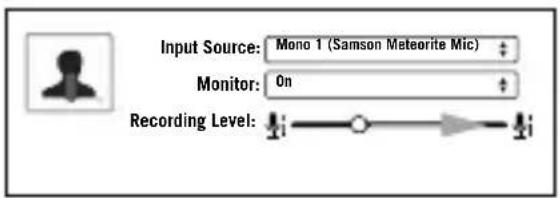
peak indicator illuminate red, your signal will be distorted. Turn the microphone level control down until it no longer flashes red.

Computer Setup
Installing the Meteorite is a simple procedure that takes just a few minutes. Simply connect the included USB cable and begin recording. The following sections of this manual provide detailed instructions on setting up your Meteorite in Windows or MAC OS.
Windows
- The first time you plug the Meteorite into a USB port, Windows will install the universal USB drivers for that port.
- To set the Meteorite as your default input/recording device, or to change its settings, open the Control Panel, Hardware & Sound settings, then click SOUND. Under Recording tab, you can select the Samson Meteorite from the list of devices and press the Set Default button to set it as the default audio input device.
- To set the gain of the microphone, click the Properties button, and then select the Levels tab. Slide the control until the desired level is reached. If you Find that the microphone red clip LED is lighting frequently, turn this control down until the LED no longer flashes red.
Apple MAC OSX
- To start using the Samson Meteorite, simply plug it in. The LED will illuminate to indicate it is receiving USB power. The MAC will recognize the USB audio device and automatically install a universal driver.
- To select the Meteorite as the computer's audio input, open System Preferences from the dock or the main Apple Menu.
- Next, open the Sound preferences, choose the Input tab and select Meteorite. To set the gain of the microphone, adjust the Input volume slider at the bottom of the Sound dialog box. The Input Level meter will show the recording level.
Specifications
Polar Pattern. . . . . . . . . Cardioid
Capsule 14mm condenser capsule
Frequency Response ..... 20Hz - 20kHz
Max SPL. 120dB
Sample Rate ..... 44.1/48kHz
Bit Rate 16bit
Power Requirements ..... 5V 50mA
Dimensions 1.96" x 2.63" (50mm x 67mm)
Weight. 0.26lb (118g)
At Samson, we are continually improving our products, therefore specifications and images are subject to change without notice.

If you want to dispose this product, do not mix it with general household waste. There is a separate collection system for used electronic products in accordance with legislation that requires proper treatment, recovery and recycling.
Private household in the 28 member states of the EU, in Switzerland and Norway may return their used electronic products free of charge to designated collection facilities or to a retailer (if you purchase a similar new one).
For Countries not mentioned above, please contact your local authorities for a correct method of disposal.
By doing so you will ensure that your disposed product undergoes the necessary treatment, recovery and recycling and thus prevent potential negative effects on the environment and human health.
THIS DEVICE COMPLIES WITH PART 15 OF THE FCC RULES CLASS B. OPERATION IS SUBJECT TO THE FOLLOWING TWO CONDITIONS:
(1) THIS DEVICE MUST NOT CAUSE HARMFUL INTERFERENCE, AND
(2) THIS DEVICE MUST ACCEPT ANY INTERFERENCE RECEIVED INCLUDING INTERFERENCE THAT MAY CAUSE UNDESIRED OPERATION. SUITABLE FOR HOME OR OFFICE USE.
Samson Technologies Corp.
45 Gilpin Avenue
Hauppauge, New York 11788-8816
Phone: 1-800-3-SAMSON (1-800-372-6766)
Fax: 631-784-2201
samsontech.com
Brand : SAMSON
Model : Meteorite
Category : Microphone