
Nexoos 630 - Memory reader Soyntec - Free user manual and instructions
Find the device manual for free Nexoos 630 Soyntec in PDF.


| Brand | Soyntec |
| Model | Nexoos 630 Smart All in 1, Silver Dots |
| Product Type | Multi-card reader / Smart card reader |
| Compatible Memory Cards | SD, SDHC, SDXC, MMC, RS MMC, MS, MS PRO DUO, Micro SD (direct), M2, XD, CF I/II, and more |
| Smart Card Compatibility | Electronic ID card, cryptographic smart cards, SIM card (mobile phone) |
| Interface | USB 2.0 (backward compatible with USB 1.1/1.0) |
| Supported Standards | ISO-7816, CCID, PC/SC, CSP Microsoft, API PKCS#11, EMV 2000 Level 1, T=0 & T=1 protocols |
| Operating Systems | Windows 2000/ME/XP/Vista/7, Mac OS X 10.3+, Linux |
| Features | Multi-card simultaneous read/write (CBO technology), SIM editor software, LED status indicator |
| Dimensions (approx.) | 80 x 50 x 15 mm |
| Weight (approx.) | 50 g |
| Power Supply | Via USB bus power |
| Warranty | 36 months (limited) |
| Package Contents | Card reader, user manual, software CD |
| Maintenance | Clean with a dry, soft cloth; avoid liquids and extreme temperatures |
| Safety | Do not disassemble; keep away from water and moisture |
Frequently Asked Questions - Nexoos 630 Soyntec
User questions about Nexoos 630 Soyntec
0 question about this device. Answer the ones you know or ask your own.
Ask a new question about this device
Download the instructions for your Memory reader in PDF format for free! Find your manual Nexoos 630 - Soyntec and take your electronic device back in hand. On this page are published all the documents necessary for the use of your device. Nexoos 630 by Soyntec.
USER MANUAL Nexoos 630 Soyntec
Enjoy the advanced features of this technological product that we have developed with maximum guarantees for you.
Nexoos 630
Smart All in 1 Silver Dots
Card Reader All in 1
1. INTRODUCTION
Soyntec ® thanks you for purchasing your Nexoos ™ 630 Smart All in 1, Silver Dots. We wish you enjoy using it.
Soyntec® multi-card reader Nexoos™ 630 Smart All in 1 is a Multi-card reader compatible with most memory cards in the market including electronic ID card, Smart cards and SIM. It meets all the standards to use with your electronic ID card and any smart card, supports multiple security applications such as personal identification, digital signature, bank operations on-line, etc.. With the “SIM Editor” program, you can also read and edit information of SIM cards of mobile phone and make backup of your agenda comfortably from any PC.
We suggest you read this user manual to enjoy this product with the best performance and in a safe way.
2. FEATURES
Multi-card reader compatible with: SD/SDHC/SDXC / MMC/RS MMC/MS/MS PRO DUO/Micro SD (without additional adaptor)/M2/XD/CF I/II.
Compatible with Electronic ID card and smart cards.
supports multiple security applications such as personal identification, digital signature, bank operations on-line, etc..
- Compatible with SIM card of Mobile phone (OS Windows required).
▶ Technology CBO: reading and writing of several cards simultaneously.
Compatible with following standards of Smart Card Reader:
ISO-7816 / CCID / PC/SC / CSP Microsoft / API PKCS#11 / EMV 2000 level 1 / Asynchronous cards based on protocol T=0 & T=1.
USB 2.0 high speed connection.
▶ Compatible with USB 1.1/1.0.
▶ LED status indicator.
Compact design.
Compatible with Windows2000 / ME / XP / Vista / Windows 7/Mac OS X /Linux.
3. PRODUCT CONTENTS
▶ 1 multi-card reader.
▶ 1 User Manual.
▶ 1 CD of software.
4. COMPATIBLE WITH
- SD / SDHC/SDXC / EXTREME SD / EXTREME III SD / ULTRA SD / ULTRA II SD / ULTRA II SD PLUS / SD-ULTRA-X / ULTRA SPEED SD / SD PRO /SD ELITE PRO / HS SD / MMC / MMC 4.0 / HS MMC / MMC micro (adaptor required) / HS RS MMC / RS MMC / RS MMC 4.0 / MMC Mobile / MMC Plus / MMC 4.2.
- MS / MS PRO/ MS DUO/ MS PRO DUO/ MS MG PRO/ MS MG/ MS MG DUO / MS MG PRO DUO/ EXTREME MS PRO/ MS SELECT/ EXTREME III MS PRO/ ULTRA II MS PRO/ HS MS MG PRO/ HS MS MG PRO DUO/ HS MS PRO/ HS MS PRO DUO/ MS ROM /MSHG
- Micro SD/T-Flash
- M2
- XD / XD 1.21
- CF I/II
- SMART CARD (Electronic ID card and cryptographic cards)
- SIM card of Mobile phone.
5. INSTALLATION
Be reminded that you should have a personal computer (Intel – from Pentium III – or similar technology) and a free USB port to connect the card reader Nexoos™ 630 Smart All in 1, Silver Dots.
In order to guarantee the correct function of card reader Nexoos™ 630 with the cryptographic cards, you should firstly install the drivers of card reader. After that, you should install the correspondent software and documentation to the cryptographic card that you are going to use, which should be provided by the supplier of the card.
Installation of the driver of Nexoos™ 630 and "SIM Editor":
5.1. WINDOWS 2000, ME, XP, VISTA, WINDOWS 7
5.1.1. "Windows Driver / SIM Editor":
You should install the software “Windows Driver / SIM Editor” included in the CD or download this software from our website: www.soyntec.com. In this step the driver for Smart Card and the software “SIM EDITOR” will be installed, which enable you to read and edit your information of SIM card of mobile phone comfortably from any PC (Editing agenda, SMS and making backup of agenda).
Important note for operation system Windows 7 :
Like many card readers for Smart Card in the market, our card reader Nexoos™ 630 uses a chip that was designed before the availability of Microsoft Windows 7, for this reason, the system doesn't detect correctly the card reader and the card reader appears as Infrared Receiver.

This does not affect the proper function of card reader, however, it can be tweak to work on Windows 7 by following the simple steps as indicated below:
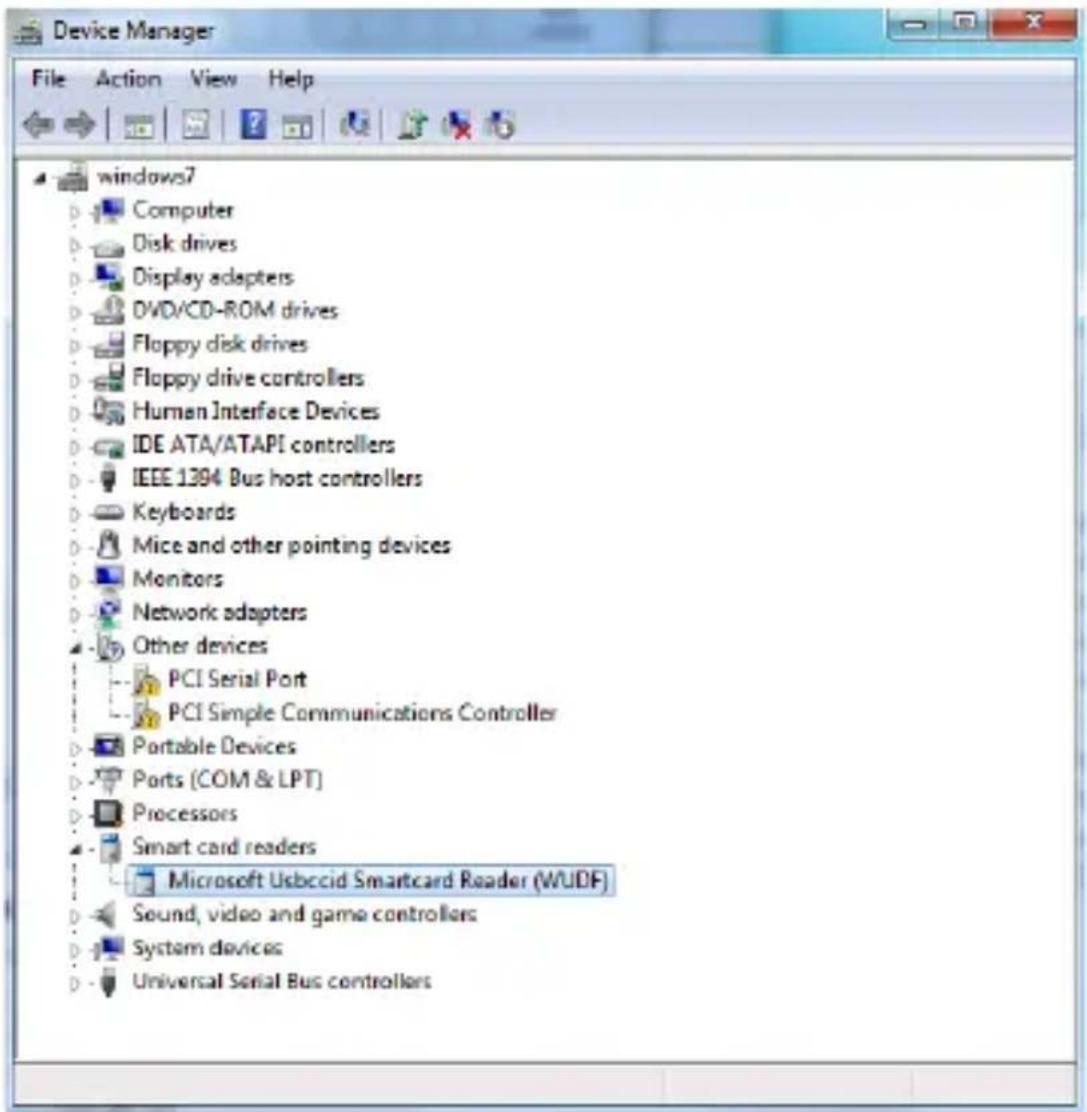
To configure the setting in Windows 7: get into Device manager → double click on “eHome Infrared Receiver” → Driver → Update Driver → Browse my computer for driver software → Let me pick from a list of device drivers on my computer.
In the next Window choose: “USB Composite Device” and click on “Next”. As the final step, it shows “Windows has successfully updated your driver software” and click on “Close”.
After this process, go back to Device manager, our card reader already appears as "Microsoft Usbccid Smartcard Reader"
5.1.2. SIM Editor:
With “SIM Editor” program, you can read and edit data of your SIM card of mobile phone comfortably from any PC (for editing agenda, SMS and make backup of agenda).
Once installed this program, the icon “SimEdit” will appear in your desktop, to use it, you should connect the card reader with your PC and insert your SIM card in the correspondent slot of card reader, then double click the icon to open the program.
The PIN number which associated with your SIM card will be required to continue with the program.
Click on the button "Si" and introduce your PIN number.
Once introduced correctly your PIN number, you can start to enjoy “SIM Editor” to edit your data, SMS and make backup of your agenda with the useful and intuitive menu of this program.
5.2. MAC OS X 10.3 OR LATER VERSIONS.
Please download and install "MAC OS X driver" from our website:
www.soyntec.com
5.3. LINUX.
Please copy the file “libccid_Info.plist” from folder “Linux driver”, which is included inside the CD or you can download and copy this file from our website: www.soyntec.com, then paste this file in the folder “etc” in your Linux to replace the current one, as the last step, restart your computer.
6. SPECIAL GUARANTEE
Soyntec ® guarantees that your product does not have any material, design or manufacture defect and provides 36 month guarantee.
Guarantee procedure
Visit the Support section at http://support.soyntec.com and select your product to view the FAQ (Frequently Asked Questions). The solution to your problem is very likely to have been already published there. You will also be able to download user manuals, user guides, drivers and updates.
If you can not find an appropriate solution in the Support section, you may send us your enquiry or warranty service request using this mail: supoort@soyntec.co.uk
You may also reach by phone at the warranty service number 902 294 294. Make sure to have your purchase receipt or invoice and the product's serial number at hand when you call.
▶ Alternatively, you may prefer to contact the distributor from which you purchased the product, presenting them the receipt or invoice. Specifications are subject to change without notice.
© 2010 by Soyntec. All rights reserved.
Trademarks
All company, brand and product names are trademarks or registered trademarks of their respective companies.
CE
AGREEMENT DECLARATION
We declare under our own exclusive responsibility the product agreement:
Soyntec Nexoos™ 630 Smart All in 1, Silver Dots Manufacturing country: China
Which concern this agreement, with the norm(s) or other(s) formative(s) document(s).
In accord with the disposition of the Directive 93/68/CEE, from the European Parliament and the Counsel from 22nd July 1993, transposed to the Spanish legislation through the Real Decree 1950/1995, from 1st December 1995.
SOYNTEC


- NEXOOS 630
- SMART ALL IN 1 SILVER DOTS
- CARD READER ALL IN 1
- INTRODUCTION
- FEATURES
- PRODUCT CONTENTS
- COMPATIBLE WITH
- INSTALLATION
- WINDOWS 2000, ME, XP, VISTA, WINDOWS 7
- WINDOWS DRIVER / SIM EDITOR
- IMPORTANT NOTE FOR OPERATION SYSTEM WINDOWS 7
- SIM EDITOR
- MAC OS X 10.3 OR LATER VERSIONS
- LINUX
- SPECIAL GUARANTEE
- GUARANTEE PROCEDURE
- TRADEMARKS
- CE
- AGREEMENT DECLARATION
- SOYNTEC NEXOOS™ 630 SMART ALL IN 1, SILVER DOTS MANUFACTURING COUNTRY: CHINA
- SOYNTEC
Brand : Soyntec
Model : Nexoos 630
Category : Memory reader