m103 - Receiver Grace Design - Free user manual and instructions
Find the device manual for free m103 Grace Design in PDF.


User questions about m103 Grace Design
0 question about this device. Answer the ones you know or ask your own.
Ask a new question about this device
Download the instructions for your Receiver in PDF format for free! Find your manual m103 - Grace Design and take your electronic device back in hand. On this page are published all the documents necessary for the use of your device. m103 by Grace Design.
USER MANUAL m103 Grace Design
natural_image
Close-up of a black audio workstation with control knobs and buttons, enclosed in a circular frame (no readable text or symbols)M103
channel strip
owner's manual Rev A
all contents © Grace Design/ Lunatec LLC
info@gracedesign.com / www.gracedesign.com
2434 30th Street, Boulder, CO 80301 USA
tel 303.443.7454 fax 303.444.4634
Welcome and thanks for purchasing the Grace Design m103 channel strip. We build all of our products to be completely reliable and easy to use, so you can concentrate on making great recordings, not struggling with complicated equipment or difficult product manuals. While you will find the m103 is completely straightforward to use, we do ask that you spend a little time familiarizing yourself with this product manual to help avoid any common user difficulties.
In the event that you do encounter any technical difficulties with this or any of our products, feel free to call us at 303-443-7454. Our office hours are 9 to 5, Monday through Friday, MST, or you may email any technical questions to: info@gracedesign.com.
Also, please check out our web support page listed below for the latest Grace Design product information, owners manuals and technical documents.
Grace Design has been building audiophile-quality products for the recording industry for over 15 years. The technology in the m103 is the result of extensive listening, field-testing and careful refinement. Your new m103 channel strip represents a combination of absolutely pristine audio performance, robust mechanical construction and bombproof reliability at a reasonable price. Regardless of what audio sources you plan to record, your m103 will faithfully serve as a versatile link between your microphone or instrument and recording device.
We sincerely hope our products help you achieve a new level of excellence in your work!

Table of Contents
| Important Safety Information 3 | |
| Safety Marking Symbols 3 | |
| Features 4 | |
| Front Panel Controls / Features 4 | |
| Rearpanel Connections 6 | |
| Installing and Connecting the m103 7 | |
| Operating the EQ Section 8 | |
| Operating the COMP Section 9 | |
| Metering 11 | |
| Setting the TRIM control 11 | |
| Block Diagram 12 | |
| Wiring Diagram 13 | |
| Specifications | 14 |
| Warranty Information | 16 |
| Manual Revisions | 17 |
Important Safety Information
GENERAL
Indoor use only•
Ordinary Protection: This equipment should not be exposed to dripping or splashing.
Avoid placing objects filled with liquids, such as vases or glasses, on this equipment.
Class I Equipment (grounded type)•
Electrical rating: 100-240V\~50-60Hz 14W•
Mains supply voltage fluctuations are not to exceed ±10% of the nominal supply voltage.
Pollution Degree 2•
Installation (Overvoltage) Category II for transient overvoltages.
Maximum Relative Humidity: <80%
Operation temperature range: 10 °C to 40 °C
Storage and transportation temperature range -40^ to 70^ .
Maximum altitude: 3000m (9843 ft)
Equipment suitable for continuous operation•
Weight: preamplifier - 2.05kg (4.5lbs)
Safety Marking Symbols

CAUTION: READ ACCOMPANYING DOCUMENTS
This symbol, located on the equipment and in this manual, refers to important instructions. Read this manual thoroughly before operating this equipment.

WARNING: ELECTRICAL SHOCK HAZARD
This symbol, located on the equipment and in this manual, indicates the potential for electrical shock hazard.
SERVICE INFORMATION
The Grace Design m103 contains no user serviceable components. Contact Grace Design for repair and upgrade information. In the event that your Grace Design m103 needs to be returned to the factory, contact us for a return authorization number.
Features
• Fast and musical transimpedance microphone preamplifier architecture
• High fidelity audio path with 0.5% precision metal film resistors
• 12 position gold plated rotary gain switch
• High performance output line driver amplifiers
- Ribbon mic mode (also great for dynamic mics)- Relay bypass of phantom power decoupling capacitors, increased input impedance, and 48V lockout
• 3-band precision EQ, fully parametric mid band, peak and shelf mode for hi and low bands
• Optical Compressor
• 10 segment Gain Reduction and Output VU meters
• Mic Amp direct output
• EQ/COMP section line input
• Laser-etched black anodized frontpanel
• Sealed gold contact relays for all signal switching
• Built in universal power supply
• Five year transferable warranty on parts and labor
• Made in the USA
Front Panel Controls / Features

-
1/4 inch TRS instrument HI-Z input - Designed to accommodate a wide variety of high impedance input sources, making the m103 an excellent choice as a DI instrument input.
-
PEAK INDICATOR - The LED peak indicator, which monitors the signal at the output of the mic preamplifier, illuminates green at -10dBu and red at +16dB (12dB before clipping). Located between the HI-Z input and GAIN controls.
-
GAIN CONTROL - The gain control has 12 positions and adjusts the voltage gain on the microphone input from 10dB to 65dB in 5dB steps. When using the instrument input, the gain range is -10dB to 45dB in 5dB steps.
-
48V PHANTOM POWER - This switch provides 48 volts to power condenser microphones. The phantom power switch (labeled 48V) connects the +48V power supply to pins 2 and 3 on the XLR input connector. LED indicator illuminates red when active or phantom power on or is present from another source (mixer, interface).
-
RIBBON SWITCH - This switch activates ribbon mic mode (also great for dynamic mics). This mode activates the relay bypass of phantom power decoupling capacitors, increases microphone input impedance, and locks out 48V phantom power to prevent accidental damage to delicate ribbon microphones. LED indicator illuminates white when active.
-
75Hz HIGH PASS FILTER — Sometimes referred to as a bass roll-off, the high pass filter rolls off at 75Hz. This 12dB/
octave filter employs a transitional Thompson - Butterworth response for the best combination of passband flatness and time domain response. LED indicator illuminates amber when active.
-
MIC/LINE switch - This switch selects which input feeds the EQ/COMP section - either the microphone preamplifier input (MIC IN from the rear panel XLR or the front panel HI-Z TRS input), or the balanced XLR LINE IN on the rear panel. The LINE IN input is after the mic preamp section and is the direct input to the EQ/COMP section. In either scenario, the mic preamplifier is always active.
-
LOW GAIN (EQ section) - This knob controls the amount of cut or boost applied to the selected low frequency, from -12dB to +12dB.
LOW FREQ - 9. This knob selects the frequency of the low band EQ, from 20 Hz to 750 Hz.
-
LOW frequency EQ type switch - This switch selects the low EQ response mode between shelving > and peak .
-
MID GAIN (EQ section) - This knob controls the amount of cut or boost applied to the selected mid frequency, from -12dB to +12dB.
MID FREQ - 12. This knob selects the frequency of the mid band EQ, from .5kHz to 4kHz.
-
MID Q - This knob controls width / sharpness of the mid EQ control, with a range from .5 (the widest, with the most effect on adjacent frequencies) to 5 (the sharpest, with the least effect on adjacent frequencies).
-
HIGH GAIN This knob controls the amount of cut or boost applied to the selected high frequency, from -12dB to +12dB.
-
HIGH FREQ - This knob selects the frequency of the high band EQ, from 3kHz to 20kHz.
-
HIGH frequency EQ type switch - This switch selects the high EQ response mode between shelving > and peak
-
EQ IN SWITCH - This switch activates the EQ circuit. The LED above the switch illuminates when the EQ is active, turns off when deactivated. This switch controls a gold contact relay.
-
EQ/COMP Peak LED - displays peaks within 6dB of internal clipping in the line section.
-
EQ>COMP / COMP>EQ - This switch selects the order of the EQ and Compressor circuits.
-
TRESHOLD - This knob sets the minimum level at which the compressor circuit is activated, with a range of +15dB to -15dB.
-
ATTACK (ms) - This knob sets how quickly (or slowly) the compressor circuit attenuates the incoming signal.
-
RELEASE (sec) - This knob sets how quickly (or slowly) the compressor circuit releases the attenuation of the incoming signal.
-
RATIO - The ratio control determines the input/output ratio for signals above the threshold level. Higher ratios result
in a more aggressive gain reduction while lower ratios will result in more gentle gain reduction.
- COMP IN SWITCH - This switch activates the COMPRESSOR circuit. The LED above the switch illuminates when the COMP is active, turns off when deactivated. This switch controls a gold contact relay.
- LINK (SC) - This switch is to activate either a) linking of two m103's compressor's side chain circuits – for use in stereo compression scenarios, or b) to activate external side chain control of the compressor for ducking, de-essing etc...
- GR METER - This 10 segment meter displays the amount of gain reduction being applied to a signal in the compression circuit.
- VU METER - This 10 segment meter displays the VU (volume units) at the m103's output. 0VU=+4dBu.
- TRIM CONTROL - The trim control provides 20dB of variable level control at the output of the m103, from -10dB to +10dB. This control is useful for small level adjustments during tracking or for compression gain makeup.
- POWER STANDBY SWITCH - The power switch activates the power supply circuitry. When in the up position, the green POWER LED will illuminate. When in the down position the m103 is in standby mode. To completely disconnect power from the m103 remove the AC power cord.
Rearpanel Connections

- MICROPHONE INPUT - The XLR microphone input connection, wired with pin 2 positive, pin 3 negative and pin 1 ground. 48V phantom power, when used, is supplied on pins 2 and 3.
- MIC PRE OUT - The balanced XLR direct output of the mic preamp section, before the EQ/COMP section. The connector is wired with pin 2 positive, pin 3 negative and pin 1 ground.
- UNBALANCED MIC PRE OUT -The unbalanced 1/4" direct output of the mic pre section, before the EQ/COMP section. The connector is wired with tip positive, sleeve ground.
- LINE INPUT - The balanced XLR input of the EQ/COMP section, after the mic preamp. This connector is wired with pin 2 positive, pin 3 negative and pin 1 ground.
- MAIN OUT XLR- The balanced XLR output of the entire m103, including the mic preamp (if selected), EQ and COMP sections. The connector is wired with pin 2 positive, pin 3 negative and pin 1 ground.
- MAIN OUT TRS - The balanced TRS output of the entire m103, including the mic preamp (if selected), EQ and COMP sections. The connector is wired with tip positive, ring negative, and sleeve ground.
- UNBALANCED MAIN OUT - The unbalanced 1/4" output of the entire m103, including the mic preamp (if selected), EQ
and COMP sections. The connector is wired TIP positive, SLEEVE ground.
-
STEREO LINK/ SIDECHAIN - This switch selects the mode of the LINK IN jack between stereo link mode and sidechain.
-
LINK IN - This 1/4" input accepts either the connection from another m103 for linking compressor controls for stereo use, or an external side chain signal source to control the compressor for ducking or de-essing applications. In sidechain mode, the connection is unbalanced with only the tip connected, so simply use an unbalanced 1/4" connector. Link mode requires a TRS 1/4" inch cable. The switch to the right of the jack selects between the two modes, while the LINK(SC) frontpanel switch activates the circuit in whichever mode is selected.
10.

POWER SUPPLY -A universal input AC supply provides mains power to the m103. A standard three prong AC power cable is included with the m103. For safety, the power supply cord must be connected to a grounded outlet. The Disconnect Device for the m103 is the Mains plug or the Appliance Coupler on the power supply of the Disconnect Device must remain accessible and operable.
Installing and Connecting the mIO3
UNPACKING
Your m103 box includes the m103, an AC power cable and a bag with this owner's manual, a warranty card, a set of four #10-32 rack screws with washers, and a set of 4 adhesive rubber feet. If any of these items are missing, let your dealer or us know and we will expedite the missing item to you.
We strongly encourage you to save the box supplied with your m103. It is specially designed to properly protect its valuable contents, and in the unlikely event that you need to return it for service, only these OEM shipping materials will ensure their safe return to our factory.
Also, we strongly urge you to register your unit with Grace Design. We provide a 5 year warranty on all of our products, but if you don't register your system it's hard for us to help you, if and when help becomes necessary. So please take a few minutes to complete the enclosed warranty registration card and mail it in, or simply go to the warranty registration form on our web site. Thank you!
INSTALLING
The m103 can be installed in a standard 19" equipment rack or sit on any flat surface. When installing it in a rack, make sure to use the supplied screws and washers to prevent any unwanted scratching or marring of the rack ears. The m103 does not run hot and requires no ventilation, so it can be installed with equipment directly above and below it. If leaving to sit on your desktop or monitor shelf, install the 4 rubber feet to the bottom of the chassis to prevent scratching your chassis and/or surface.
CONNECTING
The m103 offers a great degree of flexibility in how it can be integrated into your recording setup. The most basic setup is a microphone connected to the XLR MIC IN, and the XLR MAIN OUT connected to your mixer or recording device. Or a line level signal source patched directly into the LINE IN to access the EQ/COMP section without the signal going through the mic preamplifier. Beyond that, there is a plethora of possible connecting and routing scenarios. For example:
- Send the MIC PRE OUT to a separate track to record a safety of the performance with no EQ or compression.
- Use the MIC PRE OUT and the LINE IN as insert points for another piece of outboard gear, in which case the frontpanel LINE/MIC switch would need to be switched to LINE.
Use the mic preamplifier and EQ/COMP section independently on different sources. - Using the EQ/COMP section with a line level signal from a recorder or workstation that is recorded at a low level, you may not be able to get a proper threshold setting on the compressor circuit. If this the case, feel free to use the mic preamp section to introduce some extra gain to your signal by inserting your line level signal into the MIC IN
input (select mic on the frontpanel mic/line switch). This circuit is totally transparent and is perfectly suited to this application.
All outputs are active all the time, so you have the possibility of up to 5 live outputs if your source is MIC IN, or 3 live outputs if your source is LINE IN.
Operating Microphone Preamplifier
SETTING THE MIC PREAMPLIFIER GAIN
If you are using the m103 with a microphone signal, it is recommended that you start with the EQ and COMP 1. sections turned off. This will simplify the process of setting proper operating level of the mic preamplifier.
- Turn the GAIN control fully counter-clockwise, set the TRIM control at 12 o'clock (no boost or cut) and check that the +48V phantom power is off.
Connect the microphone to the m103 mic input and then turn on the phantom power switch on if required. When 3, sending a signal to a recorder that has fixed input levels, simply increase the gain until the optimum recording level is reached.
When sending a signal to a recorder with a variable input, use the following procedure: Turn the gain control fully 4. counter-clockwise, set the trim control at 12 O'clock. Set the record level control on the recorder to 12 o'clock or midway between minimum and maximum. With the sound source present, turn the preamplifier gain control clockwise until the peak LED begins flashing red, then reduce the gain until the red stops flashing. NOTE: since red indicates a peak level which is 10dB before clipping, it is OK for it to come on occasionally during recording. Adjust the recorder input control for the optimum recording level.
USING THE TRIM CONTROL
The trim control can be used for fine output level adjustment as well as for level riding during recording or gain makeup after the compressor section. The trim control can add (or subtract) an additional 10dB of gain for a total maximum preamplifier gain of 75dB. If the trim control is not needed for riding gain, providing extra gain boost or makeup gain from the compressor, then it should be left at zero (12 o'clock).
USING RIBBON MIC MODE
Activating the ribbon switch does three things: 48V phantom power is locked out to prevent potential damage to ribbon microphones, phantom decoupling caps are bypassed, and the impedance of the mic input is raised from 8.1kΩ to 20kΩ. The m103 has ample available gain, sufficient for even the most demanding low-level recording scenarios with ribbon microphones.
USING THE HPF
The high pass filter, sometimes referred to as a bass roll-off, starts at 75Hz. This 12dB/octave filter employs a transitional Thompson-Butterworth response for the best combination of passband flatness and time domain response. Most common uses for this are in situations where low-end rumble from mechanical sources or wind are present, to reduce excessive proximity effect, or to simply help reign in excessive bass during recording.
Operating the EQ Section
The m103 equalizer section has 3 bands, with a fully parametric mid section and sweepable low and high sections. This equalizer has been crafted to be very powerful and versatile with no compromise to the transparency and detail of the signal. Because of its high level of precision and accuracy, you may find yourself being able to hear a much smaller amount of cut or boost than you would with other EQ designs.
Both the low and high sections can be operated in either peak or shelf mode. Peak mode, as indicated by the bell shaped icon, is used to cut or boost a specific frequency. Shelf mode, as indicated by the shelf icon, boosts or cuts all of the frequencies above (for the HI band) or below (for the LOW band) the frequency selected.
While there is no wrong way to set an equalizer, there are some general guidelines that may help you get the results you are looking for a little faster.
CONTROLLING BASS FREQUENCIES
In addition to the low frequency controls of the m103, we have included the 75Hz HPF on the mic preamp section. If you need to reduce rumble, wind noise or excessive proximity effect, its recommended that you start with this control, rather that putting the EQ to work at this job.
Again, the m103 EQ is very precise and powerful, which is well illustrated by beginning to shape the tone of an instrument's bottom range. If you need to add some girth to a bass guitar, you should be able to readily hear 3dB of boost in the 50 to 100Hz range. Pay close attention not to add low frequencies at the amount that they may overtake the balance of the instrument or the mix (unless that's what you intend to do – there is no wrong way!)
CONTROLLING MID FREQUENCIES
The MID band of the m103 is fully parametric, which means that not only can you set the exact frequency you wish to adjust, but you can control the Q factor as well. Q is a measure of the 'sharpness' of the boost or cut at the selected frequency. A lower Q setting (knob turned to the left) means the boost or cut will have a greater effect on the adjacent bands. Higher Q setting means less effect on adjacent bands, providing a more 'surgical' cut or boost of the selected frequency.
PEAK INDICATOR
This red LED illuminates when the level in the EQ reaches 6dB before internal clipping. This can happen in conditions when too much gain has been added to the signal in the EQ/COMP section. If this happens it's a good idea to take an inventory of where your eq points are set, and how much gain you are adding. A good rule of thumb is that subtractive eq should precede additive eq. In other words, cutting other frequencies can help highlight the frequencies you wish to enhance without building up excessive gain in your signal path. Note that this LED is before the output trim control.
OTHER EQ RECOMMENDATIONS
If you don't have much experience using an equalizer, there is a wealth of information on the Internet to be had. It is very helpful to at least know the basics of equalizing the most common instruments, and those basics will lead to a deeper understanding of not only how an EQ works, but how the instrument works and what it takes to get it to sound right for your particular recording. Again, there is no wrong way to do it. Changing the tone of an instrument is ultimately a subjective thing, but the more you experiment the more you will understand and ultimately, the better your recordings will sound.
Operating the COMP Section
The compressor circuit is based on an optical attenuator - the purest, high fidelity gain control mechanism available. It provides gentle to fairly heavy compression, while remaining neutral and transparent. This compressor is not designed for "brick wall" limiting.
Similar to an eq, dynamic range compression is a subjective tool – there is no wrong way to use it. However, using a compressor in a way that produces the best results can be complicated, and again, the more you know, the better it will work. If you are unsure about how a compressor works, we highly recommend some reading:
http://en.wikipedia.org/wiki/Dynamic\_range\_compression
It will pay greatly to understand the mechanism of dynamic range compression BEFORE you begin to record keeper tracks with the compressor on.
SETTING THE THRESHOLD
The threshold is the point at which the compressor begins to attenuate the incoming signal. This control can also be loosely thought of as compression amount, as a high threshold setting (counterclockwise) will result in only the dynamically highest passages of signal to be attenuated, while everything below that threshold is unaffected by the circuit. Conversely, a lower threshold means more of the signal at the input of the circuit will be attenuated resulting in more compression.
Begin with the knob fully counterclockwise and the compressor switched ON, then slowly begin turning clockwise until you begin to compress the signal. You will hear the signal compress, and you will begin to see the GR meter light up. The lower the threshold setting, the more the incoming signal will be attenuated and the more lights will light up on the GR meter.
SETTING THE ATTACK RATE
The rate at which you want the compressor to start the attenuation of the signal (attack phase) depends on the character, or envelope, of the signal entering the compressor. If the signal has sharp or fast attack (percussive sounds, snare drum) that you wish to attenuate, select a fast attack rate to sense the initial impulse of the signal and attenuate it in time. If you want the compressor to react slower and not attenuate the initial impulse of the signal, select a longer attack time. Using a slower attack time may be more appropriate with signals with a slower, more gradual envelope (strings, woodwinds).
SETTING THE RELEASE RATE
The rate at which you want the circuit to release its attenuation of the signal (release phase) is set with the release control. This is the functional opposite of the attack control. If the signal has a shorter decay, it may be best to set a shorter release time. A helpful approach to setting the attack and release time may be to consider the basic pulse of the signal you're compressing. To avoid the typical artifact known as 'pumping', where you can clearly hear the compressor working, it is important to set the attack and release times to match the signal to where they are moving naturally with the dynamic fluctuations of the signal.
SETTING THE RATIO
The compressor's ratio control is used to set input/output ratio of signals above the threshold. For instance, a setting of 3:1 means that if the incoming signal is 3dB over the threshold level, that signal will leave the compressor around 1dB over the threshold level. The highest setting of this control is 12:1, meaning that signals far over the threshold setting are reduced by a much higher ratio – more compression. So lower ratio settings mean lighter compression amounts. We recommend starting with lower ratios and working upward as necessary.
SIDECHAIN CONTROL
Normally, the compressor's sidechain circuit uses the internal audio signal to trigger its response. But in sidechain mode, the sidechain circuit uses an external signal input (from the LINK IN jack on the rearpanel) to determine how the compressor responds. Examples of using an external sidechain signal include ducking and de-essing.
Ducking is an effect used to automatically reduce the level of one signal when another signal is present. Think of a DJ's microphone automatically reducing the level of the music when he or she is speaking. It involves routing a separate signal from a microphone (or any other source) into the sidechain input of the m103. This signal is what the compressor reacts to and thereby would typically reduce (or duck) the level of the main signal in the m103. You would use the compressor controls to determine the amount, rate and duration that incoming signal ducks the main signal.
De-essing is used to decrease excessive sibilant ('s' or 'sh') sounds in a voice. This is accomplished by inserting a copy of the signal into the sidechain input which has been equalized (by an external equalizer) to emphasize the frequency where the sibilance lies (usually 6-9k). This inserted signal makes the compressor react to and thereby reduce only the places in the signal where troublesome sibilance lies.
There are many other functional and creative ways to use sidechain input, more than can be illustrated here. Again, the more you know, the more powerful it can be.
GR METER
This meter shows the amount of gain reduction being applied by the compressor. The LED's illuminate right to left, with one LED representing 1dB of gain reduction and ten LED's representing 10dB's of gain reduction or more. Selecting a lower threshold setting will activate the compressor with relatively lower signal levels and will be reflected on the GR meter as more gain reduction. Selecting a faster ATTACK time will show on the meter as the LED's turning on faster, selecting a slower RELEASE will show on the GR meter as the LED's staying lit longer. There is no correct setting for this meter – it is simply displaying how the compressor is working. If all the lights are on, you are probably SQUASHING IT! If only the first three are lighting up, you are applying gentle compression. The meter is a good place to start in getting the proper setting, but it doesn't necessarily mean that it sounds right. As always, let your ears be your guide.
LINK CONTROL
This feature is used to link two m103 compressors together for stereo bus compression. In this application, only the compressors are linked and not the eq's. To use this feature, simply run a standard 1/4" TRS cable between two m103s connected to the link/sidechain jack. Both units' LINK switches must be on and both rearpanel sidechain / link switches must be set to LINK. In this mode, the sidechain signals of both units are summed together into one. Neither unit is the master, rather, changes made to either compressor will effect the summed sidechain signals. So its best to keep the two units set basically the same.
However, the RATIO control setting isn't summed and remains independent. So this setting must be set visually with stereo program meters and/ or by ear.
CHOSING EQ>COMP or COMP>EQ
Again another subjective option, but with some rules of thumb that apply. There may be an instance where it is preferable to compress before you EQ or visa versa. Perhaps it makes sense to have the compressor only working to compress an already EQ'd signal. This may be the case if your source has been radically EQ'd, with dramatic cuts, so that there is no point in having the compressor section work to compress a lot of signal that will be cut. Or conversely, if you have a lot of boost introduced into the signal, perhaps it works better to have the dynamics processed prior to EQ. We recommend that you experiment as much as can. And with this feature especially, let you ears be your guide.
Metering
The m103 has 3 places to monitor level status throughout its signal path. It is important to understand what each indicator is doing and also how it is interacting with level status down stream.
The first is the mic preamplifier PEAK LED, positioned between the HI-Z input and the GAIN control. This monitors the 1. signal at the output of the preamplifier. It illuminates green at -10dBu and red at +16dBu (12dB before clipping). This is the best way to see how your microphone preamplifier is working at a glance – if the red is flashing periodically, you're probably not yet clipping the mic preamp. If it is predominately flashing RED, then you may be close to clipping and should reduce you mic preamp gain.
Next is the the PEAK LED, which is used to monitor any peaks within 6dB of internal clipping in the line section (EQ/2. COMP). If this illuminates, take an inventory of where your eq points are set, and how much gain you are adding. If there is too much boost in the EQ, this may cause the line section to peak. Also, this may be affected by the gain setting of the microphone preamplifier upstream. If peaks are occurring without any gain boost in the EQ, then you may need to lower your mic preamplifier gain.
Lastly is the VU OUTPUT level meter, which is used to monitor the level at the output of the m103. This meter is 3. designed to work like an analog VU meter. Analog VU meters have a reaction time which is effected by physical inertia, which makes them slower than much of the transient peak information in a music signal. This means that an analog VU meter is not good at monitoring peaks, but at displaying the average volume (VU= volume units) of the signal. So we have tailored the response of our LED VU meter to act this way. While the actual headroom of the m103 is +28dBu, the VU meter only displays signal activity between -20 and and +3dBu. So in other words, +3 on the VU meter DOES NOT denote a peak. the VU meter on the m103 is there to show average volume of your signal. Actual peaks should be monitored downstream at your converter, interface or workstation.
Setting the TRIM control
The TRIM control provides 20dB of variable level control at the output of the m103. After setting correct microphone preamplifier levels and ensuring that the line section (EQ/COMP) is not experiencing any peaks, you can set the over all output of the m103 with the TRIM control. Use the TRIM to properly match to the input of your converter, interface or recorder. Also, your signal level may have been reduced by heavy compression settings, so the TRIM control can also be used to provide makup gain.
Block Diagram
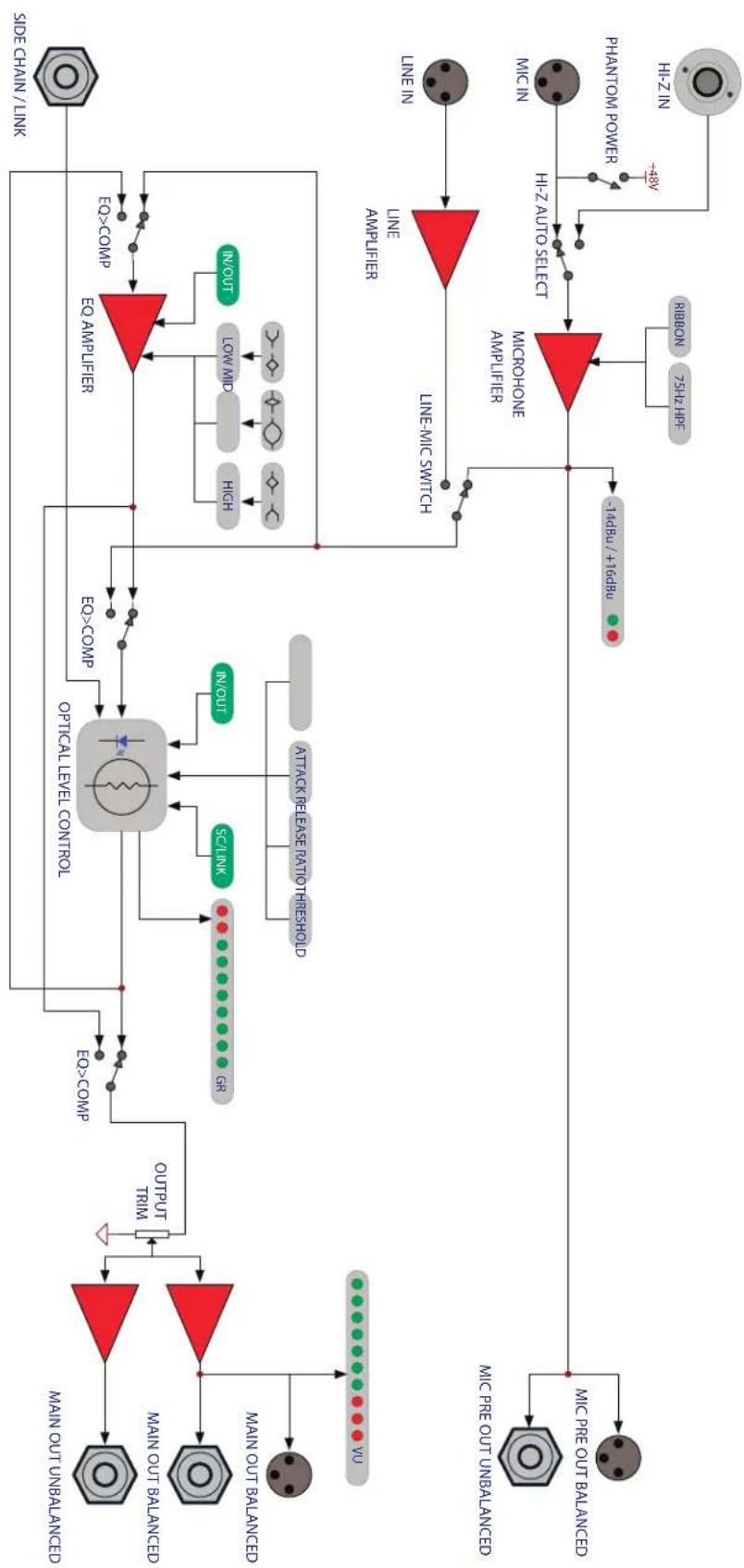
flowchart
graph TD
    A["Main Signal"] --> B["Main Out Unbalanced"]
    A --> C["Main Out Balanced"]
    A --> D["Main Out Balanced"]
    B --> E["Output Trim"]
    C --> E
    D --> E
    E --> F["Optical Level Control"]
    F --> G["EO>COMP"]
    F --> H["EO>COMP"]
    G --> I["SC/LINK"]
    H --> J["N/OUT"]
    I --> K["ATTACK RELEASE RATIO RESHOLD"]
    J --> K
    K --> L["Line-MIC SWITCH"]
    L --> M["Microphone Amplifier"]
    M --> N["HI-Z AUTO SELECT"]
    N --> O["RIBBON 75HZ HPF"]
    O --> P["+48V"]
    P --> Q["PHANTOM POWER"]
    Q --> R["HI-Z IN"]
    R --> S["Side Chain / Link"]
    T["Main Out Unbalanced"] --> U["Main Out Balanced"]
    T --> V["Main Out Balanced"]
    T --> W["Main Out Balanced"]
    T --> X["Main Out Balanced"]
    T --> Y["Main Out Balanced"]
    T --> Z["Main Out Balanced"]
    T --> AA["Main Out Balanced"]
    T --> AB["Main Out Balanced"]
    T --> AC["Main Out Balanced"]
    T --> AD["Main Out Balanced"]
    T --> AE["Main Out Balanced"]
    T --> AF["Main Out Balanced"]
    T --> AG["Main Out Balanced"]
    T --> AH["Main Out Balanced"]
    T --> AI["Main Out Balanced"]
    T --> AJ["Main Out Balanced"]
    T --> AK["Main Out Balanced"]
    T --> AL["Main Out Balanced"]
    T --> AM["Main Out Balanced"]
    T --> AN["Main Out Balanced"]
    T --> AO["Main Out Balanced"]
    T --> AP["Main Out Balanced"]
    T --> AQ["Main Out Balanced"]
Wiring Diagram
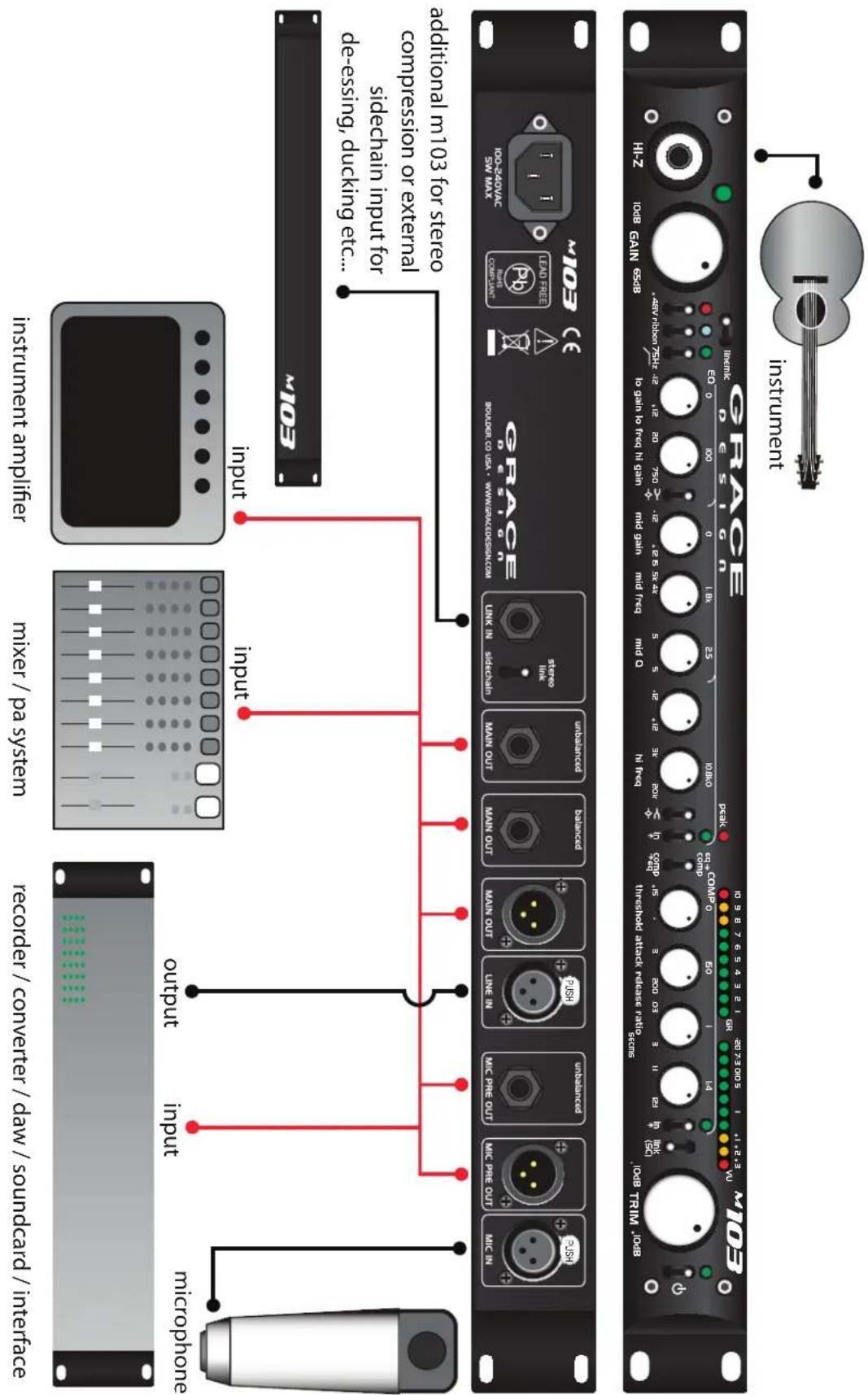
Specifications
| MIC AMP SECTION MEASURED AT MIC AMP OUTPUT | |
| GAIN RANGE (5dB steps) | |
| Mic input 10-65dB | |
| Hi-Z input -10-45dB | |
| THD+N 1kHz, 22Hz-22kHz BW | |
| @ 20dB Gain +20dBu out <0.00085% | |
| @ 40dB Gain +20dBu out <0.0010% | |
| @ 60dB Gain +20dBu out <0.0050% | |
| INTERMODULATION DISTORTION | |
| @ 40dB Gain +20dBu out | |
| SMPTE/DIN 4:1 7kHz/50Hz <0.0020 | |
| NOISE - REFERRED TO INPUT @60dB Gain 22Hz-22kHz BW | |
| 50Ω source <-130dB | |
| 150Ω source <-128dB | |
| 600Ω source <-124dB | |
| CMRR @60dB Gain, 3.5Vcm | |
| 100Hz >60dB | |
| 1kHz >75dB | |
| 10kHz >65dB | |
| FREQUENCY RESPONSE | |
| Mic input @ 40dBm Gain -3dB 3.7Hz-140kHz | |
| Hi-Z input @ 20dB Gain -3dB 1.2Hz-112kHz | |
| IMPEDANCE | |
| Mic input 8.1kΩ | |
| Mic input, Ribbon mode | 20kΩ |
| Hi-Z input (unbalanced) | 2.5MΩ |
| Hi-Z input (balanced) | 5MΩ |
| Balanced Output | 300Ω |
| Unbalanced Output | 150Ω |
| PEAK LED METER | |
| Green threshold | -10dBu |
| Red threshold | +16dBu |
| MAXIMUM OUTPUT LEVEL | |
| 100k Ohm load, 0.1% THD | +28dBu |
| EQ/COMP SECTION | |
| GAIN RANGE | |
| Output Trim | -10 - +10dB |
| EQ: 3 Bands of 0-12dB Cut or Boost | |
| Low Frequency Range | 20Hz - 750Hz |
| Mid Frequency Range | 500Hz - 4kHz |
| Mid Frequency Q | 0.5 - 5 |
| High Frequency Range | 3kHz - 20kHz |
| Compressor - Inserts Pre or Post EQ | |
| Threshold Range -15 - +15 dBu | |
| Attack Range 3 - 200 ms | |
| Release Range 0.03 - 3 s | |
| Ratio Range 1:1 - 12:1 | |
| Gain Reduction 0 - 20dB | |
| THD+N 1kHz, 22Hz-22kHz BW | |
| @ 0dB Gain +20dBu out <0.002% | |
| INTERMODULATION DISTORTION | |
| @ 0dB Gain +20dBu out | |
| SMPTE/DIN 4:1 7kHz/50Hz <0.002% | |
| OUTPUT NOISE 22Hz-22kHz BW | |
| @0dB Gain <-78dB | |
| CMRR @0dB Gain, 3.5Vcm | |
| 100Hz >75dB | |
| 1kHz >75dB | |
| 10kHz >75dB | |
| FREQUENCY RESPONSE | |
| @0dB Gain -3dB 0.016Hz-150kHz | |
| IMPEDANCE | |
| Line In 24kΩ | |
| Main Out balanced | 350Ω |
| Main Out unbalanced | 150Ω |
| Link In - sidechain mode | 100kΩ |
| OTHER | |
| LEVEL METERS | |
| EQ Peak threshold | 6 dB below interstage clipping |
| Output Level VU Meter | 0dB VU = +4dBu output |
| Gain Reduction Meter | 0-10dB Gain Reduction |
| MAXIMUM OUTPUT LEVEL | |
| 100k Ohm load, 0.1% THD | +28dBu |
| WEIGHT and DIMENSIONS | |
| 4.5 lbs | H1.7" x W19" x D9.0* |
| 2.05 kg | H4.3cm x W48.3cm x D22.9cm |
| POWER CONSUMPTION | |
| 100-240VAC ~ 50-60Hz | 14 Watts Max |
Warranty Information
Grace Design warrants all of our products to be free of defective parts and workmanship for a period of five years. 1. This warranty period begins at the original date of purchase and is transferable to any person who may subsequently purchase the product during this time.
This warranty excludes the following conditions: normal wear and tear, misuse, customer negligence, accidental 2. damage, unauthorized repair or modification, cosmetic damage and damage incurred during shipment.
During the time of this warranty, Grace Design will repair or replace, at its option, any defective parts or repair 3. defective workmanship without charge, provided the customer has appropriate proof of purchase and that the product has its original factory serial number.
- In order for Grace Design to provide efficient and timely warranty service, it is important that you mail the completed warranty registration card enclosed with all of our products within 10 days of the original date of purchase. You may also register your product directly with Grace Design by telephone (303-443-7454 Monday-Friday 9:00am to 5:00pm MST), or you can register your product online at www.gracedesign.com.
This warranty is in lieu of all other warranties whether written, expressed, or implied, INCLUDING ANY WARRANTIES 5. OF MERCHANTABILITY OR FITNESS FOR A PARTICULAR PURPOSE.
In no event will Grace Design be liable for lost profits or any other incidental, consequential or Exemplary damages, 6. even if Grace Design is aware of the possibility of such damages. In no event will Grace Design's liability exceed the purchase price of the product
This warranty gives the customer specific legal rights. The customer may also have other rights, which vary from 7. state to state. Some states do not allow limitations on implied warranties or consequential damages, so some of the limitations of the above may not apply to a particular customer.
Manual Revisions
| RevisionPage | Change | Date | Initials | ||
| A all 03/01/2010 edg | |||||