
AIR FORCE AC912501, AIR FORCE AC912501 - Cordless vacuum ROWENTA - Free user manual and instructions
Find the device manual for free AIR FORCE AC912501, AIR FORCE AC912501 ROWENTA in PDF.


| Product type | Cordless vacuum cleaner |
| Brand | Rowenta |
| Model | Air Force AC912501 |
| Power source | Rechargeable Ni-MH battery (7.2V or 12V depending on version) |
| Charging time | 16 hours maximum (full charge) |
| Runtime | Variable depending on speed and accessories (not specified) |
| Dustbin capacity | Not specified |
| Filtration | Washable foam filter protecting the motor |
| Included accessories | Telescopic crevice tool, Delta mini suction head, additional foam filter, charger |
| Suction power | 2 adjustable speeds |
| Charge indicator | LED indicator on the handle |
| Maintenance | Regular cleaning of the foam filter with soapy water (drying 12 hours minimum) |
| Battery replacement | Only by a professional repairer (Rowenta Authorized Service Center) |
| Usage | Indoor only |
| Safety | Automatic shutoff when battery is depleted; do not use without foam filter |
| Warranty | Not specified |
Frequently Asked Questions - AIR FORCE AC912501, AIR FORCE AC912501 ROWENTA
User questions about AIR FORCE AC912501, AIR FORCE AC912501 ROWENTA
0 question about this device. Answer the ones you know or ask your own.
Ask a new question about this device
Download the instructions for your Cordless vacuum in PDF format for free! Find your manual AIR FORCE AC912501, AIR FORCE AC912501 - ROWENTA and take your electronic device back in hand. On this page are published all the documents necessary for the use of your device. AIR FORCE AC912501, AIR FORCE AC912501 by ROWENTA.
USER MANUAL AIR FORCE AC912501, AIR FORCE AC912501 ROWENTA
natural_image
Black Rowenta Air Force vacuum cleaner with clear glass handle and control panel (no visible text or symbols on body)17-11
902839
Français 1
English 5
Deutsch 9
Nederlands 13
Italiano 17
Español 21
Português 25
Ελληνικά 29
Polski 33
Česky 37
Magyar 41
Slovenščina 45
Türkçe 49
Русский 55
Українська 59
Dansk 63
Suomi 67
Svenska 71
Norsk 75
Român 79
Slovensky 83
Hrvatski 87
Български език 91
中文 95
عربي 102
natural_image
Technical line drawing of a mechanical lock or latch component with labeled part 11 (no text or symbols beyond label)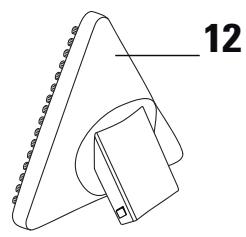
natural_image
Technical line drawing of a mechanical component with no visible text or symbols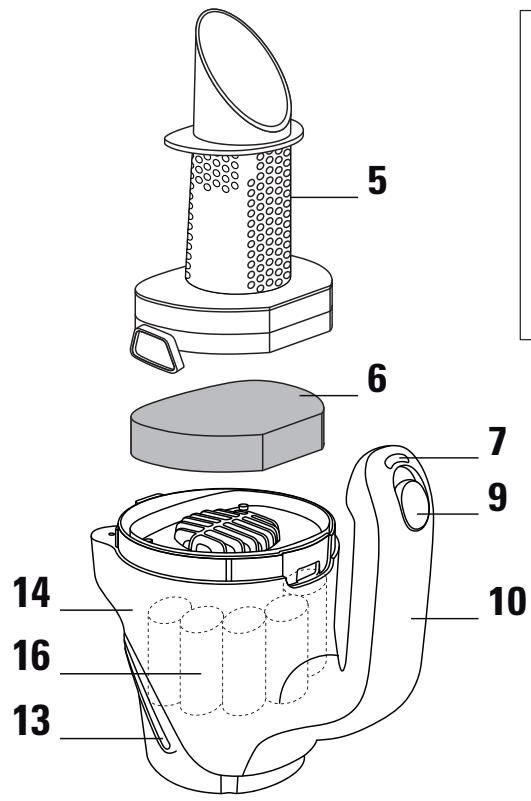
natural_image
Line drawing of a handheld device with labeled component (8), no text or symbols present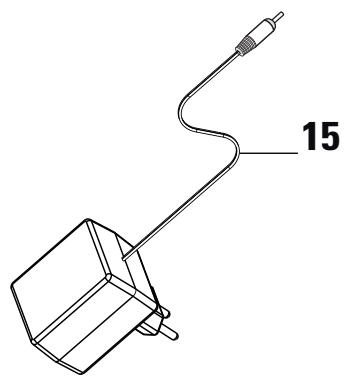
natural_image
Technical line drawing of a mechanical component with a labeled dimension (15), no text or symbols present.I • DESCRIPTION
natural_image
Line drawing of a medical device with attached electrical outlet (no text or symbols)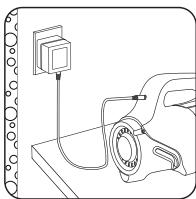
natural_image
Line drawing of a mechanical assembly with a mounted component and wiring (no text or symbols)natural_image
Illustration of a hand holding a pen with a blue arrow indicating direction (no text or symbols)natural_image
Illustration of a hand using a tool to cut a piece of paper or tape, with a blue arrow indicating the motion direction (no text or symbols present)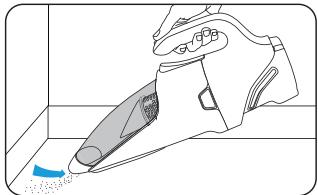
natural_image
Illustration of a hand washing a small object with a blue tool, no text or symbols presentnatural_image
Illustration of a hand adjusting a wristband with a blue arrow indicating rotation (no text or symbols)Position 0 : arrêt
Position 1 (Soft) : mobilier, surfaces fragiles
Position 2 (Booster) : carrelage, parquet, ...
natural_image
Illustration of a hand using a tool to adjust or install a small object, with no visible text or symbols.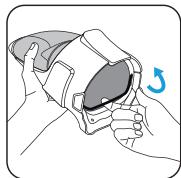
natural_image
Illustration of hands holding a VR headset with a blue arrow indicating rotation (no text or symbols)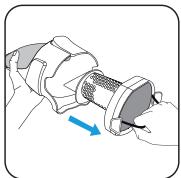
natural_image
Illustration of a hand holding a mechanical component with a blue arrow indicating direction (no text or symbols)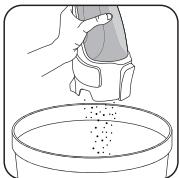
natural_image
Illustration of a hand pouring granular material into a petri dish (no text or symbols)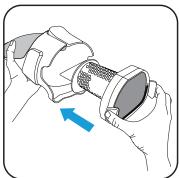
natural_image
Illustration of a hand holding a mechanical component with a blue arrow indicating direction (no text or symbols)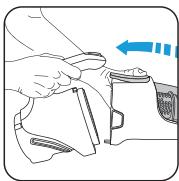
natural_image
Illustration of a hand holding a device with an arrow indicating direction (no text or symbols)natural_image
Illustration of a hand holding a mechanical component with a blue arrow indicating direction (no text or symbols)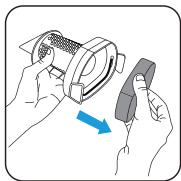
natural_image
Illustration of hands using a device to adjust a component (no text or symbols visible)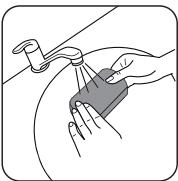
natural_image
Illustration of hands cleaning a surface with a tool (no text or symbols)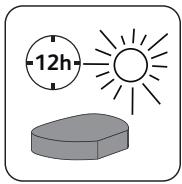
ATTENTION !
http://www.rowenta.be
I • DESCRIPTION
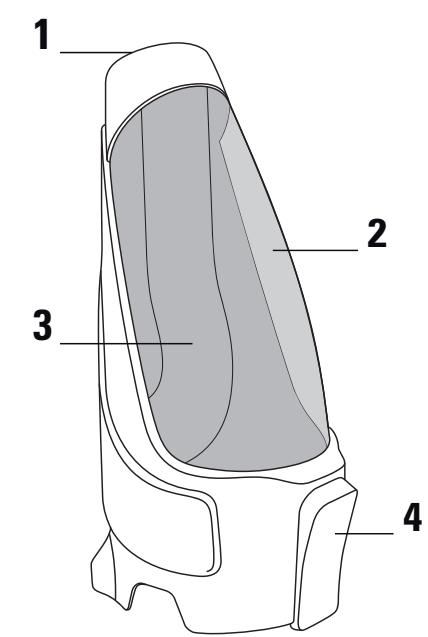
- Vacuum inlet
- Dust compartment
- Air intake vein
- Dust compartment unlocking button
- Separator
- Motor protection foam filter
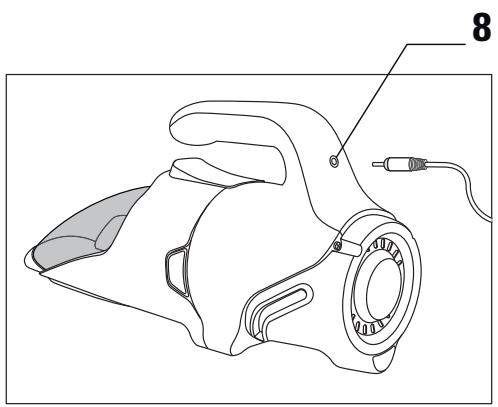
- Indicator light
- Charging orifice
- 2-speed On/Off slider
-
Handle
-
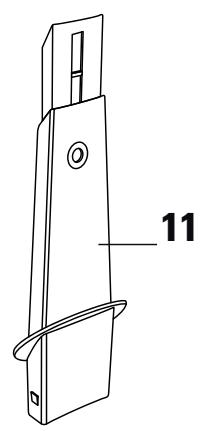
Telescopic crevice tool*
- Mini Delta section head*
- Air outlets
- Body of the appliance
- Recharger
- Batteries*: 7,2 volts: RS-AC3578 12 volts: RS-AC3579
II • CHARGING
IMPORTANT!
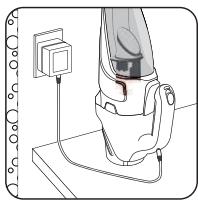
Before using for the first time, charge the appliance.
natural_image
Illustration of a horse's leg with a medical device attached, no text or symbols present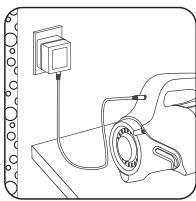
natural_image
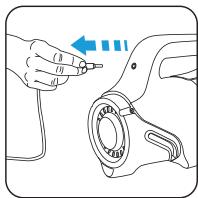
Line drawing of a mechanical device with a mounted power outlet and wiring (no text or symbols)- Plug the cord into the device. - Connect the charger to the mains. The indicator light on the handle tells you that the unit is charging.
The indicator light will turn off when the battery is fully charged (maximum 16H).
For optimal charging, you must leave the charger on until the indicator light goes off.
The appliance can remain permanently on charge without any risk. The charger might heat up slightly, which is a perfectly normal phenomenon. However, it is best to unplug the charger in case of prolonged absence (holidays, etc.).
III • USE
Use the right accessories.
natural_image
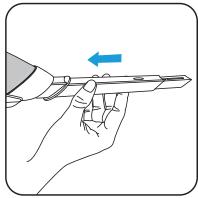
Illustration of a hand holding a pen with a blue arrow indicating direction (no text or symbols)For corners (baseboards, radiators...) and places that are hard to reach, put the telescopic crevice tool* in the vacuum inlet.
natural_image
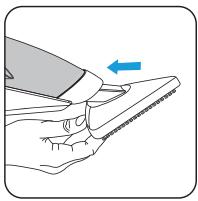
Illustration of a hand using a tool to cut a surface with a blue arrow indicating direction (no text or symbols)For flat surfaces, use the mini Delta head* that can quickly vacuum a wider area.
Turn your appliance on
natural_image
Illustration of a hand using a tool to adjust or install a mechanical component (no text or symbols visible)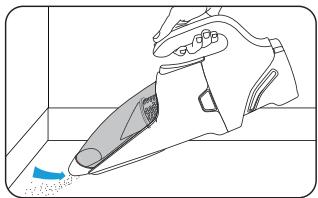
natural_image
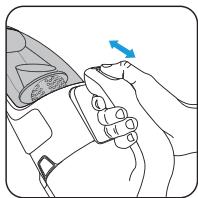
Illustration of a hand using a vacuum cleaner to clean floor (no text or symbols visible)Adjusting the power level
natural_image
Illustration of a hand adjusting a seatbelt with a blue arrow indicating direction (no text or symbols)Position 0 : stop
Position 1 (Soft) : furniture, fragile surfaces
Position 2 (Booster) : tiled floor, parquet...
When the appliance is being used, the indicator light is off.
The indicator light flashes to alert you that the battery is running low.
When the battery is discharged, to avoid damage, a security system (automatic 'Cut Off') stops the appliance and the indicator light continues to flash for a few seconds. In this case, put the On/off switch to 0 and put the appliance in to charge.
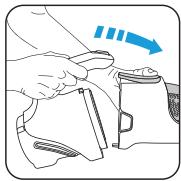
Empty the dust compartment
natural_image
Illustration of a hand using a tool to adjust or install a small object, with no visible text or symbols.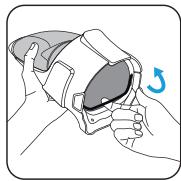
natural_image
Illustration of hands holding a helmet with a blue arrow indicating rotation (no text or symbols)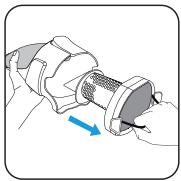
natural_image
Illustration of a hand holding a mechanical component with a blue arrow indicating direction (no text or symbols)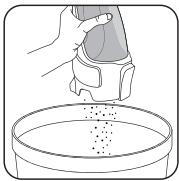
natural_image
Illustration of a hand holding a small object above a petri dish containing granular material (no text or symbols)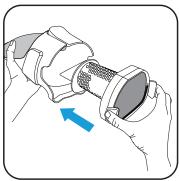
natural_image
Illustration of hands holding a mechanical component with a blue arrow indicating direction (no text or symbols)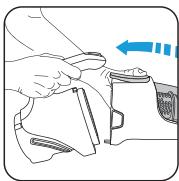
natural_image
Illustration of a hand holding a device with an arrow indicating direction (no text or symbols)NOTE : to clean the dust compartment and/or the separator, run it/them under warm water and leave it/them to dry or wipe with a soft cloth. Never wash the dust compartment and dust separator in a dishwasher.
IV • MAINTENANCE AND CLEANING
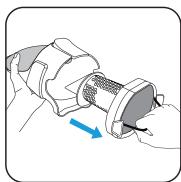
Clean the foam filter.
IMPORTANT : Never operate the vacuum cleaner without the motor filter foam.
Clean the filter foam with warm soapy water. Rinse and dry: Make sure the filter foam is dry before you put it back in, for which purpose it must dry for at least 12H.
Only a dry and clean filter can ensure optimum suction power.
NOTE : your vacuum cleaner comes with an additional foam filter so you can use the appliance while the original foam filter is drying.
natural_image
Illustration of a hand holding a mechanical component with a blue arrow indicating direction (no text or symbols)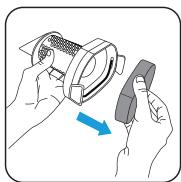
natural_image
Illustration of hands using a tool to adjust a component (no text or symbols visible)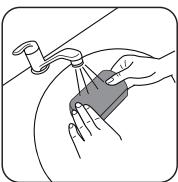
natural_image
Illustration of hands using a tool to lift a component (no text or symbols present)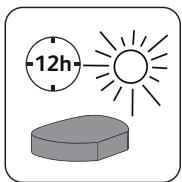
ATTENTION!
Do not use any corrosive or abrasive cleaning products.
Never wash the motor protection foam filter in the dishwasher.
IMPORTANT : Clean the foam filter at least once a month. It is recommended that you clean the filter foam more frequently if you see a drop in the efficiency of your vacuum cleaner.
Replace the filter when it is damaged. You can purchase a replacement filter by contacting your nearest Rowenta Authorised Service Centre.
Replacing the batteries
This appliance contains Nickel Metal Hydride (NiMh) batteries that for safety reasons are only accessible by a professional service engineer. To replace the batteries, please contact the nearest Rowenta Authorised Service Centre.

Environmental protection first!
i Your appliance contains valuable materials which can be recovered or recycled.
Take it to a collection point or an approved service centre so that it can be recycled.
Your appliance is designed only for indoor use.
If the batteries leak, do not rub your eyes or any mucous membranes. Wash your hands and rinse your eyes with clean water.
If the discomfort persists, consult your doctor.
VI • FOR YOUR SECURITY
Read the instructions for use carefully and keep them in a safe place.
Your vacuum cleaner is an electrical device: it must be used under normal conditions of use.
Use and store the appliance out of reach of children. Never leave the appliance operating without supervision.
This appliance is not designed to be used by people (including children) with a physical, sensory or mental impairment, or people without knowledge or experience, unless they are supervised or given prior instructions concerning the use of the appliance by someone responsible for their safety.
Children must be supervised to ensure that they do not play with the appliance.
Do not hold the sucker attachment or tube close to your eyes, ears or hair.
Check that the power voltage for your vacuum cleaner corresponds to that of your mains installation.
Any connection error renders the guarantee invalid.
Do not use your vacuum cleaner on the wet surfaces, water or liquids of whatever kind, hot substances (ash, embers), extremely fine substances (plaster, cement, ash ...), large sharp objects (broken glass), products that are harmful (solvents, paint strippers ...), corrosive (acids, cleaning fluids...), flammable and explosive (petroleum or alcohol-based).
Never immerse the appliance or charger in water or any other liquid, do not splash water on the appliance or charger. Do not store outside and keep away from damp.
Never place the device close to a heat source (oven, heating appliances or hot radiators).
Do not expose the battery to a room temperature over 40^ C.
Do not disassemble the vacuum cleaner when it is operating.
Check the foam filter is in place. Never operate the vacuum cleaner without the motor filter foam.
Unplug your appliance when you are cleaning it. Never unplug the charger by pulling on the cable.
Do not use any charger other than the model provided by the manufacturer. If the charger is damaged or not working please contact the Rowenta Customer Service or contact your nearest Authorised Service Centre.
Do not use the appliance:
- if it has fallen and has visible damage or appears to be working abnormally.
- if the charger or the charger cord are damaged.
In this case, do not open it, but send it to the nearest Rowenta Authorised Service Centre, as special tools are needed to carry out any repairs safely.
Repairs are to be performed only by specialists with original spare parts.
Repairing an appliance oneself may constitute a danger to the user.
Use only guaranteed Rowenta accessories (filters,...)
This device is reserved only for household and domestic use. In the event of inappropriate use that does not comply with the instructions, Rowenta shall take no liability.
For your safety, this appliance complies with all enforceable standards and regulations (Low Voltage Directives, Electromagnetic Compatibility, Environment, etc.).
| The appliance does not work. | The battery may be discharged: put it back on charge.The device is not being properly charged: make sure the cord is connected to the device and that the power socket works (the indicator light located on the handle should be activated).Check that the charging cord is disconnected from the device. If this is not the case, disconnect, turn the power button to position 0 and then restart. |
| The indicator light does not light up when charging. | Make sure the cord is connected to the device and the charger to the socket, and that the socket works. |
| The appliance does not vacuum or emits an abnormal noise. | The suction vein may be blocked: stop the machine and unblock the vein.The accessory being used may be blocked: stop the machine and unblock the accessory.The dust compartment may be full: empty it.Check that the dust compartment is properly attached to the appliance.Check that the accessory is correctly positioned at the end of the dust compartment. |
In case of problems, contact the Rowenta Customer Service or your nearest Authorised Service Centre :
Rowenta Consumer Service
0845 602 1454 - UK
(353) 1461 0390 - Ireland
GROUPE SEB UK Ltd.
11-49 Station Road
Langley, Slough
Berkshire SL3 8 DR
UNITED KINGDOM
http://www.rowenta.co.uk/
I • BESCHREIBUNG
natural_image
Illustration of a horse's leg with a medical device attached (no text or symbols)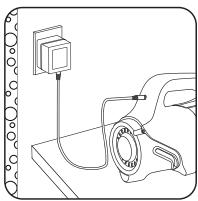
natural_image
Line drawing of a mechanical assembly with a mounted component and wiring (no text or symbols)natural_image
Illustration of a hand holding a pen with a blue arrow indicating direction (no text or symbols)natural_image
Illustration of a hand using a tool to cut a piece of material, with a blue arrow indicating the direction (no text or symbols present)natural_image
Illustration of a hand using a tool to adjust or install a mechanical component (no text or symbols visible)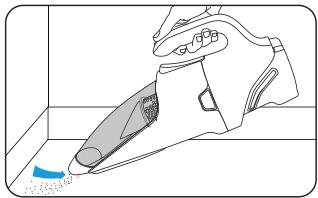
natural_image
Illustration of a hand washing a small object with a blue tool, no text or symbols presentnatural_image
Illustration of a person adjusting a seatbelt with a blue arrow indicating rotation (no text or symbols)Position 0 : Aus / Laden
natural_image
Illustration of a hand using a tool to adjust or install a device (no text or symbols visible)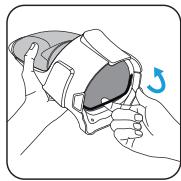
natural_image
Illustration of hands holding a device with a blue arrow indicating rotation (no text or symbols)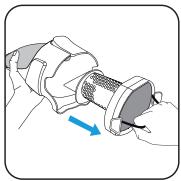
natural_image
Illustration of a hand holding a mechanical component with a blue arrow indicating direction (no text or symbols)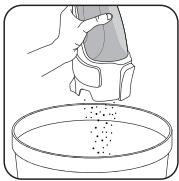
natural_image
Illustration of a hand pouring granular material into a petri dish (no text or symbols)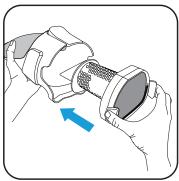
natural_image
Illustration of hands holding a mechanical component with a blue arrow indicating direction (no text or symbols)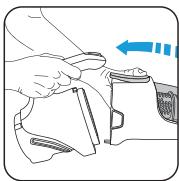
natural_image
Illustration of a hand holding a small object with an arrow indicating direction (no text or symbols)natural_image
Illustration of a hand holding a mechanical component with a blue arrow indicating direction (no text or symbols)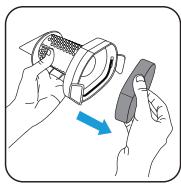
natural_image
Illustration of hands using a device to adjust a component (no text or symbols visible)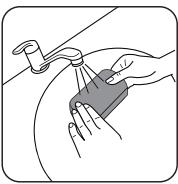
natural_image
Illustration of hands cleaning a surface with a tool (no text or symbols)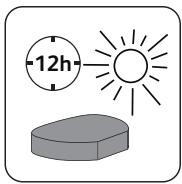
natural_image
Illustration of a horse's leg with a medical device attached, no text or symbols present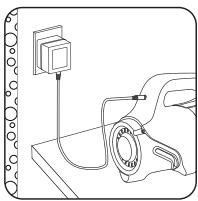
natural_image
Line drawing of a mechanical assembly with a mounted component and wiring (no text or symbols)natural_image
Illustration of a hand holding a pen with a blue arrow indicating direction (no text or symbols)natural_image
Illustration of a hand using a tool to cut a piece of paper or tape, with a blue arrow indicating the motion direction (no text or symbols present)natural_image
Illustration of a hand using a tool to adjust or install a mechanical component (no text or symbols visible)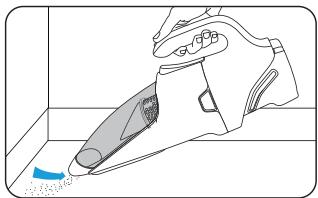
natural_image
Illustration of a hand using a vacuum cleaner to clean or remove a blue object (no text or symbols present)natural_image
Illustration of a hand adjusting a seatbelt with a blue arrow indicating direction (no text or symbols)Stand 0 : uit
Stand 1 (Soft) : meubels, kwetsbare oppervlakken
Stand 2 (Booster) : tegelvloeren, parket, ...
natural_image
Illustration of a hand using a tool to adjust or install a small object, with no visible text or symbols.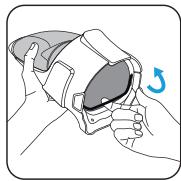
natural_image
Illustration of hands holding a helmet with a blue arrow indicating rotation (no text or symbols)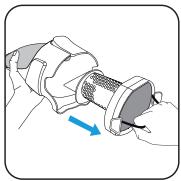
natural_image
Illustration of a hand holding a mechanical component with a blue arrow indicating direction (no text or symbols)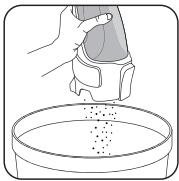
natural_image
Illustration of a hand pouring granular material into a petri dish (no text or symbols)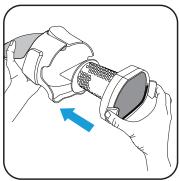
natural_image
Illustration of hands holding a mechanical component with a blue arrow indicating direction (no text or symbols)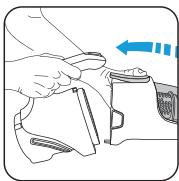
natural_image
Illustration of a hand holding a device with an arrow indicating direction (no text or symbols)natural_image
Illustration of a hand holding a mechanical component with a blue arrow indicating direction (no text or symbols)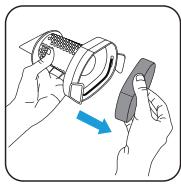
natural_image
Illustration of hands holding a device with a blue arrow indicating direction (no text or symbols)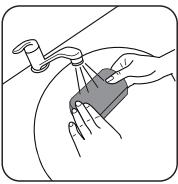
natural_image
Illustration of hands cleaning a surface with a tool (no text or symbols)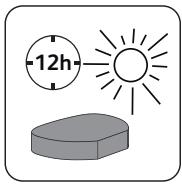
LET OP!
http://www.rowenta.be
http://www.rowenta.nl
I • DESCRIZIONE
natural_image
Illustration of a horse's leg with a medical device attached, no text or symbols present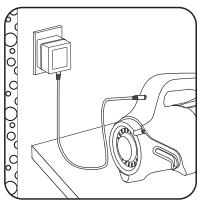
natural_image
Line drawing of a mechanical assembly with a mounted component and wiring (no text or symbols)natural_image
Illustration of a hand holding a pen with a blue arrow indicating direction (no text or symbols)natural_image
Illustration of a hand using a tool to cut a surface with a blue arrow indicating direction (no text or symbols)natural_image
Diagram showing a hand using a tool to adjust or install a mechanical component, with no visible text or symbols.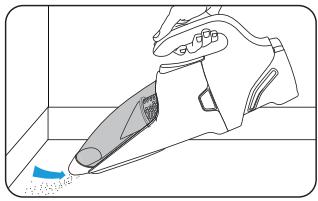
natural_image
Line drawing of a hand using a vacuum cleaner to clean or remove debris (no text or symbols)natural_image
Illustration of a hand adjusting a wristband with a blue arrow indicating direction (no text or symbols)natural_image
Illustration of a hand using a tool to adjust or install a small object, with no visible text or symbols.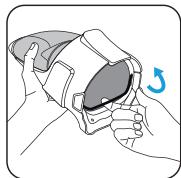
natural_image
Illustration of hands holding a VR headset with a blue arrow indicating rotation (no text or symbols)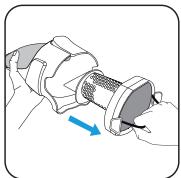
natural_image
Illustration of a hand holding a mechanical component with a blue arrow indicating direction (no text or symbols)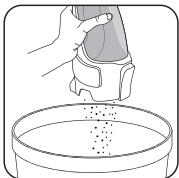
natural_image
Illustration of a hand pouring granular material into a petri dish (no text or symbols)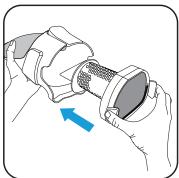
natural_image
Illustration of hands holding a mechanical component with a blue arrow indicating direction (no text or symbols)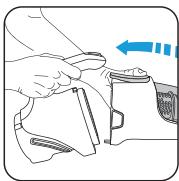
natural_image
Illustration of a hand holding a device with an arrow indicating direction (no text or symbols)natural_image
Illustration of a hand holding a mechanical component with a blue arrow indicating direction (no text or symbols)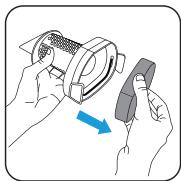
natural_image
Illustration of hands using a device to adjust a component (no text or symbols visible)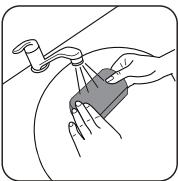
natural_image
Illustration of hands cleaning a surface with a tool (no text or symbols)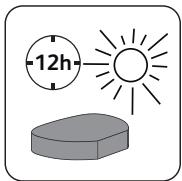
ATTENZIONE!
natural_image
Illustration of a horse's leg with a medical device attached (no text or symbols)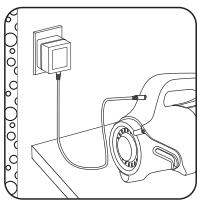
natural_image
Line drawing of a mechanical assembly with a mounted component and wiring (no text or symbols)natural_image
Illustration of a hand holding a pen with a blue arrow indicating direction (no text or symbols)natural_image
Illustration of a hand using a tool to cut a surface with a blue arrow indicating direction (no text or symbols)natural_image
Illustration of a hand using a tool to adjust or install a mechanical component (no text or symbols visible)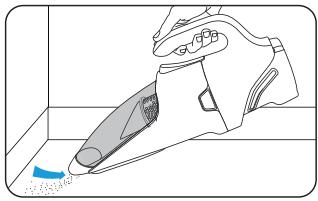
natural_image
Line drawing of a hand using a vacuum cleaner to clean or remove debris (no text or symbols)natural_image
Illustration of a hand adjusting a seatbelt with a blue arrow indicating direction (no text or symbols)natural_image
Illustration of a hand using a tool to adjust or install a small object, with no visible text or symbols.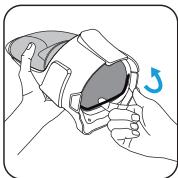
natural_image
Illustration of hands holding a helmet with a blue arrow indicating rotation (no text or symbols)
natural_image
Illustration of a hand holding a mechanical component with a blue arrow indicating direction (no text or symbols)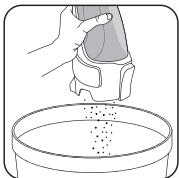
natural_image
Illustration of a hand pouring granular material into a petri dish (no text or symbols)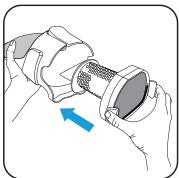
natural_image
Illustration of hands holding a mechanical component with a blue arrow indicating direction (no text or symbols)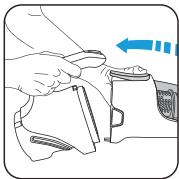
natural_image
Illustration of a hand holding a small object with an arrow indicating direction (no text or symbols)natural_image
Illustration of a hand holding a mechanical component with a blue arrow indicating direction (no text or symbols)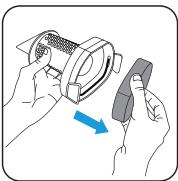
natural_image
Illustration of hands using a tool to adjust a component (no text or symbols present)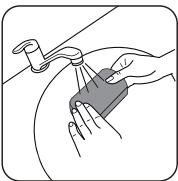
natural_image
Illustration of hands cleaning a surface with a tool (no text or symbols)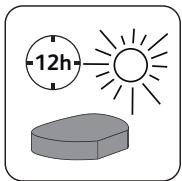
ATENCIÓN
Brand : ROWENTA
Model : AIR FORCE AC912501, AIR FORCE AC912501
Category : Cordless vacuum