
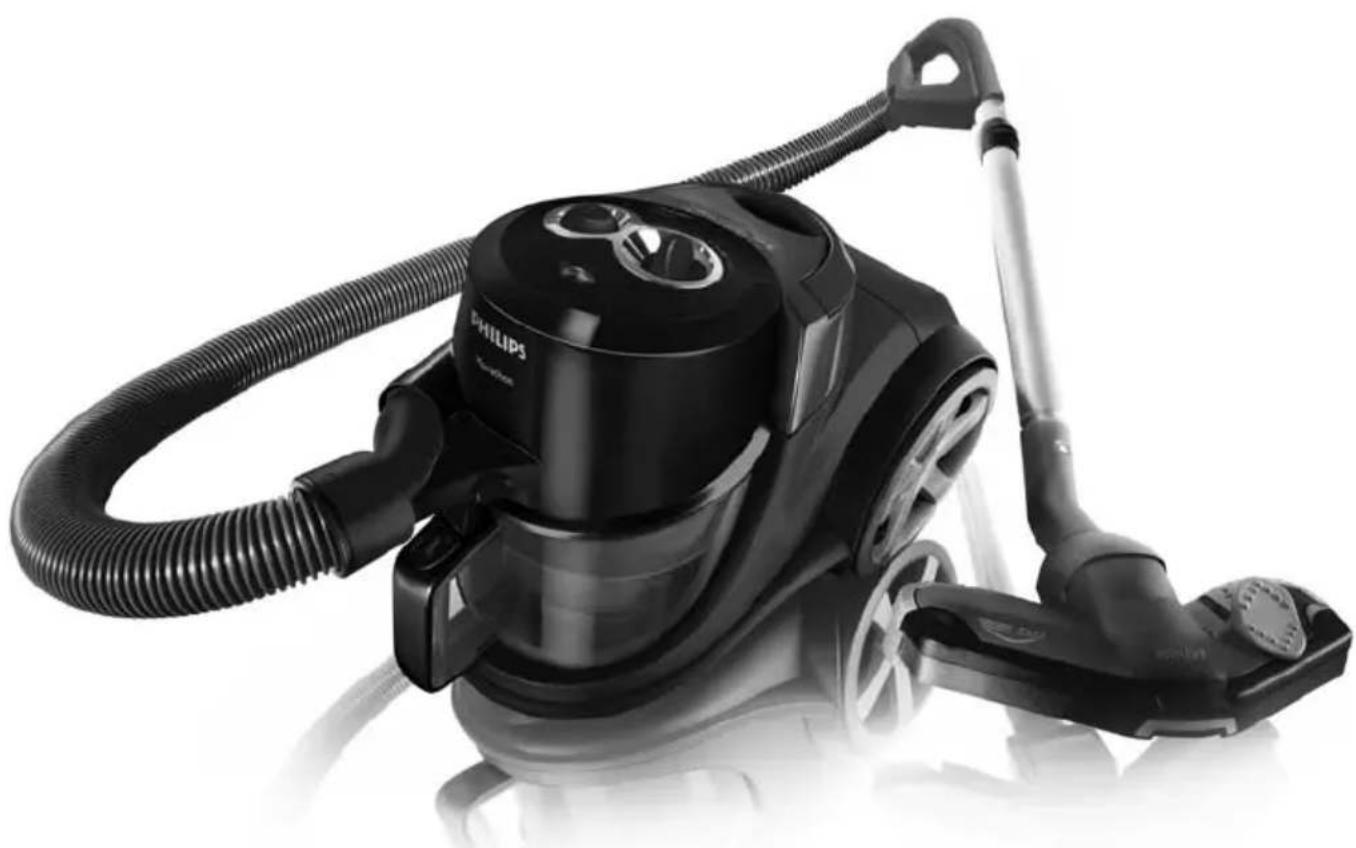
Marathon FC9229 - Vacuum Cleaner PHILIPS - Free user manual and instructions
Find the device manual for free Marathon FC9229 PHILIPS in PDF.


User questions about Marathon FC9229 PHILIPS
0 question about this device. Answer the ones you know or ask your own.
Ask a new question about this device
Download the instructions for your Vacuum Cleaner in PDF format for free! Find your manual Marathon FC9229 - PHILIPS and take your electronic device back in hand. On this page are published all the documents necessary for the use of your device. Marathon FC9229 by PHILIPS.
USER MANUAL Marathon FC9229 PHILIPS
Register your product and get support at
www.philips.com/welcome
FC9236, FC9220
natural_image
Black Philips vacuum cleaner with coiled hose and handle, no visible text or symbols on device body
natural_image
Simple line drawing of an open book with a grid on the left and a closed page on the right (no text or symbols)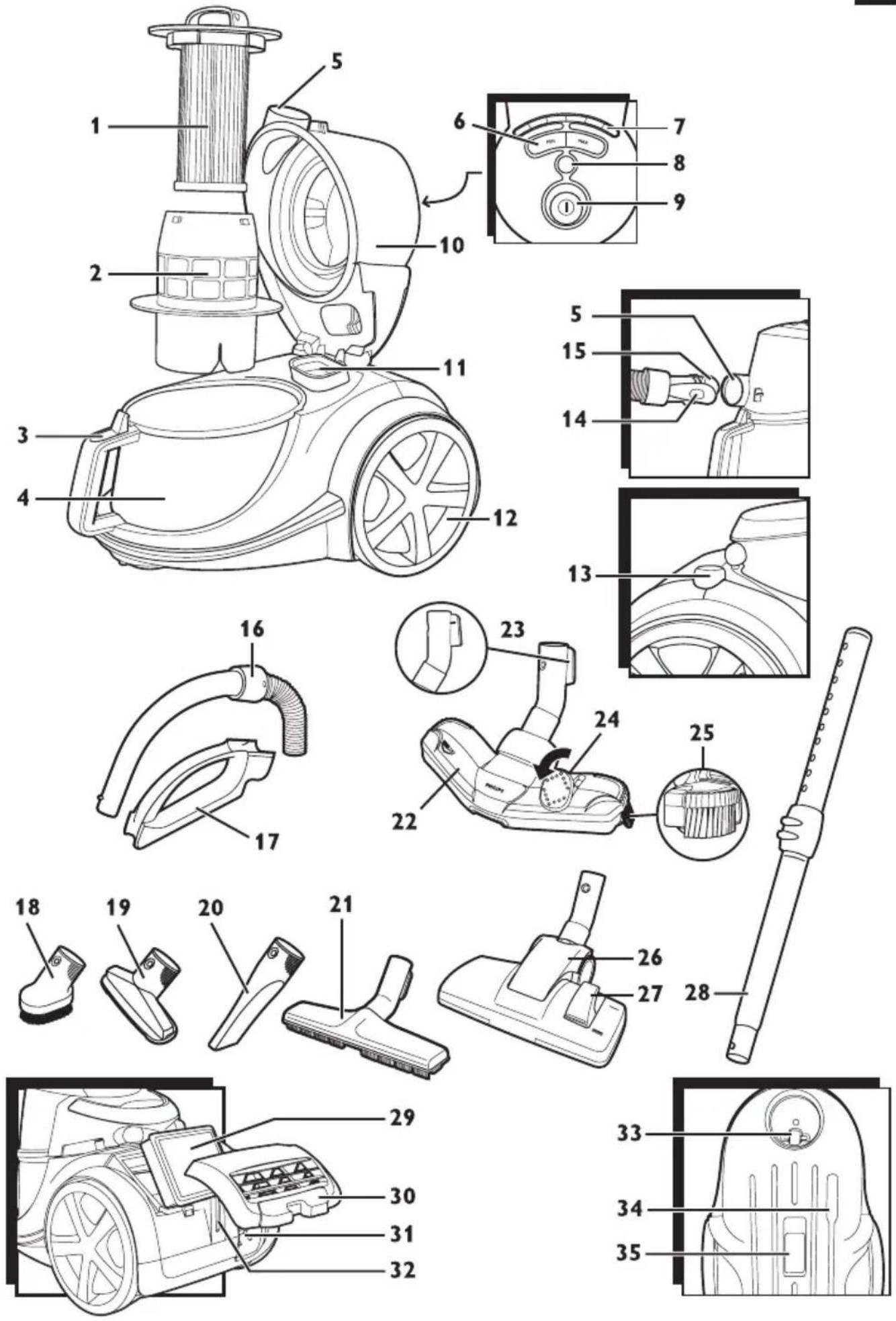
ENGLISH 6
한국어 19
繁體中文 33
简体中文 46
Introduction
Congratulations on your purchase and welcome to Philips! To fully benefit from the support that Philips offers, register your product at www.philips.com/welcome.
General description (Fig. 1)
1 Filter cylinder
2 Filter cylinder case
3 Dust bucket release button
4 Dust bucket
5 Hose connection opening
6 Suction power buttons (MIN and MAX)
7 Suction power lights
8 Filter-Clean button
9 On/off button
10 Cover
11 Motor protection filter
12 Wheel
13 Cord rewind button
14 Hose release button
15 Hose connector
16 Handgrip
17 Accessory holder
18 Small brush (specific types only)
19 Small nozzle
20 Crevice tool
21 Parquet nozzle (specific types only)
22 Tri-Active nozzle
23 Parking/storage ridge
24 Rocker switch for carpet/hard floor settings
25 Side brush
26 Combination nozzle (specific types only)
27 Rocker switch for carpet/hard floor settings
28 Telescopic tube
29 Ultra Clean Air HEPA 13 filter
30 Filter grille
31 Mains cord
32 Parking slot
33 Swivel wheel
34 Storage slot
35 Type plate
Important
Read this user manual carefully before you use the appliance and save it for future reference.
Danger
- Never suck up water or any other liquid. Never suck up flammable substances and do not suck up ashes until they are cold.
natural_image
Illustration of a person using a manual vacuum cleaner to clean or remove debris (no text or symbols)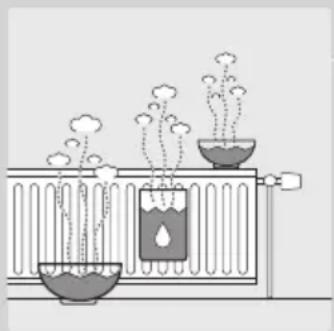
natural_image
Diagram of a scientific apparatus with two containers, one containing a droplet and the other holding a container (no text or symbols)Warning
- Check if the voltage indicated on the appliance corresponds to the local mains voltage before you connect the appliance.
- Do not use the appliance if the plug, the mains cord or the appliance itself is damaged.
- If the mains cord is damaged, you must have it replaced by Philips, a service centre authorised by Philips or similarly qualified persons in order to avoid a hazard.
- This appliance is not intended for use by persons (including children) with reduced physical, sensory or mental capabilities, or lack of experience and knowledge, unless they have been given supervision or instruction concerning use of the appliance by a person responsible for their safety.
- Children should be supervised to ensure that they do not play with the appliance.
- Do not point the hose, the tube or any other accessory at the eyes or ears nor put it in your mouth when it is connected to the vacuum cleaner and the vacuum cleaner is switched on.
Caution
- Do not suck up large objects, as this may cause the air passage in the tube or hose to become obstructed.
- When you use the vacuum cleaner to vacuum ashes, fine sand, lime, cement dust and similar substances, the pores of the filter cylinder become clogged. If you notice a strong decrease in suction power, clean the filter cylinder.
- Sucking up large objects may cause the air passage in the tube or hose to become obstructed. If this happens, the obstruction needs to be removed.
- Never use the appliance without the motor protection filter. This damages the motor and shortens the life of the appliance.
- The filter cylinder is not waterproof and cannot be cleaned with water or cleaning agents. Only clean the filter with the Filter-Clean system.
- Only use the Philips filter cylinder supplied with the appliance.
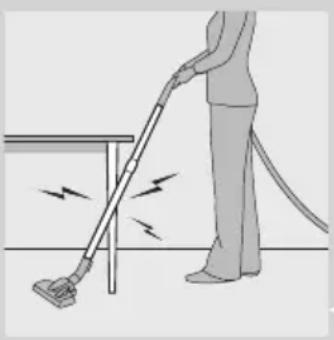
- During vacuum cleaning, especially in rooms with low air humidity, your vacuum cleaner builds up static electricity. As a result you can experience electric shocks when you touch the tube or other steel parts of your vacuum cleaner. These shocks are not harmful to you and do not damage the appliance. To reduce this inconvenience we advise you:
1 to discharge the appliance by frequently holding the tube against other metal objects in the room (for example legs of a table or chair, radiator etc.);
2 to raise the air humidity level in the room by placing water in the room. For example, you can hang containers filled with water from your radiators or place bowls filled with water on or near your radiators.
- Noise level: Lc = 78 dB(A)
Electromagnetic fields (EMF)
This Philips appliance complies with all standards regarding electromagnetic fields (EMF). If handled properly and according to the instructions in this user manual, the appliance is safe to use based on scientific evidence available today.
Preparing for use
Hose
natural_image
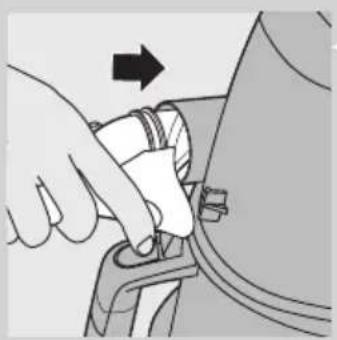
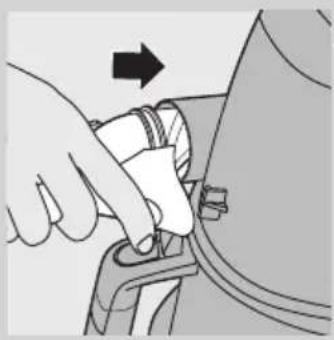
Illustration of a hand adjusting a car component with an arrow indicating direction (no text or symbols present)1 To connect the hose, push it firmly into the appliance ('click').
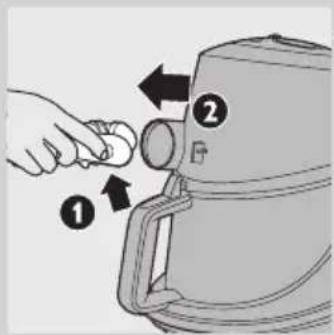
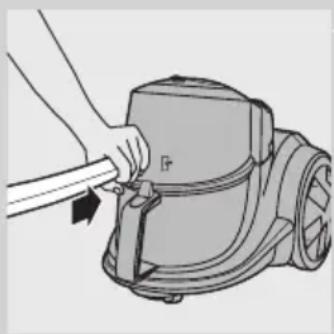
2 To disconnect the hose, press the release button (1) and pull the hose out of the appliance (2).
Telescopic tube
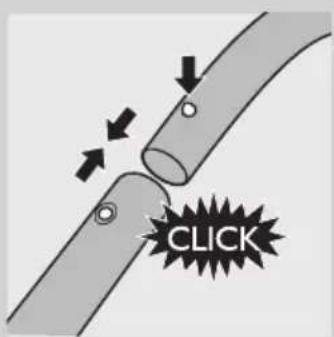
1 To connect the tube to the handgrip of the hose, press the spring-loaded lock button on the handgrip and insert the handgrip into the tube. Fit the spring-loaded lock button into the opening in the tube ('click').
2 To disconnect the tube from the handgrip, press the spring-loaded lock button and pull the handgrip out of the tube.
Use the same method to connect and disconnect the nozzles.
natural_image
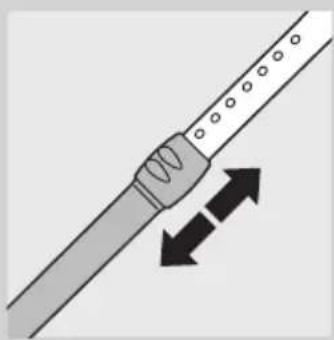
Diagram of a tool interacting with a string, showing two opposing directional arrows (no text or symbols)3 Adjust the tube to the length you find most comfortable during vacuum cleaning.
Tri-Active nozzle
natural_image
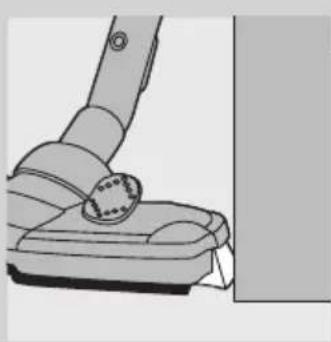
Illustration of a vacuum cleaner's grip and lever mechanism (no text or symbols)The Tri-Active nozzle is a multi-purpose nozzle for carpets and hard floors.
- The side brushes catch more dust and dirt at the sides of the nozzle and allow you to clean better along furniture and other obstacles.
natural_image
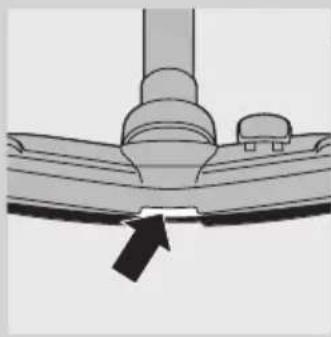
Diagram of a ceiling-mounted air vent with a black arrow pointing to the bottom surface (no text or symbols)- The opening at the front of the nozzle allows you to suck up larger particles.
natural_image
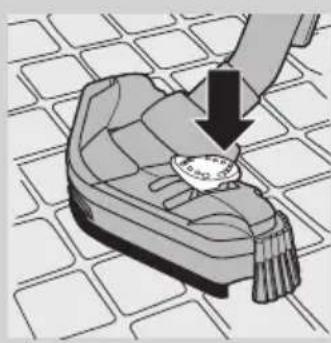
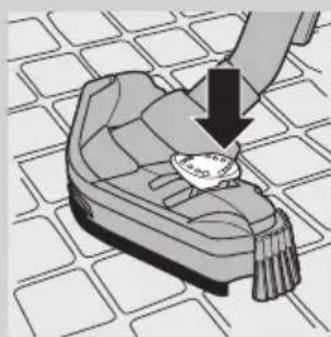
Illustration of a hand placing a small object on a patterned surface, with no visible text or symbols.1 To clean hard floors, push the rocker switch on top of the nozzle with your foot.
The brush strip for cleaning hard floors comes out of the housing. At the same time, the wheel is lifted to prevent scratching and to increase manoeuvrability.
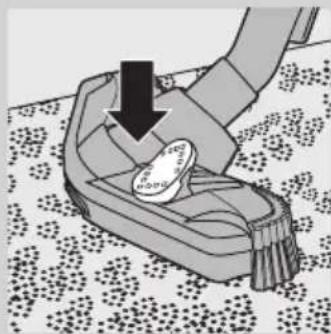
natural_image
Illustration of a hand using a tool to lift a small object on a patterned floor (no text or symbols)2 To clean carpets, push the rocker switch again.
The brush strip disappears into the nozzle housing and the wheel is lowered automatically.
Combination nozzle (specific types only)
natural_image
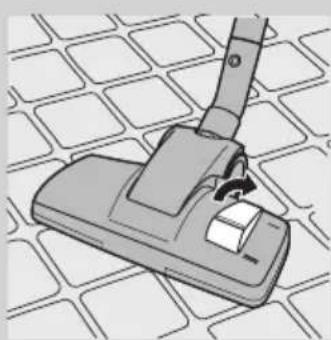
Illustration of a vacuum cleaner on a grid-patterned surface (no text or symbols)The combination nozzle can be used on either carpets or hard floors.
1 To clean hard floors, push the rocker switch on top of the nozzle with your foot.
The brush strip for cleaning hard floors comes out of the nozzle housing.
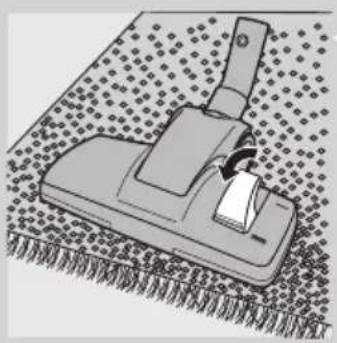
natural_image
Illustration of a mechanical tool or device on a textured surface (no text or symbols visible)2 To clean carpets, push the rocker switch again. ▶The brush strip disappears into the nozzle housing.
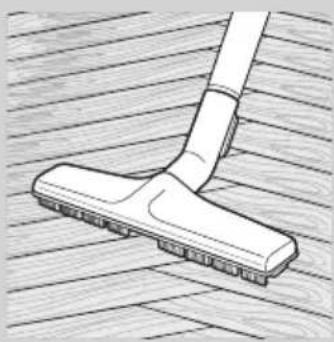
Parquet nozzle
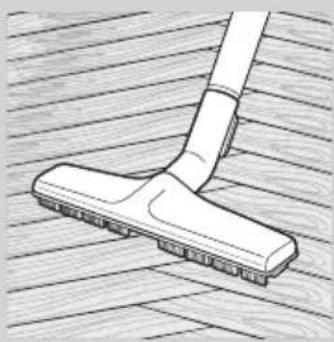
natural_image
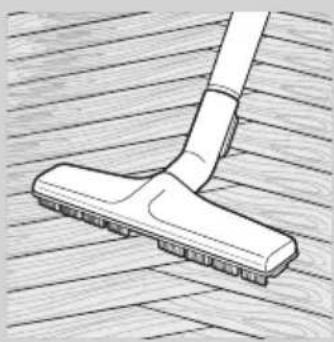
Line drawing of a hand cleaning a wooden surface with a tiled floor (no text or symbols)- The parquet nozzle is designed for gentle cleaning of parquet floors.
Crevice tool, small nozzle and small brush (specific types only)
natural_image
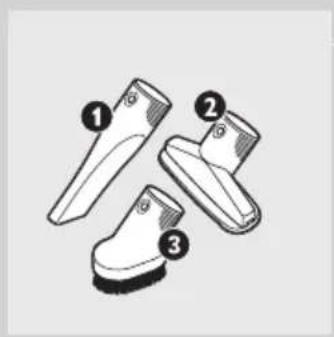
Three types of boots with numbered labels (1, 2, 3) showing different shoe designs (no text or symbols on the boots themselves)1 Connect the crevice tool (1), the small nozzle (2) or the small brush (3) directly to the handgrip or to the tube.
Accessory holder
natural_image
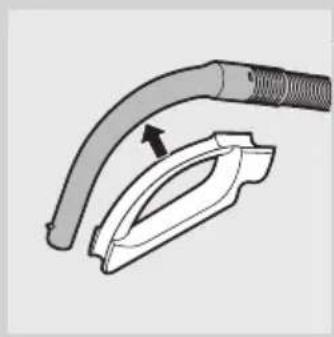
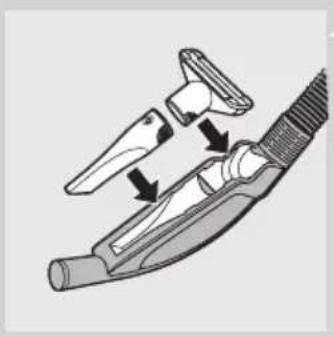
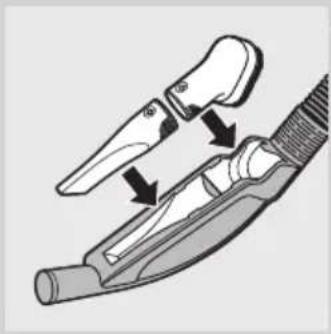
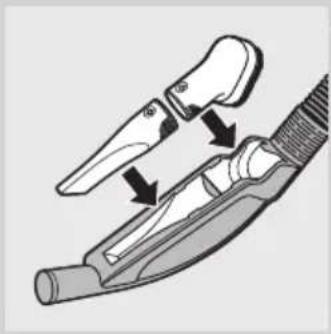
Diagram of a hairdryer tool with a curved tube and plastic clamp (no text or symbols)1 Snap the accessory holder onto the handgrip. 2 Snap two accessories into the accessory holder:
natural_image
Illustration of a hairpin with two clips and a handle, showing mechanical components (no text or symbols)- Crevice tool and small nozzle.
Note: Make sure the suction opening of the small nozzle points away from the holder.
natural_image
Diagram of a medical or surgical tool with two arrows indicating movement or force (no text or symbols present)- Crevice tool and small brush.
Note: Make sure the suction opening of the small brush points towards the holder.
Using the appliance
natural_image
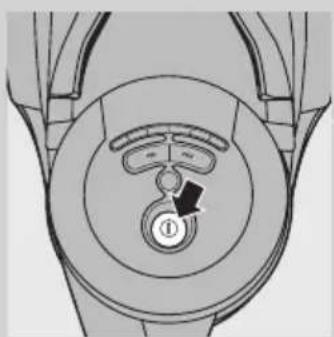
Diagram of a mechanical component with concentric circles and a central knob, no visible text or symbols1 Pull the cord out of the appliance and put the mains plug in the wall socket.
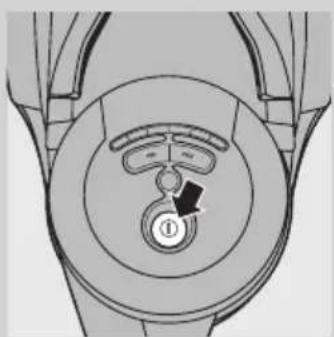
2 Press the on/off button on top of the appliance to switch on the appliance.
Adjusting suction power
natural_image
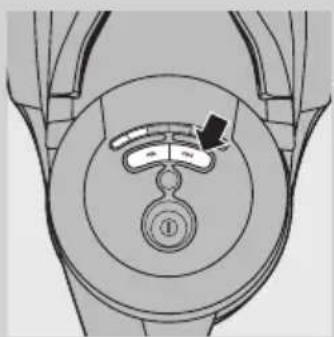
Diagram of a car wheel with a dial indicator and a numbered component (no text or symbols)During vacuum cleaning, you can adjust the suction power to one of 5 different settings.
- You can adjust the suction power with the MIN and MAX buttons (specific types only) on top of the appliance.
Pausing during use
natural_image
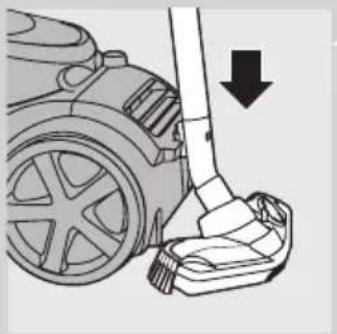
Diagram of a robotic vacuum cleaner's wheel and foot, showing mechanical components and a downward arrow indicating motion (no text or symbols present)1 If you want to pause for a moment, insert the ridge on the nozzle into the parking slot to park the tube in a convenient position.
Using the Filter-Clean button
A clean filter cylinder helps maintain high suction power.
Always press the Filter-Clean button when you have finished vacuum cleaning.
The filter-cleaning process only needs to be performed once to guarantee proper cleaning of the filter.
1 Switch off the appliance and leave the mains plug in the wall socket during the filter-cleaning process.
2 Keep the appliance in horizontal position, with all wheels touching the floor.
Always leave the hose connected to the appliance during the filter-cleaning process to prevent dust from being blown out of the appliance.
natural_image
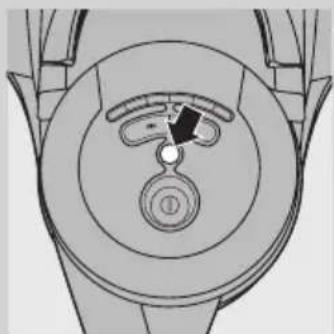
Top-down schematic of a mechanical component with concentric circles and a central knob (no text or symbols)3 Press the Filter-Clean button.
The light in the Filter-Clean button goes on and you hear a beep before the filter-cleaning process starts.
During the filter-cleaning process, the appliance produces a rattling noise. This is completely normal.
When the filter-cleaning process is finished, you hear a beep and the light in the Filter-Clean button goes out.
4 You can also press the Filter-Clean button during vacuum cleaning.
When you do this, the motor stops running and the filter cleaning-process starts. During the filter-cleaning process, the appliance does not suck up dirt.
When the filter-cleaning process is finished, the light in the Filter-Clean button goes out. The motor automatically starts running again and you can continue vacuum cleaning.
Note: If you fail to press the Filter-Clean button after vacuuming several times, the light in the Filter-Clean button starts flashing. This tells you that you need to press the Filter-Clean button to prevent the filter from becoming clogged.
Cleaning and maintenance
Always press the Filter-Clean button when you have finished vacuum cleaning.
If you persistently fail to press the Filter-Clean button when the light in the Filter-Clean button flashes, the filter cylinder clogs up with dirt and the
suction power becomes insufficient. If this happens, clean the filter cylinder as described below.
Cleaning the dust bucket and filter cylinder
natural_image
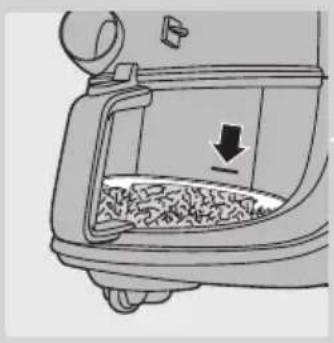
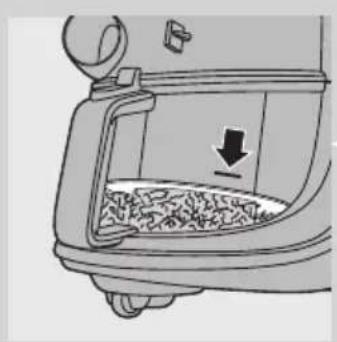
Diagram of a food container with granular contents and a downward arrow indicating a drop (no text or symbols)Always unplug the appliance before you empty the dust bucket.
The dust bucket is not dishwasher-proof.
1 Empty the dust bucket as soon as the dust level has reached the round disc of the filter cylinder case.
2 Switch off the appliance, remove the mains plug from the wall socket and disconnect the hose from the appliance.
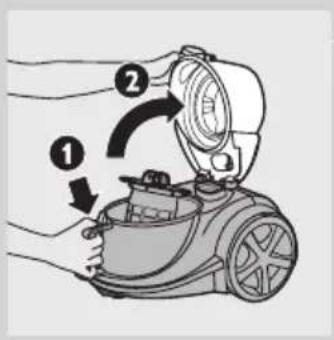
3 Unlock the cover by pressing the release button on top of the handle of the dust bucket (1). Swing open the cover (2).
natural_image
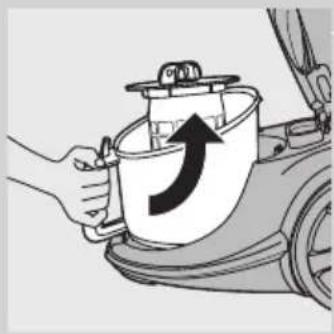
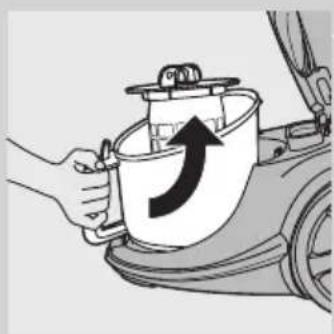
Illustration of a hand holding a container with an upward arrow, next to a car (no text or symbols)4 Lift the dust bucket out of the appliance.
natural_image
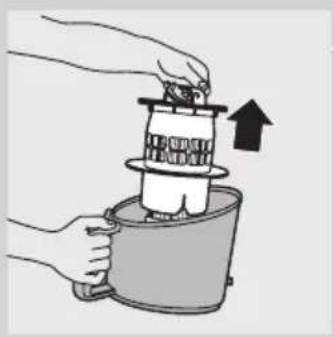
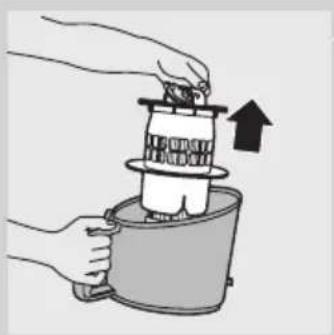
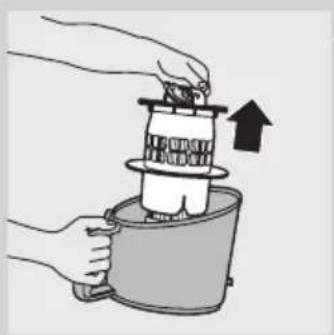
Illustration of hands assembling a mechanical component with an upward arrow (no text or symbols)5 Hold the dust bucket over a dustbin and lift the filter cylinder case out of the bucket. Empty the bucket.
6 Clean the dust bucket with cold tap water and some washing-up liquid.
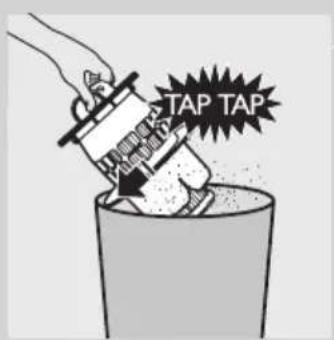
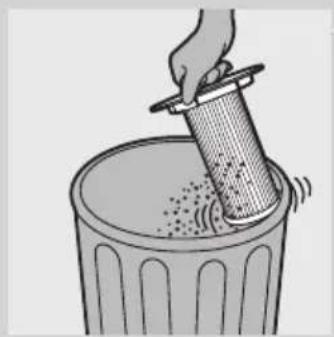
7 Gently tap the filter cylinder case against the dustbin to release all fine dust from the case.
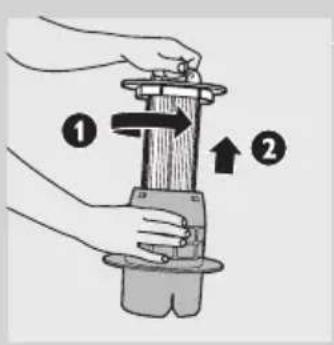
8 If you want to clean the filter cylinder case more thoroughly, first remove the filter cylinder from the case. To remove the filter cylinder, turn the handle on top of the filter cylinder anticlockwise (1) and lift the filter cylinder out of the case (2).
natural_image
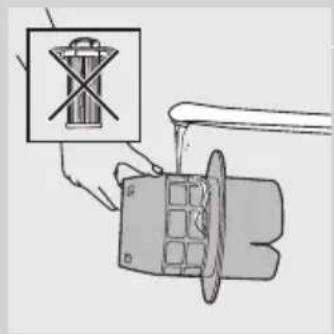
Illustration of a hand using a tool to press a battery into a motor (no text or symbols present)9 Then clean the filter cylinder case with a dry cloth or with cold tap water and some washing-up liquid.
natural_image
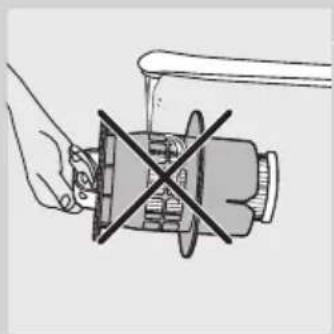
Illustration of a hand operating a mechanical device with a crossed-out X mark (no text or symbols)Do not clean the filter cylinder case with the filter cylinder in it under the tap.
natural_image
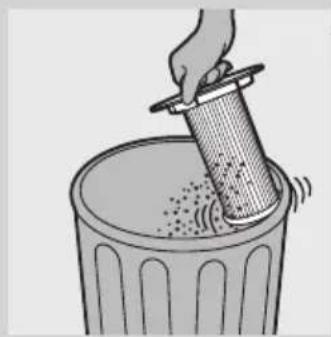
Illustration of a hand pouring granular material into a trash bin (no text or symbols)10 To clean the filter cylinder, gently tap the plastic rim of the filter cylinder against the dustbin to release all fine dust from the filter.
The filter cylinder is not waterproof and cannot be cleaned with water or cleaning agents.
11 Put the filter cylinder case back into the filter cylinder case and turn the handle clockwise until the filter cylinder locks into position. Make sure the filter cylinder is securely fixed in the filter cylinder case ('click').
Make sure that the filter cylinder case is dry before you reinsert the filter cylinder into it.
12 Put the case with the filter cylinder in it back into the dust bucket and put the dust bucket back into the appliance.
Make sure that the dust bucket is dry before you reinsert the filter cylinder case.
If you have not reinserted the filter cylinder case, the suction power lights start flashing and the appliance cannot be switched on.
13 Close the cover firmly ('click').
natural_image
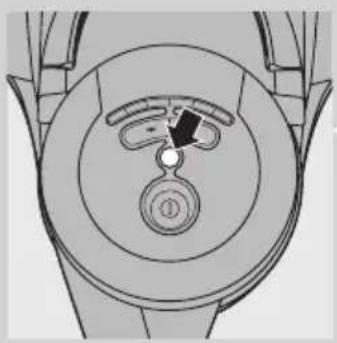
Top-down schematic of a mechanical component with concentric circles and a central knob (no text or symbols)14 Put the plug in the wall socket. Make sure the appliance is in horizontal position, with all wheels touching the floor, and the hose is connected to the appliance.
15 Press the Filter-Clean button.
16 For the best result, empty the dust bucket when the filter-cleaning process is finished (see section 'Cleaning the dust bucket and filter cylinder case').
Permanent motor protection filter
Clean the permanent motor protection filter every two months.
1 Unplug the appliance.
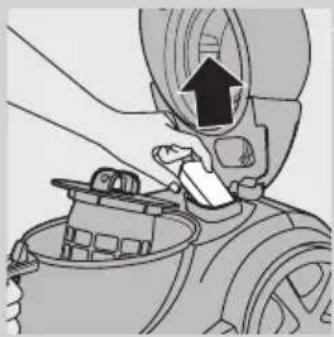
2 Take the motor protection filter out of the appliance. Clean the filter by tapping the dust out of it over a dustbin.
If the motor protection filter is very dirty, you can also rinse it with cold tap water.
natural_image
Illustration of a hand using a tool to adjust or install a mechanical component, with no visible text or symbols.Do not use washing-up liquid or any other cleaning agent to clean the motor protection filter.
3 Press the clean filter firmly back into the filter compartment to ensure that it is properly placed.
Make sure that the motor protection filter is completely dry before you put it back into the filter compartment.
Washable Ultra Clean Air HEPA 13 filter
natural_image
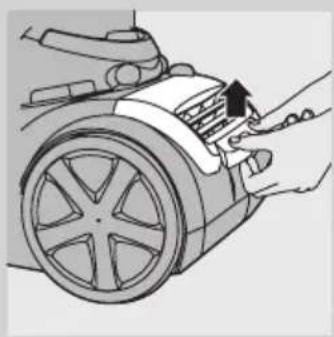
Illustration of hands installing or adjusting a component on a car wheel (no text or symbols visible)The Ultra Clean Air HEPA 13 filter is able to remove 99.95% of all particles down to 0.0003mm in size from the outlet air. This not only includes normal house dust, but also harmful microscopic vermin, such as dust mites and their excrements, which are well-known causes of respiratory allergies. Clean the washable Ultra Clean Air HEPA 13 filter every 6 months. You can clean the washable Ultra Clean Air HEPA 13 filter max. 4 times. Replace the filter after it has been cleaned 4 times.
natural_image
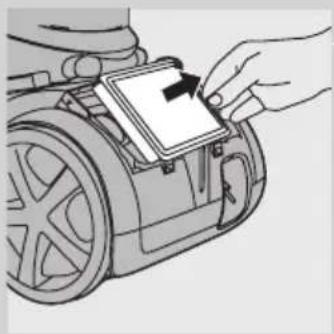
Illustration of a hand inserting a component into a car or vehicle (no text or symbols visible)1 Remove the filter grille.
2 Take out the washable HEPA 13 filter.
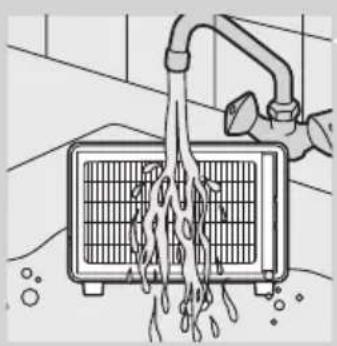
3 Rinse the pleated side of the HEPA 13 filter under a hot slow-running tap.
natural_image
Illustration of a hand pouring liquid into a gridded air vent (no text or symbols)- Hold the filter in such a way that the pleated side points upwards and the water flows parallel to the pleats. Hold the filter at an angle so that the water washes away the dirt inside the pleats.
natural_image
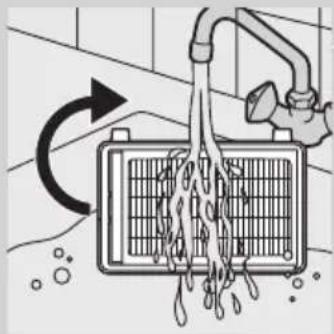
Diagram of a kitchen air drain with a faucet and water spray, showing airflow direction (no text or symbols)- Turn the filter 180^ and let the water flow along the pleats in opposite direction.
- Continue this process until the filter is clean.
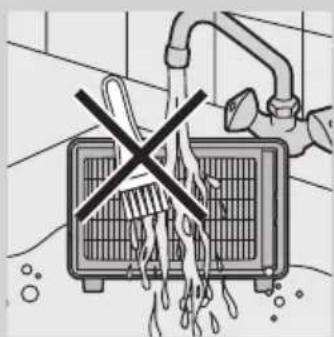
Never clean the washable filter with a brush.
Note: Cleaning does not restore the original colour of the filter, but does restore its filtration power.
4 Carefully shake the water from the surface of the filter. Let the filter dry at least 2 hours before you put it back into the vacuum cleaner.
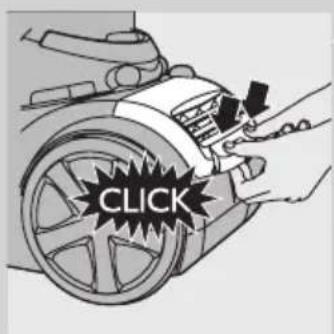
5 Put the filter back into the appliance. Reattach the top of the filter grille and push the bottom corners until they snap home ('click').
Storage
Before you store the appliance, always make sure you have cleaned the filter cylinder by pressing the Filter-Clean button (see section 'Using the Filter-Clean button' in chapter 'Using the appliance').
1 Switch off the appliance and remove the mains plug from the wall socket.
natural_image
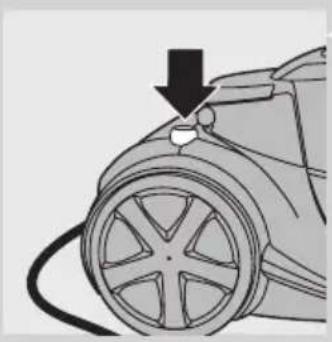
Diagram of a car tire with a valve and cable, no text or symbols present2 Press the cord rewind button to rewind the mains cord.
natural_image
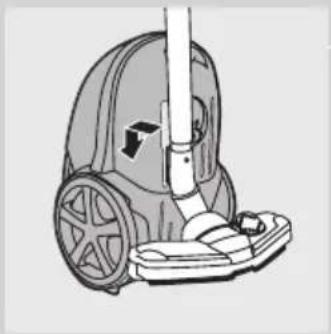
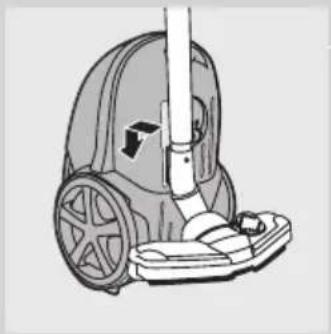
Line drawing of a vacuum cleaner with wheels and handle (no text or symbols)3 Put the appliance in upright position. Insert the ridge on the nozzle into the storage slot to attach the nozzle to the appliance.
natural_image
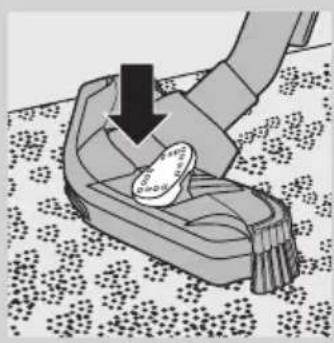
Illustration of a hand pressing down on a small object with a coin, placed on a patterned floor (no text or symbols)4 Always put the Tri-Active nozzle in the carpet setting (brush strip retracted into the nozzle) when you store it. Also prevent the side brushes from becoming bent
Ordering accessories
If you have any difficulties obtaining filters or other accessories for this appliance, please contact the Philips Customer Care Centre in your country or consult the worldwide guarantee leaflet.
- Washable Ultra Clean Air HEPA 13 filters are available under type number FC8038.
Environment
natural_image
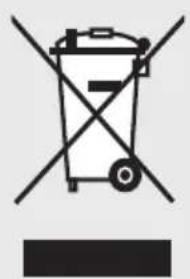
Symbol of a trash bin crossed with no text or numbers, representing waste sorting or disposal (no text present)- Do not throw away the appliance with the normal household waste at the end of its life, but hand it in at an official collection point for recycling. By doing this, you help to preserve the environment.
Guarantee & service
If you need information or if you have a problem, please visit the Philips website at www.philips.com or contact the Philips Customer Care Centre in your country. You find its phone number in the worldwide guarantee leaflet. If there is no Customer Care Centre in your country, go to your local Philips dealer or contact the Service Department of Philips Domestic Appliances and Personal Care BV.
Troubleshooting
This chapter summarises the most common problems you could encounter with the appliance. If you are unable to solve the problem with the information below, contact the Customer Care Centre in your country.
1 The light in the Filter-Clean button flashes.
- The filter cylinder needs to be cleaned. Press the Filter-Clean button to clean the filter cylinder.
2 The appliance cannot be switched on and the suction power lights flash.
- The filter cylinder case with the filter cylinder in it has not been inserted into the dust bucket. Insert the filter cylinder case with the filter cylinder.
3 The suction power is insufficient.
- Perhaps you have selected a low suction power setting. Select a higher suction power setting.
- Perhaps the filter cylinder is filled with dirt. If necessary, clean this filter.
- Perhaps the motor protection filter and/or the Ultra Clean Air HEPA 13 filter are dirty. Clean or replace the filters.
- Check if the nozzle or the hose is blocked up. To remove the obstruction, disconnect the blocked-up item and connect it (as far as possible) the other way around. Switch on the vacuum cleaner to force the air through the blocked-up item in opposite direction
natural_image
Illustration of a hand using a tool to lift a small mechanical component (no text or symbols visible)소개
natural_image
Illustration of a person using a vacuum cleaner to clean or remove objects, with lightning bolts indicating damage (no text or symbols)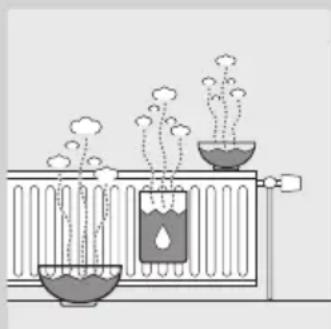
natural_image
Diagram of a chemical experiment setup with two test tubes, one emitting vapor and the other emitting liquid (no text or labels)경고
natural_image
Illustration of a hand using a tool to adjust or install a component, with an arrow indicating direction (no text or symbols present)natural_image
Diagram of a tool interacting with a metallic rod, showing two opposing directional arrows (no text or symbols)natural_image
Illustration of a vacuum cleaner's arm and base (no text or symbols)natural_image
Diagram of a mechanical component with a downward arrow indicating direction (no text or symbols)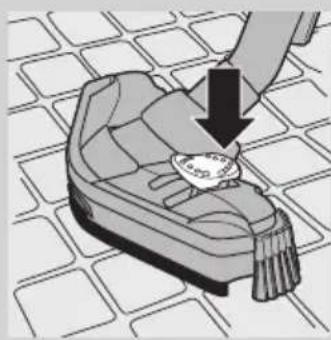
natural_image
Illustration of a hand placing a small object on a patterned surface (no text or symbols)natural_image
Illustration of a shoe being inserted into a slot, with a downward arrow indicating the insertion direction (no text or symbols present)natural_image
Illustration of a vacuum cleaner on a grid-patterned surface (no text or symbols)콤비네이션 노즐(특정 모델만 해당)
natural_image
Illustration of a mechanical tool interacting with a textured surface (no text or symbols)natural_image
Line drawing of a cleaning tool on a wooden surface (no text or symbols)natural_image
Three types of boots with numbered labels (1, 2, 3) showing different shoe designs (no text or symbols on the boots themselves)natural_image
Diagram of a hairless tool with a curved tube and a plastic clamp, showing no text or symbols.natural_image
Illustration of a hairpin with two clips and a handle, showing mechanical components (no text or symbols)-틈새 노즐 및 소형 노즐
natural_image
Diagram of a medical or surgical tool with two arrows indicating movement or force (no text or symbols present)-틈새 노즐 및 소형 브러시
natural_image
Diagram of a mechanical component with concentric circles and a central knob (no text or symbols)natural_image
Diagram of a car interior showing a circular dial with a knob and a black arrow pointing to the center (no text or symbols present)natural_image
Diagram of a robotic vacuum cleaner's wheel and foot, showing mechanical components and a downward arrow indicating motion (no text or symbols present)natural_image
Top-down schematic of a mechanical component with concentric circles and a central knob (no text or symbols)먼지통 및 필터 실린더 청소
natural_image
Diagram of a hand pouring liquid into a container with a downward arrow indicating flow (no text or symbols)4 제품에서 먼지통을 들어내십시오.
natural_image
Illustration of a hand holding a container with an upward arrow, next to a car (no text or symbols)natural_image
Illustration of hands assembling a mechanical component with an upward arrow (no text or symbols)natural_image
Illustration of a hand using a mechanical device to switch a component (no text or symbols visible)natural_image
Illustration of a hand pouring granular material into a trash bin (no text or symbols)natural_image
Top-down schematic of a mechanical component with concentric circles and a central knob (no text or symbols)natural_image
Diagram of a hand using a tool to adjust or install a mechanical component, with no visible text or symbols.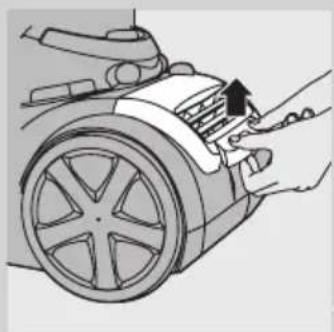
natural_image
Illustration of hands installing or adjusting a car wheel component with an arrow pointing to the handle (no text or symbols present)natural_image
Illustration of a hand placing a small electronic component into a car (no text or symbols visible)natural_image
Illustration of a hand pouring liquid into a gridded air vent (no text or symbols)natural_image
Diagram of a kitchen air drain with a faucet and water spray, showing airflow direction (no text or symbols)natural_image
Diagram of a car being charged with a cable, showing the wheel and battery (no text or symbols)natural_image
Line drawing of a vacuum cleaner with wheels and handle (no text or symbols)natural_image
Illustration of a hand using a tool to lift a small object on a patterned surface (no text or symbols)natural_image
Symbol of a trash bin with crossed lines indicating no waste or restriction (no text or numbers present)natural_image
Illustration of a hand using a tool to lift a mechanical component (no text or symbols visible)한국어32
簡介
恭喜您購買本產品並歡迎加入飛利浦!請於
natural_image
Illustration of a person using a vacuum cleaner to clean or remove a surface, with motion arrows indicating vibration (no text or symbols)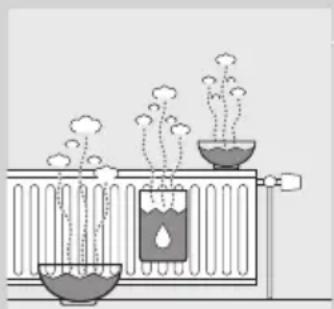
natural_image
Illustration of a chemical experiment setup with three test tubes and vapor rising (no text or labels)natural_image
Illustration of a hand using a tool to adjust or install a component, with an arrow indicating direction (no text or symbols present)natural_image
Diagram of a rope being inserted into a cable with two opposing arrows indicating direction (no text or symbols)natural_image
Illustration of a vacuum cleaner's arm and base (no text or symbols)natural_image
Diagram of a mechanical component with a downward arrow indicating force or direction (no text or symbols)- 吸頭前端開口可吸除更大碎屑。
natural_image
Illustration of a hand placing a small object on a patterned surface (no text or symbols)1 若要清理硬質地板,請以腳推壓吸頭頂端的搖動開關。
natural_image
Illustration of a hand using a tool to lift a small object on a patterned floor (no text or symbols)2 清潔地毯時,請再次推壓搖動開關。
natural_image
Illustration of a vacuum cleaner on a grid-patterned surface (no text or symbols)兩用吸頭可用於地毯或硬質地板。
1 若要清理硬質地板,請以腳推壓吸頭頂端的搖動開關
natural_image
Illustration of a mechanical tool or device on a textured surface (no text or symbols visible)2 清潔地毯時,請再次推壓搖動開關。
▶將毛刷條收進吸頭外殼內。
硬地板專用吸頭
natural_image
Line drawing of a hand cleaning a wooden surface with a tiled floor (no text or symbols)natural_image
Three types of boots with numbered labels (1, 2, 3) indicating different shoe configurations or accessories.natural_image
Diagram of a hairless tool with a curved tube and a plastic clamp, showing no text or symbols.natural_image
Illustration of a hairpin with two clips and a handle, showing mechanical components (no text or symbols)- 細隙吸頭與小吸頭。
natural_image
Diagram of a medical or surgical tool with two arrows indicating movement or force (no text or symbols present)- 細隙吸頭與小刷子。
natural_image
Top-down diagram of a car wheel and dashboard showing the wheel and dashboard (no text or symbols)natural_image
Diagram of a car wheel assembly with a dial indicator and circular base (no text or labels)natural_image
Diagram of a robotic vacuum cleaner with a downward arrow indicating motion (no text or symbols present)natural_image
Top-down schematic of a mechanical component with circular features and a central knob (no text or symbols)natural_image
Diagram of a food container with granular contents and a downward arrow indicating a drop (no text or symbols)natural_image
Illustration of a hand holding a container with an upward arrow, next to a car (no text or symbols)4 從吸塵器內提起集塵桶。
natural_image
Illustration of hands using a mechanical device to press or install a component, with an upward arrow indicating motion (no text or symbols present)natural_image
Illustration of a hand pouring liquid into a mechanical component (no text or symbols visible)natural_image
Illustration of a hand operating a mechanical device with a crossed-out X symbol (no text or labels)natural_image
Illustration of a hand pouring granular material into a trash bin (no text or symbols)natural_image
Top-down schematic of a mechanical component with concentric circles and a central knob (no text or symbols)natural_image
Diagram of a hand using a tool to adjust or install a mechanical component, with no visible text or symbols.請每兩個月清理一次永久馬達防護濾網。
natural_image
Illustration of a hand using a tool to press down or adjust the engine compartment of a car (no text or symbols visible)natural_image
Illustration of a hand inserting a component into a car or robotic device (no text or symbols visible)natural_image
Illustration of a hand pouring liquid into a grid-patterned air vent (no text or symbols)natural_image
Diagram of a washing machine with water spray and airflow, showing internal components and flow direction (no text or symbols)natural_image
Illustration of a showerhead with a crossed-out black cross symbol, no text or symbols present請勿使用刷子清潔可水洗濾網。
natural_image
Diagram of a car's wheel with a black arrow pointing to the wheel rim (no text or symbols)2 按下收線鈕,將電源線收回。
natural_image
Line drawing of a vacuum cleaner with wheels and handle (no text or symbols)natural_image
Illustration of a hand using a tool to lift a small object on a patterned surface (no text or symbols)natural_image
Symbol of a trash bin with crossed lines indicating no waste or restriction, and a solid black rectangle below (no text or symbols)natural_image
Illustration of a hand using a tool to lift a mechanical component (no text or symbols visible)简介
natural_image
Illustration of a person using a manual vacuum cleaner to clean or remove a surface, with motion lines indicating vibration (no text or symbols)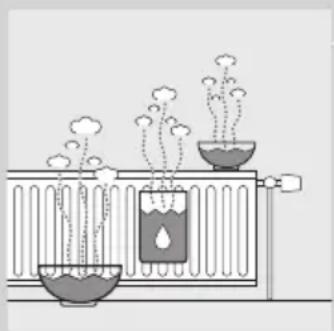
natural_image
Diagram of a chemical experiment setup with two beakers containing different substances, one emitting vapor and the other emitting liquid (no text or labels)警告
natural_image
Illustration of a person using a manual vacuum cleaner to clean or remove a surface, with motion lines indicating vibration (no text or symbols)
natural_image
Diagram of a chemical experiment setup with two beakers containing different substances, one emitting vapor and the other emitting water (no text or labels)使用准备
软管
natural_image
Illustration of a hand using a tool to adjust or install a component, with an arrow indicating direction (no text or symbols present)natural_image
Illustration of a hand gripping a textured rod with two opposing arrows indicating movement (no text or symbols)natural_image
Illustration of a vacuum cleaner's arm and base (no text or symbols)natural_image
Diagram of a mechanical component with a downward arrow indicating force or direction (no text or symbols)natural_image
Illustration of a hand pressing down on a small off-heeled shoe with a magnifying glass (no text or symbols)natural_image
Illustration of a hand using a tool to lift a small object on a patterned floor (no text or symbols)2 要清洁地毯,请再次推动转换开关。
natural_image
Illustration of a vacuum cleaner on a grid-patterned surface (no text or symbols)在地毯或硬地板上均可使用两用吸嘴。
natural_image
Illustration of a cleaning tool on a textured surface (no text or symbols)2 要清洁地毯,请再次推动转换开关。
刷条将收入吸嘴中。
地板吸嘴
natural_image
Line drawing of a hand cleaning a wooden surface with a tiled floor (no text or symbols)natural_image
Three types of boots with numbered labels (1, 2, 3) showing different designs or features (no text or symbols on the boots themselves)natural_image
Diagram of a hairless tool with a curved tube and a plastic clamp, showing no text or symbols.natural_image
Illustration of a hairpin with two clips and a handle, showing mechanical components (no text or symbols)- 缝隙吸嘴和小号吸嘴。
注意:确保小号吸嘴的吸口不指向附件夹。
natural_image
Diagram of a medical or surgical tool with two arrows indicating movement or force (no text or symbols present)- 缝隙吸嘴和小号毛刷。
注意:确保小号毛刷的吸口不指向附件夹。
使用本产品
natural_image
Top-down diagram of a car wheel and dashboard showing the wheel and dashboard (no text or symbols)natural_image
Diagram of a car interior showing a circular dial with a knob and an arrow pointing to the center (no text or symbols present)natural_image
Diagram of a robotic vacuum cleaner with a downward arrow indicating motion (no text or symbols present)natural_image
Top-down schematic of a mechanical component with concentric circles and a central knob (no text or symbols)natural_image
Diagram of a food container with granular contents and a downward arrow indicating a drop (no text or symbols)natural_image
Illustration of a hand holding a container with an upward arrow, next to a car (no text or symbols)4 将集尘桶从产品中提出。
natural_image
Illustration of hands using a mechanical device to press or install a component, with an upward arrow indicating motion (no text or symbols present)natural_image
Illustration of a hand pouring liquid into a mechanical component (no text or symbols visible)natural_image
Illustration of a hand using a mechanical device to switch a component (no text or symbols visible)请勿将带滤芯的滤芯罩放在水龙头下清洗。
natural_image
Illustration of a hand using a filter to clean granular material into a trash bin (no text or symbols)natural_image
Top-down schematic of a mechanical component with concentric circles and a central knob (no text or symbols)natural_image
Diagram of a hand using a tool to adjust or install a mechanical component, with no visible text or symbols.每两个月清洁一次永久性马达保护滤网。
natural_image
Illustration of hands installing or adjusting a component on a car wheel (no text or symbols visible)natural_image
Illustration of a hand placing a small electronic component into a motor (no text or symbols visible)natural_image
Illustration of a hand pouring liquid into a gridded air vent (no text or symbols)natural_image
Diagram of a kitchen air drain with a faucet and water spray, showing airflow direction (no text or symbols)切勿用刷子清洁可清洗过滤网。
natural_image
Diagram of a car being charged with a cable, showing the wheel and battery (no text or symbols)natural_image
Line drawing of a vacuum cleaner with wheels and handle (no text or symbols)natural_image
Illustration of a hand using a tool to lift a small object on a patterned floor (no text or symbols)natural_image
Symbol of a trash bin with crossed lines indicating no waste or restriction, and a solid black rectangle below (no text or labels)natural_image
Illustration of a hand using a tool to lift a mechanical component (no text or symbols visible)
- Introduction
- General description (Fig. 1)
- Important
- Danger
- Warning
- Caution
- Electromagnetic fields (EMF)
- Preparing for use
- Hose
- Telescopic tube
- Tri-Active nozzle
- Combination nozzle (specific types only)
- Parquet nozzle
- Crevice tool, small nozzle and small brush (specific types only)
- Accessory holder
- Using the appliance
- Adjusting suction power
- Pausing during use
- Using the Filter-Clean button
- Cleaning and maintenance
- Cleaning the dust bucket and filter cylinder
- Permanent motor protection filter
- Washable Ultra Clean Air HEPA 13 filter
- Storage
- Ordering accessories
- Environment
- Guarantee & service
- Troubleshooting
- 소개
- 경고
- 콤비네이션 노즐(특정 모델만 해당)
- 먼지통 및 필터 실린더 청소
- 簡介
- 硬地板專用吸頭
- 简介
- 警告
- 使用准备
- 软管
- 地板吸嘴
- 使用本产品
Brand : PHILIPS
Model : Marathon FC9229
Category : Vacuum Cleaner