AQLF8F 292 U - Washing machine Hotpoint Ariston - Free user manual and instructions
Find the device manual for free AQLF8F 292 U Hotpoint Ariston in PDF.


| Product Type | Washing machine |
| Brand | Hotpoint Ariston |
| Model | AQLF8F 292 U |
| Capacity | 8 kg |
| Dimensions (H x W x D) | 85 x 60 x 60 cm |
| Weight | 70 kg |
| Voltage | 220-240 V |
| Frequency | 50 Hz |
| Power Consumption | 2000 W |
| Spin Speed | 1400 rpm |
| Energy Class | A+++ |
| Noise Level (Wash/Spin) | 52 dB / 76 dB |
| Number of Programs | 16 |
| Programs | Cotton, Synthetics, Delicates, Wool, Quick Wash, Daily, Mix, Anti-Allergy, etc. |
| Features | Delay Start, Child Lock, Overflow Protection, Foam Control, Unbalance Control |
| Drum Material | Stainless steel |
| Motor Type | Inverter |
| Water Consumption | 50 L per cycle |
| Installation | Freestanding |
| Door Opening | Left |
| Included Accessories | Inlet hose, drain hose, caps |
Frequently Asked Questions - AQLF8F 292 U Hotpoint Ariston
User questions about AQLF8F 292 U Hotpoint Ariston
0 question about this device. Answer the ones you know or ask your own.
Ask a new question about this device
Download the instructions for your Washing machine in PDF format for free! Find your manual AQLF8F 292 U - Hotpoint Ariston and take your electronic device back in hand. On this page are published all the documents necessary for the use of your device. AQLF8F 292 U by Hotpoint Ariston.
USER MANUAL AQLF8F 292 U Hotpoint Ariston
Unpacking and levelling
Connecting the electricity and water supplies
Technical data
Description of the machine, 4-5
Control panel
Auto Dose System, 6-7
Running a wash cycle, 8
Wash cycles and options, 9
Table of wash cycles
Wash options
Detergents and laundry, 10
Detergent
Preparing the laundry
Washing recommendations
Load balancing system
Precautions and advice, 11
General safety
Disposal
Opening the porthole door manually
Care and maintenance, 12
Cutting off the water and electricity supplies
Cleaning the machine
Cleaning the detergent dispenser drawer
Caring for your appliance drum
Cleaning the pump
Checking the water inlet hose
Trouble shooting, 13-14
Assistance, 15
! This instruction manual should be kept in a safe place for future reference. If the washing machine is sold, given away or moved, please ensure the manual is kept with the machine, so that the new owner may benefit from the advice contained within it.
! Read these instructions carefully: they contain vital information relating to the safe installation and operation of the appliance.
! Inside the pack containing this manual, you will also find the guarantee and all the details necessary for installation.
Unpacking and levelling
Unpacking
- Once you have removed all the packaging from the washing machine, make sure it has not been damaged during transportation.
If it has been damaged, contact the retailer and do not proceed any further with the installation process.
natural_image
Pure technical diagram of a mechanical or electrical component with no visible text, numbers, or symbols.-
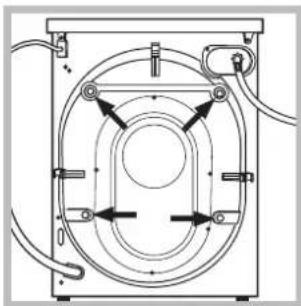
Remove the 4 protective screws (used during transportation) and the corresponding spacer, located on the rear part of the appliance (see figure).
-
Close off the holes using the plastic plugs supplied in the pack.
- Keep all the parts in a safe place; they will be needed again if the washing machine is moved to another location, to prevent the inside of the appliance being damaged.
! Packaging materials should not be used as toys for children.
Levelling
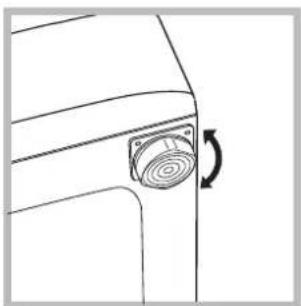
- Place the washing machine on a flat sturdy floor, without resting it up against walls or cabinets.
natural_image
Line drawing of a car door corner with a circular vent or sensor mounted on the side (no text or symbols)- If the floor is uneven, the front feet of the machine may be adjusted until it reaches a horizontal position (the angle of inclination must not exceed 2 degrees).
! If the appliance is levelled correctly, it will be more stable and much less likely to cause vibrations and noise while it is operating, particularly during the spin cycle.
! If it is placed on carpet or a rug, adjust the feet in such a way as to allow a sufficient ventilation space underneath the washing machine.
Connecting the electricity and water supplies
Connecting the water inlet hose
! Before connecting the inlet hose to the water supply, run the water until it is perfectly clear.
natural_image
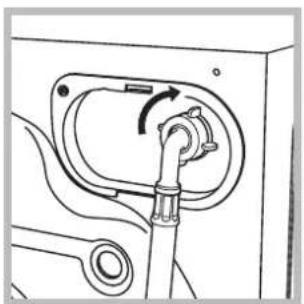
Mechanical diagram showing a valve mechanism with rotation arrow (no text or symbols)- Connect the inlet hose to the machine by screwing it onto the cold water inlet of the appliance, which is situated on the top right-hand side of the rear part of the appliance (see figure).
natural_image
Technical line drawings of two mechanical components: a hexagonal bolt and a flanged pin (no text or symbols)-
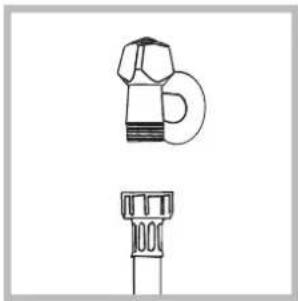
Connect the inlet hose by screwing it to a cold water tab using a 3/4 gas threaded connection (see figure).
-
Make sure that the hose is not folded over or bent.
! The water pressure at the tap must fall within the values indicated in the Technical data table (see next page).
! If the inlet hose is not long enough, contact a specialised shop or an authorised technician.
! Never use second-hand or old inlet hoses; use the products supplied with the machine.
Connecting the drain hose
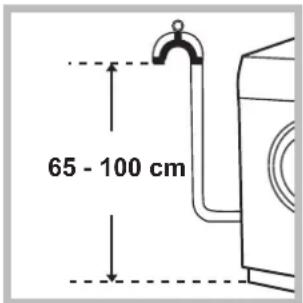
Connect the drain hose to drain duct piping or a wall drain located between 65 and 100 cm above the floor, making sure it is not bent at all.
natural_image
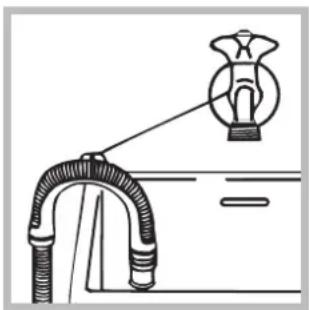
Diagram of a pipe connection with a bulb and connector (no text or symbols)Alternatively, rest the drain hose on the side of a washbasin or bathtub, fastening the duct supplied to the tap (see figure).
The free end of the hose should not be underwater.
! We advise against the use of hose extensions; if it is absolutely necessary, the extension must have the same diameter as the original hose and must not exceed 150 cm in length.
Electrical connections
Before plugging the appliance into the electricity socket, make sure that:
- the socket is earthed and complies with all applicable laws;
- the socket is able to withstand the maximum power load of the appliance as indicated in the Technical data table (see opposite);
- the supply voltage is included within the values indicated on the Technical Data Plate fixed on the machine;
- the socket is compatible with the plug of the appliance. If this is not the case, have the socket or the plug replaced.
! The machine must not be installed outdoors, even in covered areas. It is extremely dangerous to leave the appliance exposed to rain, storms and other weather conditions.
! The mains socket must remain within easy reach after the washing machine has been installed.
! Do not use extension cords or multiple sockets.
! The cable should not be bent or compressed.
! The power supply cable and plug must only be replaced by authorised technicians.
Warning! The company shall not be held responsible in the event that these regulations are not respected.
| Technical data | |
| Model | AQLF8F 292 U |
| Dimensions | width 59.5 cmheight 85 cmdepth 64,5 cm |
| Capacity | from 1 to 8 kg |
| Electrical connections | please refer to the technical data plate fixed to the machine |
| Water connections | maximum pressure 1 MPa (10 bar)minimum pressure 0.05 MPa (0.5 bar)drum capacity 62 litres |
| Spin speed | up to 1200 rotations per minute |
| Energy rated programmes according to regulation 2010/1061 | programme ; temperature 60°C and 40°C. |
 | This appliance conforms to the following EC Directives:- 2004/108/EC (Electromagnetic Compatibility)- 2006/95/EC (Low Voltage)- 2002/96/EC |
Description of the machine

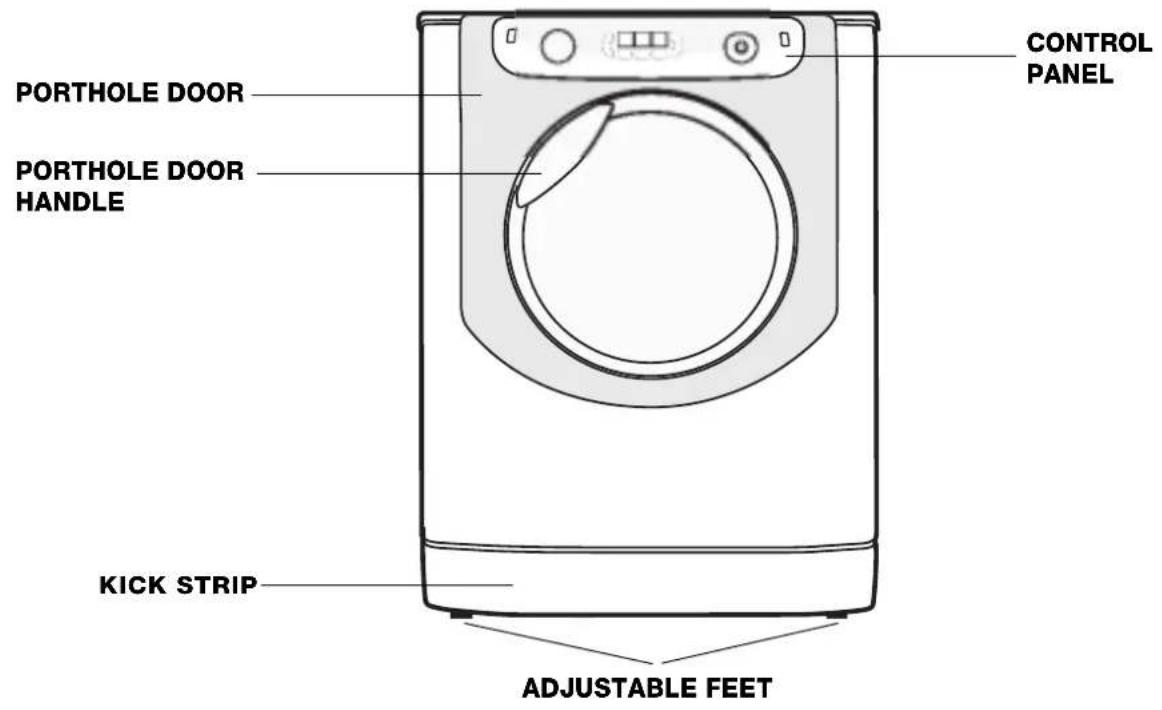
PORTHOLE DOOR
natural_image
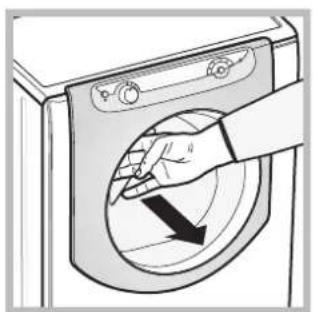
Illustration of a hand opening a washing machine with a black arrow indicating clockwise motion (no text or symbols)Always use the handle to open the porthole door (see figure).
DETERGENT DISPENSER DRAWER
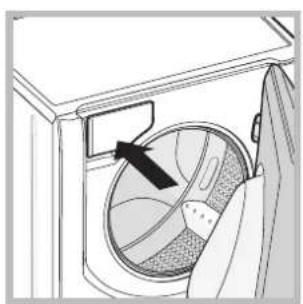
natural_image
Diagram of a washing machine interior showing a circular component with an arrow pointing to it (no text or symbols present)The detergent dispenser drawer is located inside the machine and can be accessed by opening the door.
Refer to the chapter "Auto Dose System" for information on operation.
Note: stick the label showing the wash cycle descriptions and options on the front of
the detergent dispenser drawer. You will find the sticker in the pack containing this manual.
Standby mode
This washing machine, in compliance with new energy saving regulations, is fitted with an automatic standby system which is enabled after about 30 minutes if no activity is detected. Press the ON-OFF ⏻ button briefly and wait for the machine to start up again.
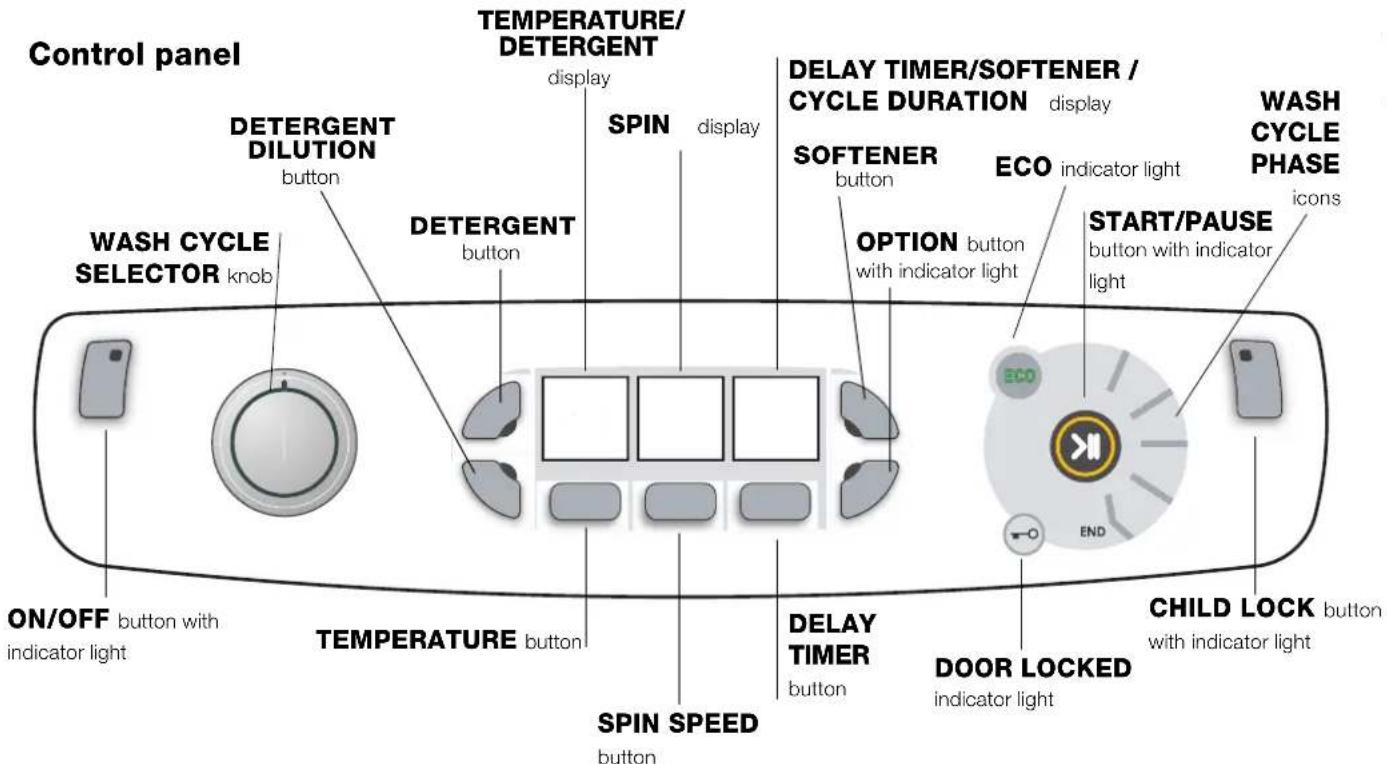
Button with ⏻ ON/OFF indicator light: press this briefly to switch the machine on or off. The green indicator light indicates that the machine is switched on. To switch off the washing machine during the wash cycle, press and hold the button for approximately 3 seconds; if the button is pressed briefly or accidentally the machine will not switch off. If the machine is switched off during a wash cycle, this wash cycle will be cancelled.
WASH CYCLE SELECTOR knob: may be turned in either direction. To select the most suitable wash cycle, please refer to the "Table of wash cycles". The knob will not move during the wash cycle.
TEMPERATURE 📁 button: press to modify or exclude the temperature setting; the value selected will appear on the display above (see "Running a wash cycle").
SPIN SPEED CYCLE 📋 button: press to modify or exclude the spin cycle; the value selected will appear on the display above (see "Running a wash cycle").
DELAY TIMER button: press to set a DELAY TIMER for the selected wash cycle; the set delay time will appear on the display above (see "Running a wash cycle").
DETERGENT and SOFTENER buttons: refer to "Modifying pre-set parameters" in the chapter "Auto Dose System".
DETERGENT DILUTION button: refer to "Filling the tanks" in the chapter "Auto Dose System".
OPTION button with indicator light: press to select the available options. The indicator light corresponding to the selected option will remain lit (see "Running a wash cycle").
WASH CYCLE PHASE icons: these illuminate to indicate the progress of the wash cycle (Wash - Rinse - Spin Drain). The text END lights up when the cycle is complete.
START/PAUSE button with indicator light: when the green indicator light flashes slowly, press the button to start a wash cycle. Once the cycle has begun the indicator light will remain lit in a fixed manner. To pause the wash cycle, press the button again; the indicator light will flash in an orange colour. If the "Door locked" indicator light is switched off, the door may be opened. To start the wash cycle from the point at which it was interrupted, press the button again.
DOOR LOCKED → indicator light: indicates that the porthole door is locked. To open the door, pause the wash cycle (see "Running a wash cycle").
CHILD LOCK 🙏 button with indicator light: to activate or deactivate the CHILD LOCK, press and hold the button for approximately 2 seconds. when the indicator light is illuminated, the control panel is locked. This means it is possible to prevent wash cycles from being modified accidentally, especially where there are children in the home.
ECO indicator light: the ECO icon lights up when, after altering the washing parameters, an energy saving of at least 10% is made. Furthermore, before the machine enters "Standby" mode, the icon will light up for a few seconds; when the machine is switched off the estimated energy saving will be around the 80% mark.
Introduction
natural_image
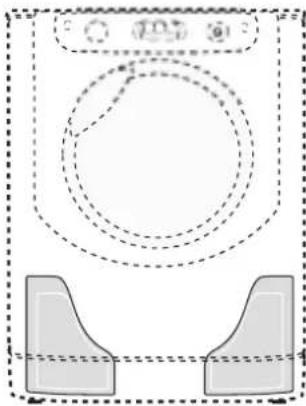
Pure technical diagram showing concentric dashed circles and rectangular shapes without any text or symbolsThis washing machine is equipped with two tanks: one for liquid detergent (either concentrated or diluted) with a capacity of approx. 5.5 l and another for liquid fabric softener (either concentrated or diluted) with a capacity of approx. 3.5 l (see picture). ! Check the detergent/fabric softener box to verify whether it is diluted or concentrated detergent. The automatic dosing system intakes the
correct amount of detergent and fabric softener from the tanks for each type of load and at the right time, guaranteeing optimal washing results without wastage. The amount of detergent/fabric softener can be modified manually by pressing the DETERGENT and FABRIC SOFTENER buttons (refer to "Modifying pre-set parameters"). If you prefer, the washing machine can also be used in the "traditional" mode, i.e. by adding the detergent in the dispenser; the machine will automatically detect the detergent and will not use the tanks.
Detergent dispenser
"Traditional" mode.
Pull out the detergent dispenser drawer up to the first stop point to add the detergent (either liquid or powder detergent), bleach or other additives (e.g. whiteners) and the pre-wash detergent for washing in the "traditional" mode (refer to "Traditional" mode).
"Auto Dose System" mode.
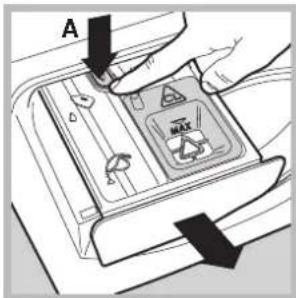
In order to fill the detergent and fabric softener tanks, the detergent dispenser drawer must be fully extracted: open the dispenser drawer up to the first stop point then press the lever (A) and open up to the second stop point, making sure that it is fully extracted. Avoid
moving the dispenser drawer during filling operations. Once the tanks have been filled (refer to "Filling the tanks"), the machine can run up to 40 cycles before the detergent finishes (*).
First-time use
Turn the washing machine on by pressing the ON/OFF button. The first wash cycle must be carried out without laundry and by adding detergent in the detergent dispenser (refer to "Traditional" mode); set the programme "☐" (Cotton 90°) without pre-wash and without filling the tanks.
(*) with an average load of 4 kg, 40°C Cotton programme, "medium" water hardness level and dirt level set to 3.
Filling the tanks:
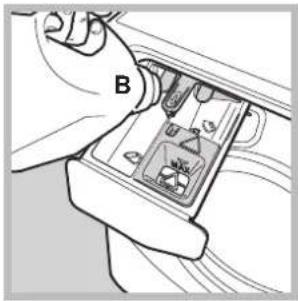
Open the detergent dispenser drawer in the "Auto Dose System" mode (refer to "Detergent dispenser"). Slowly pour the detergent (B) and fabric softener (C) until the tanks are completely filled (see picture).
natural_image
Illustration of hands inserting a device into a socket (no text or symbols visible)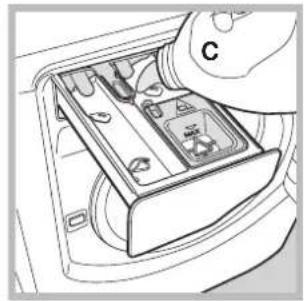
natural_image
Diagram of a hand inserting a device into a car intake tray (no text or symbols visible)To avoid exceeding the maximum capacity, a buzzer (beep) will sound with growing intensity to signal the level and 3 long beeps will sound once the tank is completely full.
Start the wash cycle immediately after filling the tanks to ensure that the dispenser is properly cleaned. The respective icons 📋 (for the detergent) and 🌐 (for the fabric softener) will light up gradually to signal the level.
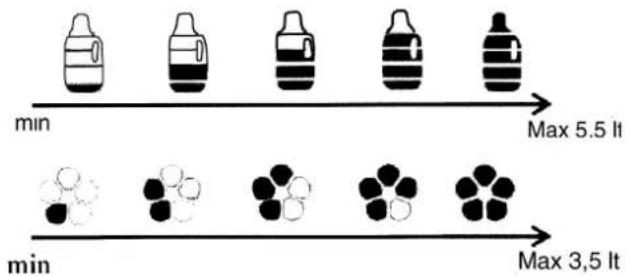
The filling time depends on the density of the product. Very dense products will take longer to fill.
Close the detergent dispenser drawer only once the compartments are completely empty.
Select the density of the detergent added (either concentrated or liquid) by pressing the appropriate button ∅.
The machine will store the selection.
If no option is selected, the detergent intake option will be pre-set to "diluted".
Use button ⚙ to set the amount of fabric softener that will be automatically extracted by the machine:
1) If concentrated softener is used, we recommend selecting the first level ( ✉ with one bar) and, if necessary, stepping up by a single position ( ✉ with 2 bars) to increase detergent intake.
2) If diluted softener is used, we recommend setting level 3 (with 3 bars) and to then either increase/decrease the amount of fabric softener to be extracted.
3) To exclude the use of fabric softener, press ✿ until the bars disappear (also refer to "Modifying pre-set parameters").
Signals for successive refilling:
When the level of detergent/fabric softener falls below the required level, at the end of the cycle, the first segment of the detergent symbol or the petal of the fabric softener symbol in the bottom left section, will flash slowly on the display. Once the detergent/fabric softener is finished, the first segment of the detergent symbol or the petal of the fabric softener symbol in the lower left section will flash fast to signal that the detergent or fabric softener tank is empty. While the cycle runs, with empty tanks, the symbols will disappear; at the end of the cycle or during the pause mode, the first segment of the symbol and the petal of the symbol in the lower left section will flash fast. If the tanks are not filled, the successive wash cycles in Auto Dose System will be carried out without any intake of detergent.
! We suggest adding detergent and fabric softener ONLY after the machine's signal.
! NEVER mix two different detergents; always clean out the tank before adding a new type of detergent (refer to "Cleaning cycle set by the user").
Using the "Auto Dose System"
If the compartments have been filled with detergent and fabric softener, you may start using the machine (refer to "Running a wash cycle").
Powder detergents for pre-washing and powder additives may only be used in the traditional mode or using the "Auto Dose System", by placing the additives directly inside the drum, preferably in conjunction with the "laundry ball".
Modifying pre-set parameters:
The machine automatically intakes detergent on the basis of the selected programme, wash load and water hardness. However, the amount of detergent/fabric softener used may be modified.
button: press to increase, decrease and to exclude detergent intake.

button: press to increase, decrease and to exclude fabric softener intake.

The level of detergent/fabric softener suggested by the machine is indicated by 3 bars.
Less than 3 bars indicates a lower level of detergent/fabric softener compared to that suggested by the machine, while more than 3 bars indicates a higher level of detergent/fabric softener.
Cleaning the tanks:
Tank cleaning cycles can either be automatic or pre-set by the user.
Automatic cleaning:
The washing machine carries out an automatic cleaning cycle during the rinse cycle if the level of detergent that remains is insufficient for carrying out a successive wash cycle.
Cleaning cycle set by the user:
Run the cleaning cycle (with empty drum) if you require adding a different product to the previous one or if the tanks have been incorrectly filled (e.g. fabric softener has been erroneously poured into the detergent tank or vice-versa). Press button ⏻ and hold for approximately 8 sec. to activate cleaning of the detergent tank, button ✿ for cleaning the fabric softener tank or button ✿ for cleaning both tanks. Once the buzzers with growing intensity are followed by 2 long buzzers and the icons ⏻ for the detergent, for the fabric softener, ✿ for both tanks appear, the cleaning cycle for the selected container will start.
The cleaning cycle lasts about 40' if the tanks are initially empty; if not, the cycle will last longer.
! During the tank cleaning cycle, the 📁 symbol will fill gradually from bottom to top and the ✿ symbol will fill gradually petal by petal.
"Traditional" mode
Pull out the detergent dispenser drawer up to the first stop point (see picture) then pour the amount of detergent and other additives (e.g. bleach) required for a single wash cycle directly into the dispenser.
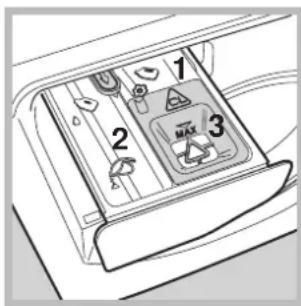
- pre-wash compartment: use powder detergent only.
-
main wash compartment: use powder or liquid detergent. If the latter is used, we recommend pouring it into the dispenser immediately before starting the washing machine and without running a pre-wash cycle.
-
! Do not pour anything in this compartment.
Tablet detergent or the relative "laundry ball" must be added directly inside the drum. In this event, deactivate the "Auto Dose System" (by pressing the 🎨 button until the relative vertical bars disappear from the display). Do not pour any fabric softener as the appropriate quantity required for each wash cycle will be automatically extracted.
To deactivate fabric softener intake, press the ⚙ button until the vertical bars disappear from the display.
For wool and silk garments, we recommend using a special detergent which must be poured directly into the detergent dispenser (compartment 2).
Running the wash cycle:
Select the programme and the compatible options on the basis of the required need and type of load.
WARNING: before you use the washing machine for the first time, run a wash cycle with detergent and no laundry, using the 90° cottons cycle without pre-wash.
- SWITCH THE MACHINE ON. Press the ⏻ button. All the indicator lights will illuminate for 1 second; the indicator light corresponding to the ⏻ button will then remain lit in a fixed manner and the START/PAUSE indicator light will flash slowly.
- LOAD THE LAUNDRY. Open the porthole door. Load the laundry, making sure you do not exceed the maximum load value indicated in the table of wash cycles on the following page.
- MEASURE OUT THE DETERGENT. There is no need to add detergent when the "Auto Dose System" mode is used, as the machine automatically intakes detergent on the basis of the selected programme, type of load and water hardness. Refer to the paragraph "Traditional" mode for implementing the traditional operation mode.
- CLOSE THE PORTHOLE DOOR.
- SELECT THE PROGRAMME. Turn the WASH CYCLE SELECTOR KNOB right or left, until you have selected the desired wash cycle. A temperature and spin speed is set for each wash cycle; these may be adjusted.
- CUSTOMISE THE WASH CYCLE. Use the relevant buttons on the control panel:
Modify the temperature and/or spin speed.
The machine automatically displays the maximum temperature and spin speed values set for the selected cycle, or the most recently-used settings if they are compatible with the selected cycle. The temperature can be decreased by pressing the button, until the cold wash ( ) setting is reached. The spin speed may be progressively reduced by pressing the ⑨ button, until it is completely excluded (no). If these buttons are pressed again, the maximum values are restored.
! Exception: if the "Cotton" programme is selected, the temperature can be increased up to a value of 90°C.
Set a DELAY TIMER.
Press the button until you have reached the desired delay time. During the setting process, the delay time is shown on the display and the ⏻ symbol flashes. After selecting a DELAY TIMER time, the fixed ⏻ symbol and the cycle duration will appear on the display. Press the button once to display the selected delay time. To remove the DELAY TIMER option, press the button until the display shows the text OFF; the ⏻ symbol will disappear.
! Once the START/PAUSE button has been pressed, the time delay may only be decreased.
Modify the cycle settings.
Press the OPTION button to customise the wash cycle in accordance with your own requirements.
- Press the button to activate the option; the corresponding indicator light will switch on.
- Press the button again to disable the option; the indicator light will switch off.
! If the selected option is not compatible with the selected wash cycle, this incompatibility will be signalled by the flashing of the indicator light and a sound alert (3 beeps); the option will not be activated.
- START THE PROGRAMME. Press the START/PAUSE button. The corresponding indicator light remains lit in a fixed manner and the porthole door locks (the → DOOR LOCKED indicator light illuminates). The icons corresponding to the wash cycle phases will light up during the cycle to indicate which phase is currently in progress. To change a wash cycle once it has already started, pause the washing machine by pressing the START/PAUSE button; then select the desired cycle and press the START/PAUSE button again. To open the door during a wash cycle, press the START/PAUSE button; if the DOOR LOCKED → indicator light is switched off you may open the door. Press the START/PAUSE button again to restart the wash cycle from the point at which it was interrupted.
- THE END OF THE WASH CYCLE. This is indicated by the illuminated text END. The porthole door may be opened immediately. If the START/PAUSE indicator light is flashing, press the button to end the cycle. Open the door, unload the laundry and switch off the machine.
! If you wish to cancel a cycle which has already begun, press and hold the ⏻ button until the cycle stops and the machine switches off.
Bag for quilts, curtains and delicate garments
The Aqualtis washing machine makes it easier for you to wash even the most valuable and delicate garments in complete confidence thanks to the special bag which protects the laundry (this is supplied with the machine). We recommend that the bag is used every time you wash quilts and padded items with an outer layer made using synthetic material.
Anti-crease
This function interrupts the wash programme, and the washing is left to soak in water before the appliance is drained.
It is automatically activated with programme (Silk) and helps to prevent the formation of creases. To complete the cycle press the START/PAUSE button.
Wash cycles and options
Table of wash cycles
| Icon | Description of the wash cycle | Max. temp.(°C) | Max. speed(rpm) | Detergent and additives | Max. load(kg) | Cycle duration | ||
| Detergent for prewash | Detergent for wash | Fabric softener | ||||||
| Cottons wash cycles | (*) The duration of the wash cycles can be checked on the display. | |||||||
| Cottonwith pre-wash(Add detergent to the relevant compartment). | 90° 1200 | ● | ● | ● | 8 | |||
| Cotton (1-2):heavily soiled whites and resistant colours. | 60°(Max. 90°) | 1200 - | ● | ● | 8 | |||
| Cotton (2):heavily soiled whites and delicate colours. | 40° 1200 - | ● | ● | 8 | ||||
| Coloured Cotton (3) | 40° 1200 - | ● | ● | 8 | ||||
| Shirts | 40° | 600 | - | ● | ● | 2 | ||
| Jeans | 40° | 800 | - | ● | ● | 4 | ||
| Special programmes | ||||||||
| Baby: heavily soiled delicate colours | 40° | 800 | - | ● | ● | 4 | ||
| Durable Synthetics | 60° | 800 | - | ● | ● | 4 | ||
| Durable Synthetics (4) | 40° | 800 | - | ● | ● | 4 | ||
| Delicate Synthetics | 40° | 800 | - | ● | ● | 4 | ||
| "Bed & Bath" for bedlinen and towels. | 60° 1200 - | ● | ● | 8 | ||||
| Duvets:for down-stuffed garments. | 30° 1000 - | ● | ● | 3,5 | ||||
| Silk: for garments in silk and viscose, lingerie. | 30° | 0 | - | ● | ● | 2 | ||
| Wool: for wool, cashmere, etc. | 40° | 800 | - | ● | ● | 2 | ||
| Mix 30': to refresh lightly soiled garments quickly (not suitable for wool, silk and clothes which require washing by hand) | 30° | 800 | - | ● | ● | 3,5 | ||
| Partials wash cycles | ||||||||
| Rinse | - | 1200 | - | - | ● | 8 | ||
| Spin | - | 1200 | - | - | - | 8 | ||
| Drain | - | 0 | - | - | - | 8 | ||
(*) Note: 10 minutes after the START, the machine will recalculate the time remaining until the end of the wash cycle on the basis of the load inside it; this value will then be shown on the display.
The length of cycle shown on the display or in this booklet is an estimation only and is calculated assuming standard working conditions. The actual duration can vary according to factors such as water temperature and pressure, the amount of detergent used, the amount and type of load inserted, load balancing and any wash options selected.
For all Test Institutes:
1) Test wash cycle in compliance with regulation 2010/1061: set wash cycle with a temperature of 60°C and 40°C.
2) Long wash cycle for cottons: set wash cycle with a temperature of 40°C.
3) Short wash cycle for cottons: set wash cycle with a temperature of 40°C.
4) Long wash cycle for synthetics: set wash cycle with a temperature of 40°C.
Options

Detergent dosage
To dose the amount of detergent (refer to the chapter "Auto Dose System").

Concentrated Detergent
To modify the degree of detergent density (refer to the chapter "Auto Dose System").

Fabric softener dosage
To dose the amount of fabric softener (refer to the chapter "Auto Dose System").

Extra rinse
By selecting this option, the efficiency of the rinse is increased and optimal residual detergent removal is guaranteed. It is particularly useful for skin which is sensitive to detergents. We recommend this option is used with a full load of washing, or when a large amount of detergent is required.
! It cannot be used in conjunction with,
Detergent
The type and quantity of detergent required depend on the type of fabric you are washing (cotton, wool, silk, etc.), as well as its colour, the washing temperature, the level of soiling and the hardness of the water in the area. Whenever the detergent and fabric softener "Auto Dose System" is activated, this washing machine helps to prevent wastage and to protect the environment, besides guaranteeing optimal washing performance. We recommend the following:
- Use powder detergent for carrying out a pre-wash and pour in the "traditional" mode.
- Use liquid detergents for delicate cotton garments and for all low-temperature wash cycles.
- When activating the "Auto Dose System" mode, use liquid detergent and fabric softeners only. Never add ultra-concentrated detergents (e.g. "Gel" type detergents or similar).
- Use gentle liquid detergents for wool and silk garments and pour in the "traditional" mode.
! Never mix two different detergents; always clean out the tank before adding a new type of detergent.
The detergent should be poured into the relevant compartment - or the dispenser placed directly inside the drum - before the wash cycle begins. In the latter case, it will not be possible to select the Cottons with pre-wash cycle.
! Do not use hand washing detergents because these create too much foam.
Preparing the laundry
- Shake out the garments before loading them into the machine.
- Divide the laundry according fabric type (symbol on the washing instruction label) and colour, making sure you separate the coloured garments from the white ones;
• Empty all pockets and check the buttons; - Do not exceed the values listed in the "Table of wash cycles", which refer to the weight of the laundry when dry.
How much does your laundry weigh?
1 sheet 400-500 g
1 pillowcase 150-200 g
1 tablecloth 400-500 g
1 bathrobe 900-1200 g
1 towel 150-250 g
1 pair of jeans 400-500 g
1 shirt 150-200 g
Washing recommendations
Shirts: use the special "Shirts" wash cycle to wash shirts in different fabrics and colours to guarantee they receive the best possible care.
Jeans: use the special "Jeans" ☑ wash cycle for all denim garments; turn inside out before washing and use a liquid detergent.
Baby: use the special "Baby" wash cycle to remove the remove the soiling typically caused by babies, while removing all traces of detergent from nappies in order to prevent the delicate skin of babies from suffering allergic reactions. The cycle has been designed to reduce the amount of bacteria by using a greater quantity of water
and optimising the effect of special disinfecting additives added to the detergent. At the end of the wash cycle, the machine will slowly rotate the drum; to end the cycle press the START/PAUSE button.
Silk: use the special "Silk" wash cycle to wash all silk garments. We recommend the use of special detergent which has been designed to wash delicate clothes.
Curtains: use the "Silk" wash cycle. These should be folded and placed inside the bag provided.
Wool: is the only washing machine brand to have been awarded the prestigious Woolmark Platinum Care endorsement (M.0508) by the Woolmark Company, which means that all woollen garments may be washed in the washing machine, even those which state "hand wash only" 🎨 on the label. The "Wool" wash cycle can be used to wash all woollen garments in the washing machine while guaranteeing optimum performance.
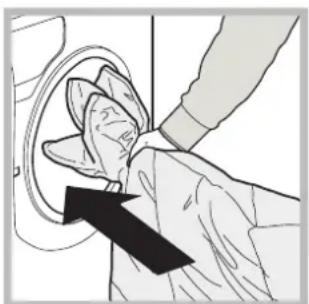
Duvets: to wash double or single duvets (the weight of which should not exceed 3,5 kg), cushions or clothes padded with goose down such as puffa jackets, use the special "Duvets" wash cycle. We recommend that duvets are placed in the drum with their edges folded inwards (see figure) and that no more than 34 of the total volume of the drum is used.
natural_image
Illustration of a hand inserting a small object into a device (no text or symbols visible)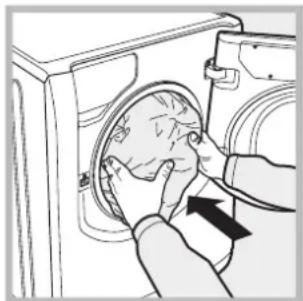
natural_image
Illustration of hands installing or adjusting a circular component inside a washing machine (no text or symbols visible)Quilts: to wash quilts with a synthetic outer layer, use the bag provided and set the wash cycle to "Duvets"
Bedlinen and towels: use the "Bed & Bath" cycle to wash laundry from all over the house; this optimises fabric softener performance and helps you save time and energy. We recommend the use of powder detergent.
Stubborn stains: it is wise to treat stubborn stains with solid soap before washing, and to use the Cottons with pre-wash cycle.
Load balancing system
Before every spin cycle, to avoid excessive vibrations before every spin and to distribute the load in a uniform manner, the drum rotates continuously at a speed which is slightly greater than the washing rotation speed. If, after several attempts, the load is not balanced correctly, the machine spins at a reduced spin speed. If the load is excessively unbalanced, the washing machine performs the distribution process instead of spinning. To encourage improved load distribution and balance, we recommend small and large garments are mixed in the load.
! The machine was designed and constructed in accordance with international safety regulations. The following information is provided for safety reasons and must therefore be read carefully.
General safety
- This appliance is not intended for use by persons (including children) with reduced physical, sensory or mental capabilities, or lack of experience and knowledge, unless they have been given supervision or instruction concerning use of the appliance by a person responsible for their safety. Children should be supervised to ensure that they do not play with the appliance.
- This appliance was designed for domestic use only.
- Do not touch the machine when barefoot or with wet or damp hands or feet.
- Do not pull on the power supply cable when unplugging the appliance from the electricity socket. Hold the plug and pull.
- Do not touch the drained water as it may reach extremely high temperatures.
- Never force the porthole door. This could damage the safety lock mechanism designed to prevent accidental opening.
- If the appliance breaks down, do not under any circumstances access the internal mechanisms in an attempt to repair it yourself.
- Always keep children well away from the appliance while it is operating.
- If it must be moved, proceed with the help of two or three people and handle it with the utmost care. Never try to do this alone, because the appliance is very heavy.
- Before loading laundry into the washing machine, make sure the drum is empty.
Disposal
- Disposing of the packaging materials: observe local regulations so that the packaging may be re-used.
- The European Directive 2002/96/EC relating to Waste Electrical and Electronic Equipment (WEEE) states that household appliances should not be disposed of using the normal solid urban waste cycle. Exhausted appliances should be collected separately in order to optimise the cost of re-using and recycling the materials inside the machine, while preventing potential damage to the atmosphere and to public health. The crossed-out dustbin is marked on all products to remind the owner of their obligations regarding separated waste collection.
For more information relating to the correct disposal of household appliances, owners should contact their local authorities or appliance dealer.
Opening the porthole door manually
In the event that it is not possible to open the porthole door due to a powercut, and if you wish to remove the laundry, proceed as follows:
natural_image
Line drawing of a washing machine with a cup beside it (no text or symbols)- remove the plug from the electrical socket.
-
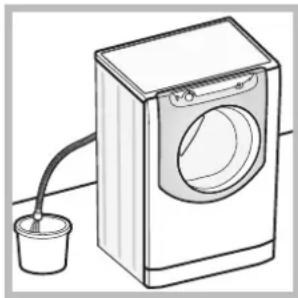
make sure the water level inside the machine is lower than the door opening; if it is not, remove excess water using the drain hose, collecting it in a bucket as indicated in the figure.
-
remove the cover panel on the lower front part of the washing machine (see overleaf).
natural_image
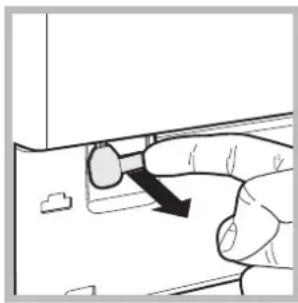
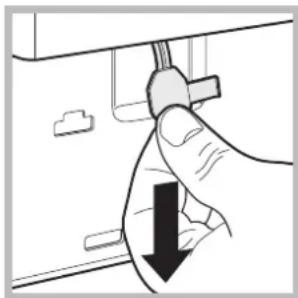
Hand holding a device with a black arrow pointing to a knob (no text or symbols visible)- pull outwards using the tab as indicated in the figure, until the plastic tie-rod is freed from its stop position; pull downwards until you hear a "click", which indicates that the door is now unlocked.
natural_image
Hand holding a cable with a black downward arrow indicating a drop or reduction (no text or symbols present)-
open the door; if this is still not possible repeat the procedure.
-
reposition the panel, making sure the hooks are securely in place before you push it onto the appliance.
Care and maintenance
EN
Cutting off the water and electricity supplies
- Turn off the water tap after every wash cycle. This will limit wear on the hydraulic system in the machine and help to prevent leaks.
- Unplug the appliance when cleaning it and during all maintenance work.
Cleaning the machine
The outer parts and rubber components of the appliance can be cleaned using a soft cloth soaked in lukewarm soapy water. Do not use solvents or abrasives.
Cleaning the detergent dispenser drawer
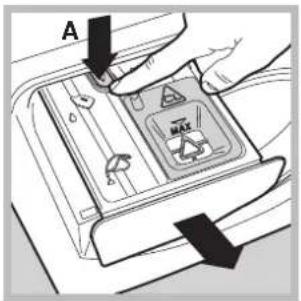
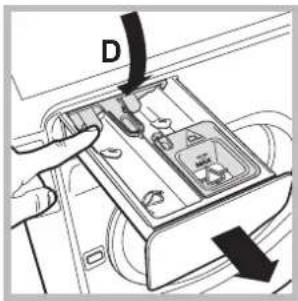
To pull out the dispenser drawer, open until the first stop point then press lever A to open completely; finally, press one of the levers D and pull the drawer outwards (see picture).
Wash it under running water; this procedure should be effected regularly. Be careful to remove any detergent residues from the dispenser drawer socket on the machine.
Keep the drawer to the left hand side when replacing it to ensure that it centres the guides and to prevent it from jamming.
Caring for your appliance drum
• Always leave the door ajar to prevent unpleasant odours from forming.
Cleaning the pump
The washing machine is fitted with a self-cleaning pump which does not require any maintenance. Sometimes, small items (such as coins or buttons) may fall into the protective pre-chamber at the base of the pump.
! Make sure the wash cycle has finished and unplug the appliance.
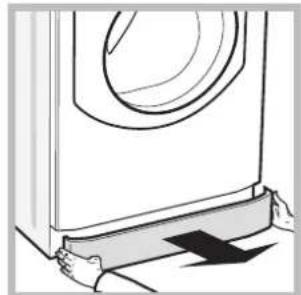
To access the pre-chamber:
natural_image
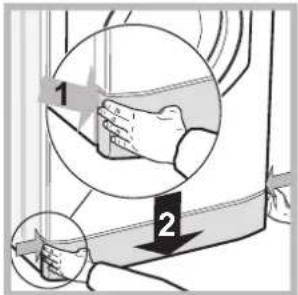
Line drawing of hands holding a large washing machine with a circular vent (no text or symbols)- take off the cover panel on the front of the machine by first pressing it in the centre and then pushing downwards on both sides until you can remove it (see figures);
natural_image
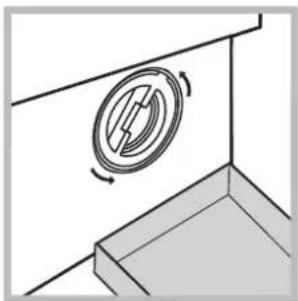
Diagram of a mechanical component with a rotating shaft and base, no text or symbols present- position a container so that it will collect the water which flows out (approximately 1.5 l) (see figure);
-
unscrew the lid by rotating it in an anti-clockwise direction (see figure);
-
clean the inside thoroughly;
- screw the lid back on;
- reposition the panel, making sure the hooks are securely in place before you push it onto the appliance.
Checking the water inlet hose
Check the inlet hose at least once a year. If there are any cracks, it should be replaced immediately: during the wash cycles, water pressure is very strong and a cracked hose could easily split open.
Your washing machine could occasionally fail to work. Before contacting the Technical Assistance Centre (see "Assistance"), make sure that the problem cannot be not solved easily using the following list.
EN
| Problem: | Possible causes / Solutions: |
| The washing machine does not switch on. | · The appliance is not plugged into the socket fully, or not enough to make contact.· There is no power in the house. |
| The wash cycle does not start. | · The door is not closed properly.· The START/PAUSE button has not been pressed.· The water tap has not been opened.· A DELAY TIMER has been set. |
| The washing machine does not fill with water. | · The water inlet hose is not connected to the tap.· The hose is bent.· The water tap has not been opened.· There is no water supply in the house.· The pressure is too low.· The START/PAUSE button has not been pressed. |
| The machine continuously fills with water and drains. | · The drain hose is not fitted at a height between 65 and 100 cm from the floor (see “Installation”).· The free end of the hose is under water (see “Installation”).· If the dwelling is on one of the upper floors of a building, there may be problems relating to water drainage, causing the washing machine to fill with water and drain continuously. Special anti-draining valves are available in shops and help to prevent this inconvenience.· The wall drainage system is not fitted with a breather pipe. |
| The washing machine does not drain or spin. | · The wash cycle does not include draining: Some wash cycles require the drain phase to be started manually (see “Wash cycles and options”).· The drain hose is bent (see Installation).· The drainage duct is clogged. |
| The machine vibrates a lot during the spin cycle. | · The drum was not unlocked correctly during installation (see “Installation”).· The machine is not level (see “Installation”).· The machine is trapped between cabinets and walls (see “Installation”).· The load is unbalanced (see “Detergents and laundry”). |
| The washing machine leaks. | · The water inlet hose is not screwed on properly (see “Installation”).· The detergent dispenser is blocked (to clean it, see “Care and maintenance”).· The drain hose is not fixed in place properly (see “Installation”). |
| The icons corresponding to the “Phase in progress” flash rapidly at the same time as the ON/OFF indicator light. | · Switch off the machine and unplug it, wait for approximately 1 minute and then switch it back on again. If the problem persists, contact the Technical Assistance Service. |
| There is too much foam. | · The detergent is not suitable for machine washing (it should display the text “for washing machines” or “hand and machine wash”, or the like).· Too much detergent was used. |
| The washing machine door remains locked. | · Perform the manual unlocking procedure (see “Precautions and tips”). |
Troubleshooting:
The machine's washing performance is unsatisfactory.
What happens if the tanks are loaded even if they are already full?
What happens if the dispenser is used in the traditional mode while the tanks are still full?
Can the tanks also be used for powder detergent?
Can powder detergent fall into the tanks?
What happens if the dispenser is not opened properly when filling the tanks?
What happens if detergent and fabric softener are erroneously inverted?
What happens if different detergents are mixed before the tanks are empty?
Possible causes / Solutions:
- The tanks have not been loaded correctly (e.g. fabric softener has been added instead of detergent or vice-versa)
- Two different types of detergent/fabric softener have mixed.
! NEVER mix two different detergents; always clean out the tanks before adding a new type of detergent. - The "Auto Dose System" is blocked due to prolonged lack of use: carry out a tank cleaning cycle (refer to "Cleaning cycle pre-set by user").
- Buzzers (Beep) and visual signals (icons appearing on the display) indicate that the tank is full. If further detergent/fabric softener is added, the excess quantity will fall into the drum and will be washed away with the next cycle.
- The machine will automatically track whether powder or liquid detergent has been loaded in the traditional mode and will not intake any amount of detergent from the tank. Fabric softener can only be used in the "Auto Dose System" mode.
- No, powder detergent can only be used in the traditional mode.
- No, there is a barrier to prevent powder detergent from falling into one of the tanks even if the dispenser is open in the "Auto Dose System" position (i.e. completely open).
- If the dispenser is not completely open, the detergent or fabric softener that has been added will fall into the drum and will be washed away with the next cycle.
- The washing machine will wash with unsatisfactory results, the tanks will have to be emptied and subjected to a manual cleaning cycle.
- The machine will wash normally although we recommend only refilling the tanks after the signal emitted by the machine; do not mix different detergents/fabric softeners.
Before calling for Assistance:
- Check whether you can solve the problem by yourself (see "Trouble shooting");
- Restart the wash cycle to check whether the problem has been solved;
- If it has not, contact the Authorised Technical Assistance Service.
! If the washing machine has been installed or used incorrectly, you will have to pay for the call-out service.
! Always request the assistance of authorised technicians.
Please have the following information to hand:
- the type of problem;
• the appliance model (Mod.);
• the serial number (S/N).
The above information can be found on the data plate located on the appliance itself.
EN

Italiano
Sommario
natural_image
Pure technical diagram of a mechanical or electrical component with no visible text, numbers, or symbols.natural_image
Line drawing of a car door corner with a scroll wheel and directional arrow (no text or symbols)natural_image
Diagram of a mechanical valve or pump assembly with directional arrow (no text or symbols)natural_image
Technical line drawing of a mechanical component with two views: top shows a flanged knob and ring, bottom shows a flanged screw head (no text or symbols)natural_image
Diagram of a pipe connection with a hanging device (no text or symbols)natural_image
Illustration of a hand opening a washing machine with a circular dial and arrow indicating clockwise motion (no text or symbols)natural_image
Diagram of a washing machine interior showing fan blades and handle (no text or symbols)natural_image
Pure technical diagram showing concentric circles and two symmetrical mechanical components without any text or symbolsnatural_image
Close-up of hands inserting a component into a device (no visible text or symbols)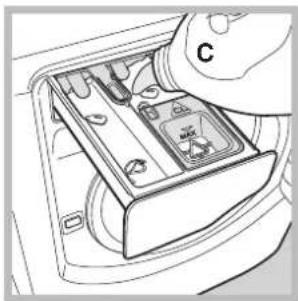
natural_image
Hand inserting a device into a car intake tray (no text or symbols visible)natural_image
Illustration of a hand inserting a device into a device with a black arrow pointing to the device (no text or symbols present)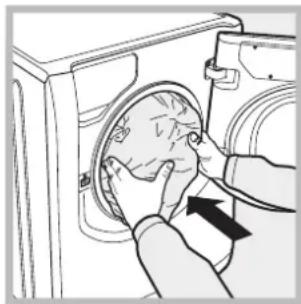
natural_image
Illustration of hands installing or adjusting a circular component inside a washing machine (no text or symbols visible)natural_image
Line drawing of a washing machine with a cup beside it (no text or symbols)natural_image
Hand holding a tool with a black arrow pointing to a circular component (no text or symbols visible)natural_image
Hand holding a cable with a black downward arrow indicating a drop or reduction (no text or symbols present)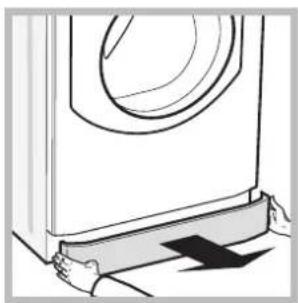
natural_image
Line drawing of hands pressing down on a washing machine (no text or symbols)natural_image
Diagram of a mechanical component with a circular feature and rotational arrow, no text or symbols presentnatural_image
Technical diagram of a mechanical or electrical component with concentric circular and radial features, no visible text or symbols.natural_image
Line drawing of a car door corner with a circular vent or sensor mounted on the side (no text or symbols)natural_image
Diagram of a mechanical valve or connector with a rotating knob (no text or symbols)natural_image
Technical line drawing of two mechanical components: a hexagonal bolt and a flanged screw (no text or symbols)natural_image
Diagram of a pipe connection to a light bulb, showing fluid flow and structural details (no text or symbols)В качестве
natural_image
Illustration of a hand opening a washing machine with a circular dial and arrow indicating clockwise motion (no text or symbols)natural_image
Diagram of a refrigerator interior showing a circular fan with internal blades and an arrow indicating direction (no text or symbols)natural_image
Pure technical diagram showing concentric circles and rectangular shapes without any text or symbolsnatural_image
Illustration of hands inserting a device into a container with labeled component B (no text or symbols beyond label)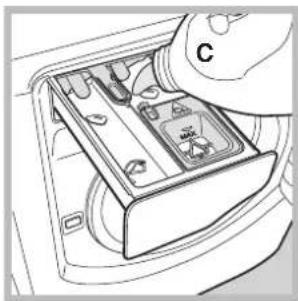
natural_image
Diagram of a hand inserting a component into a car intake tray (no text or symbols visible)natural_image
Illustration of a hand using a tool to adjust or install a piece of hair into a circular component (no text or symbols visible)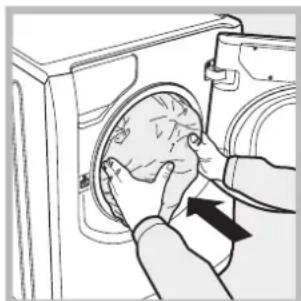
natural_image
Illustration of a person opening a washing machine with a hand adjusting the inner panel (no text or symbols visible)natural_image
Line drawing of a washing machine with a cup beside it (no text or symbols)natural_image
Hand holding a device with a black arrow pointing to the handle (no text or symbols visible)natural_image
Hand holding a cable with a black downward arrow indicating a drop or decrease (no text or symbols present)natural_image
Line drawing of hands operating a washing machine with a curved lid (no text or symbols)natural_image
Diagram of a mechanical component with a rotating circular feature and directional arrows, no text or symbols present.natural_image
Technical diagram of a mechanical or electrical component with concentric circular and oval shapes, no visible text or symbols.natural_image
Line drawing of a car door corner with a spiral-patterned opening and directional arrow (no text or symbols)natural_image
Technical line drawing of a mechanical component with a valve and handle (no text or symbols)natural_image
Technical line drawing of a mechanical component with two views: top shows a flanged knob and ring, bottom shows a flanged screw base (no text or symbols)natural_image
Diagram of a pipe connection with a bulb and connector (no text or symbols)natural_image
Illustration of a hand opening a washing machine with a circular dial and directional arrow (no text or symbols)natural_image
Diagram of a washing machine interior showing a fan blade and door handle (no text or symbols)natural_image
Pure technical diagram showing a mechanical part with dashed circular and rectangular outlines, no text or symbols present.Giriş
natural_image
Illustration of a hand inserting a device into a socket (no text or symbols visible)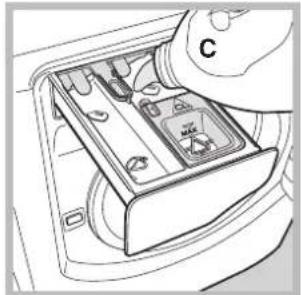
natural_image
Interior view of a car air intake box with hand holding a control knob (no text or symbols visible)natural_image
Illustration of a hand adjusting a circular object with an arrow pointing to it (no text or symbols present)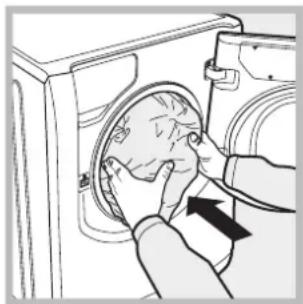
natural_image
Illustration of hands installing or adjusting a circular component inside a washing machine (no text or symbols visible)natural_image
Line drawing of a washing machine with a cup beside it (no text or symbols)natural_image
Hand holding a knob with a black arrow pointing to the knob area (no text or symbols visible)natural_image
Hand holding a cable with a black downward arrow indicating a drop or direction (no text or symbols present)natural_image
Line drawing of hands pressing down on a washing machine component (no text or symbols)natural_image
Simple line drawing of a mechanical component with a circular feature and rotational arrow (no text or symbols)- Description of the machine, 4-5
- Auto Dose System, 6-7
- Running a wash cycle, 8
- Wash cycles and options, 9
- Detergents and laundry, 10
- Precautions and advice, 11
- Care and maintenance, 12
- Trouble shooting, 13-14
- Unpacking and levelling
- Unpacking
- Levelling
- Connecting the electricity and water supplies
- Connecting the water inlet hose
- Connecting the drain hose
- Electrical connections
- Description of the machine
- PORTHOLE DOOR
- DETERGENT DISPENSER DRAWER
- Standby mode
- Introduction
- Detergent dispenser
- First-time use
- Filling the tanks:
- Signals for successive refilling:
- Using the "Auto Dose System"
- Modifying pre-set parameters:
- Cleaning the tanks:
- Automatic cleaning:
- Cleaning cycle set by the user:
- "Traditional" mode
- Running the wash cycle:
- Modify the temperature and/or spin speed.
- Set a DELAY TIMER.
- Modify the cycle settings.
- Bag for quilts, curtains and delicate garments
- Anti-crease
- Wash cycles and options
- For all Test Institutes:
- Options
- Detergent dosage
- Concentrated Detergent
- Fabric softener dosage
- Extra rinse
- Detergent
- Preparing the laundry
- How much does your laundry weigh?
- Washing recommendations
- Load balancing system
- General safety
- Disposal
- Opening the porthole door manually
- Care and maintenance
- EN
- Cutting off the water and electricity supplies
- Cleaning the machine
- Cleaning the detergent dispenser drawer
- Caring for your appliance drum
- Cleaning the pump
- Checking the water inlet hose
- Troubleshooting:
- Possible causes / Solutions:
- Before calling for Assistance:
- Please have the following information to hand:
- Sommario
- В качестве
- Giriş
Brand : Hotpoint Ariston
Model : AQLF8F 292 U
Category : Washing machine