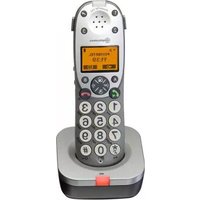
PowerTel 701 - Telephone Amplicom - Free user manual and instructions
Find the device manual for free PowerTel 701 Amplicom in PDF.


| Product Type | Amplified corded telephone |
| Brand | Amplicom |
| Model | PowerTel 701 |
| Dimensions (approx) | 230 x 180 x 80 mm |
| Weight (approx) | 600 g |
| Power Supply | AC adapter (included) |
| Volume Boost | Up to 50 dB amplification |
| Tone Control | Adjustable bass/treble |
| Ringer | Adjustable volume and tone, visual indicator |
| Large Buttons | Yes, tactile and backlit |
| Hearing Aid Compatible | Yes (Magnetic coupling) |
| Display | Large LCD with caller ID |
| Caller ID | Yes, up to 50 entries |
| Memory | Speed dial and redial |
| Handset Cord | Coiled, length 2 m |
| Wall Mountable | Yes |
| Maintenance | Clean with soft dry cloth, avoid liquids |
| Safety | Use only supplied AC adapter; keep away from water |
| Spare Parts | Handset cord, base unit, power adapter |
| Repairability | Modular design; replaceable handset and cord |
Frequently Asked Questions - PowerTel 701 Amplicom
User questions about PowerTel 701 Amplicom
0 question about this device. Answer the ones you know or ask your own.
Ask a new question about this device
Download the instructions for your Telephone in PDF format for free! Find your manual PowerTel 701 - Amplicom and take your electronic device back in hand. On this page are published all the documents necessary for the use of your device. PowerTel 701 by Amplicom.
USER MANUAL PowerTel 701 Amplicom
natural_image
Black and silver DHL8 phone with keypad and display screen (no visible text or symbols)
ONTENTS
Important Safety Instructions ....4
Cordless Handset and Charger Base 6
Cordless Phone Handset Display Icons ....7
Getting Started/Setup 8
Adding a Handset 10
Help and Support 12
Troubleshooting Guide ....12
Technical Details ......14
Default Settings 15
Maintenance and Warranty 16
Important: for any topics not covered in this user guide, please refer to the user guide of the base unit for which you will be pairing the PowerTel 701.
2 Instructions available in other languages at www.amplicomusa.com.
FCC Compliance
The FCC requires that you will be advised of certain requirements involving the use of this telephone.
-
This equipment complies with Part 68 of the FCC rules. A label on the base unit of this equipment contains, among other information, the ACTA Registration Number (US:AAAEQ##TXXXX) and the Ringer Equivalence Number (REN) for this equipment. You must, upon request, provide this information to your telephone company.
-
An applicable certification jacks Universal Service Order Codes (USOC) for the equipment is provided (i.e., RJ11C) in the packaging with each piece of approved terminal equipment.
-
A plug and jack used to connect this equipment to the premises wiring and telephone network must comply with the applicable FCC Part 68 rules and requirements adopted by the ACTA. A compliant telephone cord and modular plug is provided with this product. It is designed to be connected to a compatible modular jack that is also compliant. See installation instructions for details.
-
The REN is useful to determine the quantity of devices you may connect to your telephone line and still have all of those devices ring when your number is called. In most, but not all areas, the sum of the REN of all devices should not exceed five (5.0). To be certain of the number of devices you may connect to your line, as determined by the REN, you should call your local telephone company to determine the maximum REN for your calling area.
NOTICE: If your home has specially wired alarm equipment connected to the telephone line, ensure the installation of this equipment does not disable your alarm equipment. If you have questions about what will disable alarm equipment, consult your telephone company or a qualified installer.
- If your telephone causes harm to the telephone network, the telephone company may discontinue your service temporarily. If possible, they will notify you in advance. But if advance notice is not practical, you will be notified as soon as possible. You will be advised of your right to file a complaint with the FCC.
-
Your telephone company may make changes to its facilities, equipment, operations or procedures that could affect the proper operation of your equipment. If they do, you will be given advance notice so as to give you an opportunity to maintain uninterrupted service.
-
If you experience trouble with the telephone, please contact the Amplicom Service Center at 1-866-AMPLICOM (267-5426) for repair/warranty information. The telephone company may ask you to disconnect this equipment from the network until the problem have been corrected or you are sure that the equipment is not malfunctioning.
-
This equipment may not be used on coin service provided by the telephone company. Connection to party lines is subject to state tariffs. (Contact your state public utility commission or corporation commission for information.)
This device complies with Part 15 of the FCC Rules. Operation is subject to the following two conditions: (1) This device may not cause harmful interference, and (2) this device must accept any Interference received, Including Interference that may cause undesired operation. Privacy of communications may not be ensured when using this phone. Changes or modifications not expressly approved in writing by Amplicom may void the user's authority to operate this equipment. Some cordless phones operate at frequencies that may cause interference to nearby TVs and VCRs; to minimize or prevent such interference, the base of the cordless phone should not be placed near or on top of a TV or VCR; and, if interference is experienced, moving the cordless telephone farther away from the TV or VCR will often reduce or eliminate the interference.
-
This product is equipped with a cordless handset, it is hearing aid compatible.
-
Connection to party line service is subject to state tariffs. Contact the state public utility commission, public service commission or corporation commission for information.
FCC RF Radiation Exposure Statement:
This equipment complies with FCC RF radiation exposure limits set forth for an uncontrolled environment. for Handset unit it has been tested and meets the FCC RF exposure Guidelines,
For base unit it should be installed and operated with a minimum distance of 20 centimeters between the radiator and your body.

AFETY
Important Safety Instructions
When using your telephone equipment, basic safety precautions should always be followed to reduce the risk of fire, electric shock and injury to persons, including the following:
- Do not use this product near water, for example, near a bath tub, wash bowl, kitchen sink or laundry tub, in a wet basement or near a swimming pool.
- Do not use the telephone to report a gas leak in the vicinity of the leak.
- Use only the power cord and batteries indicated in this manual. Do not dispose of batteries in a fire. They may explode. Check with local codes for possible special disposal instructions. Save these instructions for future use.
SAVE THESE INSTRUCTIONS
Avoid using a Telephone(other than a cordless type) during an electrical storm. There may be a remote risk of electrical shock from lightning.
Intended use
This phone is suitable for use on a public telephone network. Any other use is considered unintended use. Unauthorized modification or reconstruction is not permitted. Do not open the device and attempt any repair work yourself.
Phone location
Locate the base, corded phone, and wrist-shaker base:
- On a dry, flat and stable surface
- Where the power cable will not be a trip hazard
• Where it is not obstructed by furniture
- At least three feet from other electrical appliances
- Away from smoke, dust, vibration, chemicals, moisture, heat or direct sunlight.
Power failure – What to do
Power failure can affect your phone and equipment. Only the corded phone will work if there is a power failure.
Medical equipment
Do not use the phone near emergency or intensive care medical equipment, or during an electrical storm. If you have a pacemaker check with a medical expert before using this product.
Hearing aid compatibility
This phone works with most popular hearing aids. However, given the wide range of hearing aids available, the phone may not function fully with every hearing aid.
Telephones identified with this logo have reduced noise and interference when used with most T-coil equipped hearing aids and cochlear implants. The TIA-1083 Compliant Logo is a trademark of the Telecommunications Industry Association. Used under license.

Caution: The phone will produce high volume when Boost is switched on.

ANDSET AND CHARGER BASE
PowerTel 701 Cordless Handset and Charger Base

1 Incoming call
② Memory 1
3 Boost
4 Display
5 Enter Menu/Mute/Delete
6 Internal call
7 External call/ Handsfree
8 *Ringer on/off
9 Pause
(long press 0)
10 Microphone
11 Memory 3
12 Volume up/down
13 Memory 2
14 Up/Redial
15 Headset socket (Headset not included)
16 Phone book/Save/OK
17 Recall
18 End call
19 Down/Calls list/Equalizer
20 Keypad
21 #/Keylock
22 Red Light Boost Indicator
23 Select Profile (P)
24 Charging
25 Transfer call
Warning: This Handset has been specially designed for individuals who are hard of hearing and has a normal volume which is louder than a standard phone. Use of the Boost feature can cause hearing damage to individuals who are not experiencing hearing loss.
HANDSET DISPLAY ICONS

Cordless Phone Handset Display Icons
The following icons can appear in the LCD display:

Phone book mode

More information to view up

More information to view down

Battery status

Ringer off

Keylock is on

Handsfree mode

Call in progress

Internal call in progress (if additional handsets are installed)

Play messages fast forward

Boost receiver volume is on
(Icon will flash)

Mute handset microphone

New calls

Answering machine is on

Answering machine is off

When steady— handset is in range

When flashing — handset out of range

GETTING STARTED
Getting Started — Included Equipment
PowerTel 701 Extender - Amplified Cordless Accessory Handset
• 1 cordless Handset
• 1 Rechargeable Battery Pack & 3 AAA 3.6V NiMH
- 1 charger base for cordless Handset( with Power Adapter Plug Attached)
Set up
1. Connect cordless phone charger base
Plug the power adapter from the charger base into a wall socket.

natural_image
Simple line drawing of a plug connected to a socket and a bowl (no text or symbols)Set Up - continued
1. Install the battery pack
Insert the rechargeable battery pack into the handset as shown.
Dispose of battery pack properly. Do not allow battery pack to come into contact with fire or water.

natural_image
Top-down schematic of a vehicle interior layout with no text or symbols2. Charge the handset
Place the handset on its base to charge for a minimum of 16 hours before use.
Important: make sure any handset is fully charged before registering.

ETTING STARTED
Registration key guide

PowerTel 701 Cordless handset and charger base Adding a Handset – Cordless Phone
Only register a handset if it has become de-registered from the base or if it was purchased separately.
At the handset:
- Press and hold MENU for approx 10 seconds until the display shows Press and hold Page key.
At the base:
- Press and hold Ⓞ for at least 10 seconds until the display shows Register.
De-register a handset
De-register a handset if too many are currently registered on the phone system.
- Open the menu by pressing MENU, then scroll using REDIAL or TONE CID until Handset is highlighted and press B or OK.
- Scroll using REDIAL or TONE until Registration is highlighted and press B. Then scroll REDIAL to highlight De-register and press B.
- Enter the PIN code (default PIN 0000) and press B.
- Enter the handset's internal number (e.g. 1) and press B to confirm.

HELP AND SUPPORT
Help and Support
Some issues may simply be resolved by disconnecting the power to the unit. In such instances the power to the main base station should be switched off and battery pack in the handset should also be removed for about 20 minutes. After 20 minutes, replace the battery pack and reconnect everything to determine if this has resolved the issue.
Troubleshooting Guide
I can't make phone calls
- Make sure the phone cable is connected properly. Make sure you are using the phone cable that came with your phone.
- Make sure the base is plugged in, switched on and working.
- If you're using the cordless handset, make sure you are not located too far from the base (the phone should work up to 325 yards outdoors and up to 53 yards indoors).
- Test the phone line and socket by using another phone.
I keep losing my connection on the cordless handset
- Make sure you aren't too far from the base (in ideal conditions, it should work up to 325 yards outdoors and up to 53 yards indoors).
- The base may not be in an ideal location – see Safety Information.
My handset keeps switching off
- It may need recharging. So it can charge fully, place your handset on its charger base for at least 16 hours with the charger base plugged in and working.
- Replace the rechargeable battery pack. Any replacement battery packs should be the same type as those provided.
The phone system isn't responding
You may need to reset to default settings.
Caller's identification (Call Line ID) isn't working
- Check you have this service on your phone line. Please call your network provider.
- The caller may have withheld their phone number.
My handset or base doesn't ring
Check that the ringer is on.
I've got a buzzing noise on my radio, TV, or computer
We suggest you use your cordless handset at least 3 feet away from electrical equipment and mobile phones.
There is interference in the earpiece and/or the internet connection is very slow when using the phone
You must plug the phone into the wall socket via an ADSL filter if you have broadband internet on your phone line.
Energy efficient power adapter
The included power adapter meets the eco-design requirements of the European Union (Directive 2005/32/EG).

Disposal
The symbol on this product indicates that electrical and electronic apparatus and battery pack must be disposed of separately from domestic waste at suitable collection points provided by the public waste authorities.
Technical Details
Standard DECT 1 GAP 2
Power supply (base station) Input: 100-240V \~50/60Hz 0.15A
Output: 6VDC 800mA
Range Outdoors Approx 325 yards/300m
Indoors Approx 53 yards/50m
Standby Up to 100hrs
Maximum Talk Time Up to 10hrs
Rechargeable battery pack AAA 3.6V 750mAh NiMH in handset unit.
Dialling mode Tone (DTMF)
Pulse
Optimum ambient temperature 32°F to 113°F (0°C to 45°C)
Optimum relative humidity 20% to 80%
Recall 300, 600 ms
1 DECT: Digital Enhanced Cordless Telecommunication
2 GAP: Generic Access Profile = standard for the operation of handsets and base stations from different manufacturers.
Default Settings
Cordless handset
Language English
Handset name PowerTel
Handset ringing melody (external) 7
Handset ringing melody (internal) 9
Handset ringing volume 5
Base ringing melody 8
Base ringing volume 5
Keypad beep On
Auto talk On
Contrast 3
Backlight time 10s
Boost memory Off
Recall time 600ms
Dialing mode Tone
PIN code 0000
Telephone answering machine
Language English
Answer mode Answer and record
PIN code for remote access 000
Answer delay 3
Time format 12 hour
Maintenance and Warranty
Maintenance
- Please clean your equipment's surfaces with a soft, lint-free cloth.
- Never use cleaning agents or solvents.
Warranty
AMPLICOM equipment is produced and tested according to the latest production methods. The implementation of carefully chosen materials and highly developed technologies ensure trouble free functioning and a long service life. The terms of the warranty do not apply where the cause of the equipment malfunction is the fault of the telephone network operator or any interposed private branch extension system. The terms of the warranty do not apply to the rechargeable battery pack or power packs used in the products. The period of warranty is 24 months from the date of purchase.
All deficiencies resulting from material of production faults which occur during the period of warranty will be eliminated free of charge. Rights to claims under the terms of warranty are annulled following intervention by the purchaser or third parties. Damage caused as a result of improper handling or operation, incorrect positioning or storing, improper connection or installation, Acts of God or other external influence are not covered by the terms of warranty.
In the case of complaints, we reserve the right to repair or replace defect parts or provide a replacement device. Replacement parts or devices become
GENERAL INFORMATION

our property.
Rights to compensation in the case of damage are excluded where there is no evidence of intent or gross negligence by the manufacturer.
If your equipment shows signs of defect during the period of warranty, please return to the sales outlet in which you purchased the AMPLICOM equipment together with the purchase receipt. All rights to claims under the terms of warranty in accordance with this agreement must be asserted exclusively with regard to your sales outlet.
Two years after the purchase of our products, claims under the terms of warranty can no longer be asserted.
Declaration of conformity
The ETL Listed Mark is an alternative to the CSA and UL marks. ETL Testing Laboratories owned by Intertek Testing Services (ITS) is recognized by OSHA as a Nationally Recognized Testing Laboratory (NRTL). ITS tests products according to nearly 200 safety and performance standards. The ETL Listed Mark is accepted throughout the United States when denoting compliance with nationally recognized standards such as ANSI, IEC, UL, and CSA.

This certification mark indicates that the product has been tested to and has met the minimum requirements of a widely recognized (consensus) U.S. product safety standard, that the manufacturing site has been audited, and that the applicant has agreed to a program of periodic factory follow-up inspections to verify continued conformance.
This page intentionally left blank.
- ONTENTS
- FCC Compliance
- AFETY
- Important Safety Instructions
- SAVE THESE INSTRUCTIONS
- Intended use
- Phone location
- Power failure – What to do
- Medical equipment
- Hearing aid compatibility
- ANDSET AND CHARGER BASE
- PowerTel 701 Cordless Handset and Charger Base
- HANDSET DISPLAY ICONS
- Cordless Phone Handset Display Icons
- GETTING STARTED
- Getting Started — Included Equipment
- Set up
- Connect cordless phone charger base
- Set Up - continued
- Install the battery pack
- Charge the handset
- ETTING STARTED
- PowerTel 701 Cordless handset and charger base Adding a Handset – Cordless Phone
- At the handset:
- De-register a handset
- HELP AND SUPPORT
- Troubleshooting Guide
- I can't make phone calls
- I keep losing my connection on the cordless handset
- My handset keeps switching off
- The phone system isn't responding
- Caller's identification (Call Line ID) isn't working
- My handset or base doesn't ring
- I've got a buzzing noise on my radio, TV, or computer
- There is interference in the earpiece and/or the internet connection is very slow when using the phone
- Energy efficient power adapter
- Disposal
- Technical Details
- Default Settings
- Cordless handset
- Telephone answering machine
- Maintenance and Warranty
- Maintenance
- Warranty
- GENERAL INFORMATION
- Declaration of conformity
Brand : Amplicom
Model : PowerTel 701
Category : Telephone