
Cloudbox 3TB - NAS LACIE - Free user manual and instructions
Find the device manual for free Cloudbox 3TB LACIE in PDF.


| Product Type | Network Attached Storage (NAS) |
| Brand | LaCie |
| Model | Cloudbox 3TB |
| Storage Capacity | 3 TB (3,000 GB) |
| Drive Type | 3.5-inch SATA hard drive (pre-installed) |
| Interface / Connectivity | Gigabit Ethernet (RJ-45) |
| Supported File Systems | ext4 (internal), NTFS, HFS+, FAT32 (via USB) |
| Maximum Data Transfer Rate | Up to 100 MB/s (depending on network) |
| Dimensions (W x D x H) | Approx. 185 x 125 x 60 mm (7.3 x 4.9 x 2.4 in) |
| Weight | Approx. 1.0 kg (2.2 lbs) |
| Power Supply | External, 12V DC, 2A (24W) |
| Power Consumption | ~12W (typical), ~2W (sleep) |
| Supported Operating Systems | Windows 7 or later, macOS 10.9 or later, iOS, Android |
| Key Functions | File sharing, remote access, automatic backup, media streaming (DLNA/UPnP) |
| Security | Password protection, user accounts, AES 128-bit encryption (shared folders) |
| Data Protection | RAID not supported (single disk), scheduled backups to external USB drives |
| USB Port | 1x USB 2.0 Type-A (for external storage or printer sharing) |
| LED Indicators | Power, network activity, disk status |
| Noise Level | ~25 dB (idle), ~30 dB (active) |
| Operating Temperature | 5°C to 35°C (41°F to 95°F) |
| Humidity | 20% to 80% (non-condensing) |
| Package Contents | NAS unit, power adapter, Ethernet cable, quick start guide |
| Maintenance | Keep in a well-ventilated area; clean exterior with a dry, soft cloth |
| Repairability / Spare Parts | Hard drive is user-replaceable (standard 3.5" SATA); other components not intended for user service |
Frequently Asked Questions - Cloudbox 3TB LACIE
User questions about Cloudbox 3TB LACIE
0 question about this device. Answer the ones you know or ask your own.
Ask a new question about this device
Download the instructions for your NAS in PDF format for free! Find your manual Cloudbox 3TB - LACIE and take your electronic device back in hand. On this page are published all the documents necessary for the use of your device. Cloudbox 3TB by LACIE.
USER MANUAL Cloudbox 3TB LACIE
Quick Install Guide
Box Content

LaCie CloudBox


External power supplyEthernet cab
LaCie Utilities CD-ROM:
• LaCie Network Assistant
• LaCie Backup Assistant
- User Manual
Leafl et with your
1-Year Online
Backup Contract
Rear View

Protect your investment – register for free technical support at www.lacie.com/register
Installation

Before starting the installation, please:
- Locate the included Leafl et with your 1-Year Online Backup Contract number. You will be asked for the number during the Setup.
• Read the User Manual

Fig. 1 - Leaflet
- Connect the included Ethernet cable to the CloudBox and to your local network (router or hub).

Fig. 2
- Connect the power supply.

Fig. 3
- Turn on the CloudBox by pushing and holding the power button for 2 seconds. When the front light stops blinking, the CloudBox is ready for use.
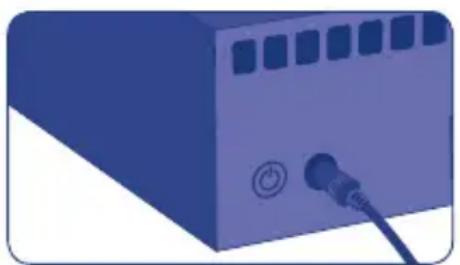
Fig. 4
Note: If you want to turn off the drive, press and hold the power button for 5 seconds until the LED blinks. When the LED turns off, the drive has shut down.
Setup

VERY IMPORTANT:
- Your network must have access to the Internet to complete the CloudBox Setup Wizard.
- The CloudBox Setup Wizard will guide you through the installation in a few easy steps.
-
The CloudBox will be available for use once the Setup Wizard is complete and your online account has been verified.
-
Install and run LaCie Network Assistant, located on the LaCie Utilities CD-ROM. LaCie Network Assistant can help you launch the CloudBox Setup Wizard.
- There are two options for launching the CloudBox Setup Wizard: a. LaCie Network Assistant; and b. From your Internet browser.
a. LaCie Network Assistant (preferred)
Windows®:
Click the LaCie Network Assistant icon located in the system tray (bottom right of the screen) and select CloudBox > Web Access...
Mac®:
Click the LaCie Network Assistant icon - located in the menu bar (top right of the screen) and select CloudBox > Web Access...
Fig. 5

Fig. 6 - LaCie Network Assistant (Windows)

Fig. 7 - LaCie Network Assistant (Mac)
Setup
b. To launch the Setup Wizard in your web browser, type the name of your CloudBox in the address bar (the default address is http://cloudbbox or http://cloudbbox.local, depending upon your browser).
- The Setup Wizard will load in your browser. Complete the Wizard and make note of your username and password for subsequent logins. You will be asked for your contract number during the setup. Please find the contract number on the leaflet shipped with your product.
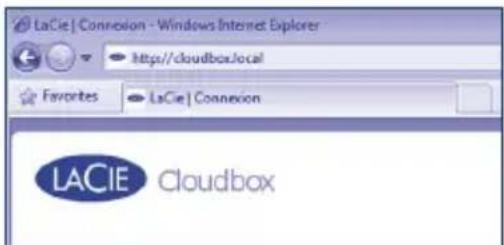
Fig. 8

Fig. 9 - CloudBox Setup Wizard

THE ADMINISTRATOR LOGIN AND PASSWORD CANNOT BE RECOVERED.
LaCie highly recommends that you write your administrator username and password for your records since they cannot be recovered.
Note: Please create an administration password that is not easy to guess.
Transfer Files and Backup
Now you can keep your important files secure by storing them on the CloudBox. Your data will be automatically backed up online.
To begin storing files on your CloudBox:
• Copy files manually from your computer to the CloudBox.
- Copy files automatically from your computer to the CloudBox using backup software. You can run the LaCie Backup Assistant on the included LaCie Utilities CD-ROM to configure your backup.
Note: Please see the User Manual for more information on how to copy files to your LaCie CloudBox.
LaCie Dashboard
Use the Dashboard administration tool to manage your LaCie CloudBox. You can create user folders, set storage quotas for each user, change the device network settings, restore data from online backups, and much more. See the User Manual for further information on how to launch the Dashboard and manage your LaCie CloudBox.

Fig. 10 - LaCie CloudBox Dashboard
FR
Installation
NIE MOŻNA ODZYSKAĆ LOGINU I HASŁA ADMINISTRATORA.
Alexandria, NSW 2015
info.au@lacie.com
LaCie Benelux
Vorstlaan / 165 Bld du Souverain
B-1160 Brussels, Belgium
info.benelux@lacie.com
LaCie Canada
235 Dufferin St.
Toronto, Ontario M6K 1Z5
info.ca@lacie.com
LaCie France
17, rue Ampère
91349 Massy Cedex
info.fr@lacie.com
LaCie Germany
Am Kesselhaus 5
D-79576 Weil Am Rhein
info.de@lacie.com
LaCie Italy
Milano Business Park
Edificio B1
(Sweden, Denmark, Norway, Finland)
Sveavägen 90, 5tr
113 59 Stockholm, Sweden
info.nordic@lacie.com
LaCie Spain
LaCie United Kingdom and Ireland
LaCie Ltd, Power Road Studios
114 Power Road
Chiswick, London, UK W4 5PY
UK: info.uk@lacie.com
Ireland: info.ie@lacie.com
LaCie USA
22985 NW Evergreen Pkwy
Hillsboro, OR 97124
sales@lacie.com
LaCie Worldwide Export
17, rue Ampère
91349 Massy Cedex, France
sales.intl@lacie.com
support.intl@lacie.com


- BOX CONTENT
- REAR VIEW
- INSTALLATION
- SETUP
- VERY IMPORTANT
- THE ADMINISTRATOR LOGIN AND PASSWORD CANNOT BE RECOVERED
- TRANSFER FILES AND BACKUP
- LACIE DASHBOARD
- FR
- NIE MOŻNA ODZYSKAĆ LOGINU I HASŁA ADMINISTRATORA
- LACIE BENELUX
- LACIE CANADA
- LACIE FRANCE
- LACIE GERMANY
- LACIE ITALY
- LACIE SPAIN
- LACIE UNITED KINGDOM AND IRELAND
- LACIE USA
- LACIE WORLDWIDE EXPORT
Brand : LACIE
Model : Cloudbox 3TB
Category : NAS