
SB8600 - Docking Station PHILIPS - Free user manual and instructions
Find the device manual for free SB8600 PHILIPS in PDF.


| Product Type | Docking Station with Speaker |
| Brand | Philips |
| Model | SB8600 |
| Dimensions (W x H x D) | 200 x 100 x 150 mm |
| Weight | 1.2 kg |
| Power Supply | DC 12V, 2.0 A |
| Main Functions | Docking and charging for iPod/iPhone, built-in speakers, auxiliary input, remote control |
| Compatible Devices | iPod and iPhone models with 30-pin connector |
| Audio Output | 2 x 10W RMS |
| Frequency Range | 60 Hz - 20 kHz |
| Impedance | 4 Ω |
| Signal-to-Noise Ratio | > 80 dB |
| Inputs | 30-pin dock, 3.5 mm auxiliary |
| Remote Control | Included, infrared |
| Display | LCD with clock and playback info |
| Alarm Function | Yes, dual alarm with snooze |
| Cleaning and Maintenance | Wipe with dry cloth; avoid liquids; keep ventilation slots clear |
| Safety Instructions | Use only provided power adapter; do not expose to water; unplug during storms |
| Spare Parts and Repairability | Contact Philips support; spare parts available for up to 5 years after discontinuation |
| General Information | Manufacturer: Philips; Country of origin: China; Warranty: 1 year |
Frequently Asked Questions - SB8600 PHILIPS
User questions about SB8600 PHILIPS
0 question about this device. Answer the ones you know or ask your own.
Ask a new question about this device
Download the instructions for your Docking Station in PDF format for free! Find your manual SB8600 - PHILIPS and take your electronic device back in hand. On this page are published all the documents necessary for the use of your device. SB8600 by PHILIPS.
USER MANUAL SB8600 PHILIPS
Always there to help you
Register your product and get support at www.philips.com/support
SB8600
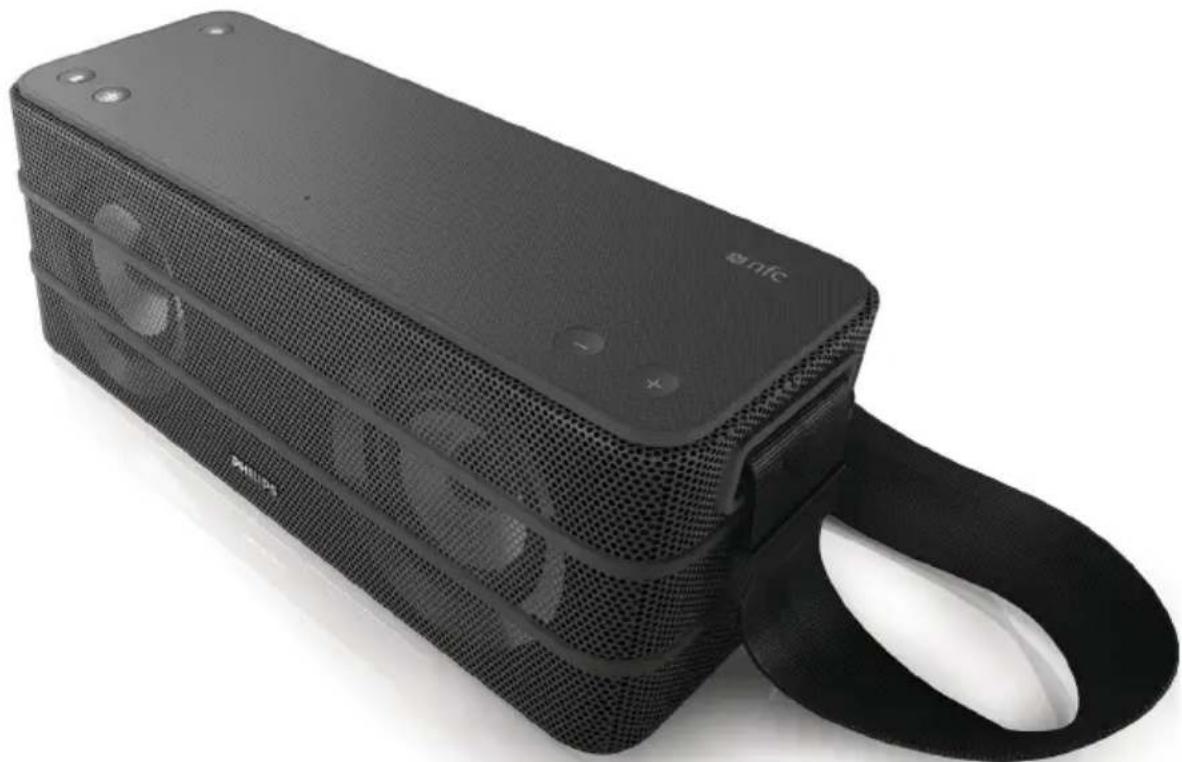
natural_image
Black rectangular electronic device with mesh grille and a black strap, no visible text or symbols on the device body.User manual
PHILIPS
Contents
1 Important 2
Safety 2
2 Your Bluetooth speaker 3
Introduction 3
What's in the box 3
Overview of the speaker 4
3 Get started 5
Power supply 5
Turn on 5
4 Play from Bluetooth-enabled devices 6
Connect a device 6
Play from Bluetooth device 7
Reconnect the Bluetooth device 7
Disconnect the Bluetooth-enabled device 7
Connect another Bluetooth-enabled
device 7
Speak through the microphone 7
Enable or disable outdoor sound effect 7
5 Other features 8
Charge your mobile devices 8
Listen to an external device 8
Adjust volume 8
Reset the speaker 8
6 Product information 9
Specifications 9
7 Troubleshooting 10
General 10
About Bluetooth device 10
8 Notice 11
1 Important
Safety

Warning
• Never remove the casing of this speaker.
• Never lubricate any part of this speaker.
• Never place this speaker on other electrical equipment.
- Keep this speaker away from direct sunlight, naked flames or heat.
• Make sure that you always have easy access to the power cord, plug, or adaptor to disconnect the speaker from the power.
• Make sure that there is enough free space around the speaker for ventilation.
• Use only power supplies listed in the user manual.
• Only use attachments or accessories specified by the manufacturer.
- The battery shall not be exposed to excessive heat such as sunshine, fire or the like.
• The speaker shall not be exposed to dripping or splashing.
- Do not place any sources of danger on the speaker (e.g. liquid filled objects, lighted candles).
- Where the plug of the Direct Plug-in Adapter is used as the disconnect device, the disconnect device shall remain readily operable.

Note
• The type plate is located on the bottom of the apparatus.
2 Your Bluetooth speaker
Congratulations on your purchase, and welcome to Philips! To fully benefit from the support that Philips offers, register your product at www.philips.com/welcome.
Introduction
With this speaker, you can
• play audio from Bluetooth-enabled devices, or other external devices; and
• charge your mobile devices.
What's in the box
Check and identify the contents of your package:
- Speaker
- Power adaptor
- Short user manual
Overview of the speaker
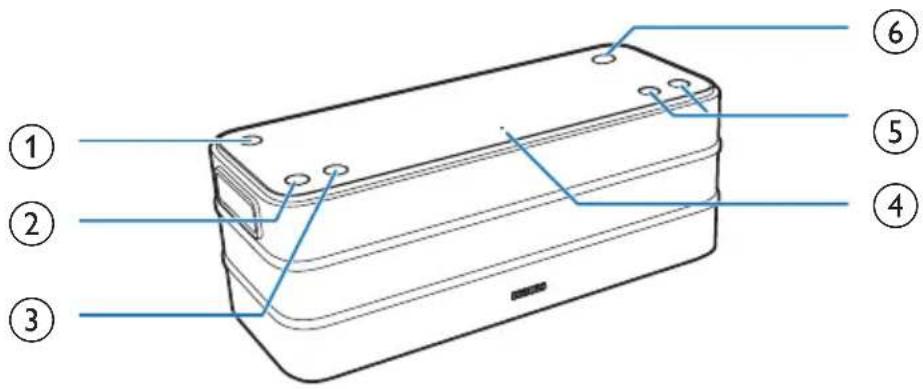
①
• Turn the speaker on or off.
②
- Bluetooth indicator.
- Disconnect Bluetooth connection.
• Enter Bluetooth pairing mode.
③ OUTDOOR
- Enable or disable outdoor sound effect.
④ Built-in microphone
⑤ +/-
- Adjust volume.
⑥ NFC
- Connect a NFC compatible device through Bluetooth.
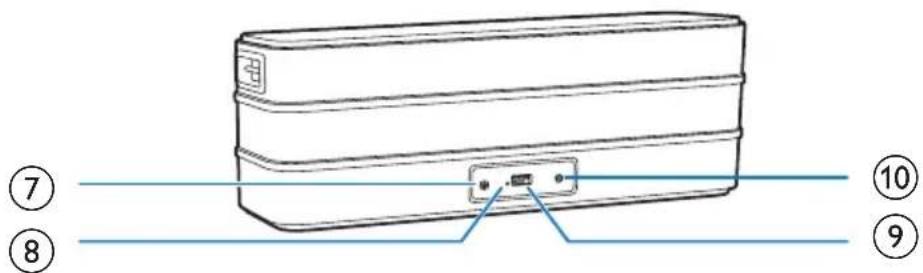
⑦ AUDIO IN
- Connect an external audio device.
⑧ Reset
- Restore factory default status.
⑨ CHARGING
• Charge mobile devices.
⑩ DC IN
- Connect AC power.
3 Get started
Always follow the instructions in this chapter in sequence.
Power supply
Either AC power or battery can be used as power supply of this product.
Option 1: AC power

Caution
- Risk of product damage! Make sure that the power voltage corresponds to the voltage printed on the back or underside of the speaker.
- Risk of electric shock! When you unplug the AC adapter, always pull the plug from the socket. Never pull the cord.
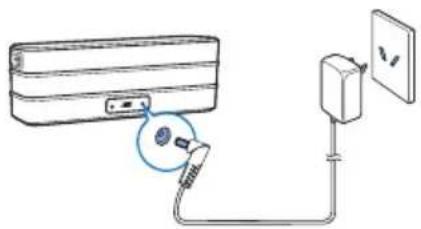
Connect the power adaptor to:
- the DC IN socket at the back of the speaker.
• the wall outlet.
Option 2: Battery power
The speaker can also be powered by the built-in rechargeable battery.

Note
- Rechargeable battery has a limited number of charge cycles. Battery life and number of charge cycles vary by use and settings.
- It takes you approximately five hours to fully charge the battery.
To charge the built-in battery:
- Connect to AC power supply.
When powered by AC mains:
| System status | Battery status Power LED status |
| On Under charging Flashing white | |
| Fully charged Solid white | |
| Off Under charging Solid red | |
| Fully charged Off | |
When powered by the built-in battery:
| System Status | Power LED status |
| On | Solid white (Full battery)Flashing red (Low battery) |
| Off | Off |
Turn on
Press and hold ⏻ for one second.
→ The ⏻ button lights up.
→ The Bluetooth indicator flashes white.
Turn off
Press and hold ⏻ for one second again.
→ The speaker is turned off.
The speaker is turned off automatically in the following situations:
- Msic playback through Bluetooth or external devices is stopped or paused for 15 minutes;
• There is no phone call for 15 minutes; or
• The volume level is 0 for 15 minutes.
4 Play from Bluetooth-enabled devices
With this product, you can listen to audio from Bluetooth-enabled devices.
Connect a device

Note
• Make sure that your Bluetooth device is compatible with this speaker.
- Before pairing a device with this speaker, read its user manual for Bluetooth compatibility.
- The speaker can memorize a maximum of 4 paired devices.
• Make sure that Bluetooth function is enabled on your device, and your device is set as visible to all other Bluetooth devices.
• Any obstacle between this speaker and a Bluetooth device can reduce the operational range.
- Keep away from any other electronic device that may cause interference.
Connect a device through NFC
Near Field Communication (NFC) is a technology that enables short-range wireless communication between various NFC compatible devices, such as mobile phones and IC tags.
If your Bluetooth device supports NFC, you can connect it with this speaker easily.
1 Press and hold for one second on the speaker.
→ The Bluetooth indicator flashes white.
2 Enable NFC on your Bluetooth device (refer to the user manual of the device).
3 Touch the NFC tag on the speaker with the NFC area of your Bluetooth device until you hear a beep.
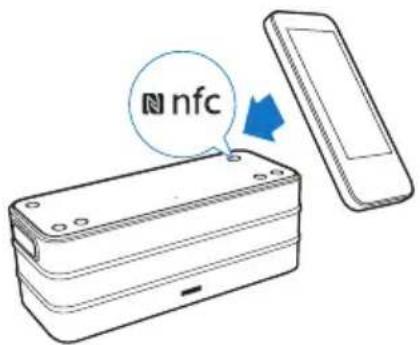
4 On your Bluetooth device, accept the pairing request with "SB8600". If necessary, input "0000" as the pairing password.
5 Follow the on-screen instructions to complete the pairing and connection.
→ After successful pairing and connection, the speaker beeps twice, and the Bluetooth indicator turns solid white.
Connect a device manually

Note
• The operational range between this speaker and a Bluetooth device is approximately 10 meters (30 feet).
1 On the speaker, press and hold ⏻ for one second.
→ The Bluetooth indicator flashes white.
2 On your Bluetooth device, enable Bluetooth and search for Bluetooth devices (refer to the user manual of the device).
3 When [Philips ShoqBox XL] is displayed on your device, select it to start pairing and connection. If necessary, enter default password "0000".
→ After successful pairing and connection, the speaker beeps twice, and the Bluetooth indicator turns solid white.
Bluetooth indicator
Description

Flashing white Connecting or waiting for pairing
Solid white Connected
Play from Bluetooth device
After successful Bluetooth connection, play audio on the Bluetooth device.
→ Audio streams from your Bluetooth device to the speaker.
Reconnect the Bluetooth device
- Next time you turn on the speaker, the speaker will reconnect the last connected device automatically; or
- On your Bluetooth device, select "Philips ShoqBox XL" on your Bluetooth menu to start connection.
Disconnect the Bluetooth-enabled device
• Press and hold ⚙for three seconds;
• Disable Bluetooth on your device; or
- Move the device beyond the communication range.
→ The Bluetooth indicator flashes white.
Connect another Bluetooth-enabled device
1 Press and hold for three seconds to disconnect the currently connected device.
→ The speaker enters Bluetooth pairing mode.
2 Connect another Bluetooth device.
Speak through the microphone
If Bluetooth connection is established, when there is an incoming call on your phone, you can speak through the built-in microphone on SB8600.

Note
• Music play pauses when there is an incoming call.
Enable or disable outdoor sound effect
Press OUTDOOR repeatedly to enable or disable the outdoor sound effect.
→ If the sound effect is enabled, the OUTDOOR button lights up white.
5 Other features
Charge your mobile devices
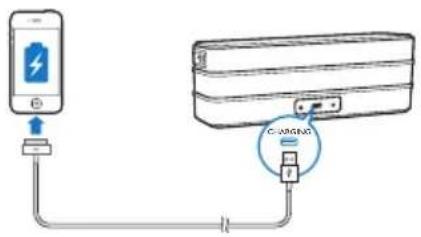
With this speaker, you can charge your mobile devices through the CHARGING socket.

Note
• The USB socket is used for charging only.
1 Connect to AC power supply.
2 Connect to your mobile device with a USB cable (not supplied).
Once the device is recognized, the charging starts.
Listen to an external device
With this speaker, you can also listen to an external audio device such as an MP3 player.

Note
• Make sure that Bluetooth connection is disconnected
1 Connect an audio input cable (not supplied) with a 3.5 mm connector on both ends to
• the AUDIO IN socket on this speaker, and
- the headphone socket on the external device.
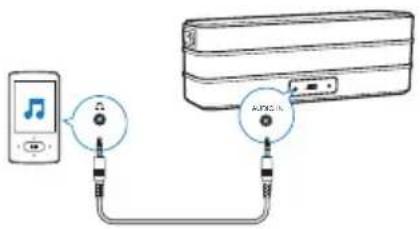
2 Play audio on the external device (refer to its user manual).
Adjust volume
During play, press + or - to increase or decrease volume.

Note
- When the volume reaches the maximum or minimum, the ⬆ button flashes white for two seconds.
Reset the speaker
If the system works abnormally, reset the speaker to factory default settings.
- Press the reset button with the tip of a pen or toothpick.
All settings are reset to factory default.
6 Product information
Weight - Main Unit 2 kg

Note
• Product information is subject to change without prior notice.
Specifications
Amplifier
Rated Output Power 2 X 10 W RMS
Signal to Noise Ratio > 65 dBA
Audio-in Input 0.6V RMS 22kOhm
Bluetooth
| Bluetooth Version V4.0 |
| Frequency Band 2.402 ~ 2.480 GHz ISM Band |
| Range 10 m (Free Space) |
General information
| Power Supply | |
| - AC Power(power adapter) | Brand name: PHILIPS; |
| Model: OH-1028A1502000U-IR; | |
| Input: 100-240V~,50/60 Hz, 800 mA MAX | |
| Output: 15 V=2 A; | |
| - Battery Lithium battery (11.1V,2200mAh) | |
| Charging | Max. 1000 mA for USB |
| Operation Power Consumption | <25 W |
| Dimensions - Main Unit (W × H × D) | 325 × 176 × 115 mm |
7 Troubleshooting

Warning
• Never remove the casing of this device.
To keep the warranty valid, never try to repair the system yourself.
If you encounter problems when using this device, check the following points before requesting service. If the problem remains unsolved, go to the Philips Web page (www.philips.com/support). When you contact Philips, make sure that the device is nearby and the model number and serial number are available.
General
No power
• Make sure that the AC power plug is connected properly.
• Make sure that there is power at the AC outlet.
• Recharge the built-in battery.
No sound
- Adjust volume on the speaker or the Bluetooth-connected device.
• Make sure that your Bluetooth device is within the effective operational range.
No response from the speaker
- Disconnect and reconnect the AC power plug, then turn on the speaker again.
- Press the reset button with the tip of a pen or toothpick to restore factory settings.
Cannot charge mobile devices
• Make sure that AC power is connected properly.
• Make sure that there is power at the AC outlet.
About Bluetooth device
The audio quality is poor after connection with a Bluetooth-enabled device.
- The Bluetooth reception is poor. Move the device closer to this product or remove any obstacle between them.
Cannot connect with the device.
- The Bluetooth function of the device is not enabled. Refer to the user manual of the device for how to enable the function.
- This product is already connected with another Bluetooth-enabled device. Disconnect that device and then try again.
The paired device connects and disconnects constantly.
- The Bluetooth reception is poor. Move the device closer to this product or remove any obstacle between them.
- For some devices, Bluetooth connection may be deactivated automatically as a power-saving feature. This does not indicate any malfunction of this product.
8 Notice
Any changes or modifications made to this device that are not expressly approved by WOOX Innovations may void the user's authority to operate the equipment.
Disposal of your old product

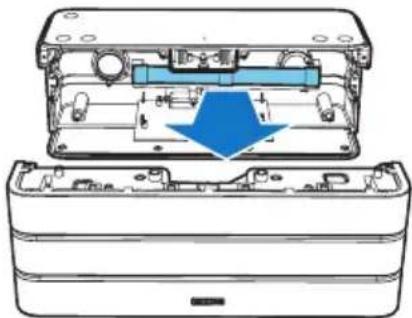
Your product is designed and manufactured with high quality materials and components, which can be recycled and reused. Do not throw away the product with the normal household waste at the end of its life, but hand it in at an official collection point or recycling. By doing this, you help to preserve the environment.
Always bring your product to a professional to remove the built-in battery.
natural_image
Cross-sectional diagram of an electronic device showing internal components and a blue arrow indicating a specific part (no text or symbols present)Environmental information
All unnecessary packaging has been omitted. We have tried to make the packaging easy to separate into three materials: cardboard (box), polystyrene foam (buffer) and polyethylene (bags, protective foam sheet.) Your system consists of materials which can be recycled and reused if disassembled by a specialized company. Please observe the local regulations regarding the disposal of packaging materials, exhausted batteries and old equipment.
Bluetooth
The Bluetooth® word mark and logos are registered trademarks owned by Bluetooth SIG, Inc. and any use of such marks by WOOX Innovations is under license.

The N Mark is a trademark or registered trademark of NFC Forum, Inc. in the United States and in other countries.

© 2014 CSR plc and its group companies. The aptX® mark and the aptX logo are trade marks of CSR plc or one of its group companies and may be registered in one or more jurisdictions.

Specifications are subject to change without notice.
2014 © WOOX Innovations Limited. All rights reserved.
Philips and the Philips' Shield Emblem are registered trademarks of Koninklijke Philips N.V. and are used by WOOX Innovations Limited under license from Koninklijke Philips N.V.
- Always there to help you
- User manual
- PHILIPS
- Contents
- Important 2
- Your Bluetooth speaker 3
- Get started 5
- Play from Bluetooth-enabled devices 6
- Other features 8
- Product information 9
- Troubleshooting 10
- Notice 11
- Important
- Safety
- Warning
- Note
- Your Bluetooth speaker
- Introduction
- What's in the box
- Overview of the speaker
- Get started
- Power supply
- Option 1: AC power
- Caution
- Option 2: Battery power
- Turn on
- Turn off
- Play from Bluetooth-enabled devices
- Connect a device
- Connect a device through NFC
- Connect a device manually
- Bluetooth indicator
- Description
- Play from Bluetooth device
- Reconnect the Bluetooth device
- Disconnect the Bluetooth-enabled device
- Connect another Bluetooth-enabled device
- Speak through the microphone
- Enable or disable outdoor sound effect
- Other features
- Charge your mobile devices
- Listen to an external device
- Adjust volume
- Reset the speaker
- Product information
- Specifications
- Troubleshooting
- General
- No power
- No sound
- No response from the speaker
- Cannot charge mobile devices
- About Bluetooth device
- Cannot connect with the device.
- The paired device connects and disconnects constantly.
- Notice
- Disposal of your old product
- Environmental information
- Bluetooth
Brand : PHILIPS
Model : SB8600
Category : Docking Station