
KASMSRWDZ1A - Thermometer Kogan - Free user manual and instructions
Find the device manual for free KASMSRWDZ1A Kogan in PDF.


| Product Type | Digital Thermometer |
| Brand | Kogan |
| Model | KASMSRWDZ1A |
| Measurement Range | -20°C to 300°C (-4°F to 572°F) |
| Accuracy | ±1°C from 0°C to 100°C; ±2°C otherwise |
| Display | Backlit LCD |
| Probe Length | 12.5 cm (5 inches) |
| Overall Dimensions | 24 cm x 4.5 cm x 2.5 cm |
| Weight | 110 g (with battery) |
| Power Source | 1 x AAA battery (LR03) |
| Battery Life | Approximately 200 hours of continuous use |
| Auto-Off | After 10 minutes of inactivity |
| Functions | Instant read, hold function, °C/°F switchable, min/max memory |
| Response Time | <3 seconds |
| Material | Stainless steel probe, ABS plastic body |
| Water Resistance | Probe is waterproof; display unit is splash-proof |
| Cleaning | Wipe with damp cloth; do not immerse display unit |
| Safety | BPA-free materials; food-safe probe |
| Spare Parts | Replacement probes available separately |
| Warranty | 1 year limited warranty |
Frequently Asked Questions - KASMSRWDZ1A Kogan
User questions about KASMSRWDZ1A Kogan
0 question about this device. Answer the ones you know or ask your own.
Ask a new question about this device
Download the instructions for your Thermometer in PDF format for free! Find your manual KASMSRWDZ1A - Kogan and take your electronic device back in hand. On this page are published all the documents necessary for the use of your device. KASMSRWDZ1A by Kogan.
USER MANUAL KASMSRWDZ1A Kogan
natural_image
Two white cylindrical objects with circular tops, no text or symbols visibleKogan SmarterHome™ Zigbee Window Door Sensor
KASMSRWDZ1A
Overview

Reset Button
Press and hold the 'Reset' button for 5 seconds until the indicator starts flashing blue. The device will then enter configuration mode.
Indicator
- Flashing: The device is in Zigbee network configuration mode (preparing to connect to the gateway).
• OFF: The device is in standby mode.
Note:
This device is designed to be paired with the Kogan SmarterHome™ Bluetooth + Zigbee Wireless Gateway (KAGTWYBTZBA) (sold separately).
Installation
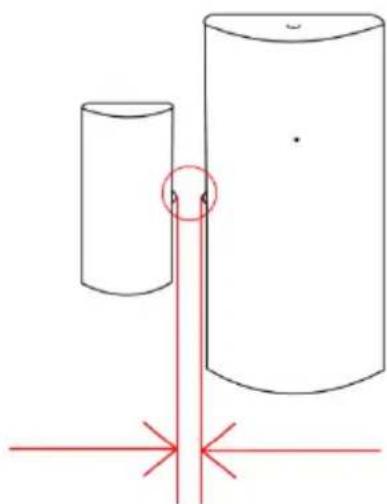
- Place the sensor where needed, ensuring the alignment marks are as close together as possible ( ≤ 15mm).
- Attach the sensors to surfaces using the provided double-sided tape as necessary.
natural_image
Simple line drawing of two cylinders with a red alignment lines and a small circle highlighting one cylinder (no text or symbols)Alignment mark ≤15mm
Operation
Note:
Ensure the Bluetooth + Zigbee Gateway is paired with the SmarterHome™ app before adding the device.
Add the Device to the Bluetooth + Zigbee Gateway (Sold Separately)
This device is designed to be paired with the Kogan SmarterHome™ Bluetooth + Zigbee Wireless Gateway (KAGTWYBTZBA).
To pair the device and the gateway:
- Ensure your gateway is paired to the SmarterHome™ app.
- On the device, remove the insulation sheet and press and hold the 'Reset' button for 5 seconds until the indicator flashes blue.
- On the SmarterHome™ app, tap 'Wireless Multi-mode Gateway'.
- Tap 'Zigbee Sub-Device'.
- Tap 'Device Management'.
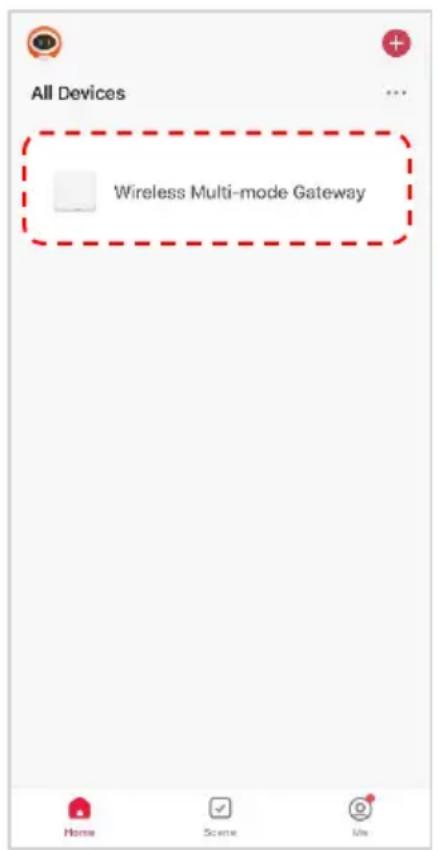
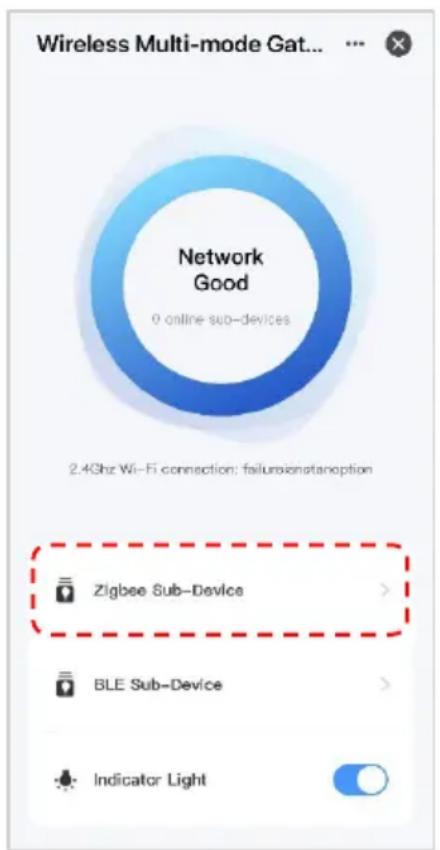

- Tap 'Add new device'.
- The app will search for the device. When the device has been successfully added, tap 'Next', and then tap 'Done'.

Using the Sensor
Notifications:
The magnetic sensor alerts you through the app when a door or window is opened, or when the sensor battery is low.
Battery Replacement:
- Slide the front cover of the large sensor upward to access the battery compartment.
- Replace the battery with a new CR2, 3V battery and replace the cover.
Linkage Actions:
Create automated actions with other smart home products when the magnets are separated.
Specifications
Protocol Zigbee 3.0
Battery CR2, 3V
Wireless Distance
Max 100m (empty area)
Detecting distance ≤15mm
Operating temperature range
-10^ 50^
Material ABS
System Requirements
Android 4.0 or higher, IOS 8.0 or higher
Dimensions
56 x 28 x 18mm, 30 x 15 x 11mm
Weight
29g (including battery)
Need more information?
We hope that this user guide has given you the assistance needed for a simple set-up.
For the most up-to-date guide for your product, as well as any additional assistance you may require, head online to help.Kogan.com.
kogan.com


Brand : Kogan
Model : KASMSRWDZ1A
Category : Thermometer