PTBKD7PN - Tablet Pyle - Free user manual and instructions
Find the device manual for free PTBKD7PN Pyle in PDF.


| Product Type | Tablet PC |
| Brand | Pyle |
| Model | PTBKD7PN |
| Display | 7-inch IPS LCD, 1024x600 pixels |
| Operating System | Android (version 5.1 Lollipop) |
| Processor | Quad-core 1.3 GHz |
| RAM | 1 GB |
| Internal Storage | 16 GB, expandable via microSD (up to 32 GB) |
| Connectivity | Wi-Fi 802.11 b/g/n, Bluetooth 4.0 |
| Camera | Rear: 2 MP, Front: 0.3 MP |
| Battery | 2500 mAh Lithium-ion, up to 4 hours of usage |
| Power Input | 5V 2A DC via micro USB |
| Dimensions | 190 x 110 x 10 mm (7.48 x 4.33 x 0.39 in) |
| Weight | 300 g (10.58 oz) |
| Ports | 1 x micro USB, 1 x 3.5 mm headphone jack |
| Audio | Built-in speaker and microphone |
| Sensors | G-sensor (accelerometer) |
| Additional Features | Multi-touch, supports e-book, video playback, web browsing |
| Care Instructions | Clean with a soft, dry cloth. Avoid exposure to liquids and extreme temperatures. |
| Spare Parts Availability | Contact Pyle customer service for replacement parts |
Frequently Asked Questions - PTBKD7PN Pyle
User questions about PTBKD7PN Pyle
0 question about this device. Answer the ones you know or ask your own.
Ask a new question about this device
Download the instructions for your Tablet in PDF format for free! Find your manual PTBKD7PN - Pyle and take your electronic device back in hand. On this page are published all the documents necessary for the use of your device. PTBKD7PN by Pyle.
USER MANUAL PTBKD7PN Pyle
PTBKD7PN
PTBKD7BL

X×◆◆□□★☆■□□***○○○▼□□☆▲
1080p full HD display, Quad-Core Processor
1GB+8GB Storage Tablet, 1GB RAM,
0.3+2MP Camera, Long Battery Life
Points for Attention
- Do not use the player in exceptionally conditions: old or hot, dusty, damp or dry environments.
- Do not allow the player to fall down while using it.
- Please charge your battery when:
A. Battery power icon shows an empty icon;
B. The system automatically shuts down and the power is soon off when you switch on the unit once again;
C. There is no response if you operate on any key
- Please do not disconnect power abruptly when the player is being formatted or in the process of uploading or downloading. Otherwise it may lead to the error in the program.
- When this unit is used as a moving disk, the user shall store or export files in the proper file management operation method. Any improper operation method may lead to the loss of files, for which this Company will be held no liable.
- Please do not dismantle this unit by yourself. If there is any inquiry, please contact the dealer.
- There will be no separate notice in the case of any change in the functions and performance of this product.
Basic Operation
Power ON: In the shutdown state, press and hold "O" button to power ON.
Power OFF: In power ON state, press and hold "O" key 3 seconds then pops-up device options, select "Power off" to shutdown.
Sleep: Under normal operating conditions, short press the power button, into hibernation. Now, the screen will close. Short press the power button again to resume the normal mode. You can set the device to enter sleep mode automatically after a desired time of non-operation
Screen Timeout: when you don't touch the screen or tap an icon or a button, the touchscreen dims then it turns off. In any state, short press "☐" button and for activation. Then skid the lock upwards to the green of spotted which will accomplish to access to the upper interface. If it is necessary to deactivate the contact screen timeout function, you can set the [Screen time out] option under [display] function into "Never".
Using the Micro SD card
After this unit is connected with the computer, you will find two moving disks. The first one is the built-in memory disk for this unit and the other is the disk for the MicroSD card. If no card is inserted, the second disk can not be opened. This unit supports the extension of the MicroSD card from 4GB to 32GB.
Inserting and Pulling out the Micro SD card
Inserting: Insert the Micro SD card face up (side with words), and slightly force the card into the socket of the card, i.e. connecting the unit. Under this state, you can play the Micro SD card content.
Pulling: Slightly push the Micro SD, and it will bounce by a section, and then you can take it out.
Caution:
Please perform inserting and pulling operation when power is off!
Otherwise, it will lead to the loss or damage of files. If no card is inserted, the computer will unable to perform read and write operation for the disk notes of the later removable disk (Micro SD card).
Battery: High capacity Polymer battery is used for this unit.
The duration of the battery power depends on volume, types of playing files and operation of batteries. The player can set up the user as "user define power off time" or "display setup" to save batteries.
Warnings for charging:
- A new battery may be empty and not charged before you get the device.
- If the device will not be used for a long time, it is better to fully charge it every 2 or 3 months during storage.
Power adapter is a key component of the portable player which play a crucial role in keeping the portable player's normal work and protecting your security when using the player. A long-term customer surveys and after-sales service Practice shows that the malfunction of the portable player in many cases were caused by using inappropriate accessories, in particular the power adapter. Using the substandard power adapter will also reduce the vocal quality of the player. Shutdown the player when you use it. In addition, using the substandard power adapter will cause combustion and explosion which will disserve the safety of the consumers.
Setting up your tablet
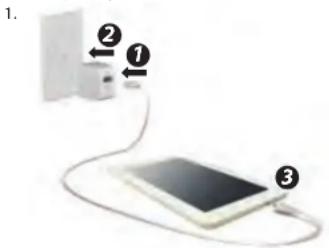
- After charging the battery, press and hold the power button for up to 5 seconds until the pattern is displayed.
IMPORTANT: If the battery icon is not displayed on the screen, press the power button briefly to display the icon, and then press and hold the power button until the logo is displayed.
Turn OFF the tablet
Press and hold "O" power button, touch Power off and then touch OK.
If your tablet becomes unresponsive, press and hold the power button for several seconds to turn off the tablet.
All Apps: Displays a list of all apps installed.
Touch to configure your preferences, and then touch.
Back: Opens the previous screen.
Home: Opens or returns to the Home screen.
Recent apps: Opens a list of apps used recently.
NOTE: The appearance of the Home screen may vary.
Google Search: Allows you to type one or more keywords to search.
Voice Search: Allows you to speak one or more keywords to search with the installed search app.
*The search feature varies by model and country.
Use gestures
The following gestures can be used with your tablet:

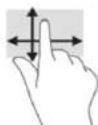

Organize the Home screen
- To add an app or a widget to the Home screen, touch the Apps tab or the Widgets tab, and then tap and hold an app or widget until it is added to the Home screen.
- To remove an app or widget from the Home screen, drag it to the X at the top of the screen.
NOTE: Some apps do not rotate automatically.
To change the Auto-rotate setting, swipe down from the top of the screen to display notifications, and then touch the Screen rotation icon to lock 📋 or unlock 🔒 the screen rotation.
Return to the Home screen
To quickly return to the Homescreen, touch □.
Display apps, widgets, and notification
Apps: Touch Ⓤ, and then touch the Apps tab to see a list of all apps.
Widgets: Touch ⏻, and then touch the Widgets tab to see a list of all widgets.
Notification: Swipe down from the top of the screen to see your notifications.
Back up your data
Strongly encourages that you periodically back up your personal data and media on your tablet to another computer, a dedicated storage device, or to the cloud using one of several commercially available solutions.
Wireless BT Connectivity:
• Built-in BT for Wireless Music Streaming
- Works with All of Today's Latest BT Devices Smartphones, Tablets, Laptops, etc.
• Simple & Hassle-Free Pairing
• BT Version: 4.0
Android Interface:
• Built-in Android Computer Operating System
• Multi-Touch Capacitive Display Screen
• Wi-Fi Wireless Streaming Connectivity
• Access to the Google Play Store
- Download Apps, Surf the Web, Play Games
What's in the Box:
- Android Tablet
• Power Adapter - Data Cable
Features:
• Built-in Android OS Computer
- Touchscreen 'Tablet-Style' Functionality
• Hi-Res LCD Digital Wide-Screen Video
- User-Friendly Control Interface
• Full HD 1080 Support
• Built-in Stereo Speakers
• FM Radio Transmitter
- Front Panel Button Controls
- Connect & Stream External Devices
• USB Flash & Micro SD Memory Card Readers
• Digital File Playback: Audio, Image & Video Files
• Headphone Jack, 3.5mm
• RCA (Audio/Video) Wiring Harness
• Built-in IR Transmitter Support for Wireless IR Headphones
- Easily Attaches to Front-Seat / Back-Seat Headrests
- Includes All Necessary Hardware & Cables for Installation
Technical Specifications:
• Display Type: LCD, 7" -inches
• Video System: PAL / NTSC Compatible Auto-Switching
- Aspect Ratio: 16:9
• Screen Resolution: 1024 x 600 Pixels
• Contrast Ratio: 300:1
• Brightness: 350 cd/m2
- English OSD Menu
• Maximum USB/SD Card Size: 4GB+64GB
• Digital File Compatibility: MP3, MP4, MP5, JPG, MPEG4, WMA, AVI
• Power Supply: 120/240V (12V Power Adapter)
- OTG Cable Length: 4.53"-inches
• Data Cable Length: 31.5" -inches
• Power Consumption: 8W
PYLE
PyleUSA.com

VISIT US ONLINE:
Have a question?
Need service or repair?
Want to leave a comment?
PyleUSA.com/ContactUs

Questions? Issues?
We are here to help!
Phone:(1)718-535-1800
Email: support@pyleusa.com
California Prop 65 Warning
WARNING:
This product contains Nickel carbonate which is known to the


- Points for Attention
- Basic Operation
- Using the Micro SD card
- Inserting and Pulling out the Micro SD card
- Caution:
- Please perform inserting and pulling operation when power is off!
- Warnings for charging:
- Turn OFF the tablet
- Use gestures
- Organize the Home screen
- Return to the Home screen
- Display apps, widgets, and notification
- Back up your data
- Wireless BT Connectivity:
- Android Interface:
- What's in the Box:
- Features:
- Technical Specifications:
- PYLE
- PyleUSA.com
Brand : Pyle
Model : PTBKD7PN
Category : Tablet