
IEM58 - Earphones Chord - Free user manual and instructions
Find the device manual for free IEM58 Chord in PDF.


| Product Type | In-Ear Monitors |
| Brand | Chord |
| Model | IEM58 |
| Driver Type | Dynamic |
| Driver Diameter | 10 mm |
| Impedance | 16 Ω |
| Frequency Response | 20 Hz - 20 kHz |
| Sensitivity | 100 dB/mW |
| Cable Length | 1.2 m |
| Connector | 3.5 mm gold-plated |
| Weight (with cable) | 15 g |
| Color | Black |
| Controls | Inline microphone and volume control |
| Ear Tips | Silicone (S, M, L sizes included) |
| Compatibility | Smartphones, tablets, MP3 players, computers |
| Noise Isolation | Passive up to 26 dB |
| Plug Shape | Straight |
| Cable Type | Tangle-free |
| Accessories | Carrying pouch, ear tips set |
| Warranty | 1 year |
Frequently Asked Questions - IEM58 Chord
User questions about IEM58 Chord
0 question about this device. Answer the ones you know or ask your own.
Ask a new question about this device
Download the instructions for your Earphones in PDF format for free! Find your manual IEM58 - Chord and take your electronic device back in hand. On this page are published all the documents necessary for the use of your device. IEM58 by Chord.
USER MANUAL IEM58 Chord
In-Ear Monitoring System
Item ref: 171.900UK, 171.899UK (additional receiver)
User Manual

natural_image
Three black electronic devices with attached audio equipment, including a USB cable, earplifier, and microphone (no text or symbols visible)Version 1.0

Caution: Please read this manual carefully before operating Damage caused by misuse is not covered by the warranty
Introduction
Thank you for choosing the Chord IEM58 in-ear monitoring system. This compact system provides high quality wireless foldback with full freedom of movement and can also be used for wireless audio transmission to active speakers in a PA system. Please read this manual before using this equipment to avoid damage through incorrect operation and to get the best performance from this equipment.
Contents:
Please take care when unpacking this product. Inspect for any damage and ensure you have the following components...
- Miniature Rechargeable 5.8GHz transmitter
- Miniature Rechargeable 5.8GHz receiver
- Stereo in-ear monitoring headphones
• USB A to C charging lead
Warning
To prevent the risk of damage to the equipment, do not expose any of the components to rain or moisture.
If liquids are spilled on any component, stop using immediately, allow unit to dry out and have checked by qualified personnel before further use.
Avoid impact or heavy vibration to any of the components or over-stretching of the cables.
No user serviceable parts inside transmitter or receiver - refer servicing to qualified service personnel.
Safety
- Ensure that the transmitter and receiver are charged using a standard 5V USB charger with 1A minimum output.
- Avoid ingress of water or particles into the transmitter or receiver
- Do not attempt to replace the internal batteries
Placement
- Ensure good line-of-sight contact between transmitter and receiver for best reception
- Keep all components out of direct sunlight and away from heat sources.
- Do not place heavy objects on top of the receiver or transmitter
Cleaning
- Use a soft cloth with a neutral detergent to clean the body of the transmitter and/or receiver.
- To avoid damage, do not use solvents to clean the components
- Sterile wipes may be used on the supplied earphones – be sure to avoid ingress of fluids into the apertures
Transmitter and Receiver
Setting up
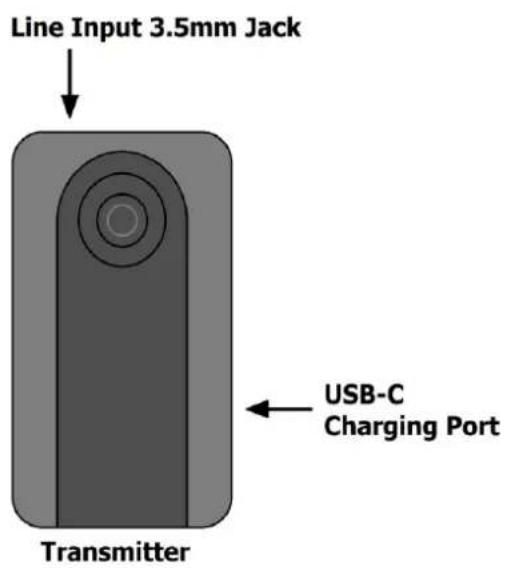
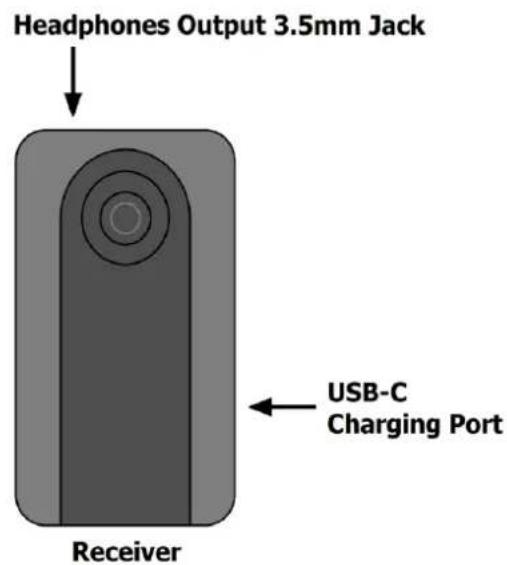
The IEM58 has been designed with simplicity in mind and requires minimum effort to set up. There is just an illuminated button, USB-C charging port and 3.5mm stereo jack on each unit.
It is advised to charge the transmitter and receiver fully (2 hours each) from USB before first use. Connect a standard 5Vdc USB charger to the USB-C connector on each unit for recharging. The push button will light solid green when charging (... or blue/green if the unit is switched on) The green light will go out when charging is complete.
Connect a stereo line level signal to the transmitter via the 3.5mm stereo jack on top.
This can be the headphones output, aux out or monitor out from a mixing console.
Note: it may be necessary to use leads or adaptors that convert the mixer output connections to a 3.5mm stereo plug for the transmitter.
Connect the supplied in-ear headphones (or other 32Ω type) to the 3.5mm jack on the receiver. This output could also be used as a line input for an active speaker or mixing console if required.
The transmitter and receiver may already be paired with each other when bought as a set. Additional receivers (171.899UK) may be bought for multi-listener applications.
The pairing procedure between transmitter and receiver is mentioned further below.
The push button on each unit should be pressed and held for 3 seconds, which will cause the push button to flash blue. When both transmitter and receiver are flashing blue, they will connect if they are already paired and the push buttons will change from flashing to solid blue.
When this happens, the transmitter will be sending audio wirelessly to the receiver.
Pressing the button on the transmitter or receiver for 5 seconds will cause the push button to flash blue and green at the same time. This is now in pairing mode and removes any previous pairing setting. When a transmitter and receiver are flashing blue and green together, they will pair automatically, and the LED will change to continuous blue when paired and connected.
Operation
Once the transmitter and receiver are paired and connected, the audio signal will transmit wirelessly between them. Clip the receiver to a convenient area of clothing and listen through the earphones.
The audio level should be controlled from the mixing console (or other audio source that is used). It is advised to start with a lower volume level to avoid hearing damage and increase as necessary. For most volume levels, the IEM58 system should have adequate dynamic range. However, if the sound seems to be distorted or overdriven, it is advised to roll back the volume level to avoid overloading the transmitter and to check the charge level of both transmitter and receiver.
The carrier frequency for IEM58 is in the 5.8GHz digital band, which uses intelligent frequency switching to maintain a strong wireless connection and avoids heavily occupied frequencies in busy Wi-Fi environments. A range of up to 30m is possible without obstacles between the two units.
When not being used, it is important to switch off the transmitter and receiver by pressing and holding the push button for 3 seconds so that the blue light is out. Pressing the button for 3 seconds again will resume the connection for either unit.
When the battery in either unit is low, the button will flash blue/blue-green - slowly at first and faster as charge goes lower - and it will need re-charging. Eventually the flashing unit will shut down. Note: leaving the units with very low or no charge can eventually damage the internal batteries.
Specifications
| Power supply | 5Vdc USB (charging only) |
| Power connection | USB type-C (transmitter & receiver) |
| Batteries | Internal Li-ion 3.7V 650mAh (transmitter & receiver) |
| Input | Line audio 3.5mm stereo jack (transmitter) |
| Output | Headphones out 3.5mm stereo jack (receiver) |
| Carrier frequency | 5.8GHz digital band |
| SNR | 95dB |
| Frequency response | 20Hz - 20kHz |
| Charge time | 2 hours (transmitter or receiver) |
| Operating time | 5 hours (max. fully charged) |
| Range | Up to 30m (line of sight) |
| Dimensions | 65 x 35 x 20mm (transmitter or receiver) |
| Weight | 46g (transmitter or receiver) |



Disposal: The "Crossed Wheelie Bin" symbol on the product means that the product is classed as Electrical or Electronic equipment and should not be disposed with other household or commercial waste at the end of its useful life. The goods must be disposed of according to your local council guidelines
Hereby, AVSL Group Ltd. declares that the radio equipment type 171.899UK & 171.900UK is in compliance with Directive 2014/53/EU
The full text of the EU declarations of conformity are available at the following internet address:
http://www.avsl.com/assets/exportdoc/1/7/171899UK%20CE.pdf
http://www.avsl.com/assets/exportdoc/1/7/171900UK%20CE.pdf
Errors and omissions excepted. Copyright© 2022.
AVSL Group Ltd. Unit 2-4 Bridgewater Park, Taylor Rd. Manchester. M41 7JQ
AVSL (EUROPE) Ltd, Unit 3D North Point House, North Point Business Park, New Mallow Road, Cork, Ireland.
171.899UK and 171.900UK User Manual
Brand : Chord
Model : IEM58
Category : Earphones