KS710LK - Saw BLACK & DECKER - Free user manual and instructions
Find the device manual for free KS710LK BLACK & DECKER in PDF.


User questions about KS710LK BLACK & DECKER
0 question about this device. Answer the ones you know or ask your own.
Ask a new question about this device
Download the instructions for your Saw in PDF format for free! Find your manual KS710LK - BLACK & DECKER and take your electronic device back in hand. On this page are published all the documents necessary for the use of your device. KS710LK by BLACK & DECKER.
USER MANUAL KS710LK BLACK & DECKER
Your Black & Decker saw has been designed for sawing wood, plastics, ceramics and sheet metal.
This tool is intended for consumer use only.
General safety rules
Warning! Read all instructions. Failure to follow all instructions listed below may result in electric shock, fire and/or serious injury. The term "power tool" in all of the warnings listed below refers to your mains operated (corded) power tool or battery operated (cordless) power tool. SAVE THESE INSTRUCTIONS.
1. Work area
a. Keep work area clean and well lit. Cluttered and dark areas invite accidents.
b. Do not operate power tools in explosive atmospheres, such as in the presence of flammable liquids, gases or dust. Power tools create sparks which may ignite the dust or fumes.
c. Keep children and bystanders away while operating a power tool. Distractions can cause you to lose control.
2. Electrical safety
a. Power tool plugs must match the outlet. Never modify the plug in any way. Do not use any adapter plugs with earthed (grounded) power tools. Unmodified plugs and matching outlets will reduce risk of electric shock.
b. Avoid body contact with earthed or grounded surfaces such as pipes, radiators, ranges and refrigerators. There is an increased risk of electric shock if your body is earthed or grounded.
c. Do not expose power tools to rain or wet conditions. Water entering a power tool will increase the risk of electric shock.
d. Do not abuse the cord. Never use the cord for carrying, pulling or unplugging the power tool. Keep cord away from heat, oil, sharp edges or moving parts. Damaged or entangled cords increase the risk of electric shock.
e. When operating a power tool outdoors, use an extension cord suitable for outdoor use. Use of a cord suitable for outdoor use reduces the risk of electric shock.
3. Personal safety
a. Stay alert, watch what you are doing and use common sense when operating a power tool. Do not use a power tool while you are tired or under the influence of drugs, alcohol or medication. A moment of inattention while operating power tools may result in serious personal injury.
b. Use safety equipment. Always wear eye protection. Safety equipment such as dust mask, non-skid safety shoes, hard hat, or hearing protection used for appropriate conditions will reduce personal injuries.
c. Avoid accidental starting. Ensure the switch is in the off position before plugging in. Carrying power tools with your finger on the switch or plugging in power tools that have the switch on invites accidents.
d. Remove any adjusting key or wrench before turning the power tool on. A wrench or a key left attached to a rotating part of the power tool may result in personal injury.
e. Do not overreach. Keep proper footing and balance at all times. This enables better control of the power tool in unexpected situations.
f. Dress properly. Do not wear loose clothing or jewellery. Keep your hair, clothing and gloves away from moving parts. Loose clothes, jewellery or long hair can be caught in moving parts.
g. If devices are provided for the connection of dust extraction and collection facilities, ensure these are connected and properly used. Use of these devices can reduce dust related hazards.
4. Power tool use and care
a. Do not force the power tool. Use the correct power tool for your application. The correct power tool will do the job better and safer at the rate for which it was designed.
b. Do not use the power tool if the switch does not turn it on and off. Any power tool that cannot be controlled with the switch is dangerous and must be repaired.
c. Disconnect the plug from the power source before making any adjustments, changing accessories, or storing power tools. Such preventive safety measures reduce the risk of starting the power tool accidentally.
d. Store idle power tools out of the reach of children and do not allow persons unfamiliar with the power tool or these instructions to operate the power tool. Power tools are dangerous in the hands of untrained users.
e. Maintain power tools. Check for misalignment or binding of moving parts, breakage of parts and any other condition that may affect the power tools operation. If damaged, have the power tool repaired before use. Many accidents are caused by poorly maintained power tools.
f. Keep cutting tools sharp and clean. Properly maintained cutting tools with sharp cutting edges are less likely to bind and are easier to control.
g. Use the power tool, accessories and tool bits etc., in accordance with these instructions and in the manner intended for the particular type of power tool, taking into account the working conditions and the work to be performed. Use of the power tool for operations different from those intended could result in a hazardous situation.
5. Service
a. Have your power tool serviced by a qualified repair person using only identical replacement parts. This will ensure that the safety of the power tool is maintained.
Electrical safety

This tool is double insulated; therefore no earth wire is required. Always check that the power supply corresponds to the voltage on the rating plate.
Additional safety instructions for jigsaws
◆Warning! Contact with or inhalation of dusts arising from cutting applications may endanger the health of the operator and possible bystanders. Wear a dust mask specifically designed for protection against dust and fumes and ensure that persons within or entering the work area are also protected.
Additional safety instructions for lasers

Warning! Laser radiation.

Do not look into the laser beam.

Do not view the laser beam directly with optical instruments.

Refer to the laser product characteristics.
This laser complies with class 2 according to EN 60825-1:1 1994+A11. Do not replace a laser diode with a different type. If damaged, have the laser repaired by an authorised repair agent.
◆Do not use the laser for any purpose other than projecting laser lines.
◆An exposure of the eye to the beam of a class 2 laser is considered safe for a maximum of 0.25 seconds. Eyelid reflexes will normally provide adequate protection. At distances over 1 m, the laser complies with class 1 and thus is considered completely safe.
◆Never look into the laser beam directly and intentionally.
◆Do not use optical tools to view the laser beam.
◆Do not set up the tool at a position where the laser beam can cross any person at head height.
◆Do not let children come near the laser.
Warning! This tool is intended for indoor use only. Do not use the tool for outdoor applications.
Overview
This tool includes some or all of the following features.
-
On/off switch
-
Lock-on button
-
Variable speed control knob
-
Laser on/off switch
-
Laser aperture
-
Dust shroud
-
Blade support roller
-
Shoe plate
-
Pendulum stroke selector
-
Dust extraction adaptor
-
Allen key
Assembly
Warning! Before attempting any of the following operations, make sure that the tool is switched off and unplugged and that the saw blade has stopped.
Fitting the saw blade (fig. A)
◆Remove the dust shroud (6).
◆Loosen the screw (12) using the Allen key (11) provided.
◆Hold the saw blade (13) as shown, with the teeth facing forward.
◆Insert the shank of the saw blade into the blade holder (14) as far as it will go.
◆Tighten the screw (12).
Fitting and removing the parallel fence (fig. B)
The parallel fence is used to saw in a straight line parallel to the edge of the workpiece. The fence can be fitted both to the left side and to the right side.
Fitting
◆Loosen the locking knob (15).
◆Insert the parallel fence (16) through the openings (17).
◆Slide the parallel fence into the desired position.
◆Tighten the locking knob.
Removing
◆Loosen the locking knob (15).
◆Pull the parallel fence off the tool.
ENGLISH
Connecting a vacuum cleaner to the tool (fig. C)
◆Slide the dust extraction adaptor (10) into the shoe plate (8) until it locks in position.
◆Connect the vacuum cleaner hose (18) to the adaptor (10).
◆Make sure that the dust shroud (6) is fitted.
Use
Warning! Let the tool work at its own pace. Do not overload.
Adjusting the shoe plate for bevel cuts (fig. D)
The shoe plate can be set to a left or right bevel angle of up to 45^ .
◆Remove the dust extraction adaptor (10) if fitted.
◆Loosen the screw (19).
◆Pull the shoe plate (8) forward, set it to the required angle and push it back into place. You can use the scale or a protractor to check the angle.
◆Tighten the screw (19).
To reset the shoe plate for straight cuts:
◆Loosen the screw (19).
◆Pull the shoe plate forward and set it to an angle of approx. 0^ .
◆Push the shoe plate backward and tighten the screw (19).
◆Use a square to check the angle.
Setting the pendulum stroke
Set the pendulum stroke selector (9) to the desired position.
◆Position 0: for laminates and sheet metal
◆Position 1-2: for plywood, metal and aluminium
◆Position 2-3: for soft wood and pvc
Variable speed control
◆Set the variable speed control knob (3) to the required speed range. Use a high speed for wood, medium speed for aluminium and PVC and low speed for metals other than aluminium.
Switching on and off
◆To switch the tool on, press the on/off switch (1).
For continuous operation, press the lock-on button (2) and release the on/off switch.
◆To switch the tool off, release the on/off switch.
To switch the tool off when in continuous operation, press the on/off switch once more and release it.
Hints for optimum use
Sawing laminates
As the saw blade cuts on the upward stroke, splintering may occur on the surface closest to the shoe plate.
◆Use a fine-tooth saw blade.
◆Saw from the back surface of the workpiece.
◆To minimise splintering, clamp a piece of scrap wood or hardboard to both sides of the workpiece and saw through this sandwich.
Sawing metal
◆Be aware that sawing metal takes much more time than sawing wood.
◆Use a saw blade suitable for sawing metal.
When cutting thin sheet metal, clamp a piece of scrap wood to the back surface of the workpiece and cut through this sandwich.
◆Spread a film of oil along the intended line of cut.
How to use the laser (fig. E)
The laser projects the line of cut on the workpiece surface.
◆To switch the laser on, press the button (4).
◆To switch the laser off, press the button (4) again.
Viewing from directly above the saw, the line of cut can be easily followed. Should this view be restricted for any reason, the laser can be used as an alternate cutting guide.
◆Use a pencil to mark the cutting line.
◆Position the saw over the line.
◆Switch on the laser.
Maintenance
Your tool has been designed to operate over a long period of time with a minimum of maintenance. Continuous satisfactory operation depends upon proper tool care and regular cleaning.
◆Regularly clean the ventilation slots with a clean, dry paint brush.
◆To clean the tool, use only mild soap and a damp cloth. Never let any liquid get inside the tool and never immerse any part of the tool into liquid.
◆Occasionally apply a drop of oil to the axle of the blade support roller.
Replacing the batteries (fig. F)
◆Remove the battery cover (20).
◆Remove the old batteries.
◆Place the new batteries as indicated.
◆Refit the cover.
Mains plug replacement (U.K. & Ireland only)
If a new mains plug needs to be fitted:
◆Safely dispose of the old plug.
◆Connect the brown lead to the live terminal in the new plug.
◆Connect the blue lead to the neutral terminal.
Warning! No connection is to be made to the earth terminal. Follow the fitting instructions supplied with good quality plugs. Recommended fuse: 5 A.
Protecting the environment
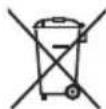
Separate collection. This product must not be disposed of with normal household waste.
Should you find one day that your Black & Decker product needs replacement, or if it is of no further use to you, do not dispose of it with household waste. Make this product available for separate collection.

Separate collection of used products and packaging allows materials to be recycled and used again. Re-use of recycled materials helps prevent environmental pollution and reduces the demand for raw materials.
Local regulations may provide for separate collection of electrical products from the household, at municipal waste sites or by the retailer when you purchase a new product.
Black & Decker provides a facility for the collection and recycling of Black & Decker products once they have reached the end of their working life. To take advantage of this service please return your product to any authorised repair agent who will collect them on our behalf.
You can check the location of your nearest authorised repair agent by contacting your local Black & Decker office at the address indicated in this manual. Alternatively, a list of authorised Black & Decker repair agents and full details of our after-sales service and contacts are available on the Internet
at: www.2helpU.com
Technical data
| KS710L | |
| Voltage V | 230 |
| Power input W 710 | |
| Number of strokes (no load) min | -1 800-3,100 |
| Max. depth of cut | |
| Wood mm 85 | |
| Steel mm 8 | |
| Aluminium mm 12 | |
| Laser properties: | |
| Wave length nm 630-680 | |
| Laser power mW 1 | |
| Weight kg 2.38 |
EC declaration of conformity
KS710L
Black & Decker declares that these products conform to: 98/37/EC, 89/336/EEC, EN 60745, EN 60825, EN 55014, EN 61000
L_pA (sound pressure) 88 dB(A), L_WA (acoustic power) 99 dB(A), hand/arm weighted vibration 5.7 m/s ^2
K_pA (sound pressure uncertainty) 3 dB(A), K_wA (acoustic power uncertainty) 3 dB(A)
Kevin Hewitt
Director of Consumer Engineering Spennymoor, County Durham DL16 6JG, United Kingdom 1-4-2005
Guarantee
Black & Decker is confident of the quality of its products and offers an outstanding guarantee. This guarantee statement is in addition to and in no way prejudices your statutory rights. The guarantee is valid within the territories of the Member States of the European Union and the European Free Trade Area.
If a Black & Decker product becomes defective due to faulty materials, workmanship or lack of conformity, within 24 months from the date of purchase, Black & Decker guarantees to replace defective parts, repair products subjected to fair wear and tear or replace such products to ensure minimum inconvenience to the customer unless:
◆The product has been used for trade, professional or hire purposes;
◆The product has been subjected to misuse or neglect;
◆The product has sustained damage through foreign objects, substances or accidents;
◆Repairs have been attempted by persons other than authorised repair agents or Black & Decker service staff.
To claim on the guarantee, you will need to submit proof of purchase to the seller or an authorised repair agent. You can check the location of your nearest authorised repair agent by contacting your local Black & Decker office at the address indicated in this manual. Alternatively, a list of authorised Black & Decker repair agents and full details of our after-sales service and contacts are available on the Internet at: www.2helpU.com
Please visit our website www.blackanddecker.co.uk to register your new Black & Decker product and to be kept up to date on new products and special offers. Further information on the Black & Decker brand and our range of products is available at www.blackanddecker.co.uk
Spennymoor, County Durham DL16 6JG,
Regno Unito
1-4-2005
Garanzia
Spennymoor, County Durham DL16 6JG,
Royaume Uni
1-4-2005
Garantie
Spennymoor, County Durham DL16 6JG,
Spojené království
1-4-2005
Záruka
Spennymoor, County Durham DL16 6JG,
PROSIMO, DA TA NAVODILA SKRBNO SHRANITE.
- Delovno mesto
Spennymoor, County Durham DL16 6JG,
Velika Britanija
1-4-2005
Garancija
Spennymoor, County Durham DL16 6JG,
Egyesült Királyság
1-4-2005
Garanciahatározat
Spennymoor, County Durham DL16 6JG,
Velika Britanija
1-4-2005
Jamstvo
Black & Decker je uvjeren u kvalitetu svojih proizvoda te za njih daje izuzetno jamstvo. Ova jamstvena izjava dopunjava i ni na koji način ne narušava Vaša zakonska prava.
Spennymoor, County Durham DL16 6JG,
Velika Britanija
1-4-2005
Garancija
Black & Decker je uvjeren u kvalitet svojih proizvoda te za njih daje posebnu garanciju. Ova garantna izjava dopunjava i nikako ne narušava Vaša zakonska prava. Ova garancija vrijedi u zemljama članicama Evropske Unije i zemljama članicama EFTA.
text_image
Exploded view diagram of a car body with numbered parts for identification22-03-05
WWW.2helpU.com
E14172
Australia
Black & Decker (Australia) Pty. Ltd. Tel. 03-8720 5100
20 Fletcher Road, Mooroolbark, Fax 03-9727 5940
Victoria, 3138
New Zealand
Black & Decker Tel. 09 579 7600
81 Hugo Johnston Drive Fax 09 579 8200
Penrose, Auckland, New Zealand
United Kingdom
Black & Decker Tel. 01753 511234
210 Bath Road Fax 01753 551155
Slough, Berkshire SL1 3YD Helpline 01753 574277