BP710 - Blood pressure monitor OMRON - Free user manual and instructions
Find the device manual for free BP710 OMRON in PDF.


User questions about BP710 OMRON
0 question about this device. Answer the ones you know or ask your own.
Ask a new question about this device
Download the instructions for your Blood pressure monitor in PDF format for free! Find your manual BP710 - OMRON and take your electronic device back in hand. On this page are published all the documents necessary for the use of your device. BP710 by OMRON.
USER MANUAL BP710 OMRON
Before using the Monitor
Introduction 3
Safety Information ....4
Operating the Device 4
Care and Maintenance ....5
Operating Instructions
Before Taking a Measurement ....6
Know Your Unit 7
Unit Display 8
Display Symbols 9
Irregular Heartbeat Symbol 9
Heartbeat Symbol/Hypertension Indicator 9
Battery Installation 11
Applying the Arm Cuff 12
Applying the Cuff on the Left Arm 12
Applying the Cuff on the Right Arm 13
Taking a Measurement 14
Special Conditions .....15
Using the Memory Function ....16
To Delete All the Values Stored in Memory 16
Care and Maintenance 17
Error Indicators 18
Troubleshooting Tips 19
FCC Statement ......20
Limited Warranties 21
Specifications 22
INTRODUCTION
Thank you for purchasing the OMRON® BP710 IntelliSense® Automatic Blood Pressure Monitor.
Fill in for future reference.
DATE PURCHASED:
SERIAL NUMBER:
• Staple your purchase receipt here
- Register your product on-line at www.register-omron.com
Your new digital blood pressure monitor uses the oscillometric method of blood pressure measurement. This means the monitor detects your blood's movement through your brachial artery and converts the movements into a digital reading. An oscillometric monitor does not need a stethoscope so the monitor is simple to use.
The BP710 comes with the following components:
• Monitor • Standard Adult Arm Cuff
- Instruction Manual printed in English and Spanish • Quick Start Guide
The BP710 IntelliSense ^® Automatic Inflation Blood Pressure Monitor is intended for home use.
SAVE THESE INSTRUCTIONS
SAFETY INFORMATION
To assure the correct use of the product, basic safety measures should always be followed including the warnings and cautions listed in this instruction manual.
| SAFETY SYMBOLS USED IN THIS INSTRUCTION MANUAL | |
| ⚠ WARNING | Indicates a potentially hazardous situation which, if not avoided, could result in death or serious injury. |
| ⚠ CAUTION | Indicates a potentially hazardous situation which, if not avoided, may result in minor or moderate injury to the user or patient or damage to the equipment or other property. |
⚠️ Contact your physician for specific information about your blood pressure. Self-diagnosis and treatment using measured results may be dangerous. Follow the instructions of your physician or licensed healthcare provider.
⚠ The monitor is not intended to be a diagnostic device.
⚠️ If battery fluid should get in your eyes, immediately rinse with plenty of clean water. Contact a physician immediately.
⚠️ Read all of the information in the instruction manual and any other literature in the box before operating the unit.
This device is intended for use in measuring blood pressure and pulse rate in the adult population. Do not use this device on infants or persons who cannot express their intentions.
⚠️ Read the Special Conditions section of the instruction manual if your systolic pressure is known to be more than 220 mmHg. Inflating to a higher pressure than necessary may result in bruising where the cuff is applied.
⚠ Operate the device only as intended. Do not use the device for any other purpose.
⚠ Dispose of the device, components and optional accessories according to applicable local regulations. Unlawful disposal may cause environmental pollution.
⚠️ Do not use a cellular phone near the device. It may result in an operational failure.
SAFETY INFORMATION
⚠ Use only Omron authorized parts and accessories. Parts and accessories not approved for use with the device may damage the unit.
⚠ Use only 1.5 V “AAA” alkaline batteries with this device. Do not use other types of batteries. This may damage the unit.
CARE AND MAINTENANCE
Do not subject the monitor to strong shocks, such as dropping the unit on the floor.
Do not submerge the device or any of the components in water.
⚠️ Store the device and the components in a clean, safe location.
Changes or modification not approved by the manufacturer will void the user warranty. Do not disassemble or attempt to repair the unit or components.
BEFORE TAKING A MEASUREMENT
To ensure a reliable reading follow these recommendations:
- Avoid eating, drinking alcohol, smoking, exercising, and bathing for 30 minutes before taking a measurement. Rest for at least 15 minutes before taking the measurement.
- Stress raises blood pressure. Avoid taking measurements during stressful times.
- Measurements should be taken in a quiet place.
- Remove tight-fitting clothing from your left arm.
- Sit on a chair with your feet flat on the floor. Rest your left arm on table so that the cuff is at the same level as your heart.
- Remain still and do not talk during the measurement.
- Wait 2-3 minutes between measurements. The wait time allows the arteries to return to the condition prior to taking the blood pressure measurement. You may need to increase the wait time depending on your individual physiological characteristics.
- Keep a record of your blood pressure and pulse readings for your physician. A single measurement does not provide an accurate indication of your true blood pressure. You need to take and record several readings over a period of time. Try to measure your blood pressure at the same time each day for consistency.
KNOW YOUR UNIT
Main Unit:

text_image
Display START/STOP button Memory (M) button Battery compartment Air jackComponents:
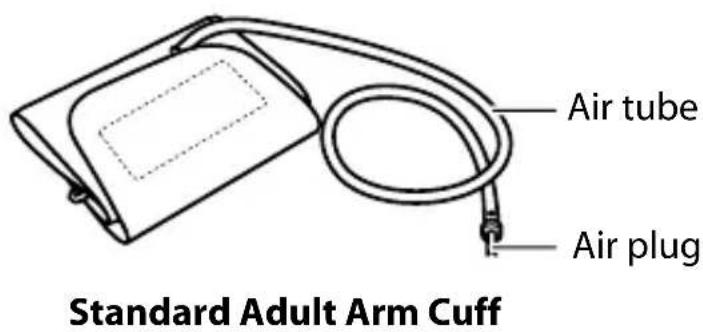
text_image
Air tube Air plug Standard Adult Arm Cuff
text_image
onion Automatic Blood Pressure Monitor vinder.pnrn GATE: 100 MHz 150 x 100 MHzInstruction Manual
Quick Start Guide
UNIT DISPLAY
Systolic blood pressure
Diastolic blood pressure
Memory symbol
(Displayed when viewing values stored in memory)
Irregular Heartbeat symbol Battery low indicator
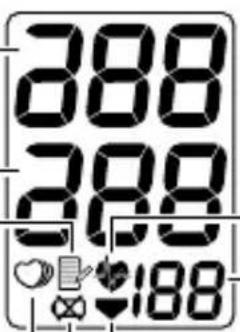
text_image
288 288 $188Heartbeat symbol
Pulse display
Deflation symbol
DISPLAY SYMBOLS
IRREGULAR HEARTBEAT SYMBOL (O)
When the monitor detects an irregular rhythm two or more times during the measurement, the Irregular Heartbeat Symbol (☐) will appear on the display with the measurement values.
An irregular heartbeat rhythm is defined as a rhythm that is more than 25% slower or 25% faster from the average rhythm detected while the monitor is measuring the systolic and diastolic blood pressure.
If the irregular heartbeat symbol (♡) displays with your measurement results, we recommend you consult your physician. Follow the directions of your doctor.
Normal Heartbeat
Pulse
Blood
pressure

natural_image
Pure waveform diagram with no text, numbers, or symbolsPulse
Blood pressure

text_image
Irregular Heartbeat Short LongHEARTBEAT SYMBOL/HYPERTENSION INDICATOR

TAKING A MEASUREMENT
The Heartbeat Symbol (flashes on the display during the measurement. The Heartbeat Symbol (flashes at every heartbeat.
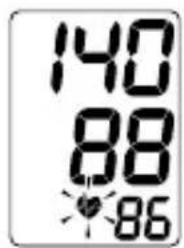
When the measurement is complete, the Heartbeat Symbol ( ✗ ) flashes on the display with your blood pressure and pulse rate if the reading is above 135 for the Systolic Blood Pressure value and/or above 85 for the Diastolic Blood Pressure value.
USING THE MEMORY FUNCTION
The Heartbeat Symbol ( ) flashes when the blood pressure reading stored in the memory is above 135 for the Systolic Blood Pressure value and/or above 85 for the Diastolic Blood Pressure value.
DISPLAY SYMBOLS
The American Heart Association recommends the following guideline for upper limit of normal for home blood pressure readings:
| AHA Home Guideline for Upper Limit of Normal BP | |
| Systolic Blood Pressure 135 mmHg | |
| Diastolic Blood Pressure 85 mmHg |
This is a general guideline because blood pressure depends on age and morbidity. The AHA recommends a lower home blood pressure goal for certain patients, including diabetic patients, pregnant women, and patients with renal failure ^1 .
WARNING
The monitor is not intended to be a diagnostic device.
WARNING
Contact your physician for specific information about your blood pressure. Self-diagnosis and treatment using measured results may be dangerous. Follow the instructions of your physician or licensed healthcare provider.
Omron Healthcare recommends you contact your physician if the Heartbeat Symbol (💡) flashes on the display with your measurement values.
BATTERY INSTALLATION
CAUTION
Use only 1.5V "AAA" alkaline batteries with this device.
-
Press the ▲ indicator on the battery cover and slide the cover off in the direction of the arrow.
-
Install 4 “AAA” size batteries so the + (positive) and - (negative) polarities match the polarities of the battery compartment as indicated.
NOTE: 4 “AAA” size batteries are not included in this unit.
- Replace the battery cover.

text_image
Diagram showing hands holding a device with an upward arrow, and a magnified inset of the device's internal structure.
natural_image
Illustration of a hand inserting a component into a device, showing a close-up of the internal structure (no text or symbols present)BATTERY REPLACEMENT

Low Battery Indicator
When the Low Battery Indicator appears on the display, turn the monitor off and remove all the batteries. Replace with four new batteries at the same time. Long-life alkaline batteries are recommended.
WARNING
If battery fluid should get in your eyes, immediately rinse with plenty of clean water. Contact a physician immediately.
CAUTION
Dispose of the device, components and optional accessories according to applicable local regulations. Unlawful disposal may cause environmental pollution.
APPLYING THE ARM CUFF
CAUTION
Read all of the information in the instruction manual and any other literature in the box before operating the unit.
CAUTION
This device is intended for use in measuring blood pressure and pulse rate in the adult population. Do not use this device on infants or persons who cannot express their intentions.
APPLYING THE CUFF ON THE LEFT ARM
-
Make sure the air plug is securely inserted in the main unit.
-
Remove tight-fitting clothing from your upper arm.
-
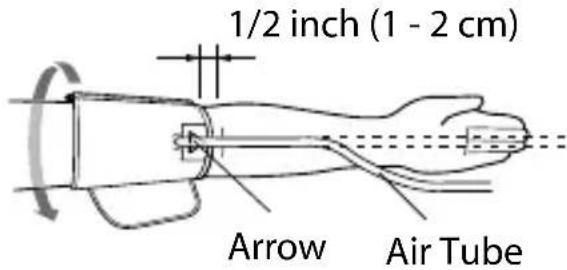
Apply the cuff to your left upper arm so the arrow is centered on the inside of your arm and aligned with your middle finger. The air tube runs down the inside of your arm. The bottom of the cuff should be approximately 1/2" above your elbow.
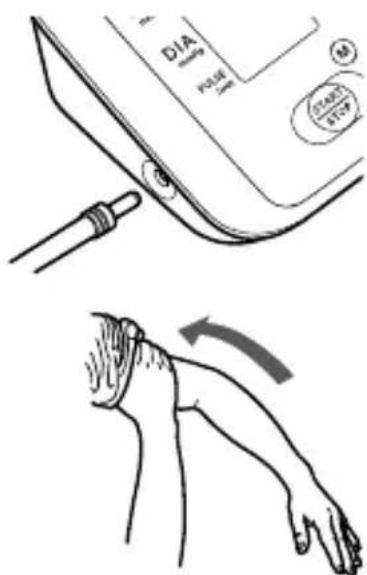
text_image
DIA Pressure 100 STAIRS STOPLeft Arm
text_image
1/2 inch (1 - 2 cm) Arrow Air TubeAPPLYING THE ARM CUFF
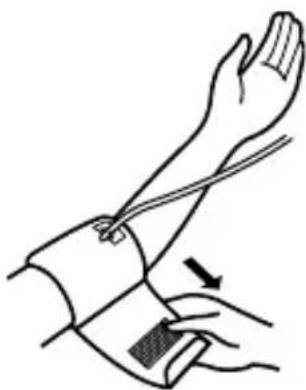
- Wrap the cuff firmly in place around your arm using the cloth fastening.
natural_image
Illustration of a human forearm and hand with a finger pointing to the wrist area (no text or symbols)APPLYING THE CUFF ON THE RIGHT ARM
When taking a measurement using the right arm, use this instruction for Step 3.
Apply the cuff to your right upper arm so the arrow and the air tube runs along the inside of your arm. The bottom of the cuff should be approximately 1/2" above your elbow.

text_image
Right Arm ArrowNOTE: Be careful not to rest your arm on the air tube. This will restrict the flow of air to the cuff.
TAKING A MEASUREMENT
- Sit on a chair with your feet flat on the floor.
Place your arm on a table so the cuff is level with your heart.
Keep still and do not talk during measurement.

natural_image
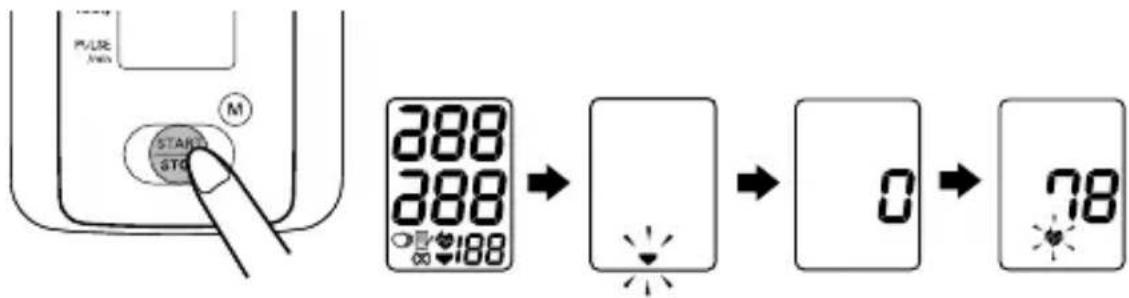
Illustration showing a person sitting at a desk and a human leg with a heart symbol, no text or symbols present.- Press the START/STOP button.
All symbols appear on the display.
The cuff starts to inflate automatically. As the cuff inflates, the monitor automatically determines your ideal inflation level.
Remain still and do not move your arm until the entire measurement process is completed.
flowchart
graph LR
    A["Start"] --> B["Timer"]
    B --> C["Display"]
    C --> D["Reset"]
    D --> E["0"]
    E --> F["78"]
NOTE: To stop the inflation or measurement, push the START/STOP button. The monitor will stop inflating, start deflating, and will turn off.
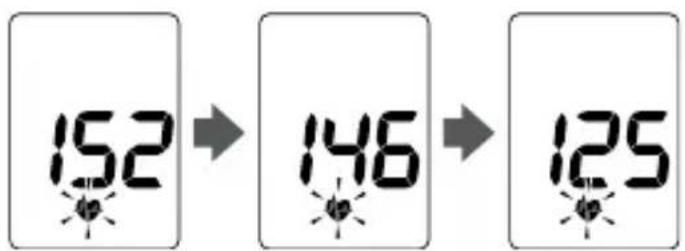
- Inflation stops automatically and the measurement is started.
As the cuff deflates, decreasing numbers appear on the display and the Heartbeat Symbol (💡) flashes.
text_image
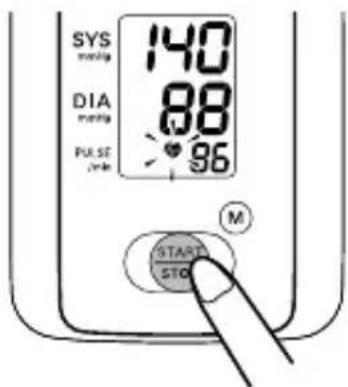
152 146 125- When the measurement is complete, the arm cuff completely deflates. Your blood pressure and pulse rate are displayed.
text_image
140 88 86TAKING A MEASUREMENT
- Press the START/STOP button to turn the monitor off.
text_image
SYS Systolic 140 DIA Systolic 88 Pulse 2.5h 96 M START STOPNOTE: The monitor will automatically turn off after five minutes.
SPECIAL CONDITIONS
CAUTION
Inflating to a higher pressure than necessary may result in bruising where the cuff is applied.
If your systolic pressure is known to be more than 220 mmHg, press and hold the START/STOP button until the monitor inflates 30 to 40 mmHg higher than your expected systolic pressure.

text_image
DIA 250 PULSE M START STDNOTES: • Do not apply more pressure than necessary. • The monitor will not inflate above 299 mmHg.
When the measurement is complete, the arm cuff completely deflates. Your blood pressure and pulse rate are displayed.
USING THE MEMORY FUNCTION
Every time you complete a measurement the monitor stores the blood pressure and pulse rate in the memory. The monitor automatically stores up to 14 sets of measurement values (systolic pressure, diastolic pressure, and pulse rate). When 14 sets of measurement values are stored, the oldest record is deleted to save the most recent values.
- Press the Memory (M) button.
The most recent set of measurement values appears on the display.
The values are displayed from the most recent to the oldest.

text_image
PULSE 72 START STOP 129 67 83NOTE: The number of the reading stored in the memory appears for a second before the pulse rate is displayed. The newest set is numbered “1”.
- Press the START/STOP button to turn the unit off.
TO DELETE ALL THE VALUES STORED IN MEMORY
You cannot partially delete values stored in the memory. All values will be deleted.
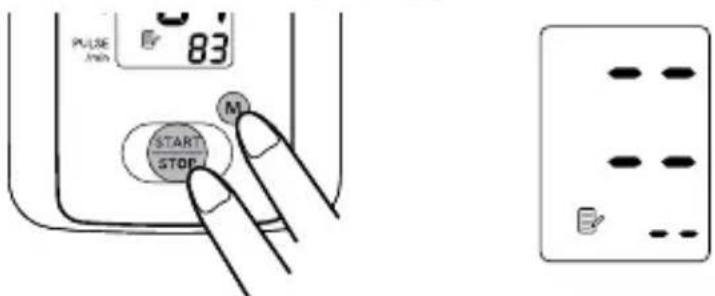
- Press the Memory (M) button.
Then while holding it down, press the START/STOP button down for more than 2 seconds until the display appears as illustrated below.
text_image
PULSE 83 M START STOP- Press the START/STOP button to turn the unit off.
NOTE: The monitor will automatically turn off after five minutes.
CARE AND MAINTENANCE
To keep your digital blood pressure monitor in the best condition and protect the unit from damage, follow the directions listed below:
Do not forcefully bend the arm cuff or air tube. Do not fold tightly.
Clean the monitor with a soft dry cloth.
Do not use any abrasive or volatile cleaners.
Do not attempt to clean the cuff.
CAUTION
Do not submerge the device or any of the components in water. Do not subject the monitor to extreme hot or cold temperatures, humidity or direct sunlight.
CAUTION
Store the device and the components in a clean, safe location.
CAUTION
Do not subject the monitor to strong shocks, such as dropping the unit on the floor.
Remove the batteries if the unit will not be used for three months or longer. Always replace all the batteries with new ones at the same time.
Use the unit consistent with the instruction provided in this manual.
Use only authorized parts and accessories.
Use the unit in a manner consistent with the instructions provided in this manual.
CAUTION
Use only Omron authorized parts and accessories. Parts and accessories not approved for use with the device may damage the unit.
CAUTION
Changes or modification not approved by the manufacturer will void the user warranty. Do not disassemble or attempt to repair the unit or components.
ERROR INDICATORS
| SYMBOL CAUSE CORRECTION | ||
 | Monitor could not detect pulse wave. | Take another measurement and remain still until the measurement is complete. |
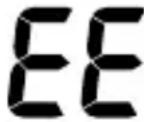 | Cuff under-inflated.Cuff not applied correctly. | Remove the arm cuff.Read “Taking a Measurement”.Wait 2-3 minutes.Take another measurement. |
 | Cuff over-inflated. | |
 | Batteries are worn. | Replace the four batteries. Refer to “Battery Installation”. |
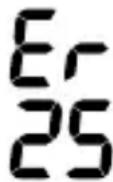 | Device error. Contact Customer Service. | |
TROUBLESHOOTING TIPS
| PROBLEM CAUSES AND SOLUTIONS | |
| No power.No display appears on the unit. | Replace all four batteries with new ones.Check the battery installation for proper placement of the battery polarities. |
| Measurement values appear too high or too low. | Blood pressure varies constantly. Many factors including stress, time of day, how you wrap the cuff, may affect your blood pressure.Review the sections “Before Taking a Measurement” and “Taking a Measurement”. |
FCC STATEMENT
Note:
POTENTIAL FOR RADIO/TELEVISION INTERFERENCE (for U.S.A. only)
This product has been tested and found to comply with the limits for a Class B digital device, pursuant to part 15 of the FCC rules.
These limits are designed to provide reasonable protection against harmful interference in a residential installation. The product generates, uses, and can radiate radio frequency energy and, if not installed and used in accordance with the instructions, may cause harmful interference to radio communications. However, there is no guarantee that interference will not occur in a particular installation. If the product does cause harmful interference to radio or television reception, which can be determined by turning the product on and off, the user is encouraged to try to correct the interference by one or more of the following measures:
- Reorient or relocate the receiving antenna.
- Increase the separation between the product and the receiver.
- Connect the product into an outlet on a circuit different from that to which the receiver is connected.
- Consult the dealer or an experienced radio/TV technician for help.
POTENTIAL FOR RADIO/TELEVISION INTERFERENCE (for Canada only)
This digital apparatus does not exceed the Class B limits for radio noise emissions from digital apparatus as set out in the interference-causing equipment standard entitled “Digital Apparatus”, ICES-003 of the Canadian Department of Communications.
Changes or modifications not expressly approved by the party responsible for compliance could void the user's authority to operate the equipment.
LIMITED WARRANTIES
Your BP710 IntelliSense® Automatic Blood Pressure Monitor, excluding the arm cuff, is warranted to be free from defects in materials and workmanship appearing within 2 years from the date of purchase, when used in accordance with the instructions provided with the monitor. The arm cuff is warranted to be free from defects in materials and workmanship appearing within one year from the date of purchase when the monitor is used in accordance with the instructions provided with the monitor. The above warranties extend only to the original retail purchaser.
We will, at our option, repair or replace without charge any monitor or arm cuff covered by the above warranties. Repair or replacement is our only responsibility and your only remedy under the above warranties.
To obtain warranty service contact Customer Service by calling 1-800-634-4350 for the address of the repair location and the return shipping and handling fee.
Enclose the Proof of Purchase. Include a letter, with your name, address, phone number, and description of the specific problem. Pack the product carefully to prevent damage in transit. Because of possible loss in transit, we recommend insuring the product with return receipt requested.
THE FOREGOING IS THE SOLE WARRANTY PROVIDED BY OMRON IN CONNECTION WITH THIS PRODUCT, AND OMRON HEREBY DISCLAIMS ANY OTHER WARRANTIES, EXPRESS OR IMPLIED, INCLUDING IMPLIED WARRANTIES OF MERCHANTABILITY AND FITNESS FOR A PARTICULAR PURPOSE. IMPLIED WARRANTIES AND OTHER TERMS THAT MAY BE IMPOSED BY LAW, IF ANY, ARE LIMITED IN DURATION TO THE PERIOD OF THE ABOVE EXPRESS WARRANTY.
OMRON SHALL NOT BE LIABLE FOR LOSS OF USE OR ANY OTHER SPECIAL, INCIDENTAL, CONSEQUENTIAL OR INDIRECT COSTS, EXPENSES OR DAMAGES.
This warranty provides you with specific legal rights, and you may have other rights that vary by jurisdiction. Because of special local requirements, some of the above limitations and exclusions may not apply to you.
FOR CUSTOMER SERVICE
Visit our web site at: www.omronhealthcare.com
Call toll free: 1-800-634-4350
SPECIFICATIONS
| Model: | BP710 (HEM-7113-Z) |
| Display: | LCD Digital Display |
| Measurement Range: | Pressure: 0 to 299 mmHg,Pulse: 40 to 180/min. |
| Accuracy/Calibration: | Pressure: ±3mmHg or 2% of readingPulse: ±5% of reading |
| Inflation: | Automatic by electric pump |
| Deflation: | Automatic pressure release valve |
| Rapid Air Release: | Automatic exhaust valve |
| Measurement Method: | Oscillometric method |
| Power Source: | 1.5V 4 “AAA” batteries |
| Battery Life: | Approx. 300 uses with 4 new alkaline batteries |
| Operating Temperature / Humidity: | 50°F to 104°F (10°C to 40°C) /15 to 90% RH |
| Storage Temperature / Humidity/Air Pressure: | -4°F to 140°F (-20°C to 60°C) /10 to 95% RH700-1060 hPa |
| Main Unit Weight: | Approximately 8 5/8 oz. (245g)not including batteries |
| Main Unit Dimensions: | Approx. 5"(l) × 4 1/8"(w) × 2 1/2" (h)(128 mm × 104 mm × 64 mm) |
| Cuff Size: | Approximately 5 3/4"(w) × 17 1/2"(l) (146 mm × 446 mm)Cuff tube 23 5/8" (600 mm) |
| Cuff Circumference: | Fits arm circumferences 9" to 13"(220 mm to 320 mm) |
SPECIFICATIONS
| Memory: | Up to 14 readings |
| Contents: | Main Unit, Standard Adult Arm Cuff, Instruction Manual, and Quick Start Guide |
| Optional Accessories: | Large Cuff 13" - 17" (320 mm - 420 mm) |

= Type B
NOTE: These specifications are subject to change without notice.
Omron Healthcare, Inc.
1200 Lakeside Drive
Bannockburn, IL 60015
www.omronhealthcare.com
Copyright © 2010 Omron Healthcare, Inc.
Made in China 5325502-1B