
NX-300SE - Ham Radio KENWOOD - Free user manual and instructions
Find the device manual for free NX-300SE KENWOOD in PDF.


User questions about NX-300SE KENWOOD
0 question about this device. Answer the ones you know or ask your own.
Ask a new question about this device
Download the instructions for your Ham Radio in PDF format for free! Find your manual NX-300SE - KENWOOD and take your electronic device back in hand. On this page are published all the documents necessary for the use of your device. NX-300SE by KENWOOD.
USER MANUAL NX-300SE KENWOOD
TRANSCEPTOR DIGITAL VHF/
TRANSCEPTOR DIGITAL UHF
This equipment complies with the essential requirements of Directive 1999/5/EC.
The use of the warning symbol ⚠ means the equipment is subject to restrictions of use in certain countries.
This equipment requires a licence and is intended for use in the countries as below.
| AT | BE | DK | FI | FR | DE | GR | IS |
| IE | IT | LI | LU | NL | NO | PT | ES |
| SE | CH | GB | CY | CZ | EE | HU | LV |
| LT | MT | PL | SK | SI | BG | RO |
ISO3166
Firmware Copyrights
The title to and ownership of copyrights for firmware embedded in Kenwood product memories are reserved for Kenwood Corporation.
Information on Disposal of Old Electrical and Electronic Equipment and Batteries (applicable for EU countries that have adopted separate waste collection systems)

natural_image
Symbol of a trash bin crossed with a diagonal line, no text or numbers presentProducts and batteries with the symbol (crossed-out wheeled bin) cannot be disposed as household waste.
Old electrical and electronic equipment and batteries should be recycled at a facility capable of handling these items and their waste byproducts.
Contact your local authority for details in locating a recycle facility nearest to you.

Proper recycling and waste disposal will help conserve resources whilst preventing detrimental effects on our health and the environment.
Notice: The sign "Pb" below the symbol for batteries indicates that this battery contains lead.
Pb
THANK YOU
We are grateful you have chosen Kenwood for your land mobile radio applications.
This instruction manual covers only the basic operations of your NEXEDGE portable radio. Ask your dealer for information on any customized features they may have added to your radio.
NXDN™
NXDN ^™ is a protocol name for a new digital communications system using 4-level FSK technology which has been co-developed by Kenwood and Icom.
NOTICES TO THE USER
◆ Government law prohibits the operation of unlicensed radio transmitters within the territories under government control.
◆ Illegal operation is punishable by fine and/or imprisonment.
◆ Refer service to qualified technicians only.
Safety: It is important that the operator is aware of and understands hazards common to the operation of any transceiver.
The AMBE+2 ^™ voice coding Technology embodied in this product is protected by intellectual property rights including patent rights, copyrights and trade secrets of Digital Voice Systems, Inc. This voice coding Technology is licensed solely for use within this Communications Equipment. The user of this Technology is explicitly prohibited from attempting to extract, remove, decompile, reverse engineer, or disassemble the Object Code, or in any other way convert the Object Code into a human-readable form. U.S. Patent Nos. #5,870,405, #5,826,222, #5,754,974, #5,701,390, #5,715,365, #5,649,050, #5,630,011, #5,581,656, #5,517,511, #5,491,772, #5,247,579, #5,226,084 and #5,195,166.
PRECAUTIONS
- Do not charge the transceiver and battery pack when they are wet.
- Ensure that there are no metallic items located between the transceiver and the battery pack.
• Do not use options not specified by Kenwood. - If the die-cast chassis or other transceiver part is damaged, do not touch the damaged parts.
- If a headset or headphone is connected to the transceiver, reduce the transceiver volume. Pay attention to the volume level when turning the squelch off.
- Do not place the microphone cable around your neck while near machinery that may catch the cable.
- Do not place the transceiver on unstable surfaces.
- Ensure that the end of the antenna does not touch your eyes.
- When the transceiver is used for transmission for many hours, the radiator and chassis will become hot. Do not touch these locations when replacing the battery pack.
- Always switch the transceiver power off before installing optional accessories.
- The charger is the device that disconnects the unit from the AC mains line. The AC plug should be readily accessible.
Turn the transceiver power off in the following locations:
• Near explosives or blasting sites.
- In aircrafts. (Any use of the transceiver must follow the instructions and regulations provided by the airline crew.)
- Where restrictions or warnings are posted regarding the use of radio devices, including but not limited to medical facilities.
• Near persons wearing pacemakers.
Turn the transceiver power off in the following locations, unless the model is specifically qualified for such use (Intrinsically Safe such as approved by Factory Mutual, CSA):
- In explosive atmospheres (inflammable gas, dust particles, metallic powders, grain powders, etc.).
• While taking on fuel or while parked at gasoline service stations.

WARNING
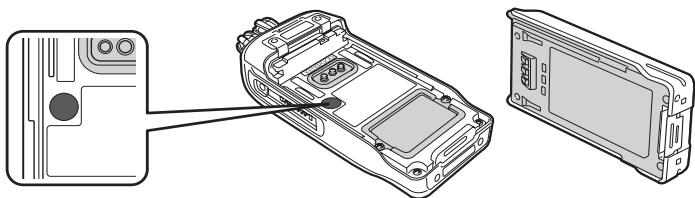
- Do not remove the black sheet from the reverse side of the transceiver (refer to the illustration below). Removal of this sheet decreases the waterproof efficiency of the transceiver and may cause malfunctions if water seeps into the transceiver.
- The orange seal on the reverse side of the transceiver is important with respect to the waterproof efficiency of the transceiver. Do not place stickers or other materials on or around the seal shown in the figure, or on the reverse side of the battery pack. Doing so will impair the waterproof efficiency of the transceiver and may cause it to break down. Additionally, in order to prevent damage to the seal, do not allow it to come in contact with foreign materials.
natural_image
Technical line drawing of a mobile phone chassis showing internal components and casing (no text or symbols)
CAUTION
- Do not disassemble or modify the transceiver for any reason.
- Do not place the transceiver on or near airbag equipment while the vehicle is running. When the airbag inflates, the transceiver may be ejected and strike the driver or passengers.
- Do not transmit while touching the antenna terminal or if any metallic parts are exposed from the antenna covering. Transmitting at such a time may result in a high-frequency burn.
- If an abnormal odor or smoke is detected coming from the transceiver, switch the transceiver power off immediately, remove the battery pack from the transceiver, and contact your Kenwood dealer.
- Use of the transceiver while you are driving may be against traffic laws. Please check and observe the vehicle regulations in your area.
- Do not expose the transceiver to extremely hot or cold conditions.
- Do not carry the battery pack (or battery case) with metal objects, as they may short the battery terminals.
- Danger of explosion if the battery is incorrectly replaced; replace only with the same type.
NOTIFICATION OF WATER-RESISTANT MODEL
Water Resistance and Maintenance (NX-200/ NX-300 Only)
This transceiver conforms to the following standards:
IP67: The IP standard is the protection level specified by the international standard IEC 60529. The first numeral indicates the “dust-resistant” level and the second numeral indicates the “water-resistant” level.
PRECAUTIONS
- The applicable standards listed above do not assure that the transceiver can be used in water. The transceiver may be damaged in a situation in which the maximum depth is over 1 meter or the maximum submersion time exceeds 30 minutes.
- Observe the following precautions to maintain the transceiver's water-resistant performance:
a) Do not drop or apply strong physical shocks to the transceiver.
b) When you disassemble the transceiver or open the cover of the option board, IP67 will no longer be maintained. After disassembling the transceiver or opening the cover of the option board, if you want to continue maintaining IP67, contact your dealer or Authorized Service Center.
c) Do not soak the transceiver in water that contains a solvent or surfactant, such as detergent or alcohol.
- If it is soaked in muddy water or salt water (including sea water), it may become corroded. Immediately flush with fresh water and then wipe dry with a soft cloth.
- If water is splashed onto the microphone, the battery, or the antenna terminal, clean and dry them with a soft cloth before reconnecting to the transceiver.
- When water gets into the microphone opening or the speaker grill, the voice level may become low or distorted. Lightly shake the transceiver to remove the water from the speaker and/or microphone before operating the transceiver.
- Use of any option on the transceiver not specified by Kenwood, may reduce or void the water resistant and dust resistant performance.
- When using an option with the transceiver, ensure that it corresponds with the IP67 standard.
INFORMATION CONCERNING THE LI-ION BATTERY PACK
The battery pack includes flammable objects such as organic solvent. Mishandling may cause the battery to rupture producing flames or extreme heat, deteriorate, or cause other forms of damage to the battery. Please observe the following prohibitive matters.

DANGER
• Do not disassemble or reconstruct battery!
The battery pack has a safety function and protection circuit to avoid danger. If they suffer serious damage, the battery may generate heat or smoke, rupture, or burst into flame.
• Do not short-circuit the battery!
Do not join the + and – terminals using any form of metal (such as a paper clip or wire). Do not carry or store the battery pack in containers holding metal objects (such as wires, chain-necklace or hairpins). If the battery pack is short-circuited, excessive current will flow and the battery may generate heat or smoke, rupture, or burst into flame. It will also cause metal objects to heat up.
• Do not incinerate or apply heat to the battery!
If the insulator is melted, the gas release vent or safety function is damaged, or the electrolyte is ignited, the battery may generate heat or smoke, rupture, or burst into flame.
- Do not use or leave the battery near fires, stoves, or other heat generators (areas reaching over 80°C/176°F)!
If the polymer separator is melted due to high temperature, an internal short-circuit may occur in the individual cells and the battery may generate heat or smoke, rupture, or burst into flame.
- Avoid immersing the battery in water or getting it wet by other means!
If the battery becomes wet, wipe it off with a dry towel before use. If the battery's protection circuit is damaged, the battery may charge at extreme current (or voltage) and an abnormal chemical reaction may occur. The battery may generate heat or smoke, rupture, or burst into flame.
- Do not charge the battery near fires or under direct sunlight!
If the battery's protection circuit is damaged, the battery may charge at extreme current (or voltage) and an abnormal chemical reaction may occur. The battery may generate heat or smoke, rupture, or burst into flame.
- Use only the specified charger and observe charging requirements!
If the battery is charged in unspecified conditions (under high temperature over the regulated value, excessive high voltage or current over regulated value, or with a remodelled charger), it may overcharge or an abnormal chemical reaction may occur. The battery may generate heat or smoke, rupture, or burst into flame.
- Do not pierce the battery with any object, strike it with an instrument, or step on it!
This may break or deform the battery, causing a short-circuit. The battery may generate heat or smoke, rupture, or burst into flame.
• Do not jar or throw the battery!
An impact may cause the battery to leak, generate heat or smoke, rupture, and/or burst into flame. If the battery's protection circuit is damaged, the battery may charge at an abnormal current (or voltage), and an abnormal chemical reaction may occur.
• Do not use the battery pack if it is damaged in any way!
The battery may generate heat or smoke, rupture, or burst into flame.
• Do not solder directly onto the battery!
If the insulator is melted or the gas release vent or safety function is damaged, the battery may generate heat or smoke, rupture, or burst into flame.
• Do not reverse the battery polarity (and terminals)!
When charging a reversed battery, an abnormal chemical reaction may occur. In some cases, an unexpected large amount of current may flow upon discharging. The battery may generate heat or smoke, rupture, or burst into flame.

DANGER
• Do not reverse-charge or reverse-connect the battery!
The battery pack has positive and negative poles. If the battery pack does not smoothly connect with a charger or operating equipment, do not force it; check the polarity of the battery. If the battery pack is reverse-connected to the charger, it will be reverse-charged and an abnormal chemical reaction may occur. The battery may generate heat or smoke, rupture, or burst into flame.
• Do not touch a ruptured and leaking battery!
If the electrolyte liquid from the battery gets into your eyes, wash your eyes out with fresh water as soon as possible, without rubbing your eyes. Go to the hospital immediately. If left untreated, it may cause eye-problems.

WARNING
- Do not charge the battery for longer than the specified time!
If the battery pack has not finished charging even after the regulated time has passed, stop it. The battery may generate heat or smoke, rupture, or burst into flame.
- Do not place the battery pack into a microwave or high pressure container!
The battery may generate heat or smoke, rupture, or burst into flame.
- Keep ruptured and leaking battery packs away from fire!
If the battery pack is leaking (or the battery emits a bad odor), immediately remove it from flammable areas. Electrolyte leaking from battery can easily catch on fire and may cause the battery to generate smoke or burst into flame.
• Do not use an abnormal battery!
If the battery pack emits a bad odor, appears to have different coloring, is deformed, or seems abnormal for any other reason, remove it from the charger or operating equipment and do not use it. The battery may generate heat or smoke, rupture, or burst into flame.
CONTENTS
UNPACKING AND CHECKING EQUIPMENT .... 1
PREPARATION 2
GETTING ACQUAINTED 4
PROGRAMMABLE FUNCTIONS....8
BASIC OPERATIONS ......12
MENU MODE (NX-200/ NX-300 ONLY) 15
SCAN....18
FleetSync: ALPHANUMERIC 2-WAY PAGING FUNCTION .....20
5-TONE SIGNALING (NX-200/ NX-300 ONLY) ......23
ADVANCED OPERATIONS ......25
BACKGROUND OPERATIONS ....30
VGS-1 OPTIONAL VOICE GUIDE & STORAGE UNIT ....33
UNPACKING AND CHECKING EQUIPMENT
Carefully unpack the transceiver. If any items are missing or damaged, file a claim with the carrier immediately.
Note: These unpacking instructions are for use by your Kenwood dealer, an authorized Kenwood service facility, or the factory.
SUPPLIED ACCESSORIES
Belt clip....1
- Screws for belt clip (3 x 8 mm)....2
Universal connector cap....1
- Dressing screw (preassembled)....1
- Packing (preassembled) .... 1
Instruction manual.... 2
PREPARATION
INSTALLING/ REMOVING THE (OPTIONAL) BATTERY PACK
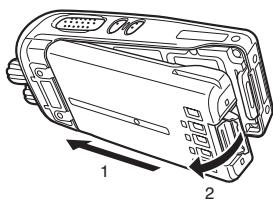
1 Match the guides of the battery pack with the grooves on the upper rear of the transceiver, then firmly press the battery pack in place.
2 Lock the safety catch to prevent accidentally releasing the battery pack.
3 To remove the battery pack, lift the safety catch, press the release latch, then pull the battery pack away from the transceiver.
natural_image
Technical line drawing of a mechanical component with labeled parts (1 and 2), no readable text or symbols present.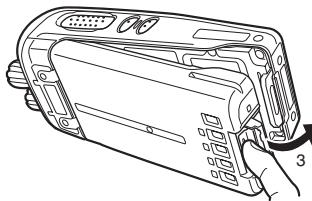
natural_image
Technical line drawing of a device casing with internal components and a hand holding a clip (no text or symbols)Note:
◆ For battery pack charging procedures and usage, refer to the battery charger Instruction Manual.
Before charging a battery pack that is attached to the transceiver, ensure that the safety catch is firmly closed.
While operating the transceiver using a Li-ion battery pack in areas with an ambient temperature of -10^/+14^ and lower, operating time may be shortened.
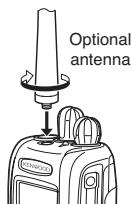
INSTALLING THE (OPTIONAL) ANTENNA
Screw the antenna into the connector on the top of the transceiver by holding the antenna at its base and turning it clockwise until secure.
text_image
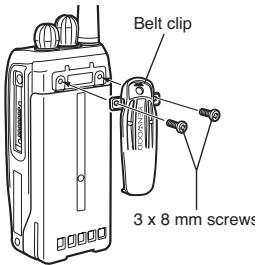
Optional antennaINSTALLING THE BELT CLIP
Attach the belt clip using the supplied 3 x 8 mm screws.
Note: If the belt clip is not installed, its mounting location may get hot during continuous transmission or when left sitting in a hot environment.
text_image
Belt clip 3 x 8 mm screws
CAUTION
Do not use glue which is designed to prevent screw loosening when installing the belt clip. Acrylic ester, which is contained in these glues, may crack the transceiver's back panel.
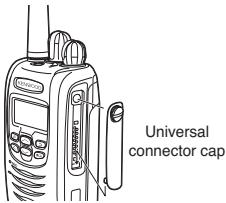
INSTALLING THE CAP OVER THE UNIVERSAL CONNECTOR
Insert the cap into place over the universal connector and secure it in place using the attached screw.
text_image
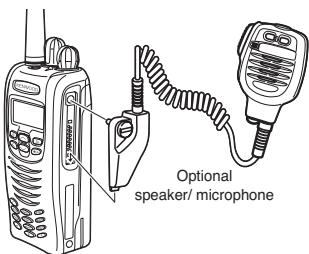
Universal connector capINSTALLING THE (OPTIONAL) SPEAKER/ MICROPHONE OR HEADSET
1 Insert the guide of the speaker/ microphone or headset connector into place over the universal connector.
2 Secure the connector in place using the attached screw.
Note: When not using an optional speaker/ microphone or headset, install the cap over the universal connector.
text_image
Optional speaker/ microphoneNX-200S/ NX-300S
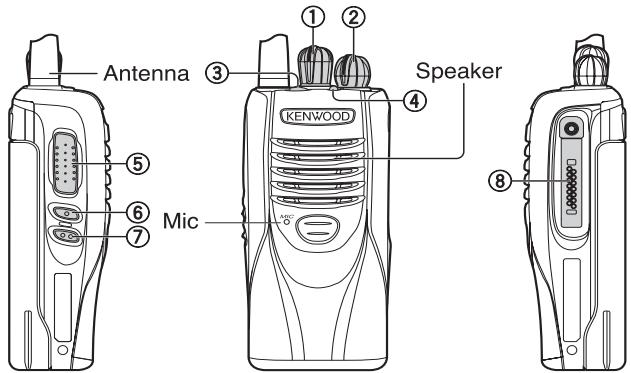
text_image
Antenna ③ ① ② Speaker ④ KENWOOD ⑤ ⑥ Mic ⑦① Selector knob
Rotate to select a zone or channel/group ID (default).
② Power switch/ Volume control
Rotate to turn the transceiver ON/OFF and to adjust the volume.
③ Auxiliary key
Press to activate its programmable function {page 8}.
④ Transmit/Receive/Battery low indicator
If enabled by your dealer, lights red while transmitting, green while receiving a call (Conventional channels only), and orange when receiving an optional signaling call. Blinks red when the battery power is low while transmitting.
⑤ PTT (Push-To-Talk) switch
Press and hold this switch, then speak into the microphone to call a station.
⑥ Side 1 key
Press to activate its programmable function {page 8}. The default is Squelch Off Momentary.
⑦ Side 2 key
Press to activate its programmable function {page 8}.
⑧ Universal connector
Connect a speaker/ microphone or headset here {page 3}. Otherwise, keep the supplied cap in place.
NX-200/ NX-300
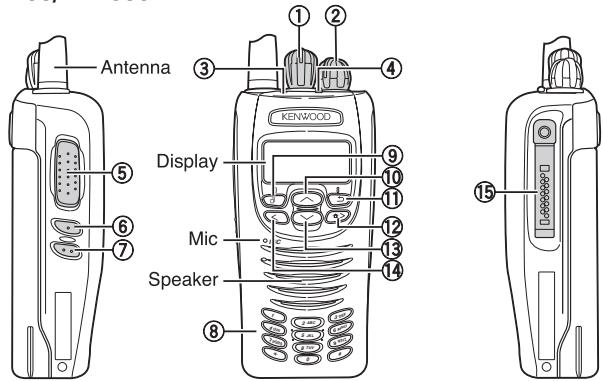
text_image
Antenna Display Mic Speaker Kenwood 1 2 3 4 5 6 7 8 9 10 11 12 13 14 15① Selector knob
Rotate to select a zone or channel/group ID (default).
② Power switch/ Volume control
Rotate to turn the transceiver ON/OFF and to adjust the volume.
③ Auxiliary key
Press to activate its programmable function {page 10}.
④ Transmit/Receive/Battery low indicator
If enabled by your dealer, lights red while transmitting, green while receiving a call (Conventional channels only), and orange when receiving an optional signaling call. Blinks red when the battery power is low while transmitting.
⑤ PTT (Push-To-Talk) switch
Press and hold this switch, then speak into the microphone to call a station.
⑥ Side 1 key
Press to activate its programmable function {page 10}. The default is Squelch Off Momentary.
⑦ Side 2 key
Press to activate its programmable function {page 10}. The default is Backlight.
⑧ Keypad (keypad models only)
Press these keys to send DTMF tones. These keys can also be programmed with secondary functions {page 10} if a programmable function key is programmed as “Function”.
⑨ key
Press to activate its programmable function {page 10}. The default is Menu.
⑩ ^ key
Press to activate its programmable function {page 10}. The default is Zone Up.
⑪ key
Press to activate its programmable function {page 10}.
⑫ > key
Press to activate its programmable function {page 10}.
⑬ key
Press to activate its programmable function {page 10}. The default is Zone Down.
⑭ < key
Press to activate its programmable function {page 10}.
⑮ Universal connector
Connect a speaker/ microphone or headset here {page 3}. Otherwise, keep the supplied cap in place.
flowchart
graph TD
    A["Input 1"] --> B["Process"]
    C["Input 2"] --> B
    D["Input 3"] --> B
    B --> E["Output 1"]
    B --> F["Output 2"]
    B --> G["Output 3"]
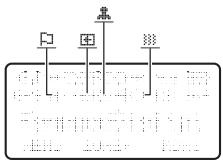
| Indicator | Description |
| Monitor or Squelch Off is activated. | |
| Blinks when an incoming call matches your Optional Signaling. | |
| The current zone (left icon) or CH/GID (right icon) is added to scan. | |
| Scan is in progress. Blinks while scan is paused. | |
| A message is stored in memory. Blinks when a new message has arrived. | |
| The current channel is a Priority channel. | |
| Operator Selectable Tone (OST) is activated. | |
| Signal strength indicator {page 32}. | |
| Battery power indicator {page 31}. | |
| Talk Around is activated. | |
| Site Lock is activated. | |
| Scrambler/ Encryption is activated. | |
| Auto Recording on the VGS-1 option is activated. | |
| Auto Reply Message on the VGS-1 option is activated. | |
| The auxiliary function is activated. | |
| Lone Worker is activated. | |
| The channel is using high transmit power. “L” appears when using low transmit power. | |
| VOX is activated. | |
| The vibrator is activated. Blinks when inhibited. | |
| 12:34P | Displays the time. |
| MENU ZONE▲ MONI | Displays the key functions for ⏻, ⏰, and ⚫. |
PROGRAMMABLE FUNCTIONS
Following is a list of available programmable functions. Please contact your dealer for further details on those functions which have been programmed on your transceiver.
■ PROGRAMMABLE FUNCTIONS FOR NX-200S/ NX-300S
• Auto Telephone ^2
- AUX
- Battery Indicator
- Broadcast ^3
- Call 1 \~ 6
- CH/GID Down
- CH/GID Select ^4
- CH/GID Recall
- CH/GID Up
- CW Message ^5
- Direct CH/GID 1 \~ 5
• Direct CH/GID Select 1 \~ 5
- Emergency ^6
- Fixed Volume
- Forced Search ^3,11
- Function
• Home CH/GID
• Home CH/GID Select
• Key Lock
- Lone Worker
• Low Transmit Power
- Monitor ^7
• Monitor Momentary ^7
- Scan
- Scan Delete/Add
• Scrambler/Encryption ^10 - Send the GPS data
- Site Down ^3
- Site Lock ^3,10
- Site Select ^4
- Site Up ^3
- Site Up/Down ^4
• Speaker Attenuation ^9 - Squelch Off ^1
• Squelch Off Momentary ^1 - Talk Around ^7
• Telephone Disconnect ^2 - Vibrator
- VOX ^8,10
- Zone Delete/Add
- Zone Down
- Zone Select ^4
- Zone Up
^1 Available only for Analog Conventional operation.
^2 Available only for Analog Trunking operation.
^3 Available only for NXDN Trunking operation.
^4 Can be programmed only on the Selector knob.
^5 Available only for NXDN Conventional operation.
^6 Can be programmed only on the Auxiliary key and the optional speaker/ microphone PF1 (orange) key.
^7 Available only for Analog Conventional, Analog Trunking, and NXDN Conventional operation.
^8 Available only for Analog Conventional and NXDN Conventional operation.
^9 Can be programmed only on the microphone programmable function keys.
^10 Available only for ON/ OFF operation.
^11 Available only when Forced Search is ON.
■ PROGRAMMABLE FUNCTIONS FOR NX-200/ NX-300
• Auto Reply Message ^2
- Autodial ^3
• Autodial Programming ^3
- AUX
- Backlight
- Broadcast ^4
- Call 1 \~ 6
- CH/GID Down
- Channel Entry
- CH/GID Select ^5
- CH/GID Recall
- CH/GID Up
- Clock
- Clock Adjustment
- CW Message ^6
- Digit 1 × Down ^12
• Digit 10 × Down ^12
• Digit 1 × Up ^12
• Digit 10 × Up ^12
- Direct CH/GID 1 \~ 5
• Direct CH/GID Select 1 \~ 5
- Display Format
- Emergency ^7
- Fixed Volume
- Forced Search ^4
- Function
• GPS Position Display
• Group (NXDN) ^6
• Group + SDM (NXDN) ^8
• Group + Status (NXDN) ^8
• Home CH/GID
• Home CH/GID Select
• Individual (NXDN) ^8
• Individual + SDM (NXDN) ^8
• Individual + Status (NXDN) ^8
• Key Lock
- Lone Worker
• Low Transmit Power
- Maintenance
- Menu
- Monitor ^9
• Monitor Momentary ^9
- OST ^1
- Playback^2
• Priority-channel Select ^10
- Receive Entry ^12
- Scan
- Scan Delete/Add
- Scrambler/Encryption
• Scramber/Encryption Code
• SDM (Analog/NXDN)
• Selcall (Analog) ^3
• Selcall + SDM (Analog) ^3
• Selcall + Status (Analog) ^3
- Send the GPS data
- Site Down ^4
- Site Lock ^4
- Site Select ^5
- Site Up ^4
- Site Up/Down ^5
• Speaker Attenuation ^11
- Squelch Level ^1
- Squelch Off ^1
• Squelch Off Momentary ^1
- Stack
• Status (Analog/NXDN)
- Talk Around ^9
• Transceiver Password
- Vibrator
- Voice Memo ^2
- VOX ^10
- Zone Delete/Add
-
Zone Down
-
Zone Select ^5
- Zone Up
^1 Available only for Analog Conventional operation.
^2 Available only if the VGS-1 optional board has been installed.
^3 Available only for Analog Conventional and Analog Trunking operation.
^4 Available only for NXDN Trunking operation.
^5 Can be programmed only on the Selector knob.
^6 Available only for NXDN Conventional operation.
^7 Can be programmed only on the Auxiliary key and the optional speaker/ microphone PF1 (orange) key.
^8 Available only for NXDN Conventional and NXDN Trunking operation.
^9 Available only for Analog Conventional, Analog Trunking, and NXDN Conventional operation.
^10 Available only for Analog Conventional and NXDN Conventional operation.
^11 Can be programmed only on the microphone programmable function keys.
^12 Available only for 5-tone calls.
BASIC OPERATIONS
SWITCHING POWER ON/OFF
Turn the Power switch/ Volume control clockwise to switch the transceiver ON.
Turn the Power switch/ Volume control counterclockwise fully to switch the transceiver OFF.
■ Transceiver Password (NX-200/ NX-300 Only)
If the transceiver is password protected, "PASSWORD" will appear on the display when the power is turned ON. To unlock the transceiver, enter the password:
1 Select a character using .
- On keypad models, you can enter the password directly.
2 Press Ⓞ to enter the selected character.
• This step is unnecessary when using the keypad.
3 Repeat steps 1 and 2 to enter the entire password.
- Press ☐ or # to delete a character. Press and hold ☐ or # to delete all characters.
4 Press ☐ or * to confirm the entry.
- If you enter an incorrect password, an error tone sounds and the transceiver remains locked.
• The password can contain a maximum of 6 digits.
ADJUSTING THE VOLUME
Rotate the Power switch/ Volume control to adjust the volume. Clockwise increases the volume and counterclockwise decreases it.
SELECTING A ZONE AND CHANNEL/GROUP ID
Select the desired zone using the key programmed as Zone Select or Zone Up/Down. Each zone contains a group of channels.
Select the desired channel/group ID using the Selector knob (default). Each channel/group ID is programmed with settings for transmitting and receiving.
- You can toggle the display between the zone and channel/group ID names and number by pressing the key programmed as Display Format, or by accessing the Menu (NX-200/ NX-300 Only) {page 15}.
Note: If the default settings for ⏻/∨ (NX-200/ NX-300 Only) and the Selector knob have been changed, use the appropriate keys to select the zone and channel/group ID.
TRANSMITTING
1 Select the desired zone and channel/group ID.
2 Press the key programmed as Monitor or Squelch Off to check whether or not the channel is free.
• If the channel is busy, wait until it becomes free.
3 Press the PTT switch and speak into the microphone. Release the PTT switch to receive.
- For best sound quality, hold the transceiver approximately 1.5 inches (3 \~ 4 cm) from your mouth.
■ Making Group Calls (Digital) (NX-200/ NX-300 Only)
If a key has been programmed with Group or Group + Status, you can select a group ID from the list to make a call to those parties on a Conventional channel.
To select a group ID:
1 Press the key programmed as Group or Group + Status.
2 Press ⏻/∨ to select a group ID/name from the list.
3 Press and hold the PTT switch to make the call.
- Speak into the transceiver as you would during a normal transmission.
■ Making Individual Calls (Digital) (NX-200/ NX-300 Only)
If a key has been programmed with Individual or Individual + Status, you can make calls to specific persons.
1 Press the key programmed as Individual or Individual + Status.
2 Press ⏰/∨ to select a unit ID from the list.
- On keypad models, you can enter a unit ID directly.
3 Press and hold the PTT switch to make the call.
- Speak into the transceiver as you would during a normal transmission.
RECEIVING
Select the desired zone and channel. If signaling has been programmed on the selected channel, you will hear a call only if the received signal matches your transceiver settings.
Note: Signaling allows your transceiver to code your calls. This will prevent you from listening to unwanted calls. Refer to "SIGNALING" on page 27 for details.
■ Receiving Group Calls (Digital)
When you receive a group call on a Conventional channel and the received group ID matches the ID set up on your transceiver, you can hear the caller's voice.
When you receive a group call on a Trunking channel, the transceiver automatically switches to the communications channel to receive the call.
■ Receiving Individual Calls (Digital)
When you receive an individual call, a ringing tone will sound and the caller's ID will appear on the display (NX-200/ NX-300 Only). To respond to the call, press and hold the PTT switch and speak into the transceiver as you would during a normal transmission.
MENU MODE (NX-200/ NX-300 ONLY)
Many functions on this transceiver are selected or configured through the Menu instead of physical controls. Once you become familiar with the Menu system, you will appreciate the versatility it offers.
MENU ACCESS
1 Press the key programmed as Menu.
• The category list is shown.
- When there is only 1 category, the function list is shown (proceed to step 4).
2 Press ⏻/∨ to select a category item.
- On keypad models, you can enter a category number directly.
3 Press ☐ or ✱ to view the function list.
4 Press ⬇/∨ to select a function item.
• On keypad models, you can enter a function number directly.
5 Press ☐ or ✗ to set up the selected function item.
- Press 📋 or # to return to the category list.
6 Press ⏰/∨ to select your desired setting.
• For settings with more than 1 level, repeat steps 5 and 6.
7 Press ☐ or ✗ to set the selected setting and exit Menu mode.
- Press 📋 or # at any time to return to the previous display.
- Press Ⓞ> at any time to exit Menu mode.
MENU CONFIGURATION
Some transceiver keys may already be programmed with functions listed in the Menu. Those functions can be accessed directly by pressing the key. All other functions can still be accessed using the transceiver Menu. The following table lists the available Menu items.
| Display | Description |
| AUTO REPLY MSG | Auto Reply Message ON/OFF |
| AUTO DIAL | Autodial Mode |
| AUTO DIAL PROG | Autodial Programming Mode |
| AUX | AUX ON/OFF |
| BROADCAST | Broadcast ON/OFF |
| CLOCK | Clock ON/OFF |
| CLOCK ADJUST | Clock Adjustment mode |
| DIRECT CH1 SEL | Direct CH/GID 1 ~ 5 Select |
| DISP FORMAT | Display Format ON/OFF |
| FIXED VOLUME | Fixed Volume |
| FORCED SEARCH | Forced Search |
| GPS POS DISP | GPS Position Display mode |
| GROUP | Group mode |
| GROUP+STATUS | Group + Status mode |
| GROUP+SDM | Group + SDM mode |
| HOME CH SEL | Home CH/GID Select |
| INDIVIDUAL | Individual mode |
| INDIV+STATUS | Individual + Status mode |
| INDIV+SDM | Individual + SDM mode |
| LONE WORKER | Lone Worker ON/OFF |
| LOW TX POWER | Low Transmission Power ON/OFF |
| MAINTENANCE | Maintenance Display mode |
| MONITOR | Monitor ON/OFF |
| OST | OST ON/OFF |
| OST LIST | OST mode |
| PLAYBACK | Playback mode |
| PRI CH SEL | Priority Channel Select mode |
| RECEIVE ENTRY | Receive Entry mode |
| SCAN | Scan ON/OFF |
| SCAN DEL/ADD | Scan Delete/Add |
| SCRAM/ENCRYP | Scrambler/Encryption ON/OFF |
| SCRAM CODE | Scrambler/Encryption Code mode |
| SELCALL | Selcall mode |
| SELCALL+STATUS | Selcall + Status mode |
| SELCALL+SDM | Selcall + SDM mode |
| SEND GPS DATA | Transmit your GPS data |
| SITE LOCK | Site Lock ON/OFF |
| SITE No. | Display Site Number |
| SITE | Site Select Mode |
| SQUELCH LEVEL | Squelch Level mode |
| SQUELCH OFF | Squelch Off ON/OFF |
| STACK | Stack mode |
| STATUS | Status mode |
| SHORT MESSAGE | Short Message mode |
| TALK AROUND | Talk Around ON/OFF |
| PASSWORD | Transceiver Password mode |
| VIBRATOR | Vibrator ON/OFF |
| VOICE MEMO | Voice Memo mode |
| VOX LEVEL | VOX Level mode |
| VOX | VOX ON/OFF |
| ZONE DEL/ADD | Zone Delete/Add |
CHARACTER ENTRY
There are 2 methods available for entering characters:
1) Pressing the ⏰/∨ keys
Press ⬇/∨ to cycle the characters from A \~ Z, 0 \~ 9, and a space (default settings).
You can also assign a character to an optional key and later press that key to recall the assigned character: A \~ Z, a \~ z, 0 \~ 9, or a space and characters.
2) Using the DTMF keypad
Press the keypad keys to enter characters as shown in the table below:
| DTMF Key | Character Cycle |
| 1 | 1 |
| 2 | A B C 2 |
| 3 | D E F 3 |
| 4 | G H I 4 |
| 5 | J K L 5 |
| 6 | M N O 6 |
| 7 | P Q R S 7 |
| 8 | T U V 8 |
| 9 | W X Y Z 9 |
| 0 | [space] 0 |
SCAN
Scan monitors for signals on the transceiver channels. While scanning, the transceiver checks for a signal on each channel and only stops if a signal is present.
To begin scanning, press the key programmed as Scan.
• The 🔒 icon appears on the display (NX-200/ NX-300 Only).
• The LED blinks green (NX-200S/ NX-300S Only).
- When a signal is detected on a channel, Scan pauses at that channel. The transceiver will remain on the busy channel until the signal is no longer present, at which time Scan resumes.
To stop scanning, press the Scan key again.
Note: To use Scan, there must be at least 2 channels in the scan sequence.
TEMPORARY CHANNEL LOCKOUT
During scan, you can temporarily remove specific channels from the scanning sequence by selecting them and pressing the key programmed as Scan Delete/Add.
- The channel is no longer scanned. However, when scanning is ended and restarted, the channels are reset and deleted channels will again be in the scanning sequence.
PRIORITY SCAN
Note: To use Priority Scan, a Priority channel must be programmed.
When using a single Priority channel, the transceiver will automatically change to the Priority channel when a call is received on that channel, even if a call is being received on a normal channel.
When using dual Priority channels, Priority channel 1 is given precedence over Priority channel 2. So, if a call is received on Priority channel 1 while a call is already on Priority channel 2, the transceiver will change to Priority channel 1.
SCAN REVERT
The Scan Revert channel is the channel selected when you press the PTT switch to transmit during scan. Your dealer can program one of the following types of Scan Revert channels:
- Selected: The last channel selected before scan.
- Selected + Talkback: Same as "Selected", plus you can respond to calls on the channel at which scan is paused.
- Priority 1/ Priority 2: The Priority channel (either Priority 1 or Priority 2).
- Priority 1 + Talkback/ Priority2 + Talkback: Same as "Priority 1/ Priority 2", plus you can respond to calls on the channel at which scan is paused.
- Last Called + Selected: The last channel on which you receive a call.
SCAN DELETE/ADD
You can add and remove zones and/or channels/group IDs to and from your scan list.
1 Select your desired zone and/or channel/group ID.
2 Press the key programmed as Zone Delete/Add (to add/remove zones) or Scan Delete/Add (to add/remove channels/group IDs) (NX-200/ NX-300 Only).
- You can also press and hold the key programmed as Scan Delete/Add to add/remove zones.
PRIORITY-CHANNEL SELECT (NX-200/ NX-300 ONLY)
If the Priority channel has been set as Operator Selectable by your dealer, you can reprogram the Priority channels.
1 Select your desired zone and channel/group ID.
2 Press the key programmed as Priority-channel Select.
3 Press ⏻/∨ to select “NORMAL”, “PRIORITY 1” (P#), “PRIORITY 2” (P#), or “PRIORITY 1&2” (P#).
4 Press ☐ to save the setting and exit.
FleetSync: ALPHANUMERIC 2-WAY PAGING FUNCTION
FleetSync is an Alphanumeric 2-way Paging Function, and is a protocol owned by Kenwood Corporation.
Note:
◆ This function is available only in analog operation.
◆ Ask your dealer for further information regarding the NX-200S/ NX-300S.
SELCALL (SELECTIVE CALLING)
A Selcall is a voice call to a station or group of stations.
■ Transmitting (NX-200/ NX-300 Only)
1 Select your desired zone and channel.
2 Press the key programmed as Selcall or Selcall + Status to enter Selcall mode.
3 Press ⏻/∨ to select the station you want to call.
- On keypad models, if Manual Dialing is enabled, you can directly enter the station ID.
4 Press the PTT switch and begin your conversation.
■ Receiving
An alert tone will sound and the transceiver will enter Selcall mode. The calling station's ID will appear when a Selcall is received (NX-200/ NX-300 Only). You can respond to the call by pressing the PTT switch and speaking into the microphone.
■ Identification Codes
An ID code is a combination of a 3-digit Fleet number and a 4-digit ID number. Each transceiver has its own ID.
- Enter a Fleet number (100 \~ 349) to make a group call.
-
Enter an ID number (1000 \~ 4999) to make an individual call in your fleet.
-
Enter a Fleet number to make a call to all units in the selected fleet (Fleet call).
- Enter an ID number to make a call to the selected ID in all fleets (Supervisor call).
- Select “ALL” Fleet and “ALL” ID to make a call to all units (Broadcast call).
STATUS MESSAGE
You can send and receive 2-digit Status messages which may be decided in your talk group. Messages can contain up to 16 alphanumeric characters. Status messages range from 10 to 99 (80 \~ 99 are reserved for special messages).
A maximum of 15 received messages (combined status messages and short messages) can be stored in the stack memory of your transceiver.
■ Transmitting
1 Select your desired zone and channel.
2 Press the key programmed as Status to enter Status mode (proceed to step 5) or Selcall + Status to enter Selcall mode (proceed to step 3).
3 Press ⏻/∨ to select the station you want to call.
- If Manual Dialing is enabled, you can enter a station ID by using the DTMF keypad, or by using ⏻/∨. When using ⏻/∨, cycle through the digits to select a digit, then press Ⓥ to set the digit and move the cursor to the right. Repeat this process until the entire ID is entered.
4 Press ☐ to enter Status mode.
5 Press ⏰/∨ to select the status you want to transmit.
- If Manual Dialing is enabled, you can enter a status ID by using the DTMF keypad, or by using ⏰/∨ (refer to step 3, above).
6 Press the PTT switch or Side 2 key to initiate the call.
- "
■ Receiving
A calling ID or text message will appear when a Status call is received. Press any key to return to normal operation.
■ Reviewing Messages in the Stack Memory (NX-200/ NX-300 Only)
1 Press the key programmed as Stack, or press and hold the key programmed as Selcall, Status, or Selcall + Status to enter Stack mode.
• The last received message is displayed.
2 Press ⏰/∨ to select the desired message.
• Message types are identified as follows:
I: Caller ID, S: Status Message, M: Short Message
- Press and hold 📄 for 1 second or press < to cycle the display information as follows:
ID Name > Status/Short Message > CH/GID > Time Stamp
3 Press ☐ to return to normal operation.
- To delete the selected message, press 📋 or #. To confirm the deletion, press 🔍 or *.
- To delete all messages, press and hold ⊃ or # for 1 second. To confirm the deletion, press ⊙ or *.
SHORT/LONG MESSAGES
Received short messages are displayed the same as Status messages and are stored in the same stack memory (NX-200/NX-300 Only).
To send short messages, and to send and receive long messages, you must connect the transceiver to a PC. Ask your dealer for details.
GPS REPORT
To send your location data, you must first connect a GPS unit to the transceiver. GPS data can be manually transmitted by pressing the key programmed as Send the GPS data, or by accessing the Menu {page 15}. If set up by your dealer, GPS data may be automatically transmitted at a preset time interval.
5-TONE SIGNALING (NX-200/ NX-300 ONLY)
5-tone Signaling is enabled or disabled by your dealer. This function opens the squelch only when the transceiver receives the 5 tones programmed in your transceiver. Transceivers that do not transmit the correct tones will not be heard.
SELCALL (SELECTIVE CALLING)
A Selcall is a voice call to a station or group of stations.
■ Transmitting
1 Select your desired zone and channel.
2 Press the key programmed as Selcall, Selcall + Status or Selcall + SDM to enter Selcall mode.
3 Press ⬇/∨ to select the station you want to call.
• On keypad models, you can directly enter the station ID.
4 Press the key programmed as Call 1 to Call 6 and begin your conversation.
Note: Additionally, you can also use the keys programmed as Digit 1x Down, Digit 1x Up, Digit 10x Down, and Digit 10x Up keys to adjust the Selcall number. Digit 1x Up/Down increases/decreases the Selcall number by 1 each time the key is pressed. Digit 10x Up/Down increases/decreases the Selcall number by 10 each time the key is pressed.
■ Receiving
When you receive a call containing the correct tones, the transceiver will enter Selcall mode. An alert tone will sound and the calling station's ID appear on the display. Press any key to return to normal operation.
STATUS MESSAGE
You can send and receive Status messages which may be decided in your talk group. Messages can contain up to 16 alphanumeric characters.
A maximum of 15 received messages can be stored in the stack memory of your transceiver.
■ Transmitting
1 Select your desired zone and channel.
2 Press the key programmed as Status to enter Status mode (proceed to step 5) or Selcall + Status to enter Selcall mode (proceed to step 3).
3 Press ⏰/∨ to select the station you want to call.
- You can enter a station ID by using the DTMF keypad, or by using ⏰/∨.
4 Press ☐ to enter Status mode.
5 Press ⏰/∨ to select the status you want to transmit.
- You can enter a status ID by using the DTMF keypad, or by using ⏰/∨ (refer to step 3, above).
6 Press the key programmed as Call 1 to Call 6 to initiate the call.
■ Receiving
A calling ID or text message will appear when a Status call is received. Press any key to return to normal operation.
■ Reviewing Messages in the Stack Memory
1 Press the key programmed as Stack to enter Stack mode.
• The last received message is displayed.
2 Press ⏻/∨ to select the desired message.
- Press and hold ☐ for 1 second or press ◀ to cycle the display information as follows:
Selcall Name > Status Name > CH/GID > Time Stamp
3 Press ☐ to return to normal operation.
- To delete the selected message, press 📋 or #. To confirm the deletion, press 📋 or *.
- To delete all messages, press and hold ⊃ or # for 1 second. To confirm the deletion, press ⊙ or *.
ADVANCED OPERATIONS
DTMF (DUAL TONE MULTI FREQUENCY) CALLS
■ Making a DTMF Call (NX-200/ MX-300 Only) Manual Dialing (Keypad Models Only)
1 Press and hold the PTT switch.
2 Enter the desired digits using the DTMF keypad.
- If you release the PTT switch, transmit mode will end even if the complete number has not been sent.
- If the Keypad Auto PTT function has been enabled by your dealer, you do not need to press the PTT switch to transmit; you can make the call simply pressing the DTMF keys.
Store & Send
1 Press the key programmed as Autodial.
2 Enter up to 30 digits using the DTMF keypad.
• Alternatively, you can enter digits by using ⏰/∨.
3 Press the PTT switch to make the call.
■ Autodial (NX-200/ MX-300 Only)
Autodial allows you to quickly call DTMF numbers that have been programmed onto your transceiver.
1 Press the key programmed as Autodial, or access the Menu {page 15}.
• The first entry in the Autodial list appears on the display.
2 Press ⬇/∨ to select your desired Autodial list number, or enter the list number directly (01 \~ 32).
• The stored entry appears on the display.
3 Press the PTT switch to make the call.
Stun Code
This function is used when a transceiver is stolen or lost. When the transceiver receives a call containing a stun code, the transceiver becomes disabled. The stun code is cancelled when the transceiver receives a call with a revive code.
EMERGENCY CALLS
If your transceiver has been programmed with the Emergency function, you can make emergency calls.
1 Press and hold the key programmed as Emergency.
- Ask your dealer for the length of time necessary to hold this key before the transceiver enters Emergency mode.
- When the transceiver enters Emergency mode, it will change to the Emergency channel and begin transmitting based on how it is set up by your dealer.
2 To exit Emergency mode, press the Emergency key again.
- If the Emergency mode completes a preset number of cycles, Emergency mode will automatically end and the transceiver will return to the zone and channel that was in use before Emergency mode was entered.
Note:
- Your dealer can set the transceiver to emit a tone when transmitting in Emergency mode.
- Your dealer can set the transceiver to emit tones and received signals as normal, or mute the speaker during Emergency operation.
SCRAMBLER
Press the key programmed as Scrambler/Encryption, or access the Menu {page 15}, to switch the transceiver to secure (encrypted) transmission.
- Pressing the PTT switch after the Scrambler function has been turned ON encrypts the transmitted signal.
SIGNALING
■ Quiet Talk (QT)/ Digital Quiet Talk (DQT)
Your dealer may have programmed QT or DQT signaling on your transceiver channels. A QT tone/ DQT code is a sub-audible tone/code which allows you to ignore (not hear) calls from other parties who are using the same channel.
Operator Selectable Tone (OST) (NX-200/ NX-300 Only)
If a key has been programmed with OST, you can reprogram the QT/DQT settings on each of your channels.
1 Select your desired channel.
2 Press and hold the key programmed as OST for 1 second.
3 Press ⏰/∨ to select your desired tone or code.
- Your dealer can set up to 40 tones/codes.
4 Press ☐ to save your new setting.
5 When you have finished operating using OST, press the OST key again to turn the OST function OFF.
■ Radio Access Number (RAN)
RAN is a new signaling system designed for digital radio communications.
When a channel is set up with a RAN, squelch will only open when a call containing a matching RAN is received.
If a call containing a different RAN is made on the same channel you are using, you will not hear the call. This allows you to ignore (not hear) calls from other parties who are using the same channel.
■ Optional Signaling
Your dealer may also program several types of optional signaling for your transceiver channels.
5-tone Signaling (NX-200/ NX-300 Only): Refer to "SELCALL (SELECTIVE CALLING)" on page 23.
DTMF Signaling : DTMF Signaling opens the squelch only when the transceiver receives a call containing a matching DTMF code.
FleetSync Signaling : Refer to "SELCALL (SELECTIVE CALLING)" on page 20.
NXDN ID Signaling: NXDN ID is an optional signaling system available only for digital communications.
VOICE OPERATED TRANSMISSION (VOX)
VOX can be activated or deactivated by your dealer. VOX operation allows you to transmit hands-free.
Note: To operate VOX, you must use an optional KHS-11, KHS-14, KHS-15-BH, or KHS-15-OH headset.
■ VOX Gain Level (NX-200/ NX-300 Only)
1 Connect the headset to the transceiver.
2 Press the key programmed as VOX.
• The current VOX Gain level appears on the display.
3 Press ⬇/∨ to increase or decrease the VOX Gain level.
• The VOX Gain can be adjusted from levels 1 to 10.
4 While adjusting the level, speak into the headset microphone to test the sensitivity level. (Your voice is not transmitted during this test procedure.)
- When sound is recognized, the LED lights orange.
5 Press ☐ to save the setting.
■ VOX Operation
1 Connect the headset to the transceiver.
2 Press and hold the key programmed as VOX for 2 seconds.
3 To transmit, simply speak into the microphone.
- The transceiver recognizes sound levels depending on the VOX Gain level. If it is too sensitive, it will transmit when there is noise in the background. If it is not sensitive enough, it will not pick up your voice when you begin speaking.
4 When you finish speaking, transmission ends.
5 To turn the VOX function OFF, press and hold the VOX key again, for 2 seconds.
Note: If a speaker/ microphone is connected to the transceiver while VOX is ON, and the VOX Gain Level is set to a sensitive level, louder received signals may cause the transceiver to transmit.
Your dealer can activate a variety of transceiver functions to perform without any additional operation on your part.
If activated by your dealer, you can view the clock by pressing the key programmed as Clock.
Note: Removing or leaving the battery pack uncharged for extended periods will clear the clock time.
To set the clock:
1 Press the key programmed as Clock Adjustment.
• The current time setting appears.
2 Press ⏻/∨ to increase or decrease the year setting.
3 Press ☐ to set the year and cycle to the month setting.
4 Repeat steps 2 and 3 to set the month, day, hour, and minute.
5 Press ☐ to exit Clock Adjustment mode.
- You can press Ⓞ at any time to exit Clock Adjustment mode.
VIBRATOR
When an optional vibrator is installed, the vibrator function will alert you when an optional signaling call is received. Press the key programmed as Vibrator, or access the Menu {page 15}, to turn the Vibrator function ON and OFF.
TIME-OUT TIMER (TOT)
The Time-out Timer is used to prevent you from using a channel for an extended duration. If you continuously transmit for a preset time, the transceiver will stop transmitting and an alert tone will sound. Release the PTT switch.
BATTERY SAVER
The Battery Saver can be activated only on Conventional channels. This function decreases the amount of power used when a signal is not being received and no operations are being performed.
KEY LOCK
Press the key programmed as Key Lock to lock and unlock the transceiver keys.
- The following keys still function when Key Lock is activated: Emergency, Backlight, Monitor, Monitor Momentary, Squelch Off, Squelch Off Momentary, Function, Key Lock, PTT
LOW BATTERY WARNING (NX-200S/ NX-300S)
Press the key programmed as Battery Indicator. The LED lights for 2 seconds, displaying the battery power remaining, as described in the table below. When the battery power is very low, recharge or replace the battery pack.
| Lights Green | Lights Orange | Lights Red | Blinks Red |
| High | Sufficient | Low | Very low |
LOW BATTERY WARNING (NX-200/ NX-300)
Your dealer can set an alert tone to sound and the LED indicator to blink red when the battery power is low. The battery power icon displays the battery power remaining, as described in the table below. When the battery power is very low, recharge or replace the battery pack.
 | [XXX2] |  |  |
| High | Sufficient | Low | Very low |
SIGNAL STRENGTH INDICATOR (NX-200/ NX-300 ONLY)
The signal strength indicator displays the strength of received calls. No icon appears when no signal is available.
| TII | TIII | TI | T |
| Strong | Sufficient | Weak | Very weak |
flashes when out of range (NXDN Trunking only).
COMPANDER
If programmed by your dealer for a channel, the commander will remove excessive noise from transmitted signals, to provide higher clarity of signals.
Note: The COMPANDER is used only in analog operation.
BUSY CHANNEL LOCKOUT (BCL)
On Conventional channels, if BCL is set up by your dealer, you will be unable to transmit if the channel is already in use. Use a different channel or wait until the channel becomes free.
If BCL Override has been programmed, you can transmit over the current signal:
1 Press and hold the PTT switch.
• If the channel is already in use, a warning tone will sound.
2 Quickly release and then press the PTT switch again.
3 Speak into the transceiver as you would during a normal call.
CONTROL CHANNEL HUNT
On digital Trunking channels, the transceiver automatically searches for a control channel.
- While searching for a control channel, the antenna icon will flash (NX-200/ NX-300 Only) and no signals can be received.
PTT ID
PTT ID is the transceiver unique ID code which is sent each time the PTT switch is pressed and/or released.
Note: PTT ID can be made only in analog operation.
VGS-1 OPTIONAL VOICE GUIDE & STORAGE UNIT
VOICE RECORDER
The voice recorder allows you to record conversations and create voice memos.
■ Auto Recording (NX-200/ NX-300 Only)
If activated, the auto recorder will continuously record all transmitted and received signals. The recording storage area retains only the last 30 seconds of recording.
■ Voice Memos (NX-200/ NX-300 Only)
To record a voice memo for later playback:
1 Press the key programmed as Voice Memo, press and hold the key programmed as Playback, or access the Menu {page 15}.
- The duration of recording memory will appear on the display and begin counting down.
2 Speak into the microphone to record your memo.
3 Press ☐ to end the recording and store it in memory.
- If the memory becomes full, recording will stop and the voice memo will be stored in memory.
■ Auto Reply Message (NX-200/ NX-300 Only)
You can set the transceiver to automatically respond to Individual Calls while using FleetSync/NXDN.
1 Press the key programmed as Auto Reply Message to enter Auto Reply Message mode.
2 When you receive an Individual Call, the transceiver will send an automatic response to the caller after 3 seconds, and "GREETING" appears on the display.
- If you are available to receive the call, press any key to cancel the auto response.
- If there is memory available on your transceiver, “I am not available. Leave your Message.” will be sent to the caller and they can leave you a recorded message. When a message is stored on your transceiver, “NEW MESSAGE” appears on the display.
- If no memory is available on your transceiver, "I am not available" will be sent to the caller and "MEMORY FULL" appears on the display.
■ Playback (NX-200/ NX-300 Only)
To play back a recorded conversation, memo, or message:
1 Press the key programmed as Playback or access the Menu {page 15}.
- If the last action on your transceiver was to auto record your conversation, “STORE?” will appear on the display, otherwise a recording channel with the time of the recording will appear.
2 Press ⏰/∨ to select the channel you want to play.
- “AR” represents auto recorded conversations, “RM” represents auto reply messages, and “VM” represents voice memos.
3 The transceiver will announce the time and channel, then the recording will play back.
- When the entire recording has been played, "END OF MESSAGE" is displayed. You can also end the recording at any time by pressing Ⓞ.
- To delete the selected recording, press ⏻. To clear all the recorded data, press and hold ⏻.
VOICE GUIDE
When changing the zone and/or channel, an audio voice will announce the new zone and channel. Additionally, when changing a function setting, the new setting will be announced.
Note: Voice announcements vary by dealer setting.
KENWOOD
CE0168①