3804 - Shredder IDEAL - Free user manual and instructions
Find the device manual for free 3804 IDEAL in PDF.


User questions about 3804 IDEAL
0 question about this device. Answer the ones you know or ask your own.
Ask a new question about this device
Download the instructions for your Shredder in PDF format for free! Find your manual 3804 - IDEAL and take your electronic device back in hand. On this page are published all the documents necessary for the use of your device. 3804 by IDEAL.
USER MANUAL 3804 IDEAL
Operating Instructions
IDEAL 2604
IDEAL 2604 CC / 2604 CC Oil
IDEAL 2604 MC / 2604 MC Oil
IDEAL 2604 SMC / 2604 SMC Oil
IDEAL 2605 SMC
IDEAL 3104
IDEAL 3104 CC / 3104 CC Oil
IDEAL 3105 CC
IDEAL 3105 SMC
IDEAL 3804
IDEAL 3804 CC
IDEAL 4002
IDEAL 4002 CC / 4002 CC Oil
IDEAL 4005
IDEAL 4005 CC
IDEAL 4005 MC
IDEAL 4005 SMC

natural_image
White industrial machine with control panel and water bottle, no visible text or symbols on the device itself.Krug & Priester GmbH & Co. KG, Balingen warrants for at least 15 years, from date of production, the availability of spare parts for this paper shredder.
For security levels P-1 to P 5 according to ISO / IEC 21964 (DIN 66399) Krug & Priester grant a lifelong warranty against any breakage on the cutting shafts (see page 3) definition of normal use.
For the security levels P-6 and P-7 according to ISO / IEC 21964 (DIN 66399) grant Krug & Priester a 2 year warranty against any breakage on the cutting shafts see definition of normal use.
natural_image
Simple line icon of an open book with an information symbol (no text or numbers present)Please ensure to read this operating manual before starting the machine for the first time and please strictly follow the safety instructions mentioned herein. This manual must be available at any time.

text_image
Warning symbol with exclamation mark inside a triangleTake care of long hair!

text_image
Prohibition sign with a figure crossed out of the diagonal line, indicating no prohibition or exclusion.
text_image
Warning symbol with exclamation mark inside a triangleDo not grasp into the cutting mechanism!

text_image
Prohibition sign with crossed hand and fork symbol, indicating no liability or prohibition
text_image
Warning symbol with exclamation mark inside triangleTake care of ties and other loose pieces of clothing!

text_image
Prohibition sign with a crossed-timber tie symbol and diagonal line, indicating no prohibition or exclusion.
text_image
Warning symbol with exclamation mark inside a triangleBe careful of loose jewellery!

text_image
Prohibition sign with a circular diagram and diagonal line, indicating no prohibition or exclusion
text_image
Warning symbol with exclamation mark inside a triangleNo operation by children!

text_image
Prohibition sign with pictograms of two human figures crossing a diagonal line, indicating no violation or prohibition.
text_image
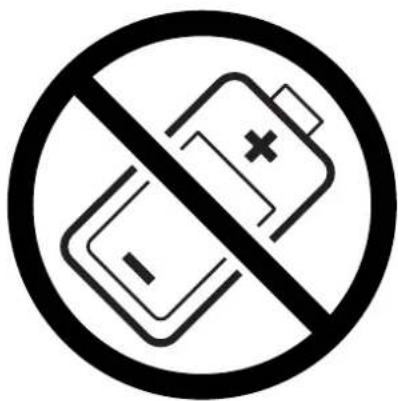
Warning symbol with exclamation mark inside triangleDo not destroy accumulators/batteries!
text_image
Prohibition sign with battery and switch symbols, indicating no prohibition or anti-protection
text_image
Warning symbol with exclamation mark inside a triangleتَلْبَاقُلَا دَاوْمِلَ عَم ذادرِلَا مَادخْتَسَا مَدَعَ نِيْعَتِي! قَىٌٍاشُولَا فَالَتَّاً ئَلَ أَنْ مِبْ بِرْقِلَاب لَاعَتَشَالِل
Do not use any spray cans with fl ammable content near to the document shredder!

text_image
Prohibition sign with no crossed-out lines and a spray can icon
text_image
Warning symbol with exclamation mark inside a triangleDo not use any fl ammable cleaning agents.

natural_image
Black and white symbolic image of a flame inside a diamond border (no text or numbers)
natural_image
Line drawing of a printer with paper being inserted, showing mechanical components and paper handling (no text or symbols)ب عند التشغيل
- اتشغيل
The door must be closed when operating the document shredder!

text_image
230V / 10A min. 120V / 15A min.Ensure free access to mains

text_image
Diagram of a washing machine with a power switch and labeled control knob showing 'R' and 'Power'Automatic standby that switches off after
15 minutes. The machine can be switched off at any time by pressing the ⏻ switch.
Green LED ⏻ control light is off. There will be no power consumption any more.

natural_image
Line drawing of a portable electronic device connected to a plug, with warning symbols (no text or labels)Remove the plug before cleaning the machine!
Do not perform any repairs on the document shredder! (See page 24).

natural_image
Line drawing of a laboratory instrument with labeled component A (no text or symbols on the device itself)Do not operate the machine without the safety flap (A).

text_image
ON/OFFON/OFF → Quick stop → Open the door!
text_image
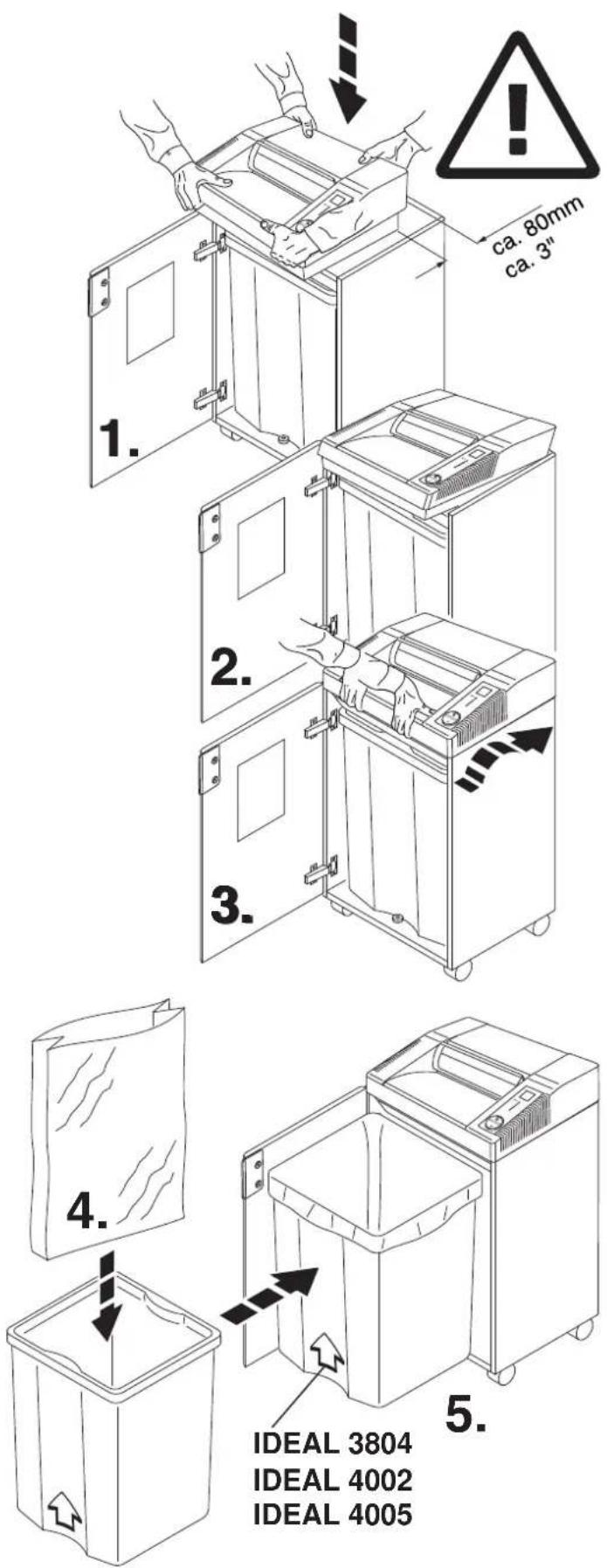
ca. 80mm ca. 3" 1. 2. 3. 4. 5. IDEAL 3804 IDEAL 4002 IDEAL 4005Open the door. Place the machine into the top of the cabinet. We recommend that two people set up this unit! Beware of fingers.
Risk of injury!
All machines have a container with plastic bag.
تشبيت وعاء الزيت
خاص فقط بموديلات:
(IDEAL 2604 Oil, IDEAL 2605, IDEAL 3104 Oil, IDEAL 3105, IDEAL 4002 Oil, IDEAL 4005)
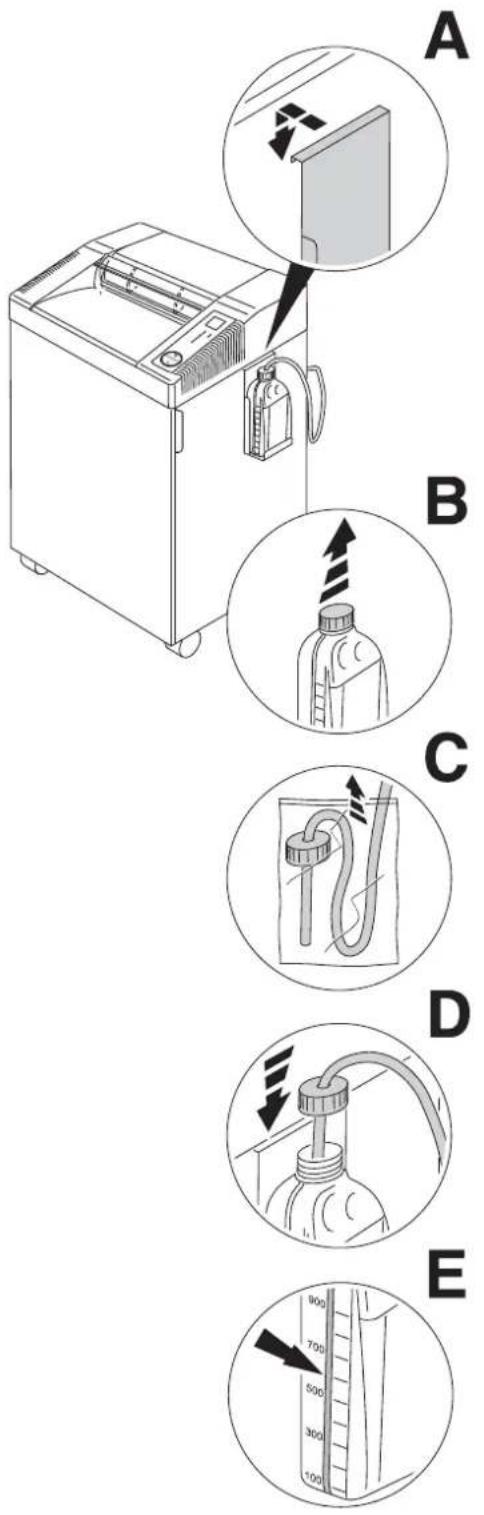
Installing the oiler:
(Only for IDEAL 2604 Oil, IDEAL 2605, IDEAL 3104 Oil, IDEAL 3105, IDEAL 4002 Oil, IDEAL 4005)
• take the oiler holder out of the cabinet and hook it into the side of the cabinet (A).
- Remove the lid from the oiler (B).
- Remove the plastic bag from the oil tube (C).
- put the oil tube into the oiler and screw on (D).
• The oil bottle has a fill level indication (E).
natural_image
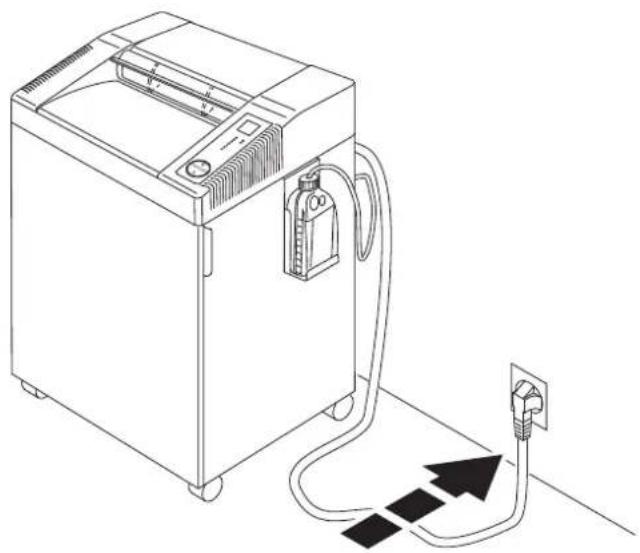
Line drawing of a portable appliance connected to a power outlet, with no text or symbols present.Close the door. Plug into the wall socket.
text_image
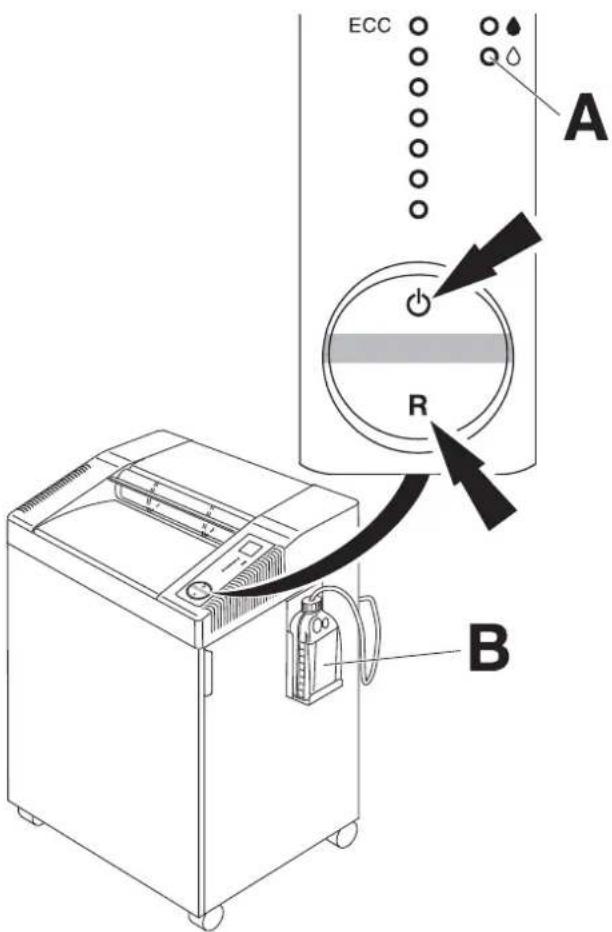
ECC A R BIDEAL 2604 Oil, IDEAL 2605, IDEAL 3104 Oil, IDEAL 3105, IDEAL 4002 Oil, IDEAL 4005
When using for the first time and when the oil bottle (B) is changed:
- Press the rocker switch ⏻.
- Press, and hold the rocker switch "R", until the LED ⬇ (A) no longer blinks red.
text_image
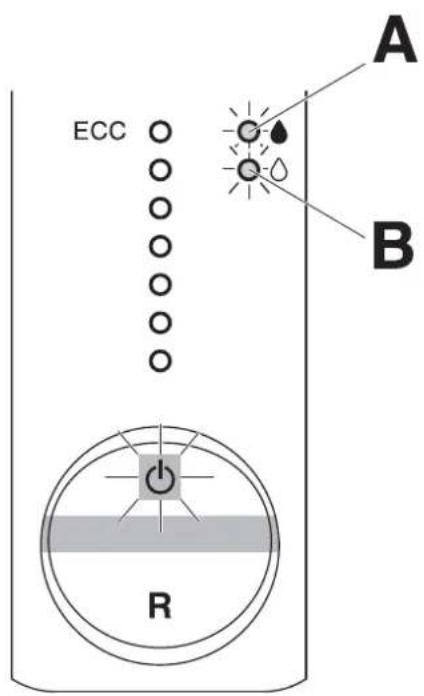
ECC A B RIDEAL 2604 Oil, IDEAL 2605, IDEAL 3104 Oil, IDEAL 3105, IDEAL 4002 Oil, IDEAL 4005
- cutting shafts are automatocally oiled. Flashing LED (B):
- Oil bottle is empty.
text_image
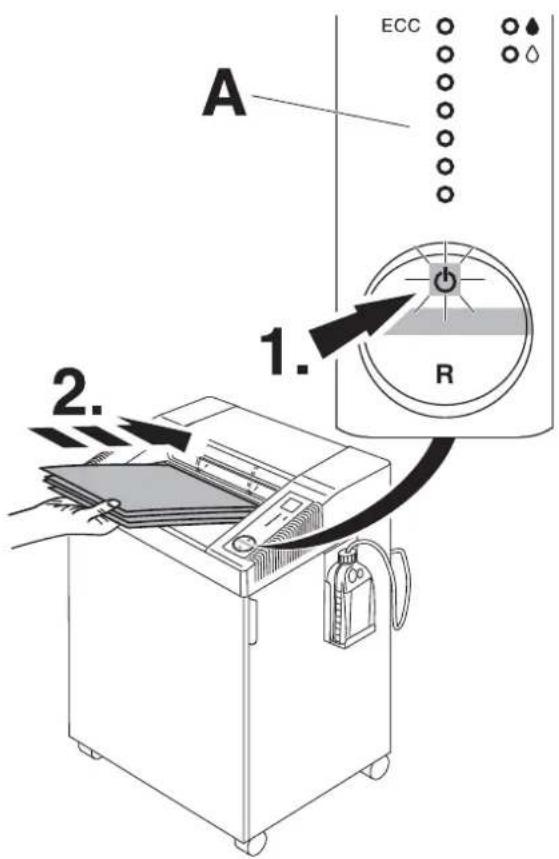
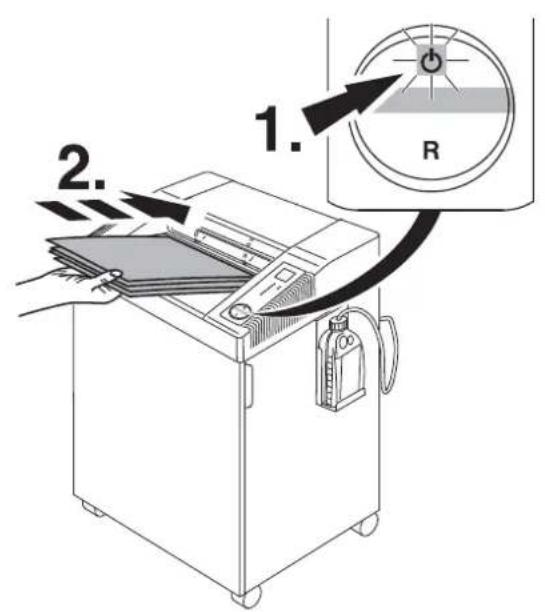
A 1. 2. ECC RPress the rocker switch ⏻1.): green light is on, the machine is now ready for operation. Starts automatically when paper is inserted (2.). Automatic standby that switches off after 15 minutes. The machine can be switched off at any time by pressing the ⏻ switch. Green LED ⏻ control light is off. There will be no power consumption any more.
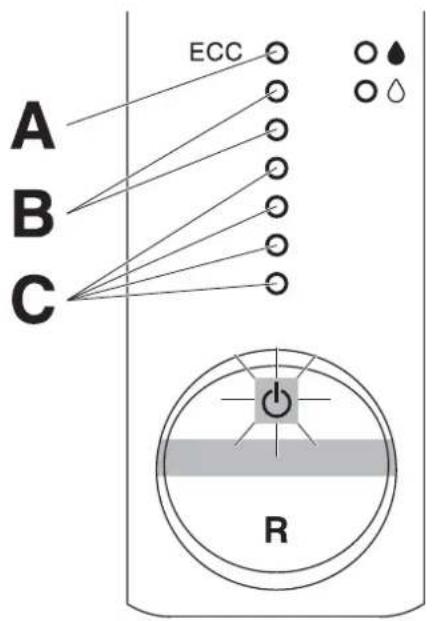
Note: All machines have an ECC- Display (Electronic Capacity Control) which indicates the used sheet capacity during shredding process (A).
text_image
A B C ECC RIDEAL 2604, IDEAL 3104, IDEAL 3105 IDEAL 4002, IDEAL 4005
Stops automatically if too much paper is inserted. Automatic reverse if paper.
LED shows yellow (B).
Maximum sheet capacity during shredding precess.
Normal sheet capacity during shredding precess.

text_image
Diagram of a portable air purifier with labeled control panel and indicator lightsت Winning Walking En the Campaign, aotomatsika en dege and would orq
Stops automatically when no further paper is inserted.

text_image
Diagram illustrating a printer's internal mechanism with labeled components and directional arrows indicating motion or flow.Stops automatically when door is opened Symbols and ash alternatively.

text_image
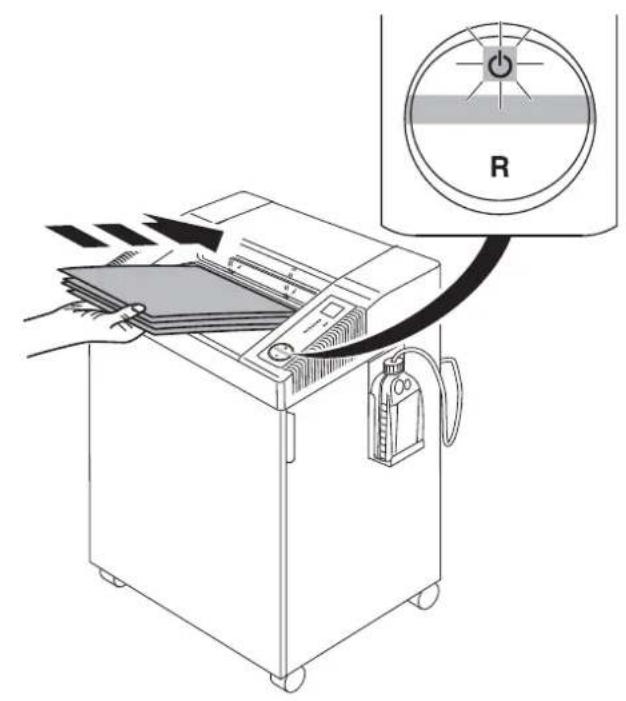
1. 2. 3-4x RStops automatically when shred bin is full. Empty the bin when "bin full" indicator lights. (See page 10). Shake the bin serveral times to ensure a clean removal.
text_image
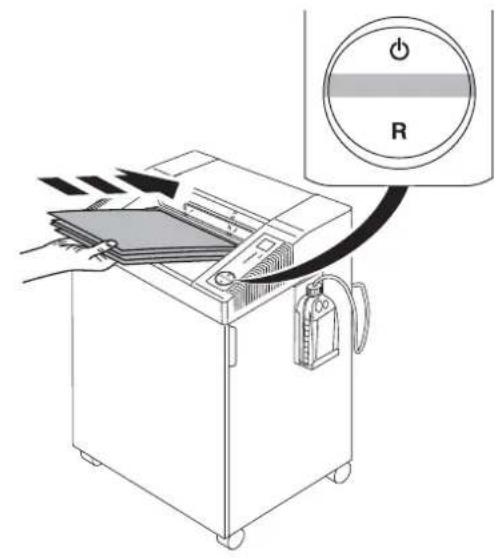
Diagram showing a printer with paper being inserted into a machine, connected to a circular indicator labeled 'R' with a power button.Stops automatically if too much paper is inserted. Automatic reverse if paper jams (Symbol "ON/OFF" ⏻ flashes).

text_image
1. 2. RPress the rocker switch "R" and remove paper. (Machine runs for a short time in reverse, if required repeat several times)

text_image
1. 2. RReset by pressing the rocker switch ⏻. Re-feed the paper in smaller quantities.
text_image
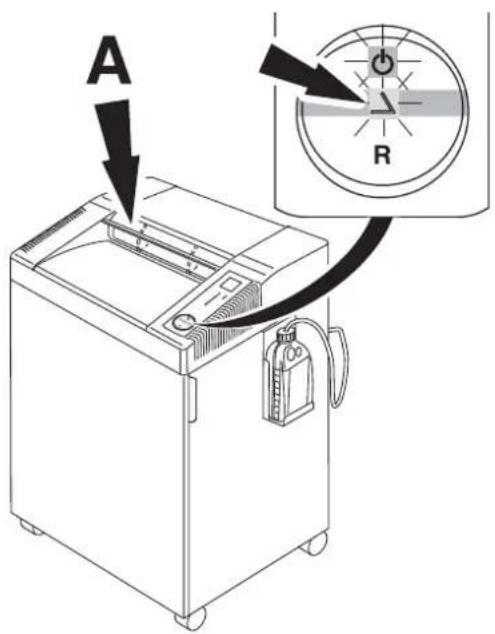
A RAutomatic stop if safety flap (A) is opened (symbols △ and ⬇l ash alternatively). Close the safety flap and press the rocker switch ⏻, paper is shredded. To remove any paper debris from a paper jam the machine runs for a short time reverse with open safety flap. If required press the rocker switch "R" several times.
IDEAL 2604, IDEAL 3104,
IDEAL 3804, IDEAL 4002
قطع على التوالي
Straight cut
text_image
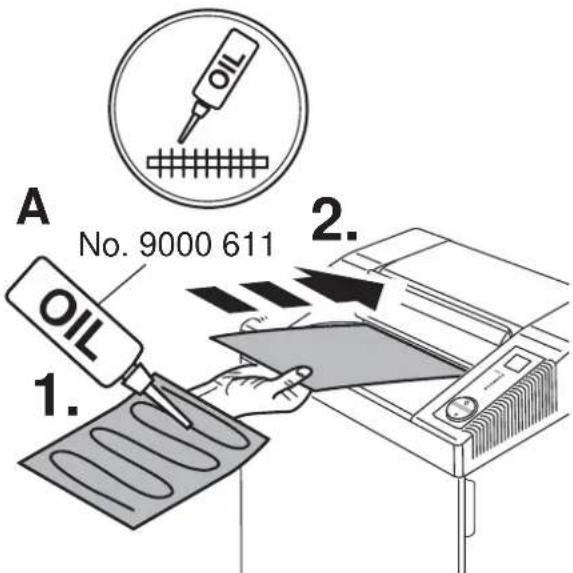
A No. 9000 611 1. 2.IDEAL 2604 CC/MC/SMC,
IDEAL 2605 SMC, IDEAL 3104 CC
قطع الجسيمات
Particle cut
No. 9000 631

natural_image
Line drawing of a printer with a paper strip and label B, no text or symbols presentIDEAL 3804 CC, IDEAL 4002
قطع الجسيمات
Particle cut
No. 9000 631
natural_image
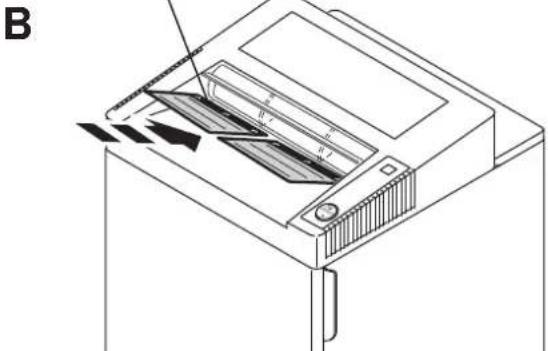
Technical line drawing of a computer drive with labeled components (no text or symbols)If the sheet capacity reduces or after the shred bin is emptied oil the shredding mechanism! (see picture)
text_image
Diagram showing a printer with a power button labeled 'R' and arrows indicating flow or movement, likely illustrating a printing or printing process.لا تعملال
Machine will not start

natural_image
Line drawing of a portable electronic device connected to a plug, with an arrow pointing to it (no text or symbols present)Is the machine plugged in?
text_image
1. 2. RIs the rocker switch ⏻ pressed? The green light rocker switch is ON? (1.).
Insert paper (2.).

text_image
A RFeed the paper into the centre of the feed opening? (photo cell) (A).

text_image
Diagram of a machine with directional arrows indicating flow or movement, and a circular icon labeled 'R' pointing to a control panel.هل الباب مفتوح؟
Door open?
text_image
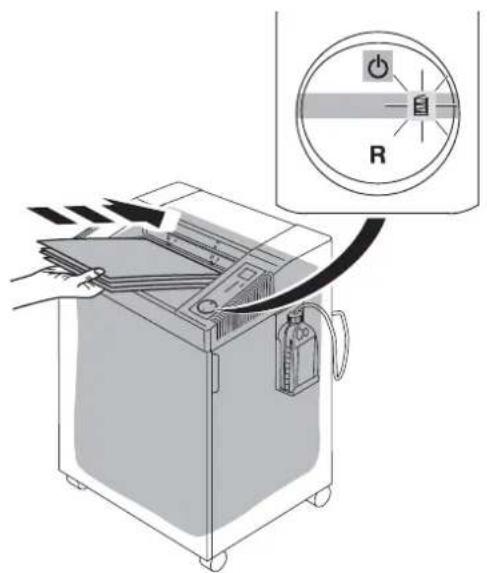
Diagram showing a printer with a power switch and indicator lights labeled 'R' pointing to its screen, illustrating the process of printing or scanning.text_image
Diagram showing a device with an arrow pointing to a circular dial labeled 'R' and a pointer indicating the direction.هل درج الأمن مفتوح؟
Safety flap open?

text_image
Diagram showing a printer with paper being inserted, accompanied by an inset diagram illustrating a rotary switch labeled 'R' with power and current indicators."Bin full" indicator 📋 illuminates but bin is not full.
- Disconnect from the mains.
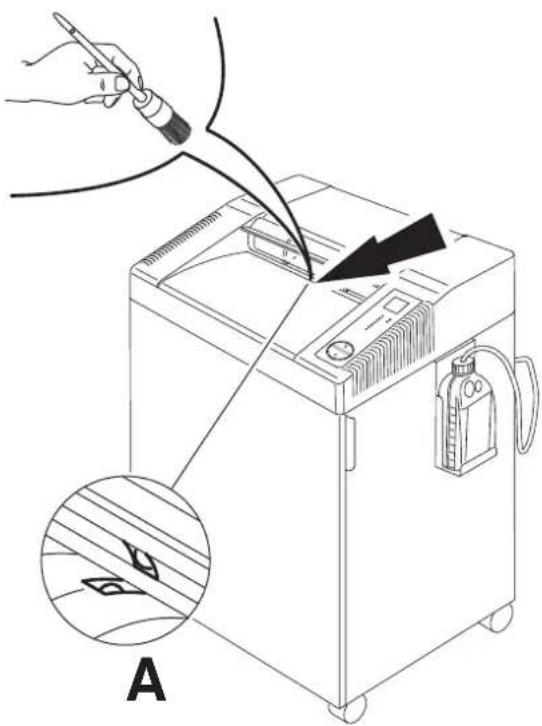
- Remove paper debries between the cutting head (A) and flap (B) with a brush. Picture shows the machine from underneath.
text_image
AMachine will not stop.
Remove plug. Clean the photo cell (A) with a small brush.

text_image
Diagram illustrating a printer printing process with labeled components including 'R' and power buttonفي حالة توقف الآلة
Overload protection. Please let the machine cool down.
- Symbols ⏻ and "R" fl ash alternatively.
- Symbol Ⓗ lights green, machine is ready for operation.

text_image
? Servicewww.krug-priester.com •
service@krug-priester.com •
Did none of the specified solutions help you with your problem?
→ Contact: Service
• www.krug-priester.com
• service@krug-priester.com


text_image
BRDG - PREDSTER 10 Batch / Series / Series

natural_image
Simple line drawing of a closed book with visible page lines (no text or symbols)Recommended accessories
Environmentally friendly oil (10 x 0,2 litre).
No. 9000 611
IDEAL 2604 CC/MC/SMC, IDEAL 3104 CC, IDEAL 3804CC,IDEAL 4002 CC
ورق الزيت (18 ورقة)
9000 631: رقم
IDEAL 2604 CC/MC/SMC, IDEAL 3104 CC, IDEAL 3804CC, IDEAL 4002 CC
Oil sheets (18 Sheets)
No. 9000 631
يتم استخدام IDEAL 2604 Oil, IDEAL 2605, IDEAL 3104 Oil, IDEAL 3105, IDEAL 4002 Oil, IDEAL 4005
Environmentally friendly oil (5 x 1 litre).
No. 9000 621
Plastic bags (50 pieces)
IDEAL 2604, IDEAL 3104
No. 9000 037
IDEAL 3105, IDEAL 3804
IDEAL 4002, IDEAL 4005
No. 9000 410

text_image
Warning symbol with exclamation mark inside a triangleDo not shred paper clips and CD/DVD with model IDEAL 2604 MC, IDEAL 2604 SMC,
IDEAL 2605 SMC, IDEAL 3105 SMC,
IDEAL 4005 MC, IDEAL 4005 SMC!
Only models IDEAL 2604, IDEAL 3104,
IDEAL 3105, IDEAL 3804, IDEAL 4002 and
IDEAL 4005 4/6 mm, 2x15 mm and 4x40 mm
are suitable to destroy CD/DVD.
It is very important to oil frequently when shredding CD/DVDs. (Only IDEAL 2604,
3104, 3804, 4002).
CE

This machine is approved by independent safety laboratories and is in compliance with the EC-regulations 2014/35/EU and 2014/30/EU.
Sound level information:
The sound level at the work place is less than the ISO 7779 standard's maximum permissible level of < 70 db (A).
The exact technical specifications can be found on the technical specifications sticker on the machine.
To claim under guarantee, the machine must still carry its original identifi cation label.
Subject to alterations without notice.

The company Krug + Priester has the following certifications:
• Quality management system according to DIN EN ISO 9001:2015
• Environmental management system according to DIN EN ISO 14001:2015
• Energy management system according to DIN EN ISO 50001:2011

natural_image
Simple line drawing of a trash bin with two crossed x-axes and a blank base (no text or symbols)Please remember to respect the local regulations: hand in the non-working electrical equipments to an appropriate waste disposal centre. The packaging material is recyclable.
Dispose of the packaging in an environmentally friendly manner and make it available for the recyclable material collection-service.
Please think off the environment and dispose shredded CDs, cards and other data medium separately from shredder paper. Thank you!
EC-declaration of conformity
- Herewith we declare that
GS- IDENT. No UL-IDENT. No
2604; 2604 CC; 2604 MC; 2604 SMC 11260401 10260401
2605 SMC 11260501 10260501
3104; 3104 CC 11310401 10310401
3105 CC; 3105 SMC 11400501 10400501
3804; 3804 CC 11400204 10400204
4002; 4002 CC 11400203 10400203
4005; 4005 CC; 4005 MC; 4005 SMC 11400501 10400501
- complies with the following provisions applying to it
توحيه Eraque EMV الkehropogناطيسي
2014/30/EU:
EMV Electromagnetic compatibility directive
2014/35/EU
Low voltage directive
انخفاض الجهد الموجة
RoHS directive, RoHS directives
- Applied harmonised standards in particular
IEC 60950-1; IEC 61000-3-2; IEC 61000-3-3;
EN 60950-1; EN 55014-1; EN 55014-2; EN 61000-3-2; EN 61000-3-3;
EN ISO 12100; EN ISO 13857; EN ISO 7779
01.07.2017
Datum
Authorized representative for technical documentation
- Geschäftsführer -
D-72336 Balingen (Germany)
ملاحظات:
Remarks:
natural_image
Four white industrial washing machines of varying sizes, arranged in a row against a plain background (no text or symbols visible)• آلات القص والتق payable • Trimmers and Guillotines •