GW225 - Blower BLACK & DECKER - Free user manual and instructions
Find the device manual for free GW225 BLACK & DECKER in PDF.


User questions about GW225 BLACK & DECKER
0 question about this device. Answer the ones you know or ask your own.
Ask a new question about this device
Download the instructions for your Blower in PDF format for free! Find your manual GW225 - BLACK & DECKER and take your electronic device back in hand. On this page are published all the documents necessary for the use of your device. GW225 by BLACK & DECKER.
USER MANUAL GW225 BLACK & DECKER
natural_image
Diagram showing a mechanical component with arrows indicating motion, labeled B2 (no text or symbols on the diagram itself)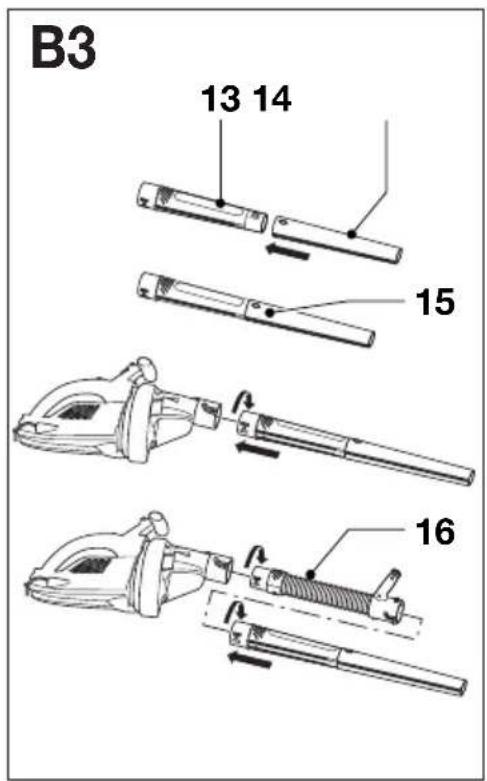
text_image
B3 13 14 15 16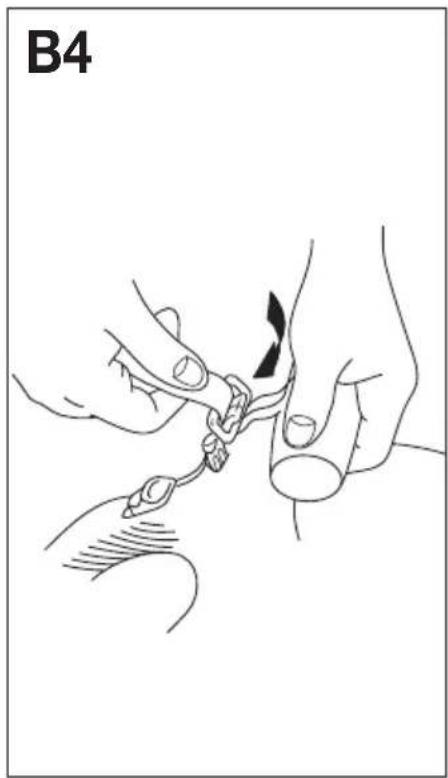
natural_image
Line drawing of two hands performing a manual manipulation or massage technique on a finger (no text or symbols)
natural_image
Technical line drawing of two mechanical device components labeled B5, showing different angles and mounting features (no text or symbols on the devices themselves)
natural_image
Line drawing of a person walking with a long pole, wearing a backpack (no text or symbols)
natural_image
Diagram showing three abstract curved lines with arrows and dots, no readable text or symbols
natural_image
Two identical line drawings of a stylized object with curved wires and circular ends, labeled 'D' in the top-left corner (no text or symbols on the objects themselves)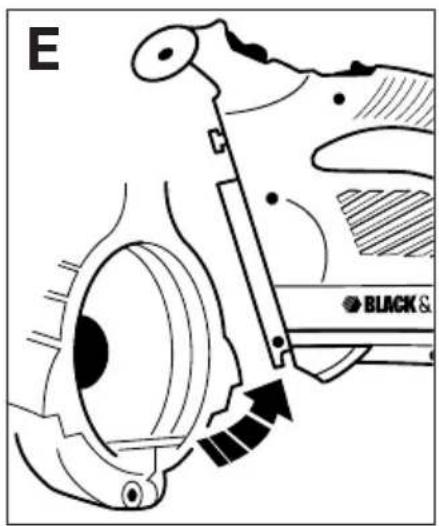
text_image
E BLACK &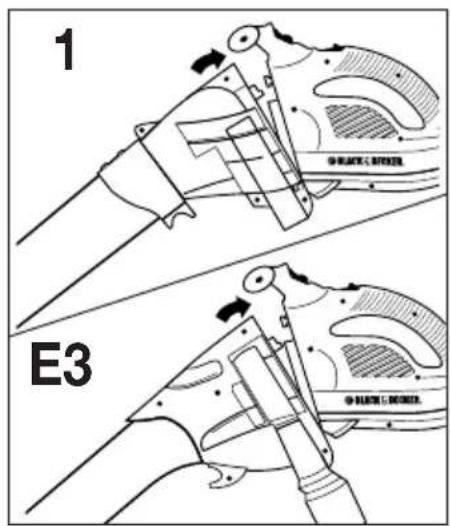
text_image
1 E3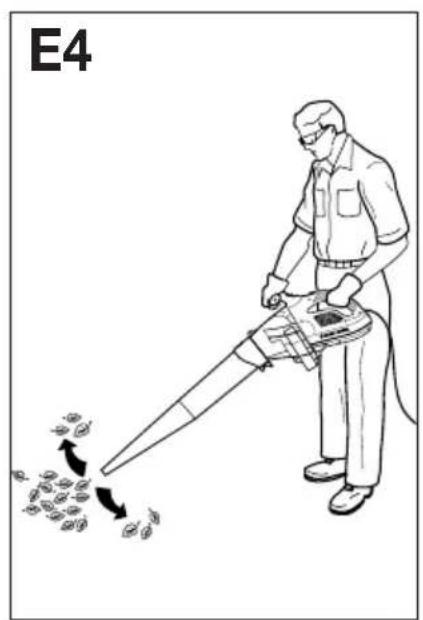
text_image
E4
text_image
E5 A B C MAX. MIN.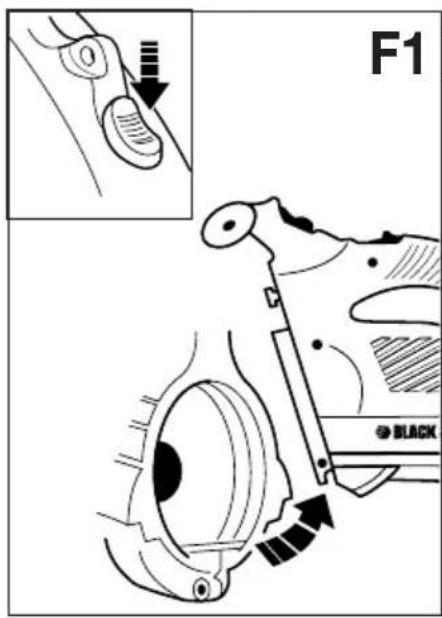
text_image
F1 BLACK
text_image
F2 F3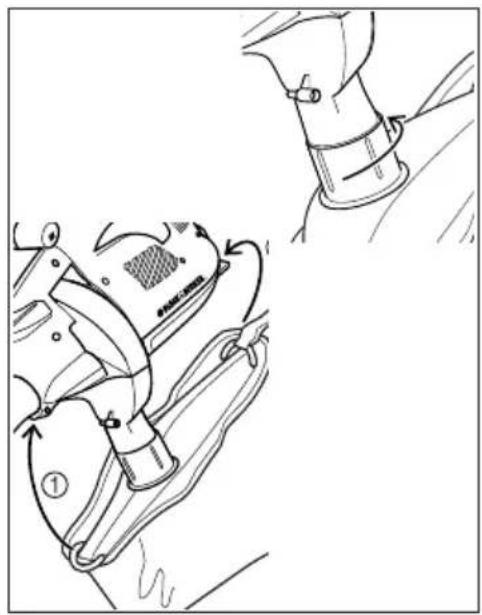
natural_image
Technical illustration of a mechanical device with labeled parts and motion arrows (no readable text or symbols)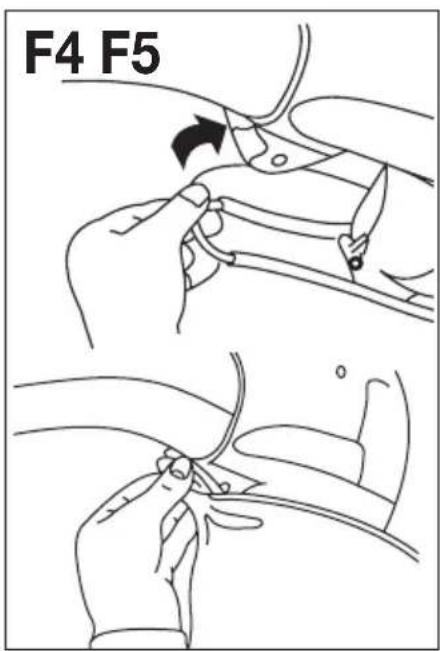
text_image
F4 F5
text_image
F6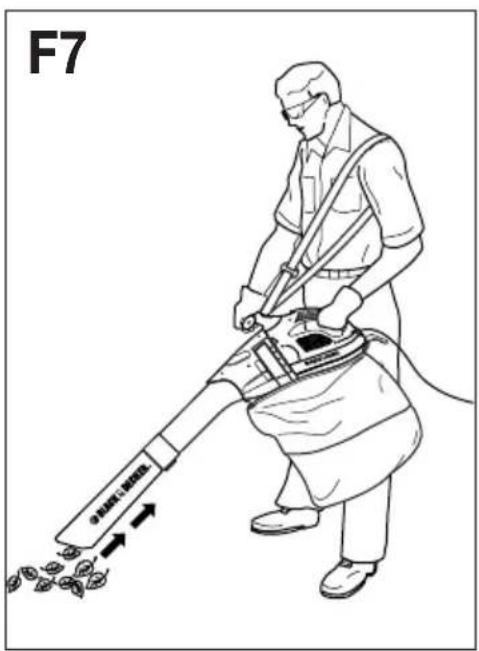
text_image
F7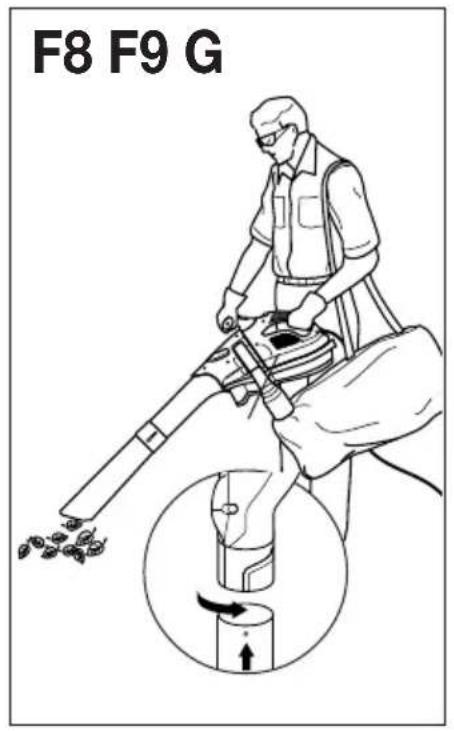
text_image
F8 F9 G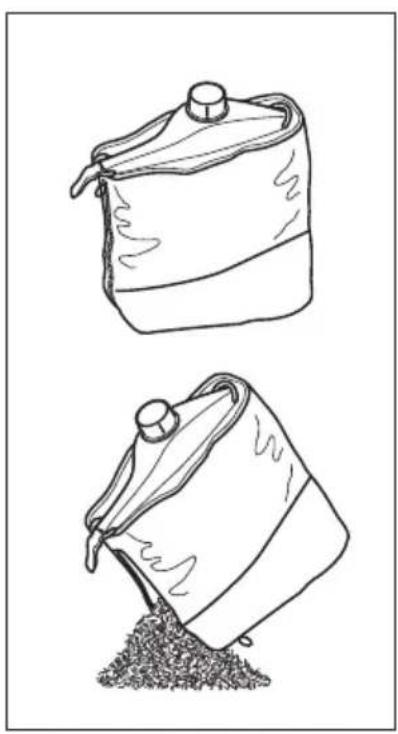
natural_image
Two hand-drawn sketches of a sack with a cap and a pile of granular material, no text or symbols present.
natural_image
Two-step diagram showing hands using a pulley system to adjust a mechanical component (no text or symbols present)User manual
GW200/225/250/254
Congratulations!
On purchasing the Black & Decker system which will assure you of problem free leaf clearing.
GW200 - Mastervac
Vacuuming √ Shredding √
GW225
Vacuuming √ Shredding √ Variable blow speed √
GW250 - Mastervac 123
Vacuuming √ Shredding √ Variable blow speed √
GW254
Vacuuming √ Shredding √ Flexible blow tube √
Your product has many features designed for your benefit, including:
- Powerful motor that blows air and will vacuum/mulch.
- Unique 5 blade fan that will shred leaves into small debris in a 7 to 1 ratio.
- Unique blow speed adjuster on blow tube varying blow speed (GW250, GW225).
- Unique flexible tube blower allowing greater comfort and control (GW254).
- Ergonomic design improves comfort and ease of use.
- Large aperture vacuuming tube to maximise the intake of leaves.
• 35 litre collection bag.
Description (Fig. A)
A Following is a list of parts that will be mentioned in this user manual and are shown in the diagrams:
GW200
- Powerhead
- On/off switch
- Release button
- Vacuum tube - upper
- Vacuum tube - lower
- Carrying strap
- Collection bag
- Cable restraint
GW225
- Powerhead
- On/off switch
-
Release button
-
Vacuum tube - upper
- Vacuum tube - lower
- Blow tube - upper
- Blow tube - lower
- Blow control
- Cable restraint
- Collection bag
GW250
- Powerhead
- On/off switch
- Release button
- Vacuum tube - upper
- Vacuum tube - lower
- Blow tube - upper
- Blow tube - lower
- Blow control
- Carrying strap
- Collection bag
- Cable restraint
GW254 (see also fig. B3)
- Powerhead
- On/off switch
- Release button
- Vacuum tube - upper
- Vacuum tube - lower
- Blow tube - upper
- Carrying strap
- Collection bag
- Cable restraint
- Blow tube - middle
- Blow tube - lower
- Lock button
- Blow tube - flexi-piece
Know your product

Read this manual carefully, observing all recommended safety precautions before, during and after using your product. Maintain your product in good working order.
Familiarise yourself with the controls on your product before attempting to operate it, but above all, be sure you know how to stop the product in an emergency.
Retain this manual and all other literature supplied for future reference.
Safety instructions
Training
- Safe working distance whilst in blow mode.
- Never allow children or persons who are unfamiliar with this type of product to use it, nor anyone who has not read this manual.
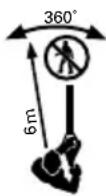
- Do not allow children, animals or other persons near your product when in use - always keep them at least 6m (20ft) away from the working area.
- Remember that the operator/user is responsible for accidents or hazards occurring to other people or their property.
- Your product is designed for use on AC (mains) electrical supplies only - do not attempt to use on any other supply.
- Plug your product into a power point - never a lighting socket. The recommended fuse is 13 amp (UK only).
- Never carry your product by the cable or jerk the cable. Keep the cable away from heat sources, oils or sharp edges. Check the condition of your cable before use and do not use if damaged.
Preparation
- Do not operate your product barefoot or in open sandals.
- To protect your feet, always wear stout shoes or boots - freshly cut grass is damp and slippery. Rubber or man made footwear will enhance your safety.
- Use protective equipment. Wear safety spectacles or goggles whilst operating your product in blow mode.
- Use a face mask if dusty.
- Use ear protection if the sound level seems uncomfortable when using your product.
- Wear long trousers to protect your legs.
Warning! Secure long hair so it is above shoulder length. Keep loose clothing, ties, tassels and hanging straps away from openings and moving parts.
- The power supply cable should be regularly inspected for signs of damage or ageing, and only used if in good condition.
-
Always be sure your product is in a safe operating condition and all parts are secure before use.
-
Do not operate the product if any parts are defective or worn.
- Do not pick up burning materials such as lit cigarette butts.
- Do not operate the blower/vacuum in a gaseous or explosive atmosphere as motors in these tools normally spark and this may ignite fumes.
- Do not allow the unit to be used by persons under the age of 16 or other persons who have not read this user manual. You are responsible if there is an accident.
Operation
- Do not use in vacuum mode without the vacuum tubes and collection bag in place.

Always switch off and remove the plug from the electrical supply when:
- Changing from blower to vacuum.
- The supply cable has become damaged or entangled.
- You leave your product.
- Clearing a blockage.
-
Checking, adjusting, cleaning or working on your product.
-
Do not place the inlet or outlet of the vacuum near eyes or ears when operating.
- Do not use your product in the rain and do not allow it to get wet. Avoid using the product in wet conditions.
- Use your product only in daylight or good artificial light.
- Do not cross gravel paths or roads whilst your product is switched on during blow/vac mode.
• Always be sure of your footing, particularly on slopes. - Do not pick up matter that may be contaminated with flammable or combustible liquids such as gasoline, or use in areas where they might be present.
- Do not place any objects into the openings. Never use if the openings are blocked - keep free of hair, lint, dust and anything that may reduce the airflow.
Warning! Always use your product in the manner outlined in this manual. Your product is designed to be used in an upright mode and if it is used in any other way it may result in injury. Never run your product whilst lying on it's side or upside down.


ENGLISH
Maintenance and storage
- Store your product in a dry place when not in use, out of the reach of children.
- Do not use solvents or cleaning fluids to clean your product - use a blunt scraper to remove grass and dirt. Always disconnect from the electrical supply before cleaning.
- Do not operate your product if any parts are defective; discard all defective parts and fit new parts before use.
- Keep all nuts, bolts and screws tight to be sure your product is in a safe working condition.
- Use only Black & Decker recommended replacement parts and accessories.
- Replacement fans are available from a Black & Decker service agent.

Warning! If the supply cord is damaged, it must be replaced by a special cord or assembly available from an authorised repair agent (Black & Decker part number: 372832-01 - UK only and part number: 370017-04 - Australia and New Zealand only).
The Black & Decker policy is one of continuous improvement to their product and as such they reserve the right to change product specification without prior notice.
Double insulation

Your product is double insulated. This means that all external metal parts are electrically isolated from the power supply. This is achieved by placing an extra insulation barrier between the electrical and mechanical parts. Double insulation means greater electrical safety and obviates the necessity of having your product earthed.
Electrical safety (UK only)
Your product should always be switched off at the mains before disconnecting any plug and socket connector or extension cables.
Fuse replacement
If your product is supplied with cable, fitted with a non-re-wireable plug:
- The plug is fitted with a 13 amp fuse which is the recommended fuse for your product.
- Only use replacement fuses which are approved to BS1362.
- When changing the fuse in your plug, always ensure the fuse cover is refitted. If the fuse cover is missing or damaged do not use the plug.
Note: Fuses do not give personal protection against electric shock.
Plug replacement
- Disconnect the plug from the supply.
- Cut off the plug and dispose of immediately. Insertion of a detached plug into a 13 amp socket outlet may result in electric shock.
- Only fit BS1363A approved plugs fitted with the correctly rated fuse.
- The cable wire colours, or a letter, will be marked at the connection points of most good quality plugs. Attach the wires to their respective points in the plug (see above). Brown is for “Live” (L) and blue is for “Neutral” (N).
- Before replacing the top cover of the mains plug ensure that the cable restraint is holding the outer sheath on the cable firmly and that the two leads are correctly fixed at the terminal screws.
Fit a BS1363A approved resilient plug
Connect blue to N (neutral)
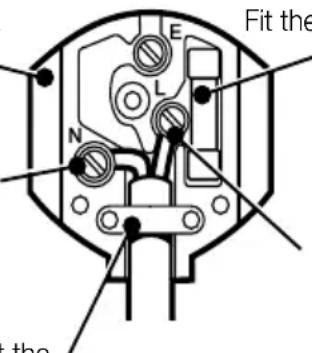
text_image
Fit the theFit the recommended fuse approved to BS1362
Connect brown to L (live)
Make sure that the outer sheath of the cable is held firmly by the clamp
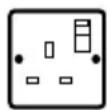
230 volts AC only Never use a light socket

Warning! Never connect live or neutral wires to the earth pin marked "E" or ±
Note: Do not wire an extension cable directly into your machine yourself. Instead, take your product to your nearest Black & Decker authorised repair agent.
Increased safety can be obtained by having a qualified electrician install a high sensitivity (30mA) circuit breaker in the house wiring. If you do not have such a circuit breaker installed, or you do not wish to have one installed, then we strongly recommend that the electrical power to the machine be supplied through a high sensitivity residual current device (RCD). The RCD is designed to provide a high degree of personal protection against harmful electric current should fault conditions occur.

Warning! The use of an RCD or other circuit breaker unit does not release the operator of your product from the safety instructions and safe working practices given in this manual.
Assembly prior to use (Fig. B & F)
B
Vacuum tube assembly (Fig. B1)
- Vacuum tubes must be assembled together before use.
- To ease assembly apply soapy water solution to joint area.
- Align location ribs on upper (4) and lower (5) tubes.
- Push both parts firmly together until clip is engaged, as per moulded detail. (Never operate apart).
- In the interests of safety, it is not intended for the tubes to be separated once assembled.
Blow tube assembly (Fig. B2)
- Blow tubes must be assembled together before use.
- To ease assembly, apply a soapy water solution to the joint area.
- Align location ribs on the upper (6) and the lower (7) tubes.
- Push both parts firmly together until the clip is engaged (never operate apart).
- In the interests of safety, it is not intended for the tubes to be separated once assembled.
Blow tube assembly (GW254) (Fig. B3)
- Fit the lower tube (14) over the middle tube (13), until the lock button (15) clicks in place.
- Align the cross mark on the assembled blow tube with the cross mark on the upper blow tube (6).
- Insert the assembled blow tube into the upper blow tube and turn it to lock it in place.
- Alternatively, the flexi-piece (16) can be fitted between the upper blow tube and the assembled blow tube. With the flexi-piece, the unit can be handled more easily and with greater control.
Carrying strap assembly (GW250) (Fig. B4)
- Fit the carrying strap to the powerhead, if required, and adjust to suit the user.

Warning! The shoulder strap should only be used during vacuum mode. Never use the strap during blow mode.
Carrying strap assembly (GW254) (Fig. B5 & B6)
For use in flexi-blow or vacuum mode.
- Fit the small loop over the T-handle.
- Adjust the large loop to suit the user.
- The unit can now be hung over the shoulder and handled as shown.
Collection bag (GW225) (Fig. F8)
- Attach the collection bag to the vacuum outlet using the bayonet fitting.
F
On/off switch (Fig. C)
C
- The on/off switch (2) is located on the handle of the powerhead.
- To switch your product on, push the switch forward.
- The switch will not operate if the release button (3) is depressed.
- To switch off, push the switch to the rear.
Cable restraint (Fig. D)
D
- A cable restraint is incorporated into the rear of the powerhead.
- To fix cable, form a loop in the cable and insert as shown.
Using your product (Fig. E)
When using as a blower or vacuum, always wear safety glasses. If using in dusty conditions, wear a filter mask as well.
Blow mode (GW250/GW254)
- Ensure your product is switched off and disconnected from the mains power supply.
- Attach the blow tube (6) to the powerhead (1) (Fig. E1) by locating the tube as shown, then pivot about this point until the locking/release catch is fully engaged (Fig. E2).
- Hold the blow tube approximately 180mm (7") above the ground, switch your product on and using a sweeping motion from side to side, advance slowly keeping the accumulated debris/leaves in front of you (Fig. E4).
Blow control (GW225/GW250) (Fig. E5)
- Position A - Maximum blow speed.
-
Position B - Blow control can be varied between positions A and C. To do this, depress the latch as shown and slide the control forward/backward to obtain desired airspeed, then release the latch to lock.
-
Position C - Minimum blow speed.
- Once you have blown the debris/leaves into a pile, you can convert to vacuum mode to collect the debris.
Removing blow/vacuum tube (Fig. F)
- Switch off your product and disconnect from the mains power supply. (If in vac mode, remove the bag).
F
- To disconnect the tube from the powerhead, depress the release button as shown (Fig. F1), ensuring the tube does not fall to the ground.
- The release button will not depress if on/off switch is in the forward "on" position.
Vacuum mode (Fig. E & F)
- Ensure your product is switched off and disconnected from the mains power supply.
E
- Attach the vacuum tube in the same way as stated previously for the GW250 blow mode (Fig. E1 & Fig. E3).
F
To fit the bag assembly to your product:
- Align the notches on the bag fitting with the recesses on the vacuum outlet (fig. F2).
- Slide the bag fitting onto the vacuum outlet and tighten the fitting (fig. F3).
- Locate the front of the collection bag into the clip on the underside of the vacuum tube (Fig. F4).
- Using the nylon band locate the rear of the collection bag over the lip positioned at the rear of the powerhead (Fig. F5 & Fig. F6).
- Ensure the bag zip is closed before operation (Fig. F5).
- Position the tube slightly above the debris/leaves. Switch your product on, then using a sweeping motion the debris/leaves will be sucked up the tube, shredded and thrown into the collection bag (Fig. F7).
- As the bag fills the power of the suction will decrease, switch off your product and unplug from the mains power supply.
- To remove the bag, unclip it using the nylon handle as shown (fig. F6) and loosen the fitting. Unzip the bag and empty it before continuing (fig. F9).
ENGLISH
Fitting of the blower vac wheel (Fig. G) (K models only)
- Disconnect your product from the electricity supply before fitting the wheel.
Note: To be used in the vac mode only.
- Locate the wheel onto the vac tube.
G
Fault finding
!
Disconnect from the mains power supply before attempting any maintenance.
| Failure to operate (1) Check the connection to the power supply.(2) Check the fuse in the plug, if blown, replace (UK only).(3) Check that the blow/vacuum tube assembly is correctly fitted to the powerhead.(4) If the fuse continues to blow - immediately disconnect from the mains power supply and consult your local Black & Decker authorised repair agent. |
Poor vacuum/ (1) Switch off - disconnect from high pitched whinethe mains power supply, debris should fall clear of the tube.
(2) Remove and empty the collection bag.
(3) Check that both the inlet and exit ports on the vacuum tube are clear.
(4) Remove any debris from the fan area.
(5) If poor vacuuming continues - immediately disconnect from the mains power supply and consult your local Black & Decker authorised repair agent.
Poor shredding (1) Switch off - disconnect from the mains power supply and remove the collection bag.
(2) Remove the vacuum tube and inspect the fan.
(3) Clean any debris from the fan blades.
(4) If the fan is cracked or damaged, do not use - consult your local Black & Decker authorised repair agent.
Cleaning your product

Disconnect from the mains power supply before any cleaning or maintenance is carried out. Keep your product dry. Under no circumstances spray with water.
- Clean your product regularly.
- Remove any leaves stuck to the inside of the vacuum tube.
- Plastic parts may be cleaned using a mild soap and a cloth dampened with hot water.

Do not use any type of detergent, cleaner or solvent which may contain chemicals that could seriously damage the plastic.
- Self lubricating bearings are used in your product, therefore lubrication is not required.
Protecting the environment

Black & Decker provides a facility for recycling Black & Decker products once they have reached the end of their working life. This service is provided free of charge. To take advantage of this service please return your product to any authorised repair agent who will collect them on our behalf.
You can check the location of your nearest authorised repair agent by contacting your local Black & Decker office at the address indicated in this manual. Alternatively, a list of authorised Black & Decker repair agents and full details of our after-sales service and contacts are available on the Internet at: www.2helpU.com.
Guarantee
Black & Decker is confident of the quality of its products and offers an outstanding guarantee. This guarantee statement is in addition to and in no way prejudices your statutory rights. The guarantee is valid within the territories of the Member States of the European Union and the European Free Trade Area.
If a Black & Decker product becomes defective due to faulty materials, workmanship or lack of conformity, within 24 months from the date of purchase, Black & Decker guarantees to replace defective parts, repair products subjected to fair wear and tear or replace such products to ensure minimum inconvenience to the customer unless:
- The product has been used for trade, professional or hire purposes;
- The product has been subjected to misuse or neglect;
- The product has sustained damage through foreign objects, substances or accidents;
- Repairs have been attempted by persons other than authorised repair agents or Black & Decker service staff.
To claim on the guarantee, you will need to submit proof of purchase to the seller or an authorised repair agent. You can check the location of your nearest authorised repair agent by contacting your local Black & Decker office at the address indicated in this manual. Alternatively, a list of authorised Black & Decker repair agents and full details of our after-sales service and contacts are available on the Internet at: www.2helpU.com.
Other outdoor tools
Black & Decker has a full range of outdoor power tools that make life in the garden easy. If you would like further information on the following products, please contact our Service and Information Centre (see the address page towards the end of this manual) or your local Black & Decker retailer.
String trimmers
Chainsaws
Cordless shear
Hedgetrimmers
Lawnmowers
Lawnrakers
Leafbusters
Shredders
Not all products are available in all countries.
EC Declaration of conformity
GW200/GW225/GW250/GW254
Black & Decker declares that these tools conform to:
98/37/EC, 89/336/EEC, 73/23/EEC,
EN 55014, EN 55104, EN 60335,
2000/14/EC, Leaf blower/collector ≤ 9.5 m³/min, Annex V
Level of sound pressure, measured according to 2000/14/EC:
L_pA (sound pressure) dB(A) 90
L_WA (acoustic power) dB(A) 103
L_WA (guaranteed) dB(A) 105
Hand/arm weighted vibration value according to EN 50144: < 2,5 m/s ^4

Brian Cooke
Director of Engineering
Spennymoor, County Durham DL16 6JG,
United Kingdom
12-06-2002
GW200/225/250/254
GW200/GW225/GW250/GW254
Spennymoor, County Durham DL16 6JG,
United Kingdom
12-06-2002
Bedienungsanleitung
GW200/225/250/254
GW200/GW225/GW250/GW254
Director of Engineering
Spennymoor, County Durham DL16 6JG, United Kingdom
12-06-2002
GW200/225/250/254
GW200/GW225/GW250/GW254
98/37/CEE, 89/336/CEE, 73/23/CEE,
EN 55014, EN 55104, EN 60335,
Spennymoor, County Durham DL16 6JG,
Royaume-Uni
12-06-2002
GW200/GW225/GW250/GW254
Director of Engineering
Spennymoor, County Durham DL16 6JG,
United Kingdom
12-06-2002
GW200/225/250/254
GW200/GW225/GW250/GW254
Spennymoor, County Durham DL16 6JG,
United Kingdom
12-06-2002
GW200/225/250/254
Interruptor on/off (Fig. C)
C
GW200/GW225/GW250/GW254
Spennymoor, County Durham DL16 6JG,
United Kingdom
12-06-2002
GW200/225/250/254
Οδηγίες χρήσεως
Συγχαρητήρια
GW200/GW225/GW250/GW254
Spennymoor, County Durham DL16 6JG,
United Kingdom
12-06-2002
| Australia | DEWALT Industrial Power Tool Company7 Clarice Road, Box Hill, Victoria 3128 Fax 03 9899 7465 | Tel. 03 9895 9200 |
| Belgique/België Black & Decker (Belgium) N.V. Tel. 02/719.07.11Weihoek 1, 1930 Zaventem Fax 02/721.40.45 | ||
| Danmark Black & Decker Tel. 70 20 15 10Hejrevang 26B, 3450 Allerød Fax 48 14 13 99Internet: www.blackdecker.dk | ||
| Deutschland Black & Decker GmbH Tel. 06126/21 24 83Black & Decker Str. 40, D - 65510 Idstein Fax 06126/21 26 01 | ||
| ΕλλάςBlack & Decker (Ελλάς) A.E. Τηλ. (010) 8981 616Στράβωνος 7 & Βουλιαγμένης 159 Τηλ. (010) 8982 63016674 Γλυφάδα, Αθήνα, Ελλάδα Φαξ Service (010) 8983 285 | ||
| España Black & Decker Spain Tel. 934 797 400Parque de Negocios “Mas Blau” Fax 934 797 419Edificio Muntadas, c/Bergadá, 1, Of. A608820 El Prat de Llobregat (Barcelona) | ||
| France | Black & Decker (France) S.A.S.B.P. 21, 69571 Dardilly Cédex | Tel. 04 72 20 39 20Fax 04 72 20 39 00 |
| Helvetia | ROFO AGGewerbezone Seeblick3213 Kleinbösingen | Tel. 026-6749391Fax 026-6749394 |
| Italia | Black & Decker Italia SpAViale Elvezia 220052 Monza (MI) | Tel. 039-23871Fax 039-2387592/2387594Numero verde 800-213935 |
| Nederland | Black & Decker (Nederland) BVFlorijnstraat 10, 4879 AH Etten-Leur | Tel. 076-5082000Fax 076-5038184 |
| New Zealand | Black & Decker Tel. 09 579 760081 Hugo Johnson DrivePenrose, Auckland, New Zealand | Fax 09 579 8200 |
| Norge | Black & Decker (Norge) A/SPostboks 248, Leirdal, 1011 OsloInternet: www.blackdecker.no | Tlf. 22 90 99 00Fax 22 90 99 01 |
| Österreich | Black & Decker Vertriebsges.m.b.HErlaaerstraße 165, 1231 Wien | Tel. 01 66116-0Fax 01 66116-14 |
| Portugal | Black & Decker Tel. 214667500Rua Egas Moniz 173S. João do Estoril 2766-651, Estoril | Fax 214667575 |
| South Africa | Black & Decker South Africa (Pty) LtdPhysical address:39 Commerce CrescentEastgate, ext. 12, Sandton, Kramerville 2148Postal address:Postnet Suite 107, Private Bag X65Halfway House 1685 | Tel. (011) 653-1400Fax (011) 653-1499 |
| Suomi Black & Decker Oy Palotie 3, 01610 Vantaa | Puh: (09) 825 4540Fax: (09) 825 45 444 | |
| Sverige | Black & Decker ABBox 603, 421 26 Västra Frölunda,Besöksadr. Ekonomivägen 11 | Tel: (09) 825 4540Fax: (09) 825 45 444 |
| Türkiye | Black & Decker Merkez ServisDudullu Cad. Kerembey Sok. No. 1Küçükbakkalköy/Istanbul | Tel. 0216 455 89 73Faks 0216 455 20 52 |
| United Kingdom | Black & Decker Tel. 01753 511234210 Bath RoadSlough, Berkshire SL1 3YD | Fax 01753 551155Helpline 01753 574277 |

natural_image
Empty white rectangle with a thin black border (no text or symbols)
| Name Name Nom Nome Naam Nombre Nome Namn Navn Navn Nimi Ovoa: Address Adresse Adresse Indirizzo Adres Dirección Morada Adress Adresse Adresse Osoite Diéuunon: Town Ort Ville Cittá Plaats Ciudad Localidade Ort By By Paikkakunta Pólη: Postal code Postleitzahl Code postal Codice postale Postcode Código Código postal Postnr. Postnr. Postinumero Kwδikóç | Is this tool a gift? Ist dieses Gerät ein Geschenk? S'agit-il d'un cadeau? Si tratta di un regalo? Kreeg u de machine als cadeau? Ha recibido usted esta herramienta como regalo? Recebeu esta ferramenta como presente? Är verktyget en gåva? Er verktöyet en gave? Er verktöjet en gave? Onko kone lahja? To εργαλείο ειναι δώρο? Yes Ja Oui Si Ja Sí Sim Ja Ja Ja Kyllä Naï No Nein Non No Nee No Não Nej Nei Nej Ei Oxi Is this tool your first purchase? Ist dieses Gerät ein Erstkauf? Est-ce un 1er achat? Questo prodotto è il suo primo acquisto? Is deze machine uw eerste aankoop? Es esta herramienta la primera de este tipo? Esta ferramenta é a sua primeira compra? Är detta ditt första B&D-verktyg? Er dette ditt første B&D verktöy? Er dette dit første B&D | verktöj? Onko tämä ensimmäinen B&D-koneesi? Eívai to εργαλείο autó η πρώτη σας αγορά? Yes Ja Oui Si Ja Sí Sim Ja Ja Ja Kyllä Naï No Nein Non No Nee No Não Nej Nei Nej Ei Oxi Dealer address Händleradresse Cachet du revendeur Indirizzo del rivenditore Adres van de dealer Dirección del detallista Morada do revendedor Återförsäljarens adress Forhandlerens adresse Forhandler adresse Jälleenmyyjän osoite Diéuunon antiproosópu | Data protection act: Tick the box if you prefer not to receive further information. Bitte ankreuzen, falls Sie keine weiteren Informationen erhalten möchten. Si vous ne souhaitez pas recevoir d'informations, cochez cette case. Barrate la casella se non desiderate ricevere informazioni. A.u.b. dit vakje aankruisen indien u geen informatie wenst te ontvangen. Señale en la casilla sino quiere recibir información. Por favor, assinale com uma cruz se não desejar receber informação. Vänligen kryssa för i rutan om Ni inte vill ha information. Vennligst kryss av dersom du ikke ønsker informasjon. Venligst sæt kryds i ruden såfremt De ikke måtte ønske at modtage information. Merkitkää rasti ruutuun, mikäli ette halua vastaanottaa informaatiota. Parakaleiste va σημειώσετε εάν δεν θέλετε να πάρετε πληροφορίες. |
Disadvon Tin5 Black & Decker only E3ad6a.
to acquing used my avpod to积极推动 cars only