kayser 44 - Sewing machine PFAFF - Free user manual and instructions
Find the device manual for free kayser 44 PFAFF in PDF.


User questions about kayser 44 PFAFF
0 question about this device. Answer the ones you know or ask your own.
Ask a new question about this device
Download the instructions for your Sewing machine in PDF format for free! Find your manual kayser 44 - PFAFF and take your electronic device back in hand. On this page are published all the documents necessary for the use of your device. kayser 44 by PFAFF.
USER MANUAL kayser 44 PFAFF
natural_image
Silhouette of a sewing machine with a downward arrow below (no text or symbols)KAYSER
44 and 46 Instruction Book
Dear Customer,
We congratulate you on your choice. You are now the proud owner of the new KAYSER sewing machine with its sleek, modern lines and remarkable sewing capabilities.
We know you can't wait to see the many useful and beautiful things you can make on your machine.
The demonstrator has no doubt given you many practical hints. But it's obvious that she could not possibly cover everything that is likely to occur in practice. That's why we have given you this instruction book which holds the answers to all the questions you may have.
With the help of the diagrams and names of controls on pages 2 and 3 you'll soon find out how it goes. Should you ever have any sewing problems, don't hesitate to contact your nearest dealer who will be glad to help you.
Disengaging the sewing mechanism. 4
Winding the bobbin 5
Threading the bobbin case . . . . 6
Inserting the bobbin case ..... 7
Changing the needle . . . . . . 7
Threading 8
Drawing up the bobbin thread . . . 9
Setting the thread tensions . . . 10/11
Setting the stitch length and sewing backwards 12
Changing the needle position . . . 13
Setting the stitch width for zigzag sewing 13
Changing the sewing foot ..... 14
Dropping the machine feed . . . . 15
A few do's and don'ts . . . . . . 15
Sewing 16
Sewing on buttons . . . . . . 16/17
Sewing buttonholes on zigzag sewing machines . . . . . . 18/19
Sewing buttonholes on zigzag and utility-stitch sewing machines . 20/21
Blindstitching on zigzag and utility-stitch sewing machines . . . 22/23
Blindstitching on zigzag sewing machines 24
Sewing elastic seams on zigzag and utility-stitch sewing machines . . . 25
Embroidering and darning ..... 26
Hemming 27
Needle and thread chart. . . . . 28
Machine care 29
Cleaning the shuttle race . . . . 30
Changing the light bulb . . . . . 31
Trouble shooting 32-36
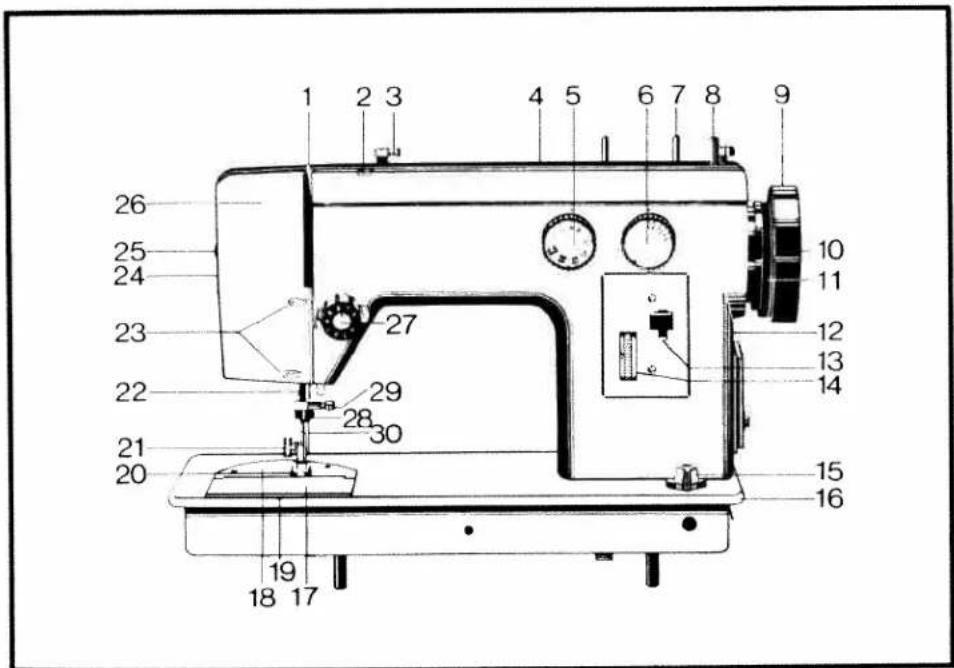
text_image
1 2 3 4 5 6 7 8 9 26 25 24 23 27 22 29 28 30 21 20 19 18 17 10 11 12 13 14 15 16Names of parts shown on opposite page
1 Take-up lever
2 Thread guide
3 Thread guide with bobbin winder tension
4 Top cover with retaining screw
5 Needle position and utility-stitch selector dial
6 Stitch width control
7 Spool pins (at back)
8 Bobbin winder
9 Balance wheel
10 Disengaging knob
11 Drive belt
12 Motor (at back)
13 Reverse feed control
14 Stitch length control
15 Drop feed control
16 Bedplate
17 Bedplate cover
18 Needle plate
19 Shuttle (not visible)
20 Sewing foot
21 Sewing foot thumb screw
22 Needle bar
23 Thread guides
24 Presser bar lifter (at back)
25 Light switch
26 Face cover
27 Needle thread tension
28 Thread cutter
29 Needle set screw
30 Presser bar
natural_image
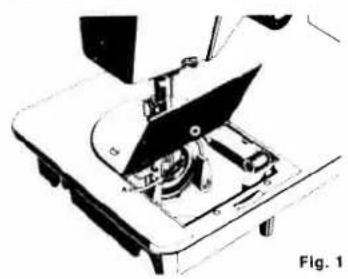
Mechanical device with a blade and base assembly, labeled Fig. 1 (no text or symbols on the diagram itself)Removing the bobbin case
Turn the balance wheel towards you until the needle is as high as it will go. Open the bedplate cover. Lift bobbin case latch A (Fig. 1) and pull the bobbin case out. When you let go of the latch again, the bobbin will drop out.

natural_image
Line drawing of a hand pressing a circular button on a surface (no text or symbols)Disengaging the sewing mechanism
Hold the balance wheel steady with your left hand and, with your right hand, turn the knob in the middle of the balance wheel towards you as shown in Fig. 2. Thus, the sewing mechanism is disengaged. To engage it again, turn the knob away from you until it is tight.
Winding the bobbin
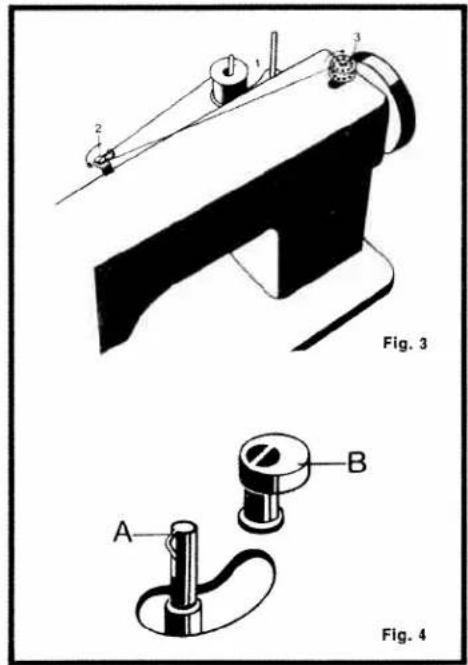
Select thread from table on page 28. Disengage sewing mechanism, and place spool of thread onto pin 1 (Fig. 3). Put bobbin onto spindle A (Fig. 4) and press against stop B. Pull thread through thread guide and under tension disc 2, as indicated by an arrow. Wind a few turns of thread on bobbin 3 (Fig. 3), as indicated by an arrow. Run machine. When bobbin is full, bobbin winder will switch itself off. Remove the bobbin. If you do not need a full bobbin, just push it away from the stop when enough thread has been wound.
If thread piles up on one side of bobbin, undo screw holding bobbin winder tension at back of machine, move tension up or down, and tighten its screw again.
text_image
Fig. 3 A B Fig. 4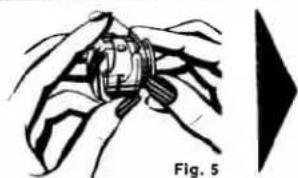
natural_image
Illustration of a crab being held with fingers, labeled Fig. 5 (no text or symbols on the diagram itself)Threading the bobbin case
Pull about four inches of thread from the bobbin. Take the bobbin case in your left hand and insert the bobbin as shown in Fig. 5.
natural_image
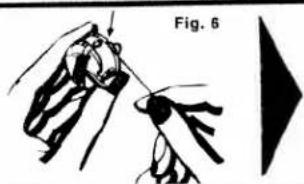
Illustration of hands holding a ring with a pointer, labeled Fig. 6 (no text or symbols on the diagram itself)Pull the thread into the slot of the bobbin case (Fig. 6).

natural_image
Illustration of a hand holding a car with a rope, alongside a separate black triangular shape (no text or symbols)Then pull the thread toward the left under the spring on the bobbin case so that it comes out of the opening as shown in Fig.7.
Inserting the bobbin case
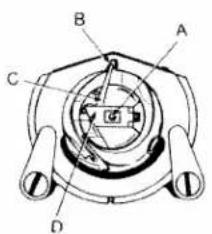
Bring needle to its highest point. Lift latch D (Fig. 8) so that bobbin will not fall out. Push bobbin case onto pin A, taking care that finger C enters slot B. Press bobbin case in as far as it will go, then let go of latch D again. Press lightly against bobbin case to make sure it has snapped into place properly.
text_image
A B C DFig. 8
Changing the needle
Turn balance wheel towards you until needle bar A (Fig. 9) is as high as it will go. Undo screw B and take out needle. Insert new needle C with its flat side facing away from you, and push upwards as far as you can. Fully tighten screw B again. Use System 130 R or 705 needles only. For needle sizes see table on page 28.

natural_image
Mechanical sewing machine diagram showing needle, handle, and base components (no text or labels)Fig. 9
text_image
Fig. 10Threading
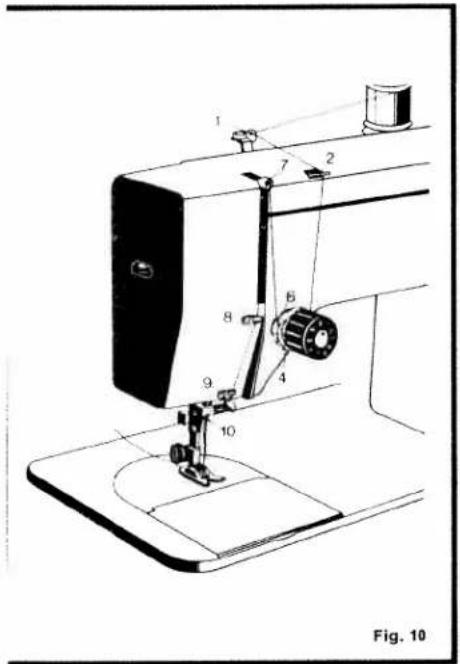
Turn the balance wheel until tape-up lever 7 (Fig. 10) is at its highest point. Put a spool of thread onto one of the spool pins. Pull the thread through guides 1 and 2, clockwise around and between tension discs 4, and through the thread check spring. Now pull the thread upwards behind guide 6, and from right to left through the hole in lever 7, then down through guides 8, 9 and 10. Thread the needle from front to back and pull about four inches of thread through its eye.
natural_image
Line drawing of a sewing machine needle and base (no text or symbols)Drawing up the bobbin thread
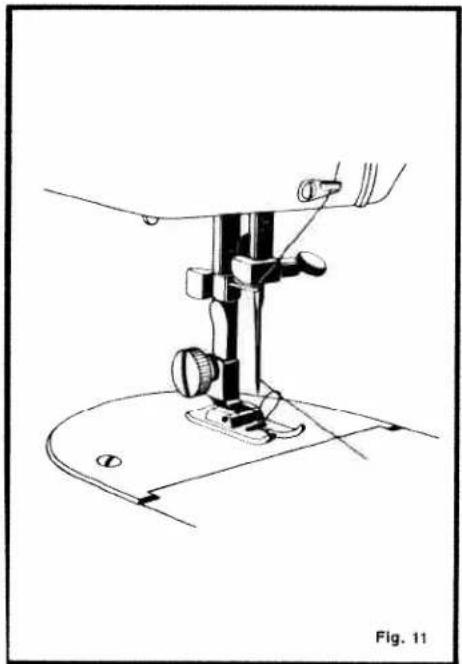
Hold the end of the needle thread in your left hand. Turn the balance wheel towards you until the needle moves down and up again and the take-up lever has reached its highest point. Now pull the needle thread and the bobbin thread will come up through the needle hole (Fig. 11). Pull both thread ends (about four inches long) towards the back, placing them under sewing foot.
I wrong

Setting the thread tensions
Upper tension too loose or lower tension too tight.
II wrong
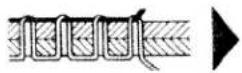
Upper tension too tight or lower tension too loose.
111 right

Tensions evenly balanced.
Fig. 12

natural_image
Hand holding a mechanical component with a tool, no visible text or symbolsFig. 13
Needle thread tension
The normal setting is between numbers 2 and 4 on the knob. Turn the knob clockwise for stronger tension, and anti-clockwise for weaker tension.

natural_image
Line drawing of a mechanical clamp or tool (no text or symbols)Fig. 14
Bobbin thread tension
To set the bobbin thread tension, turn the screw with a small screwdriver as shown above. Turn it to the right for stronger tension, and to the left for weaker tension.

text_image
R T Fig. 15Setting the stitch length and sewing backwards
The stitch length is set by turning disc R. There are numbers printed on it to show the exact stitch length setting. At setting "0" the material does not move forward at all. The longest stitch you can set on the machine is 4 mm (abt. 5/32"). Simply turn disc R until the stitch length you want is opposite the dot to the left of the disc. To sew backwards, press button T down far as it will go. When you release it, the machine will sew forwards again.
text_image
L M P AFig. 16
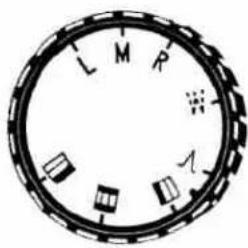
Changing the needle position
By needle position we mean the lateral position of the needle in the needle hole for straight sewing, and the point from which the needle starts when making a zigzag stitch. To change this position, turn the needle position dial as follows:
L = left, M = middle, R = right

text_image
543210 CFig. 17
Setting the stitch width for zigzag sewing
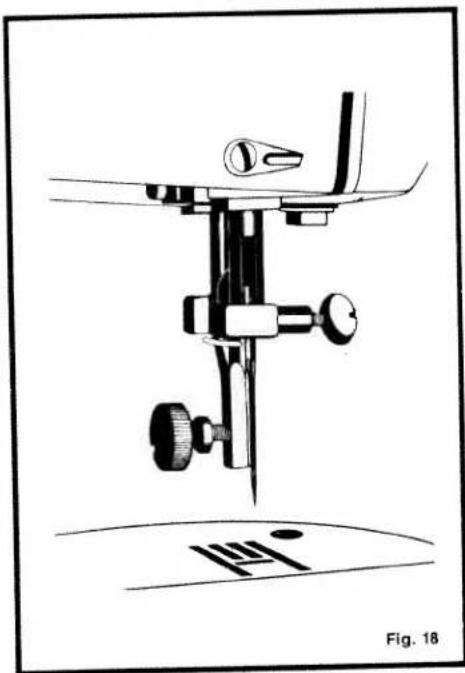
Set the stitch width control C (Fig. 17), to the width you require. The numbers 0 to 5 show the stitch width in millimetres.
You will notice that the control snaps into settings 2 and 4; these are settings for sewing buttonholes. Please note that you must only change the stitch width when the needle is up.
natural_image
Technical line drawing of a sewing machine needle and base (no text or symbols)Changing the sewing foot
Raise the presser bar lifter. Bring the needle up to its highest point. Loosen the screw holding the sewing foot, and remove the latter. Attach the new sewing foot, then fully tighten its screw again.
Dropping the machine feed
The machine feed has three positions which are set by turning the drop feed control shown in Fig. 19.
C = (feed completely dropped) for embroidering, darning and button sewing.
1 = (feed partly raised) for sewing delicate fabrics.
2 = (feed fully raised) for sewing normal and heavy materials.

natural_image
Simple line drawing of a mechanical knob or dial component (no text or symbols)Fig. 19
A few do's and don'ts
Always turn the balance wheel towards you - never allow a threaded machine to run without material under the sewing foot - always pull the ends of both threads under the sewing foot and towards the back before sewing - always raise the take-up lever before and after sewing.
Your machine is now ready for sewing Removing the work
Raise the needle and the sewing foot. Pull the workpiece back out of the machine and cut the threads with the thread cutter. Make sure that you leave 10 cm (abt. 4") of thread hanging from the needle eye and the bobbin case with which to start the next seam.
Sewing
Make sure the disengaging knob on the balance wheel is tight.
Straight-stitch sewing
When the stitch width control (Fig. 17) is set at "0", the machine will sew straight stitches.
Zigzag sewing
When you set stitch width control C to any number between 0 and 5, the machine will sew zigzag stitches of the desired width.

natural_image
Pure mechanical bracket diagram without any text, numbers, or symbolsFig. 20
Sewing on buttons
Bring the needle up to its highest point. Exchange the sewing foot with the button sewing foot shown in Fig. 20. Completely drop the feed, and set the needle to its left position. For the moment, set the stitch width to "0".

Fig. 21
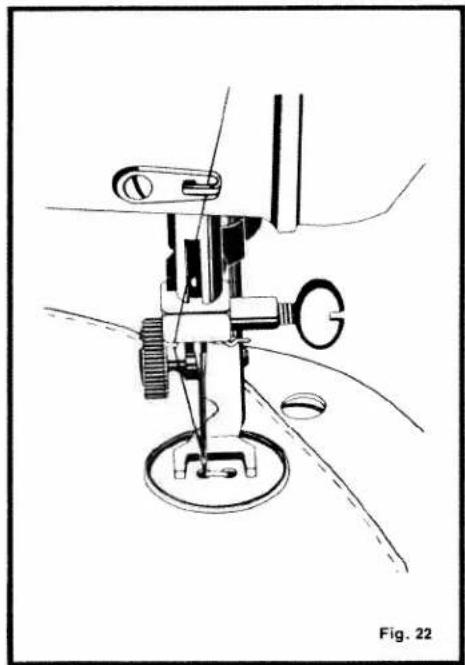
Place a button on the material and under the sewing foot, making sure that the left hole of the button is exactly under the needle as shown in Fig. 22. Lower the presser bar lifter, then set the stitch width (normally at 4) so that the needle enters the right hole of the button when you turn the balance wheel. Slowly sew about 10 stitches, then set the stitch width to "0" and sew a number of tying stitches. Buttons with four holes are sewn on as shown in Fig. 21.
natural_image
Technical line drawing of a sewing machine with no visible text or symbols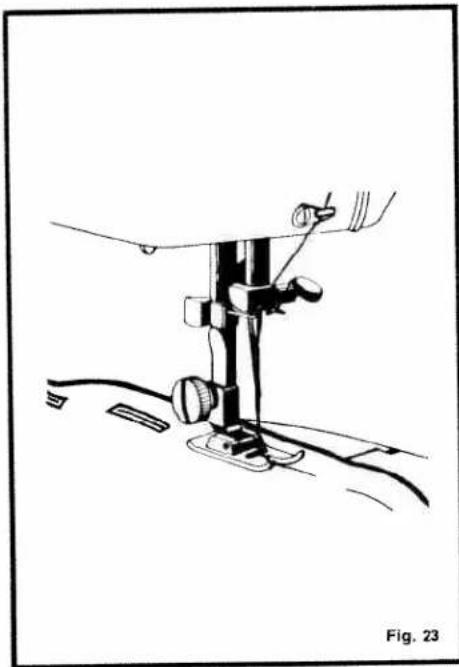
natural_image
Line drawing of a sewing machine needle and foot assembly (no text or symbols)Sewing buttonholes
on Cl. 44 zigzag sewing machines with or without filler thread
Attach plastic buttonhole foot (Fig. 23). Mark position and length of buttonhole on material with tailor's chalk. Turn needle position dial to "L" and stitch width control to "2" (see page 13). Set stitch length so that stitches are close to each other. Place material with marked buttonhole under sewing foot.
text_image
A B C D EFig. 24
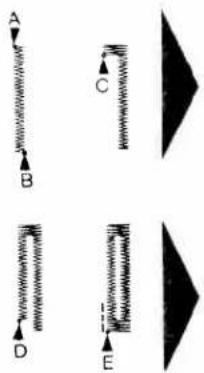
Sew first seam from A to B (Fig. 24). Leave needle down in the material on the right of its throw. Raise sewing foot, turn fabric through 180°, lower sewing foot, and raise needle. Turn stitch width control to snap-in position "4", and sew a number of bartacking stitches up to C. Raise needle out of material, turn control to "2", and sew second seam from C to D. Again raise the needle. Turn stitch width control to snap-in position between "4" and "5", and sew a number of bartacking stitches up to E. Set stitch width control to "0", then sew a number of tying stitches.
Take a seam ripper and carefully cut the buttonhole open between the seams, making sure that you do not damage them. Important! Do not forget to raise the needle out of the material before sewing each bartack.
Sewing buttonholes
on Cl. 46 zigzag and utility-stitch sewing machines with or without filler thread
Attach clear-view buttonhole foot. Mark position and length of buttonhole on material. Set stitch length control R (Fig. 15) between "0" and "0.5", and turn stitch width control (6) to "5". Turn utility-stitch selector dial (5) until symbol of left buttonhole seam is below dot mark.
If a filler thread is used, place it under the sewing foot so that it is positioned below both markings. Sew first seam from A to B in the desired length. Raise needle out of material.
Turn utility-stitch selector dial until symbol of bartack is under the dot mark and sew about five bartacking stitches. Raise needle out of the material (C). Turn utility-stitch selector dial to right buttonhole seam symbol, and sew second seam the same length as the first. Stop sewing at D and raise needle out of material.
Turn utiliy-stitch selector dial back to the bartack symbol and sew about five bartacking stitches. Raise needle out of material (E). Turn stitch width control to "O" and sew 3 to 4 tying stitches. Cut the buttonhole open, making sure you do not damage the bartacking stitches.

text_image
Bartack Right seam Left seam V M P Fig. 25 C 5 4 3 2 1 0 Fig. 26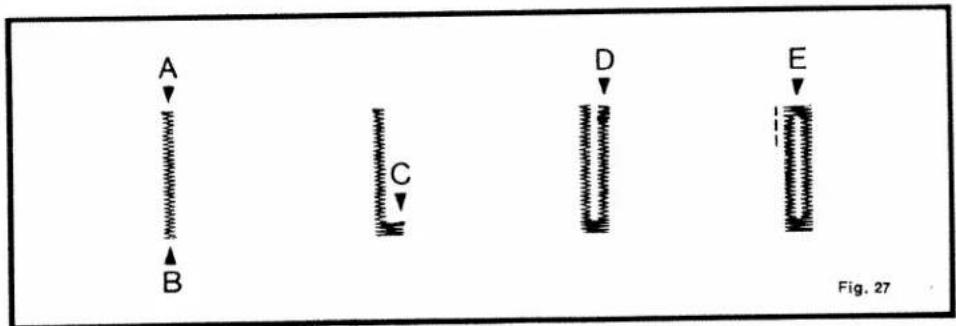
text_image
A B C D E Fig. 27Blindstitching
on Cl. 46 zigzag and utility-stitch sewing machines with clear-view foot
Turn needle position and utility-stitch selector dial (5) to blindstitch symbol. Set stitch length control between "3" and "4".
Baste hem about 5 mm (abt. 3/16") from fabric edge, as illustrated (1). Reduce needle thread tension by about one grade.
Fold hem (2) and place fabric under sewing foot so that folded edge is in line with left groove of foot.
Regulate stitch width so that needle takes left stitch exactly in folded edge, catching merely one fabric yarn.
Please note: Fold hem of heavy woolens only once (3) and finish edge with zig-zag stitches before it is hemmed.

natural_image
Pure zigzag line diagram without any text, numbers, or symbols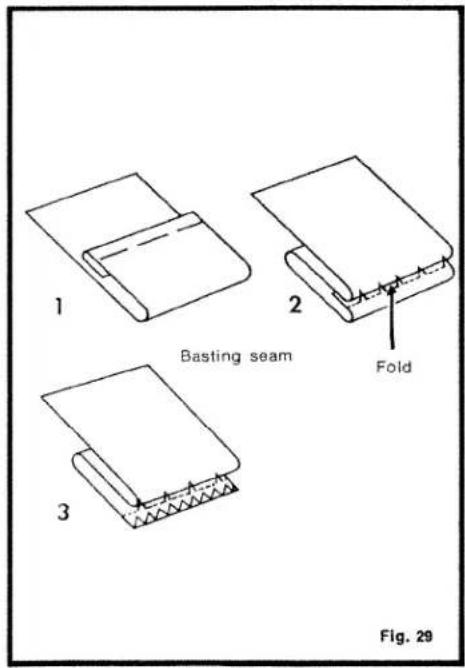
text_image
1 Basting seam 2 Fold 3 Fig. 29
Fig. 30
Blindstitching
on Cl. 44 zigzag sewing machines
Turn needle position dial to R. Turn fabric wrong side up and fold its edge back by 1 cm (abt. 1/2") (Fig. A). Then fold material to desired hem width, as shown in Fig. B, and baste. Fold hem down so that edge of 1/2"-wide hem protrudes by 3 mm (abt. 1/8") (Fig. C). Turn stitch length control to "4", and regulate stitch width so that, depending on the thickness of the material, the needle just catches the left-hand edge of top fold (Fig. C). The hem is perfect if no stitches show on right side of material (Fig. D).
Sewing elastic seams
on Cl. 46 zigzag and utility-stitch sewing machines
Attach ordinary sewing foot. Turn needle position and utility-stitch selector dial (5) to elastic-seam symbol and stitch width control (6) to "5". Set stitch length control between "0" and "1.5", as required.
Particularly well suited for sewing tricot, terry cloth and other elastic materials.

Fig. 31

natural_image
Line drawing of a hand holding a seed pod with a flower inside, labeled Fig. 32 (no text or symbols on the diagram itself)Embroidering and darning

natural_image
Illustration of hands holding a bowl with a small object inside, labeled 'Fig. 33' (no text or symbols on the diagram itself)Before embroidering, increase lower tension a little so that bobbin thread is not pulled through to top of material. This will enhance the appearance of your embroidery. Remove sewing foot and drop machine feed. Place material into embroidering hoop (Fig. 32), then put it under the needle. Lower presser bar lifter and hold hoop in both hands (Fig. 33). Run machine at high speed and move hoop back and forth, taking care that your fingers do not get into the path of the needle.
Darning is carried out in exactly the same way. Cover damaged area with dense stitches. Tears can be darned with the normal sewing foot by sewing back and forth.

natural_image
Technical line drawing of a mechanical bracket component (no text or symbols)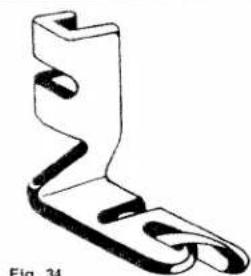
natural_image
Technical line drawing of a mechanical bracket component (no text or symbols)Hemming
natural_image
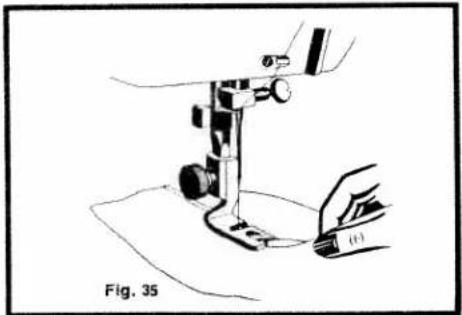
Line drawing of a sewing machine needle and fabric, labeled Fig. 35 (no text or symbols on the diagram itself)Raise needle, screw on hemmer foot (Fig. 34) and turn needle position knob to M. Fold edge of material back by 1/8" and sew a number of tying stitches on outside edge. Remove workpiece and pull folded edge into scroll of hemmer foot by tugging the loose thread ends (Fig. 35). Lower hemmer foot and sew hem with a straight or medium-wide zig-zag stitch. During sewing, fold edge of material over to the left to help guiding it into the hemmer foot.
| Needle and thread chart | ||||||
| If, for example, you wish to sew a bed sheet, look up section "Table and bed linen". Look to the right and you will see thread size 60. The type of thread is shown at the top. The needle size (80) is given in the last column. Where it is possible to use silk threads we have placed an "X". | Cotton | Silk | Synthetic (Nylon, Polyester) | Linen | Embroidering and darning thread* | Needle size |
| Fine linen, batiste | 100 | 80 | 70 | |||
| Tulle, mull, organdy | X | 80 | ||||
| Fine silk, crêpe | X | 80 | ||||
| Fine knitted fabrics made of pure cotton, cotton/rayon blends, tricot, charmeuse | 100 | X | 80 | |||
| Fine fabrics made of nylon, Diolen, Dacron, Terylene, Orion, Vestan, and synthetic curtain materials | 100 | X | 100-180 | 80 | ||
| Medium fabrics made of nylon, Dacron, Trycel, etc. | 70 | X | 80-140 | 60 | 80 | |
| Silks | X | 60 | ||||
| Lightweight taffets, muslin | 80 | X | 60 | |||
| Foambacks | 80 | X | 100 | |||
| Table and bed linen, terry cloth | 60 | 50 | ||||
| Heavy silks | X | 50 | ||||
| Linen | 60 | 50 | ||||
| Lastex, Helanca | 60 | X | 80-120 | |||
| Fine leather, leatherette, plastic | 60 | X | 80-140 | 50 | ||
| Light outerwear, jersey | 60 | X | 80 | 50 | ||
| Heavy outerwear | 40 | X | 60 | 90 | ||
| Heavy linen, bed ticking | 40 | 30 | ||||
| Denim | 40 | 50 | 30 | |||
| Heavy fabrics, mantling | 30 | X | 100 | |||
| Canvas, leather, burlap | 30 | 50 | 40 | 30 | ||
| * For embroidering and darning, a No. 50 thread is usually sufficient.Needle system 130 R | ||||||
Machine care
Oiling
All bearings of moving parts behind the face cover and under the top cover and the bedplate have to be oiled from time to time. The shuttle race must also be oiled occasionally. To do this, remove the bobbin case.
Always use high-grade (resin-free) sewing machine oil. After oiling, run the machine for a short while sewing on a piece of waste material in order to get rid of excess oil.
text_image
B C G D E F Fig. 36Cleaning the shuttle race
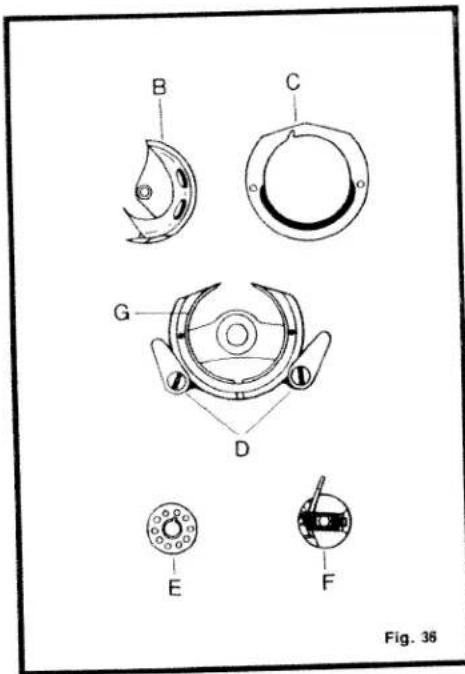
Raise the needle and take out bobbin case F with bobbin E inside (Fig. 36). Swing latches D outwards and remove shuttle race ring C. Carefully pull shuttle B out of its race (do not drop it). Clean shuttle race G with a soft brush, making sure that no brush hairs are left behind. Put the shuttle and its race ring back into place and lock them there with latches D.
natural_image
Mechanical assembly diagram showing a valve inserted into a housing, with no visible text or symbolsChanging the light bulb
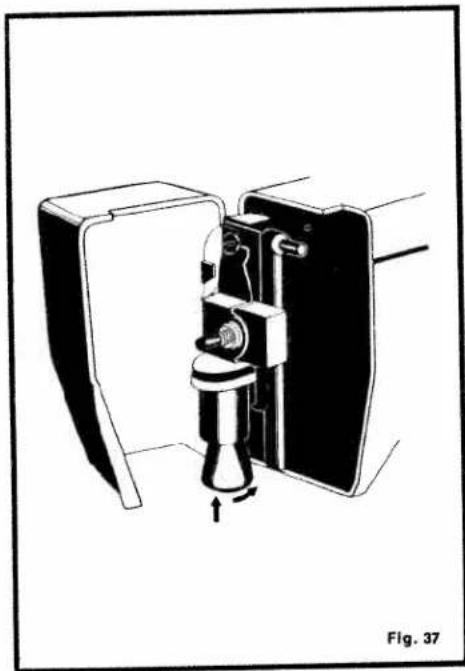
Open the face cover. Push the bulb up a little, then turn it left and pull it out. Insert a new bulb so that its pins slide into the socket slots, push it up and turn it to the right as shown by arrows in Fig. 37.
21
Trouble shooting
Needle thread breaks
Cause:
Remedy:
- Needle not threaded correctly.
-
Thread tension too tight.
-
Something is wrong with the needle.
-
Thread used is too heavy for the needle.
-
Needle inserted improperly.
-
Sewing foot, shuttle or shuttle race may be damaged.
Thread the needle from front to back.
Turn tension dial toward "0" somewhat.
Needle may be blunt or bent. Insert new System 130 R or 705 needle.
Use proper thread size as indicated in the Thread Chart.
Push needle up as far as it will go, making sure flat side of shank faces toward the back.
Replace damaged part and send it in for repair, if considered worthwhile.
Bobbin thread breaks
Cause:
Remedy:
- If bobbin thread is not wound correctly, it gets entangled.
- Bobbin thread has slipped out from under the tension spring.
Wind thread properly as instructed on page 5.
Take bobbin out of bobbin case, replace, and thread bobbin case.
Needle breaks
Cause:
-
Fabric too thick.
-
Material is pulled by sewer.
-
Needle is of inferior quality.
Remedy:
Use thicker needle as indicated in Thread Chart on page 28.
Don't pull the fabric.
Buy high-quality needles only.
Thread forms loops
Cause:
-
Thread tension not properly adjusted.
-
Thickness of material and size of thread not in accord.
-
Needle thread not placed between tension discs.
Remedy:
Adjust upper and lower thread tensions as instructed on page 11.
Select needle and thread to suit material as indicated in Thread Chart on page 18.
Raise sewing foot and place needle thread between tension discs.
Seam puckers
Cause:
-
Thread tension too tight.
-
Machine feed set too high.
Remedy:
Adjust both tensions as instructed on pages 10 and 11.
Check to see if drop feed control is turned to "1" or "2".
Faulty stitching
Cause:
- Needle and bobbin threads of inferior quality.
Remedy:
Use high-quality thread only, which has not been kept in storage too long.
25
Machine runs heavily and is noisy
Cause:
- Dust and pieces of thread have accumulated in the shuttle race.
- Machine has not been serviced for a longer time.
- Machine clogged by inferior oil.
Remedy:
Clean shuttle and shuttle race as instructed on page 30.
Read instructions on page 29.
Clean the machine thoroughly with cleaning fluid (kerosene) and oil it with high-quality sewing machine oil.