Auto+ 175X - Shredder REXEL - Free user manual and instructions
Find the device manual for free Auto+ 175X REXEL in PDF.


User questions about Auto+ 175X REXEL
0 question about this device. Answer the ones you know or ask your own.
Ask a new question about this device
Download the instructions for your Shredder in PDF format for free! Find your manual Auto+ 175X - REXEL and take your electronic device back in hand. On this page are published all the documents necessary for the use of your device. Auto+ 175X by REXEL.
USER MANUAL Auto+ 175X REXEL
To register and activate the warranty go to www.rexeleurope.com/shredders
Auto+ 175X™
GB Instruction Manual
F Manuel d'utilisation
D Bedienungsanleitung
① Manuale d'istruzioni
NL Gebruiksaanwijzing
E Manual de instrucciones
P Manual de Instruções
TR Kullanım Kılavuzu
GR Οδηγίες
DK Brugsvejledning
FI Käyttöopas
NO Bruksanvisning
⑤ Bruksanvisning
PL Instrukcja obsługi
© CZ Návod k obsluze
H Használati útmutató
RUS Руководство по эксплуатации

natural_image
Exterior view of a black AReXel cleaning brush unit (no signage or text visible on body)English 4
Français 8
Deutsch 12
Italiano 16
Nederlands 20
Español 24
Português 28
Türkçe 32
Ελληνικά 36
Dansk 40
Suomi 44
Norsk 48
Svenska 52
Polski 56
Česky 60
Magyar 64
Русский 68
Acco Australia Warranty 73

text_image
A B C D O K H G E R F J I J Krexel
text_image
L M N P Q
natural_image
Two-step illustration showing a hand inserting a card into a printer, with no visible text or symbols.
text_image
MAX
text_image
Hand placing a card into a box with visible text and labels, likely for payment or verification
natural_image
Close-up of a hand inserting a device into a device casing (no visible text or symbols)
natural_image
Close-up of a hand placing a small object onto a machine component (no visible text or symbols)
natural_image
Close-up of a hand pressing down on a mechanical component with numbered buttons (no readable text or symbols)
natural_image
Close-up of a mechanical keyboard with multiple buttons and dials (no visible text or symbols)
natural_image
Close-up of mechanical components with arrows indicating motion or movement, no visible text or symbols
Specifications
| Rexel Auto+ 175X | |
| Sheet Capacity Manual Feed Slot | 7 sheets (80gsm) |
| Sheet Capacity Auto-feed Chamber | 175 sheets (80gsm) |
| Duty Cycle | 10 min ON / 40 min OFF |
| Run Time from Cold | 14 minutes |
| Volts / Hz | 230V / 50Hz |
| Amperage | 1.2 Amps |
| Motor Watts | 270 Watts |
Introduction
Thank you for choosing this shredder from Rexel. We are sure it will serve you well, but please take a little time to study these instructions to ensure you get the best out of your machine.
Safety First

To guard against injury, the following basic safety precautions must be observed in the set-up of this product.
- Ensure the machine is plugged into an easily accessible power outlet, and ensure the cable is not likely to trip up a passer by.
- Any attempt to repair this unit by unqualified personnel will invalidate the warranty. Please return to supplier.
- Unplug your shredder before moving it or when it is not in use for an extended period of time.
- Do NOT operate with a damaged power supply cord or plug, after it malfunctions, or after it has been damaged in any manner.
- Do NOT overload electrical outlets beyond capacity as this can result in fire or electrical shock.
- The socket-outlet should be installed near the equipment and shall be easily accessible.
- Do NOT alter the attachment plug. The plug is configured for the appropriate electrical supply.
- Do NOT use near water.
- Do NOT use aerosol dusters or cleaners.
- Do NOT spray anything into the shredder.
- Do NOT load the auto-feed chamber with unopened junk mail, magazines, bound documents etc.
Although this shredder has been designed to comply with UL 60950 safety standards including the "probe accessibility tests", do not operate the shredder near children or pets.
Description of product parts
A ON/OFF switch (at rear of machine)
③ Important safety symbols (see shredder control panel below)
Paper loading door handle
① Paper loading door
E Pull out bin
Continuous jam boost button
Auto button
Reverse button
Indicator panel
J Casters
Manual feed entry slot
Credit card entry slot
M CD entry slot
CD bin 'in use' location
① Paper stack viewing window
P Pull out bin with viewing window
CD bin in storage location
Bin door with viewing window
Control Panel and Indicators

Auto

Continuous Jam Boost

Reverse

Paper jam indicator – This means there is a paper jam in the auto feed chamber.
If this symbol is flashing the shredder is attempting to clear a paper jam automatically.
If this symbol is permanently illuminated red please follow the instructions under 'Rare Occasion of Jamming'.

Paper Loading Door/Bin Door Open – This means either:
• Paper loading door is open
- Bin is open

Bin Full indicator – This means the bin is full.

Power On indicator – This means the machine is turned on.

Cool Down indicator – This means the machine is cooling down.

Safety First

This means you should be careful because long hair can become entangled in the cutters.

This means be careful of ties and other loose clothing which could become entangled in the cutters.

This means be careful of loose jewellery which could become entangled in the cutters.

This means don't reach into the feed opening of the cutters.

This means keep children away from shredder.

This means no aerosols.

This means no oil lubricant (oil sheets only).

This means do not insert credit cards into the manual feed slot. Use internal credit card position.*

This means do not insert CDs/DVDs into the manual feed slot. Use internal CD/DVD position.*

Sheet capacity of manual feed entry slot.

This means the shredder can accept small staples.

This means the shredder can accept small paperclips.

This means the shredder can accept credit cards.
(*See CD/DVD Shredding on page 6 and Credit Card shredding sections on page 7).
Illuminated Icons Explained
| LED IlluminationDoor Open Cool Down Paper Jam Auto Bin Full | |||||
| Indicator | |||||
| Colour of symbol | Red | Red | Red | Blue | Red |
| Power ON/OFF switch OFF | |||||
| Sleep mode | |||||
| Power ON/OFF switch ON | |||||
| Stand by | |||||
| Auto mode | light | ||||
| Continuous jam boost mode | light | light | |||
| Reverse mode | light | light | |||
| Paper loading door open | light | light | |||
| Bin open | light | light | |||
| Motor is cooling down | flash | light | |||
| Paper jam | light | light | |||
| Paper jam clearance | flash | light | |||
| Too many sheets are being fed into manual feed slot | light | ||||
| Cutters are self-cleaning | flash | light | |||
| Paper loading door is locked | |||||
| Autofeed operation | light | ||||
| Bin full | light | light | |||
Auto+ 175X Shredding Capability
| Auto+ 175X CAN shred the following: |  Stapled paper25mm within the corner26/6 or smaller staplesSmall sized paper loaded centrally175 sheets colour printing Stapled paper25mm within the corner26/6 or smaller staplesSmall sized paper loaded centrally175 sheets colour printing |  Paper clip paper25mm within the cornerCapable of shredding small/medium (max wire thickness=0.9 mm) paper clips175 shoots plain paper>100gsm paper (through manual feed slot ONLY) Paper clip paper25mm within the cornerCapable of shredding small/medium (max wire thickness=0.9 mm) paper clips175 shoots plain paper>100gsm paper (through manual feed slot ONLY) |  A3 folded in hall max. 2 sheets175 sheets single sided printed paper80 gsm paper- A4 - 210mm x 297mm- A5 - 148mm x 210mm- A3 single sheet folded in half to make A4 A3 folded in hall max. 2 sheets175 sheets single sided printed paper80 gsm paper- A4 - 210mm x 297mm- A5 - 148mm x 210mm- A3 single sheet folded in half to make A4 | Although the Auto+ 175X will accept fastened sheets, Rexel recommend that staples and paper clips are removed and folded paper un-folded prior to shredding to extend the life of the product. |
| Auto+ 175X CANNOT shred the following: |  Heavy Duty Staples. Check the staple leg length is not greater than 6mm. Heavy Duty Staples. Check the staple leg length is not greater than 6mm. | 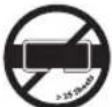 A document with more than 25 sheets held together by a staple or clip. A document with more than 25 sheets held together by a staple or clip. |  Bound documents • Bulldog clips Bound documents • Bulldog clips |  |
 Large clips. Check the length of the paperclip is not longer than 32mm. Large clips. Check the length of the paperclip is not longer than 32mm. |  Multiple folded sheets* (e.g. A3 sheets folded in half). Multiple folded sheets* (e.g. A3 sheets folded in half). |  Magazines or other documents bound by multiple staples or clips Magazines or other documents bound by multiple staples or clips |  Unopened mail* Unopened mail* | |
 Plastic sheets, laminated documents, plastic folders, glossy paper or a shoot covered with print on both sides. Plastic sheets, laminated documents, plastic folders, glossy paper or a shoot covered with print on both sides. |  Thick paper or card • Adhesive labels • Crumpled sheets* Thick paper or card • Adhesive labels • Crumpled sheets* |  |  |

Rexel®
Auto-feed Technology
The Auto+ 175X has been designed to automatically shred up to 175 sheets from the auto-feed chamber and up to 7 sheets through the manual feed slot. The auto-feed mechanism has been designed to handle paper fastened with staples and paper clips and to only pull a few sheets of paper into the cutting mechanism to minimise the risk of paper jams.
Operation
1 Unpack the product.
2 Connect the shredder to mains supply.
3 Ensure the ON/OFF button on the back of the machine is in the ON position, which will illuminate the blue standby symbol (💡).
4 To commence shredding, press the Auto button ⏻), which sets the shredder into auto mode. You are now ready to shred.
5 To load the shredder, simply lift the loading door handle (see fig 1) to open the loading door and insert documents. You can open the door further to 90 degrees for easier access if required. Load up to 175 sheets at a time into the feed chamber. Do not fill above the 175 MAX level, this could damage the shredder (see fig 2).
6 The shredder will start the shredding cycle automatically ONLY after closing the loading door (see fig 1). If there is still paper in the Autofeed chamber after first attempt open and reclose the paper loading door a second time.
7 If you only have up to 7 sheets to shred, you can use the manual feed slot, provided the auto feed chamber is empty (see fig 3).
8 Insert paper to be shredded into the feed area. The shredder will detect the paper and start automatically.
9 If the shredder is left in auto mode for more than 2 minutes without being used, the shredder will automatically turn back to standby mode in order to save power.
The shredder will automatically 'wake up' from sleep mode when paper is inserted into the shred mouth or you open the loading door. There is no need to press the Auto button ( 🔒 ).
Bin or Loading Door Open Safety Function
As a safety precaution, if the bin or loading door is opened during shredding, the shredder will stop and the bin full indicator will illuminate (7).
Automatic Jam Clearance
In the unlikely event of the shredder jamming, the Auto+ 175X will automatically reverse and forward the engine three times to clear a jam. During this operation the Paper Jam indicator will flash (8M).
Rare Occasions of Jamming
In the unlikely event of the shredder jamming, the Auto+ 175X will stop shredding. Check that the bin is not full then try clearing the jam using the reverse (◀◀) and continuous jam boost (▶▶buttons then return to Auto mode (◀)). If this is unsuccessful follow the reverse function instructions.
Reverse Function
Should you wish to reverse paper out whilst shredding, a reverse button (◀◀) has been fitted for your convenience.
2 Reverse the paper out then turn the machine off using the ON/OFF switch at the rear of the shredder. Remove the paper from the manual feed slot (if being used) or open the loading door, remove the remaining stack of paper, then pull the jammed paper free of the cutting mechanism.
3 To resume shredding, turn the shredder on using the ON/OFF switch at the rear of the shredder. Return the switch to the auto position ( 🔍 ).
Over Heating
If the Auto+ 175X is used continuously for over 10 minutes the shredder may overheat and the cool down indicator will flash red ( ). Please allow the shredder to cool down. When the shredder is ready to be used the thermometer symbol will no longer illuminate. If the shredder needs to cool down while shredding, no action is needed. The shredder will automatically restart shredding paper once it has cooled down after periods of continuous use. All you need to do is ensure paper is loaded into the chamber and the bin is empty when the machine is cooling down.
Bin Full
The shredder will not function when the bin is full and the bin full symbol ( ) is illuminated. You should empty the bin.
- Pull open the bin slowly to empty.
- Push the empty bin back into place and press the auto button to resume shredding.
CD/DVD Shredding
A separate CD/DVD tray is provided to collect the shredded CD/DVD shards, ensure that this is correctly mounted onto the bin before shredding.
1 Lift up the paper loading door (see fig 4).
2 Always insert CDs/DVDs in the CD/DVD slot (see fig 5). Only shred one CD/DVD at a time.
3 Close the paper loading door.
4 Empty the CD/DVD bin after 8 CDs/DVDs to avoid waste spilling over into the paper waste bin.
5 Remove the CD/DVD tray before recommencing to shred paper.
Credit Card Shredding
1 Lift up the paper loading door (see fig 4).
2 Insert the credit card into the roller as shown (see fig 6). Only shred one credit card at a time.
3 Close the paper loading door.
Rexel encourages customers to recycle shredded paper. Please note that shredded paper cannot be recycled if mixed with credit card shards. If recycling, please separate shredded paper and credit cards.
Self-cleaning Cutters
After emptying and replacing a full bin, the shredder will run in forward for 4 seconds, stop for 2 seconds and then reverse for 4 seconds to clear away any remaining paper from the cutter mechanism. This unique 'self-cleaning' mechanism is additional jam prevention technology from Rexel.
Maintenance
The rollers on the auto-feed mechanism may become dirty over time, please wipe clean with a dry cloth to maintain maximum product performance (see fig 7).
The auto-start infra-red sensor, located in the paper feed entry-slot, can occasionally become covered in paper-dust causing the shredder to run despite no paper being fed into the machine. Switch the shredder off at the rear of the machine and carefully clean the sensor using a cotton-swab (see fig 8).
Lubrication of the Shredder
Only use Rexel Oil Sheets (2101948 & 2101949) to lubricate. ACCO Brands Europe accepts no liability for product performance or safety when other types or brands of lubricants are used on any part(s) of this machine. Rexel recommend using an oil sheet after the bin has been emptied three times (and for on-going three bin cycle thereafter). Insert the oil sheet into the manual feed slot and NOT in the auto-feed chamber. Using an oil sheet in the auto-feed chamber will contaminate the feed rollers preventing the auto-feed mechanism shredding. Follow the maintenance instructions if the rollers become contaminated.
Shredder Accessories
We recommend that a paper waste sack for recycling shredded paper is used on all models.
Accessory Part Number Box Qty
| Recycling Waste Sack 1765031EU 20 sacks |
| Plastic Waste Sack 40060 100 sacks |
| Oil Sheets 2101949 20 |
| 2101948 12 |
Guarantee
ACCO Brands Europe warrants its products and their parts against defects in materials and workmanship under normal use for a period of 24 months from the original date of purchase. During this period we will repair or replace a defective product or part subject to the following warranty conditions:
The warranty applies only to defects in materials and workmanship under normal use and does not extend to damage to the Product or parts which result from:-
- alteration, repair, modification or service carried out by anyone other than an authorised ACCO service centre.
- accident, neglect, abuse or misuse owing to failure to comply with the normal operating procedures for a product of this type.
Nothing in this Warranty shall have the effect of excluding the liability of ACCO in respect of death and personal injury caused by the negligence of ACCO. This Warranty is offered (subject to these terms and conditions) in addition to, and does not affect your statutory rights.
For any questions relating to your warranty, please contact your local service agent (see back cover).
Additional Guarantee
ACCO Brands Europe guarantees the cutting blades of the shredder to be free from defects in material and workmanship for 10 years from the date of purchase by the original consumer.
*Please note that the cutter blades will be progressively worn down by shredding fastened sheets (staples and paperclips) - this is not covered in the warranty. The Auto+ 175X has been design to shred up to 50 credit cards and 50 CDs/DVDs in the standard 2 year warranty period. Any excessive credit card or CD/DVD shredding will invalidate the extended cutter warranty.
These conditions shall in all respects be governed and construed in accordance with English Law and subject to the exclusive jurisdiction of the English Courts.
Australian Customers
This guarantee does not apply to Australian customers. See warranty on page 73.
Rexel®
Spécifications
Cd's/DVD's versnipperen
Warranty (in Australia)
ACCO Australia warrants its products and their parts against defects in materials and workmanship under normal use for a period of 24 months from the original date of purchase (please retain proof of purchase). During this period we will repair or replace a defective product or part subject to the following warranty conditions:
The warranty applies only to defects in materials and workmanship under normal use and does not extend to damage to the Product or parts which result from:-
- Alteration, repair, modification or service carried out by anyone other than an authorised ACCO service centre.
- Accident, neglect, abuse or misuse owing to failure to comply with the normal operating procedures for a product of this type.
Nothing in this Warranty shall have the effect of excluding the liability of ACCO in respect of death and personal injury caused by the negligence of ACCO. This Warranty is offered (subject to these terms and conditions) in addition to, and does not affect your rights and remedies under, the Australian Consumer Law and other laws.
Our goods come with guarantees that cannot be excluded under the Australian Consumer Law. You are entitled to a replacement or refund for a major failure and for compensation for any other reasonably foreseeable loss or damage. You are also entitled to have the goods repaired or replaced if the goods fail to be of acceptable quality and the failure does not amount to a major failure.
For any questions relating to your warranty, please contact your local service agent.
Additional Guarantee
ACCO Australia guarantees the cutting blades of the shredder to be free from defects in material and workmanship for an extended warranty period from the date of purchase by the original consumer. Please refer to the table below for the cutter warranty period applicable to your shredder model.
| Shredder Models Extended Cutter Warranty Period | |
| Style, Style+, V35WS, V30WS, Alpha 3 | |
| Auto+60X 5 | |
| Promax V65WS, Promax V60WS, Prostyle, Prostyle+, RES1223, REX1023, REM723, SC170, CC175, Auto+80X | 7 |
| V120, V125, P180CD, P185, RSS2030, RSX1630, RSS2232, RSX1632, RSM1130, Auto+100X, Auto+175X | 10 |
| Auto+250X 15 | |
| RDS2250, RDX1850, RDSM750, RDM1150, RDS2270, RDX2070, RDSM770, RDM1170, Auto+500X, RLS32, RLX20, RLM11, RLSM9, RLWX19, RLWX30, RLWSFM9, RLWM26, RLWX39, RLWS47, RLWX25, RLWS35, Auto+750X | 20 |
*Please note that the cutter blades will be progressively worn down by shredding fastened sheets (staples and paperclips)- this is not covered by this warranty. Excessive credit card and CD shredding will also invalidate the extended cutter warranty. Some shredder models are NOT designed to shred CDs. Any attempt to do so will invalidate the warranty.
How to Make a Claim
To make a claim under this warranty, contact the ACCO Australia Customer Service Team with your proof of original purchase handy:
ACCO Australia
Level 2, 8 Lord St, Botany NSW 2019
Ph: 1300 366 376
E: sales.au@acco.com
F: 1300 360 944
The customer service team member will advise whether your product should be repaired, replaced or returned and advise the next step for you to take. If the product is validated as still under warranty and deemed faulty, ACCO will bear costs involved with the warranty process. To claim expenses incurred in making a claim under this warranty, contact our Customer Service Team on the details above.
Service
GB ACCO Service Division
Hereward Rise, Halesowen, West Midlands, B62 8AN Tel: 0845 658 6600, Fax: 0870 421 5576 www.acco.co.uk/service
Acco Brands France SAS
Service après-vente, ZAC Excellence 2000, 6 rue Robert Schuman, 21800 Chevigny Saint Sauveur Tel: +33 3 80 68 60 30, Fax: +33 3 80 68 60 49 contact@vmbs.fr
⑤ ACCO Brands Nordic AB
DK Makadamgatan 5, 254 64 Helsingborg, Sweden
N Tel: +46 42 38 36 00, Fax: +46 42 38 36 10
⑮ service.nordic@acco.com
LV
EST LT
cz XERTEC a.s.
SK Kloknerova 2278/24 (vchod z ulice Koštiřova, budova CeWe Color - Fotolab) 148 00 Praha 4 - Chodov Tel: 225 004 411, Fax: 225 004 162 servis@xertec.cz, http://www.xertec.cz
Ref: Auto+175X/7335
Issue: 1 (08/12)
PL ACCO Polska Sp. z o.o
Al. Jerozolimskie 184, 02-486 Warszawa Tel.+48 22 570-18-29 , fax +48 22 570-18-33 www.acco.pl
H OPI Customer Service
Tel.: +359 2 80 99 166 Exportee@accoeu.local
AUB ACCO Australia Pty Ltd
Level 2, 8 Lord St, Botany, NSW, 2019, Australia Tel: 1300 366 376, Fax: 1300 360 944 sales.au@acco.com
Clonshaugh Business & Technology Park, Clonshaugh, Dublin 17, Ireland Tel: 01 816 4346, Fax: 01 816 4302 admin@accoservice.eu, www.accorexel.ie
ZA Rexel Office Products (PTY) Ltd
Crusher Road, Crown Ext.3, PO Box 102, Crown Mines, Johannesburg 2025, South Africa Tel: +27 (0) 11 837 7723 service@rexelsa.co.za
ACCO Brands Asia Pte Ltd
47 Ayer Rajah Crescent, #05-08/17, Singapore 139947
BD Tel: +65 6776 0195, Fax: +65 6779 1041 webmaster@accobrandsasia.com
JPN GBC-Japan K.K.
14F Harmony Tower, 1-32-2 Honcho, Nakano-ku, Tokyo 164-8721 Tel: (81)-03-5351-1801, Fax: (81)-03-5351-1831 serv@gbc-japan.co.jp, www.gbc-japan.co.jp

BRANDS
ACCO Brands Europe
Oxford House
Aylesbury HP21 8SZ
United Kingdom
www.accoeurope.com