
Soundsticks III - Loudspeaker HARMAN KARDON - Free user manual and instructions
Find the device manual for free Soundsticks III HARMAN KARDON in PDF.


| Brand | Harman Kardon |
| Model | Soundsticks III |
| Product Type | 2.1 speaker system with subwoofer |
| Frequency Response | 44 Hz – 20 kHz |
| Power Consumption | 4 W standby, 65 W maximum |
| Power Supply | 16 V DC power adapter, minimum 1.5 A, class 2 |
| Subwoofer - Transducer | 152 mm woofer |
| Subwoofer - Amplifier Output Power | 20 W RMS |
| Satellites - Transducers | 4 x 25 mm full-range per channel |
| Satellites - Amplifier Output Power | 10 W RMS per channel |
| Satellite Dimensions | 51 mm (diameter) x 254 mm (height) |
| Satellite Weight | 0.7 kg each |
| Subwoofer Weight | Not specified (estimated ~2.5 kg) |
| Main Features | Touch volume control, mute, LED power indicator, subwoofer volume adjustment |
| Maintenance and Cleaning | Clean with a dry cloth only |
| Safety | Do not expose to water, do not block ventilation openings, unplug during thunderstorms, repair by qualified personnel |
| Spare Parts and Repairability | Contact customer service for any repairs |
| General Information | Complies with FCC Part 15, Class B |
Frequently Asked Questions - Soundsticks III HARMAN KARDON
User questions about Soundsticks III HARMAN KARDON
0 question about this device. Answer the ones you know or ask your own.
Ask a new question about this device
Download the instructions for your Loudspeaker in PDF format for free! Find your manual Soundsticks III - HARMAN KARDON and take your electronic device back in hand. On this page are published all the documents necessary for the use of your device. Soundsticks III by HARMAN KARDON.
USER MANUAL Soundsticks III HARMAN KARDON
harman/kardon®
by HARMAN
English 2
Deutsch 6
Français 9
Español 13
Nederlands 17
Italiano 20
Svensk 23
Dansk 26
Norsk 29
Suomi 32
한국어 (Korean) 35
Japanese 38
用户指南 (Simplified Chinese)..41
Русский (Russian) 44
Português 47
SOUNDSTICKS ® III
FCC Regulations
FCC Declaration of Conformity Statement
This device complies with Part 15 of the FCC Rules. Operation is subject to the following two con ditions: (1) this device may not cause harmful interference, and (2) this device must accept any interference received, including interference that may cause undesired operation.
Radio and Television Interference
This equipment has been tested and found to comply with the limits for a Class B digital device, pursuant to Part 15 of the FCC Rules. These limits are designed to provide reasonable protection against harmful interference in a residential installation. This equipment generates, uses, and can radiate radio frequency energy and, if not installed and used in accordance with the instructions, may cause harmful interference to radio communications. However, there is no guarantee that interference will not occur in a particular installation. If this equipment does cause interference to radio or television reception, which can be determined by turning the equipment off and then on, the user is encouraged to try to correct the interference by one or more of the following measures:
ment and receiver are on different branch circuits.
help.
Changes or modifications not expressly approved by Harman Consumer Group, Inc., could void the user's authority to operate the equipment.
SOUNDSTICKS 30 III
Important Safety Instructions
Read these instructions.1.
Keep these instructions.2.
Heed all warnings.3.
Follow all instructions.4.
Do not use this apparatus near water.5.
Clean only with a dry cloth.6.
Do not block any ventilation openings. Install in accordance with 7. the manufacturer's instructions.
Do not install near any heat sources such as radiators, heat 8. registers, stoves or other apparatus (including amplifiers) that produce heat.
Do not defeat the safety purpose of the polarized or grounding-9. type plug. A polarized plug has two blades with one wider than the other. A grounding-type plug has two blades and a third grounding prong. The wide blade or the third prong is provided for your safety. If the provided plug does not fit into your outlet, consult an electrician for replacement of the obsolete outlet.
Protect the power cord from being walked on or pinched, par-10. ticularly at plugs, convenience receptacles and the point where they exit from the apparatus.
Only use attachments/accessories specified by the manufacturer.11.
- Use only with the cart, stand, tripod, bracket or table specified by the manufacturer or sold with the apparatus. When a cart is used, use caution when moving the cart/ apparatus combination to avoid injury from tip-over.

-
Unplug this apparatus during lightning storms or when unused for long periods of time.
-
Refer all servicing to qualified service personnel. Servicing is required when the apparatus has been damaged in any way, such as power supply cord or plug is damaged, liquid has been spilled or objects have fallen into the apparatus, the apparatus has been exposed to rain or moisture, does not operate normally, or has been dropped.
-
Do not expose this apparatus to dripping or splashing and ensure that no objects filled with liquids, such as vases, are placed on the apparatus.
-
To completely disconnect this apparatus from the AC Mains, disconnect the power supply cord plug from the AC receptacle.
-
The mains plug of the power supply cord shall remain readily operable.
Do not expose batteries to excessive heat such as sunshine, fire 18. or the like.

THE LIGHTNING FLASH WITH AN ARROWHEAD SYMBOL, WITHIN AN EQUILATERAL TRIANGLE, IS INTENDED TO ALERT THE USER TO THE PRESENCE OF UNINSULATED "DANGEROUS VOLTAGE" WITHIN THE PRODUCT'S ENCLOSURE THAT MAY BE OF SUFFICIENT MAGNITUDE TO CONSTITUTE A RISK OF ELECTRIC SHOCK TO PERSONS.
CAUTION
RISK OF ELECTRIC SHOCK DO NOT OPEN
WARNING: TO REDUCE THE RISK OF FIRE OR ELECTRIC SHOCK, DO NOT EXPOSE THIS APPARATUS TO RAIN OR MOISTURE.

THE EXCLAMATION POINT WITHIN AN EQUILATERAL TRIANGLE IS INTENDED TO ALERT THE USER TO THE PRESENCE OF IMPORTANT OPERATING AND MAINTENANCE (SERVICING) INSTRUCTIONS IN THE LITERATURE ACCOMPANYING THE PRODUCT.
SEE MARKING ON BACK OF PRODUCT.
SOUNDSTICKS ® III
Specifications*
System
Frequency range: 44Hz - 20kHz
Power consumption: 4W idle, 65W
maximum
Subwoofer
Transducer (1): 6" woofer
Amplifier output power: 20W RMS
Dimensions (W x H): 9-3/16" x 10-3/16"
(232mm x 258mm)
Weight: 4 lb (2.2kg)
Satellite
Transducers (4): 1" full-range per channel
Amplifier output power: 10W RMS per
channel
Dimensions (W x H): 2" x 10"
(51mm × 254mm)
Weight: 1.5 lb (0.7kg)
 | 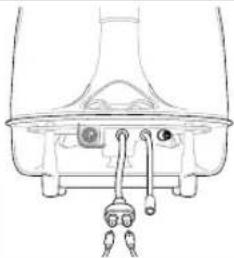 | 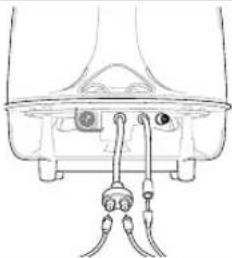 | 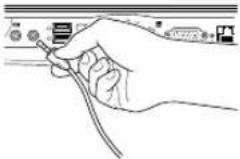 |
| Step 1. Place individual SoundSticks® III (satellites) beside monitor/computer. | Step 2. Place subwoofer as desired, but placement under your desk will provide optimal performance. | Step 3. Connect satellite cables to the dual subwoofer cable. Also connect the input cable to the subwoofer input cable jack. | Step 4. Insert SoundSticks III input cable into the computer or other audio device. |
Troubleshooting
| Symptom | Possible problem | Solution |
| No sound from SoundSticks III speaker system. | No power to subwoofer.Power adapter plug not inserted correctly.No volume or low volume. | Ensure power supply is connected to live power source and is properly connected to subwoofer. Please note: When subwoofer is powered, a power LED should light.Place plug with arrow symbol facing UP into the subwoofer.Touch the volume "Up" (+) pad on the volume control satellite to unmute and/or increase the system volume level.Note: Touching the volume "Down" (-) pad lowers the system volume. Touching both (+) and (-) volume control pads at the same time will mute the system. |
*These specifications are subject to change without notice.
Easy Setup Guide
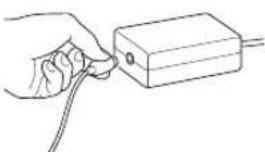 |  | 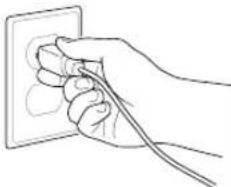 | 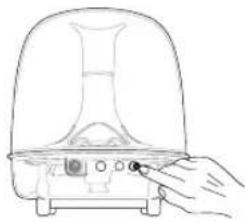 |  |
| Step 5. Plug power cord into power adapter. | Step 6. Plug power adapter into subwoofer. | Step 7. Plug power cord into wall receptacle. | Step 8. Push power ON/OFF button. Unit is on when LED is lit. Push the subwoofer volume knob/power ON/OFF button. Use the subwoofer volume knob to balance the subwoofer's volume with that of the satellites. | Step 9. Adjust volume level by touching + or – button. Touching both the + and – buttons mutes the audio. When muted, touching either button unmutes the audio. |
| Symptom Possible problem Solution | ||
| No sound from subwoofer, only satellites. | Subwoofer volume control set at minimum. | Rotate subwoofer volume control clockwise until relative volume level is appropriate. |
| No sound from satellites, only subwoofer. | Satellites not connected to subwoofer. | Check connection of satellites to subwoofer. |
| High frequencies sound dull. | Satellites not positioned properly. | Position and tilt (angle) loudspeakers toward listener. The sound from the satellites is very directional due to the four-element linear array design. |
This product is intended to be supplied by a listed direct plug-in power unit marked "Class 2" and output rated 16V DC minimum 1.5 A.
SOUNDSTICKS ® III
Dimensions: 232mm (diam.) x 258mm
Poids: 2.2kg
Haut-parleurs
Transducer (1): 6" subwoofer
SE MERKING UNDER PRODUKTET.
SOUNDSTICKS ® III
Spesifikasjoner*
System
(9 3/16" × 10 3/16")
Vekt: 2,2 kg
Satellitt
SOUNDSTICKS ® III
harman/kardon® by HARMAN
HARMAN
Harman Consumer, Inc.
8500 Balboa Boulevard, Northridge, CA 91329 USA
© 2010 Harman International Industries, Incorporated.
Features, specifications and appearance are subject to change without notice.
Harman Kardon and SoundSticks are trademarks of Harman International Industries, Incorporated, registered in the United States and/or other countries.
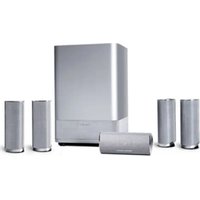
Brand : HARMAN KARDON
Model : Soundsticks III
Category : Loudspeaker