ATT05U - Turntable AKAI - Free user manual and instructions
Find the device manual for free ATT05U AKAI in PDF.


User questions about ATT05U AKAI
0 question about this device. Answer the ones you know or ask your own.
Ask a new question about this device
Download the instructions for your Turntable in PDF format for free! Find your manual ATT05U - AKAI and take your electronic device back in hand. On this page are published all the documents necessary for the use of your device. ATT05U by AKAI.
USER MANUAL ATT05U AKAI
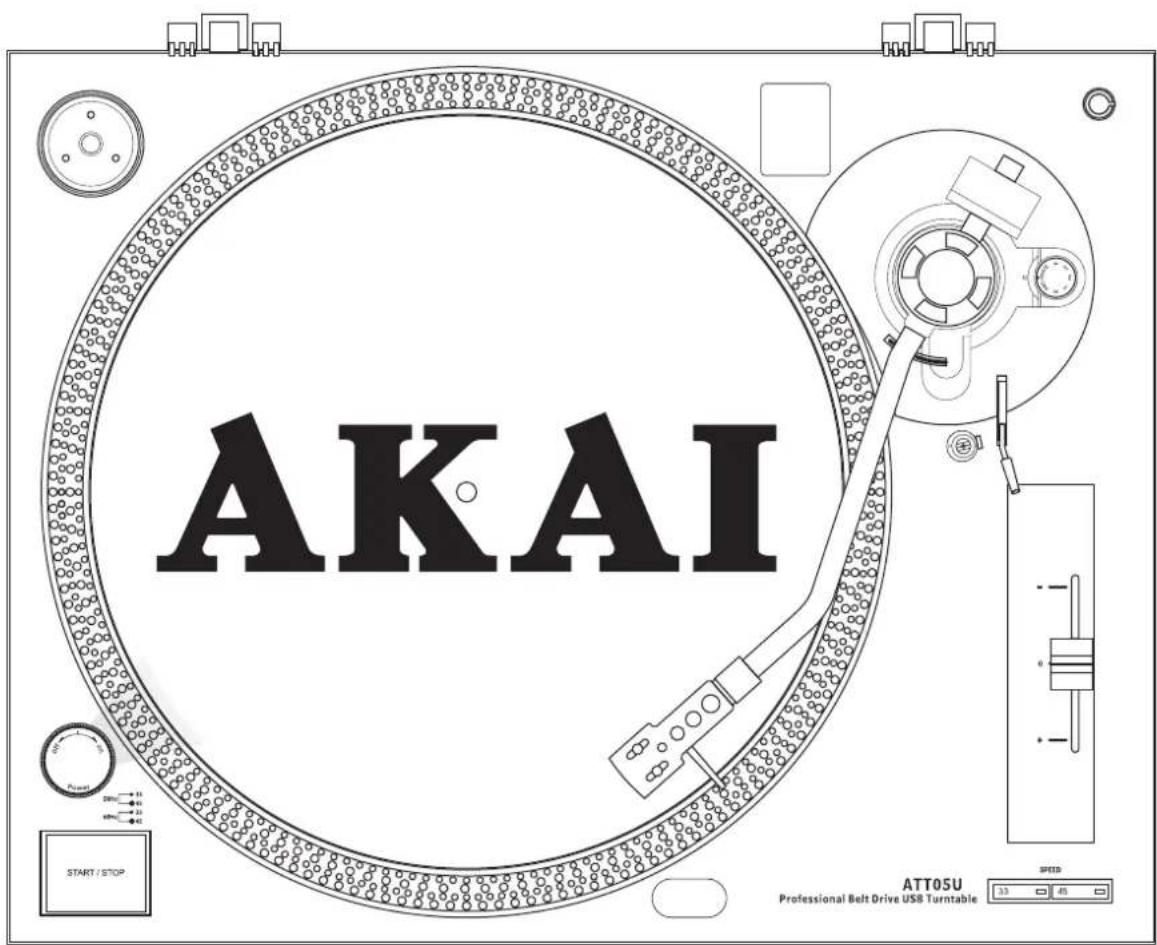
Professional Belt Drive USB Turntable
ATT05U
text_image
AKAI START / STOP ATT05U Professional Belt Drive USB TurntableOperator's manual
(GB) 37-47
IMPORTANT SAFETY INSTRUCTIONS
- Read Instructions – All the safety and operating instructions should be read before this product is operated.
- Retain Instructions — The safety and operating instructions should be retained for future reference.
- Heed Warnings—All warnings on the appliance and in the operating instructions should be adhered to.
- Follow Instructions — All operating and use instructions should be followed.
- Water and Moisture—The appliance should not be used near water - for example, near a bathtub, washbowl, kitchen sink, laundry tub, in a wet basement, or near a swimming pool, and the like.
- Carts and Stands—The appliance should be used only with a cart or stand that is recommended by the manufacturer.
An appliance and cart combination should be moved with care. Quick stops, excessive force, and uneven surfaces may cause the appliance and cart combination to overturn.

- Wall or Ceiling Mounting — The product should not be mounted to a wall or ceiling.
- Heat — The appliance should be situated away from heat sources such as radiators, heat registers, stoves, or other appliances (including amplifiers) that produce heat.
- Power Sources – This product should be operated only from the type of power source indicated on the rating label. If you are not sure of the type of power supply to your home, consult your product dealer or local power company. For products intended to operate from battery power, or other sources, refer the operating instructions.
- Grounding or Polarization – This product may be equipped with a polarized alternation-current line plug (a plug having one blade wider than the other). This plug will fit into the power outlet only one way. This is a safety feature. If you are unable to insert the plug fully into the outlet, try reversing the plug. If the plug should still fail to fit, contact your electrician to replace your obsolete outlet. Do not defeat the safety purpose of the polarized plug.
- Power-Cord Protection — Power-supply cords should be routed so that they are not likely to be walked on or pinched by items placed upon or against them, paying particular attention to the cord in correspondence of plugs, convenience receptacles, and the point where they exit from the appliance.
- Cleaning - The appliance should be cleaned only as recommended by the manufacturer.
Clean by wiping with a cloth slightly damp with water. Avoid getting water inside the appliance.
-
For AC line powered units - Before returning repaired unit to user, use an ohm-meter to measure from both AC plug blades to all exposed metallic parts. The resistance should be more than 100,000 ohms.
-
Non-use Periods — The power cord of the appliance should be unplugged from the outlet when left unused for a long period of time.
- Object and Liquid Entry—Care should be taken so that objects do not fall and liquids are not spilled into the enclosure through openings.
- Damage Requiring Service—The appliance should be serviced by qualified service personnel when:
A. The power-supply cord or the plug has been damaged; or
B. Objects have fallen, or liquid has been spilled into the appliance; or
C. The appliance has been exposed to rain; or
D. The appliance does not appear to operate normally or exhibits a marked change in performance; or
E. The appliance has been dropped, or the enclosure damaged.
- Servicing — The user should not attempt any service to the appliance beyond that described in the operating instructions. All other servicing should be referred to qualified service personnel.
- Ventilation – Slots and openings in the cabinet are provided for ventilation and to ensure reliable operation of the product and to protect it from overheating, and these openings must not be blocked or covered. The openings should never be blocked by placing the product on a bed, sofa, rug, or other similar surface. This product should not be placed in a built-in installation such as a bookcase or rack unless proper ventilation is the manufacturer's instructions have been adhered to.
- Attachments – do not use attachments not recommended by the product manufacturer as they may cause hazards.
- Accessories – Do not place this product on an unstable cart, stand, tripod, bracket, or table. The product may fall, causing serious injury to a child or adult, and serious damage to the product. Use only with a cart, stand, tripod, bracket, or table recommended by the manufacturer, or sold with the product. Any mounting of the product should follow the manufacturer's instructions, and should use a mounting accessory recommended by the manufacturer.
- Lightning – For added protection for this product during a lightning storm, or when it is left unattended and unused for long periods of time, unplug it from the wall outlet and disconnect the antenna or cable system. This will prevent damage to the product due to lightning and power-line surges.
- Replacement Parts – When replacement parts are required, be sure the service technician has used replacement parts specified by the manufacturer or have the same characteristics as the original part. Unauthorized substitutions may result in fire, electric shock, or other hazards.
- Safety Check – Upon completion of any service or repairs to this product, ask the service technician to perform safety checks to determine that the product is in proper operating condition.
IMPORTANT SAFETY INSTRUCTIONS

CAUTION
DO NOT OPEN
RISK OF ELECTRIC SHOCK

CAUTION: To reduce the risk of electric shock, do not remove any cover. No user-serviceable parts inside. Refer servicing to qualified service personnel only.

The lightning flash with arrowhead symbol within the equilateral triangle is intended to alert the use to the presence of un-insulated “dangerous voltage” within the product’s enclosure that may be of sufficient magnitude to constitute a risk of electric shock.

The exclamation point within the equilateral triangle is intended to alert the user to the presence of important operation and maintenance (servicing) instructions in the literature accompanying this appliance.
CAUTION
To prevent electric shock, do not use this polarized plug with an extension cord, receptacle or other outlet unless the blades can be fully inserted to prevent blade exposure.
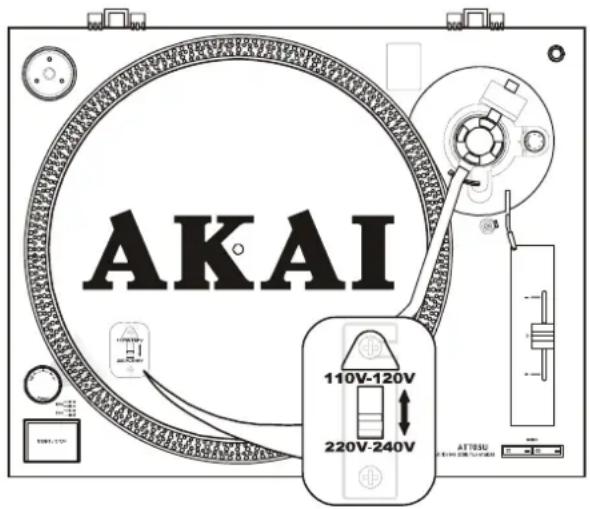
\*LINE VOLTAGE SELECTION
Just for dual voltage mode only!
Because power supplies vary from location to location we have incorporated a selectable power supply.
- The desired voltage may be set with the VOLTAGE SELECTOR switch located under the platter. (use a flat head screw driver).
- Do not force the VOLTAGE SELECTOR switch as this may cause damage.
- If the VOLTAGE SELECTOR switch does not move smoothly, please contact a qualified service technician.
text_image
AKAI 110V-120V 220V-240VBEFORE USE
* Check for the following parts included in the package with the main unit:
- Platter
- Cartridge
- Counter weight
- Disc
- Slipmat
- USB cable
- Instruction manual
• Transparent Dust cover
- Headshell
- 45 rpm adaptor
- RCA cable
\* VERY IMPORTANT!!
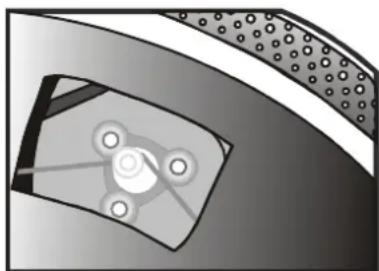
Do not forget to attach rubber belt to motor for correct operation. After placing the Turntable Platter onto the turntable through the Center Spindle, move one of the large windows on the Platter to top right corner. Attach rubber belt around motor. (Rubber belt is already attached to the underside of the Turntable Platter.)
natural_image
Cross-sectional diagram of a mechanical component with internal components and mounting holes (no text or labels)\* Notes:
1) Do not connect the AC power plug before assembly has been completed.
2) Before turning the power on, make sure once again all the connections and power voltage settings are correct. Always turn off the power when connecting or disconnecting.
3) Read this manual carefully before using the unit .Be sure to store the manual in a safe place for future reference.
ASSEMBLY
- Remove the main unit with the packing from the box and remove the packing.
- Set the 45-rpm adaptor on the main unit.
- Set the turntable platter onto the center spindle.
- Set the slip mat on the platter.
- Installation of cartridge:
When installing a cartridge, refer to the operating instructions of that cartridge.
During installation, attach the stylus protector to guard the stylus tip from damage.
(a) Connect the lead wires to the cartridge terminals. The terminals of most cartridges are color-coded.
Connect each lead wire to the terminal of the same color.
White (L+). Left channel+
Blue (L-) Left channel-
Red (R+) Right channel+
Green (R-) Right channel-
(b) Install the cartridge to the headshell and tighten it with screws provided with the cartridge.
- Insert the headshell into the front end of the tonearm, then turn the lock nut counterclockwise with the headshell firmly held horizontally.
- Slide counterweight onto tonearm. Twist it lightly and it will screw onto the rear shaft of the tonearm.
- Adjustment of horizontal "zero" balance and stylus pressure:
(a) Remove the stylus protector from the headshell, do not touch the stylus tip during the adjustment.
(b) Set the cueing lever to the lowered position.
(c) Release the tonearm clamp and lift the tonearm from the arm rest to free it.
(d) Rotate the counterweight until the tonearm is approximately balanced horizontally (floats freely).
(e) Refasten the tonearm with the tonearm clamp.
(f) Hold the counterweight stationary with one hand and rotate only the stylus-pressure ring to bring the number "0" of the ring into alignment with the center line on the tonearm rear shaft.
(g) Rotate the counterweight including the stylus-pressure ring counterclockwise until the scale shows the value corresponding to the pressure of the stylus used. Should you use a separate Stylus, please follow the manufacturer's instructions.
-
Set the anti-skating control knob to the same value as the stylus pressure.
-
Install the transparent dust cover to the main unit's dust cover hinges.
PLACEMENT
- Do not place the unit in a location where it will be exposed to direct sunlight or near a heating appliance.
- Do not place the unit in a location where there is high humidity or a lot of dust.
- Cartridge may pick up slight sound pressures or vibrations of the speakers coming along the floor or through the air resulting in feedback or “howling” sound. Find a location which is very stable and vibration free.
- The legs have functions for adjusting the height of the unit itself. Adjust the legs to stabilize the main body horizontally.
CONNECTIONS
Before connecting the unit it is advised that you also consult your current equipment instruction manual.
IMPORTANT: Be sure to turn off the equipment before you make changes to the different connections.
- Connect the power cord to an AC outlet.
- Connect the RCA cable to the PHONO input of your AMPLIFIER.
Output terminals Amplifier(Receiver)
L (White) L Channel
R (Red) R Channel
GND (Spade) GND
NOTE:
- Be sure to connect the ground terminal firmly to the amplifier or receiver.
- If this connection is not made or is loose, a power source "HUM" will result.
-
You can also use a line input by setting the phono / line switch at the rear of the turntable to line.
-
Connect PC via USB cord.

text_image
PC Set the PHONO/LINE switch to 'LINE' Set the PHONO/LINE switch to 'PHONO'.OPERATIONS
- Turn the On/Off Switch clockwise to turn on the power, the speed indicator and the strobe-illuminator, which is located beneath the On/Off switch, will light up.
- Place a record on the slip mat. When playing a 45-rpm record with a large center hole, place the 45-rpm adapter on the center spindle.
- Set the speed to match the record.
- Remove the stylus protector from the Headshell Stylus and then release the Tonearm clamp.
- Set the cueing lever to the up position.
- Press the Start/Stop Button; the turntable platter will start to rotate.
- Move the tonearm over the desired groove.
- Set the cueing lever to the down position, the tonearm will descend slowly onto the record and begin playing.
- When play is finished, raise the cueing lever, move the tonearm onto the Tonearm clamp.
- Press the Start/Stop Button to stop the platter from rotating. Turn the On/Off Switch counterclockwise to turn off the power.
\*SUSPEND PLAY
Set the cueing lever to "UP" position during play, the stylus tip of the cartridge will be lifted from the record.
CHANGING THE SPEED
- As long as the pitch control is in center "detent" click position, the turntable is operated at selected speed.
• The speed can be increased or decreased by 10% by the pitch control. - An incorrect adjustment done on purpose can also be used to have the turntable rotate extremely slow or fast.
- The strobe dots at the edge of the turntable are used for speed monitoring.
MAINTENANCE
- Clean the stylus periodically with a soft brush to prevent the accumulation of dust.
- When sound becomes distorted or noisy, check the stylus. If the stylus is worn out, replace it with a new one.
• From time to time, the transparent dust cover and turntable cabinet should be wiped down with a soft, dry cloth. - Volatile materials should not be used, such as: alcohol, thinner, benzine etc. They may remove the paint or damage the luster.
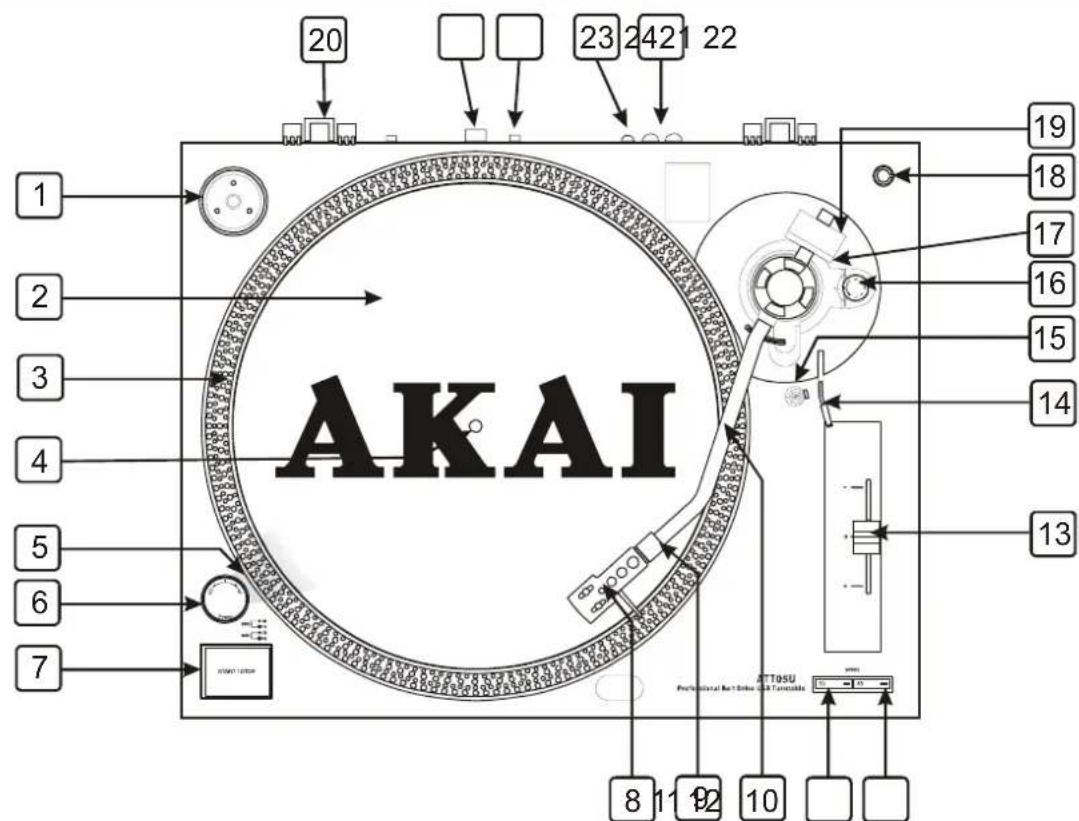
CONTROLS OVERVIEW
text_image
AKAI 1 2 3 4 5 6 7 8 11 12 10 19 18 17 16 15 14 13 20 23 24 21 22 Professional Retainer & Reminders ATTOSU1. 45-rpm Adaptor
This adapter allows you to play standard 7" EP vinyl records with large center holes. Place the adapter on the CENTER SPINDLE 7" records.
2. Turntable Platter
This platter connects directly to the center spindle. The platter and center spindle holds a vinyl record perfectly center. The platter also spins the record at a consistent speed.
3. Strobe Indicators
The PLATTER has four rows of indicators. These indicators are used to visually detail various stages of pitch. The indicators are illuminated by the STROBE INDICATOR PILOT LAMP. Each row may appear to stand still at different pitch levels. Note: The use of heavy fluorescent lighting directly above the turntable will defeat the STROBE LAMP PILOT LAMP affect indicator accuracy.
CONTROLS OVERVIEW
4. Center Spindle
This spindle holds the turntable PLATTER records stable and centered.
5. Strobe Indicators Pilot Lamp
This is lamp specially designed to pulse a beam of light at the STROBE INDICATORS on the turntable PLATTER. This will give the illusion that indicators are not spinning at certain speeds.
6. Power Switch
This is a rotary power switch. To turn main power on turn the switch in a clockwise direction. To turn main power off turn the switch in counterclockwise direction.
7. Start/Stop Button
This over sized push button controls platter motion. When the unit is turned on the platter will not automatically begin to spin. Pressing the button once will engage the high torque motor and spin the platter, pressing this again will stop the platter.
8. Headshell
The included HEADSHELL is used to connect your stylus with the tone arm.
9. Headshell Locking Nut
After attaching the headshell to the tonearm, this locking nut will securely hold the headshell to the tonearm.
10. S-Shaped Tone Arm
The tonearm is the mechanism that holds the HEAD-SHELL and stylus allowing it to glide across a record.
11. 33-RPM Speed Select Button
Engaging this button will rotate the platter at 33 revolutions per a minute (RPMs). A function LED will glow when this function is activated.
12. 45- RPM Speed Select Button
Engaging this button will rotate the platter at 45 RPMs. A function LED will glow when this function is activated.
13. Pitch Control Slider
This slider is used to adjust the playback pitch percentage (platter speed).
14. Tone Arm Lever
This lever is used to safely elevate the tone arm above a record surface without endangering a records surface.
15. Tone Arm Clamp and Rest
Use this rest to safely hold the tonearm in position during non use and transportation.
16. Anti-skate Knob
The anti-skate applies inward force to the tonearm to prevent outward skipping across the record due to the centrifugal force cause by platter rotation. The anti-skate value should be equally to that of the stylus counterweight pressure.
* The counterweight scale must face toward the DJ.
18. Extra Stylus Holder
This cut out has been designed to safely store an extra stylus headshell.
19. Counterweight
Use the counterweight to balance the tone arm and to adjust the stylus pressure.
20. Hinge For Dust Cover
21. USB Socket (USB cable limit within 3m)
After connecting the Turntable to the computer via USB, you can record your vinyl to your hard disk using the included Audacity software.
22. Phono/Line Selector
This switch is used to change the mode of phono output or line output.
23. Ground Connector
This ground connection is designed to reduce the humming and popping noises associated with magnetic phono cartridges. Be sure to connect the turntable ground lead to any available ground terminal on the same mixer the input signal leads are connected to
24. RCA output Jacks
The output is able to switch to PHONO output or LINE output. For example: These jacks are used to send a low voltage "phono" level output signal to a mixers "phono" input jacks. Turntables should be connected to "Phono" inputs on a mixer. The red colored RCA jack represents the right channel input and the white represents the left channel input.
AUDACITY SOFTWARE OVERVIEW
Audacity is free software, licensed under the GNU General Public License (GPL). More information as well as open source code can be found on the CD included or on the web at http://audacity.sourceforge.net/
* Please ensure you have installed the software before starting.
Setting up your PC to work with Audacity
- Connect an input source to the unit.
- Connect the USB lead to your computer.
- Install the Audacity recording software.
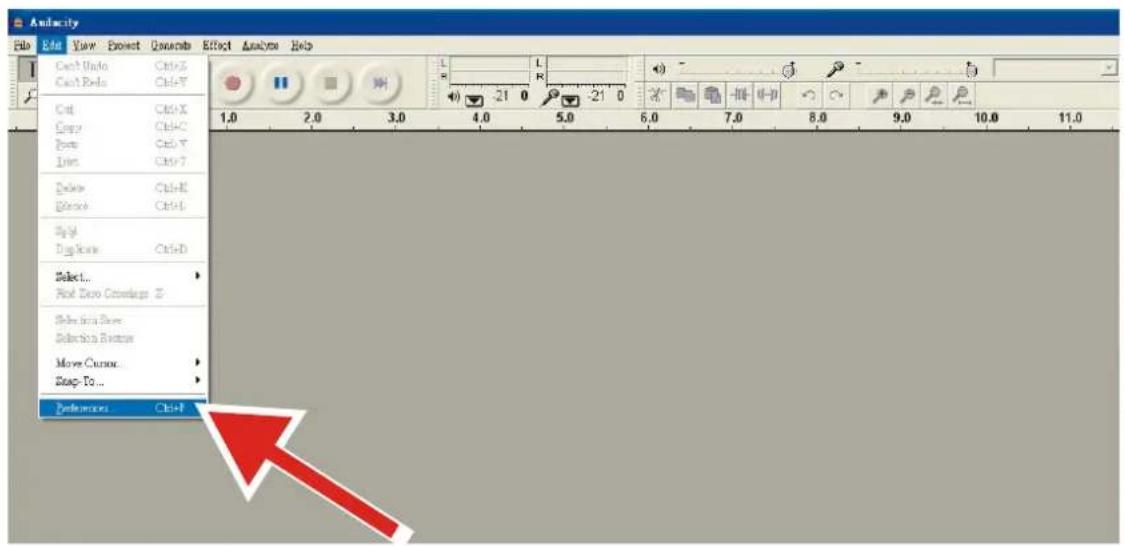
- Open the Audacity program.
- Select Preference from the Edit tab in the Audacity Menu.
text_image
Anfacity File Edit View Insert Quesets Effect Analysis Help Cash Under Ctrl+X Cash Pads Ctrl+Y Ctrl Ctrl+X Copy Ctrl+O Paste Ctrl+Y Insert Ctrl+T Delete Ctrl+E Balance Ctrl+L Style Single Mode Ctrl+D Select... And Data Coverages 2 Select this mode Selection it better Move Cursor... Snap-To... Preferences Ctrl+F- Select Audio I/O tab at the top left.
• Under Playback, Device, select your internal sound card.
• Under Recording, Device, select USB Audio CODEC.
• Under Recording, Channels, select 2 (Stereo).
- Check the box marked Play other tracks while recording new one.
- Check the box marked Software Playthrough.

text_image
Audacity Preferences Audio I/O | Quality | File Formats | Spectrograms | Directories | Interface | Keyboard | Mouse | Playba Device: South MAX HD Audio Recording Device: USB Audio CODEC Channels: 2 (Stereo) ✓ Play other tracks while recording new one ✓ Software Playthrough (Play new track while recording it)AUDACITY SOFTWARE OVERVIEW
Recording Albums with Audacity
1. Saving a project
- Audacity writes all the changed and recorded audio to a directory called Projectname_data, which is located right where you saved the project file itself.
- Thus, select Save project as from your Audacity File tab and choose a location and filename for your project.
- Please note that when you startup Audacity fresh, only the "Save As..." menu option is available.

text_image
Audacity File Edit View Project Generate Effect Analyze Help New Ctrl+N Open... Ctrl+O Close Ctrl+W Save Project Ctrl+S Save Project As... Recent Files... Export As WAV... Export Selection As WAV... Export As MP3... Export Selection As MP3... Export As Ogg Vorbis... Export Selection As Ogg Vorbis... Export Labels... Export Multiple... Page Setup... Print... Exit2. How to record
- Set your USB turntable up to play the song or album you want to record.
- Click on the red Record button to begin recording.
- Lower tone arm on USB turntable onto album and track you want to record.
- Click on the blue Pause button ☐ to pause the recording. Press it again to continue.
- Click on the yellow Stop button.
That's it. You can now play around with your recording and explore the editing capabilities of Audacity. Remember that you can use the Undo function almost without limits while the project is open.
NOTE: CD's cannot be burned directly from the Audacity application. Other CD burning applications should be used.
SPECIFICATION
GENERAL
Model: ATT05U Professional Belt Drive USB Turntable
Dimensions: 450(W) x 350(D) x 145(H)mm
Weight: 4.4Kgs
Power supply: Dual Voltage: AC 115V\~60Hz/230V\~50Hz, User Selectable
Power consumption: 8W
Standard test condition: Ambient Temperature: 23 +/- 2 degC
Relative Humidity: 65% +/- 5%
NOTE: Measurements can be carried out between 5 degC to 35 degC and 45% to 85% relative humidity.
TURNTABLE SECTION:
| Type | 2-speed | full | manual |
| Motor | DC | motor | |
| Driving Method Belt drive | |||
| Turntable Platter 330mm dia. Plastic | |||
| Speeds | 33^1/_3 and 45rpm | ||
| Wow and Flutter Less than 0.25% WRMS (JIS WTD) with 33 | ^1/_3 rpm | ||
| S/N Ratio More than 50dB (DIN-B) | |||
| Pitch Controls +/- 10% | |||
| Starting Time Less than 1 sec with 33 | ^1/_3 | ||
| Braking Time | Less than 1 sec. with 33^1/_3 | ||
| Time for Speed Change | Less than 1 sec. from 33^1/_3 to 45 rpm | ||
| Less than 1 sec. from 45 to 33 | ^1/_3 rpm | ||
| Speed tolerance at pitch=0 | Within +/-1.3% | ||
| USB Function | USB rec. Function | ||
| A/D, D/A | 16BIT 44.1KHz or 48KHz USB SELECTABLE | ||
| Computer interface | USB 1.1 compliant, WINDOWS XP or MAC OSX | ||
TONEARM SECTION:
| Type | Static balanced S-shaped tonearm with detachable headshell |
| Effective Arm Length | 220 mm |
| Tracking Error Angle | Less than 3 degree |
| Applicable Cartridge Weight | 6~10g |
| Anti-skating Range | 0-4g |
| Phono Output Level | 1.5~3.6 mV at 1KHz 5cm/sec (HP-4005) |
| Line Output Level | 90~216mV at 1KHz 5cm/sec (HP-4005) |
| Frequency Response | 20Hz-20KHz |
| Channel Separation | More than 15dB |
| Channel Balance | Within 2.5dB at 1KHz |
| Needle Pressure range | 3~4g |
| High of cue(first track) | 6~10.5mm |
| Descend of cue | 1~3sec |
| EQ AMP | |
| Output | 150mV +/-4dB (IN: 2.5 mV 1KHz) |
| RIAA | 20Hz~20KHz +1/-3dB (IN: 1.5 mV 1KHz) |
NOTE:
Corrosion, oxidation, battery-leakage and any other gradually acidic defect of this nature will invalidate the guarantee.
Disposal
Disposal of Used Electrical & Electronic Equipment

The meaning of the symbol on the product, its accessory or packaging indicates that this product shall not be treated as household waste. Please, dispose of this equipment at your applicable collection point for the recycling of electrical & electronic equipments waste. In the European Union and Other European countries which there are separate collection systems for used electrical and electronic product. By ensuring the correct disposal of this product, you will help prevent potentially hazardous to the environment and to human health, which could otherwise be caused by unsuitable waste handling of this product. The recycling of materials will help conserve natural resources. Please do not therefore dispose of your old electrical and electronic equipment with your household waste. For more detailed information about recycling of this product, please contact your local city office, your household waste disposal service or the shop where you purchased the product.