
DPF-1001 - Digital photo frame DENVER - Free user manual and instructions
Find the device manual for free DPF-1001 DENVER in PDF.


| Product Type | Digital Photo Frame |
| Model | DPF-1001 |
| Display Size | 10.1 inches |
| Display Resolution | 1024 x 600 pixels (1024*3(RGB)*600) |
| Aspect Ratio | 17:10 |
| Brightness | 200 cd/m² max |
| Contrast Ratio | 300:1 |
| Power Supply | DC 12V, 1000mA |
| Power Consumption | 12 Watts |
| Input Voltage | AC 100-240V, 50/60Hz |
| Supported Memory Cards | SD, MMC, MS, USB flash drive (USB Host) |
| Supported File Formats | JPEG (photo), MP3 (music), AVI, MPEG1/2/4 (video) |
| Maximum Photo Resolution | 10 Megapixels |
| Operating Temperature | -10°C to +50°C |
| Remote Control | Included, uses CR2025 battery (3V), effective range up to 2 meters |
| Built-in Functions | Photo, Music, Photo+Music, Movie, Calendar, Clock, Alarm, Auto Power On/Off, Edit, Favorite |
| Safety & Maintenance | Indoor use only; avoid moisture, direct sunlight, and blocking vents; do not disassemble; use eject buttons for cards |
| Package Contents | Digital Photo Frame, AC/DC Adapter, User Guide, Remote Control |
Frequently Asked Questions - DPF-1001 DENVER
User questions about DPF-1001 DENVER
0 question about this device. Answer the ones you know or ask your own.
Ask a new question about this device
Download the instructions for your Digital photo frame in PDF format for free! Find your manual DPF-1001 - DENVER and take your electronic device back in hand. On this page are published all the documents necessary for the use of your device. DPF-1001 by DENVER.
USER MANUAL DPF-1001 DENVER
natural_image
Two women in black outfits displayed on a tablet screen, one with dark hair and necklace, the other in a simple black dress (no visible text or symbols)WARNUNG
natural_image
Two women in black clothing displayed on a tablet screen, one with a necklace and the other in a studio setting (no visible text or symbols)ADVARSEL
DPF-1001 Series V1.0
Introduktion
natural_image
Two women in black tops displayed on a tablet screen, one with a necklace and the other holding a portrait (no visible text or symbols)ADVERTENCIA
DPF-1001 Series V1.0
Introducción
natural_image
Two women in black tops displayed on a tablet screen, one with a necklace and the other holding a portrait (no visible text or symbols)WAARSCHUWING
natural_image
Two women in black outfits displayed on a tablet screen, one with dark hair and the other with a white top (no visible text or symbols)AVISO
In MENU, select Photo+ Music menu and press ENTRAR, the DPF will auto load USB media or card media and
auto play Photo+ Music. If no media connect the system, it will auto return to MENU.
4. FILMES
natural_image
Two women in black outfits displayed on a tablet screen, one with a necklace and the other with a portrait (no visible text or symbols)OBS!
natural_image
Two women in black outfits displayed on a tablet screen, one with a necklace and the other with a portrait (no visible text or symbols)VAROITUS:
natural_image
Two women in black outfits displayed on a tablet screen, one with a necklace and the other with a portrait (no visible text or symbols)WARNING
The power adapter cable/disconnect device shall remain easy to operate/disconnect.
DPF-1001 Series V1.0
Introduction
Congratulations on your purchase of our Digital Photo Frame.
Before operating the unit, please read this manual thoroughly and keep it for future reference. This manual will help you use many of the exciting features to make your Digital Photo Frame more enjoyable.
This Digital Photo Frame enables you to view digital pictures directly from your cameras memory card. You can also create a slide show with multiple transition effects. No computer, digital camera, or internet connection is required.
The Multimedia Digital Photo Frame is compatible with the following memory card formats: SD, MMC, MS card and USB Host.
Precautions and Maintenance
- For indoor use only
- To avoid risks of fire or electric shock; do not expose this appliance to moisture.
- To avoid overheating; do not block the ventilation holes on the back of the unit at any time.
- Keep your Multimedia Digital Photo Frame out of sunlight .Direct sunlight may cause damage.
●Always use the eject buttons on the memory storage card slots to remove the memory storage cards. - Do not dismantle the unit. There is a risk of electric shock, and there are no user serviceable parts inside. Dismantling your Digital Photo Frame will void your warranty.
- Do not use the Digital Photo Frame if conditions could allow condensation to occur, or damage may result.
Key control and Key function:
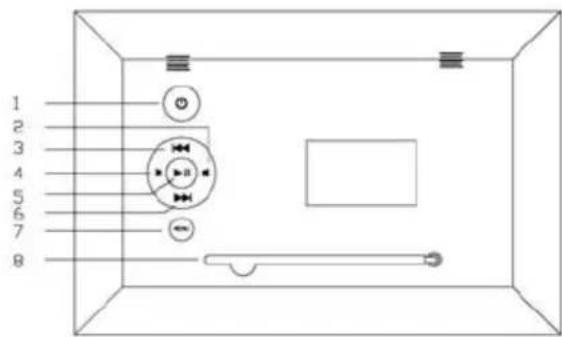
-
STANDBY: This is used to turn ON/OFF the player
-
VOL-: Left cursor select function and Turn the volume down
-
LEFT SHIFT Button : Up cursor select function and to view the previous photo.
-
VOL+ :Right cursor function and Turn the volume up
-
ENTER: Confirm your selection, and pause or play
-
RIGHT SHIFT Button : Down cursor select function and to view the next photo.
-
MENU: Press button to Displays the photo frames menu options.
8.Bracket
PF Side view
- SD/MMC/MS: The socket for DPF player to connect the SD/MMC/ MS card.
- USB: The socket for DPF player to connect the USB memory.
- DC: Input the DC power adapter to the DPF player.
- OTG: When inserted into USB cable, connect the other end of the computer.

Main Function:
User can use cursors to function, then press ENTER to enter function mode.
1.PHOTO
In MENU, select Photo menu and press ENTER, then the DPF will auto load USB media or card media and auto play photo. If no media connect the system, it will auto return to MENU.
2.MUSIC
In MENU, select Music menu and press ENTER, then the DPF will auto load USB media or card media and auto play music. If no media connect the system, it will auto return to MENU.
3.PHOTO+MUSIC

In MENU, select Photo+ Music menu and press ENTER, the DPF will auto load USB media or card media and auto play Photo+ Music. If no media connect the system, it will auto return to MENU.
4.MOVIE
In MENU, select Movie menu and press ENTER, the DPF will auto load USB media or card media and auto play Movie. If no media connect system, return to MENU.
5.SETUP
Select SETUP in menu, then press ENTER key to enter setup menu.
6.CALENDAR
In MENU, select Calendar menu and press ENTER or Play key, the DPF will enter Calendar setup mode.
7.CLOCK
Select CLOCK menu in MENU, and press ENTER or play key.
8.ALARM
Enables you to setup the alarm time clock.
9. Auto-Power
Select Auto-Power in MENU, press ENTER, it will enter the automatic power on/off setting mode.
10.EDIT
Select EDIT in MENU, and press ENTER.
11.FAVORITE
In MENU.Select Favorite menu and press ENTER, then the DPF will auto play photo in build-in flash.
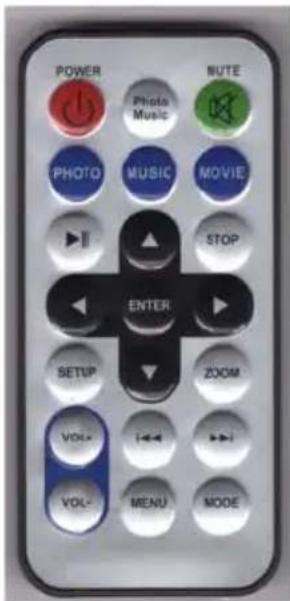
Remote Control Menu
Remove the remote control from the packaging. Remove the plastic strip from the battery tray on the bottom of the remote control. The remote control will now be functional. The remote control uses 1 x CR2025 3V battery. The remote control functions up to approximately 2 metres from the digital photo frame.
1 POWER: This is used to turn ON/OFF the player.
2 PHOTO/MUSIC: Play music while viewing photos
3 MUTE:Turn off sound
4 PHOTO: Enter photo mode.
5 MUSIC: Enter music files.
6 MOVIE: Enter movie menu.
7 > || : Play or pause the screen.
8 UP:Up cursor selecting function.
9 STOP : Stop application.
10 LEFT ARROW: Left cursor selecting function.
11 ENTER: Confirm the selecting function.
12 RIGHT ARROW: Right cursor selecting function.
13 SETUP: Control popup menu to setup the player.
14 DOWN: Down cursor selecting function
15 ZOOM: Zoom out the preview photo
16 VOL+ :Turn the volume up.
17 << | : Select the previous photo or file.
18 >> | : Select the next photo or file.
19 VOL- : Turn the volume down.
20 MENU: Display Menu options.
21 MODE: Switch LCD display mode.
Specification
| Type 10.1 inch Digital Picture Frame | |
| Resolution 1024*3(RGB)*600 | |
| Alimentation 12V 1000MA | |
| Consumption 12Watts | |
| Working Temperature -10 to +50 degrees | |
| Luminosity 200cd/m | ^2 max. |
| Contrast 300:1 | |
| Display Mode 17 :10 | |
| File Format JPEG, MP3, AVI, MPEG1/2/4 (Mainstream) | |
| Photo Size 10 Mega Pixels | |
| Current AC100—240V (50Hz—60Hz) | |
| Cards | SD/MMC/MS/ USB |
| Package Contents | Digital Picture Frame, AC/DC Adapter, User Guide, Remote Control |
Electric and electronic equipment and included batteries contains materials, components and substances that can be hazardous to your health and the environment, if the waste material (discarded electric and electronic equipment and batteries) is not handled correctly.
Electric and electronic equipment and batteries is marked with the crossed out trash can symbol, seen below. This symbol signifies that electric and electronic equipment and batteries should not be disposed of with other household waste, but should be disposed of separately.
As the end user it is important that you submit your used batteries to the appropriate and designated facility. In this manner you make sure that the batteries are recycled in accordance with legislature and will not harm the environment.
All cities have established collection points, where electric and electronic equipment and batteries can either be submitted free of charge at recycling stations and other collection sites, or be collected from the households. Additional information is available at the technical department of your city.


ALL RIGHTS RESERVED
COPYRIGHT DENVER ELECTRONICS A/S
WWW.DENVER-ELECTRONICS.COM


- WARNUNG
- ADVARSEL
- Introduktion
- ADVERTENCIA
- Introducción
- WAARSCHUWING
- AVISO
- FILMES
- VAROITUS:
- WARNING
- Introduction
- Precautions and Maintenance
- Key control and Key function:
- PF Side view
- Main Function:
- 1.PHOTO
- 2.MUSIC
- 3.PHOTO+MUSIC
- 4.MOVIE
- 5.SETUP
- 6.CALENDAR
- 7.CLOCK
- 8.ALARM
- Auto-Power
- 10.EDIT
- 11.FAVORITE
- Remote Control Menu
- Specification
Brand : DENVER
Model : DPF-1001
Category : Digital photo frame