F78002VI0P - Dishwasher AEG - Free user manual and instructions
Find the device manual for free F78002VI0P AEG in PDF.


User questions about F78002VI0P AEG
0 question about this device. Answer the ones you know or ask your own.
Ask a new question about this device
Download the instructions for your Dishwasher in PDF format for free! Find your manual F78002VI0P - AEG and take your electronic device back in hand. On this page are published all the documents necessary for the use of your device. F78002VI0P by AEG.
USER MANUAL F78002VI0P AEG
Thank you for choosing this AEG product. We have created it to give you impeccable performance for many years, with innovative technologies that help make life simpler – features you might not find on ordinary appliances. Please spend a few minutes reading to get the very best from it.
CONTENTS
4 Safety information
6 Product description
7 Control panel
9 Use of the appliance
10 Setting the water softener
11 Use of dishwasher salt
12 Use of detergent and rinse aid
13 Multitab function
14 Loading cutlery and dishes
15 Washing programs
17 Setting and starting a washing program
19 Care and cleaning
21 What to do if...
24 Technical data
24 Installation
25 Water connection
29 Electrical connection
29 Environment concerns
30 Warranty
The following symbols are used in this user manual:
!
Important information concerning your personal safety and information on how to avoid damaging the appliance.
i
General information and tips
[Non-Text]
Environmental information
Subject to change without notice.
![AEG F78002VI0P - [Non-Text] - 1](/content/2026/06/1241247/images/3b739c926cd01dacd556f421ff65062770060e7dcf2daa31c462d0be16509bfa.jpg)
SAFETY INFORMATION

For your safety and correct operation of the appliance, read this manual carefully before installation and use. Always keep these instructions with the appliance even if you move or sell it. Users must fully know the operation and safety features of the appliance.
Correct use
- Only use the appliance to clean household utensils that are suitable for dishwashers.
- Do not put solvents in the appliance. Risk of explosion.
- Put knives and all items with sharp points in the cutlery basket with their points down. If not, put them in a horizontal position in the upper basket.
- Use only products specified for dishwashers (e.g. detergent, rinse aid).
- If you open the door while the appliance is in operation, hot steam can escape. Risk of skin burns.
- Do not remove dishes from the appliance before the end of the washing program.
- When the washing program is completed, disconnect the mains plug from the mains socket and close the water tap.
- Only an authorised service engineer can repair this appliance. Use only original spare parts.
- Do not do repairs yourself to prevent injury and damage to the appliance. Always contact the Customer Care Centre.
General safety
- This appliance is intended to be used in household and similar applications such as:
- Staff kitchen areas in shops, offices and other working environments
- Farm houses
- By clients in hotels, motels and other residential type environments
- Bed and breakfast type environments.
- Some dishwasher detergents are strongly alkaline. They can be extremely dangerous if swallowed. Avoid contact with skin and eyes. Keep the children away from the appliance when the door is open. Check that the detergent dispenser is empty after completion of the washing program.
- Obey the safety instructions from the manufacturer of the dishwasher detergent to prevent burns to eyes, mouth and throat.
- Only put detergent in the dispenser before you start a washing program.
- Do not drink the water from the appliance. Detergent residue can stay in your appliance.
- Always close the door when you do not use the appliance to prevent injury and not to stumble over the open door.
- Do not sit or stand on the open door.
Child safety
- Do not let persons, children included, with reduced physical sensory, reduced mental functions or lack of experience and knowledge use the appliance. They must have supervision or instruction for the operation by a person who is responsible for their safety.
- Children should be supervised to ensure that they do not play with the appliance.
- Keep all the packaging away from children. There is a risk of suffocation.
- Keep all detergents in a safe area. Do not let children touch the detergents.
- Keep children and pets away from the appliance when the door is open.
Installation
- Make sure that the appliance is not damaged because of transport. Do not connect a damaged appliance. If necessary, contact the supplier.
- Remove all packaging before first use.
- A qualified and competent person must do the electrical installation.
- A qualified and competent person must do the plumbing installation.
- Do not change the specifications or modify this product. Risk of injury and damage to the appliance.
- Do not use the appliance:
- If the mains cable or the water hoses are damaged.
- If the control panel, worktop or plinth area are damaged so that you can get access to the inner side of the appliance.
Contact your local Customer Care Centre.
- Do not drill into the sides of the appliance otherwise damage to hydraulic and electrical components may occur.

WARNING!
Follow carefully the instructions for electrical and water connections.
PRODUCT DESCRIPTION
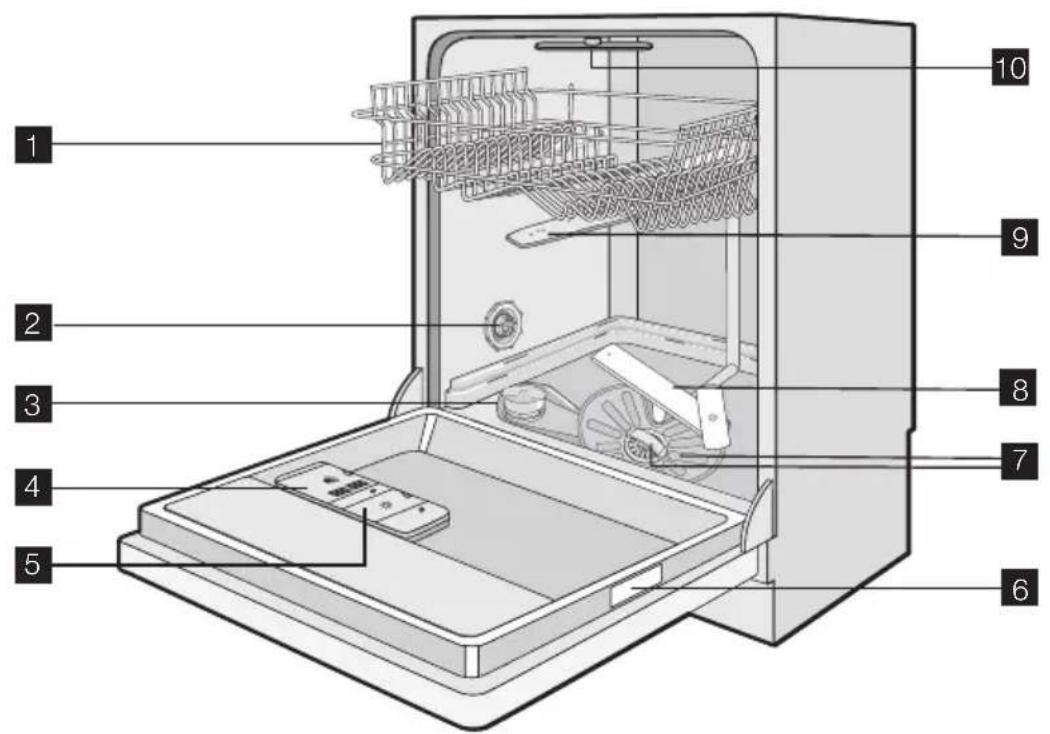
text_image
Labeled diagram of a refrigerator interior showing internal components and parts numbered 1 to 10.1 Upper basket
2 Air vent and water hardness dial
3 Salt container
4 Detergent dispenser
5 Rinse aid dispenser
6 Rating plate
7 Filters
8 Lower spray arm
9 Upper spray arm
10 Top spray arm
Light beam
After the start of the washing program, a light beam shows on the floor below the appliance door.
| Light beam | |
| The red light is on. | Indication of the start of a washing program. The red light stays on during the washing program. |
| The red light flashes. Indication of a malfunction. | |
| The green light is on. Indication of the end of a washing program. | |
CONTROL PANEL

The controls are on the top of the control panel. To operate with the controls keep the appliance door ajar.

text_image
AUTO OFF 1 2 3 4 5 6 7 8 91 On/off button
2 Display
3 Delay start button
4 Program button (down)
5 Program button (up)
6 Extra-Hygiene button
7 Multitab button
8 RESET button
9 Indicators
| Indicators | |
| § | Salt indicator. It comes on when it is necessary to fill the salt container. 1) After you fill the container, the salt indicator can stay on for some hours. This does not have an unwanted effect on the operation of the appliance |
| Rinse aid indicator. It comes on when it is necessary to fill the rinse aid dispenser. 1) | |
| →| | End indicator. It comes on when the washing program is completed. |
1) When the salt container and/or the rinse aid dispenser are empty, the related indicators do not come on while a washing program operates.
On/off button
Press this button to switch on or off the appliance.
After 10 minutes from the end of the washing program, the AUTO OFF function automatically switches off the appliance. This helps to decrease energy consumption.
The display
The display shows:
• The electronic adjustment of the level of the water softener
- The activation and deactivation of the rinse aid dispenser (only with the multitab function on)
• The number of the washing program
- The remaining time to the end of the washing program
- The end of a washing program (the display shows a zero)
• The time of the delay start - The alarm codes
- The activation and deactivation of the acoustic signals.
Delay start button
Press this button to delay the start of the washing program from 1 to 24 hours. Refer to 'Setting and starting a washing program'.
Program buttons
Press one of these buttons repeatedly to set a washing program. Each time you press the button, the display shows a number that is related to a washing program. Refer to 'Washing programs' chart.
Extra-Hygiene button
This function provides more hygienically clean dishes and glasses. During the last rinse, the temperature increases to 70 °C and is kept above 65 °C minimum for 10 to 14 minutes. Press this button to activate the function. The related indicator comes on.
The function can be activated with all washing programs but has effect only on some programs. To see where the Extra-Hygiene function has effect, refer to the 'Washing programs' chart.
Multitab button
Press this button to activate or deactivate the multitab function. Refer to 'Multitab function'.
RESET button
Press this button to cancel a washing program in operation. Refer to 'Setting and starting a washing program'.
Setting mode
The appliance must be in setting mode for these operations:
- To set and start a washing program.
- To set and start a delay start.
- To adjust electronically the level of the water softener.
- To activate or deactivate the rinse aid dispenser (only with the multitab function on).
- To deactivate or activate the acoustic signals.
Switch on the appliance. The appliance is in setting mode when:
- The display shows two horizontal status bars.
Switch on the appliance. The appliance is not in setting mode when:
- The display shows the time of the washing program or of the delay start.
- To go back to the setting mode, it is necessary to cancel the program or the delay start. Refer to 'Setting and starting a washing program'.
Acoustic signals
You can hear the acoustic signals when:
- The washing program is completed.
- You adjust electronically the level of the water softener.
- The appliance has a malfunction.

Factory setting: acoustic signals active.
Deactivating the acoustic signals
- Switch on the appliance. Make sure that the appliance is in setting mode.
- Press and hold button (4) and button (5) at the same time until the indicators of buttons (3), (4) and (5) flash.
-
Release button (4) and button (5).
-
Press button (5),
-
The indicators of button (3) and button (4) go off.
- The indicator of button (5) continues to flash.
- The display shows the setting of the acoustic signals.
| 16 | Acoustic signals activated. |
| 06 | Acoustic signals deactivated. |
- Press button (5) to change the setting. The display shows the new adjustment.
- Switch off the appliance to confirm.
To activate the acoustic signals again, do steps (1) through (6).
USE OF THE APPLIANCE
Refer to the specific instructions for each step of the procedure.
- Check if the water softener level is correct for the water hardness in your area. If necessary set the water softener.
- Fill the salt container with dishwasher salt.
- Fill the rinse aid dispenser with rinse aid.
- Load cutlery and dishes into the appliance.
- Set the correct washing program for the type of load and soil.
- Fill the detergent dispenser with the correct quantity of detergent.
- Start the washing program.

If you use the combi detergent tablets ('3 in 1', '4 in 1', '5 in 1'), set the multitab function.
Refer to 'Multitab function'.
SETTING THE WATER SOFTENER
The water softener removes minerals and salts from the water supply. Minerals and salts can have bad effect on the operation of the appliance.
Water hardness is measured in equivalent scales:
• mg/l (millimol per litre)
- ppm (parts per million),
- mmol/l (millimol per litre - international unit for the hardness of water).
Adjust the water softener in to the water hardness in your area. If necessary, contact your local water authority.
| Water hardness Water hardness setting | ||||
| mg/l ppm | mmol/l manually electronically | |||
| 910 - 1250 | 910 - 1250 | 9.1 - 12.5 | 2 | 10 |
| 760 - 909 | 760 - 909 | 7.6 - 9.0 | 2 | 9 |
| 650 - 759 | 650 - 759 | 6.5 - 7.5 | 2 | 8 |
| 510 - 649 | 510 - 649 | 5.1 - 6.4 | 2 | 7 |
| 400 - 509 | 400 - 509 | 4.0 - 5.0 | 2 | 6 |
| 330 - 399 | 330 - 399 | 3.3 - 3.9 | 2 | 5 |
| 260 - 329 | 260 - 329 | 2.6 - 3.2 | 1 | 4 |
| 190 - 259 | 190 - 259 | 1.9 - 2.5 | 1 | 3 |
| 70 - 189 | 70 - 189 | 0.7 - 1.8 | 1 | 2 |
| < 70 | < 70 | < 0.7 | 1 | 11) |
1) No use of salt required.

You must set the water softener manually and electronically.
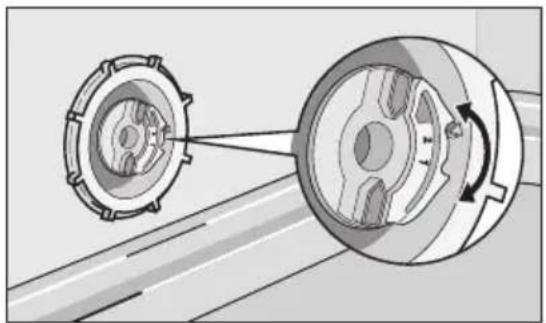
Manual adjustment

The appliance is set at the factory at position 2.
- Remove the lower basket.
- Turn the water hardness dial to position 1 or 2 (refer to the chart).
- Put back the lower basket.
natural_image
Mechanical diagram showing two rotating gears with a belt, connected by a belt (no text or symbols present)Electronic adjustment

The appliance is factory set at level 5.
- Switch on the appliance. Make sure that the appliance is in setting mode.
- Press and hold button (4) and button (5) at the same time until the indicators of buttons (3), (4) and (5) flash.
- Release button (4) and button (5).
-
Press button (3),
-
The indicators of button (4) and button (5) go off.
- The indicator of button (3) continues to flash.
• The acoustic signals sound. -
The display shows the setting of the water softener (example: S and you hear five acoustic signals = level 5).
-
Press button (3) one time to increase the water softener level by one step. Continue to press button (3) until the required water softener level is achieved.
-
Switch off the appliance to confirm.
USE OF DISHWASHER SALT

CAUTION!
Only use dishwasher salt. Types of salt that are not suitable for dishwashers cause damage to the water softener.

CAUTION!
Grains of salt and salty water on the bottom of the appliance can cause corrosion. Fill the appliance with salt before you start a washing program.
Filling the salt container
- Turn the cap counterclockwise to open the salt container.
-
Fill the salt container with 1 litre of water (only the first operation).
-
Use the funnel to fill the salt container with salt.
-
Remove the salt around the opening of the salt container.
-
Turn the cap clockwise to close the salt container.

It is normal that water overflows from the salt container when you fill it with salt.

text_image
SALE ZOUT SALT SALZ SELUSE OF DETERGENT AND RINSE AID
text_image
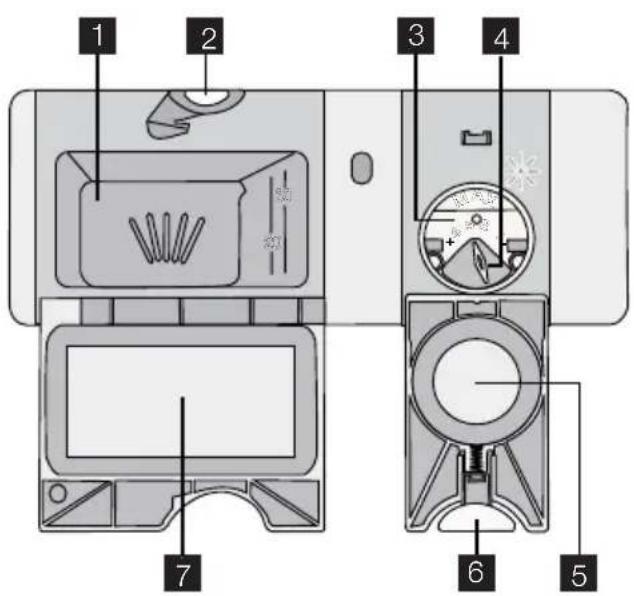
1 2 3 4 5 6 7Use of detergent

CAUTION!
Only use detergents (powder, liquid or tablet) that are suitable for dishwashers.
Follow the recommendations on the detergent packaging for the use and storage of the detergent.

To help the environment, do not use more than the correct quantity of detergent.
Filling with detergent
- Press the release button 2 to open the lid 7 of the detergent dispenser.
- Put the detergent in the dispenser 1.
- If the washing program has a prewash phase, put a small quantity of detergent on the inner part of the appliance door.
- If you use the detergent tablets, put the tablet in the detergent dispenser 1.
- Close the detergent dispenser. Press the lid until it locks into position.

Different brands of detergent dissolve in different times. Some detergent tablets do not have the best cleaning results during short washing programs. Use long washing programs when you use detergent tablets to fully remove the detergent.
Use of rinse aid

CAUTION!
Only use rinse aid specified for dishwashers.
Do not fill the rinse aid dispenser with other products (e.g. dishwasher cleaning agent, liquid detergent). This can cause damage to the appliance.
Rinse aid makes it possible to dry the dishes without streaks and stains.
Rinse aid is automatically added during the last rinsing phase.
Follow these steps to fill the rinse aid dispenser:
Filling with rinse aid
- Press the release button 6 to open the lid 5 of the rinse aid dispenser.
- Fill the rinse aid dispenser 3 with rinse aid. The mark 'max' shows the maximum level.
- Remove the spilled rinse aid with an absorbent cloth to prevent too much foam during the washing program.
- Close the rinse aid dispenser. Press the lid until it locks into position.
Adjusting the rinse aid dosage
Factory set: position 3.
You can set the rinse aid dosage between position 1 (lowest dosage) and position 4 (highest dosage).
Turn the rinse aid selector 4 to increase or reduce the dosage.

Wash hands to remove any residue of rinse aid from skin.
MULTITAB FUNCTION
The multitab function is for combi detergent tablets.
These tablets contain agents as detergent, rinse aid and dishwasher salt. Some types of tablets can contain other agents.
Be sure that these tablets are suitable for the water hardness in your area (refer to the instructions on the packaging of the products).
The multitab function deactivates the flow of rinse aid and salt.
The multitab function deactivates the indicators of salt and rinse aid.
The program duration can increase if you use the multitab function.

Activate or deactivate the multitab function before the start of a washing program. You cannot activate or deactivate the function while a washing program operates.
To activate the multitab function
- Press the multitab button, the multitab indicator comes on. The function is activated. - When you activate the multitab function, it stays on until you deactivate it.
To deactivate the multitab function and use separately detergent, salt and rinse aid
- Press the multitab button, the multitab indicator goes off. The function is deactivated.
- Fill the salt container and the rinse aid dispenser.
- Adjust the water hardness to the highest level.
- Start a washing program without dishes.
- When the washing program is completed, adjust the water softener to the water hardness in your area.
- Adjust the rinse aid dosage.
LOADING CUTLERY AND DISHES

Refer to the leaflet 'Examples of ProClean loads'.
Helpful hints and tips

CAUTION!
Only use the appliance for household utensils that are suitable for dishwashers.
Do not use the appliance to clean objects that can absorb water (sponges, household cloths, etc.).
- Before you load cutlery and dishes:
- Remove all remains of food and debris.
- Soften burnt remains of food.
- While you load cutlery and dishes:
- Load hollow items (e.g. cups, glasses and pans) with the opening down.
- Make sure that water does not collect in the container or in a deep base.
- Make sure that cutlery and dishes do not lie inside one another.
- Make sure that cutlery and dishes do not cover other cutlery and dishes.
- Make sure that glasses do not touch other glasses.
- Put small objects in the cutlery basket.
- Plastic items and pans with non-stick coatings can retain water droplets. Plastic items do not dry as well as porcelain and steel items.
- Put light items in the upper basket. Make sure that the items do not move.

CAUTION!
Make sure that the spray arms can move freely before you start a washing program.

WARNING!
Always close the door after you load or unload the appliance. An open door can be dangerous.
WASHING PROGRAMS
| Program | Type of soil | Type of load | Program description | Function |
| 1AUTO 45^ - 70^ 1) | All Crockery, cut- | lery, pots and pans | PrewashWash 45 °C or 70 °CRinsesDry | Extra-Hy-giene |
| 2 Heavy soil Crockery, cut-PRO 70^ | lery, pots and pans | PrewashWash 70 °CRinsesDry | ||
| 3Extra SILENT 50^ 2) | Normal soil Crockery and cutlery | PrewashWash 50 °CRinsesDry | ||
| 4Quick 30MIN 60^ 3) | Fresh soil Crockery and cutlery | Wash 60 °CRinse | Extra-Hy-giene | |
| 5ECO 50^ 4) | Normal soil Crockery and cutlery | PrewashWash 50 °CRinsesDry | Extra-Hy-giene | |
| 6 Light soil Crockery and Quick 50MIN 55^ | cutlery | Wash 55 °CRinses | Extra-Hy-giene | |
| 7 Normal or 45^ | light soil | Delicate crock-ery and glass-ware | Wash 45 °CRinsesDry | |
| 8 Use this program to quickly rinsethe dishes. This prevents the re-maining food to bond on the dishes and bad odours to come out from the appliance.Do not use detergent with this program. | Rinse | |||
1) The appliance senses the type of soil and the quantity of items in the baskets. It automatically adjusts the temperature and quantity of the water, the energy consumption and the program time.
2) This is the most silent washing program. The pump works at a very low speed to decrease the level of noise. Because of the low speed, the program time is long.
3) With this program you can wash a load with fresh soil. It gives good washing results in a short time.
4) This is the standard program for test institutes. With this program you have the most efficient use of water and energy consumption for crockery and cutlery with normal soil. Refer to the supplied leaflet for test information.
Consumption values
| Program Program | time (mi- nute) | Energy (kWh) Water (litre) | |
| 1 AUTO 45°-70° | 90 - 160 | 0.9 - 1.7 | 8 - 15 |
| 2 PRO 70° | 140 - 160 | 1.5 - 1.6 | 13 - 14 |
| 3 Extra SILENT 50° | 200 - 220 | 1.1 - 1.2 | 9 - 11 |
| 4 30 0.9 9 Quick 30MIN 60° | |||
| 5 ECO 50° | 105 - 115 | 0.67 - 0.81 | 9.6 - 11.6 |
| 6 Quick 50MIN 55° | 50 - 60 | 1.0 - 1.2 | 10 - 11 |
| 7 45° | 70 - 80 | 0.8 - 0.9 | 11 - 12 |
| 8 14 0.05 4 | |||

The water pressure and temperature, the variations of the mains supply and the quantity of dishes can change the consumption values.
SETTING AND STARTING A WASHING PROGRAM
Starting the washing program without delay start
- Switch on the appliance. Make sure that the appliance is in setting mode.
- Set the washing program.
- The number related to the washing program flashes in the display.
- Close the appliance door, the washing program starts.
Starting the washing program with delay start
- Switch on the appliance. Make sure that the appliance is in setting mode.
- Set the washing program.
- Press the delay start button repeatedly until the display shows the time of the delay start.
- The time of the delay start flashes in the display.
-
The delay start indicator is on.
-
Close the appliance door, the countdown starts.
When the countdown is completed, the washing program starts automatically.

The opening of the appliance door interrupts the countdown. When you close the door, the countdown continues from the point of interruption.
Cancelling the delay start
If the appliance door is open, and the countdown has not started
- Press the delay button repeatedly until the display shows the number of the washing program.
- The program number flashes in the display.
- Close the appliance door, the washing program starts.
If the appliance door is closed, and the countdown operates
- Open the appliance door.
- Press the delay button repeatedly until the display shows the number of the washing program.
-
The number flashes for some seconds and then the time of the washing program shows in the display.
-
Close the appliance door, the washing program starts.

WARNING!
Only interrupt or cancel a washing program if necessary.
Attention! Open the door carefully. Hot steam and water can escape.
Interrupting a washing program
- Open the appliance door. The washing program stops.
- Close the appliance door. The washing program continues from the point of interruption.
Cancelling the washing program
If the washing program has not started, you can change the selection.
To change the selection while the washing program operates, it is necessary to cancel the program.
- Press the RESET button until the display shows two horizontal status bars.

Make sure that there is detergent in the detergent dispenser before you start a new washing program.
End of the washing program
When the washing program is completed, an intermittent acoustic signal sounds.
-
Open the appliance door.
-
The end indicator is on
-
The display shows a zero.
-
Switch off the appliance.

For better drying results, keep the appliance door ajar for some minutes.
Removing the load
- Let the dishes cool down before you remove them from the appliance. Hot dishes are easily damaged.
- First remove items from the lower basket, then from the upper basket.
- There can be water on the sides and door of the appliance. Stainless steel becomes cool more quickly than the dishes.
CARE AND CLEANING
To remove and clean the filters

WARNING!
Switch the appliance off before you carry out any cleaning operation.
Dirty filters decrease the washing results. Although the maintenance is very low with these filters, we recommend that you regularly check the filters and clean them if necessary.
- To remove filter (A), turn it counterclockwise and remove it out from filter (B).

text_image
A B- Filter (A) has 2 parts. To disassemble the filter, pull them apart.
- Thoroughly clean the parts under running water.
- Put the 2 parts of the filter (A) together and push. Make sure that they assemble correctly in each other.
- Remove filter (B).
- Thoroughly clean filter (B) under running water.

natural_image
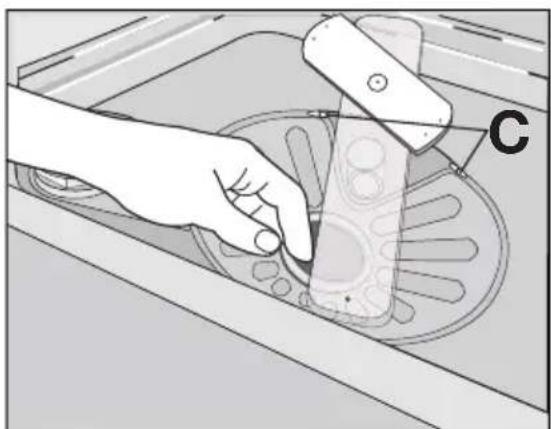
Technical illustration of a mechanical device with a lid and internal structure, showing no text or symbols.- Put filter (B) to its initial position. Make sure that it assembles correctly under the two guides (C).
- Put filter (A) into position in filter (B) and turn it clockwise until it locks.
natural_image
Illustration of a hand using a tool to clean or store items on a circular tray (no text or symbols visible)
WARNING!
Switch the appliance off before you do any cleaning operations.
Cleaning the spray arms
Do not remove the spray arms.
If the holes in the spray arms become clogged, remove remaining parts of soil with a thin pointed object.
External cleaning
Clean the external surfaces of the appliance and control panel with a damp soft cloth. Only use neutral detergents. Do not use abrasive products, scouring pads or solvents (e.g. acetone).
Internal cleaning
We recommend, every 3 months to run a washing program for heavily soiled dishes. Use detergent, but do not put dishes in the appliance.
When the appliance is not to be used for a long period
- Disconnect the mains plug from the mains socket.
- Close the water tap.
- Leave the door open to prevent unpleasant smells.
- Keep the inner side of the appliance clean.
Frost precautions

CAUTION!
Do not install the appliance where the temperature is below 0 °C. The manufacturer is not responsible for damage caused by frost.
Moving the appliance
- Disconnect the mains plug from the mains socket.
- Close the water tap.
- Remove the appliance and the hoses.
- Do not tilt the appliance during transport.
WHAT TO DO IF...
The appliance does not start or stops during operation.
If there is a fault, first try to find a solution to the problem yourself. Refer to following charts. If you cannot find a solution to the problem, contact your dealer or the Customer Care Centre.
With some malfunctions, the display shows an alarm code:
• ,10 - The appliance does not fill with water
• ,20 - The appliance does not drain the water
• ,30 - The anti-flood device operates.

WARNING!
Switch the appliance off before you do the suggested corrective actions.
| Malfunction Possible cause Possible solution | ||
| The appliance does not fill with water | The water tap is closed. Open the water tap. | |
| The filter in the water | inlet hose is blocked. | Clean the filter. |
| The installation of the | water inlet hose is not correct. The hose is bent or squashed. | Make sure that the installation is correct. |
| The water tap is blocked | or restricted with limescale. | Clean the water tap. |
| The water pressure is too low. | Contact your local water authority. | |
| The appliance does not drain the water | There is a blockage in the sink spigot. | Clean the sink spigot. |
| The installation of the | water drain hose is not correct. The hose is bent or squashed. | Make sure that the installation is correct. |
| The anti-flood device operates | Close the water tap and contact | your Customer Care Centre. |
| The program does not start | The appliance door is not closed. Close the door. | |
| Mains plug is not connected. | Plug-in the appliance to the mains. | |
| The delay start is set. | Cancel the delay start. | Wait until the countdown of the delay start is completed. |
| The fuse has blown out in the household fuse box | Replace the fuse. | |
After the check, switch on the appliance. The program continues from the point of interruption. If the malfunction occurs again, contact your Customer Care Centre.
If the display shows an alarm code, not described in the chart, contact your Customer Care Centre.
When you contact the Customer Care Centre you will need to give some details of the appliance that can be found on the rating plate (e.g. model number, serial number, product number). We recommend that you record these details.
The washing results and drying results are not satisfactory
| Problem Possible cause Possible solution | ||
| The dishes are not clean. The selected washing program was not suitable for the type of load and soil. | Make sure that the washing program is suitable for the type of load and soil. | |
| The baskets were not loaded | correctly, water did not touch all surfaces. | Load the baskets correctly. |
| The spray arms could not turn | freely because of incorrect arrangement of the load. | Make sure that an incorrect arrangement of the load does not cause a blockage of the spray arms. |
| The filters are dirty or not as- | sembled and installed correctly. | Make sure that the filters are clean and correctly assembled and installed. |
| The quantity of detergent was | not sufficient or missing. | Make sure that the quantity of detergent is sufficient. |
| Limescale particles on the dishes | The salt container is empty. Fill the salt container with salt for dishwashers. | |
| The water softener is adjusted | on a wrong level. | Adjust the level of the water softener. |
| The salt container cap is not | closed correctly. | Ensure that the salt container cap is correctly closed. |
| There are streaks, milky stains, or a bluish layer on glasses and dishes. | Rinse aid dosage is too high. Decrease the rinse aid dosage. | |
| Dry water drop stains on glasses and dishes. | Rinse aid dosage is too low. Increase the rinse aid dosage. | |
| The detergent can be the | cause. | Use a different brand of deter-gent. |
| The dishes are wet. You have set a washing pro-gram without drying phase or with a decreased drying phase. | Let the door stay ajar for some minutes before you remove the dishes. | |
| The dishes are wet and dull. The rinse aid dispenser is em-pty. | Fill the rinse aid dispenser with rinse aid. | |
| Problem Possible cause | Possible solution | |
| The multitab function is activated (this function automatically deactivates the rinse aid dispenser). | Activate the rinse aid dispenser. | |
Activating the rinse aid dispenser
- Switch on the appliance. Make sure that the appliance is in setting mode.
- Press and hold buttons (4) and (5) at the same time until the indicators of buttons (3), (4) and (5) flash.
- Release button (4) and button (5).
-
Press button (4).
-
The indicators of buttons (3) and (5) go off.
- The indicator of button (4) continues to flash.
- The display shows the setting of the rinse aid dispenser.
| 0d | Rinse aid dispenser deactivated |
| 1d | Rinse aid dispenser activated |
- Press button (4) to change the setting. The display shows the new adjustment.
- Switch off the appliance to confirm.
TECHNICAL DATA
| Dimensions Width | HeightDepth | 596 mm818 - 898 mm550 mm |
| Electrical connection Voltage | Overall powerFuseFrequency | 220-240 V2200 W10 A50 Hz |
| Water supply pressure min. | max. | 50 kPa (7 psi)800 kPa (116 psi) |
| Capacity Place settings 13 |
INSTALLATION

text_image
There should be a minimum 2mm gap between the top of the dishwasher and underside of bench top The hos e should not be extended by more than 2 metres or water pump-out problems may occur Remove entire plastic membrane from sink trap spigot & fit drain hose to spigot with clamp Secure dishwasher with brackets and screws provided DISHWASHER Gap on both sides should be equal, & no greater than 5 mm per side. 600 mm max 300 mm min. SINK POWER OUTLET If floor is not level, adjust levelling legs to suit
CAUTION!
Instructions for the installation, the furniture door and the water connection are in the separate template that is provided with this appliance. Follow carefully these instructions.

WARNING!
Make sure that the mains plug is disconnected from the mains socket during installation.

WARNING!
To prevent injury or damage, make sure that the appliance is under and adjacent safe structures. Use the supplied brackets to attach the appliance under the kitchen counter or to the adjacent units.
Install the appliance under a kitchen counter.
If a repair is necessary, the appliance must be easily accessible for the engineer.
Put the appliance adjacent to a water tap and drain.
For the venting of the appliance only water hoses and mains cable openings are necessary.
The appliance has adjustable feet to allow the adjustment of its height.
Make sure that the water inlet hose, the drain hose and the mains cable are not bent or squashed, when you insert the appliance.
Adjusting the level of the appliance
A correct adjustment of the level of the appliance allows the door to close and seal correctly.
If the door does not close correctly, loosen or tighten the adjustable feet to level the appliance.
WATER CONNECTION
Water inlet hose
Connect the inlet hose to a water tap with an external BSP thread spout of 3/4".
For best washing performance it is recommended to connect the appliance to a cold water supply.
Energy savings can be made by connecting the appliance to a Solar water system and using economy options, however the water temperature must not exceed 60 °C.
Once connected the inlet hose to the water tap, turn the tap on and check that there are no leaks.
Inlet water supply
• Water pressure: 800 kPa max - 50 kPa min.
• Water flow rate 10 L / minute min.
- If water pressure is in excess of 800 kPa, a pressure reducing valve should be used. Check for leaks.
- If water temperature is in excess of 60^ , a tempering valve should be used. Check for leaks.

CAUTION!
Always use new hoses when you connect the appliance to the water mains. Old hoses must not be used. The water inlet hose must be examined at an interval of twelve months for deterioration and replaced if necessary.
The water pressure must be in the limits, refer to 'Technical data'.
Make sure that the local water authority gives you the average mains pressure in your area.
Make sure that the water inlet hose is not bent or squashed.
Fit the hose nut correctly to prevent water leaks.

CAUTION!
Do not connect the appliance to new pipes or pipes that have been not used for a long time. Let the water run for some minutes, then connect the inlet hose.
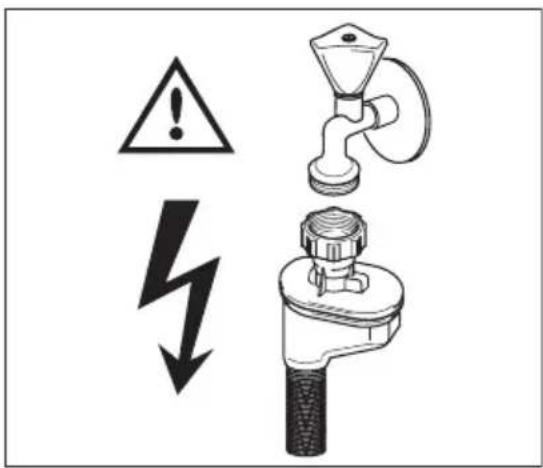
The water inlet hose is double-walled and has an inner mains cable and a safety valve. The water inlet hose is under pressure only while the water is running. If there is a leak in the water inlet hose, the safety valve interrupts the running water.
Be careful when you install the water inlet hose.

WARNING!
- The mains cable is in the double-walled inlet hose. Do not immerse the water inlet hose or the safety valve in water.
- Do not attempt to shorten the inlet hose.
- If the water inlet hose or the safety valve is damaged, immediately turn off the power and remove the mains plug from the mains socket.
- Only a qualified Service Engineer can replace the water inlet hose with safety valve.

WARNING!
Dangerous voltage
text_image
Safety warning symbols and diagram showing a faucet, lightning bolt, and warning sign with an exclamation mark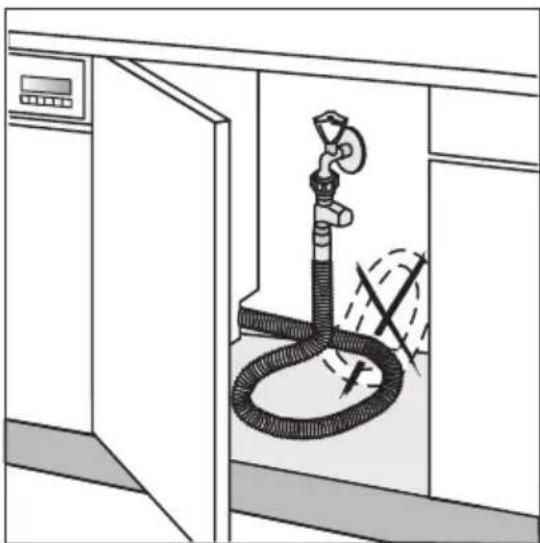
natural_image
Diagram of a showerhead spraying water inside a kitchen (no text or symbols)
In order to pass the safety valve through the kitchen cabinets, an opening of at least 45 mm x 90 mm is needed.
Water drain hose
Use the supplied hose clamp to connect the water drain hose to the sink.
The highest point of the drain hose must be no more than 600 mm from the floor and must have a continuous fall to the plumbing connection.
The drain hose can be lengthened using additional lengths and connectors. These must be purchased from Electrolux Spare Parts. The extension length must not exceed 2 metres.
The drain hose must be free of obstructions.
Remove the sink plug when the appliance drains the water to prevent that the water goes back into the appliance.
If you connect the water drain hose to a trap spi- got under the sink, remove the plastic membrane.
If you do not remove the membrane, remaining food can cause a blockage in the drain hose spi-got.

text_image
Remove entire internal membrane
The appliance has a security feature to prevent dirty water going back into the appliance. If, the spigot of the sink has a 'non-return valve', this valve can cause the appliance to drain incorrectly. Remove the non-return valve.

CAUTION!
Make sure that the water couplings are tight to prevent water leakage.
Ensure that hoses are not bent or squashed under or behind the appliance.
Once connected the inlet hose to the water tap, turn the tap on and check that there are no leaks.

natural_image
Two crossed, striped cylindrical objects with intersecting black lines, resembling stylized tools or diagrams (no text or symbols)ELECTRICAL CONNECTION

WARNING!
- The manufacturer accepts no liability for failure to observe the below safety precautions.
- Safety standards require the appliance to be earthed.
- Prior to using the appliance for the first time, ensure that the rated voltage and type of supply on the rating plate match that of the supply where the appliance is to be installed.
- The fuse rating can be found on the rating plate and in 'Technical data'.
- Always plug the mains plug onto a correctly installed approved socket.
- Do not use multi-ways plugs, connectors and extension cables. This can constitute a fire hazard through overheating.
- If necessary, have the domestic wiring system socket replaced. If the mains cable has to be replaced, contact your local Customer Care centre.
- The mains plug must be accessible after the appliance has been installed.
- Never unplug the appliance by pulling on the cable. Always pull the plug.
- Test the appliance. Run a quick washing program and ensure that the appliance fills with water, washes and drains with no leaks.
ENVIRONMENT CONCERNS
The packaging materials are environmentally friendly and can be recycled. The plastic components are identified by markings, e.g. >PE<, >PS<, etc. Discard the packaging materials in the applicable container at the community waste disposal facilities.

WARNING!
Follow these instructions to discard the appliance:
- Pull the mains plug out of the socket.
- Cut off the mains cable and the mains plug and discard them.
- Discard the door catch. This prevents children from closing themselves inside the appliance and endangering their lives.
Old appliance
Make sure that the appliance goes to the applicable collection point for recycling.
Make sure that this appliance is discarded correctly. Inappropriate waste discard of the appliance causes negative consequences for the environment and human health.
For more information about the recycling of this appliance, contact your local city office, your household waste disposal service or the shop where you purchased the appliance.
WARRANTY
FOR SALES IN AUSTRALIA AND NEW ZEALAND
ALL AEG BRANDED APPLIANCES
AEG
This document sets out the terms and conditions of the product warranties for AEG Appliances. It is an important document. Please keep it with your proof of purchase documents in a safe place for future reference should you require service for your Appliance.
- In this warranty
a) 'acceptable quality' as referred to in clause 10 of this warranty has the same meaning referred to in the ACL;
b) 'ACL' means Trade Practices Amendment (Australian Consumer Law) Act (No.2) 2010;
c) 'Appliance' means any AEG product purchased by you accompanied by this document;
d) 'ASC' means AEG' authorised serviced centres;
e) AEG is the brand controlled by Electrolux Home Products Pty Ltd of 163 O'Riordan Street, Mascot, NSW 2020, ABN 51 004 762 341 in respect of Appliances purchased in Australia and Electrolux (NZ) Limited of 3-5 Niall Burgess Road, Mount Wellington, in respect of Appliances purchased in New Zealand;
f) 'major failure' as referred to in clause 10 of this warranty has the same meaning referred to in the ACL and includes a situation when an Appliance cannot be repaired or it is uneconomic for Electrolux, at its discretion, to repair an Appliance during the Warranty Period;
g) 'Warranty Period' means:
- where the Appliance is used for personal, domestic or household use (i.e. normal single family use) as set out in the instruction manual, the Appliance is warranted against manufacturing defects in Australia and New Zealand for 60 months, following the date of original purchase of the Appliance;
- this Appliance is not designed for commercial use and therefore no warranty applies in this case;
h) 'you' means the purchaser of the Appliance not having purchased the Appliance for re-sale, and 'your' has a corresponding meaning.
-
This warranty only applies to Appliances purchased and used in Australia or New Zealand and is in addition to (and does not exclude, restrict, or modify in any way) any non-excludable statutory warranties in Australia or New Zealand.
-
During the Warranty Period AEG or its ASC will, at no extra charge if your Appliance is readily accessible for service, without special equipment and subject to these terms and conditions, repair or replace any parts which it considers to be defective. AEG or its ASC may use remanufactured parts to repair your Appliance. You agree that any replaced Appliances or parts become the property of AEG. This warranty does not apply to light globes, batteries, filters or similar perishable parts.
-
Parts and Appliances not supplied by AEG are not covered by this warranty.
-
You will bear the cost of transportation, travel and delivery of the Appliance to and from AEG or its ASC. If you reside outside of the service area, you will bear the cost of:
a) travel of an authorised representative;
b) transportation and delivery of the Appliance to and from AEG or its ASC,
In all instances, unless the Appliance is transported by AEG or an AEG authorised representative, the Appliance is transported at the owner's cost and risk while in transit to and from AEG or its ASC.
-
Proof of purchase is required before you can make a claim under this warranty.
-
You may not make a claim under this warranty unless the defect claimed is due to faulty or defective parts or workmanship. AEG is not liable in the following situations (which are not exhaustive):
a) the Appliance is damaged by:
- accident
– misuse or abuse, including failure to properly maintain or service - normal wear and tear
- power surges, electrical storm damage or incorrect power supply
- incomplete or improper installation
- incorrect, improper or inappropriate operation
- insect or vermin infestation
– failure to comply with any additional instructions supplied with the Appliance;
b) the Appliance is modified without authority from AEG in writing;
c) the Appliance's serial number or warranty seal has been removed or defaced;
d) the Appliance was serviced or repaired by anyone other than AEG, an authorised repairer or ASC.
-
This warranty, the contract to which it relates and the relationship between you and AEG are governed by the law applicable where the Appliance was purchased. Where the Appliance was purchased in New Zealand for business purposes the Consumer Guarantee Act does not apply.
-
To the extent permitted by law, AEG excludes all warranties and liabilities (other than as contained in this document) including liability for any loss or damage whether direct or indirect arising from your purchase, use or non use of the Appliance.
-
For Appliances and services provided by AEG in Australia, the Appliances come with a guarantee by AEG that cannot be excluded under the Australian Consumer Law. You are entitled to a replacement or refund for a major failure and for compensation for any other reasonably foreseeable loss or damage. You are also entitled to have the Appliance repaired or replaced if the Appliance fails to be of acceptable quality and the failure does not amount to a major failure. The benefits to you given by this warranty are in addition to your other rights and remedies under a law in relation to the Appliances or services to which the warranty relates.
-
At all times during the Warranty Period, AEG shall, at its discretion, determine whether repair, replacement or refund will apply if an Appliance has a valid warranty claim applicable to it.
-
For Appliances and services provided by AEG in New Zealand, the Appliances come with a guarantee by AEG pursuant to the provisions of the Consumer Guarantees Act, the Sale of Goods Act and the Fair Trading Act.
- To enquire about claiming under this warranty, please follow these steps:
a) carefully check the operating instructions, user manual and the terms of this warranty;
b) have the model and serial number of the Appliance available;
c) have the proof of purchase (eg an invoice) available;
d) telephone the numbers shown below.
- You accept that if you make a warranty claim, AEG and its ASC may exchange information in relation to you to enable AEG to meet its obligations under this warranty.
Important Notice
Before calling for service, please ensure that the steps listed in point 13 above have been followed.
SERVICE AUSTRALIA
AEG
www.aeg.com/au
FOR SERVICE
or to find the address of your nearest state service centre in Australia
PLEASE CALL 1300 363 664
OR EMAIL customercare@aegaustralia.com.au
For the cost of a local call (Australia only)
FOR SPARE PARTS
or to find the address of your nearest state spare parts centre in Australia
PLEASE CALL 13 13 50
OR EMAIL customercare@aegaustralia.com.au
For the cost of a local call (Australia only)
SERVICE NEW ZEALAND
AEG
FOR SERVICE
or to find the address of your nearest authorised service centre in New Zealand
FREE CALL 0800 10 66 10
OR EMAIL customercare@electrolux.co.nz
(New Zealand only)
FOR SPARE PARTS
or to find the address of your nearest state spare parts centre in New Zealand
FREE CALL 0800 10 66 20
OR EMAIL customercare@electrolux.co.nz
(New Zealand only)
CE